eco MERCEDES-BENZ C-Class 2012 W204 Comand Manual
[x] Cancel search | Manufacturer: MERCEDES-BENZ, Model Year: 2012, Model line: C-Class, Model: MERCEDES-BENZ C-Class 2012 W204Pages: 234, PDF Size: 6.74 MB
Page 34 of 234
X
Sel ect c and
confi rmbypre ssing W the
CO MAND controller.
The letter c is
ad de dto S in
the data field.
X Re peat the process untilthe name has
be en enter edinful l.
X To enter aphon enumb er:select the
di gits one byone inthe corre spondingdata
fie ldby turni ngcVd andsliding ZVÆ the
CO MAND controllera nd pre ssW to
confi rm.
Sw itchin gdata fields If
yo uwa ntto ente rafir stname afteryouhave
entered asurna me,forexamp le,procee das
foll ows toswi tch betwe enthe data fields:
Option 1
X Select the4or5 icon inthe chara cter
bar and press Wtoconfirm.
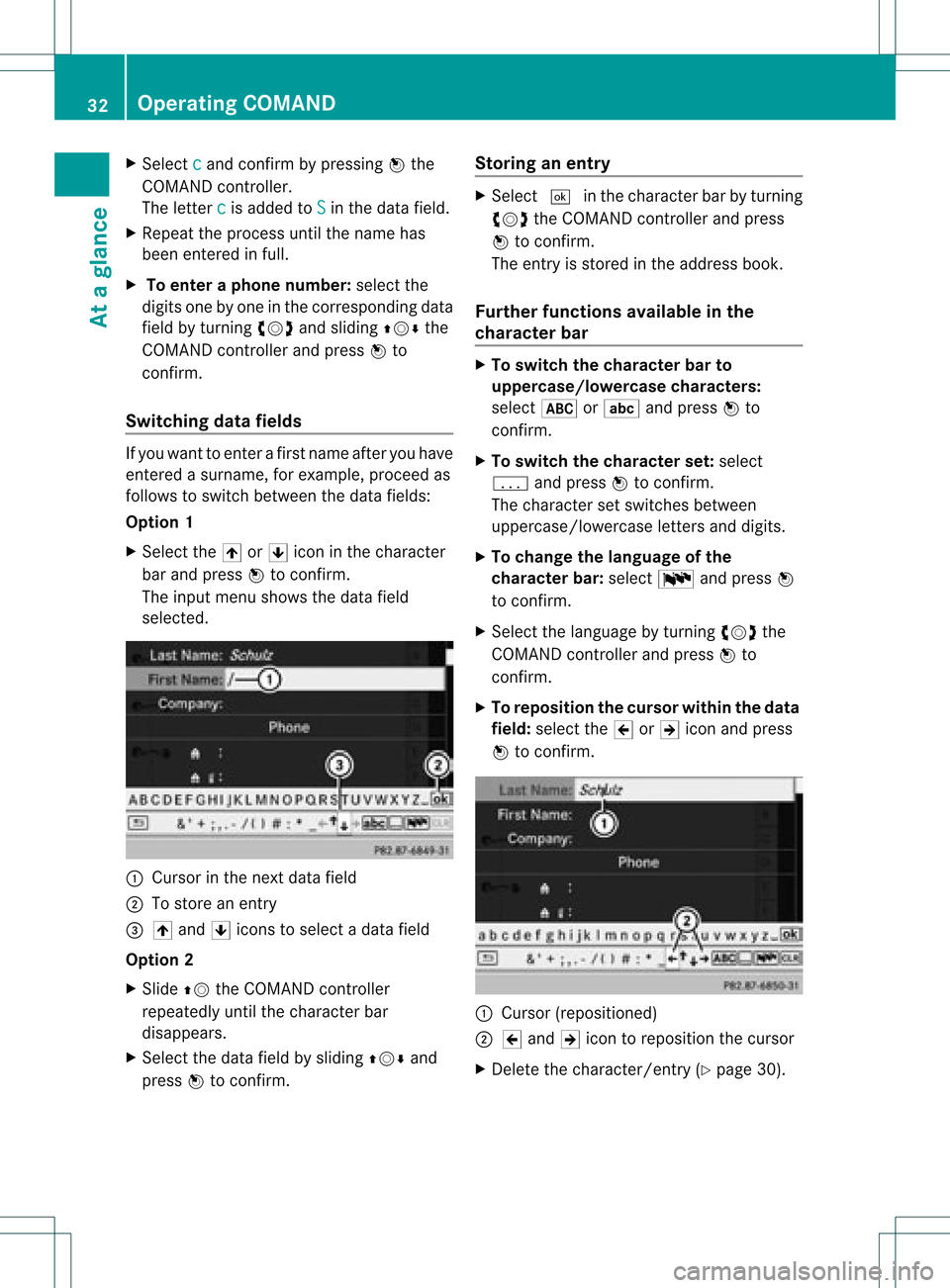
The inpu tmenu shows thedata field
select ed. :
Cursor inthe nextdata field
; Tostore anentry
= 4 and 5icons toselec tada tafield
Opt ion 2
X Slide ZVtheCOMAND controller
repeatedly untilthecharac terbar
disappears.
X Select thedata fieldbysliding ZVÆand
press Wtocon firm. Stor
inganentr y X
Select ¬inthe charact erbar byturn ing
cVd theCOMAND controller and press
W tocon firm.
The entryisstor edinthe address book.
Furt herfunct ionsavaila bleinthe
char acter bar X
To switch thechar acter barto
upp ercase/lowercase character s:
select *orE andpress Wto
con firm.
X To switch thechar acter set:select
p andpress Wtocon firm.
The charac terset switc hesbetween
uppercase/ lowercaseletters and digits.
X To change thelangua geofthe
char acter bar:select Bandpress W
to con firm.
X Select thelanguage byturn ingcVd the
COMAND controller and press Wto
con firm.
X To reposit ionthe cursor withinthedata
field: select the2or3 icon andpress
W tocon firm. :
Cursor (reposit ioned)
; 2 and 3icon toreposit ionthe cursor
X Delet ethe charact er/entry(Ypage 30). 32
Oper
ating COMANDAtaglance
Page 35 of 234
Basi
cfunc tions ofCO MA ND Sw
itchin gCO MA ND on/o ff
X Pre ssthe qcontro lknob.
Aw arning mes sage appear s.COMA ND
calls uptheprev iously selectedmen u.
i Ifyou switchoff COMA ND,playbac kof
the curre ntaudio or vide os ource willalso
be switched off. Switching
theCOMAND displayon/
off
X Press theW functionbutton .
or
X Select System in
the main functionbar by
sliding ZVandturnin gcVd theCOMAND
cont roller andpress Wtoconf irm.
In both cases, thesystem menuappears.
X To switch off:select Display Off and
press Wtoconf irm.
X To switch on:press oneofthe funct ion
button s,e.g. W, Øorthe % back
button . Mut
e
Sound fromanaudio/video source X
Press the8 button onCOMAND oron
the multifunct ionsteerin gwheel.
The sound fromtherespect iveaudio or
video source isswitched onormuted.
i When thesound isoff, thesystem
display sthe , icon inthe status line.
When youchange theaudio orvideo
source, oradjust thevolume, sound
automatically switchesonagain.
i Even ifthe sound isswitched off,you will
still hear navigation system
announc ements. Switching
offallnavigation
announcements X
Navigat ionannouncements: pressthe
8 button duringtheannounc ement.
Switching navigation announcements
back on X
Press 8again.
i The navigation announcementsare
swi tched onaga inifyou start anew route
gui dance orifCOMAND isswi tched offand
on with theqcontrol knob. Adjusting
thevolume
Adjusting thevolume forthe audio or
video source X
Turn theqcontrol knob.
or
X Press theW orX button onthe
multi function steeringwheel.
The volumeofthe currently selected audio
or vide osource changes.
You canalsoadju stthe volu meforthe
foll owi ng:
R naviga tionannouncements
R phone calls
R voice outputofthe Voice Control System
(see theseparate operating instructions)
Adjust ingthe volume fornavigation
announcements During
anavigation announcemen t:
X Turn qthe cont rolknob.
or
X Press theW orX button onthe
multifunction steeringwheel. Basic
functions ofCOMAND
33Ataglance Z
Page 36 of 234
Adj
usting thevolu meforphone calls You
canadjust thevol ume forhan ds-free
mod eduri ngate leph onecall .
X Turn theq control knob.
or
X Pre sstheW orX buttonon the
mult ifunction steer ing whee l. Adj
usting thesoun dsettings
Callin gup thesound menu You
canmak evari ous soun dset tings for the
diff eren taudio andvide osour ces.This mean s
th at itis poss ibletoset mor ebass forradio
mod eth an for audio CDmod e,for example .
You cancalluptheres pec tive soun dmen u
fr om themen uof thedesi redmod e.
The example describeshow tocall upthe
soun dmen uin radio mode.
X Pre ssthe$ function button.
The radio displayappear s.You willhear the
last stati on played onthelast waveb and. X
Se lec tSou nd by
slidi ngVÆ andturnin g
cVd theCOMA NDcontrol ler and press
W toconfirm .
You cannowset thetreble andbass orthe
balan ceand fade rfor radio mode. Adjust
ingtreble andbass X
Select Treble or
Bass in
the sound menu
by turnin gcVd theCOMAND controller
and press Wtoconf irm.
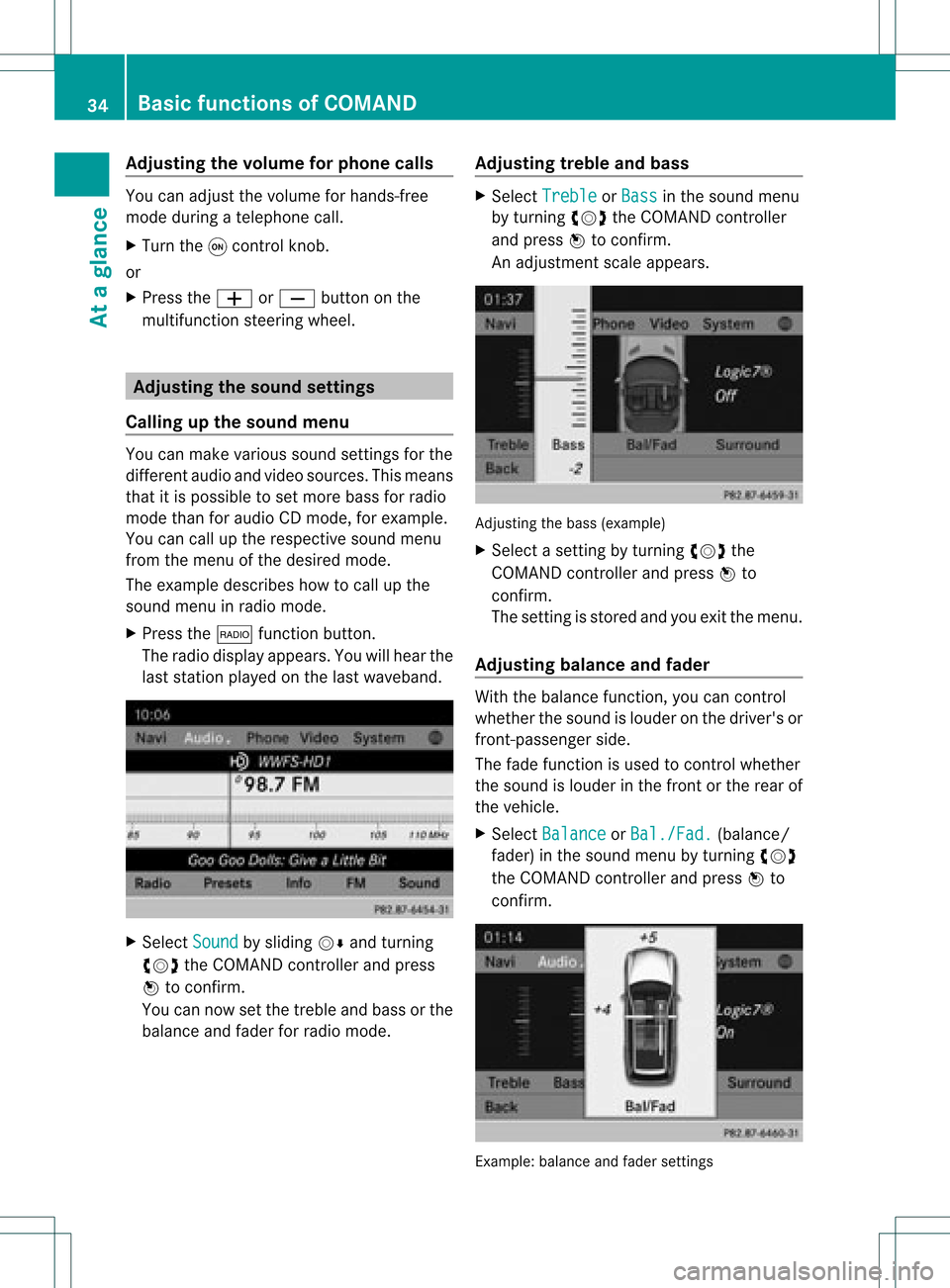
An adjustmen tscal eap pea rs. Adju
sting thebass (exa mple)
X Sel ect asetti ngbyturni ngcVd the
CO MAND controllera nd pre ssW to
confi rm.
The setti ngisstor edand youexi tthe menu.
Adjust ingbalance andfader With
thebala nce funct ion,youcan cont rol
whether thesound islouder onthe driver's or
front -passenger side.
The fade funct ionisused tocont rolwhether
the sound islouder inthe front orthe rear of
the vehicle.
X Select Balance or
Bal./Fad. (bala
nce/
fader) inthe sound menubyturning cVd
the COMAND controller andpress Wto
confirm . Example:
balanceandfader settings 34
Basic
functions ofCOMANDAt aglance
Page 37 of 234
X
Sel ect aba lance setti ngbysliding XVY the
CO MAND controllera nd pre ssW to
confi rm.
X Sel ect afa de rs ett ing bysliding ZVÆthe
COMAND controller andpress Wto
con firm.
The settingisstor edand youexit themenu. Sur
round sound
General information If
your vehicle isequipped withtheharman/
kardon ®
Logic7 ®
surround soundsystem,
you can setthe optimum surround soundin
the vehicle interior.
The harman/ kardon®
Logic7 ®
surround
sound system isavailable forthe following
operatin gmodes:
R radio (FMonly)
R satellite radio
R audio CD
R audio DVD(MLP, dts,PCM andDolby
Digit alaudio format s)
R MP3 (including SDmemory cardandUSB
stor age device)
R Media Interface
R Bluetoot h®
audio mode
R video DVD(PCM, dtsand Dolby Digital
audio format s)
R AUX
Because someDVDscon tain both stereoand
multichan nelaudio format s,itmay be
nec essary toset the audio format
(Y page 163).
i The Logic7 ®
On func
tion creat esa
surround soundexperien cefor every
passenger whenplaying, forexample,
ster eorecor dings. Itenables optimum
playback ofmusic andfilms onCD, audio
DVD orvideo DVDwithmultichan nelaudio
format s,such asMLP, dtsorDolby Digital.
This results insound charact eristicslike those
intended bythe sound engineer
when theoriginal wasrecor ded.
i Ifyou select Logic7 ®
Off ,
all permissible
format sare played asstor edon the
medium. Duetothe design ofthe
passenger compartment,an optimum
audio experien cecann otbe guaranteed for
all passengers .
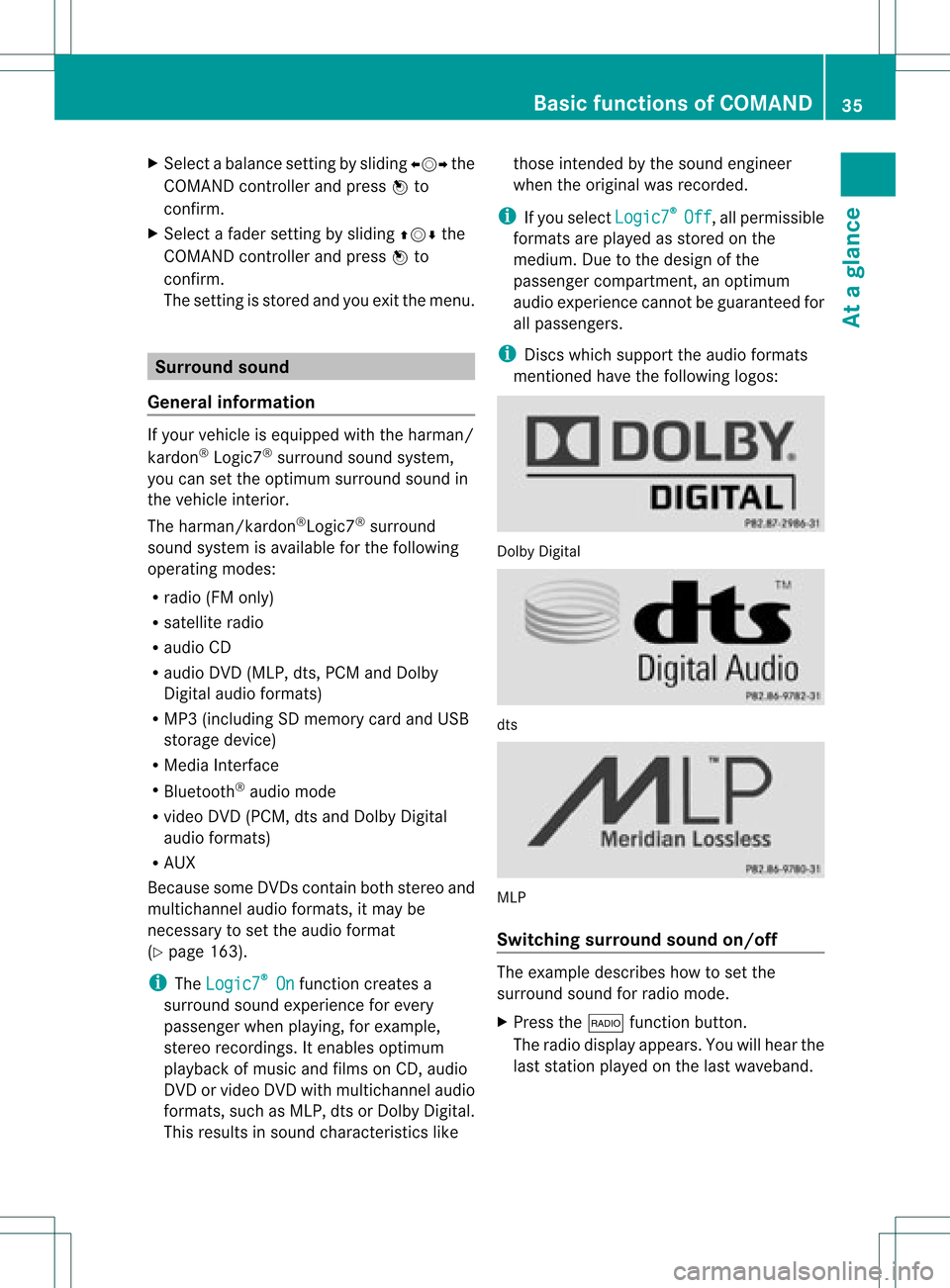
i Disc swhich support theaudio format s
ment ioned havethefollowing logos: Dolby
Digital dts
MLP
Switching surround sound on/off The
example describes howtoset the
surround soundforradio mode.
X Press the$ function button .
The radio display appears. Youwillhear the
last stationplayed onthe last waveband. Ba
sic functions ofCOMAND
35Ataglance Z
Page 38 of 234
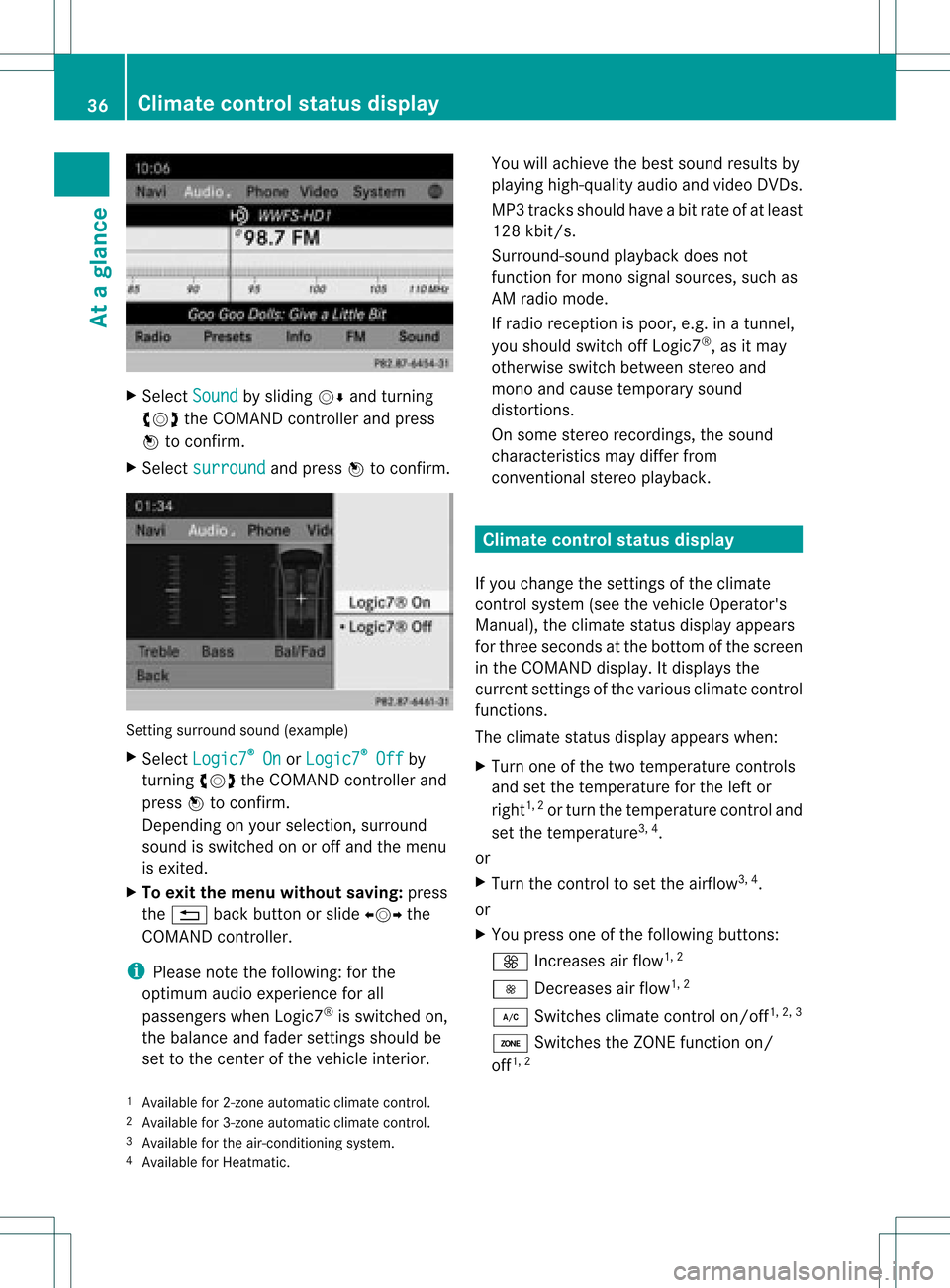
X
Sel ect Sound by
sliding VÆ andturni ng
cVd theCOMAND controllerand press
W toconfi rm.
X Sel ect surround and
pressW toconfi rm. Setting
surrou ndsou nd(examp le)
X Sel ect Logic7 ®
On or
Log ic7 ®
Off by
turni ngcVd theCOMAND controllerand
pre ssW toconfi rm.
Depe nding on your sel ecti on, surrou nd
sou ndissw itche don oroff and themenu
is exi ted.
X To exitthe men uwi thout saving:pre ss
the % back button orslide XVY the
CO MAND controller.
i Plea se note thefollowi ng: forthe
opti mum audio expe rience forall
pa sse nger swh en Log ic7®
is sw itche don,
the balance and fadersetti ngsshould be
set tothe center ofthe vehicleinter ior. Yo
uwi llach ieve the best sou ndresults by
pl ay ing high-q uality audio and video DVDs.
MP3 tracks shouldha ve ab itrat eof at least
128 kbit/s.
Surr ound- soundplayback doesnot
func tion formon osign alsourc es,such as
AM radio mode.
If radio receptio nispoor, e.g.inatunnel,
you should switchoffLogic7 ®
,as itmay
otherwise switchbetween stereoand
mono andcause temporary sound
distortions.
On some stereo recordings, thesound
characteristics maydiffer from
conven tionalstereo playback. Climate
controlstatusdisplay
If you change thesettings ofthe climate
cont rolsystem (seethevehicle Operator's
Manual ),the climate statusdisplayappea rs
for three seconds atthe bottom ofthe screen
in the COMAND display.Itdispla ysthe
current settings ofthe various climate control
function s.
The climate statusdisplayappea rswhen:
X Turn oneofthe two temperature controls
and setthe temperature forthe left or
right 1,
2
or turn thetemperature controland
set the temperature 3,
4
.
or
X Turn thecont roltoset the airflow 3,
4
.
or
X You press oneofthe followi ngbuttons:
K Increases airflow 1,
2
I Decreases airflow 1,
2
¿ Switches climatecontrolon/off 1,
2, 3
á Switches theZONE function on/
off 1,
2
1 Available for2-zon eautomatic climatecontrol.
2 Available for3-zon eautomatic climatecontrol.
3 Available forthe air-conditioning system.
4 Available forHeatmatic. 36
Cli
mat econ trol stat usdisplayAt aglanc e
Page 39 of 234
Ã
Controls theclim atecontrol
auto matically1,
2
ñ Setstheclim atecontrol style to
auto maticmod e(FO CUS /MEDIUM /
DI FF US E)2
_ Setstheair dist ribut ion1,
2
M, PorO Setstheair
dist ribut ion3,
4
.
¬ Activat esthedef rostfun ction 1,
2,3, 4
Ù Switches on max imum coolin g
i The climatestatus displaydoes not
appear whentheimag efrom therear view
cam eraisdisp layed. The
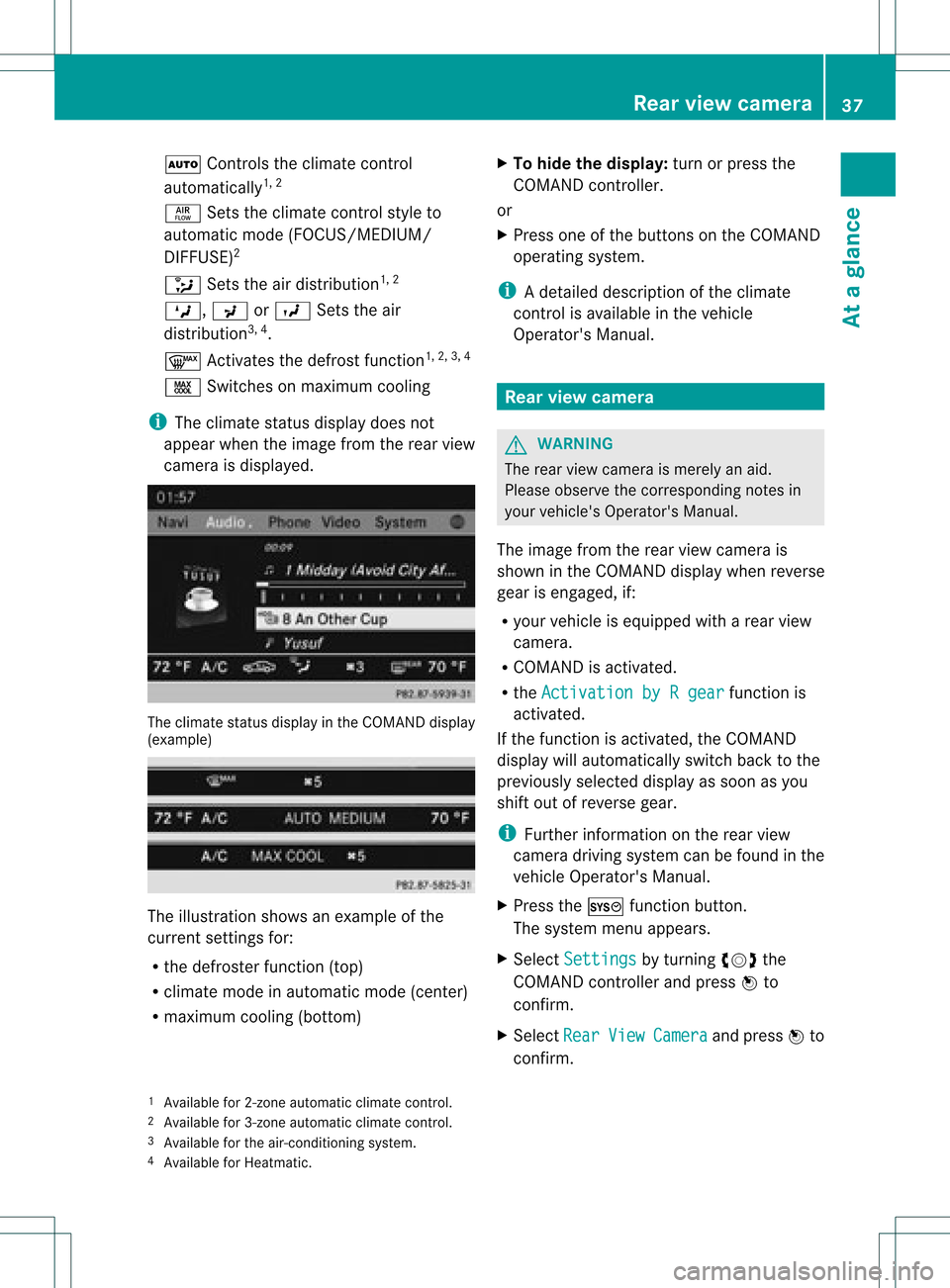
climat est atus displayintheCOMA NDdisp lay
(ex ampl e) The
illust ration showsanexample ofthe
cur ren tset ting sfor :
R thedef rosterfun ction (top)
R clim atemod ein auto maticmod e(ce nter)
R max imum coolin g(bot tom) X
To hid eth edis pla y:tur nor pre ssthe
COMA NDcontrol ler.
or
X Pre ssoneof thebut tons on theCOMA ND
oper ating syst em.
i Adetailed descript ionofthe climate
con trol isavailable inthe vehicle
Operator 'sManual. Rear
view camer a G
WARN
ING
The rear view camera ismerely anaid.
Please observe thecorr espondin gnotes in
your vehicle's Operator's Manual.
The image fromtherear view camera is
shown inthe COMAND displaywhenreverse
gear isengaged, if:
R your vehicle isequipped witharear view
camera.
R COMAND isactivated.
R the Activation byRgear funct
ionis
activated.
If the funct ionisactivated, theCOMAND
display willautomatically switchbacktothe
previously selecteddisplayassoon asyou
shift outofreverse gear.
i Further informat iononthe rear view
camera drivingsystem canbefound inthe
vehicle Operator's Manual.
X Press theW functionbutton .
The system menuappears.
X Select Settings by
turnin gcVd the
COMAND controller andpress Wto
conf irm.
X Select Rear View Camera and
press Wto
conf irm.
1 Available for2-zone automatic climatecontrol.
2 Available for3-zone automatic climatecontrol.
3 Available forthe air-condit ioningsystem.
4 Available forHeatmatic . Rear
view camera
37Ataglance Z
Page 42 of 234
COMAN
Dfea tures
Thes eOper atingIn st ruc tions desc ribeall
st andar dand optionalequipm enta vail able
for you rCOMAND systematthe time of
purcha se.Cou ntry-specifi cdeviation sare
possible. Pleasenotethat your COMAND
system maynotbeequipped withallthe
features described. Display
settings Sett
ingthe bright ness
The brightn essdetec tedbythe display light
sensor affectsthe settingoption sfor this
func tion.
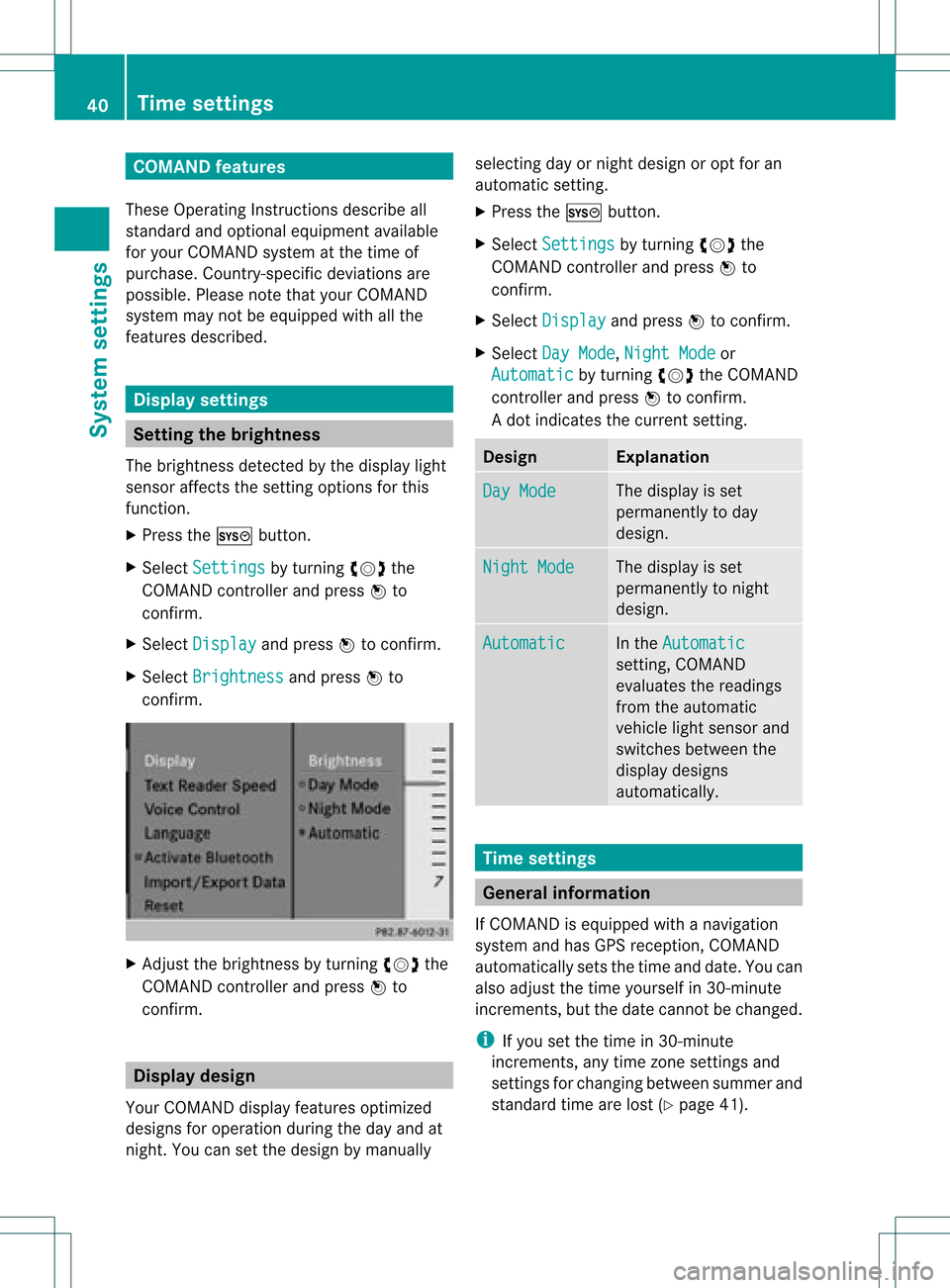
X Press theW button .
X Select Setting s by
turn ingcVd the
COMAND controller andpress Wto
con firm.
X Select Display and
press Wtocon firm.
X Select Brightn ess and
press Wto
con firm. X
Adj ust the brightn essbyturn ingcVd the
COMAND controller andpress Wto
con firm. Display
design
Your COMAND displayfeatures optimized
designs foroperation duringtheday and at
night .You can setthe design bymanually selecting
dayornight design oropt foran
automatic setting.
X Press theW button .
X Select Settings by
turnin gcVd the
COMAND controller andpress Wto
conf irm.
X Select Display and
press Wtoconf irm.
X Select DayMode ,
Night Mode or
Automatic by
turnin gcVd theCOMAND
cont roller andpress Wtoconf irm.
A dot indicates thecurrent setting. Design Explanat
ion Day
Mode The
display isset
permanent lyto day
design. Night
Mode The
display isset
permanent lyto night
design. Automatic In
the Automatic sett
ing, COMAND
evaluates thereadings
from theautomatic
vehicle lightsensor and
switches betweenthe
display designs
automatically. Time
settings General
information
If COMAND isequipped withanavigation
system andhasGPS reception ,COMAND
automatically setsthetime anddate. Youcan
also adjust thetime yourself in30- minute
increm ents,but thedate cannotbe changed.
i Ifyou setthe time in30- minute
increm ents,any time zonesett ings and
sett ings forchanging betweensummerand
standard timearelost (Ypage 41). 40
Tim
esettingsSystem settings
Page 43 of 234
i
The following navigation systemfunctions
require thetime, timezoneand summer/
standard timetobe set correc tlyinorder
to work properly:
R route guidance onroutes withtime-
dependent trafficguidance
R calculation ofexpect edtime ofarrival Setting
thetime
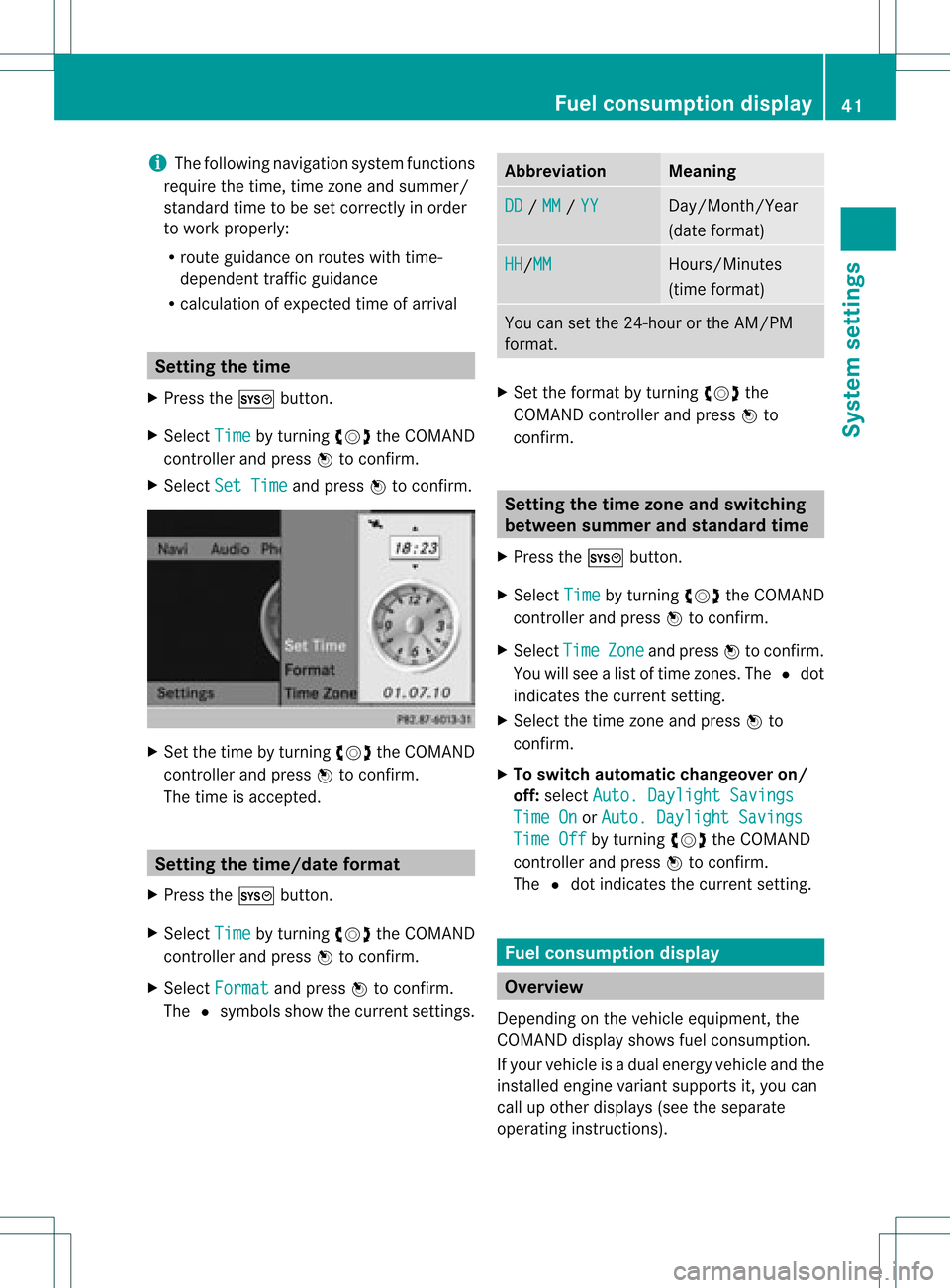
X Press theW button .
X Select Time by
turnin gcVd theCOMAND
cont roller andpress Wtoconf irm.
X Select SetTime and
press Wtoconf irm. X
Set thetime byturnin gcVd theCOMAND
cont roller andpress Wtoconf irm.
The time isaccepted. Setting
thetime/da teform at
X Press theW button .
X Select Time by
turnin gcVd theCOMAND
cont roller andpress Wtoconf irm.
X Select Format and
press Wtoconf irm.
The #symbols showthecurren tsett ings. Abbreviat
ion Meaning
DD /
MM /
YY Day/Mon
th/Year
(date format ) HH /MM Hours/
Minutes
(time format ) You
cansetthe 24-hour orthe AM/ PM
format . X
Set theformat byturn ingcVd the
COMAND controller andpress Wto
con firm. Sett
ingthe timezone andswitching
between summerand stand ardtime
X Press theW button .
X Select Time by
turn ingcVd theCOMAND
con troller andpress Wtocon firm.
X Select Time Zone and
press Wtocon firm.
You willsee alist oftime zones.The #dot
indicat esthe curren tsett ing.
X Select thetime zoneand press Wto
con firm.
X To switch automat icchangeover on/
off: select Auto. Dayligh tSavings Time
On or
Auto. Dayligh tSavings Time
Off by
turn ingcVd theCOMAND
con troller andpress Wtocon firm.
The #dot indicat esthe curren tsett ing. Fuel
consumpt iondispla y Overview
Depen dingonthe vehicle equipment, the
COMAND displayshowsfuelconsumption .
If your vehicle isadual energy vehicle andthe
inst alled engin evariant supports it,you can
call upother displays (seetheseparate
operatin ginst ruct ions). Fuel
consumpt iondispla y
41System settings
Page 44 of 234
Callin
gup displa ys
X Pre sstheW button.
X In thesyst emmen u,slide ZVthe
COMA NDcontroll erup unt ilth eFul l Scr
een opt
ion isselec ted.
X Pre ssW theCOMA NDcontroll er.
The systemdispl ayissho wnasfull scree n
(wit hout systemmen u).
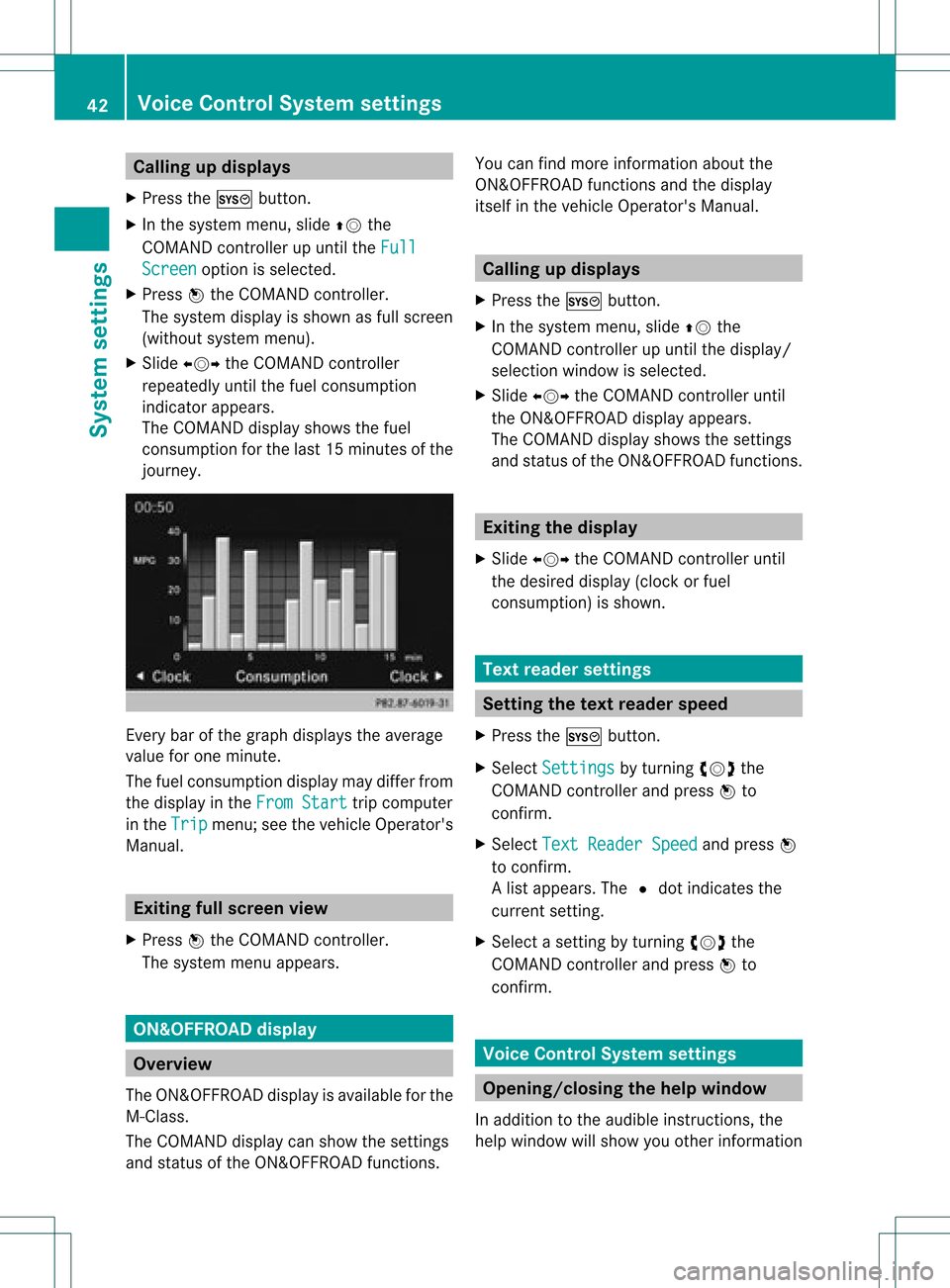
X Slid eXVY theCOMA NDcontroll er
repe atedly untilth efuel consumpt ion
ind icat orappear s.
The COMA NDdispl aysho wsthefuel
co nsumpt ionforthelast 15min utesof the
jo urn ey. Ev
ery bar ofthegrap hdisplays theaverage
value forone minute.
The fuel consumpt iondisplay maydifferfro m
the display inthe From Start tr
ip com puter
in the Trip men
u;see thevehic leOperat or's
Manual. Exitin
gfull screen view
X Press Wthe COMA NDcontroller.
The systemmen uappears. ON&
OFFROAD display Over
view
The ON& OFFROAD display isavailable forthe
M-Class .
The COMA NDdisplay canshow thesettings
and status ofthe ON& OFFROAD functions. You
canfindmor einf orm ation about the
ON& OFFROAD functionsand thedisplay
its elf inthe vehic leOperat or'sManual. Calling
updisp lays
X Press theW button.
X In the syst emmen u,slide ZVthe
COMA NDcontroller upunt ilthe display/
selec tionwindow isselec ted.
X Slide XVY theCOMA NDcontroller until
the ON& OFFROAD display appears.
The COMA NDdisplay showsthesettings
and status ofthe ON& OFFROAD functions. Exitin
gth edisp lay
X Slide XVY theCOMA NDcontroller until
the desire ddisplay (clockorfuel
co nsumpt ion)is sho wn. Tex
trea der settings Set
tingth etex trea der speed
X Pre sstheW button.
X Se lec tSet tings by
turnin gcVd the
COMA NDcontrol ler and pressW to
co nfirm .
X Se lec tTex tRea der Speed and
pressW
to confirm .
Al ist appears. The#dot indic ates the
curr entsetting.
X Selec ta set tingby turnin gcVd the
COMA NDcontroller andpress Wto
con firm . Voice
ControlSyst emsett ings Opening
/closing thehelp window
In additio ntothe audib leinstr uctions, the
help window willshow youother inform ation 42
Voice
Control System settingsSystem settings
Page 45 of 234
during
voicecontroloperation andthe
<0009000E0004000900160009000400150001000C0009001C000100140009000F
000EV process.
X Press theW button.
X Select Settin gs by
turn ingcVd the
COMAND controller and press Wto
con firm.
X Select Voice Control and
press Wto
con firm.
X Select HelpWindow and
press Wto
con firm.
You have switchedthehelp window on
O oroff ª. Individu
alization
Intr oduct ion You
canusethe<0009000E0004000900160009000400150001000C0009001C000100140009000F
000EV function to
fine tune theVoice ControlSyst emtoyour
voice andtherefore improve voice
recog nition. This means thatother users'
voices willnotberecog nized aseasily, and
ther efore thisfunc tion canbedeactiv ated
(Y page 44).
Indiv idualization comprisestwoparts and
tak esapproximat elyfive minut es.Itcon sists
of train ingthe system torecog nizeacert ain
number ofdigit sequenc esand voice
comm ands.
Sta rting new individu alization Indiv
idualization canonly bestart edwhen the
vehicle isstat ionary. Beforestart ing,switc h
off alldevices orfunc tionswhich could int
erfer e,such asthe radio orthe navigat ion
system. Afterstart ingthe session ,the system
guides youthrough thetrain ingwith spoken
inst ruct ions.
X Press theW button.
X Select Settin gs by
turn ingcVd the
COMAND controller and press Wto
con firm.
X Select Voice Control and
press Wto
con firm.
X Select Start NewIndivi dualization and
press Wtocon firm.
You seeand hear aprompt askingwhether
you would likefurther infor mation .
X Select Yes or
No and
press Wtocon firm.
If you select No ,
the first part of
<0009000E0004000900160009000400150001000C0009001C000100140009000F
000EV begins.Youwillbeasked
whether youwould liketotrain digits or
voice comm ands.
If you select Yes ,
you willsee and hear
infor mation onthe <0009000E0004000900160009000400150001000C0009001C000100140009000F
000EV
proces s.The first part of<0009000E0004000900160009000400150001000C0009001C000100140009000F
000EV
then begins automatic ally.
X To close thedispla y:press Wthe
COMAND controller.
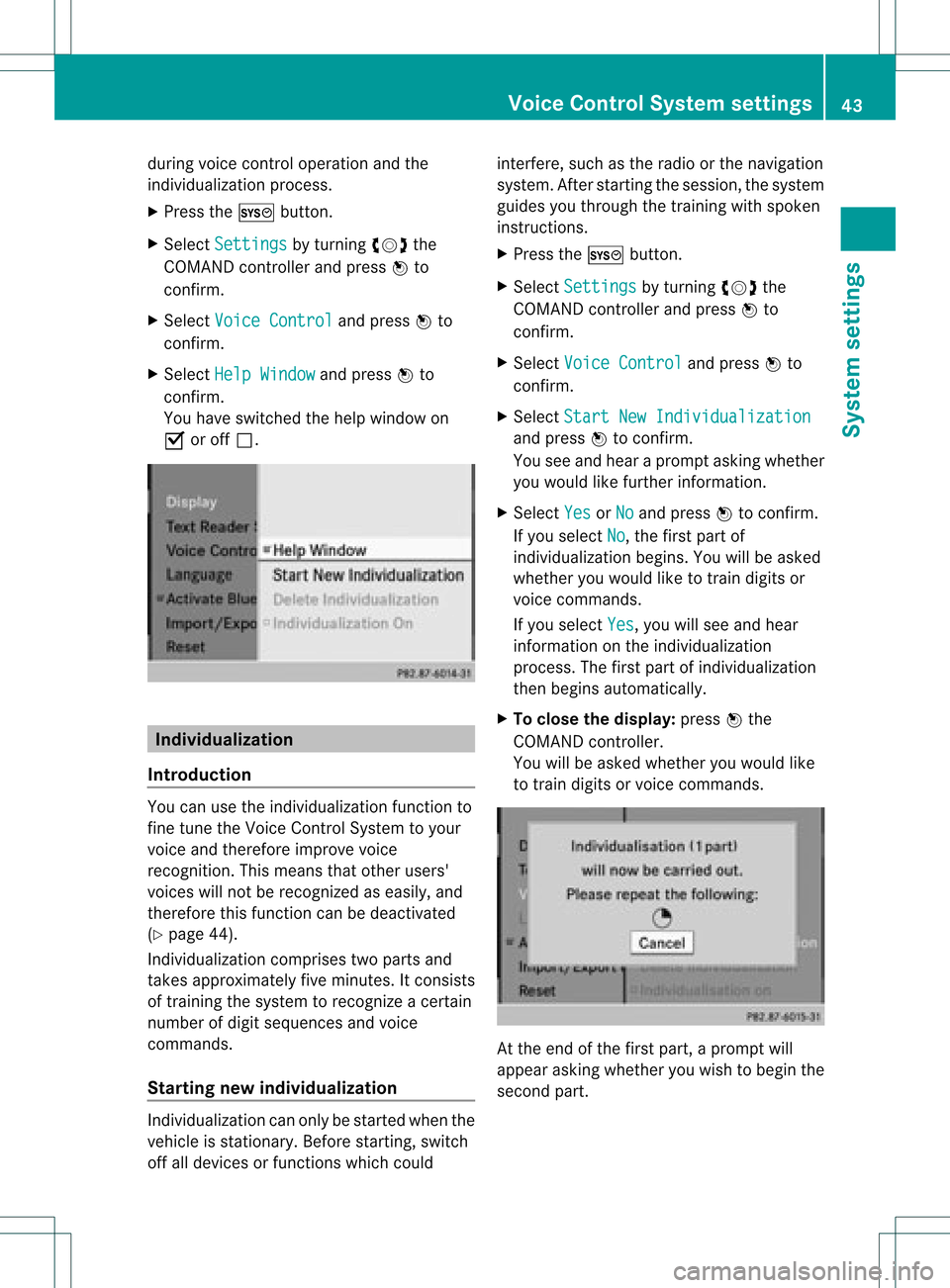
You willbeasked whether youwould like
to train digits orvoice comm ands. At
the end ofthe first part, aprompt will
appear askingwhether youwish tobegin the
secon dpart. Voice
Control Systemsett ings
43Systemsett ings