navi control MERCEDES-BENZ C-Class 2012 W204 Comand Manual
[x] Cancel search | Manufacturer: MERCEDES-BENZ, Model Year: 2012, Model line: C-Class, Model: MERCEDES-BENZ C-Class 2012 W204Pages: 234, PDF Size: 6.74 MB
Page 45 of 234
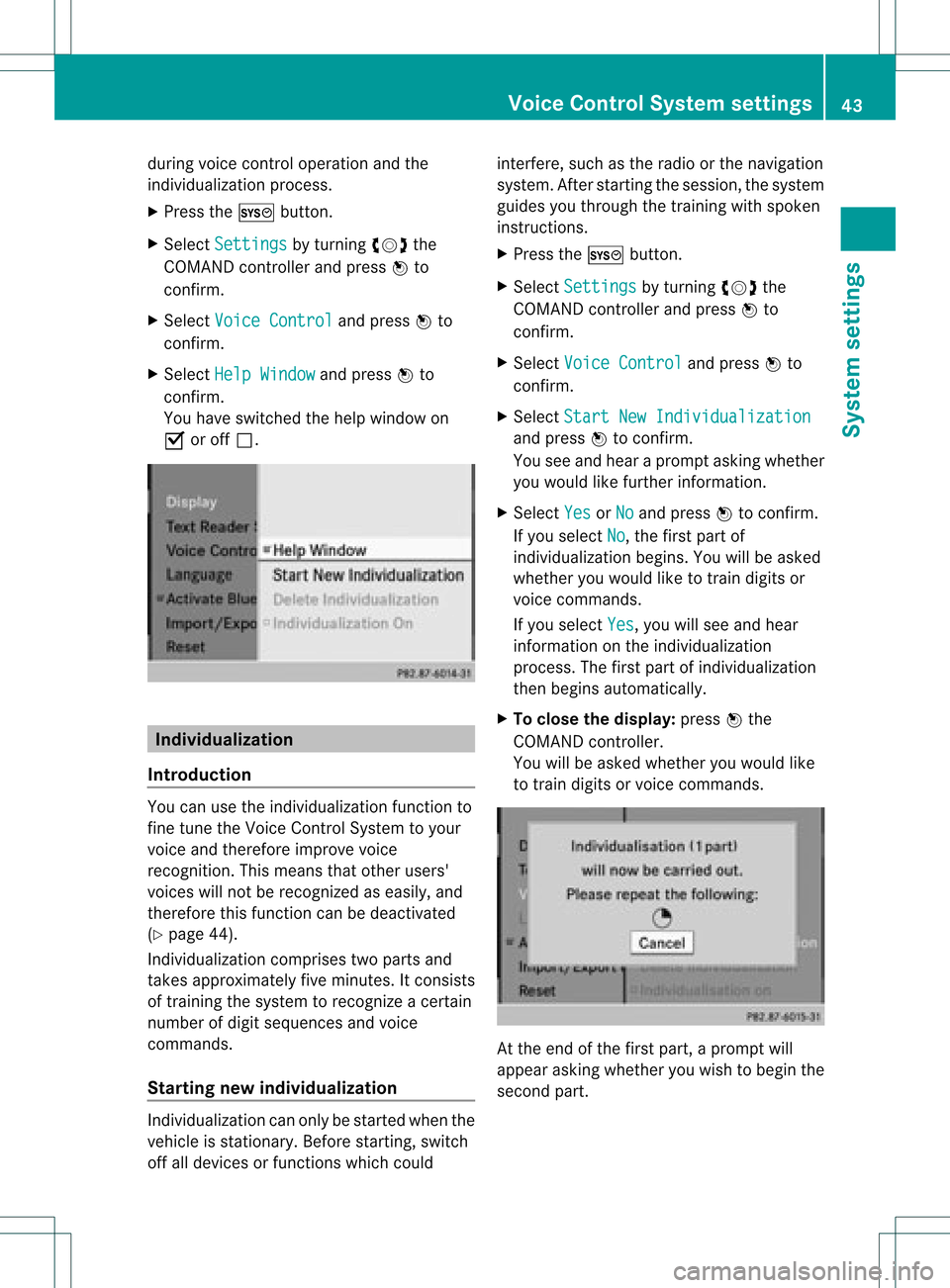
during
voicecontroloperation andthe
<0009000E0004000900160009000400150001000C0009001C000100140009000F
000EV process.
X Press theW button.
X Select Settin gs by
turn ingcVd the
COMAND controller and press Wto
con firm.
X Select Voice Control and
press Wto
con firm.
X Select HelpWindow and
press Wto
con firm.
You have switchedthehelp window on
O oroff ª. Individu
alization
Intr oduct ion You
canusethe<0009000E0004000900160009000400150001000C0009001C000100140009000F
000EV function to
fine tune theVoice ControlSyst emtoyour
voice andtherefore improve voice
recog nition. This means thatother users'
voices willnotberecog nized aseasily, and
ther efore thisfunc tion canbedeactiv ated
(Y page 44).
Indiv idualization comprisestwoparts and
tak esapproximat elyfive minut es.Itcon sists
of train ingthe system torecog nizeacert ain
number ofdigit sequenc esand voice
comm ands.
Sta rting new individu alization Indiv
idualization canonly bestart edwhen the
vehicle isstat ionary. Beforestart ing,switc h
off alldevices orfunc tionswhich could int
erfer e,such asthe radio orthe navigat ion
system. Afterstart ingthe session ,the system
guides youthrough thetrain ingwith spoken
inst ruct ions.
X Press theW button.
X Select Settin gs by
turn ingcVd the
COMAND controller and press Wto
con firm.
X Select Voice Control and
press Wto
con firm.
X Select Start NewIndivi dualization and
press Wtocon firm.
You seeand hear aprompt askingwhether
you would likefurther infor mation .
X Select Yes or
No and
press Wtocon firm.
If you select No ,
the first part of
<0009000E0004000900160009000400150001000C0009001C000100140009000F
000EV begins.Youwillbeasked
whether youwould liketotrain digits or
voice comm ands.
If you select Yes ,
you willsee and hear
infor mation onthe <0009000E0004000900160009000400150001000C0009001C000100140009000F
000EV
proces s.The first part of<0009000E0004000900160009000400150001000C0009001C000100140009000F
000EV
then begins automatic ally.
X To close thedispla y:press Wthe
COMAND controller.
You willbeasked whether youwould like
to train digits orvoice comm ands. At
the end ofthe first part, aprompt will
appear askingwhether youwish tobegin the
secon dpart. Voice
Control Systemsett ings
43Systemsett ings
Page 47 of 234
Acti
vating/d eactivating Blu eto oth ®
X Pre sstheW button.
The systemmen uappear s.
X Se lec tSet tin gs by
turnin gcVd the
COMA NDcontrol ler and pressW to
co nfirm .
X Se lec tAct iva teBluetooth and
press
W toconfirm .
This switches Blue tooth®
on O oroff ª. Set
ting thesys tem langua ge
This function allows youtodet erm inethe
lan guage forthemen udisp lays andthe
nav igat ionann oun cemen ts.T he navigation
announcemen tsare not availa bleinall
language s.Ifalanguage isnot availa ble,the
navigation announcemen tswill beinEnglish.
The selected language affectsthecharacters
availa bleforentr y.
When yousetthe system language ,the
language ofthe Voice Control System will
change accordingly. Ifthe selected language
is not supported bythe Voice Control System,
English willbeselected.
X Press theW button.
X Select Settings by
turning cVdthe
COMAND controller andpress Wto
confirm .
X Select Language and
press Wtoconfirm .
The listoflanguage sappea rs.The #dot
indicates thecurrent setting. X
Select thelanguage byturning cVdthe
COMAND controller andpress Wto
confirm .
COMAND loadstheselected language and
sets it. Assign
ingthe favorites button
This funct ionisavaila ble,e.g. forthe M-Class.
Depending onthe vehicle equipment, youcan
assign oneortwo favorites buttons.Theyare
located onthe left (one favorites button
installed) oron the left and right (twofavorites
buttons installed) besidetheCOMAND
cont roller (Ypage 19).
You canselect thefollowing predefined
funct ionsinamenu:
R Display On/Off :
you can switch the
displa yoff oron.
R Full Screen: 'Clock' :y
ou can show the
clock infull screen .
R Full Screen: 'Map' :y
ou can show the
map infull screen .
R Spoken Driving Tip :y
ou can callupthe
current drivingrecomm endation.
R Display Traffic Messages :y
ou can call
up traffic reports.
R Navigate Home :
you can start route
guidance toyour home address ifyou have
already enteredand saved theaddress
(Y page 57).
R Detour Menu :y
ou can callupthe Detour
menu andthen avoid asection ofthe route
and recalculate theroute (Ypage 82).
R Compass Screen :y
ou can callupthe
compass.
X To assign afavorite sbutton: pressthe
W button.
X Sele ctSettin gs by
sliding VÆandturning
cVd theCOM AND controll erand press
W toconfirm. As
sig nin gthe favorite sbutton
45Systemsettin gs
Page 49 of 234
!
Never remove thestick orcard when
writing datatothe USB stick orthe memory
card Youmay otherwise losedata. Reset
function
You canreset COMAND tothe factory
settings. Amongotherthings, thiswilldelete
all personal COMAND data(e.g.station
presets, entriesinthe destination memory
and inthe listofprevious destinations inthe
navigation system,address bookentries).
Resetting isrecommended beforesellingor
transferrin gownership ofyour vehicle, for
example.
Data onthe internal harddrive, e.g.music
files inthe MUSIC REGISTER, willbedeleted.
You canalso delete musicfilesfrom the
MUSIC REGISTER usingthe"Delete allmusic
files" (Ypage 170)function.
X Press theW function button.
X Select Settings by
turning cVdthe
COMAND controller andpress Wto
confirm.
X Select Reset and
press Wtoconfirm.
Ap rompt appears asking whethe ryou wish
to reset.
X Select Yes or
No and
press Wtoconf irm.
If you select No ,
the process willbeaborted.
If you select Yes ,
a prompt willappear again
asking whether youreally wishtoreset.
X Select Yes or
No and
press Wtoconf irm.
If you select Yes ,
a message willbeshown.
COMAND isreset andrestart ed.
If you select No ,
the process willbeaborted. Reset
function
47Systemsettings
Page 53 of 234
fact
that certain menuitemsaregray edout
and cannot besele cted.
The followi ngentries arenot possi ble,for
examp le:
R entering thedesti nation cityand street
R entering adesti nation viathe map
R entering points ofinterest inthe vicini tyof
a city orvia aname search
R edi ting entries
R usi ng the numbe rkeyp adfor dire ctentry
Other entries arepossi ble,such asentering
poi nts ofinterest inthe vicini tyof the
desti nation orcurrent position.
Address escan beentered viathe Voice
Control System (seethesepa rateOpera ting
Instructions) whilethe vehi cleisin motion. Swi
tchin gto navig ation mode
Option 1
X Press theØ function button.
The map isdisp layed with themenu either
show norhidden .
Opt ion 2
X Selec tNavi in
the main function barby
slidin gZV andturnin gcVd theCOMA ND
con troller andpress Wtocon firm .
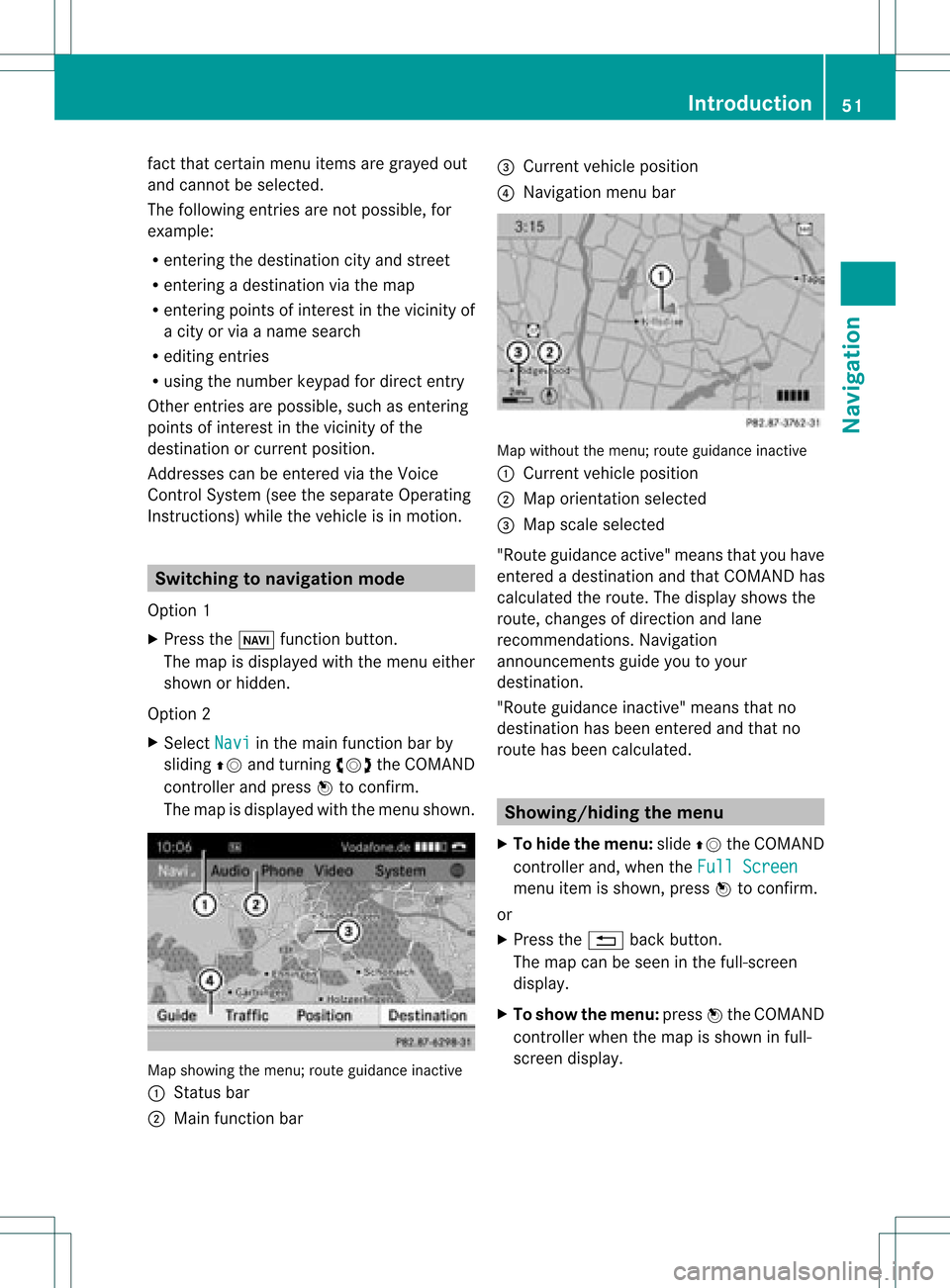
The map isdisplayed withthemen ushown . Map
showin gthe men u;rout eguidan ceinac tive
: Status bar
; Main function bar =
Curre ntveh icle posit ion
? Navi gation men ubar Map
withoutthemen u;rout eguidan ceinac tive
: Curre ntveh icle posit ion
; Map orientatio nselected
= Map scale select ed
"Route guidance active"meansthatyouhave
ent ered adestin ationandthat COMAND has
calculated theroute. Thedisplay showsthe
route, changes ofdirect ionand lane
recom mendat ions.Navigation
announ cementsguide youtoyour
destin ation.
"Route guidance inactive"means thatno
destin ationhasbeen entered andthat no
route hasbeen calculated. Showing/hiding
themenu
X To hide themenu: slideZVtheCOMAND
con troller and,when theFull Screen menu
itemisshown, pressWtocon firm.
or
X Press the% backbutton .
The map canbeseen inthe full-scr een
display.
X To show themenu: pressWthe COMAND
con troller whenthemap isshown infull-
screen display. Introd
uction
51Navigation Z
Page 55 of 234
Setting
thenumber ofpersons inthe
vehicle forthe use ofcarpool lanes For
route calculation, youcan take HOV or
carpool lanesintoaccount.
If you useHOV orcarpool lanes,please
observe theappli cable lawsaswell asthe
local andtime limitation conditions.
Carpool lanesmayonlybeused under certain
condition s.Normally youcan usethese lanes
when twopeople aretraveling inthe vehicle.
However, therearelanes thatcanonly be
used when threeorfour people (e.g.inNew
York) travel inthe vehicle. InCali fornia, lone
drivers canuseacarpool laneiftheir vehicle's
emission level/fuel consumptionisbelow a
fixed threshold.
Carpool lanesmaybereserved forspecific
times (e.g.during thepeak period).
Carpool lanesareidentified byHOV symbols
on special roadsigns andbymarkings onthe
road. Onthe road signs, youmay alsoseethe
word CARPOOL .T
he lanes arearranged asa
separate lanenext tothe others orare built
as aphysicall yseparate lane.
Depending upontheNumber of Occupants
in
Vehicle settin
g,COMAND usesHOVor
carpool laneswhen calculating aroute.
COMAND thenguides youwith visual and
acoustic drivinginstruct ionsonto oraway
from HOVorcarpool lanes.
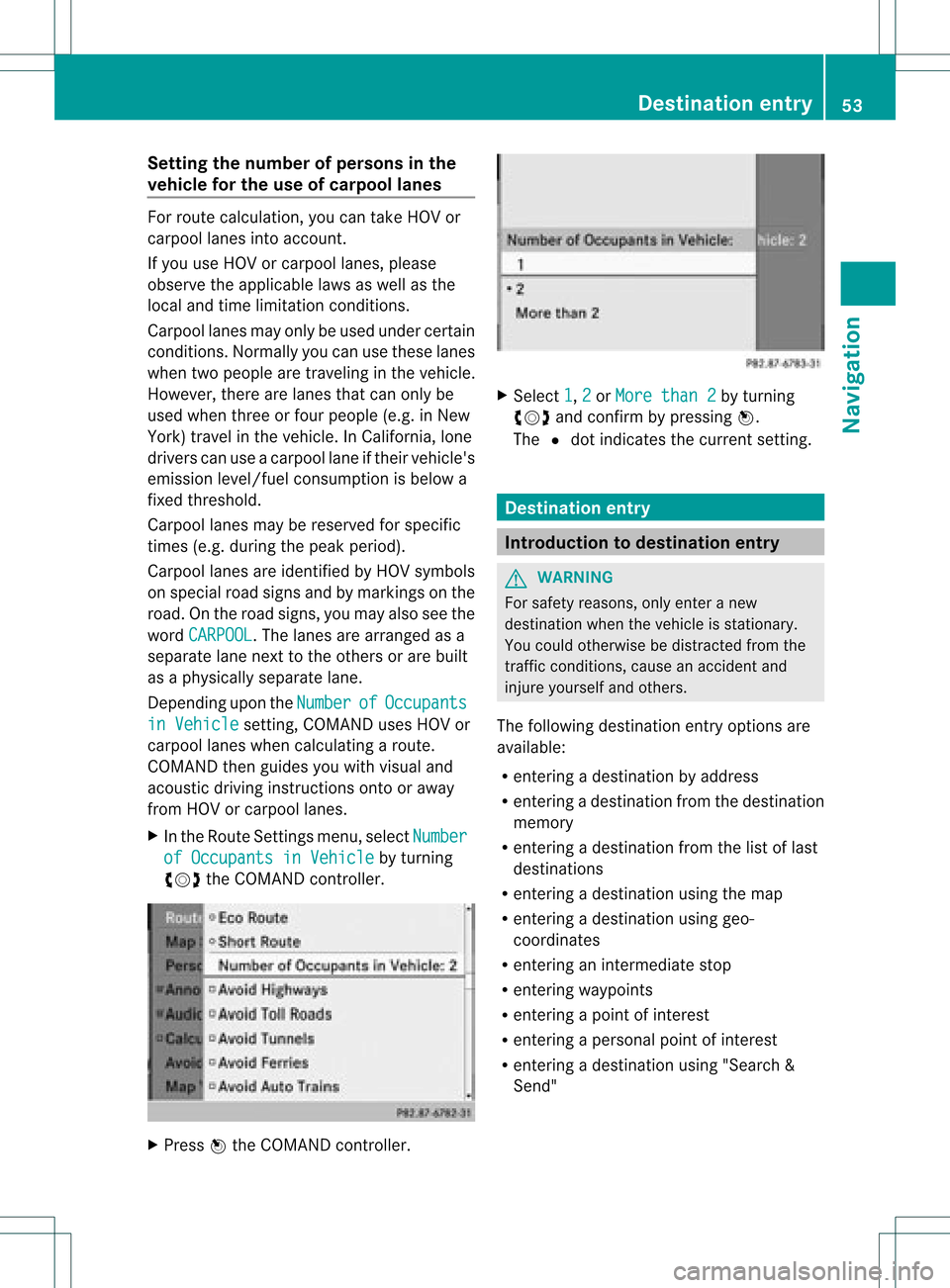
X In the Route Settings menu, selectNumber of
Occupants inVehicle by
turning
cVd theCOMAND controller. X
Press Wthe COMAND controller. X
Select 1 ,
2 or
More than2 by
turning
cVd andconfirm bypressing W.
The #dot indicates thecurrent setting. Destination
entry Introduction
todestination entry G
WARNING
For safety reasons, onlyenter anew
destination whenthevehicle isstationary.
You could otherwise bedistracted fromthe
traffic condition s,cause anaccident and
injure yourself andothers.
The following destination entryoptions are
availa ble:
R enterin gadestination byaddress
R enterin gadestination fromthedestination
memory
R enterin gadestination fromthelistoflast
destinations
R enterin gadestination usingthemap
R enterin gadestination usinggeo-
coordinates
R enterin gan intermediate stop
R enterin gway points
R enterin gapoint ofinterest
R enterin gapersonal pointofinterest
R enterin gadestination using"Search &
Send" Des
tinat ionentry
53Navigat ion Z
Page 57 of 234
R
Last States/Provinces R
States (U.S.A.) R
Provinces (Canada) X
To sele ctalist :turn cVd theCOMAN D
con troller andpress Wtocon firm .
The listofselect edstat es/pr ovinces
appears.
X To select astate/ province :tur ncVd the
CO MAND controller and pressW to
confi rm.
The addre ssentry menu appe arsag ain. The
sta te/p rovince selecte dha snow been
ente red.
En teri ngthe city X
Sel ect City in
the addre ssentry menu by
tur ning cVd theCOMAND controller and
pre ssW toconfi rm.
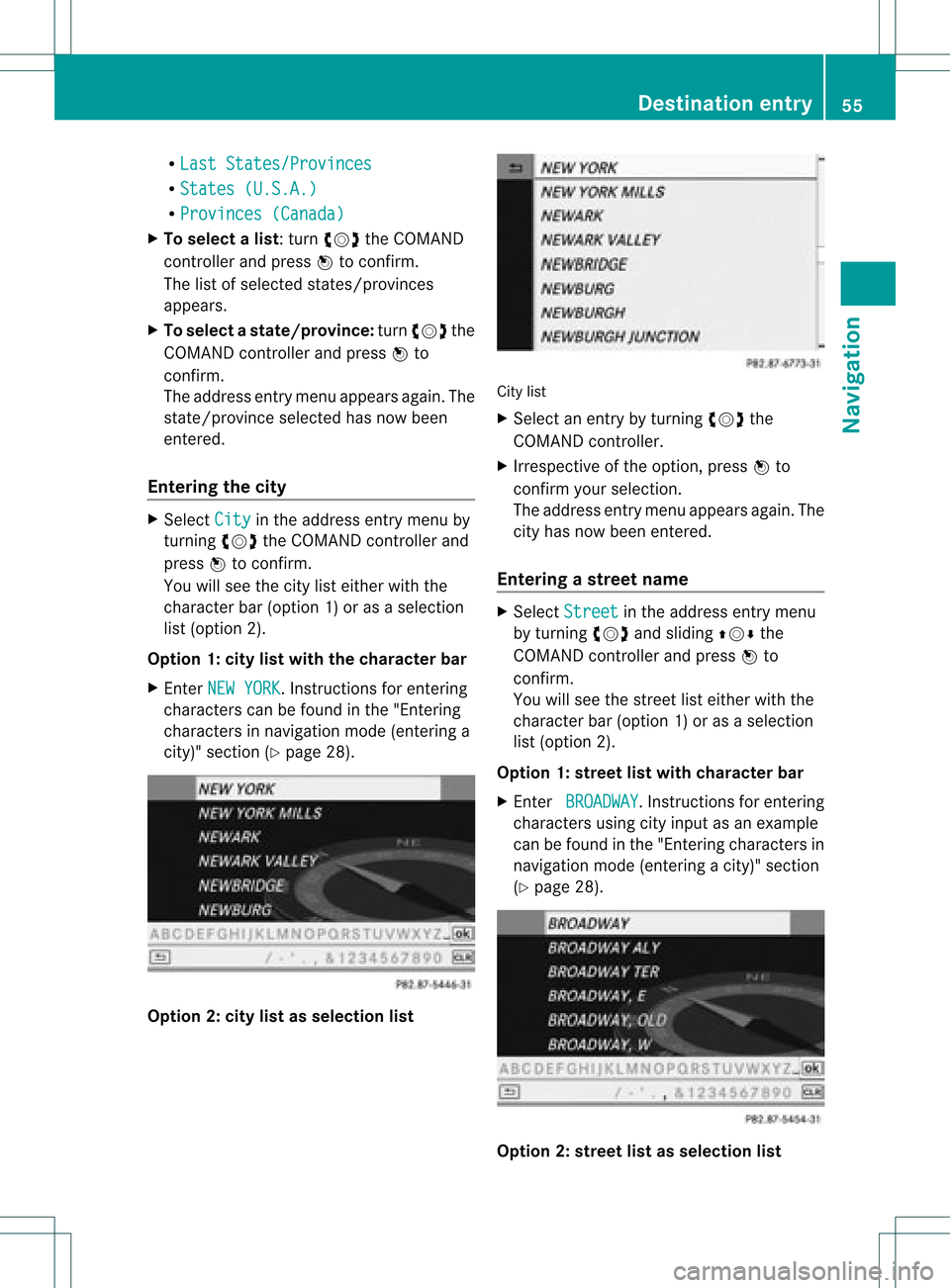
Yo uwi llsee thecity list either with the
cha racter bar(option 1)or as aselection
list (option 2).
Option 1:city listwith thechara cterbar
X En ter NEW YORK .
Inst ruction sfor enter ing
charact erscan befound inthe "Ent ering
charact ersinnavigation mode(enterin ga
city)" section (Ypage 28). Option
2:city listasselection list City
list
X Select anentr yby turnin gcVd the
COMAND controller.
X Irrespect iveofthe option, pressWto
conf irmyour selection.
The address entrymenu appears again.The
city hasnow been entered.
Entering astr eet name X
Select Street in
the address entrymenu
by turnin gcVd andsliding ZVÆthe
COMAND controller andpress Wto
conf irm.
You willsee thestreet listeither withthe
charact erbar (option 1)or as aselection
list (option 2).
Option 1:street listwith chara cterbar
X En ter BROADWAY .
Inst ruction sfor enter ing
charact ersusing cityinput asan example
can befound inthe "Ent ering charact ersin
navigation mode(enterin gac ity)" section
(Y page 28). Opt
ion 2:str eet listasselection list Destina
tionentry
55Navigat ion Z
Page 58 of 234
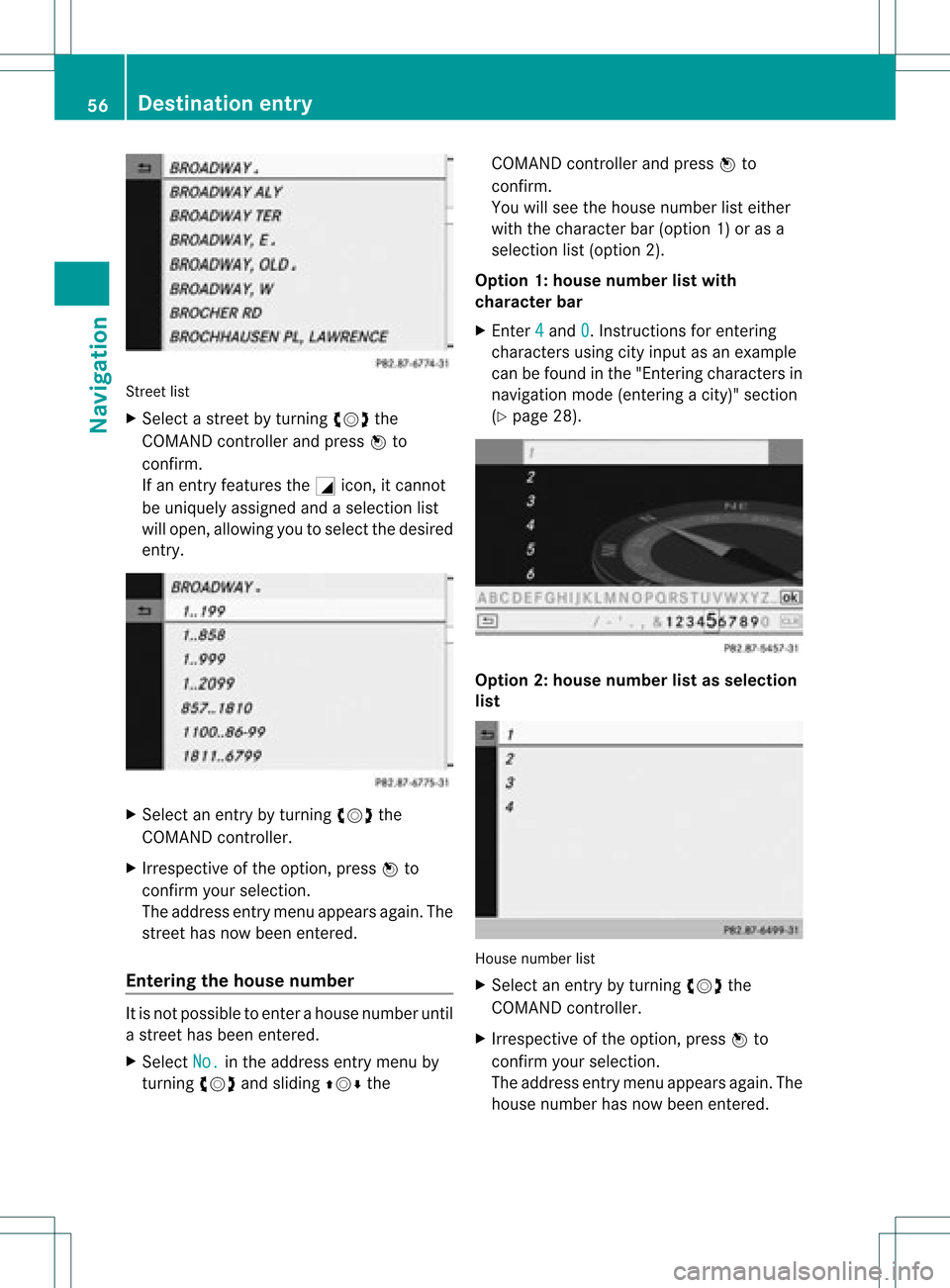
Street
list
X Sel ect astree tby turni ngcVd the
CO MAND controllera nd pre ssW to
confi rm.
If an entry features the Gicon,itcanno t
be uniquelyas signe dand asel ecti onlist
wi llop en, allo wi ng youto sel ect the desired
entry . X
Sel ect anentry byturning cVd the
CO MAND controller.
X Irre spe ctive ofthe optio n,pre ssW to
confi rmyour sel ecti on.
The addre ssentry menu appe arsag ain. The
stre ethasnow been ente red.
En teri ngthe housenumb er It
is not possi bleto ente rahouse numberuntil
a street hasbeen entered.
X Select No. in
the address entrymenu by
turning cVdandsliding ZVÆthe COMAND
controller andpress Wto
confirm .
You willsee thehouse number listeither
with thecharacter bar(option 1)or as a
selection list(option 2).
Option 1:house number listwith
character bar
X Ent er4 and
0 .
Inst ructions forenterin g
characters usingcityinput asan example
can befound inthe "Ent ering characters in
navigation mode(entering acity)" section
(Y page 28). Opt
ion 2:house numberlistasselection
list House
numberlist
X Selec tan ent ryby turnin gcVd the
COMA NDcontroller.
X Irr espec tiveof the option, press Wto
con firm your selec tion.
The address entrymen uappears again.The
house numberhas now been entered. 56
Destina
tionentryNavigat ion
Page 60 of 234
X
Sel ect Yes and
pressW toconfi rm.
After selecti ngYes ,
the Saving Pro
cedure Successful mes
sage
ap pe ars .
En teri ngaZIPcode X
Se lec tZIP in
theaddr essentry men uby
tur nin gcVd andslidingZVÆ the
COMA NDcontrol ler and pressW to
co nfirm .
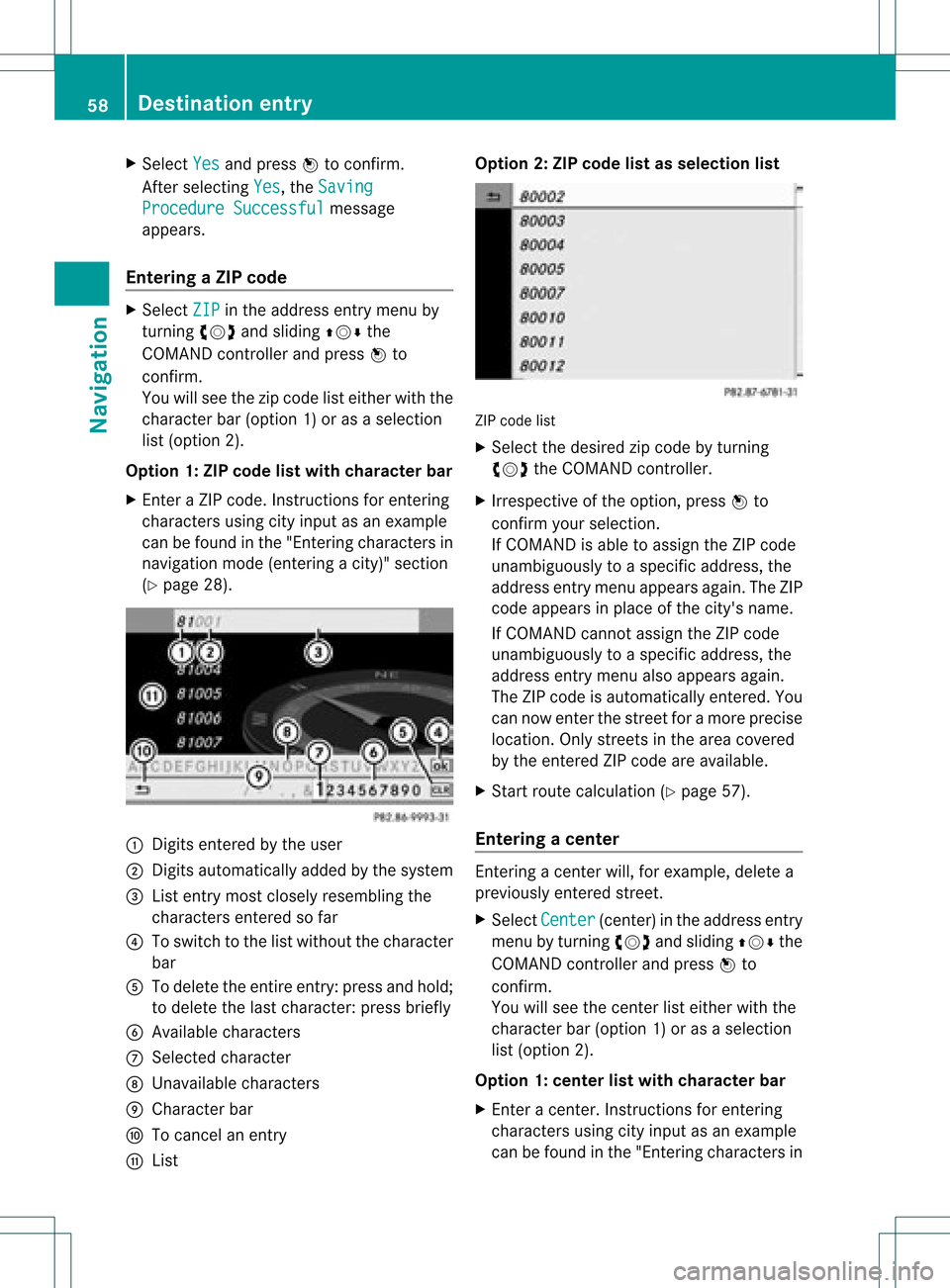
You willsee thezip co de list either withth e
ch arac terb ar(opt ion1)or as aselec tion
list (opt ion2).
Opt ion 1:ZIP code listwith character bar
X En tera ZIP code. Inst ruc tions for enterin g
ch arac ters usin gcit yinp utas an example
can befoun din the"En terin gch arac ters in
nav igat ionmod e(en terin gac ity)" section
(Y page 28). :
Digit sent ered bythe user
; Digit sautom atically added bythe syst em
= List entrymost closelyresem blingthe
char acters entered sofar
? Toswitc hto the listwitho utthe char acter
bar
A Todelet ethe entireent ry:press andhold;
to delet ethe last char acter: press briefly
B Available characters
C Selec tedchar acter
D Unav ailable characters
E Charact erbar
F Tocan celanent ry
G List Opt
ion 2:ZIP code listasselection list ZIP
code list
X Selec tthe desired zipcode byturning
cVd theCOMAND controller.
X Irrespect iveofthe option, pressWto
confirm yourselection.
If COMAND isable toassign theZIPcode
unambiguou slytoaspecific address, the
address entrymenu appea rsagain. TheZIP
code appea rsinplace ofthe city's name.
If COMAND cannotassigntheZIPcode
unambiguou slytoaspecific address, the
address entrymenu alsoappea rsagain.
The ZIPcode isautomatically entered.You
can now enter thestreet foramore precise
location. Onlystreet sin the area covered
by the entered ZIPcode areavaila ble.
X Start route calculation (Ypage 57).
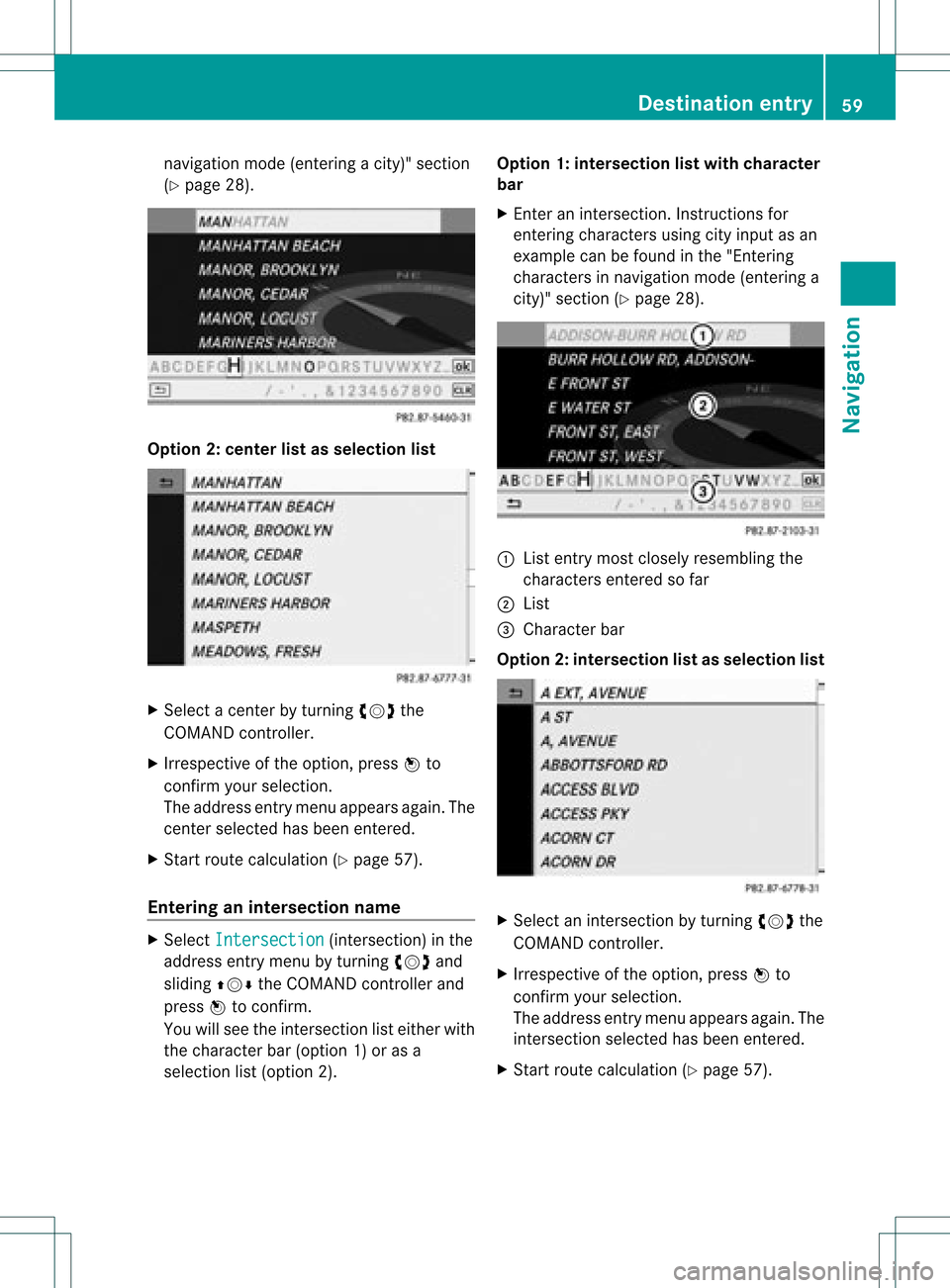
Entering acenter En
terin gacen terw ill,for exam ple,delet ea
prev iously entered street .
X Selec tCent er (cen
ter)in the address entry
men uby turnin gcVd andslidin gZVÆ the
COMA NDcontroller andpress Wto
con firm .
You willsee thecenterlist eith erwith the
char acterbar (opt ion1)or as aselec tion
list (opt ion2).
Opt ion 1:center listwith characterbar
X En ter acen ter.In st ruct ions forenterin g
char acters using cityinput asan exam ple
can befoun din the "Entering char acters in 58
Destina
tionentryNavigat ion
Page 61 of 234
nav
igati on mod e(e nteri ngacity)" section
(Y page 28). Opt
ion 2:center listasselection list X
Selec ta cen terbyturnin gcVd the
COMA NDcontroller.
X Irr espec tiveof the option, press Wto
con firm your selec tion.
The address entrymen uappears again.The
cen terselec tedhas been entered.
X Start rout ecalc ulation (Ypage 57).
Enter inganinter section name X
Selec tInte rsection (int
ersec tion)in the
address entrymen uby turnin gcVd and
slidin gZVÆ theCOMA NDcontroller and
press Wtocon firm .
You willsee theintersec tionlisteith erwith
the char acterbar (opt ion1)or as a
selec tionlist(opt ion2). Opt
ion 1:inter section listwith character
bar
X En ter anintersec tion.In st ruct ions for
ent erin gchar acters using cityinput asan
exam plecan befoun din the "Entering
char acters innavig ation mode (enteringa
cit y)" sect ion(Ypage 28). :
List entrymost closelyresem blingthe
char acters entered sofar
; List
= Charact erbar
Opt ion2:inter section listasselection list X
Selec tan intersec tionbyturnin gcVd the
COMA NDcontroller.
X Irr espec tiveof the option, press Wto
con firm your selec tion.
The address entrymen uappears again.The
int ersec tionselec tedhas been entered.
X Start rout ecalc ulation (Ypage 57). Destina
tionentry
59Navigat ion Z
Page 62 of 234

Selec
tingadesti nation from the
dest inationmem ory(e.g. Myaddress)
Intr odu ction The
dest inationmem oryalways contain san
ent rynam ed"My addre ss".You may wish to
assign yourhomeaddres sto this ent ry,for
exam ple(Ypage 57),and selec tit for rout e
guidan ce.This entryisalways locatedatthe
to pof thelist inthedest inationmem ory.
X To switch onnav igat ionmod e:pres sth e
Ø function butt on.
X To show themen u:pres sW theCOMA ND
con troller .
X Sele ctDes tination in
thenav igat ion
syst emmen ubar byturnin gcVd the
COMA NDcontroller andpres singW to
con firm.
X Sele ctFro mMem ory and
pres sW to
con firm.
You willsee thedest inationmem orylist
eit her with thechar acterbar (opt ion1)or
as aselec tionlist (op tion 2).
Op tion 1:dest inationmem orylistwith
cha racter bar X
En teradestinat ion,e.g. "My address".
Ins truc tionsfor entering charac tersusing
cit yinput asan example canbefound inthe
"Ent ering charac tersinnavigat ionmode
(ent ering acit y)" sect ion(Ypage 31). :
Character entered bythe user
; Character sautomatic allyadded bythe
system
= List entrymost closely resemblin gthe
charac tersentered sofar
? Toswitc hto the select ionlist
A Todelete anent ry
B Character snot curren tlyavailable
C Character bar
D Current lyselect edcharac ter
E Tocanc elan ent ry
F Character scurren tlyavailable
Opt ion 2:destina tionmem orylistas
selection list Dest
ination memorylist
X Select MyAddres s by
turn ingcVd the
COMAND controller.
X Irres pectiveofthe option ,press Wto
con firm your select ion.
The address entrymenu appears again.
"My address" hasbeen entered. 60
Destinat
ionentr yNavigat ion