boot MERCEDES-BENZ C-CLASS CABRIOLET 2016 Owner's Manual
[x] Cancel search | Manufacturer: MERCEDES-BENZ, Model Year: 2016, Model line: C-CLASS CABRIOLET, Model: MERCEDES-BENZ C-CLASS CABRIOLET 2016Pages: 377, PDF Size: 6.9 MB
Page 165 of 377

In addition, at least one of the following condi-
tions must be fulfilled:
R the engine is switched off
R the driver is not wearing a seat belt and the
driver's door is opened
R there is a system malfunction
R the power supply is insufficient
R the vehicle is stationary for a lengthy period
Red indicator lamp !on the instrument clus-
ter lights up.
The electric parking brake is not automatically
applied if the engine is switched off by the ECO
start/stop function.
Applying automatically (vehicles with
manual transmission) The electric parking brake is applied automati-
cally when the vehicle is being kept stationary by
the HOLD function.
In addition, at least one of the following condi-
tions must be fulfilled:
R the engine is switched off
R the driver is not wearing a seat belt and the
driver's door is open
R there is a system malfunction
R the power supply is insufficient
R the vehicle is stationary for a lengthy period
Red indicator lamp !on the instrument clus-
ter lights up.
The electric parking brake is not automatically
applied if the engine is switched off by the ECO
start/stop function.
Releasing automatically The electric parking brake of your vehicle is
released automatically when all the following
conditions are fulfilled:
R the seat belt is fastened
R the engine is running
R vehicles with automatic transmission: you
accelerate and the transmission is in position
D or R
or you shift the transmission position from
Pto
position Dor R. You will need to accelerate
more on steeper gradients
R vehicles with manual transmission: a gear
has been selected and you depress the accel-
erator pedal
Vehicles with automatic transmission: if the
transmission is in position R, the boot lid must
be closed.
Vehicles with manual transmission: when
reverse gear Ris engaged, the boot lid must be
closed.
If your seat belt is not fastened, the following
conditions must be fulfilled for the electric park- ing brake to be released automatically:
R the driver's door is closed
R vehicles with automatic transmission: you
are shifting from transmission position Por
have previously driven at speeds greater than 3 km/h
R vehicles with manual transmission: you
have previously driven at speeds greater than 3 km/h
Ensure that you do not depress the accelerator
pedal unintentionally. Otherwise, the parking
brake will be released and the vehicle will start
to move.
Emergency braking The vehicle can also be braked during an emer-
gency by using the electric parking brake.
X While driving, press handle :of the electric
parking brake (Y page 161).
The vehicle is braked as long as you keep
handle :of the electric parking brake
depressed. The longer electric parking brake
handle :is depressed, the greater the brak-
ing force.
During braking:
R a warning tone sounds
R the Release parking brake Release parking brake display mes-
sage appears
R red indicator lamp !on the instrument
cluster flashes
When the vehicle has been braked to a stand-
still, the electric parking brake is applied. 162
ParkingDriving and parking
Page 196 of 377

Reversing camera
General notes Reversing camera
:is a visual parking and
manoeuvring aid. It shows the area behind the
vehicle with guide lines in the multimedia sys-
tem.
The area behind the vehicle is displayed as a
mirror image, as in the rear-view mirror.
i The text shown in the multimedia system
depends on the language setting. The follow-
ing are examples of reversing camera displays
in the multimedia system.
Important safety notes The reversing camera is only an aid. It is not a
substitute for your attention to the immediate
surroundings. The responsibility for safe
manoeuvring and parking remains with you.
Make sure that there are no persons, animals or
objects in range while manoeuvring and parking.
The reversing camera will not function or will
function only in a limited manner:
R if the boot lid is open
R in heavy rain, snow or fog
R at night or in very dark places
R if the camera is exposed to very bright light
R if the area is lit by fluorescent lamps or LED
lighting (the display may flicker)
R if there is a sudden change in temperature,
e.g. when driving into a heated garage in win- ter
R if the camera lens is dirty or obstructed.
Observe the notes on cleaning
(Y page 320)
R if the rear of your vehicle is damaged. In this
case, have the camera position and setting
checked at a qualified specialist workshop The field of vision and other functions of the
reversing camera may be restricted due to addi-
tional accessories on the rear of the vehicle (e.g. licence plate holder, rear-mounted bicycle
rack).
The reversing camera is protected from rain-
drops and dust by a flap. When the reversing
camera is activated, this flap opens.
The flap closes again when:
R you have finished the manoeuvring process
R you switch off the engine
R you open the boot
See the notes on cleaning (Y page 320).
For technical reasons, the flap may remain open
briefly after the reversing camera has been
deactivated.
Activating/deactivating the reversing
camera X
To activate: make sure that the Activa‐ Activa‐
tion by R gear
tion by R gear function is selected in the
multimedia system (see Digital Owner's Man-
ual).
X Engage reverse gear.
The reversing camera flap opens. The area
behind the vehicle appears with guide lines in
the multimedia system.
The image from the reversing camera is avail-
able throughout the manoeuvring process.
X To switch the function mode for vehicles
with trailer tow hitch:using the controller,
select symbol :for the "Reverse parking"
function or symbol ;for "Coupling up a
trailer".
The symbol of the selected function is high-
lighted. Driving systems
193Driving and parking Z
Page 200 of 377
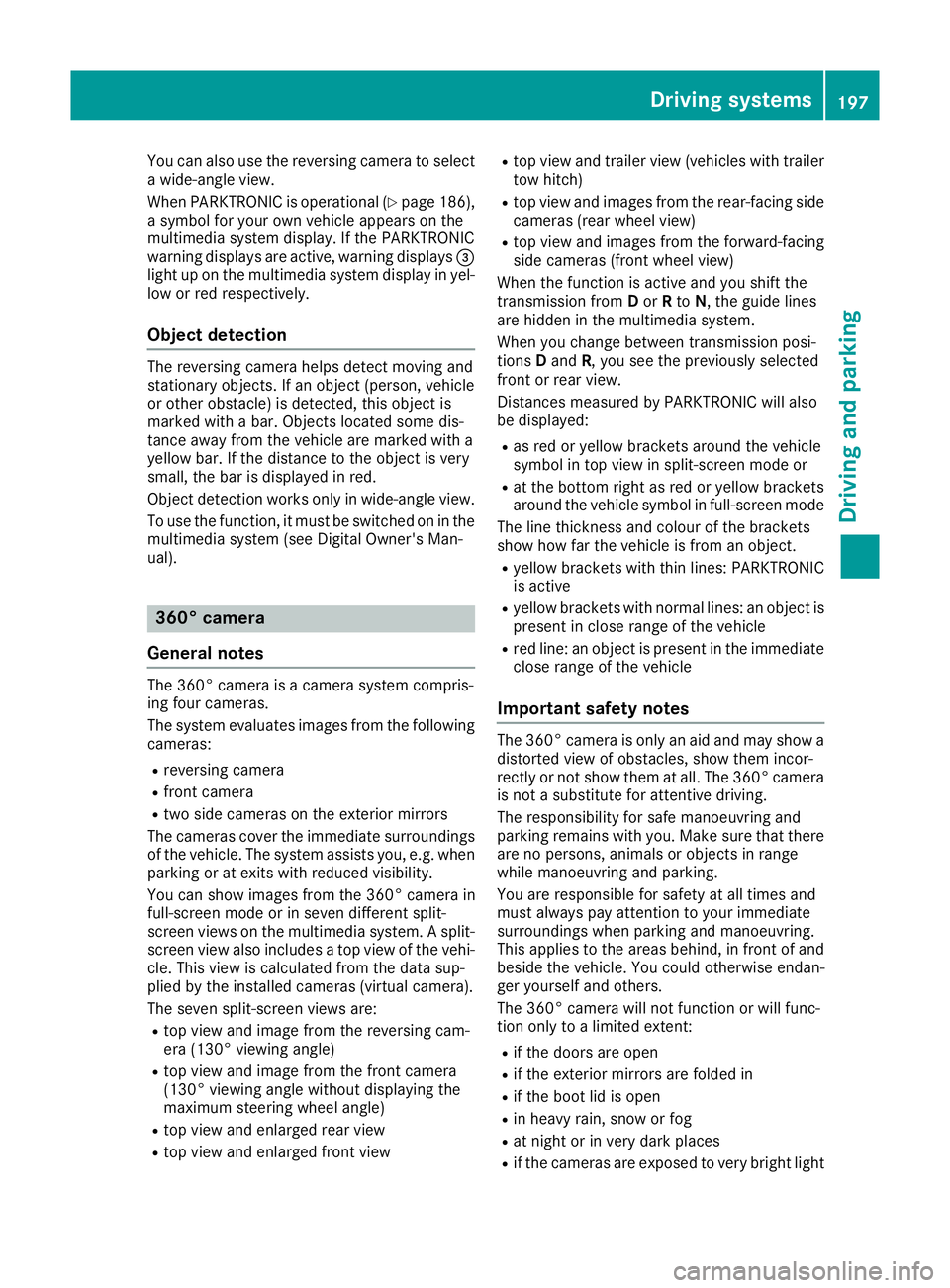
You can also use the reversing camera to select
a wide-angle view.
When PARKTRONIC is operational (Y page 186),
a symbol for your own vehicle appears on the
multimedia system display. If the PARKTRONIC
warning displays are active, warning displays =
light up on the multimedia system display in yel-
low or red respectively.
Object detection The reversing camera helps detect moving and
stationary objects. If an object (person, vehicle
or other obstacle) is detected, this object is
marked with a bar. Objects located some dis-
tance away from the vehicle are marked with a
yellow bar. If the distance to the object is very
small, the bar is displayed in red.
Object detection works only in wide-angle view.
To use the function, it must be switched on in the
multimedia system (see Digital Owner's Man-
ual). 360° camera
General notes The 360° camera is a camera system compris-
ing four cameras.
The system evaluates images from the following
cameras:
R reversing camera
R front camera
R two side cameras on the exterior mirrors
The cameras cover the immediate surroundings
of the vehicle. The system assists you, e.g. when
parking or at exits with reduced visibility.
You can show images from the 360° camera in
full-screen mode or in seven different split-
screen views on the multimedia system. A split-
screen view also includes a top view of the vehi-
cle. This view is calculated from the data sup-
plied by the installed cameras (virtual camera).
The seven split-screen views are: R top view and image from the reversing cam-
era (130° viewing angle)
R top view and image from the front camera
(130° viewing angle without displaying the
maximum steering wheel angle)
R top view and enlarged rear view
R top view and enlarged front view R
top view and trailer view (vehicles with trailer
tow hitch)
R top view and images from the rear-facing side
cameras (rear wheel view)
R top view and images from the forward-facing
side cameras (front wheel view)
When the function is active and you shift the
transmission from Dor Rto N, the guide lines
are hidden in the multimedia system.
When you change between transmission posi-
tions Dand R, you see the previously selected
front or rear view.
Distances measured by PARKTRONIC will also
be displayed:
R as red or yellow brackets around the vehicle
symbol in top view in split-screen mode or
R at the bottom right as red or yellow brackets
around the vehicle symbol in full-screen mode
The line thickness and colour of the brackets
show how far the vehicle is from an object.
R yellow brackets with thin lines: PARKTRONIC
is active
R yellow brackets with normal lines: an object is
present in close range of the vehicle
R red line: an object is present in the immediate
close range of the vehicle
Important safety notes The 360° camera is only an aid and may show a
distorted view of obstacles, show them incor-
rectly or not show them at all. The 360° camera is not a substitute for attentive driving.
The responsibility for safe manoeuvring and
parking remains with you. Make sure that there
are no persons, animals or objects in range
while manoeuvring and parking.
You are responsible for safety at all times and
must always pay attention to your immediate
surroundings when parking and manoeuvring.
This applies to the areas behind, in front of and beside the vehicle. You could otherwise endan-
ger yourself and others.
The 360° camera will not function or will func-
tion only to a limited extent:
R if the doors are open
R if the exterior mirrors are folded in
R if the boot lid is open
R in heavy rain, snow or fog
R at night or in very dark places
R if the cameras are exposed to very bright light Driving systems
197Driving and parking Z
Page 202 of 377
The full-screen option is available only in the fol-
lowing views:
R top view with image from the reversing cam-
era
R top view with image from the front camera
Multimedia system display Important safety notes
The camera system may show a distorted view
of obstacles, show them incorrectly or not show
them at all. Obstacles in the following locations are not shown by the system:
R under the front and rear bumpers
R very close to the front and rear bumpers
R in the area immediately above the recessed
handle on the boot lid
R very close to the exterior mirrors
R in the transitional areas between the various
cameras in the virtual top view
! Objects not at ground level may appear to
be further away than they actually are, e.g.:
R the bumper of a parked vehicle
R the drawbar of a trailer
R the ball coupling of a trailer tow hitch
R the rear section of an HGV
R a slanted post
Use the guidelines only for orientation.
Approach objects no further than the bottom- most guideline.
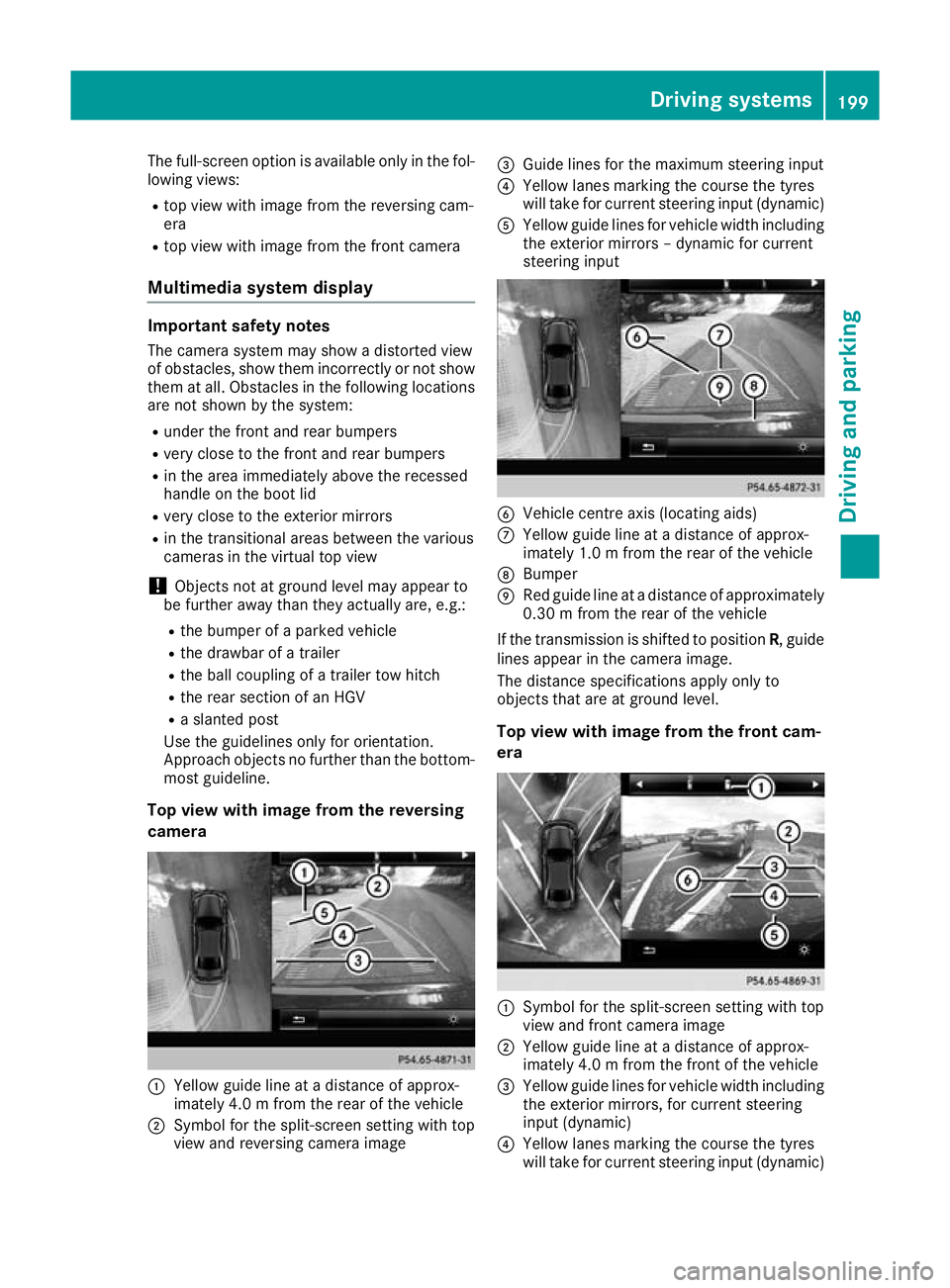
Top view with image from the reversing
camera :
Yellow guide line at a distance of approx-
imately 4.0 m from the rear of the vehicle
; Symbol for the split-screen setting with top
view and reversing camera image =
Guide lines for the maximum steering input
? Yellow lanes marking the course the tyres
will take for current steering input (dynamic)
A Yellow guide lines for vehicle width including
the exterior mirrors – dynamic for current
steering input B
Vehicle centre axis (locating aids)
C Yellow guide line at a distance of approx-
imately 1.0 m from the rear of the vehicle
D Bumper
E Red guide line at a distance of approximately
0.30 m from the rear of the vehicle
If the transmission is shifted to position R, guide
lines appear in the camera image.
The distance specifications apply only to
objects that are at ground level.
Top view with image from the front cam-
era :
Symbol for the split-screen setting with top
view and front camera image
; Yellow guide line at a distance of approx-
imately 4.0 m from the front of the vehicle
= Yellow guide lines for vehicle width including
the exterior mirrors, for current steering
input (dynamic)
? Yellow lanes marking the course the tyres
will take for current steering input (dynamic) Driving systems
199Driving and parking Z
Page 218 of 377
Always engage the ball coupling as described.
G
WARNING
If you release the ball coupling or it does not
engage correctly when folding in, it will swing out. Within pivoting range of the ball coupling,
there is an increased risk of an accident and
injury.
Only release the ball coupling if the pivoting
range is unobstructed. Always make sure that the ball coupling engages when folding in.
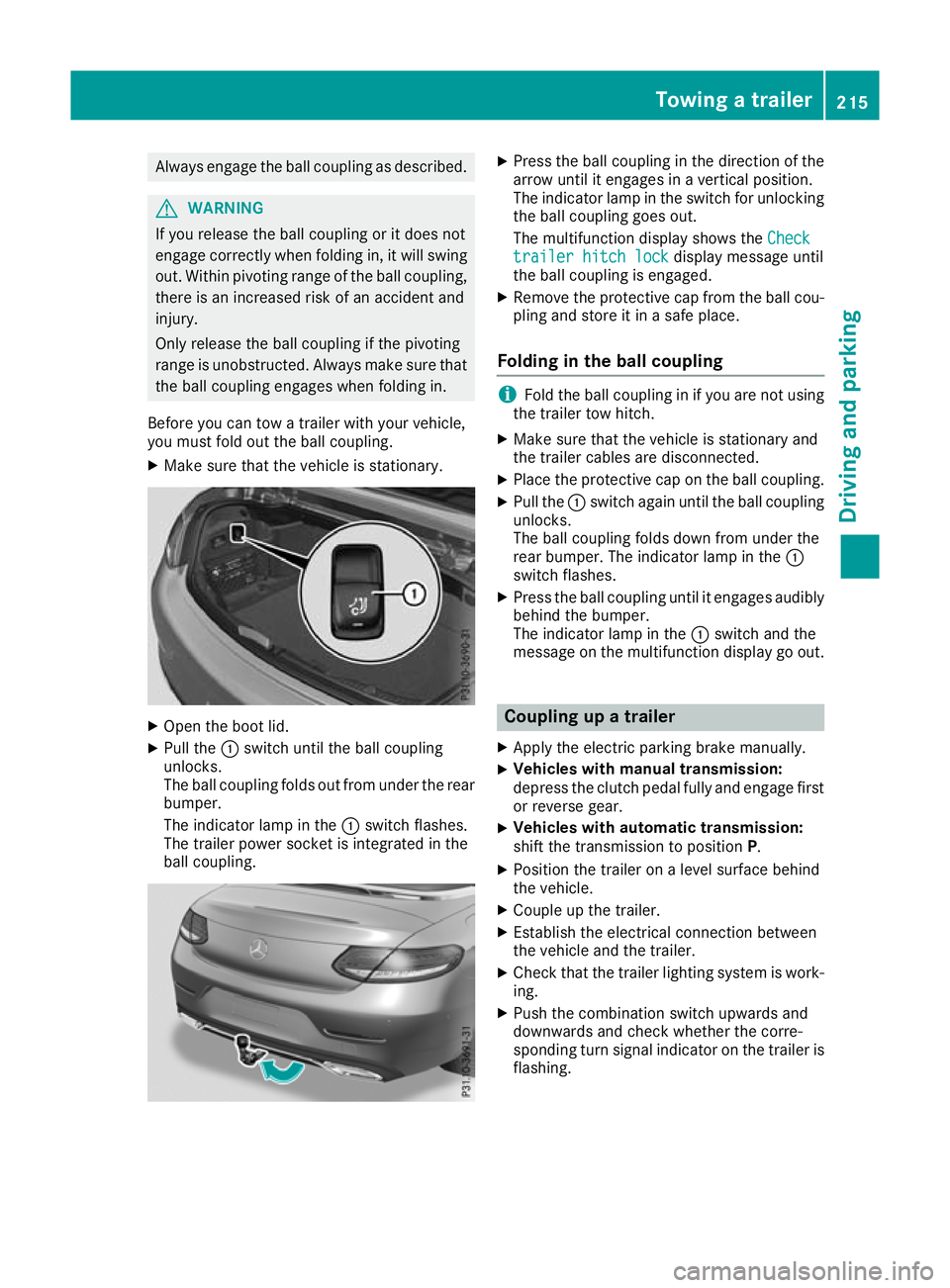
Before you can tow a trailer with your vehicle,
you must fold out the ball coupling.
X Make sure that the vehicle is stationary. X
Open the boot lid.
X Pull the :switch until the ball coupling
unlocks.
The ball coupling folds out from under the rear
bumper.
The indicator lamp in the :switch flashes.
The trailer power socket is integrated in the
ball coupling. X
Press the ball coupling in the direction of the
arrow until it engages in a vertical position.
The indicator lamp in the switch for unlocking
the ball coupling goes out.
The multifunction display shows the Check Check
trailer hitch lock
trailer hitch lock display message until
the ball coupling is engaged.
X Remove the protective cap from the ball cou-
pling and store it in a safe place.
Folding in the ball coupling i
Fold the ball coupling in if you are not using
the trailer tow hitch.
X Make sure that the vehicle is stationary and
the trailer cables are disconnected.
X Place the protective cap on the ball coupling.
X Pull the :switch again until the ball coupling
unlocks.
The ball coupling folds down from under the
rear bumper. The indicator lamp in the :
switch flashes.
X Press the ball coupling until it engages audibly
behind the bumper.
The indicator lamp in the :switch and the
message on the multifunction display go out. Coupling up a trailer
X Apply the electric parking brake manually.
X Vehicles with manual transmission:
depress the clutch pedal fully and engage first
or reverse gear.
X Vehicles with automatic transmission:
shift the transmission to position
P.
X Position the trailer on a level surface behind
the vehicle.
X Couple up the trailer.
X Establish the electrical connection between
the vehicle and the trailer.
X Check that the trailer lighting system is work-
ing.
X Push the combination switch upwards and
downwards and check whether the corre-
sponding turn signal indicator on the trailer is
flashing. Towing a trailer
215Driving and parking Z
Page 272 of 377
Display messages
Possible causes/consequences and
M
MSolutions Clutch overheated
Clutch overheated
Avoid pulling away Avoid pulling away
Engage/disengage Engage/disengage
clutch quickly if clutch quickly if
req. req. The clutch is under considerable load and the permitted operating
temperature has been exceeded. A warning tone also sounds.
Avoid frequent pulling away and driving at walking pace over longer
distances.
X Stop the vehicle, paying attention to road and traffic conditions.
X Secure the vehicle against rolling away (Y page 159).
X Leave the engine running.
The clutch is cooled more quickly with the engine running.
or X If possible, drive on at a steady speed.
X Remove your foot from the clutch pedal and do not allow the clutch
to slip.
The clutch may also cool down during the journey.
It may take several minutes for it to cool down. When the clutch has
cooled down, the display message disappears. The clutch is fully
operational again. N The boot lid is open.
X Close the boot lid. M The bonnet is open. A warning tone also sounds.
G WARNING
The open bonnet may then block your view when the vehicle is in
motion.
There is a risk of an accident.
X Stop the vehicle safely as soon as possible, paying attention to road
and traffic conditions.
X Secure the vehicle against rolling away (Y page 159).
X Close the bonnet. Active bonnet mal‐ Active bonnet mal‐
function See Own‐ function See Own‐
er's Manual er's Manual The active bonnet (pedestrian protection) is not active due to a mal-
function or because it has already been triggered.
X Consult a qualified specialist workshop. C At least one door is open. A warning tone also sounds.
X Close all doors. _
Front left seat Front left seat
backrest backrest
not
notlocked
locked
or Front right seat
Front right seat
backrest not locked
backrest not locked The driver's or front-passenger's seat backrest is not engaged. A
warning tone also sounds.
X Push the backrest back until it engages. Display
messages
269On-board computer and displays Z
Page 274 of 377
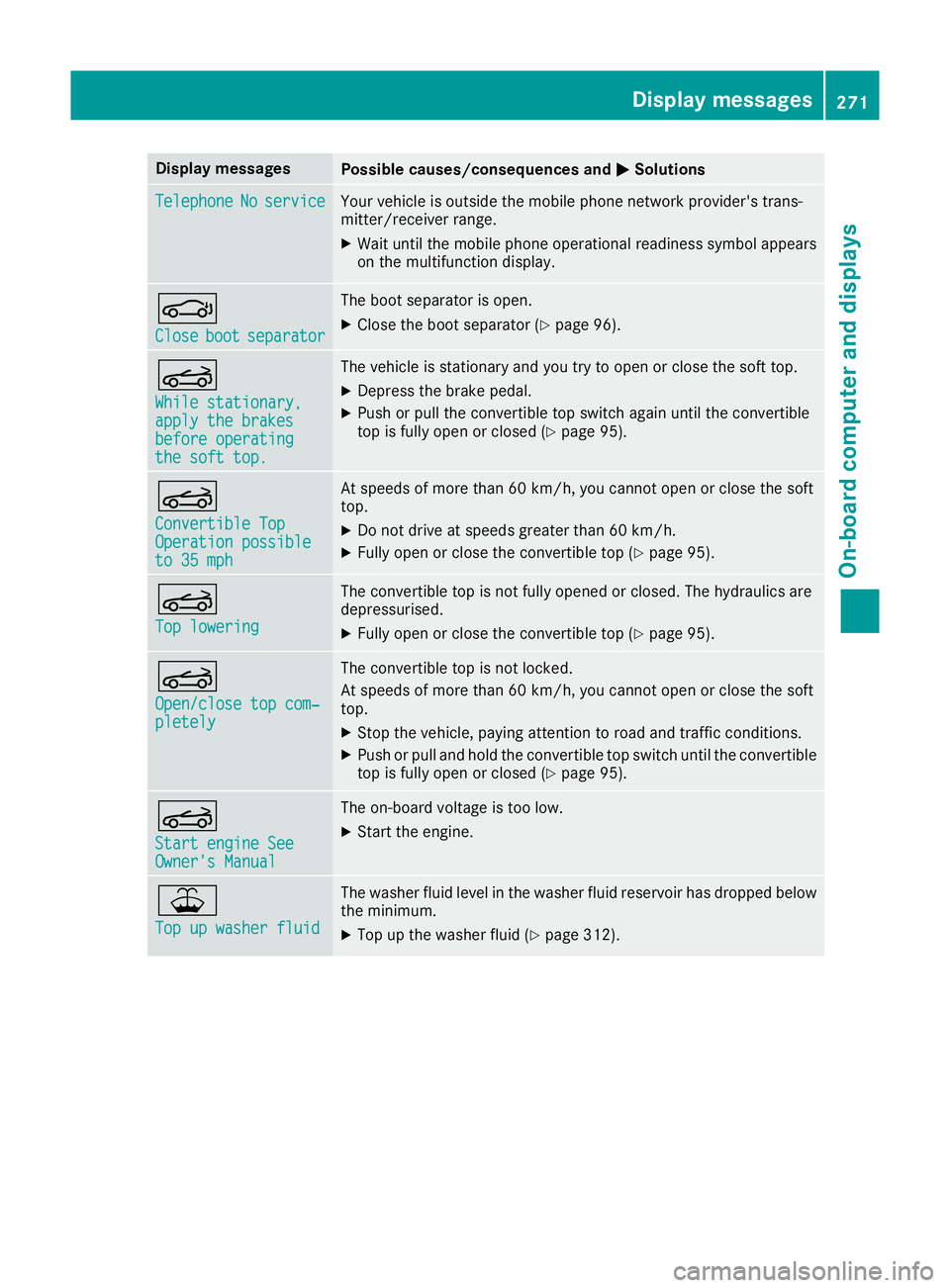
Display messages
Possible causes/consequences and
M
MSolutions Telephone
Telephone
No
Noservice
service Your vehicle is outside the mobile phone network provider's trans-
mitter/receiver range.
X Wait until the mobile phone operational readiness symbol appears
on the multifunction display. J
Close Close
boot
bootseparator
separator The boot separator is open.
X Close the boot separator (Y page 96).K
While stationary, While stationary,
apply the brakes apply the brakes
before operating before operating
the soft top. the soft top. The vehicle is stationary and you try to open or close the soft top.
X
Depress the brake pedal.
X Push or pull the convertible top switch again until the convertible
top is fully open or closed (Y page 95).K
Convertible Top Convertible Top
Operation possible Operation possible
to 35 mph to 35 mph At speeds of more than 60 km/h, you cannot open or close the soft
top.
X Do not drive at speeds greater than 60 km/h.
X Fully open or close the convertible top (Y page 95).K
Top lowering Top lowering The convertible top is not fully opened or closed. The hydraulics are
depressurised.
X Fully open or close the convertible top (Y page 95).K
Open/close top com‐ Open/close top com‐
pletely pletely The convertible top is not locked.
At speeds of more than 60 km/h, you cannot open or close the soft
top.
X Stop the vehicle, paying attention to road and traffic conditions.
X Push or pull and hold the convertible top switch until the convertible
top is fully open or closed (Y page 95).K
Start engine See Start engine See
Owner's Manual Owner's Manual The on-board voltage is too low.
X Start the engine. ¥
Top up washer fluid Top up washer fluid The washer fluid level in the washer fluid reservoir has dropped below
the minimum.
X Top up the washer fluid (Y page 312). Display
messages
271On-board computer and displays Z
Page 299 of 377
Stowage areas
Loading guidelines
G
WARNING
Combustion engines emit poisonous exhaust
gases such as carbon monoxide. Exhaust
gases can enter the vehicle interior if the boot
lid is open when the engine is running, espe-
cially if the vehicle is in motion. There is a risk of poisoning.
Always switch off the engine before opening
the boot lid. Never drive with the boot lid
open. G
WARNING
If objects, luggage or loads are not secured or not secured sufficiently, they could slip, tip
over or be flung around and thereby hit vehicle
occupants. There is a risk of injury, especially when braking or abruptly changing directions.
Always store objects so that they cannot be
flung around. Secure objects, luggage or
loads against slipping or tipping before the
journey. G
WARNING
The exhaust tail pipe and tail pipe trim can
become very hot. If you come into contact
with these parts of the vehicle, you could burn
yourself. There is a risk of injury.
Always be particularly careful around the
exhaust tail pipe and the tail pipe trim. Allow
these components to cool down before touch-
ing them.
The handling characteristics of a laden vehicle
are dependent on the distribution of the load
within the vehicle. For this reason, you should
note the following when transporting a load:
R never exceed the maximum gross vehicle
weight or the permissible axle loads for the
vehicle (including occupants).
R the boot is the preferred place to store
objects.
R position heavy loads as far forwards as pos-
sible and as low down in the boot as possible. R
the load must not protrude above the upper
edge of the seat backrests.
R always place the load behind unoccupied
seats if possible.
R secure the load with sufficiently strong and
wear-resistant lashing material. pad sharp
edges for protection.
i Lashing material is available at any qualified
specialist workshop. Stowage compartments
Important safety notes G
WARNING
If objects in the passenger compartment are
stowed incorrectly, they can slide or be
thrown around and hit vehicle occupants. In
addition, cupholders, open stowage spaces
and mobile phone brackets cannot always
retain all objects they contain. There is a risk of injury, particularly in the event of sudden
braking or a sudden change in direction.
R Always stow objects so that they cannot be
thrown around in such situations.
R Always make sure that objects do not pro-
trude from stowage spaces, parcel nets or
stowage nets.
R Close the lockable stowage spaces before
starting a journey.
R Always stow and secure heavy, hard, poin-
ted, sharp-edged, fragile or bulky objects in
the boot.
Read the loading guidelines (Y page 296).296
Stowage areasStowing and features
Page 301 of 377
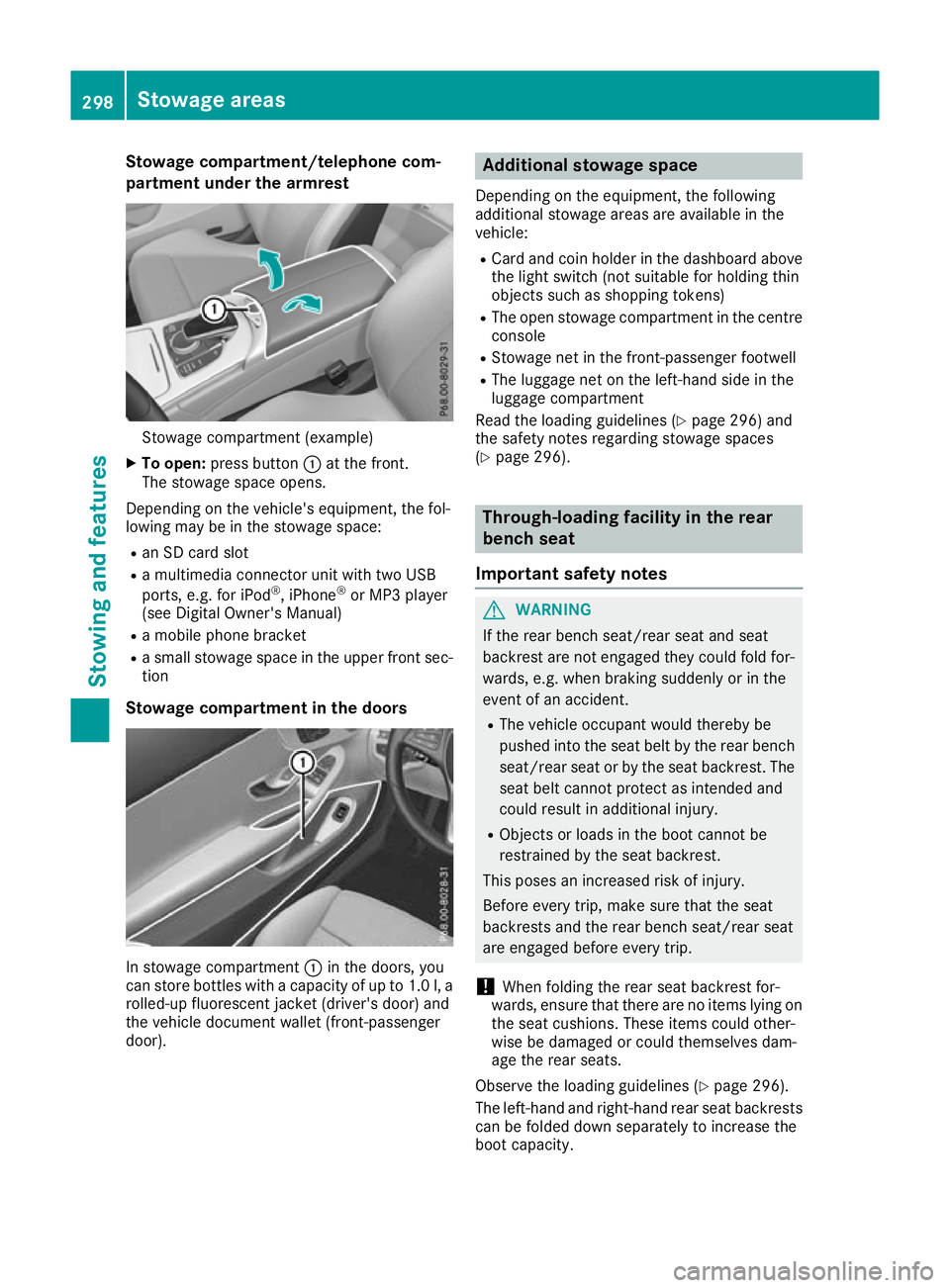
Stowage compartment/telephone com-
partment under the armrest Stowage compartment (example)
X To open: press button :at the front.
The stowage space opens.
Depending on the vehicle's equipment, the fol-
lowing may be in the stowage space:
R an SD card slot
R a multimedia connector unit with two USB
ports, e.g. for iPod ®
, iPhone ®
or MP3 player
(see Digital Owner's Manual)
R a mobile phone bracket
R a small stowage space in the upper front sec-
tion
Stowage compartment in the doors In stowage compartment
:in the doors, you
can store bottles with a capacity of up to 1.0 l, a
rolled-up fluorescent jacket (driver's door) and
the vehicle document wallet (front-passenger
door). Additional stowage space
Depending on the equipment, the following
additional stowage areas are available in the
vehicle:
R Card and coin holder in the dashboard above
the light switch (not suitable for holding thin
objects such as shopping tokens)
R The open stowage compartment in the centre
console
R Stowage net in the front-passenger footwell
R The luggage net on the left-hand side in the
luggage compartment
Read the loading guidelines (Y page 296) and
the safety notes regarding stowage spaces
(Y page 296). Through-loading facility in the rear
bench seat
Important safety notes G
WARNING
If the rear bench seat/rear seat and seat
backrest are not engaged they could fold for- wards, e.g. when braking suddenly or in the
event of an accident.
R The vehicle occupant would thereby be
pushed into the seat belt by the rear bench
seat/rear seat or by the seat backrest. The
seat belt cannot protect as intended and
could result in additional injury.
R Objects or loads in the boot cannot be
restrained by the seat backrest.
This poses an increased risk of injury.
Before every trip, make sure that the seat
backrests and the rear bench seat/rear seat
are engaged before every trip.
! When folding the rear seat backrest for-
wards, ensure that there are no items lying on the seat cushions. These items could other-
wise be damaged or could themselves dam-
age the rear seats.
Observe the loading guidelines (Y page 296).
The left-hand and right-hand rear seat backrests can be folded down separately to increase the
boot capacity. 298
Stowage areasStowing and features
Page 302 of 377
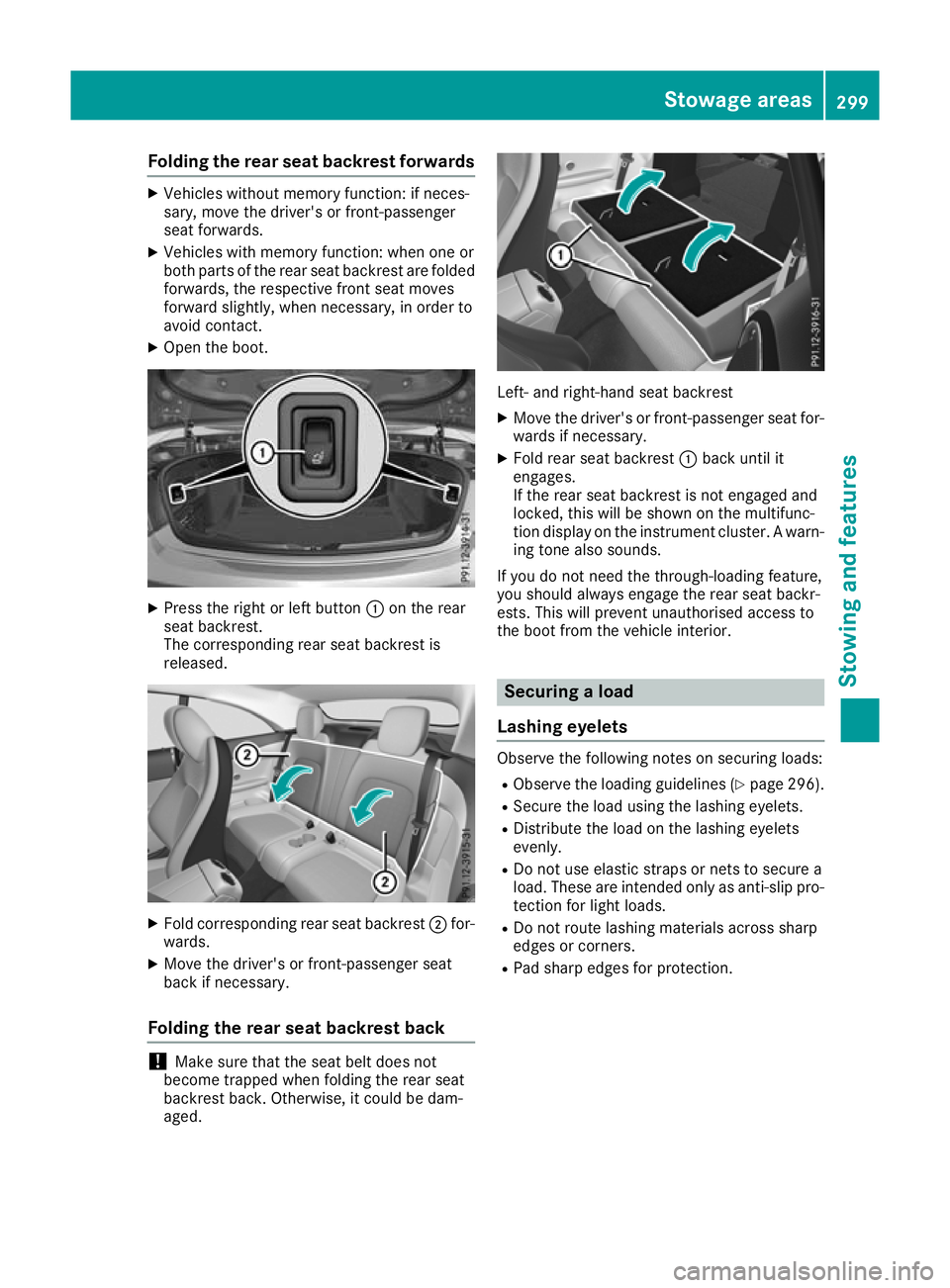
Folding the rear seat backrest forwards
X
Vehicles without memory function: if neces-
sary, move the driver's or front-passenger
seat forwards.
X Vehicles with memory function: when one or
both parts of the rear seat backrest are folded forwards, the respective front seat moves
forward slightly, when necessary, in order to
avoid contact.
X Open the boot. X
Press the right or left button :on the rear
seat backrest.
The corresponding rear seat backrest is
released. X
Fold corresponding rear seat backrest ;for-
wards.
X Move the driver's or front-passenger seat
back if necessary.
Folding the rear seat backrest back !
Make sure that the seat belt does not
become trapped when folding the rear seat
backrest back. Otherwise, it could be dam-
aged. Left- and right-hand seat backrest
X Move the driver's or front-passenger seat for-
wards if necessary.
X Fold rear seat backrest :back until it
engages.
If the rear seat backrest is not engaged and
locked, this will be shown on the multifunc-
tion display on the instrument cluster. A warn- ing tone also sounds.
If you do not need the through-loading feature,
you should always engage the rear seat backr-
ests. This will prevent unauthorised access to
the boot from the vehicle interior. Securing a load
Lashing eyelets Observe the following notes on securing loads:
R Observe the loading guidelines (Y page 296).
R Secure the load using the lashing eyelets.
R Distribute the load on the lashing eyelets
evenly.
R Do not use elastic straps or nets to secure a
load. These are intended only as anti-slip pro-
tection for light loads.
R Do not route lashing materials across sharp
edges or corners.
R Pad sharp edges for protection. Stowage areas
299Stowing and featu res Z