light MERCEDES-BENZ C-CLASS COUPE 2015 Owners Manual
[x] Cancel search | Manufacturer: MERCEDES-BENZ, Model Year: 2015, Model line: C-CLASS COUPE, Model: MERCEDES-BENZ C-CLASS COUPE 2015Pages: 385, PDF Size: 13.12 MB
Page 184 of 385
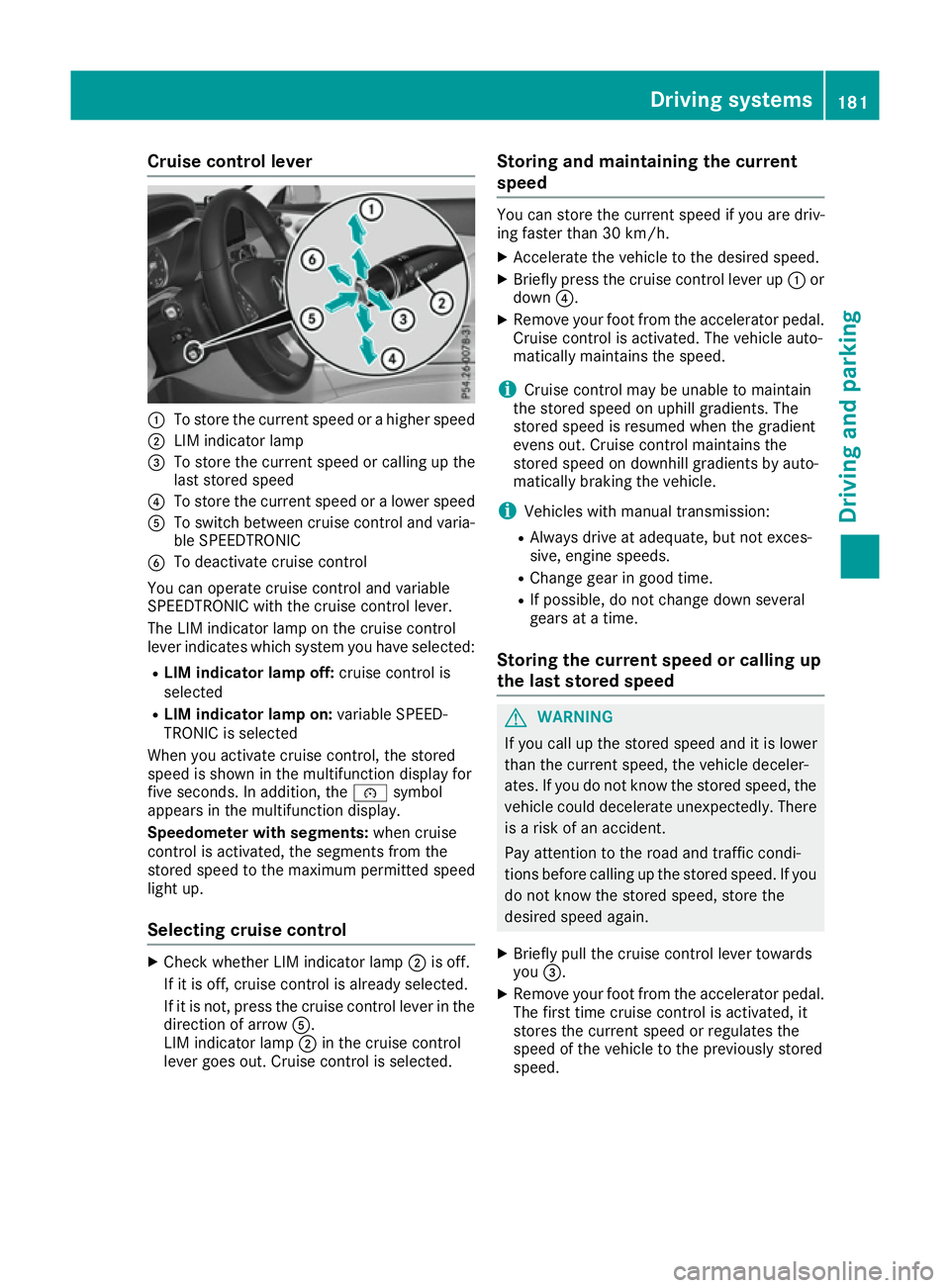
Cruise control lever
:
To store th ecurren tspee dorah igher speed
; LIM indicator lamp
= To store th ecurren tspee dorc alling up the
last store dspeed
? To store th ecurren tspee doral ower speed
A To switch between cruise control and varia-
ble SPEEDTRONIC
B To deactivate cruise control
You can operate cruise control and variable
SPEEDTRONIC wit hthe cruise control lever.
The LIM indicator lamp on th ecruise control
leve rindicates whic hsystem you have selected:
R LIM indicator lam poff:cruise control is
selected
R LIM indicator lam pon:variable SPEED-
TRONIC is selected
When you activat ecruise control, th estored
spee diss hown in th emultifunction display for
fiv es econds. In addition ,the é symbol
appear sinthemultifunction display.
Speedometer with segments: when cruise
control is activated, th esegments from the
store dspee dtot hemaximum permitted speed
light up.
Selecting cruise control X
Chec kwhether LIM indicator lamp ;is off.
If it is off ,cruise control is alread yselected.
If it is not, pres sthe cruise control leve rinthe
direction of arrow A.
LIM indicator lamp ;in th ecruise control
leve rgoes out .Cruis econtrol is selected. Storing and maintaining th
ecurrent
speed You can store th
ecurren tspee dify ou are driv-
ing faster than 30 km/h.
X Accelerat ethe vehicle to th edesired speed.
X Briefl ypres sthe cruise control leve rup:or
down ?.
X Remove your foo tfro mt heaccelerato rpedal.
Cruis econtrol is activated. The vehicle auto-
maticall ymaintain sthe speed.
i Cruis
econtrol may be unable to maintain
th es toreds pee donu phill gradients .The
store dspee disr esumed when th egradient
evens out .Cruis econtrol maintain sthe
store dspee dond ownhill gradients by auto-
maticall ybraking th evehicle.
i Vehicle swithm anual transmission:
R Always driv eatadequate, but no texces-
sive, engin espeeds.
R Change gear in good time.
R If possible, do no tchang ed own several
gear satat ime.
Storing th ecurren tspeed or callin gup
th el ast stored speed G
WARNING
If you call up th estoreds pee dand it is lower
than th ecurren tspeed, th evehicle deceler-
ates. If you do no tkno wt he store dspeed, the
vehicle coul ddecelerate unexpectedly. There
is ar iskofana ccident.
Pay attentio ntotheroad and traffic condi-
tions before calling up th estoreds peed. If you
do no tknowt he store dspeed, store the
desired spee dagain.
X Briefl ypull th ecruise control leve rtow ards
you =.
X Remove your foo tfro mt heaccelerato rpedal.
The first tim ecruise control is activated, it
store sthe curren tspee dorr egulate sthe
spee doft hevehicle to th epreviously stored
speed. Driving systems
181Driving and parking Z
Page 185 of 385
Setting
aspeed Bear in mind that it may take
abrief moment
until the vehicle has accelerated or braked to
the set speed.
X Press the cruise control lever up :for a
higher speed or down ?for alower speed.
X Keep the cruise control lever pressed until the
desired speed is reached.
X Release the cruise control lever.
The new speed is stored.
X To adjust the set speed in
1km/h incre-
ments: briefly press the cruise control lever
up : or down ?to the pressure point.
The last stored speed increases or decreases
in 1k m/h increments.
X To adjust the set speed in 10 km/h incre-
ments: briefly press the cruise control lever
up : or down ?beyond the pressure point.
The last stored speed increases or decreases in 10 km/h increments.
i Cruise control is not deactivated if you
depress the accelerator pedal. If you acceler-
ate to overtake, cruise control adjusts the
vehicle's speed to the last speed stored after
you have finished overtaking.
Deactivating cruise control There are several ways to deactivate cruise con-
trol:
X Briefly press the cruise control lever forwards
B.
or
X Brake.
or
X Briefly move the cruise control lever in the
direction of arrow A.
Variable SPEEDTRONIC is selected. LIM indi-
cator lamp ;in the cruise control lever is on.
Cruise control is automatically deactivated if: R you apply the electric parking brake
R you are driving at less than 30 km/h
R ESP ®
intervenes or you deactivate ESP ®
R while driving avehicle with manual transmis-
sion, you shift into neutral or depress the
clutch pedal for longer than six seconds R
on vehicles with manual transmission, you
shift to agear that is too high, and as aresult
the engine speed is too low
R on vehicles with automatic transmission, you
shift to position Nwhile driving
If cruise control is deactivated, you will hear a
warning tone. You will see the Cruise con‐
Cruise con‐
trol off trol off message in the multifunction display
for approximately five seconds.
i The last speed stored is cleared when you
switch off the engine. SPEEDTRONIC
General notes SPEEDTRONIC brakes automatically so that you
do not exceed the set speed. Change into a
lower gear in good time on long and steep down-
hill gradients. Take particular note of this when
driving aladen vehicle. By doing so, you will
make use of the braking effect of the engine.
This relieves the load on the brake system and
preventst he brakes from overheating and wear-
ing too quickly.
Important safety notes If you fail to adapt your driving style, SPEED-
TRONIC can neither reduce the risk of an acci-
dent nor override the laws of physics. SPEED-
TRONIC cannot take into account road, weather or traffic conditions. SPEEDTRONIC is only an
aid. You are responsible for the distance to the
vehicle in front,f or vehicle speed, for braking in
good time, and for staying in lane.
If there is achange of drivers, advise the new
driver of the speed stored.
You can set avariable or permanent limit speed:
R variable for speed limits, e.g. in built-up areas
R permanent for long-term speed restrictions,
e.g. when driving with winter tyres fitted
(Y page 184)
i The speed indicated in the speedometer
may differ slightly from the limit speed stored. 182
Driving systemsDriving and parking
Page 186 of 385
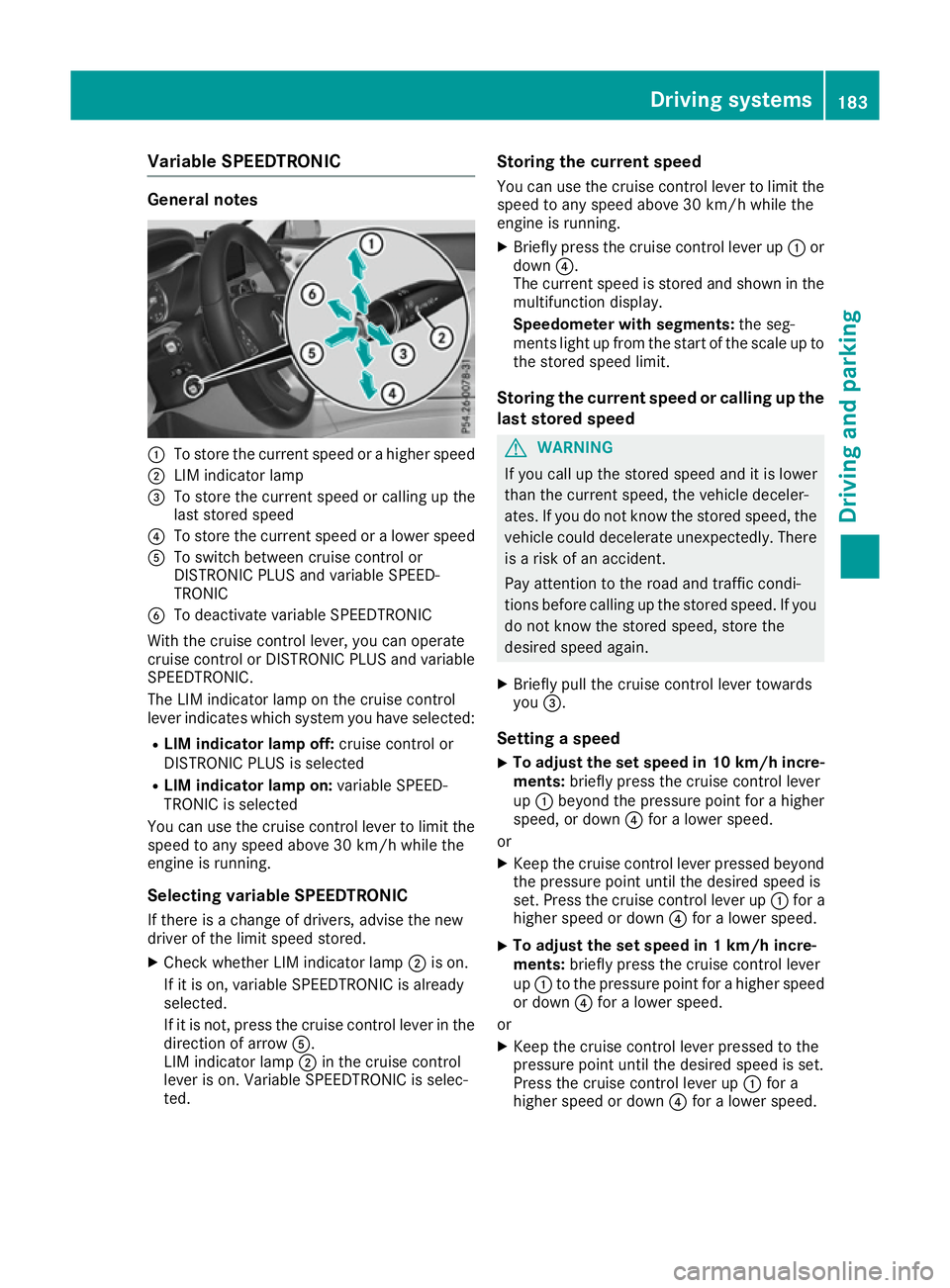
Variable SPEEDTRONIC
General notes
:
To stor ethe current speed or ahighe rspeed
; LIM indicator lamp
= To stor ethe current speed or calling up the
last stored speed
? To stor ethe current speed or alower speed
A To switch between cruis econtro lor
DISTRONIC PLU Sand variabl eSPEED-
TRONIC
B To deactivate variabl eSPEEDTRONIC
With the cruis econtro llev er, yo ucan operate
cruis econtro lorDISTRONIC PLU Sand variable
SPEEDTRONIC.
The LIM indicator lamp on the cruis econtrol
lever indicates which system yo uhaves elected:
R LIMi ndicator lamp off: cruisecontro lor
DISTRONIC PLU Sisselected
R LIMi ndicator lamp on: variableSPEED-
TRONIC is selected
Yo uc an us ethe cruis econtro llev er to limit the
speed to any speed above 30 km/h whil ethe
engine is running.
Selecting variabl eSPEEDTRONIC
If ther eisac hange of drivers ,adviset he new
driver of the limit speed stored.
X Check whethe rLIM indicator lamp ;is on.
If it is on, variabl eSPEEDTRONIC is already
selected.
If it is not, press the cruis econtro llev er in the
direction of arrow A.
LIM indicator lamp ;in the cruis econtrol
lever is on. Variabl eSPEEDTRONIC is selec-
ted. Storin
gthe current speed
Yo uc an us ethe cruis econtro llev er to limit the
speed to any speed above 30 km/h whil ethe
engine is running.
X Briefly press the cruis econtro llev er up :or
down ?.
The current speed is stored and shown in the
multifunctio ndisplay.
Speedomete rwiths egments: the seg-
ments light up from the start of the scale up to
the stored speed limit.
Storin gthe current speed or calling up the
las tstored speed G
WARNING
If yo ucallupt he stored speed and it is lower
tha nthe current speed ,the vehicl edeceler-
ates. If yo udonot know the stored speed ,the
vehicl ecould decelerate unexpectedly .There
is ar iskofana ccident.
Pa ya ttentio ntothe roa dand traffic condi-
tions before calling up the stored speed .Ifyou
do not know the stored speed ,stor ethe
desired speed again.
X Briefly pull the cruis econtro llev er towards
you =.
Settin gaspeed
X To adjust the se
tspeed in 10 km/h incre-
ments: brieflypress the cruis econtro llev er
up : beyond the pressure point for ahigher
speed ,ordown?for alower speed.
or X Kee pthe cruis econtro llev er presse dbeyond
the pressure point unti lthe desired speed is
set. Press the cruis econtro llev er up :for a
highe rspeed or down ?for alower speed.
X To adjust the se
tspeed in 1km/h incre-
ments: brieflypress the cruis econtro llev er
up : to the pressure point for ahighe rspeed
or down ?for alower speed.
or X Kee pthe cruis econtro llev er presse dtothe
pressure point unti lthe desired speed is set.
Press the cruis econtro llev er up :for a
highe rspeed or down ?for alower speed. Driving systems
183Driving andparking Z
Page 187 of 385
Switching SPEEDTRONIC to passive
If you depress the accelerator pedal beyond the
pressure point (kickdown), SPEEDTRONIC is
switched to passive mode. The SPEEDTRONIC SPEEDTRONIC
suspended
suspended message appears in the multifunc-
tion display.
You can then exceed the stored speed. SPEED-
TRONIC is activated again if you:
R drive slower than the stored speed without
kickdown
R set anew speed or
R call up the last speed stored again
The SPEEDTRONIC suspended SPEEDTRONIC suspended message in the
multifunction display disappears.
Deactivating variable SPEEDTRONIC
It is not possible to deactivate variable SPEED-
TRONIC by braking.
There are several ways to deactivate variable
SPEEDTRONIC:
X Briefly press the cruise control lever forwards
B.
or X Briefly press the cruise control lever in the
direction of arrow A.
LIM indicator lamp ;in the cruise control
lever goes out. Variable SPEEDTRONIC is
deactivated.
Cruise control or DISTRONIC PLUS is selec-
ted.
i The last speed stored is cleared when you
switch off the engine.
Permanent SPEEDTRONIC
You can use the on-board computer to limit the
speed permanently to avalue between
160 km/h(e.g. for driving on winter tyres) and
the maximum speed (Y page 248).
Shortly before the stored speed is reached, it
appears in the multifunction display.
Permanent SPEEDTRONIC remains active, even
if variable SPEEDTRONIC is deactivated.
You cannot exceed the stored limit speed, even if you depress the accelerator pedal beyond the
pressure point (kickdown). DISTRONIC PLUS
General notes DISTRONIC PLUS regulates the speed and auto-
matically helps you maintain the distance to the
vehicle detected in front.V ehicles are detected
with the aid of the radar sensor system.
DISTRONIC PLUS brakes automatically so that
the set speed is not exceeded.
Change into alower gear in good time on long
and steep downhill gradients. Take particular
note of this when driving aladen vehicle. By
doing so, you will make use of the braking effect
of the engine. This relieves the load on the brake
system and preventst he brakes from overheat-
ing and wearing too quickly.
If DISTRONIC PLUS detectst hat there isarisk of
ac ollision, you will be warned visuallya nd
acoustically. Without your intervention,
DISTRONIC PLUS cannot prevent acollision. An
intermittent warning tone will then sound and
the distance warning lamp will light up in the
instrumen tcluster. Brake immediately to
increase the distance to the vehicle driving in
front,ort ake evasive action, provided it is safe
to do so.
DISTRONIC PLUS operates in the range
between 0km/h and 200 km/h.
Do not use DISTRONIC PLUS while driving on
roads with steep gradients.
Important safety notes G
WARNING
DISTRONIC PLUS does not react to:
R people or animals
R stationary obstacles on the road, e.g. stop-
ped or parked vehicles
R oncominga nd crossing traffic
As aresult, DISTRONIC PLUS may neither give
warnings nor interveneins uch situations.
There is arisk of an accident.
Always pay careful attention to the traffic sit- uation and be ready to brake. G
WARNING
DISTRONIC PLUS cannot always clearly rec-
ognise other road users and complex traffic
conditions. 184
Driving systemsDriving and parking
Page 192 of 385
X
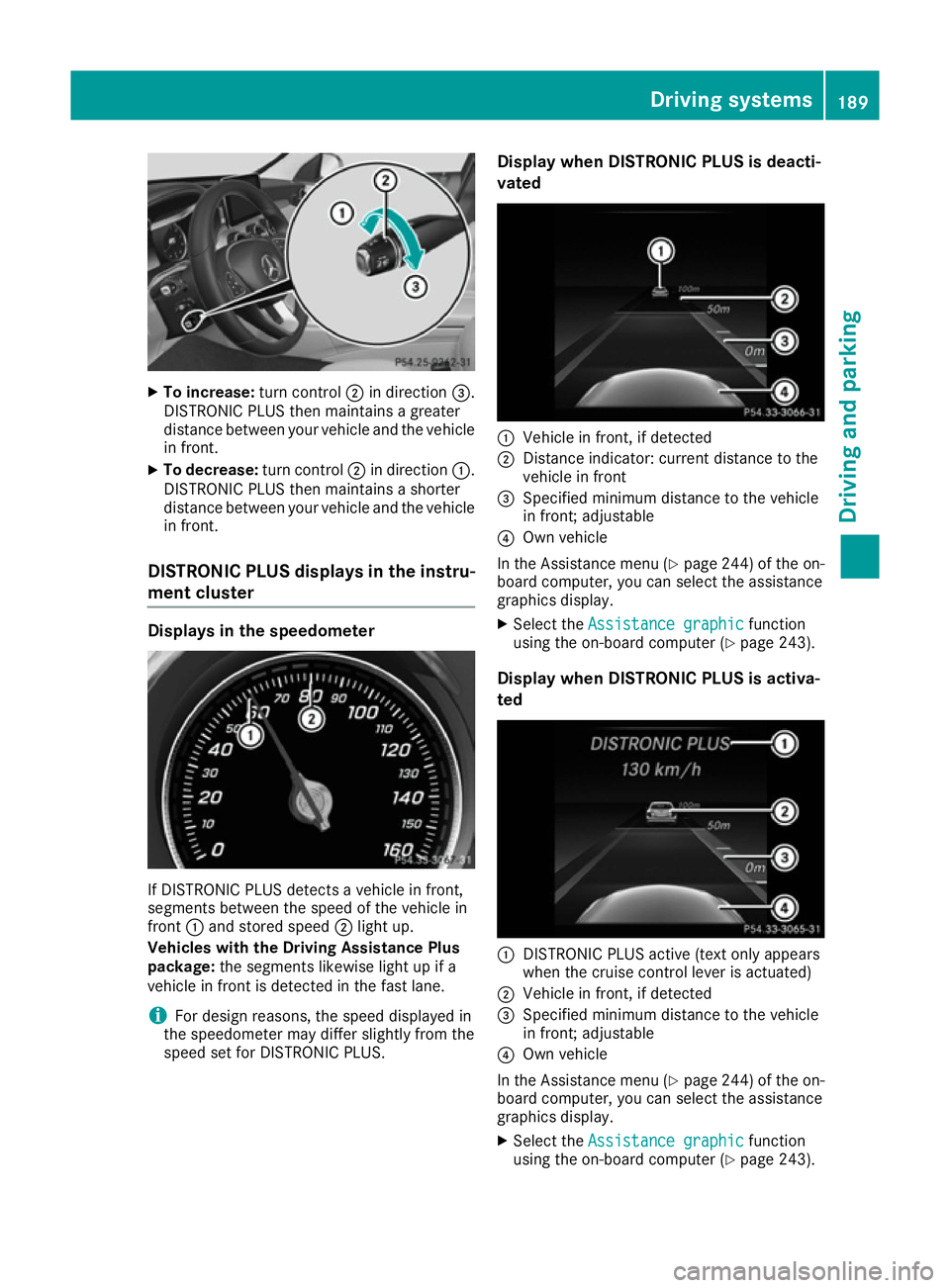
To increase: turn control;in direction =.
DISTRONIC PLU Sthen maintains agreater
distance between your vehicl eand the vehicle
in front.
X To decrease: turn control;in direction :.
DISTRONIC PLU Sthen maintains ashorter
distance between your vehicl eand the vehicle
in front.
DISTRONI CPLUSd isplay sinthe instru-
men tcluster Displays in the speedometer
If DISTRONIC PLU
Sdetects avehicl einf ront,
segments between the speed of the vehicl ein
front :and stored speed ;light up.
Vehicles with the Driving Assistance Plus
package: the segments likewis elight up if a
vehicl einfront is detecte dinthe fas tlan e.
i For design reasons
,the speed displayed in
the speedometer ma ydiffer slightl yfrom the
speed set for DISTRONIC PLUS. Display when DISTRONI
CPLUSisd eacti-
vated :
Vehicl einfront, if detected
; Distance indicator: current distance to the
vehicl einfront
= Specified minimu mdistance to the vehicle
in front; adjustable
? Ownvehicle
In the Assistance menu (Y page 244) of the on-
board computer, yo ucan select the assistance
graphics display.
X Select the Assistanc egraphic
Assistanc egraphic function
using the on-board compute r(Ypage 243).
Display when DISTRONI CPLUSisa ctiva-
ted :
DISTRONIC PLU Sactive (text onl yappea rs
when the cruis econtro llev er is actuated)
; Vehicl einfront, if detected
= Specified minimu mdistance to the vehicle
in front; adjustable
? Ownvehicle
In the Assistance menu (Y page 244)ofthe on-
board computer, you can select the assistance
graphics display.
X Select the Assistance graphic Assistance graphic function
using the on-board computer (Y page243). Driving systems
189Driving and parking Z
Page 193 of 385
You will see the stored speed for approximately
five seconds when you activate DISTRONIC
PLUS.
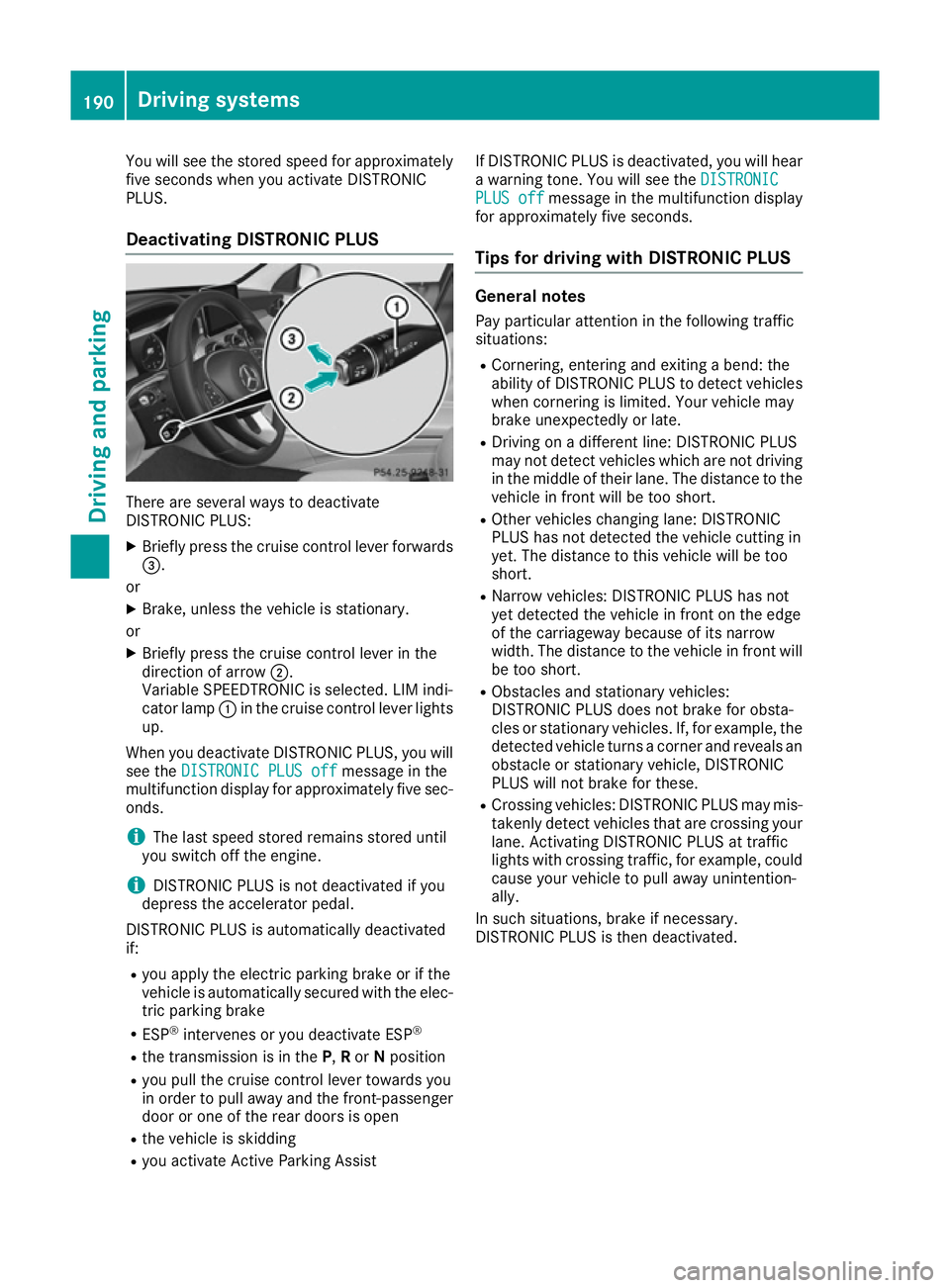
Deactivating DISTRONIC PLUS There are several ways to deactivate
DISTRONIC PLUS:
X Briefly press the cruis econtrol lever forwards
=.
or
X Brake, unless the vehicle is stationary.
or X Briefly press the cruis econtrol lever in the
direction of arrow ;.
Variable SPEEDTRONIC is selected. LIM indi-
cator lamp :in the cruis econtrol lever lights
up.
When you deactivate DISTRONIC PLUS ,you will
see the DISTRONI CPLUS off
DISTRONI CPLUS off messageinthe
multifunction display for approximately five sec-
onds.
i The last speed stored remain
sstored until
you switc hoff the engine.
i DISTRONIC PLUS is not deactivate
difyou
depres sthe accelerator pedal.
DISTRONIC PLUS is automatically deactivated
if: R you apply the electric parking brak eorifthe
vehicle is automatically secured with the elec- tric parking brake
R ESP ®
intervenes or you deactivate ESP ®
R the transmission is in the P,Ror Nposition
R you pull the cruis econtrol lever towards you
in order to pull away and the front-passenger door or one of the rear doors is open
R the vehicle is skidding
R you activate Activ eParking Assist If DISTRONIC PLUS is deactivated, you will hear
aw arnin gtone. You will see the DISTRONIC
DISTRONIC
PLUS off PLUS off messageinthe multifunction display
for approximately five seconds.
Tip sfor driving with DISTRONIC PLUS General notes
Pay particular attention in the followin gtraffic
situations:
R Cornering, enterin gand exiting abend: the
ability of DISTRONIC PLUS to detec tvehicles
when cornering is limited. Your vehicle may
brak eunexpectedly or late.
R Driving on adifferen tline: DISTRONIC PLUS
may not detec tvehicles which are not driving
in the middle of their lane. The distance to the
vehicle in fron twill be too short.
R Other vehicles changing lane: DISTRONIC
PLUS has not detected the vehicle cuttin gin
yet. The distance to this vehicle will be too
short.
R Narro wvehicles: DISTRONIC PLUS has not
yet detected the vehicle in fron tonthe edge
of the carriageway because of its narrow
width. The distance to the vehicle in fron twill
be too short.
R Obstacles and stationar yvehicles:
DISTRONIC PLUS does not brak efor obsta-
cles or stationar yvehicles. If, for example, the
detected vehicle turn sacorner and reveals an
obstacle or stationar yvehicle, DISTRONIC
PLUS will not brak efor these.
R Crossin gvehicles: DISTRONIC PLUS may mis-
takenly detec tvehicles that are crossin gyour
lane. Activatin gDISTRONIC PLUS at traffic
light swith crossin gtraffic ,for example, could
cause your vehicle to pull away unintention-
ally.
In such situations ,brak eifn ecessary.
DISTRONIC PLUS is the ndeactivated. 190
Driving systemsDriving and parking
Page 194 of 385
DISTRONI
CPLUS wit hSteering Assist
an dS top&Go Pilot General notes
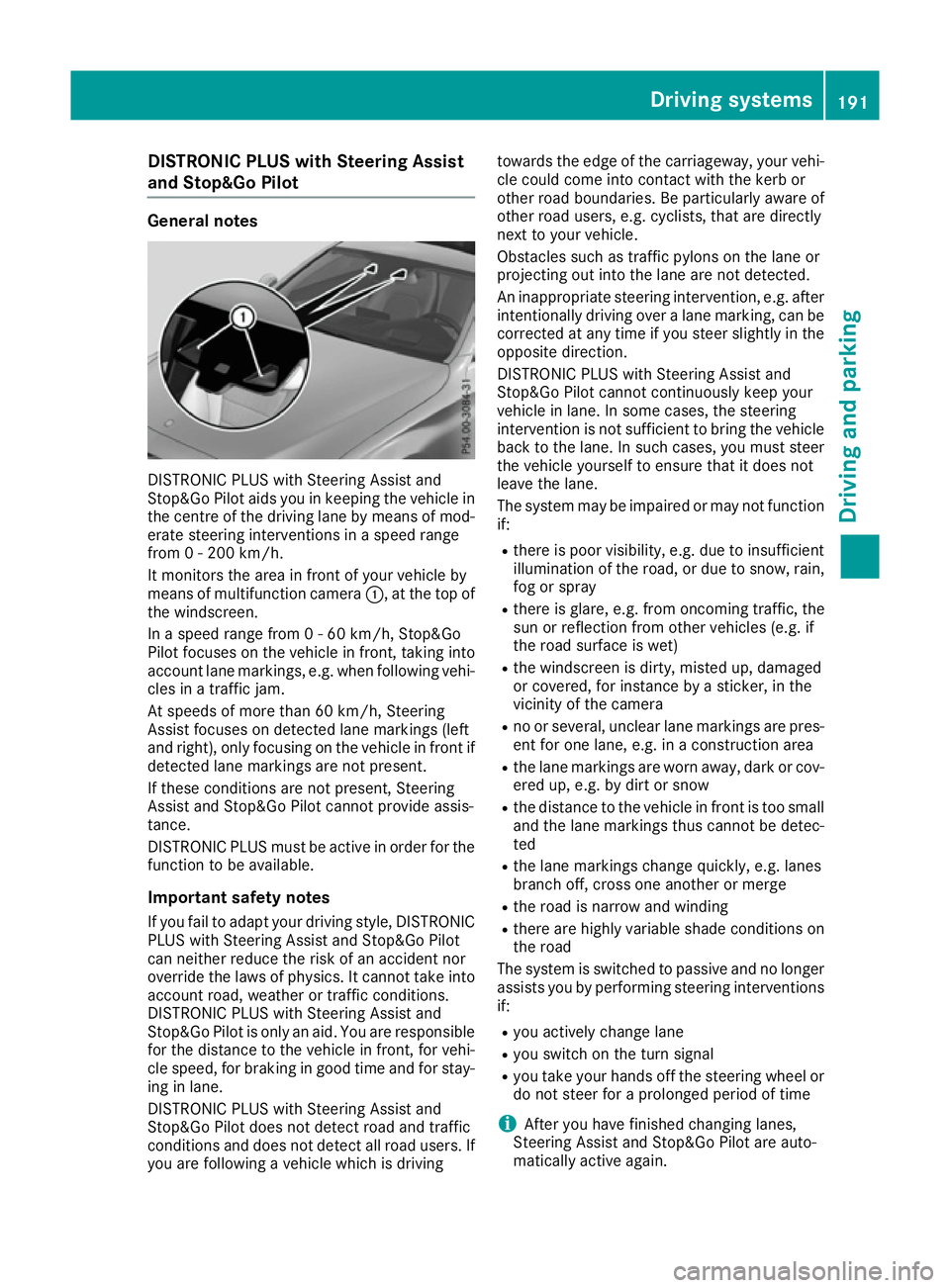
DISTRONIC PLU
SwithS teerin gAssista nd
Stop&Go Pilo taids you in keepin gthe vehicle in
th ec entre of thedrivin glan ebym eans of mod-
erate steerin ginterventions inas peed range
from 0-200km/h.
It monitors th eareainf rontof your vehicle by
means of multifunction camera :,atthetopof
th ew indscreen.
In as peed range from 0-60km/h, Stop&Go
Pilo tfoc uses on th evehicle in front, taking into
accoun tlan em arkings, e.g. when followin gvehi-
cles in atraffic jam.
At speeds of more than 60 km/h, Steering
Assis tfoc uses on detecte dlanem arking s(left
and right), only focusin gonthevehicle in fron tif
detecte dlanem arking sare no tpresent.
If these condition sare no tpresent, Steering
Assis tand Stop&Go Pilo tcanno tprovid eassis-
tance.
DISTRONIC PLU Smustbea ctive in order fo rthe
function to be available.
Important safet ynotes
If you fail to adapt your drivin gstyle, DISTRONIC
PLU SwithS teerin gAssista nd Stop&Go Pilot
can neither reduce th eriskofana ccidentnor
override th elaws of physics. It canno ttak einto
accoun troa d, weather or traffic conditions.
DISTRONIC PLU SwithS teerin gAssista nd
Stop&Go Pilo tisonlyana id. You are responsible
fo rt he distanc etothevehicle in front, fo rvehi-
cl es peed, fo rbraking in goo dtimea nd fo rstay-
in ginl ane.
DISTRONIC PLU SwithS teerin gAssista nd
Stop&Go Pilo tdoesn otdetec troa da nd traffic
condition sand doe snotdetec tall road users. If
you are followin gavehicle whic hisdriving toward
sthe edg eoft hecarriageway, your vehi-
cl ec ould come into contact wit hthe kerb or
other road boundaries .Beparticularly awar eof
other road users, e.g. cyclists, that are directly
next to your vehicle.
Obstacles suc hastraffic pylon sonthelaneor
projectin gout into th elan ea re no tdetected.
An inappropriat esteerin gintervention, e.g. after
intentionally drivin goveral anem arking ,can be
correcte datany time if you steer slightly in the
opposite direction.
DISTRONIC PLU SwithS teerin gAssista nd
Stop&Go Pilo tcanno tcontinu ously keep your
vehicle in lane. In som ecases, th esteering
intervention is no tsufficien ttobring th evehicle
bac ktot helane. In suc hcases, you mus tsteer
th ev ehicle yoursel ftoensuret hatitd oesn ot
leav ethe lane.
The syste mmay be impaire dormay notfunction
if:
R there is poo rvisibility, e.g. due to insufficient
illumination of th eroad, or due to snow, rain,
fo gors pray
R there is glare, e.g. from oncomin gtraffic ,the
sun or reflection from other vehicles (e.g. if
th er oads urfac eisw et)
R thew indscree nisdirty, miste dup, damaged
or covered, fo rinstance byasticker ,inthe
vicinit yofthe camera
R no or several, unclear lan emarking sare pres-
en tfor onelane, e.g. in aconstructio narea
R thel an em arking sare wor naway, dar korcov-
ere dup, e.g. by dir torsnow
R thed istanc etothevehicle in fron tistoosmall
and th elan em arking sthusc anno tbed etec-
ted
R thel an em arking schang eq uickly, e.g. lanes
branc hoff,c ross on eanother or merge
R ther oadisn arrowand winding
R there are highly variable shade condition son
th er oad
The syste misswitched to passive and no longer
assist syou by performin gsteerin ginterventions
if:
R you actively chang elane
R you switch on th eturns ignal
R you take your hands of fthe steerin gwhee lor
do no tsteer fo raprolonged period of time
i Afte
ryou hav efinished changin glanes,
Steerin gAssista nd Stop&Go Pilo tare auto-
matically active again. Driving syste
ms
191Driving an dparking Z
Page 195 of 385
Steering Assist and Stop&G
oPilot canno tpro-
vid ea ssistance:
R on very sharp corners
R when towing atrailer
R ifal os soft yre pressure or adefectiv etyre has
bee ndetected and displayed
Pa ya ttention also to the important safety notes
for DISTRONIC PLU S(Ypage 184).
The steering interventions are carrie doutwith a
limite dsteering moment. The system requires
the driver to keep his hands on the steering
wheel and to stee rhimself.
If yo udon ot stee ryoursel forify outake your
hands off the steering wheel for aprolonged
perio doftime,the system will firs talert yo uwith
av isua lwarning .As teering wheel symbol
appears in the multifunction display .Ifyouhave
stil lnot started to stee rand have not taken hold
of the steering wheel afte rfive seconds at the
latest, awarning tone also sounds to remind you
to take control of the vehicle. Steering Assist
and Stop&G oPilot switch to passive mode.
DISTRONIC PLU Sremains active.
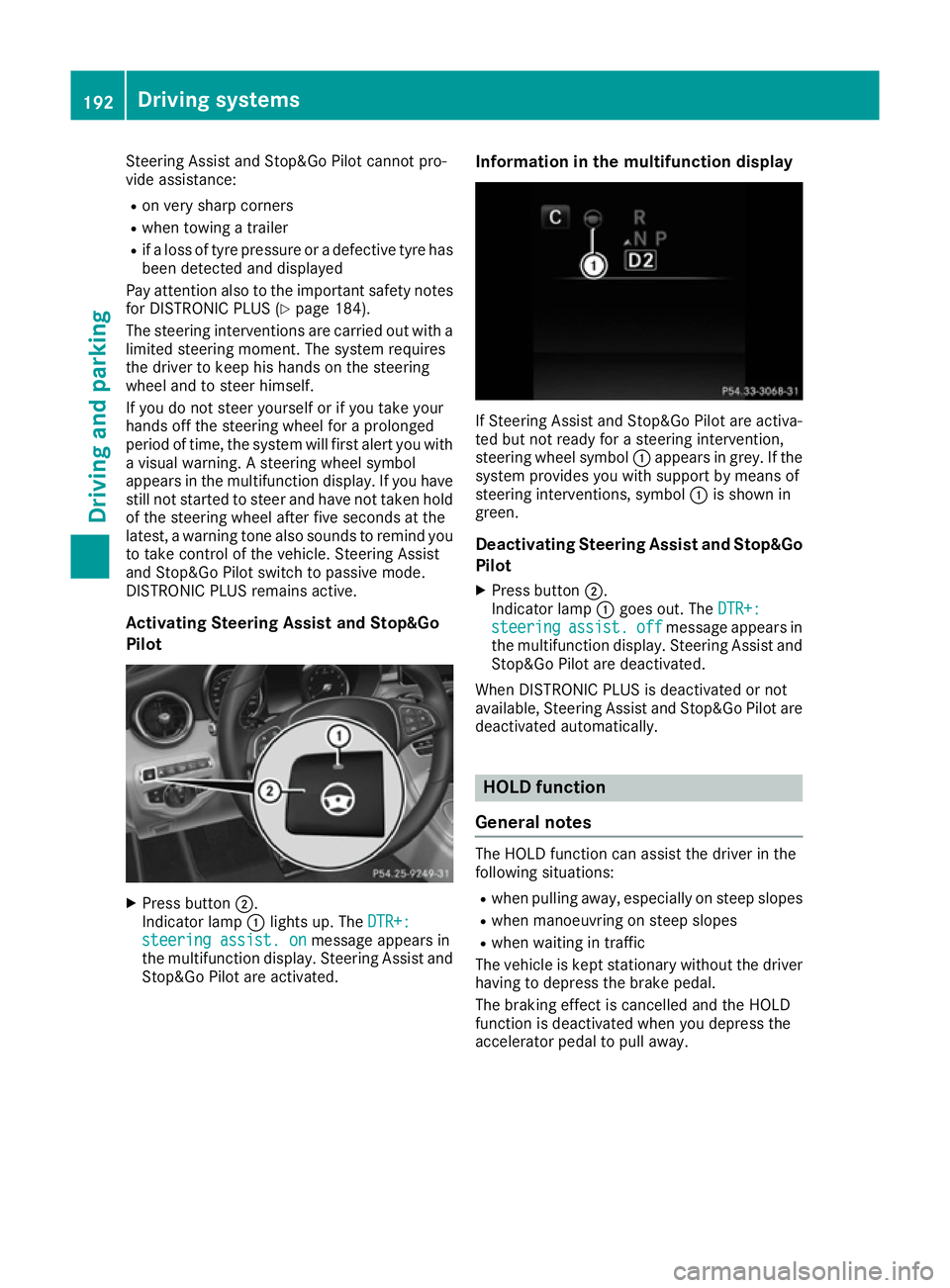
Activating Steering Assist and Stop&Go
Pilot X
Press button ;.
Indicato rlamp :lights up .The DTR+: DTR+:
steering assist. on
steering assist. on message appears in
the multifunction display .Steering Assist and
Stop&G oPilot are activated. Information in the multifunctio
ndisplay If Steering Assist and Stop&G
oPilot are activa-
ted bu tnot ready for asteering intervention,
steering wheel symbol :appears in grey. If the
system provides yo uwiths upport by means of
steering interventions, symbol :is shown in
green.
Deactivatin gSteering Assist and Stop&Go
Pilot
X Press button ;.
Indicato rlamp :goe sout.T he DTR+:
DTR+:
steering
steering assist.
assist.off
offmessage appears in
the multifunction display .Steering Assist and
Stop&G oPilot are deactivated.
Whe nDISTRONIC PLU Sisdeactivated or not
available ,Steering Assist and Stop&G oPilot are
deactivated automatically. HOL
Dfunction
General notes The HOLD function can assis
tthe driver in the
following situations:
R when pulling away ,especially on stee pslopes
R when manoeuvring on stee pslopes
R when waiting in traffic
The vehicl eiskept stationary withou tthe driver
having to depress the brake pedal.
The braking effect is cancelled and the HOLD
function is deactivated when yo udepress the
accelerato rpedal to pull away. 192
Drivin
gsystemsDriving and parking
Page 199 of 385
Vehicl
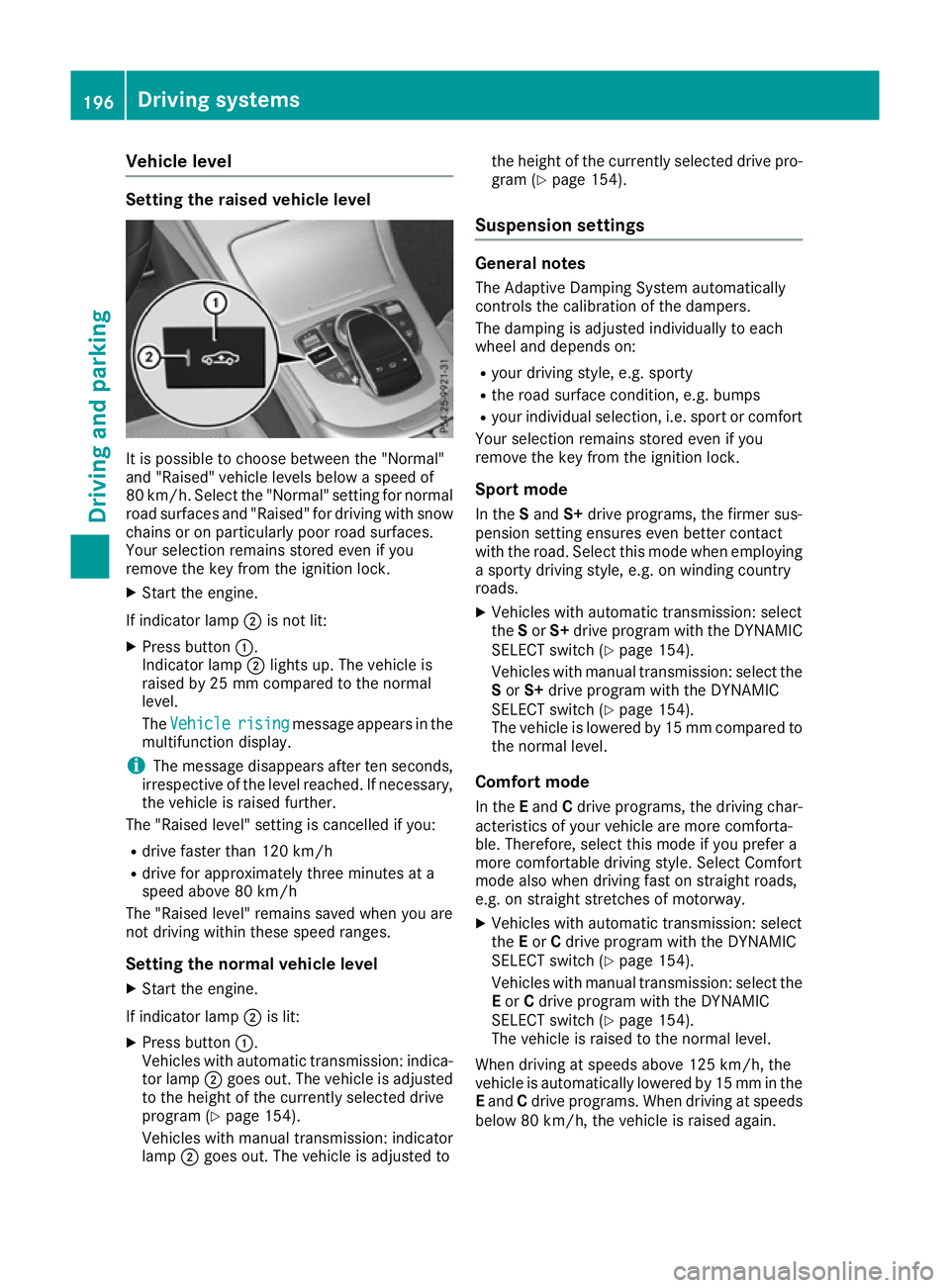
elevel Settin
gthe raised vehicle level It is possibl
etochoose between the "Normal"
and "Raised "vehicl elevelsb elow aspeed of
80 km/h .Select the "Normal" setting for normal
roa dsurfaces and "Raised "for driving with snow
chains or on particularly poor roa dsurfaces.
Your selection remains stored eve nifyou
remove the key from the ignition lock.
X Start the engine.
If indicator lamp ;is not lit:
X Press button :.
Indicato rlamp ;lights up .The vehicl eis
raised by 25 mm compare dtothe normal
level.
The Vehicle
Vehicle rising risingmessage appears in the
multifunctio ndisplay.
i The message disappears afte
rten seconds,
irrespective of the level reached. If necessary,
the vehicl eisraised further.
The "Raised level "setting is cancelled if you:
R drive faster tha n120 km/h
R drive for approximatel ythre em inutes at a
speed above 80 km/h
The "Raised level "remains saved when yo uare
not driving withi nthes espeed ranges.
Settin gthe normal vehicle level
X Start the engine.
If indicator lamp ;is lit:
X Press button :.
Vehicles with automatic transmission: indica-
tor lamp ;goe sout.T he vehicl eisadjusted
to the height of the currentl yselecte ddrive
progra m(Ypage 154).
Vehicles with manual transmission: indicator
lamp ;goe sout.T he vehicl eisadjusted to the height of the currentl
yselecte ddrive pro-
gra m( Ypage 154).
Suspension settings General notes
The Adaptive Damping System automatically
controls the calibration of the dampers.
The damping is adjusted individually to each
whee land depends on:
R your driving style ,e.g.s porty
R the roa dsurface condition, e.g .bum ps
R your individual selection, i.e .sport or comfort
Your selection remains stored eve nifyou
remove the key from the ignition lock.
Sport mode In the Sand S+drive programs, the firmer sus-
pension setting ensures eve nbetter contact
with the road. Select thi smodew hene mploying
as porty driving style ,e.g.onw inding country
roads.
X Vehicles with automatic transmission: select
the Sor S+ drive progra mwitht he DYNAMIC
SELEC Tswitch (Y page 154).
Vehicles with manua ltransmission: select the
S or S+ drive progra mwitht he DYNAMIC
SELEC Tswitch (Y page 154).
The vehicl eislowere dby15m mcompare dto
the norma llev el.
Comfort mode In the Eand Cdrive programs, the driving char-
acteristics of your vehicl eare more comforta-
ble. Therefore, select thi smodeify ouprefer a
more comfortabl edriving style .Select Comfort
mod ealsow hend riving fas tonstraight roads,
e.g .ons traight stretches of motorway.
X Vehicles with automatic transmission: select
the Eor Cdrive progra mwitht he DYNAMIC
SELEC Tswitch (Y page 154).
Vehicles with manua ltransmission: select the
E or Cdrive progra mwitht he DYNAMIC
SELEC Tswitch (Y page 154).
The vehicl eisraised to the norma llev el.
Whe ndriving at speed sabove 125 km/h ,the
vehicl eisautomaticall ylowere dby15m mint he
E and Cdrive programs. Whe ndriving at speeds
belo w80k m/h,the vehicl eisraised again. 196
Driving systemsDriving an
dparking
Page 200 of 385
AMG RIDE CONTROL
Genera lnotes The electronically controlled damping system
works continuously. This improves driving
safet yand rid ecomfo rt.
The damping is adjusted individually to each
whee land depend son:
R your drivin gstyle, e.g. sporty
R ther oad surfac econditi on,e.g.b umps
R your individual selection of Sport ,Sport+or
Comfort
The suspension setting is adjusted usin gthe
corresponding butto ninthecentre console.
i The mod
ecan also be set usin gthe
DYNAMIC SELECT switch (Y page 154).
This is only possibl eif:
R wit hthe AM GR IDEC ONTROL sport ssus-
pension butto nonthecentre console, and
R wit hthe DYNAMIC SELECT switch ,the
sam emodeiss elected for th echassis. This
is th ecase, for example, when bot hare set
to Comfort mode.
If th eignition is switched off for less than four
hours, th epreviously selected drive program is
activated when th eengineisn exts tarted. If the
ignition is switched off for mor ethanfour hours,
Comfort mod eisactivated when th eengineis
next started.
Sport mode The firmer setting of th
esuspension tuning in
Sport mod eensures eve nbette rcontac twith
th er oad .Selec tthism odew hen employin ga
sport ydrivin gstyle, e.g. on windin gcountry
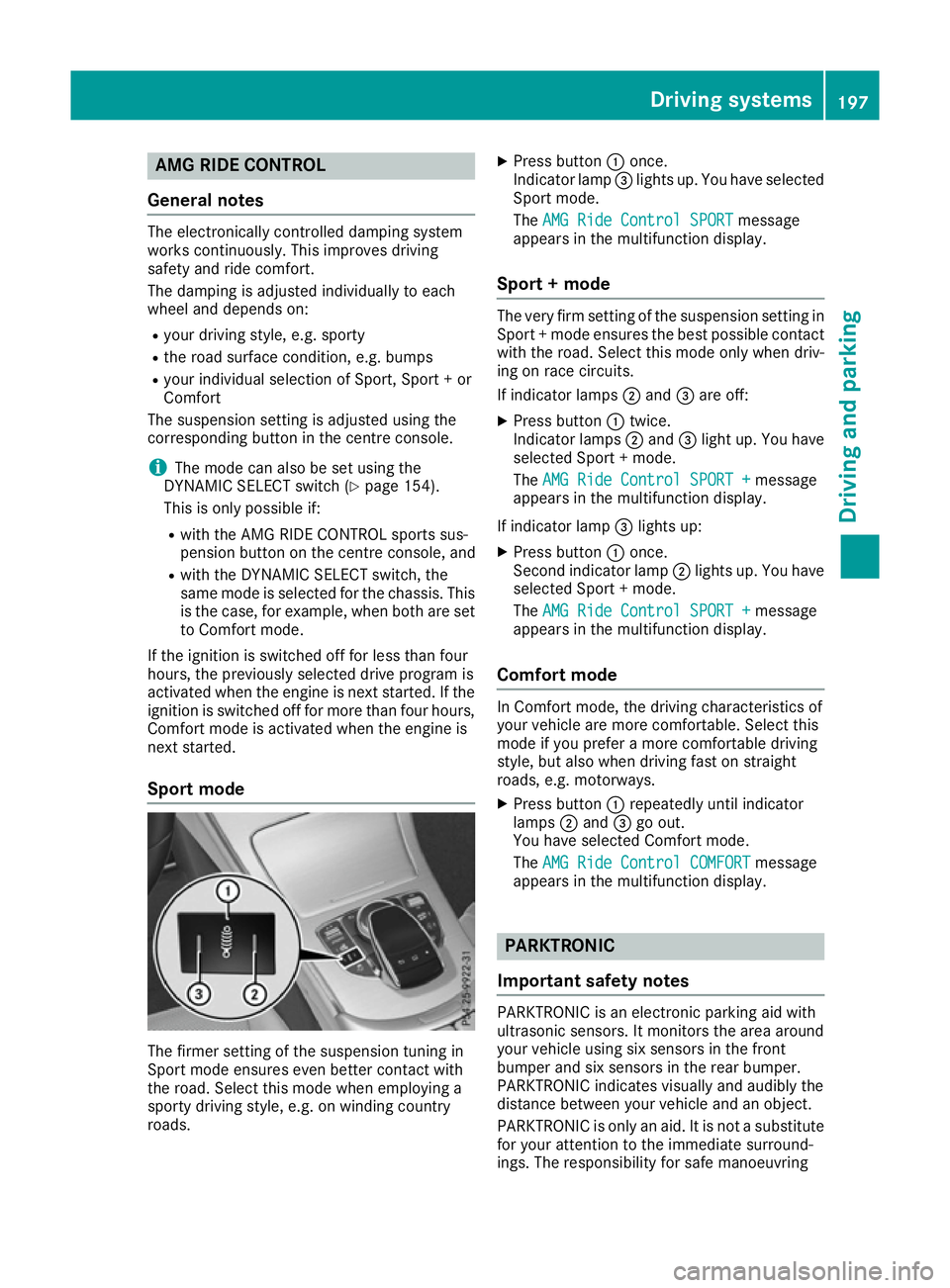
roads. X
Press button :once.
Indicato rlamp =lights up. You hav eselected
Sport mode.
The AMG Rid eContro lSPORT
AMG Rid eContro lSPORT message
appear sinthemultifunction display.
Sport +mode The ver
yfirms etting of th esuspension setting in
Sport +modee nsures th ebest possibl econtact
wit hthe road .Selec tthism odeo nlyw hen driv-
ing on rac ecircuits.
If indicator lamps ;and =are off:
X Press button :twice.
Indicato rlamps ;and =ligh tup. You have
selected Sport +mode.
The AMG Rid eContro lSPORT +
AMG Rid eContro lSPORT + message
appear sinthemultifunction display.
If indicator lamp =lights up:
X Press button :once.
Second indicator lamp ;lights up. You have
selected Sport +mode.
The AMG Rid eContro lSPORT +
AMG Rid eContro lSPORT + message
appear sinthemultifunction display.
Comfor tmode In Comfort mode, th
edrivin gcharacteristics of
your vehicl eare mor ecomfo rtable. Selec tthis
mod eify ou prefer amorec omfo rtable driving
style, but also when drivin gfastons traight
roads, e.g. motorways.
X Press button :repeatedly until indicator
lamps ;and =go out.
You hav eselected Comfort mode.
The AMG Rid eContro lCOMFORT
AMG Rid eContro lCOMFORT message
appear sinthemultifunction display. PARKTRONIC
Important safety notes PARKTRONI
Cisanelectronic parking aid with
ultrasonic sensors. It monitors th earea around
your vehicl eusings ix sensor sinthefront
bumper and six sensor sintherear bumper.
PARKTRONI Cindicates visually and audibly the
distanc ebetween your vehicl eand an object.
PARKTRONI Cisonlyana id. It is no tasubstitute
for your attention to th eimmediat esurround-
ings. The responsibilit yfor saf emanoeuvring Driving systems
197Driving and parking Z