light MERCEDES-BENZ C-CLASS COUPE 2015 Owners Manual
[x] Cancel search | Manufacturer: MERCEDES-BENZ, Model Year: 2015, Model line: C-CLASS COUPE, Model: MERCEDES-BENZ C-CLASS COUPE 2015Pages: 385, PDF Size: 13.12 MB
Page 238 of 385
transmission (shiftin
gmanually)
(Y page 163)
R j Activ eParking Assist (Y page 201)
R ¯ Cruise contro l(Ypage 180)
R È SPEEDTRONIC (Y page 182)
R _ Adaptive Highbea mAssist Plus
(Y page 121)
R è ECO start/sto pfunctio n(Ypage 149)
R ë HOLD functio n(Ypage 192)
R a DISTRONI CPLUSS teerin gAssist and
Stop&Go Pilo t(Y page 191)
R 120 km/h! 120 km/h! Maximum permissibl espeed
exceeded (only for certain countries) Head-up display
General notes The head-up displa
yprojects information from
the navigation syste mand the driver assistance
syste mabove the dashboard into the driver's
field of vision. Thi sallow sthe head-up displa yto
collect information withou tyou havin gtotake
your eyes off of the road.
Ar equirement for the displa yofthe contents is
tha tthe following functions ar eavailable in the
vehicl eand ar eswitched on:
R Cruise contro land SPEEDTRONIC
R DISTRONI CPLUS
R Traffi cSignA ssist
R Navigation
Important safety notes The head-up displa
yisonlyana idand is not a
substitute for attentiv edriving.
Speed limits and overtaking restrictions ar enot
always correctl ydisplayed .Traffi csigns always
have priority ove rthe Traffi cSignA ssist display.
The visibility of the head-up displa yisinfluenced
by the following conditions:
R the driver's seat position
R the positioning of the displa yimage
R the genera llig ht conditions
R sunglasse swithp olarisation filters
R We troa ds urfaces
R blocking of sunlight by objects on the display
cover In the event of extreme sunlight, sections of the
displa ymayfade .This ca nbereversed by
switching the head-up displa yoff and on again.
i Vehicles with the head-up displa
yareequip-
pe dw ithas pecial windscreen. Shoul drepairs
be necessary ,havet he windscreen replaced
at aq uali fied specialis tworkshop.
Displays and operation Switchin
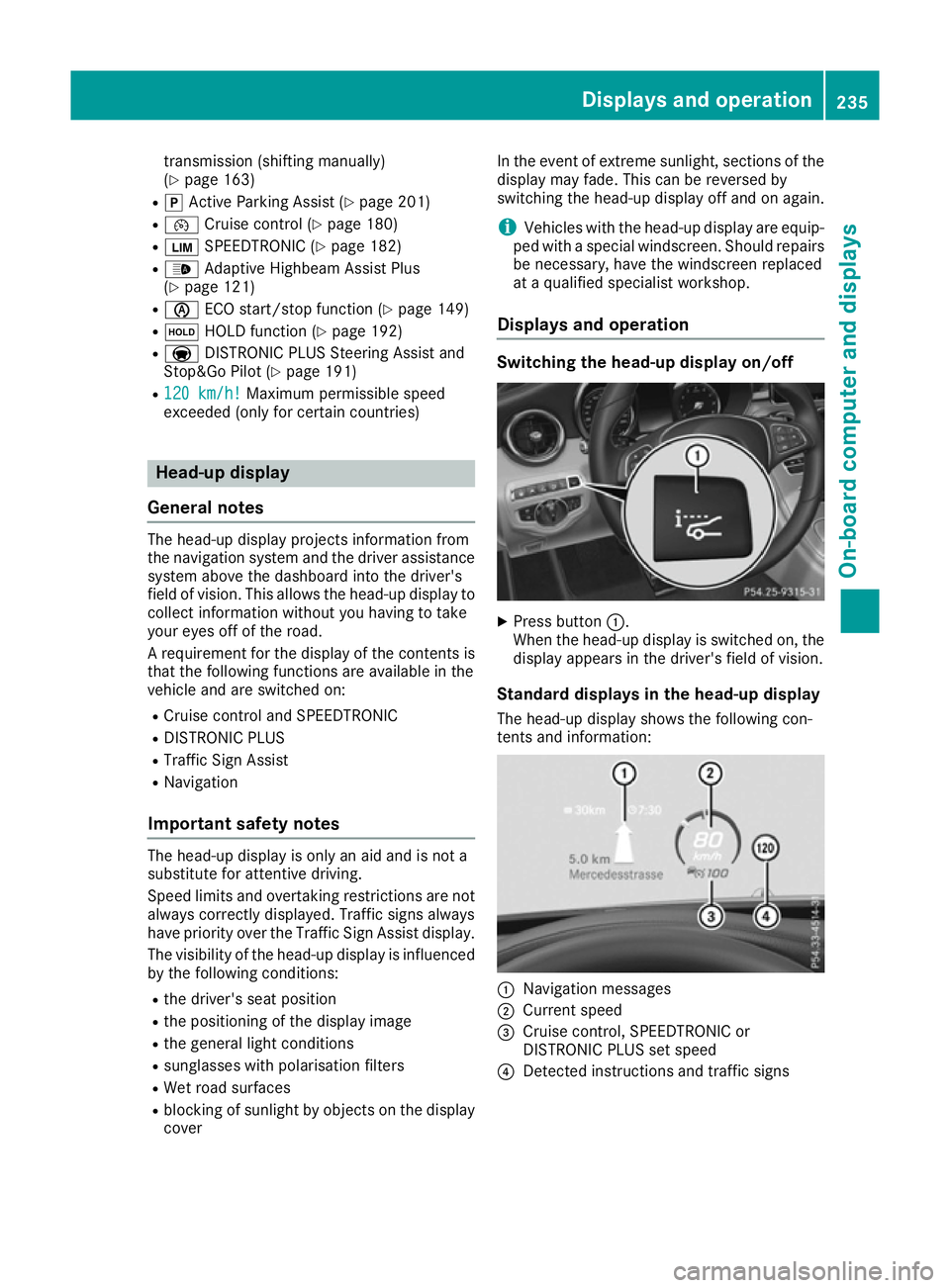
gthe head-up displa yon/off X
Press button :.
When the head-up displa yisswitched on, the
displa yappears in the driver's field of vision.
Standard displays in the head-up display
Th eh ead-u pdisplay shows the following con-
tents and information: :
Navigation messages
; Current speed
= Cruise control ,SPEEDTRONIC or
DISTRONI CPLUSs etspeed
? Detected instructions and traffi csigns Displays an
doperation
235On-boardcompu tera nd displays Z
Page 247 of 385
R
DISTRONI CPLUS(Ypage 184)
R Traffi cSignA ssist (Y page 216)
R Distance warning functio nand autono-
mou sbraking system of COLLISION PRE-
VENTION ASSIST PLU S(Ypage 69)
R PRE-SAFE ®
Brake (Y page 75)
R Blind Spo tAssist (Y page 218 )orActive
Blind Spo tAssist (Y page 221)
R ATTENTION ASSIST (Y page 215)
R Lane Keeping Assist (Y page 219)orActive
Lane Keeping Assist (Y page223)
X Press :to display the ATTENTION ASSIST
assessment. Servic
emenu
Introduction Depending on the equipment fitted in the vehi-
cle, you have the following options in the Ser‐
Ser‐
vice
vice menu:
R Calling up display messages in the message
memory (Y page253)
R Restarting the tyre pressure loss warning sys-
tem (Y page358) or checking the tyre pres-
sure electronically (Y page360)
R Calling up the service due date
(Y page3 25)
R Displaying the AdBlue ®
level and range
(Y page2 44) (BlueTEC vehicles only)
Displayin gthe AdBlue ®
level and range The
AdBlue
AdBlue menu is only available in BlueTEC
vehicles.
X Press òon the steering whee ltoopen the
menu list.
X Press :or9 on the steering whee lto
select the Service
Service menu.
X Confirm by pressing aon the steering
wheel.
X Press :or9 to select the AdBlue AdBlue
submenu.
X Press ato confirm yours election.
The range and AdBlue ®
level appear in abar
grap hint he multifunction display.
Observe the informatio nand notes on "Refuel-
ling" (Y page169). Setting
smenu
Introduction Depending on the equipment fitted in the vehi-
cle, you have the following options in the
Set‐ Set‐
tings
tings menu:
R Changing assistance settings (Y page244)
R Changing head-up display settings
(Y page2 46)
R Changing the light settings (Y page247)
R Changing the instrument cluster settings
(Y page2 48)
R Changing the vehicl esettings (Y page248)
R Restoring the factory settings (Y page249)
Assistanc esubmenu Deactivating/activating ESP
®
Observe the "Important safety notes" section in the description of ESP ®
(Y page7 2). G
WARNING
If you deactivate ESP ®
,E SP ®
no longer sta-
bilises the vehicle. There is an increase drisk
of skidding and an accident.
Only deactivate ESP ®
in the situations descri-
bed in the following.
It may be best to deactivate ESP ®
in the follow-
ing situations:
R when using snow chains
R in deep snow
R on sand or gravel
Deactivating/activating ESP ®
on Mercedes-
AMG vehicles (Y page73).
For further informatio nabout ESP ®
,s ee
(Y page7 1).
X Start the engine.
X Press òon the steering whee ltoopen the
menu list.
X Press :or9 on the steering whee lto
select the Settings
Settings menu.
X Confirm by pressing aon the steering
wheel.
X Press :or9 to select the Assistance Assistance
submenu.
X Press ato confirm.
X Select ESP
ESPwith : or9. 244
Menus and submenusOn-board computer and displays
Page 248 of 385
X
Press ato confirm.
The curren tselection appears.
X To activate/deactivate: press theabut-
ton again.
If the å warning lamp in the instrument
cluster lights up when the vehicle is ready to
drive, ESP ®
is deactivated.
If the ÷ andå warning lamps light up
continuously, ESP ®
is not availabl edue to amal-
function.
Observe the information on warning lamps
(Y page 287).
Observe the information on display messages
(Y page 254).
Traffic Sign Assist
You can activat eordeactivate the warning func-
tion of Traffic Sign Assist in the Traffic TrafficSign
Sign
Assist
Assist menu. When the message function is
activated, detected traffic signs and information appear in the multifunction display for five sec-
onds.
X Press òon the steerin gwheel to open the
menu list.
X Press the :or9 button on the steering
wheel to select the Settings
Settings menu.
X Confirm by pressing aon the steering
wheel.
X Press :or9 to select the Assistance Assistance
submenu.
X Press ato confirm.
X Select Traffic Sign Assist Traffic Sign Assist with: or
9.
X Press ato confirm.
The curren tselection appears.
X Activate or deactivat
ethe warning func-
tion: press aagain.
For further information about Traffic Sign Assist, see (Y page 216).
Activating/deactivating COLLISION PRE-
VENTION ASSIST PLUS
X Press òon the steerin gwheel to open the
menu list.
X Press :or9 on the steerin gwheel to
select the Settings
Settings menu.
X Confirm by pressing aon the steering
wheel.
X Press :or9 to select the Assistance Assistance
submenu. X
Press ato confirm.
X Select Collision Prevention Collision Prevention with9
or :.
X Press ato confirm.
The curren tselection appears.
X To activate/deactivate: press theabut-
ton again.
When COLLISION PREVENTION ASSIST PLUS
is deactivated, the æsymbol appears in
the multifunction display in the Assistance Assistance
graphic
graphic menu.
For further information about COLLISION PRE-
VENTION ASSIST PLUS, see (Y page 69).
Activating/deactivating PRE-SAFE ®
Brake PRE ‑SAFE ®
Brake is only availabl efor vehicles
with the Drivin gAssistance package.
X Press òon the steerin gwheel to open the
menu list.
X Press :or9 on the steerin gwheel to
select the Settings
Settings menu.
X Confirm by pressing aon the steering
wheel.
X Press :or9 to select the Assistance Assistance
submenu.
X Press ato confirm.
X Select PRE-SAFE Brake
PRE-SAFE Brake with: or9.
X Press ato confirm.
The curren tselection appears.
X To activate/deactivate: press theabut-
ton again.
When PRE-SAFE ®
Brake is deactivated, the
æ symbol appears in the multifunction dis-
play in the Assistance graphic Assistance graphic menu.
Further information on PRE‑ SAFE®
Brake
(Y page 75).
Activating/deactivating Blind Spot Assist
X Press òon the steerin gwheel to open the
menu list.
X Press :or9 on the steerin gwheel to
select the Settings Settings menu.
X Confirm by pressing aon the steering
wheel.
X Press :or9 to select the Assistance Assistance
submenu.
X Press ato confirm.
X Select Blind Spot Assist Blind Spot Assist with: or
9. Menus and submenus
245On-board computer and displays Z
Page 250 of 385
Setting the position
You can adjust the position of the head-up dis-
play on the windscreen. You can compensate for
height differences if the seat positions are
changed, for example.
X Switch on the head-up display (Y page 235).
X Press òon the steering wheel to open the
menu list.
X Press :or9 on the steering wheel to
select the Settings
Settings menu.
X Confirm by pressing aon the steering
wheel.
X Press :or9 to select the Head-up Head-up
display
display submenu.
X Press ato confirm.
X Press :or9 to select the Position
Position
function.
X Press ato save the setting.
X Press :or9 to adjust the position to a
level from Level
Level +5
+5(up) to Level
Level -5
-5(down).
X Press aor% to save the setting.
Using the Memory function, you can save and
call up the set position of the head-up display as as ingle memory preset (Y page 116).
Adjusting the brightness
The brightness of the head-up display is auto-
matically adjusted to the surrounding light con-
ditions. You can also individually adjust the
brightness of the head-up display.
X Switch on the head-up display (Y page 235).
X Press òon the steering wheel to open the
menu list.
X Press :or9 on the steering wheel to
select the Settings
Settings menu.
X Confirm by pressing aon the steering
wheel.
X Use : or9 to select the Head-up
Head-up
display
display submenu.
X Press ato confirm.
X Press :or9 to select the Brightness
Brightness
function.
X Press the abutton to save the setting.
X Press :or9 to adjust the brightness
to alevel from Level
Level +5
+5(bright) to Level
Level-5
-5
(dark).
X Press the aor% button to save the
setting. Light submenu Switching the Intelligent Light System
on/off
X Press òon the steering wheel to open the
menu list.
X Press :or9 on the steering wheel to
select the Settings Settings menu.
X Confirm by pressing aon the steering
wheel.
X Press :or9 to select the Lights
Lights
submenu.
X Press ato confirm.
X Press :or9 to select the Intelli‐
Intelli‐
gent Light System
gent Light System function.
If the Intelligent Light System
Intelligent Light System function
has been switched on, the cone of light and
the L symbol in the multifunction display
are shown in white.
X Press the abutton to save the setting.
If you switch on the Intelligent
Intelligent Light
LightSys‐
Sys‐
tem
tem function, the following functions are activa-
ted:
R Motorway mode
R Active light function
R Cornering light function
R Extended range foglamps
If you set the dipped-beam headlamps for driv-
ing on the right/left ,the multifunction display
shows the Inactive Inactive for
forleft-side
left-side traffic
traffic
or Inactive for right-side traffic
Inactive for right-side traffic dis-
play message in the Lights
Lightssubmenu instead of
the Intelligent Light System
Intelligent Light System function
(Y page 247). This display message will only
appear if the settingf or driving on the left/right
is set opposite to your vehicle's countryv ersion.
Further information on the Intelligent Light Sys-
tem (Y page 121).
Setting the dipped-beam headlamps for
driving on the left/right
This function is only available in vehicles with
the Intelligent Light System.
You can use this function to switch between
symmetrical and asymmetrical dipped beam
(Y page 118).
X Press òon the steering wheel to open the
menu list.
X Press :or9 on the steering wheel to
select the Settings
Settings menu. Menus and submenus
247On-board computer and displays Z
Page 251 of 385
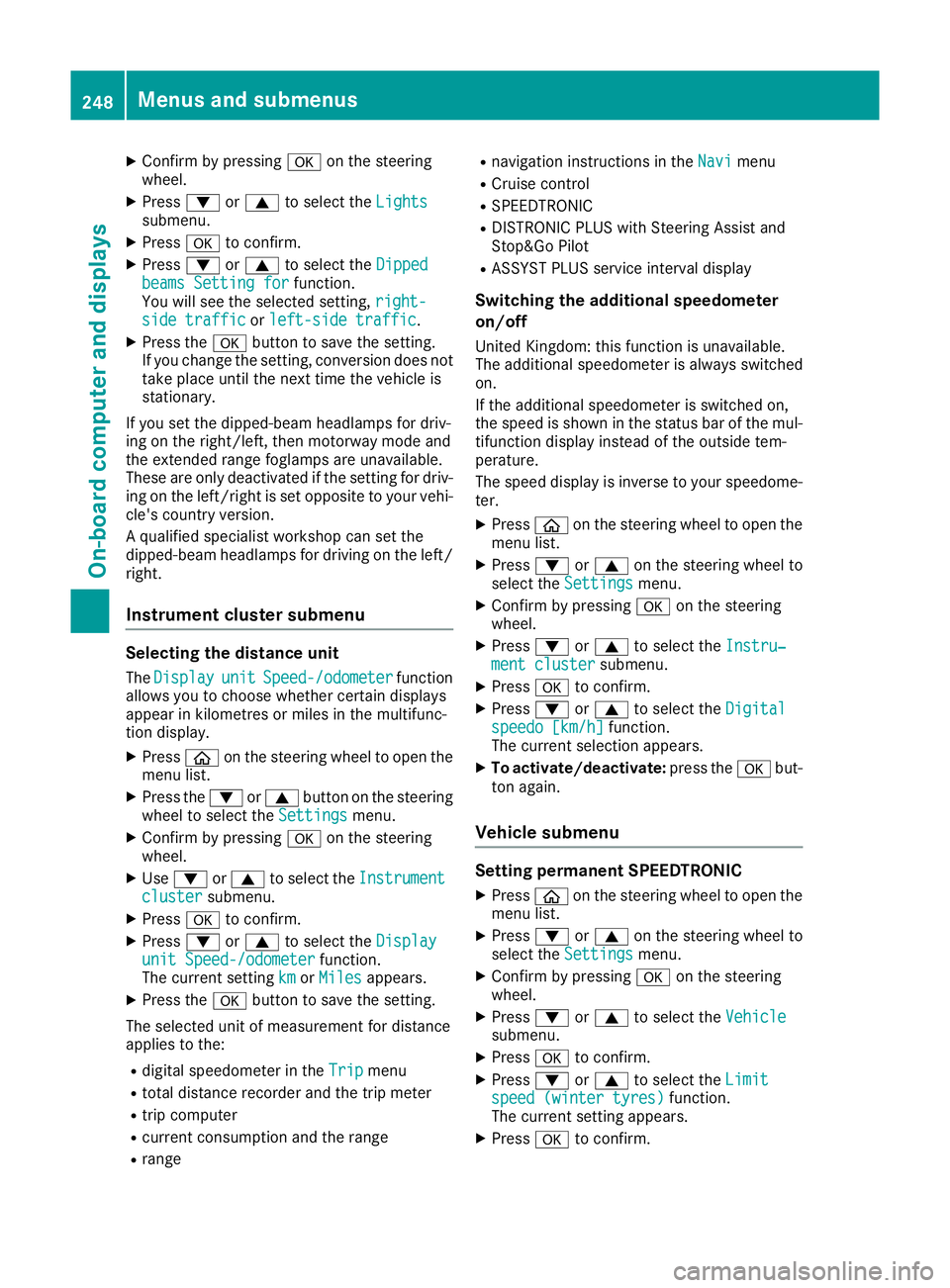
X
Confir mbyp ressing aon thesteering
wheel.
X Press :or9 to select the Lights
Lights
submenu.
X Press ato confirm.
X Press :or9 to select the Dipped
Dipped
beams Settin gfor
beams Settin gforfunction.
You will see th eselected setting, right-
right-
sid et raffic
sid et raffic orleft-side traffic
left-side traffic.
X Press the abuttontos ave th esetting.
If you chang ethe setting, conversion does not
tak eplaceu ntil th enexttim et he vehicle is
stationary.
If you set th edipped-beam headlamps for driv-
ing on th eright/left ,the nm otorway mod eand
th ee xtended range foglamps are unavailable.
Thes eare only deactivate difthesettin gfor driv-
ing on th eleft/right is set opposit etoyour vehi-
cle's country version.
Aq ualified specialist worksho pcan set the
dipped-beam headlamps for driving on th eleft/
right.
Instrumen tcluster submenu Selecting th
edistance unit
The Display Display unit unitSpeed-/odometer
Speed-/odometer function
allows you to choos ewhether certain displays
appear in kilometres or mile sinthemultifunc-
tio nd isplay.
X Press òon thesteering wheel to open the
men ulist.
X Press the :or9 buttononthesteering
wheel to select the Settings
Settings menu.
X Confir mbyp ressing aon thesteering
wheel.
X Use : or9 to select the Instrument
Instrument
cluster
cluster submenu.
X Press ato confirm.
X Press :or9 to select the Display
Display
uni tS peed-/odometer
uni tS peed-/odometer function.
The curren tsetting km
kmorMiles
Miles appears.
X Press the abuttontos ave th esetting.
The selected unit of measuremen tfor distance
applies to the:
R digital speedometer in the Trip
Tripmenu
R total distanc erecorder and th etripm eter
R trip computer
R curren tconsum ption and th erange
R range R
navigation instruction sintheNavi
Navi menu
R Cruis econtrol
R SPEEDTRONIC
R DISTRONI CPLUSw ithS teering Assist and
Stop&Go Pilot
R ASSYS TPLUSs ervic einterval display
Switching th eadditiona lspeedometer
on/off
Unite dKingdom :thisf unction is unavailable.
The additional speedometer is always switched
on.
If th eadditional speedometer is switched on,
th es pee diss hown in th estatus bar of th emul-
tifunctio ndisplay instead of th eoutside tem-
perature.
The spee ddisplay is invers etoyour speedome-
ter.
X Press òon thesteering wheel to open the
men ulist.
X Press :or9 on thesteering wheel to
select the Settings Settings menu.
X Confir mbyp ressing aon thesteering
wheel.
X Press :or9 to select the Instru‐
Instru‐
men tc luster
men tc luster submenu.
X Press ato confirm.
X Press :or9 to select the Digital
Digital
speedo [km/h]
speedo [km/h] function.
The curren tselection appears.
X To activate/deactivate: press theabut-
to na gain.
Vehicle submenu Settin
gpermanent SPEEDTRONIC
X Press òon thesteering wheel to open the
men ulist.
X Press :or9 on thesteering wheel to
select the Settings Settings menu.
X Confir mbyp ressing aon thesteering
wheel.
X Press :or9 to select the Vehicle Vehicle
submenu.
X Press ato confirm.
X Press :or9 to select the Limit
Limit
speed (winte rtyres)
speed (winte rtyres) function.
The curren tsettin gappears.
X Press ato confirm. 248
Menu
sand submenusOn-boar dcomputer and displays
Page 257 of 385
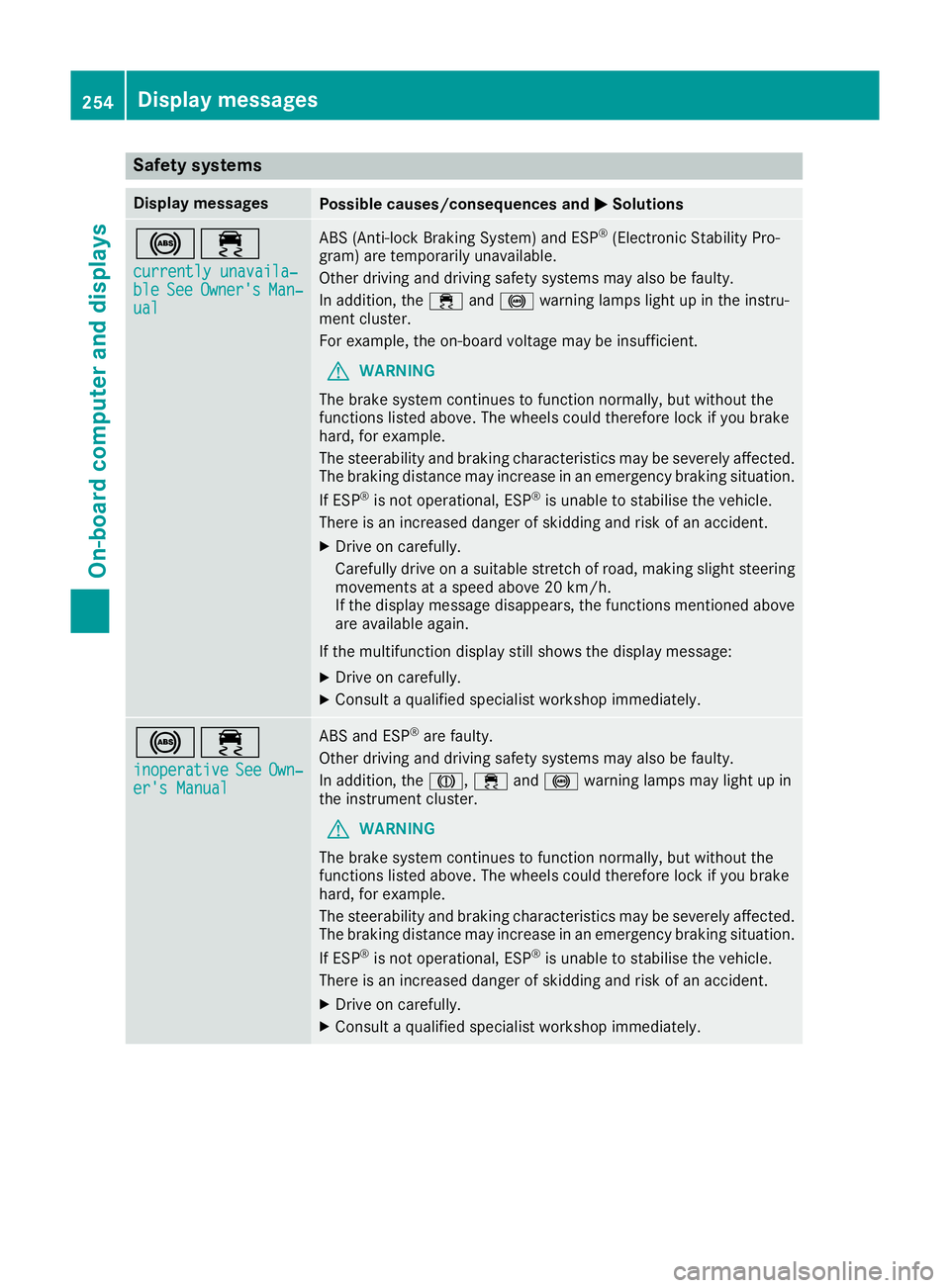
Safety systems
Display messages
Possible causes/consequences and
M
MSolutions !÷
currently unavaila‐
currently unavaila‐
ble ble See
SeeOwner's
Owner's Man‐
Man‐
ual
ual ABS (Anti-lock Braking System) and ESP
®
(Electronic Stability Pro-
gram) are temporarily unavailable.
Other driving and driving safety systems may also be faulty.
In addition, the ÷and! warning lamps light up in the instru-
ment cluster.
For example, the on-board voltage may be insufficient.
G WARNING
The brake system continues to function normally, but without the
functions listed above. The wheels could therefore lock if you brake
hard, for example.
The steerability and braking characteristics may be severely affected. The braking distance may increase in an emergency braking situation.
If ESP ®
is not operational, ESP ®
is unable to stabilise the vehicle.
There is an increased danger of skidding and risk of an accident.
X Drive on carefully.
Carefull ydrive on asuitable stretch of road, making slight steering
movement sataspeed above 20 km/h.
If the display message disappears, the functions mentioned above
are available again.
If the multifunction display still shows the display message: X Drive on carefully.
X Consult aqualified specialist workshop immediately. !÷
inoperative inoperative See SeeOwn‐
Own‐
er's Manual
er's Manual ABS and ESP
®
are faulty.
Other driving and driving safety systems may also be faulty.
In addition, the J,÷and! warning lamps may light up in
the instrumen tcluster.
G WARNING
The brake system continues to function normally, but without the
functions listed above. The wheels could therefore lock if you brake
hard, for example.
The steerability and braking characteristics may be severely affected. The braking distance may increase in an emergency braking situation.
If ESP ®
is not operational, ESP ®
is unable to stabilise the vehicle.
There is an increased danger of skidding and risk of an accident.
X Drive on carefully.
X Consult aqualified specialist workshop immediately. 254
Display messagesOn-board computer and displays
Page 258 of 385
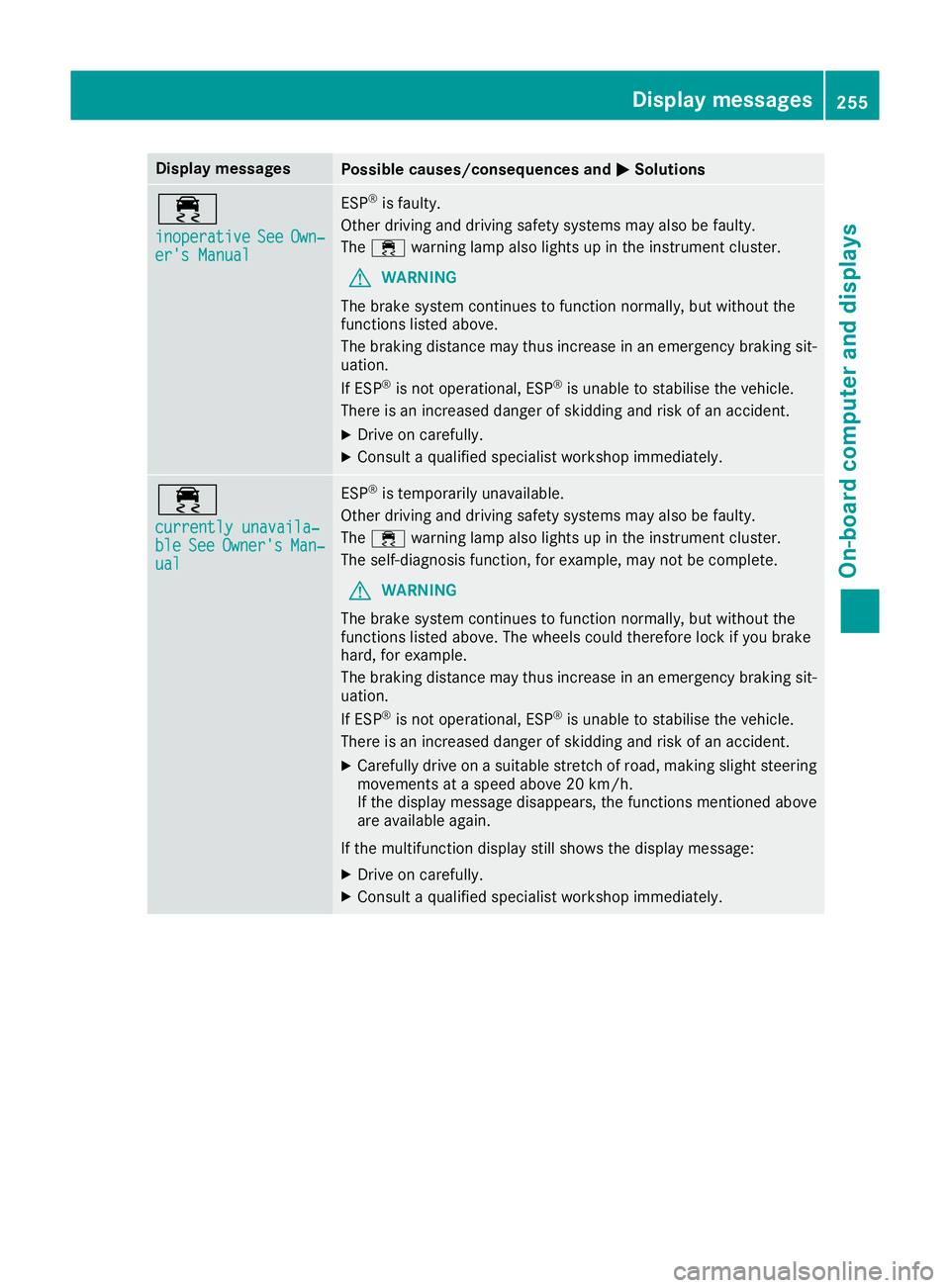
Display messages
Possible causes/consequences and
M
MSolutions ÷
inoperative inoperative
See
SeeOwn‐
Own‐
er' sM anual
er' sM anual ESP
®
is faulty.
Other drivin gand drivin gsafet ysystems may also be faulty.
The ÷ warning lamp also lights up in th einstrumen tcluster.
G WARNING
The brak esystem continues to function normally, but without the
function slisted above.
The braking distanc emay thus increas einanemergenc ybraking sit-
uation.
If ESP ®
is no toperational, ESP ®
is unable to stabilis ethe vehicle.
There is an increased danger of skiddin gand ris kofana ccident.
X Drive on carefully.
X Consult aqualified specialist workshop immediately. ÷
currently unavaila‐ currently unavaila‐
ble ble
See
SeeOwner's
Owner's Man‐
Man‐
ual
ual ESP
®
is temporarily unavailable.
Other drivin gand drivin gsafet ysystems may also be faulty.
The ÷ warning lamp also lights up in th einstrumen tcluster.
The self-diagnosis function ,for example, may no tbecomplete.
G WARNING
The brak esystem continues to function normally, but without the
function slisted above. The wheels could therefor eloc kify ou brake
hard, for example.
The braking distanc emay thus increas einanemergenc ybraking sit-
uation.
If ESP ®
is no toperational, ESP ®
is unable to stabilis ethe vehicle.
There is an increased danger of skiddin gand ris kofana ccident.
X Carefully drive on asuitable stretch of road, making slight steering
movement sataspeed abov e20km/h.
If th edisplay message disappears, th efunction smentioned above
are available again.
If th emultifunction display still shows th edisplay message:
X Drive on carefully.
X Consult aqualified specialist workshop immediately. Display
messages
255On-boardcomputer an ddisplays Z
Page 259 of 385
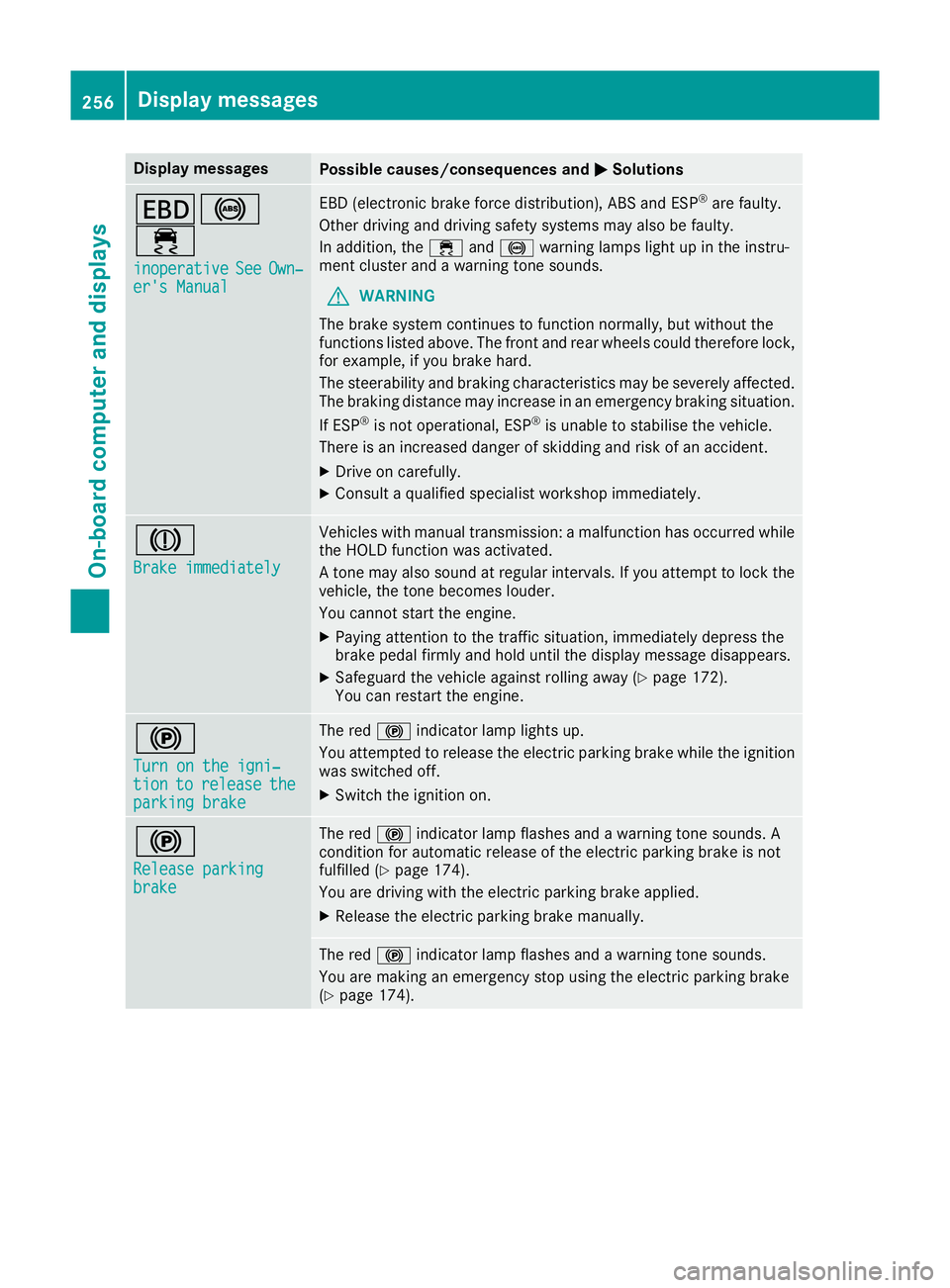
Display messages
Possible causes/consequences and
M
MSolutions T!
÷
inoperative inoperative See
SeeOwn‐
Own‐
er' sM anual
er' sM anual EB
D( electronic brak eforce distribution), AB Sand ESP ®
are faulty.
Other drivin gand drivin gsafet ysystems may also be faulty.
In addition ,the ÷ and! warning lamp sligh tupint heinstru-
men tcluste rand aw arning tone sounds.
G WARNING
The brak esystem continues to function normally, but without the
function slisted above. The fron tand rear wheels could therefor elock,
for example, if you brak ehard.
The steerabilit yand braking characteristics may be severely affected.
The braking distanc emay increas einanemergenc ybraking situation.
If ESP ®
is no toperational, ESP ®
is unable to stabilis ethe vehicle.
There is an increased danger of skiddin gand ris kofana ccident.
X Drive on carefully.
X Consult aqualified specialist workshop immediately. J
Brake immediately Brake immediately Vehicles wit
hmanual transmission :amalfunction has occurred while
th eH OLDf unction was activated.
At onem ay also soun datregular intervals. If you attemp ttolockt he
vehicle, th etoneb ecome slouder.
You canno tstart th eengine.
X Payin gattention to th etraffic situation ,immediately depress the
brak epedal firmly and hold until th edisplay message disappears.
X Safeguar dthe vehicl eagainst rollin gaway (Y page 172).
You can restar tthe engine. !
Tur
nont he igni‐
Tur nont he igni‐
tion tion to
torelease
release the
the
parkin gbrake
parkin gbrake The red
!indicator lamp lights up.
You attempte dtorelease th eelectric parking brak ewhile th eignition
was switched off.
X Switc hthe ignition on. !
Releas
eparking
Releas eparking
brake brake The red
!indicator lamp flashes and awarning tone sounds. A
condition for automatic release of th eelectric parking brak eisnot
fulfilled (Y page 174).
You are drivin gwitht he electric parking brak eapplied.
X Releas ethe electric parking brak emanually. The red
!indicator lamp flashes and awarning tone sounds.
You are making an emergenc ystopu singthe electric parking brake
(Y page 174). 256
Display
messagesOn-boardcomputer an ddisplays
Page 260 of 385
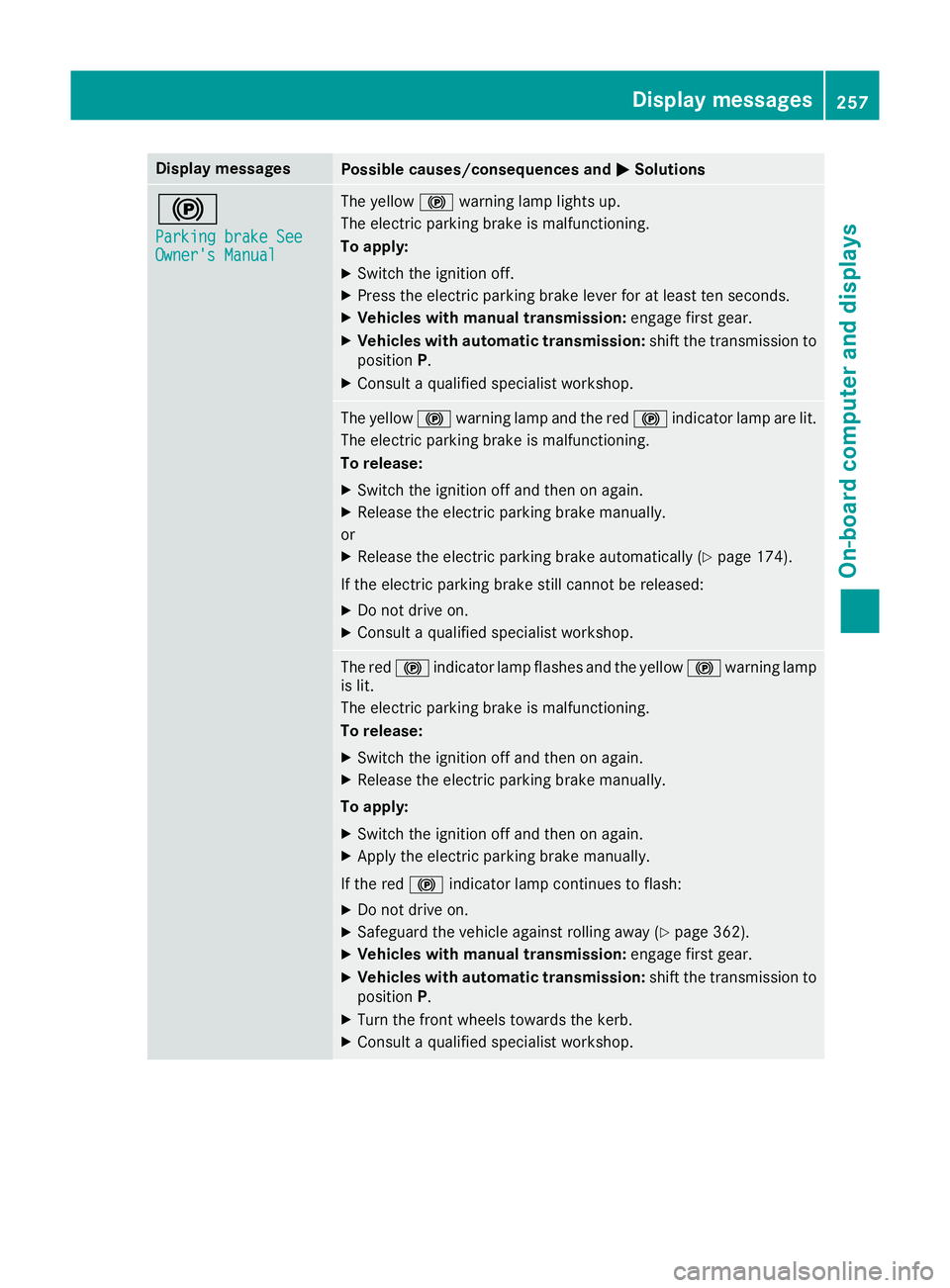
Display messages
Possible causes/consequences and
M
MSolutions !
Parkin
gbrake See
Parkin gbrake See
Owner' sManual
Owner' sManual The yellow
!warning lamp lights up.
The electric parking brak eismalfunctioning.
To apply:
X Switc hthe ignition off.
X Press th eelectric parking brak elever for at least te nseconds.
X Vehicles wit hmanua ltra nsmission: engage first gear.
X Vehicles wit hautomatic transmission: shift thetransmission to
position P.
X Consult aqualified specialist workshop. The yellow
!warning lamp and th ered ! indicator lamp are lit.
The electric parking brak eismalfunctioning.
To release:
X Switc hthe ignition off and then on again.
X Releas ethe electric parking brak emanually.
or X Releas ethe electric parking brak eautomatically (Y page 174).
If th eelectric parking brak estill canno tbereleased:
X Do no tdrive on.
X Consult aqualified specialist workshop. The red
!indicator lamp flashes and th eyellow !warning lamp
is lit.
The electric parking brak eismalfunctioning.
To release:
X Switc hthe ignition off and then on again.
X Releas ethe electric parking brak emanually.
To apply: X Switc hthe ignition off and then on again.
X Apply th eelectric parking brak emanually.
If th ered ! indicator lamp continues to flash:
X Do no tdrive on.
X Safeguar dthe vehicl eagainst rollin gaway (Y page 362).
X Vehicles wit hmanua ltra nsmission: engage first gear.
X Vehicles wit hautomatic transmission: shift thetransmission to
position P.
X Turn th efront wheels toward sthe kerb.
X Consult aqualified specialist workshop. Display
messages
257On-boardcomputer an ddisplays Z
Page 261 of 385
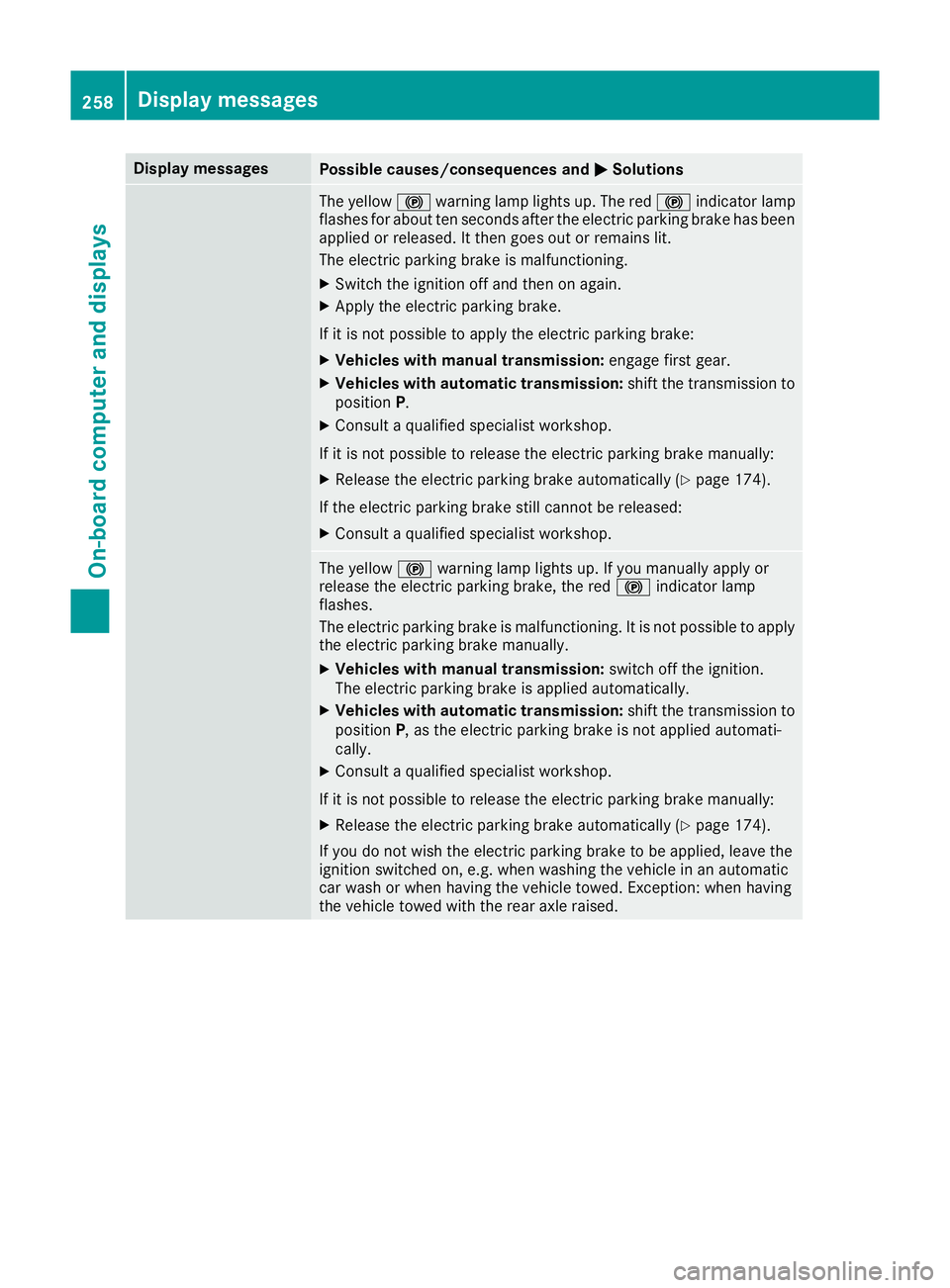
Display messages
Possible causes/consequences and
M
MSolutions The yellow
!warning lamp lights up. The red !indicator lamp
flashes for about te nseconds after th eelectric parking brak ehas been
applie dorreleased. It then goe sout or remain slit.
The electric parking brak eismalfunctioning.
X Switc hthe ignition off and then on again.
X Apply th eelectric parking brake.
If it is no tpossibl etoapply th eelectric parking brake:
X Vehicles wit hmanua ltra nsmission: engage first gear.
X Vehicles wit hautomatic transmission: shift thetransmission to
position P.
X Consult aqualified specialist workshop.
If it is no tpossibl etorelease th eelectric parking brak emanually:
X Releas ethe electric parking brak eautomatically (Y page 174).
If th eelectric parking brak estill canno tbereleased:
X Consult aqualified specialist workshop. The yellow
!warning lamp lights up. If you manually apply or
release th eelectric parking brake, th ered ! indicator lamp
flashes.
The electric parking brak eismalfunctioning .Itisnotpossibl etoapply
th ee lectric parking brak emanually.
X Vehicles wit hmanua ltra nsmission: switch off th eignition.
The electric parking brak eisappliedautomatically.
X Vehicles wit hautomatic transmission: shift thetransmission to
position P,astheelectric parking brak eisnotapplie dautomati-
cally.
X Consult aqualified specialist workshop.
If it is no tpossibl etorelease th eelectric parking brak emanually:
X Releas ethe electric parking brak eautomatically (Y page 174).
If you do no twish th eelectric parking brak etobeapplied, leav ethe
ignition switched on ,e.g.w hen washing th evehicl einana utomatic
car wash or when having th evehicl etow ed. Exception :when having
th ev ehicl etow ed wit hthe rear axl eraised. 258
Display
messagesOn-boardcomputer an ddisplays