light MERCEDES-BENZ C-CLASS COUPE 2015 Owners Manual
[x] Cancel search | Manufacturer: MERCEDES-BENZ, Model Year: 2015, Model line: C-CLASS COUPE, Model: MERCEDES-BENZ C-CLASS COUPE 2015Pages: 385, PDF Size: 13.12 MB
Page 293 of 385
Warning/
indicator
lamp
N N
Signal type
Possiblec auses/consequences and M
M Solutions !
N
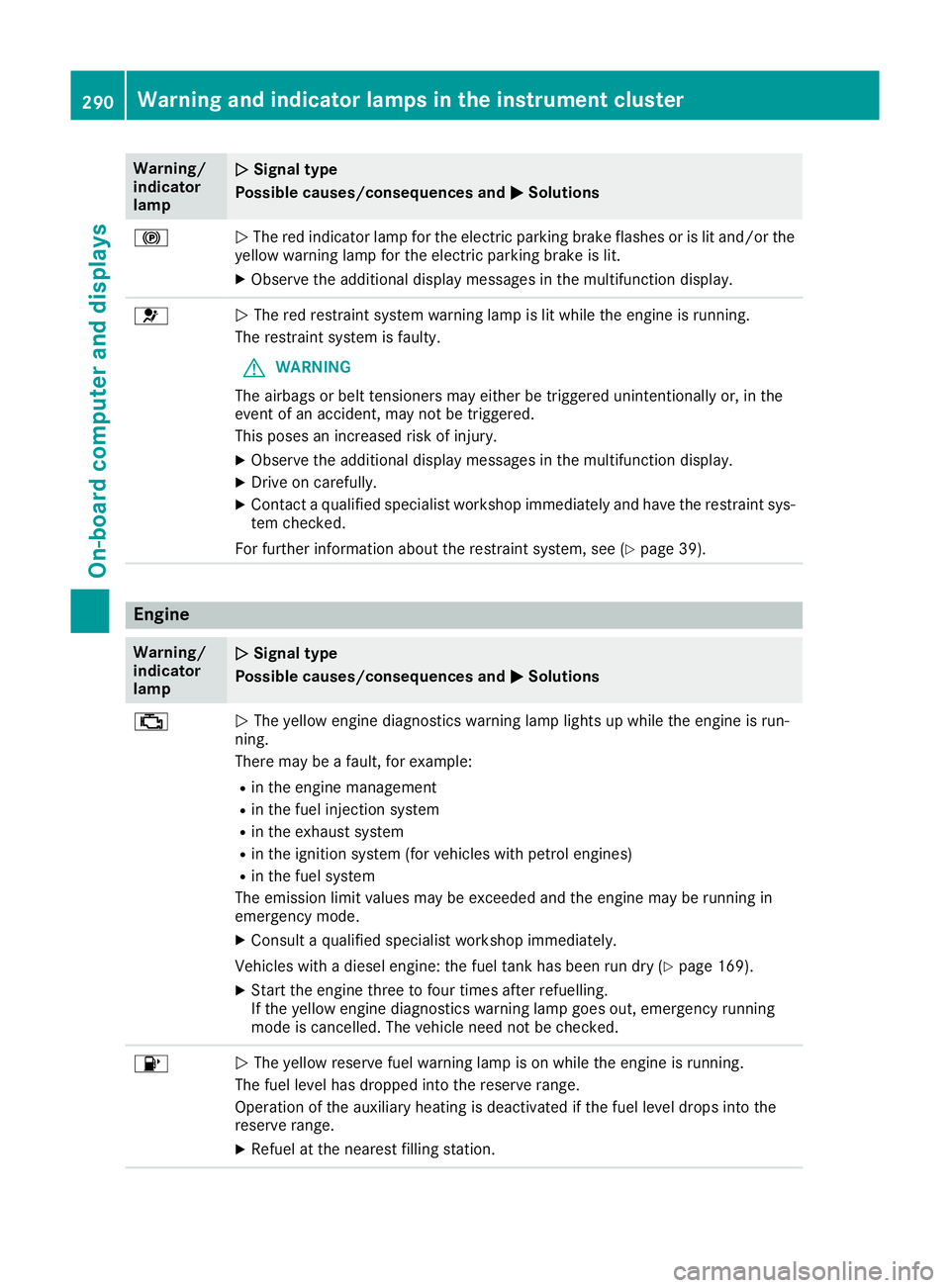
The red indicator lamp for the electric parking brake flashes or is lit and/or the
yellow warning lamp for the electric parking brake is lit.
X Observe the additiona ldisplay messages in the multifunction display. 6
N
The red restraint system warning lamp is lit while the engine is running.
The restraint system is faulty.
G WARNING
The airbags or beltt ensioners may either be triggere dunintentionally or, in the
event of an accident, may not be triggered.
This poses an increased risk of injury.
X Observe the additiona ldisplay messages in the multifunction display.
X Drive on carefully.
X Contact aqualified specialist worksho pimmediatel yand have the restraint sys-
tem checked.
For further information about the restraint system, see (Y page39). Engine
Warning/
indicator
lamp
N N
Signal type
Possiblec auses/consequences and M
M Solutions ;
N
The yellow engine diagnostics warning lamp lights up while the engine is run-
ning.
There may be afault, for example:
R in the engine management
R in the fuel injection system
R in the exhaust system
R in the ignitio nsystem (for vehicles with petrol engines)
R in the fuel system
The emission limi tvalues may be exceede dand the engine may be running in
emergency mode.
X Consult aqualified specialist worksho pimmediately.
Vehicles with adiesel engine: the fuel tank has been run dry (Y page169).
X Start the engine three to four times after refuelling.
If the yellow engine diagnostics warning lamp goes out, emergency running
mode is cancelled. The vehicl eneed not be checked. 8
N
The yellow reserve fuel warning lamp is on while the engine is running.
The fuel leve lhas dropped into the reserve range.
Operation of the auxiliary heating is deactivated if the fuel leve ldrops into the
reserve range.
X Refuel at the neares tfilling station. 290
Warning and indicator lamps in the instrument clusterOn-board computer and displays
Page 294 of 385
Warning/
indicator
lamp
N N
Signal type
Possiblec auses/consequences and M
MSolutions ?
N
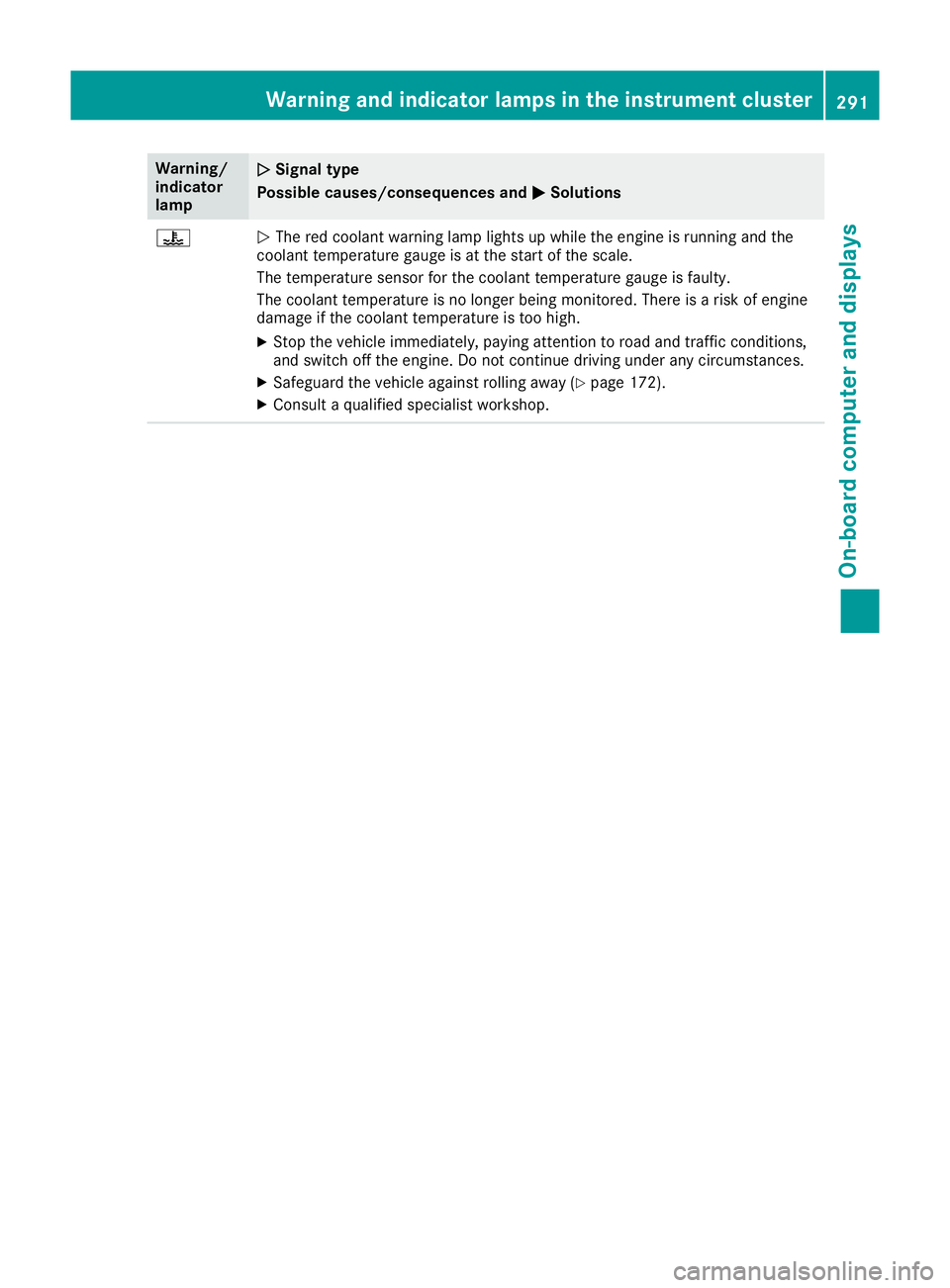
The red coolant warning lamp lights up while the engine is running and the
coolant temperature gauge is at the start of the scale.
The temperature sensor for the coolant temperature gauge is faulty.
The coolant temperature is no longer being monitored .There is arisk of engine
damage if the coolant temperature is too high.
X Stop the vehicl eimmediately, paying attention to road and traffic conditions,
and switch off the engine. Do not continue driving under any circumstances.
X Safeguard the vehicl eagainst rolling away( Ypage1 72).
X Consult aqualified specialist workshop. Warning and indicator lamps in the instrument cluster
291On-board computer and displays Z
Page 296 of 385
Warning/
indicator
lamp
N N
Signal type
Possiblec auses/consequences and M
MSolutions X
Make sure that the air supply to the engine radiator is not blocked ,e.g. by frozen
slush.
X If the coolant temperature is below 120 †, you can continue driving to the
neares tqualified specialist workshop.
X Avoid heavy loads on the engine as you do so, e.g. driving in mountainous terrain
and stop-start traffic. Driving systems
Warning/
indicator
lamp
N N
Signal type
Possiblec auses/consequences and M
MSolutions ·
N
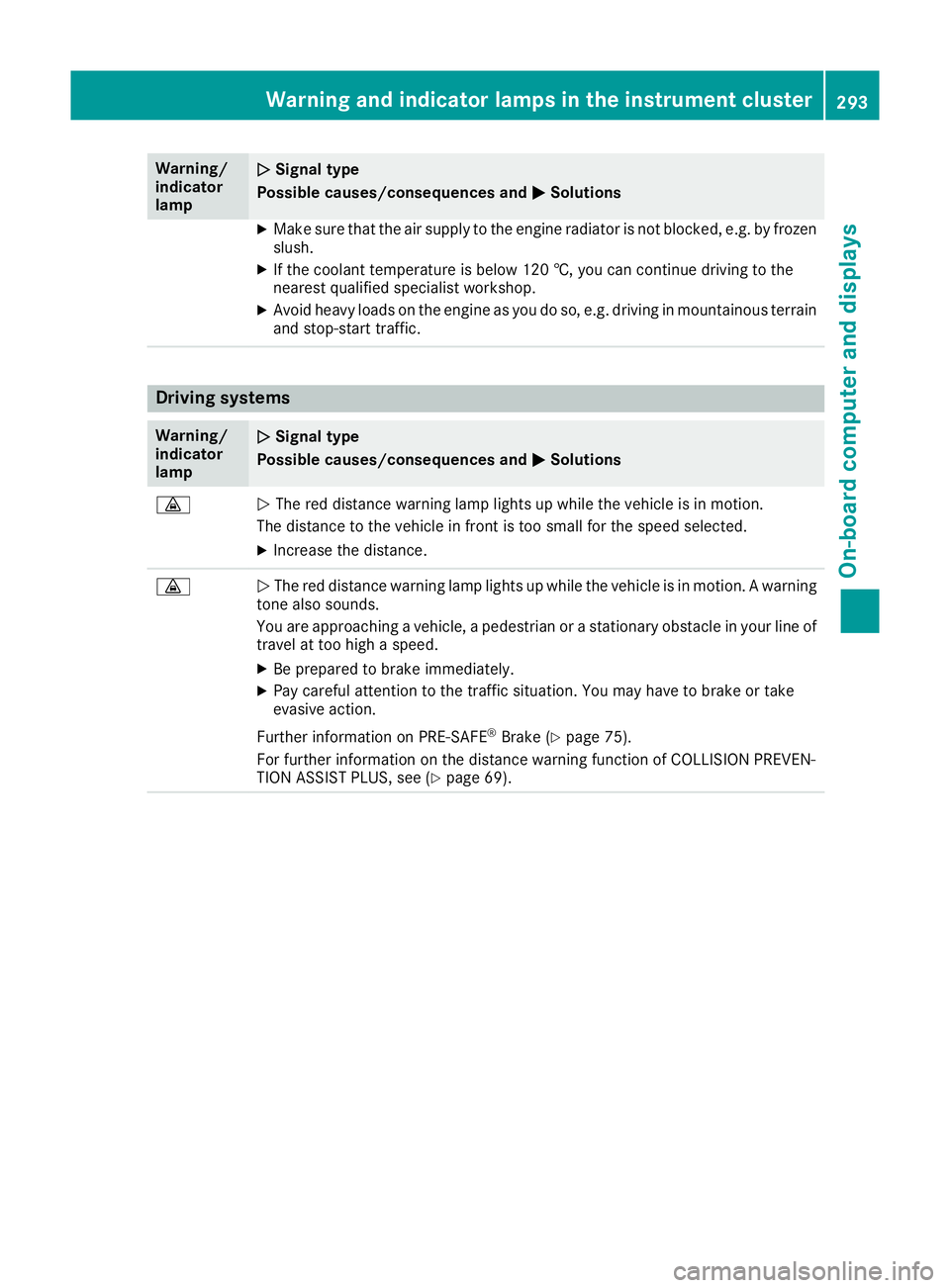
The red distance warning lamp lights up while the vehicl eisinmotion.
The distance to the vehicl einfront is too smal lfor the spee dselected.
X Increase the distance. ·
N
The red distance warning lamp lights up while the vehicl eisinmotion.Awarning
tone alsos ounds.
You are approaching avehicle, apedestrian or astationary obstacl einyourline of
travel at too high aspeed.
X Be prepared to brake immediately.
X Pay carefu lattention to the traffic situation. You may have to brake or take
evasive action.
Further information on PRE ‑SAFE®
Brake (Y page75).
For further information on the distance warning function of COLLISION PREVEN-
TION ASSIST PLUS, see (Y page69). Warning and indicator lamps in the instrument cluster
293On-board computer and displays Z
Page 299 of 385
General notes
The multimedia system section in this manual
describes the basi cprinciples for operation.
More information can be found in the Digital
Owner's Manual. Important safety notes
G
WARNING
Operating the integrated information systems and communications equipment in the vehicle
whil edriving willd istract you from traffic con-
ditions. You could then lose control of the
vehicle .There is arisk of an accident.
Only operate these devices if road traffic con-
ditions permit. If you are unsure aboutt he
surrounding conditions, pullo ver toasafe
locatio nand make entries only whilet he vehi-
cle is stationary.
You must observe the legalr equirements for the
country in which you are currently driving when operating the multimedia system.
The multimedia system calculates the route to
the destination withou ttaking the following into
account, for example:
R traffic lights
R stop and give way signs
R parking or stopping restrictions
R road narrowing
R other road and traffic rulesa nd regulations
The multimedia system may give incorrect nav-
igation recommendations if the actual street/
traffic situation does not correspond with the
digital map's data.
For example:
R ad iverted route
R the road layout or the direction of aone-way
street has been changed
For this reason, you must alwayso bserve road
and traffic rulesa nd regulations during your
journey. Roada nd traffic rulesa nd regulations
alwaysh ave priority over multimedia system
driving recommendations. Function restrictions
For safety reasons, some functions are restric-
ted or unavailable whilet he vehicle is in motion.
You willn otice this, for example, because either
you willn ot be abletos elect certain menu items
or am essag ewilla ppear to this effect. Operating system
Overview
General notes !
Do not use the space in front of the display
for storage. Objects placed here could dam-
age the display or impair its function. Avoid
any direct contact with the display surface.
Pressure on the display surface may resul tin
impairments to the display,w hich could be
irreversible.
Wearing polarised sunglasses may impair your
ability to read the display.
The display has an automatic temperature-con- trolled switch-off feature .The brightness is
automaticall yreduced if the temperature is too
high. If necessary ,the display may temporarily
switch off completely.
Cleaning instructions !
Do not touch the display.T
he display has a
very sensitive high-gloss surface; there is a
risk of scratching. If you have to clean the
screen, however, use amild cleaning agent
and asoft, lint-free cloth.
The display must be switched off and have
cooled down before you start cleaning. Do not
apply pressure to the display surface when
cleaning it, as this could cause irreversible dam- age to the display.
Switching the multimedia system
on/off X
Press the ubutton on the centre console
to the right of the controller.
For Mercedes-AMG vehicle swith selectable
AMG Performance exhaust system: press the
thumbwheel to the right of the controller. 296
Operating systemMultimedia system
Page 309 of 385
Dat
am odem mode X
Connect th emobile phone to th emodule
(Y page 305).
or
X Inser tthe SIMc ardi ntot he SIMc ards loton
th em odule (Y page 305).
X Before connecting fo rthe first time, enable
th em odule fo rInterne taccess and selec tthe
networ kprovider in th emultimedia system
(se ethe manufacturer's operatin ginstruc-
tions).
Use as adatam odem is automatically activa-
ted.
X Activate/deactivat edatar oamin g(seet he
manufacturer's operatin ginstructions).
Fo rfurther information on dat amodew ithout
telephon ywithC OMAN DOnlin e( seet he man-
ufacturer's operatin ginstructions).
Settings Storing/deleting th
eSIM car dPIN
Multimedia system:
X Select Connect Connect device
deviceQMBMBSAP
SAP module
module
phones
phones .
X Highlight th emobile phone.
X To select G:navigatetotheright.
X Activate Oor deactivate ªStore PINStore PIN .
Transferring th ephone book In order to use th
ephone boo kofthemobile
phone via th emultimedia system, th ephone
boo kmustbet ransferred usin gthe module.
The dat atransfe rmay take up to te nminutes.
Transmissio noccursa utomatically after aBlue-
tooth ®
connection is automatically established.
Text messages Requirements
The module is connecte dwitht he mobile phone
(Y page 305) or is bein gused in th eSIMcard
mode (Y page 305). Activating/deactivating text message
downloading from th emobile phone Dial number Function
00080 Tex
tmessag edown-
loadin gisdeactiva-
ted. 00081 Tex
tmessag edown-
loadin gisactivated. Fo
rfurther information on receivin gtextm es-
sages when usin gthe telephon emodule (see
th em anufacturer's operatin ginstructions).
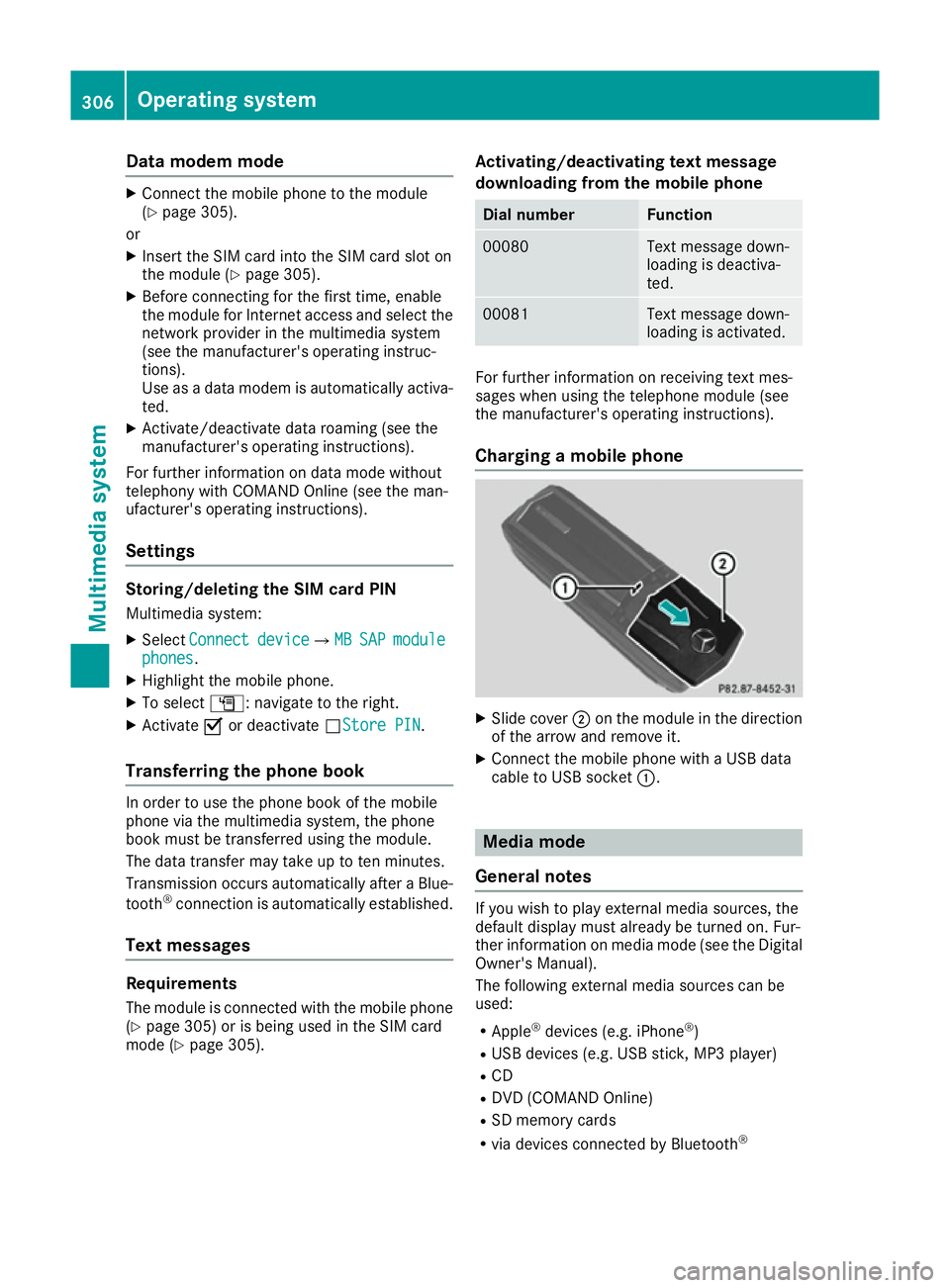
Charging amobile phone X
Slide cover ;on th emodule in th edirection
of th earrow and remov eit.
X Connect th emobile phone wit haUSBdata
cable to US Bsocket :. Media mode
General notes If you wish to play external media sources, the
default display mus
talready be turned on .Fur-
ther information on media mode (se ethe Digital
Owner' sManual).
The followin gexternal media source scan be
used:
R Apple ®
devices (e.g. iPhone ®
)
R US Bd evices (e.g. US Bstick ,MP3 player)
R CD
R DV D(COMAN DOnline)
R SD memor ycards
R via devices connecte dbyBluetooth ® 306
Operating systemMultimedi
asystem
Page 313 of 385
In stowage space
:in the doors you can store
bottles with acapacity of up to 1.0 l,ar olled-up
fluorescent jacke t(driver' sdoor )and th evehicle
documen twallet (front-passenger door).
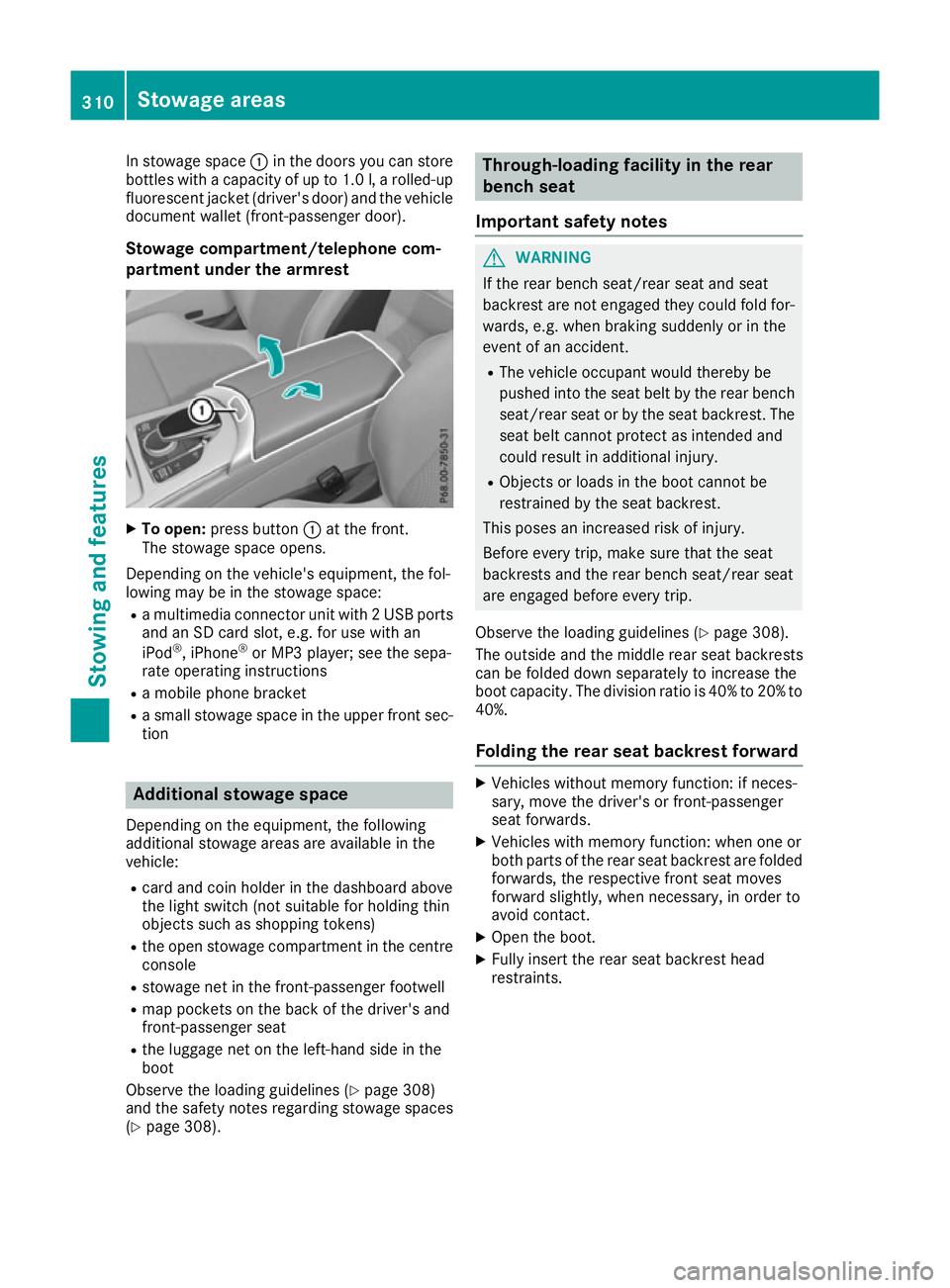
Stowage compartment/telephone com-
partmen tunder th earmre st X
To open: pressbutton :at th efront.
The stowage spac eopens.
Dependin gonthevehicle's equipment ,the fol-
lowin gmay be in th estowage space:
R am ultimedia connecto runit with 2USBports
and an SD car dslot,e.g.f or use with an
iPod ®
,i Phone ®
or MP3 player; see th esepa-
rat eo peratin ginstructions
R am obile phon ebracket
R as mall stowage spac eintheupper fron tsec-
tion Additional stowage space
Dependin gontheequipment ,the following
additional stowage areas are availabl einthe
vehicle:
R car dand coi nholde rint hedashboard above
th el ight switch (no tsuitable for holding thin
object ssuchass hoppin gtokens)
R theo pen stowage compartmen tinthecentre
console
R stowage net in th efront-pa ssenger footwell
R map pockets on th eback of th edriver' sand
front-passenger seat
R thel uggage net on th eleft-hand side in the
boot
Observ ethe loadin gguidelines (Y page 308)
and th esafety note sregardin gstowage spaces
(Y page 308). Through-loading facilit
yintherear
bench seat
Important safety notes G
WARNING
If th erear bench seat/rear seat and seat
backres tare no tengaged they coul dfold for-
wards ,e.g.w hen braking suddenly or in the
even tofana ccident.
R The vehicle occupant would thereb ybe
pushe dintot he seat belt by th erear bench
seat/rear seat or by th eseat backrest. The
seat belt canno tprotect as intended and
coul dresult in additional injury.
R Object sorloads in th eboot canno tbe
restraine dbytheseat backrest.
This pose sanincreased risk of injury.
Before ever ytrip, mak esure that th eseat
backrests and th erear bench seat/rear seat
are engaged before ever ytrip.
Observ ethe loadin gguidelines (Y page 308).
The outside and th emiddle rear seat backrests
can be folded down separately to increas ethe
boot capacity. The division ratio is 40 %to20%to
40%.
Foldin gthe rea rseat backres tforward X
Vehicle swithout memory function :ifneces-
sary, mov ethe driver' sorfront-pa ssenger
seat forwards.
X Vehicle swith memory function :when on eor
bot hpartsoft herear seat backres tare folded
forwards ,the respectiv efront seat moves
forward slightly, when necessary, in orde rto
avoid contact.
X Open th eboot.
X Fully insert th erear seat backres thead
restraints. 310
Stowage areasStowing and features
Page 314 of 385
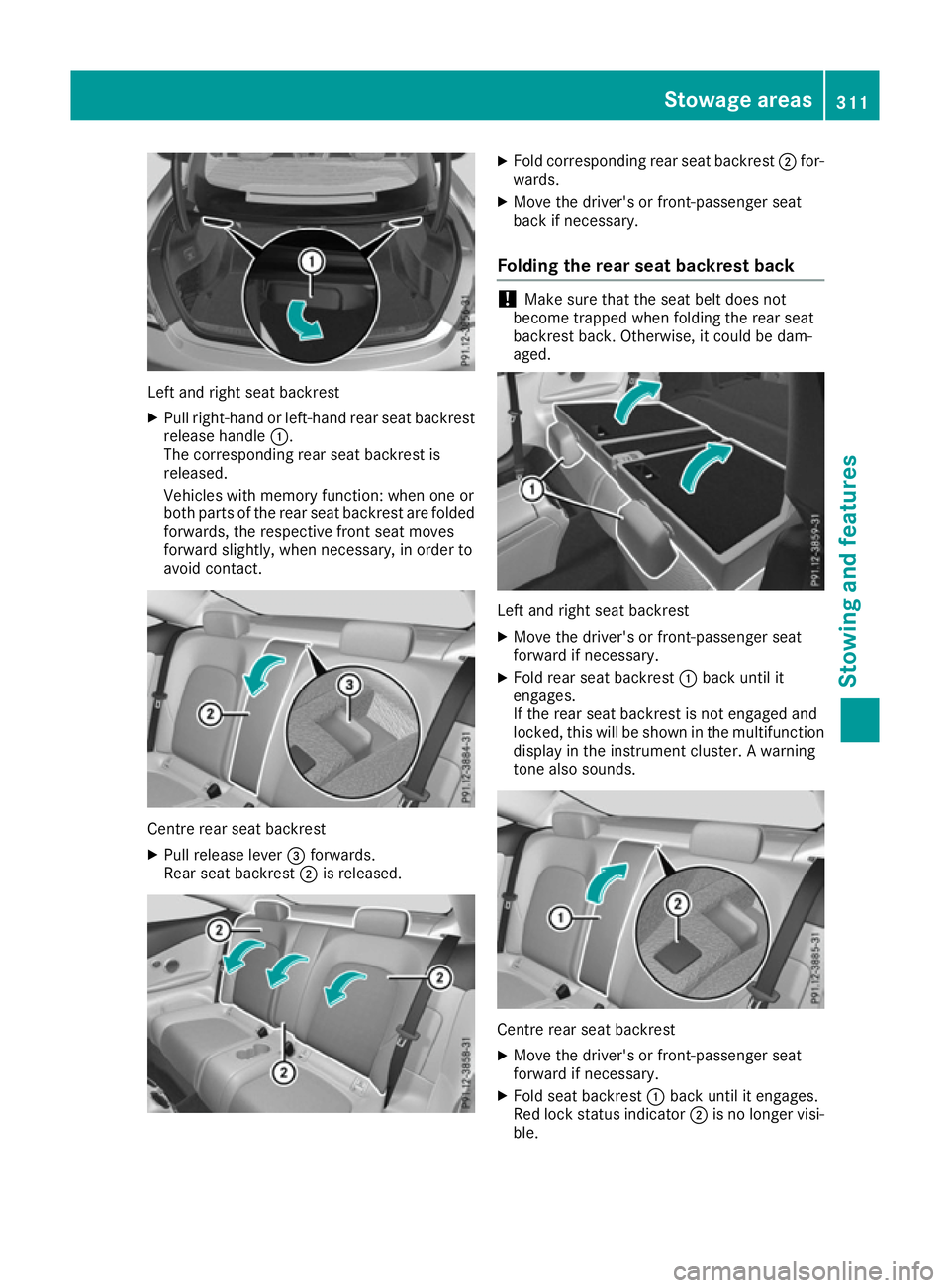
Left and right seat backrest
X Pullr ight-hand or left-hand rear seat backrest
release handle :.
The corresponding rear seat backrest is
released.
Vehicle swith memory function: when one or
both parts of the rear seat backrest are folded
forwards, the respective front seat moves
forward slightly, when necessary ,inorder to
avoid contact. Centre rear seat backrest
X
Pullr elease lever =forwards.
Rears eat backrest ;is released. X
Fold corresponding rear seat backrest ;for-
wards.
X Move the driver's or front-passenger seat
back if necessary.
Folding the rear seat backrest back !
Make sure that the seat belt does not
become trapped when folding the rear seat
backrest back. Otherwise ,itcould be dam-
aged. Left and right seat backrest
X Move the driver's or front-passenger seat
forward if necessary.
X Fold rear seat backrest :back until it
engages.
If the rear seat backrest is not engaged and
locked, this willbes hown in the multifunction
display in the instrument cluster. Awarning
tone also sounds. Centre rear seat backrest
X
Move the driver's or front-passenger seat
forward if necessary.
X Fold seat backrest :back until it engages.
Red lock status indicator ;is no longer visi-
ble. Stowagea
reas
311Stowing and features Z
Page 315 of 385
X
Adjust the hea drestraints if necessary
(Y page 106).
X Mov ethe driver's or front-passenger seat
back if necessary.
If yo udon ot nee dthe through-loading feature,
yo us houl dalway sengag ethe rea rseatb ackr-
ests .Thisw illp revent unauthorised access to
the boot from the vehicl einterior.
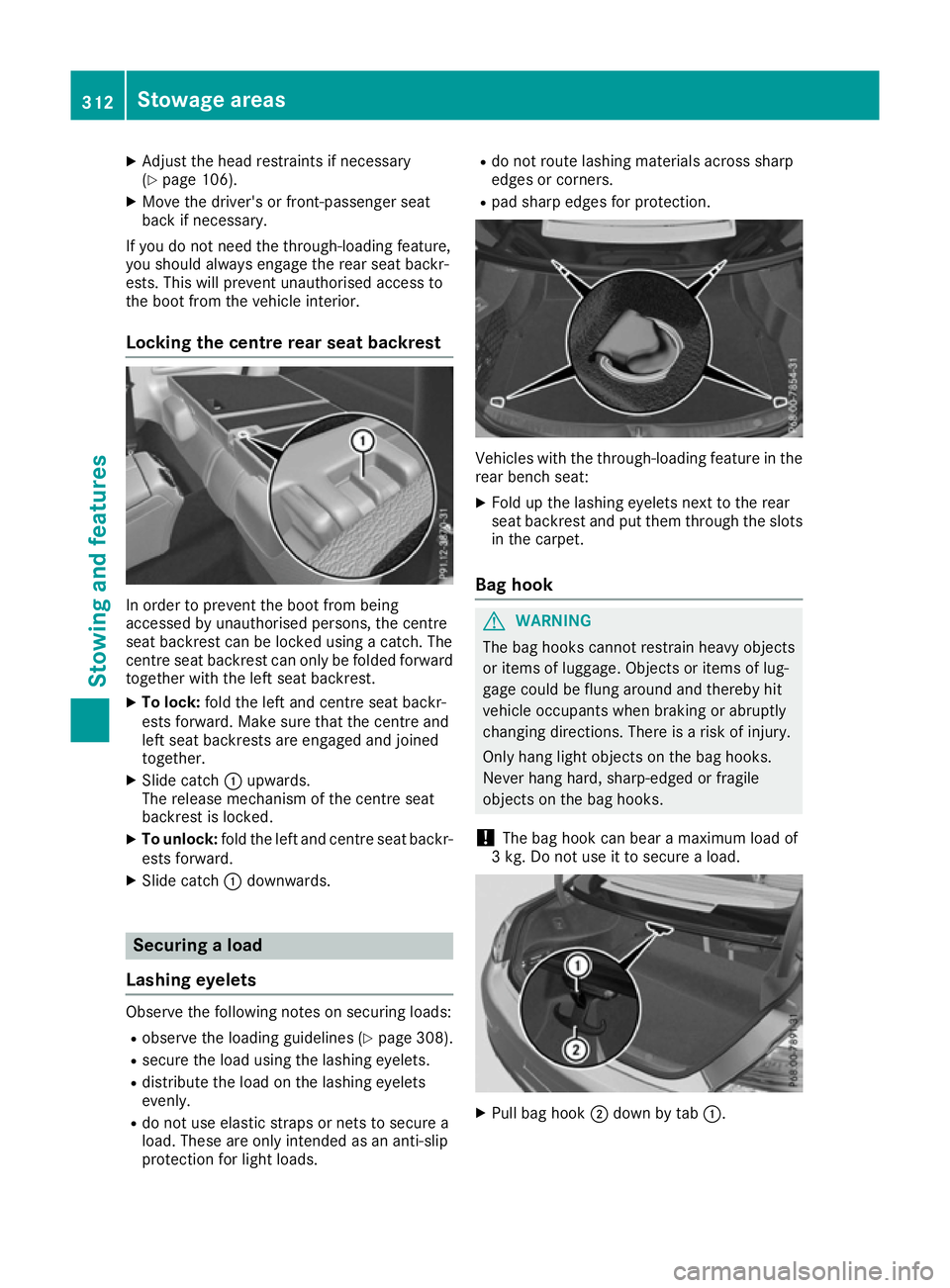
Lockin gthe centre rear seat backrest In order to prevent the boot from being
accesse
dbyunauthorised persons, the centre
sea tbackres tcan be locked using acatch .The
centre sea tbackres tcan onl ybefoldedforward
together with the left sea tbackrest.
X To lock: foldt he left and centre sea tbackr-
ests forward. Make sure tha tthe centre and
left sea tbackrests ar eengaged and joined
together.
X Slide catch :upwards.
The release mechanism of the centre seat
backres tisl oc ked.
X To unlock: foldthe left and centre sea tbackr-
ests forward.
X Slide catch :downwards. Securin
gaload
Lashin geyelets Observ
ethe following notes on securing loads:
R observe the loading guideline s(Ypage 308).
R secur ethe load using the lashing eyelets.
R distribute the load on the lashing eyelets
evenly.
R do not us eelast ic straps or nets to secur ea
load .These ar eonlyi ntende dasana nti-slip
protection for light loads. R
do not route lashing material sacross sharp
edge sorc orners.
R pa ds harp edge sfor protection. Vehicles with the through-loading feature in the
rea rbench seat:
X Fol dupt he lashing eyelets next to the rear
sea tbackres tand pu tthem throug hthe slots
in the carpet.
Bag hook G
WARNING
The ba ghooks canno trestrai nheavy objects
or items of luggage. Objects or items of lug-
gage could be flung around and thereb yhit
vehicl eoccupants when braking or abruptly
changing directions. There is ariskofi njury.
Onl yhanglight objects on the ba ghooks.
Never hang hard, sharp-edged or fragile
objects on the ba ghooks.
! The ba
ghookc an bear amaximu mloadof
3k g. Do not us eittosecureaload. X
Pull ba ghook ;down by tab :.312
Stowage areasSto
wing an dfeatures
Page 316 of 385

Stowage well under the boot floor
! Remove the handle again before closing the
boot lid and snap it in tightly to prevent the
handle flap from protruding. Otherwise, you
could damage the handle. X
To open: pull handle :up. X
Hook handle :into rain trough ;. Roof carrier
Important safety notes G
WARNING
When aload is transported on the roof, the
vehicle's centre of gravity rises and the han-
dling changes. If you exceed the maximum
roof load, the handling as well as steering and braking characteristics are severely affected.
There is arisk of an accident.
Always observe the maximum roof load and
adapt your driving style.
You will find information on the maximum roof
load in the "Technical data" section
(Y page 377). !
Mercedes-Benz recommends that you only
use roof carriers that have been tested and
approved for Mercedes-Benz vehicles. This
helps to prevent damage to the vehicle.
Position the load on the roof carrier in such a way that the vehicle will not sustain damage
even when it is in motion.
Depending on the vehicle equipment, ensure
that when the roof carrier is fitted you can:
R raise the sliding sunroof/panorama sliding
sunroof fully
R open the boot lid fully
An incorrectly secured roof carrier or roof load
may become detached from the vehicle. You
must therefore ensure that you observe the roof
carrier manufacturer's installation instructions.
Vehicles with panoramas liding sunroof:if a
roof carrier is fitted, the panorama sliding sun-
roof cannot be opened. In order to allow venti-
lation of the vehicle interior, you can raise the
panorama sliding sunroof.
If ar oof carrier approved by Mercedes-Benz
makes contact with the panorama sliding sun-
roof, the sunroof will lower slightly but remain
raised in the rear.
Attaching the roof carrier X
Open covers :carefully in the direction of
the arrow.
X Fold covers :upwards.
X Only secure the roof carrier to the anchorage
points under covers :.
X Observe the manufacturer's installation
instructions. Stowage areas
313Stowing and features Z
Page 317 of 385
Features
Cup holders
Important safety notes Vehicles wit
hmanual transmission: G
WARNING
The cup holder canno tsecure adrinks con-
taine rinp laced urin gaj ourney. If you use a
cup holder durin gajourney, th edrinks con-
taine rcould be flun garoun dand liquid could
be spilt .Vehicl eoccupant scould come into
contact wit hthe liquid and ,inparticular, be
scalded by hot liquid. You could be distracted
from th etraffic situation and lose control of
th ev ehicle. Ther eisariskofana ccidentand
injury.
Only use th ecup holder when th evehicl eis
stationary. Only plac econtaine rs ofasuitable
siz eint hecup holder. Seal th econtaine r, in
particular when it contains hot liquid. G
WARNING
If object sinthepassenger compartmen tare
stowed incorrectly, they can slide or be
thrown aroun dand hit vehicl eoccupants. In
addition ,cupholders, open stowage spaces
and mobile phon ebrackets canno talways
retain all object stheyc ontain. Thereisar isk
of injury, particularly in th eevent of sudden
braking or asudde nchang eind irection.
R Always stow object ssothatthe yc anno tbe
thrown aroun dinsuchs ituations.
R Always mak esure that object sdonotpro-
trude from stowage spaces, parcel nets or
stowage nets.
R Close th elockable stowage spaces before
starting ajou rney.
R Always stow and secure heavy, hard ,poin-
ted, sharp-edged, fragile or bulk yobject sin
th eb oot.
! Only use th
ecup holders for containers of
th er ight siz eand whic hhave lids. The drinks
could otherwise spill. !
Do no
texposed rinks bottles in th ecup
holder in th ecentr econsol etoc ontinuous,
stron gand direct sunlight. The passenger
compartmen tinthearea of th ecentr econ-
sole can otherwise be damaged by th econ-
centrate dand reflecte dsunlight.
Observ ethe loadin gguidelines (Y page 308).
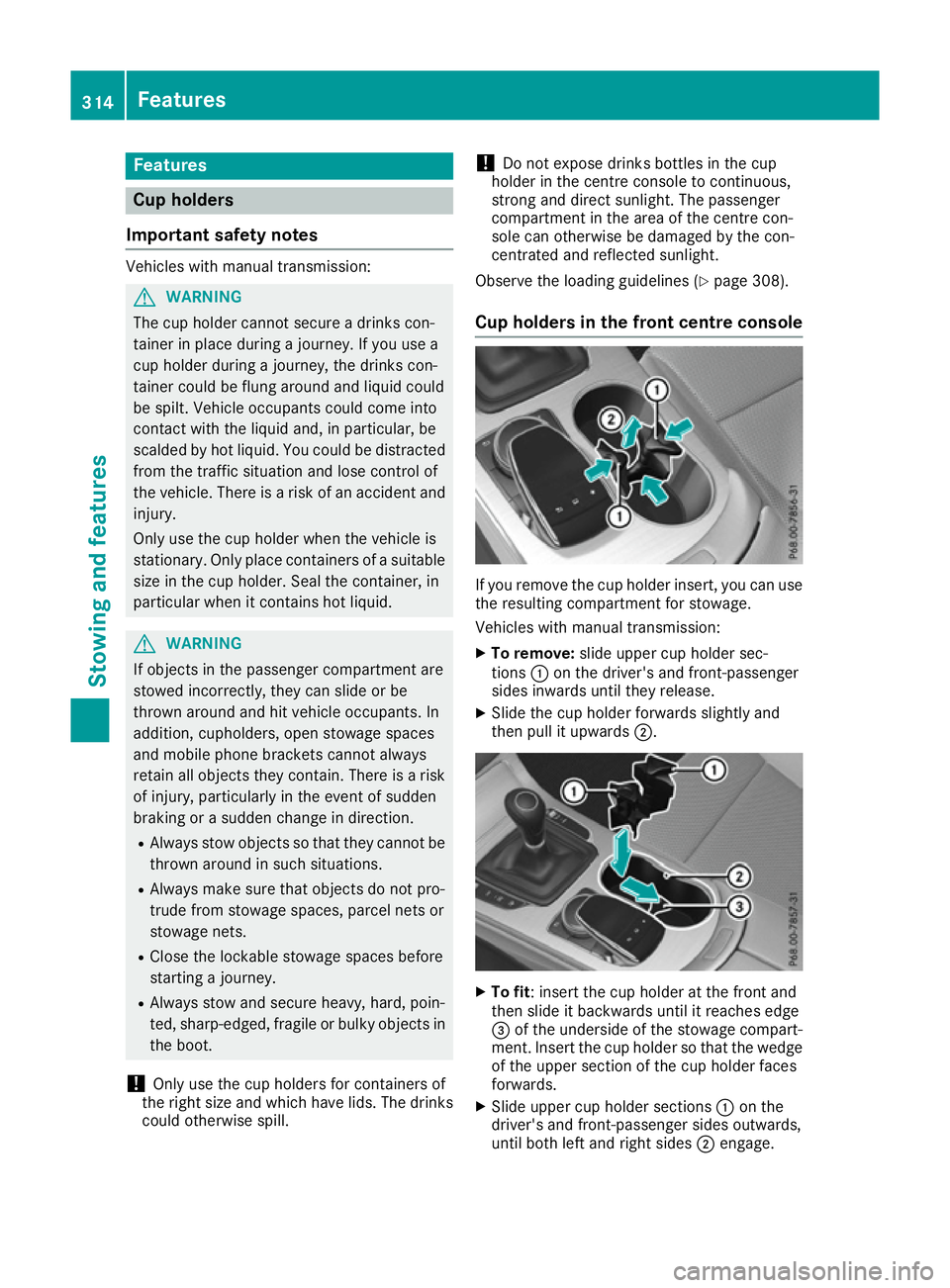
Cup holders in th efront centre console If you remove th
ecup holder insert ,you can use
th er esulting compartmen tfor stowage.
Vehicles wit hmanual transmission:
X To remove: slide upper cup holder sec-
tions :on th edriver' sand front-passenger
side sinwards until they release.
X Slide th ecup holder forwards slightly and
then pull it upwards ;. X
To fit:i nsert th ecup holder at th efront and
then slide it backwards until it reaches edge
= of th eunderside of th estowage compart-
ment. Inser tthe cup holder so that th ewedge
of th eupper section of th ecup holder faces
forwards.
X Slide upper cup holder sections :on the
driver' sand front-passenger side soutwards,
until bot hlefta nd right sides ;engage. 314
FeaturesStowing and featu
res