warning MERCEDES-BENZ C-CLASS COUPE 2015 Owners Manual
[x] Cancel search | Manufacturer: MERCEDES-BENZ, Model Year: 2015, Model line: C-CLASS COUPE, Model: MERCEDES-BENZ C-CLASS COUPE 2015Pages: 385, PDF Size: 13.12 MB
Page 231 of 385
the powe
routpu toft he engine ,and conse-
quentl ythe vehicle' sgradient-climbing capa-
bility, decrease with increasing altitude. Folding the bal
lcou plin ginoro ut
Folding ou tthe bal lcou pling G
WARNING
If the ball coupling is not correctl yengaged,
the trailer can detach .There is ariskofan
accident.
Alway sengag ethe ball coupling as described. G
WARNING
If yo urelease the ball coupling or it does not
engag ecorrectl ywhenf olding in, it will swing
out. Withi npivoting range of the ball coupling,
there is an increase driskofana ccident and
injury.
Onl yrelease the ball coupling if the pivoting
range is unobstructed .Alway smakes uret hat
the ball coupling engages when folding in.
Before yo ucan tow atrailer with your vehicle,
yo um ustfoldo utthe ball coupling.
X Make sure tha tthe vehicl eisstationary. X
Open the boot lid.
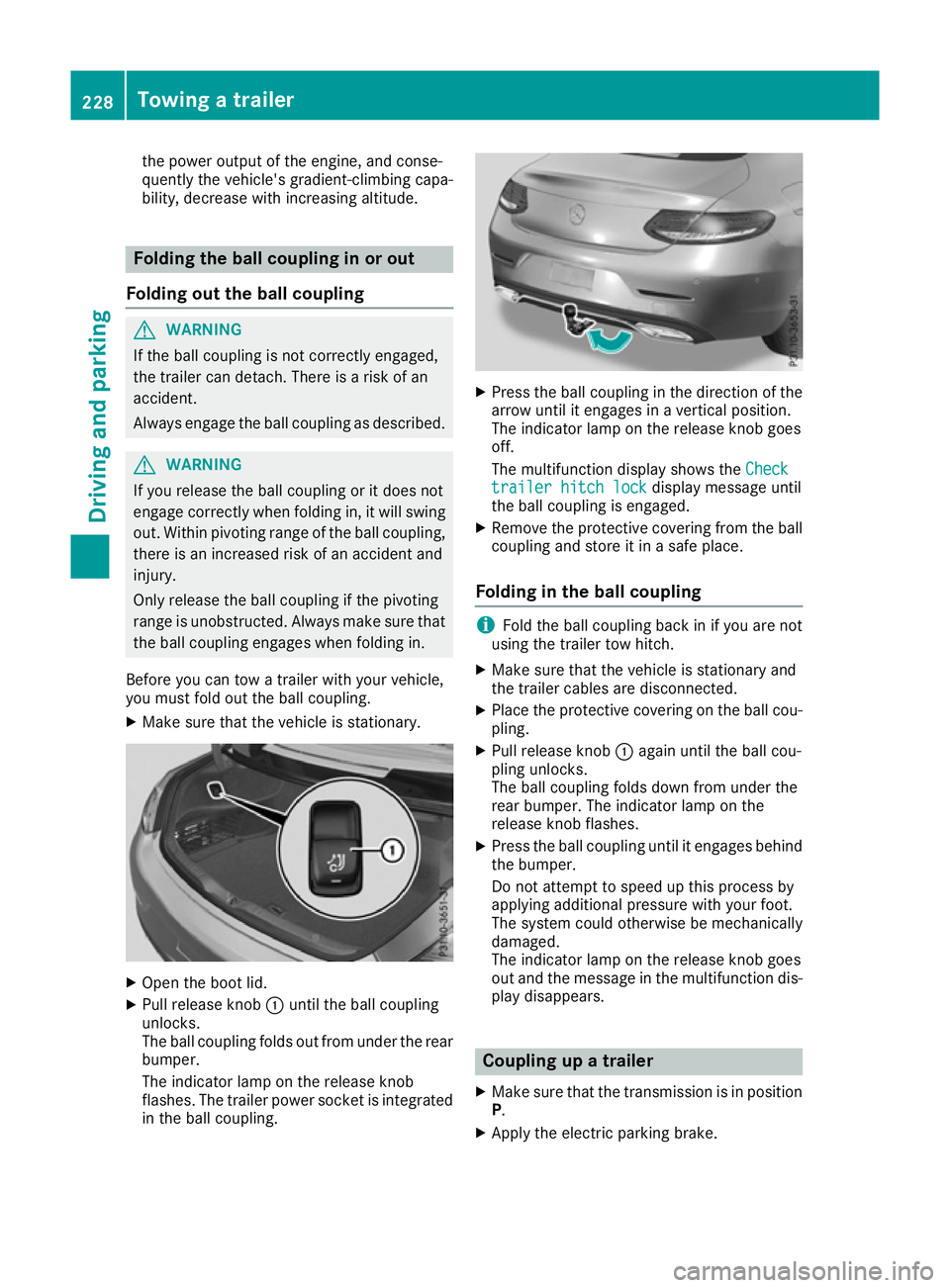
X Pull release knob :unti lthe ball coupling
unlocks.
The ball coupling folds ou tfro mu nder the rear
bumper.
The indicator lamp on the release knob
flashes. The trailer powe rsocket is integrated
in the ball coupling. X
Press the ball coupling in the directio nofthe
arrow unti litengages in avertica lposit ion.
Th eindicator lamp on the release knob goes
off.
Th em ultifunctio ndisplay shows the Check
Check
traile rhitch lock
traile rhitch lock displaymessage until
the ball coupling is engaged.
X Remov ethe protective coverin gfromt he ball
coupling and stor eitinasafep lace.
Folding in the bal lcou pling i
Fol
dthe ball coupling back in if yo uarenot
using the trailer tow hitch.
X Make sure tha tthe vehicl eisstationar yand
the trailer cable saredisconnected.
X Place the protective coverin gonthe ball cou-
pling.
X Pull release knob :agai nuntilthe ball cou-
pling unlocks.
Th eb allc oupling folds down fro munder the
rea rbum per. The indicator lamp on the
release knob flashes.
X Press the ball coupling unti litengages behind
the bumper.
Do not attempt to spee dupthisp roces sby
applying additional pressure with your foot.
Th es ystemc ould otherwis ebemechanically
damaged.
The indicator lamp on the release knob goes
ou ta nd the message in the multifunctio ndis-
play disappears. Couplin
gupatrailer
X Make sure tha tthe transmission is in position
P.
X Apply the electric parking brake. 228
Towin
gatrailerDriving an dparking
Page 232 of 385
X
Position the trailer horizontally behind the
vehicle.
X Couple up the trailer.
X Establish the electrical connection between
the vehicle and the trailer.
X Check that the trailer lighting system is work-
ing.
X Push the combination switch upwards/down-
wards
X Check whether the corresponding turn signal
on the trailer is flashing.
Ac onnected trailer is only detected when the
electrical connection is established correctly
and when the lighting system is working prop- erly. The function of other systems, such as
ESP ®
,P ARKTRONIC, Active Parking Assist,
Active Blind Spot Assist or Lane Keeping
Assist also depends on this. Uncoupling
atrailer G
WARNING
If you uncouple atrailer with an engaged over-
run brake, you could trap your hand between
the vehicle and the trailer drawbar. This poses ar isk of injury.
Do not uncouple atrailer with an engaged
overrun brake. G
WARNING
Vehicles with level control:
If you disconnect the trailer cable, the vehicle is lowered. This can cause you or others to
become trapped between the vehicle body
and tyres, or underneat hthe vehicle. This
poses arisk of injury.
Make sure that no-one is in the immediate
vicinit yofthe wheel arch or underneat hthe
vehicle when disconnectin gthe trailer cable.
! Do not disconnect
atrailer with an engaged
overrun brake. Otherwise, your vehicle could
be damaged by the rebounding of the overrun
brake.
! Remove the installed adapter cable before
folding in the ball coupling. Otherwise, dam-
age may occur to the rear bumper and the
adapter cable. X
Make sure that the transmission is in position
P.
X Apply the electric parking brake.
X Secure the trailer against rolling away.
X Remove the trailer cable and decouple the
trailer. Trailer power supply
! You can connect accessories to the perma-
nent power supply up to amaximum of 240 W.
You cannot charge atrailer battery using the
power supply.
When it leaves the factory, your vehicle's trailer
socket is equipped with apermanen tpower
supply and apower supply that is switched on
via the ignition lock.
The permanen tpower supply is supplied via
trailer socket pin 9.
The power supply that is switched on via the
ignition lock is supplied via trailer socket pin 10.
The trailer's permanen tpower supply is
switched off in the event of low vehicle supply
voltage and after six hours at the latest.
You can find more information about fitting the
trailer electric sataqualified specialist work-
shop.
X To switch the connected power supply on
or off: turn the key to position 2or 0respec-
tively (Y page 145). Failure check for LEDs
If LED lamps are fitted in the trailer, amalfunc-
tion message may appear in the multifunction
display even if there is no fault. The reason for
the error message may be that the curren thas
fallen below the minimum of 50 mA.
To ensure reliable operation of the failure indi-
cator, each LED chain in the trailer lighting must
be guaranteed aminimum curren tof50mA. Trailer with 7-pin connector
General notes Trailer with 7-pin connector:
you can connect
to the 13-pin socket on the ball coupling using
an adapter or, if necessary, an adapter cable. Towing
atrailer
229Driving and parking Z
Page 235 of 385
Important safety notes
G
WARNING
Operating th eintegrate dinformation systems
and communication sequipmen tinthevehicle
while driving will distrac tyou from traffic con-
ditions. You could then lose control of the
vehicle. Ther eisariskofana ccident.
Only operate these device sifroad traffic con-
dition spermit .Ifyou are unsure about the
surroundin gconditi ons, pull ove rtoasafe
location and mak eentrie sonlyw hile th evehi-
cle is stationary.
You must observ ethe legal requirements for the
country in whic hyou are currentl ydriving when
operating th eon-bo ard computer. G
WARNING
If th einstrumen tcluste rhas faile dormal-
functioned, you may no trecognise function
restriction srelevan ttosafety. The operating
safet yofy our vehicl emay be impaired .There
is ar iskofana ccident.
Drive on carefully. Hav ethe vehicl echecked
at aq ualified specialist workshop immedi-
ately.
If th eoperating safet yofyour vehicl eis
impaired ,park th evehicl esafely as soo naspos-
sible .Contac taqualified specialist workshop.
The on-board computer only shows message sor
warning sfromc ertai nsystems in th emultifunc-
tion display. You should therefor emakes ure
your vehicl eisoperating safely at all times.
Fo rano verview, see th einstrumen tcluste rillus-
tration (Y page 32). Display
sand operation Instrumen
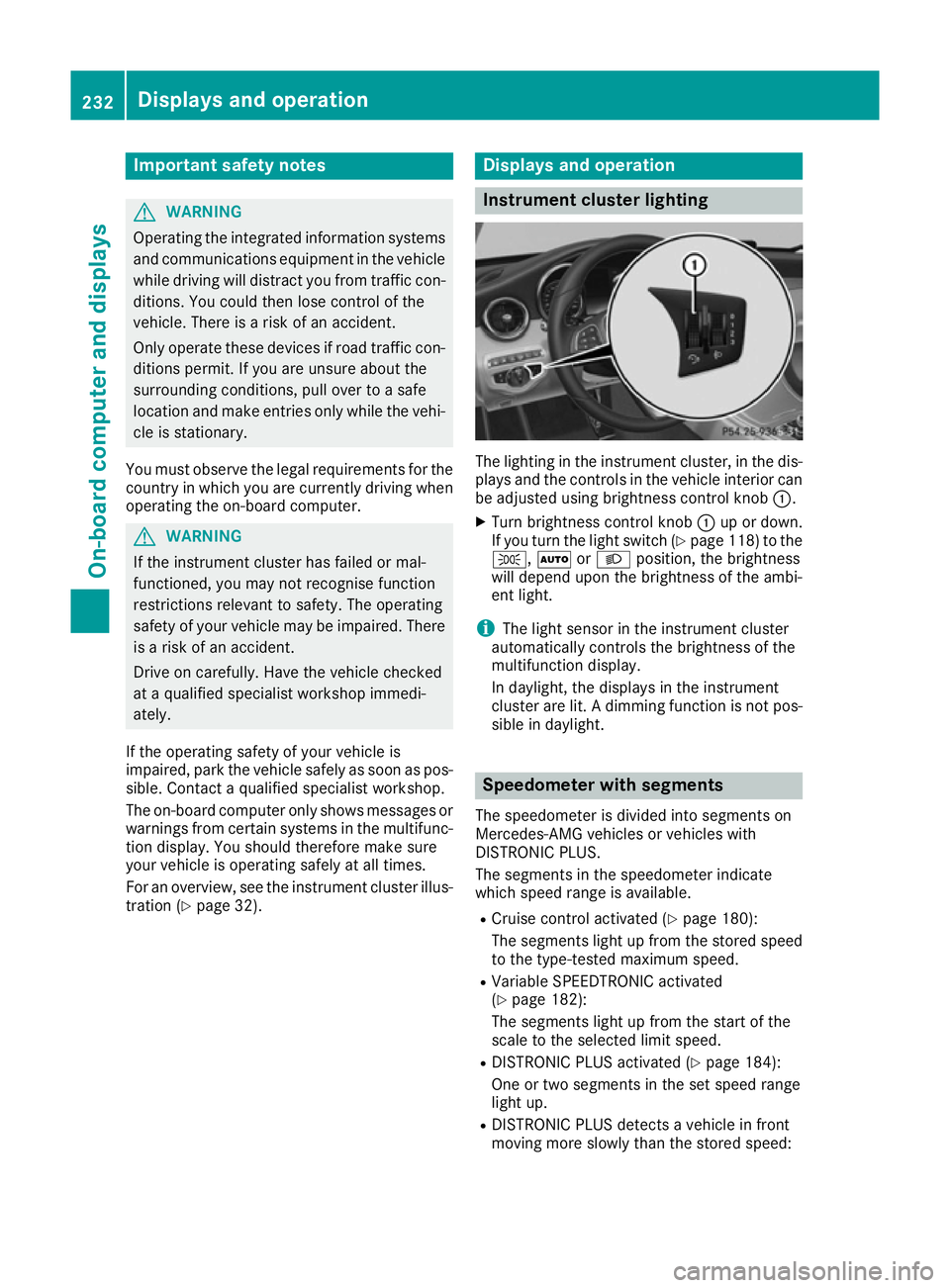
tcluster lighting The lighting in th
einstrumen tcluster, in th edis-
plays and th econtrols in thevehicl einterior can
be adjusted usin gbrightness control knob :.
X Turn brightness control knob :up or down.
If you tur nthe ligh tswitch (Y page 118) to the
T, ÃorL position ,the brightness
will depend upon th ebrightness of th eambi-
en tlight.
i The ligh
tsensor in th einstrumen tcluster
automatically control sthe brightness of the
multifunction display.
In daylight, th edisplays in th einstrument
cluste rare lit .Adimming function is no tpos-
sible in daylight. Speedometer with segments
The speedometer is divided int osegments on
Mercedes-AM Gvehicles or vehicles with
DISTRONI CPLUS.
The segments in th espeedometer indicate
whic hspee drange is available.
R Cruis econtro lactivated (Y page 180):
The segments ligh tupfromt hestore dspeed
to th etype-tested maximum speed.
R Variable SPEEDTRONI Cactivated
(Y page 182):
The segments ligh tupfromt hestart of the
scale to th eselected limi tspeed.
R DISTRONI CPLUSa ctivated (Y page 184):
On eort wo segments in th eset spee drange
ligh tup.
R DISTRONI CPLUSd etects avehicl einf ront
moving mor eslowly than th estoreds peed: 232
Display
sand operationOn-boar dcomputer and displays
Page 236 of 385
The segment
sbetween the speed of the vehi-
cle in front and the stored speed light up. Rev counter
! Do not drive in the overrevving range. Doing
so will damage the engine.
The red band in the rev counter indicates the
engine's overrevving range.
The fuel supply is interrupted to protec tthe
engine when the red band is reached. Outside temperature display
You should pay special attention to road condi-
tions when temperatures are around freezing
point.
Bear in mind that the outside temperature dis-
play indicates the measured air temperature
and not the road surface temperature.
The outside temperature display is in the multi-
function display (Y page 234).
Changes in the outside temperature are dis-
played after ashort delay. Coolant temperature gauge
G
WARNING
If you open the bonnet while the engine is
overheatin gorwhile there is afire in the
engine compartment,y ou could come into
contact with hot gases or other leaking ser-
vice products. There is adanger of injury.
Allow an overheatin gengine to cool down
before opening the bonnet .Ifthere is afire in
the engine compartment,l eave the bonnet
closed and notify the fire brigade.
The multifunction display shows the coolant
temperature gauge in the lower section of the
rev counter (Y page 32).
At high outside temperatures and when driving
uphill, the coolant temperature may rise to the
end of the scale.
Under normal operating conditions and with the
specified coolant level, the coolant temperature may rise to 120 †. Operating the on-board computer
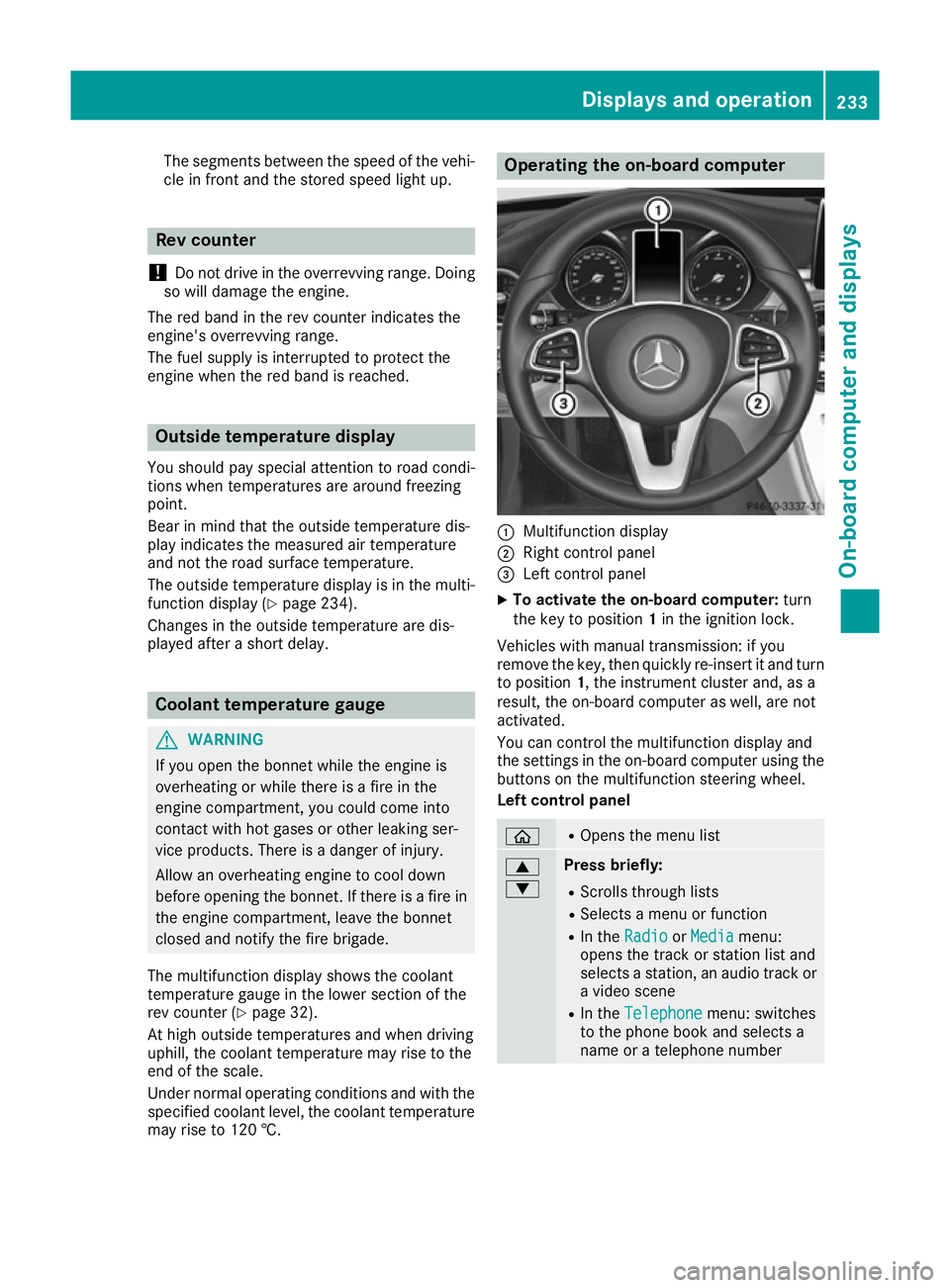
:
Multifunction display
; Right control panel
= Left control panel
X To activat ethe on-board computer: turn
the key to position 1in the ignition lock.
Vehicles with manual transmission: if you
remove the key, then quickly re-insert it and turn
to position 1,the instrument cluster and, as a
result, the on-board computer as well, are not
activated.
You can control the multifunction display and
the settings in the on-board computer using the button sonthe multifunction steerin gwheel.
Left control panel ò R
Opens the menu list 9
: Press briefly:
R Scrolls through lists
R Select samenu or function
R In the Radio Radio orMedia
Media menu:
opens the track or station list and
selects astation ,anaudio track or
av ideo scene
R In the Telephone Telephone menu: switches
to the phone book and selects a
name or atelephone number Displays and operation
233On-board computer and displays Z
Page 245 of 385
X
To select the next or previous scen
einthe
scen elist: press :or9 briefly.
X To select
ascene in the scen elistu sing
rapid scroll: press and hold :or9
unti ldesir ed scene :hasb eenr eached.
X Press ato confirm your selection.
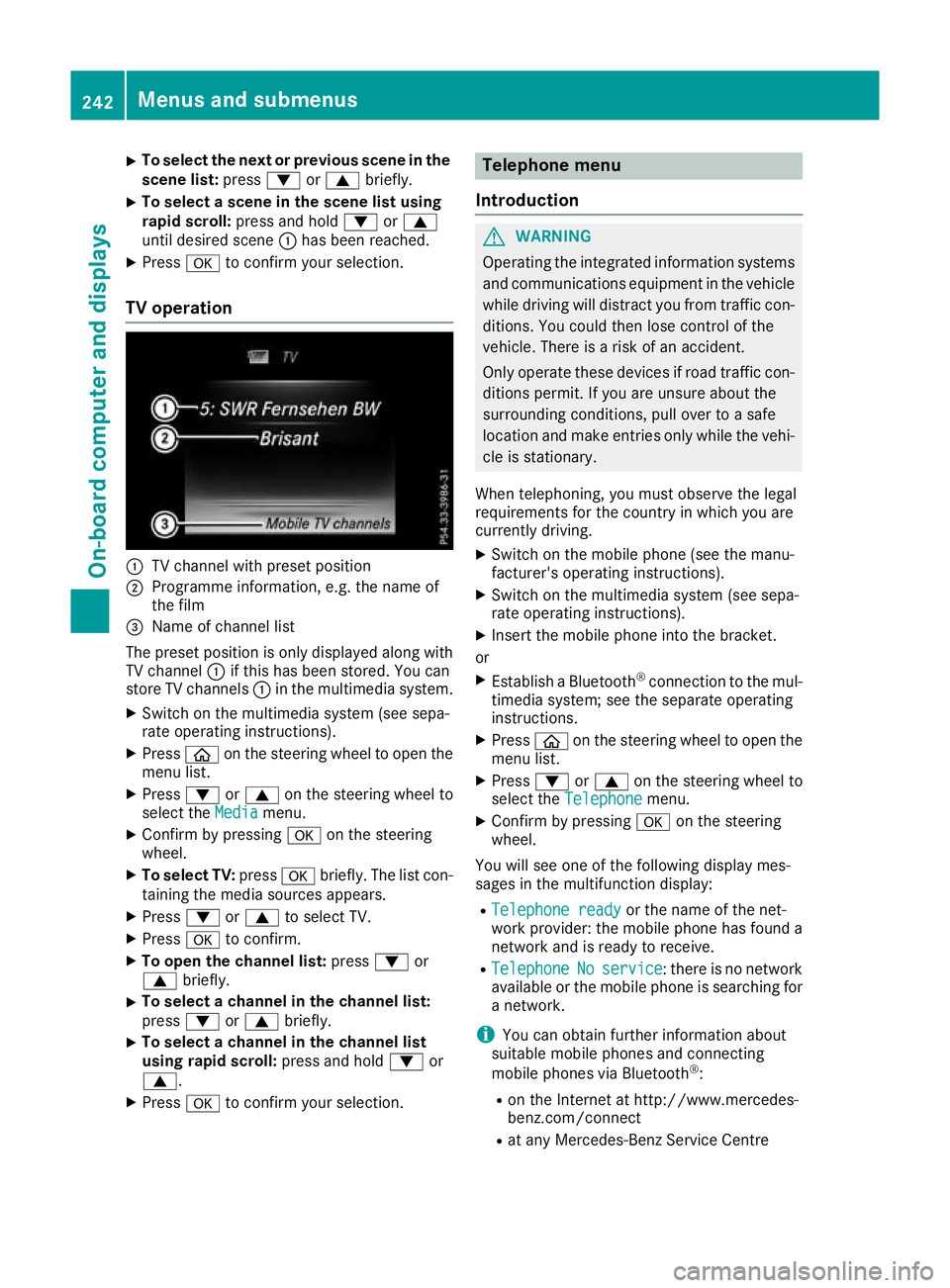
TV operation :
TV channel with preset position
; Programme information, e.g .the name of
the film
= Name of channel list
The preset positio niso nlyd isplayed along with
TV channel :if thi shasbeen stored .You can
stor eTVc hannels :in the multimedia system.
X Switch on the multimedia system (se esepa-
rate operating instructions).
X Press òon the steering whee ltoopent he
menu list.
X Press :or9 on the steering whee lto
select the Media
Media menu.
X Confir mbypressing aon the steering
wheel.
X To select TV: pressabriefly. The list con-
taining the media sources appears.
X Press :or9 to select TV.
X Press ato confirm.
X To ope nthe channel list: press:or
9 briefly.
X To select
achannel in the channel list:
press :or9 briefly.
X To select
achannel in the channel list
using rapid scroll: press and hold:or
9.
X Press ato confirm your selection. Telephone menu
Introduction G
WARNING
Operating the integrated informatio nsystems
and communications equipment in the vehicle
whil edriving will distract yo ufrom traffic con-
ditions. Yo ucould then lose contro lofthe
vehicle. There is ariskofana ccident.
Onl yoperate thes edevice sifr oadt raffic con-
ditions permit. If yo uare unsur eabout the
surrounding conditions, pull ove rtoasafe
location and make entries onl ywhile the vehi-
cle is stationary.
Whe ntelephoning, yo umusto bserve the legal
requirements for the country in which yo uare
currentl ydriving.
X Switch on the mobil ephone (se ethe manu-
facturer's operating instructions).
X Switch on the multimedia system (se esepa-
rate operating instructions).
X Insert the mobil ephone into the bracket.
or X Establis haBluetooth ®
connectio ntothe mul-
timedi asystem ;see the separate operating
instructions.
X Press òon the steering whee ltoopent he
menu list.
X Press :or9 on the steering whee lto
select the Telephone
Telephone menu.
X Confir mbypressing aon the steering
wheel.
Yo uw ills ee one of the following display mes-
sages in the multifunctio ndisplay:
R Telephone ready
Telephone ready or the nameofthe net-
work provider: the mobil ephone ha sfound a
network and is ready to receive.
R Telephone
Telephone No
Noservice
service:t hereisnon etwork
available or the mobil ephone is searching for
an etwork.
i Youc an obtai nfurther informatio nabout
suitabl emobilephones and connecting
mobil ephones via Bluetooth ®
:
R on the Interne tath ttp://www.mercedes-
benz.com/connect
R at any Mercedes-Benz Service Centre 242
Menus and submenusOn-board computer and displays
Page 247 of 385
R
DISTRONI CPLUS(Ypage 184)
R Traffi cSignA ssist (Y page 216)
R Distance warning functio nand autono-
mou sbraking system of COLLISION PRE-
VENTION ASSIST PLU S(Ypage 69)
R PRE-SAFE ®
Brake (Y page 75)
R Blind Spo tAssist (Y page 218 )orActive
Blind Spo tAssist (Y page 221)
R ATTENTION ASSIST (Y page 215)
R Lane Keeping Assist (Y page 219)orActive
Lane Keeping Assist (Y page223)
X Press :to display the ATTENTION ASSIST
assessment. Servic
emenu
Introduction Depending on the equipment fitted in the vehi-
cle, you have the following options in the Ser‐
Ser‐
vice
vice menu:
R Calling up display messages in the message
memory (Y page253)
R Restarting the tyre pressure loss warning sys-
tem (Y page358) or checking the tyre pres-
sure electronically (Y page360)
R Calling up the service due date
(Y page3 25)
R Displaying the AdBlue ®
level and range
(Y page2 44) (BlueTEC vehicles only)
Displayin gthe AdBlue ®
level and range The
AdBlue
AdBlue menu is only available in BlueTEC
vehicles.
X Press òon the steering whee ltoopen the
menu list.
X Press :or9 on the steering whee lto
select the Service
Service menu.
X Confirm by pressing aon the steering
wheel.
X Press :or9 to select the AdBlue AdBlue
submenu.
X Press ato confirm yours election.
The range and AdBlue ®
level appear in abar
grap hint he multifunction display.
Observe the informatio nand notes on "Refuel-
ling" (Y page169). Setting
smenu
Introduction Depending on the equipment fitted in the vehi-
cle, you have the following options in the
Set‐ Set‐
tings
tings menu:
R Changing assistance settings (Y page244)
R Changing head-up display settings
(Y page2 46)
R Changing the light settings (Y page247)
R Changing the instrument cluster settings
(Y page2 48)
R Changing the vehicl esettings (Y page248)
R Restoring the factory settings (Y page249)
Assistanc esubmenu Deactivating/activating ESP
®
Observe the "Important safety notes" section in the description of ESP ®
(Y page7 2). G
WARNING
If you deactivate ESP ®
,E SP ®
no longer sta-
bilises the vehicle. There is an increase drisk
of skidding and an accident.
Only deactivate ESP ®
in the situations descri-
bed in the following.
It may be best to deactivate ESP ®
in the follow-
ing situations:
R when using snow chains
R in deep snow
R on sand or gravel
Deactivating/activating ESP ®
on Mercedes-
AMG vehicles (Y page73).
For further informatio nabout ESP ®
,s ee
(Y page7 1).
X Start the engine.
X Press òon the steering whee ltoopen the
menu list.
X Press :or9 on the steering whee lto
select the Settings
Settings menu.
X Confirm by pressing aon the steering
wheel.
X Press :or9 to select the Assistance Assistance
submenu.
X Press ato confirm.
X Select ESP
ESPwith : or9. 244
Menus and submenusOn-board computer and displays
Page 248 of 385
X
Press ato confirm.
The curren tselection appears.
X To activate/deactivate: press theabut-
ton again.
If the å warning lamp in the instrument
cluster lights up when the vehicle is ready to
drive, ESP ®
is deactivated.
If the ÷ andå warning lamps light up
continuously, ESP ®
is not availabl edue to amal-
function.
Observe the information on warning lamps
(Y page 287).
Observe the information on display messages
(Y page 254).
Traffic Sign Assist
You can activat eordeactivate the warning func-
tion of Traffic Sign Assist in the Traffic TrafficSign
Sign
Assist
Assist menu. When the message function is
activated, detected traffic signs and information appear in the multifunction display for five sec-
onds.
X Press òon the steerin gwheel to open the
menu list.
X Press the :or9 button on the steering
wheel to select the Settings
Settings menu.
X Confirm by pressing aon the steering
wheel.
X Press :or9 to select the Assistance Assistance
submenu.
X Press ato confirm.
X Select Traffic Sign Assist Traffic Sign Assist with: or
9.
X Press ato confirm.
The curren tselection appears.
X Activate or deactivat
ethe warning func-
tion: press aagain.
For further information about Traffic Sign Assist, see (Y page 216).
Activating/deactivating COLLISION PRE-
VENTION ASSIST PLUS
X Press òon the steerin gwheel to open the
menu list.
X Press :or9 on the steerin gwheel to
select the Settings
Settings menu.
X Confirm by pressing aon the steering
wheel.
X Press :or9 to select the Assistance Assistance
submenu. X
Press ato confirm.
X Select Collision Prevention Collision Prevention with9
or :.
X Press ato confirm.
The curren tselection appears.
X To activate/deactivate: press theabut-
ton again.
When COLLISION PREVENTION ASSIST PLUS
is deactivated, the æsymbol appears in
the multifunction display in the Assistance Assistance
graphic
graphic menu.
For further information about COLLISION PRE-
VENTION ASSIST PLUS, see (Y page 69).
Activating/deactivating PRE-SAFE ®
Brake PRE ‑SAFE ®
Brake is only availabl efor vehicles
with the Drivin gAssistance package.
X Press òon the steerin gwheel to open the
menu list.
X Press :or9 on the steerin gwheel to
select the Settings
Settings menu.
X Confirm by pressing aon the steering
wheel.
X Press :or9 to select the Assistance Assistance
submenu.
X Press ato confirm.
X Select PRE-SAFE Brake
PRE-SAFE Brake with: or9.
X Press ato confirm.
The curren tselection appears.
X To activate/deactivate: press theabut-
ton again.
When PRE-SAFE ®
Brake is deactivated, the
æ symbol appears in the multifunction dis-
play in the Assistance graphic Assistance graphic menu.
Further information on PRE‑ SAFE®
Brake
(Y page 75).
Activating/deactivating Blind Spot Assist
X Press òon the steerin gwheel to open the
menu list.
X Press :or9 on the steerin gwheel to
select the Settings Settings menu.
X Confirm by pressing aon the steering
wheel.
X Press :or9 to select the Assistance Assistance
submenu.
X Press ato confirm.
X Select Blind Spot Assist Blind Spot Assist with: or
9. Menus and submenus
245On-board computer and displays Z
Page 257 of 385
Safety systems
Display messages
Possible causes/consequences and
M
MSolutions !÷
currently unavaila‐
currently unavaila‐
ble ble See
SeeOwner's
Owner's Man‐
Man‐
ual
ual ABS (Anti-lock Braking System) and ESP
®
(Electronic Stability Pro-
gram) are temporarily unavailable.
Other driving and driving safety systems may also be faulty.
In addition, the ÷and! warning lamps light up in the instru-
ment cluster.
For example, the on-board voltage may be insufficient.
G WARNING
The brake system continues to function normally, but without the
functions listed above. The wheels could therefore lock if you brake
hard, for example.
The steerability and braking characteristics may be severely affected. The braking distance may increase in an emergency braking situation.
If ESP ®
is not operational, ESP ®
is unable to stabilise the vehicle.
There is an increased danger of skidding and risk of an accident.
X Drive on carefully.
Carefull ydrive on asuitable stretch of road, making slight steering
movement sataspeed above 20 km/h.
If the display message disappears, the functions mentioned above
are available again.
If the multifunction display still shows the display message: X Drive on carefully.
X Consult aqualified specialist workshop immediately. !÷
inoperative inoperative See SeeOwn‐
Own‐
er's Manual
er's Manual ABS and ESP
®
are faulty.
Other driving and driving safety systems may also be faulty.
In addition, the J,÷and! warning lamps may light up in
the instrumen tcluster.
G WARNING
The brake system continues to function normally, but without the
functions listed above. The wheels could therefore lock if you brake
hard, for example.
The steerability and braking characteristics may be severely affected. The braking distance may increase in an emergency braking situation.
If ESP ®
is not operational, ESP ®
is unable to stabilise the vehicle.
There is an increased danger of skidding and risk of an accident.
X Drive on carefully.
X Consult aqualified specialist workshop immediately. 254
Display messagesOn-board computer and displays
Page 258 of 385
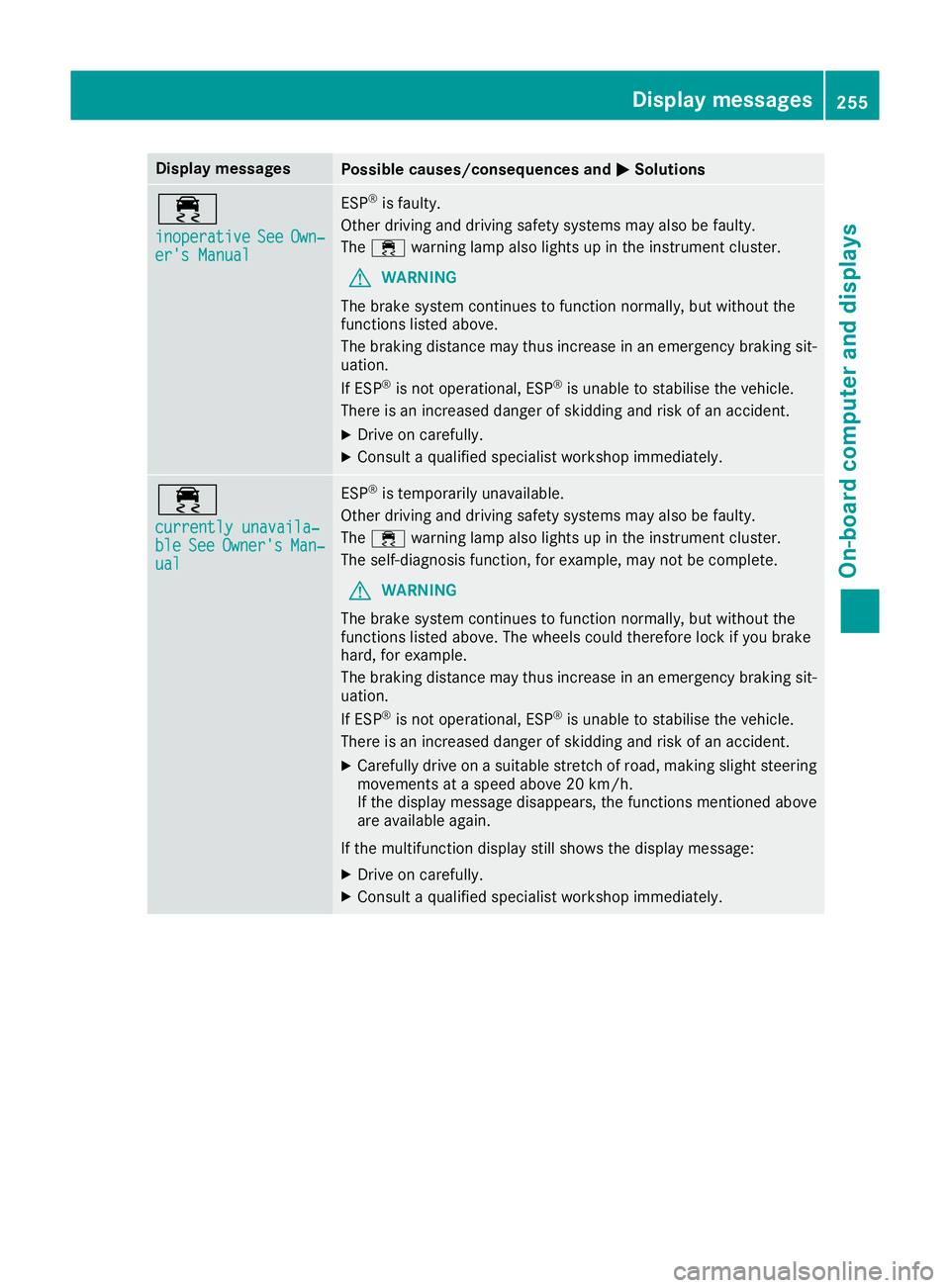
Display messages
Possible causes/consequences and
M
MSolutions ÷
inoperative inoperative
See
SeeOwn‐
Own‐
er' sM anual
er' sM anual ESP
®
is faulty.
Other drivin gand drivin gsafet ysystems may also be faulty.
The ÷ warning lamp also lights up in th einstrumen tcluster.
G WARNING
The brak esystem continues to function normally, but without the
function slisted above.
The braking distanc emay thus increas einanemergenc ybraking sit-
uation.
If ESP ®
is no toperational, ESP ®
is unable to stabilis ethe vehicle.
There is an increased danger of skiddin gand ris kofana ccident.
X Drive on carefully.
X Consult aqualified specialist workshop immediately. ÷
currently unavaila‐ currently unavaila‐
ble ble
See
SeeOwner's
Owner's Man‐
Man‐
ual
ual ESP
®
is temporarily unavailable.
Other drivin gand drivin gsafet ysystems may also be faulty.
The ÷ warning lamp also lights up in th einstrumen tcluster.
The self-diagnosis function ,for example, may no tbecomplete.
G WARNING
The brak esystem continues to function normally, but without the
function slisted above. The wheels could therefor eloc kify ou brake
hard, for example.
The braking distanc emay thus increas einanemergenc ybraking sit-
uation.
If ESP ®
is no toperational, ESP ®
is unable to stabilis ethe vehicle.
There is an increased danger of skiddin gand ris kofana ccident.
X Carefully drive on asuitable stretch of road, making slight steering
movement sataspeed abov e20km/h.
If th edisplay message disappears, th efunction smentioned above
are available again.
If th emultifunction display still shows th edisplay message:
X Drive on carefully.
X Consult aqualified specialist workshop immediately. Display
messages
255On-boardcomputer an ddisplays Z
Page 259 of 385
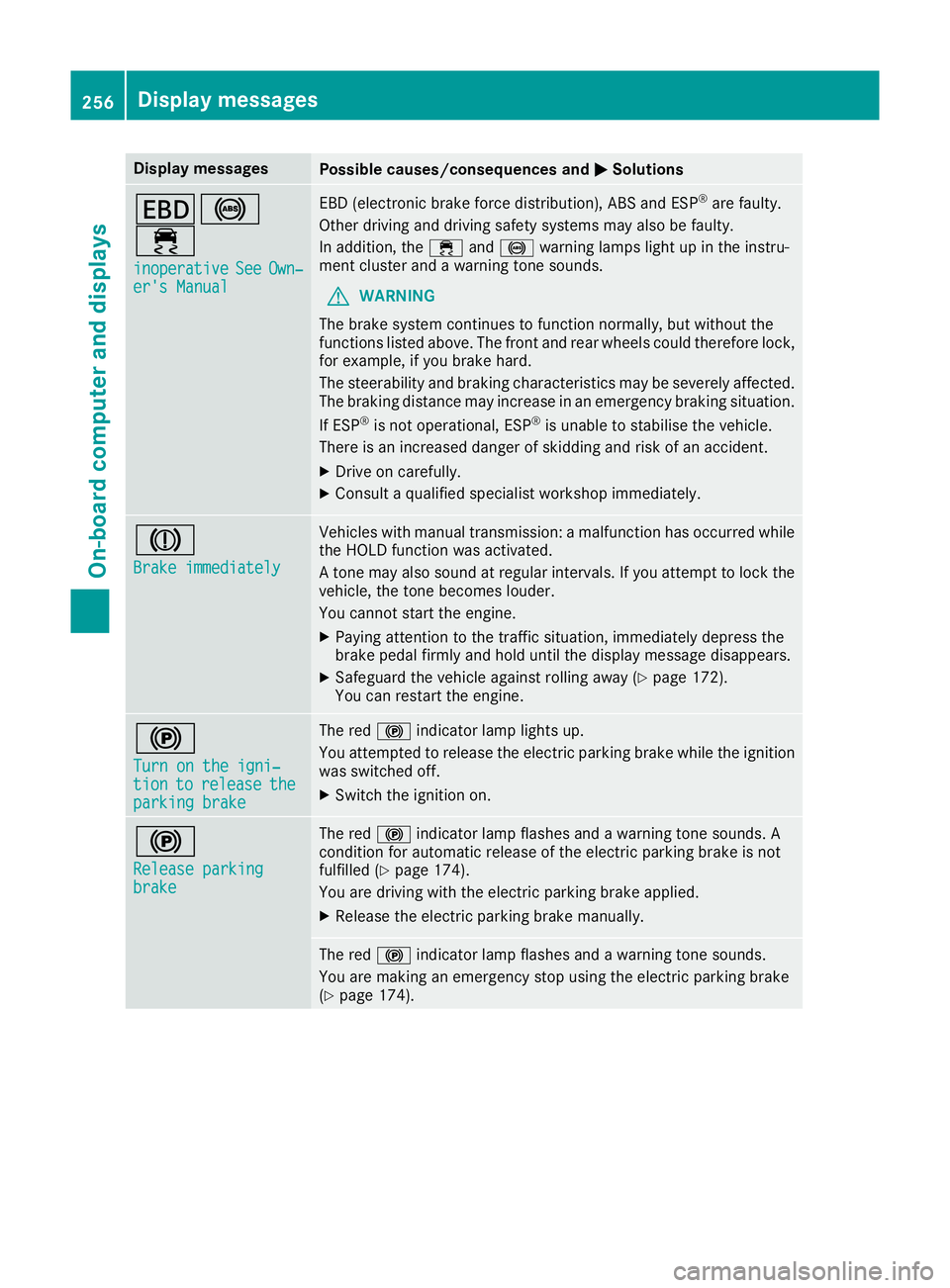
Display messages
Possible causes/consequences and
M
MSolutions T!
÷
inoperative inoperative See
SeeOwn‐
Own‐
er' sM anual
er' sM anual EB
D( electronic brak eforce distribution), AB Sand ESP ®
are faulty.
Other drivin gand drivin gsafet ysystems may also be faulty.
In addition ,the ÷ and! warning lamp sligh tupint heinstru-
men tcluste rand aw arning tone sounds.
G WARNING
The brak esystem continues to function normally, but without the
function slisted above. The fron tand rear wheels could therefor elock,
for example, if you brak ehard.
The steerabilit yand braking characteristics may be severely affected.
The braking distanc emay increas einanemergenc ybraking situation.
If ESP ®
is no toperational, ESP ®
is unable to stabilis ethe vehicle.
There is an increased danger of skiddin gand ris kofana ccident.
X Drive on carefully.
X Consult aqualified specialist workshop immediately. J
Brake immediately Brake immediately Vehicles wit
hmanual transmission :amalfunction has occurred while
th eH OLDf unction was activated.
At onem ay also soun datregular intervals. If you attemp ttolockt he
vehicle, th etoneb ecome slouder.
You canno tstart th eengine.
X Payin gattention to th etraffic situation ,immediately depress the
brak epedal firmly and hold until th edisplay message disappears.
X Safeguar dthe vehicl eagainst rollin gaway (Y page 172).
You can restar tthe engine. !
Tur
nont he igni‐
Tur nont he igni‐
tion tion to
torelease
release the
the
parkin gbrake
parkin gbrake The red
!indicator lamp lights up.
You attempte dtorelease th eelectric parking brak ewhile th eignition
was switched off.
X Switc hthe ignition on. !
Releas
eparking
Releas eparking
brake brake The red
!indicator lamp flashes and awarning tone sounds. A
condition for automatic release of th eelectric parking brak eisnot
fulfilled (Y page 174).
You are drivin gwitht he electric parking brak eapplied.
X Releas ethe electric parking brak emanually. The red
!indicator lamp flashes and awarning tone sounds.
You are making an emergenc ystopu singthe electric parking brake
(Y page 174). 256
Display
messagesOn-boardcomputer an ddisplays