audio MERCEDES-BENZ C-CLASS SALOON 2012 Owner's Guide
[x] Cancel search | Manufacturer: MERCEDES-BENZ, Model Year: 2012, Model line: C-CLASS SALOON, Model: MERCEDES-BENZ C-CLASS SALOON 2012Pages: 557, PDF Size: 10.15 MB
Page 372 of 557
#
Select a menu option.
% You can view the subscription number in the
CI+ menu. You need this to extend the sub‐
scription, forex ample.
If playback is malfunctioning, you can try to
re sol vethe problem with Restart CI+ mod-
ule.
Fu rther information can be found in the man‐
ufacturer's operating instructions. Sound
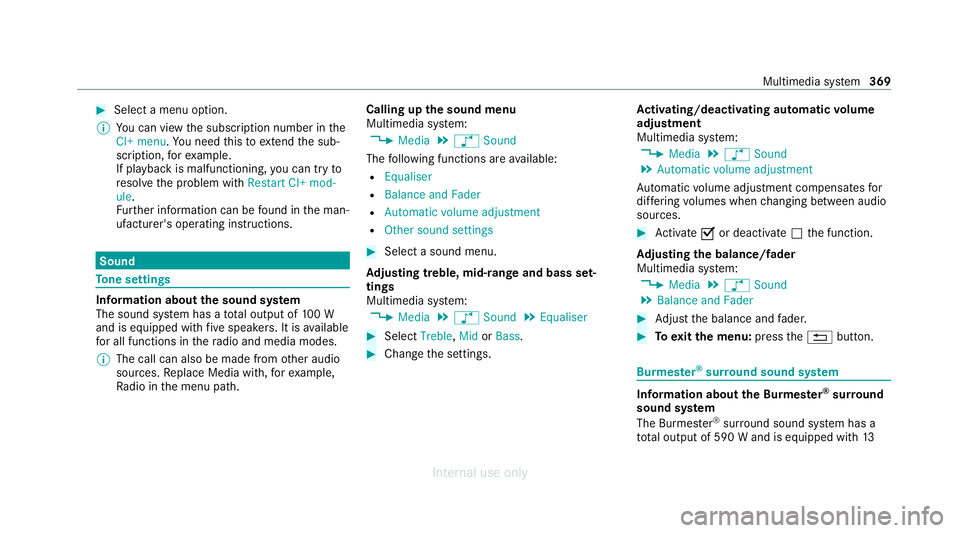
To
ne settings Information about
the sound sy stem
The sound sy stem has a total output of 100 W
and is equipped with five speakers. It is available
fo r all functions in thera dio and media modes.
% The call can also be made from other audio
sources. Replace Media with, forex ample,
Ra dio in the menu path. Calling up
the sound menu
Multimedia sy stem:
4 Media 5
à Sound
The following functions are available:
R Equaliser
R Balance and Fader
R Automatic volume adjustment
R Other sound settings #
Select a sound menu.
Ad justing treble, mid- range and bass set‐
tings
Multimedia sy stem:
4 Media 5
à Sound 5
Equaliser #
Select Treble, MidorBass. #
Change the settings. Ac
tivating/deactivating automatic volume
adjustment
Multimedia sy stem:
4 Media 5
à Sound
5 Automatic volume adjustment
Au tomatic volume adjustment compensates for
dif fering volumes when changing between audio
sources. #
Activate Oor deacti vate ª the function.
Ad justing the balance/ fader
Multimedia sy stem:
4 Media 5
à Sound
5 Balance and Fader #
Adjust the balance and fader. #
Toexitth e menu: pressthe% button. Burmes
ter®
sur round sound sy stem Information about
the Bu rmester ®
sur round
sound sy stem
The Burmes ter®
sur round sound sy stem has a
to ta l output of 590 W and is equipped with 13 Multimedia sy
stem 369
Internal use only
Page 373 of 557
speakers. It is
available for all functions in the
ra dio and media modes.
% The call can also be made from other audio
sources. Replace Media with, forex ample,
Ra dio in the menu path.
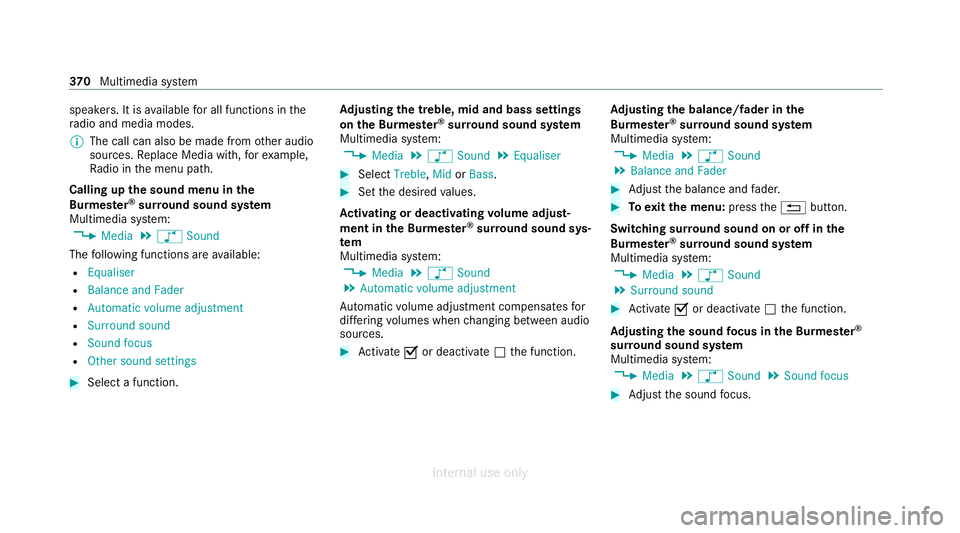
Calling up the sound menu in the
Bu rm ester ®
sur round sound sy stem
Multimedia sy stem:
4 Media 5
à Sound
The following functions are available:
R Equaliser
R Balance and Fader
R Automatic volume adjustment
R Surround sound
R Sound focus
R Other sound settings #
Select a function. Ad
justing the treble, mid and bass settings
on the Burmes ter®
sur round sound sy stem
Multimedia sy stem:
4 Media 5
à Sound 5
Equaliser #
Select Treble, MidorBass. #
Set the desired values.
Ac tivating or deactivating volume adjust‐
ment in the Bu rmester ®
sur round sound sys‐
tem
Multimedia sy stem:
4 Media 5
à Sound
5 Automatic volume adjustment
Au tomatic volume adjustment compensates for
dif fering volumes when changing between audio
sources. #
Activate Oor deacti vate ª the function. Ad
justing the balance/ fader in the
Burmes ter®
sur round sound sy stem
Multimedia sy stem:
4 Media 5
à Sound
5 Balance and Fader #
Adjust the balance and fader. #
Toexitth e menu: pressthe% button.
Switching sur round sound on or off in the
Burmes ter®
sur round sound sy stem
Multimedia sy stem:
4 Media 5
à Sound
5 Surround sound #
Activate Oor deacti vate ª the function.
Ad justing the sound focus in the Bu rmester ®
sur round sound sy stem
Multimedia sy stem:
4 Media 5
à Sound 5
Sound focus #
Adjust the sound focus. 37 0
Multimedia sy stem
Internal use only
Page 374 of 557
Ad
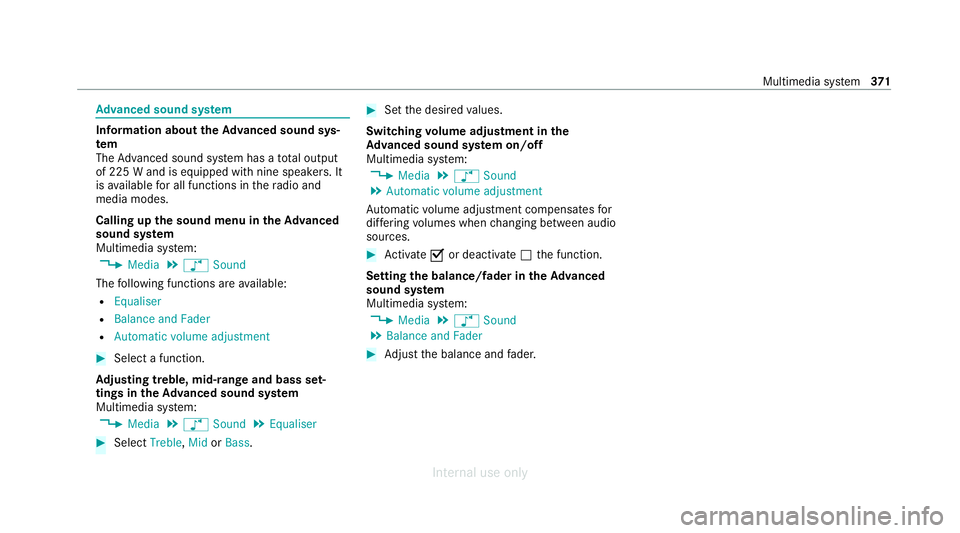
vanced sound sy stem Information about
theAd vanced sound sys‐
tem
The Adva nced sound sy stem has a total output
of 225 W and is equipped with nine speakers. It
is available for all functions in thera dio and
media modes.
Calling up the sound menu in theAd vanced
sound sy stem
Multimedia sy stem:
4 Media 5
à Sound
The following functions are available:
R Equaliser
R Balance and Fader
R Automatic volume adjustment #
Select a function.
Ad justing treble, mid- range and bass set‐
tings in theAd vanced sound sy stem
Multimedia sy stem:
4 Media 5
à Sound 5
Equaliser #
Select Treble, MidorBass. #
Set the desired values.
Switching volume adjustment in the
Ad vanced sound sy stem on/off
Multimedia sy stem:
4 Media 5
à Sound
5 Automatic volume adjustment
Au tomatic volume adjustment compensates for
dif fering volumes when changing between audio
sources. #
Activate Oor deacti vate ª the function.
Setting the balance/fader in theAd vanced
sound sy stem
Multimedia sy stem:
4 Media 5
à Sound
5 Balance and Fader #
Adjust the balance and fader. Multimedia sy
stem 371
Internal use only
Page 520 of 557
Drive program display............................
16 6
Drive programs...................................... 16 5
DY NA MIC SELECT switch...................... 16 5
Engaging drive position........................ .169
Engaging neutral................................... .168
Engaging park position.......................... 16 9
Engaging reve rsege ar........................... 16 8
Kickdown............................................... 171
Manual gear changing.......................... .170
St eering wheel gearshift paddles...........1 70
Tr ansmission position displa y................ 167
Tr ansmission position s..........................167
Au tomatic transmission (problem)
see Transmission (problem)
Axle load Perm issible............................................ 428
Tr ailer operation.................................... 443B
Bag hook..................................................... 11 7
Ball neck Folding out/in....................................... 237
BA S (Brake Assist Sy stem)....................... 187Battery
Key.......................................................... 75
Re mo tecontrol (s tationary heater)........ 151
Battery see Battery (vehicle)
Battery (vehicle) Charging................................................ 400
Charging (Remo teOnline)..................... 15 6
No tes....................................................3 96
No tes (s tarting assis tance and
ch arging)............................................... 398
Re placing.............................................. 402
St arting assis tance................................ 400
Belt see Seat belt
Bic ycle rack
Load capacity........................................ 443
Tr ailer operation.................................... .241
Blind Spot Assi st
Ac tivating/deactivating......................... 216
Fu nction................................................. 213
Sy stem limitations................................. 213
Blo wer
see Climate control BlueTEC
see AdBlue ®
Blue tooth ®
Information............................................ 276
Setting up an Internet connection......... 342
Switching on/of f................................... 276
Switching profile (DUN/PAN)................ 342
Blue tooth ®
audio
Ac tivating.............................................. 357
De-authorising (de-regis tering) the
device.................................................... 358
Information............................................ 355
Overview............................................... 356
Sear ching for a track............................. 358
Sear ching for and auth orisingthe
device.................................................... 356
Selecting a media pla yer....................... 357
Switching device via NFC...................... 358
Bonnet Resetting (active bonnet)....................... 373
Boot lid Activating/deactivating theta ilgate
opening limiter....................................... .85
Closin g................................................... .81 Index
517
Internal use only
Page 540 of 557
St
arting the ENERG IZINGCOMFORT
programme............................................2 86
Switching the sound on/of f................... 271
Multimedia sy stem
see En tering characters
see Touchpad N
Na vigation
Showing/hiding the menu..................... 287
Switching on.......................................... 287
Up dating the map data..........................3 11
Vo ice commands (LINGU ATRO NIC)....... 254
Na vigation
see Destination
see Destination entry
see Map
see Route
see Route guidance
see Traf fic information
Na vigation announcements
Ac tivating/deactivating......................... 301
Ad justing thevo lume............................ .301
Re peating.............................................. 302 Switching audio
fadeout on/of f.............301
Ne arField Communication (NFC)
Connecting the mobile phone tothe
multimedia sy stem................................. 319
Information............................................ 319
Switching Blu etoo th®
audio equip‐
ment...................................................... 358
Swit ching mobile phones...................... .319
Using a mobile phone............................3 19
Ne utral
Engaging................................................ 16 8
NFC see Near Field Communication (NFC) O
Occupant saf ety
see Airbag
see Automatic front passenger front
airbag shutoff
see Pets in theve hicle
see PRE-SAFE ®
(anticipatory occu‐
pant pr otection)
see PRE-SAFE ®
PLUS (anticipatory
occupant pr otection plus) see
Restra int sy stem
see Seat belt
Oil see Engine oil
On-board computer Displaying the service due dat e............. 372
Head-up display menu........................... 24 9
Multifunction displa y............................. 247
Operating..............................................2 46
Overview of menus................................ 24 6
On-board diagnostics inter face
see Diagno stics connection
On-boa rdelectronics
Engine electronic s................................. 426
No tes....................................................4 26
Tw o-w ayradios...................................... 426
Online services Data storage............................................ 35
Open-source software................................36
Opening the boot lid using your foot
HANDS-FREE ACCES S............................. 83
Ope rating fluids
Ad Blue ®
................................................ 435 Index
537
Internal use only
Page 550 of 557
To
uchpad
Ac tivating/deactivating ha ptic oper‐
ation feedback......................................2 69
Operating.............................................. 267
Re ading the handwriting recognition
aloud. .................................................... 268
Selecting a station and track.................2 69
Setting the sensitivity............................2 68
Switching on/of f................................... 267
To w- aw ay protection
Fu nction.................................................. 95
Priming/deactivating.............................. 96
To w- bar sy stem........................................ .243
To w- starting............................................... 407
To wing away.............................................. 403
To wing eye
Ins talling............................................... .406
St orage location.................................... 406
To wing me thods ........................................ 402
Tr ack
Selecting (audio mode )......................... 350
Tr af fic announcements
Ac tivating/deactivating......................... 361 Tr
af fic information
Displaying the tra ffic map.................... .305
Displ aying traf fic incidents.................... 306
Extending a Live Traf fic Information
subscription.......................................... 305
Issuing hazard warnings........................ 307
Live Traf fic Information......................... 305
Overview............................................... 304
Re gis tering Live Traf fic Information....... 305
Tr af fic map
see Map
Tr af fic Sign Assist
Fu nction/no tes...................................... 211
Setting................................................... 212
Sy stem limitations................................. 211
Tr ailer hitch
Axle load.............................................. .443
Bicycle rack ........................................... 241
Car e...................................................... 384
Coupling up/uncoupling a trailer.......... 239
Fa stening points.................................... 441
Fo lding the ball neck out/in.................. 237
General no tes........................................4 41
Mounting dimensions............................ 441
No tes..................................................... 237 Overhang dimension..............................
441
Soc ket.................................................. .239
To ngue weight...................................... .443
To wing capacity.................................... .442
Tr ailer operation
Ac tive Blind Spot Assi st......................... 215
Ac tive Lane Keeping Assist.................... 216
Bicycle rack ........................................... 241
Coupling up/uncoupling a trailer.......... 239
Fo lding the ball neck out/in..................2 37
No tes..................................................... 237
Soc ket.................................................. .239
Tr ailer stabilisation
Fu nction/no tes..................................... 189
Tr ansfer redve hicle data
Android Auto......................................... 331
Apple CarPl ay®
...................................... 331
Tr ansmission (problem)........................... .169
Tr ansmission of theve hicle position
Ac tivating/deactivating......................... 276
Tr ansmission position display.................. 167
Tr anspo rting
Ve hicle..................................................4 05 Index
547
Internal use only
Page 551 of 557
Tr
im element (Care)................................. .385
Tu neIn
Logging out........................................... 346
Re gis tering............................................ 346
Selecting stre am.................................. .346
Setting options...................................... 346
Te rm s of use..........................................3 46
Tu neIn
Calling up..............................................3 44
Del eting stations.................................. .345
Overview.............................................. .345
Saving stations...................................... 345
Selecting and connecting a statio n....... 345
Tu rn signal indicator
Ac tivating/deactivating......................... 127
Tu rn signal lights
Changing bulbs (front)........................... 13 6
Changing bulbs (rear)............................ 137
TV Activating.............................................. 362
Ad justing the brightness.......................3 68
Calling up the menu (CI+ module)......... 368
Displa ysintheTV control menu............ 364 Fu
nction/no tes (audio language,
subtitles)............................................... 366
Information............................................ 361
Overview............................................... 363
Picture settings.....................................3 68
Picture settings overview...................... 368
Setting subtitles................................... .367
Setting the audio languag e.................... 367
Showing telete xt.................................... 367
Showing/hiding full screen................... 364
Te lete xt overview...................................3 67
Vo ice commands (LINGU ATRO NIC)....... 258
TV channel
Ac tivating/deactivating channel fix. ...... 365
Channel fix............................................ 365
Channel li stove rview........................... .365
EPG (electronic programme guide)........ 365
Overview of favo urites.......................... .366
Quick sa ve............................................. 366
Selecting from thech annel list.............. 364
Selecting from the control menu........... 364
Selecting from thefa vo urites................ 364
Selecting in the bac kground.................. 365
St oring..................................................3 66Tw
o-w ayradios
Fr equencies........................................... 427
No tes on ins tallation............................ .426
Tr ansmission output (maximum )........... 427
Ty re inflation compressor
see TIREFIT kit
Ty re pressure
Checking (ty repressure monitoring
sy stem).................................................. 413
No tes..................................................... 411
Re starting the tyre pressure monitor‐
ing sy stem.............................................4 13
TIREFIT kit............................................. 392
Ty re pressure monitoring sy stem
(function)............................................... 412
Ty re pressure table................................ 412
Ty re pressure moni tor
Fu nction................................................. 412
Ty re pressure moni toring sy stem
Checking the tyre pressure.................... 413
Checking the tyre temp erature..............4 13
Re starting............................................. .413
Ty re pressure table .................................... 412548
Index
Internal use only