steering MERCEDES-BENZ C-CLASS SALOON 2014 Owner's Guide
[x] Cancel search | Manufacturer: MERCEDES-BENZ, Model Year: 2014, Model line: C-CLASS SALOON, Model: MERCEDES-BENZ C-CLASS SALOON 2014Pages: 489, PDF Size: 14.88 MB
Page 132 of 489

R
the exterior mirrors fold in automatically as
soon as you lock the vehicle from the out-
side
R the exterior mirrors fold out automatically
again as soon as you unlock the vehicle
i If the exterior mirrors have been folded in
manually, they do not fold out.
Exterior mirror pushed out of position If an exterior mirror has been pushed out of
position (forwards or backwards), proceed as
follows:
X Vehicles without electrically folding
exterior mirrors: move the exterior mirror
into the correct position manually.
X Vehicles with electrically folding exte-
rior mirrors: press and hold button :
until you hear a click and then the mirror
engaging in position (Y page 128).
The mirror housing is engaged again and
you can adjust the exterior mirrors as usual
(Y page 128). Automatic anti-dazzle mirrors
G
WARNING
Electrolyte may escape if the glass of an auto- matic anti-dazzle mirror breaks. Electrolyte is
harmful and causes irritation. It must not
come into contact with your skin, eyes, res-
piratory organs or clothing or be swallowed.
There is a risk of injury.
If you come into contact with electrolyte,
observe the following:
R immediately rinse off electrolyte from your
skin with water.
R immediately and thoroughly rinse electro-
lyte out of eyes using clean water.
R if electrolyte is swallowed, immediately
rinse out your mouth thoroughly. Do not
induce vomiting. R
if electrolyte comes into contact with skin
or eyes or is swallowed, seek medical atten-
tion immediately.
R immediately change out of clothing that has
been in contact with electrolyte.
R if an allergic reaction occurs, seek medical
attention immediately.
The rear-view mirror and the exterior mirror
on the driver's side automatically go into anti- dazzle mode if the following conditions are
met simultaneously:
R the ignition is switched on
R incident light from headlamps strikes the
sensor in the rear-view mirror
The mirrors do not dip if reverse gear is
engaged or if the interior lighting is switched
on. Parking position of the exterior mirror
on the front-passenger side
Using reverse gear :
Memory button M
; Adjustment button
= Button for the exterior mirror on the front-
passenger side
? Button for the exterior mirror on the driv-
er's side
You can set the front-passenger side exterior
mirror so that you can see the rear wheel on
that side as soon as you engage reverse gear.
You can store this position. Mirrors
129Seats, steering wheel and mirrors Z
Page 133 of 489
X
Turn the key to position 2in the ignition
lock (Y page 181).
X Press button =for the exterior mirror on
the front-passenger side.
X Engage reverse gear.
The exterior mirror on the front-passenger
side moves to the preset parking position.
X Use adjustment button ;to adjust the
exterior mirror to a position that allows you to see the rear wheel and the kerb.
The parking position is stored.
i If you shift the transmission to another
position, the exterior mirror on the front-
passenger side returns to the driving posi-
tion.
Using the memory button You can set the front-passenger side exterior
mirror so that you can see the rear wheel on
that side as soon as you engage reverse gear.
This setting can be stored using memory but-
ton M:.
X Turn the key to position 2in the ignition
lock (Y page 181).
X Press button =for the exterior mirror on
the front-passenger side.
X Use adjustment button ;to adjust the
exterior mirror to a position that allows you to see the rear wheel and the kerb.
X Press memory button M: and one of the
arrows on adjustment button ;within
three seconds.
The parking position is stored if the exterior
mirror does not move.
X If the mirror moves out of position, repeat
the steps. Calling up a stored parking position set-
ting X
Turn the key to position 2in the ignition
lock (Y page 181).
X Adjust the exterior mirror on the front-
passenger side using button =.
X Engage reverse gear.
The exterior mirror on the front-passenger
side moves to the stored parking position.
The exterior mirror on the front-passenger
side moves back to its original position:
R as soon as you exceed a speed of
15 km/h
R about ten seconds after you have disen-
gaged reverse gear
R if you press button ?for the exterior mir-
ror on the driver's side Memory function
Important safety notes
G
WARNING
If you use the memory function on the driver's side while driving, the adjustments could
cause you to lose control of the vehicle. There
is a risk of an accident.
Only use the memory function on the driver's
side while the vehicle is stationary. G
WARNING
When the memory function adjusts the seat or steering wheel, you and other vehicle occu-
pants – particularly children – could become
trapped. There is a risk of injury.
While the memory function is making adjust-
ments, make sure that no one has any body
parts in the sweep of the seat or steering
wheel. If somebody becomes trapped, imme-
diately release the memory function position
button. The adjustment process is stopped. 130
Memory functionSeats, steering wheel and mirrors
Page 134 of 489
G
WARNING
If children activate the memory function, they
could become trapped, especially if they are
unattended. There is a risk of injury.
When leaving the vehicle, always take the key with you and lock the vehicle. Never leave
children unattended in the vehicle. Storing settings
With the memory function, you can store up
to three different settings, e.g. for three dif-
ferent people.
The following settings are stored as a single
memory preset:
R position of the seat, backrest and head
restraint
R seat heating: cushion surfaces
R driver's side: position of the exterior mir-
rors on the driver's and front-passenger
sides
R position of the head-up display X
Adjust the seat accordingly (Y page 121).
X On the driver's side, adjust the steering
wheel (Y page 126) and the exterior mirrors
(Y page 128).
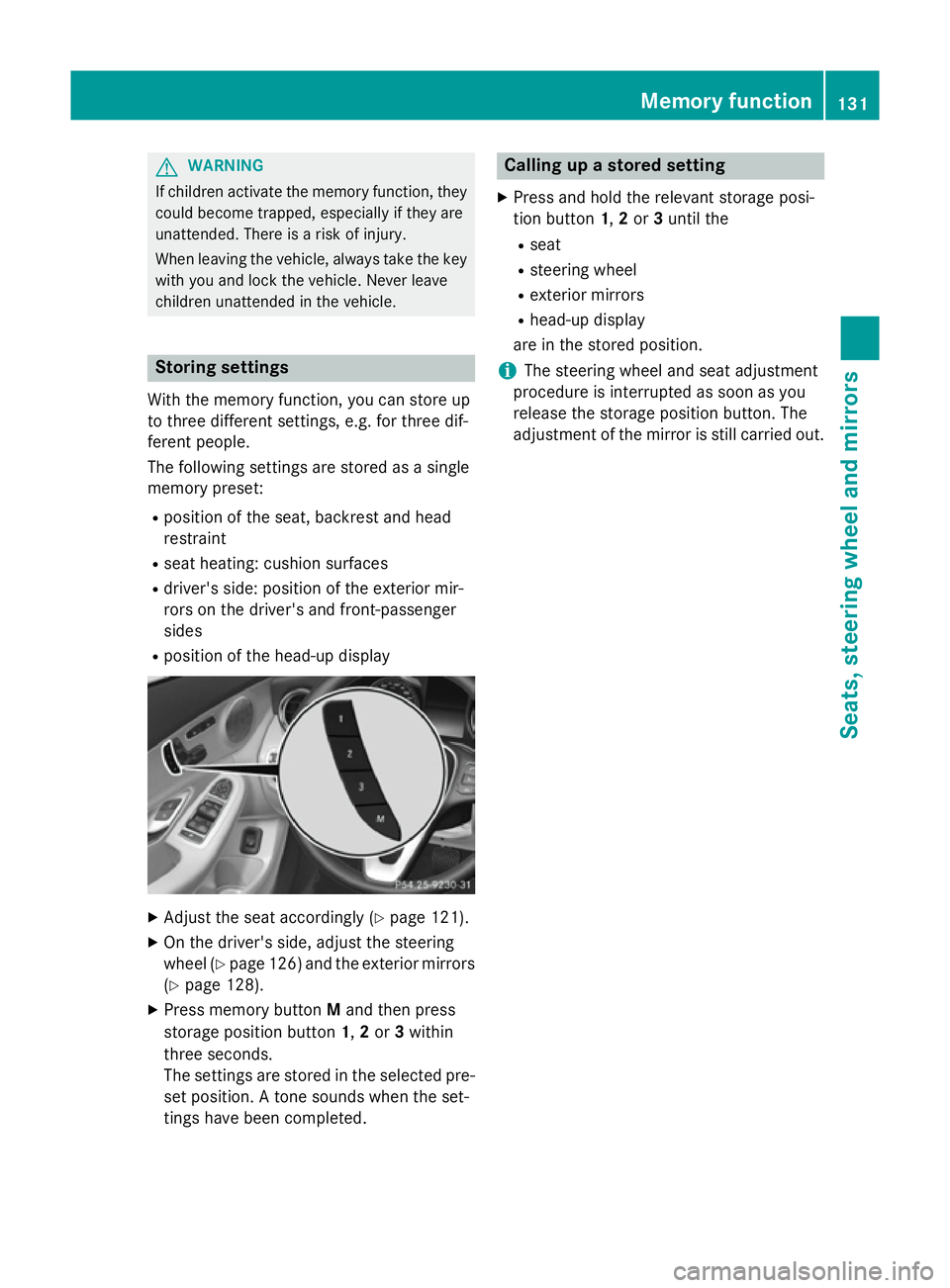
X Press memory button Mand then press
storage position button 1,2or 3within
three seconds.
The settings are stored in the selected pre- set position. A tone sounds when the set-
tings have been completed. Calling up a stored setting
X Press and hold the relevant storage posi-
tion button 1,2or 3until the
R seat
R steering wheel
R exterior mirrors
R head-up display
are in the stored position.
i The steering wheel and seat adjustment
procedure is interrupted as soon as you
release the storage position button. The
adjustment of the mirror is still carried out. Memory function
131Seats, steering wheel and mirrors Z
Page 141 of 489
Intelligent Light System
General notes The Intelligent Light System is a system that
adjusts the headlamps automatically to suit
the prevailing driving and weather conditions. It offers advanced functions for improved illu-
mination of the road surface, e.g. depending
on the vehicle speed or weather conditions.
The system includes the active light function,
cornering light function, motorway mode and extended range foglamps. The system is only
active when it is dark.
You can activate or deactivate the "Intelligent Light System" function using the on-board
computer (Y page 311).
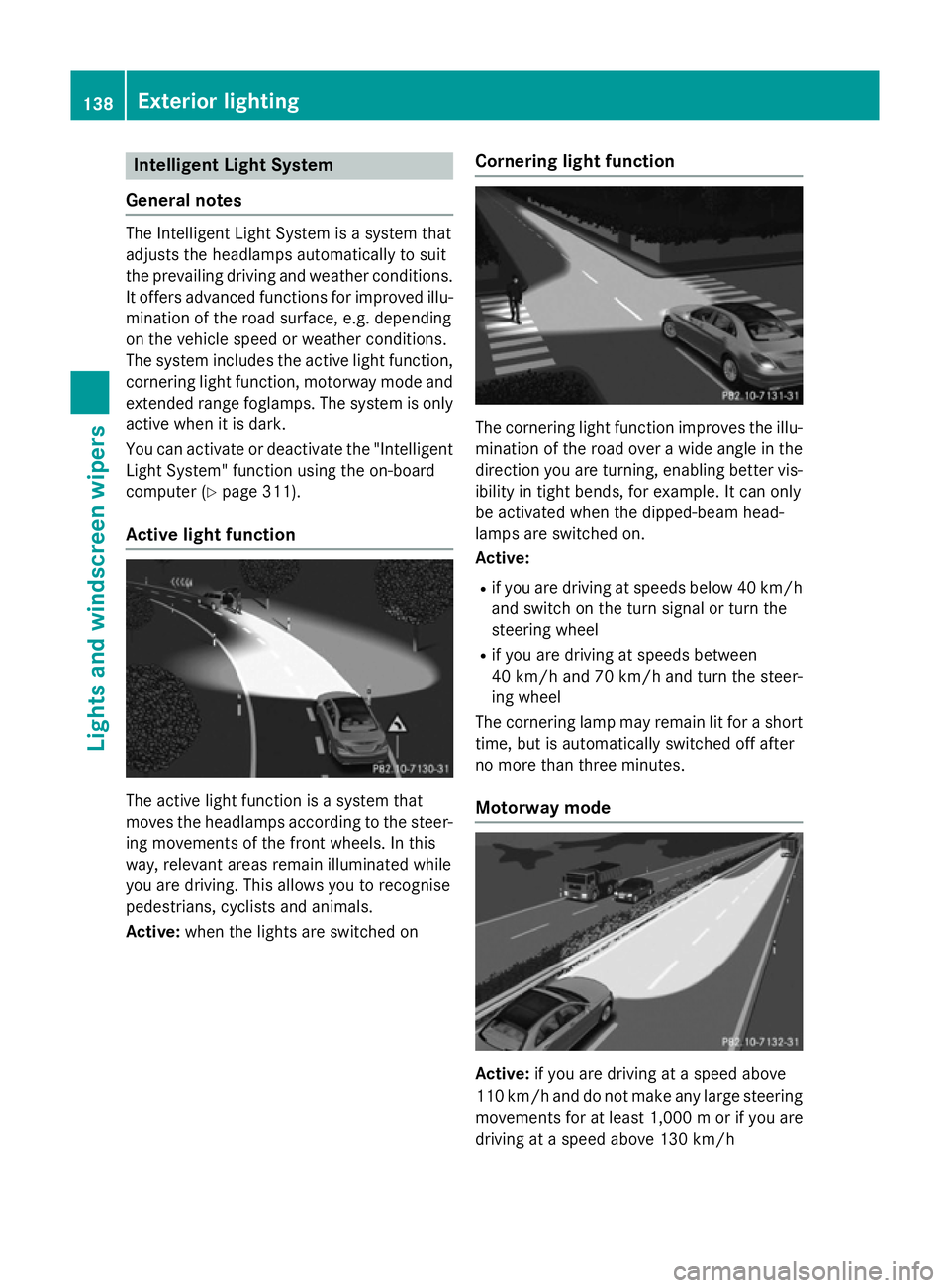
Active light function The active light function is a system that
moves the headlamps according to the steer-
ing movements of the front wheels. In this
way, relevant areas remain illuminated while
you are driving. This allows you to recognise
pedestrians, cyclists and animals.
Active: when the lights are switched on Cornering light function The cornering light function improves the illu-
mination of the road over a wide angle in the direction you are turning, enabling better vis-
ibility in tight bends, for example. It can only
be activated when the dipped-beam head-
lamps are switched on.
Active:
R if you are driving at speeds below 40 km/h
and switch on the turn signal or turn the
steering wheel
R if you are driving at speeds between
40 km/h and 70 km/h and turn the steer-
ing wheel
The cornering lamp may remain lit for a short
time, but is automatically switched off after
no more than three minutes.
Motorway mode Active:
if you are driving at a speed above
110 km/h and do not make any large steering
movements for at least 1,000 mor if you are
driving at a speed above 130 km/h 138
Exterior lightingLights and windscreen wipers
Page 183 of 489
Useful information
i This Owner's Manual describes all mod-
els, series and optional equipment for your
vehicle that were available at the time of
going to press. National variations are pos- sible. Note that your vehicle may not be
equipped with all of the functions descri-
bed. This is also the case for systems and
functions relevant to safety.
i Read the information on qualified special-
ist workshops: (Y page 27). Running-in notes
Important safety notes
In certain driving and driving safety systems,
the sensors adjust automatically while a cer-
tain distance is being driven after the vehicle has been delivered or after repairs. Full sys-
tem effectiveness is not reached until the end
of this teach-in procedure.
Brake pads/linings and discs that are either
new or have been replaced only achieve opti- mum braking effect after several hundred kil-
ometres of driving. Compensate for the
reduced braking effect by applying greater
force to the brake pedal. The first 1,500 km
If you treat the engine with sufficient care
from the very start, you will be rewarded with excellent performance for the remainder of
the engine's life.
R Drive at varying road speeds and engine
speeds for the first 1,500 km.
R Avoid overstraining the vehicle during this
period, e.g. driving at full throttle.
R When changing gears manually, change up
in good time, before the rev counter needle
reaches Ôof the way to the red area of the
rev counter. R
Do not shift down a gear manually in order
to brake.
R Vehicles with automatic transmission: try
to avoid depressing the accelerator pedal
beyond the point of resistance (kickdown).
After 1,500 km, you may gradually accelerate the vehicle to full road and engine speeds.
You should also observe these notes on run-
ning-in if the engine or parts of the drive train
on your vehicle have been replaced.
Always observe the applicable speed limit. Driving
Important safety notes
G
WARNING
Objects in the driver's footwell may restrict
the clearance around the pedals or block a
depressed pedal. This jeopardises the oper-
ating and road safety of the vehicle. There is a risk of an accident.
Stow all objects securely in the vehicle so that
they do not get into the driver's footwell.
Always fit the floormats securely and as pre-
scribed in order to ensure that there is always sufficient room for the pedals. Do not use
loose floormats and do not place several floor-mats on top of one another. G
WARNING
Unsuitable footwear can hinder correct usage of the pedals, e.g.:
R shoes with thick soles
R shoes with high heels
R slippers
There is a risk of an accident.
Wear suitable footwear to ensure correct
usage of the pedals. G
WARNING
If you switch off the ignition while driving,
safety-relevant functions are only available
with limitations, or not at all. This could affect, for example, the power steering and the brake 180
DrivingDriving and parking
Page 194 of 489
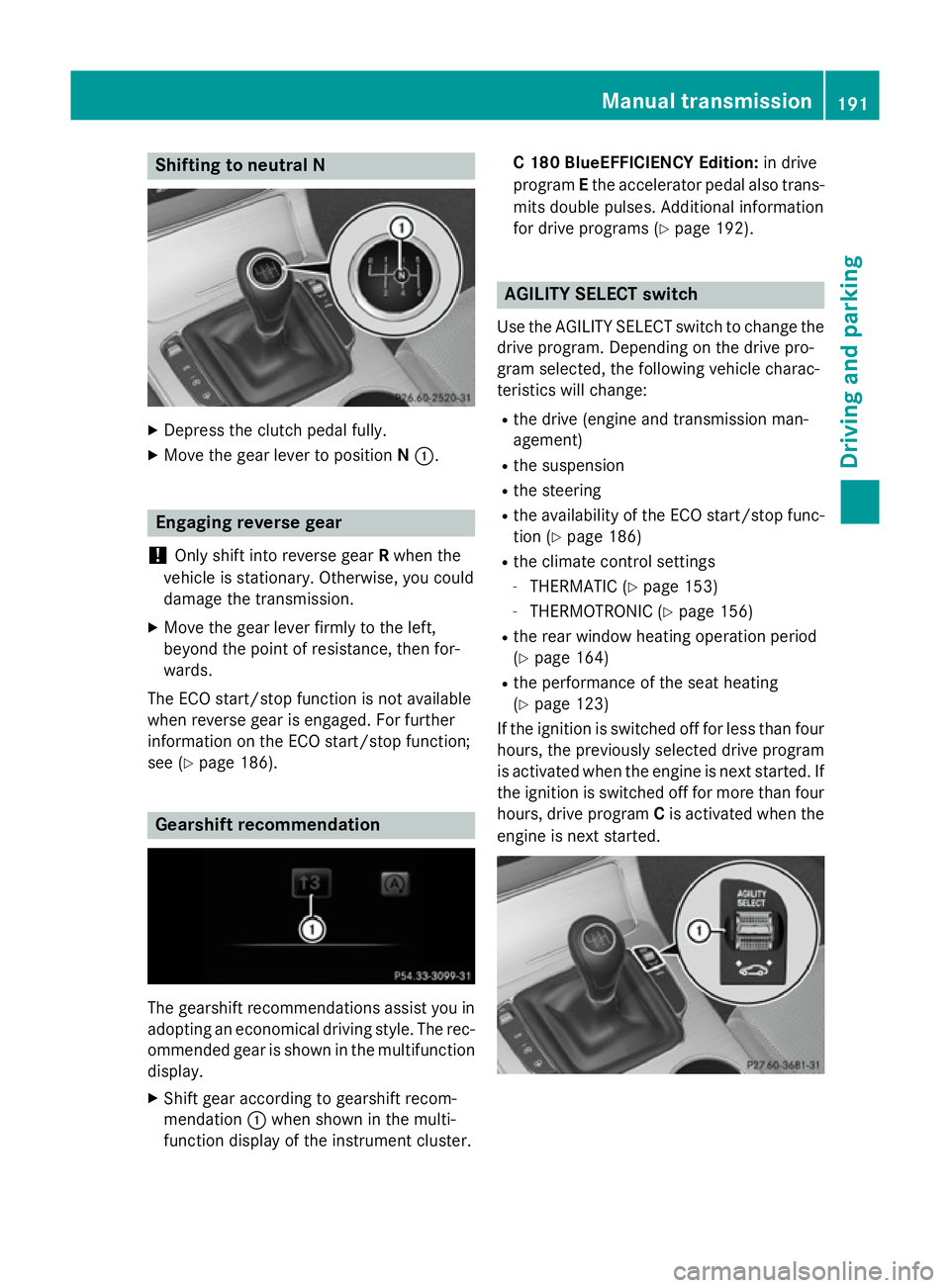
Shifting to neutral N
X
Depress the clutch pedal fully.
X Move the gear lever to position N:. Engaging reverse gear
! Only shift into reverse gear
Rwhen the
vehicle is stationary. Otherwise, you could
damage the transmission.
X Move the gear lever firmly to the left,
beyond the point of resistance, then for-
wards.
The ECO start/stop function is not available
when reverse gear is engaged. For further
information on the ECO start/stop function;
see (Y page 186). Gearshift recommendation
The gearshift recommendations assist you in
adopting an economical driving style. The rec- ommended gear is shown in the multifunction
display.
X Shift gear according to gearshift recom-
mendation :when shown in the multi-
function display of the instrument cluster. C 180 BlueEFFICIENCY Edition:
in drive
program Ethe accelerator pedal also trans-
mits double pulses. Additional information
for drive programs (Y page 192). AGILITY SELECT switch
Use the AGILITY SELECT switch to change the drive program. Depending on the drive pro-
gram selected, the following vehicle charac-
teristics will change:
R the drive (engine and transmission man-
agement)
R the suspension
R the steering
R the availability of the ECO start/stop func-
tion (Y page 186)
R the climate control settings
- THERMATIC (Y page 153)
- THERMOTRONIC (Y page 156)
R the rear window heating operation period
(Y page 164)
R the performance of the seat heating
(Y page 123)
If the ignition is switched off for less than four hours, the previously selected drive program
is activated when the engine is next started. If
the ignition is switched off for more than four hours, drive program Cis activated when the
engine is next started. Manual transmission
191Driving and parking Z
Page 195 of 489
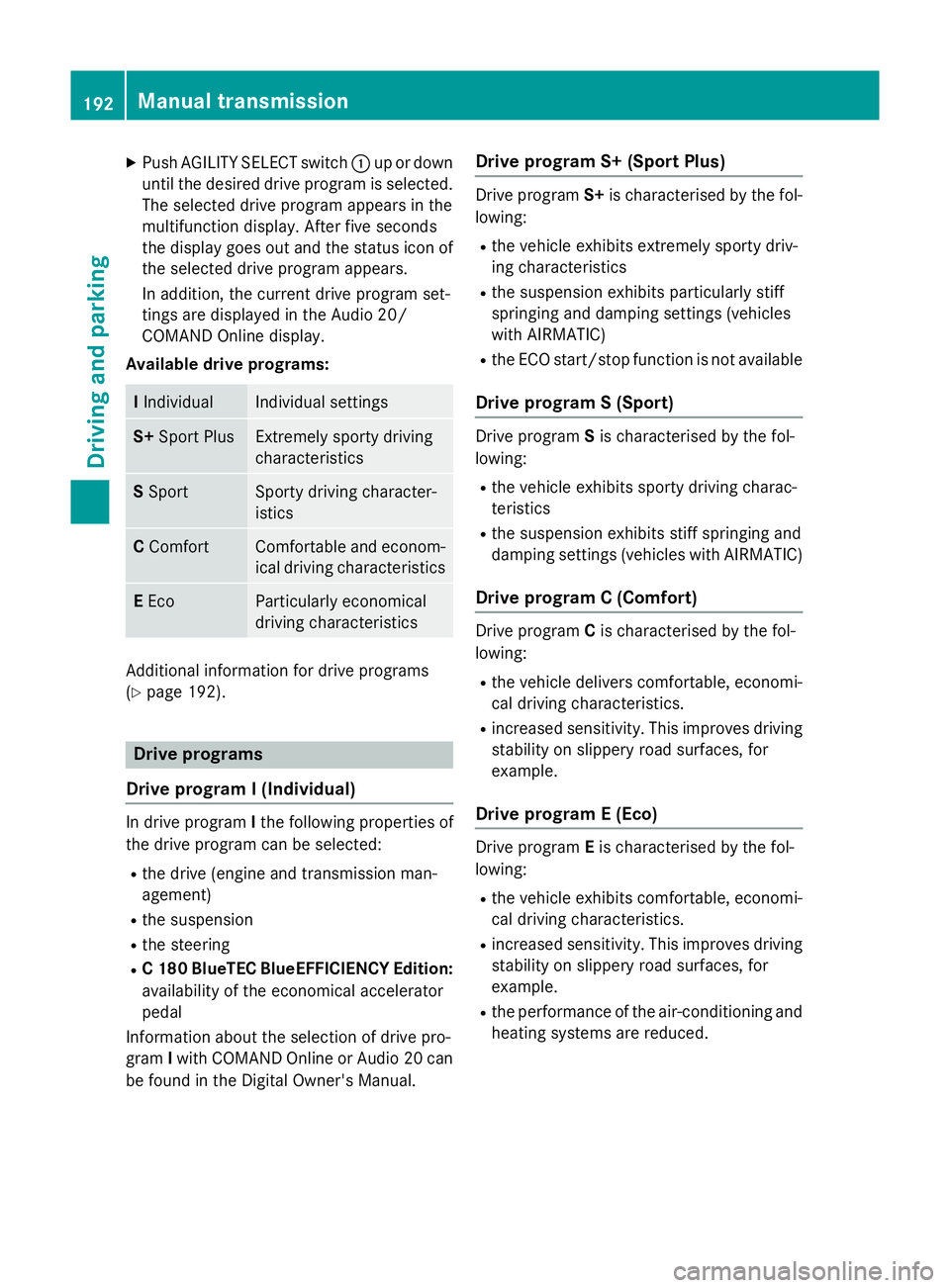
X
Push AGILITY SELECT switch :up or down
until the desired drive program is selected. The selected drive program appears in the
multifunction display. After five seconds
the display goes out and the status icon of
the selected drive program appears.
In addition, the current drive program set-
tings are displayed in the Audio 20/
COMAND Online display.
Available drive programs: I
Individual Individual settings
S+
Sport Plus Extremely sporty driving
characteristics
S
Sport Sporty driving character-
istics
C
Comfort Comfortable and econom-
ical driving characteristics E
Eco Particularly economical
driving characteristics
Additional information for drive programs
(Y page 192). Drive programs
Drive program I (Individual) In drive program
Ithe following properties of
the drive program can be selected:
R the drive (engine and transmission man-
agement)
R the suspension
R the steering
R C 180 BlueTEC BlueEFFICIENCY Edition:
availability of the economical accelerator
pedal
Information about the selection of drive pro-
gram Iwith COMAND Online or Audio 20 can
be found in the Digital Owner's Manual. Drive program S+ (Sport Plus) Drive program
S+is characterised by the fol-
lowing:
R the vehicle exhibits extremely sporty driv-
ing characteristics
R the suspension exhibits particularly stiff
springing and damping settings (vehicles
with AIRMATIC)
R the ECO start/stop function is not available
Drive program S (Sport) Drive program
Sis characterised by the fol-
lowing:
R the vehicle exhibits sporty driving charac-
teristics
R the suspension exhibits stiff springing and
damping settings (vehicles with AIRMATIC)
Drive program C (Comfort) Drive program
Cis characterised by the fol-
lowing:
R the vehicle delivers comfortable, economi-
cal driving characteristics.
R increased sensitivity. This improves driving
stability on slippery road surfaces, for
example.
Drive program E (Eco) Drive program
Eis characterised by the fol-
lowing:
R the vehicle exhibits comfortable, economi-
cal driving characteristics.
R increased sensitivity. This improves driving
stability on slippery road surfaces, for
example.
R the performance of the air-conditioning and
heating systems are reduced. 192
Manual transmissionDriving and parking
Page 196 of 489
Automatic transmission
Important safety notes
G
WARNING
If the engine speed is above the idling speed
and you engage transmission position Dor R,
the vehicle could pull away suddenly. There is a risk of an accident.
When engaging transmission position Dor R,
always firmly depress the brake pedal and do not simultaneously accelerate. G
WARNING
The automatic transmission switches to neu-
tral position Nwhen you switch off the engine.
The vehicle may roll away. There is a risk of an
accident.
After switching off the engine, always switch
to parking position P. Prevent the parked vehi-
cle from rolling away by applying the parking
brake.
Bear in mind that power transmission
between the engine and the transmission is
interrupted when the engine is switched off.
For this reason, shift the automatic transmis-
sion to Pwhen the engine is switched off and
the vehicle is stationary. Apply the electric
parking brake to prevent the vehicle from roll- ing away.
Hybrid Vehicles: observe the safety instruc-
tions for hybrid vehicles (Y page 269). DIRECT SELECT lever
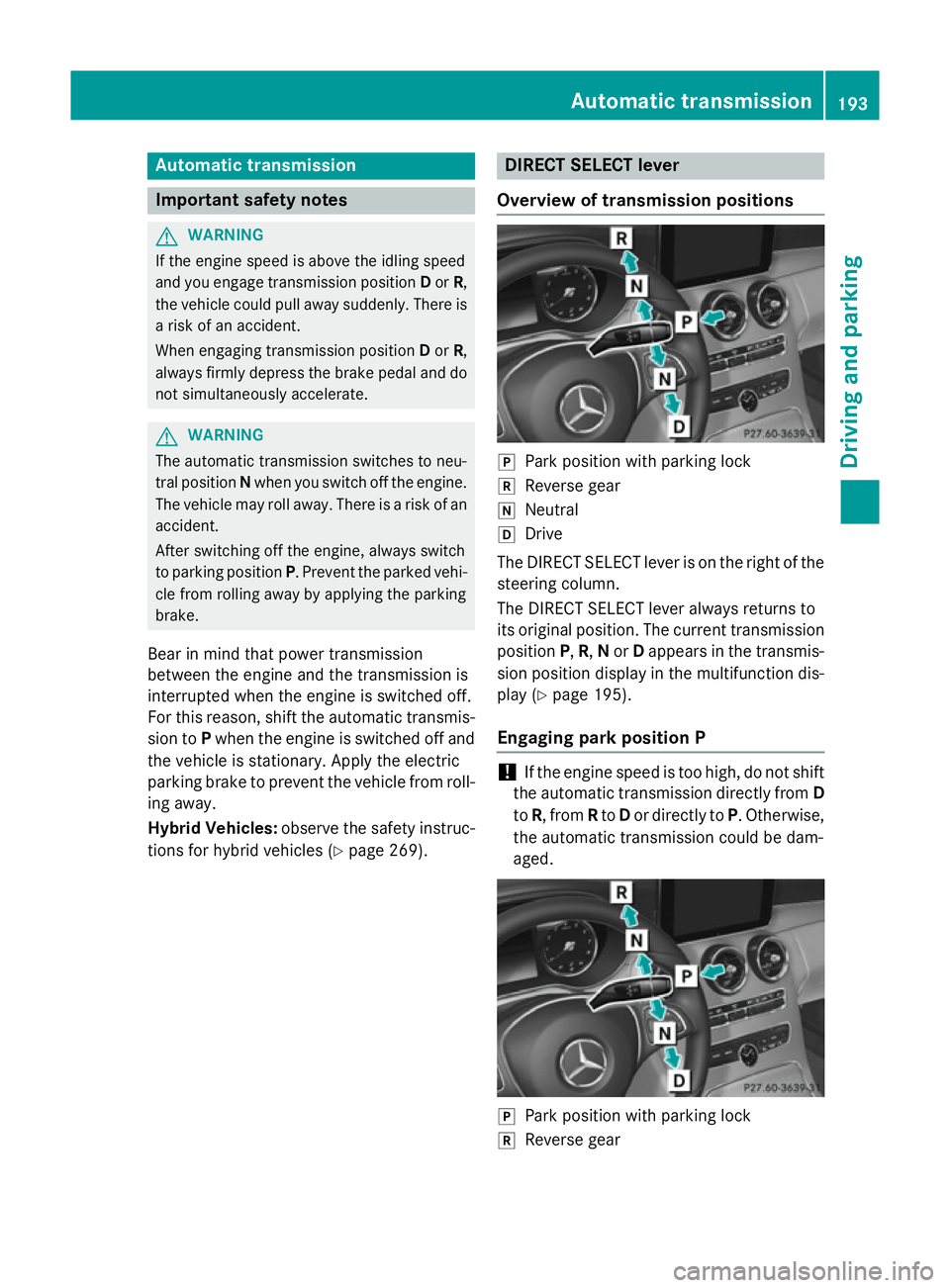
Overview of transmission positions j
Park position with parking lock
k Reverse gear
i Neutral
h Drive
The DIRECT SELECT lever is on the right of the
steering column.
The DIRECT SELECT lever always returns to
its original position. The current transmission position P,R, Nor Dappears in the transmis-
sion position display in the multifunction dis- play (Y page 195).
Engaging park position P !
If the engine speed is too high, do not shift
the automatic transmission directly from D
to R, from Rto Dor directly to P. Otherwise,
the automatic transmission could be dam-
aged. j
Park position with parking lock
k Reverse gear Automatic trans
mission
193Driving an d parking Z
Page 200 of 489
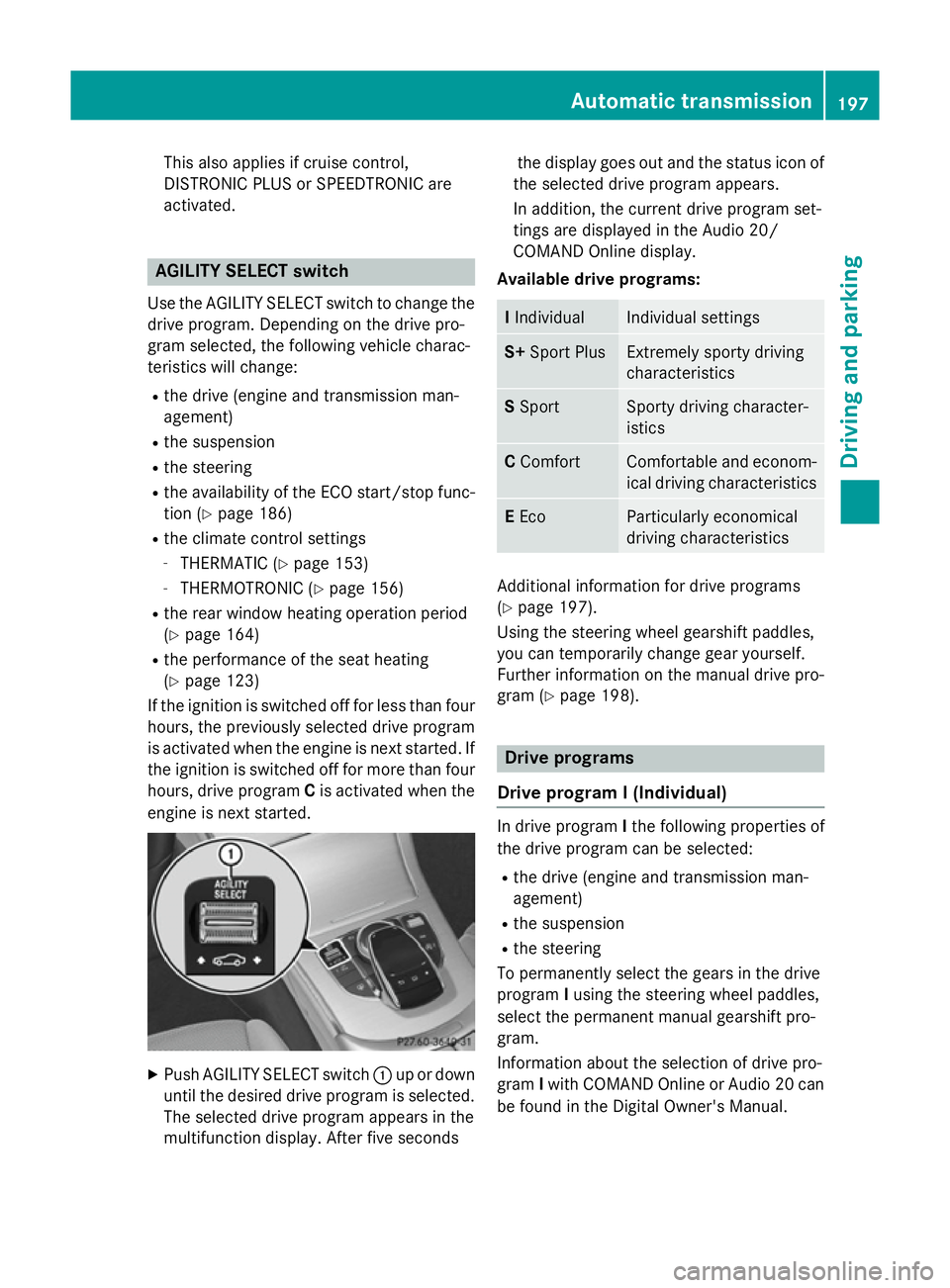
This also applies if cruise control,
DISTRONIC PLUS or SPEEDTRONIC are
activated.
AGILITY SELECT switch
Use the AGILITY SELECT switch to change the drive program. Depending on the drive pro-
gram selected, the following vehicle charac-
teristics will change:
R the drive (engine and transmission man-
agement)
R the suspension
R the steering
R the availability of the ECO start/stop func-
tion (Y page 186)
R the climate control settings
- THERMATIC (Y page 153)
- THERMOTRONIC (Y page 156)
R the rear window heating operation period
(Y page 164)
R the performance of the seat heating
(Y page 123)
If the ignition is switched off for less than four hours, the previously selected drive program
is activated when the engine is next started. If
the ignition is switched off for more than four hours, drive program Cis activated when the
engine is next started. X
Push AGILITY SELECT switch :up or down
until the desired drive program is selected. The selected drive program appears in the
multifunction display. After five seconds the display goes out and the status icon of
the selected drive program appears.
In addition, the current drive program set-
tings are displayed in the Audio 20/
COMAND Online display.
Available drive programs: I
Individual Individual settings
S+
Sport Plus Extremely sporty driving
characteristics
S
Sport Sporty driving character-
istics
C
Comfort Comfortable and econom-
ical driving characteristics E
Eco Particularly economical
driving characteristics
Additional information for drive programs
(Y page 197).
Using the steering wheel gearshift paddles,
you can temporarily change gear yourself.
Further information on the manual drive pro-
gram (Y page 198). Drive programs
Drive program I (Individual) In drive program
Ithe following properties of
the drive program can be selected:
R the drive (engine and transmission man-
agement)
R the suspension
R the steering
To permanently select the gears in the drive
program Iusing the steering wheel paddles,
select the permanent manual gearshift pro-
gram.
Information about the selection of drive pro-
gram Iwith COMAND Online or Audio 20 can
be found in the Digital Owner's Manual. Automatic transmission
197Driving and parking Z
Page 201 of 489
Drive program S+ (Sport Plus)
Drive program
S+is characterised by the fol-
lowing:
R the vehicle exhibits extremely sporty driv-
ing characteristics
R the vehicle pulls away in first gear
R the automatic transmission shifting up
later
R as a result of the later automatic transmis-
sion shift points, the fuel consumption pos-sibly being higher
R the suspension exhibits particularly stiff
springing and damping settings (vehicles
with AIRMATIC)
R the ECO start/stop function is not available
Drive program S (Sport) Drive program
Sis characterised by the fol-
lowing:
R the vehicle exhibits sporty driving charac-
teristics
R the vehicle pulls away in first gear
R the automatic transmission shifting up
later
R as a result of the later automatic transmis-
sion shift points, the fuel consumption pos-sibly being higher
R the suspension exhibits stiff springing and
damping settings (vehicles with AIRMATIC)
Drive program C (Comfort) Drive program
Cis characterised by the fol-
lowing:
R the vehicle delivers comfortable, economi-
cal driving characteristics.
R the vehicle pulling away more gently in
forward and reverse gears unless the accel- erator pedal is depressed fully.
R increased sensitivity. This improves driving
stability on slippery road surfaces, for
example.
R optimal fuel consumption resulting from
the automatic transmission shifting up sooner. The vehicle is driven in the low
engine speed range and the wheels are less
likely to spin.
Drive program E (Eco) Drive program
Eis characterised by the fol-
lowing:
R the vehicle exhibits comfortable, economi-
cal driving characteristics.
R the vehicle pulling away more gently in
forward and reverse gears unless the accel-
erator pedal is depressed fully.
R increased sensitivity. This improves driving
stability on slippery road surfaces, for
example.
R optimal fuel consumption resulting from
the automatic transmission shifting up
sooner. The vehicle is driven in the low
engine speed range and the wheels are less likely to spin.
R during deceleration, the engine is discon-
nected from the drive train. The vehicle
uses kinetic energy and consumes less fuel
(overrun mode).
R the performance of the air-conditioning and
heating systems are reduced. Manual gearshifting
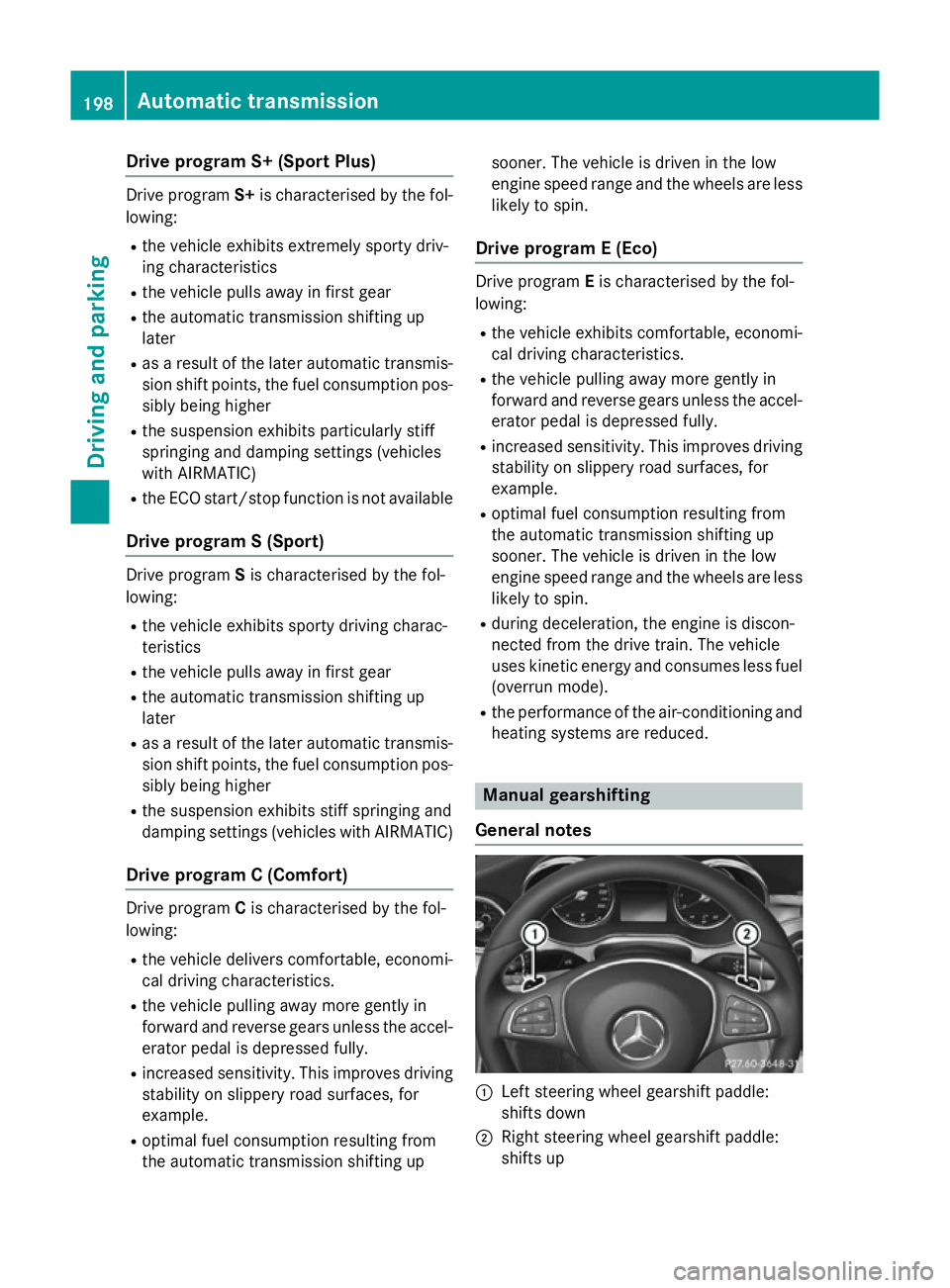
General notes :
Left steering wheel gearshift paddle:
shifts down
; Right steering wheel gearshift paddle:
shifts up 198
Automatic transmissionDriving and pa
rking