display MERCEDES-BENZ C-CLASS SALOON 2018 Owners Manual
[x] Cancel search | Manufacturer: MERCEDES-BENZ, Model Year: 2018, Model line: C-CLASS SALOON, Model: MERCEDES-BENZ C-CLASS SALOON 2018Pages: 609, PDF Size: 11.19 MB
Page 357 of 609
Switching between calls
0007
Select call 003B.
The selected call is active. The other call is
on hold.
Ac tivating or ending a call on hold 0007
Select Continue call orEnd call.
Conducting a conference call 0007
Select Create conference call inthete le‐
phone menu.
The new participant is included in the confe r‐
ence call.
Ending an active call 0007
Select 005A.
0009 On some mobile phones, the call on hold is
activated as soon as the active call is ended.
Ac cepting/rejecting a waiting call
Re quirements:
R There is an active call (0013 page 353).If
yo ure cei vea call while already in a call, a
message is displa yed. An acoustic signal also
sounds. 0007
Select Accept.
The incoming call is active.
If only one mobile phone is connec ted with
th e multimedia sy stem, the pr evious call will
be put on hold.
If during a call you accept a call with the
ot her mobile phone when in two phone mode
th en theex isting call is ended. 0007
Select Reject.
0009 This function and behaviour depends on your
mobile phone network pr ovider and the
mobile phone (see the manufacturer's oper‐
ating instructions). Contacts
Information about
the contacts menu
The con tacts menu contains all contacts from
ex isting data sources, e.g. mobile phone or
memo rycard. You can store up to6,000 con‐
ta cts. Depending on
the data source, you ha vethefo l‐
lowing number of con tacts:
R Perm anently sa ved con tacts: 3,000 entries
R Contacts loaded from the mobile phone:
3,000 entri es
Fr om the conta cts menu, you can per form the
fo llowing actions:
R Telephone operation:
- Calling a con tact (0013 page 356)
- Calling a new number (0013 page 353)
R Navigation (0013 page 325)
R Compose messa ges (0013 page 358)
If a mobile phone is connected tothe multimedia
sy stem (0013 page 349) and automatic calling
up (0013 page 355) is activated, the mobile
phone's conta cts are displayed in the address
book. 354
Multimedia sy stem
Page 360 of 609
Call list
Call list
overview
Depending on whe ther your mobile phone sup‐
ports the PBAP Blue tooth®
profile or not, this
can ha vediffere nt ef fects on the presentation
and functions of the call list.
If th e PBAP Blue tooth ®
profile is suppor ted, the
ef fects are as follo ws:
R The call lists from the mobile phone are dis‐
pla yed in the multimedia sy stem.
R When connecting the mobile phone, you may
ha ve toconfirm the connection forth e PBAP
Blue tooth ®
profile.
If th e PBAP Blue tooth ®
profile is not suppor ted,
th e ef fects are as follo ws:
R The multimedia sy stem generates its own call
li st s.
R The call list is not synchronised with the call
lists in the mobile phone. Making a call from
the call list
Multimedia sy stem:
0018 Telephone 0019
ø Call list 0007
Select a number.
The call is made. Te
xt messages Overview of
text message functions
If th e connected mobile phone supports the
MAP Blue tooth®
profile, thete xt messa gefunc‐
tions can be used on the multimedia sy stem.
Yo u can obtain fur ther information about set‐
tings and suppor ted functions of Blue tooth ®
-
capable mobile phones from a Mercedes-Benz
service centre or at: http://www.mercedes-
benz.com/connect
Some mobile phones require fur ther settings
af te r being connected tothe multimedia sy stem
(see manufacturer's operating instructions).
New messages are identified bythei sym‐
bol in the media display and an audible signal. Depending on
the mobile phone, the multimedia
sy stem only displa ysnew incoming text mes‐
sa ge s or the10 0 ne westtext messa ges.
The ú symbol is displa yed when the mobile
phone's message memory is full.
Configuring the displa yedte xt messages
Multimedia sy stem:
0018 Telephone 0019
Z Options
0019 Text message 0019
Message display 0007
Select p.
A menu with thefo llowing options is shown:
R All messages
R New and unread messages
R New messages
R Off (The text messa ges are not displa yed
automaticall y.) 0007
Select an option.
0009 The setting may not be acti veuntil the
mobile phone is reconnected. Multimedia sy
stem 357
Page 361 of 609
Re
ading text messages
Multimedia sy stem:
0018 Telephone 0019
i Text message
Re ading a text message 0007
Select a text messa ge.
The message text is displ ayed.
Using there ad-aloud function 0007
Select a text messa ge. 0007
Select Read aloud .
The text messa geisread aloud.
Composing and sending a text message
Multimedia sy stem:
0018 Telephone 0019
i Text message 0007
Select Write new text message.
Ad ding a recipient 0007
Select Press to add recipient. 0007
Select the conta ct.
Dictating text 0007
Select Press to dictate. 0007
Tostart the dictation function: press on
th e cent ral control element.
The app forth e dictation function is loaded.
If th ere was no prior Internet connection, a
connection is now es tablished. 0007
Say the message.
The dictation ends automatically af teryou
ha ve finished speaking.
Af terth evo ice message has been processed,
it is shown as text. 0007
Toreplace a message: selectReplace mes-
sage.
The text that has been dictated and shown
on the display is reset and can be dictated
again.
Editing text 0007
Select thewo rd. 0007
Tocall up the cor rection menu: press on
th e cent ral control element.
The following options are available:
R adjusting the capitalisation of words (if
suppor tedby thech aracter set) R
expanding thech oice of words
R deleting the selection
R recording a new dictation 0007
Tolea vethe menu: selectDone.
Sending text messages 0007
Select Send text message .
Re plying toate xt message
Multimedia sy stem:
0018 Telephone 0019
i Text message 0007
Open thete xt messa ge. 0007
Select p. 0007
Select Reply.
Calling a text message sender
Multimedia sy stem:
0018 Telephone 0019
i Text message 0007
Open thete xt messa ge. 0007
Select p. 0007
Select Call sender. 358
Multimedia sy stem
Page 362 of 609
Deleting
text messages
Multimedia sy stem:
0018 Telephone 0019
i Text message 0007
Select p. 0007
Todel ete a text message: selectDelete. 0007
Outbox
or 0007
Select Drafts. In Car Of
fice "In Car Of
fice" functions
Using "In Car Of fice", you can connect your
online services with the multimedia sy stem.
The following functions are available:
R Display of upcoming meetings in the calen‐
dar
R Selection of a meeting as a destination in the
navigation
R Display of upcoming telephone con fere nces
R Selection of telephone con fere nces for auto‐
matic dialling R
Display of participants in a telephone con fer‐
ence
R Display and selection of calls tobe made
0009 Please no tethat cer tain functions are only
av ailable when theve hicle is stationar y.
0009 Ifth e! symbol appears in thest atus
line, the "In Car Of fice" service is available in
th eve hicle.
Calling up "In Car Of fice"
Re quirements:
R A mobile phone is connec tedto the multime‐
dia sy stem.
R You ha vea user account on the Mercedes
me por tal (https://me.me rcedes-benz-com).
R The "In Car Of fice" service is acti vated in the
Mercedes me por tal.
R You ha vean account with an online service,
fo rex ample Of fice 365. 0007
Select In Car Office . Switching automatic
start of "In Car Of fice"
on/off
Multimedia sy stem:
0018 System 0019
In Car Office 0007
Switch Start In Car Office automatically on
0073 or off 0053.
If th e automatic start of "In Car Of fice" is
switched on, displ ays with options rega rding
upcoming appointments automatically
appear in the media displa y.
If th e automatic start of "In Car Of fice“ is
switched off, you can call up the application
via the main menu.
Selecting "In Car Of fice" functions
Multimedia sy stem
0018 In Car Office 0007
Select an appointment.
Depending on the appointment and the
st ored information, thefo llowing functions
are available:
R Start route guidance/ Cancel route guid.
R Display participants Multimedia sy
stem 359
Page 371 of 609
R
Con firm ation of the data pr otection prom pt
R Cur rent vehicle location
R Mileage and maintenance data
R Selected data about thest atus of theve hicle
The following data is transmitted if no service is
activated and the data pr otection prom pthas
been confirmed:
R Vehicle identification number
R Mercedes me cus tomer identification num‐
ber
R Reason forth e initiation of the call
R Language set in the multimedia sy stem
R Confirmation of the data pr otection prom pt
The following data is transmitted if the data pro‐
te ction prom pthas been rejected:
R Reason for initiating the call
R Rejection of the data pr otection prom pt Mercedes-Benz emer
gency call sy stem Information on
the Mercedes-Benz emer‐
ge ncy call sy stem
The Mercedes-Benz emer gency call sy stem only
functions in areas where mobile phone co verage
is available from the wireless service pr oviders.
Insuf ficient network co verage from the wireless
service pr oviders may result in an emer gency
call not being transmitted.
The Mercedes-Benz eme rgency call sy stem is
av ailable for at least tenye ars starting from the
manufacturing date.
The ignition must be switched on before an auto‐
matic emergency call can be made.
0009 The Mercedes-Benz emer gency call sy stem
is activated at thefa ctor y.
Overview of the Mercedes-Benz emer gency
call sy stem
The Mercedes-Benz emer gency call sy stem can
help todecisively reduce the time between an
accident and the ar riva l of emer gency services
at the site of the accident. It helps locate an
accident site in places that are dif ficult to
access. The emer
gency call can be made au tomatical ly
( 0013 page 369) or manually (0013 page 369).
Only make emer gency calls if you or others are
in need of rescue. Do not make an emer gency
call in theeve nt of a breakdown or a similar sit‐
uation.
Displ ays in the media displa y:
SOS READY : emergency call available
SOS NOT READY: the ignition is not on or there
is a malfunction with the emer gency call sy stem.
During an active emer gency call, 0053appears
in the displa y.
Yo u can find more information on there gional
av ailability of the Mercedes-Benz emer gency call
sy stem at: http://www.mercedes-benz.com/
connect_ecall.
0009 Ifth ere is a malfunction in the emer gency
call sy stem (e.g. a fault with the speaker,
microphone, airbag, SOS button), a cor re‐
sponding message appears inthe multifunc‐
tion display of the instrument clus ter. 368
Multimedia sy stem
Page 373 of 609
cue
teams and/or the police tothe accident
site.
R In cer tain situations data is also transmitted
in thevo ice channel tothe Mercedes-Benz
emer gency call centre.
This allo wsmeasu resfo rre scue, reco very or
to wing toa Mercedes-Benz Service Cent reto
be initiated quickl y.
If th e Mercedes-Benz emer gency call sy stem
cann otconnect tothe Mercedes-Benz emer‐
ge ncy call centre, the emer gency call is au tomat‐
ically sent tothe public emer gency services call
centre.
If no connection can be made tothe public
emer gency services, a cor responding message
appears inthe media displa y.0007
Dial the emer gency call number 11 2onyour
mobile phone.
Ending an unin tentional emer gency call 0007
Select 0076onthe multifunction steering
wheel. Data transfer of
the Mercedes-Benz emer‐
ge ncy call sy stem
In theeve nt of an au tomatic or manual emer‐
ge ncy call thefo llowing data is transmitte d,for
ex ample:
R Vehicle's GPS position data
R GPS position data on thero ute (a few
hundred metres before the incident)
R Direction of tra vel
R Vehicle identification number
R Vehicle drive type
R Number of people de term ined tobe in the
ve hicle
R Whe ther Mercedes me connect is available
or not
R Whe ther the emer gency call was initiated
manually or automatically
R Time of the accident
R Language setting on the multimedia sy stem Fo
r accident clarification purposes, thefo llowing
measures can be take n up toan hour af terthe
emer gency call has been initia ted:
R The cur rent vehicle position can be called up
R Avo ice connection totheve hicle occupants
can be es tablished
0009 ForRu ssia: various functions, e.g. receiving
traf fic information, cannot be used for up to
two hou rsafte r sending an emergency call.
Fu nction of the emer gency call sy stem self-
diagnosis (Russia)
Yo ur car verifies the operability of the emer‐
ge ncy call sy stem each time the ignition is ON.
In case of sy stem failure, you will be informed
with text messa geon the instrument clus ter and
with red indicator SOS NOT READY onthe media
displa y.
Please, make sure, that during 30 seconds af ter
switching ignition ON there d indicator SOS
NOT READY inthe upper right corner of the
media display is switched OFF, this means the
emer gency call sy stem passed diagnostics suc‐ 37 0
Multimedia sy stem
Page 377 of 609
Multimedia sy
stem:
0018 System 0019
ö Connectivity
0019 Internet settings 0007
Highlight the mobile phone. 0007
Select 0080. 0007
Select Change configuration .0007
For mobile phones with PAN and DUN:
select Configure settings using COMAND. 0007
Configure the Internet connection using pre‐
set or manual access data (0013 page372).
Cancelling Interne t access permission for a
mobile phone
Multimedia sy stem:
0018 System 0019
ö Connectivity
0019 Internet settings 0007
Highlight the mobile phone. 0007
Select 0080. 0007
Select Delete configuration. 0007
Select Yes. Displaying mobile phone details
Multimedia sy
stem:
0018 System 0019
ö Connectivity
0019 Internet settings 0007
Highlight the mobile phone. 0007
Select 0080. 0007
Select Details.
Establishing an Internet connection
Multimedia sy stem:
0018 Connect 0007
Forex ample, select zBrowser .
0009 The multimedia sy stem usually es tablishes
th e Internet connection automaticall y.Ifthe
multimedia sy stem is not connected tothe
Internet, the Internet connection is es tab‐
lished when an Internet application is used.
0009 The availability of web br ows ers is count ry-
dependent. Connection
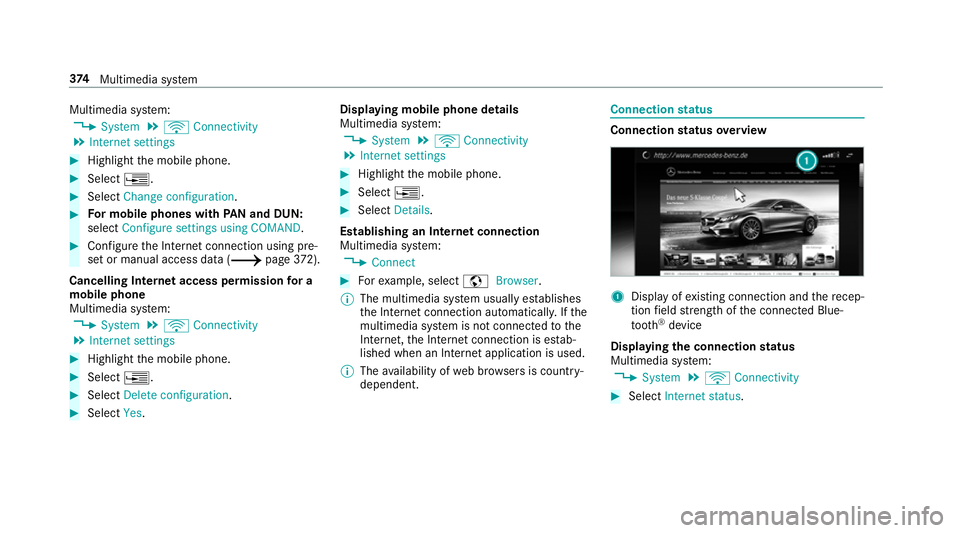
status Connection
status overview 1
Display of existing connection and there cep‐
tion field stre ngth of the connected Blue‐
tooth ®
device
Displaying the connection status
Multimedia sy stem:
0018 System 0019
ö Connectivity 0007
Select Internet status .374
Multimedia sy stem
Page 380 of 609
Deleting br
owser data
Multimedia sy stem:
0018 Connect 0019
z Browser
0019 Z Options 0019
Delete browser data
The following options are available:
R All
R Cache
R Cookies
R Entered URLs
R Form data 0007
Select an option. 0007
Select Yes.
Managing bookmar ks
Multimedia sy stem:
0018 Connect 0019
z Browser
0019 ß Bookmarks
Selecting a bookmark 0007
Select an entry. Creating a bookmark 0007
Select Add new bookmark. 0007
Enter a URL and a name. 0007
Select ¡.
Editing a bookmark 0007
Highlight a bookmar k. 0007
Select p. 0007
Select Edit. 0007
Enter a URL and a name. 0007
Select ¡.
Deleting a bookmark 0007
Highlight a bookmar k. 0007
Select p. 0007
Select Delete. 0007
Select Yes.
Closing the br owser
Multimedia sy stem:
0018 Connect 0019
z Browser 0007
Select åClose browser . Internet
radio Calling up In
ternetradio
Re quirements:
R There is an account on http://
www.me rcedes.me.
R The Internet radio service is activated.
R The data volume is available.
Depending on the count ry, data volume may
need tobe pur chased.
R Afast Internet connection for data transmis‐
sion free of inter fere nce.
The services are countr y-dependent.
Fo r more information, consult a Mercedes-
Benz service centre.
Multimedia sy stem:
0018 Radio 0019
Þ Radio source 0007
Select TuneIn radio.
The Internet radio display appears. The last
st ation set starts playing.
0009 The connection quality depends on the local
mobile phone reception. Multimedia sy
stem 377
Page 381 of 609
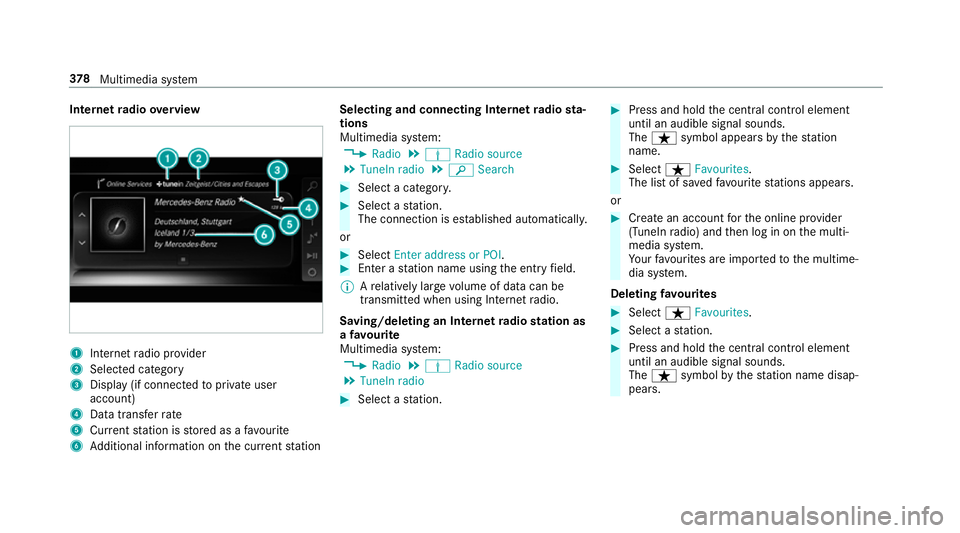
Internet
radio overview 1
Inte rn et radio pr ovider
2 Selec ted category
3 Display (if connec tedto private user
account)
4 Data transfer rate
5 Current station is stored as a favo urite
6 Additional information on the cur rent station Selecting and connecting Internet
radio sta‐
tions
Multimedia sy stem:
0018 Radio 0019
Þ Radio source
0019 TuneIn radio 0019
00D3 Search 0007
Select a categor y. 0007
Select a station.
The connection is es tablished automaticall y.
or 0007
Select Enter address or POI. 0007
Enter a station name using the entry field.
0009 Arelatively lar gevolume of data can be
transmitte d when using Internet radio.
Saving/deleting an Internet radio station as
a fa vo urite
Multimedia sy stem:
0018 Radio 0019
Þ Radio source
0019 TuneIn radio 0007
Select a station. 0007
Press and hold the cent ral control element
until an audible signal sounds.
The ß symbol appears bythest ation
name. 0007
Select ßFavourites.
The list of sa vedfavo urite stations appears.
or 0007
Create an account forth e online pr ovider
(TuneIn radio) and then log in on the multi‐
media sy stem.
Yo ur favo urites are impor tedto the multime‐
dia sy stem.
Deleting favo urites 0007
Select ßFavourites. 0007
Select a station. 0007
Press and hold the cent ral control element
until an audible signal sounds.
The ß symbol bythest ation name disap‐
pears. 378
Multimedia sy stem
Page 386 of 609
Connecting USB devices
000E NO
TEDama gecaused byhigh temp era‐
tures High
temp eratures can damage USB devices. 0007
Remo vethe USB device af ter use and
ta ke it out of theve hicle. The multimedia connection unit is
found in the
stow age compartment under the armrest and
has two USB ports.
Depending on theve hicle's equipment, addi‐
tional USB ports can be found in thestow age
compartment of the cent reconsole and in the
re ar passenger compartment. 0007
Connect the USB device tothe USB port.
Pla yable music files are pla yed back only if
th e cor responding media display is activated.
0009 Use the USB port identified by00C2 touse
Apple CarPlay™ and Android Auto.
0009 Depending on theve hicle equipment there is
an additional USB port in there ar passenger
compartment. Ports th at are labelled with a bat
tery symbol can only be used tocharge
USB devices.
Selecting a track in the media playba ck
Multimedia sy stem:
0018 Media
Selecting a track byskipping toa track 0007
Toskip backwards or forw ards toa
track: navigate up or down.
Selecting a track using the cur rent track list 0007
Select 00D3. 0007
Select Current track list. 0007
Select a tra ck.
Selecting playback options
Multimedia sy stem:
0018 Media 0019
Z Options
Playing back similar trac ks 0007
Select Play similar tracks.
A track li stwith similar trac ksis created and
pla yed bac k. Playback mode 0007
Select Random playback of the current track
list.
The cur rent track li stis pla yed in random
orde r. 0007
Select Random playback of the current
medium.
All trac kson the active data storage medium
are pla yed in random orde r. 0007
Select Normal track sequence .
The cur rent track li stis pla yed in the order it
appears on the data storage medium.
Controlling media playback
Multimedia sy stem:
0018 Media 0019
Y Playback control
A bar with playback controls is shown. 0007
Topause playback: select and confirm
Y with th e cent ral control element.
The 00CF symbol is displa yed. 0007
Toresume playback: select and confirm
Y again with the cent ral control element.
The 00D0 symbol is displa yed. Multimedia sy
stem 383