lights MERCEDES-BENZ C-Class SEDAN 2013 W204 Service Manual
[x] Cancel search | Manufacturer: MERCEDES-BENZ, Model Year: 2013, Model line: C-Class SEDAN, Model: MERCEDES-BENZ C-Class SEDAN 2013 W204Pages: 358, PDF Size: 4.85 MB
Page 153 of 358
i
When the engine is started, the automatic
transmission always switches to automatic
drive program E(drive program Cin AMG
vehicles).
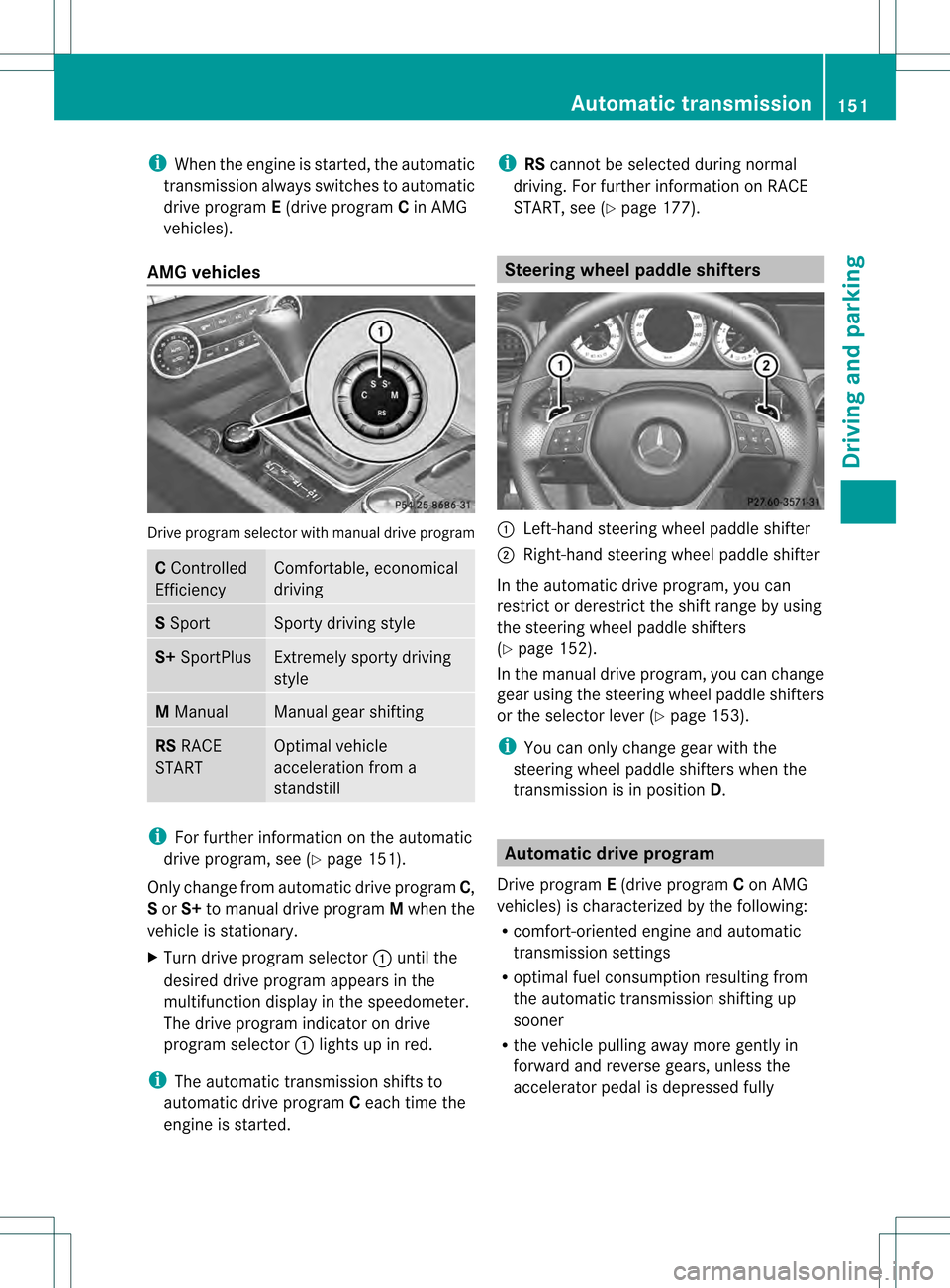
AMG vehicles Drive program selecto
rwith manual drive program C
Controlled
Efficiency Comfortable, economical
driving
S
Sport Sporty driving style
S+
SportPlus Extremely sporty driving
style
M
Manual Manual gear shifting
RS
RACE
START Optimal vehicle
acceleration from a
standstill
i
For further information on the automatic
drive program, see (Y page 151).
Only change from automatic drive program C,
S or S+ to manual drive program Mwhen the
vehicle is stationary.
X Turn drive program selector 0002until the
desired drive program appears in the
multifunction display in the speedometer.
The drive program indicator on drive
program selector 0002lights up in red.
i The automatic transmission shifts to
automatic drive program Ceach time the
engine is started. i
RScannot be selected during normal
driving. For further information on RACE
START, see (Y page 177). Steering wheel paddle shifters
0002
Left-hand steering wheel paddle shifter
0003 Right-hand steering wheel paddle shifter
In the automatic drive program, you can
restrict or derestrict the shift range by using
the steering wheel paddle shifters
(Y page 152).
In the manual drive program, you can change
gear using the steering wheel paddle shifters
or the selector lever (Y page 153).
i You can only change gear with the
steering wheel paddle shifters when the
transmission is in position D. Automatic drive program
Drive program E(drive program Con AMG
vehicles) is characterized by the following:
R comfort-oriented engine and automatic
transmission settings
R optimal fuel consumption resulting from
the automatic transmission shifting up
sooner
R the vehicle pulling away more gently in
forward and reverse gears, unless the
accelerator pedal is depressed fully Automatic transmission
151Driving and parking Z
Page 155 of 358
Selecting the ideal shift range
X
Press the selector lever to the left towards
D– and hold it in position.
or
X Pull the left-hand steering wheel paddle
shifter and hold it in position.
The automatic transmission shifts to the
gear which allows optimum acceleration
and deceleration. To do this, the automatic
transmission shifts down one or more
gears. Manual drive program
Switching on the manual drive program The manual drive program is only available for
vehicles with the dynamic handling package
and for AMG vehicles.
Manual drive program Mdiffers from drive
program S(or, in the case of AMG vehicles,
drive programs Sand S+) with regard to:
R spontaneity
R responsiveness
R smoothness of the gear changes
X Press the program selector button
(Y page 150) repeatedly until Mappears in
the multifunction display.
X AMG vehicles: turn the drive program
selector (Y page 151) until Mappears in the
multifunction display.
The indicator Mon the drive program
selector lights up in red.
Upshifting i
Vehicles with the dynamic handling
package: if the maximum engine speed for
the shift range is reached and you continue
to accelerate, the automatic transmission
shifts up. If manual drive program Mhas
been selected, the automatic transmission
does not switch up. X
Briefly press the selector lever to the right
towards D+.
or
X Pull the right-hand steering wheel paddle
shifter (Y page 151).
The automatic transmission shifts up to the
next gear.
AMG vehicles
! In manual drive program M, the automatic
transmission does not shift up
automatically even when the engine
limiting speed for the current gear is
reached. When the engine limiting speed is
reached, the fuel supply is cut to prevent
the engine from overrevving. Always make
sure that the engine speed does not reach
the red area of the tachometer. There is
otherwise a risk of engine damage.
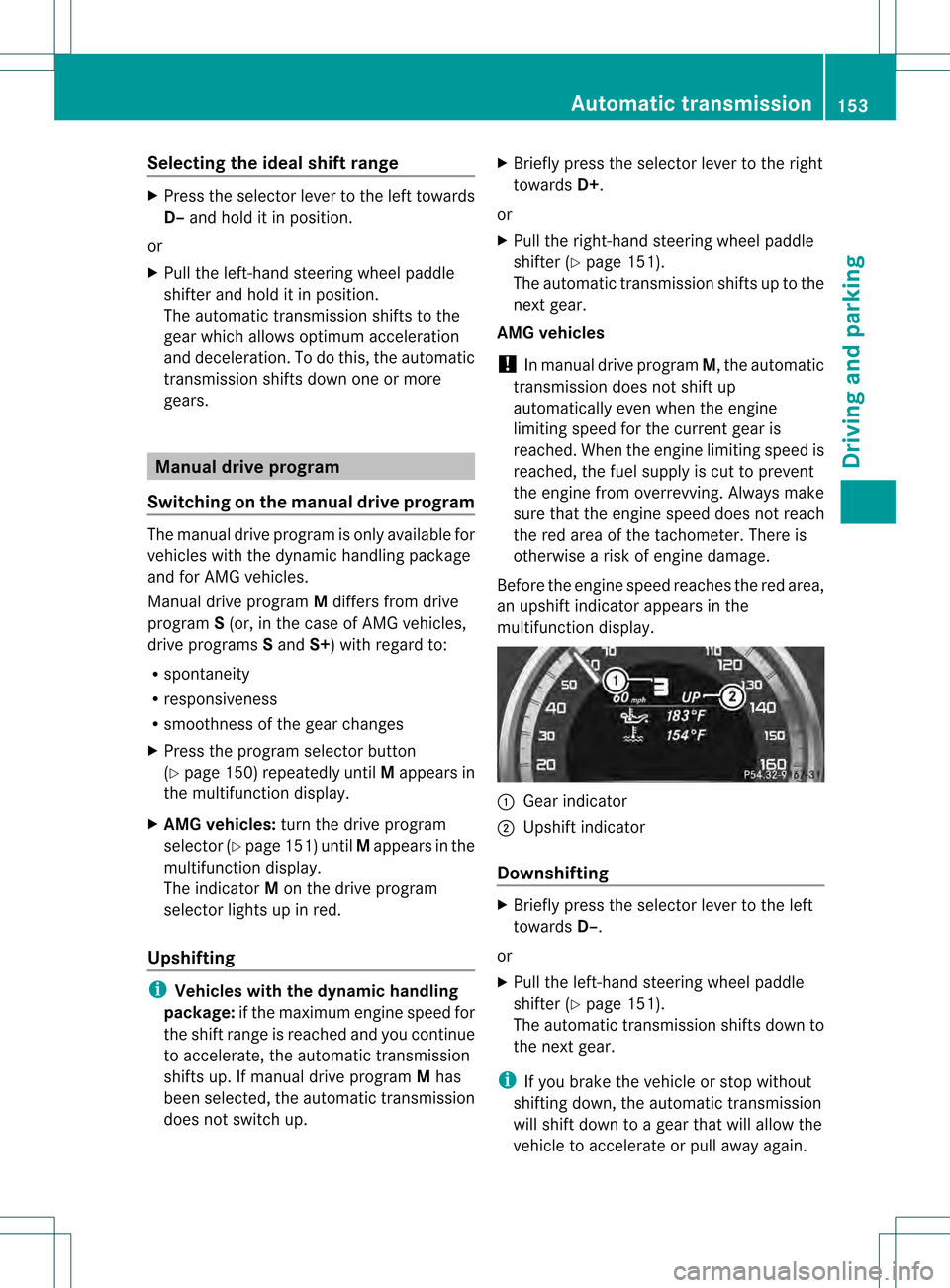
Before the engine speed reaches the red area,
an upshift indicator appears in the
multifunction display. 0002
Gear indicator
0003 Upshift indicator
Downshifting X
Briefly press the selector lever to the left
towards D–.
or
X Pull the left-hand steering wheel paddle
shifter (Y page 151).
The automatic transmission shifts down to
the next gear.
i If you brake the vehicle or stop without
shifting down, the automatic transmission
will shift down to a gear that will allow the
vehicle to accelerate or pull away again. Automatic transmission
153Driving and parking Z
Page 162 of 358

X
To apply: depress parking brake 0003firmly.
Whe nthe engine is running, the 000C(USA
only) or 0006(Canada only) indicator lamp
lights up in the instrumentc luster.
X To release: depress the brake pedal and
keep it depressed.
X Pull release handle 0002.
When the ignition is switched on or the
engine is running, the 000C(USA only) or
0006 (Canada only) indicator lamp goes out
in the instrument cluster. Parking the vehicle for
along period
If you leave the vehicle parked for longer than
four weeks, the battery may be damaged by
exhaustive discharging.
X Connecting a trickle charger.
i You can obtain information about trickle
chargers from a qualified specialist
workshop.
If you leave the vehicle parked for longer than
six weeks, the vehicle may suffer damage as
a result of lack of use.
X Visit a qualified specialist workshop and
seek advice. Driving tips
General driving tips
Important safety notes G
WARNING
If you switch off the ignitio nwhile driving,
safety-relevant functions are only available
with limitations, or not at all. This could affect,
for example, the power steering and the brake
boosting effect.Y ou will require considerably
more effort to steer and brake. There is a risk
of an accident.
Do not switch off the ignition while driving. G
WARNING
If you operate mobile communication
equipment while driving, you will be
distracted from traffic conditions. You could
also lose control of the vehicle. There is a risk
of an accident.
Only operate this equipment when the vehicle
is stationary.
Observe the legal requirements for the
country in which you are driving. Some
jurisdictions prohibit the driver from using a
mobile phone while driving a vehicle.
If you make a call while driving, always use
hands-free mode. Only operate the telephone
when the traffic situation permits. If you are
unsure, pull over to a safe location and stop
before operating the telephone.
Bear in mind that at a speed of only 30 mph
(approximately 50 km/h), the vehicle covers
a distance of 44 feet (approximately 14 m)
per second.
Drive sensibly –save fuel Observe the following tips to save fuel:
X
The tires should always be inflated to the
recommended tire pressure.
X Remove unnecessary loads.
X Remove roof racks whe nthey are not
needed. 160
Driving tipsDriving and parking
Page 165 of 358
Wet roads
If you have drive
nfor a long time in heavy rain
without braking, there may be a delayed
reaction from the brakes when braking for the
first time. This may also occur after the
vehicle has been washed.
You have to depress the brake pedal more
firmly. Maintain a greater distance from the
vehicle in front.
After driving on a wet road or having the
vehicle washed, brake firmly while paying
attention to the traffic conditions. This will
warm up the brake discs, thereby drying them
more quickly and protecting them against
corrosion.
Limited braking performance on salt-
treated roads If you drive on salted roads, a layer of salt
residue may form on the brake discs and
brake pads. This can result in a significantly
longer braking distance.
R Brake occasionally to remove any possible
salt residue. Make sure that you do not
endanger other road users when doing so.
R Carefully depress the brake pedal and the
beginning and end of a journey.
R Maintain a greater distance to the vehicle
ahead.
Servicing the brakes !
If the red brake warning lamp lights up in
the instrument cluster and you hear a
warning tone while the engine is running,
the brake fluid level may be too low.
Observe additional warning messages in
the multifunction display.
The brake fluid level may be too low due to
brake pad wear or leaking brake lines.
Have the brake system checked
immediately. This work should be carried
out at a qualified specialist workshop.
All checks and maintenance work on the
brake system must be carried out at a qualified specialist workshop. Consult a
qualified specialist workshop to arrange this.
Have brake pads installed and brake fluid
replaced at a qualified specialist workshop.
!
Vehicles with 4MATIC: function or
performance tests may only be carried out
on a 2-axle dynamometer. If you are
planning to have the vehicle tested on such
a dynamometer, contact an authorized
Mercedes-Benz Center to obtain further
information first. Otherwise, you could
damage the drive train or the brake system.
! Vehicles with 4MATIC: as the ESP®
system operates automatically, the engine
and the ignition must be switched off
(SmartKey in position 0or 1in the ignition
lock or Start/Stop button in position 0or
1) while the parking brake is being tested
on a brake dynamometer.
Braking maneuvers triggered automatically
by ESP ®
may seriously damage the brake
system.
! Vehicles with 4MATIC: as the ESP®
system operates automatically, the engine
and the ignition system must be switched
off (SmartKey in position 0or 1in the
ignition lock or Start/Stop button in
position 0or 1) when:
R testing the parking brake on a brake
dynamometer.
R you intend to have the vehicle towed with
the front axle raised.
Braking maneuvers triggered automatically
by ESP ®
may seriously damage the brake
system.
If the brake system has only been subject to
moderate loads, you should test the
functionality of your brakes at regular
intervals. To do so, press firmly on the brake
pedal when driving at a high speed. This
improves the grip of the brake pads.
You can find a description of Brake Assist
(BAS) on (Y page 65) or of BAS PLUS on
(Y page 65). Driving tips
163Driving and parking Z
Page 177 of 358
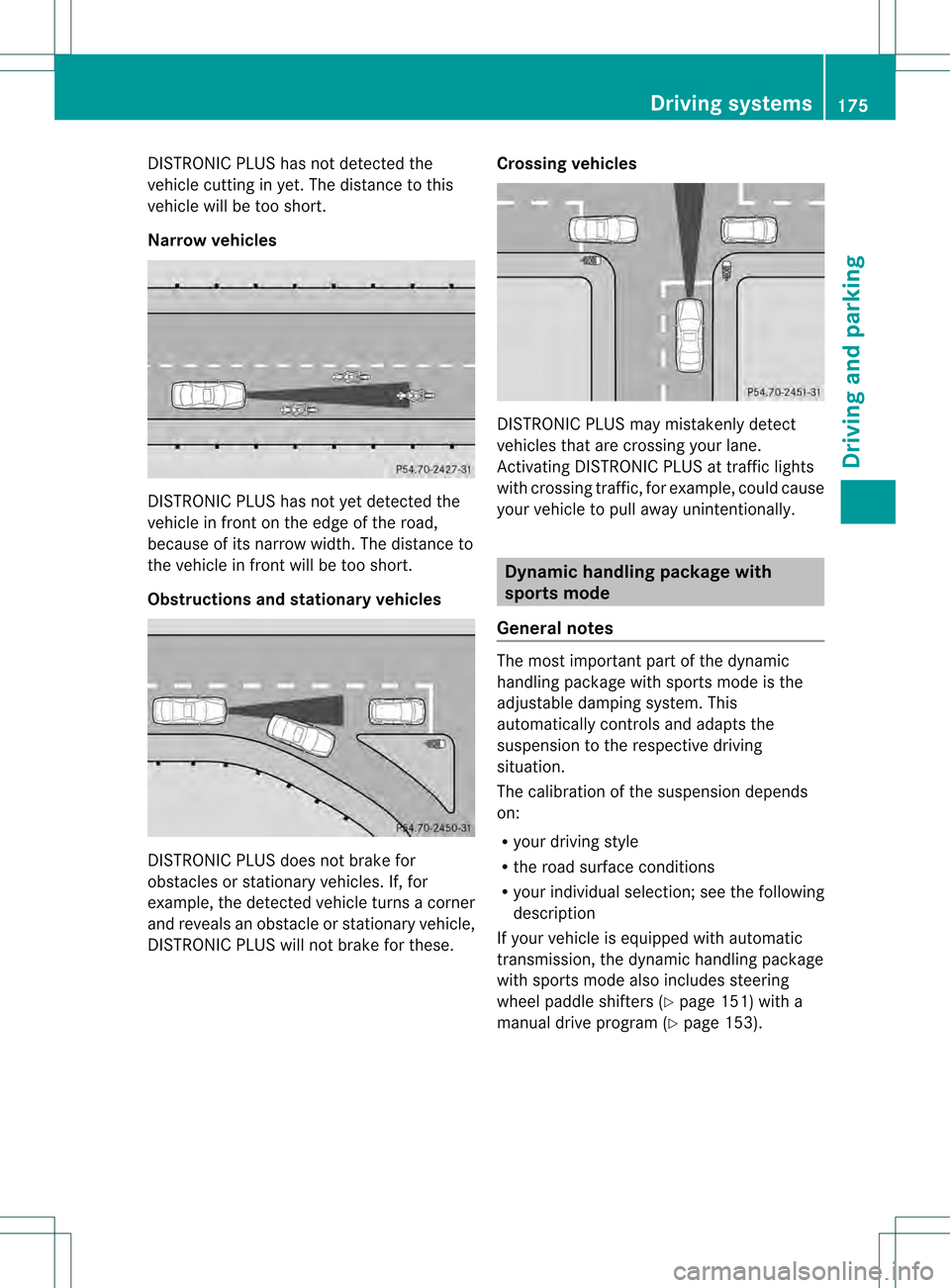
DISTRONIC PLUS has not detected the
vehicle cutting in yet. The distance to this
vehicle will be too short.
Narrow vehicles
DISTRONIC PLUS has not yet detected the
vehicle in front on the edge of the road,
because of its narrow width .The distance to
the vehicle in front will be too short.
Obstructions and stationary vehicles DISTRONIC PLUS does not brake for
obstacles or stationary vehicles. If, for
example, the detected vehicle turns a corner
and reveals an obstacle or stationary vehicle,
DISTRONIC PLUS will not brake for these. Crossing vehicles DISTRONIC PLUS may mistakenly detect
vehicles that are crossing your lane.
Activating DISTRONIC PLUS at traffic lights
with crossing traffic, for example, could cause
your vehicle to pull away unintentionally.
Dynamic handling package with
sports mode
General notes The most important part of the dynamic
handling package with sports mode is the
adjustable damping system. This
automatically controls and adapts the
suspension to the respective driving
situation.
The calibration of the suspension depends
on:
R
your driving style
R the road surface conditions
R your individual selection; see the following
description
If your vehicle is equipped with automatic
transmission, the dynamic handling package
with sports mode also includes steering
wheel paddle shifters (Y page 151) with a
manual drive program (Y page 153). Driving systems
175Driving and parking Z
Page 178 of 358
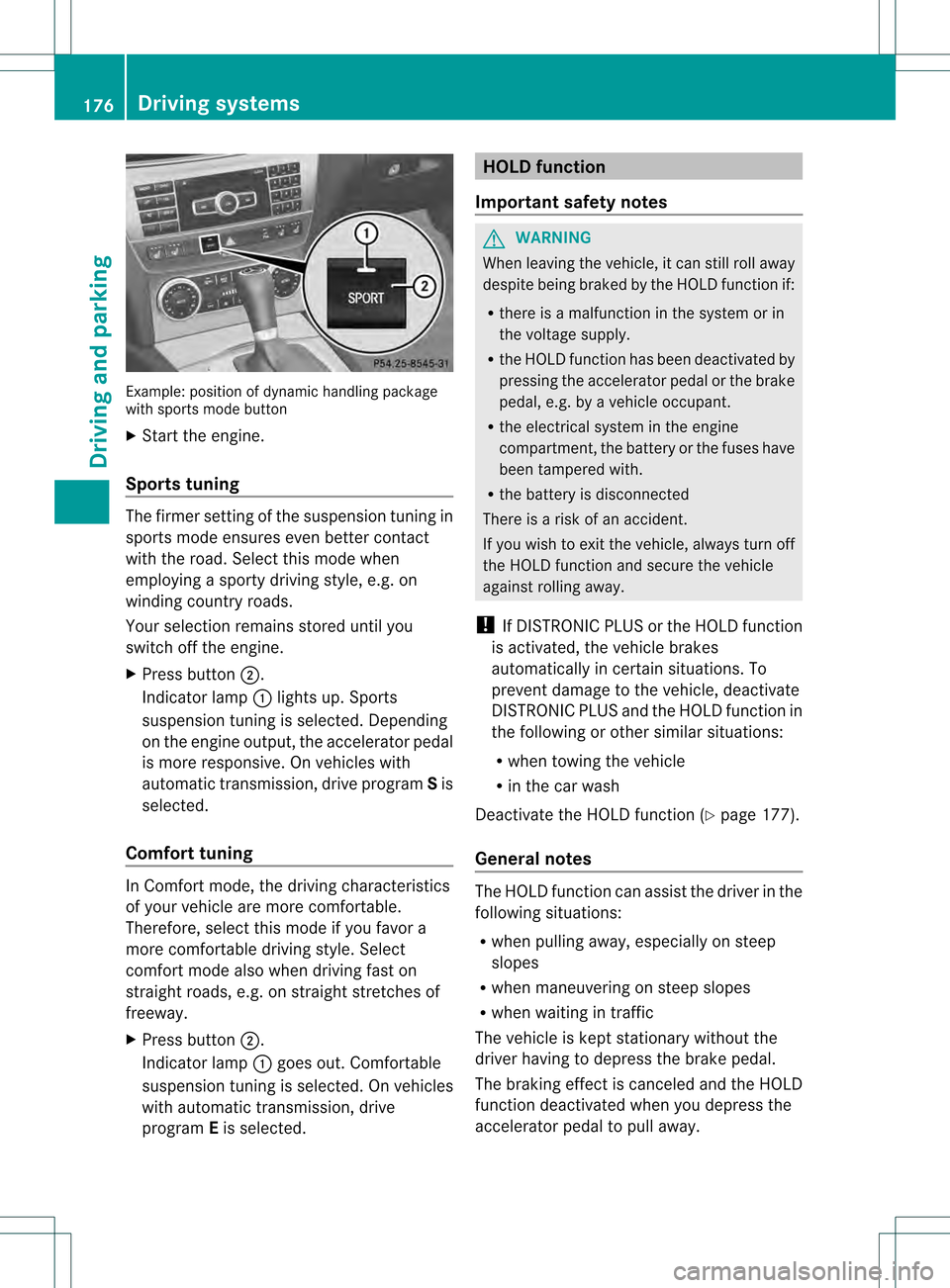
Example: positio
nofdynamic handling package
with sports mode button
X Start the engine.
Sports tuning The firmer setting of the suspension tuning in
sports mode ensures eve nbetter contact
with the road. Select this mode when
employing a sporty driving style, e.g. on
winding country roads.
Your selection remains stored until you
switch off the engine.
X Press button 0003.
Indicator lamp 0002lights up. Sports
suspension tuning is selected. Depending
on the engine output, the accelerator pedal
is more responsive. On vehicles with
automatic transmission, drive program Sis
selected.
Comfort tuning In Comfort mode, the driving characteristics
of your vehicle are more comfortable.
Therefore, select this mode if you favor a
more comfortable driving style. Select
comfort mode also when driving fast on
straight roads, e.g. on straight stretches of
freeway.
X
Press button 0003.
Indicator lamp 0002goes out. Comfortable
suspension tuning is selected. On vehicles
with automatic transmission ,drive
program Eis selected. HOLD function
Important safety notes G
WARNING
When leaving the vehicle, it can still roll away
despite being braked by the HOLD function if:
R there is a malfunction in the system or in
the voltage supply.
R the HOLD function has been deactivated by
pressing the accelerator peda lorthe brake
pedal, e.g. by a vehicle occupant.
R the electrical system in the engine
compartment, the battery or the fuses have
been tampered with.
R the battery is disconnected
There is a risk of an accident.
If you wish to exit the vehicle, always turn off
the HOLD function and secure the vehicle
against rolling away.
! If DISTRONIC PLUS or the HOLD function
is activated, the vehicle brakes
automatically in certain situations. To
prevent damage to the vehicle, deactivate
DISTRONIC PLUS and the HOLD function in
the following or other similar situations:
R when towing the vehicle
R in the car wash
Deactivate the HOLD function (Y page 177).
General notes The HOLD function can assist the driver in the
following situations:
R
when pulling away, especially on steep
slopes
R when maneuvering on steep slopes
R when waiting in traffic
The vehicle is kept stationary without the
driver having to depress the brake pedal.
The braking effect is canceled and the HOLD
function deactivated when you depress the
accelerator pedal to pull away. 176
Driving systemsDriving and parking
Page 180 of 358
speed and driving style to the prevailing road
and weather conditions.
RACE START enables optimal acceleration
from a standing start. The precondition for
this is a suitable high-grip road surface.
i RACE START is only available in AMG
vehicles.
Conditions for activation You can activate RACE START if:
R
the doors are closed
R the engine is running and it has reached an
operating temperature of approximately
176 ‡ (80 †) This is the case when the
engine oil temperature in the multifunction
display stops flashing.
R SPORT handling mode is activated
(Y page 68)
R the steering wheel is in the straight-ahead
position
R the vehicle is stationary and the brake
pedal is depressed (left foot)
R the transmission is in position D
Activating RACE START X
Depress the brake pedal with your left foot
and keep it depressed.
X Turn the drive program selector clockwise
(Y page 150) until the RSlamp lights up.
The RACE START Confirm: Paddle UP Cancel: Paddle DOWN message appears
in the multifunction display.
i If the activation conditions are no longer
fulfilled, RACE START is canceled. The
multifunction display shows the RACESTART Canceled message.X
To cancel: pull the left steering wheel
paddle shifter (Y page 151).
or
X To confirm: pull the right steering wheel
paddle shifter (Y page 151).
The RACE START Available Depress gas pedal message appears in the
multifunction display.
i If you do not depress the accelerator
pedal fully within two seconds, RACE
START is canceled. The RACE START Not Possible See Operator's Manual
message appears in the multifunction
display.
X Fully depress the accelerator pedal.
The engine speed rises to approximately
3,500 rpm.
The RACE START Release brake to start message appears in the
multifunction display.
i If you do not release the brake pedal
within five seconds, RACE START is
canceled. The multifunction display shows
the RACE START Canceled message.
X Take your foot off the brake, but keep the
accelerator pedal depressed.
The vehicle pulls away at maximum
acceleration.
The RACE START Active message appears
in the multifunction display.
RACE START is deactivated when the vehicle
reaches a speed of approximately 30 mph
(Canada: 50 km/h). Drive program S+is
activated. SPORT handling mode remains
activated.
RACE START is deactivated immediately if
you release the accelerator pedal during
RACE START or if any of the activation
conditions are no longer fulfilled. The RACE START Not Possible See Operator's
Manual message appears in the multifunction
display.
i If RACE START is used repeatedly within
a short period of time, it is only available 178
Driving systemsDriving and parking
Page 183 of 358
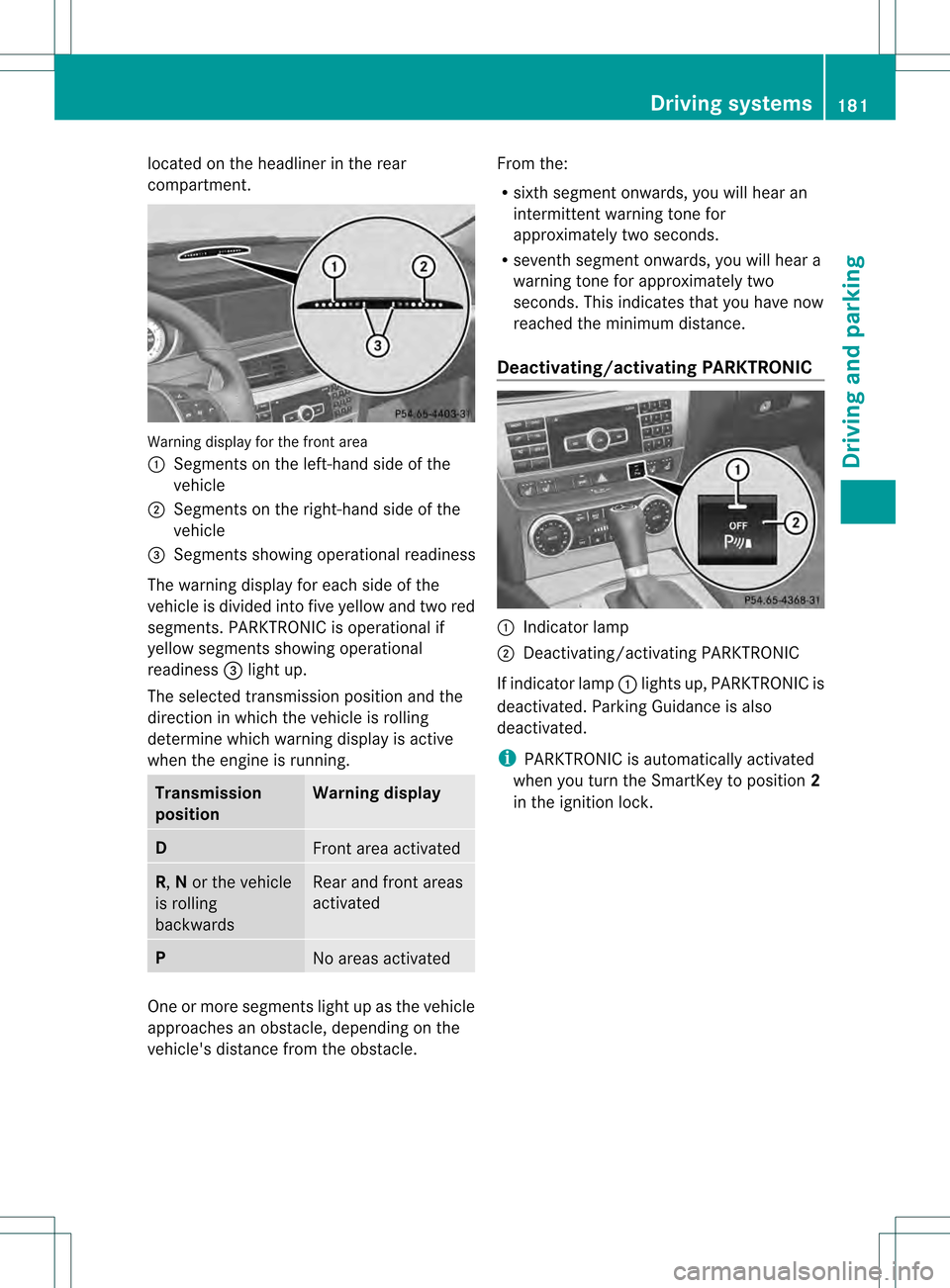
located on the headliner in the rear
compartment.
Warning display for the front area
0002
Segments on the left-hand side of the
vehicle
0003 Segments on the right-hand side of the
vehicle
0022 Segments showing operational readiness
The warning display for each side of the
vehicle is divided into five yellow and two red
segments. PARKTRONIC is operational if
yellow segments showing operational
readiness 0022light up.
The selected transmission position and the
direction in which the vehicle is rolling
determine which warning display is active
when the engine is running. Transmission
position Warning display
D
Front area activated
R,
Nor the vehicle
is rolling
backwards Rear and front areas
activated
P
No areas activated
One or more segments light up as the vehicle
approaches an obstacle, depending on the
vehicle's distance fro mthe obstacle. From the:
R
sixth segment onwards, you will hear an
intermittent warning tone for
approximately two seconds.
R seventh segment onwards, you will hear a
warning tone for approximately two
seconds. This indicates that you have now
reached the minimum distance.
Deactivating/activating PARKTRONIC 0002
Indicator lamp
0003 Deactivating/activating PARKTRONIC
If indicator lamp 0002lights up, PARKTRONIC is
deactivated. Parking Guidance is also
deactivated.
i PARKTRONIC is automatically activated
when you turn the SmartKey to position 2
in the ignition lock. Driving systems
181Driving and parking Z
Page 184 of 358
Problems with PARKTRONIC
Problem Possible causes/consequences and
0001 Solutions
Only the red segments
in the PARKTRONIC
warning displays are lit.
You also hear a warning
tone for approximately
two seconds.
PARKTRONIC is
deactivated after
approximately
20 seconds, and the
indicator lamp in the
PARKTRONIC button
lights up. PARKTRONIC has malfunctioned and has switched off.
X
If problems persist, have PARKTRONIC checked at a qualified
specialist workshop. Only the red segments
in the PARKTRONIC
warning displays are lit.
PARKTRONIC is
deactivated after
approximately
20 seconds. The PARKTRONIC sensors are dirty or there is interference.
X
Cleant he PARKTRONIC sensors (Y page 291).
X Switch the ignition back on. The problem may be caused by an external source of radio or
ultrasound waves.
X
See if PARKTRONIC functions in a different location. Parking Guidance
Important safety notes Parking Guidance is an electronic parking aid
with ultrasound. Ultrasound is used to
measure the road on both sides of the vehicle.
As uitable parking space is indicated by the
parking symbol. You receive steering
instructions when parking .You may also use
PARKTRONIC (Y page 179).
Parking Guidance is only an aid. It is not a
replacement for your attention to your
immediate surroundings. You are always
responsible for safe maneuvering, parking
and exiting a parking space. When
maneuvering, parking or pulling out of a
parking space, make sure that there are no
persons, animals or object sinthe area in
which you are maneuvering. G
WARNING
If objects are located above the detection
range, Parking Guidance may provide steering
instructions too soon. You may cause a
collision as a result. There is a risk of an
accident.
If objects are located above the detection
range, stop and switch off Parking Assist.
! Pay particular attention to low objects or
objects with flat surfaces, such as trailer
drawbars, posts, cross beams and curbs.
These types of objects cannot be detected
by Parking Guidance and may damage the
vehicle.
When PARKTRONIC is deactivated, Parking
Guidance is also unavailable. 182
Driving systemsDriving and parking
Page 190 of 358
Due to the nature of the system:
R
warnings may be issued in error when
driving close to crash barriers or similar
solid lane borders.
R the warning is canceled when driving for an
extended period next to long vehicles, such
as trucks.
The two rada rsensors for Blind Spot Assist
are integrated into the sides of the rear
bumper. Make sure that the bumper is free of
dirt, ice or slush in the vicinity of the sensors.
The sensors must not be covered, for
example by cycle racks or overhanging loads.
Following a severe impact or in the event of
damage to the bumpers, have the function of
the sensors checked at a qualified specialist
workshop. Blind Spot Assist may otherwise
not work properly.
Indicator and warning display
Blind Spot Assist is not active at speeds below
approximately 20 mph (30 km/h) .Vehicles in
the monitoring range are then not indicated. 0002
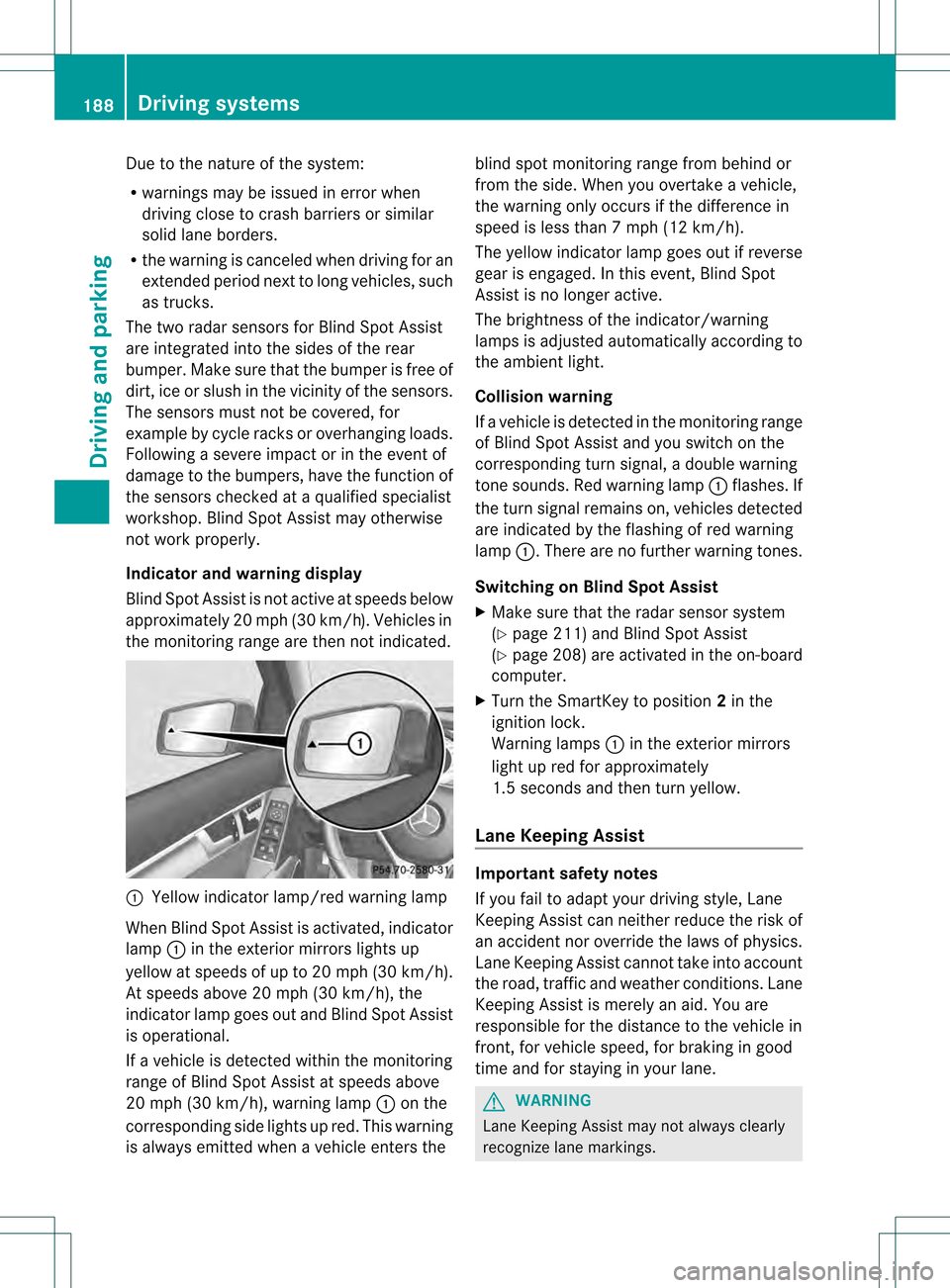
Yellow indicator lamp/red warning lamp
When Blind Spot Assist is activated, indicator
lamp 0002in the exterior mirrors lights up
yellow at speeds of up to 20 mph (30k m/h).
At speeds above 20 mph (30 km/h), the
indicator lamp goes out and Blind Spot Assist
is operational.
If a vehicle is detected withi nthe monitoring
range of Blind Spot Assist at speeds above
20 mph (30 km/h), warning lamp 0002on the
corresponding side lights up red. This warning
is always emitted when a vehicle enters the blind spot monitoring range from behind or
from the side. When you overtake a vehicle,
the warning only occurs if the difference in
speed is less than 7mph (12 km/h).
The yellow indicator lamp goes out if reverse
gear is engaged. In this event, Blind Spot
Assist is no longer active.
The brightness of the indicator/warning
lamps is adjusted automatically according to
the ambient light.
Collision warning
If a vehicle is detected in the monitoring range
of Blind Spot Assist and you switch on the
corresponding turn signal, a double warning
tone sounds. Red warning lamp 0002flashes. If
the turn signal remains on, vehicles detected
are indicated by the flashing of red warning
lamp 0002.There are no further warning tones.
Switching on Blind Spot Assist
X Make sure that the radar sensor system
(Y page 211) and Blind Spot Assist
(Y page 208) are activated in the on-board
computer.
X Turn the SmartKey to position 2in the
ignition lock.
Warning lamps 0002in the exterior mirrors
light up red for approximately
1.5 seconds and then turn yellow.
Lane Keeping Assist Important safety notes
If you fail to adapt your driving style, Lane
Keeping Assist can neither reduce the risk of
an accident nor override the laws of physics.
Lane Keeping Assist cannot take into account
the road, traffic and weather conditions. Lane
Keeping Assist is merely an aid. You are
responsible for the distance to the vehicle in
front, for vehicle speed, for braking in good
time and for staying in your lane. G
WARNING
Lane Keeping Assist may not always clearly
recognize lane markings. 188
Driving systemsDriving and parking