lock MERCEDES-BENZ CL CLASS 2010 Owner's Guide
[x] Cancel search | Manufacturer: MERCEDES-BENZ, Model Year: 2010, Model line: CL CLASS, Model: MERCEDES-BENZ CL CLASS 2010Pages: 500, PDF Size: 9.32 MB
Page 95 of 500
X
Select Navi.
X Check the check box for menu item City
(3D).
Setting route type You can set the following route types:
R
Fast Route: COMAND calculates a route
with minimized driving time.
R Dynamic Route: COMAND calculates a
route with
minimized driving time and takes
into account traffic messages received
along the route. Thus, the navigation
system can dynamically recalculate the
route. Roads that are blocked will be
avoided whenever possible. For
information on traffic messages see
(Y page 125).
R Short Route : COMAND calculates a route
with minimized route length.
X Select Navi Q Mode.
The list
of available rote types appears. The
dot # indicates the currently selected
setting.
X Select route type: Fast Route
, Dynamic
Route or Short Route.
X Exit menu: Slide XVY.
i If you
change the route type setting during
active route guidance, COMAND calculates
a new route. If you change the setting when
route guidance is inactive, COMAND uses
the new setting for the next route guidance.
Setting route mode With this function you can select the following
options for route calculation:
R
Minimize Highways
R Minimize Toll Roads
R Minimize Tunnels
R Minimize Ferries
R Minimize Motorail Trains X
Select Navi Q Mode.
The mode list appears.
X Switching mode on or off: Select
desired
modes.
Depending on the previous status, the
mode is switched on or off. A checkmark
indicates that the mode is switched on. It
is possible to switch on more than one
mode.
X Exiting menu: Slide XVY or press back
button % in the center console
(Y page 75).
COMAND will verify whether it can
incorporate the modes if you select them
with route guidance active.
If possible, COMAND calculates a new
route considering the selected options.
If the
route cannot be recalculated with the
selected options, a message appears and
an announcement is made. COMAND
calculates a new route. Only options that
are possible will be considered.
Displaying highway information When this function is enabled, highway
information ahead will display automatically
(Y page 124).
Audio fadeout
X
Select Navi Q Audio Fadeout.
When the check box is checked U the
volume of the current audio source fades
during a navigation announcement. COMAND navigation system
(entering a destination)
Introduction
G
Warning!
For safety reasons, only enter a new
destination when the vehicle is stationary. COMAND navigation system (entering a destination)
93
Control systems
216_AKB; 3; 90, en-US
d2ureepe,Version: 2.11.8.1 2009-05-15T11:47:50+02:00 - Seite 93 Z
Page 111 of 500

Entering a destination from the list of
last destinations
X Select Navi Q Destination Q From
Last Destinations.
The list of last destinations appears. The
most recent destination is at the top of the
list.
X Select desired destination.
X Starting route calculation: Select Start,
see also ( Y page 107). Entering a destination from the map
i Depending on the factory settings of the
vehicle, it may not be possible to enter a
destination while the vehicle exceeds a
preset speed. As soon as the vehicles
speed drops to below the preset speed, the
function is available again.
Calling up the map X
In the address input menu, select Map
(Y page 94).
You will see the map with a cross hair. The
map is set to the address set in the address
input menu.
or
X Select Navi Q Destination Q Via
Map.
You will see the map with a cross hair. :
Cross hair
; Details of the cross hair position
= Map scale i
Display ; may be the name of a road, for
example, provided the digital map contains
the necessary data.
If no data is available, display ; shows:
R the coordinates if the Geo
Coordinates display is switched on
(Y page 92)
R no display if the Geo Coordinates
display is switched off ( Y page 92)
Moving the map and selecting the
destination X
Moving map: Slide ZVÆ, XVY or aVb.
X Adjusting map scale: Rotate cVd.
Rotating clockwise enlarges the map,
rotating counterclockwise reduces it.
X Selecting a destination: Press W.
If the cross hair is located off the edge of
the digital map, a route cannot be
calculated to this destination and you will
see the message The destination is
located off the map..
X Select OK.
X Move the map and select a destination
again.
If the destination can be attributed, you will
see the address of the destination. If not,
you will see the display Destination
from map.
X Starting route calculation: Select Start,
see also ( Y page 107). Entering a stopover
When route guidance is active, you can enter
a stopover. Stopovers can be predefined
destinations from the following predefined
categories:
R Mercedes-Benz Service Center
R Hospital
R Gas Station
R Parking Lot COMAND navigation system (entering a destination)
109Control systems
216_AKB; 3; 90, en-US
d2ureepe,Version: 2.11.8.1 2009-05-15T11:47:50+02:00 - Seite 109 Z
Page 125 of 500

Displaying info
X Select Info in map view with the menu
system displayed ( Y page 89).
The route information appears. Example illustration: Display with main destination
and stopover
:
Distance/estimated time of arrival/
estimated journey time to the stopover
destination
; Stopover destination P
= Street, city and state/province
? Main destination O
A Distance/estimated time of arrival/
estimated journey time to the main
destination
i COMAND uses the time set in COMAND
as the basis for calculating the estimated
arrival time. The clock must be set correctly
in COMAND (Y page 79). The arrival time is
displayed in local vehicle time, based on
the time zone set in the vehicle.
The following data cannot be seen until the
route calculation has been completed:
R Distance to destination
R Estimated arrival time
R Estimated remaining travel time If the destination is located within a
partially digitized area, the following data
may differ from the facts:
R
Distance to destination
R Estimated arrival time
R Estimated remaining travel time Displaying route information
X Select Route Q Route Info in map view
with the menu system displayed
(Y page 89).
The route information appears. :
Information for highlighted portion of
route
; Highlighted portion of route
= Next portion of route
X Closing route info: Select Back and press
W or press back button % in the center
console (Y page 75).
X Displaying next or previous route
section: Select Next or Previous.
X Zooming into or out of route: Select N
or M. Where am I?
You can display your current position while
route guidance is active as well as when route
guidance has been canceled. COMAND navigation system (during route guidance)
123Control systems
216_AKB; 3; 90, en-US
d2ureepe,Version: 2.11.8.1 2009-05-15T11:47:50+02:00 - Seite 123 Z
Page 126 of 500
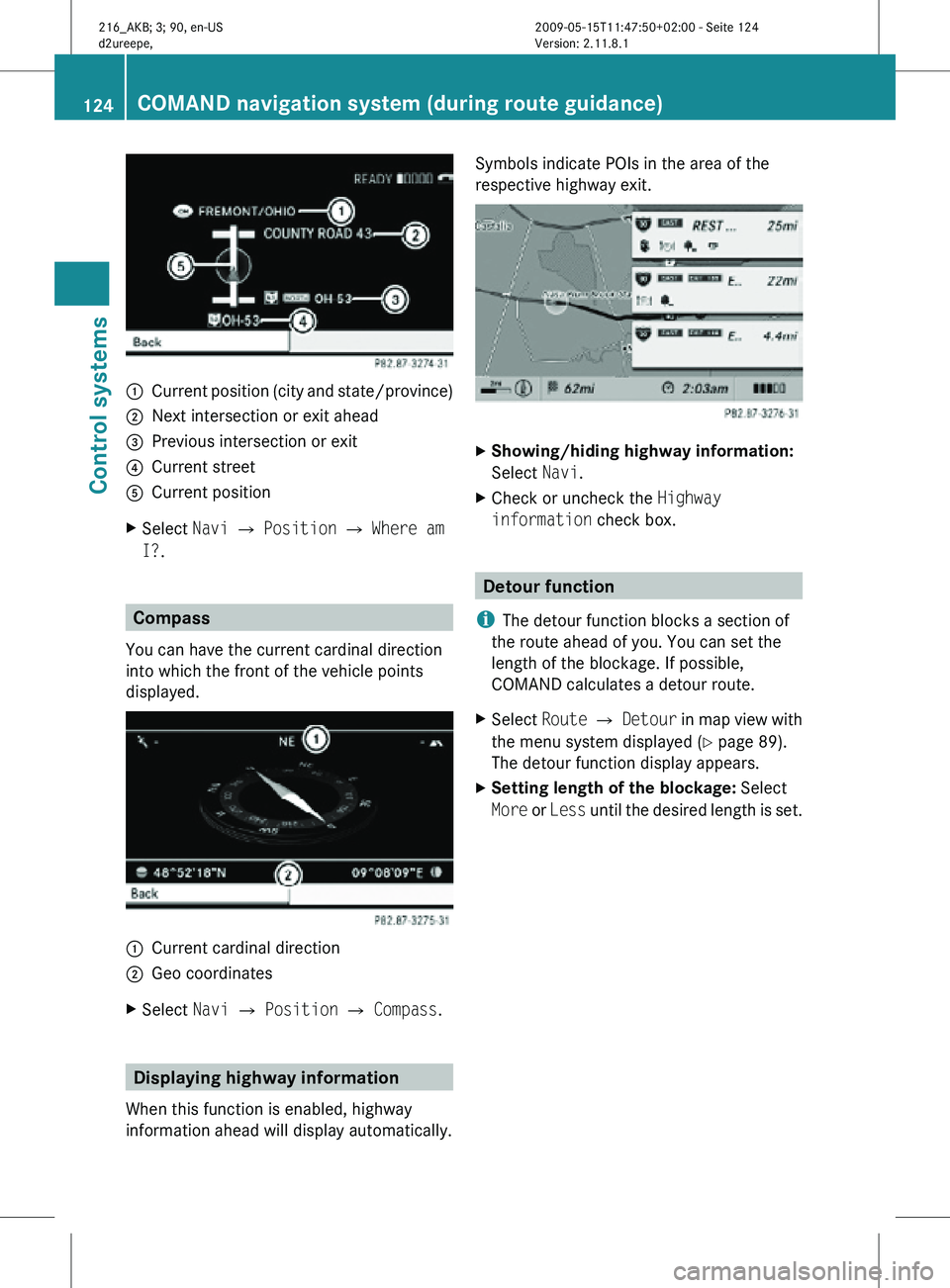
:
Current position (city and state/province)
; Next intersection or exit ahead
= Previous intersection or exit
? Current street
A Current position
X Select Navi Q Position Q Where am
I?. Compass
You can have the current cardinal direction
into which the front of the vehicle points
displayed. :
Current cardinal direction
; Geo coordinates
X Select Navi Q Position Q Compass. Displaying highway information
When this function is enabled, highway
information ahead will display automatically. Symbols indicate POIs in the area of the
respective highway exit.
X
Showing/hiding highway information:
Select Navi.
X Check or uncheck the Highway
information check box. Detour function
i The detour function blocks a section of
the route ahead of you. You can set the
length of the blockage. If possible,
COMAND calculates a detour route.
X Select Route Q Detour in map view with
the menu system displayed (Y page 89).
The detour function display appears.
X Setting length of the blockage: Select
More or Less until the desired length is set. 124
COMAND navigation system (during route guidance)Control systems
216_AKB; 3; 90, en-US
d2ureepe,
Version: 2.11.8.1 2009-05-15T11:47:50+02:00 - Seite 124
Page 127 of 500
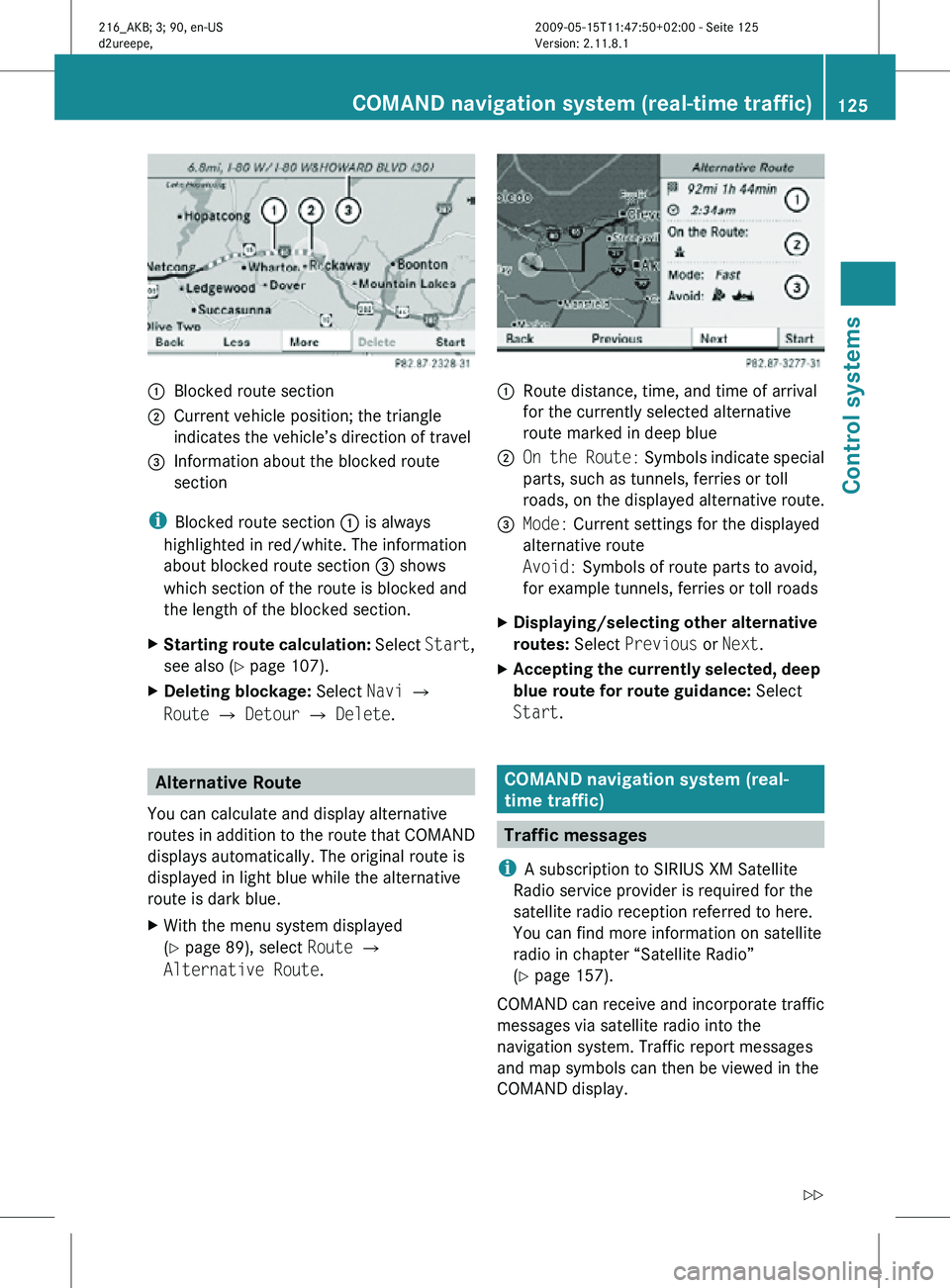
:
Blocked route section
; Current vehicle position; the triangle
indicates the vehicle’s direction of travel
= Information about the blocked route
section
i Blocked route section : is always
highlighted in red/white. The information
about blocked route section = shows
which section of the route is blocked and
the length of the blocked section.
X Starting route calculation: Select Start,
see also ( Y page 107).
X Deleting blockage: Select Navi Q
Route Q Detour Q Delete. Alternative Route
You can calculate and display alternative
routes in addition to the route that COMAND
displays automatically. The original route is
displayed in light blue while the alternative
route is dark blue.
X With the menu system displayed
(Y page 89), select Route Q
Alternative Route. :
Route distance, time, and time of arrival
for the currently selected alternative
route marked in deep blue
; On the Route: Symbols indicate special
parts, such as tunnels, ferries or toll
roads, on the displayed alternative route.
= Mode: Current settings for the displayed
alternative route
Avoid: Symbols of route parts to avoid,
for example tunnels, ferries or toll roads
X Displaying/selecting other alternative
routes: Select Previous or Next.
X Accepting the currently selected, deep
blue route for route guidance: Select
Start. COMAND navigation system (real-
time traffic)
Traffic messages
i A subscription to SIRIUS XM Satellite
Radio service provider is required for the
satellite radio reception referred to here.
You can find more information on satellite
radio in chapter “Satellite Radio”
(Y page 157).
COMAND can receive and incorporate traffic
messages via satellite radio into the
navigation system. Traffic report messages
and map symbols can then be viewed in the
COMAND display. COMAND navigation system (real-time traffic)
125Control systems
216_AKB; 3; 90, en-US
d2ureepe,Version: 2.11.8.1 2009-05-15T11:47:50+02:00 - Seite 125 Z
Page 129 of 500
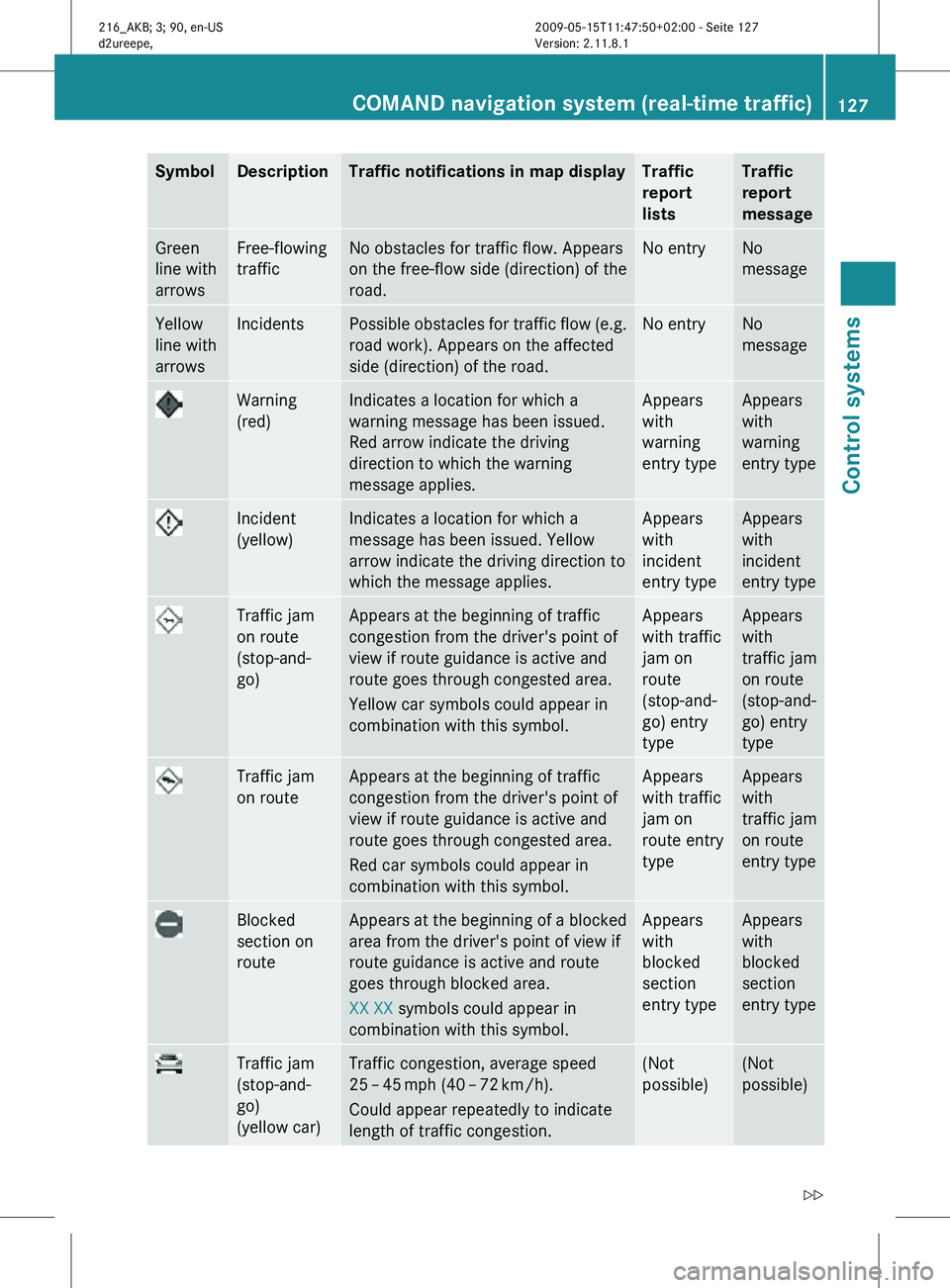
Symbol Description Traffic notifications in map display Traffic
report
lists Traffic
report
message
Green
line with
arrows Free-flowing
traffic No obstacles for traffic flow. Appears
on the free-flow side (direction) of the
road. No entry No
message
Yellow
line with
arrows Incidents Possible obstacles for traffic flow (e.g.
road work). Appears on the affected
side (direction) of the road. No entry No
message
Warning
(red) Indicates a location for which a
warning message has been issued.
Red arrow indicate the driving
direction to which the warning
message applies. Appears
with
warning
entry type Appears
with
warning
entry type
Incident
(yellow) Indicates a location for which a
message has been issued. Yellow
arrow indicate the driving direction to
which the message applies. Appears
with
incident
entry type Appears
with
incident
entry type
Traffic jam
on route
(stop-and-
go) Appears at the beginning of traffic
congestion from the driver's point of
view if route guidance is active and
route goes through congested area.
Yellow car symbols could appear in
combination with this symbol. Appears
with traffic
jam on
route
(stop-and-
go) entry
type Appears
with
traffic jam
on route
(stop-and-
go) entry
type
Traffic jam
on route Appears at the beginning of traffic
congestion from the driver's point of
view if route guidance is active and
route goes through congested area.
Red car symbols could appear in
combination with this symbol. Appears
with traffic
jam on
route entry
type Appears
with
traffic jam
on route
entry type
Blocked
section on
route Appears at the beginning of a blocked
area from the driver's point of view if
route guidance is active and route
goes through blocked area.
XX XX symbols could appear in
combination with this symbol. Appears
with
blocked
section
entry type Appears
with
blocked
section
entry type
Traffic jam
(stop-and-
go)
(yellow car) Traffic congestion, average speed
25
– 45 mph (40 – 72 km/h).
Could appear repeatedly to indicate
length of traffic congestion. (Not
possible) (Not
possible)COMAND navigation system (real-time traffic)
127Control systems
216_AKB; 3; 90, en-US
d2ureepe,Version: 2.11.8.1 2009-05-15T11:47:50+02:00 - Seite 127 Z
Page 130 of 500
Symbol Description Traffic notifications in map display Traffic
report
lists Traffic
report
message
Traffic jam
(red car) Traffic congestion, average speed
5 – 20
mph (8 – 32 km/h).
Could appear repeatedly to indicate
length of traffic congestion. (Not
possible) (Not
possible)
XXXX Blocked
section Road impassable.
Could appear repeatedly to indicate
length of blocked area (Not
possible) (Not
possible)
Displaying real-time traffic reports
X
If necessary, switch to navigation mode
and show the menu system ( Y page 89).
X Select Traffic.
COMAND searches for satellite radio
channels sending traffic messages.
The message No traffic reports are
currently available for this area.
may appear for the following reasons:
R Messages were not yet received.
R There are no messages available.
X Cancelling the search: Select Cancel.
X Closing the message: Select OK
If there are traffic reports, you will see a list
or a submenu, depending on whether route
guidance is active or not.
i A traffic message may also concern an
area or region rather than a road, e.g.
impaired visibility due to fog.
List when route guidance is not active
The list shows all the roads, areas or regions
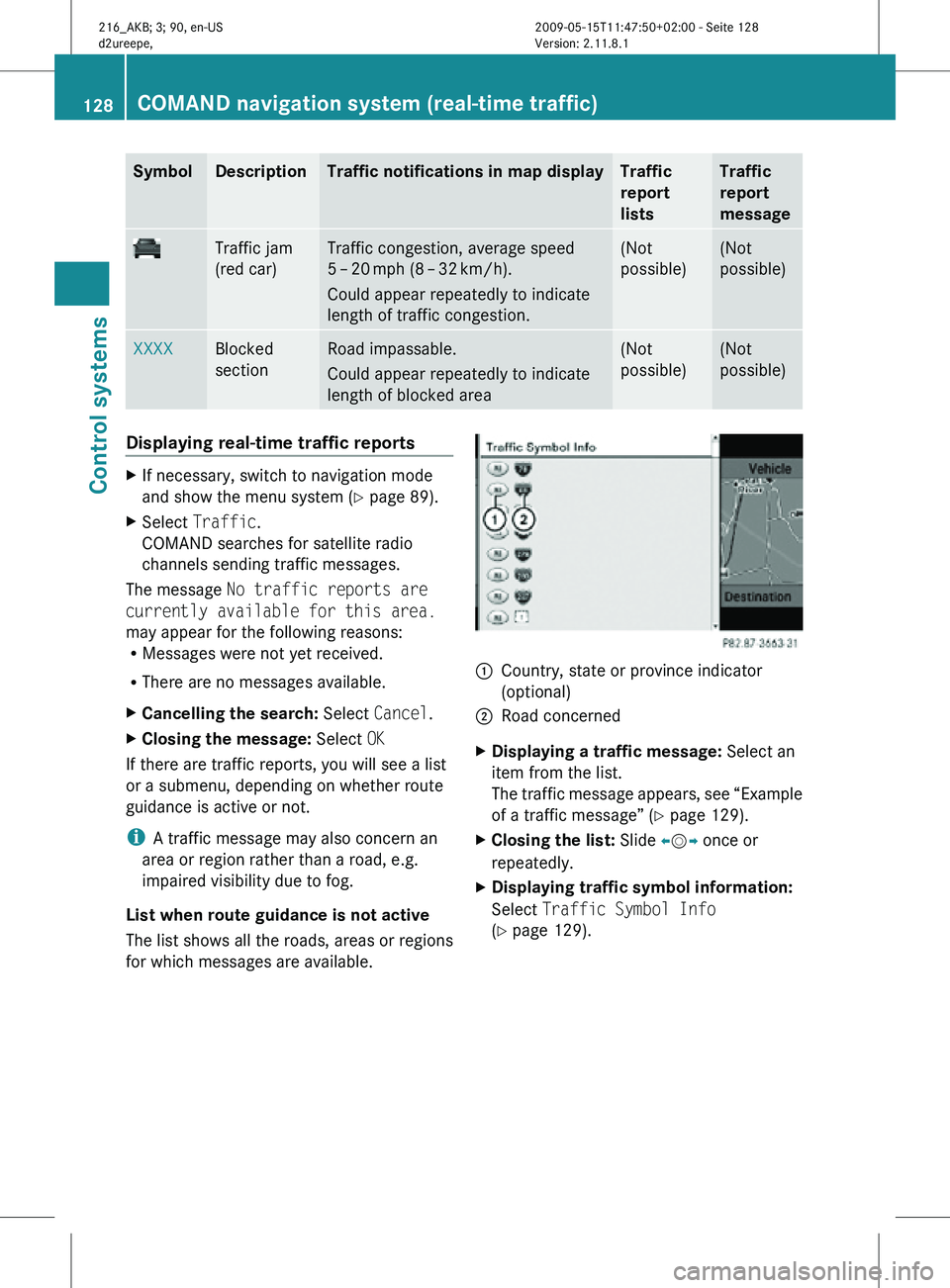
for which messages are available. 1
Country, state or province indicator
(optional)
2 Road concerned
X Displaying a traffic message: Select an
item from the list.
The traffic message appears, see “Example
of a traffic message” ( Y page 129).
X Closing the list: Slide XVY once or
repeatedly.
X Displaying traffic symbol information:
Select Traffic Symbol Info
(Y page 129). 128
COMAND navigation system (real-time traffic)Control systems
216_AKB; 3; 90, en-US
d2ureepe,
Version: 2.11.8.1 2009-05-15T11:47:50+02:00 - Seite 128
Page 140 of 500
The following conditions must be met for a
“911” emergency call via COMAND:
R
Mobile phone must be switched on.
R The corresponding mobile
communications network must be
available.
i Emergency calls may not be possible with
all telephone networks or if certain network
services and/or telephone functions are
active. Check with your local service
providers.
If you cannot make an emergency call, you
will have to initiate rescue measures yourself.
Placing a “911” emergency call using
COMAND with the mobile phone
unlocked X
Press button S to switch to telephone
mode.
X Enter 911 using the telephone keypad in
the center console.
X Press button 6 on the telephone
keypad in the center console.
or
X Select 6 in the COMAND display and
press W for dialing to begin.
Connecting call… appears in the
COMAND display while the mobile phone
establishes the connection.
X Wait until the emergency call center
answers, then describe the emergency.
i Depending on the phone type, if no SIM
card is inserted in a GSM mobile phone or
if there is no service on a CDMA mobile
phone, NO SERVICE may appear in the
COMAND display. In that case, you only can
make an emergency call on the mobile
phone itself, without the use of COMAND. Placing a “911” emergency call with the
mobile phone locked i
If the mobile phone is locked, you only can
make an emergency call on the mobile
phone itself, without the use of COMAND. Bluetooth interface
Bluetooth ®
is a technology for wireless
exchange of data over short distances of up
to approximately 33 feet (10 m). You can
connect your mobile phone to COMAND or
exchange vCards using Bluetooth ®
.
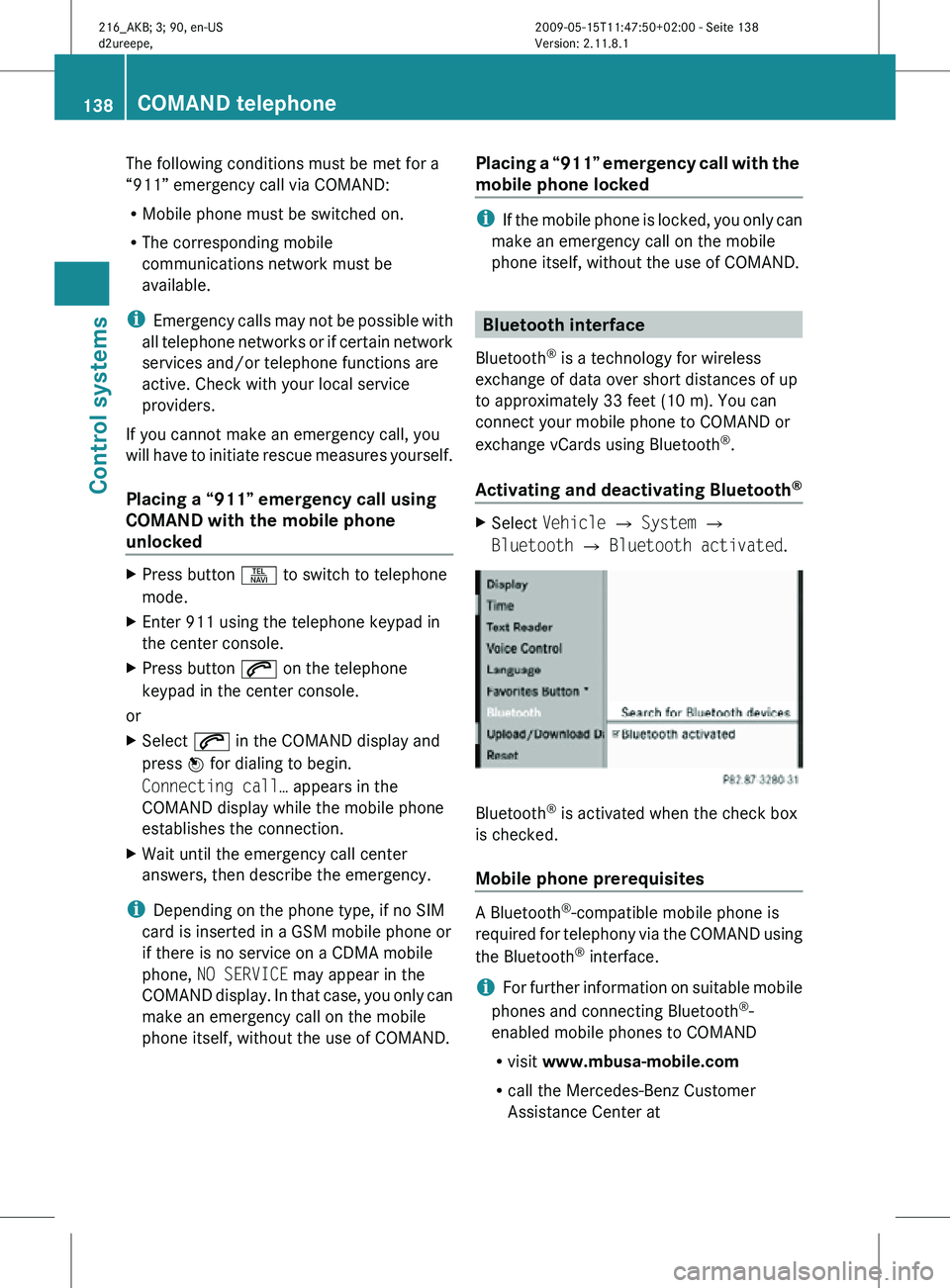
Activating and deactivating Bluetooth ® X
Select Vehicle Q System Q
Bluetooth Q Bluetooth activated. Bluetooth
®
is activated when the check box
is checked.
Mobile phone prerequisites A Bluetooth
®
-compatible mobile phone is
required for telephony via the COMAND using
the Bluetooth ®
interface.
i For further information on suitable mobile
phones and connecting Bluetooth ®
-
enabled mobile phones to COMAND
R visit www.mbusa-mobile.com
R call the Mercedes-Benz Customer
Assistance Center at 138
COMAND telephoneControl systems
216_AKB; 3; 90, en-US
d2ureepe,
Version: 2.11.8.1 2009-05-15T11:47:50+02:00 - Seite 138
Page 191 of 500
USB storage device
i
This function is available for
alphabetically ordered directories. The
function is
not available within playlists for
example.
X Within a folder, press the respective button
on the telephone keypad once or more to
enter the first character of the desired
artist name. For example, press button
l three
times for an artist whose name
starts with a “C”.
The available characters are displayed on
the bottom of the display.
When the directory contains folders only,
COMAND will search for folders. Selecting active partition (USB
storage devices only)
You can
select this function with USB storage
devices when the storage space is
partitioned. The system supports up to 4
partitions (primary or logical, FAT formatted).
i The Windows formatting program
supports FAT partitions of up to 32 gigabyte
by default.
X Select Media Interface Q Select
Active Partition. Playback options
The following options are available:
R Normal Track Sequence
Tracks are
played back in regular order (e.g.
in numerical or in alphabetical order).
R Random Tracks
All available tracks on the current medium
are played back in random order.
R Category Mix or Random Folder (with
USB devices when Folder was selected) Tracks of the currently active category or
folder
and
its subfolders are played back in
random order.
X Selecting playback options: Select
Media Interface in the basic display.
The list of options appears. The dot
#
indicates the currently selected option.
X Select an option. COMAND vehicle menu
Introduction
In this menu, you can program the following
vehicle functions: Function
Multi-function Contour Seat
Settings (Y page 198)
Rear Window Sunshade (Y page 190)
Easy Entry/Exit Feature
(Y page 190)
Exterior Lighting Delayed Shut-off
(Y page 191)
Interior Lighting Delayed Shut-off
(Y page 191)
Ambient Lighting (Y page 192)
Automatic Mirror Folding
(Y page 192)
Locator Lighting (Y page 192)
Automatic Locking (Y page 193)
Trunk Opening-height Restriction
(Y page 193)
You can select the individual vehicle
functions in two ways. COMAND vehicle menu
189
Control systems
216_AKB; 3; 90, en-US
d2ureepe, Version: 2.11.8.1 2009-05-15T11:47:50+02:00 - Seite 189 Z
Page 193 of 500
To stop seat/steering wheel movement, do
one of the following:
R
Press seat adjustment switch.
R Move steering wheel adjustment stalk.
R Press one of the memory position buttons
or the memory button M.
Do not leave children unattended in the
vehicle, or with access to an unlocked vehicle.
Children could open the driver’s door and
unintentionally activate the easy-entry/exit
feature, which could result in an accident
and/or serious personal injury.
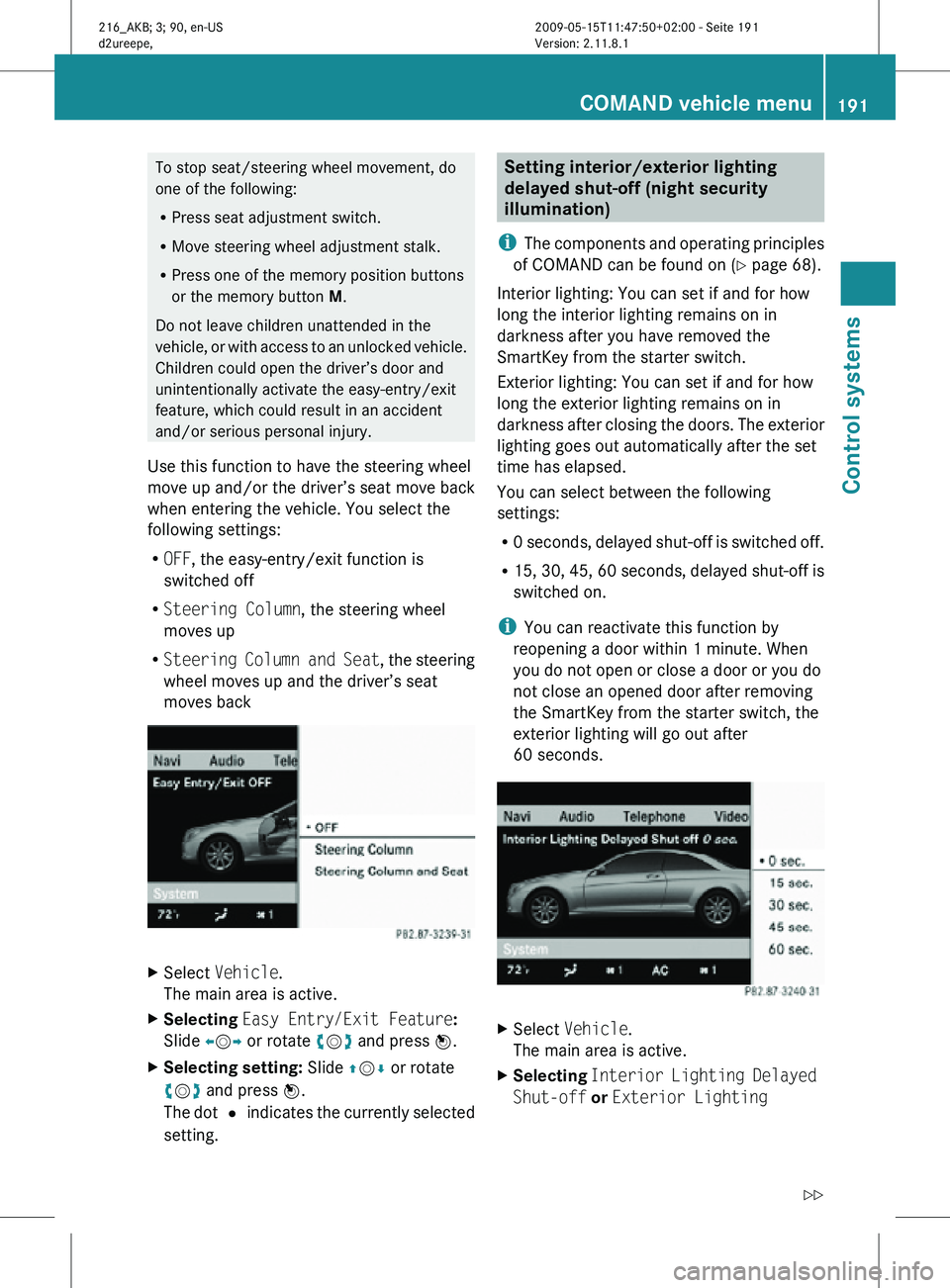
Use this function to have the steering wheel
move up and/or the driver’s seat move back
when entering the vehicle. You select the
following settings:
R OFF, the easy-entry/exit function is
switched off
R Steering Column, the steering wheel
moves up
R Steering Column and Seat , the steering
wheel moves up and the driver’s seat
moves back X
Select Vehicle.
The main area is active.
X Selecting Easy Entry/Exit Feature:
Slide XVY or rotate cVd and press W.
X Selecting setting: Slide ZVÆ or rotate
cVd and press W.
The dot # indicates the currently selected
setting. Setting interior/exterior lighting
delayed shut-off (night security
illumination)
i The components and operating principles
of COMAND can be found on ( Y page 68).
Interior lighting: You can set if and for how
long the interior lighting remains on in
darkness after you have removed the
SmartKey from the starter switch.
Exterior lighting: You can set if and for how
long the exterior lighting remains on in
darkness after closing the doors. The exterior
lighting goes out automatically after the set
time has elapsed.
You can select between the following
settings:
R 0 seconds, delayed shut-off is switched off.
R 15, 30, 45, 60 seconds, delayed shut-off is
switched on.
i You can reactivate this function by
reopening a door within 1 minute. When
you do not open or close a door or you do
not close an opened door after removing
the SmartKey from the starter switch, the
exterior lighting will go out after
60 seconds. X
Select Vehicle.
The main area is active.
X Selecting Interior Lighting Delayed
Shut-off or Exterior Lighting COMAND vehicle menu
191Control systems
216_AKB; 3; 90, en-US
d2ureepe, Version: 2.11.8.1 2009-05-15T11:47:50+02:00 - Seite 191 Z