lock MERCEDES-BENZ CL CLASS 2010 Workshop Manual
[x] Cancel search | Manufacturer: MERCEDES-BENZ, Model Year: 2010, Model line: CL CLASS, Model: MERCEDES-BENZ CL CLASS 2010Pages: 500, PDF Size: 9.32 MB
Page 259 of 500
Fix whatever is affecting the window before
trying to shut the door.
Automatic central locking
You can switch the automatic central locking
on or off using the COMAND system
(Y page 193).
The doors and the trunk lock automatically
when the vehicle is set into motion.
You can open a locked door from the inside.
Open door only when conditions are safe to
do so.
The doors are designed to unlock
automatically after an accident if the force of
the impact exceeds a preset threshold.
The vehicle locks automatically when the
ignition is switched on and the wheels are
turning at a vehicle speed of above 9 mph
(15 km/h). You could therefore lock yourself
out when the vehicle is pushed or towed or is
on a test stand. Locking and unlocking from the inside
G
Observe Safety notes, see page 51.
You can lock or unlock the vehicle from the
inside using the central locking or unlocking
switch. This can be useful, for example, if you
want to lock the vehicle before starting to
drive.
The central locking or unlocking switch does
not lock or unlock the fuel filler flap or the
interior storage compartments, such as the
glove box. X
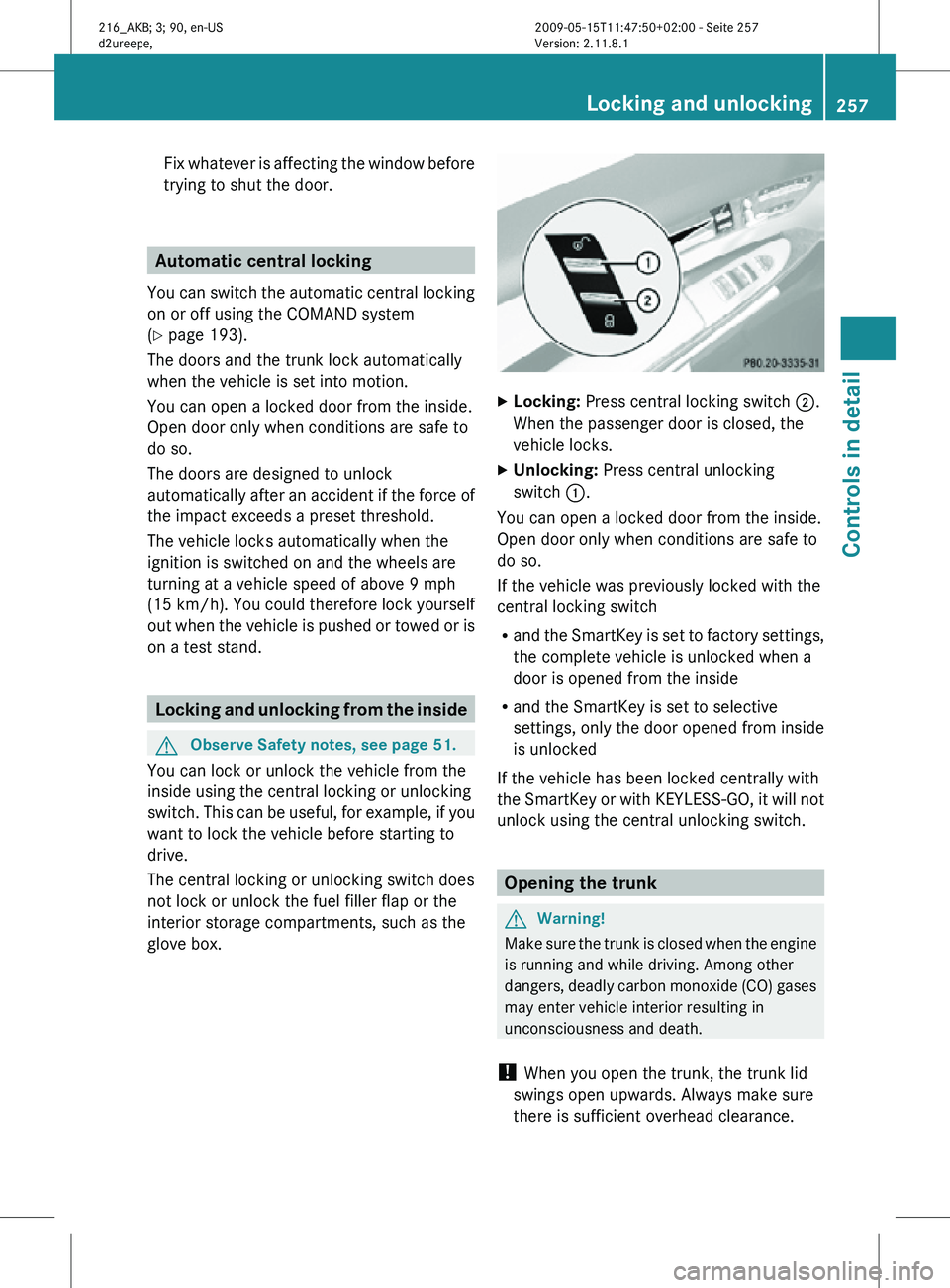
Locking: Press central locking switch ;.
When the passenger door is closed, the
vehicle locks.
X Unlocking: Press central unlocking
switch :.
You can open a locked door from the inside.
Open door only when conditions are safe to
do so.
If the vehicle was previously locked with the
central locking switch
R and the SmartKey is set to factory settings,
the complete vehicle is unlocked when a
door is opened from the inside
R and the SmartKey is set to selective
settings, only the door opened from inside
is unlocked
If the vehicle has been locked centrally with
the SmartKey or with KEYLESS-GO, it will not
unlock using the central unlocking switch. Opening the trunk
G
Warning!
Make sure the trunk is closed when the engine
is running and while driving. Among other
dangers, deadly carbon monoxide (CO) gases
may enter vehicle interior resulting in
unconsciousness and death.
! When you open the trunk, the trunk lid
swings open upwards. Always make sure
there is sufficient overhead clearance. Locking and unlocking
257Controls in detail
216_AKB; 3; 90, en-US
d2ureepe, Version: 2.11.8.1 2009-05-15T11:47:50+02:00 - Seite 257 Z
Page 260 of 500
You can open the trunk when the vehicle is
stationary.
A minimum height clearance of 5.9 ft (1.80 m)
is required to open the trunk lid.
Opening the trunk from the outside
X
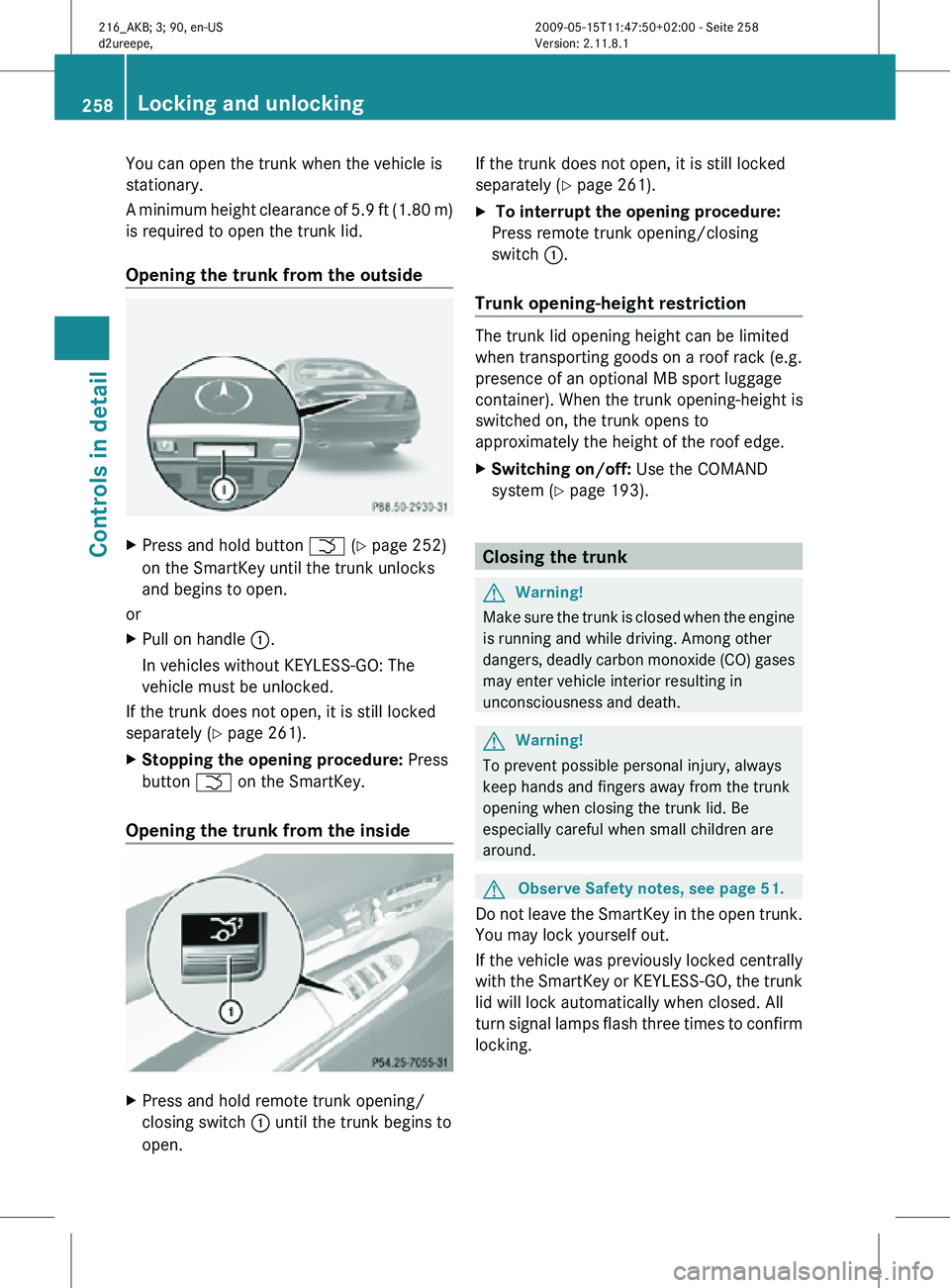
Press and hold button F (Y page 252)
on the SmartKey until the trunk unlocks
and begins to open.
or
X Pull on handle :.
In vehicles without KEYLESS-GO: The
vehicle must be unlocked.
If the trunk does not open, it is still locked
separately ( Y page 261).
X Stopping the opening procedure: Press
button F on the SmartKey.
Opening the trunk from the inside X
Press and hold remote trunk opening/
closing switch : until the trunk begins to
open. If the trunk does not open, it is still locked
separately (
Y page 261).
X To interrupt the opening procedure:
Press remote trunk opening/closing
switch :.
Trunk opening-height restriction The trunk lid opening height can be limited
when transporting goods on a roof rack (e.g.
presence of an optional MB sport luggage
container). When the trunk opening-height is
switched on, the trunk opens to
approximately the height of the roof edge.
X
Switching on/off: Use the COMAND
system (Y page 193). Closing the trunk
G
Warning!
Make sure the trunk is closed when the engine
is running and while driving. Among other
dangers, deadly carbon monoxide (CO) gases
may enter vehicle interior resulting in
unconsciousness and death. G
Warning!
To prevent possible personal injury, always
keep hands and fingers away from the trunk
opening when closing the trunk lid. Be
especially careful when small children are
around. G
Observe Safety notes, see page 51.
Do not leave the SmartKey in the open trunk.
You may lock yourself out.
If the vehicle was previously locked centrally
with the SmartKey or KEYLESS-GO, the trunk
lid will lock automatically when closed. All
turn signal lamps flash three times to confirm
locking. 258
Locking and unlockingControls in detail
216_AKB; 3; 90, en-US
d2ureepe,
Version: 2.11.8.1 2009-05-15T11:47:50+02:00 - Seite 258
Page 261 of 500
Closing the trunk from the outside
manually
X
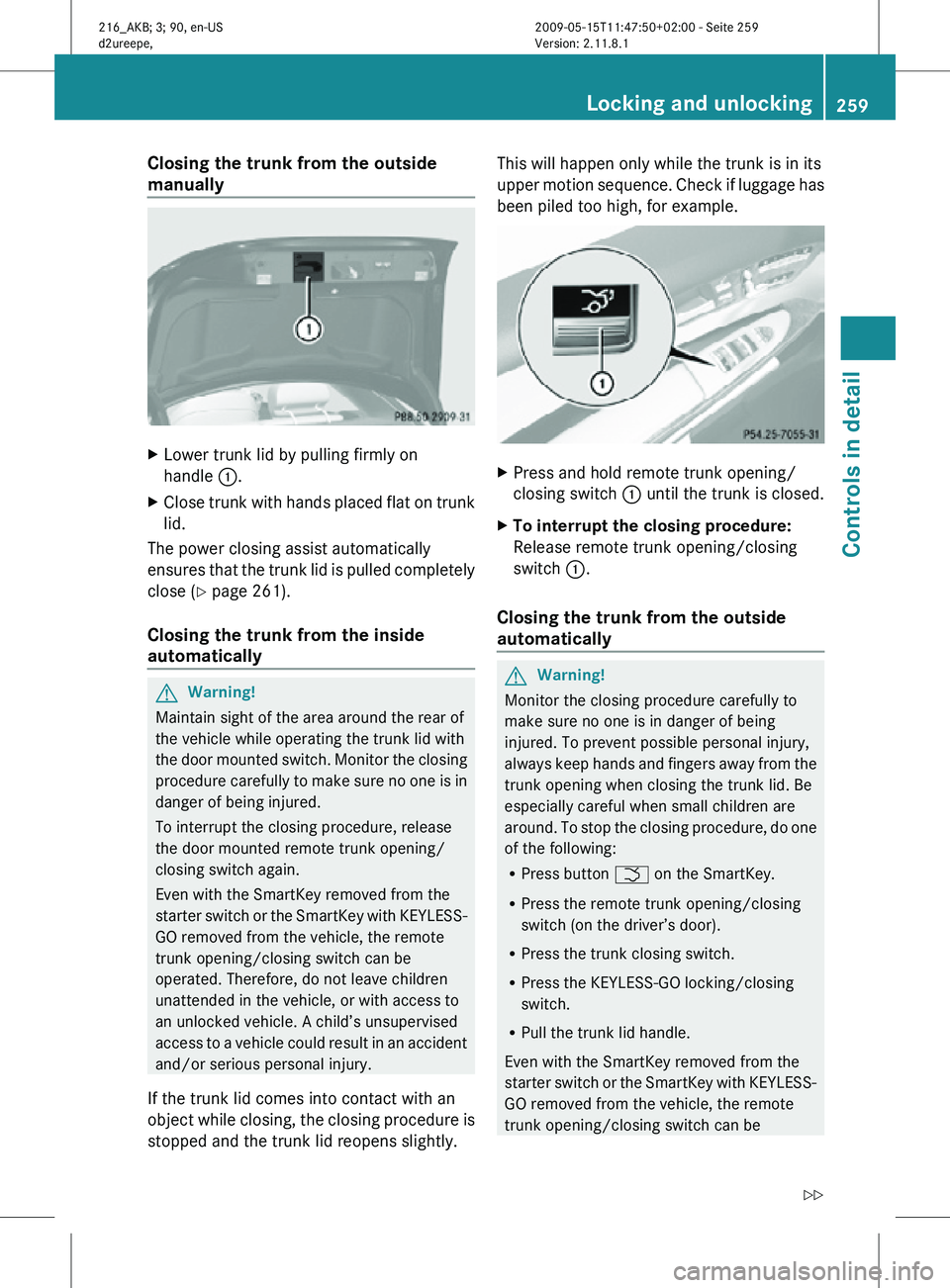
Lower trunk lid by pulling firmly on
handle :.
X Close trunk with hands placed flat on trunk
lid.
The power closing assist automatically
ensures that the trunk lid is pulled completely
close ( Y page 261).
Closing the trunk from the inside
automatically G
Warning!
Maintain sight of the area around the rear of
the vehicle while operating the trunk lid with
the door mounted switch. Monitor the closing
procedure carefully to make sure no one is in
danger of being injured.
To interrupt the closing procedure, release
the door mounted remote trunk opening/
closing switch again.
Even with the SmartKey removed from the
starter switch or the SmartKey with KEYLESS-
GO removed from the vehicle, the remote
trunk opening/closing switch can be
operated. Therefore, do not leave children
unattended in the vehicle, or with access to
an unlocked vehicle. A child’s unsupervised
access to a vehicle could result in an accident
and/or serious personal injury.
If the trunk lid comes into contact with an
object while closing, the closing procedure is
stopped and the trunk lid reopens slightly. This will happen only while the trunk is in its
upper motion sequence. Check if luggage has
been piled too high, for example.
X
Press and hold remote trunk opening/
closing switch : until the trunk is closed.
X To interrupt the closing procedure:
Release remote trunk opening/closing
switch :.
Closing the trunk from the outside
automatically G
Warning!
Monitor the closing procedure carefully to
make sure no one is in danger of being
injured. To prevent possible personal injury,
always keep hands and fingers away from the
trunk opening when closing the trunk lid. Be
especially careful when small children are
around. To stop the closing procedure, do one
of the following:
R Press button F on the SmartKey.
R Press the remote trunk opening/closing
switch (on the driver’s door).
R Press the trunk closing switch.
R Press the KEYLESS-GO locking/closing
switch.
R Pull the trunk lid handle.
Even with the SmartKey removed from the
starter switch or the SmartKey with KEYLESS-
GO removed from the vehicle, the remote
trunk opening/closing switch can be Locking and unlocking
259Controls in detail
216_AKB; 3; 90, en-US
d2ureepe, Version: 2.11.8.1 2009-05-15T11:47:50+02:00 - Seite 259 Z
Page 262 of 500
operated. Therefore, do not leave children
unattended in the vehicle, or with access to
an unlocked vehicle. A child’s unsupervised
access to a vehicle could result in an accident
and/or serious personal injury.
Vehicles without KEYLESS-GO
Vehicles with KEYLESS-GO
X
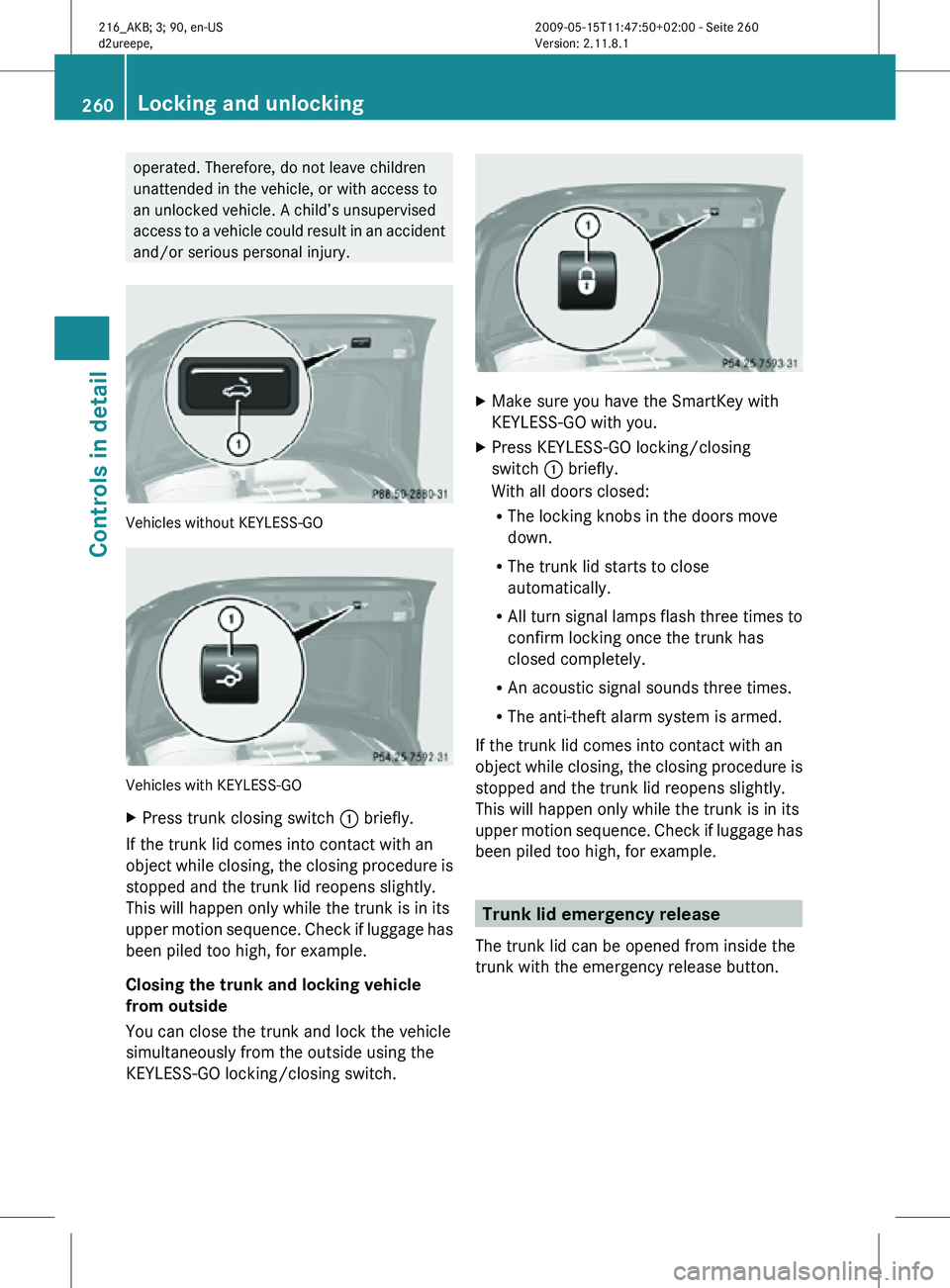
Press trunk closing switch : briefly.
If the trunk lid comes into contact with an
object while closing, the closing procedure is
stopped and the trunk lid reopens slightly.
This will happen only while the trunk is in its
upper motion sequence. Check if luggage has
been piled too high, for example.
Closing the trunk and locking vehicle
from outside
You can close the trunk and lock the vehicle
simultaneously from the outside using the
KEYLESS-GO locking/closing switch. X
Make sure you have the SmartKey with
KEYLESS-GO with you.
X Press KEYLESS-GO locking/closing
switch : briefly.
With all doors closed:
R
The locking knobs in the doors move
down.
R The trunk lid starts to close
automatically.
R All turn signal lamps flash three times to
confirm locking once the trunk has
closed completely.
R An acoustic signal sounds three times.
R The anti-theft alarm system is armed.
If the trunk lid comes into contact with an
object while closing, the closing procedure is
stopped and the trunk lid reopens slightly.
This will happen only while the trunk is in its
upper motion sequence. Check if luggage has
been piled too high, for example. Trunk lid emergency release
The trunk lid can be opened from inside the
trunk with the emergency release button. 260
Locking and unlockingControls in detail
216_AKB; 3; 90, en-US
d2ureepe,
Version: 2.11.8.1 2009-05-15T11:47:50+02:00 - Seite 260
Page 263 of 500

X
Briefly press emergency release
button :.
The emergency release button unlocks and
opens the trunk while the vehicle is standing
still or in motion.
Illumination of the emergency release button:
R The button flashes for 30 minutes after
opening the trunk.
R The button flashes for 60 minutes after
closing the trunk.
The emergency release button does not open
the trunk, if the vehicle battery is discharged
or disconnected. Valet locking
You can lock the trunk separately with the
mechanical key. This denies unauthorized
access to the trunk, e.g. when you valet park
the vehicle.
X Leave only the SmartKey less its
mechanical key with the vehicle. X
Valet locking: Close the trunk.
X Remove the mechanical key from the
SmartKey (Y page 460).
X Insert the mechanical key in the trunk lid
lock.
X Turn the mechanical key clockwise to
position 2 and remove the mechanical
key in that position to lock the trunk.
The trunk remains locked even when the
vehicle is centrally unlocked.
You can then only open the trunk with the
mechanical key.
X Canceling: Insert the mechanical key in
the trunk lid lock.
X Turn the mechanical key counterclockwise
to neutral position 1 and remove the
mechanical key in that position to unlock
the trunk.
You can now open the trunk. Power closing assist for doors and
trunk lid
It is not necessary to slam the door or trunk
lid closed. An electrical power-assisted
mechanism draws doors and trunk lid closed
quietly and automatically once door and trunk
lid has been latched. When the electrical
power-assisted mechanism has stopped,
doors and/or trunk can be reopend. G
Warning!
To prevent possible personal injury, always
keep hands and fingers away from the door or
trunk opening when closing a door or the
trunk lid. Be especially careful when small
children are around.
In case of danger, pull the inside or outside
door handle, or pull the trunk lid handle.
To prevent personal injury, never actuate the
closing assist mechanism by tampering with
the door or trunk lid latch. Locking and unlocking
261Controls in detail
216_AKB; 3; 90, en-US
d2ureepe, Version: 2.11.8.1 2009-05-15T11:47:50+02:00 - Seite 261 Z
Page 264 of 500

G
Warning!
Only drive with the doors closed. Otherwise,
one or more of the doors could open while the
vehicle is in motion, putting you and/or
others at risk. G
Warning!
Make sure the trunk is closed when the engine
is running and while driving. Among other
dangers, deadly carbon monoxide (CO) gases
may enter vehicle interior resulting in
unconsciousness and death.
X Power closing assist for doors: Press the
doors gently past the initial engage position
into the lock.
X Power closing assist for trunk lid: Press
the trunk lid gently into its lock. Starter switch positions
SmartKey
G
Observe Safety notes, see page 51. Starter switch
g
For removing SmartKey
1 Power supply for some electrical
consumers, e.g. wipers
2 Ignition (power supply for all electrical
consumers) and driving position
3 Starting position
When you switch on the ignition, all lamps in
the instrument cluster come on. The high-
beam headlamp indicator lamp and turn
signal indicator lamps will only come on if activated. If a lamp in the instrument cluster
fails to come on when the ignition is switched
on, have it checked and replaced if necessary.
If a lamp in the instrument cluster remains on
after starting the engine or comes on while
driving, refer to “Lamps in instrument cluster”
(Y page 450).
X
Always remove the SmartKey from the
starter switch when the engine is not in
operation.
This will help to prevent accelerated vehicle
battery discharge or a completely
discharged vehicle battery.
If the SmartKey cannot be turned in the
starter switch, the vehicle battery may not be
sufficiently charged.
X Check the vehicle battery and charge it if
necessary ( Y page 471).
or
X Get a jump start (Y page 471).
i If the SmartKey does not belong to the
vehicle, the SmartKey can be turned in the
starter switch. However, the ignition does
not switch on and the engine does not start. KEYLESS-GO
G
Observe Safety notes, see page 51.
Vehicles equipped with the KEYLESS-GO
feature are supplied with a SmartKey with
integrated KEYLESS-GO function and a
removable KEYLESS-GO start/stop button.
The KEYLESS-GO start/stop button must be
inserted in the starter switch and the
SmartKey present in the vehicle.
Pressing the KEYLESS-GO start/stop button
without depressing the brake pedal
corresponds to the various starter switch
positions (Y page 262).
Pressing the KEYLESS-GO start/stop button
with the brake pedal firmly depressed will
start the engine (Y page 285).
The KEYLESS-GO start/stop button can be
pulled out of the starter switch easily. You can 262
Starter switch positionsControls in detail
216_AKB; 3; 90, en-US
d2ureepe,
Version: 2.11.8.1 2009-05-15T11:47:50+02:00 - Seite 262
Page 266 of 500
i
When you now press the KEYLESS-GO
start/stop button once and the driver’s
door is
open, the power supply is switched
off. Seats
Safety notes
G
Warning!
In order to avoid possible loss of vehicle
control the
following must be done before the
vehicle is put into motion:
R seat adjustment
R head restraint adjustment
R steering wheel adjustment
R rear view mirror adjustment
R fastening of seat belts G
Warning!
Do not adjust the driver’s seat while driving.
Adjusting the seat while driving could cause
the driver to lose control of the vehicle.
Never ride in a moving vehicle with the seat
backrest in
an excessively reclined position as
this can be dangerous. You could slide under
the seat belt in a collision. If you slide under
it, the seat belt would apply force at the
abdomen or neck. That could cause serious
or fatal injuries. The seat backrest and seat
belts provide the best restraint when the
wearer is in a position that is as upright as
possible and seat belts are properly
positioned on the body. G
Warning!
Your seat must be adjusted so that you can
correctly fasten your seat belt. Observe the following points:
R
Adjust the
seat backrest until your arms are
slightly angled when holding the steering
wheel.
R Adjust the seat to a comfortable seating
position that still allows you to reach the
accelerator/brake pedal safely. The
position should be as far back as possible
with the driver still able to operate the
controls properly.
R Adjust the head restraint so that it is as
close to the head as possible. The center of
the head restraint must support the back of
the head at eye level.
R Never place hands under the seat or near
any moving parts while a seat is being
adjusted.
Failure to do so could result in an accident
and/or serious personal injury. G
Warning!
The power seats can be operated at any time.
Therefore, do not leave children unattended
in the vehicle, or with access to an unlocked
vehicle. A child’s unsupervised access to a
vehicle could result in an accident and/or
serious personal injury. G
Warning!
According to accident statistics, children are
safer when properly restrained in the rear
seating positions than in the front seating
position. Thus, we strongly recommend that
children be
placed in the rear seats whenever
possible. Regardless of seating position,
children 12 years old and under must be
seated and properly secured in an
appropriately sized infant restraint, toddler
restraint, or booster seat recommended for
the size and weight of the child. For additional
information, see “Children in the vehicle”.
A child’s risk of serious or fatal injuries is
significantly increased if the child restraints
are not properly secured in the vehicle and/ 264
Seats
Controls in detail
216_AKB; 3; 90, en-US
d2ureepe,
Version: 2.11.8.1 2009-05-15T11:47:50+02:00 - Seite 264
Page 267 of 500
or the child is not properly secured in the child
restraint.
G
Warning!
For your protection, drive only with properly
positioned head restraints.
Adjust the head restraint so that it is as close
to the head as possible and the center of the
head restraint supports the back of the head
at eye level. This will reduce the potential for
injury to the head and neck in the event of an
accident or similar situation.
Do not drive the vehicle without the seat head
restraints. Head restraints are intended to
help reduce injuries during an accident. Seat adjustment
You can adjust the lumbar support,
multicontour seats, as well as drive-dynamic
multicontour seats using COMAND
(Y page 198).
! When moving the seats, make sure there
are no items in the footwell or behind the
seats. Otherwise, you could damage the
seats and/or the items.
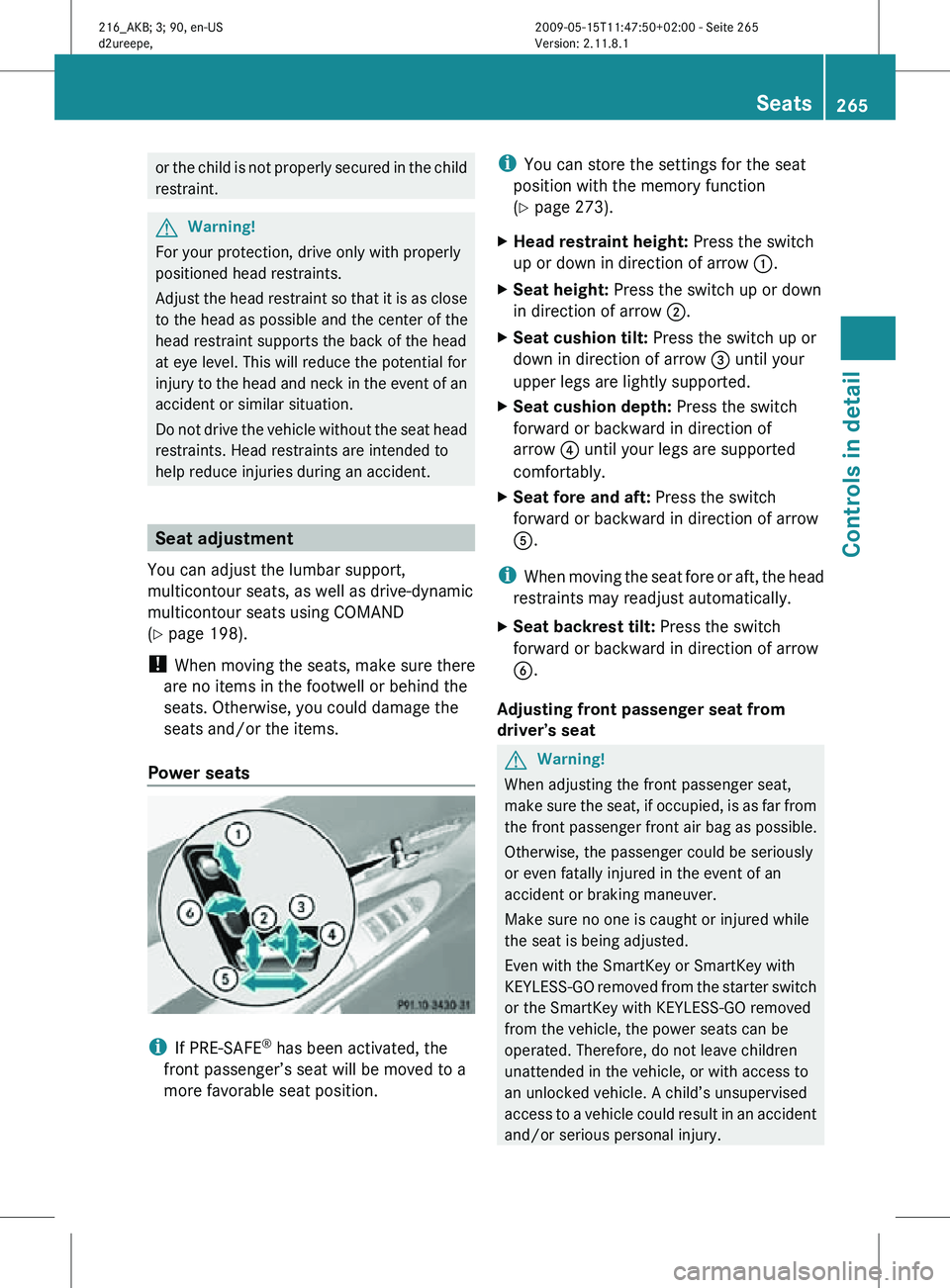
Power seats i
If PRE-SAFE ®
has been activated, the
front passenger’s seat will be moved to a
more favorable seat position. i
You can store the settings for the seat
position with the memory function
(Y page 273).
X Head restraint height: Press the switch
up or down in direction of arrow :.
X Seat height: Press the switch up or down
in direction of arrow ;.
X Seat cushion tilt: Press the switch up or
down in direction of arrow = until your
upper legs are lightly supported.
X Seat cushion depth: Press the switch
forward or backward in direction of
arrow ? until your legs are supported
comfortably.
X Seat fore and aft: Press the switch
forward or backward in direction of arrow
A.
i When moving the seat fore or aft, the head
restraints may readjust automatically.
X Seat backrest tilt: Press the switch
forward or backward in direction of arrow
B.
Adjusting front passenger seat from
driver’s seat G
Warning!
When adjusting the front passenger seat,
make sure the seat, if occupied, is as far from
the front passenger front air bag as possible.
Otherwise, the passenger could be seriously
or even fatally injured in the event of an
accident or braking maneuver.
Make sure no one is caught or injured while
the seat is being adjusted.
Even with the SmartKey or SmartKey with
KEYLESS-GO removed from the starter switch
or the SmartKey with KEYLESS-GO removed
from the vehicle, the power seats can be
operated. Therefore, do not leave children
unattended in the vehicle, or with access to
an unlocked vehicle. A child’s unsupervised
access to a vehicle could result in an accident
and/or serious personal injury. Seats
265Controls in detail
216_AKB; 3; 90, en-US
d2ureepe, Version: 2.11.8.1 2009-05-15T11:47:50+02:00 - Seite 265 Z
Page 268 of 500
!
Do not move the front passenger seat
completely forward if objects are stored in
the parcel net in the front passenger-side
footwell. Items in the net may be damaged.
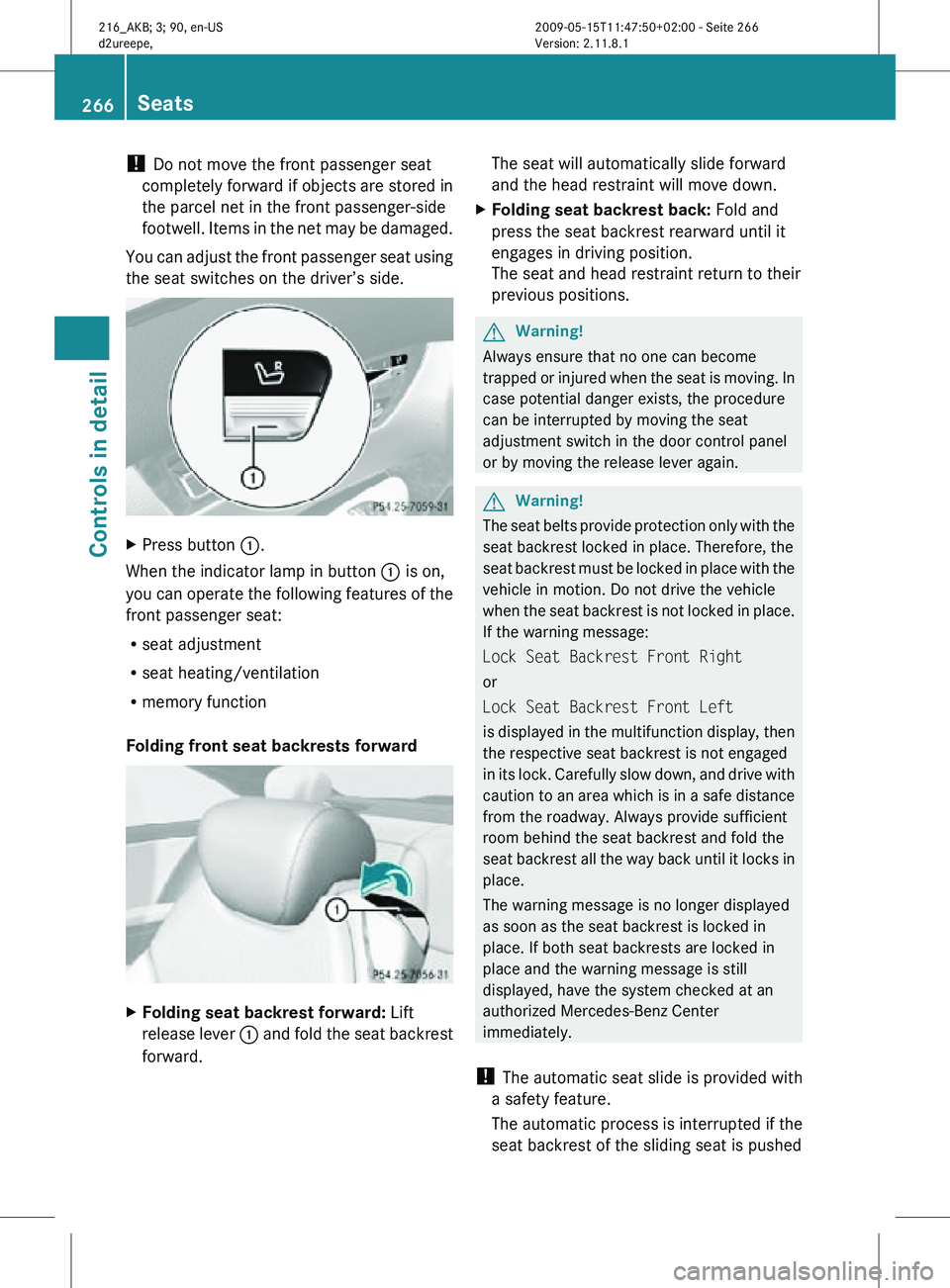
You can adjust the front passenger seat using
the seat switches on the driver’s side. X
Press button :.
When the indicator lamp in button : is on,
you can operate the following features of the
front passenger seat:
R seat adjustment
R seat heating/ventilation
R memory function
Folding front seat backrests forward X
Folding seat backrest forward: Lift
release lever : and fold the seat backrest
forward. The seat will automatically slide forward
and the head restraint will move down.
X Folding seat backrest back: Fold and
press the seat backrest rearward until it
engages in driving position.
The seat and head restraint return to their
previous positions. G
Warning!
Always ensure that no one can become
trapped or injured when the seat is moving. In
case potential danger exists, the procedure
can be interrupted by moving the seat
adjustment switch in the door control panel
or by moving the release lever again. G
Warning!
The seat belts provide protection only with the
seat backrest locked in place. Therefore, the
seat backrest must be locked in place with the
vehicle in motion. Do not drive the vehicle
when the seat backrest is not locked in place.
If the warning message:
Lock Seat Backrest Front Right
or
Lock Seat Backrest Front Left
is displayed in the multifunction display, then
the respective seat backrest is not engaged
in its lock. Carefully slow down, and drive with
caution to an area which is in a safe distance
from the roadway. Always provide sufficient
room behind the seat backrest and fold the
seat backrest all the way back until it locks in
place.
The warning message is no longer displayed
as soon as the seat backrest is locked in
place. If both seat backrests are locked in
place and the warning message is still
displayed, have the system checked at an
authorized Mercedes-Benz Center
immediately.
! The automatic seat slide is provided with
a safety feature.
The automatic process is interrupted if the
seat backrest of the sliding seat is pushed 266
SeatsControls in detail
216_AKB; 3; 90, en-US
d2ureepe,
Version: 2.11.8.1 2009-05-15T11:47:50+02:00 - Seite 266
Page 269 of 500
against an occupant or object. The seat will
slide forward and stop.
Investigate and correct the cause of
interruption.
Now use memory button or seat
adjustment switch to bring the seat into the
desired position.
When folding the seat backrest forward
from a reclined position, and then folding it
back, the seat backrest stops in a more
upright position for the safety of any rear-
seat passenger. Adjust the seat backrest
until your arms are slightly angled when
holding the steering wheel.
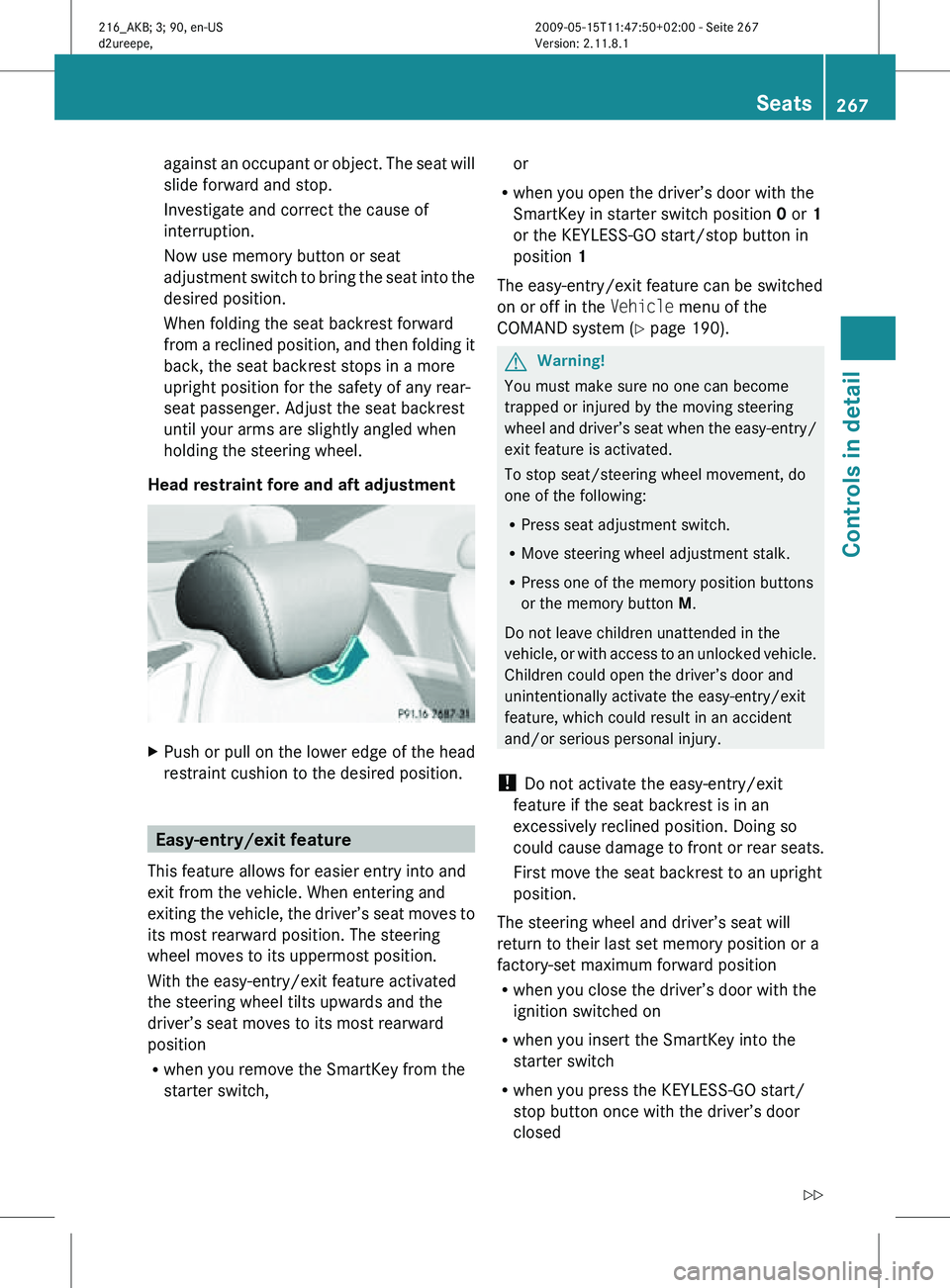
Head restraint fore and aft adjustment X
Push or pull on the lower edge of the head
restraint cushion to the desired position. Easy-entry/exit feature
This feature allows for easier entry into and
exit from the vehicle. When entering and
exiting the vehicle, the driver’s seat moves to
its most rearward position. The steering
wheel moves to its uppermost position.
With the easy-entry/exit feature activated
the steering wheel tilts upwards and the
driver’s seat moves to its most rearward
position
R when you remove the SmartKey from the
starter switch, or
R when you open the driver’s door with the
SmartKey in starter switch position 0 or 1
or the KEYLESS-GO start/stop button in
position 1
The easy-entry/exit feature can be switched
on or off in the Vehicle menu of the
COMAND system (Y page 190). G
Warning!
You must make sure no one can become
trapped or injured by the moving steering
wheel and driver’s seat when the easy-entry/
exit feature is activated.
To stop seat/steering wheel movement, do
one of the following:
R Press seat adjustment switch.
R Move steering wheel adjustment stalk.
R Press one of the memory position buttons
or the memory button M.
Do not leave children unattended in the
vehicle, or with access to an unlocked vehicle.
Children could open the driver’s door and
unintentionally activate the easy-entry/exit
feature, which could result in an accident
and/or serious personal injury.
! Do not activate the easy-entry/exit
feature if the seat backrest is in an
excessively reclined position. Doing so
could cause damage to front or rear seats.
First move the seat backrest to an upright
position.
The steering wheel and driver’s seat will
return to their last set memory position or a
factory-set maximum forward position
R when you close the driver’s door with the
ignition switched on
R when you insert the SmartKey into the
starter switch
R when you press the KEYLESS-GO start/
stop button once with the driver’s door
closed Seats
267Controls in detail
216_AKB; 3; 90, en-US
d2ureepe, Version: 2.11.8.1 2009-05-15T11:47:50+02:00 - Seite 267 Z