lock MERCEDES-BENZ CL CLASS 2010 Service Manual
[x] Cancel search | Manufacturer: MERCEDES-BENZ, Model Year: 2010, Model line: CL CLASS, Model: MERCEDES-BENZ CL CLASS 2010Pages: 500, PDF Size: 9.32 MB
Page 194 of 500
Delayed Shut-off: Slide XVY or rotate
cVd and press W.
A menu appears.
The dot
# indicates the currently selected
setting.
X Selecting setting: Slide ZVÆ or rotate
cVd and press W.
The dot # indicates the currently selected
setting.
i The exterior lamp switch must be in
position c (Y page 275) before turning
off the engine. Otherwise the exterior
lighting will not come on when leaving the
vehicle. Setting interior ambient lighting
i The components and operating principles
of COMAND can be found on ( Y page 68).
You can select the following settings:
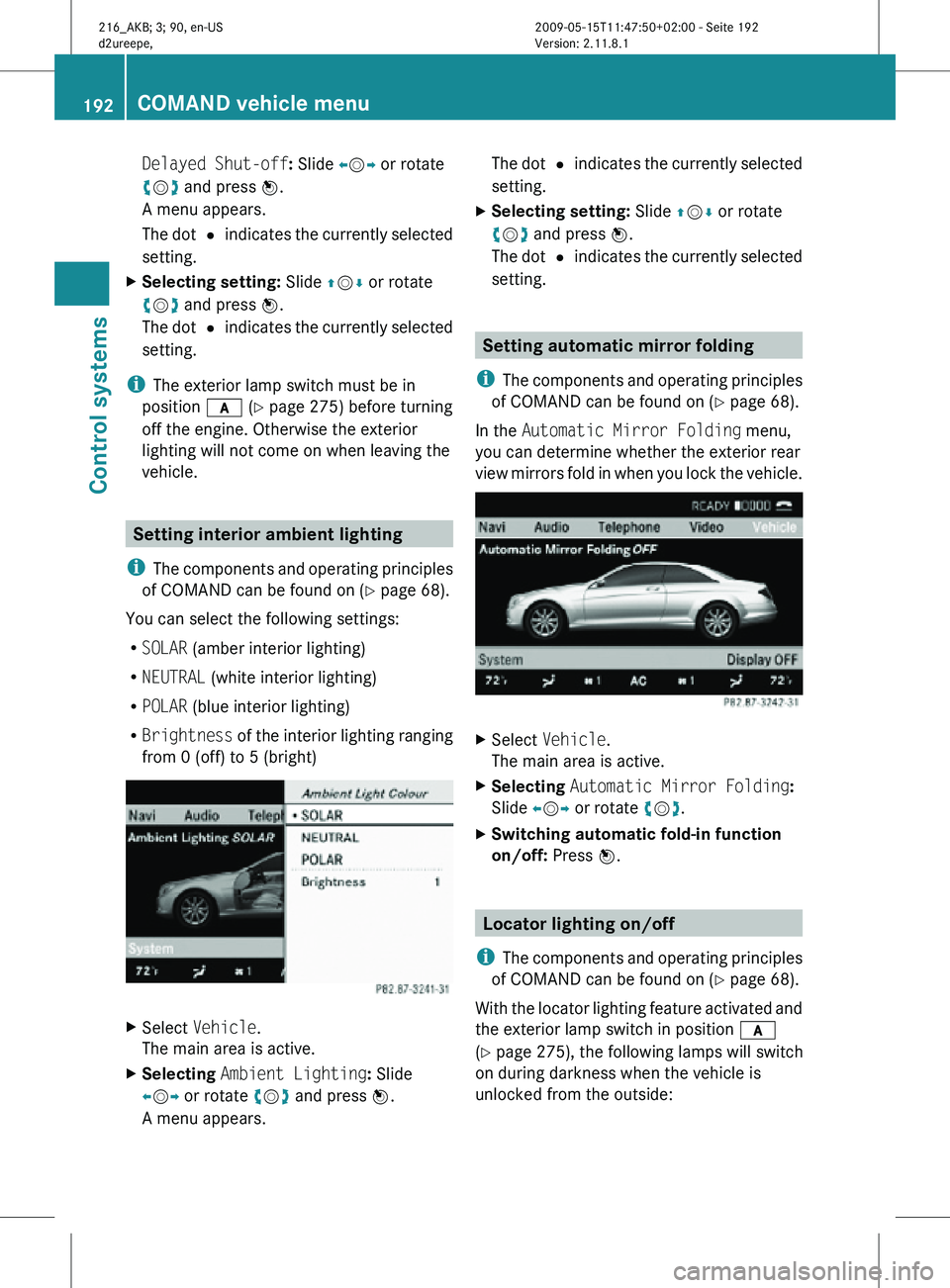
R SOLAR (amber interior lighting)
R NEUTRAL (white interior lighting)
R POLAR (blue interior lighting)
R Brightness of the interior lighting ranging
from 0 (off) to 5 (bright) X
Select Vehicle.
The main area is active.
X Selecting Ambient Lighting: Slide
XVY or rotate cVd and press W.
A menu appears. The dot
# indicates the currently selected
setting.
X Selecting setting: Slide ZVÆ or rotate
cVd and press W.
The dot # indicates the currently selected
setting. Setting automatic mirror folding
i The components and operating principles
of COMAND can be found on ( Y page 68).
In the Automatic Mirror Folding menu,
you can determine whether the exterior rear
view mirrors fold in when you lock the vehicle. X
Select Vehicle.
The main area is active.
X Selecting Automatic Mirror Folding:
Slide XVY or rotate cVd.
X Switching automatic fold-in function
on/off: Press W. Locator lighting on/off
i The components and operating principles
of COMAND can be found on ( Y page 68).
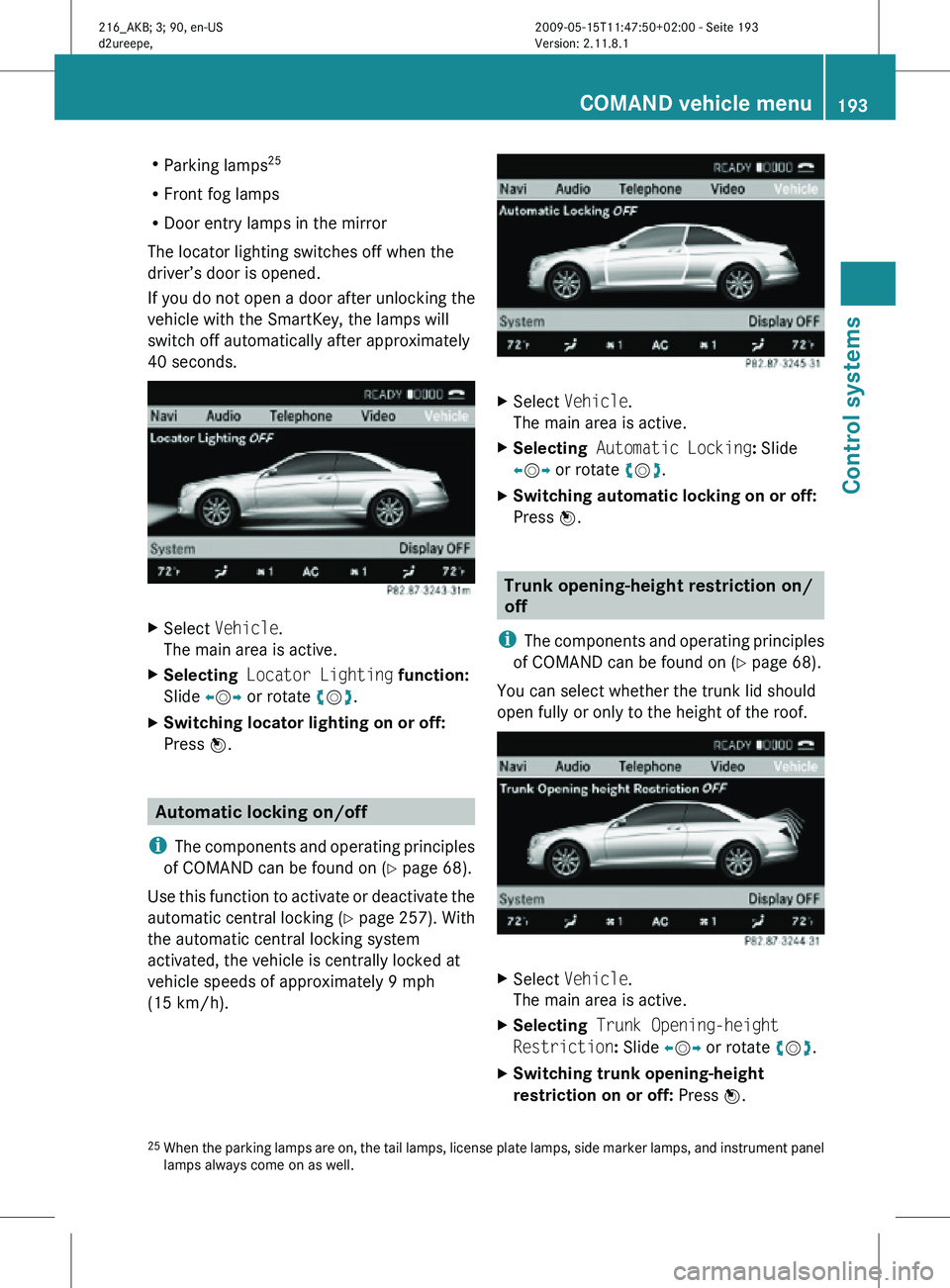
With the locator lighting feature activated and
the exterior lamp switch in position c
(Y page 275), the following lamps will switch
on during darkness when the vehicle is
unlocked from the outside: 192
COMAND vehicle menuControl systems
216_AKB; 3; 90, en-US
d2ureepe,
Version: 2.11.8.1 2009-05-15T11:47:50+02:00 - Seite 192
Page 195 of 500
R
Parking lamps 25
R Front fog lamps
R Door entry lamps in the mirror
The locator lighting switches off when the
driver’s door is opened.
If you do not open a door after unlocking the
vehicle with the SmartKey, the lamps will
switch off automatically after approximately
40 seconds. X
Select Vehicle.
The main area is active.
X Selecting Locator Lighting function:
Slide XVY or rotate cVd.
X Switching locator lighting on or off:
Press W. Automatic locking on/off
i The components and operating principles
of COMAND can be found on ( Y page 68).
Use this function to activate or deactivate the
automatic central locking (Y page 257). With
the automatic central locking system
activated, the vehicle is centrally locked at
vehicle speeds of approximately 9 mph
(15 km/h). X
Select Vehicle.
The main area is active.
X Selecting Automatic Locking: Slide
XVY or rotate cVd.
X Switching automatic locking on or off:
Press W. Trunk opening-height restriction on/
off
i The components and operating principles
of COMAND can be found on ( Y page 68).
You can select whether the trunk lid should
open fully or only to the height of the roof. X
Select Vehicle.
The main area is active.
X Selecting Trunk Opening-height
Restriction: Slide XVY or rotate cVd.
X Switching trunk opening-height
restriction on or off: Press W.
25 When the parking lamps are on, the tail lamps, license plate lamps, side marker lamps, and instrument panel
lamps always come on as well. COMAND vehicle menu
193Control systems
216_AKB; 3; 90, en-US
d2ureepe, Version: 2.11.8.1 2009-05-15T11:47:50+02:00 - Seite 193 Z
Page 228 of 500
“Telephone”
Use the command “Telephone” to activate
the
telephone
main menu. Use this command
if you want the digits you are entering to
appear on the COMAND display.
“Help telephone” The Voice Control System features a
comprehensive help function.
Use the command “Help telephone” and the
Voice Control System will read out an option
list
of
available functions and commands that
can be used in conjunction with the telephone
(Y page 80).
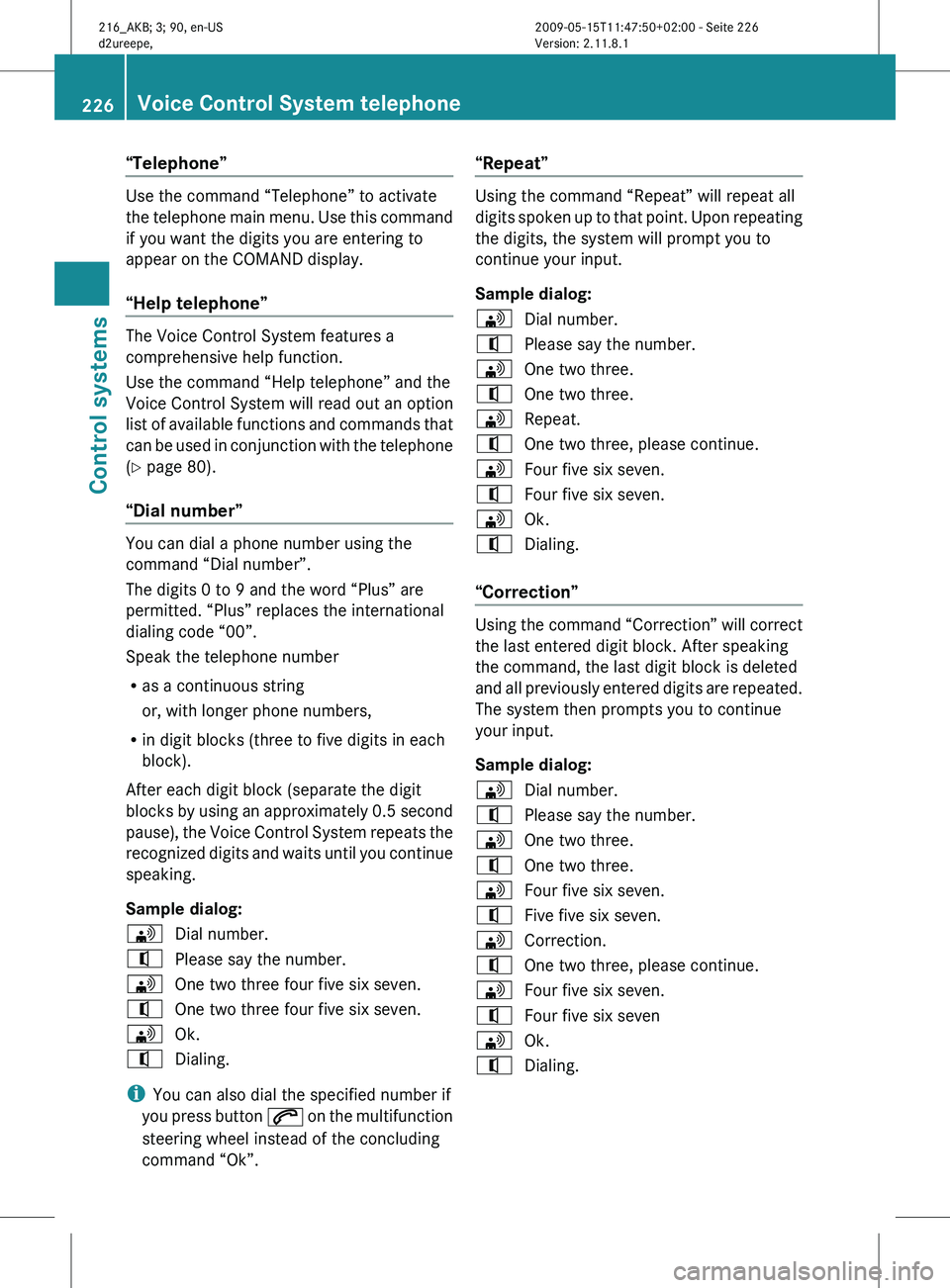
“Dial number” You can dial a phone number using the
command “Dial number”.
The digits 0 to 9 and the word “Plus” are
permitted. “Plus” replaces the international
dialing code “00”.
Speak the telephone number
R
as a continuous string
or, with longer phone numbers,
R in digit blocks (three to five digits in each
block).
After each digit block (separate the digit
blocks by
using an approximately 0.5 second
pause), the Voice Control System repeats the
recognized digits and waits until you continue
speaking.
Sample dialog:
\ Dial number.
^ Please say the number.
\ One two three four five six seven.
^ One two three four five six seven.
\ Ok.
^ Dialing.
i You can also dial the specified number if
you press
button 6 on the multifunction
steering wheel instead of the concluding
command “Ok”. “Repeat” Using the command “Repeat” will repeat all
digits
spoken
up to that point. Upon repeating
the digits, the system will prompt you to
continue your input.
Sample dialog:
\ Dial number.
^ Please say the number.
\ One two three.
^ One two three.
\ Repeat.
^ One two three, please continue.
\ Four five six seven.
^ Four five six seven.
\ Ok.
^ Dialing.
“Correction” Using the command “Correction” will correct
the last entered digit block. After speaking
the command, the last digit block is deleted
and
all
previously entered digits are repeated.
The system then prompts you to continue
your input.
Sample dialog:
\ Dial number.
^ Please say the number.
\ One two three.
^ One two three.
\ Four five six seven.
^ Five five six seven.
\ Correction.
^ One two three, please continue.
\ Four five six seven.
^ Four five six seven
\ Ok.
^ Dialing. 226
Voice Control System telephone
Control systems
216_AKB; 3; 90, en-US
d2ureepe,
Version: 2.11.8.1 2009-05-15T11:47:50+02:00 - Seite 226
Page 249 of 500
Media interface
R
media interface (on)
R UCI (on) USB interface
R
USB
R USB interface Aux
R
audio auxiliary/aux (input)
R auxiliary/aux audio (input)
R video auxiliary/aux (input)
R auxiliary/aux video (input) Voice Control System
troubleshooting
Help function
To support
the user, the Voice Control System
contains an extensive help function.
The help function gives you
R general hints on how to best use the Voice
Control System
R a listing of all available commands Help commands
“Help voice control” Using the command “Help voice control” will
give you information on how to best use the
Voice Control System.
“Help”
X
Press button ? on the multifunction
steering wheel and speak the command
“Help”.
You will receive help for the currently
selected application. When you speak the command “Help” during
a dialog such as after the command “Dial
number”, you will receive help for the next
dialog steps.
You can also call up the help function
specifically for a particular system, for
example using the command “Help
telephone”.
Help window
You can use the help window to view a
selection of
valid commands on the COMAND
display.
The help functions can be switched on or off
via COMAND in the System menu
(Y page 80). Entering digits and spelling
Entering digits R
Digits from “Zero” to “Nine” may be used.
R Speaking phone
numbers in digit blocks of
3 to 5 digits has proven a very reliable
method for the input of phone numbers.
Spelling R
The letters of the English alphabet and the
digits 0 - 9 may be used.
R Speak the letters in blocks of 5 - 7 letters
at a time.
R Speak each individual letter clearly. Voice Control System troubleshooting
247
Control systems
216_AKB; 3; 90, en-US
d2ureepe, Version: 2.11.8.1 2009-05-15T11:47:50+02:00 - Seite 247 Z
Page 253 of 500
Vehicle equipment ............................
252
Locking and unlocking .....................252
Starter switch positions ................... 262
Seats .................................................. 264
Multifunction steering wheel ..........270
Mirrors ............................................... 271
Memory function .............................. 273
Lighting .............................................. 274
Wipers ................................................ 280
Power windows ................................. 282
Driving and parking .......................... 285
Automatic transmission ................... 291
Transfer case .................................... 299
Instrument cluster ............................300
Driving systems ................................ 301
Climate control system ....................338
Rear window defroster ..................... 344
Power tilt/sliding sunroof ...............345
Loading and storing ..........................347
Useful features ................................. 350 251Controls in detail
216_AKB; 3; 90, en-US
d2ureepe,
Version: 2.11.8.1 2009-05-15T11:47:50+02:00 - Seite 251
Page 254 of 500
Vehicle equipment
i This Operator’s Manual describes all
features, standard or optional, potentially
available for your vehicle at the time of
purchase. Please be aware that your
vehicle might not be equipped with all
features described in this manual. Locking and unlocking
Notes
G
Observe Safety notes, see page 51.
When unlocking or locking the vehicle with
the SmartKey an acoustic signal sounds. The
acoustic signal is activated at the factory. If
you wish to deactivate the feature, or adjust
its signal volume, contact an authorized
Mercedes-Benz Center.
When unlocking the vehicle, all turn signal
lamps flash once. An acoustic signal sounds
once, and the locking knobs in the doors
move up. The anti-theft alarm system is
disarmed.
When locking the vehicle, all turn signal lamps
flash three times. An acoustic signal sounds
three times, and the locking knobs in the
doors move down. The anti-theft alarm
system is armed.
All doors and the trunk must be closed.
If you cannot lock or unlock the vehicle with
the SmartKey, the batteries in the SmartKey
are discharged, the SmartKey is
malfunctioning, or the vehicle battery is
drained.
X Check the batteries in the SmartKey
(Y page 255) and replace them if
necessary.
X Use the mechanical key to unlock the
driver’s door and the trunk (Y page 460). X
Use the mechanical key to lock the vehicle
(Y page 461).
X Have the vehicle battery and the vehicle
battery connections checked at an
authorized Mercedes-Benz Center.
If the SmartKey is malfunctioning, contact
Roadside Assistance or an authorized
Mercedes-Benz Center. SmartKey
Your vehicle comes supplied with two
SmartKeys, each with remote control and a
removable mechanical key.
The SmartKey centrally locks and unlocks
R the doors
R the trunk lid
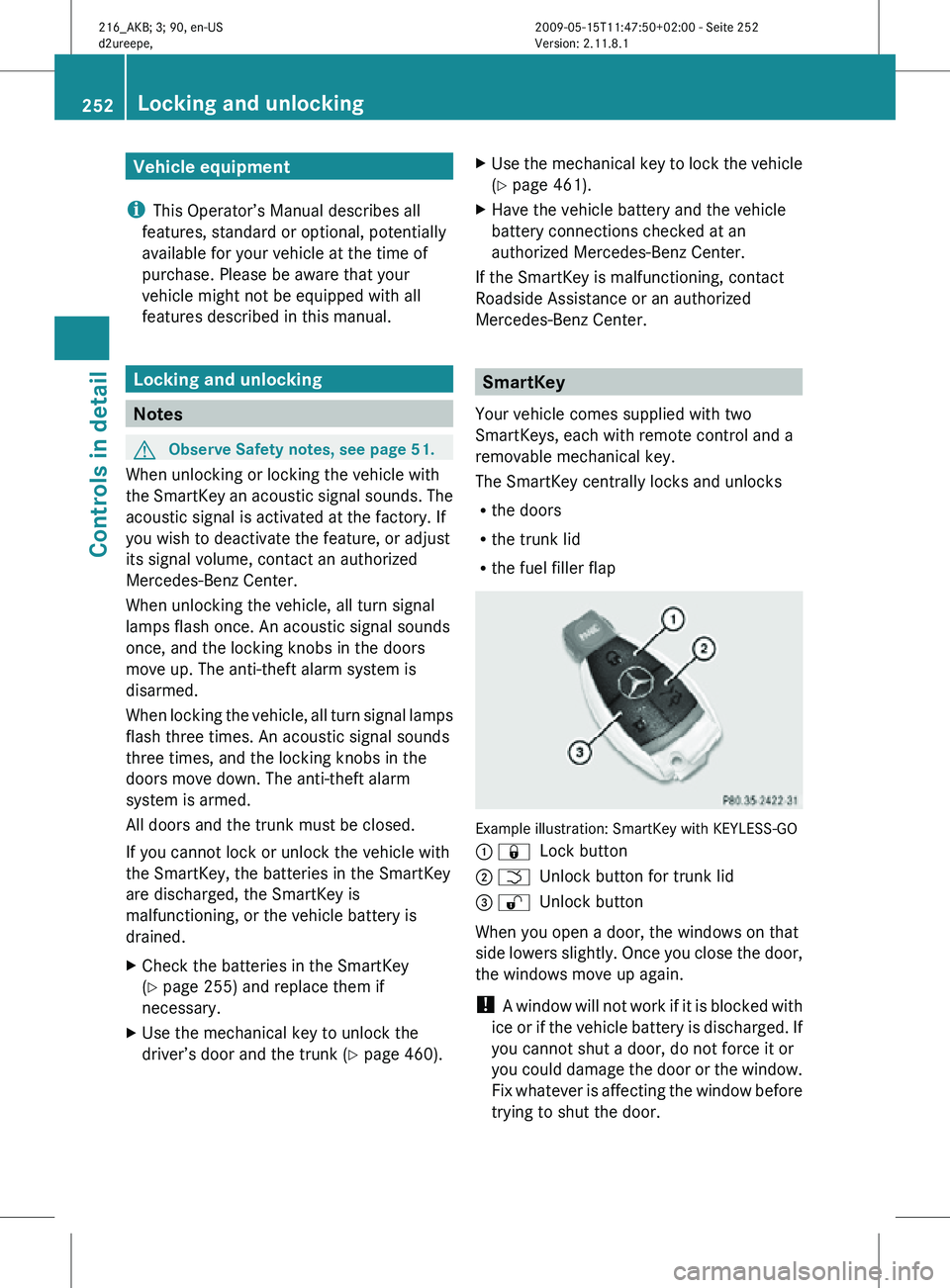
R the fuel filler flap Example illustration: SmartKey with KEYLESS-GO
: &
Lock button
; F Unlock button for trunk lid
= % Unlock button
When you open a door, the windows on that
side lowers slightly. Once you close the door,
the windows move up again.
! A window will not work if it is blocked with
ice or if the vehicle battery is discharged. If
you cannot shut a door, do not force it or
you could damage the door or the window.
Fix whatever is affecting the window before
trying to shut the door. 252
Locking and unlockingControls in detail
216_AKB; 3; 90, en-US
d2ureepe,
Version: 2.11.8.1 2009-05-15T11:47:50+02:00 - Seite 252
Page 255 of 500
i
USA only:
This device complies with Part 15 of the
FCC Rules. Operation is subject to the
following two conditions:
1. This device may not cause harmful
interference, and
2.
this device must accept anyinterference received, including
interference that may cause undesired
operation.
Any unauthorized modification to this
device could void the user’s authority to
operate the equipment.
i Canada only:
This device complies with RSS-210 of
Industry Canada. Operation is subject to
the following two conditions:
1. This device may not cause interference, and
2. this device must accept any interference received, including
interference that may cause undesired
operation of the device.
Any unauthorized modification to this
device could void the user’s authority to
operate the equipment.
Factory setting X
Global unlocking: Press button %.
Unless you open a door or the trunk within
approximately 40 seconds after unlocking
the vehicle:
R The vehicle will be locked again.
R The anti-theft alarm system will be
rearmed.
X Global locking: Press button &.
Selective setting If you frequently travel alone, you may wish
to reprogramm the SmartKey. Pressing button
% will then only unlock the driver’s
door and the fuel filler flap.
X Switching on/off: Press
and hold buttons
% and & simultaneously for
approximately 6 seconds until the battery
check lamp (Y page 255) flashes twice.
The SmartKey will then function as follows:
X Unlocking driver’s door and fuel filler
flap: Press button % once.
X Global unlocking: Press button %
twice.
X Global locking: Press button &. KEYLESS-GO
Vehicles equipped with KEYLESS-GO come
with two SmartKeys with KEYLESS-GO, each
with remote control and a removable
mechanical key.
The KEYLESS-GO function is integrated into
the SmartKey.
The validity of the SmartKey is
checked every time you grasp an outside door
handle.
When the SmartKey is valid, your vehicle
unlocks
R the doors
R the trunk lid
R the fuel filler flap
When you open a door, the windows on that
side lowers slightly. Once you close the door,
the windows move up again.
! A window will not work if it is blocked with
ice or if the vehicle battery is discharged. If
you cannot shut a door, do not force it or
you could damage the door or the window.
Fix whatever is affecting the window before
trying to shut the door. Locking and unlocking
253
Controls in detail
216_AKB; 3; 90, en-US
d2ureepe, Version: 2.11.8.1 2009-05-15T11:47:50+02:00 - Seite 253 Z
Page 256 of 500
i
USA only:
This device complies with Part 15 of the
FCC Rules. Operation is subject to the
following two conditions:
1. This device may not cause harmful
interference, and
2.
this device must accept anyinterference received, including
interference that may cause undesired
operation.
Any unauthorized modification to this
device could void the user’s authority to
operate the equipment.
i Canada only:
This device complies with RSS-210 of
Industry Canada. Operation is subject to
the following two conditions:
1. This device may not cause interference, and
2. this device must accept any interference received, including
interference that may cause undesired
operation of the device.
Any unauthorized modification to this
device could void the user’s authority to
operate the equipment.
Important notes on using KEYLESS-GO R
You can also use the SmartKey with
KEYLESS-GO like a normal SmartKey
(Y page 252).
R You can combine KEYLESS-GO functions
with normal SmartKey functions (e.g.
unlocking with KEYLESS-GO and locking
with button &).
R Always carry the SmartKey with you.
R Never store the SmartKey together with
-electronic items
such as a mobile phone
or another SmartKey
- metallic objects such as coins or metal
foil Doing so could impair the function of the
KEYLESS-GO system.
R To lock
or unlock the vehicle, the SmartKey
must be located outside the vehicle within
approximately 3 ft (1 m) of a door or the
trunk.
R When the vehicle has been parked for more
than 72 hours, the KEYLESS-GO function is
deactivated. Pull an outside door handle
and switch on the ignition once to activate
the KEYLESS-GO function.
R If the SmartKey is positioned farther away
from the vehicle, the system may no longer
recognize the SmartKey. The vehicle
cannot be locked or the engine started via
the KEYLESS-GO system.
R If the SmartKey is removed from the vehicle
(e.g. if a passenger exits the vehicle with
the SmartKey)
-when pressing the KEYLESS-GO start/
stop button or trying to lock the vehicle
with the outside door handle the
message Key Not Detected appears in
the multifunction display
- with the engine running, the red message
Key Not Detected appears in the
multifunction display while driving off
Find the SmartKey or change its present
location immediately (e.g. place it on the
front passenger seat or insert it in shirt
pocket).
R If you have started the engine with the
KEYLESS-GO start/stop button, you can
turn it off again by
-pressing the KEYLESS-GO start/stop
button
- inserting the SmartKey into the starter
switch when the vehicle is at a standstill
and the automatic transmission is in park
position P 254
Locking and unlocking
Controls in detail
216_AKB; 3; 90, en-US
d2ureepe,
Version: 2.11.8.1 2009-05-15T11:47:50+02:00 - Seite 254
Page 257 of 500

R
The vehicle could be inadvertently
unlocked if the SmartKey is within 3 ft (1 m)
of the vehicle and
-an outside door handle is splashed with
water
or
- you attempt to clean an outside door
handle
R Remember that the engine can be started
by anyone with a SmartKey that is left
inside the vehicle.
Possibility 1 (One SmartKey in the vehicle,
one SmartKey outside the vehicle):
If you leave the SmartKey behind when
exiting and locking the vehicle, no message
appears in the multifunction display.
Possibility 2 (One SmartKey in the vehicle,
no SmartKey outside the vehicle):
When exiting and trying to lock the vehicle,
the message Key Detected In Vehicle
appears in the multifunction display. The
vehicle will not be locked.
Factory setting X
Global unlocking: Pull an outside door
handle.
Unless you open a door or the trunk within
approximately 40 seconds after unlocking
the vehicle:
R The vehicle will be locked again.
R The anti-theft alarm system will be
rearmed. X
Global locking: Touch outside of a door
handle :.
Selective setting If you frequently travel alone, you may wish
to reprogram the SmartKey. Pulling the
driver’s outside door handle will then only
unlock the driver’s door and the fuel filler flap.
X
Switching on/off: Press and hold buttons
% and & simultaneously for
approximately 6 seconds until the battery
check lamp (Y page 255) flashes twice.
KEYLESS-GO will then function as follows:
X Unlocking driver’s door and fuel filler
flap: Pull the driver’s outside door handle.
X Global unlocking: Pull the outside door
handle on the passenger side.
X Global locking: Touch outside of a door
handle :. Checking SmartKey batteries
Example illustration: SmartKey with KEYLESS-GO
X
Press button & or % on the
SmartKey.
Battery check lamp : comes on briefly to
indicate that the SmartKey batteries are in
order.
If the battery check lamp does not come on
briefly during check, the SmartKey batteries
are discharged.
X Replace the batteries ( Y page 461). Locking and unlocking
255Controls in detail
216_AKB; 3; 90, en-US
d2ureepe, Version: 2.11.8.1 2009-05-15T11:47:50+02:00 - Seite 255 Z
Page 258 of 500
i
You can obtain the required batteries at
any authorized Mercedes-Benz Center.
i If the batteries are checked within signal
range of the vehicle, pressing button
& or % will lock or unlock the vehicle
accordingly. Loss of the SmartKey
If you lose your SmartKey or mechanical key,
you should do the following:
X Have the SmartKey deactivated by an
authorized Mercedes-Benz Center.
X Report the loss of the SmartKey or the
mechanical key to your car insurance
company immediately.
X Have the mechanical lock replaced if
necessary.
Any authorized Mercedes-Benz Center will be
glad to supply you with a replacement. For
information on replacing the SmartKey, see
“Replacing the SmartKey” ( Y page 256).Replacing the SmartKey
Only you, or someone authorized by you can
order a replacement key from any Mercedes-
Benz Center. In order to do so, the Mercedes-
Benz Center will require proof of identity and
vehicle ownership with original documents,
including the following:
If you are the current owner of the vehicle:
R the vehicle’s current state registration
R a current identity card, passport, or drivers
license
If you are an authorized person:
R the vehicle’s current state registration
R a current identity card, passport, or drivers
license for the authorized individual
R signed and dated authorization from the
owner of the vehicle for which the key is
being requested i
Duplicated or photocopied
documentation will not be accepted.
Activating the key Once you, or an authorized person, has
provided the appropriate documents, the
Mercedes-Benz Center will need to
synchronize the key to your vehicle before it
can be used. In order to do so, the Mercedes-
Benz Center need access to your vehicle.
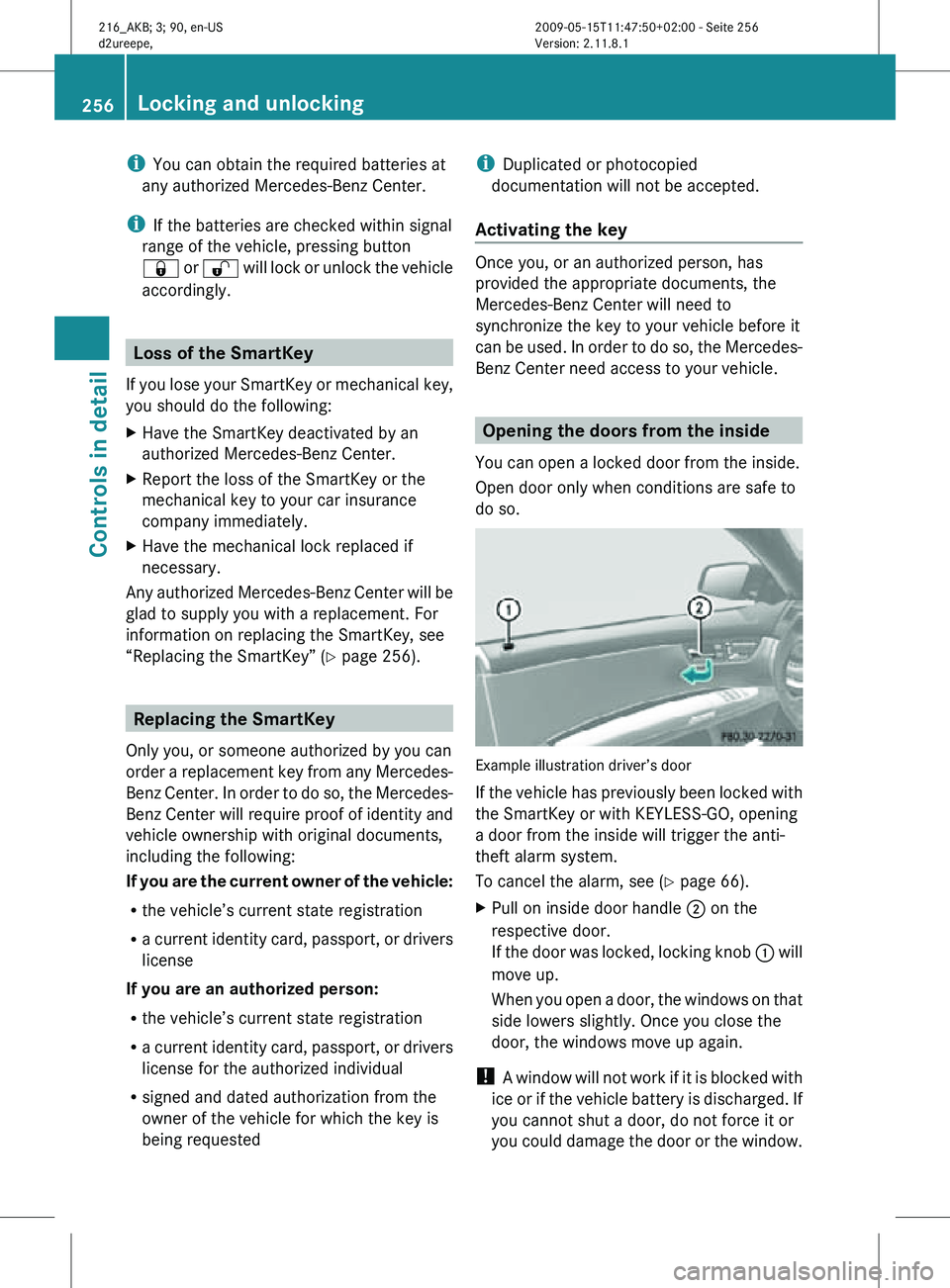
Opening the doors from the inside
You can open a locked door from the inside.
Open door only when conditions are safe to
do so. Example illustration driver’s door
If the vehicle has previously been locked with
the SmartKey or with KEYLESS-GO, opening
a door from the inside will trigger the anti-
theft alarm system.
To cancel the alarm, see (Y page 66).
X
Pull on inside door handle ; on the
respective door.
If the door was locked, locking knob : will
move up.
When you open a door, the windows on that
side lowers slightly. Once you close the
door, the windows move up again.
! A window will not work if it is blocked with
ice or if the vehicle battery is discharged. If
you cannot shut a door, do not force it or
you could damage the door or the window. 256
Locking and unlockingControls in detail
216_AKB; 3; 90, en-US
d2ureepe,
Version: 2.11.8.1 2009-05-15T11:47:50+02:00 - Seite 256