audio MERCEDES-BENZ CL CLASS 2010 Service Manual
[x] Cancel search | Manufacturer: MERCEDES-BENZ, Model Year: 2010, Model line: CL CLASS, Model: MERCEDES-BENZ CL CLASS 2010Pages: 500, PDF Size: 9.32 MB
Page 177 of 500
discs which comply with the IEC 60908
standard.
You
can therefore only use discs
with a maximum thickness of 1.3 mm.
If you insert thicker discs, e.g. those that
contain data on both sides (DVD on one
side and audio data on the other), they
cannot be ejected and can damage
COMAND.
Do not use CDs with a diameter of 8 cm.
Attempting to play discs with a diameter of
8 cm or playing such discs with an adapter
may cause damage COMAND.
Such damages are not covered by the
Mercedes-Benz Limited Warranty.
Only use round discs with a diameter of
12 cm.
Notes about handling DVDs For notes about handling DVDs, see
(Y page 165). Functional limitations
Depending on the DVD, it is possible that
certain functions or actions may be
temporarily or permanently unavailable. If
you try to utilize such functions or carry out
such actions, you will see the K symbol in
the display. Inserting or ejecting DVDs
G
Observe Safety notes, see page 162.
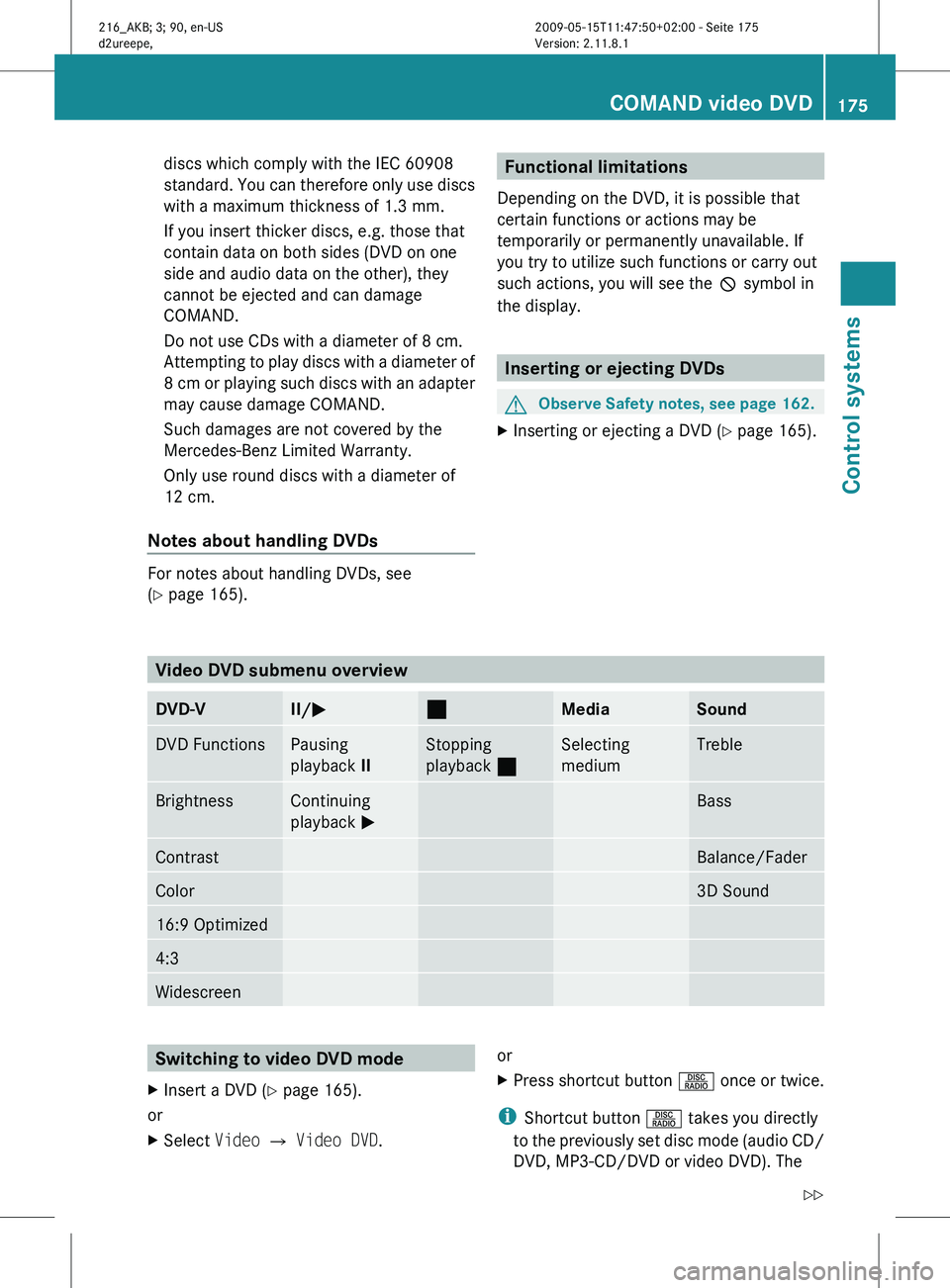
X Inserting or ejecting a DVD (Y page 165). Video DVD submenu overview
DVD-V II/
M ¯
Media Sound
DVD Functions Pausing
playback
II Stopping
playback
¯ Selecting
medium Treble
Brightness Continuing
playback
M Bass
Contrast Balance/Fader
Color 3D Sound
16:9 Optimized
4:3
Widescreen
Switching to video DVD mode
X Insert a DVD (Y page 165).
or
X Select Video Q Video DVD. or
X
Press shortcut button R once or twice.
i Shortcut button R takes you directly
to the
previously set disc mode (audio CD/
DVD, MP3-CD/DVD or video DVD). The COMAND video DVD
175
Control systems
216_AKB; 3; 90, en-US
d2ureepe, Version: 2.11.8.1 2009-05-15T11:47:50+02:00 - Seite 175 Z
Page 179 of 500
X
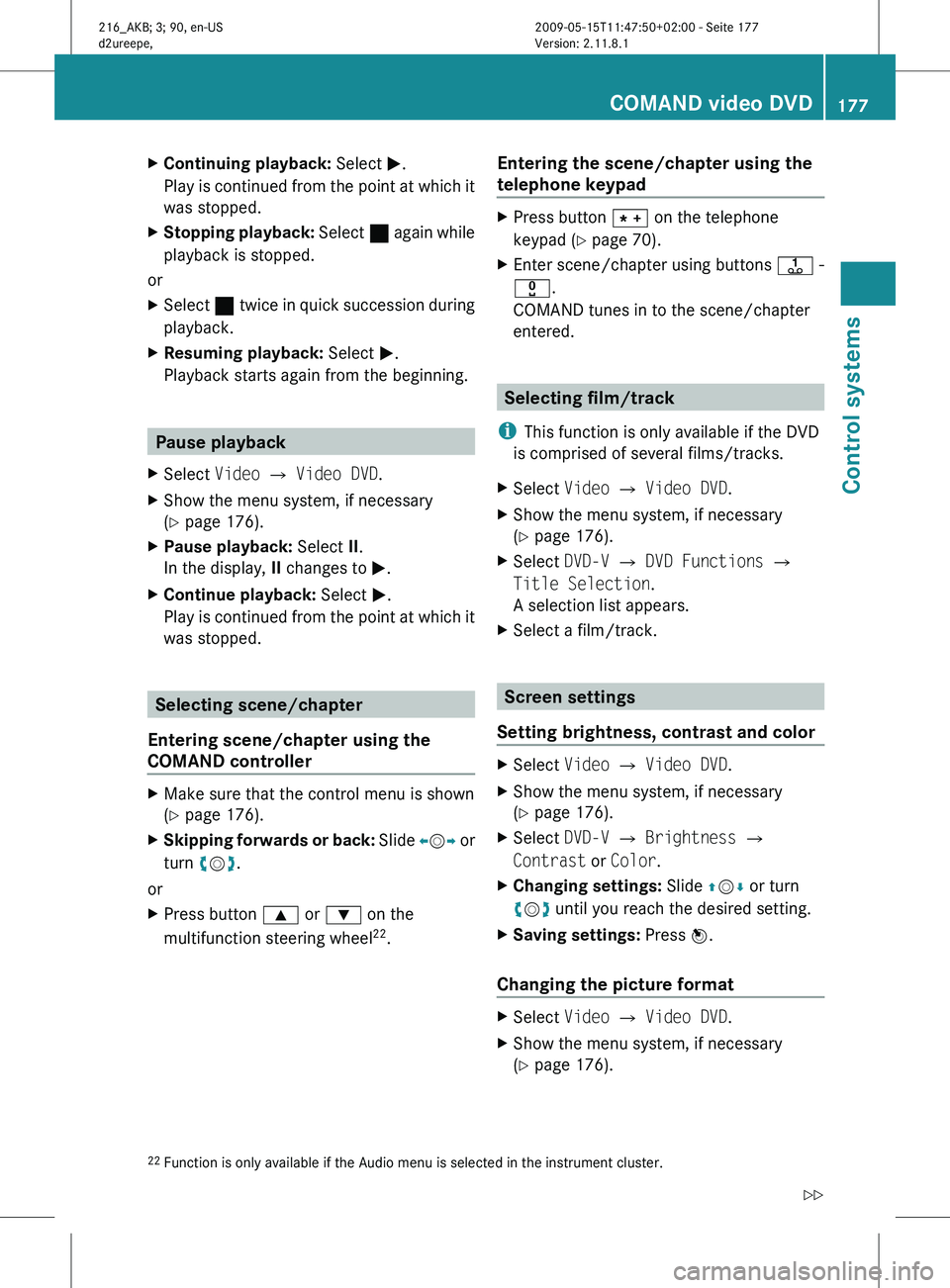
Continuing playback: Select M.
Play is
continued from the point at which it
was stopped.
X Stopping playback: Select ¯
again while
playback is stopped.
or
X Select ¯ twice in quick succession during
playback.
X Resuming playback:
Select M.
Playback starts again from the beginning. Pause playback
X Select Video Q Video DVD.
X Show the menu system, if necessary
(Y page 176).
X Pause playback: Select II.
In the display, II changes to M.
X Continue playback: Select M.
Play is
continued from the point at which it
was stopped. Selecting scene/chapter
Entering scene/chapter using the
COMAND controller X
Make sure that the control menu is shown
(Y page 176).
X Skipping forwards or back: Slide X
VY or
turn cVd.
or
X Press button 9 or : on the
multifunction steering wheel 22
. Entering the scene/chapter using the
telephone keypad X
Press button à on the telephone
keypad (
Y page 70).
X Enter scene/chapter using buttons j -
x.
COMAND tunes in to the scene/chapter
entered. Selecting film/track
i This function is only available if the DVD
is comprised of several films/tracks.
X Select Video Q Video DVD.
X Show the menu system, if necessary
(Y page 176).
X Select DVD-V Q DVD Functions Q
Title Selection.
A selection list appears.
X Select a film/track. Screen settings
Setting brightness, contrast and color X
Select Video Q Video DVD.
X Show the menu system, if necessary
(Y page 176).
X Select DVD-V Q Brightness Q
Contrast or Color.
X Changing settings: Slide ZVÆ or turn
cVd until you reach the desired setting.
X Saving settings: Press W.
Changing the picture format X
Select Video Q Video DVD.
X Show the menu system, if necessary
(Y page 176).
22 Function is only available if the Audio menu is selected in the instrument cluster. COMAND video DVD
177
Control systems
216_AKB; 3; 90, en-US
d2ureepe, Version: 2.11.8.1 2009-05-15T11:47:50+02:00 - Seite 177 Z
Page 181 of 500
or
X
Select a menu item of your choice from the
DVD menu.
X Select the menu item Go up
in the selection
menu.
i Depending on the DVD, the menu item
Go up
or the back button % may only be
available in certain DVD menus. On some
DVDs, they may have no function at all.
Back to the movie X
Press back button % until you can see
the movie.
or
X Select the corresponding menu item in the
DVD menu.
or
X Select a menu item of your choice from the
DVD menu.
X Select the menu item Back (to the
movie) in the selection menu.
i Depending on the DVD, the menu item
Back (to
the movie) or the back button
% may be without function. Setting the language
i This function
is not available for all DVDs.
If it is available, you can set the language
for the DVD menu and the audio language.
The number of settings you can make is
determined by the content of the DVD. It
may also be possible to make the settings
in the DVD menu (Y page 178).
X Select Video Q Video DVD.
X Show the menu system, if necessary
(Y page 176).
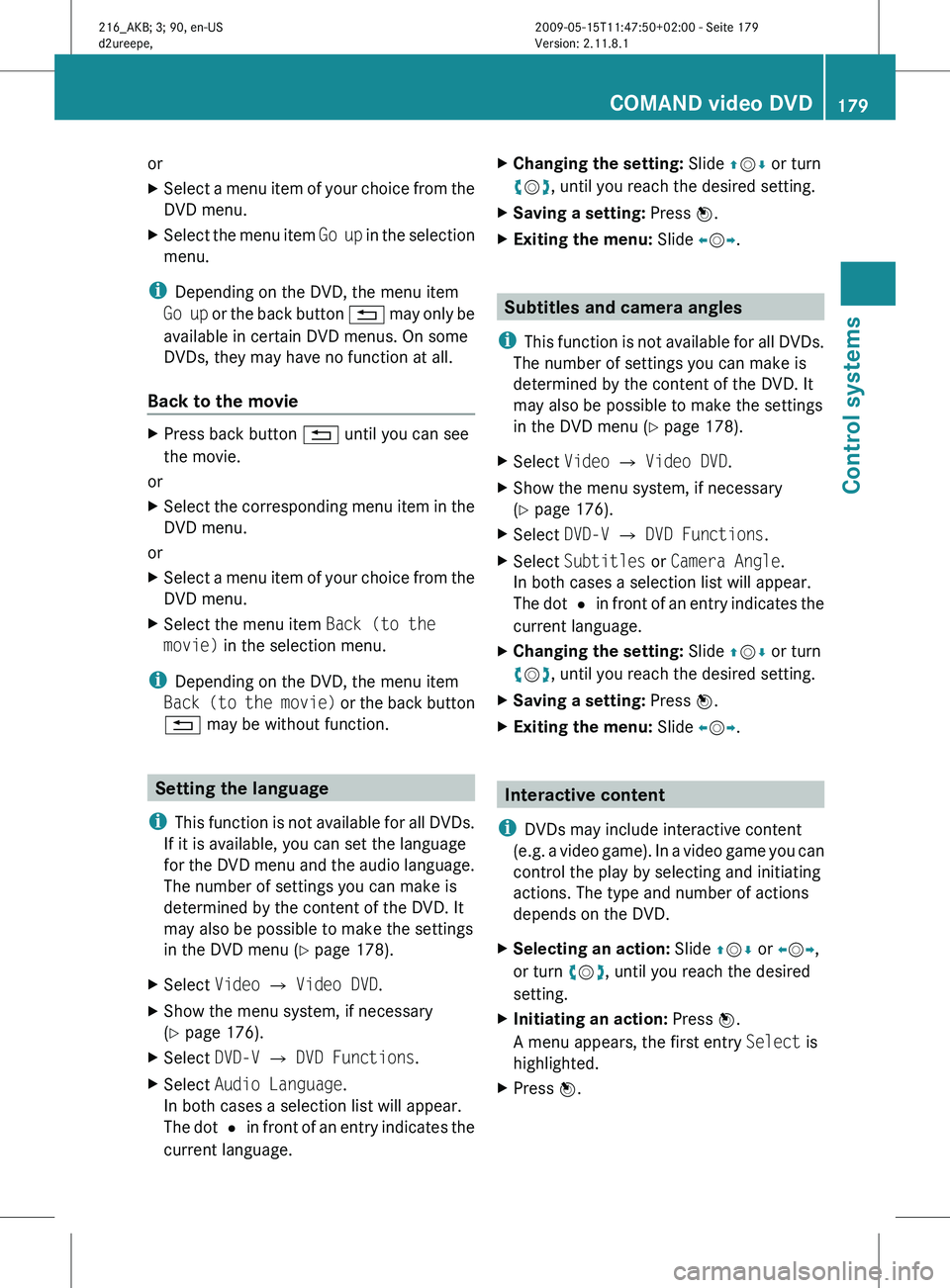
X Select DVD-V Q DVD Functions.
X Select Audio Language.
In both cases a selection list will appear.
The dot
#
in front of an entry indicates the
current language. X
Changing the setting: Slide ZVÆ or turn
cVd, until you reach the desired setting.
X Saving a setting: Press W.
X Exiting the menu: Slide XVY. Subtitles and camera angles
i This function
is not available for all DVDs.
The number of settings you can make is
determined by the content of the DVD. It
may also be possible to make the settings
in the DVD menu (Y page 178).
X Select Video Q Video DVD.
X Show the menu system, if necessary
(Y page 176).
X Select DVD-V Q DVD Functions.
X Select Subtitles or Camera Angle.
In both cases a selection list will appear.
The dot
#
in front of an entry indicates the
current language.
X Changing the setting: Slide ZVÆ or turn
cVd, until you reach the desired setting.
X Saving a setting: Press W.
X Exiting the menu: Slide XVY. Interactive content
i DVDs may include interactive content
(e.g. a
video game). In a video game you can
control the play by selecting and initiating
actions. The type and number of actions
depends on the DVD.
X Selecting an action: Slide ZVÆ or XVY,
or turn cVd, until you reach the desired
setting.
X Initiating an action: Press W.
A menu appears, the first entry Select is
highlighted.
X Press W. COMAND video DVD
179
Control systems
216_AKB; 3; 90, en-US
d2ureepe, Version: 2.11.8.1 2009-05-15T11:47:50+02:00 - Seite 179 Z
Page 182 of 500
Music Register
G
Observe Safety notes, see page 68.
You can save MP3 or WMA audio files in the
Music Register. The storage capacity is
approximately 7 gigabyte. !
Keep your original music files in a safe
place. A
fault with the COMAND may cause
the music files stored in the Music Register
to be lost. Mercedes-Benz USA, LLC is not
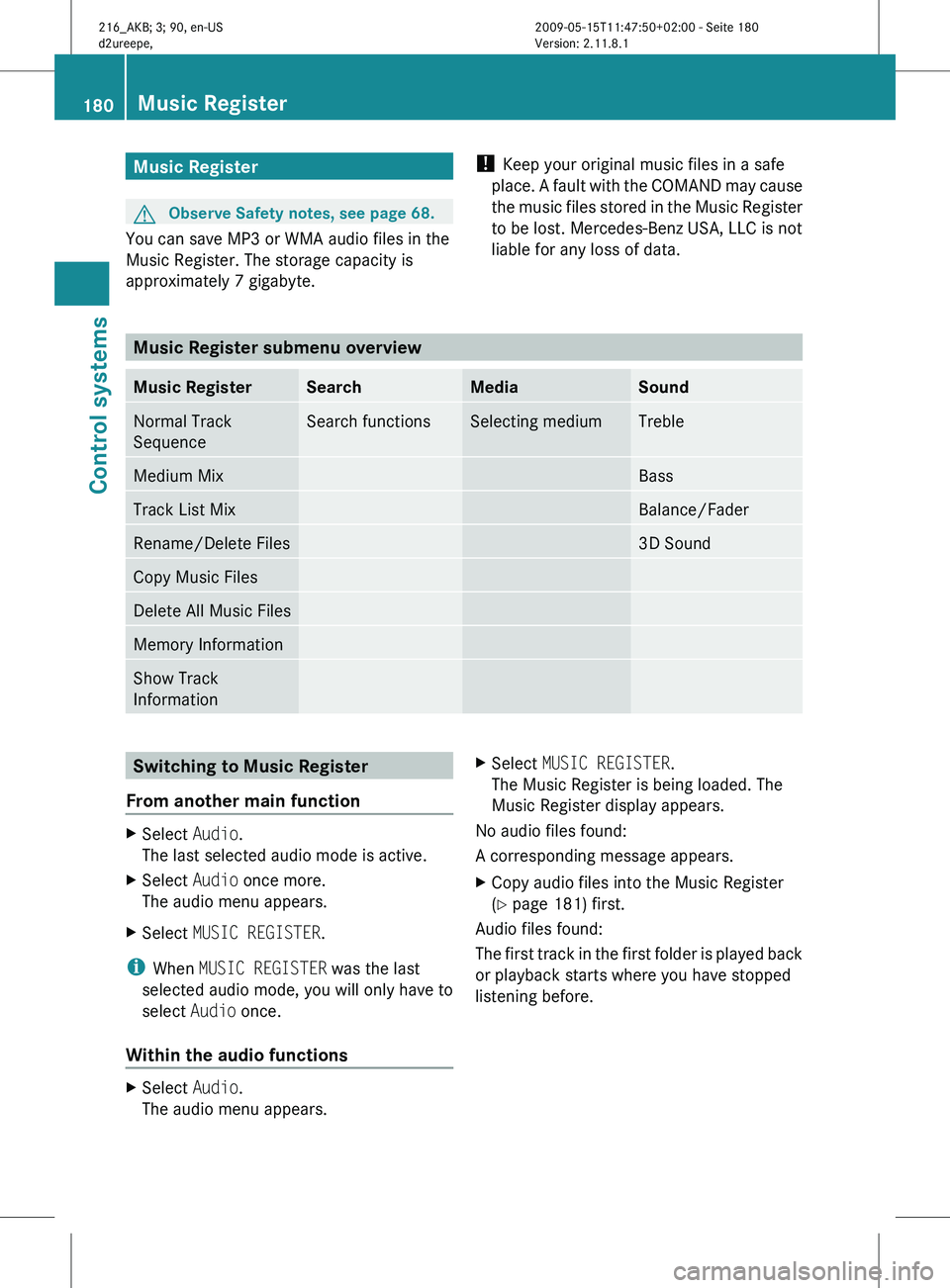
liable for any loss of data. Music Register submenu overview
Music Register Search Media Sound
Normal Track
Sequence Search functions Selecting medium Treble
Medium Mix Bass
Track List Mix Balance/Fader
Rename/Delete Files 3D Sound
Copy Music Files
Delete All Music Files
Memory Information
Show Track
Information
Switching to Music Register
From another main function X
Select Audio.
The last selected audio mode is active.
X Select Audio once more.
The audio menu appears.
X Select MUSIC REGISTER.
i When MUSIC REGISTER was the last
selected audio mode, you will only have to
select Audio once.
Within the audio functions X
Select Audio.
The audio menu appears. X
Select MUSIC REGISTER.
The Music Register is being loaded. The
Music Register display appears.
No audio files found:
A corresponding message appears.
X Copy audio files into the Music Register
(Y page 181) first.
Audio files found:
The first
track in the first folder is played back
or playback starts where you have stopped
listening before. 180
Music Register
Control systems
216_AKB; 3; 90, en-US
d2ureepe,
Version: 2.11.8.1 2009-05-15T11:47:50+02:00 - Seite 180
Page 183 of 500
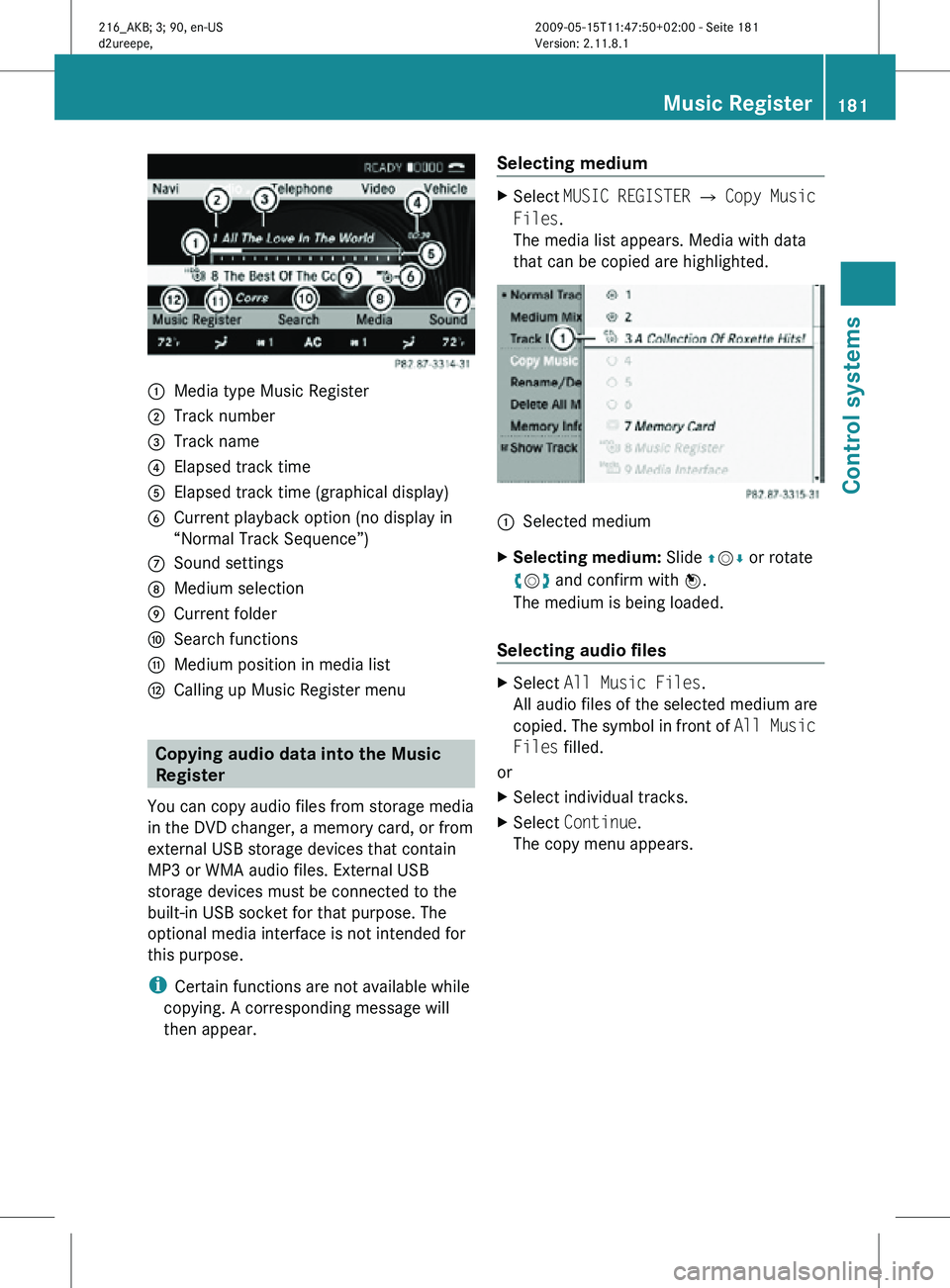
:
Media type Music Register
; Track number
= Track name
? Elapsed track time
A Elapsed track time (graphical display)
B Current playback option (no display in
“Normal Track Sequence”)
C Sound settings
D Medium selection
E Current folder
F Search functions
G Medium position in media list
H Calling up Music Register menu Copying audio data into the Music
Register
You can copy audio files from storage media
in the DVD changer, a memory card, or from
external USB storage devices that contain
MP3 or WMA audio files. External USB
storage devices must be connected to the
built-in USB socket for that purpose. The
optional media interface is not intended for
this purpose.
i Certain functions are not available while
copying. A corresponding message will
then appear. Selecting medium X
Select MUSIC REGISTER Q Copy Music
Files.
The media list appears. Media with data
that can be copied are highlighted. :
Selected medium
X Selecting medium: Slide ZVÆ or rotate
cVd and confirm with W.
The medium is being loaded.
Selecting audio files X
Select All Music Files.
All audio files of the selected medium are
copied. The symbol in front of All Music
Files filled.
or
X Select individual tracks.
X Select Continue.
The copy menu appears. Music Register
181Control systems
216_AKB; 3; 90, en-US
d2ureepe, Version: 2.11.8.1 2009-05-15T11:47:50+02:00 - Seite 181 Z
Page 184 of 500
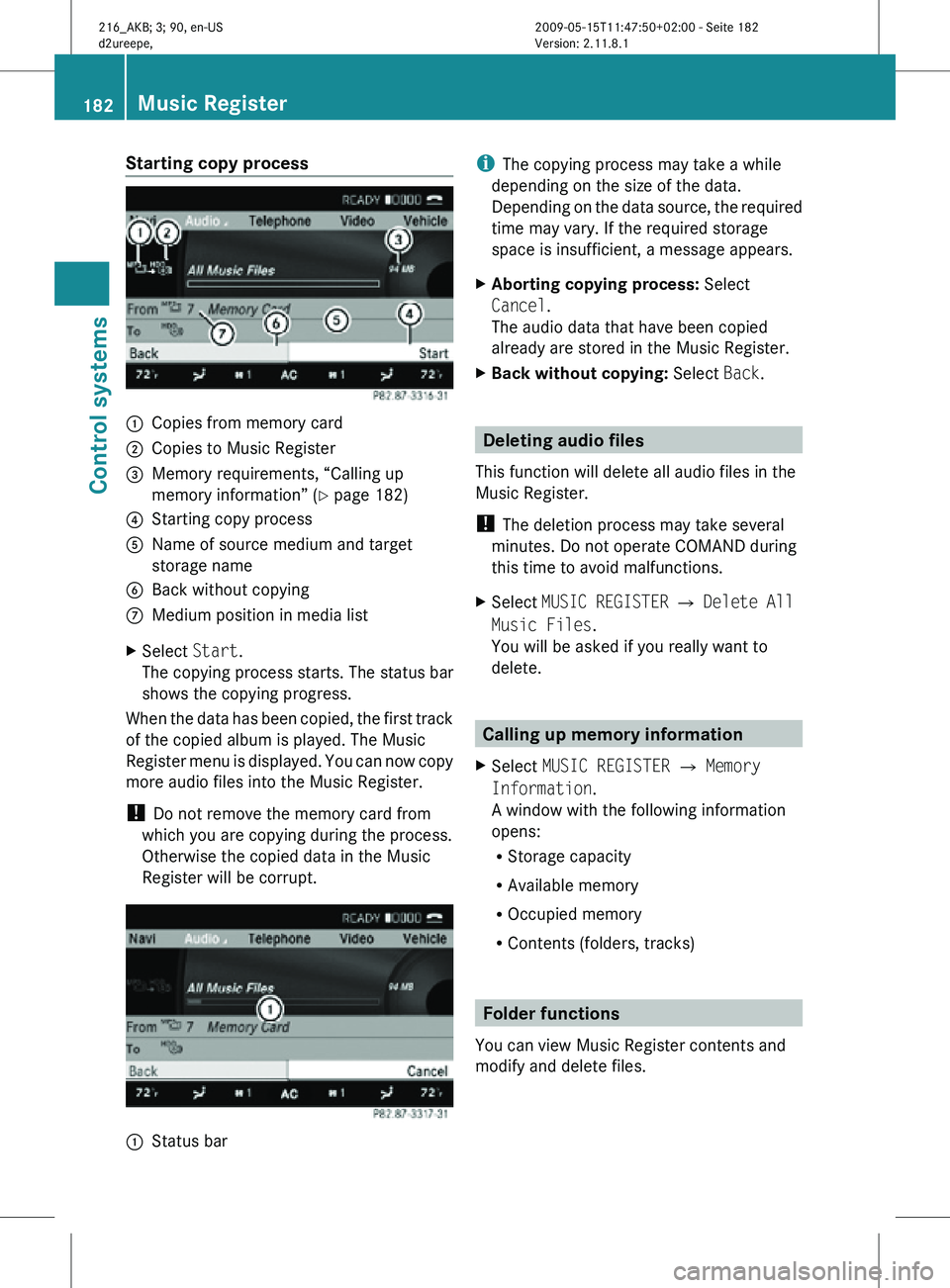
Starting copy process
:
Copies from memory card
; Copies to Music Register
= Memory requirements, “Calling up
memory information” (Y page 182)
? Starting copy process
A Name of source medium and target
storage name
B Back without copying
C Medium position in media list
X Select Start.
The copying process starts. The status bar
shows the copying progress.
When the data has been copied, the first track
of the copied album is played. The Music
Register menu is displayed. You can now copy
more audio files into the Music Register.
! Do not remove the memory card from
which you are copying during the process.
Otherwise the copied data in the Music
Register will be corrupt. :
Status bar i
The copying process may take a while
depending on the size of the data.
Depending on the data source, the required
time may vary. If the required storage
space is insufficient, a message appears.
X Aborting copying process: Select
Cancel.
The audio data that have been copied
already are stored in the Music Register.
X Back without copying: Select Back. Deleting audio files
This function will delete all audio files in the
Music Register.
! The deletion process may take several
minutes. Do not operate COMAND during
this time to avoid malfunctions.
X Select MUSIC REGISTER Q Delete All
Music Files.
You will be asked if you really want to
delete. Calling up memory information
X Select MUSIC REGISTER Q Memory
Information.
A window with the following information
opens:
R Storage capacity
R Available memory
R Occupied memory
R Contents (folders, tracks) Folder functions
You can view Music Register contents and
modify and delete files. 182
Music RegisterControl systems
216_AKB; 3; 90, en-US
d2ureepe,
Version: 2.11.8.1 2009-05-15T11:47:50+02:00 - Seite 182
Page 185 of 500
X
Select MUSIC REGISTER Q Rename/
Delete Files.
or
X Press W when the main area is highlighted.
The contents of the current folder are
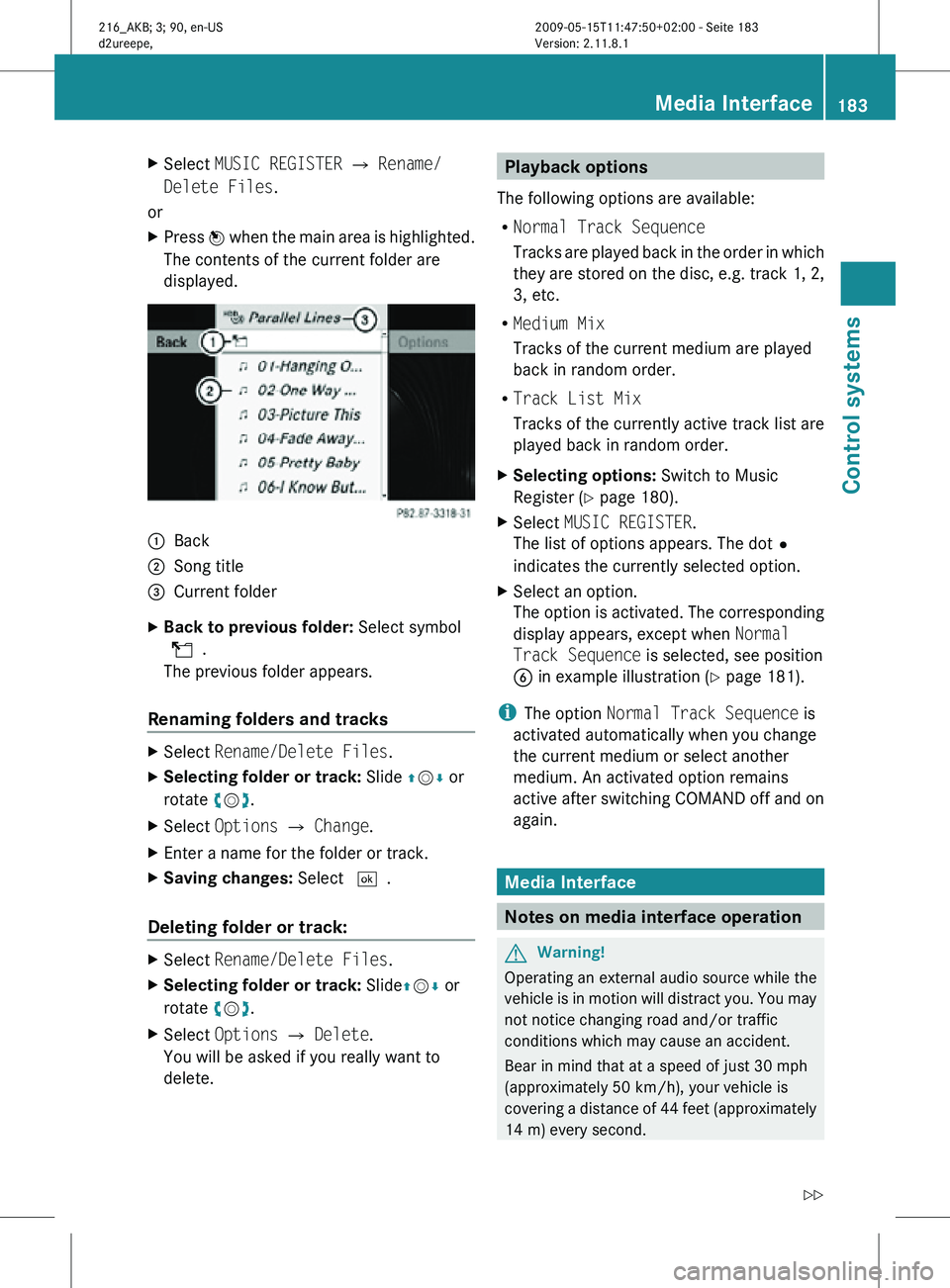
displayed. :
Back
; Song title
= Current folder
X Back to previous folder: Select symbol
U.
The previous folder appears.
Renaming folders and tracks X
Select Rename/Delete Files.
X Selecting folder or track: Slide ZVÆ or
rotate cVd.
X Select Options Q Change.
X Enter a name for the folder or track.
X Saving changes: Select ¬.
Deleting folder or track: X
Select Rename/Delete Files.
X Selecting folder or track: Slide ZVÆ or
rotate cVd.
X Select Options Q Delete.
You will be asked if you really want to
delete. Playback options
The following options are available:
R Normal Track Sequence
Tracks are played back in the order in which
they are stored on the disc, e.g. track 1, 2,
3, etc.
R Medium Mix
Tracks of the current medium are played
back in random order.
R Track List Mix
Tracks of the currently active track list are
played back in random order.
X Selecting options: Switch to Music
Register ( Y page 180).
X Select MUSIC REGISTER.
The list of options appears. The dot#
indicates the currently selected option.
X Select an option.
The option is activated. The corresponding
display appears, except when Normal
Track Sequence is selected, see position
B in example illustration ( Y page 181).
i The option Normal Track Sequence is
activated automatically when you change
the current medium or select another
medium. An activated option remains
active after switching COMAND off and on
again. Media Interface
Notes on media interface operation
G
Warning!
Operating an external audio source while the
vehicle is in motion will distract you. You may
not notice changing road and/or traffic
conditions which may cause an accident.
Bear in mind that at a speed of just 30 mph
(approximately 50 km/h), your vehicle is
covering a distance of 44 feet (approximately
14 m) every second. Media Interface
183Control systems
216_AKB; 3; 90, en-US
d2ureepe, Version: 2.11.8.1 2009-05-15T11:47:50+02:00 - Seite 183 Z
Page 186 of 500
For your safety and the safety of others, pull
over to a safe location and stop before
operating an external audio source.
Connections i
Always store the devices in a safe place.
Only use genuine Mercedes-Benz
connector cables.
Suitable connector cables are located in
the vehicle or can be purchased at any
authorized Mercedes-Benz Center.
The media interface allows for connection of
the following media to the COMAND:
R iPod ®
R USB devices
R MP3 player
i For further information on compatible
multimedia devices
R visit www.mbusa-mobile.com
R call the Mercedes-Benz Customer
Assistance Center at
1-800-FOR-MERCedes
(1-800-367-6372) (in the USA)
R call Customer Service at
1-800-387-0100 (in Canada)
Supported USB devices The following USB devices are supported:
R
USB flash drives
R USB hard drives (1", 1.8", and 2.5") with a
starting/steady current not to exceed
800 mA (separate power supply may be
necessary)
R selected MP3 players
i The media interface supports USB
storage devices of “USB Device
Subclass 6”. Information on “USB Device
Subclass 6” is available from the
manufacturer of the respective device. Supported file formats on USB devices The following file formats are supported:
R
MP3: CBR, VBR (up to 320 kbit/s)
R WMA: CBR, VBR (up to 320 kbit/s)
Special characteristics of USB devices
R Do not store data other than audio data on
a USB device. Doing so will increase the
time required to initialize the USB device.
R A maximum of 8 directory levels with up to
1000 tracks each are supported.
R Do not use USB extensions or adapters.
They could impair functionality.
R Playlists on the USB device will be searched
for in the background. Playlists that were
found will be available in separate
categories among the folders. The
initialization of large USB storage devices
that contain a large number of files may
take several minutes.
i Files that are protected via DRM
(Digital Rights Management) are not
supported by the media interface. Connecting external devices
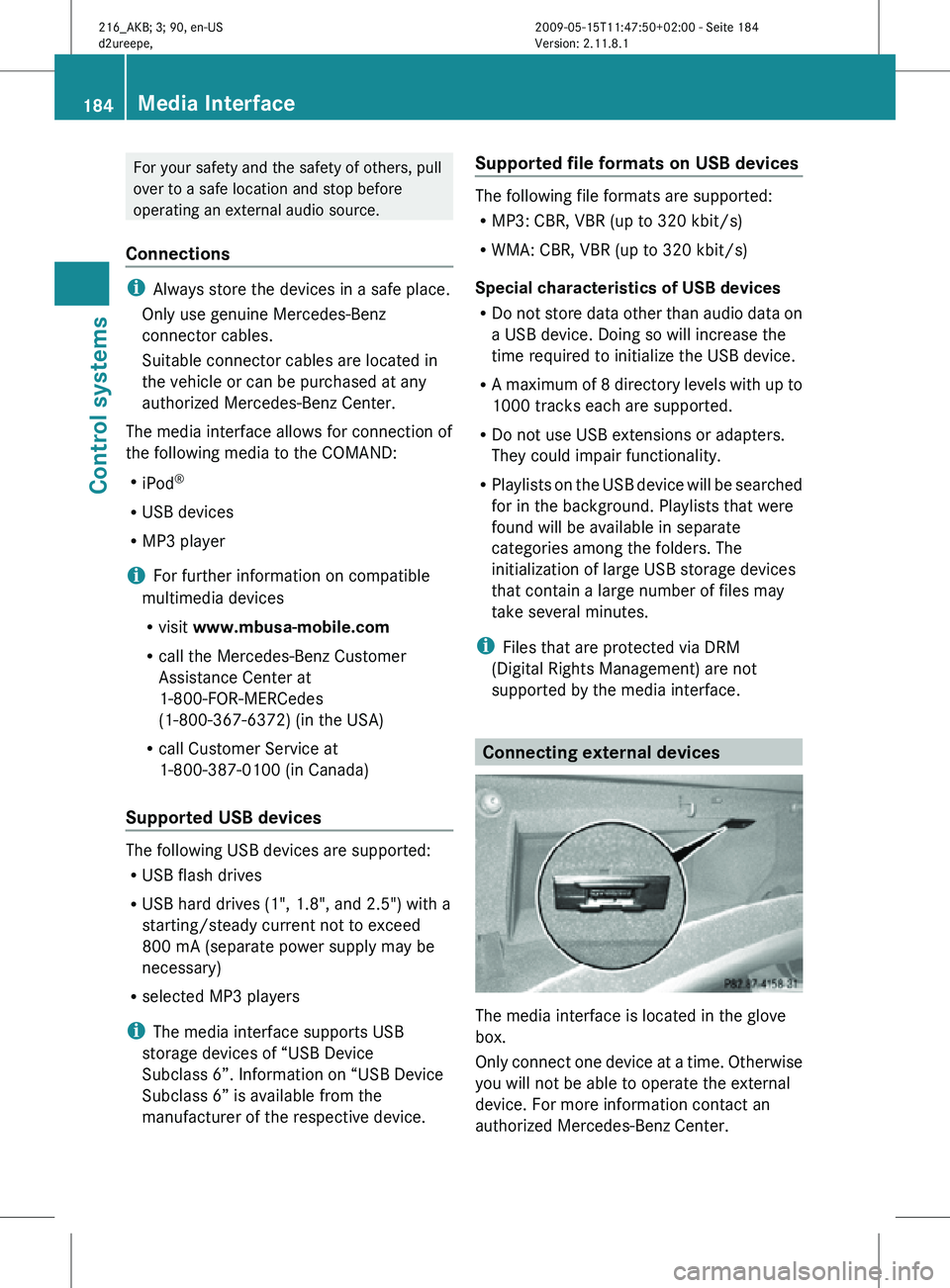
The media interface is located in the glove
box.
Only connect one device at a time. Otherwise
you will not be able to operate the external
device. For more information contact an
authorized Mercedes-Benz Center.184
Media InterfaceControl systems
216_AKB; 3; 90, en-US
d2ureepe,
Version: 2.11.8.1 2009-05-15T11:47:50+02:00 - Seite 184
Page 187 of 500
i
Do not leave external devices in the
vehicle. Proper function of the device could
be impaired due to excessive
temperatures, for example when exposing
to direct sunlight or when the outside
temperature is extremely low. Mercedes-
Benz does not assume liability for damage
to external devices. :
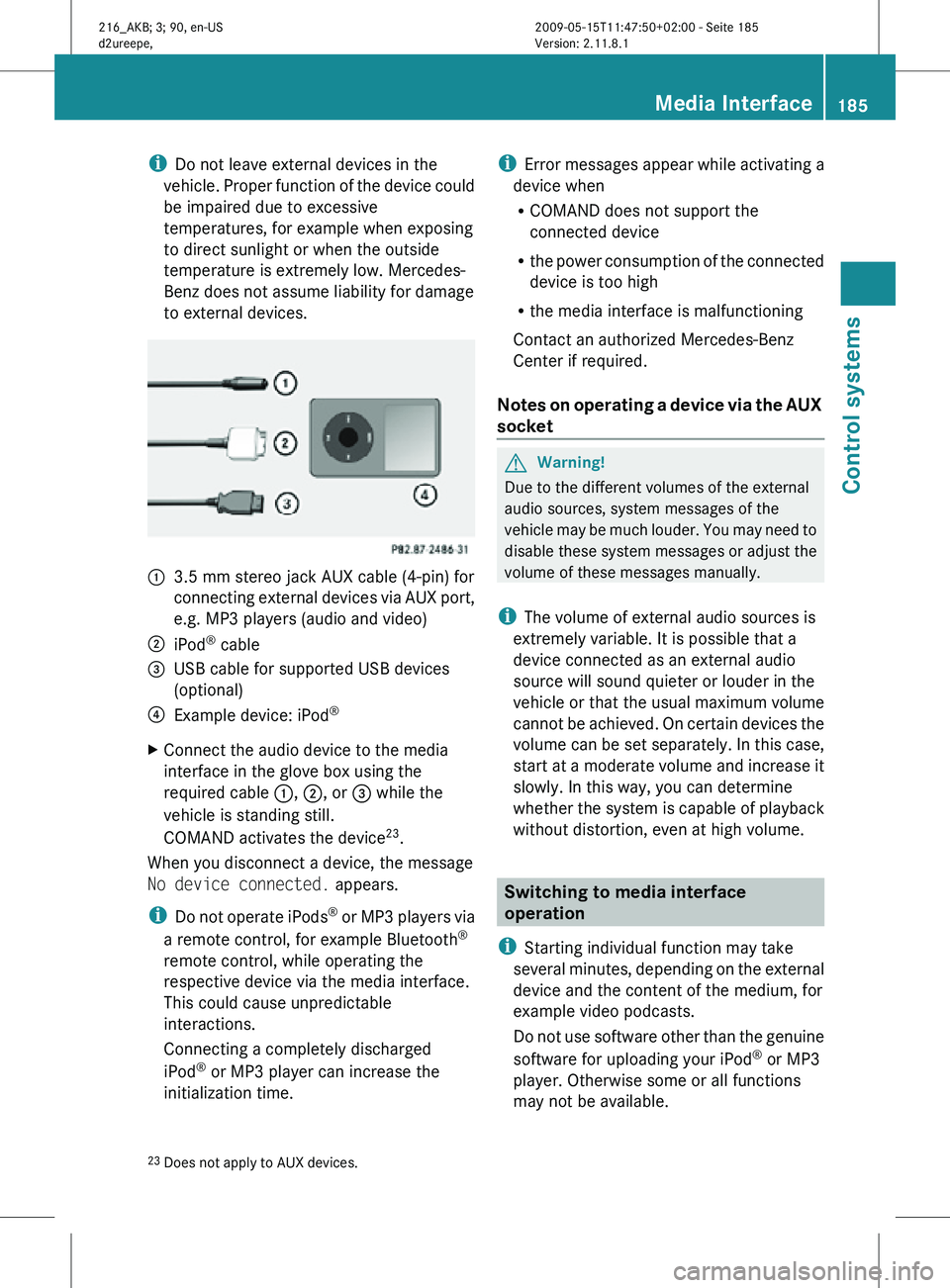
3.5 mm stereo jack AUX cable (4-pin) for
connecting external devices via AUX port,
e.g. MP3 players (audio and video)
; iPod ®
cable
= USB cable for supported USB devices
(optional)
? Example device: iPod ®
X Connect the audio device to the media
interface in the glove box using the
required cable :, ;, or = while the
vehicle is standing still.
COMAND activates the device 23
.
When you disconnect a device, the message
No device connected. appears.
i Do not operate iPods ®
or MP3 players via
a remote control, for example Bluetooth ®
remote control, while operating the
respective device via the media interface.
This could cause unpredictable
interactions.
Connecting a completely discharged
iPod ®
or MP3 player can increase the
initialization time. i
Error messages appear while activating a
device when
R COMAND does not support the
connected device
R the power consumption of the connected
device is too high
R the media interface is malfunctioning
Contact an authorized Mercedes-Benz
Center if required.
Notes on operating a device via the AUX
socket G
Warning!
Due to the different volumes of the external
audio sources, system messages of the
vehicle may be much louder. You may need to
disable these system messages or adjust the
volume of these messages manually.
i The volume of external audio sources is
extremely variable. It is possible that a
device connected as an external audio
source will sound quieter or louder in the
vehicle or that the usual maximum volume
cannot be achieved. On certain devices the
volume can be set separately. In this case,
start at a moderate volume and increase it
slowly. In this way, you can determine
whether the system is capable of playback
without distortion, even at high volume. Switching to media interface
operation
i Starting individual function may take
several minutes, depending on the external
device and the content of the medium, for
example video podcasts.
Do not use software other than the genuine
software for uploading your iPod ®
or MP3
player. Otherwise some or all functions
may not be available.
23 Does not apply to AUX devices. Media Interface
185Control systems
216_AKB; 3; 90, en-US
d2ureepe, Version: 2.11.8.1 2009-05-15T11:47:50+02:00 - Seite 185 Z
Page 188 of 500
From another main function
X
Press shortcut button R.
COMAND activates the last selected disc
mode.
i When media interface operation was
selected before, it is now activated.
X Select MediaQ Media Interface.
The media list appears. The dot #
indicates the currently played medium.
i When no device is connected, Media
Interface instead of the device name
appears.
If COMAND does not support the
connected device, the message Device
incompatible. appears. The device will
be listed in the media list as Not
Available. When two devices are
connected, the message Please ensure
that only one device is connected.
appears.
X Confirm with W.
COMAND activates a connected device. A
corresponding message appears.
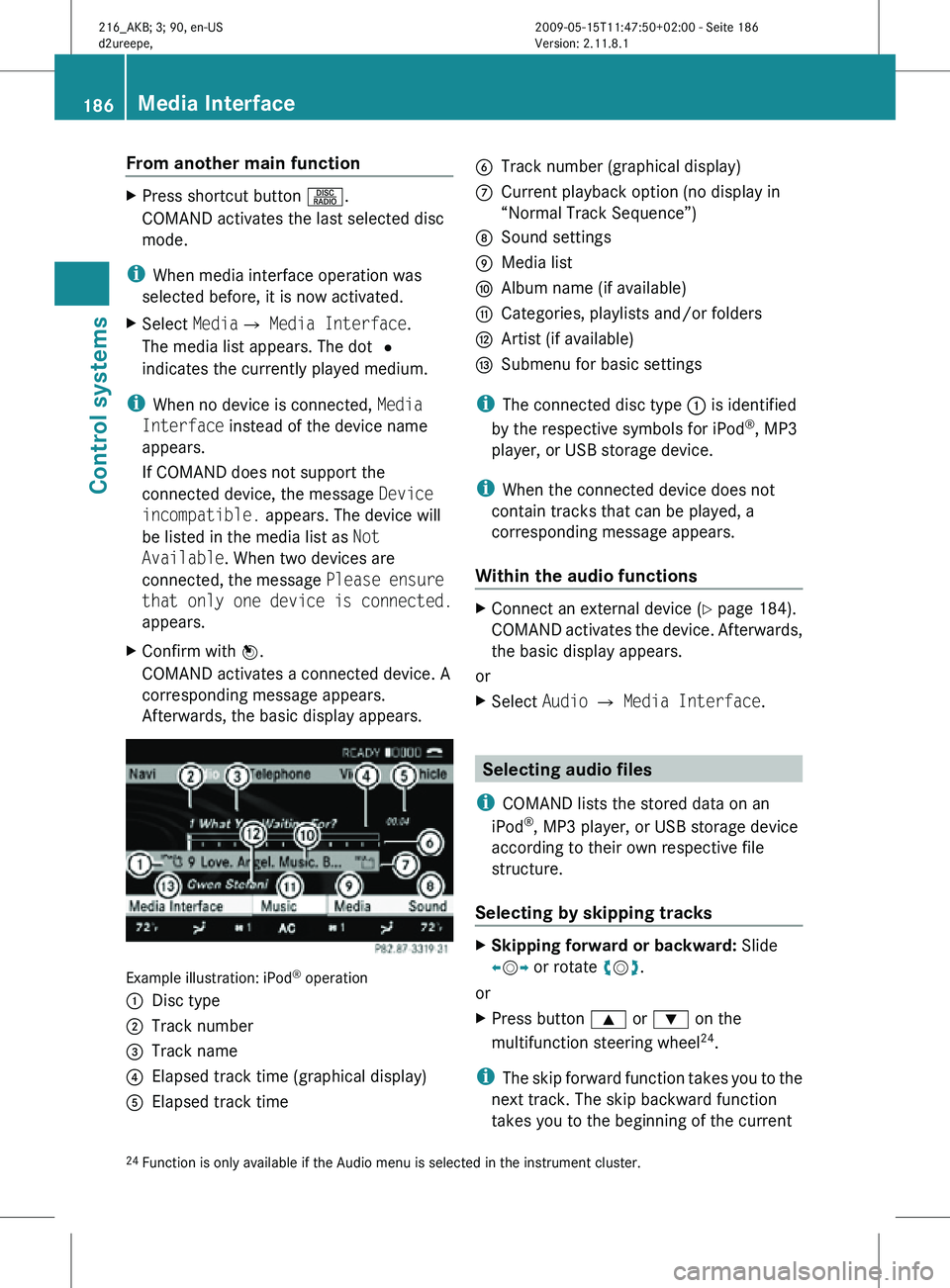
Afterwards, the basic display appears. Example illustration: iPod
®
operation
: Disc type
; Track number
= Track name
? Elapsed track time (graphical display)
A Elapsed track time B
Track number (graphical display)
C Current playback option (no display in
“Normal Track Sequence”)
D Sound settings
E Media list
F Album name (if available)
G Categories, playlists and/or folders
H Artist (if available)
I Submenu for basic settings
i The connected disc type : is identified
by the respective symbols for iPod ®
, MP3
player, or USB storage device.
i When the connected device does not
contain tracks that can be played, a
corresponding message appears.
Within the audio functions X
Connect an external device (Y page 184).
COMAND activates the device. Afterwards,
the basic display appears.
or
X Select Audio Q Media Interface. Selecting audio files
i COMAND lists the stored data on an
iPod ®
, MP3 player, or USB storage device
according to their own respective file
structure.
Selecting by skipping tracks X
Skipping forward or backward: Slide
XVY or rotate cVd.
or
X Press button 9 or : on the
multifunction steering wheel 24
.
i The skip forward function takes you to the
next track. The skip backward function
takes you to the beginning of the current
24 Function is only available if the Audio menu is selected in the instrument cluster. 186
Media InterfaceControl systems
216_AKB; 3; 90, en-US
d2ureepe,
Version: 2.11.8.1 2009-05-15T11:47:50+02:00 - Seite 186