warning MERCEDES-BENZ CL CLASS 2010 Workshop Manual
[x] Cancel search | Manufacturer: MERCEDES-BENZ, Model Year: 2010, Model line: CL CLASS, Model: MERCEDES-BENZ CL CLASS 2010Pages: 500, PDF Size: 9.32 MB
Page 123 of 500
Off-road and off-map
Route guidance to an off-road
destination G
Warning!
The COMAND navigation system may direct
you to off-road routes that your vehicle may
not be capable of traversing through without
damaging your tires, wheels or vehicle. It is
the driver’s sole responsibility to determine
the suitability of the route. Off-road routes
may be of varying conditions and their
appropriateness for use may be affected by
various factors such as time of day, time of
year and immediate weather conditions that
cannot be judged or taken into consideration
by the COMAND system.
COMAND can guide you to destinations
within the area covered by the digital map,
even if a destination is not located at a road
known to the system.
These destinations are shown as off-road
destinations, which you can enter using the
map, for example. In these cases, COMAND
guides you for as long as possible with
navigation announcements and displays on
roads known to the system.
Shortly before you reach the last known the
point to leave the digitized road network, you
will hear the announcement The
destination is nearby. Follow the
arrow on the display.
You will then see an arrow that indicates the
direction to the off-road destination. When
the off-road destination is close to the road,
Area of dest. reached appears in addition
below the arrow.
The section of the route from the last known
point on the map to the off-road destination
is indicated with a dashed line after a certain
length. It simply shows the direction to the
off-road destination without taking account of
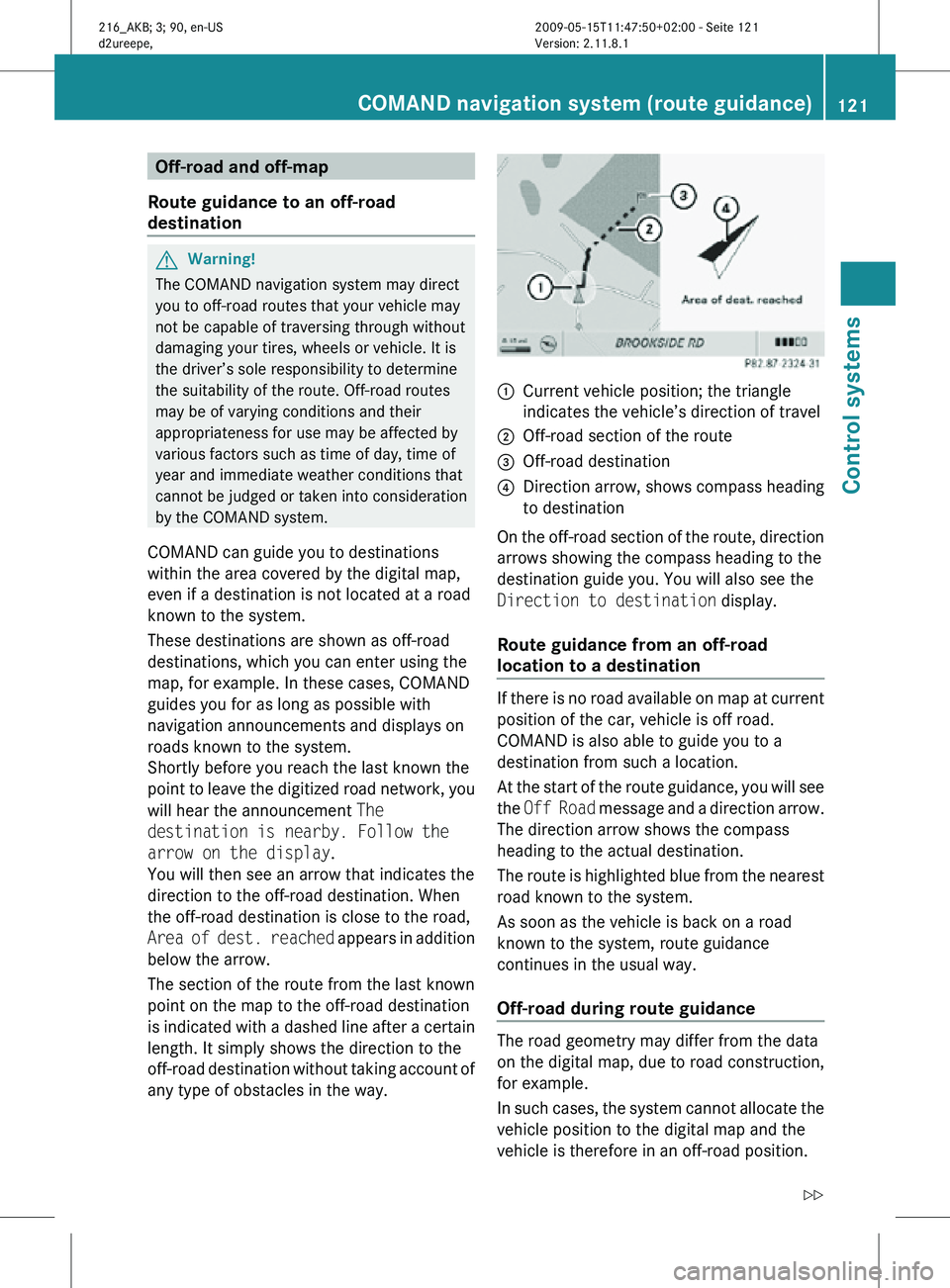
any type of obstacles in the way. :
Current vehicle position; the triangle
indicates the vehicle’s direction of travel
; Off-road section of the route
= Off-road destination
? Direction arrow, shows compass heading
to destination
On the off-road section of the route, direction
arrows showing the compass heading to the
destination guide you. You will also see the
Direction to destination display.
Route guidance from an off-road
location to a destination If there is no road available on map at current
position of the car, vehicle is off road.
COMAND is also able to guide you to a
destination from such a location.
At the start of the route guidance, you will see
the
Off Road message and a direction arrow.
The direction arrow shows the compass
heading to the actual destination.
The route is highlighted blue from the nearest
road known to the system.
As soon as the vehicle is back on a road
known to the system, route guidance
continues in the usual way.
Off-road during route guidance The road geometry may differ from the data
on the digital map, due to road construction,
for example.
In such cases, the system cannot allocate the
vehicle position to the digital map and the
vehicle is therefore in an off-road position.COMAND navigation system (route guidance)
121Control systems
216_AKB; 3; 90, en-US
d2ureepe,Version: 2.11.8.1 2009-05-15T11:47:50+02:00 - Seite 121 Z
Page 124 of 500
The
Off Road
message and an arrow showing
the compass heading to the destination
appear on the display.
As soon as the system can allocate the
vehicle position to the map again, route
guidance continues in the usual way. Navigation announcements
G
Warning!
Navigation announcements are intended to
direct you
while driving without diverting your
attention from the road and driving.
Please always use navigation announcements
instead of consulting the map display for
directions. Consulting the symbols or map
display for directions may cause you to divert
your attention from driving and increase your
risk of an accident.
i If Chinese is set as the system language,
the navigation announcements are in
English. For information on how to set the
system language see ( Y page 81).
Navigation announcements are muted
during telephone calls. You can, however,
call up a current announcement at any
time. You can also call up a current
announcement at any time if you have
missed an announcement.
Route guidance is active already.
X Calling up a current announcement:
Select Navi Q RPT.
or
X Press favorite button h if
the button has
been programmed with this function
(Y page 81). X
Switching off navigation messages:
Press button 8 during an
announcement.
You will see the message The driving
instructions have been muted. for a
short while.
i The announcements remain switched off
even if
you start a new route guidance or if
COMAND is switched off/on with button
u.
If you switch COMAND off by removing the
SmartKey from the starter switch and then
switch the ignition back on after more than
3 minutes, the announcements are
automatically switched back on.
X Switching navigation announcements
back on manually: Select Navi Q RPT.
X Adjusting volume of the messages:
Adjust the volume during an automatic
announcement (
Y page 76).
or
X Call up an announcement manually using
Navi Q RPT and adjust the volume
(Y page 76).
i You can use the function Audio
Fadeout (Y
page 93) to reduce the volume
of audio sources during navigation
announcements. COMAND navigation system (during
route guidance)
Cancel route guidance
X Select Destination Q Cancel Route
Guidance in map view with the menu
system displayed (Y
page 89). Continuing canceled route guidance
X Select Destination Q Continue
Route Guidance in map view with the
menu system displayed (Y
page 89).
COMAND calculates the route. 122
COMAND navigation system (during route guidance)
Control systems
216_AKB; 3; 90, en-US
d2ureepe,
Version: 2.11.8.1 2009-05-15T11:47:50+02:00 - Seite 122
Page 129 of 500
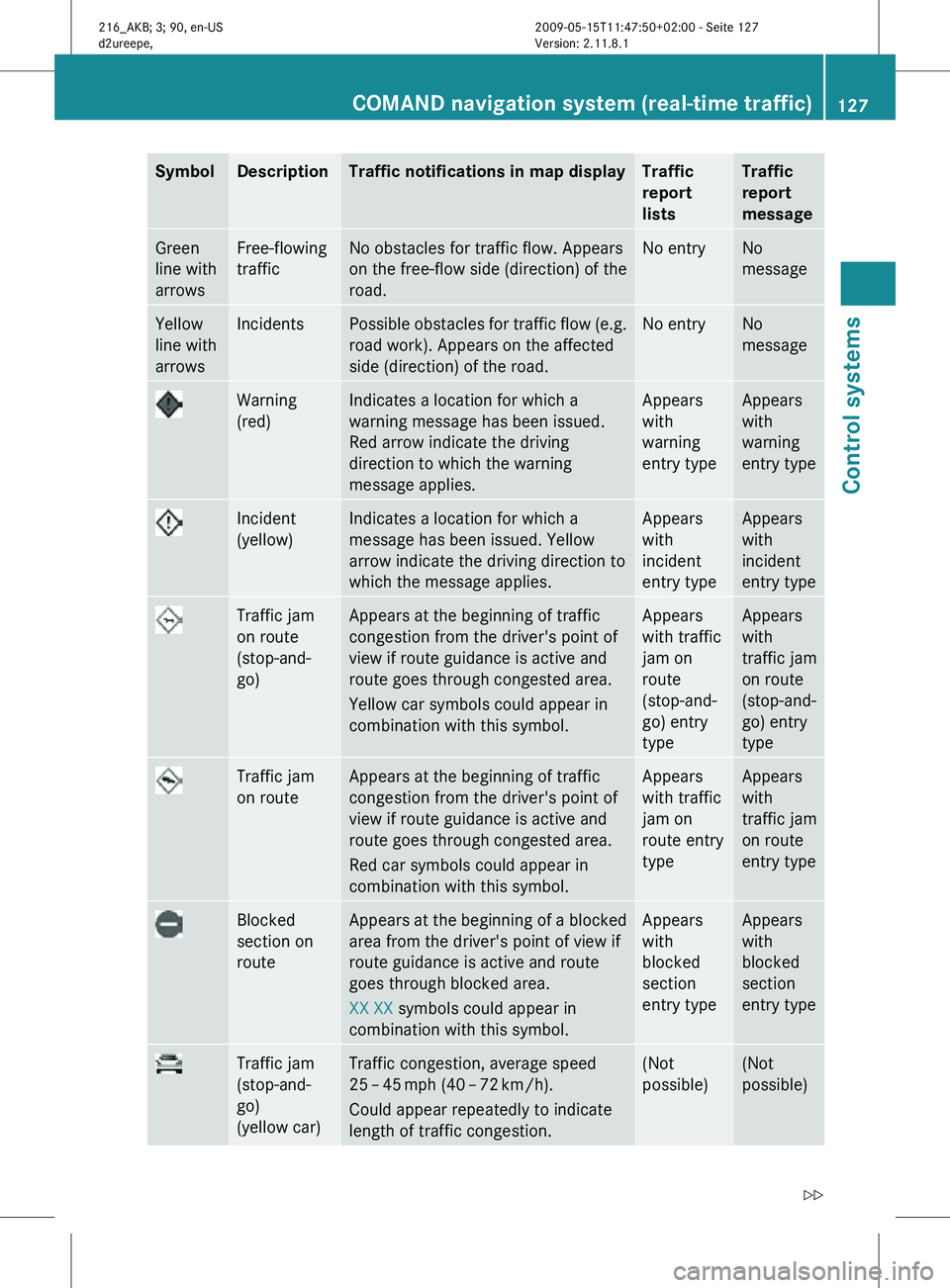
Symbol Description Traffic notifications in map display Traffic
report
lists Traffic
report
message
Green
line with
arrows Free-flowing
traffic No obstacles for traffic flow. Appears
on the free-flow side (direction) of the
road. No entry No
message
Yellow
line with
arrows Incidents Possible obstacles for traffic flow (e.g.
road work). Appears on the affected
side (direction) of the road. No entry No
message
Warning
(red) Indicates a location for which a
warning message has been issued.
Red arrow indicate the driving
direction to which the warning
message applies. Appears
with
warning
entry type Appears
with
warning
entry type
Incident
(yellow) Indicates a location for which a
message has been issued. Yellow
arrow indicate the driving direction to
which the message applies. Appears
with
incident
entry type Appears
with
incident
entry type
Traffic jam
on route
(stop-and-
go) Appears at the beginning of traffic
congestion from the driver's point of
view if route guidance is active and
route goes through congested area.
Yellow car symbols could appear in
combination with this symbol. Appears
with traffic
jam on
route
(stop-and-
go) entry
type Appears
with
traffic jam
on route
(stop-and-
go) entry
type
Traffic jam
on route Appears at the beginning of traffic
congestion from the driver's point of
view if route guidance is active and
route goes through congested area.
Red car symbols could appear in
combination with this symbol. Appears
with traffic
jam on
route entry
type Appears
with
traffic jam
on route
entry type
Blocked
section on
route Appears at the beginning of a blocked
area from the driver's point of view if
route guidance is active and route
goes through blocked area.
XX XX symbols could appear in
combination with this symbol. Appears
with
blocked
section
entry type Appears
with
blocked
section
entry type
Traffic jam
(stop-and-
go)
(yellow car) Traffic congestion, average speed
25
– 45 mph (40 – 72 km/h).
Could appear repeatedly to indicate
length of traffic congestion. (Not
possible) (Not
possible)COMAND navigation system (real-time traffic)
127Control systems
216_AKB; 3; 90, en-US
d2ureepe,Version: 2.11.8.1 2009-05-15T11:47:50+02:00 - Seite 127 Z
Page 137 of 500
Deleting one of the last destinations
X Select Navi Q Destination Q From
Last Destinations.
The list of last destinations appears.
X Select desired destination.
The address of the destination appears.
X Select Delete.
X Select Yes or No. COMAND telephone
Safety notes
G
Warning!
Some jurisdictions prohibit the driver from
using a cellular telephone while driving.
Whether or not prohibited by law, for safety
reasons, the
driver should not use the cellular
telephone while the vehicle is in motion. Stop
the vehicle in a safe location before placing or
answering a call.
If you nonetheless choose to use the mobile
phone 3
while driving, please use the
handsfree feature and be sure to pay
attention to the traffic situation at all times.
Use the mobile phone only when road,
weather and traffic conditions permit.
Otherwise, you may not be able to observe
traffic conditions and could endanger yourself
and others.
Bear in mind that at a speed of just 30 mph
(approximately 50 km/h), your vehicle is
covering a distance of 44 feet (approximately
14 m) every second. General notes
i USA only:
This device complies with Part 15 of the
FCC Rules. Operation is subject to the
following two conditions:
1. This device may not cause harmful
interference, and
2.
this device must accept anyinterference received, including
interference that may cause undesired
operation.
Any unauthorized modification to this
device could void the user’s authority to
operate the equipment.
i Canada only:
This device complies with RSS-210 of
Industry Canada. Operation is subject to
the following two conditions:
1. This device may not cause interference, and
2. this device must accept any interference received, including
interference that may cause undesired
operation of the device.
Any unauthorized modification to this
device could void the user’s authority to
operate the equipment.
3 Observe all legal requirements COMAND telephone
135
Control systems
216_AKB; 3; 90, en-US
d2ureepe, Version: 2.11.8.1 2009-05-15T11:47:50+02:00 - Seite 135 Z
Page 154 of 500
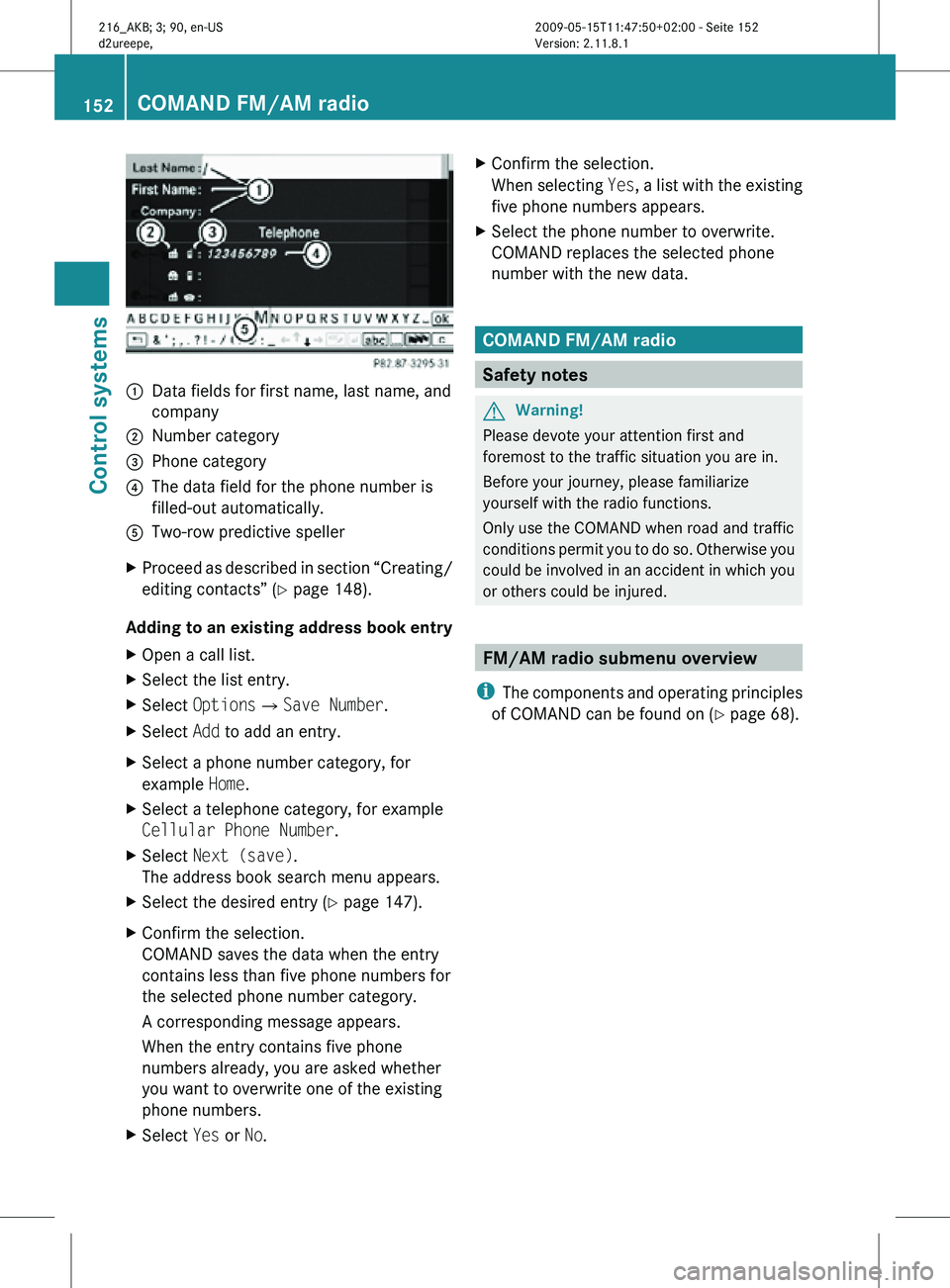
:
Data fields for first name, last name, and
company
; Number category
= Phone category
? The data field for the phone number is
filled-out automatically.
A Two-row predictive speller
X Proceed as described in section “Creating/
editing contacts” (Y page 148).
Adding to an existing address book entry
X Open a call list.
X Select the list entry.
X Select OptionsQSave Number.
X Select Add to add an entry.
X Select a phone number category, for
example Home.
X Select a telephone category, for example
Cellular Phone Number.
X Select Next (save).
The address book search menu appears.
X Select the desired entry (Y page 147).
X Confirm the selection.
COMAND saves the data when the entry
contains less than five phone numbers for
the selected phone number category.
A corresponding message appears.
When the entry contains five phone
numbers already, you are asked whether
you want to overwrite one of the existing
phone numbers.
X Select Yes or No. X
Confirm the selection.
When selecting Yes, a list with the existing
five phone numbers appears.
X Select the phone number to overwrite.
COMAND replaces the selected phone
number with the new data. COMAND FM/AM radio
Safety notes
G
Warning!
Please devote your attention first and
foremost to the traffic situation you are in.
Before your journey, please familiarize
yourself with the radio functions.
Only use the COMAND when road and traffic
conditions permit you to do so. Otherwise you
could be involved in an accident in which you
or others could be injured. FM/AM radio submenu overview
i The components and operating principles
of COMAND can be found on ( Y page 68).152
COMAND FM/AM radioControl systems
216_AKB; 3; 90, en-US
d2ureepe,
Version: 2.11.8.1 2009-05-15T11:47:50+02:00 - Seite 152
Page 159 of 500
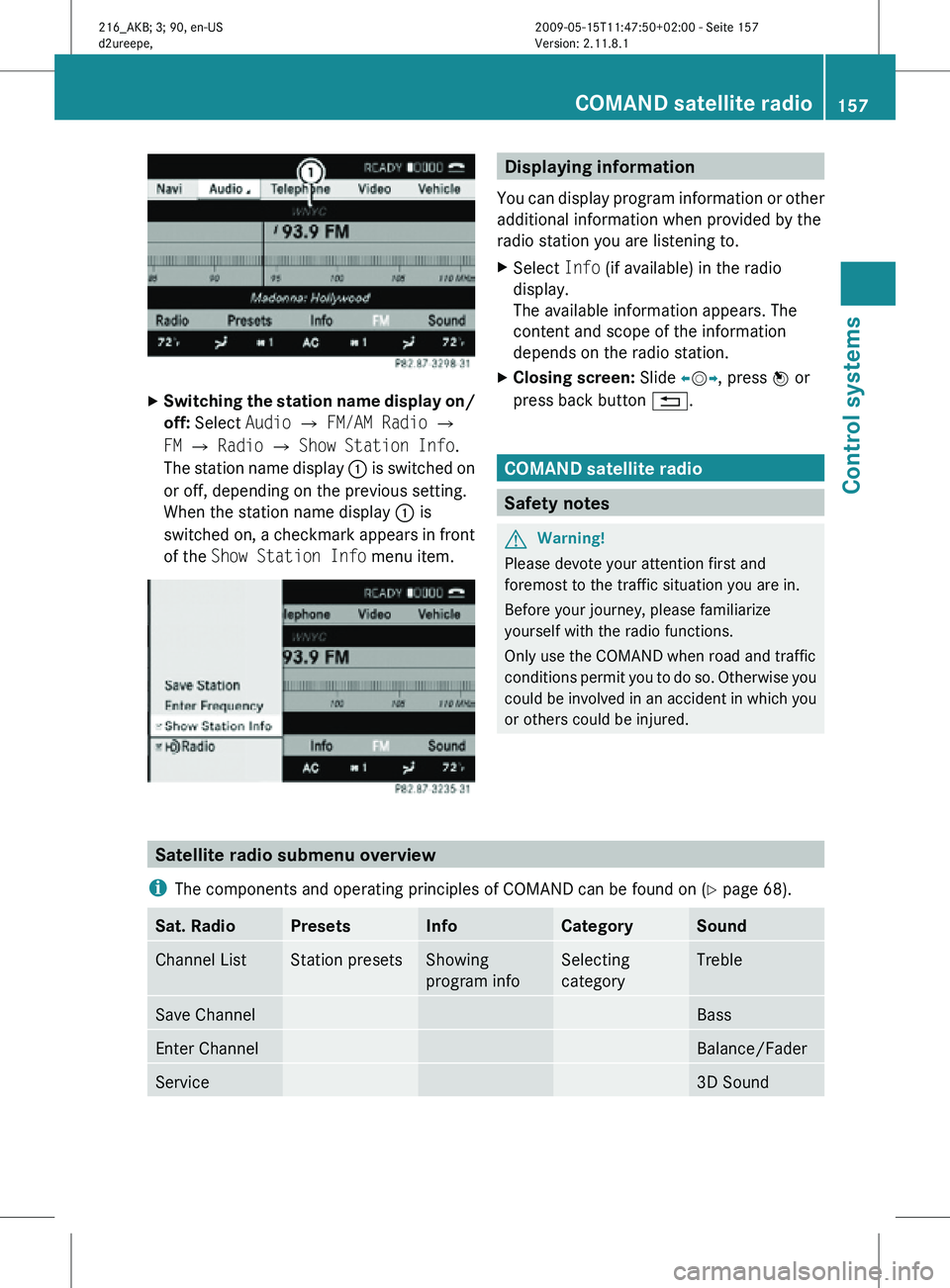
X
Switching the station name display on/
off: Select Audio Q FM/AM Radio Q
FM Q Radio Q Show Station Info.
The station name display : is switched on
or off, depending on the previous setting.
When the station name display : is
switched on, a checkmark appears in front
of the Show Station Info menu item. Displaying information
You can display program information or other
additional information when provided by the
radio station you are listening to.
X Select Info (if available) in the radio
display.
The available information appears. The
content and scope of the information
depends on the radio station.
X Closing screen: Slide XVY, press W or
press back button %. COMAND satellite radio
Safety notes
G
Warning!
Please devote your attention first and
foremost to the traffic situation you are in.
Before your journey, please familiarize
yourself with the radio functions.
Only use the COMAND when road and traffic
conditions permit you to do so. Otherwise you
could be involved in an accident in which you
or others could be injured. Satellite radio submenu overview
i The components and operating principles of COMAND can be found on ( Y page 68).Sat. Radio Presets Info Category Sound
Channel List Station presets Showing
program info Selecting
category Treble
Save Channel Bass
Enter Channel Balance/Fader
Service 3D SoundCOMAND satellite radio
157Control systems
216_AKB; 3; 90, en-US
d2ureepe, Version: 2.11.8.1 2009-05-15T11:47:50+02:00 - Seite 157 Z
Page 164 of 500
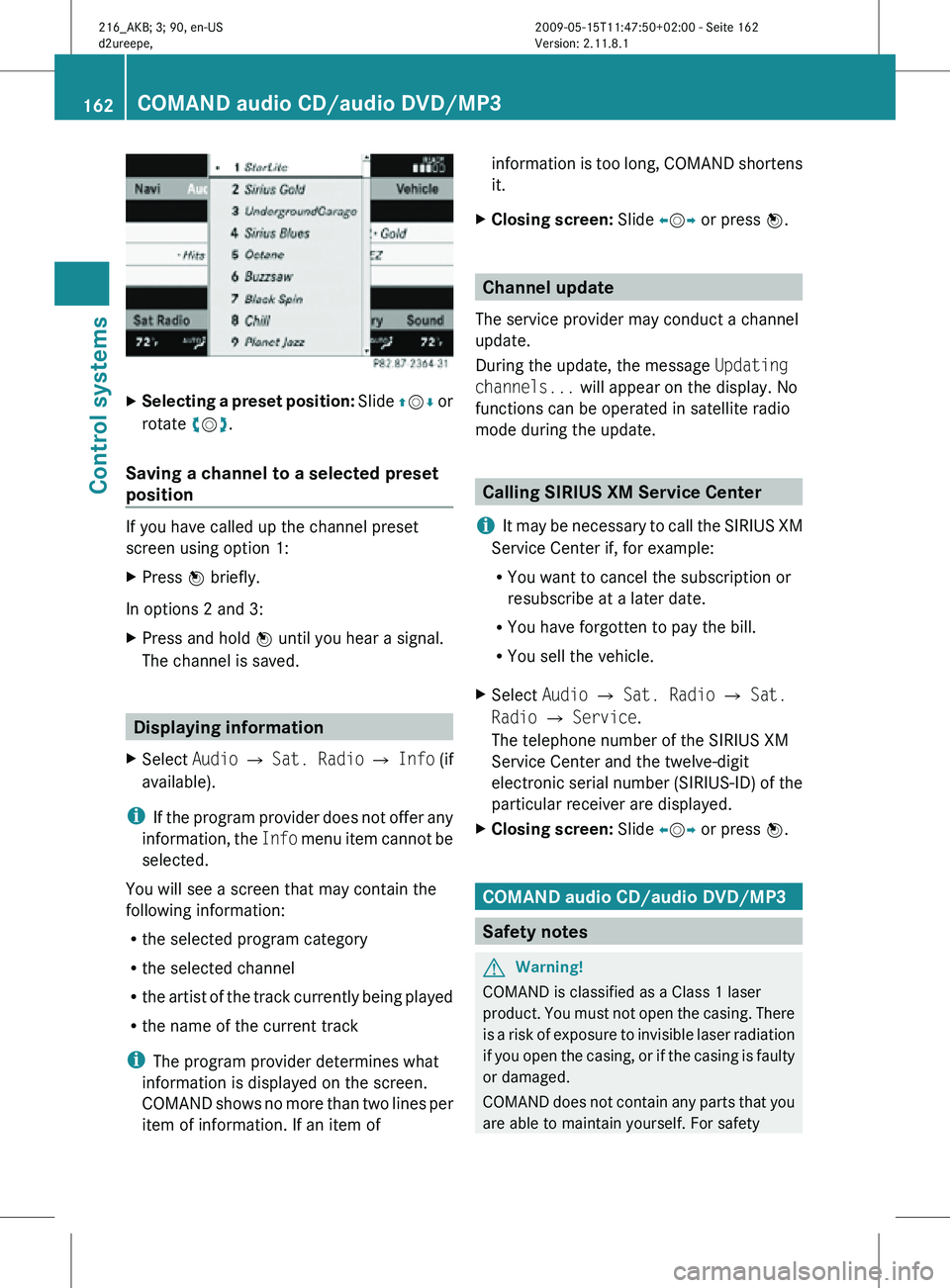
X
Selecting a preset position: Slide ZVÆ or
rotate cVd.
Saving a channel to a selected preset
position If you have called up the channel preset
screen using option 1:
X
Press W briefly.
In options 2 and 3:
X Press and hold W until you hear a signal.
The channel is saved. Displaying information
X Select Audio Q Sat. Radio Q Info (if
available).
i If the program provider does not offer any
information, the Info menu item cannot be
selected.
You will see a screen that may contain the
following information:
R the selected program category
R the selected channel
R the artist of the track currently being played
R the name of the current track
i The program provider determines what
information is displayed on the screen.
COMAND shows no more than two lines per
item of information. If an item of information is too long, COMAND shortens
it.
X Closing screen: Slide XVY or press W. Channel update
The service provider may conduct a channel
update.
During the update, the message Updating
channels... will appear on the display. No
functions can be operated in satellite radio
mode during the update. Calling SIRIUS XM Service Center
i It may be necessary to call the SIRIUS XM
Service Center if, for example:
R You want to cancel the subscription or
resubscribe at a later date.
R You have forgotten to pay the bill.
R You sell the vehicle.
X Select Audio Q Sat. Radio Q Sat.
Radio Q Service.
The telephone number of the SIRIUS XM
Service Center and the twelve-digit
electronic serial number (SIRIUS-ID) of the
particular receiver are displayed.
X Closing screen: Slide XVY or press W. COMAND audio CD/audio DVD/MP3
Safety notes
G
Warning!
COMAND is classified as a Class 1 laser
product. You must not open the casing. There
is a risk of exposure to invisible laser radiation
if you open the casing, or if the casing is faulty
or damaged.
COMAND does not contain any parts that you
are able to maintain yourself. For safety 162
COMAND audio CD/audio DVD/MP3Control systems
216_AKB; 3; 90, en-US
d2ureepe,
Version: 2.11.8.1 2009-05-15T11:47:50+02:00 - Seite 162
Page 165 of 500
reasons, all maintenance work must be
carried out by qualified technicians.
G
Warning!
Only carry out the following when the vehicle
is stationary:
R Inserting a disc/device
R Ejecting a disc/device
There is
a risk of accident by being distracted
from road and traffic conditions if you load a
disc/device while the vehicle is in motion.
Bear in mind that at a speed of just 30 mph
(approximately 50 km/h), your vehicle is
covering a distance of 44 feet (approximately
14 m) every second. Notes about MP3 mode
Permissible media for MP3/WMA files R
CD-R and CD-RW
R DVD-R and DVD-RW
R DVD+R and DVD+RW
R SD cards
R USB flash drives
R iPod ®
R MP3 players
Permissible file systems R
ISO9660/Joliet for CDs
R UDF for DVDs
R FAT16 or FAT32 for storage media
Multisession CDs For multisession CDs, the first session type
of the CD determines how COMAND will
process the CD.
For example, if the first session type is
according to the audio CD standard and the
second session type is according to the data
CD standard containing MP3/WMA tracks, COMAND will treat the CD as a conventional
audio CD. This means that it is only possible
to
access
the audio CD tracks. Access to the
MP3/WMA tracks is not possible.
Similarly, if the first session type is according
to the data CD standard containing MP3/
WMA tracks and the second session type is
according to the audio CD standard,
COMAND will treat the CD as a data CD. This
means that it is only possible to access the
MP3/WMA tracks. Access to the audio CD
tracks is not possible.
File structure on a disc When you create an audio disc, the tracks can
be
organized
in folders. A disc may contain a
maximum of 4000 tracks.
The directory depth may not exceed a
maximum of 8 levels. The system will ignore
files in lower levels.
Notes on USB storage media Do not store data other than audio data on a
USB storage medium. Doing so will increase
the
time
required to initialize the USB storage
medium.
A maximum of 8 directory levels with up to
4000 tracks each are supported.
For information on connecting USB storage
media to the built-in USB socket in the glove
box see ( Y page 72).
Track and folder names When you create an audio medium, you can
assign names to the tracks and folders.
COMAND uses these names for the
corresponding display. Empty folders or
folders which contain data other than MP3/
WMA tracks are not displayed by COMAND.
If MP3/WMA files are saved in the root
directory itself (uppermost directory on
storage medium), the root directory will also
be treated as a folder. COMAND will then
show the name of the root directory as the
folder name.COMAND audio CD/audio DVD/MP3
163
Control systems
216_AKB; 3; 90, en-US
d2ureepe, Version: 2.11.8.1 2009-05-15T11:47:50+02:00 - Seite 163 Z
Page 175 of 500
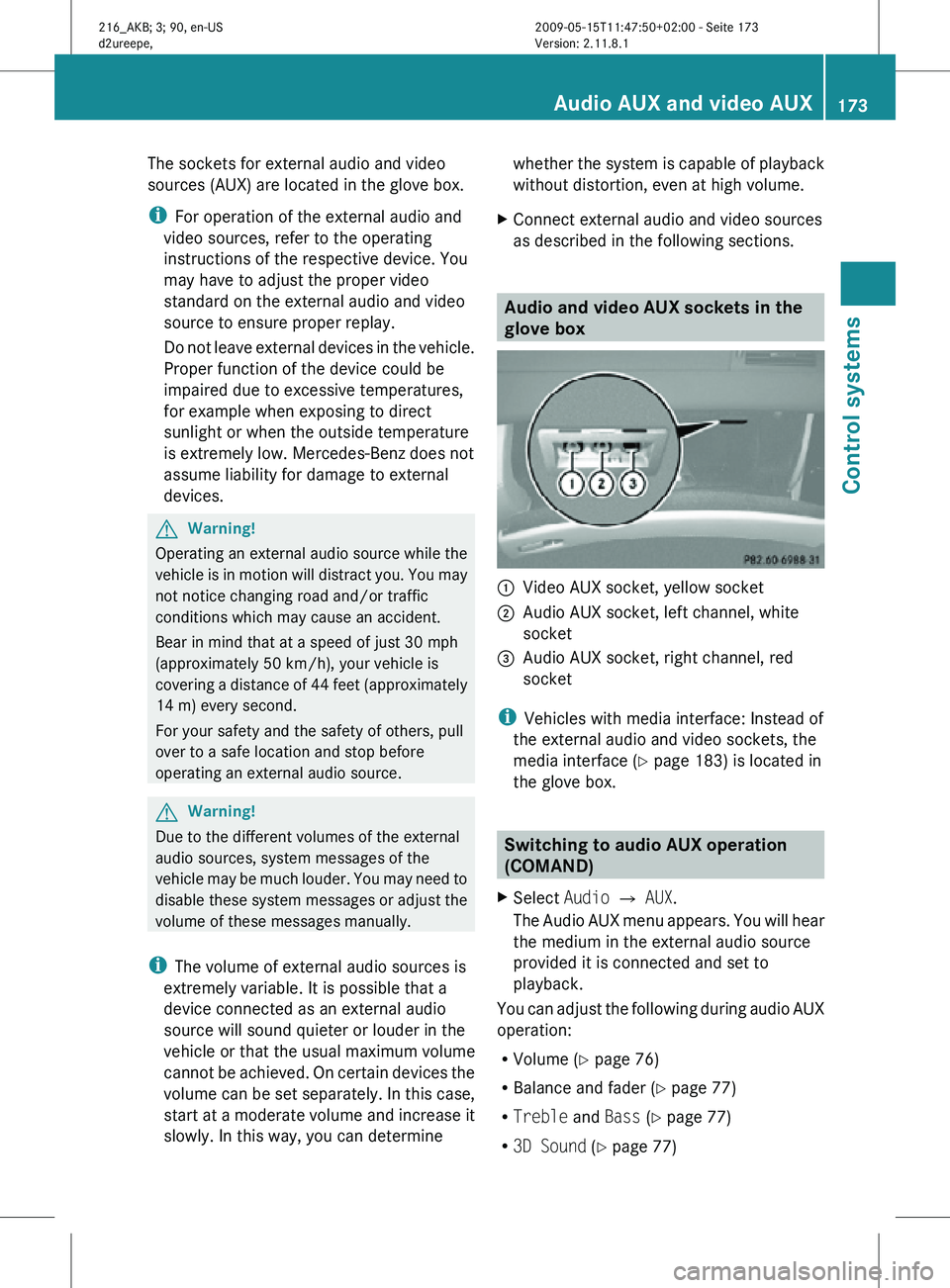
The sockets for external audio and video
sources (AUX) are located in the glove box.
i
For operation of the external audio and
video sources, refer to the operating
instructions of the respective device. You
may have to adjust the proper video
standard on the external audio and video
source to ensure proper replay.
Do not leave external devices in the vehicle.
Proper function of the device could be
impaired due to excessive temperatures,
for example when exposing to direct
sunlight or when the outside temperature
is extremely low. Mercedes-Benz does not
assume liability for damage to external
devices. G
Warning!
Operating an external audio source while the
vehicle is in motion will distract you. You may
not notice changing road and/or traffic
conditions which may cause an accident.
Bear in mind that at a speed of just 30 mph
(approximately 50 km/h), your vehicle is
covering a distance of 44 feet (approximately
14 m) every second.
For your safety and the safety of others, pull
over to a safe location and stop before
operating an external audio source. G
Warning!
Due to the different volumes of the external
audio sources, system messages of the
vehicle may be much louder. You may need to
disable these system messages or adjust the
volume of these messages manually.
i The volume of external audio sources is
extremely variable. It is possible that a
device connected as an external audio
source will sound quieter or louder in the
vehicle or that the usual maximum volume
cannot be achieved. On certain devices the
volume can be set separately. In this case,
start at a moderate volume and increase it
slowly. In this way, you can determine whether the system is capable of playback
without distortion, even at high volume.
X Connect external audio and video sources
as described in the following sections. Audio and video AUX sockets in the
glove box
:
Video AUX socket, yellow socket
; Audio AUX socket, left channel, white
socket
= Audio AUX socket, right channel, red
socket
i Vehicles with media interface: Instead of
the external audio and video sockets, the
media interface ( Y page 183) is located in
the glove box. Switching to audio AUX operation
(COMAND)
X Select Audio Q AUX.
The Audio AUX menu appears. You will hear
the medium in the external audio source
provided it is connected and set to
playback.
You can adjust the following during audio AUX
operation:
R Volume ( Y page 76)
R Balance and fader ( Y page 77)
R Treble and Bass (Y page 77)
R 3D Sound (Y page 77) Audio AUX and video AUX
173Control systems
216_AKB; 3; 90, en-US
d2ureepe, Version: 2.11.8.1 2009-05-15T11:47:50+02:00 - Seite 173 Z
Page 185 of 500
X
Select MUSIC REGISTER Q Rename/
Delete Files.
or
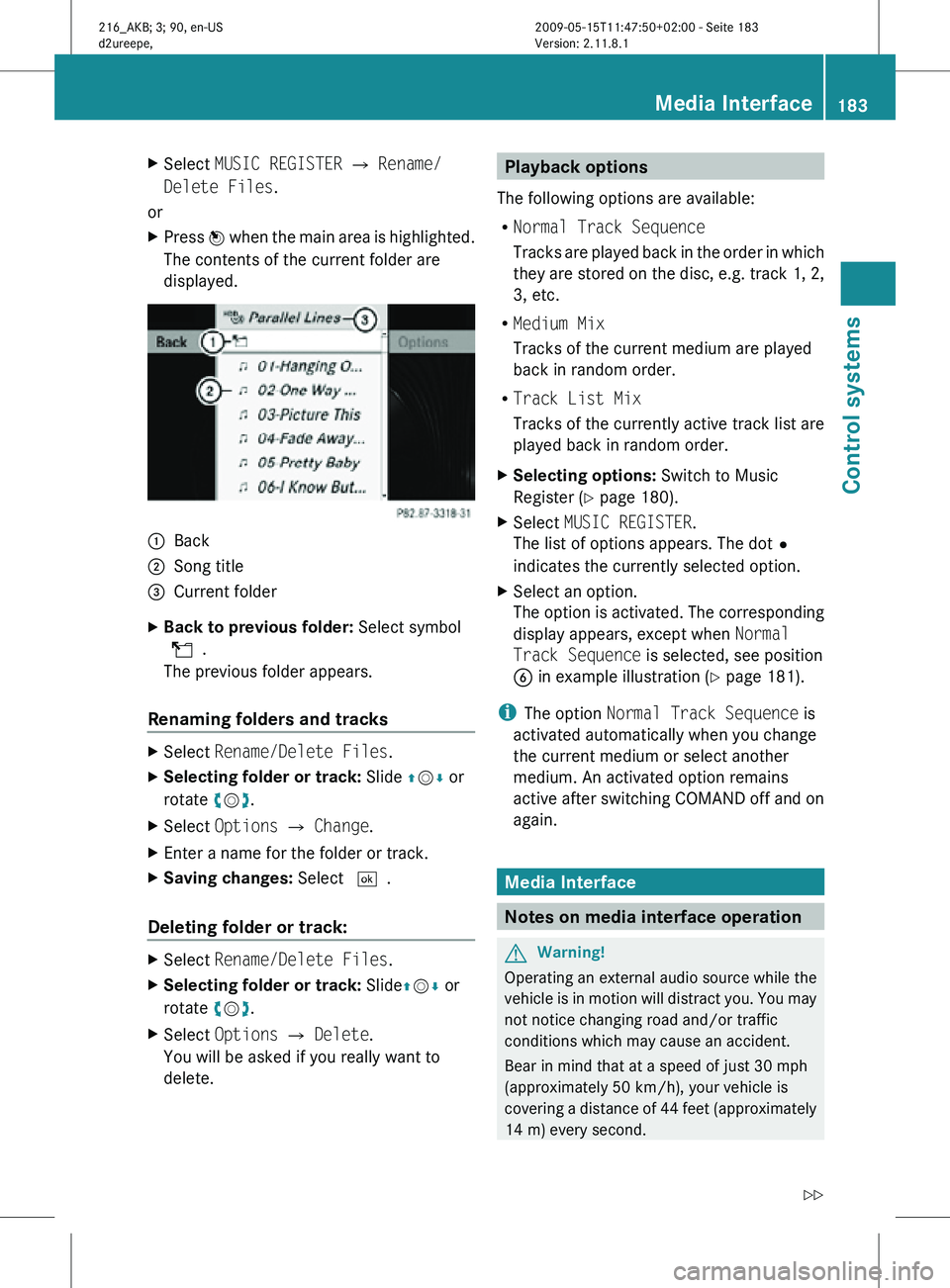
X Press W when the main area is highlighted.
The contents of the current folder are
displayed. :
Back
; Song title
= Current folder
X Back to previous folder: Select symbol
U.
The previous folder appears.
Renaming folders and tracks X
Select Rename/Delete Files.
X Selecting folder or track: Slide ZVÆ or
rotate cVd.
X Select Options Q Change.
X Enter a name for the folder or track.
X Saving changes: Select ¬.
Deleting folder or track: X
Select Rename/Delete Files.
X Selecting folder or track: Slide ZVÆ or
rotate cVd.
X Select Options Q Delete.
You will be asked if you really want to
delete. Playback options
The following options are available:
R Normal Track Sequence
Tracks are played back in the order in which
they are stored on the disc, e.g. track 1, 2,
3, etc.
R Medium Mix
Tracks of the current medium are played
back in random order.
R Track List Mix
Tracks of the currently active track list are
played back in random order.
X Selecting options: Switch to Music
Register ( Y page 180).
X Select MUSIC REGISTER.
The list of options appears. The dot#
indicates the currently selected option.
X Select an option.
The option is activated. The corresponding
display appears, except when Normal
Track Sequence is selected, see position
B in example illustration ( Y page 181).
i The option Normal Track Sequence is
activated automatically when you change
the current medium or select another
medium. An activated option remains
active after switching COMAND off and on
again. Media Interface
Notes on media interface operation
G
Warning!
Operating an external audio source while the
vehicle is in motion will distract you. You may
not notice changing road and/or traffic
conditions which may cause an accident.
Bear in mind that at a speed of just 30 mph
(approximately 50 km/h), your vehicle is
covering a distance of 44 feet (approximately
14 m) every second. Media Interface
183Control systems
216_AKB; 3; 90, en-US
d2ureepe, Version: 2.11.8.1 2009-05-15T11:47:50+02:00 - Seite 183 Z