warning MERCEDES-BENZ CL CLASS 2010 Owners Manual
[x] Cancel search | Manufacturer: MERCEDES-BENZ, Model Year: 2010, Model line: CL CLASS, Model: MERCEDES-BENZ CL CLASS 2010Pages: 500, PDF Size: 9.32 MB
Page 280 of 500

High beam
X
Turn the exterior lamp switch to position
L (Y page 275).
X Switching on: Push the combination
switch in direction of arrow :.
The high-beam headlamp indicator lamp
K in the instrument cluster comes on.
X Switching off: Pull the combination switch
in direction of arrow = to its original
position.
i Also note the information on high-beam
headlamps with activated automatic
headlamp mode ( Y page 275) or the
daytime running lamp mode ( Y page 276).
High-beam flasher X
Switching on: Pull the combination switch
briefly in direction of arrow =.Hazard warning flasher
The hazard warning flasher can be switched
on at all times, even with the SmartKey
removed from the starter switch.
The hazard warning flasher comes on
automatically when an air bag deploys.
CL 600 and CL 65 AMG (USA only):
The hazard warning flasher comes on
automatically when you brake the vehicle
strongly at a speed of more than 50 mph
(70 km/h) and bring it to a complete stop. X
Switching on: Press hazard warning
flasher switch :.
All turn signal lamps are flashing.
i With the hazard warning flasher activated
and the combination switch set for either
left or right turn, only the respective left or
right turn signals will operate when the
ignition is switched on.
X Switching off: Press hazard warning
flasher switch : again.
i If the hazard warning flasher was
activated automatically, press hazard
warning flasher switch : to switch it off.
CL 600 and CL 65 AMG (USA only):
When the hazard warning flasher was
activated by a hard stop automatically, it
will be switched off automatically at a
vehicle speed of above 6 mph (10 km/h). Headlamp cleaning system
The headlamps will be cleaned with a high-
pressure water jet automatically when the
engine is running and you have
R switched on the headlamps
and
R the windshield wipers have wiped the
windshield with washer fluid five times
The counter resets when you switch off the
ignition.
For information on filling up the washer
reservoir, see “Washer system and headlamp
cleaning system” ( Y page 372). Corner-illuminating lamps
The corner-illuminating lamps improve
illumination of the area in the direction into
which you are turning.
The corner-illuminating lamps will only
operate in low ambient lighting conditions. 278
LightingControls in detail
216_AKB; 3; 90, en-US
d2ureepe,
Version: 2.11.8.1 2009-05-15T11:47:50+02:00 - Seite 278
Page 282 of 500

R
unlock the vehicle
R remove the SmartKey from the starter
switch ( Interior Lighting Delayed
Switch-off must be switched on
(Y page 191))
R open a door
The interior lighting goes out after a short
time (Y page 191).
i If a door remains open, the interior lamps
go out automatically after approximately
5 minutes.
X Deactivating: Press button ~.
The OFF indicator lamp next to the button
comes on.
Manual control X
Switching front interior lighting on/
off: Press button c.
X Switching rear interior lighting on/off:
Press button s.
X Switching front reading lamps on/off:
Press respective button p.
i The brightness of the ambient lighting is
adjusted via COMAND ( Y page 192).
Emergency lighting The interior lighting comes on automatically
if the vehicle is involved in an accident.
Switching off:
X
Press hazard warning flasher switch
(Y page 278).
or
X Press switch ~.
or
X Unlock the vehicle with the SmartKey. Wipers
Notes
! Do not operate the wipers when the
windshield is dry. Dust that accumulates on
a windshield might scratch the glass and/
or damage the wiper blades when wiping
occurs on a dry windshield. If it is necessary
to operate the wipers in dry weather
conditions, always operate the wipers with
washer fluid.
! If the windshield wipers leave smears on
the windshield after the car has been driven
through an automatic car wash, then wax
or other residue is on the windshield.
Shortly after washing the car in an
automatic car wash, clean the windshield
with washer fluid. Windshield wipers
X Observe notes on page (Y page 280).
Switching on/off Combination switch
1
$ Windshield wipers off
2 Ä Slow intermittent wiping 31
3 Å Fast intermittent wiping 32
4 ° Slow continuous wiping
31 Rain sensor operation with low sensitivity.
32 Rain sensor operation with high sensitivity. 280
WipersControls in detail
216_AKB; 3; 90, en-US
d2ureepe,
Version: 2.11.8.1 2009-05-15T11:47:50+02:00 - Seite 280
Page 284 of 500

R
Turn off the engine by pressing the
KEYLESS-GO start/stop button and
open the driver’s door (with the driver’s
door open, starter switch is in position
0, same
as with SmartKey removed from
starter switch).
R Engage the parking brake.
R Remove blockage.
R Turn the windshield wipers on again.
If the windshield wipers fail to function at
all with the combination switch in position
Ä or Å,
R set the combination switch to the next
higher wiper speed
R have the windshield wipers checked at
the nearest authorized Mercedes-Benz
Center Power windows
Opening and closing
The windows are opened and closed
electrically. The switches for all windows are
located on
the driver’s door. The switches for
the respective windows are located on the
passenger door and the rear side trim panels.
i Operating the rear side windows from the
rear is not possible when you activate the
override switch ( Y page 55). G
Observe Safety notes, see page 51. G
Warning!
When opening or closing the windows, make
sure there is no danger of anyone being
harmed by the opening/closing procedure.
The door windows are equipped with the
express operation and automatic reversal
function. If
in express operation mode a door
window encounters an obstruction that
blocks its path, the automatic reversal
function will stop the door window and open
it slightly. The windows operate differently when the
switch is pulled and held. See the “Closing
when a window is blocked” section in this
chapter for details.
The closing of the door windows can be
immediately
halted
by releasing the switch or,
if the switch was pulled past the resistance
point and released, by either pressing or
pulling the respective switch.
The closing of the rear side windows can be
immediately halted by releasing the switch.
Activate the override switch when children
are riding in the back seats of the vehicle. The
children may otherwise injure themselves,
e.g. by becoming trapped in the window
opening. G
Warning!
Do not keep any part of your body up against
the window
pane when opening a window. The
downward motion of the pane may pull that
part of your body down between the window
pane and the door frame and trap it there. If
there is a risk of entrapment, release the
switch and pull it to close the window.
i You can also open or close the windows
using the SmartKey, see “Summer opening
feature” ( Y page 283) and “Convenience
closing feature” ( Y page 284).
i After switching off the ignition or
removing the SmartKey from the starter
switch, you can operate the windows until
you open a door. If no door was opened you
can operate the windows for up to
5 minutes. 282
Power windowsControls in detail
216_AKB; 3; 90, en-US
d2ureepe,
Version: 2.11.8.1 2009-05-15T11:47:50+02:00 - Seite 282
Page 285 of 500
X
Switch on the ignition.
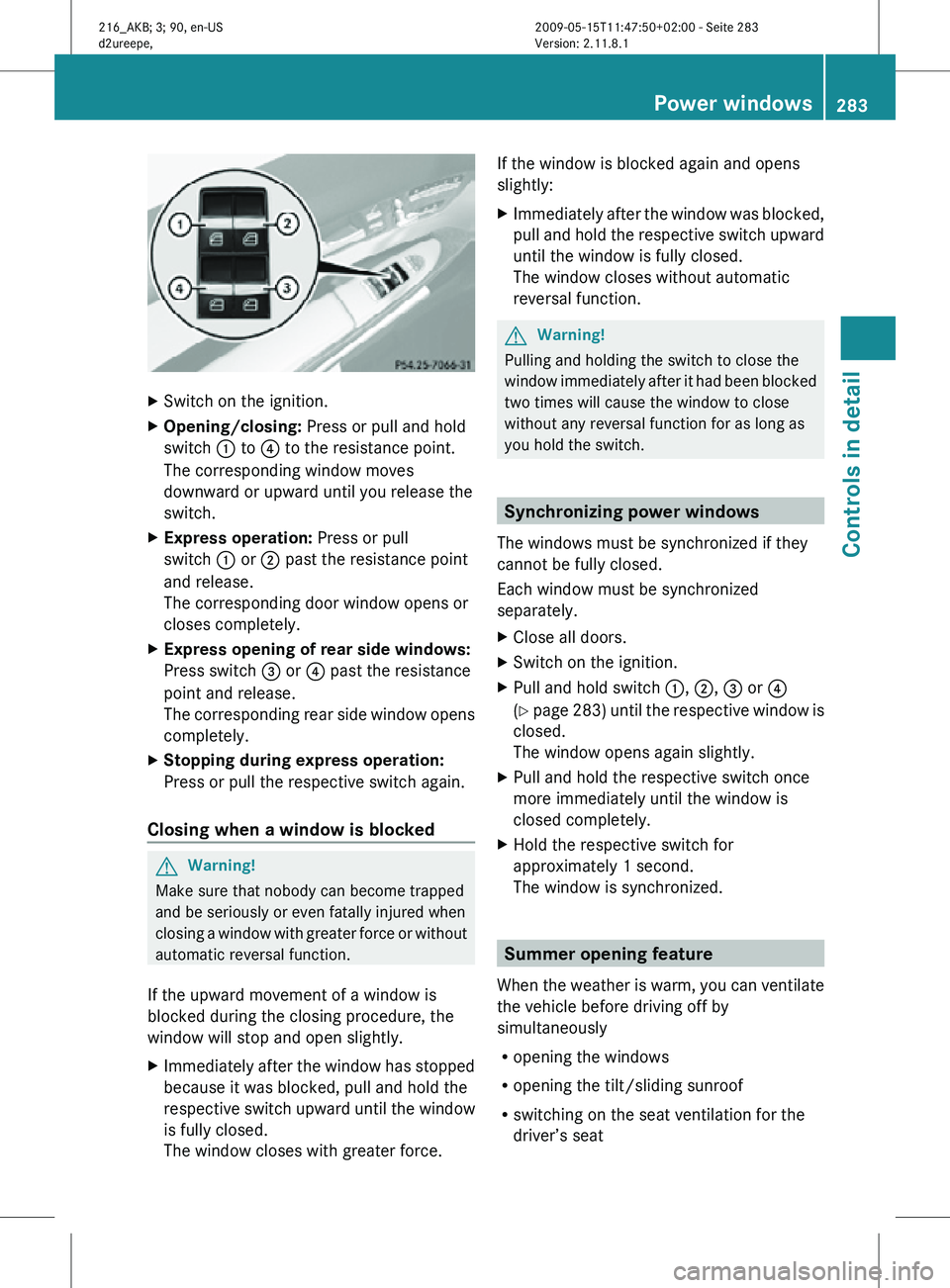
X Opening/closing: Press or pull and hold
switch : to ? to the resistance point.
The corresponding window moves
downward or upward until you release the
switch.
X Express operation: Press or pull
switch : or ; past the resistance point
and release.
The corresponding door window opens or
closes completely.
X Express opening of rear side windows:
Press switch = or ? past the resistance
point and release.
The corresponding rear side window opens
completely.
X Stopping during express operation:
Press or pull the respective switch again.
Closing when a window is blocked G
Warning!
Make sure that nobody can become trapped
and be seriously or even fatally injured when
closing a window with greater force or without
automatic reversal function.
If the upward movement of a window is
blocked during the closing procedure, the
window will stop and open slightly.
X Immediately after the window has stopped
because it was blocked, pull and hold the
respective switch upward until the window
is fully closed.
The window closes with greater force. If the window is blocked again and opens
slightly:
X
Immediately after the window was blocked,
pull and hold the respective switch upward
until the window is fully closed.
The window closes without automatic
reversal function. G
Warning!
Pulling and holding the switch to close the
window immediately after it had been blocked
two times will cause the window to close
without any reversal function for as long as
you hold the switch. Synchronizing power windows
The windows must be synchronized if they
cannot be fully closed.
Each window must be synchronized
separately.
X Close all doors.
X Switch on the ignition.
X Pull and hold switch :, ;, = or ?
(Y page 283) until the respective window is
closed.
The window opens again slightly.
X Pull and hold the respective switch once
more immediately until the window is
closed completely.
X Hold the respective switch for
approximately 1 second.
The window is synchronized. Summer opening feature
When the weather is warm, you can ventilate
the vehicle before driving off by
simultaneously
R opening the windows
R opening the tilt/sliding sunroof
R switching on the seat ventilation for the
driver’s seat Power windows
283Controls in detail
216_AKB; 3; 90, en-US
d2ureepe, Version: 2.11.8.1 2009-05-15T11:47:50+02:00 - Seite 283 Z
Page 286 of 500

The summer opening feature can only be
activated via the remote control of the
SmartKey. The SmartKey must be in close
proximity to the driver’s outside door handle.
X
Aim the transmitter eye of the SmartKey at
the driver’s outside door handle.
X Press and hold button % on the
SmartKey until the windows and the tilt/
sliding sunroof have reached the desired
position.
The vehicle unlocks.
X Release button % on the SmartKey to
interrupt the opening procedure. Convenience closing feature
When locking the vehicle, you can
simultaneously close the windows and the
tilt/sliding sunroof. G
Warning!
When closing the windows and the tilt/sliding
sunroof, make sure there is no danger of
anyone being harmed by the closing
procedure.
If potential danger exists, proceed as follows:
R Release button & to stop the closing
procedure. To open, press and hold button
%. To continue the closing procedure
after making sure that there is no danger of
anyone being harmed by the closing
procedure, press and hold button &.
Vehicles with KEYLESS-GO:
R Release the sensor surface on the outside
door handle to stop the closing procedure.
R Immediately pull on the same outside door
handle and hold firmly. The windows and
the tilt/sliding sunroof will open for as long
as the door handle is held but the door not
opened. With SmartKey The SmartKey must be in close proximity to
the driver’s outside door handle.
X
Aim transmitter eye of the SmartKey at the
driver’s outside door handle.
X Press and hold button & on the
SmartKey until the windows and the tilt/
sliding sunroof are closed completely.
The vehicle locks.
X Release button & on the SmartKey to
interrupt the closing procedure.
With KEYLESS-GO The SmartKey with KEYLESS-GO must be
located outside the vehicle within
approximately 3 ft (1 m) of a door.
X
Close all doors.
X Touch and hold sensor surface : on an
outside door handle until the windows and
the tilt/sliding sunroof are closed
completely.
i Make sure you are only touching sensor
surface :.
X Release sensor surface : to interrupt the
closing procedure. 284
Power windowsControls in detail
216_AKB; 3; 90, en-US
d2ureepe,
Version: 2.11.8.1 2009-05-15T11:47:50+02:00 - Seite 284
Page 287 of 500
Driving and parking
Safety notes
G
Warning!
Make sure absolutely no objects are
obstructing the pedals’ range of movement.
Keep the driver’s footwell clear of all
obstacles. If there are any floormats or
carpets in the footwell, make sure the pedals
still have sufficient clearance.
During sudden driving or braking maneuvers
the objects could get caught between or
under the pedals. You could then no longer
brake or accelerate. This could lead to
accidents and injury. G
Warning!
With the engine not running, there is no power
assistance for the brake and steering
systems. In this case, it is important to keep
in mind that a considerably higher degree of
effort is necessary to brake and steer the
vehicle. Adapt your driving accordingly. Starting the engine
G
Warning!
Inhalation of exhaust gas is hazardous to your
health. All exhaust gas contains carbon
monoxide (CO), and inhaling it can cause
unconsciousness and possible death.
Do not run the engine in confined areas (such
as a garage) which are not properly ventilated.
If you think that exhaust gas fumes are
entering the vehicle while driving, have the
cause determined and corrected
immediately. If you must drive under these
conditions, drive only with at least one
window fully open at all times. Automatic transmission Gearshift pattern for automatic transmission
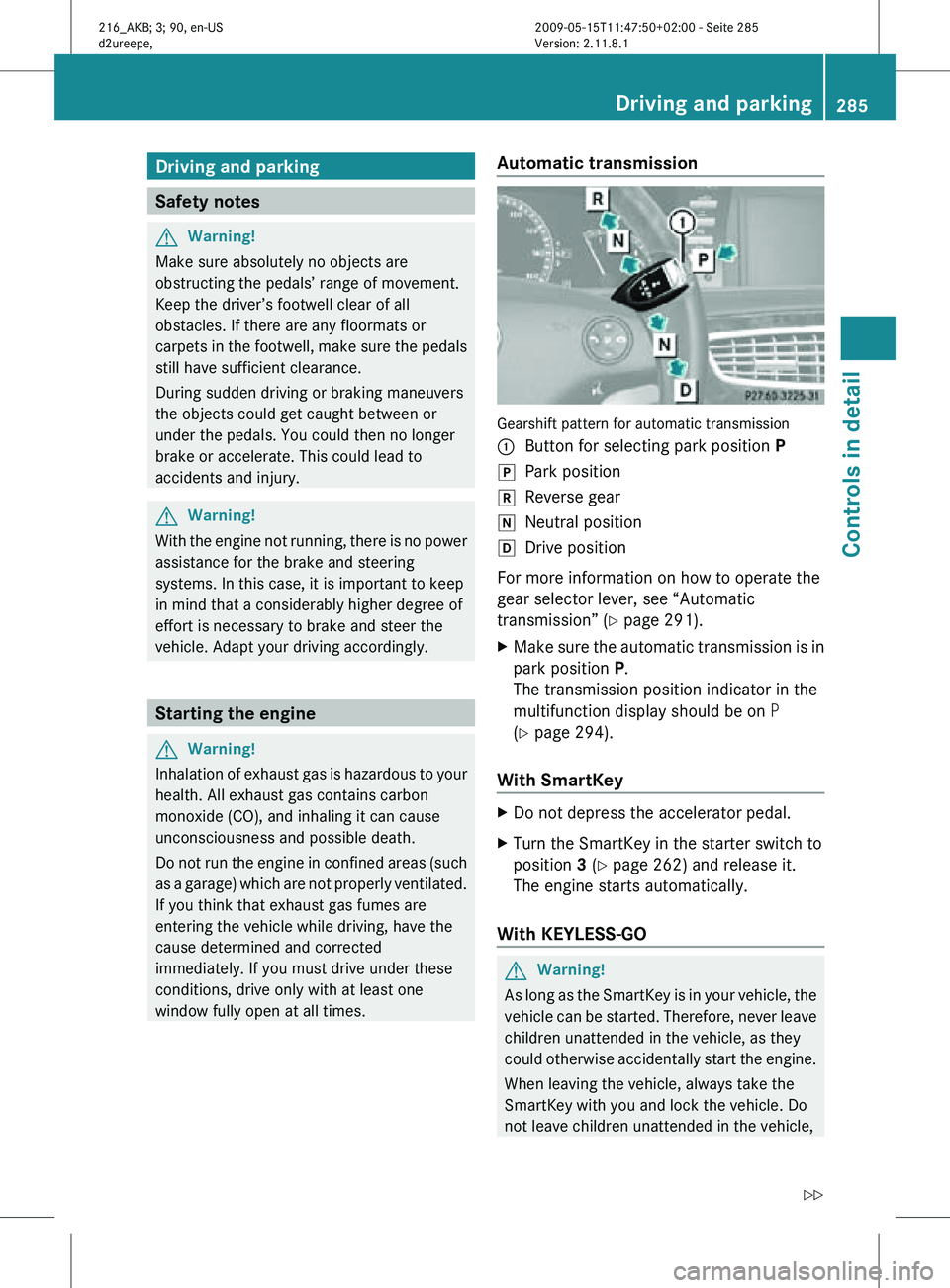
:
Button for selecting park position P
j Park position
k Reverse gear
i Neutral position
h Drive position
For more information on how to operate the
gear selector lever, see “Automatic
transmission” (Y page 291).
X Make sure the automatic transmission is in
park position P.
The transmission position indicator in the
multifunction display should be on P
(Y page 294).
With SmartKey X
Do not depress the accelerator pedal.
X Turn the SmartKey in the starter switch to
position 3 (Y page 262) and release it.
The engine starts automatically.
With KEYLESS-GO G
Warning!
As long as the SmartKey is in your vehicle, the
vehicle can be started. Therefore, never leave
children unattended in the vehicle, as they
could otherwise accidentally start the engine.
When leaving the vehicle, always take the
SmartKey with you and lock the vehicle. Do
not leave children unattended in the vehicle, Driving and parking
285Controls in detail
216_AKB; 3; 90, en-US
d2ureepe, Version: 2.11.8.1 2009-05-15T11:47:50+02:00 - Seite 285 Z
Page 289 of 500
Driving off
G
Warning!
On slippery road surfaces, never downshift in
order to obtain braking action. This could
result in
drive wheel slip and reduced vehicle
control. Your vehicle’s ABS will not prevent
this type of loss of control.
! Do not run a cold engine at high engine
speeds. Running a cold engine at high
engine speeds may shorten the service life
of the engine. This is not covered by the
Mercedes-Benz Limited Warranty.
CL 63 AMG: At engine temperatures below
68‡ (20†), the engine’s maximum speed
is restricted in order to protect it from
damage. Avoid driving your vehicle at full
speed when the engine is cold to prevent
premature engine wear and/or diminished
comfort.
! You have forgotten to release the
electronic parking brake when driving off if
R an acoustic warning sounds
R the message Please Release
Parking Brake appears in the
multifunction display
R the red indicator lamp for the electronic
parking brake F (USA only) or !
(Canada only) in the instrument cluster
flashes
Release the electronic parking brake.
! Avoid spinning of a drive wheel. This may
cause serious damage to the drivetrain
which is not covered by the Mercedes-Benz
Limited Warranty.
! Simultaneously depressing the
accelerator pedal and applying the brakes
reduces engine performance and causes
premature brake and drivetrain wear which
is not covered by the Mercedes-Benz
Limited Warranty. i
Once the vehicle is in motion, the doors
and the trunk look automatically. The
locking knobs in the doors move down.
The automatic door lock feature can be
deactivated ( Y page 193).
Automatic transmission G
Warning!
It is dangerous to shift the automatic
transmission out
of park position P or neutral
position N if the engine speed is higher than
idle speed. If your foot is not firmly on the
brake pedal, the vehicle could accelerate
quickly forward or in reverse. You could lose
control of the vehicle and hit someone or
something. Only shift into gear when the
engine is idling normally and when your right
foot is firmly on the brake pedal.
! Only shift the automatic transmission into
reverse gear R or park position P when the
vehicle is stopped. Otherwise the
automatic transmission could be damaged.
X Depress the brake pedal.
The gear selector lever can now be used.
X Shift the automatic transmission into drive
position D or reverse gear R.
i Shifting the
automatic transmission out of
park position P is only possible with the
brake pedal depressed.
Without the brake pedal depressed, the
gear selector lever can be moved up or
down. However, the parking pawl remains
engaged, not allowing shifting to occur.
X Wait for the gear selection process to
complete before setting the vehicle in
motion.
X Release the brake pedal.
X Carefully depress the accelerator pedal.
The electronic parking brake releases
automatically. Driving and parking
287
Controls in detail
216_AKB; 3; 90, en-US
d2ureepe, Version: 2.11.8.1 2009-05-15T11:47:50+02:00 - Seite 287 Z
Page 290 of 500
The red indicator lamp
F (USA only)
or ! (Canada only) in the instrument
cluster goes out.
After a cold start, the automatic transmission
shifts at a higher engine speed. This allows
the catalytic converter to reach its operating
temperature earlier.
For more
information on driving, see “Driving
instructions” ( Y page 397). Problems while driving
The engine
runs erratically and misfires R
An ignition cable may be damaged.
R The engine electronics may not be
operating properly.
R Unburned gasoline may have entered the
catalytic converter and damaged it.
X Give very little gas.
X Have the problem checked at an authorized
Mercedes-Benz Center
as soon as possible.
The coolant temperature is above
248‡ (120†) The coolant is too hot and is no longer cooling
the engine.
X
Stop the vehicle in a safe location as soon
as possible.
X Turn off the engine immediately.
X Allow the engine and coolant to cool off.
X Check the coolant level and add coolant if
necessary ( Y page 372).
In case of accident If the vehicle is leaking fuel:
X
Do not start the engine under any
circumstances.
X Exit the vehicle at a safe distance from the
roadway.
X Notify local fire and/or police authorities. If the extent of the damage cannot be
determined:
X
Contact an authorized Mercedes-Benz
Center or call Roadside Assistance.
If no damage on major assemblies, fuel
system, and engine mount can be
determined:
X Start the engine in the usual manner. Parking
G
Warning!
Do not park in areas where the hot exhaust
system could come into contact with
combustible materials. Combustible
materials such as grass, hay or leaves could
be ignited and cause a vehicle fire.
Unintended vehicle movement could cause
serious personal injury or damage to the
vehicle or the vehicle drivetrain. To reduce
such risks, always do the following before
turning off
the engine and leaving the vehicle:
R Keep right foot on the brake pedal.
R Engage the electronic parking brake.
R Shift the automatic transmission into park
position P.
R Slowly release the brake pedal.
R When parked on an incline, always turn the
front wheels towards the road curb.
R Turn the SmartKey in the starter switch to
position 0 and remove the SmartKey from
the starter switch, or press the KEYLESS-
GO start/stop button.
R Take the SmartKey with you and lock the
vehicle when leaving.
Electronic parking brake G
Warning!
When leaving the vehicle, always remove the
SmartKey from
the starter switch, take it with
you, and lock the vehicle. Do not leave 288
Driving and parking
Controls in detail
216_AKB; 3; 90, en-US
d2ureepe,
Version: 2.11.8.1 2009-05-15T11:47:50+02:00 - Seite 288
Page 292 of 500
Emergency braking with electronic
parking brake
In
an
emergency situation, you can also brake
your vehicle by using the electronic parking
brake.
X While driving, press handle :.
All four
wheels of the vehicle will be braked
for as long as you press and hold the handle
for the electronic parking brake. The longer
you keep the handle pressed, the stronger
your vehicle will be braked.
During the braking procedure
R an acoustic warning sounds
R the message Please Release Parking
Brake appears
in the multifunction display
R the red indicator lamp for the electronic
parking brake F (USA only) or !
(Canada only) in the instrument cluster
flashes
Once the vehicle comes to a complete stop,
the electronic parking brake will engage
automatically. Turning off the engine
G
Warning!
Do not turn off the engine before the vehicle
has come
to a complete stop. With the engine
not running, there is no power assistance for
the brake and steering systems. In this case,
it is important to keep in mind that a
considerably higher degree of effort is
necessary to brake and steer the vehicle.
i If the engine cannot be turned off as
described, see “Emergency engine
shutdown” ( Y page 478).
X Shift the automatic transmission into park
position P.
i Observe instructions if you want the
automatic transmission to remain in neutral position N, see “Remaining in
neutral position N” (
Y page 292).
With SmartKey X
Turn the SmartKey in the starter switch to
position 0.
X Remove the SmartKey from the starter
switch.
When you turn off the engine using the
SmartKey, and remove the SmartKey from
the starter switch or open a front door, the
automatic transmission will shift into park
position P automatically. G
Warning!
Keep in mind that turning off the engine alone
only will
shift the automatic transmission into
neutral position N automatically.
Always shift the automatic transmission into
park position P before turning off the engine.
Otherwise the vehicle could roll away which
could result in an accident and/or serious
personal injury.
With KEYLESS-GO X
Press the KEYLESS-GO start/stop button.
With the driver’s door closed, the starter
switch is
now in position 1. With the driver’s
door opened, the starter switch is set to
position 0, same as the SmartKey removed
from the starter switch (Y page 262).
When you turn off the engine using the
KEYLESS-GO start/stop button and open a
front door, the automatic transmission will
shift into park position P automatically. G
Warning!
Keep in mind that turning off the engine alone
only will
shift the automatic transmission into
neutral position N automatically.
Always shift the automatic transmission into
park position P before turning off the engine.290
Driving and parking
Controls in detail
216_AKB; 3; 90, en-US
d2ureepe,
Version: 2.11.8.1 2009-05-15T11:47:50+02:00 - Seite 290
Page 293 of 500
Otherwise the vehicle could roll away which
could result in an accident and/or serious
personal injury.
i In an emergency you can turn off the
engine while driving by pressing and
holding the KEYLESS-GO start/stop button
for approximately 3 seconds.
If you have started the engine with the
KEYLESS-GO start/stop button and cannot
turn it off as described above:
X Remove the KEYLESS-GO start/stop
button from the starter switch.
X Insert the SmartKey into the starter switch.
The engine turns off. The starter switch is
in position 0 (Y page 262). Automatic transmission
Introduction
For information on driving with an automatic
transmission, see “Driving and parking”
(Y page 285). G
Warning!
Make sure absolutely no objects are
obstructing the pedals’ range of movement.
Keep the driver’s footwell clear of all
obstacles. If there are any floormats or
carpets in the footwell, make sure the pedals
still have sufficient clearance.
During sudden driving or braking maneuvers
the objects could get caught between or
under the pedals. You could then no longer
brake or accelerate. This could lead to
accidents and injury.
! Allow the engine to warm up under low
load use. Do not place full load on the
engine until the operating temperature has
been reached.
Avoid spinning of a drive wheel for an
extended period when driving off on
slippery road surfaces. This may cause serious damage to the
engine and the drivetrain which is not
covered by the Mercedes-Benz Limited
Warranty.
i During the brief warm-up, transmission
upshifting is delayed. This allows the
catalytic converter to heat up more quickly
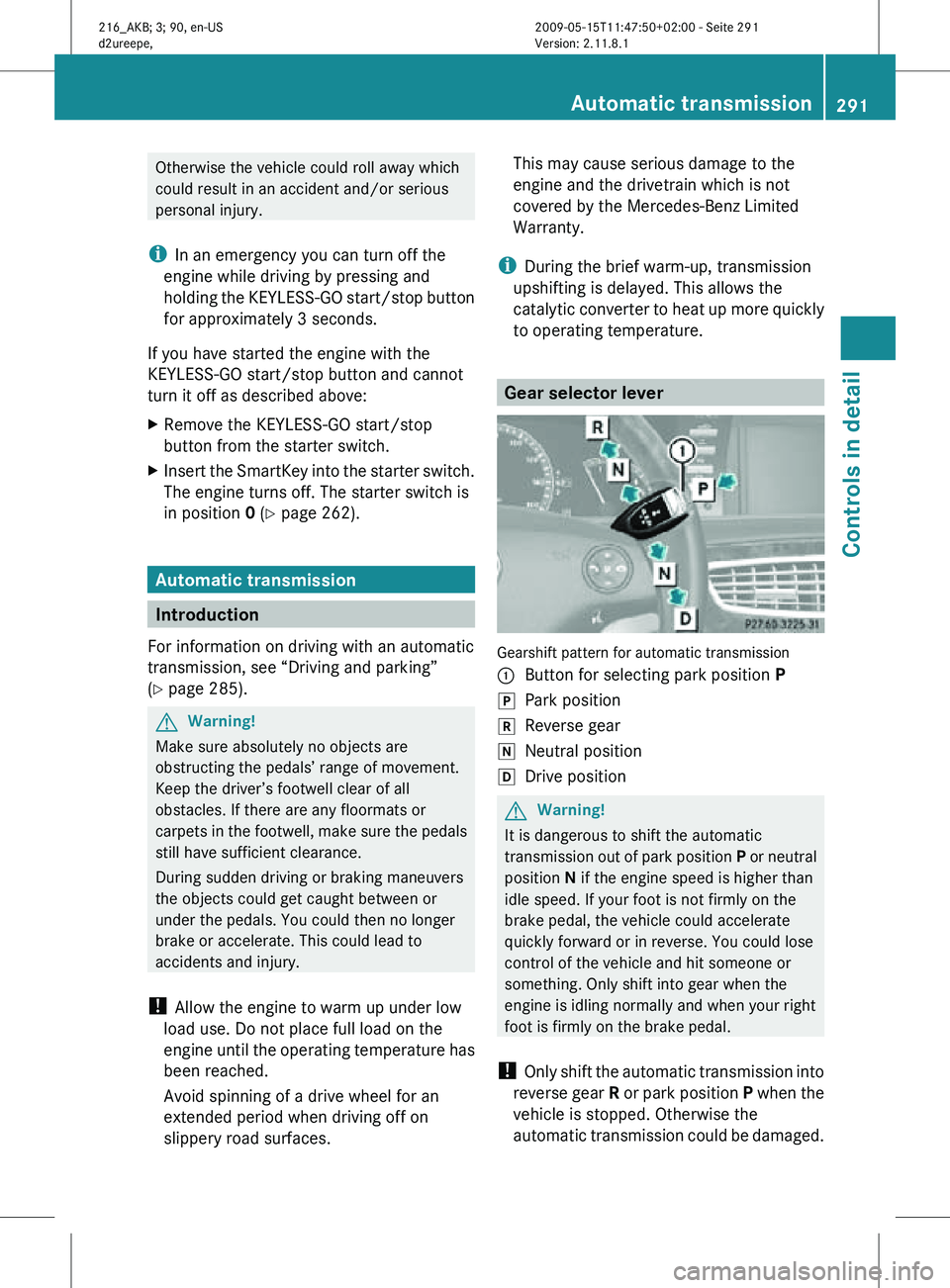
to operating temperature. Gear selector lever
Gearshift pattern for automatic transmission
:
Button for selecting park position P
j Park position
k Reverse gear
i Neutral position
h Drive position G
Warning!
It is dangerous to shift the automatic
transmission out of park position P or neutral
position N if the engine speed is higher than
idle speed. If your foot is not firmly on the
brake pedal, the vehicle could accelerate
quickly forward or in reverse. You could lose
control of the vehicle and hit someone or
something. Only shift into gear when the
engine is idling normally and when your right
foot is firmly on the brake pedal.
! Only shift the automatic transmission into
reverse gear R or park position P when the
vehicle is stopped. Otherwise the
automatic transmission could be damaged. Automatic transmission
291Controls in detail
216_AKB; 3; 90, en-US
d2ureepe, Version: 2.11.8.1 2009-05-15T11:47:50+02:00 - Seite 291 Z