lock MERCEDES-BENZ CL CLASS 2013 Owners Manual
[x] Cancel search | Manufacturer: MERCEDES-BENZ, Model Year: 2013, Model line: CL CLASS, Model: MERCEDES-BENZ CL CLASS 2013Pages: 496, PDF Size: 7.5 MB
Page 316 of 496
yellow segments showing operational
readiness = light up.
The selected transmission position
determines which warning display is active
when the engine is running.Transmission
positionWarning displayDFront area activatedRRear and front areas
activatedNIf the electric parking
brake is engaged: no
areas are activated
If the electric parking
brake is released:
rear and front areas
are activatedPNo areas activated
One or more segments light up as the vehicle
approaches an obstacle, depending on the
vehicle's distance from the obstacle.
When the first red segment lights up, you hear
an intermittent warning for about two
seconds. From the second red segment, you
hear a continuous warning. This indicates that
you have now reached the minimum distance.
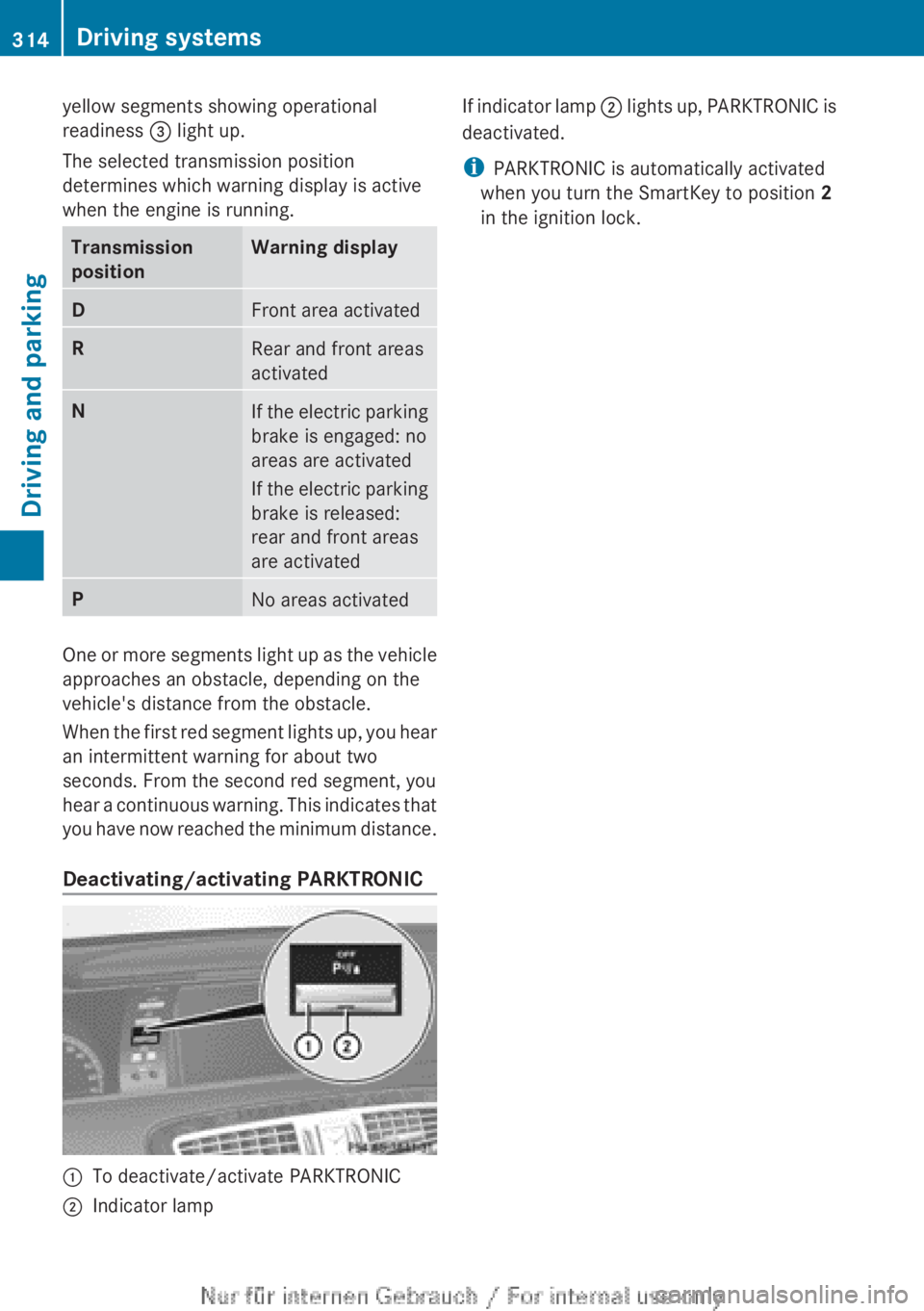
Deactivating/activating PARKTRONIC
:To deactivate/activate PARKTRONIC;Indicator lampIf indicator lamp ; lights up, PARKTRONIC is
deactivated.
i PARKTRONIC is automatically activated
when you turn the SmartKey to position 2
in the ignition lock.314Driving systemsDriving and parking
Page 322 of 496
Rthe trunk lid is open
R it is raining or snowing strongly or if it is
foggy
R it is night or if you are parking/
maneuvering your vehicle in a very dark
area
R a very bright white light is affecting the
camera
R the immediate vicinity is illuminated with
fluorescent light (the display of the
COMAND system can flicker)
R temperature changes abruptly, for example
if you drive out of the cold into a heated
garage (condensation on the lens)
R the camera lens is dirty or covered
R the rear of your vehicle is damaged
In this case, have the position and the
setting of the camera checked at a
specialist workshop. Mercedes-Benz
recommends that you consult a Mercedes-
Benz Center for this purpose.
Do not use the rear view camera in these
situations. You could otherwise injure
yourself and other people and/or cause
damage - including damage to your vehicle -
while parking/maneuvering.
Activating the rear view cameraXMake sure that the SmartKey is in position
2 in the ignition lock.XEngage reverse gear.
The area behind the vehicle is shown in the
COMAND display with guide lines.
Guide lines in the COMAND display
GWARNING
Use of rear view camera can be dangerous if
you are color-blind or have impaired color
vision.
Only use rear view camera if you can see and
distinguish all colored guidelines shown by
rear view camera on the COMAND system
display.
GWARNING
Please note that objects that do not touch the
ground may appear to be further away than
they actually are, for example:
R the bumper of a vehicle parked behind you
R the trailer drawbar
R the ball coupling of a trailer tow hitch
R the rear end of a truck
R a slanted post
In such cases, you should not use the guide
lines to judge the distance. You may misjudge
the distance, which increases the risk of
impacting the objects.
Even if the object you approach is directly on
the ground, do not approach the object any
closer than the red guide line.
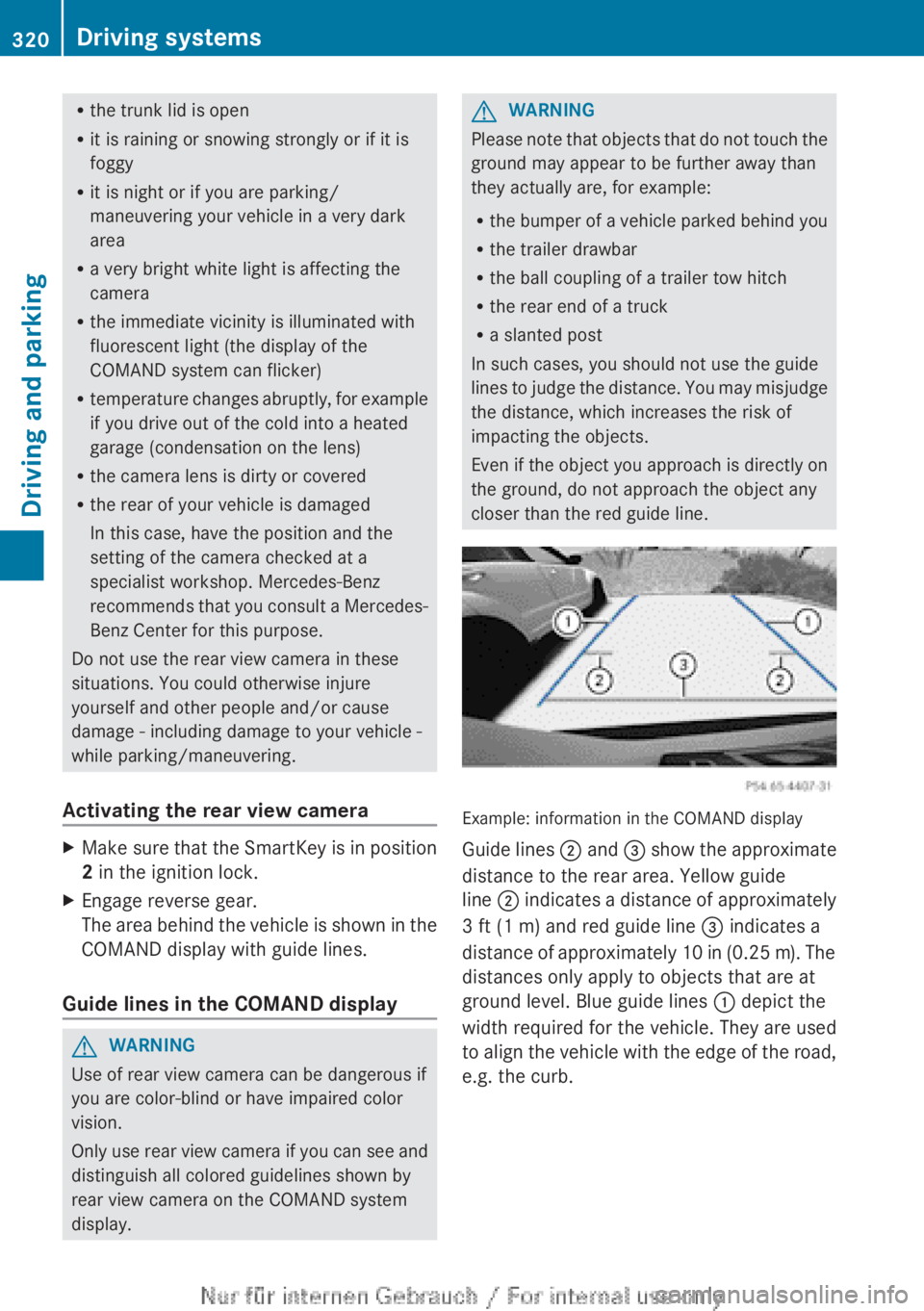
Example: information in the COMAND display
Guide lines ; and = show the approximate
distance to the rear area. Yellow guide
line ; indicates a distance of approximately
3 ft (1 m) and red guide line = indicates a
distance of approximately 10 in (0.25 m). The
distances only apply to objects that are at
ground level. Blue guide lines : depict the
width required for the vehicle. They are used
to align the vehicle with the edge of the road,
e.g. the curb.
320Driving systemsDriving and parking
Page 325 of 496
Pedestrian recognitionGWARNING
Pedestrian recognition may be impaired or
inoperative if:
R pedestrians are partially or entirely
obscured by objects, e.g. parked vehicles.
R the silhouette of the pedestrian in the Night
View Assist Plus display is incomplete or
interrupted, e.g. by powerful light
reflections.
R pedestrians do not contrast with the
surroundings.
R pedestrians are not standing upright, for
example, if they are sitting, crouching or
lying down.
i Animals are not recognized by pedestrian
recognition.
Night View Assist Plus is able to recognize
pedestrians by typical characteristics, e.g. a
silhouette in the shape of a person.
Pedestrian recognition is then switched on
automatically if:
R Night View Assist Plus is activated.
R you are driving faster than 6 mph
(10 km/h).
R the surroundings are dark, e.g. when
driving outside built-up areas without
street lighting.
If pedestrian recognition is active, the symbol
for active pedestrian recognition
( Y page 325) appears in the multifunction
display. If a pedestrian is now recognized,
they are framed and thereby highlighted. If
the pedestrian recognition system has
brought a pedestrian to your attention, look
through the windshield to evaluate the
situation. The actual distance to objects and
pedestrians cannot be gauged accurately by
looking at a screen.
It may be the case that objects are highlighted
as well as pedestrians.
Spotlight function
Pedestrian recognition with spotlight
function is activated automatically if:
R Night View Assist Plus with spotlight
function is activated.
R you are driving faster than 28 mph
(45 km/h).
R the surroundings are dark, e.g. when
driving outside built-up areas without
street lighting.
Only one person or object can be illuminated
by the spotlight at any one time.
The spotlight function will not function if:
R pedestrians or objects cannot be
recognized due to fast cornering.
R pedestrians or objects are on the driver's
side of the vehicle.
Conversely, if you switch to symmetrical
low beams ( Y page 250), pedestrians or
objects located on the passenger side of
the vehicle will not be detected.
It may be the case that pedestrians and other
objects are inadvertently illuminated.
Activating/deactivating Night View
Assist Plus with spotlight function
You can only activate Night View Assist Plus
with spotlight function if:
R the SmartKey is in position 2 in the ignition
lock.
R it is dark.
R the "Adaptive Highbeam Assist" function is
activated via the on-board computer
( Y page 350).
R the light switch is in position c.
R the combination switch is pushed forward
beyond the point of resistance.
R reverse gear has not been engaged.
Driving systems323Driving and parkingZ
Page 327 of 496
If you push the combination switch forward
beyond the point of resistance again, both
systems are reactivated.XTo deactivate: press button : again.XDeactivate Adaptive Highbeam Assist
( Y page 254).
i
If you do not wish to use the spotlight
function, you first need to deactivate Night
View Assist Plus and then activate it again
without the spotlight function
( Y page 325).
Activating/deactivating Night View
Assist Plus without spotlight function
You can only activate Night View Assist Plus
without spotlight function if:
R the SmartKey is in position 2 in the ignition
lock.
R it is dark.
R the light switch is in the c or L
position.
R reverse gear has not been engaged.
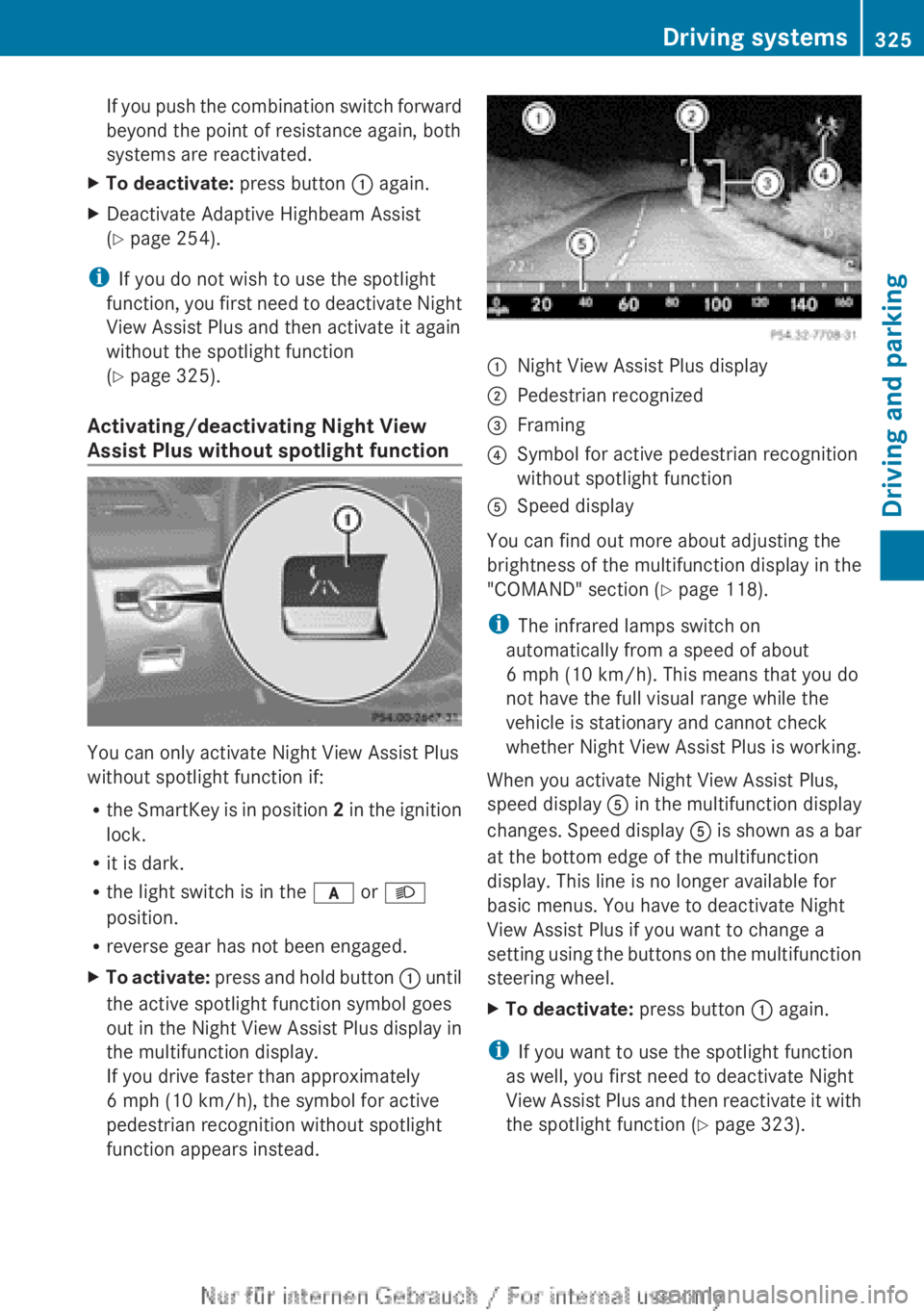
XTo activate: press and hold button : until
the active spotlight function symbol goes
out in the Night View Assist Plus display in
the multifunction display.
If you drive faster than approximately
6 mph (10 km/h), the symbol for active
pedestrian recognition without spotlight
function appears instead.:Night View Assist Plus display;Pedestrian recognized=Framing?Symbol for active pedestrian recognition
without spotlight functionASpeed display
You can find out more about adjusting the
brightness of the multifunction display in the
"COMAND" section ( Y page 118).
i The infrared lamps switch on
automatically from a speed of about
6 mph (10 km/h). This means that you do
not have the full visual range while the
vehicle is stationary and cannot check
whether Night View Assist Plus is working.
When you activate Night View Assist Plus,
speed display A in the multifunction display
changes. Speed display A is shown as a bar
at the bottom edge of the multifunction
display. This line is no longer available for
basic menus. You have to deactivate Night
View Assist Plus if you want to change a
setting using the buttons on the multifunction
steering wheel.
XTo deactivate: press button : again.
i
If you want to use the spotlight function
as well, you first need to deactivate Night
View Assist Plus and then reactivate it with
the spotlight function ( Y page 323).
Driving systems325Driving and parkingZ
Page 332 of 496
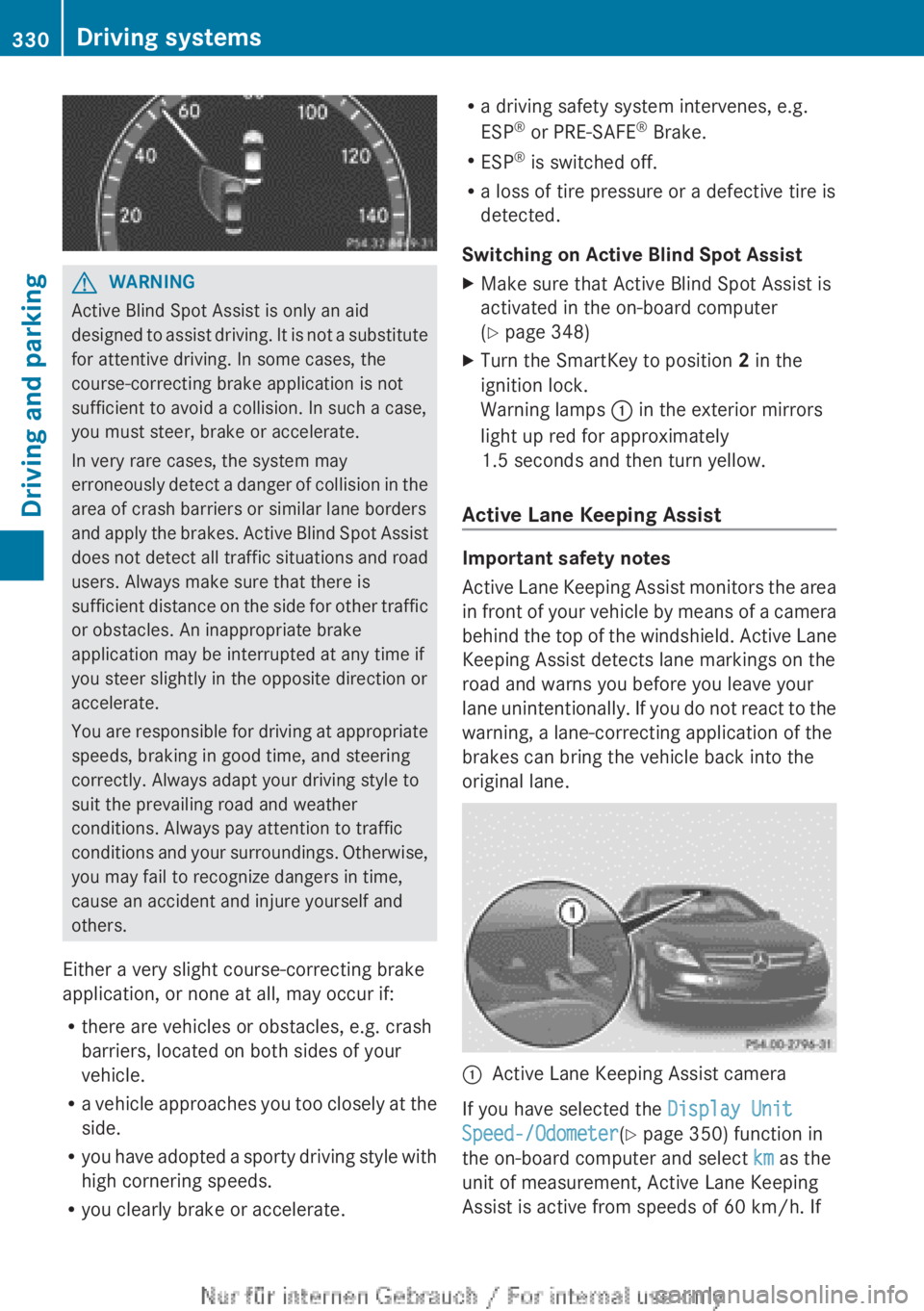
GWARNING
Active Blind Spot Assist is only an aid
designed to assist driving. It is not a substitute
for attentive driving. In some cases, the
course-correcting brake application is not
sufficient to avoid a collision. In such a case,
you must steer, brake or accelerate.
In very rare cases, the system may
erroneously detect a danger of collision in the
area of crash barriers or similar lane borders
and apply the brakes. Active Blind Spot Assist
does not detect all traffic situations and road
users. Always make sure that there is
sufficient distance on the side for other traffic
or obstacles. An inappropriate brake
application may be interrupted at any time if
you steer slightly in the opposite direction or
accelerate.
You are responsible for driving at appropriate
speeds, braking in good time, and steering
correctly. Always adapt your driving style to
suit the prevailing road and weather
conditions. Always pay attention to traffic
conditions and your surroundings. Otherwise,
you may fail to recognize dangers in time,
cause an accident and injure yourself and
others.
Either a very slight course-correcting brake
application, or none at all, may occur if:
R there are vehicles or obstacles, e.g. crash
barriers, located on both sides of your
vehicle.
R a vehicle approaches you too closely at the
side.
R you have adopted a sporty driving style with
high cornering speeds.
R you clearly brake or accelerate.
Ra driving safety system intervenes, e.g.
ESP ®
or PRE-SAFE ®
Brake.
R ESP ®
is switched off.
R a loss of tire pressure or a defective tire is
detected.
Switching on Active Blind Spot AssistXMake sure that Active Blind Spot Assist is
activated in the on-board computer
( Y page 348)XTurn the SmartKey to position 2 in the
ignition lock.
Warning lamps : in the exterior mirrors
light up red for approximately
1.5 seconds and then turn yellow.
Active Lane Keeping Assist
Important safety notes
Active Lane Keeping Assist monitors the area
in front of your vehicle by means of a camera
behind the top of the windshield. Active Lane
Keeping Assist detects lane markings on the
road and warns you before you leave your
lane unintentionally. If you do not react to the
warning, a lane-correcting application of the
brakes can bring the vehicle back into the
original lane.
:Active Lane Keeping Assist camera
If you have selected the Display Unit
Speed-/Odometer (Y page 350) function in
the on-board computer and select km as the
unit of measurement, Active Lane Keeping
Assist is active from speeds of 60 km/h. If
330Driving systemsDriving and parking
Page 339 of 496
! A display message is shown if the coolant
temperature is too high.
If the coolant temperature is over
248 ‡(120 †), do not continue driving. The
engine will otherwise be damaged.
Tachometer
The red band in the tachometer indicates the
engine's overrevving range.
! Do not drive in the overrevving range, as
this could damage the engine.
The fuel supply is interrupted to protect the
engine when the red band is reached.
Outside temperature display
The outside temperature display is in the
multifunction display ( Y page 338).
GWARNING
The outside temperature indicator is not
designed to serve as an ice-warning device
and is therefore unsuitable for that purpose.
Indicated temperatures just above the
freezing point do not guarantee that the road
surface is free of ice. The road may still be icy,
especially in wooded areas or on bridges.
Changes in the outside temperature are
displayed after a short delay.
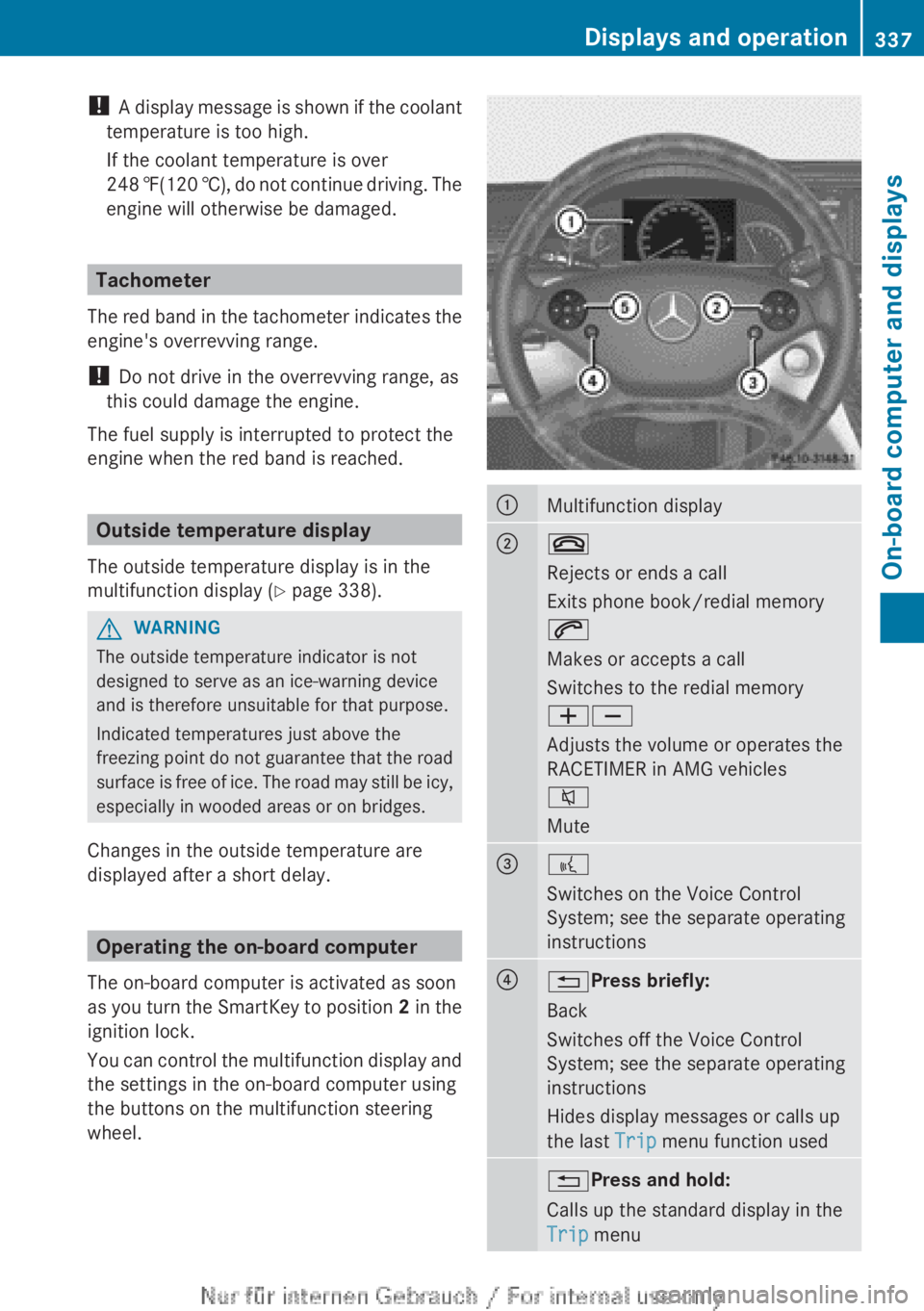
Operating the on-board computer
The on-board computer is activated as soon
as you turn the SmartKey to position 2 in the
ignition lock.
You can control the multifunction display and
the settings in the on-board computer using
the buttons on the multifunction steering
wheel.
:Multifunction display;~
Rejects or ends a call
Exits phone book/redial memory
6
Makes or accepts a call
Switches to the redial memory
WX
Adjusts the volume or operates the
RACETIMER in AMG vehicles
8
Mute=?
Switches on the Voice Control
System; see the separate operating
instructions?% Press briefly:
Back
Switches off the Voice Control
System; see the separate operating
instructions
Hides display messages or calls up
the last Trip menu function used% Press and hold:
Calls up the standard display in the
Trip menuDisplays and operation337On-board computer and displaysZ
Page 346 of 496
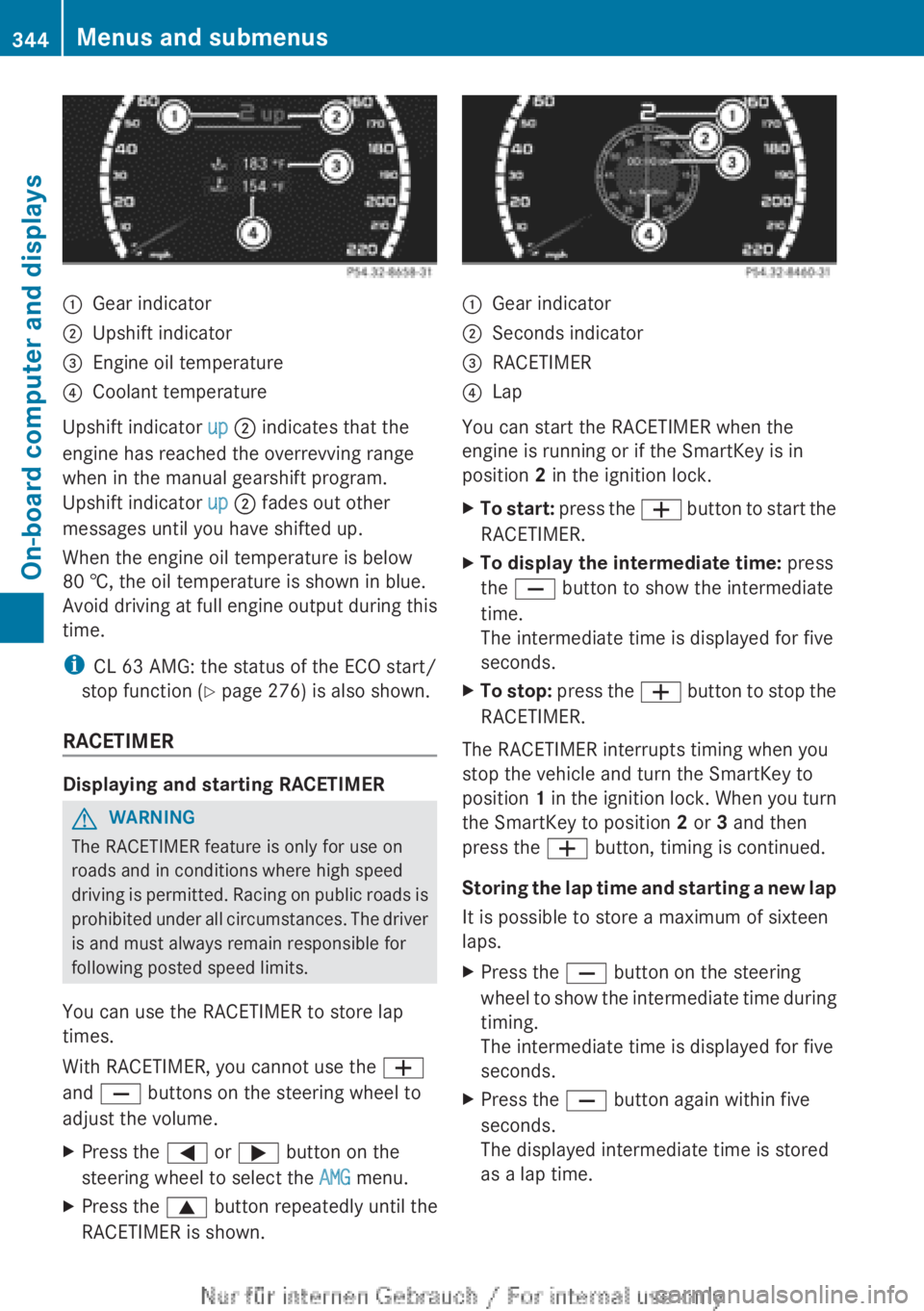
:Gear indicator;Upshift indicator=Engine oil temperature?Coolant temperature
Upshift indicator up ; indicates that the
engine has reached the overrevving range
when in the manual gearshift program.
Upshift indicator up ; fades out other
messages until you have shifted up.
When the engine oil temperature is below
80 †, the oil temperature is shown in blue.
Avoid driving at full engine output during this
time.
i CL 63 AMG: the status of the ECO start/
stop function ( Y page 276) is also shown.
RACETIMER
Displaying and starting RACETIMER
GWARNING
The RACETIMER feature is only for use on
roads and in conditions where high speed
driving is permitted. Racing on public roads is
prohibited under all circumstances. The driver
is and must always remain responsible for
following posted speed limits.
You can use the RACETIMER to store lap
times.
With RACETIMER, you cannot use the W
and X buttons on the steering wheel to
adjust the volume.
XPress the = or ; button on the
steering wheel to select the AMG menu.XPress the 9 button repeatedly until the
RACETIMER is shown.:Gear indicator;Seconds indicator=RACETIMER?Lap
You can start the RACETIMER when the
engine is running or if the SmartKey is in
position 2 in the ignition lock.
XTo start: press the W button to start the
RACETIMER.XTo display the intermediate time: press
the X button to show the intermediate
time.
The intermediate time is displayed for five
seconds.XTo stop: press the W button to stop the
RACETIMER.
The RACETIMER interrupts timing when you
stop the vehicle and turn the SmartKey to
position 1 in the ignition lock. When you turn
the SmartKey to position 2 or 3 and then
press the W button, timing is continued.
Storing the lap time and starting a new lap
It is possible to store a maximum of sixteen
laps.
XPress the X button on the steering
wheel to show the intermediate time during
timing.
The intermediate time is displayed for five
seconds.XPress the X button again within five
seconds.
The displayed intermediate time is stored
as a lap time.344Menus and submenusOn-board computer and displays
Page 352 of 496
Switching Adaptive Highbeam Assist
on/offXPress the = or ; button on the
steering wheel to select the Settings
menu.XPress the : or 9 button to select
Adapt. High-beam Asst. .XPress the a button to confirm.XTo activate/deactivate: press a
again.
Switching the additional speedometer
on/off
An additional digital speedometer can be
shown in the multifunction display.
Vehicles with a kilometer speedometer: the
digital speedometer has mph units.
Vehicles with a miles speedometer: the digital
speedometer has km/h units.
XPress the = or ; button on the
steering wheel to select the Settings
menu.XPress 9 or : to select Add.
Speedometer .XPress the a button to confirm.XPress the a button to save the setting.
Selecting the unit of measurement for
distance
The Display Unit Speed-/Odometer:
function allows you to choose whether
certain displays appear in kilometers or miles.
The selected unit of measurement for
distance applies to:
R analog speedometers
R digital speedometers in the Trip menu
R odometer and the trip odometer
R Trip computer
R navigation instructions in the Navi menu
R DISTRONIC PLUS
R ASSYST PLUS service interval display
The digital speedometer shows alternative
speed units ( Y page 350).XPress the = or ; button on the
steering wheel to select the Settings
menu.XPress 9 or : to select Units.XPress a to confirm.XPress the a button to save the setting.
The unit switches km/h and mph.
Activating/deactivating the acoustic
locking verification signal
If you activate the Acoustic Lock Feedb.
function, an audible signal sounds depending
on the vehicle's date of manufacture:
R when locking
or
R once when unlocking and three times when
locking
XPress the = or ; button on the
steering wheel to select the Settings
menu.XPress the 9 or : button to select
Acoustic Lock Feedb.XPress the a button to confirm.XTo activate/deactivate: press a
again.
Activating/deactivating the radar
sensor system
The following systems are switched off when
the radar sensor system is deactivated:
R DISTRONIC PLUS ( Y page 298)
R BAS PLUS ( Y page 66)
R PRE-SAFE ®
Brake ( Y page 68)
R Active Blind Spot Assist ( Y page 327)
XPress the = or ; button on the
steering wheel to select the Settings
menu.XPress 9 or : to select Radar
Sensors .350Menus and submenusOn-board computer and displays
Page 355 of 496
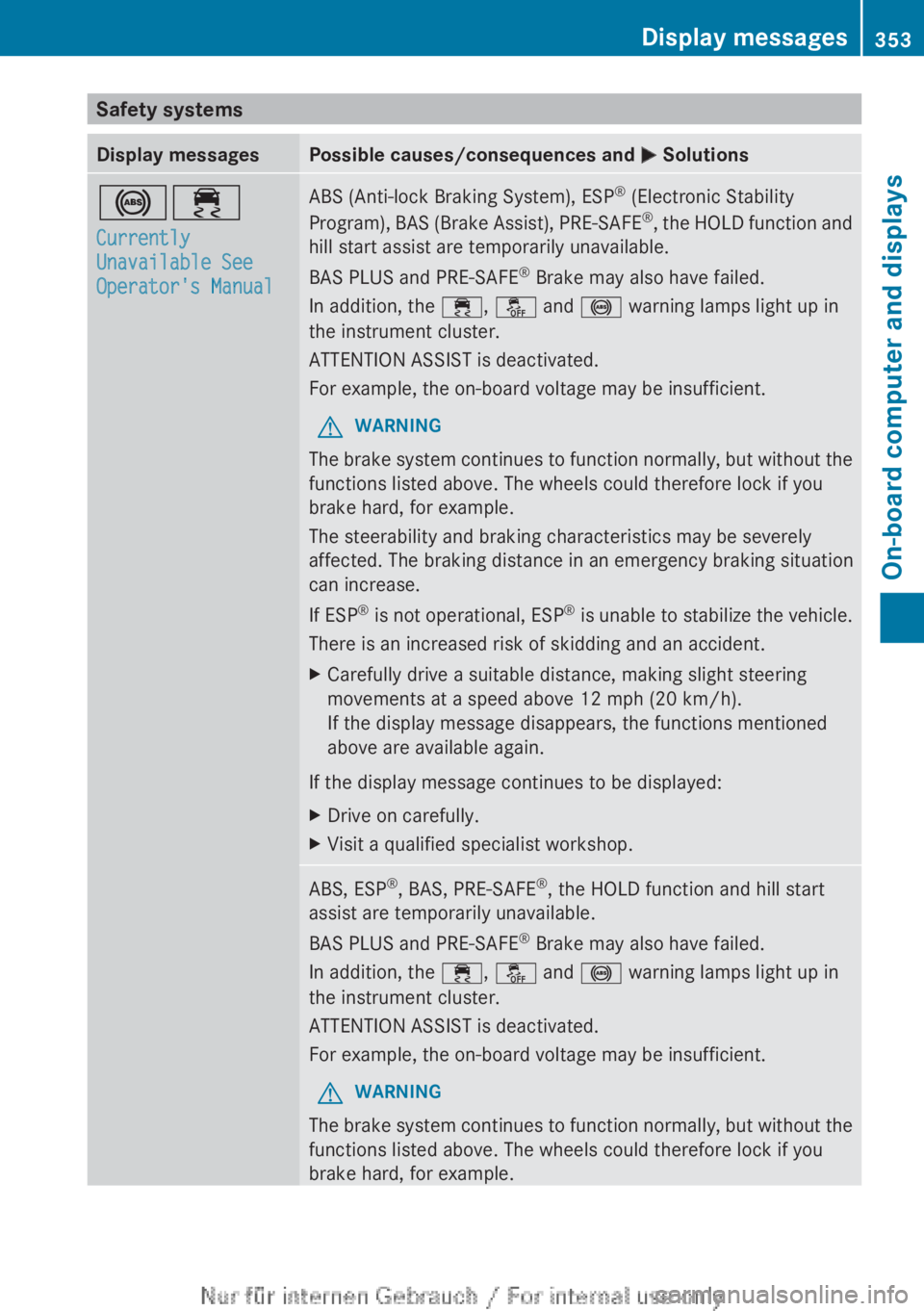
Safety systemsDisplay messagesPossible causes/consequences and M Solutions!÷
Currently
Unavailable See
Operator's ManualABS (Anti-lock Braking System), ESP ®
(Electronic Stability
Program), BAS (Brake Assist), PRE-SAFE ®
, the HOLD function and
hill start assist are temporarily unavailable.
BAS PLUS and PRE-SAFE ®
Brake may also have failed.
In addition, the ÷, å and ! warning lamps light up in
the instrument cluster.
ATTENTION ASSIST is deactivated.
For example, the on-board voltage may be insufficient.GWARNING
The brake system continues to function normally, but without the
functions listed above. The wheels could therefore lock if you
brake hard, for example.
The steerability and braking characteristics may be severely
affected. The braking distance in an emergency braking situation
can increase.
If ESP ®
is not operational, ESP ®
is unable to stabilize the vehicle.
There is an increased risk of skidding and an accident.
XCarefully drive a suitable distance, making slight steering
movements at a speed above 12 mph (20 km/h).
If the display message disappears, the functions mentioned
above are available again.
If the display message continues to be displayed:
XDrive on carefully.XVisit a qualified specialist workshop.ABS, ESP ®
, BAS, PRE-SAFE ®
, the HOLD function and hill start
assist are temporarily unavailable.
BAS PLUS and PRE-SAFE ®
Brake may also have failed.
In addition, the ÷, å and ! warning lamps light up in
the instrument cluster.
ATTENTION ASSIST is deactivated.
For example, the on-board voltage may be insufficient.GWARNING
The brake system continues to function normally, but without the
functions listed above. The wheels could therefore lock if you
brake hard, for example.
Display messages353On-board computer and displaysZ
Page 356 of 496
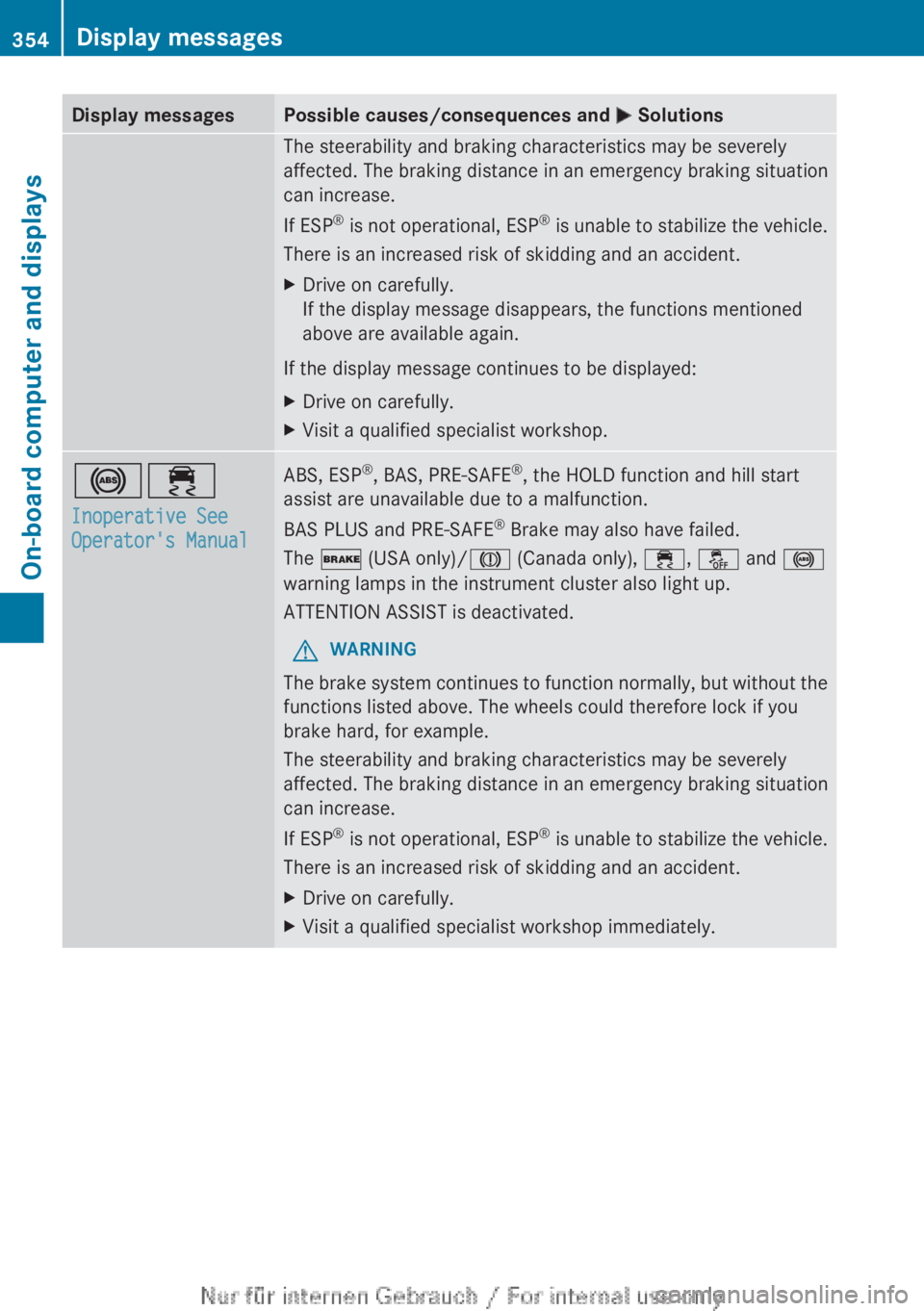
Display messagesPossible causes/consequences and M SolutionsThe steerability and braking characteristics may be severely
affected. The braking distance in an emergency braking situation
can increase.
If ESP ®
is not operational, ESP ®
is unable to stabilize the vehicle.
There is an increased risk of skidding and an accident.XDrive on carefully.
If the display message disappears, the functions mentioned
above are available again.
If the display message continues to be displayed:
XDrive on carefully.XVisit a qualified specialist workshop.!÷
Inoperative See
Operator's ManualABS, ESP ®
, BAS, PRE-SAFE ®
, the HOLD function and hill start
assist are unavailable due to a malfunction.
BAS PLUS and PRE-SAFE ®
Brake may also have failed.
The $ (USA only)/ J (Canada only), ÷, å and !
warning lamps in the instrument cluster also light up.
ATTENTION ASSIST is deactivated.GWARNING
The brake system continues to function normally, but without the
functions listed above. The wheels could therefore lock if you
brake hard, for example.
The steerability and braking characteristics may be severely
affected. The braking distance in an emergency braking situation
can increase.
If ESP ®
is not operational, ESP ®
is unable to stabilize the vehicle.
There is an increased risk of skidding and an accident.
XDrive on carefully.XVisit a qualified specialist workshop immediately.354Display messagesOn-board computer and displays