engine MERCEDES-BENZ CL COUPE 2009 User Guide
[x] Cancel search | Manufacturer: MERCEDES-BENZ, Model Year: 2009, Model line: CL COUPE, Model: MERCEDES-BENZ CL COUPE 2009Pages: 421, PDF Size: 10.78 MB
Page 53 of 421
The brakes will work normally again when:
R you release the brake pedal
R no obstacle is detected in front of your
vehicle
R there is no longer any danger of a rear-end
collision
BAS PLUS is then deactivated.
At speeds up to approximately 70 km/h, BAS
PLUS can also detect stationary obstacles,
for example, stopped or parked vehicles.
Vehicles with COMAND and a navigation sys-
tem*: the radar sensor system is switched off
automatically in the vicinity of radio telescope
facilities (Y page 411).
For BAS PLUS to assist you when driving, the
radar sensor system must be switched on and
operational. You can check this by activating
Distronic Plus* (Y page 235) or via the
"Radar sensor" menu in the on-board com-
puter (Y page 226). G
Risk of accident
Only clearly identified obstacles will initiate
braking assistance by BAS PLUS. In particular,
the detection of obstacles can be restricted if
there is:
R dirt on the sensors or the sensors are cov-
ered
R snow or heavy rain
R interference by other radar sources
R strong radar reflections, for example in
multi-storey garages
BAS PLUS does not react to people or ani-
mals, oncoming vehicles and crossing traffic.
BAS PLUS may not detect narrow vehicles
such as motorcycles and vehicles driving on
a different line.
Following a collision or crash-related damage
to the front end of the vehicle, have the con-
figuration and operation of the radar sensors
checked at a Mercedes-Benz Service Centre.
If BAS PLUS is not available due to a malfunc-
tion in the radar sensor system, the braking system remains available with full brake
boosting effect and BAS. Adaptive brake lamps
i Adaptive brake lamps are only available in
certain countries.
If you brake sharply from a speed of more
than 50 km/h or if braking is assisted by BAS
or BAS PLUS*, the brake lamps flash rapidly.
In this way, traffic travelling behind you is
warned in an even more noticeable manner.
If you brake sharply from a speed of more
than 70 km/h to a standstill, the hazard warn-
ing lamps are activated automatically. If the
brakes are applied again, the brake lamps
light up continuously. The hazard warning
lamps switch off automatically if you travel
faster than 10 km/h. You can also switch off
the hazard warning lamps using the hazard
warning switch button (Y page 196). ESP
®
(Electronic Stability Program)
ESP ®
monitors driving stability and traction,
i.e. power transmission between tyres and
the road surface.
If ESP ®
detects that the vehicle is deviating
from the direction desired by the driver, one
or more wheels are braked to stabilise the
vehicle. If necessary, the engine output is also
modified to keep the vehicle on the desired
course within physical limits. ESP ®
assists
the driver when pulling away on wet or slip-
pery roads. ESP ®
can also stabilise the vehi-
cle when braking.
When ESP ®
intervenes, the ÷warning
lamp flashes in the instrument cluster. G
Risk of accident
If the ÷ warning lamp in the instrument
cluster flashes, proceed as follows: 50
Driving safety systemsSafety
* optional
216_AKB; 2; 3, en-GB
bjanott,
Version: 2.11.7.7 2009-02-27T14:54:17+01:00 - Seite 50
Dateiname: 6515230602_buchblock.pdf; erzeugt am 04. Mar 2009 11:14:50; WK
Page 54 of 421
R
Under no circumstances should you deac-
tivate ESP ®
.
R When pulling away, only depress the accel-
erator pedal as far as is necessary.
R Adapt your driving style to the prevailing
road and weather conditions.
The vehicle may otherwise begin to skid.
If you drive too fast, ESP ®
cannot reduce the
risk of an accident. ESP ®
cannot override the
laws of physics.
! If the vehicle is to be towed with the front
or rear axle raised, the ignition must be
switched off (key in position 0or 1in the
ignition lock). Application of the brakes by
ESP ®
could otherwise destroy the brake
system on the front or rear axle.
! Vehicles with 4MATIC* may not be towed
with the front or rear axle raised.
i Only use wheels with the recommended
tyre sizes. Only then will ESP ®
function
properly.
ETS (Electronic Traction Support) Traction control is part of ESP
®
.
Traction control brakes the drive wheels indi-
vidually if they spin. This enables you to pull
away and accelerate on slippery surfaces, for
example, if the road surface is slippery on one
side.
Traction control remains active when you
deactivate ESP ®
. G
Risk of accident
Traction control cannot reduce the risk of an
accident if you drive too fast. Traction control
cannot override the laws of physics.
Activating/deactivating ESP ®ESP
®
is activated automatically when the
engine is running. It may be best to deactivate ESP
®
in the fol-
lowing situations:
R when using snow chains
R in deep snow
R on sand or gravel G
Risk of accident
Activate ESP ®
as soon as the situations
described above no longer apply. ESP ®
will
otherwise not be able to stabilise the vehicle
if the vehicle starts to skid or a wheel starts
to spin.
If you deactivate ESP ®
:
R ESP ®
no longer improves driving stability.
R engine torque is not limited and the drive
wheels are able to spin. The spinning
wheels produce a cutting effect for better
traction.
R traction control is still activated.
R ESP ®
still provides support when you
brake.
i If ESP ®
is deactivated and one or more
wheels start to spin, the ÷warning lamp
in the instrument cluster flashes. In such
situations, ESP ®
will not stabilise the vehi-
cle.
X To deactivate: (Ypage 224).
The å warning lamp in the instrument
cluster lights up. G
Risk of accident
If the å warning lamp in the instrument
cluster lights up when the engine is running,
ESP ®
is deactivated or is unavailable due to a
malfunction. The risk that your vehicle may
start to skid then increases in certain situa-
tions.
Always adapt your driving style to the prevail-
ing road and weather conditions. Driving safety systems
51Safety
* optional
216_AKB; 2; 3, en-GB
bjanott,
Version: 2.11.7.7 2009-02-27T14:54:17+01:00 - Seite 51 Z
Dateiname: 6515230602_buchblock.pdf; erzeugt am 04. Mar 2009 11:14:50; WK
Page 57 of 421
X
To activate/deactivate: activate or deac-
tivate PRE-SAFE ®
Brake in the on-board
computer (Y page 224).
After activation, the Äsymbol is dis-
played on the left in the driver display.
Vehicles with COMAND and a navigation sys-
tem*: the radar sensor system is switched off
automatically in the vicinity of radio telescope
facilities (Y page 411).
For PRE-SAFE ®
Brake to assist you when driv-
ing, the radar sensor system must be
switched on and operational.
PRE-SAFE ®
Brake does not always clearly
identify complex traffic situations properly.
You can terminate the intervention of PRE-
SAFE ®
Brake in a non-critical driving situation
at any time if:
R an acoustic and visual warning occurs
R the vehicle brakes gently
To end this you can either depress the accel-
erator pedal further, activate kickdown or
release the brake pedal.
The braking intervention of PRE-SAFE ®
Brake
is ended automatically if:
R you manoeuvre to avoid the obstacle.
R you drive slower than approximately
15 km/h.
R there is no longer an obstacle detected in
front of your vehicle.
R there is no longer any danger of a collision.
i While Distronic Plus is activated, PRE-
SAFE ®
Brake remains passive.
Following a collision or crash-related damage
to the front end of the vehicle, have the con-
figuration and operation of the radar sensors
checked. Choose a qualified specialist work-
shop for this which has the necessary spe-
cialist knowledge and tools for the work
required. Mercedes-Benz recommends that
you use a Mercedes-Benz Service Centre for
this purpose. Anti-theft systems
Immobiliser
The immobiliser prevents your vehicle from
being started without the correct key.
Activating the immobiliser X
With the key: remove the key from the
ignition lock.
X With KEYLESS GO*: press the start/stop
button on the dashboard.
The engine switches off.
Deactivating the immobiliser X
With the key: turn the key to position 2in
the ignition lock.
X With KEYLESS GO*: press the start/stop
button on the dashboard twice without
depressing the brake.
i The immobiliser is always deactivated
when you start the engine. ATA* (anti-theft alarm system)
A visual and audible alarm is triggered when
the alarm system is primed and you open:
R a door
R a door using the emergency key element
R the boot lid
R the bonnet
The alarm is not switched off even if you close
an open door again. 54
Anti-theft systemsSafety
* optional
216_AKB; 2; 3, en-GB
bjanott,
Version: 2.11.7.7 2009-02-27T14:54:17+01:00 - Seite 54
Dateiname: 6515230602_buchblock.pdf; erzeugt am 04. Mar 2009 11:14:50; WK
Page 135 of 421
jam, for example. If a quicker route is deter-
mined due to a received RDS-TMC traffic
announcement, the navigation system
changes the route. If possible, it will bypass
blockages.
R Short route: COMAND calculates a route
with the shortest possible (minimised) dis-
tance regarding distance and driving time.
X Select NaviQMode:
The mode list appears.
The current setting is indicated by a #dot.
X To make a setting: selectFastest
route orDynamic route orShort
route.
X To exit the menu: slideXVY.
i COMAND calculates a new route if you
change the route type setting with route
guidance active. If you change the route
type setting when route guidance is inac-
tive, COMAND uses the new setting for the
next route guidance.
Setting route options This function allows you to set the following
options for route guidance:
R Avoid motorways
R Avoid toll roads
R Avoid routes requiring special
toll sticker
R Avoid tunnels
R Avoid ferries
R Avoid motorail trains
X Select NaviQMode:
The mode list appears.
The selected option is indicated by a O
tick. It is possible to select more than one
option.
X To activate or deactivate an option:
select the desired option.
The option is selected or deselected,
depending on the previous status. X
To exit the menu: slideXVY.
COMAND will verify whether it can imple-
ment the options if you have selected them
with route guidance active. If it can,
COMAND calculates a new route while
implementing the options selected. If it
cannot, you will see and hear a correspond-
ing message.
X Select OK.
COMAND calculates a new route. Only
those options which can be implemented
are considered. Installing map software
The digital maps generated by the map soft-
ware become outdated in the same way as
conventional road maps. Optimum route
guidance can only be provided by the naviga-
tion system in conjunction with the most up-
to-date map software. Information about new
map software versions can be obtained from
a Mercedes-Benz Service Centre.
You can install new map software, which may
consist of one of more DVDs (depending on
the scope), yourself.
The installation process can take between
10 and 120 minutes, depending on the scope
of the map software. If the radio is switched
on before you start the installation process,
you can still adjust the volume. You can also
use COMAND to operate the automatic air-
conditioning system and to cancel the proc-
ess. Other functions are not operational. If
possible, carry out the installation process
when the vehicle is stationary. The DVD read
speed is higher when the vehicle is stationary
than when it is in motion, so less time is
required. If the starter battery is not suffi-
ciently charged, COMAND may end the proc-
ess automatically, in order to protect the bat-
tery. Therefore, let the engine idle during the
installation process. 132
Navigation system* (introduction)COMAND
* optional
216_AKB; 2; 3, en-GB
bjanott,
Version: 2.11.7.7 2009-02-27T14:54:17+01:00 - Seite 132
Dateiname: 6515230602_buchblock.pdf; erzeugt am 04. Mar 2009 11:15:14; WK
Page 136 of 421
G
Risk of poisoning
Never leave the engine running in enclosed
spaces. The exhaust gases contain carbon
monoxide. Inhaling exhaust fumes consti-
tutes a health hazard and could lead to loss
of consciousness or even death.
Displaying information on the currently
used map version X
Select NaviQMap version.
Notes on handling DVDs R
Only hold DVDs by the edge.
R Handle DVDs carefully to prevent reading
errors.
R Avoid getting scratches, fingerprints and
dust on DVDs.
R Use a commercially-available cleaning
cloth to clean discs. Do not wipe them with
a circular motion, but only in straight lines
from the centre outwards.
R Place DVDs back in their cases after use.
R Protect DVDs from heat and direct sunlight.
Map software copy protection Map software for COMAND is subject to a
charge. The map software has just one acti-
vation code which is usable in one vehicle
only, and is not transferable. You can obtain
the six digit activation code from your
Mercedes-Benz Service Centre. If you have
lost the activation code, or if COMAND does
not accept the activation code that you have
received, ask at your Mercedes-Benz Service
Centre.
Your vehicle is supplied with map software at
the factory. Depending on the country, the
map software for your region is either pre-
installed (Europe/USA), or the map software
is provided on a DVD (all other countries). You
do not require an activation code for the map
software that is provided with your vehicle. If the map software on your vehicle has been
installed at the factory and you wish to rein-
stall it, this also does not necessitate entry of
the activation code.
Installation process X
Insert the map software DVD into the single
DVD drive (Y page 77) or the DVD
changer* (Y page 78).
COMAND checks the DVD and shows a
corresponding message in the display.
The map software is not compatible with
the navigation system
You will see a message that the installation of
the map software is not possible.
X To confirm the message: pressW.
COMAND ejects the DVD.
X Take the DVD out of the slot.
X Insert a DVD which is compatible with the
vehicle’s navigation system.
The map software is not compatible with
the current system software
You will see a message that the system soft-
ware and the map software are not compati-
ble.
X To confirm the message: pressW.
COMAND ejects the DVD.
X Take the DVD out of the slot.
X Have the system software updated at a
Mercedes-Benz Service Centre.
The map software cannot be installed until
the system software has been updated.
Map software compatible with the navi-
gation system and the current system
software
COMAND checks whether the map data on
the DVD is already installed.
Map data is already installed
You will see a message that the map data is
already installed and a prompt will appear
asking you whether you wish to continue with
the installation. Navigation system* (introduction)
133COMAND
* optional
216_AKB; 2; 3, en-GB
bjanott,
Version: 2.11.7.7 2009-02-27T14:54:17+01:00 - Seite 133 Z
Dateiname: 6515230602_buchblock.pdf; erzeugt am 04. Mar 2009 11:15:14; WK
Page 173 of 421
X
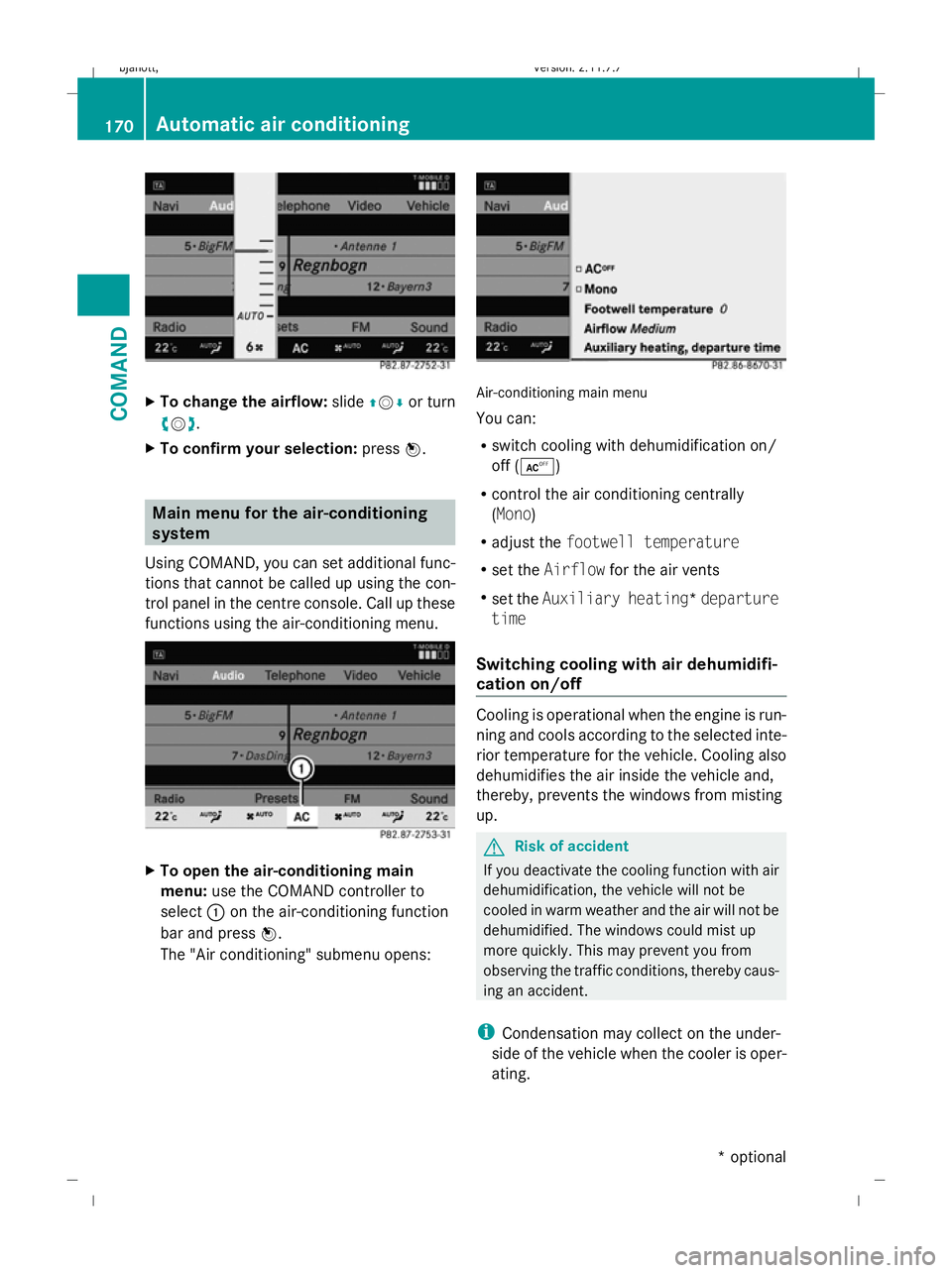
To change the airflow: slideZVÆor turn
cV d.
X To confirm your selection: pressW. Main menu for the air-conditioning
system
Using COMAND, you can set additional func-
tions that cannot be called up using the con-
trol panel in the centre console. Call up these
functions using the air-conditioning menu. X
To open the air-conditioning main
menu: use the COMAND controller to
select :on the air-conditioning function
bar and press W.
The "Air conditioning" submenu opens: Air-conditioning main menu
You can:
R
switch cooling with dehumidification on/
off (Æ)
R control the air conditioning centrally
(Mono)
R adjust the footwell temperature
R set the Airflow for the air vents
R set the Auxiliary heating* departure
time
Switching cooling with air dehumidifi-
cation on/off Cooling is operational when the engine is run-
ning and cools according to the selected inte-
rior temperature for the vehicle. Cooling also
dehumidifies the air inside the vehicle and,
thereby, prevents the windows from misting
up. G
Risk of accident
If you deactivate the cooling function with air
dehumidification, the vehicle will not be
cooled in warm weather and the air will not be
dehumidified. The windows could mist up
more quickly. This may prevent you from
observing the traffic conditions, thereby caus-
ing an accident.
i Condensation may collect on the under-
side of the vehicle when the cooler is oper-
ating. 170
Automatic air conditioningCOMAND
* optional
216_AKB; 2; 3, en-GB
bjanott,
Version: 2.11.7.7 2009-02-27T14:54:17+01:00 - Seite 170
Dateiname: 6515230602_buchblock.pdf; erzeugt am 04. Mar 2009 11:15:32; WK
Page 181 of 421
Opening and closing
Key
The key centrally locks/unlocks:
R the doors
R the boot lid
R the fuel filler flap G
Risk of accident
If children are left unsupervised in the vehicle,
they could:
R open a door from the inside at any time,
even if it has been locked
R start the vehicle using a key which has been
left in the vehicle
R release the parking brake
They could thereby endanger themselves and
others. Never leave children unsupervised in
the vehicle. Always take the key with you
when leaving the vehicle, even if you are only
leaving it for a short time. :
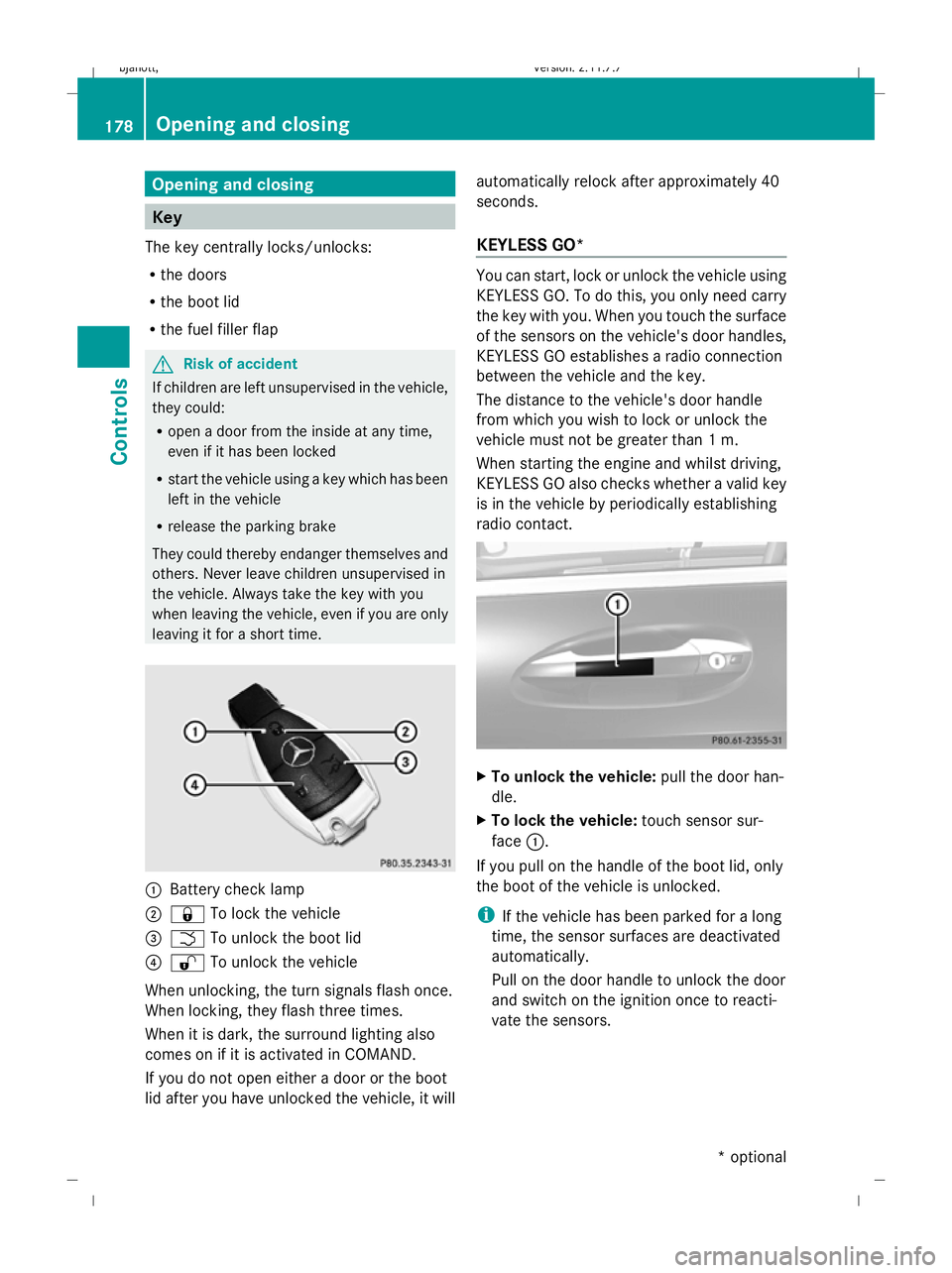
Battery check lamp
; & To lock the vehicle
= F To unlock the boot lid
? % To unlock the vehicle
When unlocking, the turn signals flash once.
When locking, they flash three times.
When it is dark, the surround lighting also
comes on if it is activated in COMAND.
If you do not open either a door or the boot
lid after you have unlocked the vehicle, it will automatically relock after approximately 40
seconds.
KEYLESS GO* You can start, lock or unlock the vehicle using
KEYLESS GO. To do this, you only need carry
the key with you. When you touch the surface
of the sensors on the vehicle's door handles,
KEYLESS GO establishes a radio connection
between the vehicle and the key.
The distance to the vehicle's door handle
from which you wish to lock or unlock the
vehicle must not be greater than 1 m.
When starting the engine and whilst driving,
KEYLESS GO also checks whether a valid key
is in the vehicle by periodically establishing
radio contact. X
To unlock the vehicle: pull the door han-
dle.
X To lock the vehicle: touch sensor sur-
face :.
If you pull on the handle of the boot lid, only
the boot of the vehicle is unlocked.
i If the vehicle has been parked for a long
time, the sensor surfaces are deactivated
automatically.
Pull on the door handle to unlock the door
and switch on the ignition once to reacti-
vate the sensors. 178
Opening and closingControls
* optional
216_AKB; 2; 3, en-GB
bjanott,
Version: 2.11.7.7 2009-02-27T14:54:17+01:00 - Seite 178
Dateiname: 6515230602_buchblock.pdf; erzeugt am 04. Mar 2009 11:15:36; WK
Page 183 of 421
X
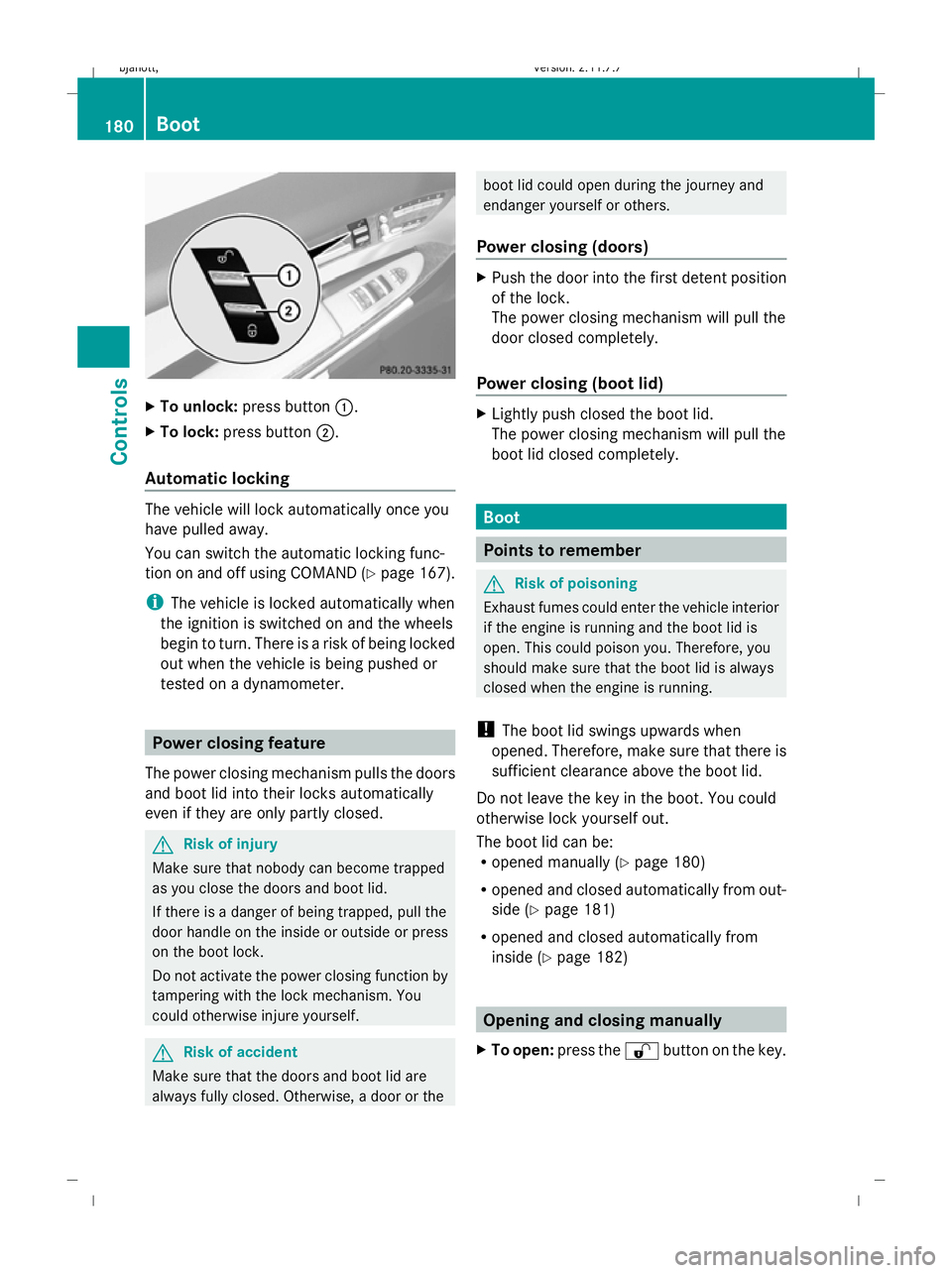
To unlock: press button :.
X To lock: press button ;.
Automatic locking The vehicle will lock automatically once you
have pulled away.
You can switch the automatic locking func-
tion on and off using COMAND (Y page 167).
i The vehicle is locked automatically when
the ignition is switched on and the wheels
begin to turn. There is a risk of being locked
out when the vehicle is being pushed or
tested on a dynamometer. Power closing feature
The power closing mechanism pulls the doors
and boot lid into their locks automatically
even if they are only partly closed. G
Risk of injury
Make sure that nobody can become trapped
as you close the doors and boot lid.
If there is a danger of being trapped, pull the
door handle on the inside or outside or press
on the boot lock.
Do not activate the power closing function by
tampering with the lock mechanism. You
could otherwise injure yourself. G
Risk of accident
Make sure that the doors and boot lid are
always fully closed. Otherwise, a door or the boot lid could open during the journey and
endanger yourself or others.
Power closing (doors) X
Push the door into the first detent position
of the lock.
The power closing mechanism will pull the
door closed completely.
Power closing (boot lid) X
Lightly push closed the boot lid.
The power closing mechanism will pull the
boot lid closed completely. Boot
Points to remember
G
Risk of poisoning
Exhaust fumes could enter the vehicle interior
if the engine is running and the boot lid is
open. This could poison you. Therefore, you
should make sure that the boot lid is always
closed when the engine is running.
! The boot lid swings upwards when
opened. Therefore, make sure that there is
sufficient clearance above the boot lid.
Do not leave the key in the boot. You could
otherwise lock yourself out.
The boot lid can be:
R opened manually (Y page 180)
R opened and closed automatically from out-
side (Y page 181)
R opened and closed automatically from
inside (Y page 182) Opening and closing manually
X To open: press the %button on the key. 180
BootControls
216_AKB; 2; 3, en-GB
bjanott,
Version: 2.11.7.7 2009-02-27T14:54:17+01:00 - Seite 180
Dateiname: 6515230602_buchblock.pdf; erzeugt am 04. Mar 2009 11:15:36; WK
Page 185 of 421
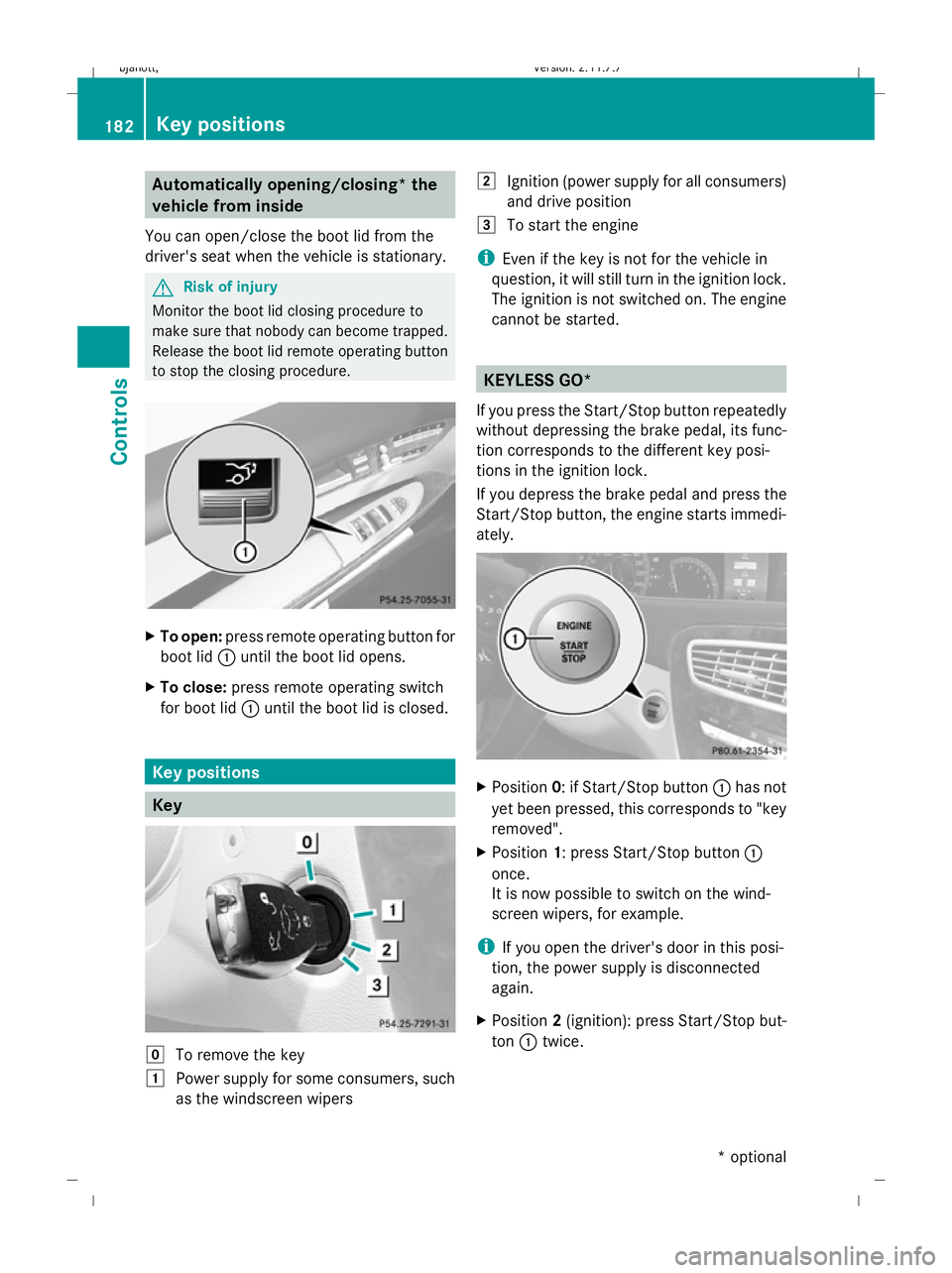
Automatically opening/closing* the
vehicle from inside
You can open/close the boot lid from the
driver's seat when the vehicle is stationary. G
Risk of injury
Monitor the boot lid closing procedure to
make sure that nobody can become trapped.
Release the boot lid remote operating button
to stop the closing procedure. X
To open: press remote operating button for
boot lid :until the boot lid opens.
X To close: press remote operating switch
for boot lid :until the boot lid is closed. Key positions
Key
g
To remove the key
1 Power supply for some consumers, such
as the windscreen wipers 2
Ignition (power supply for all consumers)
and drive position
3 To start the engine
i Even if the key is not for the vehicle in
question, it will still turn in the ignition lock.
The ignition is not switched on. The engine
cannot be started. KEYLESS GO*
If you press the Start/Stop button repeatedly
without depressing the brake pedal, its func-
tion corresponds to the different key posi-
tions in the ignition lock.
If you depress the brake pedal and press the
Start/Stop button, the engine starts immedi-
ately. X
Position 0: if Start/Stop button :has not
yet been pressed, this corresponds to "key
removed".
X Position 1: press Start/Stop button :
once.
It is now possible to switch on the wind-
screen wipers, for example.
i If you open the driver's door in this posi-
tion, the power supply is disconnected
again.
X Position 2(ignition): press Start/Stop but-
ton :twice. 182
Key positionsCont
rols
* option al
216_AKB; 2; 3, en-GB
bjanott
,V ersion: 2.11.7.7
2009-02-27T14:54:17+01:00 - Seite 182
Dateiname: 6515230602_buchblock.pdf; erzeugt am 04. Mar 2009 11:15:38; WK
Page 196 of 421
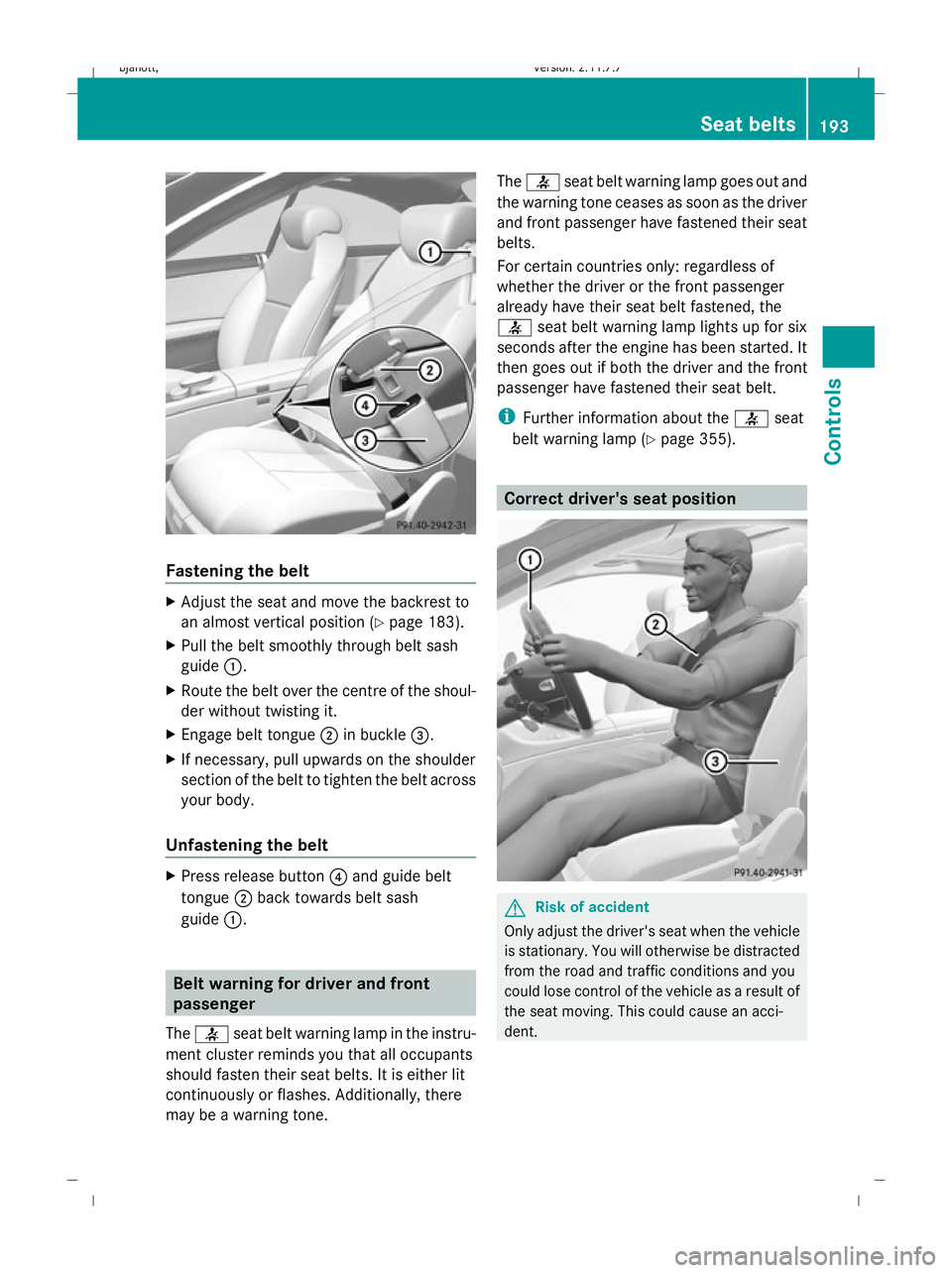
Fastening the belt
X
Adjust the seat and move the backrest to
an almost vertical position (Y page 183).
X Pull the belt smoothly through belt sash
guide :.
X Route the belt over the centre of the shoul-
der without twisting it.
X Engage belt tongue ;in buckle =.
X If necessary, pull upwards on the shoulder
section of the belt to tighten the belt across
your body.
Unfastening the belt X
Press release button ?and guide belt
tongue ;back towards belt sash
guide :. Belt warning for driver and front
passenger
The 7 seat belt warning lamp in the instru-
ment cluster reminds you that all occupants
should fasten their seat belts. It is either lit
continuously or flashes. Additionally, there
may be a warning tone. The
7 seat belt warning lamp goes out and
the warning tone ceases as soon as the driver
and front passenger have fastened their seat
belts.
For certain countries only: regardless of
whether the driver or the front passenger
already have their seat belt fastened, the
7 seat belt warning lamp lights up for six
seconds after the engine has been started. It
then goes out if both the driver and the front
passenger have fastened their seat belt.
i Further information about the 7seat
belt warning lamp (Y page 355). Correct driver's seat position
G
Risk of accident
Only adjust the driver's seat when the vehicle
is stationary. You will otherwise be distracted
from the road and traffic conditions and you
could lose control of the vehicle as a result of
the seat moving. This could cause an acci-
dent. Seat belts
193Controls
216_AKB; 2; 3, en-GB
bjanott, Version: 2.11.7.7 2009-02-27T14:54:17+01:00 - Seite 193 Z
Dateiname: 6515230602_buchblock.pdf; erzeugt am 04. Mar 2009 11:15:43; WK