buttons MERCEDES-BENZ CL COUPE 2009 Owner's Manual
[x] Cancel search | Manufacturer: MERCEDES-BENZ, Model Year: 2009, Model line: CL COUPE, Model: MERCEDES-BENZ CL COUPE 2009Pages: 421, PDF Size: 10.78 MB
Page 226 of 421
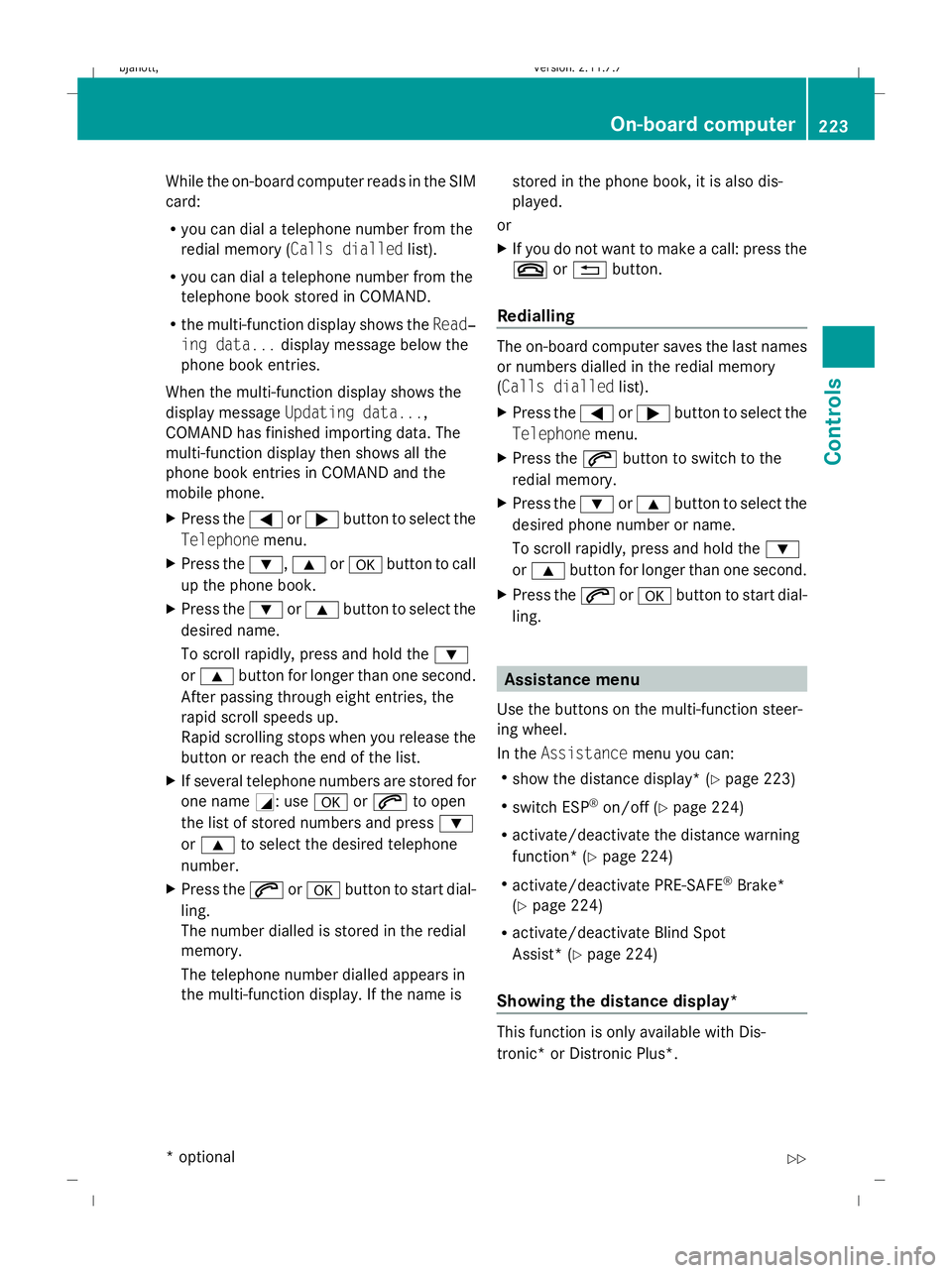
While the on-board computer reads in the SIM
card:
R
you can dial a telephone number from the
redial memory ( Calls dialled list).
R you can dial a telephone number from the
telephone book stored in COMAND.
R the multi-function display shows the Read‐
ing data... display message below the
phone book entries.
When the multi-function display shows the
display message Updating data...,
COMAND has finished importing data. The
multi-function display then shows all the
phone book entries in COMAND and the
mobile phone.
X Press the =or; button to select the
Telephone menu.
X Press the :,9ora button to call
up the phone book.
X Press the :or9 button to select the
desired name.
To scroll rapidly, press and hold the :
or 9 button for longer than one second.
After passing through eight entries, the
rapid scroll speeds up.
Rapid scrolling stops when you release the
button or reach the end of the list.
X If several telephone numbers are stored for
one name G: useaor6 to open
the list of stored numbers and press :
or 9 to select the desired telephone
number.
X Press the 6ora button to start dial-
ling.
The number dialled is stored in the redial
memory.
The telephone number dialled appears in
the multi-function display. If the name is stored in the phone book, it is also dis-
played.
or
X If you do not want to make a call: press the
~ or% button.
Redialling The on-board computer saves the last names
or numbers dialled in the redial memory
(Calls dialled
list).
X Press the =or; button to select the
Telephone menu.
X Press the 6button to switch to the
redial memory.
X Press the :or9 button to select the
desired phone number or name.
To scroll rapidly, press and hold the :
or 9 button for longer than one second.
X Press the 6ora button to start dial-
ling. Assistance menu
Use the buttons on the multi-function steer-
ing wheel.
In the Assistance menu you can:
R show the distance display* ( Ypage 223)
R switch ESP ®
on/off (Y page 224)
R activate/deactivate the distance warning
function* (Y page 224)
R activate/deactivate PRE-SAFE ®
Brake*
(Y page 224)
R activate/deactivate Blind Spot
Assist* (Y page 224)
Showing the distance display* This function is only available with Dis-
tronic* or Distronic Plus*. On-board computer
223Controls
* optional
216_AKB; 2; 3, en-GB
bjanott,
Version: 2.11.7.7 2009-02-27T14:54:17+01:00 - Seite 223 Z
Dateiname: 6515230602_buchblock.pdf; erzeugt am 04. Mar 2009 11:15:54; WK
Page 228 of 421
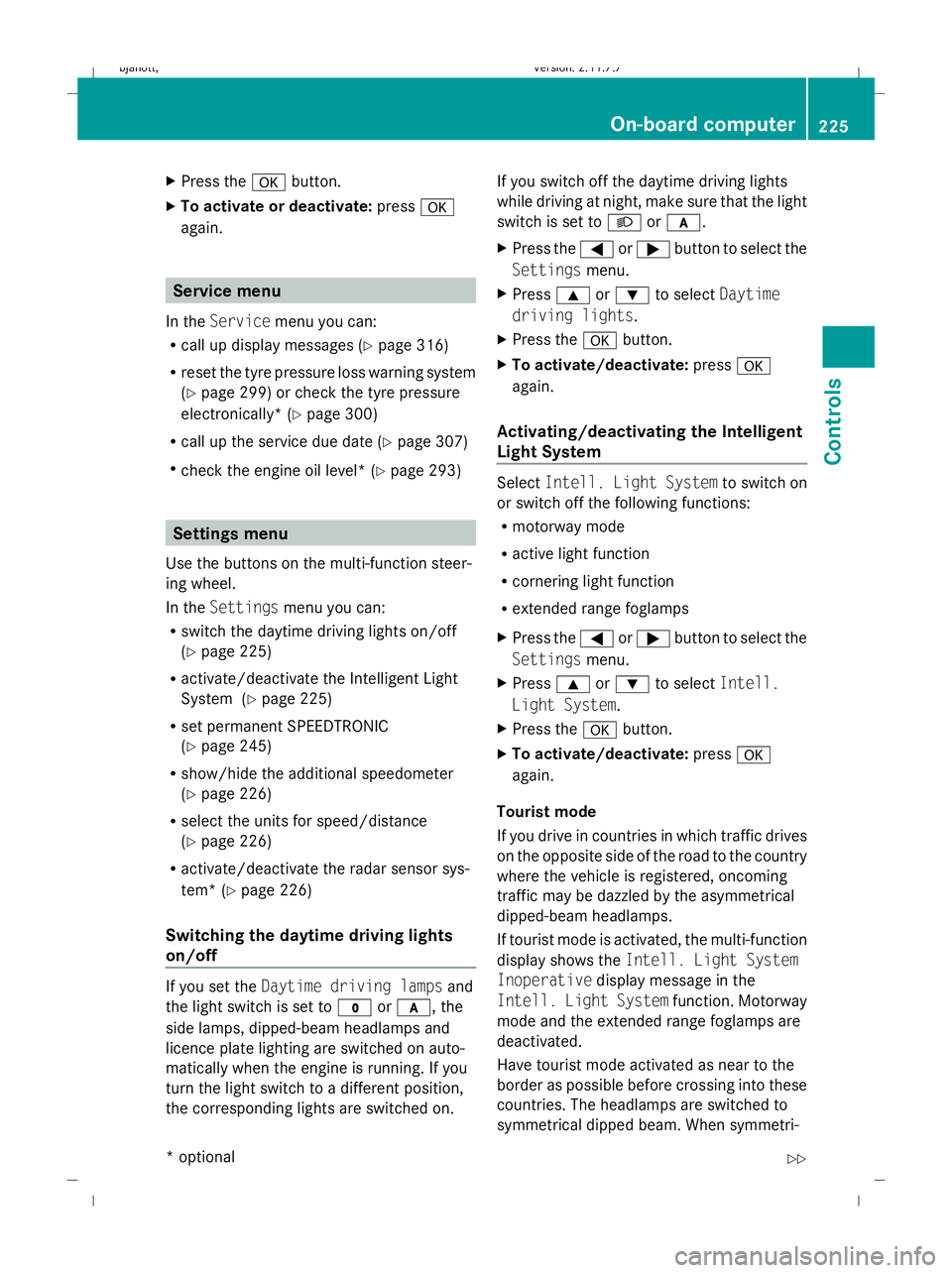
X
Press the abutton.
X To activate or deactivate: pressa
again. Service menu
In the Service menu you can:
R call up display messages (Y page 316)
R reset the tyre pressure loss warning system
(Y page 299) or check the tyre pressure
electronically* (Y page 300)
R call up the service due date (Y page 307)
R check the engine oil level* (Y page 293)Settings menu
Use the buttons on the multi-function steer-
ing wheel.
In the Settings menu you can:
R switch the daytime driving lights on/off
(Y page 225)
R activate/deactivate the Intelligent Light
System (Y page 225)
R set permanent SPEEDTRONIC
(Y page 245)
R show/hide the additional speedometer
(Y page 226)
R select the units for speed/distance
(Y page 226)
R activate/deactivate the radar sensor sys-
tem* (Y page 226)
Switching the daytime driving lights
on/off If you set the
Daytime driving lamps and
the light switch is set to $orc, the
side lamps, dipped-beam headlamps and
licence plate lighting are switched on auto-
matically when the engine is running. If you
turn the light switch to a different position,
the corresponding lights are switched on. If you switch off the daytime driving lights
while driving at night, make sure that the light
switch is set to
Lorc.
X Press the =or; button to select the
Settings menu.
X Press 9or: to select Daytime
driving lights.
X Press the abutton.
X To activate/deactivate: pressa
again.
Activating/deactivating the Intelligent
Light System Select
Intell. Light System to switch on
or switch off the following functions:
R motorway mode
R active light function
R cornering light function
R extended range foglamps
X Press the =or; button to select the
Settings menu.
X Press 9or: to select Intell.
Light System.
X Press the abutton.
X To activate/deactivate: pressa
again.
Tourist mode
If you drive in countries in which traffic drives
on the opposite side of the road to the country
where the vehicle is registered, oncoming
traffic may be dazzled by the asymmetrical
dipped-beam headlamps.
If tourist mode is activated, the multi-function
display shows the Intell. Light System
Inoperative display message in the
Intell. Light System function. Motorway
mode and the extended range foglamps are
deactivated.
Have tourist mode activated as near to the
border as possible before crossing into these
countries. The headlamps are switched to
symmetrical dipped beam. When symmetri- On-board computer
225Controls
* optional
216_AKB; 2; 3, en-GB
bjanott,
Version: 2.11.7.7 2009-02-27T14:54:17+01:00 - Seite 225 Z
Dateiname: 6515230602_buchblock.pdf; erzeugt am 04. Mar 2009 11:15:54; WK
Page 263 of 421
and cannot check whether Night View
Assist is working.
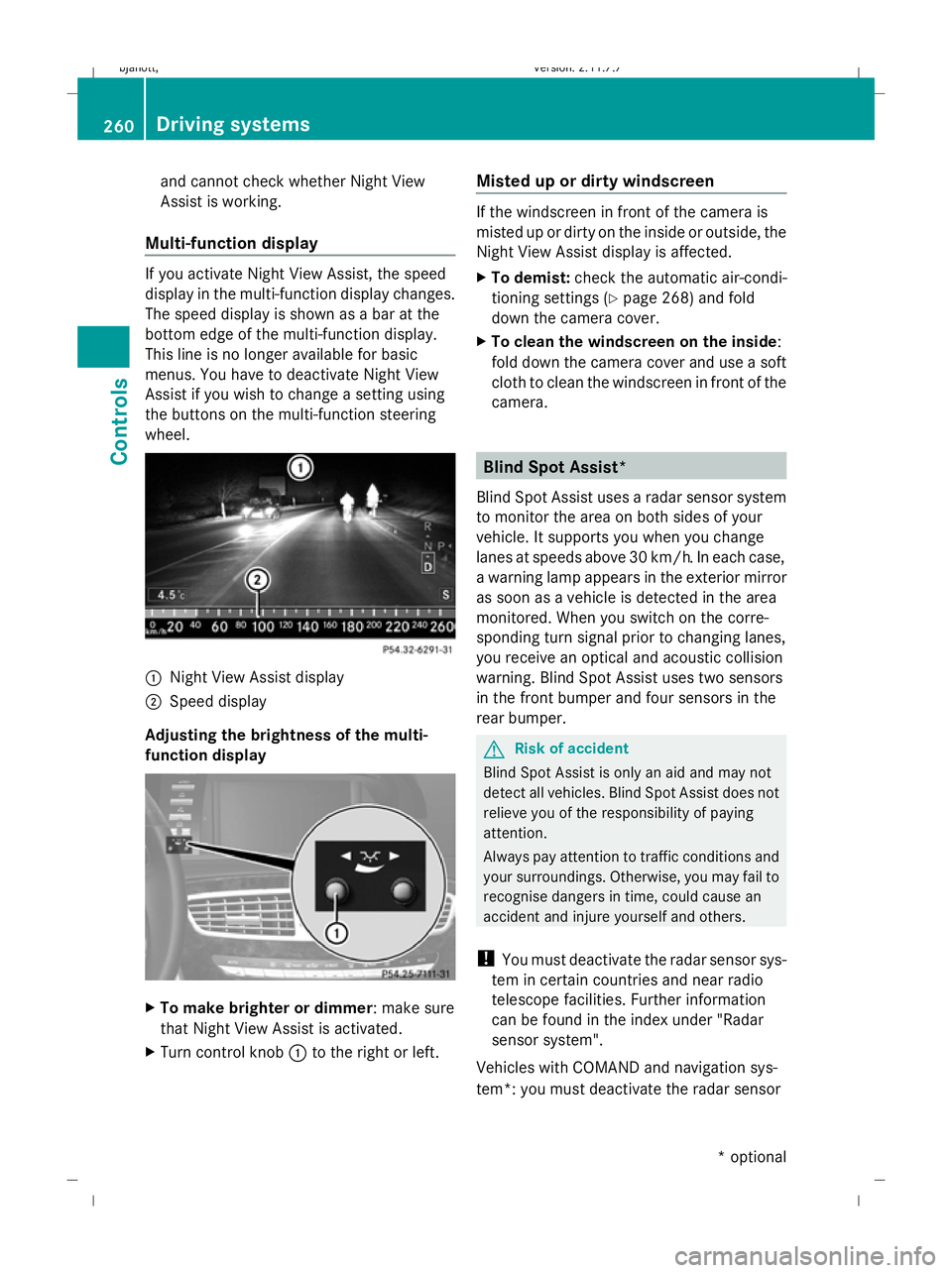
Multi-function display If you activate Night View Assist, the speed
display in the multi-function display changes.
The speed display is shown as a bar at the
bottom edge of the multi-function display.
This line is no longer available for basic
menus. You have to deactivate Night View
Assist if you wish to change a setting using
the buttons on the multi-function steering
wheel. :
Night View Assist display
; Speed display
Adjusting the brightness of the multi-
function display X
To make brighter or dimmer : make sure
that Night View Assist is activated.
X Turn control knob :to the right or left. Misted up or dirty windscreen If the windscreen in front of the camera is
misted up or dirty on the inside or outside, the
Night View Assist display is affected.
X
To demist: check the automatic air-condi-
tioning settings (Y page 268) and fold
down the camera cover.
X To clean the windscreen on the inside:
fold down the camera cover and use a soft
cloth to clean the windscreen in front of the
camera. Blind Spot Assist*
Blind Spot Assist uses a radar sensor system
to monitor the area on both sides of your
vehicle. It supports you when you change
lanes at speeds above 30 km/h. In each case,
a warning lamp appears in the exterior mirror
as soon as a vehicle is detected in the area
monitored. When you switch on the corre-
sponding turn signal prior to changing lanes,
you receive an optical and acoustic collision
warning. Blind Spot Assist uses two sensors
in the front bumper and four sensors in the
rear bumper. G
Risk of accident
Blind Spot Assist is only an aid and may not
detect all vehicles. Blind Spot Assist does not
relieve you of the responsibility of paying
attention.
Always pay attention to traffic conditions and
your surroundings. Otherwise, you may fail to
recognise dangers in time, could cause an
accident and injure yourself and others.
! You must deactivate the radar sensor sys-
tem in certain countries and near radio
telescope facilities. Further information
can be found in the index under "Radar
sensor system".
Vehicles with COMAND and navigation sys-
tem*: you must deactivate the radar sensor 260
Driving systemsCont
rols
* option al
216_AKB; 2; 3, en-GB
bjanott
,V ersion: 2.11.7.7
2009-02-27T14:54:17+01:00 - Seite 260
Dateiname: 6515230602_buchblock.pdf; erzeugt am 04. Mar 2009 11:16:08; WK
Page 276 of 421
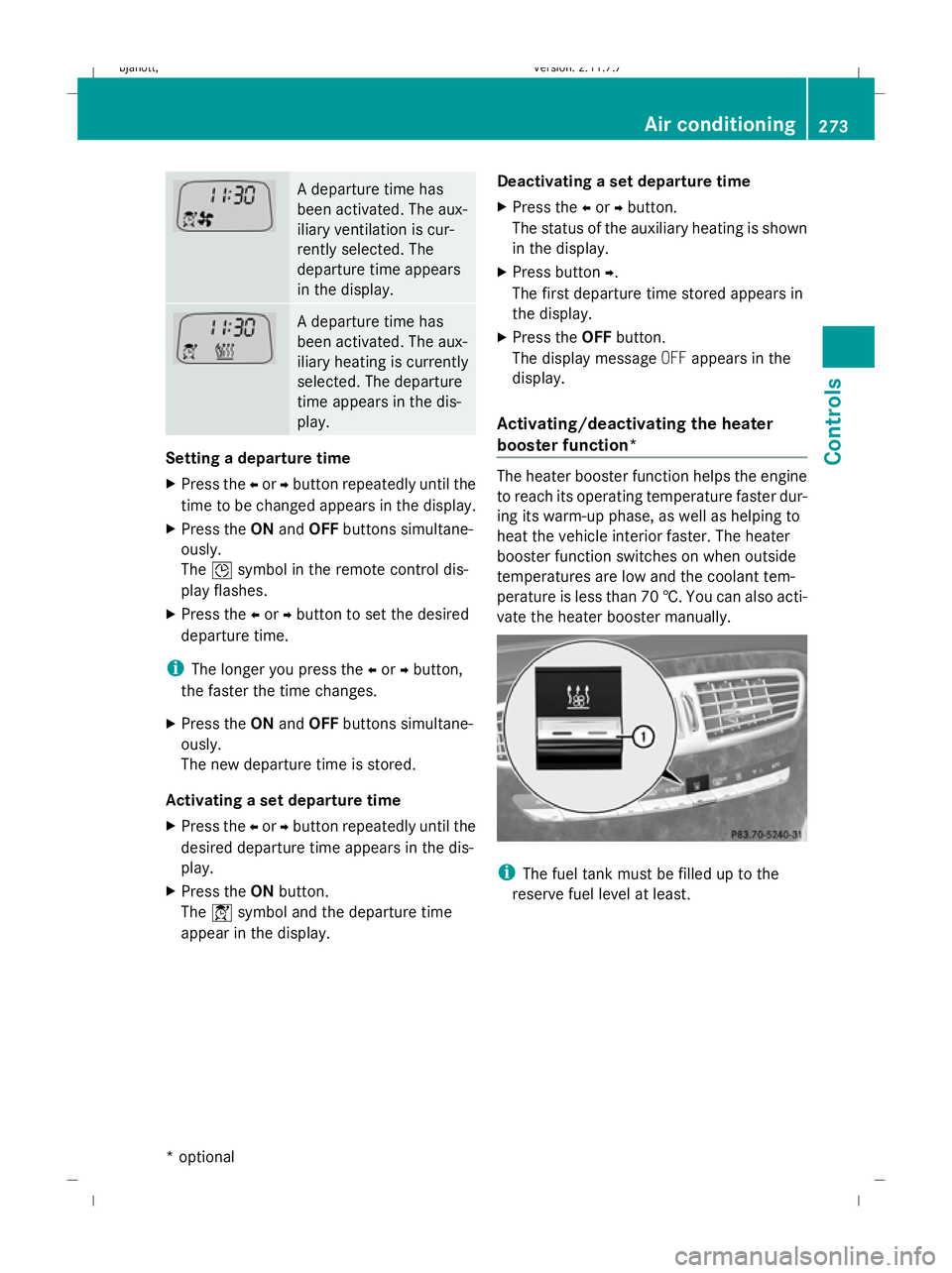
A departure time has
been activated. The aux-
iliary ventilation is cur-
rently selected. The
departure time appears
in the display.
A departure time has
been activated. The aux-
iliary heating is currently
selected. The departure
time appears in the dis-
play.
Setting a departure time
X
Press the Xor Ybutton repeatedly until the
time to be changed appears in the display.
X Press the ONand OFF buttons simultane-
ously.
The Îsymbol in the remote control dis-
play flashes.
X Press the Xor Ybutton to set the desired
departure time.
i The longer you press the Xor Ybutton,
the faster the time changes.
X Press the ONand OFF buttons simultane-
ously.
The new departure time is stored.
Activating a set departure time
X Press the Xor Ybutton repeatedly until the
desired departure time appears in the dis-
play.
X Press the ONbutton.
The Ísymbol and the departure time
appear in the display. Deactivating a set departure time
X Press the Xor Ybutton.
The status of the auxiliary heating is shown
in the display.
X Press button Y.
The first departure time stored appears in
the display.
X Press the OFFbutton.
The display message OFFappears in the
display.
Activating/deactivating the heater
booster function* The heater booster function helps the engine
to reach its operating temperature faster dur-
ing its warm-up phase, as well as helping to
heat the vehicle interior faster. The heater
booster function switches on when outside
temperatures are low and the coolant tem-
perature is less than 70 †. You can also acti-
vate the heater booster manually.
i
The fuel tank must be filled up to the
reserve fuel level at least. Air conditioning
273Controls
* optional
216_AKB; 2; 3, en-GB
bjanott,
Version: 2.11.7.7 2009-02-27T14:54:17+01:00 - Seite 273 Z
Dateiname: 6515230602_buchblock.pdf; erzeugt am 04. Mar 2009 11:16:14; WK
Page 287 of 421
tracted from the traffic conditions, cause an
accident and injure yourself and others.
Two-way radios and fax equipment used with-
out low-reflection exterior aerials can inter-
fere with the vehicle's electronics and,
thereby, jeopardise the operating safety of
the vehicle and your safety. Therefore, you
must only use this equipment if it is correctly
connected to a separate, reflection-free, exte-
rior aerial. G
Risk of injury
Excessive electromagnetic radiation may
cause damage to your health and the health
of others. Using an exterior aerial takes into
account current scientific discussions relat-
ing to the possible health risk posed by elec-
tromagnetic fields.
To ensure optimum reception quality for
mobile phones in the vehicle, and to minimise
mutual influences between the vehicle elec-
tronics and mobile phones, Mercedes-Benz
recommends the use of an approved exterior
aerial. An exterior aerial conducts the elec-
tromagnetic fields generated by a wireless
device to the exterior of the vehicle; the field
strength within the vehicle interior is lower
than in a vehicle that does not have an exte-
rior aerial.
i There are various mobile phone brackets
that may be fitted to your vehicle; in some
cases, these are country-specific. You can
obtain these mobile phone brackets from a
qualified specialist workshop, e.g. a
Mercedes-Benz Service Centre.
The functions and services available when
you use the phone depend on your mobile
phone model and service provider. Inserting the mobile phone
X
Open the telephone compartment
(Y page 277).
X Place the mobile phone bracket into the
pre-installed fitting; see the separate
mobile phone bracket fitting instructions.
X Insert the mobile phone into the mobile
phone bracket; see the separate mobile
phone bracket fitting instructions.
If the mobile phone is inserted in the mobile
phone bracket, you can speak to the person
you are calling using the hands-free system.
You can operate the telephone using the
6 and~ buttons on the multi-function
steering wheel. You can operate other mobile
phone functions via the on-board computer
(Y page 222).
When you take the key out of the ignition lock,
the mobile phone stays on but you can no
longer use the hands-free system.
If you are making a call and you would like to
take the key out of the ignition lock, first
remove the mobile phone from the bracket.
Otherwise, the call will be ended. Infrared reflecting windscreen*
The infrared reflecting glass prevents the
vehicle interior from becoming too hot. It also
blocks radio waves up into the gigahertz
range. 284
FeaturesControls
* optional
216_AKB; 2; 3, en-GB
bjanott,
Version: 2.11.7.7 2009-02-27T14:54:17+01:00 - Seite 284
Dateiname: 6515230602_buchblock.pdf; erzeugt am 04. Mar 2009 11:16:22; WK
Page 289 of 421
X
Press and hold one of transmitter but-
tons ;to? on the integrated remote
control.
Indicator lamp :starts to flash after a
short while. It flashes about once a second.
i Indicator lamp :flashes immediately
the first time the transmitter button is pro-
grammed. If this transmitter button has
already been programmed, indicator
lamp :will only start flashing at a rate of
once a second after 20 seconds have
elapsed.
X Keep the transmitter buttons depressed.
X Point the garage door's remote control with
the transmitter towards the left-hand side
of the rear-view mirror from a distance of 5
to 20 cm.
i The distance between the garage door's
remote control and the integrated garage
door opener depends on the system of the
garage door drive. You might require sev-
eral attempts. You should test every posi-
tion for at least 20 seconds before trying
another position.
X Keep the transmitter button on the garage
door's remote control depressed until indi-
cator lamp :starts to flash rapidly.
The programming was successful if indica-
tor lamp :flashes rapidly.
X Release the transmitter buttons on the
garage door's remote control and the inte-
grated remote control.
If indicator lamp :goes out after approx-
imately 20 seconds and did not flash rapidly
before this:
X Release the transmitter buttons on the
integrated and portable remote controls.
X Repeat the programming procedure. When
doing so, change the distance between the
garage door's remote control and the trans-
mitter buttons in the rear-view mirror.
i If the garage door system works with a
rolling code, after programming you must synchronise the remote control integrated
in the rear-view mirror with the garage door
system receiver.
You will find further information in the
garage door opening system's operating
instructions, e.g. the sections on "Synchro-
nising the transmitter" or "Registering a
new transmitter". You can also call the hot-
line mentioned above.
Opening or closing the garage door Once programmed, the integrated remote
control will assume the function of the garage
door system's remote control. Please read
the operating instructions for the garage door
system.
X Turn the key to position 2in the ignition
lock.
X Press the transmitter button on the rear-
view mirror that you have programmed to
operate the garage door.
Garage door system with fixed code: indi-
cator lamp :lights up continuously.
Garage door system with rolling code: indi-
cator lamp :flashes briefly and then lights
up for approximately two seconds. This is
repeated for up to 20 seconds.
i The transmitter will transmit a signal for
as long as the transmitter button is being
pressed. The transmission will be halted
after a maximum of 20 seconds and indi-
cator lamp :will flash. Press the trans-
mitter button again, if necessary.
Clearing the remote control memory X
Turn the key to position 2in the ignition
lock.
X Press and hold transmitter buttons ;
and ?for approximately 20 seconds until
indicator lamp :flashes rapidly.
The memory is cleared. 286
FeaturesControls
216_AKB; 2; 3, en-GB
bjanott,
Version: 2.11.7.7 2009-02-27T14:54:17+01:00 - Seite 286
Dateiname: 6515230602_buchblock.pdf; erzeugt am 04. Mar 2009 11:16:23; WK
Page 310 of 421
Service A .. km overdue
i
If you fail to have the service performed
by the specified date, you may be violating
applicable laws. Your warranty may be inva-
lidated and goodwill settlements may be
refused. Calling up the service due date
Use the buttons on the multi-function steer-
ing wheel.
X Switch on the ignition.
X Press the =or; button to select the
Service menu.
X Press the 9or: button to select
ASSYST PLUS.
X Press a.
The multi-function display shows the
service due date. Care
Care and cleaning products
Regular care of your vehicle is a condition for
retaining the quality in the long term.
To care for your vehicle, use the care and
cleaning products recommended and
approved by Mercedes-Benz.
! For cleaning your vehicle, do not use any
of the following:
R dry, coarse or rough cloths
R abrasive cleaning agents
R solvents
R cleaning agents containing solvents
and do not scour.
Do not touch the surfaces or protective
films with hard objects, e.g. rings or ice
scrapers. You can otherwise scratch or
damage the surfaces or protective films. H
Environmental note
Dispose of empty packaging, cleaning cloths
and polishing wads in an environmentally
responsible manner.
! Do not park the vehicle for a long period
of time directly after cleaning, especially if
the wheels have just been cleaned with a
wheel cleaner. Wheel cleaners could cause
rapid corrosion of the brake discs and
brake pads/linings. After cleaning, park
the vehicle when it is at normal operating
temperature. Exterior care
Automatic car wash G
Risk of accident
The vehicle is braked when Hold or Distronic
Plus* is activated. Therefore, deactivate Hold
and Distronic Plus before the vehicle is
washed in an automatic car wash.
You can wash the vehicle in an automatic car
wash from the beginning.
! We recommend automatic car washes
with an adjustable 36
high-pressure pre-
cleaning program. In car washes that use
high water pressures, there is a danger that
a small quantity of water may leak into the
vehicle.
If the vehicle is very dirty, pre-wash it before
cleaning it in an automatic car wash.
! Make sure that the automatic car wash is
suitable for the size of the vehicle. Fold in
the exterior mirrors before the vehicle is
washed. There is otherwise a risk of dam-
age to the exterior mirrors.
! When washing your vehicle in a tow-
through car wash, make sure that the auto-
matic transmission is in position N, other-
wise the vehicle could be damaged.
36 In accordance with the specifications for cabriolet programs. Care
307Operation
* optional
216_AKB; 2; 3, en-GB
bjanott,
Version: 2.11.7.7 2009-02-27T14:54:17+01:00 - Seite 307 Z
Dateiname: 6515230602_buchblock.pdf; erzeugt am 04. Mar 2009 11:16:30; WK
Page 320 of 421
Use the buttons on the multi-function steer-
ing wheel.
X
Using =or; select the Service
menu.
If there are display messages, the multi-
function display shows, e.g. 2 messages.
X Using 9or: select the entry, e.g.
2 messages.
X Confirm with a.
X Using :or9 scroll through the dis-
play messages. Hiding display messages You cannot hide display messages of the
highest priority. The multi-function display
will continue to show these display messages
until their cause has been remedied.
Use the buttons on the multi-function steer-
ing wheel.
X
Press aor% to hide the display
message.
The following tables contain all the display
messages. Text messages
G
Risk of accident and injury
The operating safety of your vehicle may be affected if service work is carried out incorrectly.
You could lose control of your vehicle and cause an accident. In addition, the safety systems may
no longer be able to protect you or others as they are designed to do.
Always have service work performed at a qualified specialist workshop which has the necessary
specialist knowledge and tools to carry out the work required. Mercedes-Benz recommends that
you use a Mercedes-Benz Service Centre for this purpose. In particular, work relevant to safety
or on safety-related systems must be carried out at a qualified specialist workshop. Display messages
317Practical advice
216_AKB; 2; 3, en-GB
bjanott, Version: 2.11.7.7 2009-02-27T14:54:17+01:00 - Seite 317 Z
Dateiname: 6515230602_buchblock.pdf; erzeugt am 04. Mar 2009 11:16:34; WK
Page 352 of 421
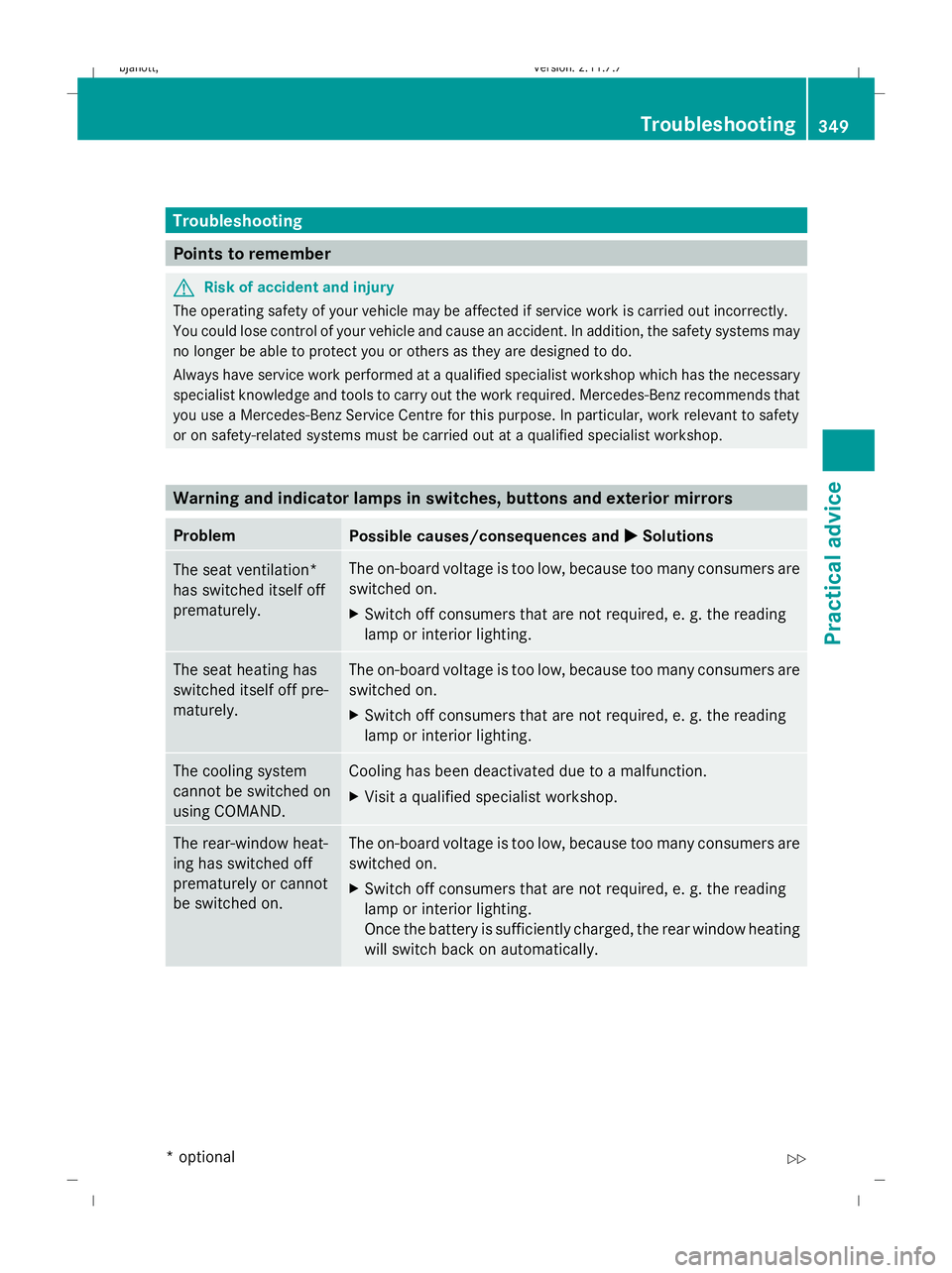
Troubleshooting
Points to remember
G
Risk of accident and injury
The operating safety of your vehicle may be affected if service work is carried out incorrectly.
You could lose control of your vehicle and cause an accident. In addition, the safety systems may
no longer be able to protect you or others as they are designed to do.
Always have service work performed at a qualified specialist workshop which has the necessary
specialist knowledge and tools to carry out the work required. Mercedes-Benz recommends that
you use a Mercedes-Benz Service Centre for this purpose. In particular, work relevant to safety
or on safety-related systems must be carried out at a qualified specialist workshop. Warning and indicator lamps in switches, buttons and exterior mirrors
Problem
Possible causes/consequences and
X
X Solutions The seat ventilation*
has switched itself off
prematurely. The on-board voltage is too low, because too many consumers are
switched on.
X Switch off consumers that are not required, e. g. the reading
lamp or interior lighting. The seat heating has
switched itself off pre-
maturely. The on-board voltage is too low, because too many consumers are
switched on.
X Switch off consumers that are not required, e. g. the reading
lamp or interior lighting. The cooling system
cannot be switched on
using COMAND. Cooling has been deactivated due to a malfunction.
X
Visit a qualified specialist workshop. The rear-window heat-
ing has switched off
prematurely or cannot
be switched on. The on-board voltage is too low, because too many consumers are
switched on.
X Switch off consumers that are not required, e. g. the reading
lamp or interior lighting.
Once the battery is sufficiently charged, the rear window heating
will switch back on automatically. Troubleshooting
349Practical advice
* optional
216_AKB; 2; 3, en-GB
bjanott
,V ersion: 2.11.7.7
2009-02-27T14:54:17+01:00 - Seite 349 Z
Dateiname: 6515230602_buchblock.pdf; erzeugt am 04. Mar 2009 11:16:40; WK
Page 371 of 421
X
Push the battery tray back into the key
housing until the battery tray engages.
X Check the function of all key buttons on the
vehicle.
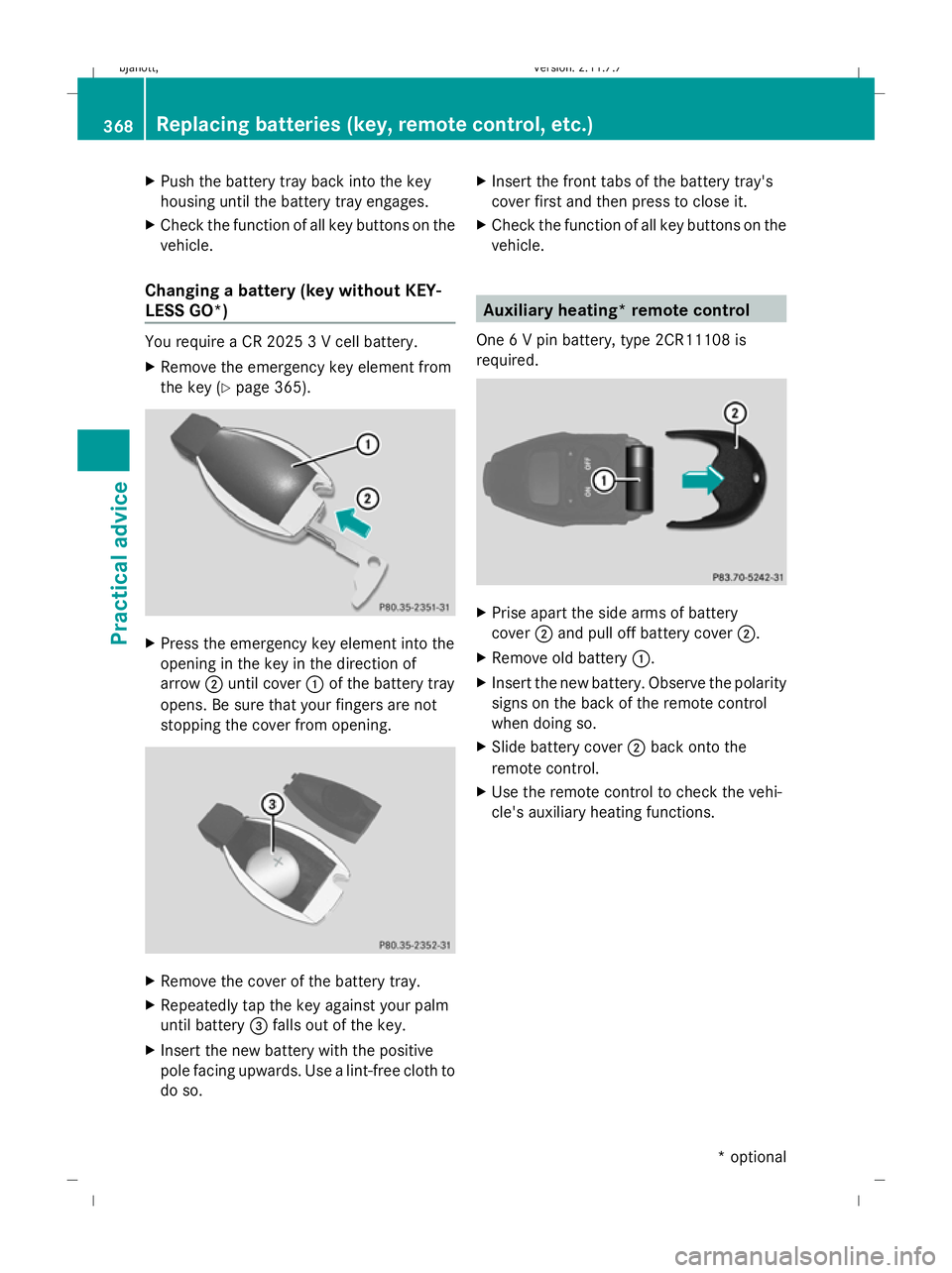
Changing a battery (key without KEY-
LESS GO*) You require a CR 2025 3 V cell battery.
X Remove the emergency key element from
the key (Y page 365). X
Press the emergency key element into the
opening in the key in the direction of
arrow ;until cover :of the battery tray
opens. Be sure that your fingers are not
stopping the cover from opening. X
Remove the cover of the battery tray.
X Repeatedly tap the key against your palm
until battery =falls out of the key.
X Insert the new battery with the positive
pole facing upwards. Use a lint-free cloth to
do so. X
Insert the front tabs of the battery tray's
cover first and then press to close it.
X Check the function of all key buttons on the
vehicle. Auxiliary heating* remote control
One 6 V pin battery, type 2CR11108 is
required. X
Prise apart the side arms of battery
cover ;and pull off battery cover ;.
X Remove old battery :.
X Insert the new battery. Observe the polarity
signs on the back of the remote control
when doing so.
X Slide battery cover ;back onto the
remote control.
X Use the remote control to check the vehi-
cle's auxiliary heating functions. 368
Replacing batteries (key, remote control, etc.)Practical advice
* optional
216_AKB; 2; 3, en-GB
bjanott,
Version: 2.11.7.7 2009-02-27T14:54:17+01:00 - Seite 368
Dateiname: 6515230602_buchblock.pdf; erzeugt am 04. Mar 2009 11:16:44; WK