buttons MERCEDES-BENZ CL COUPE 2009 User Guide
[x] Cancel search | Manufacturer: MERCEDES-BENZ, Model Year: 2009, Model line: CL COUPE, Model: MERCEDES-BENZ CL COUPE 2009Pages: 421, PDF Size: 10.78 MB
Page 111 of 421
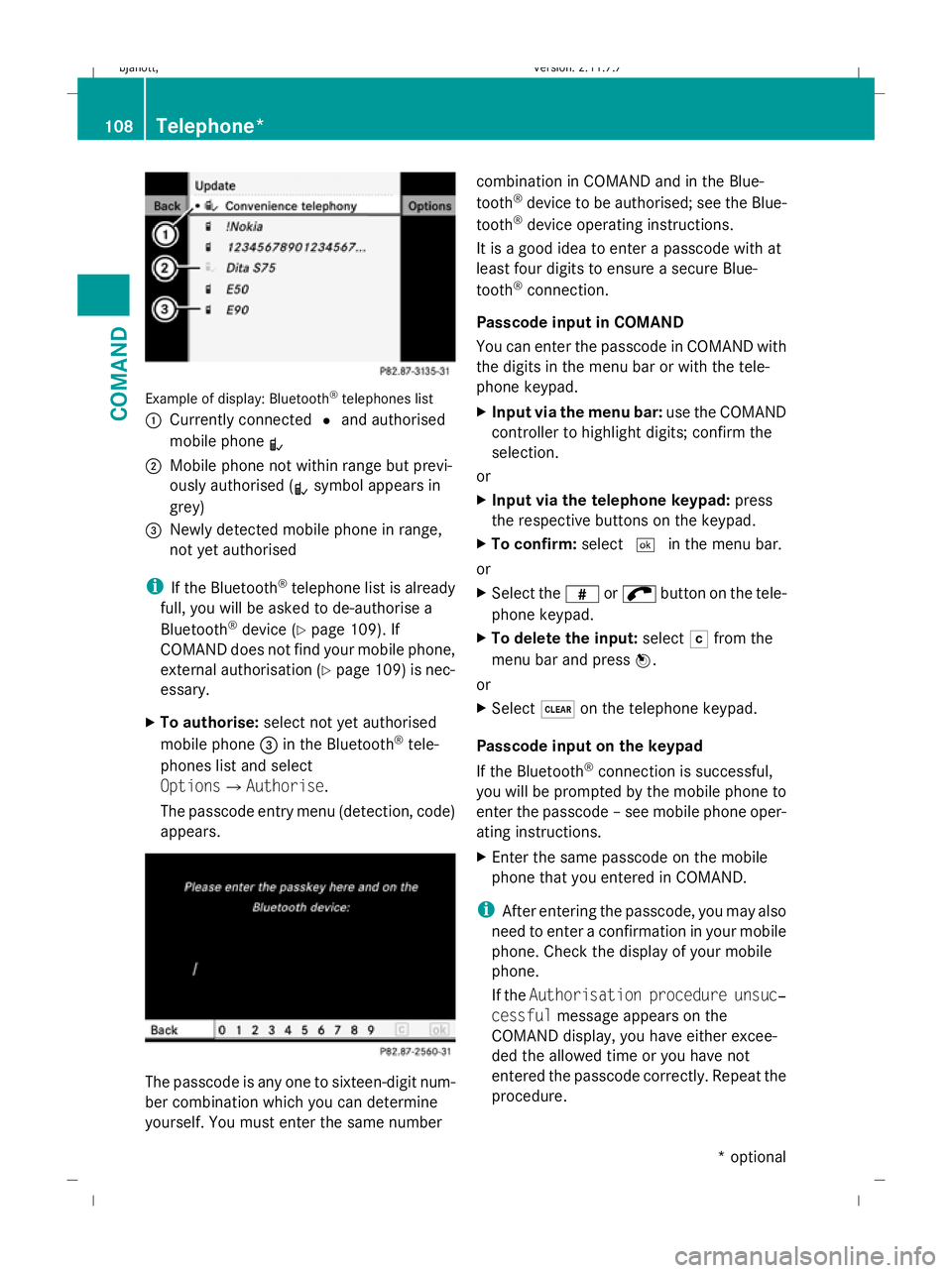
Example of display: Bluetooth
®
telephones list
: Currently connected #and authorised
mobile phone L
; Mobile phone not within range but previ-
ously authorised ( Lsymbol appears in
grey)
= Newly detected mobile phone in range,
not yet authorised
i If the Bluetooth ®
telephone list is already
full, you will be asked to de-authorise a
Bluetooth ®
device (Y page 109). If
COMAND does not find your mobile phone,
external authorisation (Y page 109) is nec-
essary.
X To authorise: select not yet authorised
mobile phone =in the Bluetooth ®
tele-
phones list and select
OptionsQAuthorise.
The passcode entry menu (detection, code)
appears. The passcode is any one to sixteen-digit num-
ber combination which you can determine
yourself. You must enter the same number combination in COMAND and in the Blue-
tooth
®
device to be authorised; see the Blue-
tooth ®
device operating instructions.
It is a good idea to enter a passcode with at
least four digits to ensure a secure Blue-
tooth ®
connection.
Passcode input in COMAND
You can enter the passcode in COMAND with
the digits in the menu bar or with the tele-
phone keypad.
X Input via the menu bar: use the COMAND
controller to highlight digits; confirm the
selection.
or
X Input via the telephone keypad: press
the respective buttons on the keypad.
X To confirm: select¬in the menu bar.
or
X Select the zor; button on the tele-
phone keypad.
X To delete the input: selectFfrom the
menu bar and press W.
or
X Select $on the telephone keypad.
Passcode input on the keypad
If the Bluetooth ®
connection is successful,
you will be prompted by the mobile phone to
enter the passcode – see mobile phone oper-
ating instructions.
X Enter the same passcode on the mobile
phone that you entered in COMAND.
i After entering the passcode, you may also
need to enter a confirmation in your mobile
phone. Check the display of your mobile
phone.
If the Authorisation procedure unsuc‐
cessful message appears on the
COMAND display, you have either excee-
ded the allowed time or you have not
entered the passcode correctly. Repeat the
procedure. 108
Telephone*COMAND
* optional
216_AKB; 2; 3, en-GB
bjanott,
Version: 2.11.7.7 2009-02-27T14:54:17+01:00 - Seite 108
Dateiname: 6515230602_buchblock.pdf; erzeugt am 04. Mar 2009 11:15:06; WK
Page 118 of 421
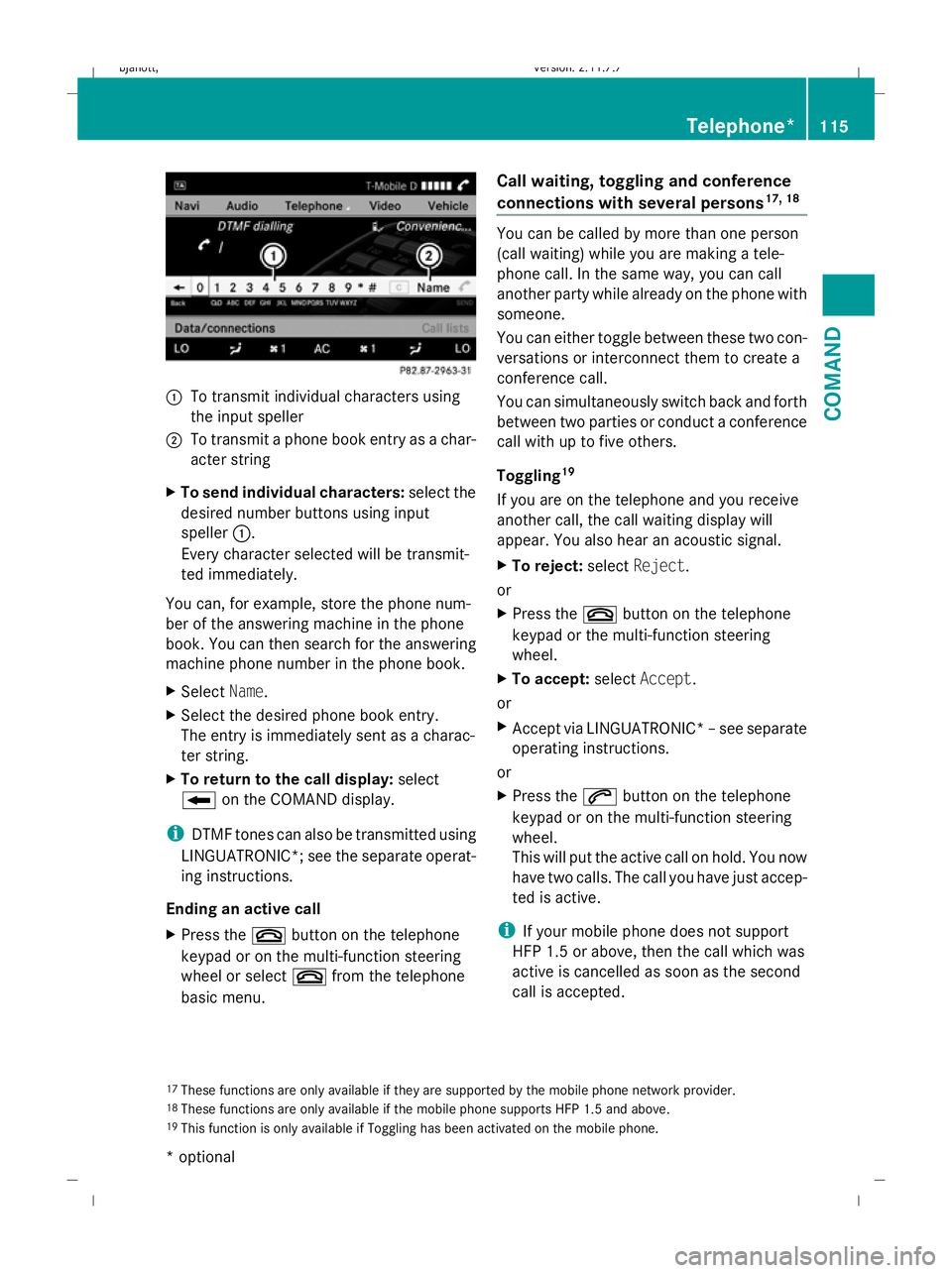
:
To transmit individual characters using
the input speller
; To transmit a phone book entry as a char-
acter string
X To send individual characters: select the
desired number buttons using input
speller :.
Every character selected will be transmit-
ted immediately.
You can, for example, store the phone num-
ber of the answering machine in the phone
book. You can then search for the answering
machine phone number in the phone book.
X Select Name.
X Select the desired phone book entry.
The entry is immediately sent as a charac-
ter string.
X To return to the call display: select
B on the COMAND display.
i DTMF tones can also be transmitted using
LINGUATRONIC*; see the separate operat-
ing instructions.
Ending an active call
X Press the ~button on the telephone
keypad or on the multi-function steering
wheel or select ~from the telephone
basic menu. Call waiting, toggling and conference
connections with several persons
17, 18 You can be called by more than one person
(call waiting) while you are making a tele-
phone call. In the same way, you can call
another party while already on the phone with
someone.
You can either toggle between these two con-
versations or interconnect them to create a
conference call.
You can simultaneously switch back and forth
between two parties or conduct a conference
call with up to five others.
Toggling
19
If you are on the telephone and you receive
another call, the call waiting display will
appear. You also hear an acoustic signal.
X To reject: selectReject.
or
X Press the ~button on the telephone
keypad or the multi-function steering
wheel.
X To accept: selectAccept.
or
X Accept via LINGUATRONIC* –see separate
operating instructions.
or
X Press the 6button on the telephone
keypad or on the multi-function steering
wheel.
This will put the active call on hold. You now
have two calls. The call you have just accep-
ted is active.
i If your mobile phone does not support
HFP 1.5 or above, then the call which was
active is cancelled as soon as the second
call is accepted.
17 These functions are only available if they are supported by the mobile phone network provider.
18 These functions are only available if the mobile phone supports HFP 1.5 and above.
19 This function is only available if Toggling has been activated on the mobile phone. Telephone*
115COMAND
* optional
216_AKB; 2; 3, en-GB
bjanott,
Version: 2.11.7.7
2009-02-27T14:54:17+01:00 - Seite 115 Z
Dateiname: 6515230602_buchblock.pdf; erzeugt am 04. Mar 2009 11:15:08; WK
Page 171 of 421
X
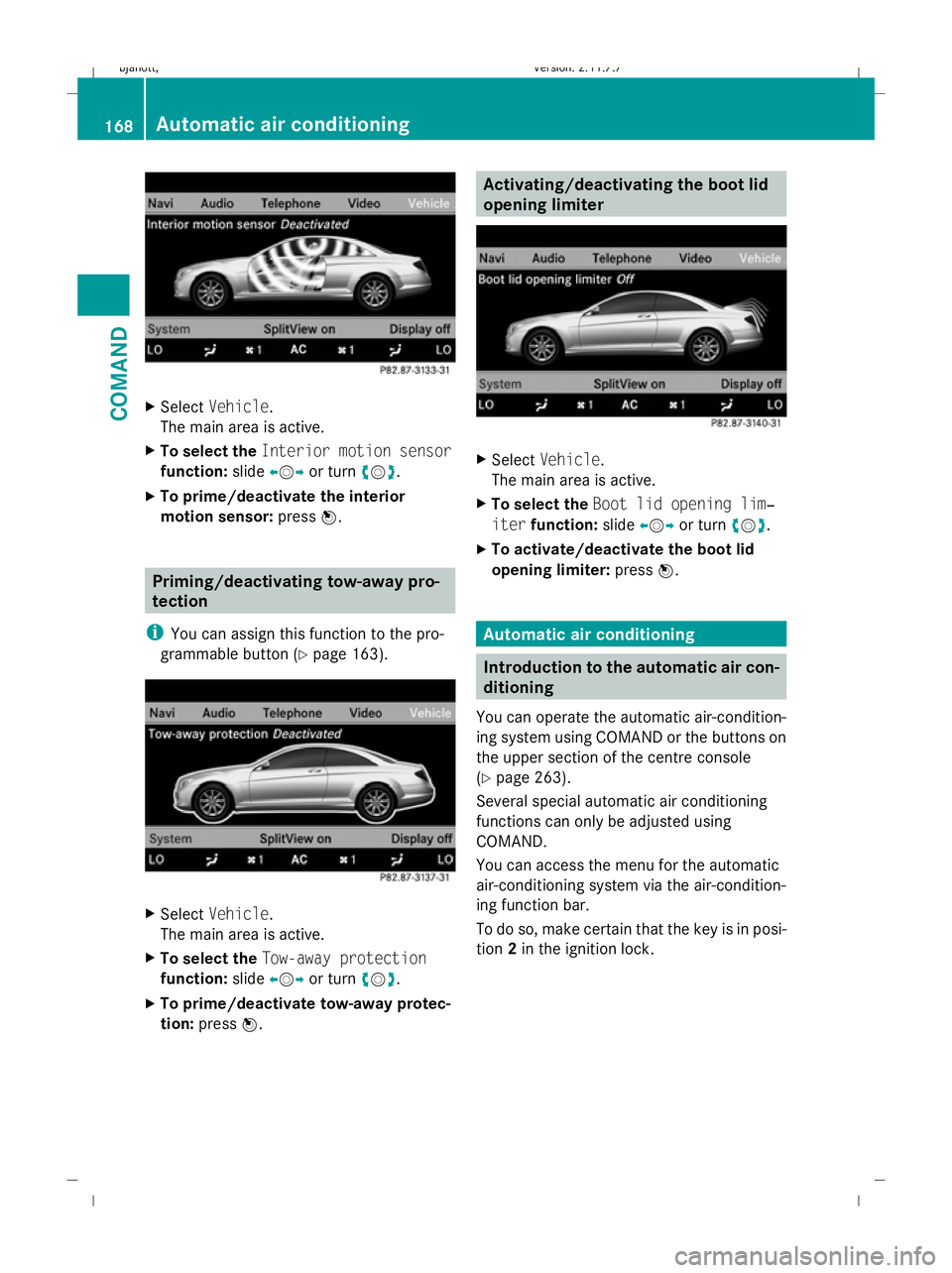
Select Vehicle.
The main area is active.
X To select the Interior motion sensor
function: slideXVY or turn cVd.
X To prime/deactivate the interior
motion sensor: pressW. Priming/deactivating tow-away pro-
tection
i You can assign this function to the pro-
grammable button (Y page 163).X
Select Vehicle.
The main area is active.
X To select the Tow-away protection
function: slideXVY or turn cVd.
X To prime/deactivate tow-away protec-
tion: press W. Activating/deactivating the boot lid
opening limiter
X
Select Vehicle.
The main area is active.
X To select the Boot lid opening lim‐
iter function: slideXVY or turn cVd.
X To activate/deactivate the boot lid
opening limiter: pressW. Automatic air conditioning
Introduction to the automatic air con-
ditioning
You can operate the automatic air-condition-
ing system using COMAND or the buttons on
the upper section of the centre console
(Y page 263).
Several special automatic air conditioning
functions can only be adjusted using
COMAND.
You can access the menu for the automatic
air-conditioning system via the air-condition-
ing function bar.
To do so, make certain that the key is in posi-
tion 2in the ignition lock. 168
Automatic air conditioningCOMAND
216_AKB; 2; 3, en-GB
bjanott,
Version: 2.11.7.7 2009-02-27T14:54:17+01:00 - Seite 168
Dateiname: 6515230602_buchblock.pdf; erzeugt am 04. Mar 2009 11:15:30; WK
Page 182 of 421
Individual settings
You can change the setting of the locking
system in such a way that only the driver's
door and the fuel filler flap are unlocked. This
could be useful if you frequently travel on your
own.
X To change the setting: press the%
and & buttons simultaneously for
approximately six seconds until the battery
check lamp flashes twice.
The key now functions as follows:
X To unlock the driver's door: press the
% button once.
X To unlock centrally: press the%but-
ton twice.
X To lock centrally: press the&button.
The KEYLESS GO* function is changed as fol-
lows:
X To unlock the driver's door : pull the door
handle on the driver's door.
X To unlock centrally: pull the door handle
on the front-passenger door or on the rear
doors.
X To lock centrally: touch sensor sur-
face :on one of the door handles.
Restoring the factory settings X
Press the %and& buttons simulta-
neously for approximately six seconds until
the battery check lamp flashes twice.
Additional information R
Convenience opening (Y page 201)
R Convenience closing (Y page 201)
R Opening and closing in an emergency
(Y page 365) Opening the doors from the inside
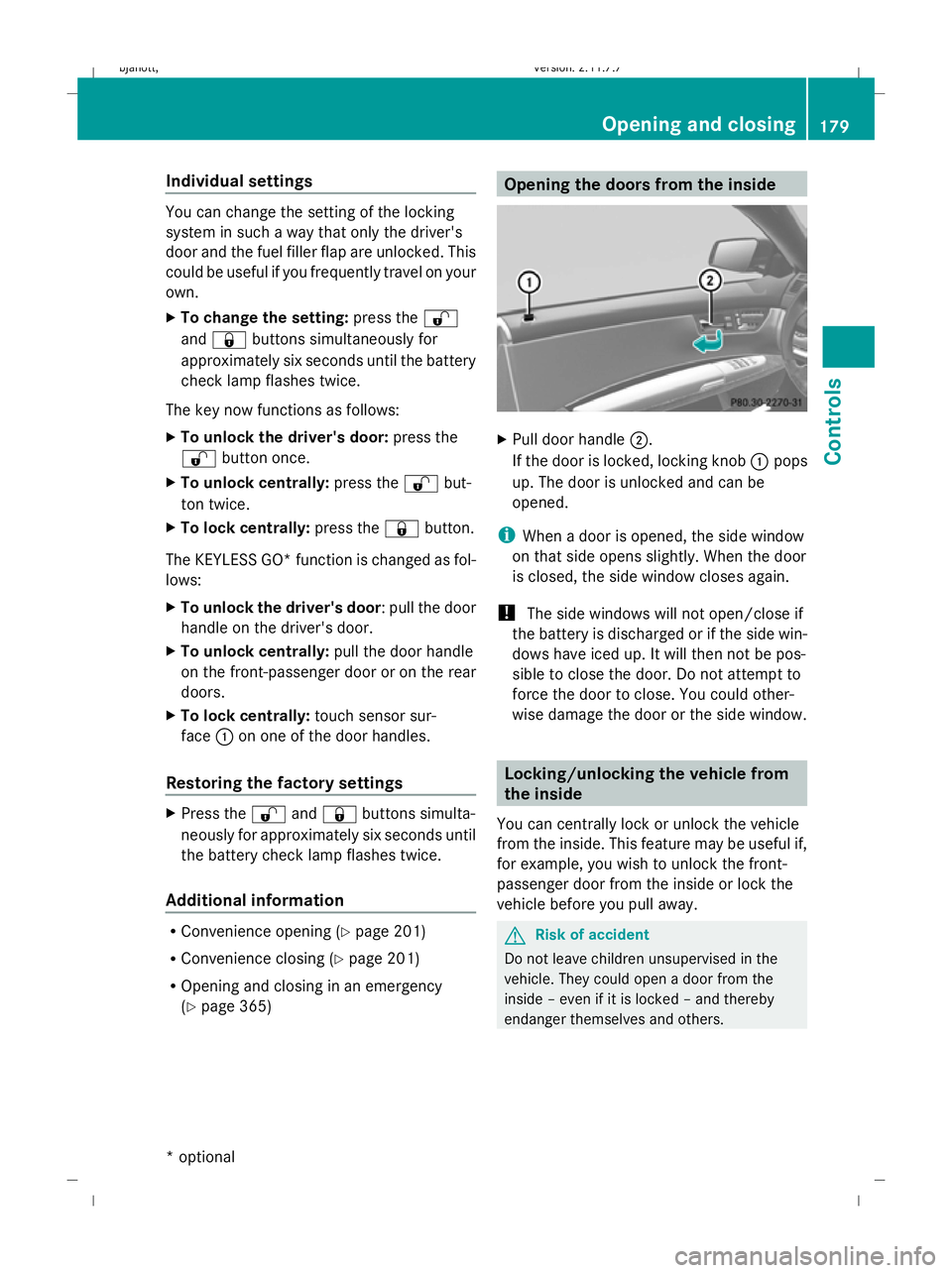
X
Pull door handle ;.
If the door is locked, locking knob :pops
up. The door is unlocked and can be
opened.
i When a door is opened, the side window
on that side opens slightly. When the door
is closed, the side window closes again.
! The side windows will not open/close if
the battery is discharged or if the side win-
dows have iced up. It will then not be pos-
sible to close the door. Do not attempt to
force the door to close. You could other-
wise damage the door or the side window. Locking/unlocking the vehicle from
the inside
You can centrally lock or unlock the vehicle
from the inside. This feature may be useful if,
for example, you wish to unlock the front-
passenger door from the inside or lock the
vehicle before you pull away. G
Risk of accident
Do not leave children unsupervised in the
vehicle. They could open a door from the
inside – even if it is locked – and thereby
endanger themselves and others. Opening and closing
179Controls
* option al
216_AKB; 2; 3, en-GB
bjanott
,V ersion: 2.11.7.7
2009-02-27T14:54:17+01:00 - Seite 179 Z
Dateiname: 6515230602_buchblock.pdf; erzeugt am 04. Mar 2009 11:15:36; WK
Page 216 of 421
On-board computer
Points to remember
The on-board computer is activated as soon
as you turn the key to position 2in the ignition
lock. G
Risk of accident
Only use the on-board computer when road
and traffic conditions permit. You would oth-
erwise be distracted and unable to concen-
trate properly on driving, and could cause an
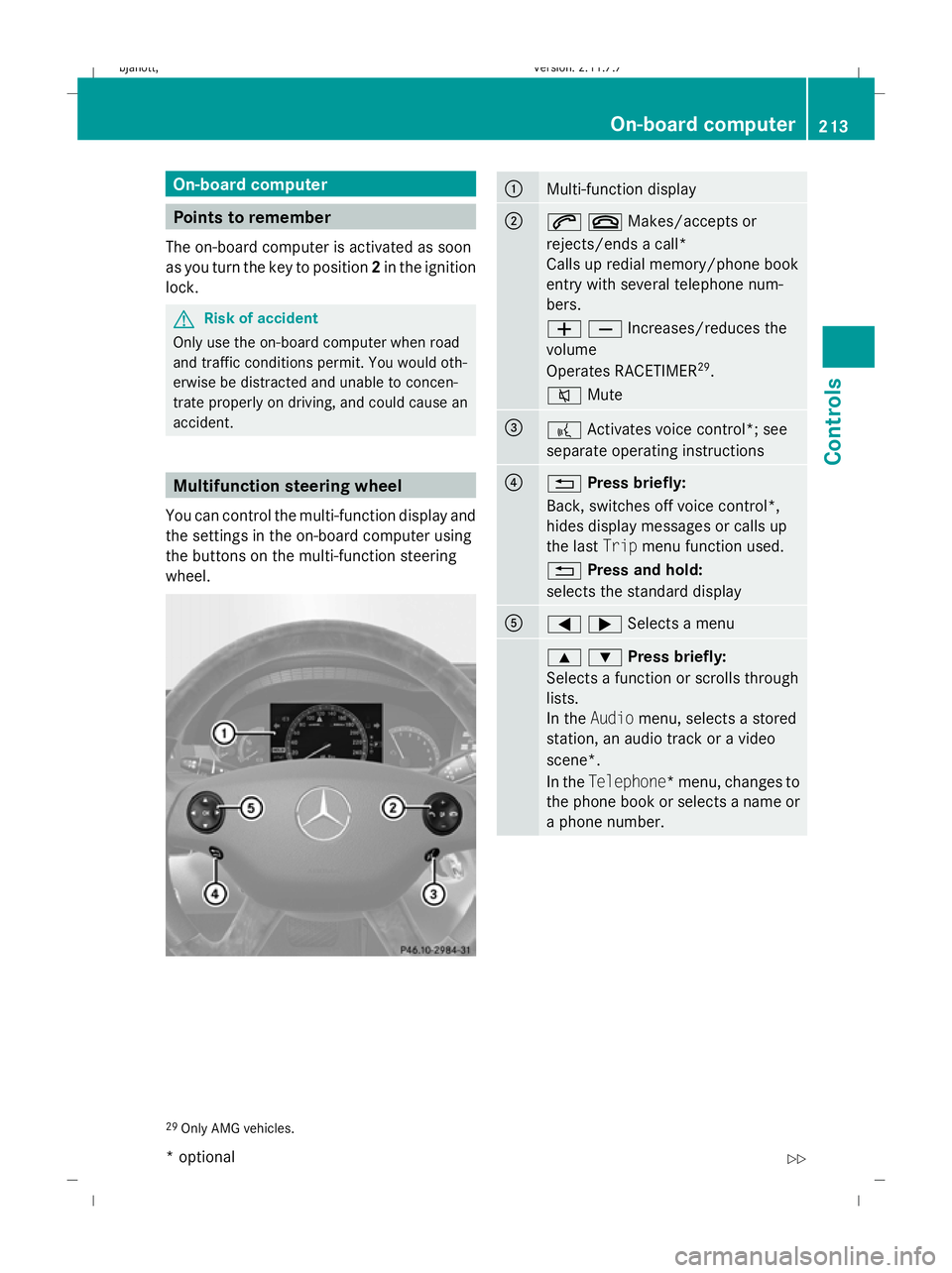
accident. Multifunction steering wheel
You can control the multi-function display and
the settings in the on-board computer using
the buttons on the multi-function steering
wheel. :
Multi-function display
;
6~Makes/accepts or
rejects/ends a call*
Calls up redial memory/phone book
entry with several telephone num-
bers.
WXIncreases/reduces the
volume
Operates RACETIMER 29
.
8 Mute =
?
Activates voice control*; see
separate operating instructions ?
%
Press briefly:
Back, switches off voice control*,
hides display messages or calls up
the last Tripmenu function used.
% Press and hold:
selects the standard display A
=;Selects a menu
9:Press briefly:
Selects a function or scrolls through
lists.
In the
Audio menu, selects a stored
station, an audio track or a video
scene*.
In the Telephone*m enu, changes to
the phone book or selects a name or
a phone number. 29
Only AMG vehicles. On-board computer
213Controls
* optional
216_AKB; 2; 3, en-GB
bjanott,
Version: 2.11.7.7
2009-02-27T14:54:17+01:00 - Seite 213 Z
Dateiname: 6515230602_buchblock.pdf; erzeugt am 04. Mar 2009 11:15:50; WK
Page 218 of 421
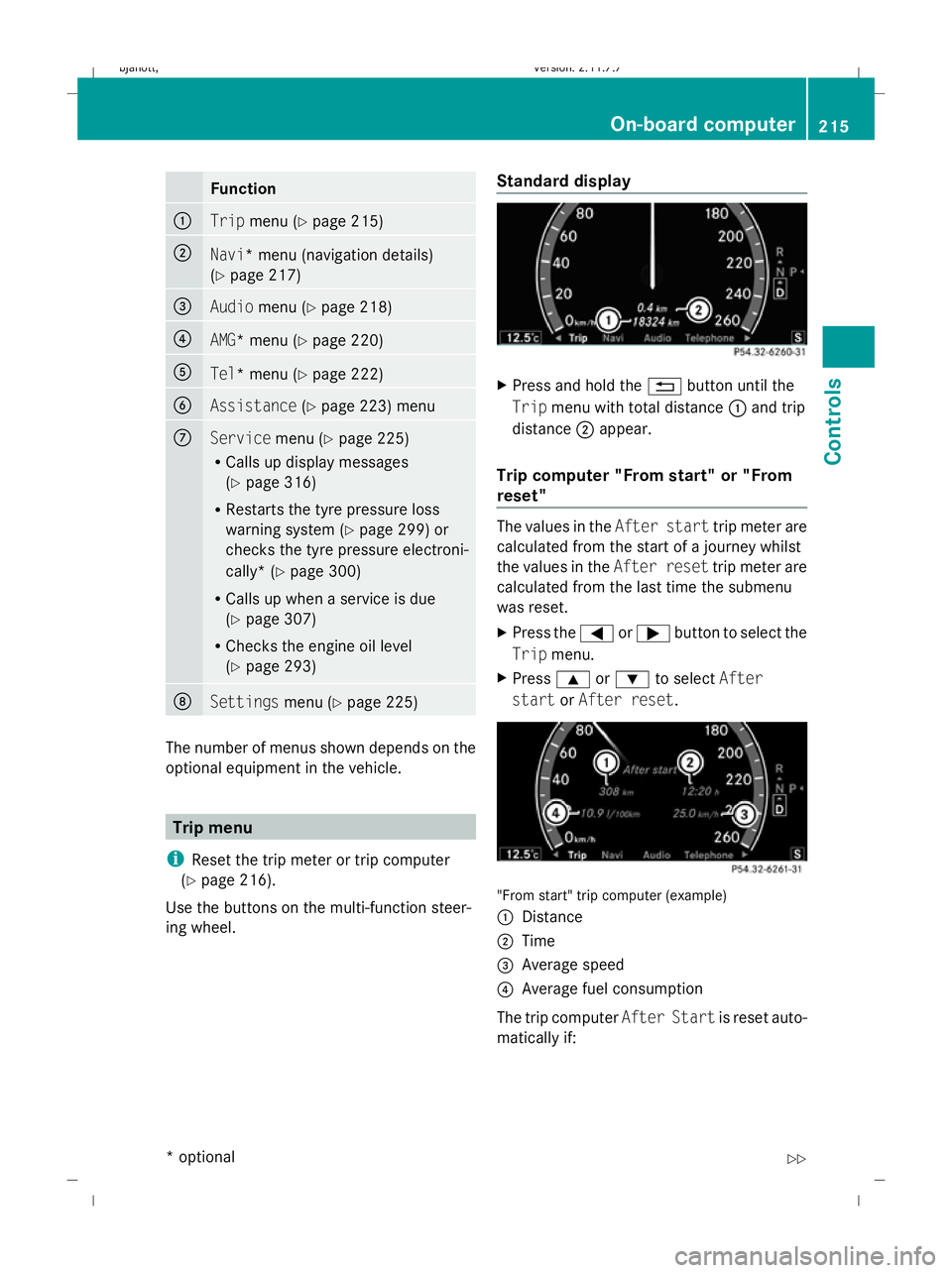
Function
:
Trip
menu (Y page 215) ;
Navi
* menu (navigation details)
(Y page 217) =
Audio
menu (Y page 218) ?
AMG* menu (Y
page 220) A
Tel* menu (Y
page 222) B
Assistance
(Ypage 223) menu C
Service
menu (Ypage 225)
R Calls up display messages
(Y page 316)
R Restarts the tyre pressure loss
warning system (Y page 299) or
checks the tyre pressure electroni-
cally* (Y page 300)
R Calls up when a service is due
(Y page 307)
R Checks the engine oil level
(Y page 293) D
Settings
menu (Ypage 225) The number of menus shown depends on the
optional equipment in the vehicle. Trip menu
i Reset the trip meter or trip computer
(Y page 216).
Use the buttons on the multi-function steer-
ing wheel. Standard display X
Press and hold the %button until the
Trip menu with total distance :and trip
distance ;appear.
Trip computer "From start" or "From
reset" The values in the
After starttrip meter are
calculated from the start of a journey whilst
the values in the After resettrip meter are
calculated from the last time the submenu
was reset.
X Press the =or; button to select the
Trip menu.
X Press 9or: to select After
start orAfter reset. "From start" trip computer (example)
:
Distance
; Time
= Average speed
? Average fuel consumption
The trip computer After Startis reset auto-
matically if: On-board computer
215Controls
* optional
216_AKB; 2; 3, en-GB
bjanott
,V ersion: 2.11.7.7
2009-02-27T14:54:17+01:00 - Seite 215 Z
Dateiname: 6515230602_buchblock.pdf; erzeugt am 04. Mar 2009 11:15:51; WK
Page 220 of 421
Navigation* menu
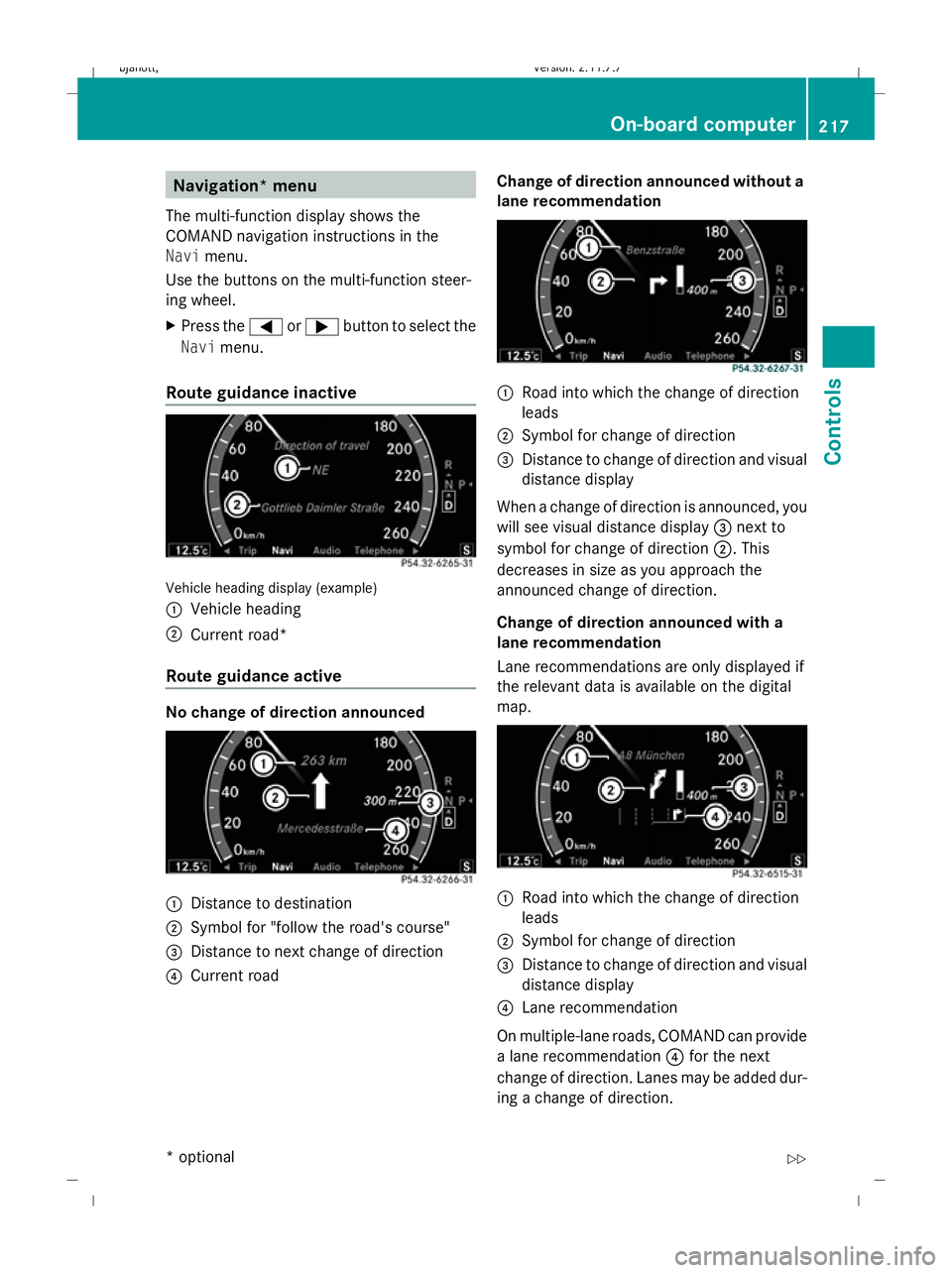
The multi-function display shows the
COMAND navigation instructions in the
Navi menu.
Use the buttons on the multi-function steer-
ing wheel.
X Press the =or; button to select the
Navi menu.
Route guidance inactive Vehicle heading display (example)
:
Vehicle heading
; Current road*
Route guidance active No change of direction announced
:
Distance to destination
; Symbol for "follow the road's course"
= Distance to next change of direction
? Current road Change of direction announced without a
lane recommendation :
Road into which the change of direction
leads
; Symbol for change of direction
= Distance to change of direction and visual
distance display
When a change of direction is announced, you
will see visual distance display =next to
symbol for change of direction ;. This
decreases in size as you approach the
announced change of direction.
Change of direction announced with a
lane recommendation
Lane recommendations are only displayed if
the relevant data is available on the digital
map. :
Road into which the change of direction
leads
; Symbol for change of direction
= Distance to change of direction and visual
distance display
? Lane recommendation
On multiple-lane roads, COMAND can provide
a lane recommendation ?for the next
change of direction. Lanes may be added dur-
ing a change of direction. On-board
computer
217Controls
* optional
216_AKB; 2; 3, en-GB
bjanott,
Version: 2.11.7.7 2009-02-27T14:54:17+01:00 - Seite 217 Z
Dateiname: 6515230602_buchblock.pdf; erzeugt am 04. Mar 2009 11:15:52; WK
Page 221 of 421
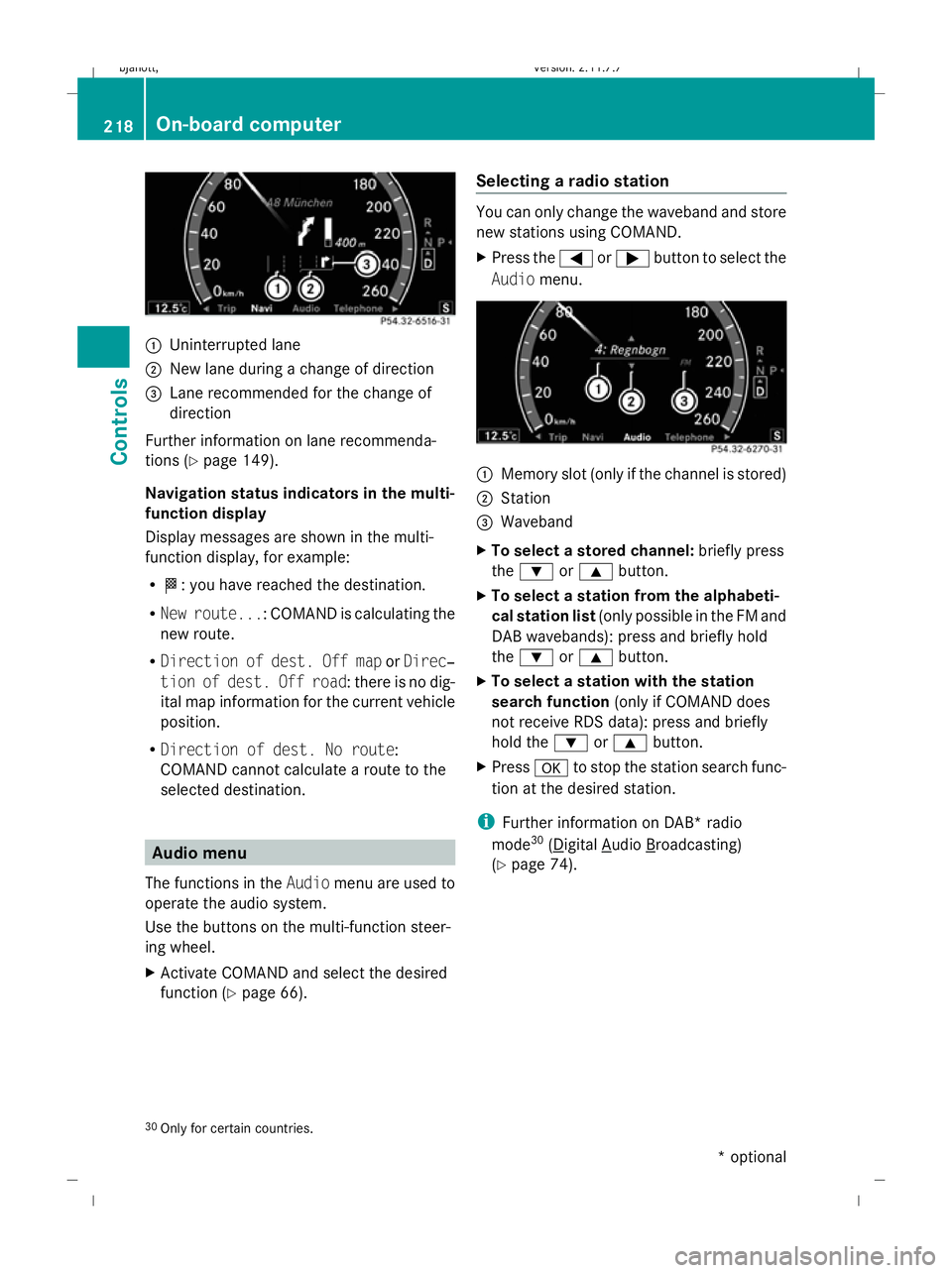
:
Uninterrupted lane
; New lane during a change of direction
= Lane recommended for the change of
direction
Further information on lane recommenda-
tions (Y page 149).
Navigation status indicators in the multi-
function display
Display messages are shown in the multi-
function display, for example:
R O: you have reached the destination.
R New route...: COMAND is calculating the
new route.
R Direction of dest. Off map orDirec‐
tion of dest. Off road: there is no dig-
ital map information for the current vehicle
position.
R Direction of dest. No route:
COMAND cannot calculate a route to the
selected destination. Audio menu
The functions in the Audiomenu are used to
operate the audio system.
Use the buttons on the multi-function steer-
ing wheel.
X Activate COMAND and select the desired
function (Y page 66). Selecting a radio station You can only change the waveband and store
new stations using COMAND.
X
Press the =or; button to select the
Audio menu. :
Memory slot (only if the channel is stored)
; Station
= Waveband
X To select a stored channel: briefly press
the : or9 button.
X To select a station from the alphabeti-
cal station list (only possible in the FM and
DAB wavebands): press and briefly hold
the : or9 button.
X To select a station with the station
search function (only if COMAND does
not receive RDS data): press and briefly
hold the :or9 button.
X Press ato stop the station search func-
tion at the desired station.
i Further information on DAB* radio
mode 30
( Digital Audio Broadcasting)
(Y page 74).
30 Only for certain countries. 218
On-board computerControls
* optional
216_AKB; 2; 3, en-GB
bjanott,
Version: 2.11.7.7 2009-02-27T14:54:17+01:00 - Seite 218
Dateiname: 6515230602_buchblock.pdf; erzeugt am 04. Mar 2009 11:15:52; WK
Page 223 of 421
not receive channel lists): press and briefly
hold the :or9 button.
X Press ato stop the station search func-
tion at the desired station. AMG* menu
Use the buttons on the multi-function steer-
ing wheel.
X Press the =or; button to select the
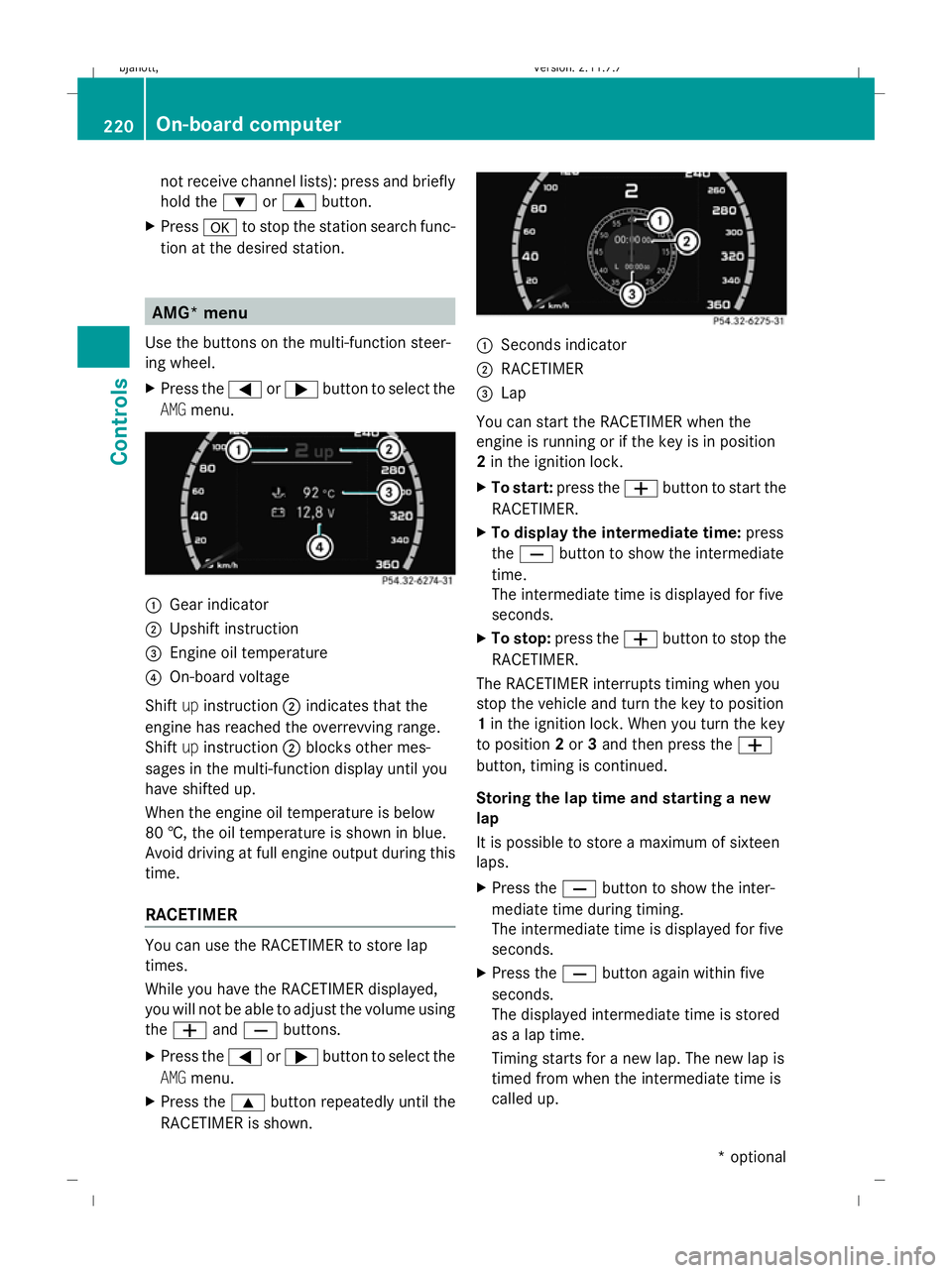
AMG menu. :
Gear indicator
; Upshift instruction
= Engine oil temperature
? On-board voltage
Shift upinstruction ;indicates that the
engine has reached the overrevving range.
Shift upinstruction ;blocks other mes-
sages in the multi-function display until you
have shifted up.
When the engine oil temperature is below
80 †, the oil temperature is shown in blue.
Avoid driving at full engine output during this
time.
RACETIMER You can use the RACETIMER to store lap
times.
While you have the RACETIMER displayed,
you will not be able to adjust the volume using
the W andX buttons.
X Press the =or; button to select the
AMG menu.
X Press the 9button repeatedly until the
RACETIMER is shown. :
Seconds indicator
; RACETIMER
= Lap
You can start the RACETIMER when the
engine is running or if the key is in position
2 in the ignition lock.
X To start: press the Wbutton to start the
RACETIMER.
X To display the intermediate time: press
the X button to show the intermediate
time.
The intermediate time is displayed for five
seconds.
X To stop: press the Wbutton to stop the
RACETIMER.
The RACETIMER interrupts timing when you
stop the vehicle and turn the key to position
1 in the ignition lock. When you turn the key
to position 2or 3and then press the W
button, timing is continued.
Storing the lap time and starting a new
lap
It is possible to store a maximum of sixteen
laps.
X Press the Xbutton to show the inter-
mediate time during timing.
The intermediate time is displayed for five
seconds.
X Press the Xbutton again within five
seconds.
The displayed intermediate time is stored
as a lap time.
Timing starts for a new lap. The new lap is
timed from when the intermediate time is
called up. 220
On-board computerControls
* optional
216_AKB; 2; 3, en-GB
bjanott,
Version: 2.11.7.7 2009-02-27T14:54:17+01:00 - Seite 220
Dateiname: 6515230602_buchblock.pdf; erzeugt am 04. Mar 2009 11:15:53; WK
Page 225 of 421
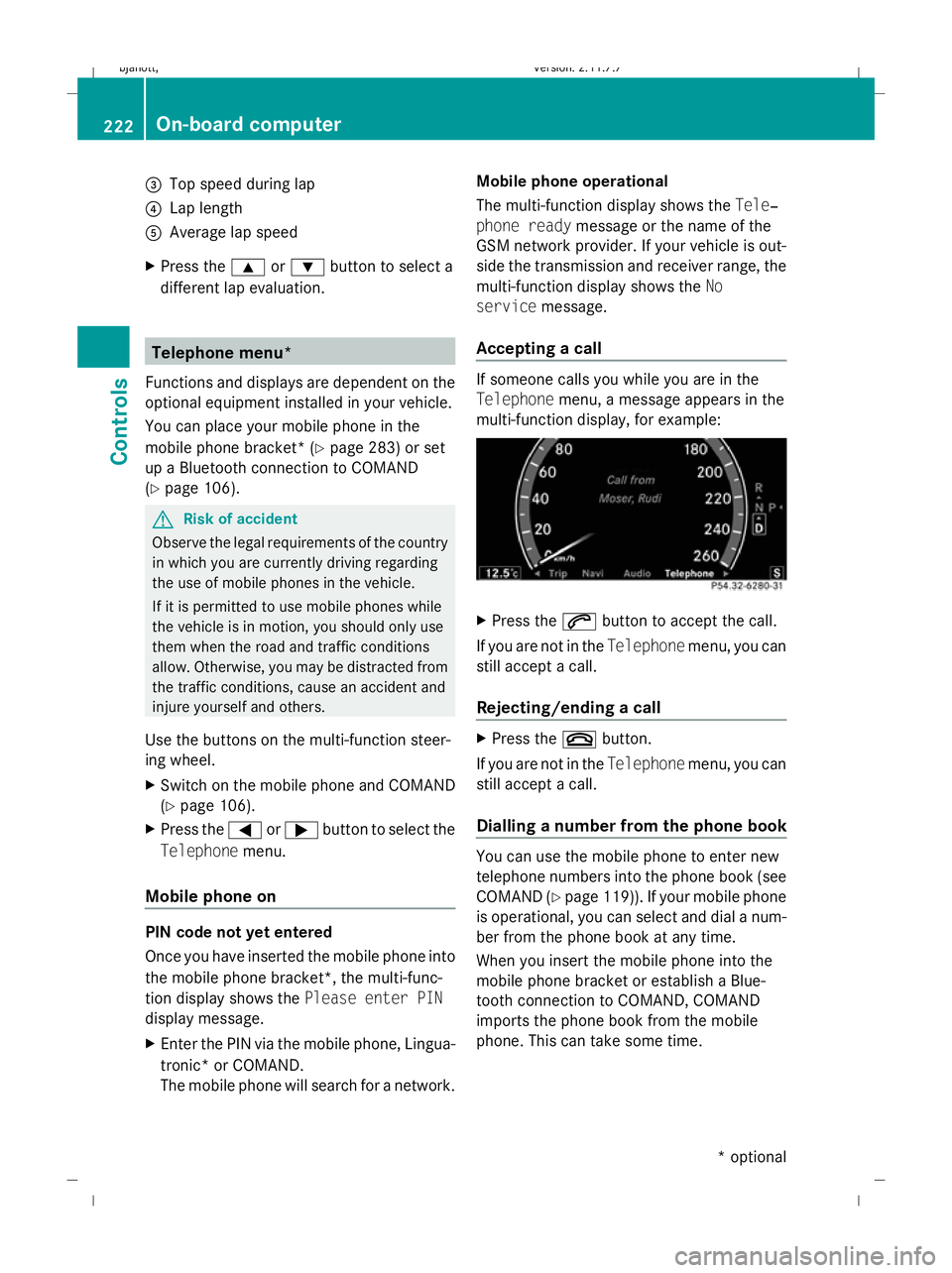
=
Top speed during lap
? Lap length
A Average lap speed
X Press the 9or: button to select a
different lap evaluation. Telephone menu*
Functions and displays are dependent on the
optional equipment installed in your vehicle.
You can place your mobile phone in the
mobile phone bracket* (Y page 283) or set
up a Bluetooth connection to COMAND
(Y page 106). G
Risk of accident
Observe the legal requirements of the country
in which you are currently driving regarding
the use of mobile phones in the vehicle.
If it is permitted to use mobile phones while
the vehicle is in motion, you should only use
them when the road and traffic conditions
allow. Otherwise, you may be distracted from
the traffic conditions, cause an accident and
injure yourself and others.
Use the buttons on the multi-function steer-
ing wheel.
X Switch on the mobile phone and COMAND
(Y page 106).
X Press the =or; button to select the
Telephone menu.
Mobile phone on PIN code not yet entered
Once you have inserted the mobile phone into
the mobile phone bracket*, the multi-func-
tion display shows the Please enter PIN
display message.
X Enter the PIN via the mobile phone, Lingua-
tronic* or COMAND.
The mobile phone will search for a network. Mobile phone operational
The multi-function display shows the
Tele‐
phone ready message or the name of the
GSM network provider. If your vehicle is out-
side the transmission and receiver range, the
multi-function display shows the No
service message.
Accepting a call If someone calls you while you are in the
Telephone menu, a message appears in the
multi-function display, for example: X
Press the 6button to accept the call.
If you are not in the Telephonemenu, you can
still accept a call.
Rejecting/ending a call X
Press the ~button.
If you are not in the Telephonemenu, you can
still accept a call.
Dialling a number from the phone book You can use the mobile phone to enter new
telephone numbers into the phone book (see
COMAND (Y page 119)). If your mobile phone
is operational, you can select and dial a num-
ber from the phone book at any time.
When you insert the mobile phone into the
mobile phone bracket or establish a Blue-
tooth connection to COMAND, COMAND
imports the phone book from the mobile
phone. This can take some time. 222
On-board computerControls
* optional
216_AKB; 2; 3, en-GB
bjanott,
Version: 2.11.7.7 2009-02-27T14:54:17+01:00 - Seite 222
Dateiname: 6515230602_buchblock.pdf; erzeugt am 04. Mar 2009 11:15:54; WK