buttons MERCEDES-BENZ CL COUPE 2009 Owners Manual
[x] Cancel search | Manufacturer: MERCEDES-BENZ, Model Year: 2009, Model line: CL COUPE, Model: MERCEDES-BENZ CL COUPE 2009Pages: 421, PDF Size: 10.78 MB
Page 10 of 421
COMAND
Back button . . . . . . . . . . . . . . . . . . .68
Basic functions . . . . . . . . . . . . . . . . .62
Components . . . . . . . . . . . . . . . . . . .58
Controller . . . . . . . . . . . . . . . . . . . . .59
DAB . . . . . . . . . . . . . . . . . . . . . . . . .74
Display . . . . . . . . . . . . . . . . . . . . . . .59
Function buttons . . . . . . . . . . . . . . .60
Linguatronic settings . . . . . . . . . . .162
Menu overview . . . . . . . . . . . . . . . . .66
Navigation . . . . . . . . . . . . . . . . . . .125
Operation . . . . . . . . . . . . . . . . . . . . .66
Overview . . . . . . . . . . . . . . . . . . . . .30
Radio . . . . . . . . . . . . . . . . . . . . . . . .70
TV . . . . . . . . . . . . . . . . . . . . . . . . . . .89
Video . . . . . . . . . . . . . . . . . . . . . . . .84
COMAND controller . . . . . . . . . . . . . ..59
Operation . . . . . . . . . . . . . . . . . . . . .59
COMAND display . . . . . . . . . . . . . . . . .59
Adjusting . . . . . . . . . . . . . . . . . . . . .68
Cleaning . . . . . . . . . . . . . . . . . . . . .310
COMAND menu
Automatic air conditioning . . . . . . .168
Navigation . . . . . . . . . . . . . . . . . . .129
Overview . . . . . . . . . . . . . . . . . . . . .66
TV . . . . . . . . . . . . . . . . . . . . . . . . . . .89
Vehicle . . . . . . . . . . . . . . . . . . . . . .164
Video . . . . . . . . . . . . . . . . . . . . . . . .84
Conference connection . . . . . . . . . ..115
Constant headlamp mode see Daytime driving lights . . . . . . .225
Consumption statistics (on-board
computer) . . . . . . . . . . . . . . . . . . . . . .215
Convenience closing . . . . . . . . . . . ..201
Convenience opening . . . . . . . . . . ..201
Convenience telephony . . . . . . . . ..110
Coolant Checking the level . . . . . . . . . . . . .294
Display message . . . . . . . . . .331, 342
Mixture ratio . . . . . . . . . . . . . . . . .399
Temperature gauge . . . . . . . . . . . .212
Coolbox . . . . . . . . . . . . . . . . . . . . . . . .283
Cornering lights Display message . . . . . . . . . . . . . .343
Cruise control . . . . . . . . . . . . . . . . . .227
Display message . . . . . . . . . . . . . .329
Cup holder . . . . . . . . . . . . . . . . . . . . .277 Current fuel consumption (on-
board computer)
. . . . . . . . . . . . . . . .216 D
DAB . . . . . . . . . . . . . . . . . . . . . . . . . . . .74
Ensembl e.. . . . . . . . . . . . . . . . . . . .74
Sub-programme . . . . . . . . . . . . . . . .75
Dashboard
Cleanin g.. . . . . . . . . . . . . . . . . . . .310
see Instrument cluster . . . . . . . . . .212
see Cockpit
Data carrier
Music Register . . . . . . . . . . . . . . . . .94
Date
Setting (COMAND ).. . . . . . . . . . . .161
Daytime driving lights . . . . . . . . . . ..195
Switching on/off (on-board com-
puter) . . . . . . . . . . . . . . . . . . . . . . .225
Delayed switch-off
Exterior lighting (COMAND) . . . . . .166
Interior lighting (COMAND) . . . . . .166
Destination input . . . . . . . . . . . . . . ..135
destination memory . . . . . . . . . . . ..157
Digital speedometer (on-board
computer) . . . . . . . . . . . . . . . . .216, 226
Digital TV . . . . . . . . . . . . . . . . . . . . . . .92
Dipped-beam headlamps Display message . . . . . . . . . . . . . .343
Symmetrical . . . . . . . . . . . . . . . . . .306
DIRECT SELECT lever
see Automatic transmission
Display
Adjusting (COMAND) . . . . . . . . . . . .68
Display message
Symbol messages . . . . . . . . .330, 364
Display messages . . . . . . . . . . . . . ..316
Service interval displa y.. . . . . . ..306
Text messages . . . . . . . . . . . . . . . .317
Up (AMG menu) . . . . . . . . . . . . . . .220
Distance display
Displaying (on-board computer) . . .223
Distance warning function (vehi-
cles with Distronic) . . . . . . . . . . . . . ..52
Activating/deactivating (on-
board computer) . . . . . . . . . . . . . .224
Distance warning lamp . . . . . . . . . ..351 Index
7 216_AKB; 2; 3, en-GB
bjanott,
Version: 2.11.7.7 2009-02-27T14:54:17+01:00 - Seite 7Dateiname: 6515230602_buchblock.pdf; erzeugt am 04. Mar 2009 11:14:34; WK
Page 12 of 421

Emergency running mode
Automatic transmission . . . . . . . . .359
Emergency unlocking
Boot . . . . . . . . . . . . . . . . . . . . . . . .366
Vehicle . . . . . . . . . . . . . . . . . . . . . .366
Engine
Running irregularl y.. . . . . . . . . . . .358
Starting problems . . . . . . . . . . . . .358
Starting with KEYLESS GO . . . . . . .203
Starting with the key . . . . . . . . . . .202
Switching off . . . . . . . . . . . . . . . . .206
Engine diagnostics warning lamp ..3 54
Engine electronics . . . . . . . . . . . . . ..394
Malfunction . . . . . . . . . . . . . . . . . .358
Engine number . . . . . . . . . . . . . . . . . .396
Engine oil . . . . . . . . . . . . . . . . . . . . . .398
Capacities . . . . . . . . . . . . . . . . . . .294
Checking the oil level (dipstick) . . .294
Checking the oil level (on-board
computer) . . . . . . . . . . . . . . . . . . .293
Consumption . . . . . . . . . . . . . . . . .293
Display message . . . . . . . . . .293, 347
Filler neck . . . . . . . . . . . . . . . . . . .294
Temperature display (on-board
computer) . . . . . . . . . . . . . . . . . . .220
Topping up . . . . . . . . . . . . . . . . . . .294
Ensemble . . . . . . . . . . . . . . . . . . . . . . .74
ESP ®
(Electronic Stability Program) .50
Activating/deactivating . . . . . . . . . .51
Activating/deactivating (on-
board computer) . . . . . . . . . . . . . .224
Display messages . . . . . . . . . . . . .334
Warning lamp . . . . . . . . . .50, 352, 353
ETS (Electronic Traction Support) . ..51
Exterior lighting see Exterior lighting
Exterior mirror parking position
Adjusting (COMAND ).. . . . . . . . . .165
Exterior mirrors
Adjusting . . . . . . . . . . . . . . . . . . . .189
Anti-dazzle mode (automatic) . . . .189
Convenience settings . . . . . . . . . . .165
Folding in/out (automatically). . ..1 89
Folding in/out (electrically).. . . . .189
Malfunction . . . . . . . . . . . . . . . . . .362
Parking position . . . . . . . . . . . . . . .191
Storing settings . . . . . . . . . . . . . . .190 Exterior view
Overview . . . . . . . . . . . . . . . . . . . . .24 F
Fault message see Display message . . . . . . . . . . .316
Favourites (COMAND) . . . . . . . . . . ..163
Fire extinguisher . . . . . . . . . . . . . . . .314
First-aid kit . . . . . . . . . . . . . . . . . . . . .314
Flat tyre Equipment . . . . . . . . . . . . . . . . . . .373
MOExtended run-flat system . . . . .381
Preparing the vehicle . . . . . . . . . . .373
TIREFIT kit . . . . . . . . . . . . . . . . . . .373
Floormat . . . . . . . . . . . . . . . . . . . . . . .287
Foglamps Display message . . . . . . . . . . . . . .345
Fording . . . . . . . . . . . . . . . . . . . . . . . .305
Frequencies Garage door opene r.. . . . . . . . . . .408
Front airbag . . . . . . . . . . . . . . . . . . . . .40
Front multicontour seat (COMAND) 173
Front-passenger airbag . . . . . . . . . . ..40
Front-passenger seat Adjusting from the driver's seat . . .184
Fuel . . . . . . . . . . . . . . . . . . . . . . . . . . .397
Gauge . . . . . . . . . . . . . . . . . . . . . . . .27
Loss . . . . . . . . . . . . . . . . . . . . . . . .357
Petrol . . . . . . . . . . . . . . . . . . . . . . .291
Fuel consumption
Current (on-board computer) . . . . .216
Notes . . . . . . . . . . . . . . . . . . . . . . .397
Fuel filler flap
Opening/closing . . . . . . . . . . . . . .290
Fuel gauge . . . . . . . . . . . . . . . . . . . . . .27
Fuel level Calling up the range (on-board
computer) . . . . . . . . . . . . . . . . . . .216
Fuel line
Malfunction . . . . . . . . . . . . . . . . . .357
Fuel tank
Defect . . . . . . . . . . . . . . . . . . . . . .357
Function buttons (COMAND) . . . . . ..60
Fuse allocation chart . . . . . . . . . . ..389 Index
9 216_AKB; 2; 3, en-GB
bjanott,
Version: 2.11.7.7 2009-02-27T14:54:17+01:00 - Seite 9Dateiname: 6515230602_buchblock.pdf; erzeugt am 04. Mar 2009 11:14:35; WK
Page 18 of 421
Sensors
Cleaning . . . . . . . . . . . . . . . . . . . . .310
Service indicator
see Service interval display . . . . . .306
Service products . . . . . . . . . . . . . . . .396
Brake fluid . . . . . . . . . . . . . . . . . . .400
Coolant . . . . . . . . . . . . . . . . . . . . .399
Engine oil . . . . . . . . . . . . . . . . . . . .398
Fuel . . . . . . . . . . . . . . . . . . . . . . . .397
Settings
Calling up a stored setting . . . . . . .190
On-board computer . . . . . . . . . . . .225
Setting the air distribution
COMAND . . . . . . . . . . . . . . . . . . . .169
Shift ranges
Automatic transmission . . . . . . . . .209
Sidebag . . . . . . . . . . . . . . . . . . . . . . . . .41
Side windows Convenience closing . . . . . . . . . . .201
Convenience opening . . . . . . . . . . .201
Fault . . . . . . . . . . . . . . . . . . . . . . . .361
Opening/closing . . . . . . . . . . . . . .200
Skibag . . . . . . . . . . . . . . . . . . . . . . . . .278
Sliding/tilting sunroof . . . . . . . . . ..274
Convenience closing . . . . . . . . . . .201
Convenience opening . . . . . . . . . . .201
Rain closing feature . . . . . . . . . . . .275
Resetting . . . . . . . . . . . . . . . . . . . .275
Sliding sunroof
see Sliding/tilting sunroof
Snow chains . . . . . . . . . . . . . . . . . . . .303
Socket . . . . . . . . . . . . . . . . . . . . . . . . .282
Cockpit . . . . . . . . . . . . . . . . . . . . . .282
Sound settings . . . . . . . . . . . . . . . . . . .63
Spare wheel Fitting. . . . . . . . . . . . . . . . . . . . . . .378
Technical data . . . . . . . . . . . . . . . .407
Special destination
Entry . . . . . . . . . . . . . . . . . . . . . . . .147
Spectacles compartment . . . . . . . ..276
Speed limiter Speedtronic . . . . . . . . . . . . . . . . . .242
Speedometer
Additional speedometer (on-
board computer) . . . . . . . . . .216, 226
Selecting the display unit (on-
board computer) . . . . . . . . . . . . . .226 Speedtronic
. . . . . . . . . . . . . . . . . . . .242
Display message . . . . . . . . . .320, 329
Permanent . . . . . . . . . . . . . . . . . . .245
Variabl e.. . . . . . . . . . . . . . . . . . . .243
SRS (Supplemental Restraint Sys-
tem) . . . . . . . . . . . . . . . . . . . . . . . . . . . .37
Display message . . . . . . . . . . . . . .338
Warning lamp . . . . . . . . . . . . . .37, 353
Steering wheel
Adjusting . . . . . . . . . . . . . . . . . . . .188
Buttons (on-board computer) . . . . .213
Storing settings . . . . . . . . . . . . . . .190
Steering wheel boss
Cleaning . . . . . . . . . . . . . . . . . . . . .310
Steering wheel heating . . . . . . . . . ..188
Stowage compartments . . . . . . . . ..275
Armrest (under) . . . . . . . . . . . . . . .277
Centre console . . . . . . . . . . . . . . . .276
Cup holder . . . . . . . . . . . . . . . . . . .277
Glove compartment . . . . . . . . . . . .276
Rea r.. . . . . . . . . . . . . . . . . . . . . . .277
Rear seat armrest . . . . . . . . . . . . .277
Rear seats (between) . . . . . . . . . . .277
Stowage well
Boot floor (underneath) . . . . . . . . .280
Summer opening
see Convenience opening
Sun visor . . . . . . . . . . . . . . . . . . . . . . .280
Supplemental Restraint System See SRS . . . . . . . . . . . . . . . . . . . . . .37
Suspension tuning . . . . . . . . ..247, 248
Switching off the alarm ATA . . . . . . . . . . . . . . . . . . . . . . . . . .55
System settings (COMAND)
Display . . . . . . . . . . . . . . . . . . . . . .161
Linguatronic settings . . . . . . . . . . .162
Menu overview . . . . . . . . . . . . . . . .160
Programmable button . . . . . . . . . .163
Reset . . . . . . . . . . . . . . . . . . . . . . .163
Setting the system language . . . . .163
Time settings . . . . . . . . . . . . . . . . .161 T
Tail pipes Cleaning . . . . . . . . . . . . . . . . . . . . .310
Tank
see Fuel tank Index
15 216_AKB; 2; 3, en-GB
bjanott,
Version: 2.11.7.7 2009-02-27T14:54:17+01:00 - Seite 15Dateiname: 6515230602_buchblock.pdf; erzeugt am 04. Mar 2009 11:14:35; WK
Page 33 of 421
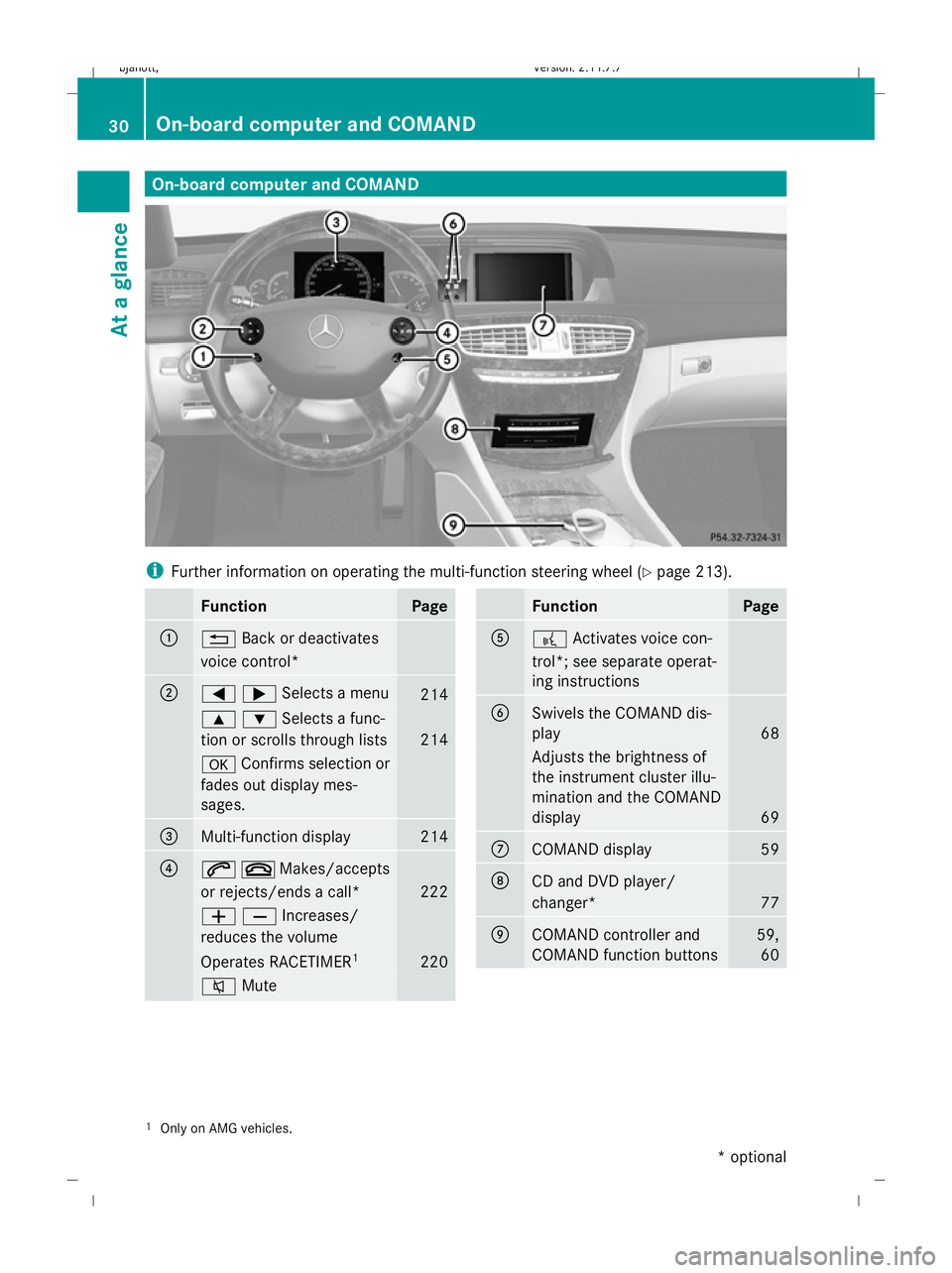
On-board computer and COMAND
i
Further information on operating the multi-function steering wheel (Y page 213).Function Page
:
%
Back or deactivates
voice control* ;
=;Selects a menu
214
9:Selects a func-
tion or scrolls through lists 214
a
Confirms selection or
fades out display mes-
sages. =
Multi-function display 214
?
6~Makes/accepts
or rejects/ends a call* 222
WXIncreases/
reduces the volume Operates RACETIMER
1 220
8
Mute Function Page
A
?
Activates voice con-
trol*; see separate operat-
ing instructions B
Swivels the COMAND dis-
play
68
Adjusts the brightness of
the instrument cluster illu-
mination and the COMAND
display
69
C
COMAND display 59
D
CD and DVD player/
changer*
77
E
COMAND controller and
COMAND function buttons 59,
60 1
Only on AMG vehicles. 30
On-board computer and COMANDAt a glance
* optional
216_AKB; 2; 3, en-GB
bjanott,
Version: 2.11.7.7
2009-02-27T14:54:17+01:00 - Seite 30
Dateiname: 6515230602_buchblock.pdf; erzeugt am 04. Mar 2009 11:14:42; WK
Page 35 of 421
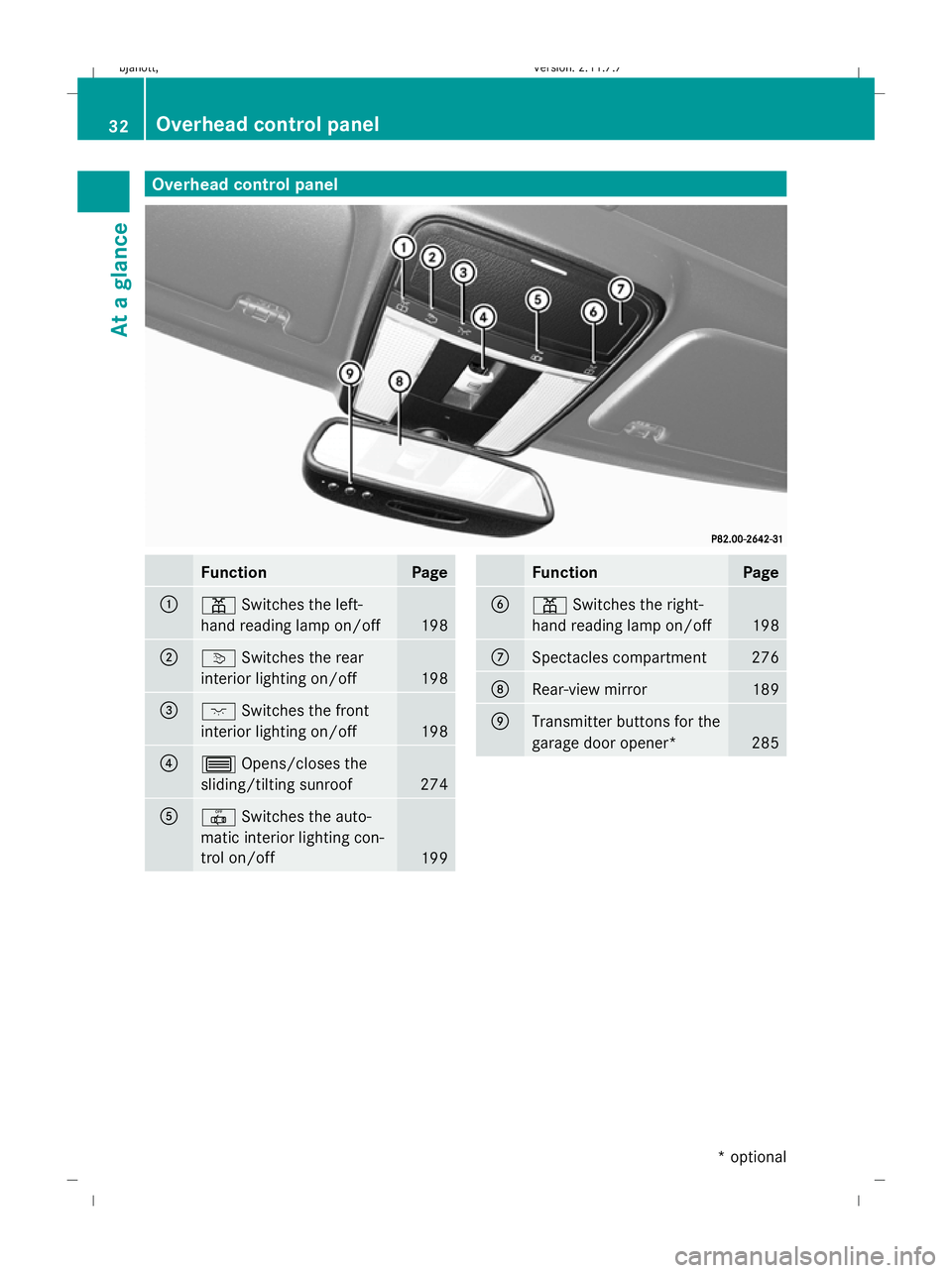
Overhead control panel
Function Page
:
p
Switches the left-
hand reading lamp on/off 198
;
v
Switches the rear
interior lighting on/off 198
=
c
Switches the front
interior lighting on/off 198
?
3
Opens/closes the
sliding/tilting sunroof 274
A
|
Switches the auto-
matic interior lighting con-
trol on/off 199 Function Page
B
p
Switches the right-
hand reading lamp on/off 198
C
Spectacles compartment 276
D
Rear-view mirror 189
E
Transmitter buttons for the
garage door opener*
28532
Overhead control panelAt a glance
* optional
216_AKB; 2; 3, en-GB
bjanott,
Version: 2.11.7.7 2009-02-27T14:54:17+01:00 - Seite 32
Dateiname: 6515230602_buchblock.pdf; erzeugt am 04. Mar 2009 11:14:44; WK
Page 61 of 421
Introduction
Operating safety
G
Risk of accident
Your attention must always be focused on the
traffic conditions.
Only use COMAND or the telephone* when
the road and traffic conditions permit.
Bear in mind that, at a speed of only
50 km/h, your vehicle covers a distance of
nearly 14 m per second. The navigation sys-
tem* will not provide you with information
about stop signs, give-way signs, traffic regu-
lations or road safety features. It is up to you
to pay attention to these while driving the
vehicle. Only enter a new destination when
the vehicle is stationary. G
Risk of accident and injury
Vehicles with BlueHYBRID *: make sure that
you read the "BlueHYBRID" supplement. You
may otherwise fail to detect dangers.
Dear radio user,
This radio can be operated by anyone in
accordance with the relevant EC directive.
The equipment corresponds to current Euro-
pean and harmonised national standards.
This guarantees that the equipment conforms
to the relevant specifications regarding elec-
tromagnetic compatibility.
As a result, interference caused by your
equipment to other electrical/electronic
equipment and interference to your equip-
ment caused by other electrical/electronic
equipment can be largely prevented.
The equipment is approved by the vehicle
manufacturer in accordance with European
Automotive EMC Directive 95/54/EC.
This means that the equipment in your vehicle
is authorised for use according to the given
regulations. The equipment does not require
certification and conforms to the relevant
equipment-specific EMC specifications in accordance with European standards
EN 55013 and EN 55020. Function restrictions when the vehi-
cle is being driven
For safety reasons, some COMAND functions
are restricted or unavailable while the vehicle
is in motion. This will be indicated by
COMAND displaying a message to this effect. Components
You can use COMAND to operate the follow-
ing in your vehicle:
R the audio functions
R the navigation system*
R the telephone* and communication func-
tions (text messages*)
R video DVD and TV*
R various vehicle settings
COMAND consists of:
R the COMAND display/SPLITVIEW*
R the COMAND controller
R the COMAND function buttons
R the telephone keypad
R connections in the glove compartment
(USB, additional USB*, jack plug* and
iPod ®
connection*)
The entertainment system* comprises:
R a remote control* for the front passenger
R wireless headphones* for the front
passenger 58
IntroductionCOMAND
* optional
216_AKB; 2; 3, en-GB
bjanott,
Version: 2.11.7.7 2009-02-27T14:54:17+01:00 - Seite 58
Dateiname: 6515230602_buchblock.pdf; erzeugt am 04. Mar 2009 11:14:52; WK
Page 63 of 421
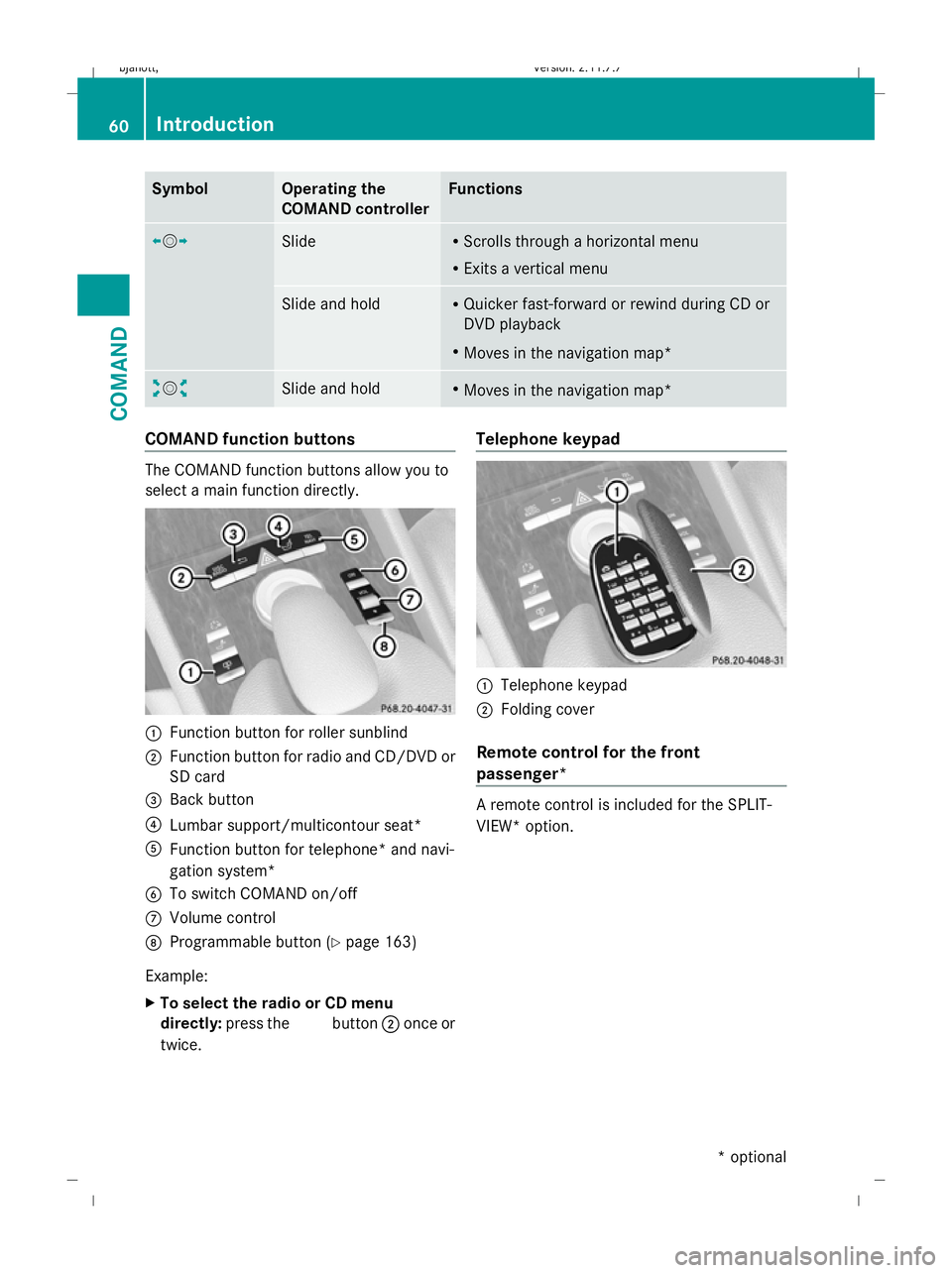
Symbol Operating the
COMAND controller Functions
XVY
Slide R
Scrolls through a horizontal menu
R Exits a vertical menu Slide and hold R
Quicker fast-forward or rewind during CD or
DVD playback
R Moves in the navigation map* aVb
Slide and hold R
Moves in the navigation map* COMAND function buttons
The COMAND function buttons allow you to
select a main function directly. :
Function button for roller sunblind
; Function button for radio and CD/DVD or
SD card
= Back button
? Lumbar support/multicontour seat*
A Function button for telephone* and navi-
gation system*
B To switch COMAND on/off
C Volume control
D Programmable button (Y page 163)
Example:
X To select the radio or CD menu
directly: press the Rbutton ;once or
twice. Telephone keypad
:
Telephone keypad
; Folding cover
Remote control for the front
passenger* A remote control is included for the SPLIT-
VIEW* option. 60
IntroductionCOMAND
* optional
216_AKB; 2; 3, en-GB
bjanott,
Version: 2.11.7.7
2009-02-27T14:54:17+01:00 - Seite 60
Dateiname: 6515230602_buchblock.pdf; erzeugt am 04. Mar 2009 11:14:53; WK
Page 64 of 421
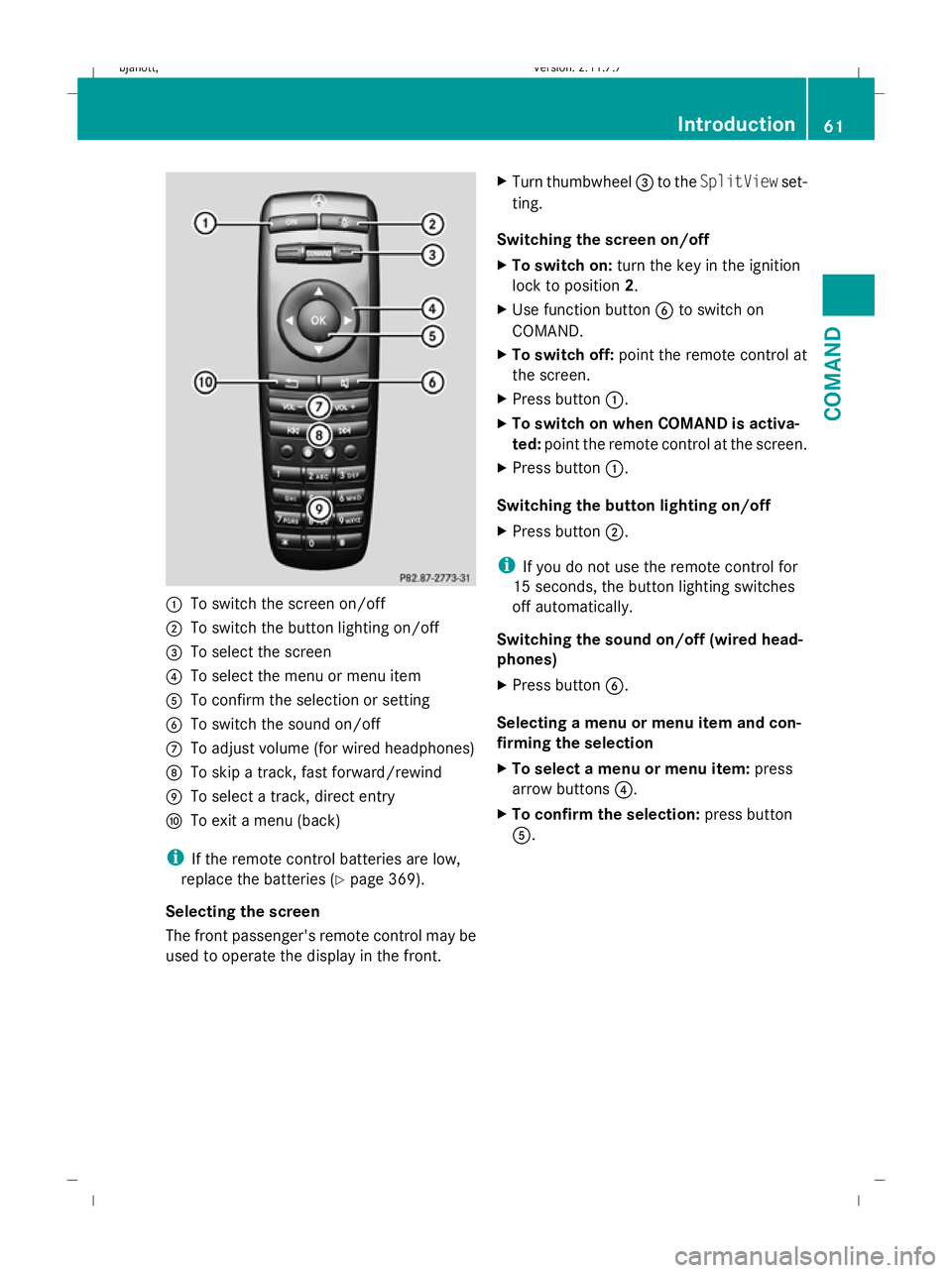
:
To switch the screen on/off
; To switch the button lighting on/off
= To select the screen
? To select the menu or menu item
A To confirm the selection or setting
B To switch the sound on/off
C To adjust volume (for wired headphones)
D To skip a track, fast forward/rewind
E To select a track, direct entry
F To exit a menu (back)
i If the remote control batteries are low,
replace the batteries (Y page 369).
Selecting the screen
The front passenger's remote control may be
used to operate the display in the front. X
Turn thumbwheel =to the SplitView set-
ting.
Switching the screen on/off
X To switch on: turn the key in the ignition
lock to position 2.
X Use function button Bto switch on
COMAND.
X To switch off: point the remote control at
the screen.
X Press button :.
X To switch on when COMAND is activa-
ted: point the remote control at the screen.
X Press button :.
Switching the button lighting on/off
X Press button ;.
i If you do not use the remote control for
15 seconds, the button lighting switches
off automatically.
Switching the sound on/off (wired head-
phones)
X Press button B.
Selecting a menu or menu item and con-
firming the selection
X To select a menu or menu item: press
arrow buttons ?.
X To confirm the selection: press button
A. Introduction
61COMAND
216_AKB; 2; 3, en-GB
bjanott, Version: 2.11.7.7 2009-02-27T14:54:17+01:00 - Seite 61 Z
Dateiname: 6515230602_buchblock.pdf; erzeugt am 04. Mar 2009 11:14:53; WK
Page 75 of 421
Selecting via the station presets
X
Select AudioQRadio QMemory.
or
X Press Wwhen the main area is selected.
The preset menu appears. The #dot in
front of a preset position indicates that the
currently selected channel is stored there.
X Select the preset position and briefly press
W.
You can also select the station using the digits
on the telephone keypad (Y page 106) or the
buttons on the multi-function steering wheel:
X Briefly press the 9or: button on
the multi-function steering wheel.
Selecting by entering the frequency
manually X
Select AudioQ RadioQRadio Q
Frequency input.
X To select a higher or lower number: slide
ZVÆ or turn cVd.
i You can only tune in to currently permit-
ted frequencies.
X To move to the next frequency: slide
XVY.
X To set the frequency: pressW.
COMAND tunes in to the frequency
entered.
i If you enter a frequency in the medium
waveband which is outside the frequency
range, COMAND tunes in to the next lower
frequency. Storing a station
Twenty stations can be stored in each wave-
band.
If station fix or frequency fix has been set,
these functions are saved when the station is
saved. Storing manually X
Select AudioQRadio QRadio Q
Save station.
or
X Press Wwhen the main area is selected.
or
X Select AudioQRadio QMemory.
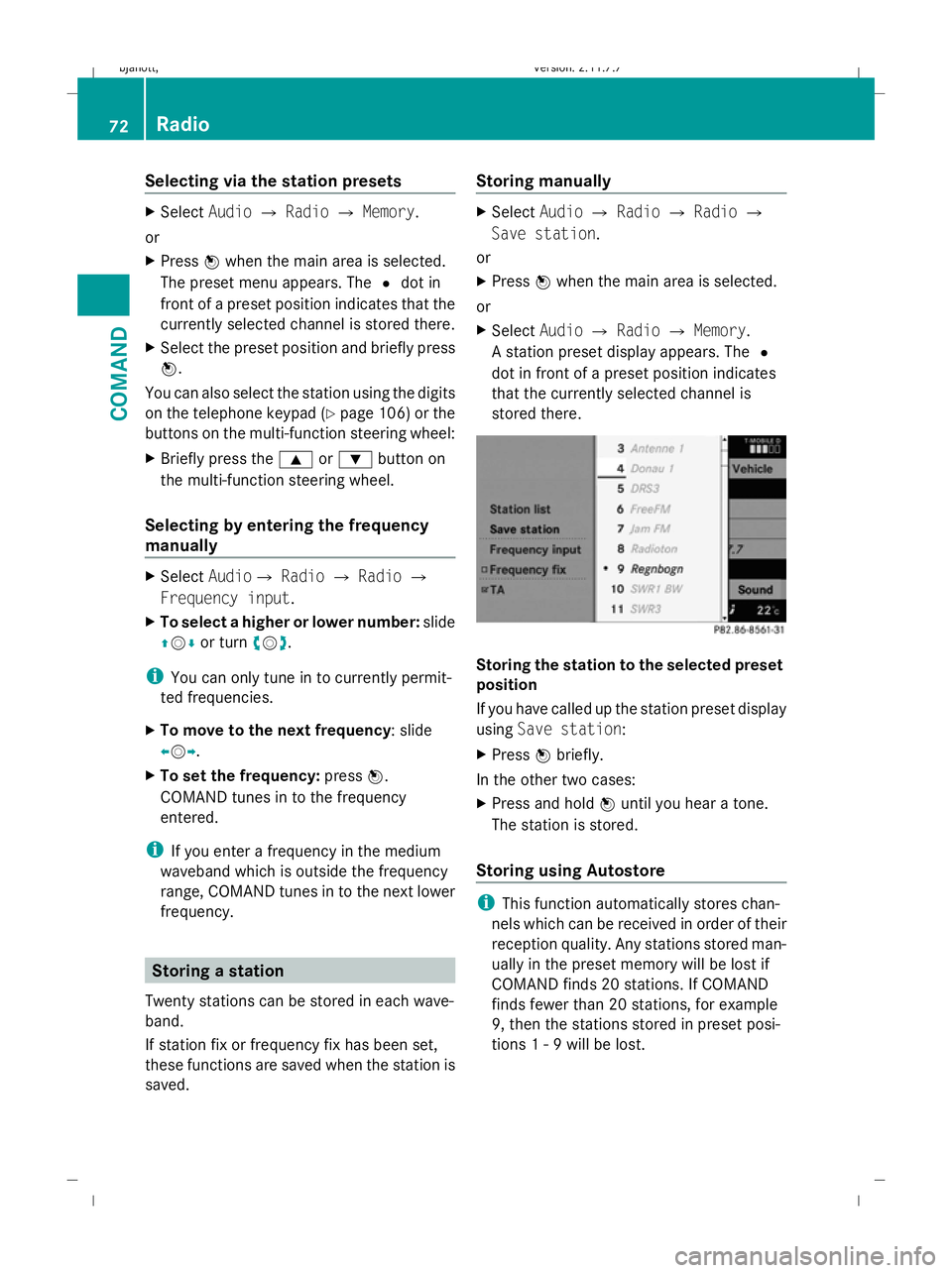
A station preset display appears. The #
dot in front of a preset position indicates
that the currently selected channel is
stored there. Storing the station to the selected preset
position
If you have called up the station preset display
using Save station:
X Press Wbriefly.
In the other two cases:
X Press and hold Wuntil you hear a tone.
The station is stored.
Storing using Autostore i
This function automatically stores chan-
nels which can be received in order of their
reception quality. Any stations stored man-
ually in the preset memory will be lost if
COMAND finds 20 stations. If COMAND
finds fewer than 20 stations, for example
9, then the stations stored in preset posi-
tions 1 - 9 will be lost. 72
RadioCOMAND
216_AKB; 2; 3, en-GB
bjanott,
Version: 2.11.7.7 2009-02-27T14:54:17+01:00 - Seite 72
Dateiname: 6515230602_buchblock.pdf; erzeugt am 04. Mar 2009 11:14:57; WK
Page 109 of 421
Switching the telephone on/off
You can only switch the telephone on and
off 11
if convenience telephony* is activated.
X To switch on: insert the mobile phone into
the bracket when COMAND is switched on.
or
X Switch on the mobile phone – see mobile
phone operating instructions.
or
X Select Telephone QTelephone on.
X To switch off: selectTelephone Q
Telephone off.
or
X Switch off the mobile phone – see mobile
phone operating instructions. Telephone keypad
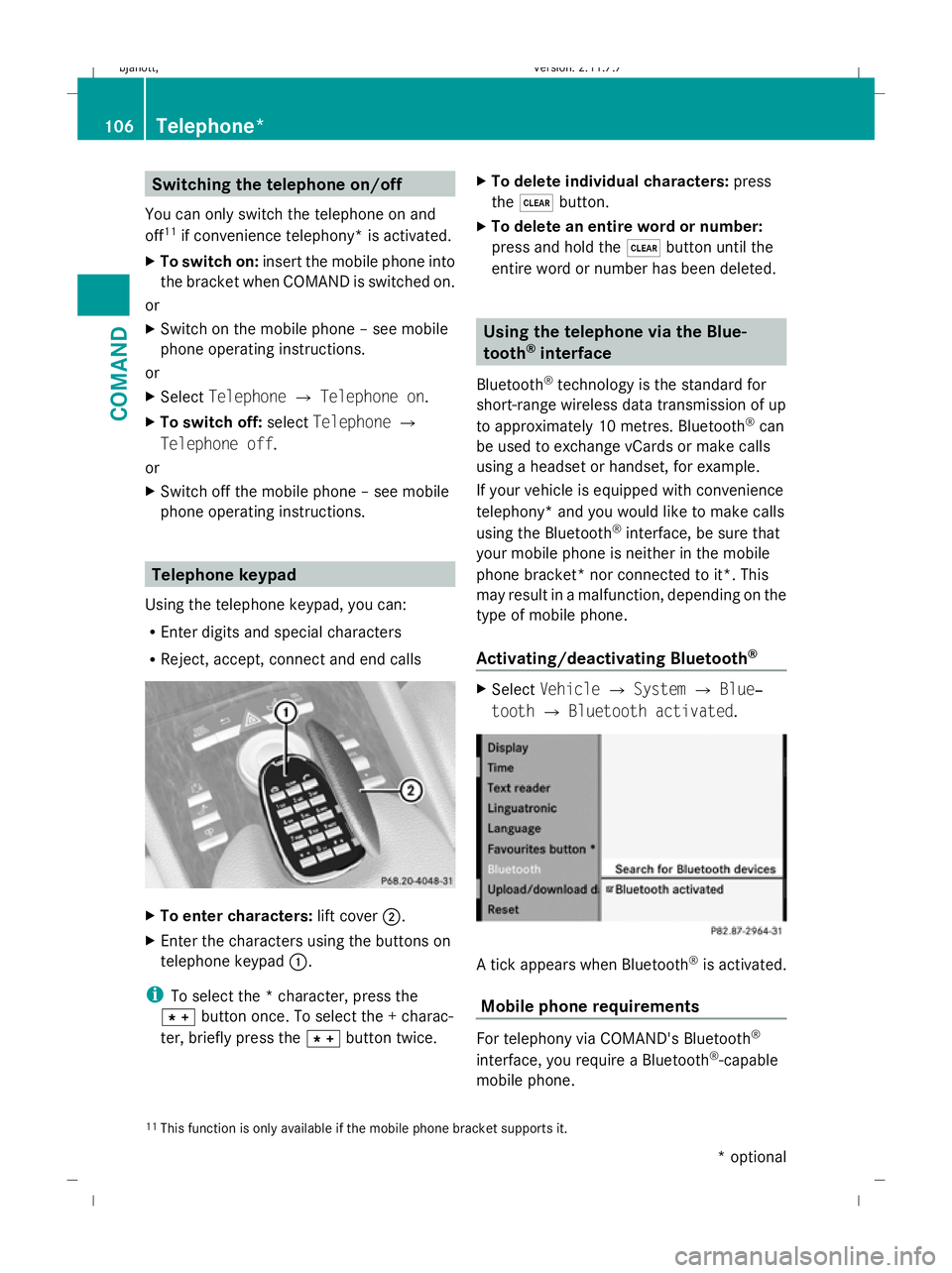
Using the telephone keypad, you can:
R Enter digits and special characters
R Reject, accept, connect and end calls X
To enter characters: lift cover;.
X Enter the characters using the buttons on
telephone keypad :.
i To select the * character, press the
à button once. To select the + charac-
ter, briefly press the Ãbutton twice. X
To delete individual characters: press
the $ button.
X To delete an entire word or number:
press and hold the $button until the
entire word or number has been deleted. Using the telephone via the Blue-
tooth
®
interface
Bluetooth ®
technology is the standard for
short-range wireless data transmission of up
to approximately 10 metres. Bluetooth ®
can
be used to exchange vCards or make calls
using a headset or handset, for example.
If your vehicle is equipped with convenience
telephony* and you would like to make calls
using the Bluetooth ®
interface, be sure that
your mobile phone is neither in the mobile
phone bracket* nor connected to it*. This
may result in a malfunction, depending on the
type of mobile phone.
Activating/deactivating Bluetooth ® X
Select Vehicle QSystem QBlue‐
tooth QBluetooth activated. A tick appears when Bluetooth
®
is activated.
Mobile phone requirements For telephony via COMAND's Bluetooth
®
interface, you require a Bluetooth ®
-capable
mobile phone.
11 This function is only available if the mobile phone bracket supports it. 106
Telephone*COMAND
* optional
216_AKB; 2; 3, en-GB
bjanott,
Version: 2.11.7.7 2009-02-27T14:54:17+01:00 - Seite 106
Dateiname: 6515230602_buchblock.pdf; erzeugt am 04. Mar 2009 11:15:06; WK