radio MERCEDES-BENZ CLA 2017 User Guide
[x] Cancel search | Manufacturer: MERCEDES-BENZ, Model Year: 2017, Model line: CLA, Model: MERCEDES-BENZ CLA 2017Pages: 318, PDF Size: 9.9 MB
Page 229 of 318
General notes The multimedia system section in this Opera-
tor's Manual describes the basic principles for
operation. More information can be found in the
Digital Operator's Manual.
Important safety notes
G WARNING
If you operate information systems and com-
munication equipment integrated in the vehi-
cle while driving, you will be distracted from
traffic conditions. You could also lose control
of the vehicle. There is a risk of an accident.
Only operate the equipment when the traffic
situation permits. If you are not sure that this
is possible, park the vehicle paying attention
to traffic conditions and operate the equip-
ment when the vehicle is stationary.
You must observe the legal requirements for the
country in which you are currently driving when
operating the multimedia system.
The multimedia system calculates the route to
the destination without taking the following into
account, for example: R
traffic lights R
stop and yield signs R
parking or stopping restrictions R
road narrowing R
other road and traffic rules and regulations
The multimedia system may give incorrect nav-
igation recommendations if the actual street/
traffic situation does not correspond with the
digital map's data.
For example: R
a diverted route R
the road layout or the direction of a one-way
street has been changed
For this reason, you must always observe road
and traffic rules and regulations during your
journey. Road and traffic rules and regulations
always have priority over multimedia system
driving recommendations.
Navigation announcements are intended to
direct you while driving without diverting your
attention from the road and driving. Please always use this feature instead of con-
sulting the map display for directions. Looking
at the icons or map display can distract you from
traffic conditions and driving, and increase the
risk of an accident.
This equipment complies with FCC radiation
exposure limits set forth for uncontrolled equip-
ment and meets the FCC radio frequency (RF)
Exposure Guidelines in Supplement C to OET65.
This equipment has very low levels of RF energy
that is deemed to comply without maximum
permissive exposure evaluation (MPE). How-
ever, it is recommended to insta ll it at a distance
of
at least 8 inches (approx. 20 cm) between the
radiation source and a person's body (not
including limbs such as hands, wrists, feet and
legs).
G WARNING
Modifications to electronic components, their
software as well as wiring can impair their
function and/or the function of other net-
worked components. In particular, systems
relevant to safety could also be affected. As a
result, these may no longer function as inten-
ded and/or jeopardize the operating safety of
the vehicle. There is an increased risk of an
accident and injury.
Never tamper with the wiring as well as elec-
tronic components or their software. You
should have all work to electrical and elec-
tronic equipment carried out at a qualified
specialist workshop.
If you make any changes to the vehicle elec-
tronics, the general operating permit is ren-
dered invalid.
Function restrictions
For safety reasons, some functions are restric-
ted or unavailable while the vehicle is in motion.
You will notice this, for example, because either
you will not be able to select certain menu items
or a message will appear to this effect.Function restrictions 227
Multimedia system Z
Page 230 of 318
Operating system
Overview
General notes
! Do not use the space in front of the display
for storage. Objects placed here could dam-
age the display or impair its function. Avoid
any direct contact with the display surface.
Pressure on the display surface may result in
impairments to the display, which could be
irreversible.
Wearing polarized sunglasses may impair your
ability to read the display.
The display has an automatic temperature-con-
trolled switch-off feature. The brightness is
automatically reduced if the temperature is too
high. The display may temporarily switch off
completely.
Cleaning instructions
! Do not touch the display. The display has a
very sensitive high-gloss surface; there is a
risk of scratching. If you have to clean the
screen, however, use a mild cleaning agent
and a soft, lint-free cloth.
The display must be switched off and have
cooled down before you start cleaning. Do not
apply pressure to the display surface when
cleaning it, as this could cause irreversible dam-
age to the display.
Switching the multimedia system
on/off X
Press the C control knob.
Adjusting the volume X
Turn the C control knob.
The volume is adjusted: R
for the currently selected media source R
during traffic or navigation announcements R
in hands-free mode during a phone call
Switching the sound on or off X
Press the c button on the control panel.
If the audio output is switched off, the status
line will show the c symbol. If you switch the media source or set the volume, the sound
is automatically switched on.
i Navigation announcements will be heard
even if the sound is muted.
Functions The multimedia system has the following func-
tions: R
Radio mode R
Media mode with media search R
Sound systems R
Navigation system
COMAND: navigation via the hard drive
Audio 20: navigation via SD card R
Communication functions R
SIRIUS Weather (COMAND) R
Vehicle functions with system settings R
Favorites functions
Controller The controller in the center console lets you: R
select menu items on the display R
enter characters R
select a destination on the map R
save entries
The controller can be: R
turned 3 R
slid left or right 1 R
slid forwards or back 4R
slid diagonally 2 R
pressed briefly or pressed and held 7
Back button You can use the 8 button to exit a menu or to
call up the basic display of the current operating
mode. X
To exit the menu: briefly press the 8
button.
The multimedia system changes to the next
higher menu level in the current operating
mode. X
To call up the basic display: press the 8
button for longer than two seconds.
The multimedia system changes to the basic
display of the current operating mode.228
Operating system
Multimedia system
Page 279 of 318
As a rule, you should have the vehicle trans-
ported. R
towing the vehicle with a tow rope or tow bar
Only tow the vehicle in exceptional cases.
The battery must be connected and charged.
Otherwise, you: R
cannot turn the SmartKey to position 2 in the
ignition lock R
cannot release the electric parking brake R
cannot move the transmission to position N
The function of the electric parking brake and
the parking lock is dependent on the on-board
voltage.
If the on-board voltage is low or if there is a sys-
tem malfunction: R
the electric parking brake may not be applied
in certain circumstances, or R
the transmission may not be shifted to P
Switch off non-essential consumers, e.g. the
radio.
Disarm the automatic locking feature before the
vehicle is towed ( Y
page 184). You could other-
wise be locked out when pushing or towing the
vehicle.
Installing/removing the towing eye
Installing the towing eye
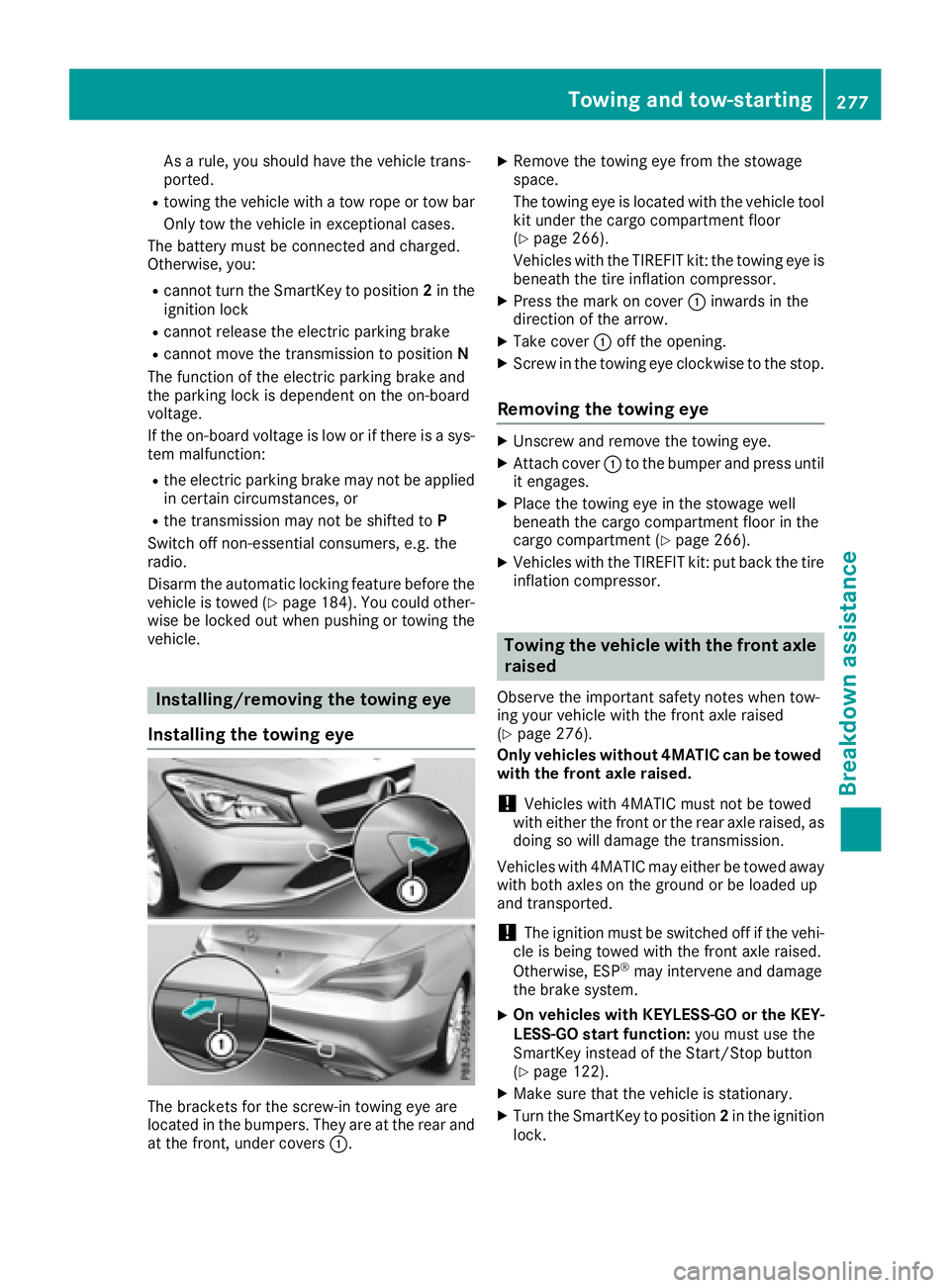
The brackets for the screw-in towing eye are
located in the bumpers. They are at the rear and
at the front, under covers C . X
Remove the towing eye from the stowage
space.
The towing eye is located with the vehicle tool
kit under the cargo compartment floor
( Y
page 266).
Vehicles with the TIREFIT kit: the towing eye is
beneath the tire inflation compressor. X
Press the mark on cover C inwards in the
direction of the arrow. X
Take cover C off the opening. X
Screw in the towing eye clockwise to the stop.
Removing the towing eye X
Unscrew and remove the towing eye. X
Attach cover C to the bumper and press until
it engages. X
Place the towing eye in the stowage well
beneath the cargo compartment floor in the
cargo compartment ( Y
page 266).X
Vehicles with the TIREFIT kit: put back the tire
inflation compressor.
Towing the vehicle with the front axle
raised Observe the important safety notes when tow-
ing your vehicle with the front axle raised
( Y
page 276).
Only vehicles without 4MATIC can be towed
with the front axle raised.
! Vehicles with 4MATIC must not be towed
with either the front or the rear axle raised, as
doing so will damage the transmission.
Vehicles with 4MATIC may either be towed away
with both axles on the ground or be loaded up
and transported.
! The ignition must be switched off if the vehi-
cle is being towed with the front axle raised.
Otherwise, ESP ®
may intervene and damage
the brake system. X
On vehicles with KEYLESS-GO or the KEY-
LESS-GO start function: you must use the
SmartKey instead of the Start/Stop button
( Y
page 122). X
Make sure that the vehicle is stationary. X
Turn the SmartKey to position 2 in the ignition
lock.Towing and tow-starting 277
Breakdo wn assis tance Z
Page 293 of 318
the information on display messages
( Y
page 209).
It may take up to ten minutes for a malfunction
of the tire pressure monitor to be indicated. A
malfunction will be indicated by the tire pres-
sure warning lamp flashing for approximately
one minute and then remaining lit. When the
malfunction has been rectified, the tire pressure
warning lamp goes out after a few minutes of
driving.
The tire pressure values indicated by the on-
board computer may differ from those meas-
ured at a gas station with a pressure gauge. The
tire pressures shown by the on-board computer
refer to those measured at sea level. At high
altitudes, the tire pressure values indicated by a
pressure gauge are higher than those shown by
the on-board computer. In this case, do not
reduce the tire pressures.
The operation of the tire pressure monitor can
be affected by interference from radio transmit-
ting equipment (e.g. radio headphones, two-way
radios) that may be being operated in or near the
vehicle.
Checking the tire pressure electroni-
cally X
Make sure that the SmartKey is in position 2
in the ignition lock ( Y
page 121).X
Press Y or e on the steering wheel to
select the Serv. menu.X
Press the c or d button to select
Tire Pressure .X
Press the v button.
The current tire pressure of each tire is shown
in the multifunction display.
If the vehicle was parked for longer than
20 minute s, the Tire pressure will be
displayed after driving a few minutes
message is shown.
After a teach-in process, the tire pressure mon-
itor automatically detects new wheels or new
sensors. As long as a clear allocation of the tire
pressure value to the individual wheels is not
possible, the Tire Pressure Monitor Active
message is shown instead of the tire pressure
display. The tire pressures are already being
monitored. Tire pressure monitor warning mes-
sages If the tire pressure monitor detects a pressure
loss in one or more tires, a warning message is
shown in the multifunction display. The yellow
tire pressure warning lamp then lights up. R
If the Please Correct Tire Pressure
message appears in the multifunction display,
the tire pressure in at least one tire is too low.
The tire pressure must be corrected when the
opportunity arises. R
If the Check Tire Pressure message
appears in the multifunction display, the tire
pressure in one or more tires has dropped
significantly. The tires must be checked. R
If the Tire Pressure Warning Tire Fail‐
ure message appears, the tire pressure in one
or more tires has dropped suddenly. The tires
must be checked.
Observe the instructions and safety notes in the
display messages in the "Tires" section
( Y
page 209).
If the wheel positions on the vehicle are rotated,
the tire pressures may be displayed for the
wrong positions for a short time. This is rectified
after a few minutes of driving, and the tire pres-
sures are displayed for the correct positions.
Restarting the tire pressure monitor When you restart the tire pressure monitor, all
existing warning messages are deleted and the
warning lamps go out. The monitor uses the cur-
rently set tire pressures as the reference values
for monitoring. In most cases, the tire pressure
monitor will automatically detect the new refer-
ence values after you have changed the tire
pressure. However, you can also set reference
values manually as described here. The tire
pressure monitor then monitors the new tire
pressure values. X
Set the tire pressure to the value recommen-
ded for the corresponding driving situation on
the Tire and Loading Information placard on
the driver's side B-pillar ( Y
page 285).
You can find more tire pressure values for
various operating conditions in the tire pres-
sure table inside the fuel filler flap
( Y
page 138). X
Make sure that the tire pressure is correct on
all four wheels.Tire pressure 291
Wheels and tires Z
Page 294 of 318
X
Make sure that the SmartKey is in position 2
in the ignition lock ( Y
page 121).X
Press Y or e on the steering wheel to
select the Serv. menu.X
Press the c or d button to select
Tire Pressure .X
Press the v button.
The multifunction display shows the current
tire pressure for each tire or the Tire pres‐
sure will be displayed after driving
a few minutes message.X
Press the d button.
The multifunction display shows the Use
Current Pressures as New Reference
Values message.
If you wish to confirm the restart: X
Press the v button.
The Tire Press. Monitor Restarted mes-
sage appears in the multifunction display.
After driving for a few minutes, the system
checks whether the current tire pressures are
within the specified range. The new tire pres-
sures are then accepted as reference values
and monitored.
If you wish to cancel the restart: X
Press the 8 button.
The tire pressure values stored at the last
restart will continue to be monitored.
Radio type approval for the tire pres-
sure monitor Country Radio type approval number
USA FCC ID: MRXMW2433A
FCC ID: MRXGG4
FCC ID: MRXMC34MA4
Canada IC: 2546A-MW2433A
IC: 2546A-GG4
IC: 2546A-MC34MA4
Loading the vehicle
Instruction labels for tires and loads
G WARNING
Overloaded tires can overheat, causing a
blowout. Overloaded tires can also impair the steering and driving characteristics and lead
to brake failure. There is a risk of accident.
Observe the load rating of the tires. The load
rating must be at least half of the GAWR of
your vehicle. Never overload the tires by
exceeding the maximum load.
Two instruction labels on your vehicle show the
maximum possible load.
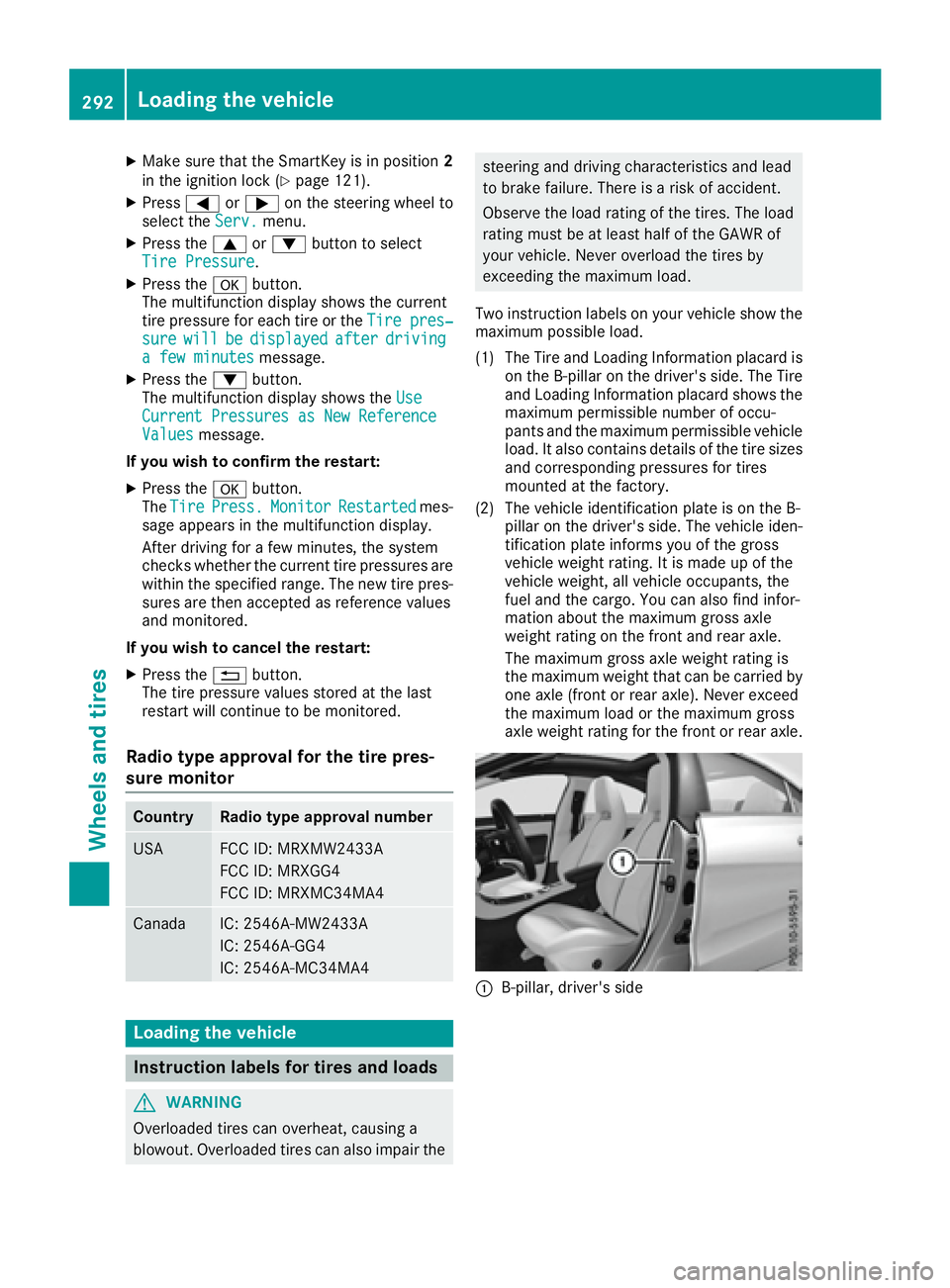
(1) The Tire and Loading Information placard is
on the B-pillar on the driver's side. The Tire
and Loading Information placard shows the
maximum permissible number of occu-
pants and the maximum permissible vehicle
load. It also contains details of the tire sizes
and corresponding pressures for tires
mounted at the factory.
(2) The vehicle identification plate is on the B-
pillar on the driver's side. The vehicle iden-
tification plate informs you of the gross
vehicle weight rating. It is made up of the
vehicle weight, all vehicle occupants, the
fuel and the cargo. You can also find infor-
mation about the maximum gross axle
weight rating on the front and rear axle.
The maximum gross axle weight rating is
the maximum weight that can be carried by
one axle (front or rear axle). Never exceed
the maximum load or the maximum gross
axle weight rating for the front or rear axle.
C
B-pillar, driver's side292
Loading the vehicle
Wheels and tires
Page 309 of 318
Information regarding technical data
i The dat a state d her e specifically refers to a
vehicl e wit h standard equipment. Consult an
authorize d Mercedes-Ben z Cente r for th e
dat a for all vehicl e variants and trim levels.
Vehicle electronics
Installing two-way radios and mobile
phones (RF transmitters)
G WARNIN G
The electromagneti c radiation from modifie d
or incorrectl y retrofitte d RF-transmitters can
interfere wit h th e vehicl e electronics . This can
compromise th e operational safet y of th e
vehicle. Ther e is a ris k of an accident.
You should hav e all wor k to electrical and
electronic equipmen t carried out at a qualified
specialist workshop.
G WARNIN G
The electromagneti c radiation from incor-
rectl y operate d RF transmitters can interfere
wit h th e vehicl e electronics , for example:R
if th e RF transmitte r is no t connecte d wit h
an exterio r antennaR
th e exterio r antenna has been installed
incorrectl y or is no t a low-reflection typ e
This can compromise th e operational safet y
of th e vehicle. Ther e is a ris k of an accident.
Hav e th e low-reflection exterio r antenna
mounte d at a qualified specialist workshop.
When operating RF transmitters in th e vehi-
cle , always connec t them wit h th e low-reflec -
tion exterio r antenna.
! The operating permit may be invalidated if
th e instruction s for installation and use of RF
transmitters are no t observed. In particular, th e followin g condition s must be
complied with: R
only approve d wavebands may be used. R
observ e th e maximum permissible output
in these wavebands. R
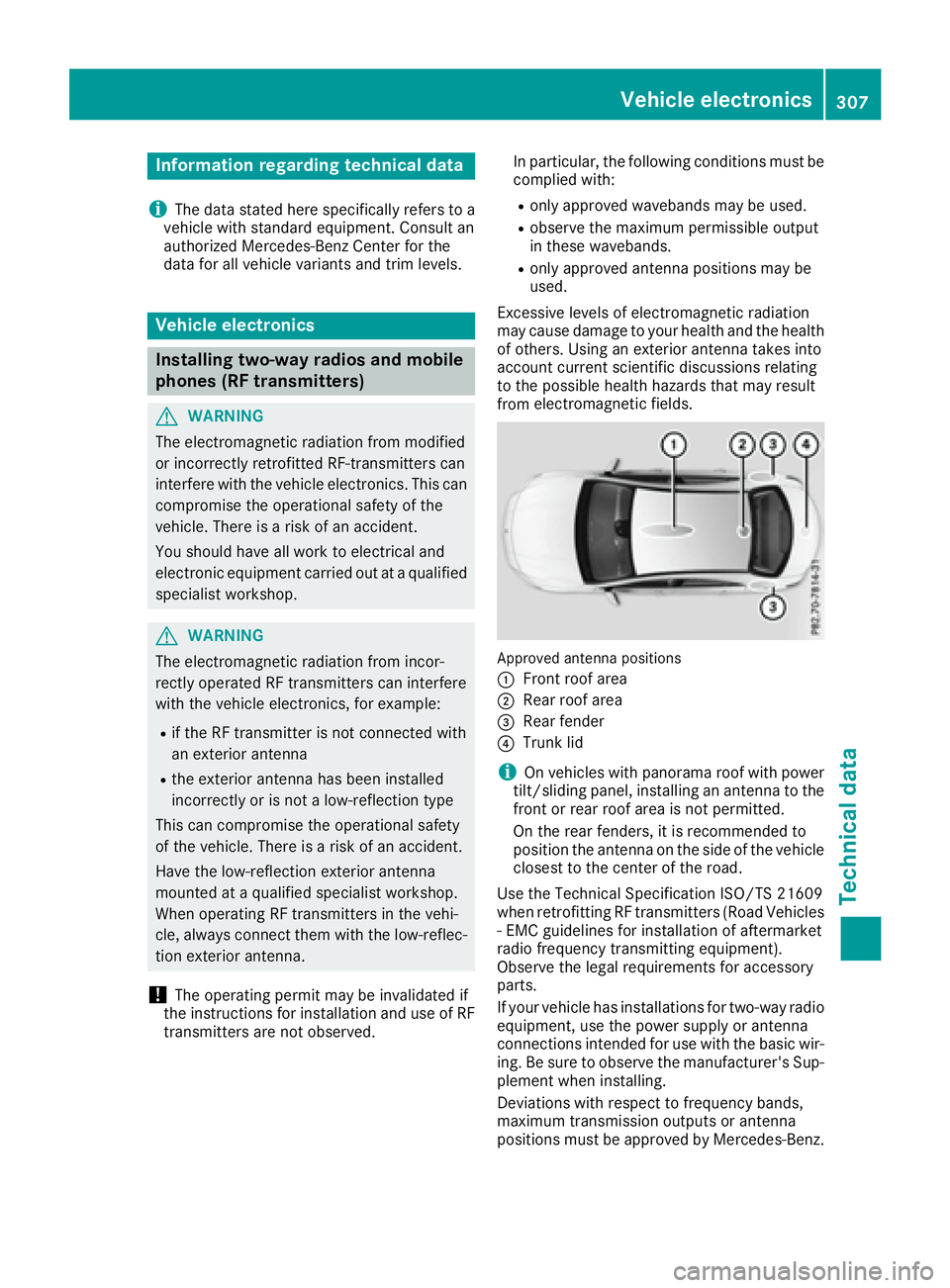
only approve d antenna position s may be
used.
Excessiv e levels of electromagneti c radiation
may caus e damag e to your healt h and th e healt h
of others. Using an exterio r antenna takes int o
accoun t curren t scientific discussion s relating
to th e possible healt h hazards that may result
from electro magneti c fi
elds.
Approved antenna position s
C
Fron t roo f areaD
Rear roo f area
Page 310 of 318
The maximum transmission output (PEAK) at the
base of the antenna must not exceed the fol-
lowing values:
Frequency band Maximum
transmission
output
Short wave
3 - 54 MHz 100 W
4 m waveband
74 - 88 MHz 30 W
2 m waveband
144 - 174 MHz 50 W
Trunked radio system/
Tetra
380 - 460 MHz 10 W
70 cm waveband
400 - 460 MHz 35 W
Mobile communications
(2G/3G/4G) 10 W
The following can be used in the vehicle without
restrictions: R
RF transmitters with a maximum transmis-
sion output of up to 100 mW R
RF transmitters with transmitter frequencies
in the 380 - 410 MHz frequency band and a
maximum transmission output of up to 2 W
(trunked radio system/Tetra) R
Mobile phones (2G/3G/4G)
There is no restriction for antenna positions on
the outside of the vehicle for the following fre-
quency bands: R
Trunked radio system/Tetra R
70 cm waveband R
2G/3G/4G Identification plates
Vehicle identification plate with vehi-
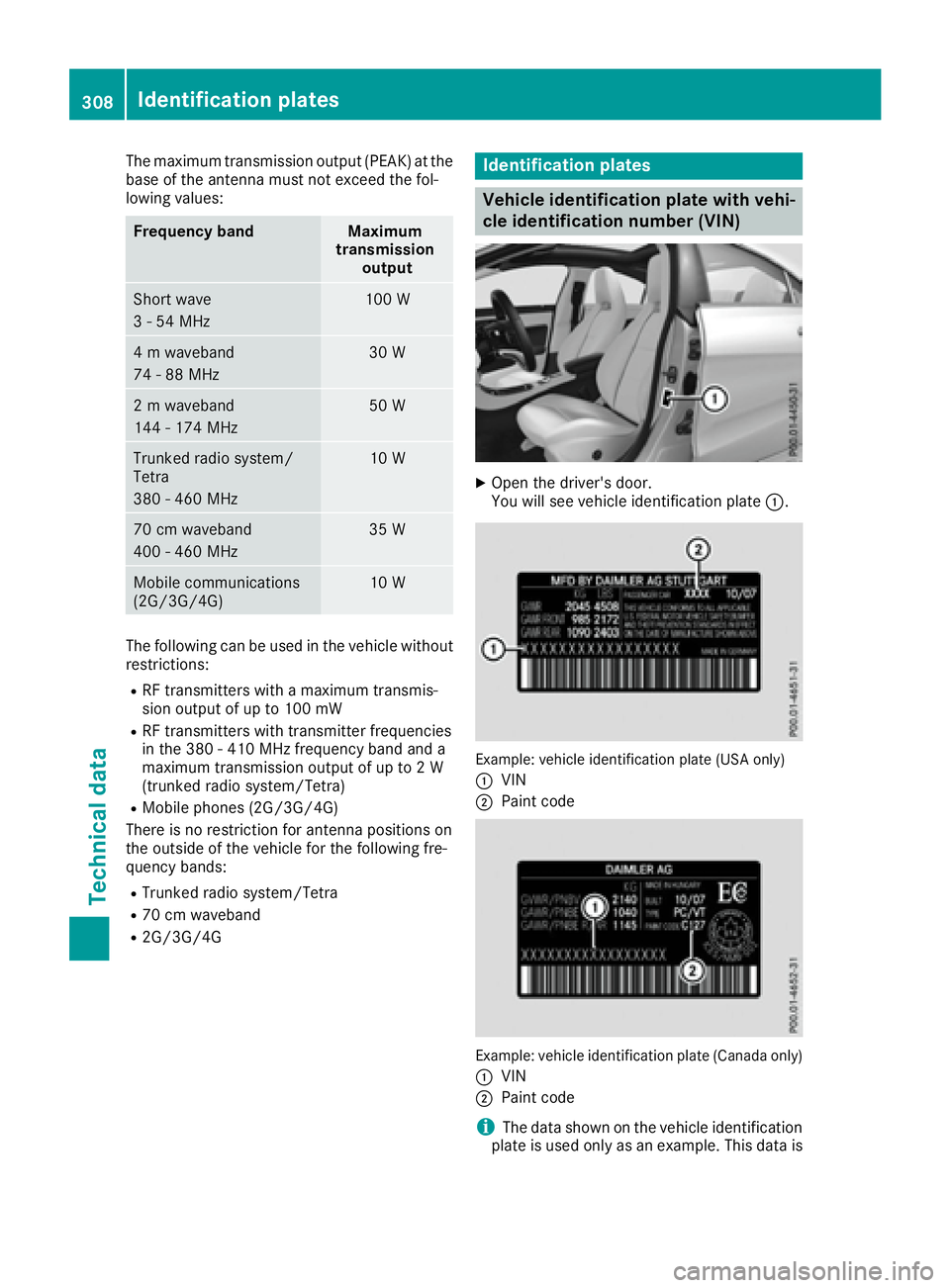
cle identification number (VIN) X
Open the driver's door.
You will see vehicle identification plate C .
Example: vehicle identification plate (USA only)
C
VIN D
Paint code
Example: vehicle identification plate (Canada only)
C
VIN
D
Paint code
i The data shown on the vehicle identification
plate is used only as an example. This data is308
Identification plates
Technical data