ABS MERCEDES-BENZ CLA 2019 User Guide
[x] Cancel search | Manufacturer: MERCEDES-BENZ, Model Year: 2019, Model line: CLA, Model: MERCEDES-BENZ CLA 2019Pages: 330, PDF Size: 23.57 MB
Page 64 of 330
Important safety notes
iObserve the "Important safety notes" sec-tion (Ypage 61).
GWARNING
If BAS is malfunctioning, the braking distance
in an emergency braking situation is
increased. There is a risk of an accident.
In an emergency braking situation, depress
the brake pedal with full force. ABS prevents
the wheels from locking.
Braking
XKeep the brake pedal firmly depressed untilthe emergency braking situation is over.ABS prevents the wheels from locking.
The brakes will function as usual once yourelease the brake pedal. BAS is deactivated.
Active Brake Assist
General information
iObserve the "Important safety notes" sec-tion (Ypage 61).
Active Brake Assist consists of a distance warn-ing function with an autonomous braking func-tion and a situation-dependent brake boostingeffect.
Active Brake Assist can help you to minimize therisk of a collision with the vehicle traveling infront or reduce the effects of such a collision.
If Active Brake Assist detects that there is a riskof collision, you will be warned visually andacoustically. If you do not react to the visualcollision warning or the warning tone, autono-mous braking can be initiated in critical situa-tions. If you apply the brake yourself in a criticalsituation, Active Brake Assist supports you witha situation-dependent brake boosting effect.
Important safety notes
Detection of hazardous situations can be par-ticularly impaired if:
RThere is dirt on the sensors or anything elsecovering the sensors
RThere is snow or heavy rain
RThere is interference by other radar sources
RThere are strong radar reflections, for exam-ple in parking garages
RA narrow vehicle is traveling in front, e.g. amotorcycle
RA vehicle is traveling in front on a different line
RYou are driving a new vehicle or servicing onthe Active Brake Assist system has just beencarried out
Observe the important safety notes in the"Breaking-in notes" section (Ypage 122).
Following damage to the front end of the vehicle,have the configuration and operation of theradar sensor checked at a qualified specialistworkshop. This also applies to collisions at lowspeeds where no visible damage to the front ofthe vehicle is apparent.
Activating/deactivating
Active Brake Assist is active after every ignitioncycle.
You can activate or deactivate Active BrakeAssist (Ypage 187) in the on-board computer.When deactivated, the distance warning func-tion and the autonomous braking function arealso deactivated.
If Active Brake Assist is deactivated, the
Page 66 of 330
Situation-dependent braking assistance is capa-ble of reacting to moving objects that havealready been detected as such at least onceover the period of observation, up to vehiclespeeds of around 155 mph (250 km/h).
Situation-dependent braking assistance canalso detect stationary objects, up to vehiclespeeds of around 44 mph (70 km/h).
XKeep the brake pedal depressed until theemergency braking situation is over.ABS prevents the wheels from locking.
The brakes will work normally again if:
Ryou release the brake pedal
Rthere is no longer any danger of a collision
Rno obstacle is detected in front of your vehicle
Situation-dependent braking assistance is thendeactivated.
Important safety notes
iObserve the "Important safety notes" sec-tion for driving safety systems (Ypage 61).
GWARNING
Active Brake Assist does not react:
Rto persons, bicycles, motorcycles or ani-
mals
Rto approaching vehicles
Rto cross traffic
Ron bends
As a result, Active Brake Assist cannot inter-
vene in all critical situations. There is a risk of
an accident.
Always pay careful attention to the traffic sit-
uation and be prepared to brake.
GWARNING
Adaptive Brake Assist cannot always clearly
identify objects and complex traffic situa-
tions.
In such cases, Adaptive Brake Assist might:
Rintervene unnecessarily
Rnot intervene
There is a risk of an accident.
Always pay careful attention to the traffic sit-
uation and be ready to brake. Terminate the
intervention in a non-critical driving situation.
Due to the nature of the system, complex butnon-critical driving conditions may also causeActive Brake Assist to intervene.
Even if Active Brake Assist is not available due toa malfunction in the radar sensor system, thebrake system is still available with full brakeboosting effect and BAS.
ESP®(Electronic Stability Program)
General notes
iObserve the "Important safety notes" sec-tion (Ypage 61).
ESP®monitors driving stability and traction, i.e.power transmission between the tires and theroad surface.
If ESP®detects that the vehicle is deviating fromthe direction desired by the driver, one or morewheels are braked to stabilize the vehicle. Theengine output is also modified to keep the vehi-cle on the desired course within physical limits.
ESP®assists the driver when pulling away on
wet or slippery roads. ESP®can also stabilizethe vehicle during braking.
ETS/4ETS (Electronic Traction System)
iObserve the "Important safety notes" sec-tion (Ypage 61).
ETS traction control is part of ESP®. On vehicles
with 4MATIC, 4ETS is part of ESP®.
Traction control brakes the drive wheels indi-vidually if they spin. This enables you to pullaway and accelerate on slippery surfaces, forexample if the road surface is slippery on oneside. In addition, more drive torque is transfer-red to the wheel or wheels with traction.
Traction control remains active, even if you
deactivate ESP®.
Important safety notes
iObserve the "Important safety notes" sec-tion (Ypage 61).
GWARNING
If ESP®is malfunctioning, ESP®is unable to
stabilize the vehicle. Additionally, further driv-
ing safety systems are deactivated. This
increases the risk of skidding and an accident.
64Driving safety systems
Safety
Page 164 of 330
cle with all wheels in full contact with theground.
4MATIC, together with ESP®, improves the trac-tion of your vehicle whenever a drive wheelspins due to insufficient grip.
If you fail to adapt your driving style, 4MATIC canneither reduce the risk of accident nor overridethe laws of physics. 4MATIC cannot takeaccount of road, weather and traffic conditions.4MATIC is only an aid. You are responsible forthe distance to the vehicle in front, for vehiclespeed, for braking in good time and for staying inyour lane.
If a drive wheel spins due to insufficient grip:
ROnly depress the accelerator pedal as far asnecessary when pulling away.
RAccelerate less when driving.
iIn wintry driving conditions, the maximumeffect of 4MATIC can only be achieved if youuse winter tires (M+S tires), with snow chainsif necessary.
DYNAMIC BODY CONTROL
General notes
DYNAMIC BODY CONTROL offers improveddriving comfort and continuously controls thecalibration of the dampers. The damping char-acteristics adapt to the current operating anddriving situation.
The damping is tuned individually to each wheeland depends on:
Ryour driving style, e.g. sporty
Rthe road surface conditions
Rthe drive program selected
The drive program can be set using theDYNAMIC SELECT button (Ypage 129).
Selecting Comfort mode
In theComfortdrive program, the driving char-acteristics of your vehicle are more comforta-ble. Therefore, select this drive program if youprefer a more comfortable driving style. Alsoselect theComfortdrive program when drivingfast on straight roads, e.g. on straight stretchesof highway.
XPress DYNAMIC SELECT button (Ypage 129)as many times as necessary until theCom-fortdrive program is selected.
Selecting Sport mode
The firmer setting of the suspension tuning intheSportdrive program ensures even bettercontact with the road. Select this drive programwhen employing a sporty driving style, e.g. onwinding country roads.
XPress DYNAMIC SELECT button (Ypage 129)as many times as necessary until theSportdrive program is selected.
Parking Assist PARKTRONIC
Important safety notes
Parking Assist PARKTRONIC is an electronicparking aid with ultrasound. It monitors the areaaround your vehicle using six sensors in thefront bumper and six sensors in the rearbumper. Parking Assist PARKTRONIC visuallyand audibly indicates the distance between yourvehicle and an object.
Parking Assist PARKTRONIC is only an aid. It isnot a replacement for your attention to yourimmediate surroundings. You are alwaysresponsible for safe maneuvering, parking andexiting a parking space. Make sure that thereare no persons, animals or objects in the maneu-vering area when you are maneuvering or park-ing.
!When parking, pay particular attention toobjects above or below the sensors, such asflower pots or trailer drawbars. Parking AssistPARKTRONIC does not detect such objectswhen they are in the immediate vicinity of thevehicle. You could damage the vehicle or theobjects.
The sensors may not detect snow and otherobjects that absorb ultrasonic waves.
Ultrasonic sources such as an automatic carwash, the compressed-air brakes of a truck ora pneumatic drill could cause Parking AssistPARKTRONIC to malfunction.
Parking Assist PARKTRONIC may not functioncorrectly on uneven terrain.
162Driving systems
Driving an d parking
Page 179 of 330
in green (Ypage 187). Lane Keeping Assist isready for use.
IfStandardStandardis selected, no warning vibrationoccurs if:
Ryou have switched on the turn signal. In thisevent, the warnings are suppressed for a cer-tain period of time.
Ra driving safety system intervenes, e.g. ABS,
BAS or ESP®.
WhenAdaptiveAdaptiveis selected, no warning vibra-tion occurs if:
Ryou have switched on the turn signal. In thisevent, the warnings are suppressed for a cer-tain period of time.
Ra driving safety system intervenes, e.g. ABS,
BAS or ESP®.
Ryou accelerate hard, e.g. kickdown.
Ryou brake hard.
Ryou steer actively, e.g. swerve to avoid anobstacle or change lanes quickly.
Ryou cut the corner on a sharp bend.
In order that you are warned only when neces-sary and in good time if you cross the lane mark-ing, the system detects certain conditions andwarns you accordingly.
The warning vibration occurs earlier if:
Ryou approach the outer lane marking on abend
Rthe road has very wide lanes, e.g. a freeway
Rthe system detects solid lane markings
The warning vibration occurs later if:
Rthe road has narrow lanes.
Ryou cut the corner on a bend
Driving systems177
Driving and parking
Z
Page 224 of 330
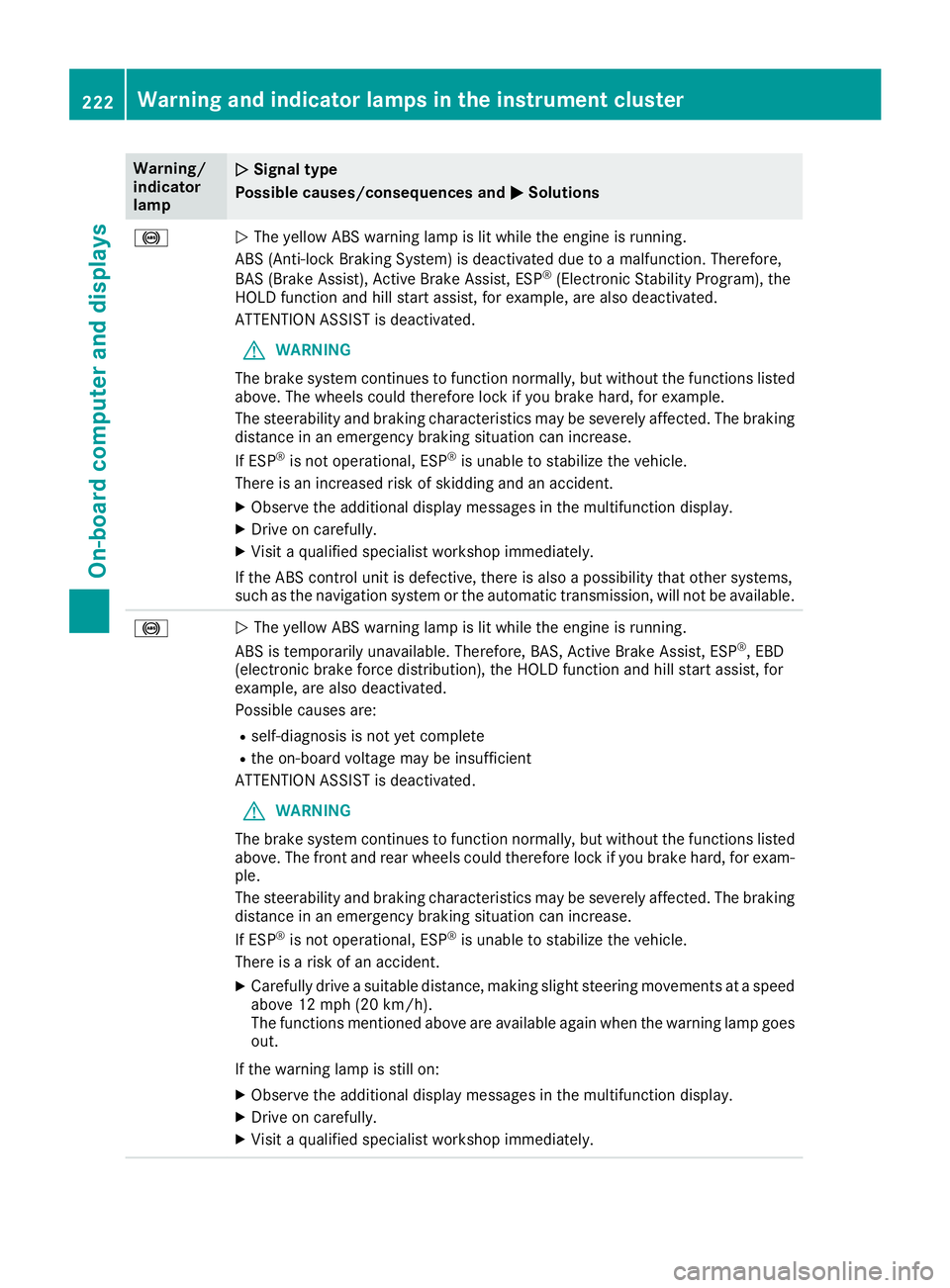
Warning/indicatorlamp
QQSignal type
Possible causes/consequences andPPSolutions
%QThe yellow ABS warning lamp is lit while the engine is running.
ABS (Anti-lock Braking System) is deactivated due to a malfunction. Therefore,
BAS (Brake Assist), Active Brake Assist, ESP®(Electronic Stability Program), theHOLD function and hill start assist, for example, are also deactivated.
ATTENTION ASSIST is deactivated.
GWARNING
The brake system continues to function normally, but without the functions listedabove. The wheels could therefore lock if you brake hard, for example.
The steerability and braking characteristics may be severely affected. The brakingdistance in an emergency braking situation can increase.
If ESP®is not operational, ESP®is unable to stabilize the vehicle.
There is an increased risk of skidding and an accident.
XObserve the additional display messages in the multifunction display.
XDrive on carefully.
XVisit a qualified specialist workshop immediately.
If the ABS control unit is defective, there is also a possibility that other systems,such as the navigation system or the automatic transmission, will not be available.
%QThe yellow ABS warning lamp is lit while the engine is running.
ABS is temporarily unavailable. Therefore, BAS, Active Brake Assist, ESP®, EBD(electronic brake force distribution), the HOLD function and hill start assist, forexample, are also deactivated.
Possible causes are:
Rself-diagnosis is not yet complete
Rthe on-board voltage may be insufficient
ATTENTION ASSIST is deactivated.
GWARNING
The brake system continues to function normally, but without the functions listedabove. The front and rear wheels could therefore lock if you brake hard, for exam-ple.
The steerability and braking characteristics may be severely affected. The brakingdistance in an emergency braking situation can increase.
If ESP®is not operational, ESP®is unable to stabilize the vehicle.
There is a risk of an accident.
XCarefully drive a suitable distance, making slight steering movements at a speedabove 12 mph (20 km/h).The functions mentioned above are available again when the warning lamp goesout.
If the warning lamp is still on:
XObserve the additional display messages in the multifunction display.
XDrive on carefully.
XVisit a qualified specialist workshop immediately.
222Warning and indicator lamps in the instrument cluster
On-board computer and displays
Page 225 of 330
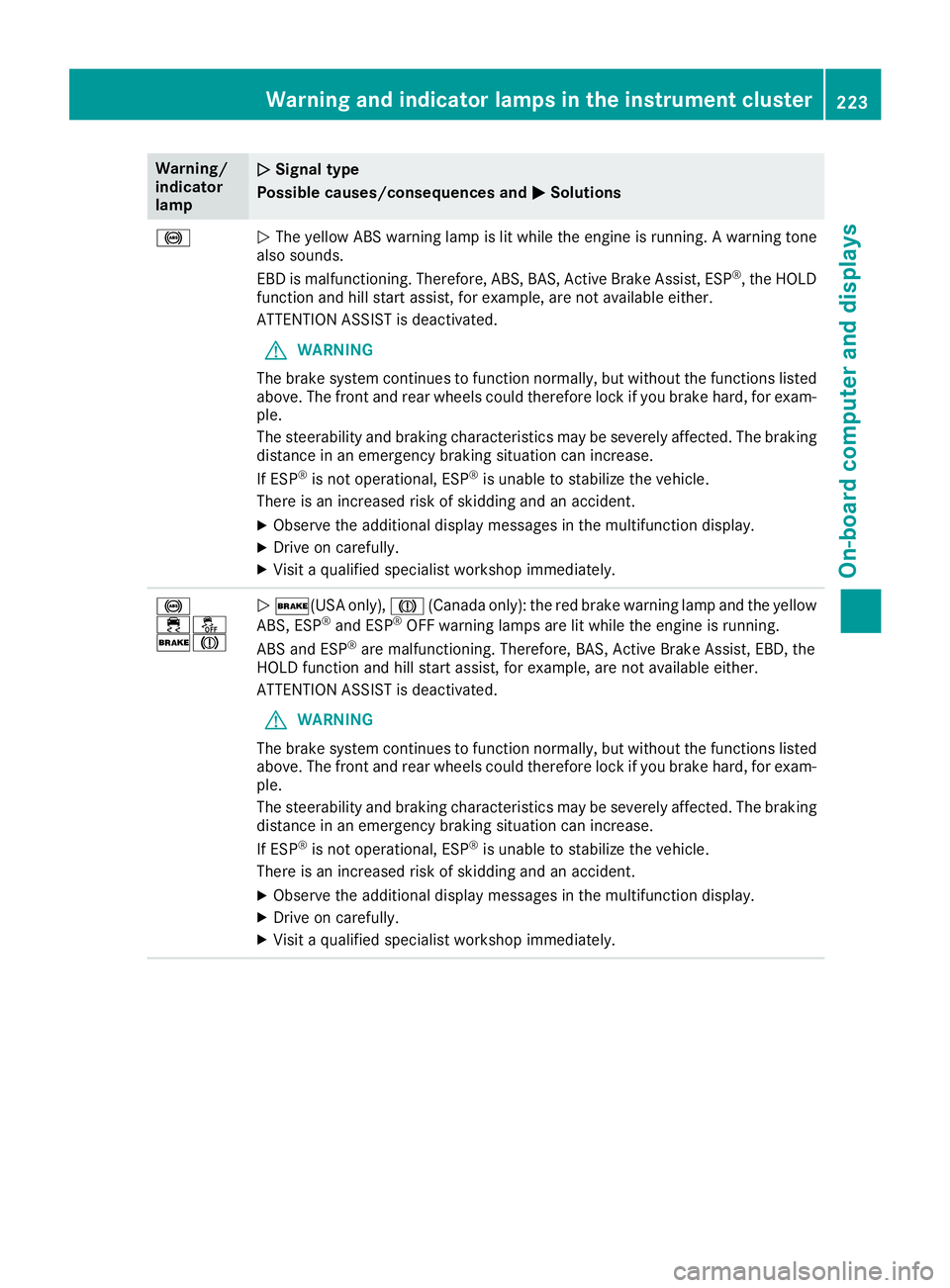
Warning/indicatorlamp
QQSignal type
Possible causes/consequences andPPSolutions
%QThe yellow ABS warning lamp is lit while the engine is running. A warning tonealso sounds.
EBD is malfunctioning. Therefore, ABS, BAS, Active Brake Assist, ESP®, the HOLDfunction and hill start assist, for example, are not available either.
ATTENTION ASSIST is deactivated.
GWARNING
The brake system continues to function normally, but without the functions listedabove. The front and rear wheels could therefore lock if you brake hard, for exam-ple.
The steerability and braking characteristics may be severely affected. The brakingdistance in an emergency braking situation can increase.
If ESP®is not operational, ESP®is unable to stabilize the vehicle.
There is an increased risk of skidding and an accident.
XObserve the additional display messages in the multifunction display.
XDrive on carefully.
XVisit a qualified specialist workshop immediately.
%
Page 270 of 330
To clean, use plenty of water and a mild cleaningagent without additional or abrasive products,e.g. use a car shampoo approved for Mercedes-Benz.
XDry vehicles covered with film using a soft,absorbent cloth after every wash.Water marks could otherwise form.
Scratches, corrosive deposits, areas affected bycorrosion and damage caused by inadequatecare cannot always be completely repaired. Insuch cases, visit a qualified specialist workshop.
XRemove dirt immediately, where possible,while avoiding rubbing too hard.The decorative film may be irreparably dam-aged.
XSoak insect remains with insect remover andrinse off the treated areas afterwards.
XSoak bird droppings with water and rinse offthe treated areas afterwards.
The Paint Cleaner cleaning product, which hasbeen approved and recommended byMercedes-Benz, should be used when dirt haspenetrated the decorative film surface or thedecorative film has become dull.
The manufacturer can provide you with infor-mation on special care and cleaning products.
Laminated surfaces may exhibit optical differ-ences to surfaces which were not protected by adecorative film when the decorative film isremoved.
iHave work or repairs on decorative film car-ried out at a qualified specialist workshop.Mercedes-Benz recommends that you use anauthorized Mercedes-Benz Center for thispurpose.
Cleaning the vehicle parts
Cleaning the wheels
GWARNING
The water jet from a circular jet nozzle (dirt
blasters) can cause invisible exterior damage
to the tires or chassis components. Compo-
nents damaged in this way may fail unexpect-
edly. There is a risk of an accident.
Do not use power washers with circular jet
nozzles to clean the vehicle. Have damaged
tires or chassis components replaced imme-
diately.
!Do not use acidic wheel cleaning productsto remove brake dust. This could damagewheel bolts and brake components.
!Do not park your vehicle for a long period oftime directly after cleaning, particularly aftercleaning the wheel rim with wheel cleaner.Wheel cleaner can lead to the increased cor-rosion of the brake discs and pads. Therefore,drive for a few minutes after cleaning. Byheating up the brakes, the brake discs andpads dry. The vehicle can then be parked for along period of time.
Cleaning the windows
GWARNING
You could become trapped by the windshield
wipers if they start moving while cleaning the
windshield or wiper blades. There is a risk of
injury.
Always switch off the windshield wipers and
the ignition before cleaning the windshield or
wiper blades.
!Only fold the windshield wipers away fromthe windshield when vertical. Otherwise, youwill damage the hood.
!Do not use dry cloths, abrasive products,solvents or cleaning agents containing sol-vents to clean the inside of the windows. Donot touch the insides of the windows withhard objects, e.g. an ice scraper or ring. Thereis otherwise a risk of damaging the windows.
!Clean the water drainage channels of thewindshield and the rear window at regularintervals. Deposits such as leaves, petals andpollen may under certain circumstances pre-vent water from draining away. This can leadto corrosion damage and damage to elec-tronic components.
XClean the inside and outside of the windowswith a damp cloth and a cleaning product thatis recommended and approved by Mercedes-Benz.
268Care
Maintenance and care
Page 280 of 330
Tire pressure reached
GWARNING
A tire temporarily sealed with tire sealant
impairs the driving characteristics and is not
suitable for higher speeds. There is a risk of
accident.
You should therefore adapt your driving style
accordingly and drive carefully. Do not exceed
the specified maximum speed with a tire that
has been repaired using tire sealant.
USA only:The maximum permissible speed fora tire sealed with tire sealant is 50 mph(80 km/h). The upper part of the TIREFIT stickermust be affixed to the instrument cluster in thedriver's field of vision.
If a tire pressure of 200 kPa (2.0 bar/29 psi) hasbeen attained after ten minutes:
XSwitch off the tire inflation compressor.
XUnscrew the filler hose from the valve of thefaulty tire.Note that tire sealant may escape when youunscrew the filler hose.
XUSA only:Stow the tire sealant bottle and thetire inflation compressor.
XPull away immediately.
XStop after driving for approximately tenminutes and check the tire pressure with thetire inflation compressor.The tire pressure must now be at least130 kPa (1.3 bar/19 psi).
GWARNING
If the required tire pressure is not reached
after driving for a short period, the tire is too
badly damaged. The tire sealant cannot repair
the tire in this instance. Damaged tires and a
tire pressure that is too low can significantly
impair the vehicle's braking and driving char-
acteristics. There is a risk of accident.
Do not continue driving. Contact a qualified
specialist workshop.
iUSA only:In cases such as the one men-tioned above, contact an authorizedMercedes-Benz Center. Or call1-800-FOR-MERCedes (in the USA) or1-800-387-0100 (in Canada).
XUSA only:Correct the tire pressure if it is stillat least 130 kPa (1.3 bar/19 psi). See the Tireand Loading Information placard on the driv-er's side B-pillar or the tire pressure table inthe fuel filler flap for values.
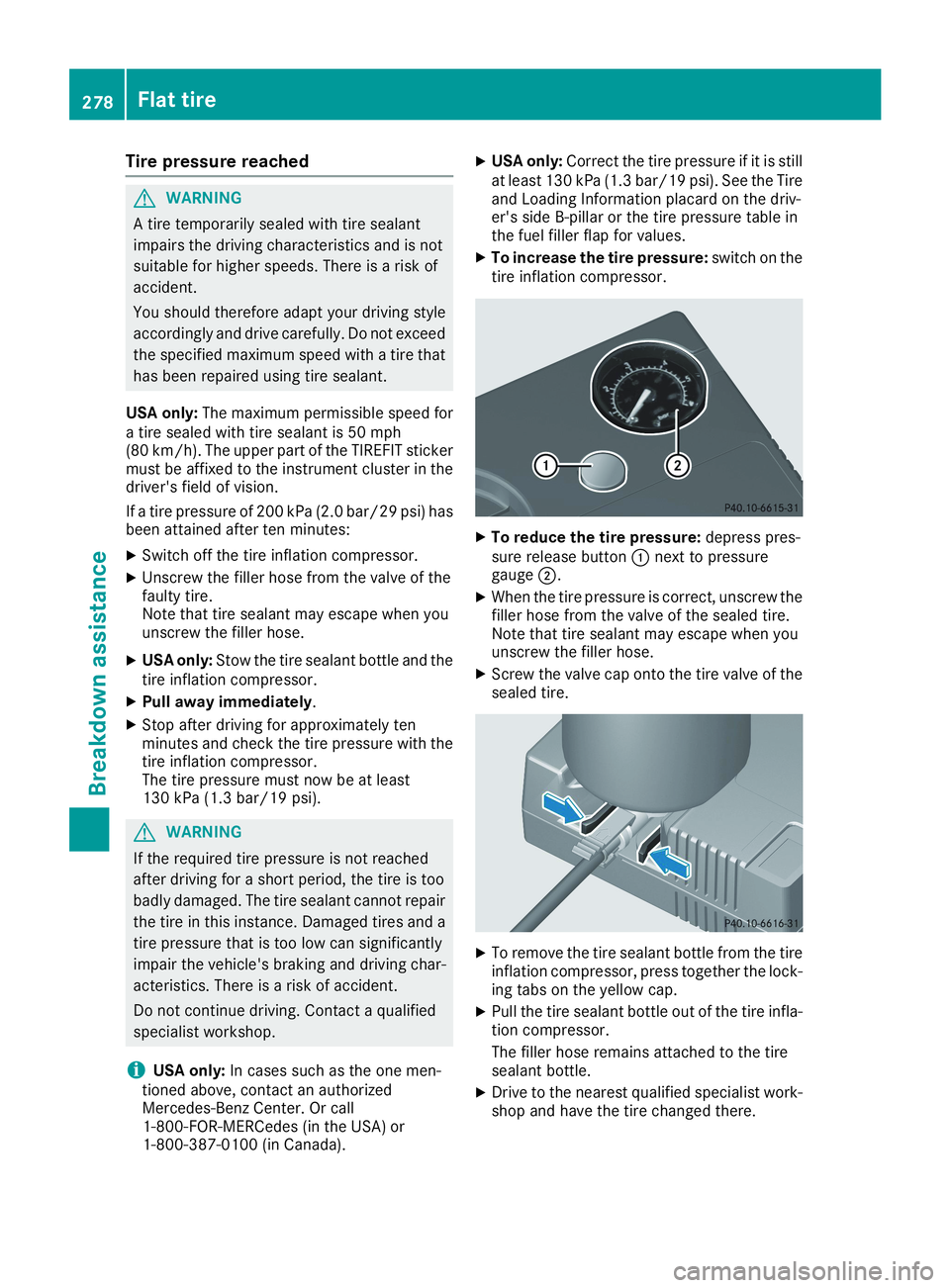
XTo increase the tire pressure:switch on thetire inflation compressor.
XTo reduce the tire pressure:depress pres-sure release buttonCnext to pressuregaugeD.
XWhen the tire pressure is correct, unscrew thefiller hose from the valve of the sealed tire.Note that tire sealant may escape when youunscrew the filler hose.
XScrew the valve cap onto the tire valve of thesealed tire.
XTo remove the tire sealant bottle from the tireinflation compressor, press together the lock-ing tabs on the yellow cap.
XPull the tire sealant bottle out of the tire infla-tion compressor.
The filler hose remains attached to the tiresealant bottle.
XDrive to the nearest qualified specialist work-shop and have the tire changed there.
278Flat tire
Breakdown assistance
Page 281 of 330
XHave the tire sealant bottle and the filler hosereplaced as soon as possible at a qualifiedspecialist workshop.
XHave the tire sealant bottle replaced everyfour years at a qualified specialist workshop.
Battery (vehicle)
Important safety notes
Special tools and expert knowledge are requiredwhen working on the battery, e.g. removal andinstallation. You should therefore have all workinvolving the battery carried out at a qualifiedspecialist workshop.
GWARNING
Work carried out incorrectly on the battery
can lead, for example, to a short circuit and
thus damage the vehicle electronics. This can
lead to function restrictions applying to
safety-relevant systems, e.g. the lighting sys-
tem, the ABS (anti-lock braking system) or the
ESP®(Electronic Stability Program). The oper-
ating safety of your vehicle may be restricted.
You could lose control of the vehicle, for
example:
Rwhen braking
Rin the event of abrupt steering maneuvers
and/or when the vehicle's speed is not
adapted to the road conditions
There is a risk of an accident.
In the event of a short circuit or a similar inci-
dent, contact a qualified specialist workshop
immediately. Do not drive any further. You
should have all work involving the battery car-
ried out at a qualified specialist workshop.
For further information about ABS and ESP®,see (Ypage 61) and (Ypage 64).
GWARNING
Electrostatic build-up can lead to the creation
of sparks, which could ignite the highly explo-
sive gases of a battery. There is a risk of an
explosion.
Before handling the battery, touch the vehicle
body to remove any existing electrostatic
build-up.
The highly flammable gas mixture forms whencharging the battery as well as when jump-start-ing.
Always make sure that neither you nor the bat-tery is electrostatically charged. A build-up ofelectrostatic charge can be caused, for exam-ple:
Rby wearing clothing made from syntheticfibers
Rdue to friction between clothing and seats
Rif you push or pull the battery across the car-pet or other synthetic materials
Rif you rub the battery with a cloth
GWARNING
During the charging process, a battery produ-
ces hydrogen gas. If a short circuit occurs or
sparks are created, the hydrogen gas can
ignite. There is a risk of an explosion.
RMake sure that the positive terminal of a
connected battery does not come into con-
tact with vehicle parts.
RNever place metal objects or tools on a bat-
tery.
RIt is important that you observe the descri-
bed order of the battery terminals when
connecting and disconnecting a battery.
RWhen jump-starting, make sure that the
battery poles with identical polarity are
connected.
RIt is particularly important to observe the
described order when connecting and dis-
connecting the jumper cables.
RNever connect or disconnect the battery
terminals while the engine is running.
GWARNING
Battery acid is caustic. There is a risk of injury.
Avoid contact with skin, eyes or clothing. Do
not inhale any battery gases. Do not lean over
the battery. Keep children away from batter-
ies. Wash away battery acid immediately with
Battery (vehicle)279
Breakdown assistance
Z
Page 283 of 330
Only replace a battery with a battery that hasbeen recommended by Mercedes-Benz.
Remove the SmartKey if you park the vehicleand do not require any electrical consumers.The vehicle will then use very little energy, thusconserving battery power.
If the power supply has been interrupted, e.g. ifyou reconnect the battery, you will have to:
Rset the clock using the multimedia system(see the Digital Operator's Manual)
Rreset the function for folding the exterior mir-rors in/out automatically, by folding the mir-rors out once (Ypage 98)
Charging the battery
GWARNING
During charging and jump-starting, explosive
gases can escape from the battery. There is a
risk of an explosion.
Particularly avoid fire, open flames, creating
sparks and smoking. Ensure there is sufficient
ventilation while charging and jump-starting.
Do not lean over a battery.
GWARNING
Battery acid is caustic. There is a risk of injury.
Avoid contact with skin, eyes or clothing. Do
not inhale any battery gases. Do not lean over
the battery. Keep children away from batter-
ies. Wash away battery acid immediately with
plenty of clean water and seek medical atten-
tion.
GWARNING
A discharged battery can freeze at tempera-
tures below freezing point. When jump-start-
ing the vehicle or charging the battery, gases
can escape from the battery. There is a risk of
an explosion.
Allow the frozen battery to thaw out before
charging it or jump-starting.
!Only use battery chargers with a maximumcharging voltage of 14.8 V.
!Only charge the battery using the jump-starting connection point.
The jump-starting connection point is in theengine compartment (Ypage 282).
XOpen the hood.
XConnect the battery charger to the positiveterminal and ground point in the same orderas when connecting the donor battery in thejump-starting procedure (Ypage 282).
If the indicator/warning lamps do not light up inthe instrument cluster at low temperatures, it isvery likely that the discharged battery has fro-zen. In this case you may neither jump-start thevehicle nor charge the battery. The service life ofa thawed-out battery may be shorter. The start-ing characteristics can be impaired, particularlyat low temperatures. Have the thawed-out bat-tery checked at a qualified specialist workshop.
Only charge the installed battery with a batterycharger which has been tested and approved byMercedes-Benz. A battery charger unit speciallyadapted for Mercedes-Benz vehicles and testedand approved by Mercedes-Benz is available asan accessory. It permits the charging of the bat-tery in its installed position. Contact an author-ized Mercedes-Benz Center for further informa-tion and availability. Read the battery charger'soperating instructions before charging the bat-tery.
Replacing the 12 V battery
Observe the notes on the 12 V battery(Ypage 279).
Mercedes-Benz recommends that you have the12 V battery replaced at a qualified specialistworkshop, e.g. at an authorized Mercedes-BenzCenter.
If you want to replace the battery yourself,observe the following notes:
RAlways replace a defective battery with a bat-tery which meets the specific requirements ofthe vehicle.
The vehicle is equipped with a battery usingAGM (absorbent glass mat) technology or abattery using EFB (enhanced flooded battery)technology. Full vehicle functionality is guar-anteed only with an AGM or EFB battery. Ifreplacement is necessary, always use the bat-tery technology originally installed. Switchingbetween the battery technologies is not per-mitted. For safety reasons, Mercedes-Benzrecommends that you only use batteries
Battery (vehicle)281
Breakdown assistance
Z