key MERCEDES-BENZ CLA 2019 Repair Manual
[x] Cancel search | Manufacturer: MERCEDES-BENZ, Model Year: 2019, Model line: CLA, Model: MERCEDES-BENZ CLA 2019Pages: 330, PDF Size: 23.57 MB
Page 150 of 330
helps you to avoid overheating the brakes andwearing them out excessively.
When you take advantage of engine braking, itis possible that a drive wheel will not rotate forsome time, e.g. on a slippery road surface.This could cause damage to the drive train.This type of damage is not covered by theMercedes-Benz warranty.
Briefly depressing the accelerator pedal ondownhill gradients while the manual drive pro-gramMis temporarily activated: the automatictransmission may switch to the last active auto-matic drive programEorS. The automatic trans-mission may shift to a higher gear. This canreduce the engine's braking effect.
Heavy and light loads
GWARNING
If you rest your foot on the brake pedal while
driving, the braking system can overheat. This
increases the stopping distance and can even
cause the braking system to fail. There is a
risk of an accident.
Never use the brake pedal as a footrest. Never
depress the brake pedal and the accelerator
pedal at the same time.
!Depressing the brake pedal constantlyresults in excessive and premature wear tothe brake pads.
If the brakes have been subjected to a heavyload, do not stop the vehicle immediately. Driveon for a short while. This allows the airflow tocool the brakes more quickly.
Wet roads
If you have driven for a long time in heavy rainwithout braking, there may be a delayed reac-tion from the brakes when braking for the firsttime. This may also occur after the vehicle hasbeen washed or driven through deep water.
You have to depress the brake pedal morefirmly. Maintain a greater distance from thevehicle in front.
After driving on a wet road or having the vehiclewashed, brake firmly while paying attention tothe traffic conditions. This will warm up thebrake discs, thereby drying them more quicklyand protecting them against corrosion.
Limited braking performance on salt-
treated roads
If you drive on salted roads, a layer of salt resi-due may form on the brake discs and brakepads. This can result in a significantly longerbraking distance.
RIn order to prevent any salt build-up, apply thebrakes occasionally while paying attention tothe traffic conditions.
RCarefully depress the brake pedal and thebeginning and end of a journey.
RMaintain a greater distance to the vehicleahead.
Servicing the brakes
!The brake fluid level may be too low, if:
Rif the red brake warning lamp lights up inthe instrument cluster and
Ryou hear a warning tone while the engine isrunning
Observe additional warning messages in themultifunction display.
The brake fluid level may be too low due tobrake pad wear or leaking brake lines.
Have the brake system checked immediately.Consult a qualified specialist workshop toarrange this.
!A function or performance test should onlybe carried out on a 2-axle dynamometer. Ifyou wish to operate the vehicle on such adynamometer, please consult a qualified spe-cialist workshop in advance. You could oth-erwise damage the drive train or the brakesystem.
!As the ESP®system operates automatically,the engine and the ignition must be switchedoff (the SmartKey must be in position
Page 163 of 330
iIf you do not depress the accelerator pedalwithin a few seconds, RACE START is can-celed. The multifunction display shows theRACE START CanceledRACE START Canceledmessage.
XFully depress the accelerator pedal.The engine speed is increased.
TheRACERACESTARTSTARTReleaseReleasebrakebraketotostartstartmessage appears in the multifunction display.
iIf you do not release the brake pedal withina short time, RACE START will be canceled.The multifunction display shows theRACERACESTART CanceledSTART Canceledmessage.
XTake your foot off the brake, but keep theaccelerator pedal depressed.The vehicle pulls away at maximum acceler-ation.
TheRACERACESTARTSTARTActiveActivemessage appears inthe multifunction display.
RACE START is deactivated when the vehiclereaches a speed of approximately 50 km/h.
RACE START is deactivated immediately if yourelease the accelerator pedal during RACESTART or if any of the activation conditions areno longer fulfilled. TheRACE START Not Pos‐RACE START Not Pos‐sible See Operator's Manualsible See Operator's ManualorRACERACESTART CanceledSTART Canceledmessage appears in the mul-tifunction display.
iIf RACE START is used repeatedly within ashort period of time, it is only available againafter the vehicle has been driven a certaindistance.
AMG adaptive sport suspension sys-
tem
General notes
The electronically controlled damping systemworks continuously. This improves drivingsafety and ride comfort.
The damping is tuned individually to each wheeland depends on:
Ryour driving style, e.g. sporty
Rthe road surface condition, e.g. bumps
Ryour individual selection ofSportorComfort
The suspension setting is adjusted using thecorresponding button in the center console.
iThe mode can also be set using the AMGDYNAMIC SELECT controller (Ypage 130).
Each time you start the engine with the Smart-Key or the Start/Stop button,Comfortmode isactivated. For further information about startingthe engine, see (Ypage 123).
Sport mode
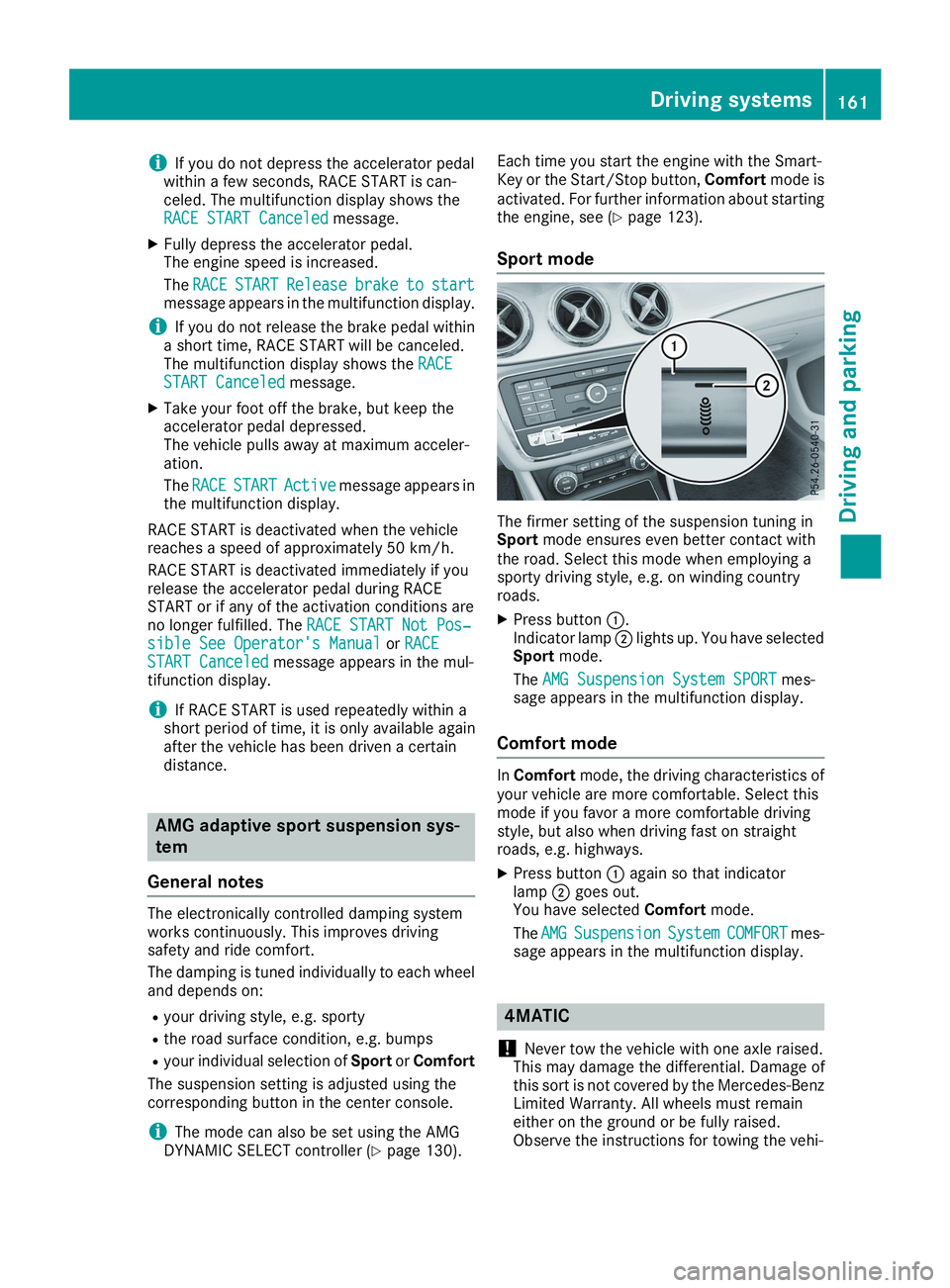
The firmer setting of the suspension tuning inSportmode ensures even better contact withthe road. Select this mode when employing asporty driving style, e.g. on winding countryroads.
XPress buttonC.Indicator lampDlights up. You have selectedSportmode.
TheAMG Suspension System SPORTAMG Suspension System SPORTmes-sage appears in the multifunction display.
Comfort mode
InComfortmode, the driving characteristics ofyour vehicle are more comfortable. Select thismode if you favor a more comfortable drivingstyle, but also when driving fast on straightroads, e.g. highways.
XPress buttonCagain so that indicatorlampDgoes out.You have selectedComfortmode.
TheAMGAMGSuspensionSuspensionSystemSystemCOMFORTCOMFORTmes-sage appears in the multifunction display.
4MATIC
!Never tow the vehicle with one axle raised.This may damage the differential. Damage ofthis sort is not covered by the Mercedes-BenzLimited Warranty. All wheels must remaineither on the ground or be fully raised.Observe the instructions for towing the vehi-
Driving systems161
Driving and parking
Z
Page 172 of 330
Rif the camera lens is dirty or obstructed.Observe the notes on cleaning(Ypage 269)
Rif the rear of your vehicle is damaged. In thiscase, have the camera position and settingchecked at a qualified specialist workshop.
The field of vision and other functions of the rearview camera may be restricted due to additionalaccessories on the rear of the vehicle (e.g.license plate holder, rear bicycle rack).
iThe contrast of the display may be affectedby the sudden presence of sunlight or otherlight sources, e.g. when exiting a garage. Payparticular attention in this situation.
iIf usability is severely restricted, e.g. due topixel errors, have the display repaired orreplaced.
Activating/deactivating the rear view
camera
XTo activate:make sure that the SmartKey isin positionHin the ignition lock.
XMake sure that theActivation by R gearActivation by R gearfunction is selected in the multimedia system;see the Digital Operator's Manual.
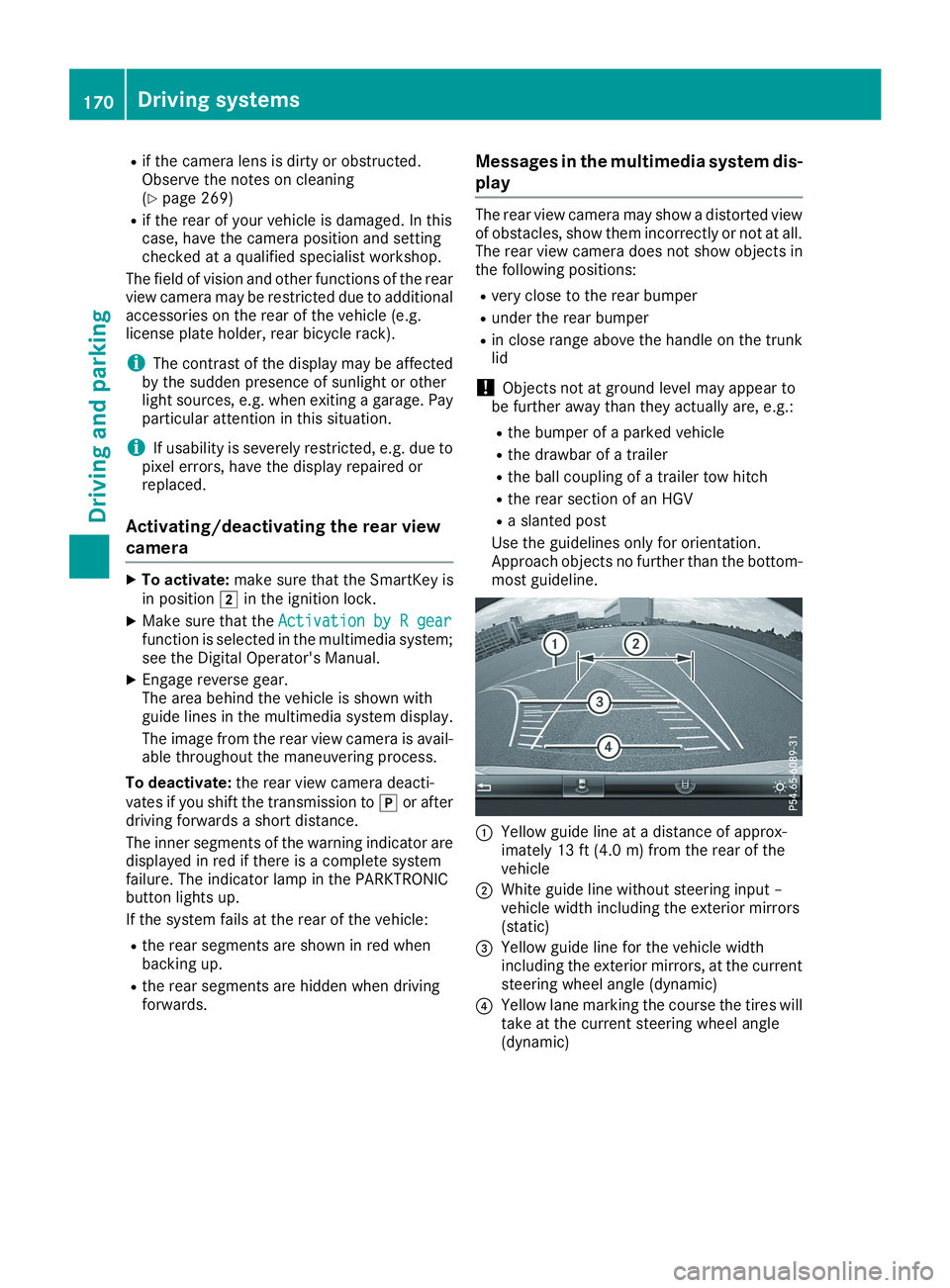
XEngage reverse gear.The area behind the vehicle is shown withguide lines in the multimedia system display.
The image from the rear view camera is avail-able throughout the maneuvering process.
To deactivate:the rear view camera deacti-vates if you shift the transmission to]or afterdriving forwards a short distance.
The inner segments of the warning indicator aredisplayed in red if there is a complete systemfailure. The indicator lamp in the PARKTRONICbutton lights up.
If the system fails at the rear of the vehicle:
Rthe rear segments are shown in red whenbacking up.
Rthe rear segments are hidden when drivingforwards.
Messages in the multimedia system dis-
play
The rear view camera may show a distorted viewof obstacles, show them incorrectly or not at all.The rear view camera does not show objects inthe following positions:
Rvery close to the rear bumper
Runder the rear bumper
Rin close range above the handle on the trunklid
!Objects not at ground level may appear tobe further away than they actually are, e.g.:
Rthe bumper of a parked vehicle
Rthe drawbar of a trailer
Rthe ball coupling of a trailer tow hitch
Rthe rear section of an HGV
Ra slanted post
Use the guidelines only for orientation.Approach objects no further than the bottom-most guideline.
CYellow guide line at a distance of approx-imately 13 ft (4.0 m) from the rear of thevehicle
DWhite guide line without steering input –vehicle width including the exterior mirrors(static)
Page 178 of 330
Switching on Blind Spot Assist
XMake sure that Blind Spot Assist is activatedin the on-board computer (Ypage 188).
XTurn the SmartKey to positionHin the igni-tion lock.Warning lampsCin the exterior mirrors lightup red for approximately 1.5 seconds andthen turn yellow.
Lane Keeping Assist
General notes
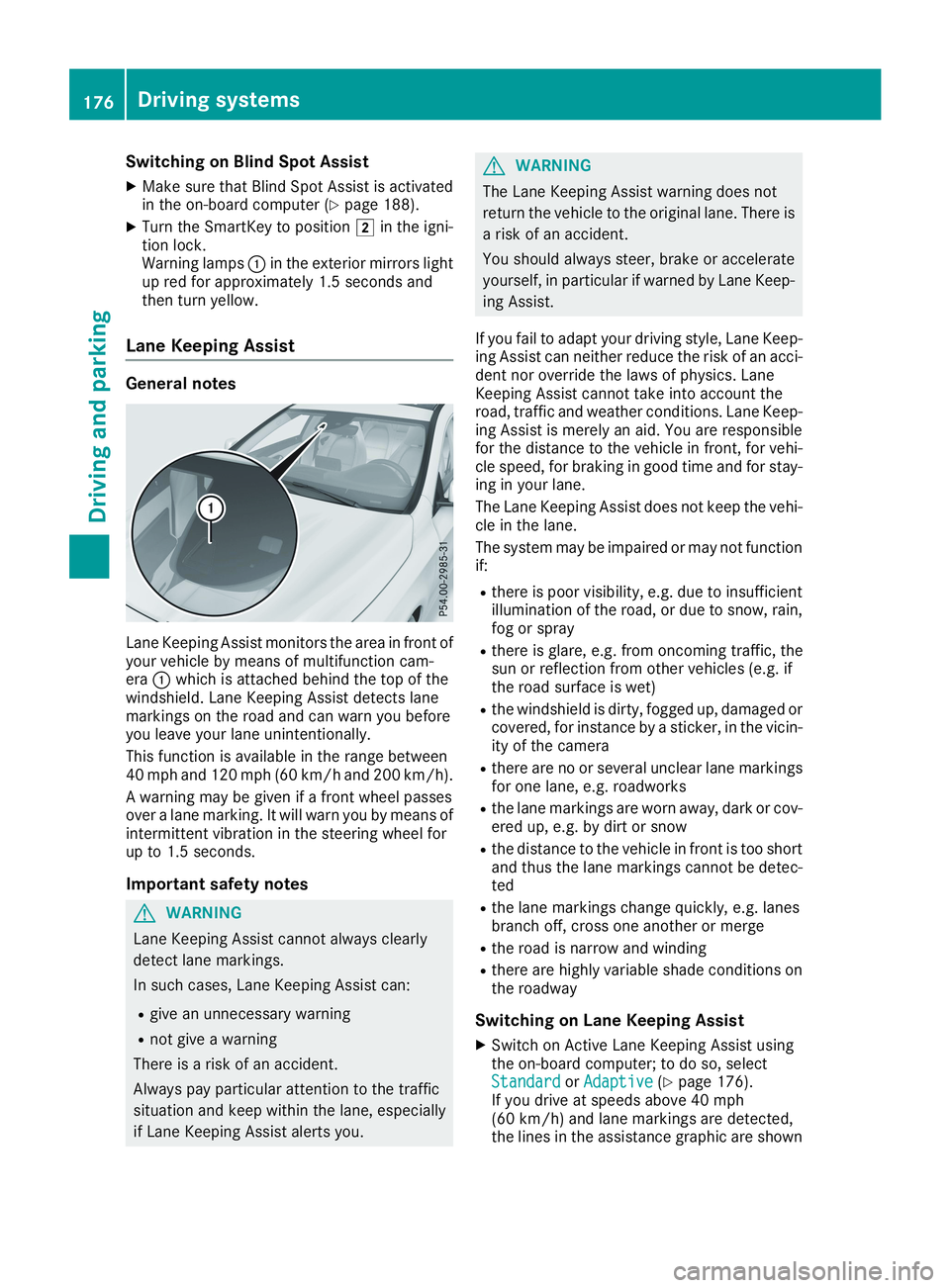
Lane Keeping Assist monitors the area in front ofyour vehicle by means of multifunction cam-eraCwhich is attached behind the top of thewindshield. Lane Keeping Assist detects lanemarkings on the road and can warn you beforeyou leave your lane unintentionally.
This function is available in the range between40 mph and 120 mph (60 km/h and 200 km/h).
A warning may be given if a front wheel passesover a lane marking. It will warn you by means ofintermittent vibration in the steering wheel forup to 1.5 seconds.
Important safety notes
GWARNING
Lane Keeping Assist cannot always clearly
detect lane markings.
In such cases, Lane Keeping Assist can:
Rgive an unnecessary warning
Rnot give a warning
There is a risk of an accident.
Always pay particular attention to the traffic
situation and keep within the lane, especially
if Lane Keeping Assist alerts you.
GWARNING
The Lane Keeping Assist warning does not
return the vehicle to the original lane. There is
a risk of an accident.
You should always steer, brake or accelerate
yourself, in particular if warned by Lane Keep-
ing Assist.
If you fail to adapt your driving style, Lane Keep-ing Assist can neither reduce the risk of an acci-dent nor override the laws of physics. LaneKeeping Assist cannot take into account theroad, traffic and weather conditions. Lane Keep-ing Assist is merely an aid. You are responsiblefor the distance to the vehicle in front, for vehi-cle speed, for braking in good time and for stay-ing in your lane.
The Lane Keeping Assist does not keep the vehi-cle in the lane.
The system may be impaired or may not functionif:
Rthere is poor visibility, e.g. due to insufficientillumination of the road, or due to snow, rain,fog or spray
Rthere is glare, e.g. from oncoming traffic, thesun or reflection from other vehicles (e.g. ifthe road surface is wet)
Rthe windshield is dirty, fogged up, damaged orcovered, for instance by a sticker, in the vicin-ity of the camera
Rthere are no or several unclear lane markingsfor one lane, e.g. roadworks
Rthe lane markings are worn away, dark or cov-ered up, e.g. by dirt or snow
Rthe distance to the vehicle in front is too shortand thus the lane markings cannot be detec-ted
Rthe lane markings change quickly, e.g. lanesbranch off, cross one another or merge
Rthe road is narrow and winding
Rthere are highly variable shade conditions onthe roadway
Switching on Lane Keeping Assist
XSwitch on Active Lane Keeping Assist usingthe on-board computer; to do so, selectStandardStandardorAdaptiveAdaptive(Ypage 176).If you drive at speeds above 40 mph(60 km/h) and lane markings are detected,the lines in the assistance graphic are shown
176Driving systems
Driving and parking
Page 194 of 330
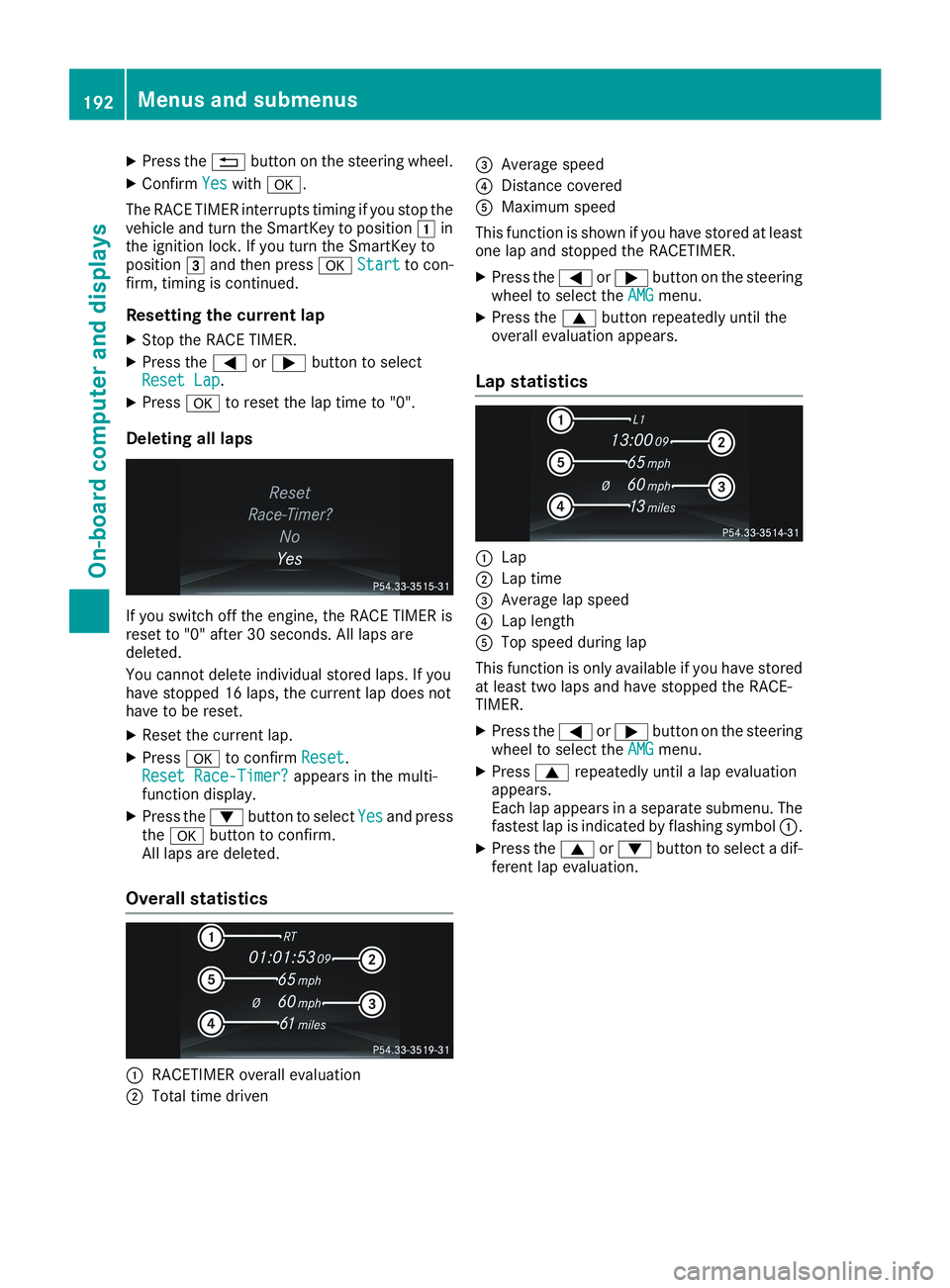
XPress the8button on the steering wheel.
XConfirmYesYeswithv.
The RACE TIMER interrupts timing if you stop thevehicle and turn the SmartKey to positionGinthe ignition lock. If you turn the SmartKey topositionIand then pressvStartStartto con-firm, timing is continued.
Resetting the current lap
XStop the RACE TIMER.
XPress theYorebutton to selectReset LapReset Lap.
XPressvto reset the lap time to "0".
Deleting all laps
If you switch off the engine, the RACE TIMER isreset to "0" after 30 seconds. All laps aredeleted.
You cannot delete individual stored laps. If youhave stopped 16 laps, the current lap does nothave to be reset.
XReset the current lap.
XPressvto confirmResetReset.Reset Race-Timer?Reset Race-Timer?appears in the multi-function display.
XPress thedbutton to selectYesYesand pressthevbutton to confirm.All laps are deleted.
Overall statistics
CRACETIMER overall evaluation
DTotal time driven
Page 236 of 330
Traffic reports on the route for the route guid-ance are taken into account (not available inall countries).
RDynamic TRF. Route After RequestDynamic TRF. Route After Request
You can decide whether or not current trafficreports should be included in the route cal-culation (not available in all countries).
RCalculate Alternative RoutesCalculate Alternative Routes
Different routes are being calculated. In orderto do so, instead ofStartStart, select the menuitemContinueContinue.
XTo avoid/use route options:selectAvoidAvoid
OptionsOptions.
XSelect a route option.
Notes for route options:
RUse Toll RoadsUse Toll Roads
The route calculation includes roads whichrequire you to pay a usage fee (toll).
RNumber of Occupants in the Vehicle:Number of Occupants in the Vehicle:(only available in the USA)
Prerequisite: your vehicle meets the accessconditions for carpool lanes.
Carpool lanes will be included if the carpoollanes option is activated.
Entering an address
Multimedia system:
XSelectNaviNavi{NavigationNavigation.The map shows the vehicle's current position.
XSlide6the controller.
XSelectDestinationDestination{Address EntryAddress Entry.
Enter an address, e.g. as follows:
Rcity or ZIP code, street, house number
Rstate/province, city or ZIP code
Rcity or ZIP code, center
Rstreet, city or ZIP code, intersection
XSelectCityCity.The city in which the vehicle is currently loca-ted (current vehicle position) is at the top.Below this, you will see locations for whichroute guidance has already been carried out.
XEnter the city.TheCsymbol: the location is contained onthe digital map multiple times.
XTo switch to the list:slide the5control-ler.
XSelect the location.If available, the ZIP code is shown. If there aredifferent ZIP codes available for the location,the corresponding digits are displayed with anXX.
XEnter the street and house number.The address is in the menu.
Further options for destination entry:
Rsearch for a keyword
The keyword search finds destinations usingfragments of words.
Rselect the last destination
Rselect a contact
Rselect a POI
You can search for a POI by location, name ortelephone number.
Rselect destination on the map
Renter intermediate destination
You can map the route to the destinationyourself with up to four intermediate destina-tions.
Rselect destinations from Mercedes-BenzApps
Rselect geo-coordinates
Calculating the route
Prerequisite: the address has been entered andis in the menu.
XSelectStartStartorContinueContinue.The route is calculated with the selected routetype and the selected route options.
If route guidance has already been activated,a prompt will appear asking whether you wishto end the current route guidance.
XSelectCancel Active Route GuidanceCancel Active Route GuidanceorSet as Intermediate DestinationSet as Intermediate Destination.Cancel Active Route GuidanceCancel Active Route Guidancecancelsthe current route guidance and starts routecalculation to the new destination.
Set as Intermediate DestinationSet as Intermediate Destinationaddsthe new destination in addition to the existingdestination and opens the intermediate des-tinations list.
234Operating system
Multimedia system
Page 237 of 330
Connecting a mobile phone
(COMAND)
Requirements
For telephony via the Bluetooth®interface, you
require a Bluetooth®-capable mobile phone. Themobile phone must support Hands-Free Profile1.0 or above.
Multimedia system:
XSelectVehicleVehicle{System Set‐System Set‐tingstings{Activate BluetoothActivate Bluetooth.
XActivate Bluetooth®s.
Mobile phone:
XActivate Bluetooth®and, if necessary, Blue-
tooth®visibility for other devices (see themanufacturer's operating instructions).
The Bluetooth®device names for all of one man-ufacturer's products might be identical. Tomake it possible to clearly identify your mobilephone, change the device name (see the man-ufacturer's operating instructions).
If the mobile phone supports the PBAP (PhoneBookAccessProfile) and MAP (Message
AccessProfile) Bluetooth®profiles, the follow-ing information will be transmitted after youconnect:
RPhone book
RCall lists
RText messages and e-mail
iFurther information on suitable mobilephones can be found at:http://www.mercedes-benz.com/connect
iIn the USA, you can get in touch with theMercedes-Benz Customer Assistance Centeron 1-800-FOR-MERCedes (1-800-367-6372).
In Canada, you can get in touch with the Cus-tomer Relations Center on 1-800-387-0100.
Searching for and authorizing (connect-
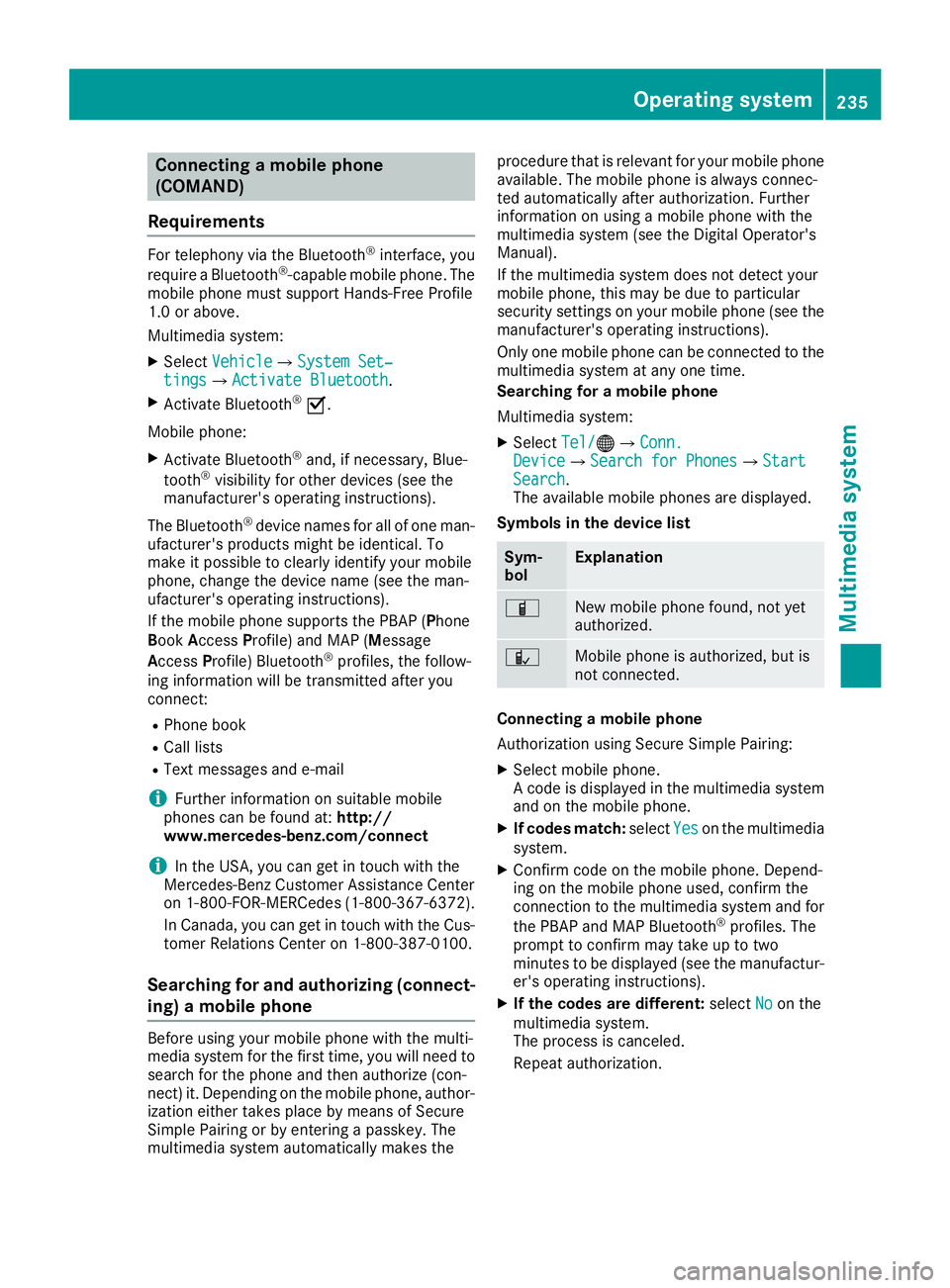
ing) a mobile phone
Before using your mobile phone with the multi-media system for the first time, you will need tosearch for the phone and then authorize (con-nect) it. Depending on the mobile phone, author-ization either takes place by means of SecureSimple Pairing or by entering a passkey. Themultimedia system automatically makes the
procedure that is relevant for your mobile phoneavailable. The mobile phone is always connec-ted automatically after authorization. Furtherinformation on using a mobile phone with themultimedia system (see the Digital Operator'sManual).
If the multimedia system does not detect yourmobile phone, this may be due to particularsecurity settings on your mobile phone (see themanufacturer's operating instructions).
Only one mobile phone can be connected to themultimedia system at any one time.
Searching for a mobile phone
Multimedia system:
XSelectTel/Tel/
Page 238 of 330
Authorization by entering a passkey (passcode):
XSelect the Bluetooth®name of the mobilephone.The input menu for the passkey is displayed.
XChoose a one to sixteen-digit number combi-nation as a passkey.
XEnter the passkey on the multimedia system.
XPressTto confirm.
XEnter and confirm the passkey on the mobilephone. Depending on the mobile phone used,confirm the connection to the multimedia sys-
tem and for the PBAP and MAP Bluetooth®
profiles. The prompt to confirm may take upto two minutes to be displayed (see the man-ufacturer's operating instructions).
Connecting a mobile phone (Audio 20)
Requirements
For telephony via the Bluetooth®interface, you
require at least one Bluetooth®-capable mobilephone depending on use ofone-telephonemodeortwo-telephone mode. The mobilephone must support Hands-Free Profile 1.0 orabove.
Intwo-telephone modeyou can use all thefunctions of the multimedia system with themain telephone. With theadditional tele-phone, you can receive incoming calls.
Multimedia system:
XSelectVehicleVehicle{System Set‐System Set‐tingstings{Activate BluetoothActivate Bluetooth.
XActivate Bluetooth®s.
Mobile phone:
XActivate Bluetooth®and, if necessary, Blue-
tooth®visibility for other devices (see themanufacturer's operating instructions).
The Bluetooth®device names for all of one man-ufacturer's products might be identical. Tomake it possible to clearly identify your mobilephone, change the device name (see the man-ufacturer's operating instructions).
If the mobile phone supports the PBAP (PhoneBookAccessProfile) and MAP (Message
AccessProfile) Bluetooth®profiles, the follow-ing information is transmitted after you connectthe main telephone:
RPhone book
RCall lists
RText messages and e-mail
iFurther information on suitable mobilephones can be found at:http://www.mercedes-benz.com/connect
iIn the USA, you can get in touch with theMercedes-Benz Customer Assistance Centeron 1-800-FOR-MERCedes (1-800-367-6372).
In Canada, you can get in touch with the Cus-tomer Relations Center on 1-800-387-0100.
Searching for and authorizing (connect-
ing) a mobile phone
Before using your mobile phone with the multi-media system for the first time, you will need tosearch for the phone and then authorize (con-nect) it. Depending on the mobile phone, author-ization either takes place by means of SecureSimple Pairing or by entering a passkey. Themultimedia system automatically makes theprocedure that is relevant for your mobile phoneavailable. The mobile phone is always connec-ted automatically after authorization. Furtherinformation on using a mobile phone with themultimedia system (see the Digital Operator'sManual).
If the multimedia system does not detect yourmobile phone, this may be due to particularsecurity settings on your mobile phone (see themanufacturer's operating instructions).
Searching for a mobile phone
Multimedia system:
XSelectTel/Tel/
Page 239 of 330
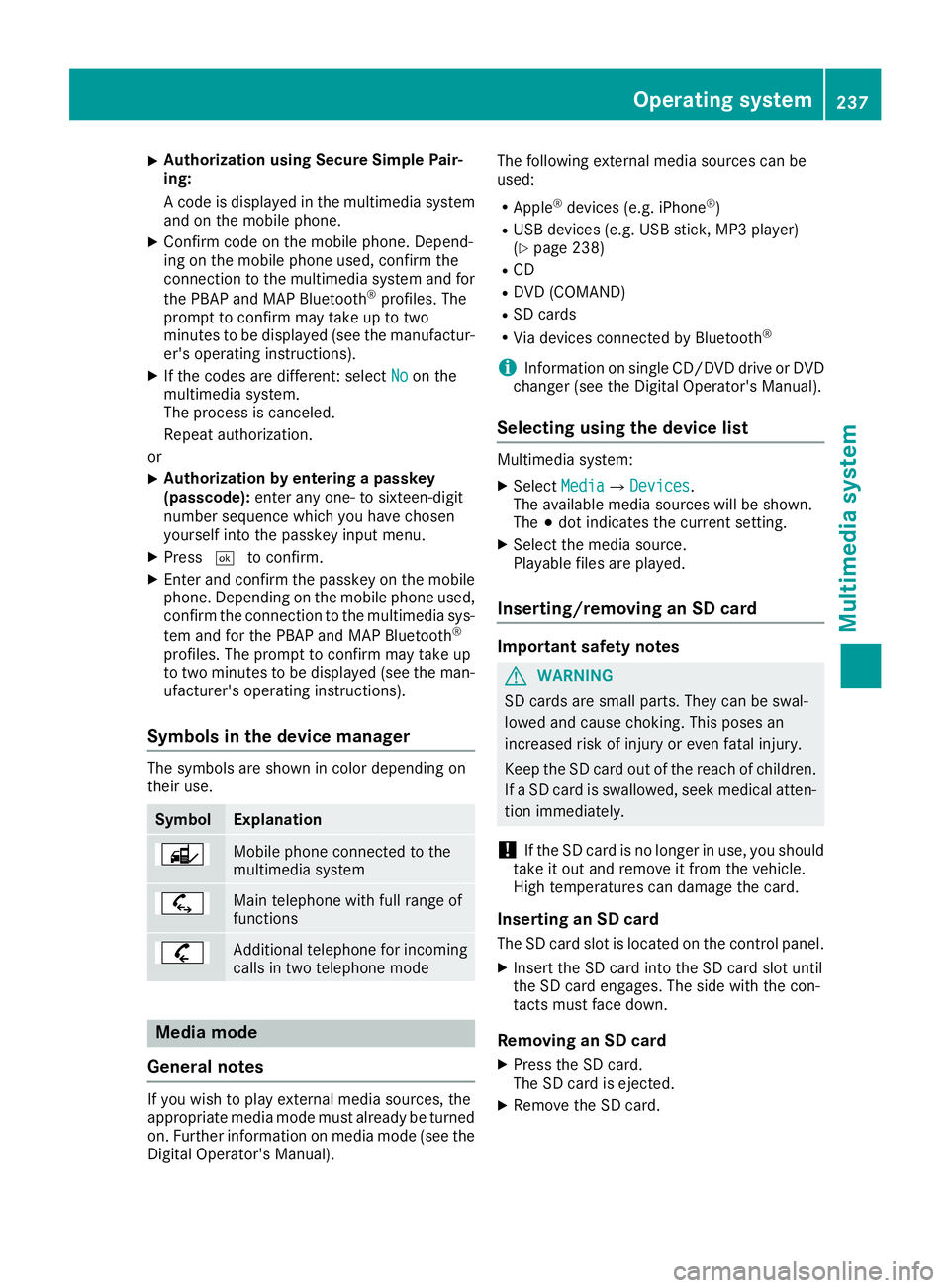
XAuthorization using Secure Simple Pair-ing:
A code is displayed in the multimedia systemand on the mobile phone.
XConfirm code on the mobile phone. Depend-ing on the mobile phone used, confirm theconnection to the multimedia system and for
the PBAP and MAP Bluetooth®profiles. Theprompt to confirm may take up to twominutes to be displayed (see the manufactur-er's operating instructions).
XIf the codes are different: selectNoNoon themultimedia system.The process is canceled.
Repeat authorization.
or
XAuthorization by entering a passkey(passcode):enter any one- to sixteen-digitnumber sequence which you have chosenyourself into the passkey input menu.
XPressTto confirm.
XEnter and confirm the passkey on the mobilephone. Depending on the mobile phone used,confirm the connection to the multimedia sys-
tem and for the PBAP and MAP Bluetooth®
profiles. The prompt to confirm may take upto two minutes to be displayed (see the man-ufacturer's operating instructions).
Symbols in the device manager
The symbols are shown in color depending ontheir use.
SymbolExplanation
Mobile phone connected to themultimedia system
Main telephone with full range offunctions
Additional telephone for incomingcalls in two telephone mode
Media mode
General notes
If you wish to play external media sources, theappropriate media mode must already be turnedon. Further information on media mode (see theDigital Operator's Manual).
The following external media sources can beused:
RApple®devices (e.g. iPhone®)
RUSB devices (e.g. USB stick, MP3 player)(Ypage 238)
RCD
RDVD (COMAND)
RSD cards
RVia devices connected by Bluetooth®
iInformation on single CD/DVD drive or DVDchanger (see the Digital Operator's Manual).
Selecting using the device list
Multimedia system:
XSelectMediaMedia{DevicesDevices.The available media sources will be shown.The;dot indicates the current setting.
XSelect the media source.Playable files are played.
Inserting/removing an SD card
Important safety notes
GWARNING
SD cards are small parts. They can be swal-
lowed and cause choking. This poses an
increased risk of injury or even fatal injury.
Keep the SD card out of the reach of children.
If a SD card is swallowed, seek medical atten-
tion immediately.
!If the SD card is no longer in use, you shouldtake it out and remove it from the vehicle.High temperatures can damage the card.
Inserting an SD card
The SD card slot is located on the control panel.
XInsert the SD card into the SD card slot untilthe SD card engages. The side with the con-tacts must face down.
Removing an SD card
XPress the SD card.The SD card is ejected.
XRemove the SD card.
Operating system237
Multimedia system
Z
Page 254 of 330
The destination download function is availableif:
Rthe vehicle is equipped with a navigation sys-tem.
Rthe relevant mobile phone network is availa-ble and data transfer is possible.
Route Assistance
This service is part of the Mercedes me connectPLUS Package and cannot be obtained sepa-rately.
You can use the Route Assistance function evenif the vehicle is not equipped with a navigationsystem.
Within the framework of this service, you receivea professional and reliable form of navigationsupport without having to leave your vehicle.
The customer service representative finds asuitable route depending on your vehicle's cur-rent position and the desired destination. Youwill then be guided live through the current routesection.
Search and Send
General notes
To use "Search & Send", your vehicle must beequipped with Mercedes me connect and a nav-igation system. Additionally, a Mercedes meconnect service subscription must be comple-ted.
"Search & Send" is a destination entry service. Adestination address found on Google Maps™can be transferred via Mercedes me connectdirectly to your vehicle's navigation system.
Specifying and sending the destination
address
XGo to the website http://maps.google.comand enter a destination address into the entryfield.
XTo send the destination address to the e-mail address of your Mercedes me con-nect account:click the corresponding but-ton on the website.
Example:
If you select 'Send to vehicle' and then'Mercedes-Benz', the destination address willbe sent to your vehicle.
XWhen the "Send" dialog window appears:
Enter the e-mail address you specified whensetting up your Mercedes me connectaccount into the corresponding field.
XClick "Send".
Information on specific commands such as"Address entry" or "Send" can be found on thewebsite.
Calling up a transmitted destination
address
XTurn the SmartKey to positionHin the igni-tion lock (Ypage 123).The transmitted destination address is loadedinto the vehicle's navigation system.
A display message appears, asking whethernavigation should be started.
XSelectYesYesby turning3or sliding1the controller and confirm with7.The system calculates the route and subse-quently starts the route guidance with theaddress entered.
If you selectNoNothe address can be stored inthe address book.
If you have sent more than one destinationaddress, each individual destination must beconfirmed separately.
Destination addresses are loaded in the sameorder as the order in which they were sent.
If you have multiple Mercedes-Benz vehicleswith Mercedes me connect and activeMercedes me connect accounts:
If multiple vehicles are registered under thesame e-mail address, the destination will besent to all the vehicles.
Vehicle remote opening
You can use the vehicle remote opening if youhave unintentionally locked your vehicle and areplacement SmartKey is not available.
The vehicle can be unlocked by the Mercedes-Benz Customer Assistance Center.
The vehicle can be immediately unlockedremotely within four days of the ignition beingturned off. After this time, remote unlockingmay be delayed by 15 to 60 minutes. After30 days, the vehicle can no longer be unlockedremotely.
The vehicle remote opening feature is availableif the relevant mobile phone network is availableand a data connection is possible.
XContact the following service hotlines:
252Features
Stowage and features