low beam MERCEDES-BENZ CLA-Class 2014 C117 Owner's Manual
[x] Cancel search | Manufacturer: MERCEDES-BENZ, Model Year: 2014, Model line: CLA-Class, Model: MERCEDES-BENZ CLA-Class 2014 C117Pages: 358, PDF Size: 6.6 MB
Page 8 of 358
Breakdown
see Flat tire
see Towing away/tow-starting
Bulbs
see Replacing bulbs C
California Important notice for retail cus-
tomers and lessees .......................... 23
Calling up a malfunction
see Display messages
Car
see Vehicle
Care
Carpets .......................................... 294
Car wash ........................................ 288
Displa y........................................... 292
Exhaust pipe .................................. 292
Exterior lights ................................ 291
Gear or selector lever .................... 293
Interior ........................................... 292
Matte finish ................................... 290
Notes ............................................. 287
Paint .............................................. 289
Plastic trim .................................... 292
Power washe r................................ 289
Rear view camera .......................... 291
Roof lining ...................................... 294
Seat belt ........................................ 294
Seat cover ..................................... 293
Sensors ......................................... 291
Steering wheel ............................... 293
Trim pieces .................................... 293
Washing by hand ........................... 288
Wheels ........................................... 289
Windows ........................................ 290
Wiper blades .................................. 290
Wooden trim .................................. 293
Cargo compartment enlargement ... 259
Cargo tie down rings ......................... 261
Car wash (care) ................................. 288
Center console Lower section .................................. 35
Upper section .................................. 34 Central locking
Automatic locking (on-board com-
puter) ............................................. 209
Locking/unlocking (SmartKey )........ 76
Changing bulbs
Brake lamps ................................... 117
Cornering light function ................. 117
High-beam headlamp s................... 116
Low-beam headlamp s.................... 116
Rear fog lamp ................................ 117
Reversing lamps ............................ 117
Turn signals (front) ......................... 117
Turn signals (rear) .......................... 117
Child-proof locks
Important safety notes .................... 62
Rear doors ....................................... 62
Children
In the vehicle ................................... 56
Restraint systems ............................ 56
Special seat belt retractor ............... 59
Child seat
LATCH-type (ISOFIX) child seat
anchors ............................................ 60
On the front-passenger sea t............ 59
Top Tether ....................................... 61
Cigarette lighter ................................ 265
Climate control Automatic climate control ............. 125
Automatic climate control (dual-
zone) .............................................. 127
Controlling automaticall y............... 131
Cooling with air dehumidification .. 129
Defrosting the windows ................. 133
Defrosting the windshield .............. 133
Important safety notes .................. 124
Indicator lamp ................................ 131
Maximum cooling .......................... 133
Notes on using dual-zone auto-
matic climate control ............. 126, 128
Overview of systems ...................... 124
Problems with cooling with air
dehumidification ............................ 131
Problem with the rear window
defroster ........................................ 135
Refrigerant ..................................... 352
Refrigerant filling capacity ............. 353
Setting the air distribution ............. 132 6
Index
Page 10 of 358
Display messages
ASSYST PLUS ................................ 286
Calling up (on-board computer) .... .213
Driving systems ............................ .232
Engine ............................................ 230
General notes ................................ 213
Hiding (on-board computer) ........... 213
Lights ............................................. 226
Safety systems .............................. 214
SmartKey ....................................... 243
Tires ............................................... 237
Vehicle .......................................... .239
Distance recorder .............................199
see Odometer
see Trip odometer
Distance warning function
Activating/deactivating ................. 205
Function/notes ................................ 64
Warning lamp ................................. 253
DISTRONIC PLUS
Activation conditions ..................... 170
Cruise control lever ....................... 169
Deactivating ................................... 173
Display message ............................ 235
Displays in the multifunction dis-
play ................................................ 174
Driving tips ................................... .174
Function/notes ............................ .168
Important safety notes .................. 168
Setting the specified minimum
distance ......................................... 172
Warning lamp ................................. 253
Doors
Automatic locking (on-board com-
puter) ............................................. 209
Automatic locking (switch) .............. .83
Central locking/unlocking
(SmartKey) ...................................... .76
Control panel .................................. .37
Display message ............................ 241
Emergency locking ........................... 83
Emergency unlocking ....................... 83
Important safety note s.................... 81
Opening (from inside) ...................... 81
Drinking and driving ......................... 161 Drive program
Automatic ...................................... 151
Display ........................................... 148
Display (DIRECT SELECT lever) ...... 147
Manual ........................................... 152
SETUP (on-board computer) .......... 211
Driver's door
see Doors
Driver's seat
see Seats
Driving abroad
Mercedes-Benz Service ................. 287
Symmetrical low beam .................. 108
Driving on flooded roads .................. 165
Driving safety systems 4ETS (Electronic Traction Sys-
tem) ................................................. 68
ABS (Anti-lock Braking System) ....... 63
ADAPTIVE BRAK E............................. 71
Adaptive Brake Assist ...................... 66
BAS (Brake Assist System) .............. 64
COLLISION PREVENTION ASSIST .... 64
COLLISION PREVENTION ASSIST
PLUS ................................................ 67
Distance warning function ............... 64
EBD (electronic brake force distri- bution) ............................................. 71
ESP ®
(Electronic Stability Pro-
gram) ............................................... 67
ETS/4ETS (Electronic Traction
System) ........................................... 68
ETS (Electronic Traction System) ..... 68
Important safety information ........... 63
Overview .......................................... 63
STEER CONTROL ............................. 71
Driving systems
Active Parking Assist ..................... 181
ATTENTION ASSIST ........................ 189
Blind Spot Assist ............................ 191
Cruise control ................................ 166
Display message ............................ 232
DISTRONIC PLUS ........................... 168
HOLD function ............................... 176
Lane Keeping Assist ...................... 193
Lane Tracking package .................. 191
PARKTRONIC ................................. 178
RACE START (AMG vehicles) .......... 177 8
Index
Page 14 of 358
Light function, active
Display message ............................ 229
Lights
Activating/deactivating the inte-
rior lighting delayed switch-off ...... .209
Automatic headlamp mode ............ 109
Cornering light function ................. 111
Display message ............................ 226
Driving abroad ............................... 108
Fog lamps ...................................... 109
Fog lamps (extended) .................... 112
Hazard warning lamps ................... 111
High beam flasher .......................... 111
High-beam headlamps ................... 110
Light switch ................................... 108
Low-beam headlamps .................... 109
Parking lamps ................................ 110
Rear fog lamp ................................ 109
Setting the brightness of the
ambient lighting (on-board com-
puter) ............................................. 208
Standing lamps .............................. 110
Switching the daytime running
lamps on/off (on-board com-
puter) ............................................. 208
Switching the daytime running
lamps on/off (switch) .................... 109
Switching the exterior lighting
delayed switch-off on/off (on-
board computer) ............................ 208
Switching the surround lighting
on/off (on-board computer) .......... 208
Turn signals ................................... 110
see Interior lighting
see Replacing bulbs
Light sensor (display message) ....... 229
Loading guidelines ............................ 256
Locking see Central locking
Locking (doors)
Automatic ........................................ 83
Emergency locking ........................... 83
From inside (central locking but-
ton) ................................................. .82
Locking centrally
see Central locking Locking verification signal (on-
board computer)
.............................. .209
Low-beam headlamps Changing bulbs .............................. 116
Display message ............................ 226
Setting for driving abroad (sym-
metrical) ........................................ 108
Switching on/off ........................... 109
Lumbar support
Adjusting the 4-way lumbar sup-
port ................................................ 100 M
M+S tires ............................................ 316
Malfunction message see Display messages
Matte finish (cleaning instruc-
tions) ................................................. .290
mbrace Call priority ................................... .270
Display message ............................ 220
Downloading destinations
(COMAND) ..................................... 270
Downloading routes ....................... 273
Emergency call .............................. 267
General notes ................................ 266
Geo fencing ................................... 274
Locating a stolen vehicle .............. .272
MB info call button ........................ 269
Remote vehicle locking .................. 272
Roadside Assistance button .......... 268
Search & Send ............................... 271
Self-test ......................................... 267
Speed alert ................................... .274
System .......................................... 267
Triggering the vehicle alarm ........... 274
Vehicle remote malfunction diag-
nosis .............................................. 273
Vehicle remote unlocking .............. 272
Mechanical key
Function/notes ................................ 77
Inserting .......................................... 77
Locking vehicle ................................ 83
Unlocking the driver's door .............. 83
Media Interface
see Separate operating instructions
Memory card (audio) ......................... 20212
Index
Page 34 of 358
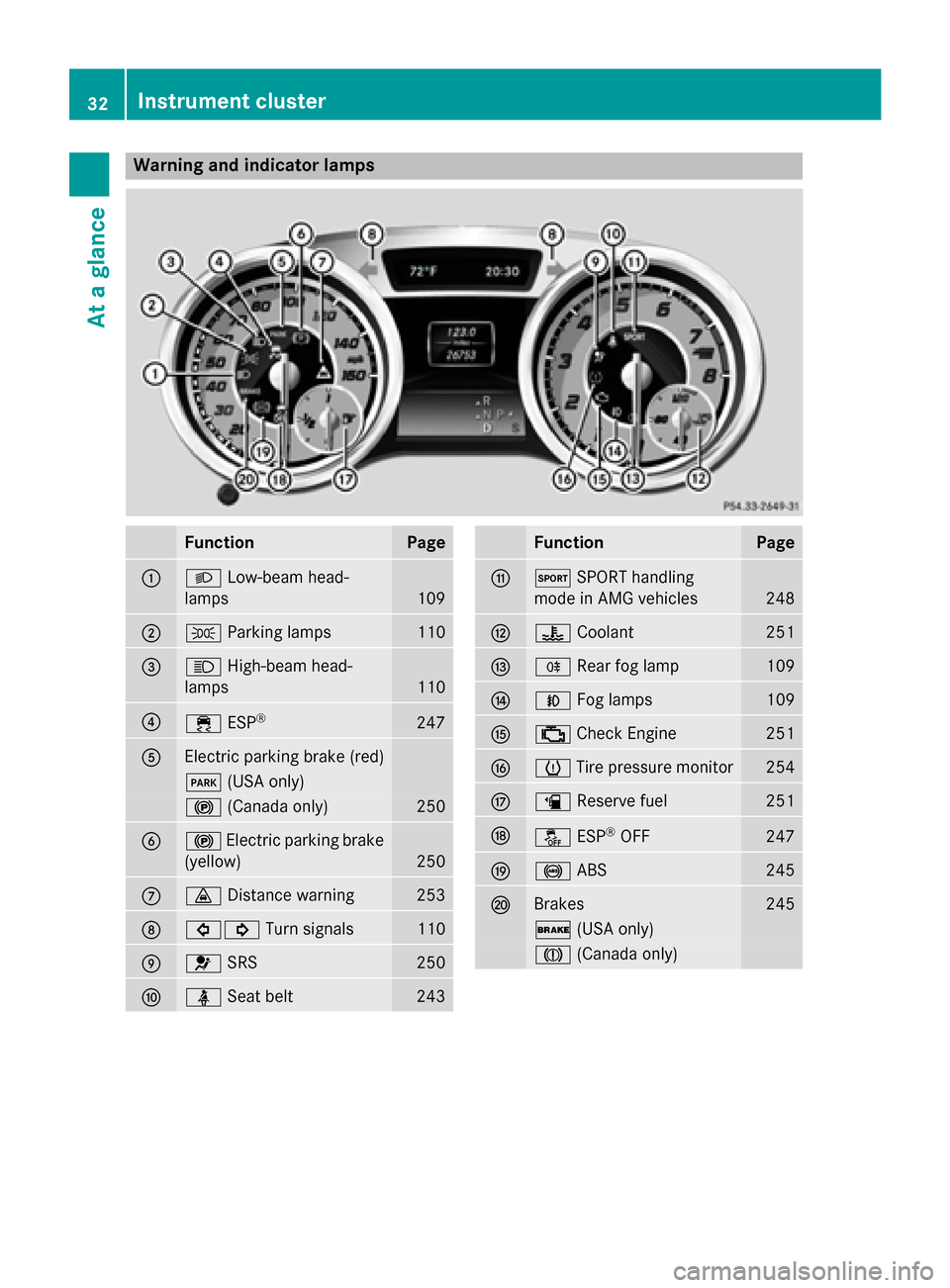
Warning and indicator lamps
Function Page
0043
0058
Low-beam head-
lamps 109
0044
0060
Parking lamps 110
0087
0057
High-beam head-
lamps 110
0085
00E5
ESP® 247
0083
Electric parking brake (red)
0049
(USA only) 0024
(Canada only) 250
0084
0024
Electric parking brake
(yellow) 250
006B
00BA
Distance warning 253
006C
003E003D
Turn signals 110
006D
0075
SRS 250
006E
00E9
Seat belt 243 Function Page
006F
0074
SPORT handling
mode in AMG vehicles 248
0070
00AC
Coolant 251
0071
005E
Rear fog lamp 109
0072
005A
Fog lamps 109
0073
00B9
Check Engine 251
0074
0077
Tire pressure monitor 254
0075
00D4
Reserve fuel 251
0076
00BB
ESP®
OFF 247
0077
0025
ABS 245
0078
Brakes 245
0027
(USA only) 004D
(Canada only) 32
Instrument clusterAt a glance
Page 110 of 358
Useful information
i This Operator's manual describes all
models and all standard and optional equip- ment of your vehicle available at the time of
publication of the Operator's manual.
Country-specific differences are possible.
Please note that your vehicle may not be
equipped with all features described. This
also applies to safety-related systems and
functions.
i Read the information on qualified special-
ist workshops (Y page 26). Exterior lighting
General notes
For reasons of safety, Mercedes-Benz recom- mends that you drive with the lights switchedon even during the daytime. In some coun-
tries, operation of the headlamps varies due
to legal requirements and self-imposed obli-
gations. Driving abroad
Conversion to symmetrical low beam Switch the headlamps to symmetrical low
beam in countries in which traffic drives on
the opposite side of the road from the country
where the vehicle is registered. This prevents glare to oncoming traffic. When using sym-
metrical lights, the edge of the road is not lit
as widely and as far ahead as normal.
Have the headlamps converted at a qualified
specialist workshop as close to the border as
possible before driving in these countries.
Conversion to asymmetrical low beam
after returning Have the headlamps converted back to asym-
metrical low-beam headlamps at a qualified
specialist workshop as soon as possible after crossing the border again. Setting the exterior lighting
Setting options Exterior lighting can be set using:
R the light switch
R the combination switch (Y page 110)
R the on-board computer (Y page 208)
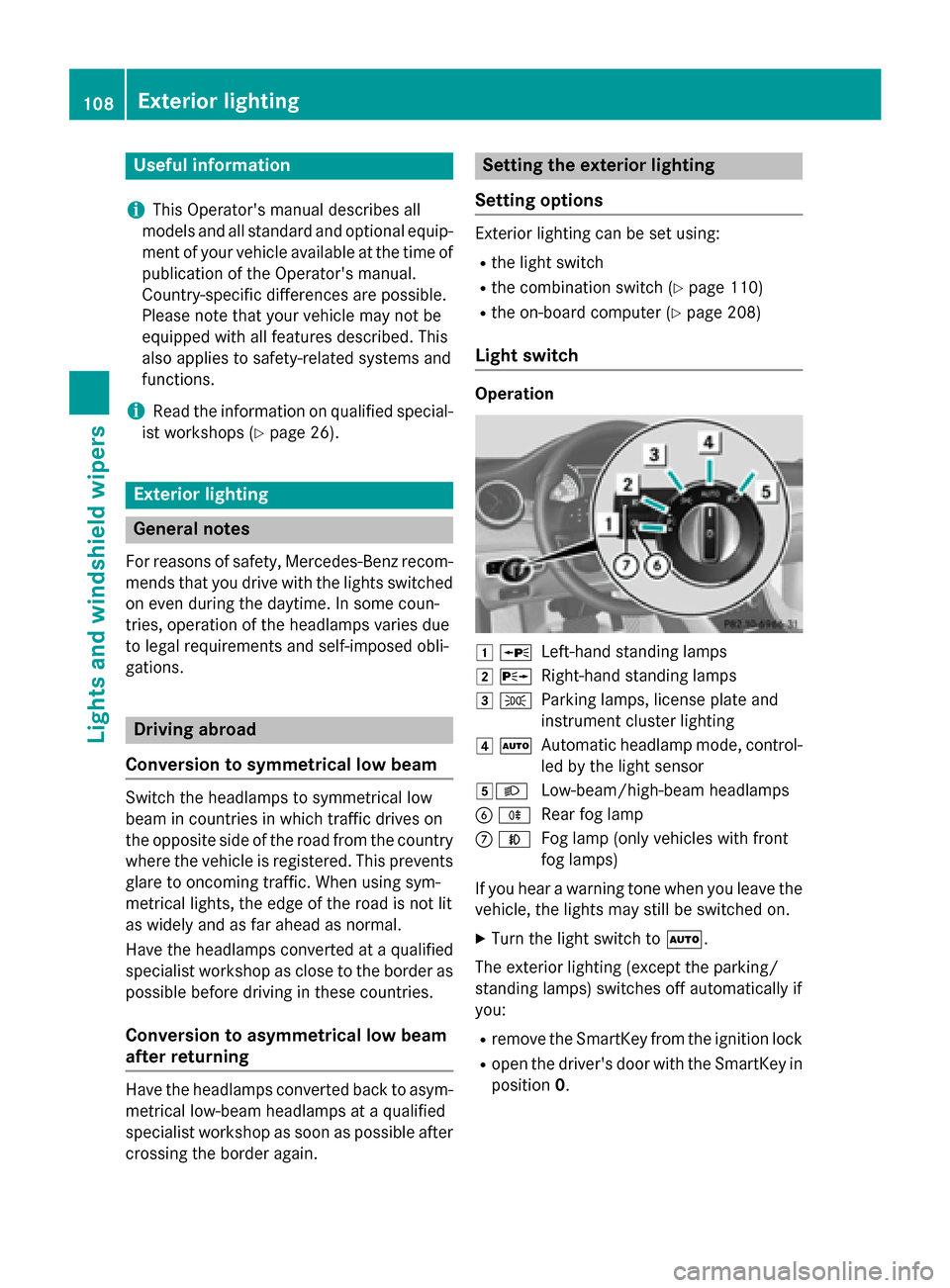
Light switch Operation
0047
0063
Left-hand standing lamps
0048 0064
Right-hand standing lamps
0049 0060
Parking lamps, license plate and
instrument cluster lighting
004A 0058
Automatic headlamp mode, control-
led by the light sensor
004B0058 Low-beam/high-beam headlamps
0084 005E
Rear fog lamp
006B 005A
Fog lamp (only vehicles with front
fog lamps)
If you hear a warning tone when you leave the
vehicle, the lights may still be switched on.
X Turn the light switch to 0058.
The exterior lighting (except the parking/
standing lamps) switches off automatically if
you: R remove the SmartKey from the ignition lock
R open the driver's door with the SmartKey in
position 0. 108
Exterior lightingLights and windshield wipers
Page 111 of 358
Automatic headlamp mode
G
WARNING
When the light switch is set to 0058, the low-
beam headlamps may not be switched on
automatically if there is fog, snow or other
causes of poor visibility due to the weather
conditions such as spray. There is a risk of an
accident.
In such situations, turn the light switch to
0058.
The automatic headlamp feature is only an
aid. The driver is responsible for the vehicle's lighting at all times.
0058 is the favored light switch setting. The
light setting is automatically selected accord- ing to the brightness of the ambient light
(exception: poor visibility due to weather con-
ditions such as fog, snow or spray):
R SmartKey in position 1in the ignition lock:
the parking lamps are switched on or off
automatically depending on the brightness of the ambient light.
R With the engine running: if you have acti-
vated the daytime running lamps function
via the on-board computer, the daytime
running lamps or the low-beam headlamps
and parking lamps are switched on or off
automatically depending on the brightnessof the ambient light.
X To switch on automatic headlamp
mode: turn the light switch to 0058.
The daytime running lamps improve the visi-
bility of your vehicle during the day. The day-
time running lamps function is required by law in Canada.
When the engine is running and the vehicle is
stationary: if you move the selector lever from a drive position to P, the daytime running
lamps/low-beam headlamps go out after
three minutes.
When the engine is running, the vehicle is
stationary and in bright ambient light: if you
turn the light switch to 0060, the daytime
running lamps and parking lamps switch on. If the engine is running and you turn the light
switch to 0058, the manual settings take
precedence over the daytime running lamps.
Low-beam headlamps
Even if the light sensor does not detect that it is dark, the parking lamps and low-beam
headlamps switch on when the ignition is
switched on and the light switch is set to the
0058 position. This is a particularly useful
function in the event of rain and fog.
X To switch on the low-beam headlamps:
turn the SmartKey in the ignition lock to
position 2or start the engine.
X Turn the light switch to 0058.
The green 0058indicator lamp in the instru-
ment cluster lights up.
Front fog lamps
In conditions where visibility is poor due to
fog, snow or rain, the fog lamps improve vis-
ibility as well as making it easier for other road
users to see you. They can be operated
together with the parking lamps or together
with the parking lamps and low-beam head-
lamps.
X To switch on the front fog lamps: turn
the SmartKey in the ignition lock to position 2 or start the engine.
X Turn the light switch to 0058or0058.
X Press the 005Abutton.
The green 005Aindicator lamp in the instru-
ment cluster lights up.
X To switch off the front fog lamps: press
the 005A button.
The green 005Aindicator lamp in the instru-
ment cluster goes out.
Only vehicles with front fog lamps are equip-
ped with the "fog lamp" function; information
on the fog lamp function for vehicles with
Intelligent Light System (Y page 112).
Rear fog lamp
The rear fog lamp improves visibility of your
vehicle for the traffic behind in the event of
thick fog. Please take note of the country- Exterior lighting
109Lights and windshield wipers Z
Page 112 of 358
specific regulations for the use of rear fog
lamps.
X To switch on the rear fog lamps: turn the
SmartKey in the ignition lock to position 2
or start the engine.
X Turn the light switch to 0058or0058.
X Press the 005Ebutton.
The yellow 005Eindicator lamp in the
instrument cluster lights up.
X To switch off the rear fog lamp: press the
005E button.
The yellow 005Eindicator lamp in the
instrument cluster goes out.
i When the rear fog lamp is switched on,
the center brake lamp in the tail lamp
switches off due to a legal requirement.
Parking lamps ! If the battery has been excessively dis-
charged, the parking lamps or standing
lamps are automatically switched off to
enable the next engine start. Always park
your vehicle safely and sufficiently lit
according to legal standards. Avoid the
continuous use of the 0060parking lamps
for several hours. If possible, switch on the
0064 right or the 0063left standing lamp.
X To switch on: turn the light switch to 0060.
The green 0060indicator lamp in the instru-
ment cluster lights up.
Standing lamps
Switching on the standing lamps ensures the
corresponding side of the vehicle is illumina-
ted.
X To switch on the standing lamps: the
SmartKey is not in the ignition lock or it is in position 0.
X Turn the light switch to 0063(left-hand side
of the vehicle) or 0064(right-hand side of
the vehicle). Combination switch
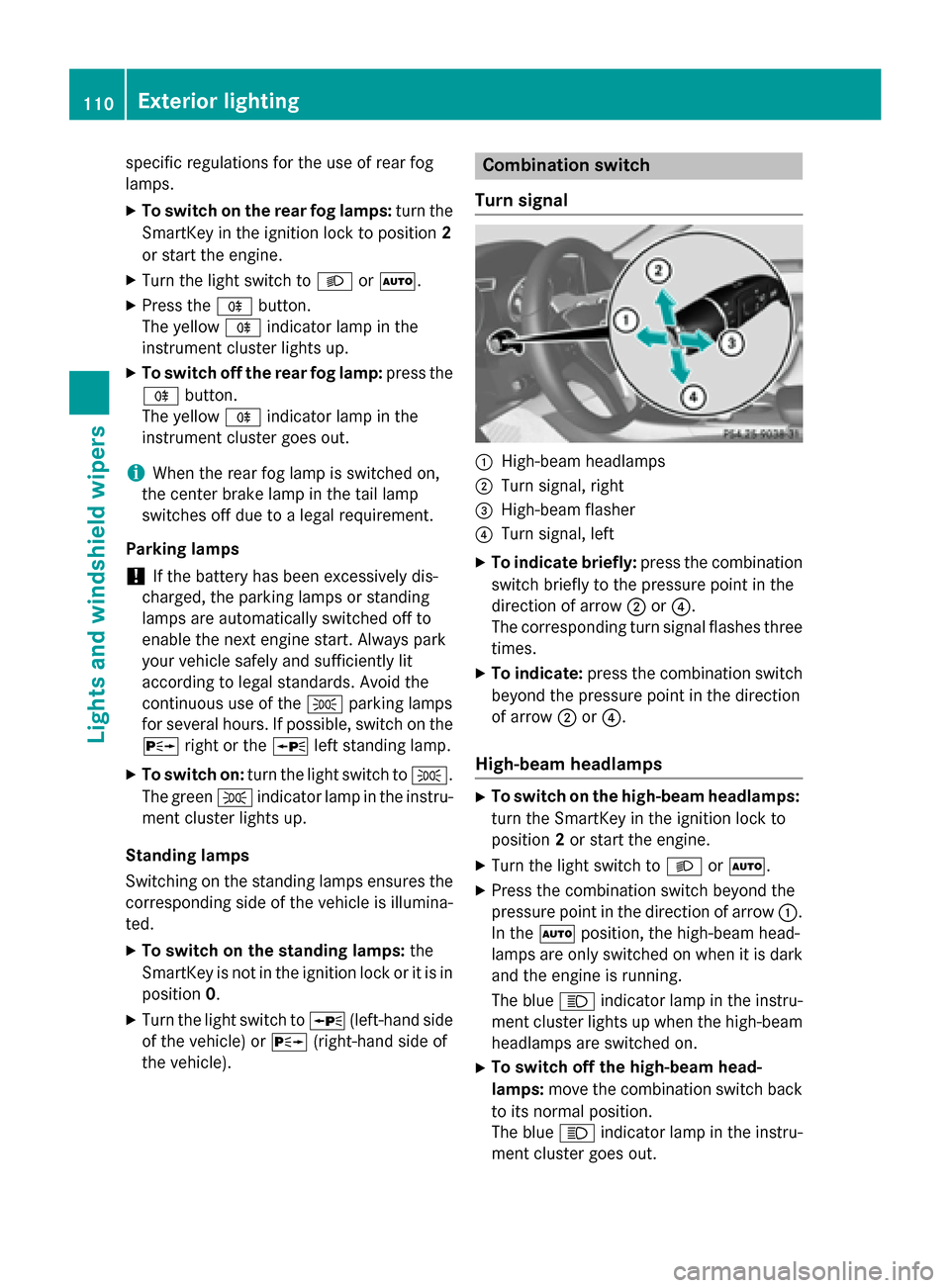
Turn signal 0043
High-beam headlamps
0044 Turn signal, right
0087 High-beam flasher
0085 Turn signal, left
X To indicate briefly: press the combination
switch briefly to the pressure point in the
direction of arrow 0044or0085.
The corresponding turn signal flashes three
times.
X To indicate: press the combination switch
beyond the pressure point in the direction
of arrow 0044or0085.
High-beam headlamps X
To switch on the high-beam headlamps:
turn the SmartKey in the ignition lock to
position 2or start the engine.
X Turn the light switch to 0058or0058.
X Press the combination switch beyond the
pressure point in the direction of arrow 0043.
In the 0058position, the high-beam head-
lamps are only switched on when it is dark
and the engine is running.
The blue 0057indicator lamp in the instru-
ment cluster lights up when the high-beam headlamps are switched on.
X To switch off the high-beam head-
lamps: move the combination switch back
to its normal position.
The blue 0057indicator lamp in the instru-
ment cluster goes out. 110
Exterior lightingLights and windshield wipers
Page 113 of 358
i
Vehicles with Adaptive Highbeam Assist:
when Adaptive Highbeam Assist is active, it controls activation of the high-beam head-
lamps (Y page 112).
High-beam flasher X
To switch on: turn the SmartKey in the
ignition lock to position 1or 2or start the
engine.
X Pull the combination switch in the direction
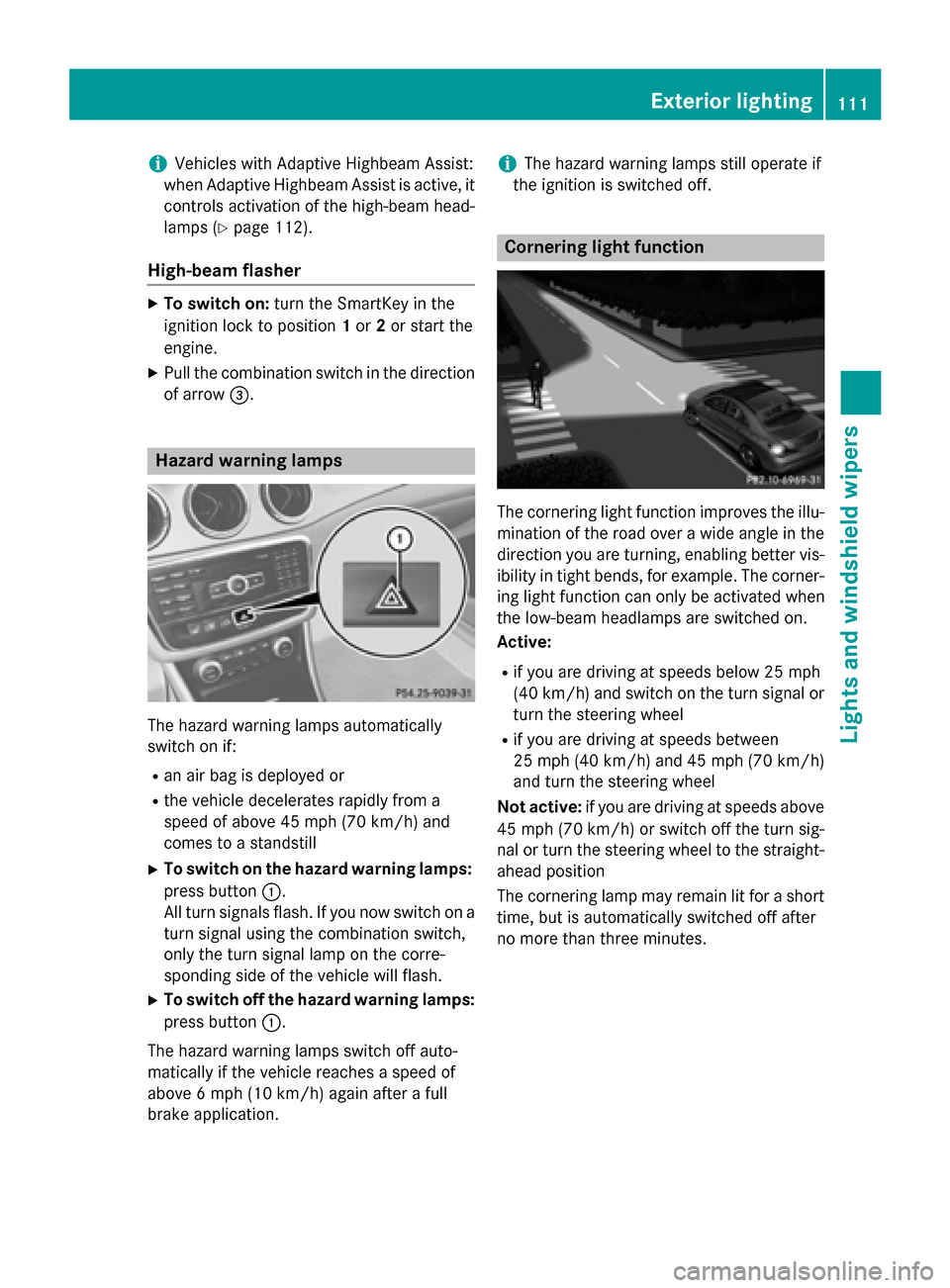
of arrow 0087. Hazard warning lamps
The hazard warning lamps automatically
switch on if:
R an air bag is deployed or
R the vehicle decelerates rapidly from a
speed of above 45 mph (70 km/h) and
comes to a standstill
X To switch on the hazard warning lamps:
press button 0043.
All turn signals flash. If you now switch on a turn signal using the combination switch,
only the turn signal lamp on the corre-
sponding side of the vehicle will flash.
X To switch off the hazard warning lamps:
press button 0043.
The hazard warning lamps switch off auto-
matically if the vehicle reaches a speed of
above 6 mph (10 km/h) again after a full
brake application. i
The hazard warning lamps still operate if
the ignition is switched off. Cornering light function
The cornering light function improves the illu-
mination of the road over a wide angle in the direction you are turning, enabling better vis-
ibility in tight bends, for example. The corner- ing light function can only be activated when
the low-beam headlamps are switched on.
Active:
R if you are driving at speeds below 25 mph
(40 km/h) and switch on the turn signal or
turn the steering wheel
R if you are driving at speeds between
25 mph (40 km/h) and 45 mph (70 km/h)
and turn the steering wheel
Not active: if you are driving at speeds above
45 mph (70 km/h) or switch off the turn sig-
nal or turn the steering wheel to the straight-
ahead position
The cornering lamp may remain lit for a short
time, but is automatically switched off after
no more than three minutes. Exterior lighting
111Lights and windshield wipers Z
Page 114 of 358
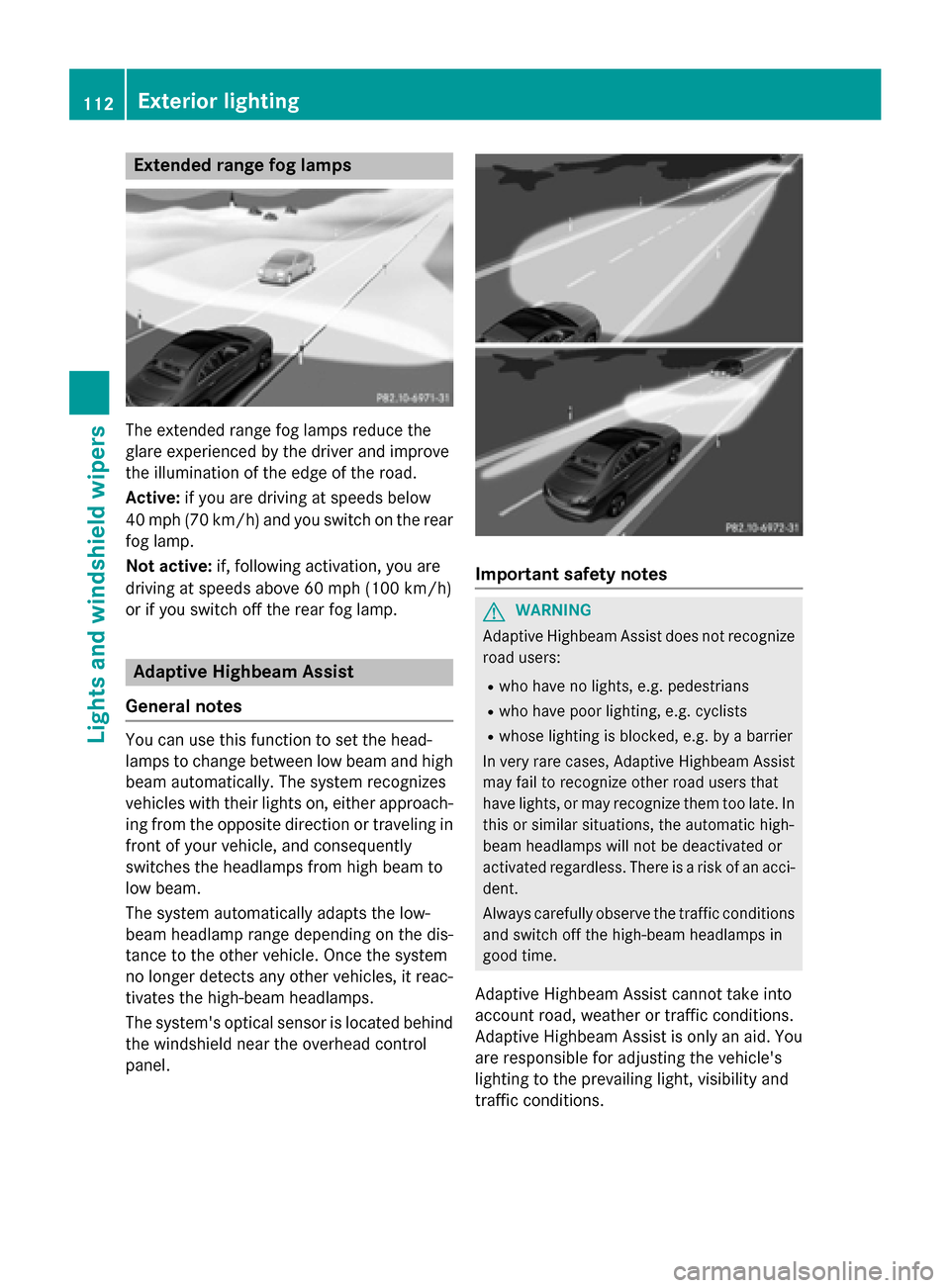
Extended range fog lamps
The extended range fog lamps reduce the
glare experienced by the driver and improve
the illumination of the edge of the road.
Active: if you are driving at speeds below
40 mph (70 km/h) and you switch on the rear
fog lamp.
Not active: if, following activation, you are
driving at speeds above 60 mph (100 km/h)
or if you switch off the rear fog lamp. Adaptive Highbeam Assist
General notes You can use this function to set the head-
lamps to change between low beam and high
beam automatically. The system recognizes
vehicles with their lights on, either approach-ing from the opposite direction or traveling in
front of your vehicle, and consequently
switches the headlamps from high beam to
low beam.
The system automatically adapts the low-
beam headlamp range depending on the dis-
tance to the other vehicle. Once the system
no longer detects any other vehicles, it reac-
tivates the high-beam headlamps.
The system's optical sensor is located behind
the windshield near the overhead control
panel. Important safety notes
G
WARNING
Adaptive Highbeam Assist does not recognize road users:
R who have no lights, e.g. pedestrians
R who have poor lighting, e.g. cyclists
R whose lighting is blocked, e.g. by a barrier
In very rare cases, Adaptive Highbeam Assist
may fail to recognize other road users that
have lights, or may recognize them too late. In this or similar situations, the automatic high-
beam headlamps will not be deactivated or
activated regardless. There is a risk of an acci-
dent.
Always carefully observe the traffic conditions and switch off the high-beam headlamps in
good time.
Adaptive Highbeam Assist cannot take into
account road, weather or traffic conditions.
Adaptive Highbeam Assist is only an aid. You are responsible for adjusting the vehicle's
lighting to the prevailing light, visibility and
traffic conditions. 112
Exterior lightingLights and windshield wipers
Page 115 of 358
In particular, the detection of obstacles can
be restricted if there is:
R poor visibility, e.g. due to fog, heavy rain or
snow
R dirt on the sensors or the sensors are
obscured
Switching Adaptive Highbeam Assist
on/off X
To switch on: turn the light switch to 0058.
X Press the combination switch beyond the
pressure point in the direction of arrow 0043.
The 00CE indicator lamp in the multifunc-
tion display lights up when it is dark and the
light sensor activates the low-beam head-
lamps.
If you are driving at speeds above approx-
imately 16 mph (25 km/h):
The headlamp range is set automatically
depending on the distance between the
vehicle and other road users.
If you are driving at speeds above approx-
imately 19 mph (30 km/h) and no other
road users have been detected:
The high-beam headlamps are switched on automatically. The 0057indicator lamp in
the instrument cluster also lights up.
If you are driving at speeds below approx-
imately 16 mph (25 km/h) or other road
users have been detected or the roads are
adequately lit:
The high-beam headlamps are switched off
automatically. The 0057indicator lamp in
the instrument cluster goes out. The 00CE
indicator lamp in the multifunction display
remains lit.
X To switch off: move the combination
switch back to its normal position or move
the light switch to another position.
The 00CE indicator lamp in the instrument
cluster goes out. Headlamps fogged up on the inside
Certain climatic and physical conditions may
cause moisture to form in the headlamp. This moisture does not affect the functionality of
the headlamp. Interior lighting
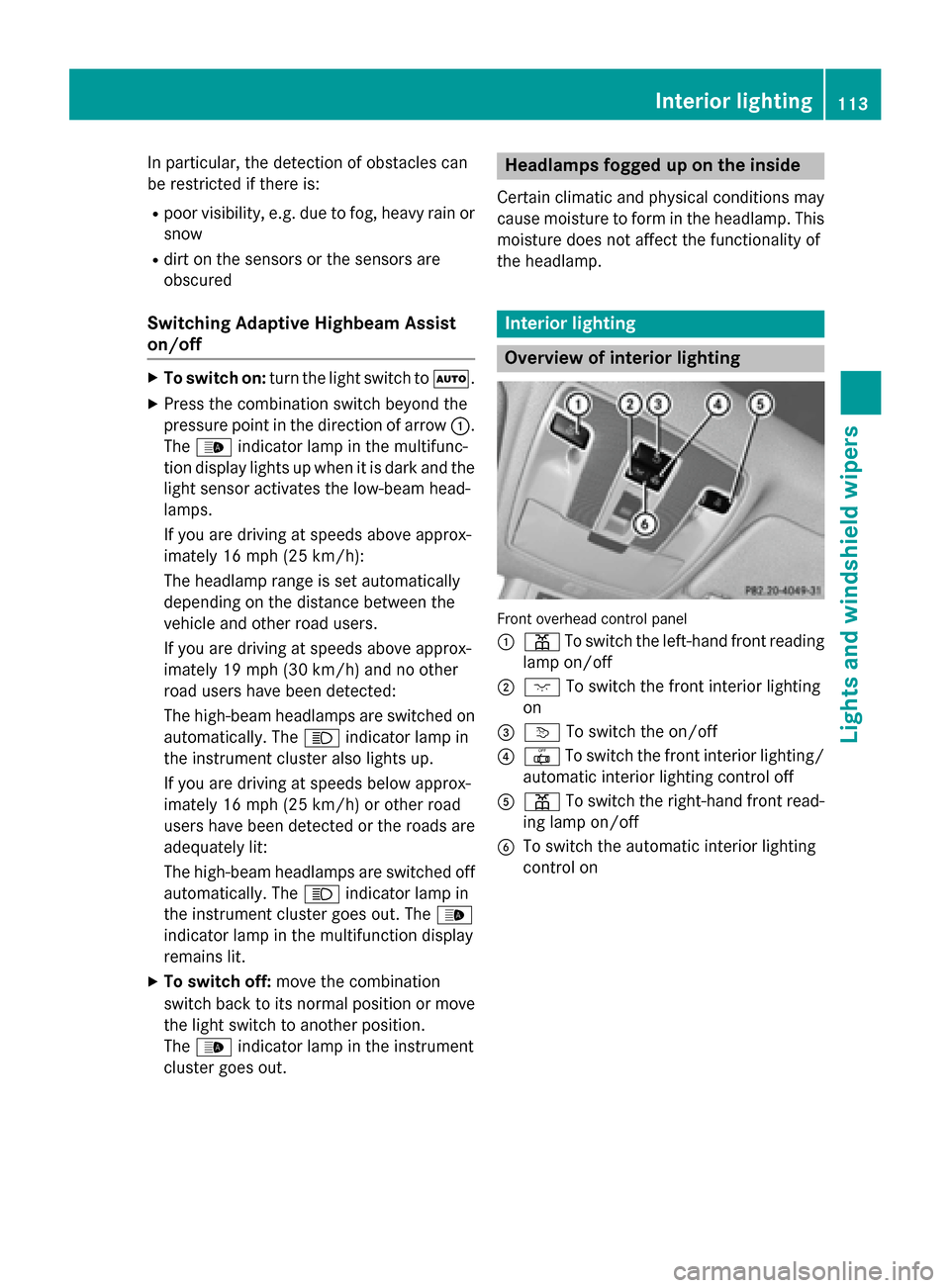
Overview of interior lighting
Front overhead control panel
0043
003D To switch the left-hand front reading
lamp on/off
0044 004A To switch the front interior lighting
on
0087 0043 To switch the on/off
0085 0033 To switch the front interior lighting/
automatic interior lighting control off
0083 003D To switch the right-hand front read-
ing lamp on/off
0084 To switch the automatic interior lighting
control on Interior lighting
113Lights and windshield wipers Z