display MERCEDES-BENZ CLK COUPE 2004 User Guide
[x] Cancel search | Manufacturer: MERCEDES-BENZ, Model Year: 2004, Model line: CLK COUPE, Model: MERCEDES-BENZ CLK COUPE 2004Pages: 453, PDF Size: 14.93 MB
Page 110 of 453
107
Controls in detail
Instrument cluster
The coolant temperature gauge is located
on the right-hand side of the instrument
cluster.
The temperature displayed may climb to
120 °Cwhen the vehicle is being driven in
normal conditions and if the coolant con-
tains the correct concentration of corro-
sion inhibitor and antifreeze.
The red band in the rev counter indicates
the engine's overrevving range. The engine
speed is limited to protect the engine when
the red band is reached.
! Do not driv ein the overrevving range. Doing
so could damage the engine. There may be a short delay before a lower
outside temperature is displayed, for
example after leaving a garage.
There may also be a short delay before a
rise in the outside temperature is dis-
played. This prevents an incorrect temper-
ature displ
aycaused by heat from the
engine when the vehicle is stationary or
mo ving slowly.
i You can set the unit for the out side temper-
ature display using the operating syst em
( =
page 119). Co
olant temperature gauge Rev counter Outside temperature displ
ay G
Risk of accident Even if the temperature displayed is just
above freezing point, the road
surface may
still be icy, especially inwooded areas or on
br idges. The vehicle could skid if you fail to
adapt your driving style accordingly. For this
reason, always adapt your driving style and
speed to the weather conditions. 209en_d2.boo Seite
107 Dienstag, 25. Mai 2004 7:26 19
Page 111 of 453
108 Controls in detail
Operating system
The operating system is activated as soon
as
the key is turned to position 1in the
ignition lock. You may perform the follow-
ing using the operating system:
! Call up information about your vehicle
! Make settin gs
You can use this not only to find out when
the next service is due, but also to set the
language for messages in the instrument
cluster and much more.
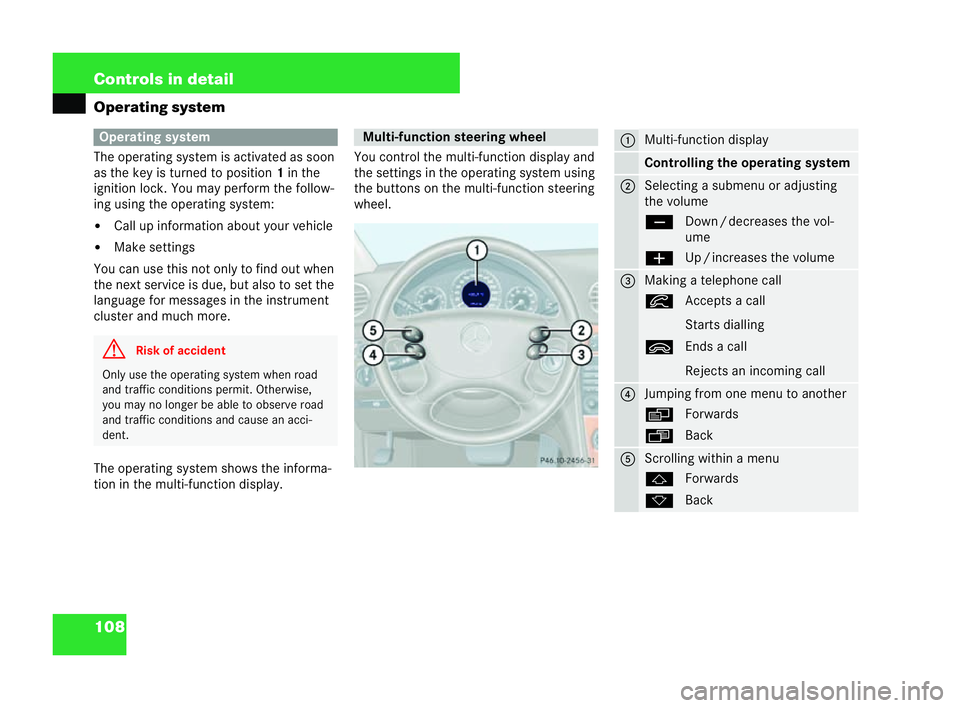
The operating system shows the informa-
tion in the multi-function display. You con
trol the multi-function displ ayand
the settings in the operating system using
the buttons on the multi-function steering
whee l. Operating system
G
Risk of accident Only use the operating
system when road
and traffic conditions permit. Otherwise,
you may no longer be able to observe road
and traffic conditio nsand cause an acci-
dent. Multi-function st
eeringwheel
P46.10-2456-31 1 Multi-function display
Co
ntrolling theo perating system 2 Selecting a submenu or adjusting
the volume
ç
Down/decreases the vol-
ume
æ Up/increases the volume 3 Making a telephone call
í
Accepts a call
Starts dialling
ì Ends a call
Rejects an incoming call 4 Jumping from one menu to another
è
Forwards
ÿ Back 5 Scrolling within a menu
j
Forwards
k Back 209en_d2.boo Seite
108 Dienstag, 25. Mai 2004 7:26 19
Page 112 of 453
109
Controls in detail
Operating system
The multi-functi ondisplay changes when
you press one of these buttons on the
multi-function steering wheel.
Several functions are combined themati-
cally in each menu. For example, theAudio
menu contains functions for controlling
the rad ioor CD player. You can use a func-
tion to call up informa tion or to change the
settings for your vehicle. You can think of the order of the men
us
and function sin a menu as a circle:
! If you press the èorÿ button
repeatedly, each menu appears in turn.
! If you press the korj button
repeatedly, each menu function
appears in turn.
The
Se ttings...menu contains submenus
instead of functions with which you can
call up orchange a setting. For notes on
how to control these submenus, see the
"Settings menu" section ( =pa ge 116). The
number of menus depends on the
optional equipment installed in your vehi-
cle.
The following page describes the menus
and their functions. 209en_d2.boo Seite
109 Dienstag, 25. Mai 2004 7:26 19
Page 113 of 453
110 Controls in detail
Operating system
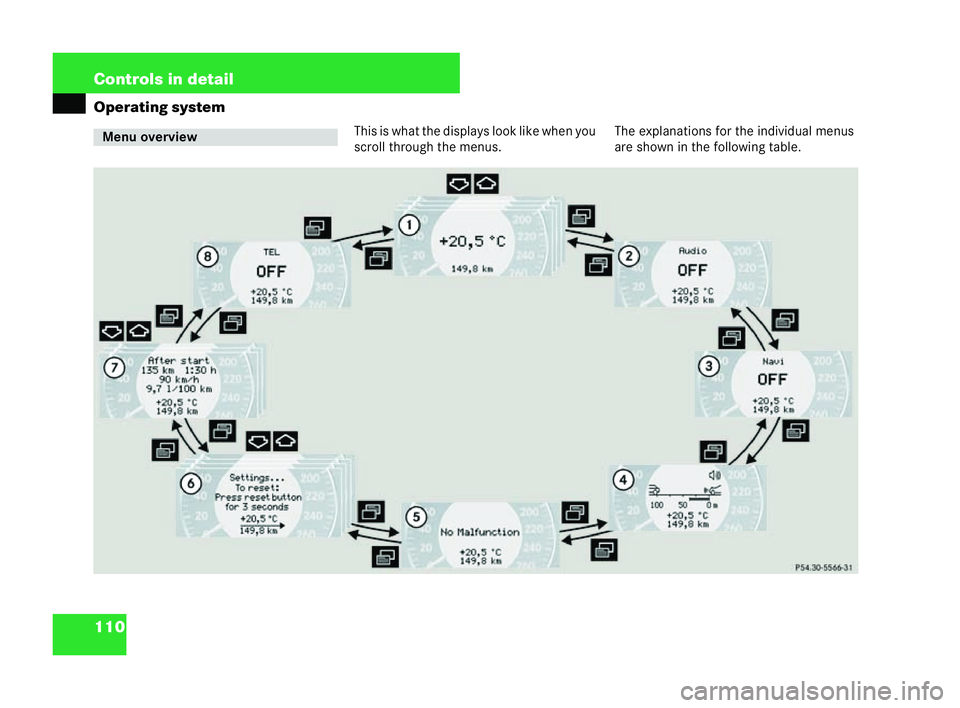
Thisiswh at the displays look like when you
scroll through the menus. The explanations for the individual menus
are shown in the following table.Menu overview
P54.30-5196-31209en_d2.boo Seite
110 Dienstag, 25. Mai 2004 7:26 19
Page 114 of 453
111
Controls in detail
Operating system
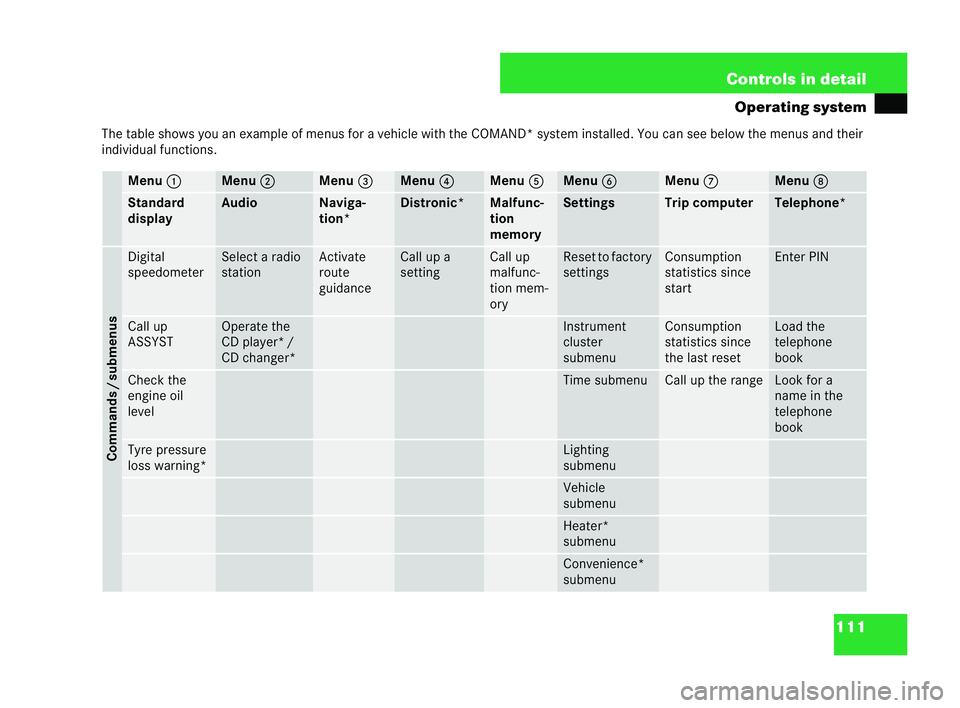
The table shows you an example of menus for a vehicle with the COMAND* system installed. You ca nsee below the menus and their
individual functions. Menu
1 Menu
2 Menu
3 Menu
4 Menu
5 Menu
6 Menu
7 Menu
8 Standard
display Au
dio Naviga-
tion* Distronic* Malfunc-
tion
me
mory Settings Trip computer Te
lep hone*Commands /submenus Digital
speedometer Select a radio
station Activate
rou
te
guida nce Call up a
sett
ing Ca
ll up
malfunc-
tion mem-
ory Reset to factory
settings Consumption
statistics since
start Ent
erPIN Call up
ASSYST Operate the
CD player* /
CD changer* Instrument
cluster
submenu Consumption
statistics since
the
last reset Load the
telephone
book
Check the
engine oil
le
vel Time submenu Call up the range Look for a
name in the
telephone
book
Tyre pressure
lo
ss warning* Lighting
submenu
Vehicle
submenu
Heater*
submenu
Convenience*
submenu209en_d2.boo Seite
111 Dienstag, 25. Mai 2004 7:26 19
Page 115 of 453
112 Controls in detail
Operating systemi
The table overview of the menus contains
gene ric terms which are not always sho wninthe
operating system. The appropriate generic term
should make it easier for you tofamiliarise your-
se lf with the menu s.
The operating system displays the new function
range with the first menu function.
In the case of the Audio 10, Audio 10CD*
and Audio 30APS* audio systems, the
operating system displays the audio and
telephone menus in English. The display
for these menus is independent of the lan-
guage selected as your display language. In
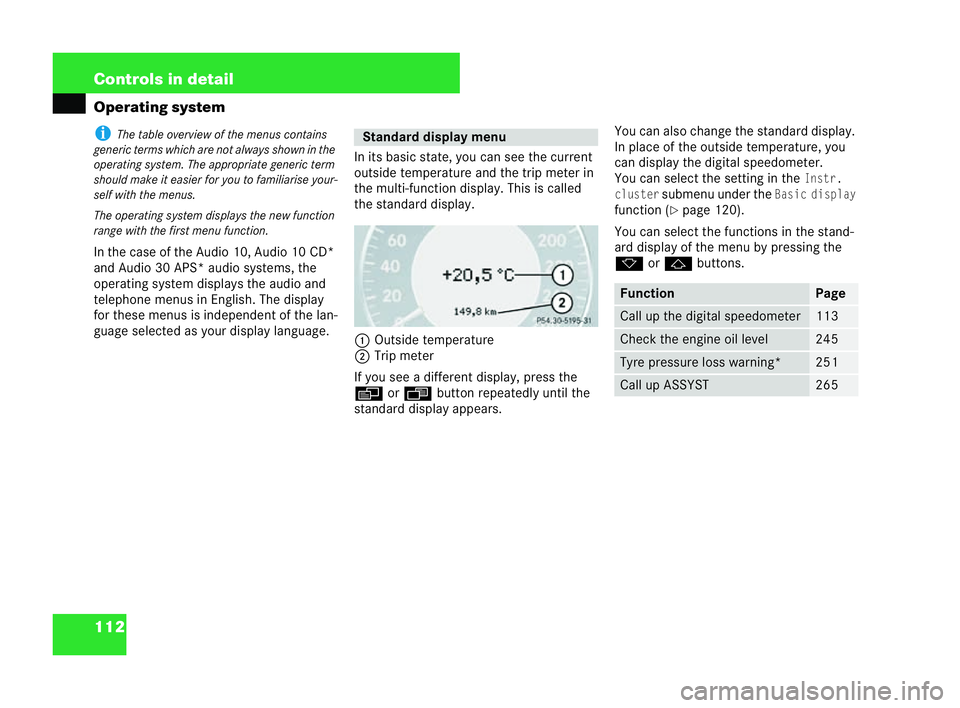
its basic state, you can see the current
outside temperature and the trip meter in
the multi-function displ ay. This is called
the standard display.
1 Out side tem perature
2 Trip meter
If you see a different display, press the
è orÿ button repeatedly until the
sta ndard display appears. You can also change the standard display.
In place of the
outside temperature, you
can display the digita lspeedometer.
You can select the setting in theInstr.
cluster
submenu und ertheBasic display
function (
=page 120).
You can select the functions inthe stand-
ard display of the menu by pressing the
k orj buttons. Standard
display menu
P54.30-5195-31 Fu
nction Page
Call up the digital speedo
meter 113
Check the engine oil level 245
Tyre pressure loss warn
ing* 251
Call up ASSYST 265209en_d2.boo Seite
112 Dienstag, 25. Mai 2004 7:26 19
Page 116 of 453
113
Controls in detail
Operating system
Digital sp eedometer display, status ind
icator
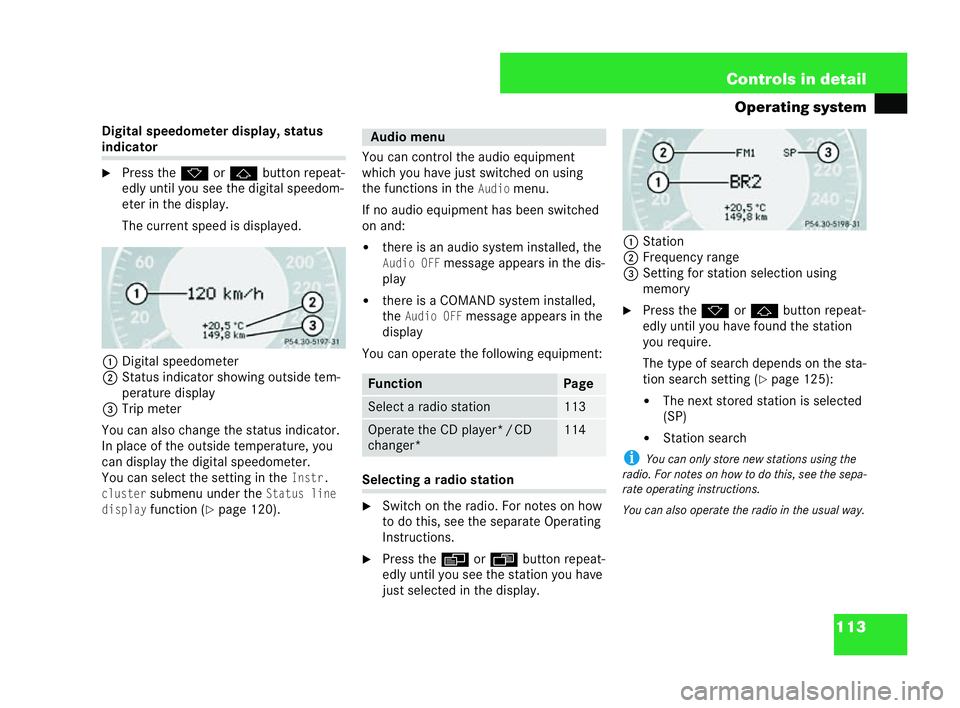
6 Press the korj button repea t-
edly until you see the digital speedom-
eter in the display.
The current speed is disp layed.
1 Digital speedometer
2 Status indicator showing outside tem-
peratur e display
3 Trip meter
You can also change the status indicator.
In place of the outside temperature, you
can display the digita lspeedometer.
You can select the setting in theInstr.
cluster
submenu under theStat usline
display
function ( =pag e120). You can control the audio equipment
wh
ich you have just switched on using
the functions in the
Audiomenu.
If no audio equipment has been switched
on and:
! there isan audio system installed, the
Audio OFFmessage appears in the dis-
play
! there isa COMAND system installed,
the
Audio OFFmessage appears in the
display
You can operate the following equipment: Se
lecting a radio station
6 Switch on the radio. For notes on how
to do this, see the separate Opera ting
Instructions.
6 Press the èorÿ button repeat-
edly until you see the station you have
ju st selected in the display. 1
Station
2 Frequency range
3 Setting for station selection using
mem ory
6 Press the korj button repeat-
edly until you have found the station
you requ ire.
The type of search depends on the sta-
tion search setting (
=pa ge 125):
! The next stored station is selected
(SP)
! Station search
i You can only store new stations using the
radio. For notes on how to do this, see the sepa-
rat eop erati ng inst ructions.
Yo u can also operate the radio in the usual way.
P54.30-5197-31 Au
dio menu Function Page
Selec
ta radio station 113
Operate the CD player*
/CD
changer* 114 P54.30-5198-31209en_d2.boo Seite
113 Dienstag, 25. Mai 2004 7:26 19
Page 117 of 453
114 Controls in detail
Operating systemOperating the CD player*
6
Switch on the radio and select the CD
player. For note son how to do this, see
the separate Operating Instructions.
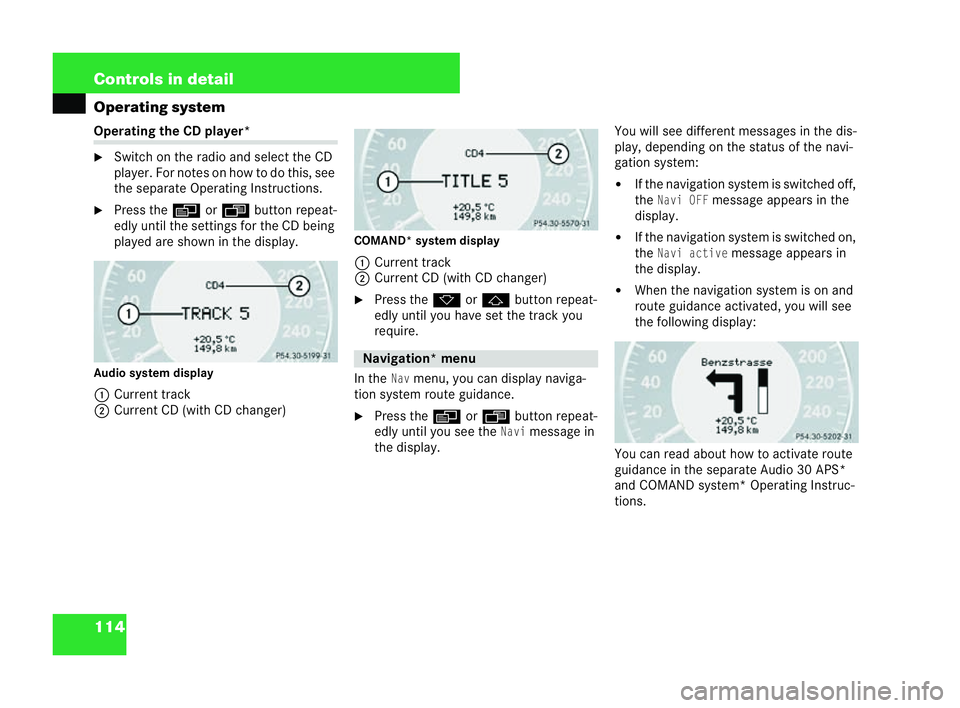
6 Press the èorÿ button repeat-
edly until the settings for the CD being
played are shown in the display.
Audio system dis play
1 Current track
2 Current CD (with CD changer) COMAND*
system display
1 Current track
2 Current CD (with CDchanger)
6 Press the korj button repeat-
edly until you have set the tra ckyou
require.
In theNavmenu, you can displ aynaviga-
tion system route guidance.
6 Press the èorÿ button repea t-
edly until you see the
Navimessage in
the display. You will see different messag
esin the dis-
play, depending on the status of the navi-
gation system:
! If the navigation system isswi tched off,
the
Nav iO FFmessage appears in the
display.
! If the navigation system isswitched on,
the
Navi activemessage appears in
the display.
! When the navigation system ison and
route guidance activated, you will see
the following display:
You can read about how to act ivat e route
guidance in the separate Audio 30APS*
and COMAND system* Operating Instruc-
tions.
P54.30-5199-31 Navigat
ion* menu
P54.30-5200-31 P54.30-5202-31209en_d2.boo Seite
114 Dienstag, 25. Mai 2004 7:26 19
Page 118 of 453
115
Controls in detail
Operating system
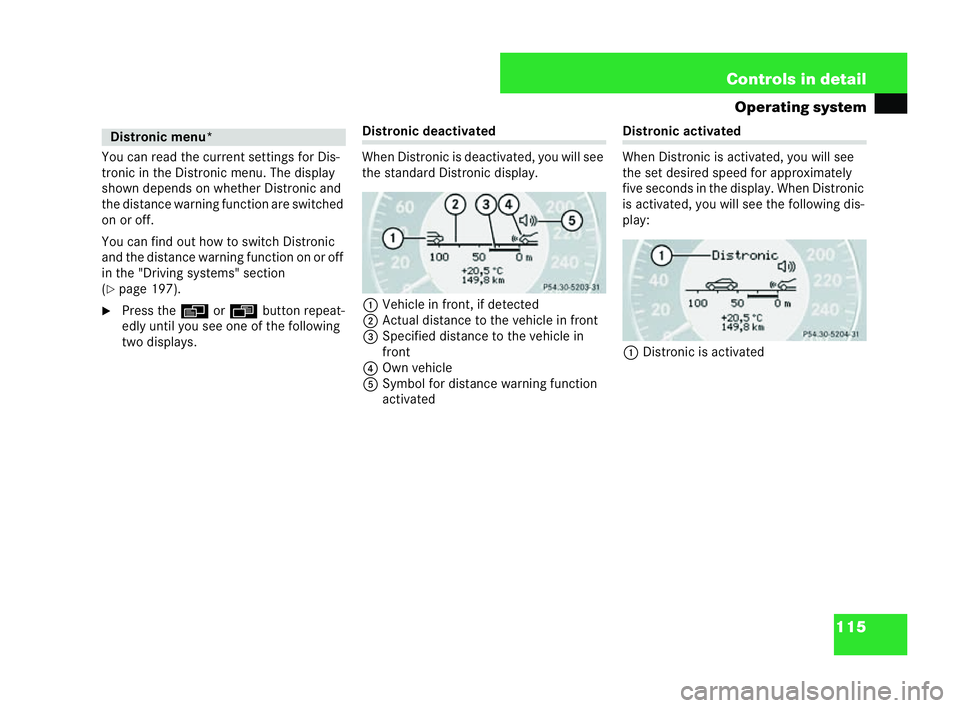
You can read the current settings for Dis-
tronic in the Di stronic menu. The display
shown depends on whether Distronic and
the distance warning function are switched
on or off.
You can find out how to switch Distronic
and the distance warning function on or off
in the "Driving systems" section
( = page 197).
6 Press the èorÿ button repeat-
edly until you see one of the following
two displays. Distronic deactivated
When Distronic is deactivated, you will see
the sta ndard Distronic display.
1 Vehicle in front, if detected
2 Actu aldist ance to the vehicle in front
3 Specified distance to the vehicle in
front
4 Own vehic le
5 Symbol for distance warning function
activat ed Di
stronic activated
When Distronic isactivated, you will see
the set desired speed for approximately
five seconds in the displ ay. When Distronic
is activated, you will see the following dis-
play:
1 Distronic is activ ated Distronic menu*
P54.30-5203-31 P54.30-5204-31209en_d2.boo Seite
115 Dienstag, 25. Mai 2004 7:26 19
Page 119 of 453
116 Controls in detail
Operating system
You can call up malfunctions which have
occurred in the malfunction memory
menu. The message in the display depends
on whether malfunctions have occurred or
not.
6 Press the èorÿ button repeat-
edly until you see the correspond ing
malfunction memory message in the
display. No malfunction messages
If no malfunctions have occurred, the mes-
sageNo
malfunctionappea rsin the dis-
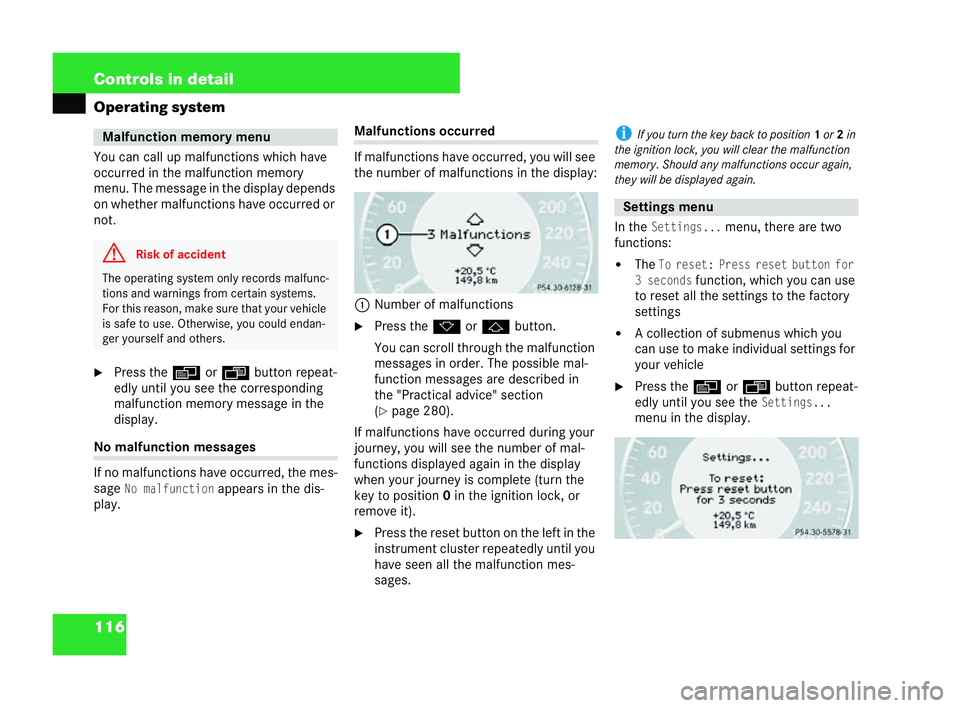
play. Malfunctions occurred
If malfunctions have
occurred, you will see
the number of malfunctions in the display:
1 Number of malfunctions
6 Press the korj button.
You can scroll through the malfunction
messages in order. The possible mal-
function messages are described in
th e" Practical advice" sec tion
( = pa ge 280).
If ma lfunctions have occurre dduring your
journey, you wi llsee the number of mal-
functions displayed again in the display
when your journey iscomplete (turn the
key to position 0in the ignition lock ,or
remove it).
6 Press the reset button on the left in the
instrument cluster repeatedly until you
have seen all the malfunction mes-
sages. i
If you tur nthe key back toposition 1or 2in
th ei gnition lock, you will clear the malfunction
me mo ry.Should any malfunctions occur again,
the ywill be displayed again.
In the
Sett ings...menu, there are two
functions:
! The
Toreset: Press reset buttonfor
3 seconds
function, which you can use
to reset all the set tings to the factory
settin gs
! A collection of submenus which you
can use to make indi vidual settings for
your vehicle
6 Press the èorÿ button repeat-
edly until you see the
Settings ...
menu in the displ ay. Malfunction memory
menu G
Risk of accident The operating system only records malfunc-
tions and warnings
from certain systems.
For this reason, make sure th atyour veh icle
is safe to use. Otherwise, you could endan-
ger yourself and others. P54.30-5205-31 Settings menu
P54.30-5206-31209en_d2.boo Seite
116 Dienstag, 25. Mai 2004 7:26 19