tow MERCEDES-BENZ CLK430 CABRIOLET 2002 A208 User Guide
[x] Cancel search | Manufacturer: MERCEDES-BENZ, Model Year: 2002, Model line: CLK430 CABRIOLET, Model: MERCEDES-BENZ CLK430 CABRIOLET 2002 A208Pages: 346
Page 178 of 346
175 Wind screen
Technical
data Instruments
and controlsOperationDrivingInstrument
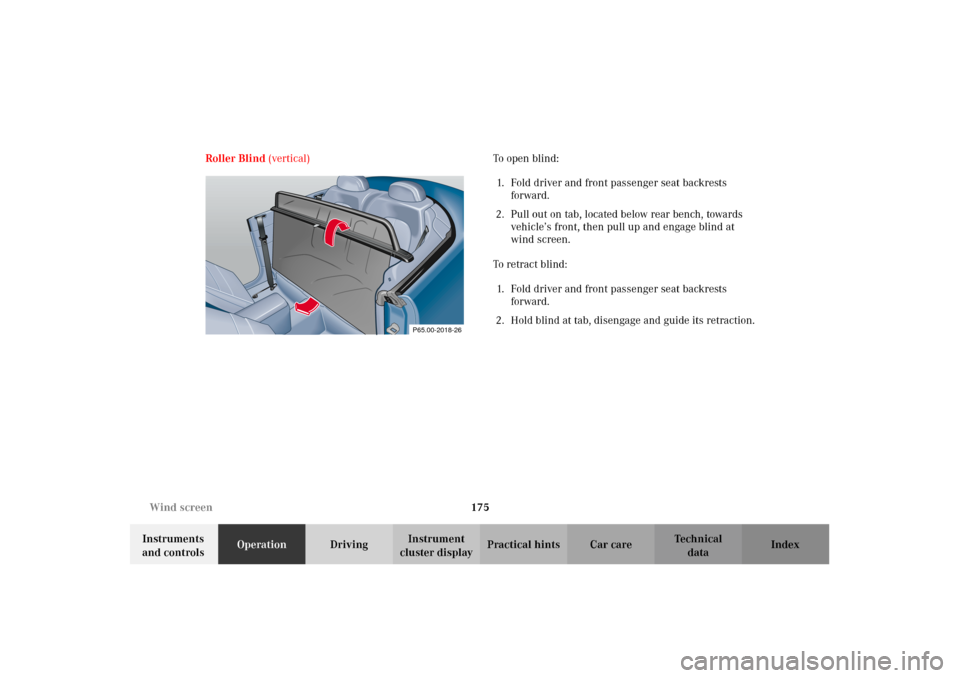
cluster displayPractical hints Car care Index Roller Blind (vertical) To open blind:
1. Fold driver and front passenger seat backrests
forward.
2. Pull out on tab, located below rear bench, towards
vehicle’s front, then pull up and engage blind at
wind screen.
To retract blind:
1. Fold driver and front passenger seat backrests
forward.
2. Hold blind at tab, disengage and guide its retraction.
P65.00-2018-26
J_A208.book Seite 175 Donnerstag, 31. Mai 2001 9:35 09
Page 186 of 346
183 Tele Aid
Technical
data Instruments
and controlsOperationDrivingInstrument
cluster displayPractical hints Car care Index Important!
Always make sure that the indicator lamps in the
“SOS” button, in the “Roadside Assistance” button and
in the “Information” button do not remain illuminated
constantly in red and the message “TELE AID - VISIT
WORKSHOP” is not displayed in the multifunction
display after the system self check.
If a malfunction is indicated as outlined above, have the
system checked at the nearest Mercedes-Benz Center as
soon as possible.
Emergency calls
An emergency call is initiated automatically:
•following an accident in which the Emergency
Tensioning Retractors (ETR’s) or airbags deploy,
•if the antitheft alarm or the tow away alarm stays on
for more than 20 seconds, see pages 43 and 44.
An emergency call can also be initiated manually by
opening the cover next to the inside rear view mirror
labeled “SOS”, then briefly pressing the button located
under the cover. See below for instructions on initiating
an emergency call manually.Once the emergency call is in progress, the indicator
lamp in the “SOS” button will begin to flash. The
message “EMERGENCY CALL – CONNECTING CALL”
appears in the multifunction display. When the
connection is established, the message “EMERGENCY
CALL – CALL CONNECTED” appears in the
multifunction display. All information relevant to the
emergency, such as the location of the vehicle
(determined by the GPS satellite location system),
vehicle model, identification number and color are
generated.
A voice connection between the Response Center and
the occupants of the vehicle will be established
automatically soon after the emergency call has been
initiated. When a voice connection is established the
audio system mutes and the message “TELE AID –
EMERGENCY CALL ACTIVE” appears in the
multifunction display. The Response Center will attempt
to determine more precisely the nature of the accident
provided they can speak to an occupant of the vehicle.
J_A208.book Seite 183 Donnerstag, 31. Mai 2001 9:35 09
Page 189 of 346
186 Tele Aid
Technical
data Instruments
and controlsOperationDrivingInstrument
cluster displayPractical hints Car care Index
Roadside Assistance button
Located below the center armrest cover is the Roadside
Assistance button. Pressing and holding the
button (for longer than 2 seconds) will initiate a call to a
Mercedes-Benz Roadside Assistance dispatcher. The
button will flash while the call is in progress. The
message “ROADSIDE ASSISTANCE – CONNECTING
CALL” will appear in the multifunction display. When
the connection is established, the message “ROADSIDE
ASSISTANCE – CALL CONNECTED” appears in the
multifunction display. The Tele Aid system will transmit
data generating the vehicle identification number,
model, color and location (subject to availability of
cellular and GPS signals).
A voice connection between the Roadside Assistance
dispatcher and the occupants of the vehicle will be
established. When a voice connection is established the
audio system mutes and the message “TELE AID –
ROADSIDE ASSISTANCE CALL ACTIVE” appears in the
multifunction display. The nature of the need for
assistance can then be described. The Mercedes-Benz
Roadside assistance dispatcher will either dispatch a
qualified Mercedes-Benz technician or arrange to tow
your vehicle to the nearest Mercedes-Benz Center. For services such as labor and/or towing charges may apply.
Refer to the Roadside Assistance manual for more
information.
These programs are only available in the USA:
•S ign an d Drive s erv ices : Ser vi ces such as jump start,
a few gallons of fuel or the replacement of a flat tire
with the vehicle spare tire are obtainable,
•Remote Vehicle Diagnostics: This function permits
the Mercedes-Benz Roadside Assistance dispatcher
to download malfunction codes and actual vehicle
data.
Notes:
The indicator lamp in the Roadside Assistance
button remains illuminated in red for approx.
10 seconds during the system self-check after turning
electronic key in starter switch to position 2 (together
with the “SOS” button and the Information
button¡).
See system self-check on page 182 when the indicator
lamp does not light up in red or stays on longer than
approximately 10 seconds.
J_A208.book Seite 186 Donnerstag, 31. Mai 2001 9:35 09
Page 202 of 346
199 Automatic transmission
Technical
data Instruments
and controlsOperationDrivingInstrument
cluster displayPractical hints Car care Index Dependent on the program mode selector switch
position “S” or “W” the maximum speed in the
reverse gear is different. However, it is not
possible to change the program mode while in
reverse.
Neutral
No power is transmitted from the engine to the
drive axle. When the brakes are released, the
vehicle can be moved freely (pushed or towed). Do
not engage “N” while driving except to coast
when the vehicle is in danger of skidding (e.g. on
icy roads, see winter driving instructions on
page 211).
Important!
Coasting the vehicle, or driving for any other
reason with selector lever in “N” can result in
transmission damage that is not covered by the
Mercedes-Benz Limited Warranty.
The transmission automatically upshifts through
5th gear. Position “D” provides optimum driving
characteristics under all normal operating
conditions.Gear selection for special circumstances
The transmission gear ranges for special circumstances
can be selected by pressing the selector lever to the
right or the left with the selector lever in position “D”.
The gear range currently selected is indicated in the
instrument cluster display.
Briefly press selector lever in the ç direction:
The transmission downshifts, one gear at a time, in the
order “4”, “3”, “2”, “1”.
Press and hold selector lever in the ç direction:
The selector lever position display will switch to the
gear range currently selected by the automatic
transmission.
The transmission will only shift down one gear if the
gear range currently selected has already shifted to its
highest possible gear.
Briefly press selector lever in the æ direction:
The transmission will shift from the current gear range
to the next higher gear range. If the transmission is
already in gear range “D”, an additional upshift of one
gear is possible.
J_A208.book Seite 199 Donnerstag, 31. Mai 2001 9:35 09
Page 211 of 346
208 Driving instructions
Technical
data Instruments
and controlsOperationDrivingInstrument
cluster displayPractical hints Car care Index
Parking
Important!
It is advisable to set the parking brake whenever
parking or leaving the vehicle. In addition, move
selector lever to position “P”.
When parking on hills, always set the parking brake.Tires
Tread wear indicators (TWI) are required by law. These
indicators are located in six places on the tread
circumference and become visible at a tread depth of
approximately
1/16in (1.5 mm), at which point the tire is
considered worn and should be replaced.
The tread wear indicator appears as a solid band across
the tread.
Wa r n i n g !
To reduce the risk of personal injury as a result of
vehicle movement, before
turning off the engine
and leaving the vehicle, always:
1. Keep right foot on the service brake pedal.
2. Firmly depress parking brake pedal.
3. Move the selector lever to position “P”.
4. Slowly release the service brake pedal.
5. Turn front wheels towards the road curb.
6. Turn the electronic key to steering lock
position 0 and remove.
7. Take the electronic key and lock vehicle when
leaving.
Wa r n i n g !
If you feel a sudden significant vibration or ride
disturbance, or you suspect that possible damage to
your vehicle has occurred, you should turn on the
hazard warning flashers, carefully slow down, and
drive with caution to an area which is a safe
distance from the roadway.Inspect the tires and under the vehicle for possible
damage. If the vehicle or tires appear unsafe, have
it towed to the nearest Mercedes-Benz Center or
tire dealer for repairs.
J_A208.book Seite 208 Donnerstag, 31. Mai 2001 9:35 09
Page 223 of 346
220 Driving systems
Technical
data Instruments
and controlsOperationDrivingInstrument
cluster displayPractical hints Car care Index
Electronic stability program (ESP)
The ESP enhances directional control and reduces
driving wheel spin of the vehicle under various driving
conditions.
Over/understeering of the vehicle is counteracted by
applying brakes to the appropriate wheel to create a
countervailing vehicle movement. Engine torque is also
limited. The ESP warning lamp, located in the
speedometer dial, starts to flash when ESP is in
operation.Important!
If the ESP warning lampv flashes:
•During take-off apply as little throttle as possible.
•While driving ease up on the accelerator.
•Adapt your speed and driving to the prevailing road
conditions.
•Do not switch off the ESP.
Caution!
If the vehicle is towed with the front axle raised (see
towing the vehicle on page 276), the engine must be
shut off (electronic key in steering lock position 0 or 1).
Otherwise, the ESP will immediately be engaged and
will apply the rear wheel brakes.
Wa r n i n g !
ESP cannot prevent the natural laws of physics
from acting on the vehicle, nor can it increase the
traction afforded. The ESP cannot prevent
ac c id ent s, i nc l udi ng t hose resul tin g from exc es si ve
speed in turns, or aquaplaning. Only a safe,
attentive, and skillful driver can prevent accidents.
The capabilities of an ESP equipped vehicle must
never be exploited in a reckless or dangerous
manner which could jeopardize the user’s safety or
the safety of others.
J_A208.book Seite 220 Donnerstag, 31. Mai 2001 9:35 09
Page 252 of 346
249 Contents – Practical hints
Technical
data Instruments
and controlsOperation DrivingInstrument
cluster displayPractical hintsCar care Index
Practical hintsFirst aid kit .....................................250
Shelf below rear window ..............250
Stowing things in
the vehicle ..................................250
Luggage cover .................................250
Fuses ................................................252
Hood .................................................254
Checking engine oil level .............256
Automatic transmission
fluid level ...................................257
Coolant level ...................................257
Adding coolant ...........................258Windshield washer / headlamp
cleaning system ........................ 259
Windshield and headlamp
washer fluid mixing ratio ........ 259
Spare wheel, vehicle tools,
storage compartment ............... 260
Vehicle jack .................................... 261
Wheels ............................................ 262
Tire replacement ....................... 262
Rotating wheels ......................... 263
Spare wheel .................................... 264
Changing wheels ........................... 266
Tire inflation pressure ..................271
Battery ............................................. 272Jump starting .................................. 274
Towing the vehicle ......................... 276
Exterior lamps ................................280
Headlamp assembly ................... 281
Taillamp assemblies ..................283
Adjusting headlamp aim ...............285
Changing batteries in
the electronic key .....................288
Synchronizing remote
control .........................................290
Raising soft top manually ............. 291
Antenna ...........................................298
Manual release for
fuel filler flap .............................299
Replacing wiper blade insert .......299
J_A208.book Seite 249 Donnerstag, 31. Mai 2001 9:35 09
Page 253 of 346
250 First aid kit
Technical
data Instruments
and controlsOperation DrivingInstrument
cluster displayPractical hintsCar care Index
First aid kit
The first aid kit is stored in the left trunk well.
Shelf below rear window
Stowing things in the vehicleLuggage cover
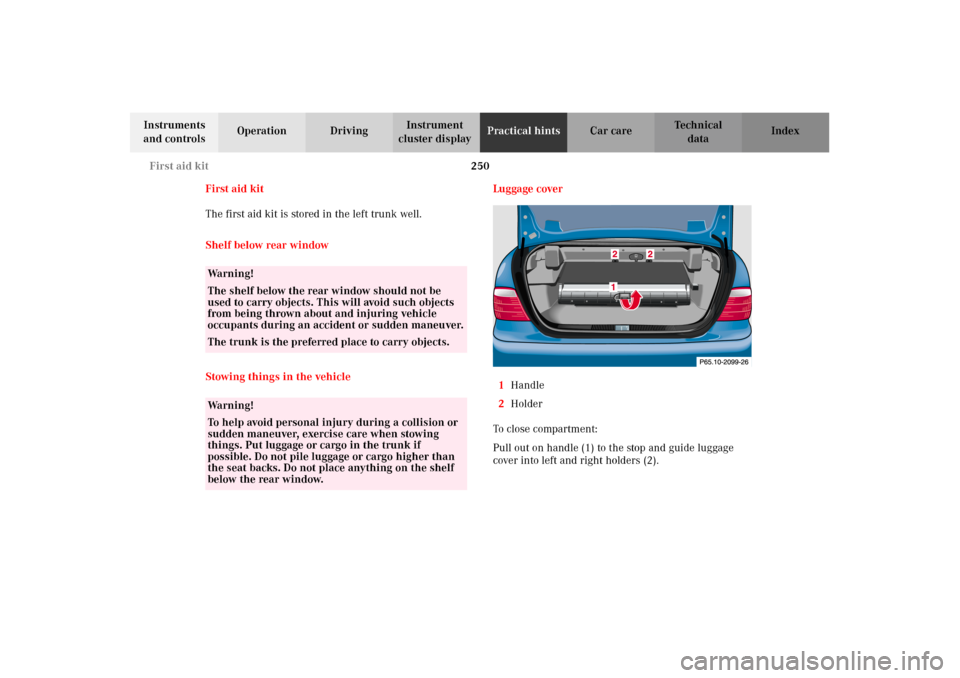
1Handle
2Holder
To c l o s e c o mp a r t m e n t :
Pull out on handle (1) to the stop and guide luggage
cover into left and right holders (2).
Wa r n i n g !
The shelf below the rear window should not be
used to carry objects. This will avoid such objects
from being thrown about and injuring vehicle
occupants during an accident or sudden maneuver.
The trunk is the preferred place to carry objects.Wa r n i n g !
To help avoid personal injury during a collision or
sudden maneuver, exercise care when stowing
things. Put luggage or cargo in the trunk if
possible. Do not pile luggage or cargo higher than
the seat backs. Do not place anything on the shelf
below the rear window.
J_A208.book Seite 250 Donnerstag, 31. Mai 2001 9:35 09
Page 279 of 346
276 Towing
Technical
data Instruments
and controlsOperation DrivingInstrument
cluster displayPractical hintsCar care Index
Towing the vehicleImportant!
When towing the vehicle, please, note the following:
With the automatic central locking activated and the
electronic key in steering lock position 2, the vehicle
doors lock if the left front wheel as well as the right rear
wheel are turning at vehicle speeds of approx. 9 mph
(15 km/h) or more.
To prevent the vehicle door locks from locking,
deactivate the automatic central locking, see page 36.
Wa r n i n g !
Prior to towing the vehicle with all wheels on the
ground, make certain that the electronic key is in
steering lock position 2. The maximum towing
speed and distance with the vehicle on the ground
is 30 mph (50 km/h) and 30 miles (50 km).If the electronic key is left in the steering lock
position 0 for an extended period of time, it can no
longer be turned in the lock. In this case, the
steering is locked. To unlock, remove electronic key
from steering lock and reinsert.
J_A208.book Seite 276 Donnerstag, 31. Mai 2001 9:35 09
Page 280 of 346
277 Towing
Technical
data Instruments
and controlsOperation DrivingInstrument
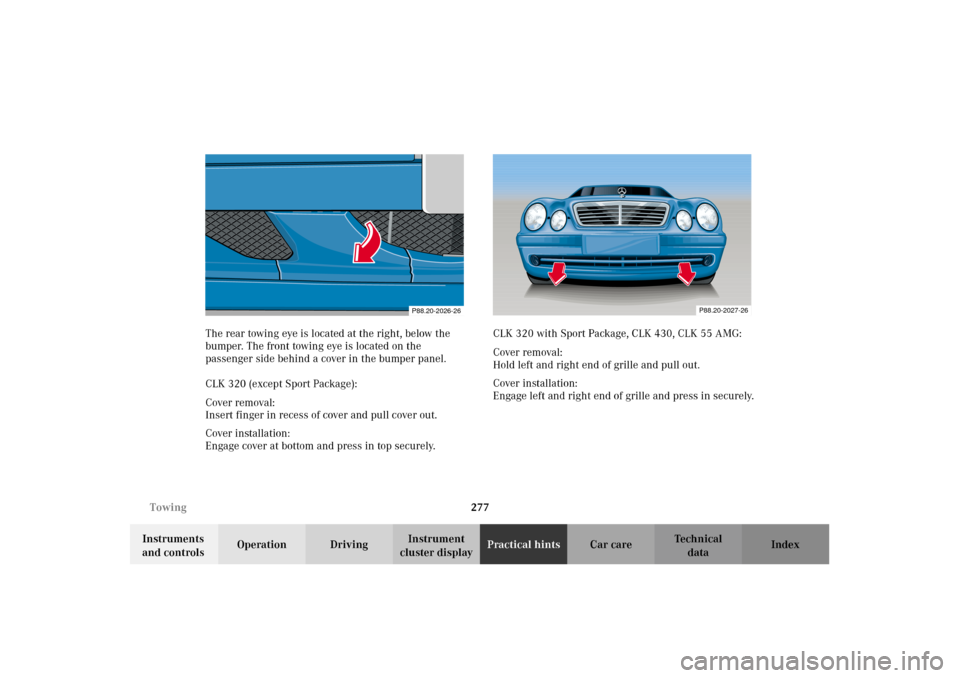
cluster displayPractical hintsCar care Index The rear towing eye is located at the right, below the
bumper. The front towing eye is located on the
passenger side behind a cover in the bumper panel.
CLK 320 (except Sport Package):
Cover removal:
Insert finger in recess of cover and pull cover out.
Cover installation:
Engage cover at bottom and press in top securely.CLK 320 with Sport Package, CLK 430, CLK 55 AMG:
Cover removal:
Hold left and right end of grille and pull out.
Cover installation:
Engage left and right end of grille and press in securely.
P88.20-2026-26
P88.20-2027-26
J_A208.book Seite 277 Donnerstag, 31. Mai 2001 9:35 09