automatic MERCEDES-BENZ CLS-Class 2016 W218 Owner's Guide
[x] Cancel search | Manufacturer: MERCEDES-BENZ, Model Year: 2016, Model line: CLS-Class, Model: MERCEDES-BENZ CLS-Class 2016 W218Pages: 342, PDF Size: 8.28 MB
Page 75 of 342
PRE-SAFE®Brake
General information
PRE-SAFE®Brake can help you to minimize the
risk of a collision with a vehicle ahead or a
pedestrian, and reduce the effects of such a
collision. If PRE-SAFE
®Brake has detected a risk
of collision, you will be warned visually and
acoustically as well as by automatic braking.
iPay attention to the important safety notes
in the "Driving safety systems" section
(
Ypage 64).
PRE‑SAFE
®Brake is only available in vehicles
with the Driving Assistance Plus package.
For PRE-SAFE
®Brake to assist you when driving,
the radar sensor system and the camera system
must be switched on and be operational.
With the help of the radar sensor system and the
camera system, PRE-SAFE
®Brake can detect
obstacles that are in front of your vehicle for an
extended period of time.
In addition, pedestrians in the path of your vehi- cle can be detected.
PRE-SAFE
®Brake detects pedestrians using
typical characteristics such as the body con-
tours and posture of a person standing upright.
iObserve the restrictions described in the
"Important safety notes" sec-
tion“ (
Ypage 73).
Important safety notes
GWARNING
PRE-SAFE
®Brake will initially brake your vehi-
cle by a partial application of the brakes if a
danger of collision is detected. There may be
a collision unless you brake yourself. Even
after subsequent full application of the brakes
a collision cannot always be avoided, partic-
ularly when approaching at too high a speed.
There is a risk of an accident.
Always apply the brakes yourself and try to
take evasive action, provided it is safe to do
so.
In the event of a partial application of the brakes,
the vehicle is braked with up to 50% of the full
braking pressure.
GWARNING
PRE-SAFE
®Brake cannot always clearly iden-
tify objects and complex traffic conditions.
In these cases, PRE-SAFE
®Brake may:
Rgive an unnecessary warning and then
brake the vehicle
Rnot give a warning or intervene
There is a risk of an accident.
Always pay particular attention to the traffic
situation and be ready to brake, especially if
PRE-SAFE
®Brake warns you. Terminate the
intervention in a non-critical driving situation.
GWARNING
PRE-SAFE
®Brake cannot always clearly iden-
tify people, especially if they are moving. In
these cases, PRE-SAFE
®Brake cannot inter-
vene. There is a risk of an accident.
Always pay particular attention to the traffic
situation and be ready to brake, especially if
PRE-SAFE
®Brake warns you.
In order to maintain the appropriate distance to
the vehicle in front and thus prevent a collision,
you must apply the brakes yourself.
GWARNING
PRE-SAFE
®Brake does not react:
Rto small people, e.g. children
Rto animals
Rto oncoming vehicles
Rto crossing traffic
Rwhen cornering
As a result, PRE-SAFE
®Brake may neither
give warnings nor intervene in all critical sit-
uations. There is a risk of an accident.
Always pay careful attention to the traffic sit- uation and be ready to brake.
In the event of snowfall or heavy rain, the rec-
ognition can be impaired.
Driving safety systems73
Safety
Z
Page 76 of 342
Recognition by theradar sensor system is also
impaire dif:
Rthere is dirt on th esensor sor anythin gelse
covering th esensor s
Rthere is interferenc eby other radar source s
Rthere are strongradar reflections, for exam-
ple in parking garages
Ra narrow vehicl eis traveling in front, e.g. a
motorbike
Ra vehicl eis traveling in fron ton adifferen tlin e
relative to th ecenter of your vehicl e
Recognition by th ecamera system is also
impaire din th eevent of:
Rdirt on th ecamera or if th ecamera is covered
Rglar eon th ecamera system, e.g. from th esun
bein glow in th esk y
Rdarkness
Ror if:
-pedestrian smov equickly, e.g. int oth epat h
of th evehicl e
-thecamera system no longer recognizes a
pedestrian as aperson due to special cloth -
ing or other objects
-a pedestrian is concealed by other objects
-th etypical outlin eof aperson is no tdistin-
guishable from th ebackgroun d
Followin gdamag eto th efron ten dof th evehicle,
hav eth econfiguration and operation of th e
radar sensor schecke dat aqualified specialist
workshop. This also applie sto collision sat slow
speeds wher ethere is no visible damag eto th e
fron tof th evehicle.
Followin gdamag eto th
ew
indshield, hav eth e
configuration and operation of th ecamera sys-
te m checke dat aqualified specialist workshop.
Function
XTo activate/deactivate: activateor deacti -
vat ePRE-SAF E®Brake in th eon-board com-
puter (Ypage 204).
If th ePRE-SAF E®Brake is no tactivated, th e
æ symbol appear sin th emultifunction dis-
play.
Starting at aspee dof aroun d 4mph (7 km/h),
this function warn syou if you rapidly approac h a
vehicl ein front. An intermittent warning tone
will then soun dand th e· distanc ewarning
lamp will ligh tup in th einstrumen tcluster.
XBrake immediately to defuse th esituation .
or
XTak eevasive action provide dit is saf eto do
so.
PRE-SAF E
®Brake can also brak eth evehicl e
automatically under th efollowin gconditions:
Rth edriver and front-passenger hav etheir seat
belt sfastene d
and
Rth evehicl espee dis between approximately
4 mph (7 km/h) and 12 4mph (20 0km/h)
At speeds of up to approximately 44 mph
(70 km/h) PRE-SAF E
®Brake can also detect:
Rstationary objects in th epat hof your vehicle,
e.g. stoppe dor parked vehicles
Rpedestrian sin th epat hof your vehicl e
iIf there is an increased ris kof acollision ,
preventive passenger protection measures
(PRE-SAF E
®)are triggered (Ypage 56).
If th eris kof collision wit hth evehicl ein fron t
re
main sand you do no tbrake, tak eevasive
action or accelerate significantly, th evehicl e
may perfor mautomatic emergenc ybraking ,up
to th epoin tof full brak eapplication .Automatic
emergenc ybraking is no tperformed until imme-
diately prio rto an imminent accident.
You can preven tth eintervention of th ePRE -
SAFE
®Brake at any time by:
Rdepressing th eaccelerato rpedal further.
Ractivating kickdown .
Rreleasingth ebrak epedal .
The braking action of PRE-SAF E®Brake is ended
automatically if:
Ryou maneuve rto avoi dth eobstacle.
Rthere is no longer aris kof collision .
Rthere is no longer an obstacle detecte din
fron tof your vehicle.
Protection against theft
Immobilizer
The immobilize rprevents your vehicl efrom
bein gstarted without th ecorrec tSmartKey.
74Protection against theft
Safety
Page 77 of 342
XTo activate with the SmartKey:remove the
SmartKey from the ignition lock.
XTo activate with KEYLESS-GO: switch the
ignition off and open the driver's door.
XTo deactivate: switch on the ignition.
When leaving the vehicle, always take the
SmartKey with you and lock the vehicle. Anyone
can start the engine if a valid SmartKey has been
left inside the vehicle.
iThe immobilizer is always deactivated when
you start the engine.
In the event that the engine cannot be started
(yet the vehicle's battery is charged), the sys-
tem is not operational. Contact an authorized
Mercedes-Benz Center or call
1-800-FOR-MERCedes (in the USA) or
1-800-387-0100 (in Canada).
ATA (anti-theft alarm system)
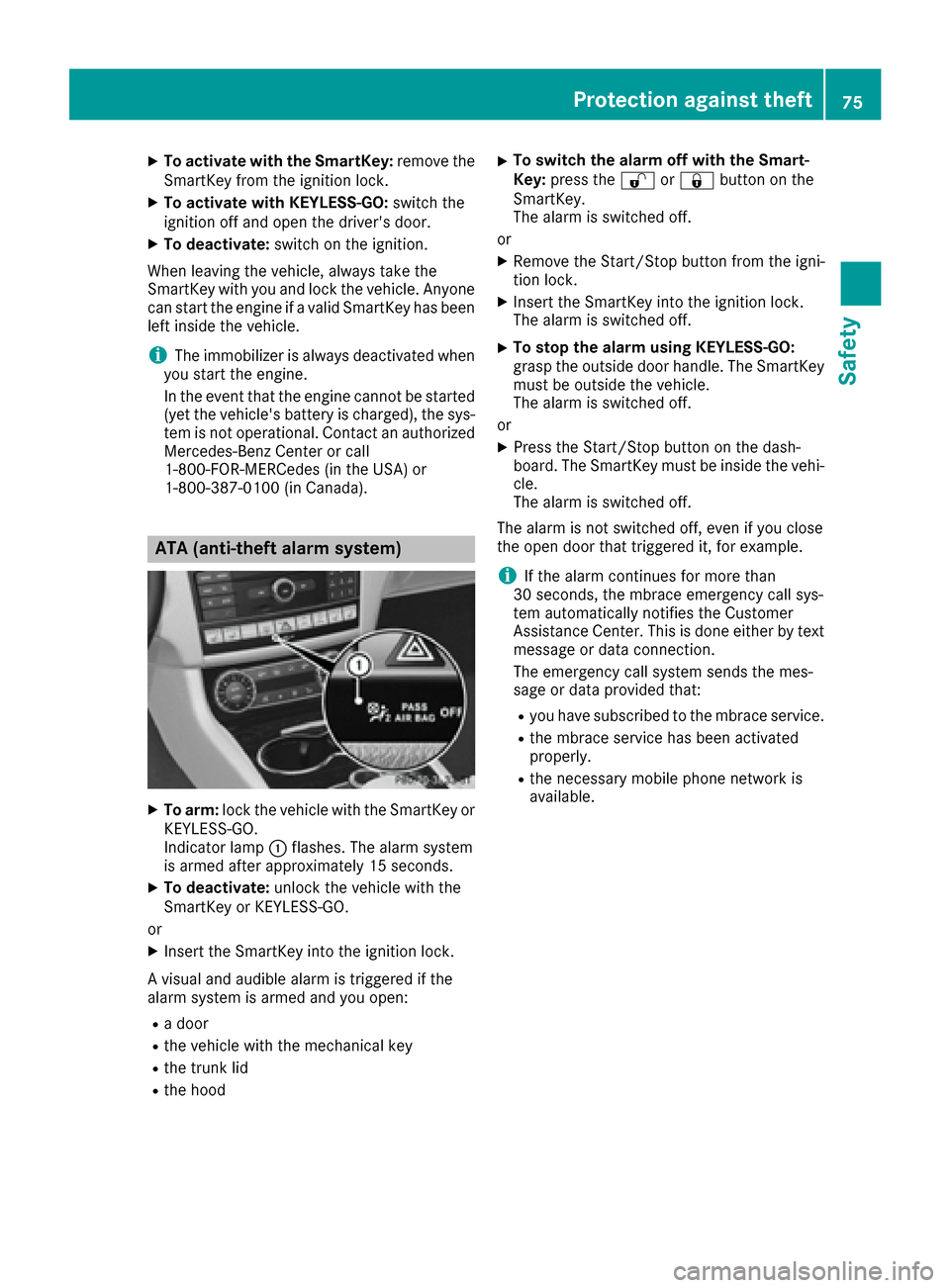
XTo arm: lock the vehicle with the SmartKey or
KEYLESS-GO.
Indicator lamp :flashes. The alarm system
is armed after approximately 15 seconds.
XTo deactivate: unlock the vehicle with the
SmartKey or KEYLESS-GO.
or
XInsert the SmartKey into the ignition lock.
A visual and audible alarm is triggered if the
alarm system is armed and you open:
Ra door
Rthe vehicle with the mechanical key
Rthe trunk lid
Rthe hood
XTo switch the alarm off with the Smart-
Key: press the %or& button on the
SmartKey.
The alarm is switched off.
or
XRemove the Start/Stop button from the igni-
tion lock.
XInsert the SmartKey into the ignition lock.
The alarm is switched off.
XTo stop the alarm using KEYLESS-GO:
grasp the outside door handle. The SmartKey
must be outside the vehicle.
The alarm is switched off.
or
XPress the Start/Stop button on the dash-
board. The SmartKey must be inside the vehi-
cle.
The alarm is switched off.
The alarm is not switched off, even if you close
the open door that triggered it, for example.
iIf the alarm continues for more than
30 seconds, the mbrace emergency call sys-
tem automatically notifies the Customer
Assistance Center. This is done either by text message or data connection.
The emergency call system sends the mes-
sage or data provi
ded that:
Ryou have subscribed to the mbrace service.
Rthe mbrace service has been activated
properly.
Rthe necessary mobile phone network is
available.
Protection against theft75
Safety
Z
Page 78 of 342
SmartKey
Important safety notes
GWARNING
If children are left unsupervised in the vehicle,
they could:
Ropen the doors, thus endangering other
people or road users.
Rget out and disrupt traffic.
Roperate the vehicle's equipment.
Additionally, children could set the vehicle in
motion if, for example, they:
Rrelease the parking brake.
Rshifting the automatic transmission out of
park position P
RStart the engine.
There is a risk of an accident and injury.
When leaving the vehicle, always take the
SmartKey with you and lock the vehicle. Never
leave children or animals unattended in the
vehicle. Always keep the SmartKey out of
reach of children.
GWARNING
If you attach heavy or large objects to the
SmartKey, the SmartKey could be uninten-
tionally turned in the ignition lock. This could
cause the engine to be switched off. There is a risk of an accident.
Do not attach any heavy or large objects to the
SmartKey. Remove any bulky key rings before
inserting the SmartKey into the ignition lock.
!Keep the SmartKey away from strong mag-
netic fields. Otherwise, the remote control
function could be affected.
Strong magnetic fields can occur in the vicin-
ity of powerful electrical installations.
Do not keep the SmartKey:
Rwith electronic devices, e.g. a mobile phone
or another SmartKey.
Rwith metallic objects, e.g. coins or metal foil.
Rinside metallic objects, e.g. a metal case.
This can affect the functionality of the Smart- Key.
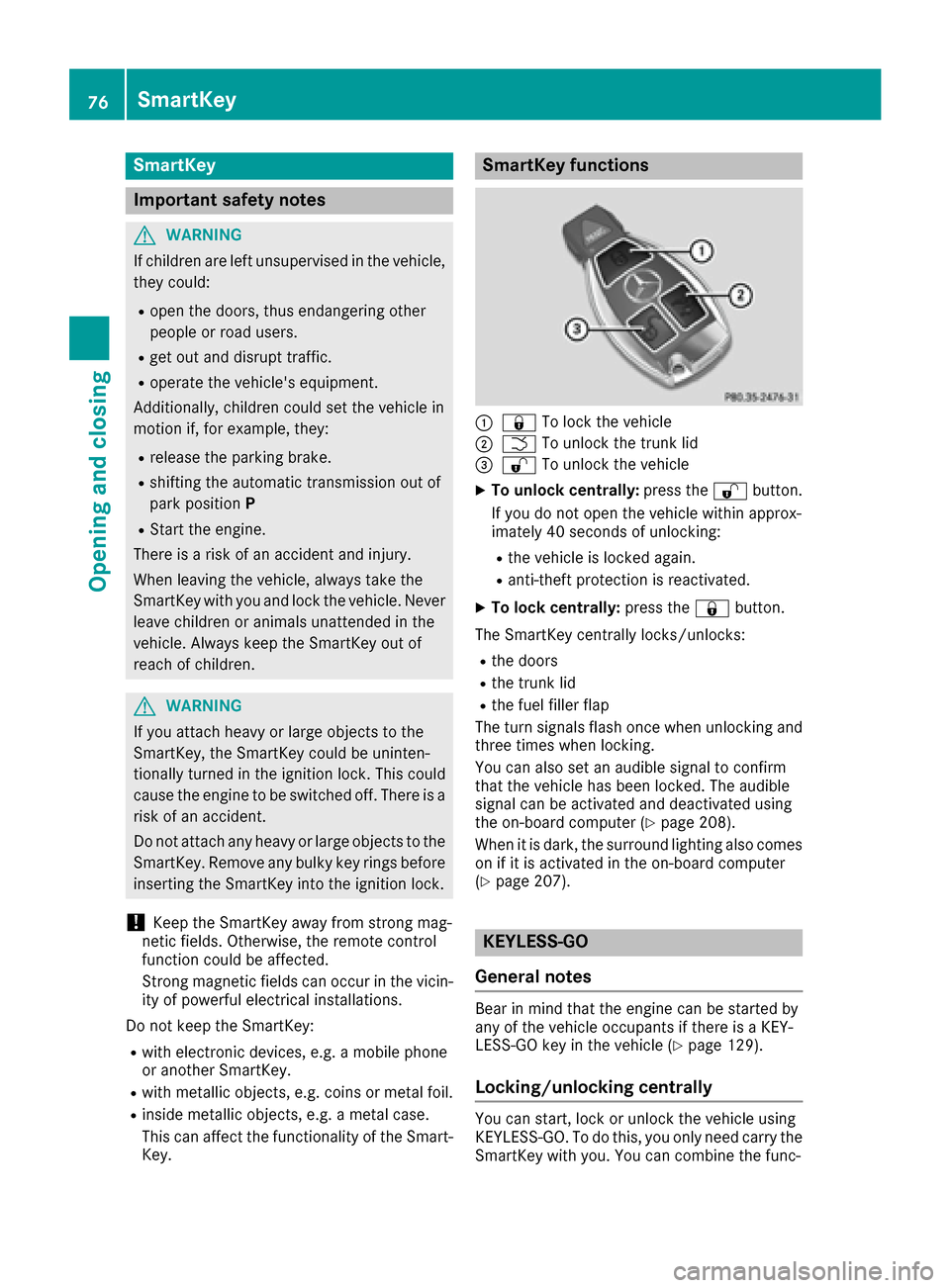
SmartKey functions
:& To lock the vehicle
;FTo unlock the trunk lid
=%To unlock the vehicle
XTo unlock centrally: press the%button.
If you do not open the vehicle within approx-
imately 40 seconds of unlocking:
Rthe vehicle is locked again.
Ranti-theft protection is reactivated.
XTo lock centrally: press the&button.
The SmartKey centrally locks/unlocks:
Rthe doors
Rthe trunk lid
Rthe fuel filler flap
The turn signals flash once when unlocking and
three times when locking.
You can also set an audible signal to confirm
that the vehicle has been locked. The audible
signal can be activated and deactivated using
the on-board computer (
Ypage 208).
When it is dark, the surround lighting also comes
on if it is activated in the on-board computer
(
Ypage 207).
KEYLESS-GO
General notes
Bear in mind that the engine can be started by
any of the vehicle occupants if there is a KEY-
LESS-GO key in the vehicle (
Ypage 129).
Locking/unlocking centrally
You can start, lock or unlock the vehicle using
KEYLESS-GO. To do this, you only need carry the
SmartKey with you. You can combine the func-
76SmartKey
Opening and closing
Page 83 of 342
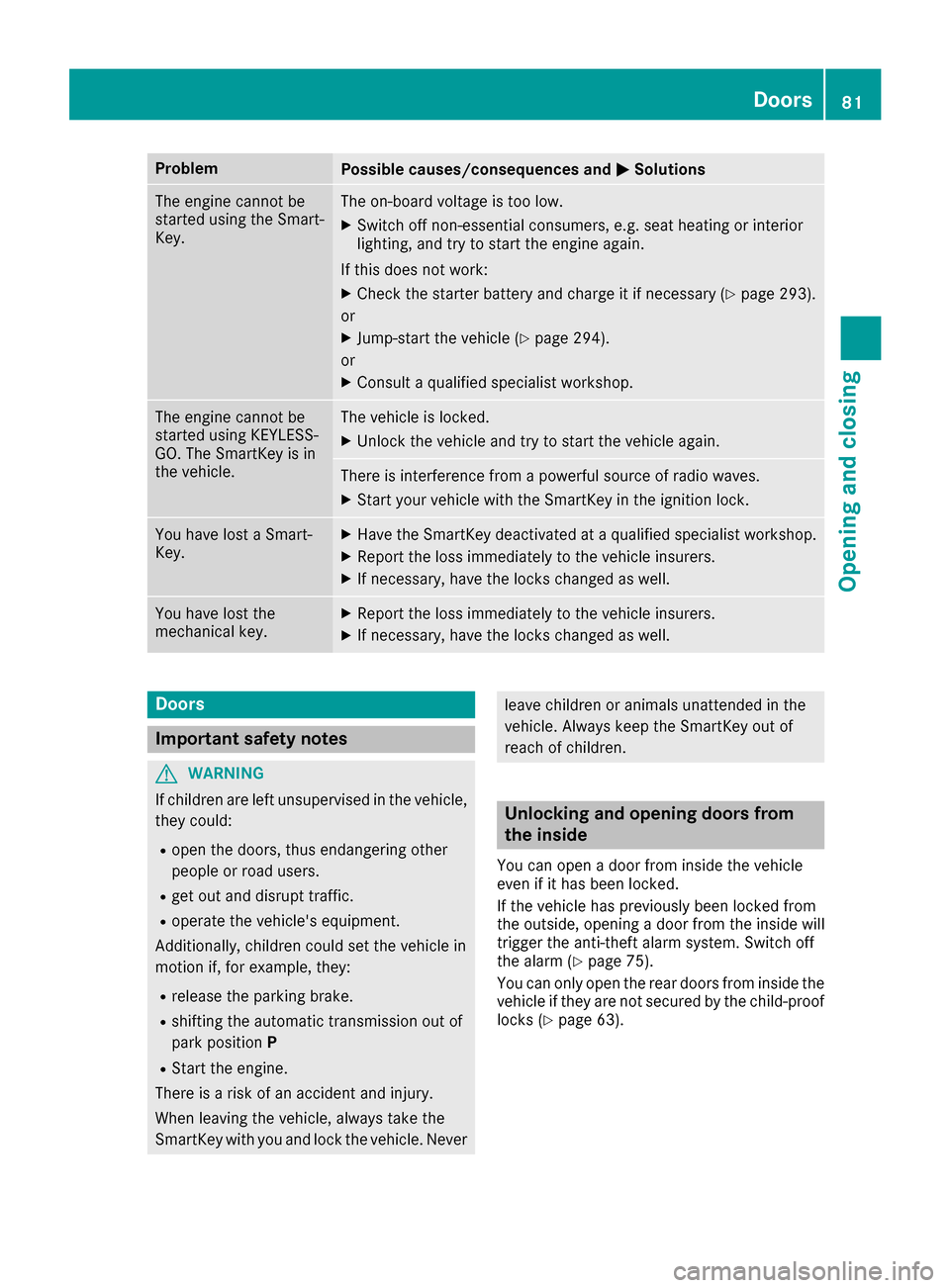
ProblemPossible causes/consequences andMSolutions
The engine cannot be
started using the Smart-
Key.The on-board voltage is too low.
XSwitch off non-essential consumers, e.g. seat heating or interior
lighting, and try to start the engine again.
If this does not work:
XCheck the starter battery and charge it if necessary (Ypage 293).
or
XJump-start the vehicle (Ypage 294).
or
XConsult a qualified specialist workshop.
The engine cannot be
started using KEYLESS-
GO. The SmartKey is in
the vehicle.The vehicle is locked.
XUnlock the vehicle and try to start the vehicle again.
There is interference from a powerful source of radio waves.
XStart your vehicle with the SmartKey in the ignition lock.
You have lost a Smart-
Key.XHave the SmartKey deactivated at a qualified specialist workshop.
XReport the loss immediately to the vehicle insurers.
XIf necessary, have the locks changed as well.
You have lost the
mechanical key.XReport the loss immediately to the vehicle insurers.
XIf necessary, have the locks changed as well.
Doors
Important safety notes
GWARNING
If children are left unsupervised in the vehicle,
they could:
Ropen the doors, thus endangering other
people or road users.
Rget out and disrupt traffic.
Roperate the vehicle's equipment.
Additionally, children could set the vehicle in
motion if, for example, they:
Rrelease the parking brake.
Rshifting the automatic transmission out of
park position P
RStart the engine.
There is a risk of an accident and injury.
When leaving the vehicle, always take the
SmartKey with you and lock the vehicle. Never
leave children or animals unattended in the
vehicle. Always keep the SmartKey out of
reach of children.
Unlocking and opening doors from
the inside
You can open a door from inside the vehicle
even if it has been locked.
If the vehicle has previously been locked from
the outside, opening a door from the inside will
trigger the anti-theft alarm system. Switch off
the alarm (
Ypage 75).
You can only open the rear doors from inside the
vehicle if they are not secured by the child-proof
locks (
Ypage 63).
Doors81
Opening and closing
Z
Page 84 of 342

XTo unlock a front door:pull door handle;.
Locking knob :pops up.
The door is unlocked and can be opened.
XTo open a front door: pull door handle;.
XTo unlock a rear door: pull up locking
knob :.
The door is unlocked and can be opened.
XTo open a rear door: pull door handle;.
Centrally locking and unlocking the
vehicle from the inside
You can centrally lock or unlock the vehicle from
the inside. The switches are on the driver’s door.
XTo unlock:press button :.
XTo lock:press button ;.
If all the doors are closed, the vehicle locks.
Meanwhile, the fuel filler flap will not be locked
or unlocked.
If the vehicle has been locked from the outside,
it cannot be centrally unlocked from the inside.
You can open a door from inside the vehicle
even if it has been locked. You can only open the rear doors from inside the
vehicle if they are not secured by the child-proof
locks (
Ypage 63).
If a locked door is opened from the inside, the
previous unlock status of the vehicle will be
taken into consideration if:
Rthe vehicle was locked using the locking but-
ton for the central locking, or
Rif the vehicle was locked automatically
The vehicle will be fully unlocked if it had previ-
ously been fully unlocked. If only the driver's
door had been previously unlocked, only the
door which has been opened from the inside is
unlocked.
Automatic locking feature
XTo deactivate: press and hold button :for
about five seconds until a tone sounds.
XTo activate: press and hold button ;for
about five seconds until a tone sounds.
If you press one of the two buttons and do not
hear a tone, the relevant setting has already
been selected.
The vehicle is locked automatically when the
ignition is switched on and the wheels are turn-
ing.
You could therefore lock yourself out if:
Rthe vehicle is being pushed.
Rthe vehicle is being towed.
Rthe vehicle is on a roller dynamometer.
You can also switch the automatic locking func-
tion on and off using the on-board computer
(
Ypage 207).
82Doors
Opening and closing
Page 85 of 342
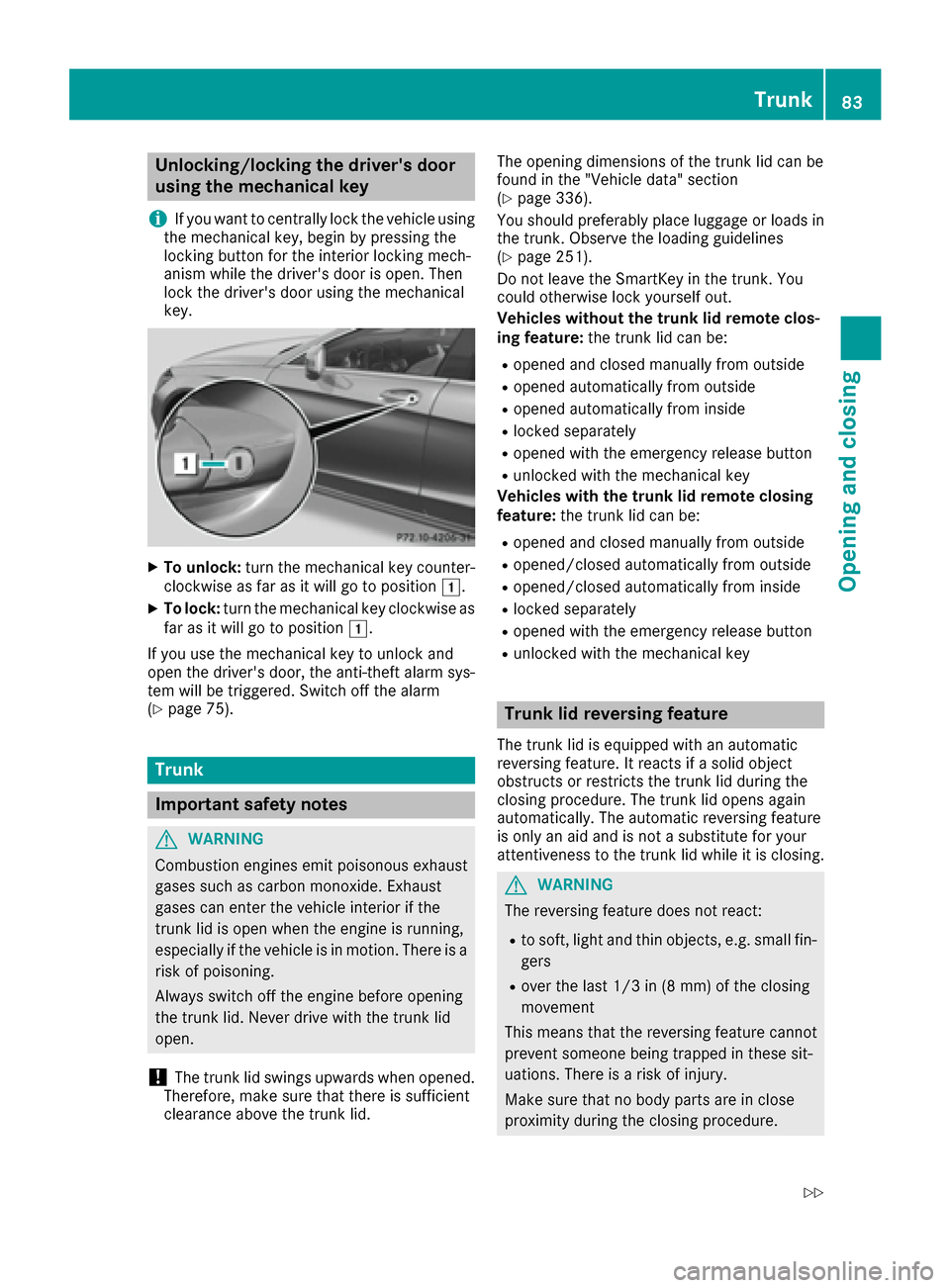
Unlocking/locking the driver's door
using the mechanical key
i
If you want to centrally lock the vehicle using
the mechanical key, begin by pressing the
locking button for the interior locking mech-
anism while the driver's door is open. Then
lock the driver's door using the mechanical
key.
XTo unlock: turn the mechanical key counter-
clockwise as far as it will go to position 1.
XTo lock:turn the mechanical key clockwise as
far as it will go to position 1.
If you use the mechanical key to unlock and
open the driver's door, the anti-theft alarm sys-
tem will be triggered. Switch off the alarm
(
Ypage 75).
Trunk
Important safety notes
GWARNING
Combustion engines emit poisonous exhaust
gases such as carbon monoxide. Exhaust
gases can enter the vehicle interior if the
trunk lid is open when the engine is running,
especially if the vehicle is in motion. There is a
risk of poisoning.
Always switch off the engine before opening
the trunk lid. Never drive with the trunk lid
open.
!The trunk lid swings upwards when opened.
Therefore, make sure that there is sufficient
clearance above the trunk lid. The opening dimensions of the trunk lid can be
found in the "Vehicle data" section
(
Ypage 336).
You should preferably place luggage or loads in
the trunk. Observe the loading guidelines
(
Ypage 251).
Do not leave the SmartKey in the trunk. You
could otherwise lock yourself out.
Vehicles without the trunk lid remote clos-
ing feature: the trunk lid can be:
Ropened and closed manually from outside
Ropened automatically from outside
Ropened automatically from inside
Rlocked separately
Ropened with the emergency release button
Runlocked with the mechanical key
Vehicles with the trunk lid remote closing
feature: the trunk lid can be:
Ropened and closed manually from outside
Ropened/closed automatically from outside
Ropened/closed automatically from inside
Rlocked separately
Ropened with the emergency release button
Runlocked with the mechanical key
Trunk lid reversing feature
The trunk lid is equipped with an automatic
reversing feature. It reacts if a solid object
obstructs or restricts the trunk lid during the
closing procedure. The trunk lid opens again
automatically. The automatic reversing feature
is only an aid and is not a substitute for your
attentiveness to the trunk lid while it is closing.
GWARNING
The reversing feature does not react:
Rto soft, light and thin objects, e.g. small fin-
gers
Rover the last 1/3 in (8 mm) of the closing
movement
This means that the reversing feature cannot
prevent someone being trapped in these sit-
uations. There is a risk of injury.
Make sure that no body parts are in close
proximity during the closing procedure.
Trunk83
Opening and closing
Z
Page 86 of 342

If somebody becomes trapped:
Rpress theFbutton on the SmartKey, or
Rpull or press the remote operating switch
on the driver's door or
Rpress the closing or locking button on the
trunk lid, or
Rpull on the trunk lid handle
Opening/closing from outside
Opening
XPress the %button on the SmartKey .
XPull handle :.
XRaise the trunk lid.
Closing
XPull the trunk lid down using recess :.
XIf necessary, lock the vehicle with the &
button on the SmartKey (Ypage 76) or with
KEYLESS-GO (Ypage 76).
If KEYLESS-GO detects only one SmartKey in the
trunk after it closed, the trunk lid opens again. If KEYLESS-GO detects a second SmartKey out-
side the vehicle, the trunk lid remains closed.
Opening/closing automatically from
outside
Important safety notes
GWARNING
Parts of the body could become trapped dur-
ing automatic closing of the trunk lid. More-
over, people, e.g. children, may be standing in the closing area or may enter the closing area
during the closing process. There is a risk of
injury.
Make sure that nobody is in the vicinity of the
closing area during the closing process.
Use one of the following options to stop the
closing process:
Rpress the Fbutton on the SmartKey.
Rpull or press the remote operating switch
on the driver's door.
Rpress the closing or locking button on the
trunk lid.
Rpull the trunk lid handle
GWARNING
Combustion engines emit poisonous exhaust
gases such as carbon monoxide. Exhaust
gases can enter the vehicle interior if the
trunk lid is open when the engine is running,
especially if the vehicle is in motion. There is a
risk of poisoning.
Always switch off the engine before opening
the trunk lid. Never drive with the trunk lid
open.
!The trunk lid swings upwards when opened.
Therefore, make sure that there is sufficient
clearance above the trunk lid.
The opening dimensions of the trunk lid can be
found in the "Vehicle data" section
(
Ypage 336).
84Trunk
Opening and closing
Page 87 of 342
Opening
You can open the trunk lid automatically using
the SmartKey or the handle in the trunk lid.
XPress and hold theFbutton on the Smart-
Key until the trunk lid opens.
or
XIf the trunk is unlocked, pull the trunk lid han-
dle and release it again immediately
(
Ypage 84).
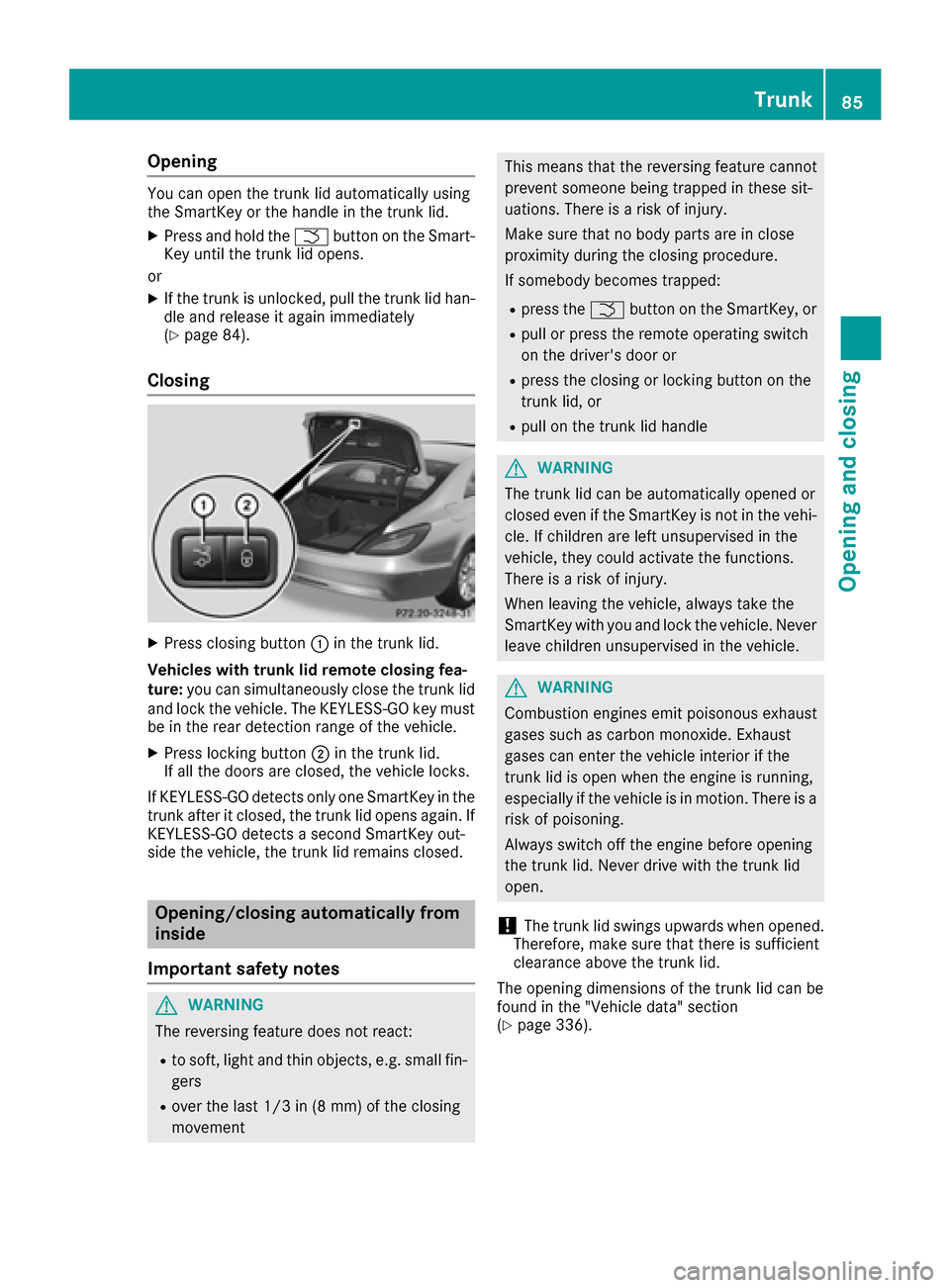
Closing
XPress closing button :in the trunk lid.
Vehicles with trunk lid remote closing fea-
ture: you can simultaneously close the trunk lid
and lock the vehicle. The KEYLESS-GO key must
be in the rear detection range of the vehicle.
XPress locking button ;in the trunk lid.
If all the doors are closed, the vehicle locks.
If KEYLESS-GO detects only one SmartKey in the
trunk after it closed, the trunk lid opens again. If
KEYLESS-GO detects a second SmartKey out-
side the vehicle, the trunk lid remains closed.
Opening/closing automatically from
inside
Important safety notes
GWARNING
The reversing feature does not react:
Rto soft, light and thin objects, e.g. small fin-
gers
Rover the last 1/3 in (8 mm) of the closing
movement
This means that the reversing feature cannot
prevent someone being trapped in these sit-
uations. There is a risk of injury.
Make sure that no body parts are in close
proximity during the closing procedure.
If somebody becomes trapped:
Rpress the Fbutton on the SmartKey, or
Rpull or press the remote operating switch
on the driver's door or
Rpress the closing or locking button on the
trunk lid, or
Rpull on the trunk lid handle
GWARNING
The trunk lid can be automatically opened or
closed even if the SmartKey is not in the vehi- cle. If children are left unsupervised in the
vehicle, they could activate the functions.
There is a risk of injury.
When leaving the vehicle, always take the
SmartKey with you and lock the vehicle. Never
leave children unsupervised in the vehicle.
GWARNING
Combustion engines emit poisonous exhaust
gases such as carbon monoxide. Exhaust
gases can enter the vehicle interior if the
trunk lid is open when the engine is running,
especially if the vehicle is in motion. There is a
risk of poisoning.
Always switch off the engine before opening
the trunk lid. Never drive with the trunk lid
open.
!The trunk lid swings upwards when opened.
Therefore, make sure that there is sufficient
clearance above the trunk lid.
The opening dimensions of the trunk lid can be
found in the "Vehicle data" section
(
Ypage 336).
Trunk85
Opening and closing
Z
Page 89 of 342
Make sure that nobody touches the side win-dow during the opening procedure. If some-
body becomes trapped, release the switch or
pull the switch to close the side window again.
GWARNING
While closing the side windows, body parts in
the closing area could become trapped. There is a risk of injury.
When closing make sure that no parts of the
body are in the closing area. If somebody
becomes trapped, release the switch or press
the switch to open the side window again.
GWARNING
If children operate the side windows they
could become trapped, particularly if they are left unsupervised. There is a risk of injury.
Activate the override feature for the rear side
windows. When leaving the vehicle, always
take the SmartKey with you and lock the vehi-
cle. Never leave children unsupervised in the
vehicle.
Side window reversing feature
The side windows are equipped with an auto-
matic reversing feature. If a solid object blocks
or restricts a side window during the closing
process, the side window opens again automat-
ically. However, the automatic reversing feature
is only an aid and is not a substitute for your
attentiveness when closing a side window.
GWARNING
The reversing feature does not react:
Rto soft, light and thin objects, e.g. small fin-
gers
Rover the last 1/6 in(4 mm) of the closing
movement
Rduring resetting
Rwhen closing the side window again man-
ually immediately after automatic reversing
This means that the reversing feature cannot
prevent someone being trapped in these sit-
uations. There is a risk of injury.
Make sure that no body parts are in close
proximity during the closing procedure. If
someone becomes trapped, press the switch
to open the side window again.
Opening and closing the side win-
dows
The switches for all side windows are located on the driver's door. There is also a switch on each
door for the corresponding side window.
The switches on the driver's door take prece-
dence.
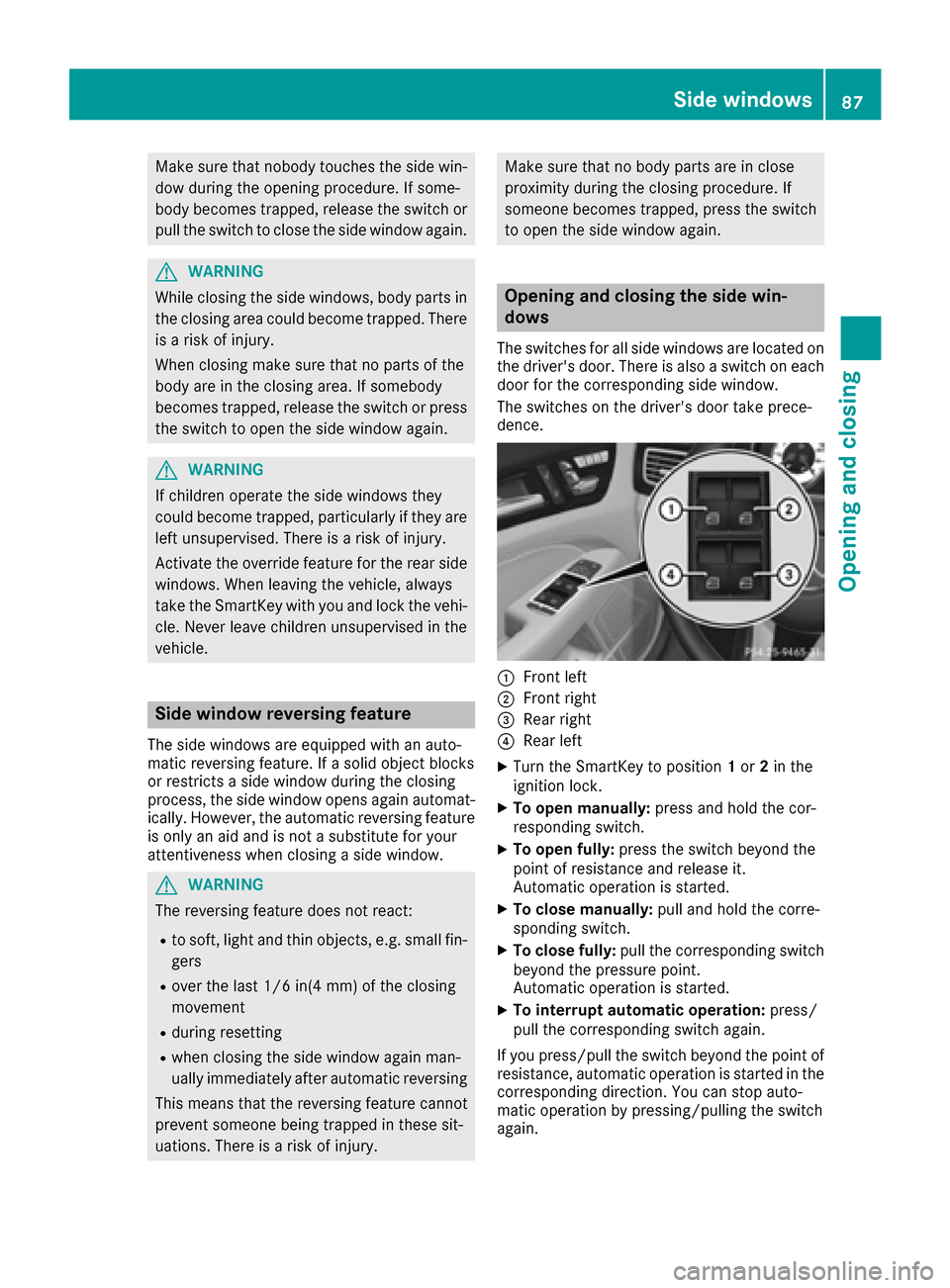
:Front left
;Front right
=Rear right
?Rear left
XTurn the SmartKey to position 1or 2in the
ignition lock.
XTo open manually: press and hold the cor-
responding switch.
XTo open fully: press the switch beyond the
point of resistance and release it.
Automatic operation is started.
XTo close manually: pull and hold the corre-
sponding switch.
XTo close fully: pull the corresponding switch
beyond the pressure point.
Automatic operation is started.
XTo interrupt automatic operation: press/
pull the corresponding switch again.
If you press/pull the switch beyond the point of
resistance, automatic operation is started in the
corresponding direction. You can stop auto-
matic operation by pressing/pulling the switch
again.
Side windows87
Opening and closing
Z