ESP MERCEDES-BENZ CLS COUPE 2012 Workshop Manual
[x] Cancel search | Manufacturer: MERCEDES-BENZ, Model Year: 2012, Model line: CLS COUPE, Model: MERCEDES-BENZ CLS COUPE 2012Pages: 373, PDF Size: 9.12 MB
Page 175 of 373
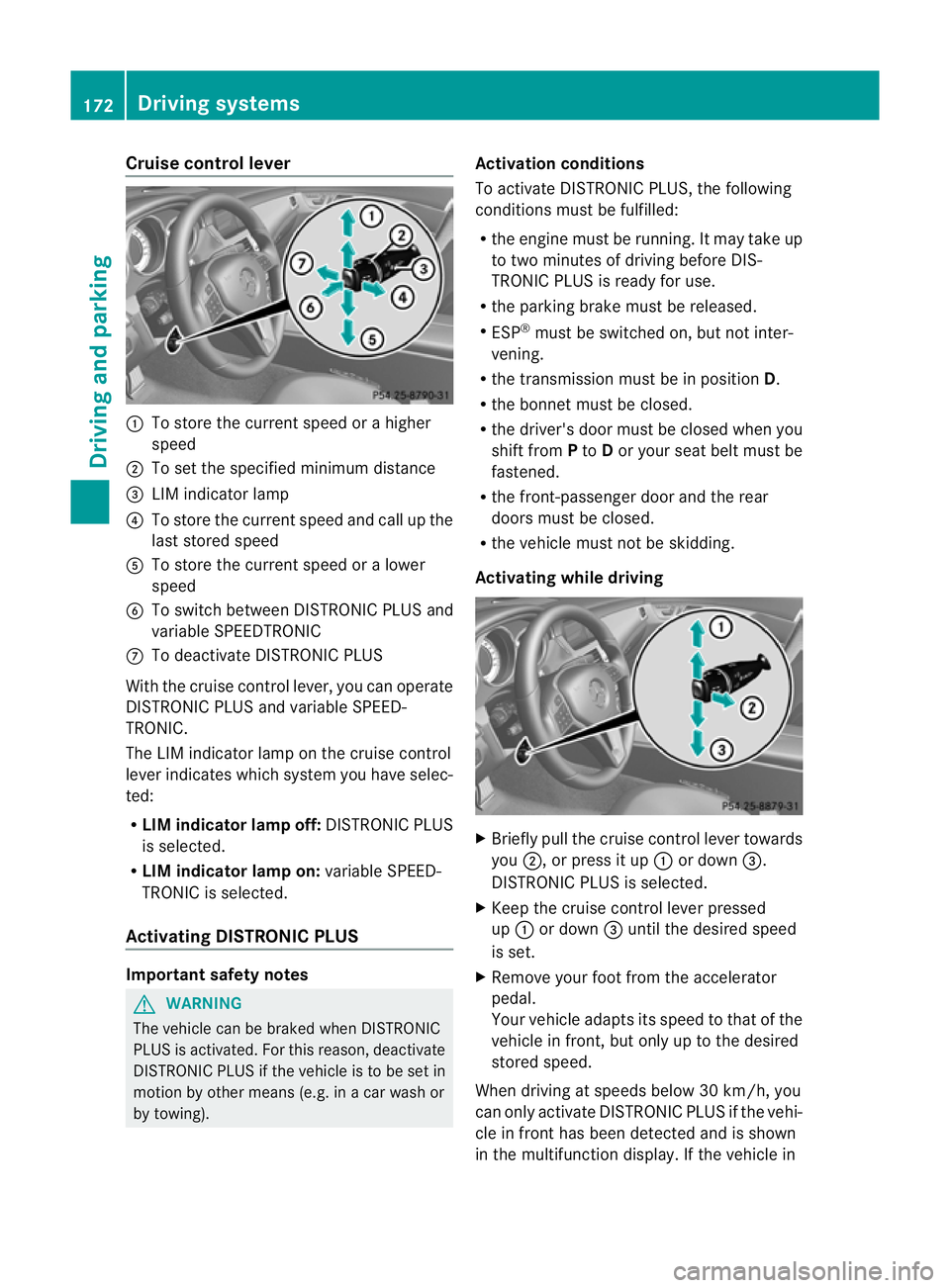
Cruise control lever
:
To store th ecurren tspeed or ahigher
speed
; To set the specified minimum distance
= LIM indicator lamp
? To stor ethe curren tspeed and call up the
last stored speed
A To stor ethe curren tspeed or alower
speed
B To switc hbetween DISTRONIC PLUS and
variable SPEEDTRONIC
C To deactivate DISTRONIC PLUS
With the cruise contro llever, you can operate
DISTRONIC PLUS and variable SPEED-
TRONIC.
The LIM indicator lamp on the cruise control
lever indicates which system you have selec-
ted:
R LIM indicator lamp off: DISTRONIC PLUS
is selected.
R LIM indicator lamp on: variable SPEED-
TRONIC is selected.
Activating DISTRONIC PLUS Important safet
ynotes G
WARNING
The vehicle can be braked when DISTRONIC
PLUS is activated. For this reason, deactivate
DISTRONIC PLUS if the vehicle is to be set in
motion by other means (e.g. in acar wash or
by towing). Activation conditions
To activate DISTRONIC PLUS
,the following
condition smust be fulfilled:
R the engin emust be running. It may tak eup
to two minutes of drivin gbefore DIS-
TRONIC PLUS is ready for use.
R the parkin gbrake must be released.
R ESP ®
must be switched on, but not inter-
vening.
R the transmission must be in position D.
R the bonnet must be closed.
R the driver' sdoor must be closed when you
shift from Pto Dor your seat belt must be
fastened.
R the front-passenger door and the rear
doors must be closed.
R the vehicle must not be skidding.
Activating while driving X
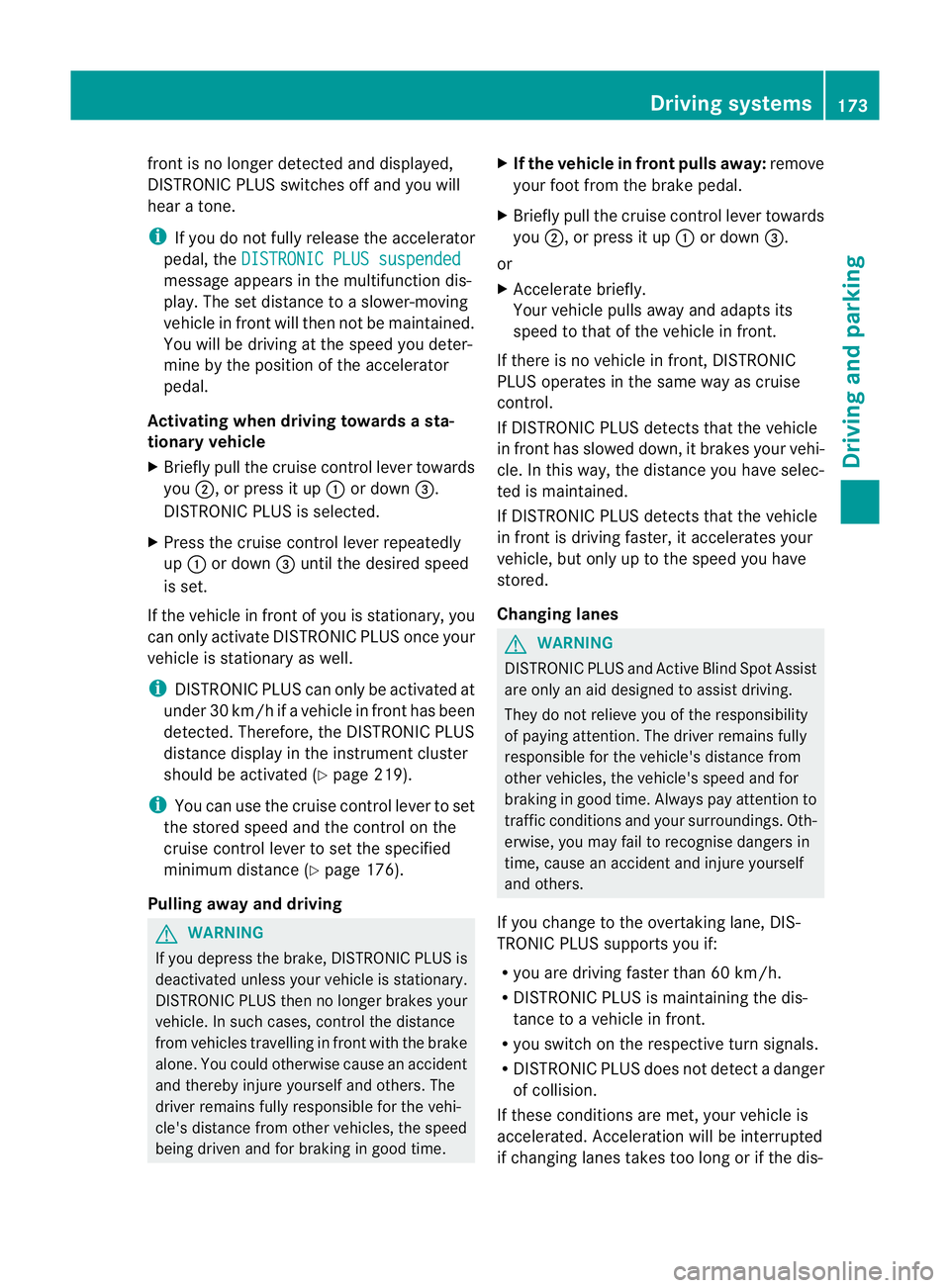
Briefly pull the cruise contro llever towards
you ;,orp ress it up :or down =.
DISTRONIC PLUS is selected.
X Keep the cruise contro llever pressed
up : or down =until the desired speed
is set.
X Remove your foot from the accelerator
pedal.
Your vehicle adapts its speed to that of the
vehicle in front, but only up to the desired
stored speed.
When drivin gatspeeds below 30 km/h, you
can only activate DISTRONIC PLUS if the vehi-
cle in fron thas been detected and is shown
in th emultifunction display. If th evehicle in 172
Driving systemsDriving and parking
Page 176 of 373
front is no longe
rdetected and displayed,
DISTRONIC PLUS switche soff and you will
hear atone.
i If you do not fully release the accelerator
pedal, the DISTRONIC PLUS suspended message appears in the multifunction dis-
play. The set distanc etoaslower-moving
vehicle in fron twill the nnot be maintained.
You will be driving at the speed you deter-
mine by the position of the accelerator
pedal.
Activating when driving toward sasta-
tionary vehicle
X Briefl ypullt he cruis econtro llev er towards
you ;,orp ress it up :or down =.
DISTRONI CPLUSiss elected.
X Press the cruise control lever repeatedly
up : or down =until the desired speed
is set.
If the vehicle in front of you is stationary, you
can only activate DISTRONIC PLUS once your
vehicle is stationary as well.
i DISTRONIC PLUS can only be activated at
under 30 km/h if avehicle in front has been
detected. Therefore, the DISTRONIC PLUS
distance displayint he instrument cluster
should be activated (Y page 219).
i You can use the cruise control lever to set
the stored speed and the control on the
cruise control lever to set the specified
minimum distance (Y page 176).
Pulling away and driving G
WARNING
If you depress the brake, DISTRONIC PLUS is
deactivated unless your vehicle is stationary.
DISTRONIC PLUS then no longer brakes your
vehicle. In such cases, control the distance
from vehicles travelling in front with the brake
alone. You could otherwise cause an accident
and thereby injure yourselfa nd others. The
driver remains fully responsibl efor the vehi-
cle's distance from othe rvehicles, the speed
being driven and for braking in good time. X
If the vehicle in front pulls away: remove
your foot from the brake pedal.
X Briefly pull the cruise control lever towards
you ;,orp ress it up :or down =.
or
X Accelerate briefly.
Your vehicle pulls away and adapts its
speed to that of the vehicle in front.
If there is no vehicle in front, DISTRONIC
PLUS operates in the same way as cruise
control.
If DISTRONIC PLUS detects that the vehicle
in fron thas slowe ddown ,itb rakes yourv ehi-
cle. In this way, the distanc eyou have selec-
ted is maintained.
If DISTRONIC PLUS detects that the vehicle
in fron tisdriving faster, it accelerates your
vehicle, but only up to the speed you have
stored.
Changing lanes G
WARNING
DISTRONIC PLUS and Active Blind Spot Assist
are only an aid designed to assist driving.
They do not relieve you of the responsibility
of paying attention. The driver remains fully
responsible for the vehicle's distance from
other vehicles, the vehicle's speed and for
braking in good time. Always pay attention to
traffic conditions and your surroundings. Oth-
erwise, you may fail to recognise dangers in
time, cause an accident and injure yourself
and others.
If you change to the overtaking lane, DIS-
TRONIC PLUS supports you if:
R you are driving faster than 60 km/h.
R DISTRONIC PLUS is maintaining the dis-
tance to avehicle in front.
R you switch on the respective turn signals.
R DISTRONIC PLUS does not detect adanger
of collision.
If these conditions are met, your vehicle is
accelerated. Acceleration will be interrupted
if changing lanes takes too long or if the dis- Driving systems
173Driving and parking Z
Page 180 of 373
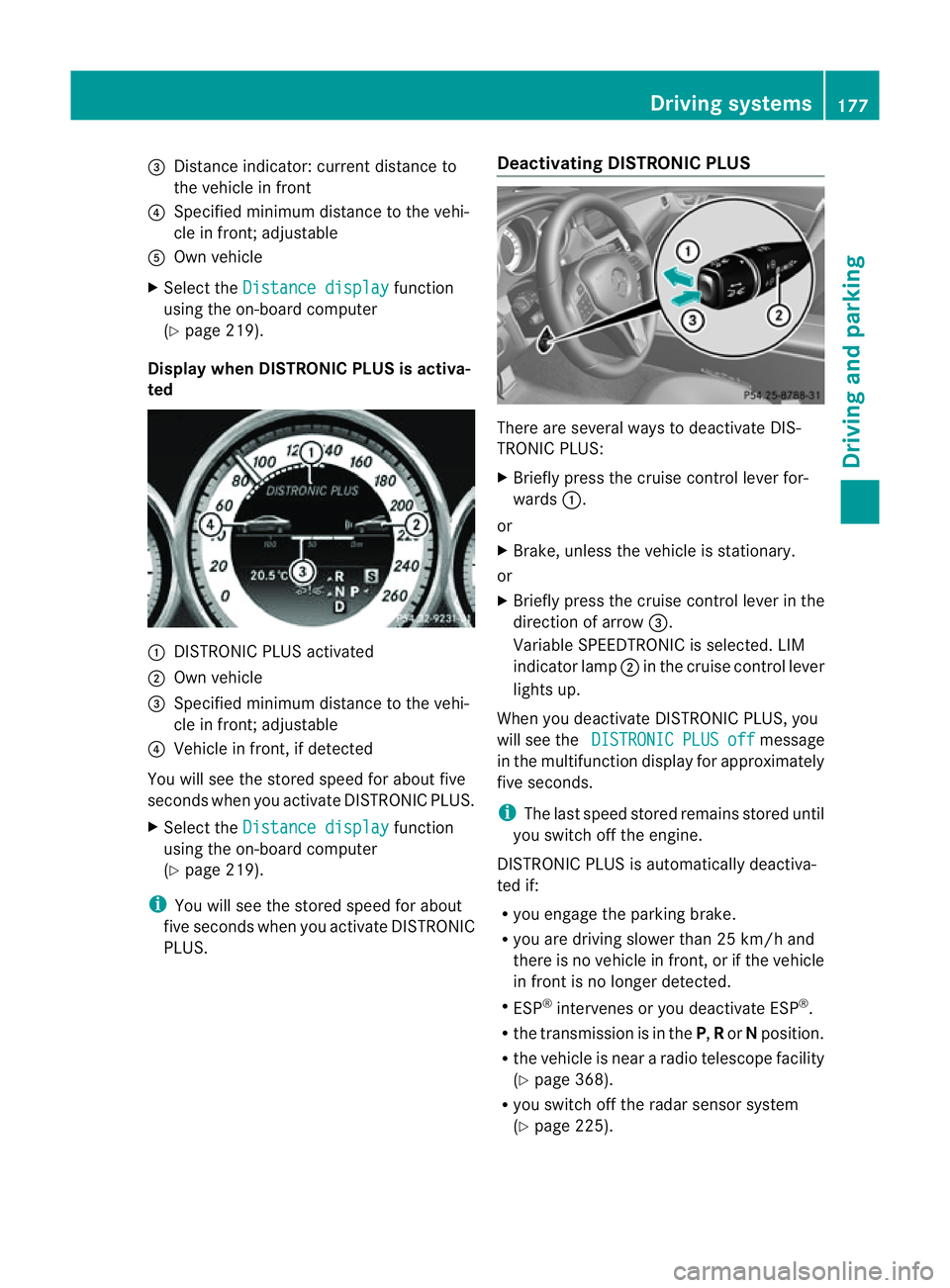
=
Distance indicator: current distance to
the vehicl einfront
? Specifie dminimum distance to the vehi-
cle in front; adjustable
A Ownvehicle
X Select the Distancedisplay function
using the on-board computer
(Y page 219).
Display when DISTRONIC PLUS is activa-
ted :
DISTRONIC PLUS activated
; Own vehicle
= Specified minimum distanc etothe vehi-
cle in front; adjustable
? Vehicle in front, if detected
You will see the stored speed for about five
seconds when you activat eDISTRONIC PLUS.
X Select the Distancedisplay function
using the on-board computer
(Y page 219).
i You will see the stored speed for about
five seconds when you activat eDISTRONIC
PLUS. Deactivating DISTRONIC PLUS There are several ways to deactivat
eDIS-
TRONIC PLUS:
X Briefly press the cruise control lever for-
wards :.
or
X Brake, unless the vehicle is stationary.
or
X Briefly press the cruise control lever in the
direction of arrow =.
Variable SPEEDTRONIC is selected. LIM
indicator lamp ;in the cruise control lever
lights up.
When you deactivat eDISTRONIC PLUS, you
will see the DISTRONIC PLUS off message
in the multifunction display for approximately
five seconds.
i The last speed stored remains stored until
you switch off the engine.
DISTRONIC PLUS is automatically deactiva-
ted if:
R you engage the parkin gbrake.
R you are driving slower than 25 km/ha nd
ther eisnov ehicle in front, or if the vehicle
in fron tisnol onger detected.
R ESP ®
intervenes or you deactivat eESP®
.
R the transmission is in the P,Ror Nposition.
R the vehicle is near aradio telescope facility
(Y page 368).
R you switch off the radar sensor system
(Y page 225). Driving systems
177Driving and parking Z
Page 182 of 373
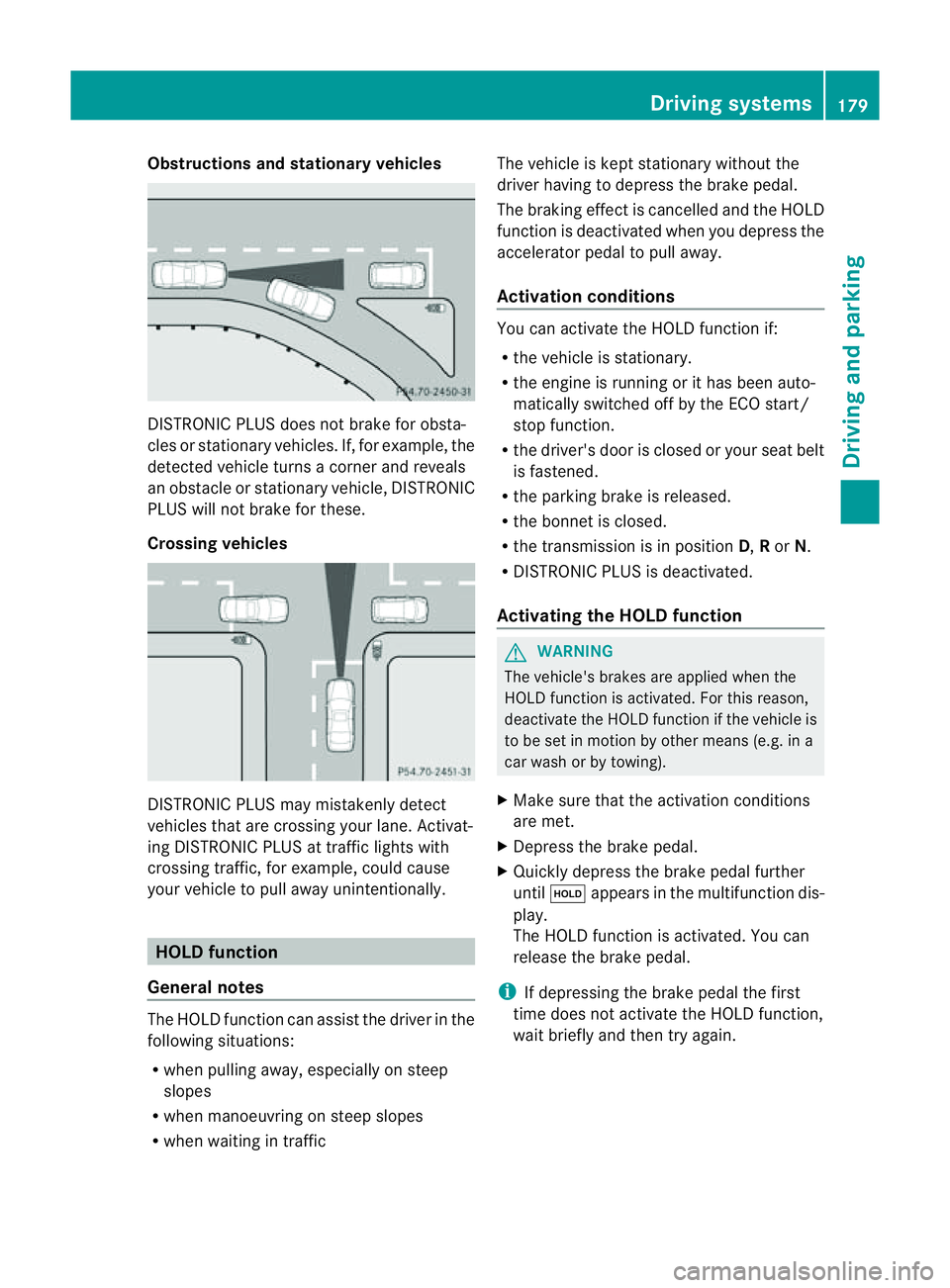
Obstructions and stationary vehicles
DISTRONIC PLUS does not brake for obsta-
cles or stationary vehicles. If, for example, the
detected vehicle turn sacorner and reveals
an obstacle or stationary vehicle, DISTRONIC
PLUS will not brake for these.
Crossing vehicles DISTRONIC PLUS may mistakenly detect
vehicles that are crossing your lane. Activat-
ing DISTRONIC PLUS at traffic lights with
crossing traffic, for example, could cause
your vehicle to pull away unintentionally. HOLD function
General notes The HOLD function can assist the driver in the
following situations:
R when pulling away ,especially on steep
slopes
R when manoeuvrin gonsteep slopes
R when waiting in traffic The vehicle is kept stationary without the
driver having to depress the brake pedal.
The braking effec tiscancelled and the HOLD
function is deactivated when you depress the
accelerator pedal to pull away.
Activation conditions You can activate the HOLD function if:
R
the vehicle is stationary.
R the engine is running or it has been auto-
matically switched off by the ECO start/
stop function.
R the driver's door is closed or your seat belt
is fastened.
R the parking brake is released.
R the bonnet is closed.
R the transmission is in position D,Ror N.
R DISTRONIC PLUS is deactivated.
Activating the HOLD function G
WARNING
The vehicle's brakes are applied when the
HOLD function is activated. For this reason,
deactivate the HOLD function if the vehicle is
to be set in motion by other means (e.g. in a
car wash or by towing).
X Make sure that the activation conditions
are met.
X Depress the brake pedal.
X Quickly depress the brake pedal further
until ë appears in the multifunction dis-
play.
The HOLD function is activated. You can
release the brake pedal.
i If depressing the brake pedal the first
time does not activate the HOLD function,
wait briefly and then try again. Driving systems
179Driving and parking Z
Page 187 of 373
Select this mod
ewhene mploying asporty
driving style ,e.g. on winding country roads.
X Press button :once.
Indicato rlamp ?light sup. You have selec-
te dS port mode.
The AMG Rid eContro lSPORT message
appear sinthemultifunction display.
Sport +mode
The ver yfirms etting of the suspension tuning
in Sport +mode ensures the best possible
contact with the road. Select this mode only
when driving on race circuits.
If indicator lamps =and ?are off:
X Press button :twice.
Indicator lamps =and ?light up. You
have selected Sport +mode.
The AMG Ride Control SPORT + message
appears in the multifunction display.
If indicator lamp ?lights up:
X Press button :once.
Secondi ndicator lamp =lights up. You
have selected Sport +mode.
The AMG Ride Control SPORT + message
appears in the multifunction display.
Comfort mode
In comfor tmode, the driving characteristics
of your vehicle are more comfortable. There-
fore, select this mode if you prefer amore
comfortable driving style. Select comfort
mode also when driving fast on straight roads,
e.g. on straight stretches of motorway.
X Press button :repeatedly until indicator
lamps =and ?go out.
You have selected Comfort mode.
The AMG Ride Control COMFORT mes-
sage appears in the multifunction display.
Storing and calling up settings
Once the suspension tuning and drive pro-
gram have been selected, you can store and
call up your settings using AMG button ;.X
To store: press AMG button ;until you
hear atone.
X To call up: press AMG button ;.
The stored suspension tuninga nd drive
program are selected.
X To display: briefly press AMG button ;.
Your selection appears in the multifunction
display. 4MATIC (permanent all-wheel drive)
G
WARNING
4MATIC cannot reduce the risk of an accident
if you drive too fast.
If ad rive wheel spins due to insufficien tgrip:
R only depress the accelerator peda lasfar as
necessary when pulling away.
R accelerate less when driving.
R adapt yourd riving style to suitr oad and
traffic conditions.
! Never tow the vehicle with one axle
raised. This may damage the transfer case.
Damage of this sort is not covered by the
Mercedes-Benz implied warranty. All
wheels must remain either on the ground
or be fully raised. Observe the instructions
for towing the vehicle with all wheels in full
contact with the ground.
i In wintry driving conditions, the maximum
effect of 4MATIC can only be achieved if
you use winter tyres (M+ Styres), wit hsnow
chain sifnecessary.
4MATIC ensures that all four wheels are per-
manentl ydriven .Together wit hESP®
,it
improves th etraction of your vehicl ewhen-
eve rad rive wheel spins due to insufficient
grip. 184
Driving systemsDriving and parking
Page 188 of 373
PARKTRONIC
Important safety notes G
WARNING
PARKTRONIC is only an aid and may not
detect all obstacles. It is not asubstitute for
attentive driving.
You are always responsible for safety and
must continue to pay attention to your imme-
diate surroundings when parking and
manoeuvring. You could otherwise endanger
yourself and others. G
WARNING
Make sure that no persons or animals are in
the manoeuvring range. Otherwise, they
could be injured.
PARKTRONIC is an electronic parking aid with
ultrasonic sensors. It indicates visuallya nd
audibly the distance between your vehicle
and an object.
PARKTRONIC is activated automatically if
you:
R switch on the ignition
R shift the transmission to position D,Ror N
R release the parking brake
PARKTRONIC is deactivated at speeds above
18 km/h. It is reactivated at lower speeds.
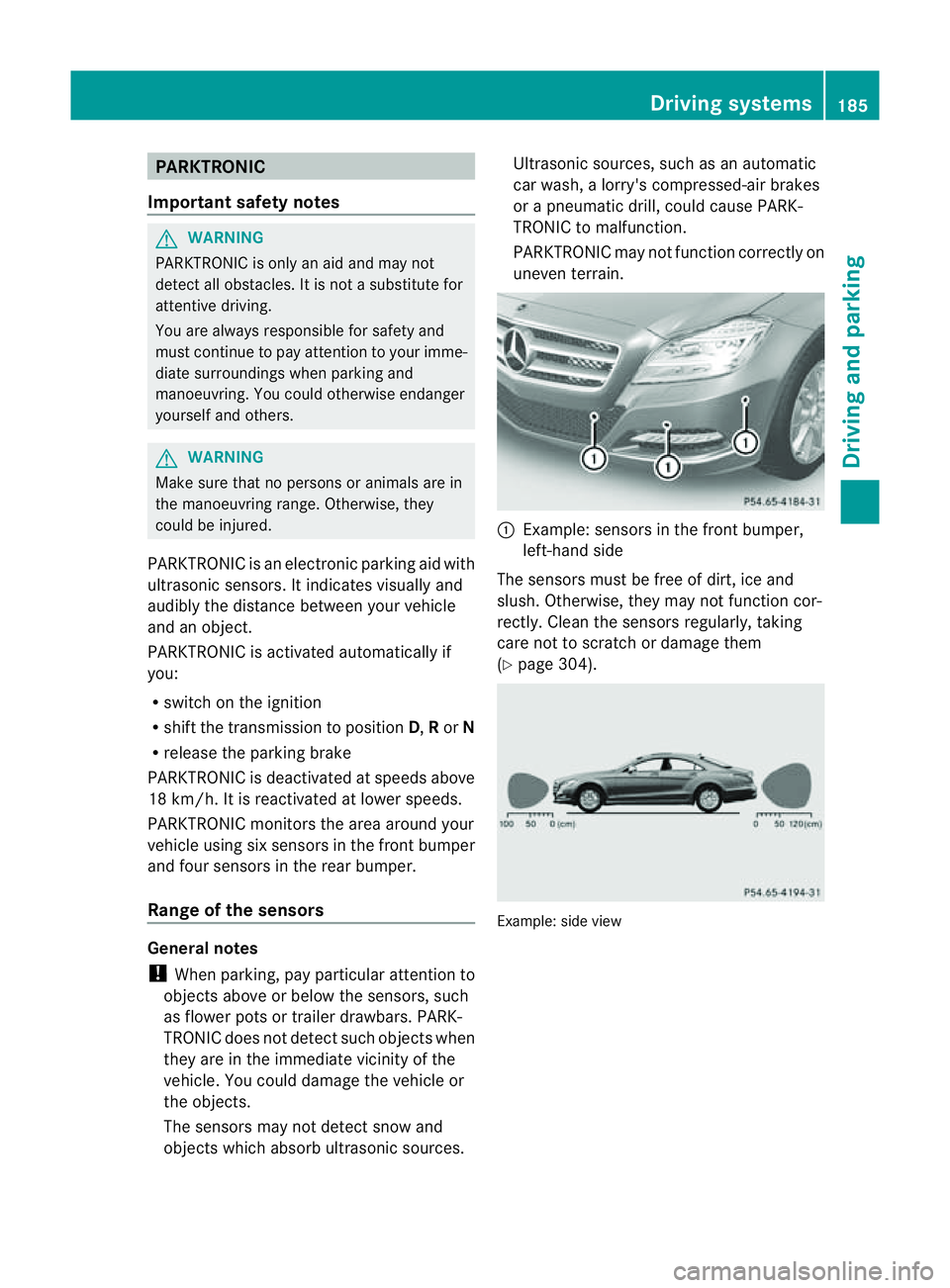
PARKTRONIC monitorst he area around your
vehicle using six sensors in the front bumper
and four sensors in the rear bumper.
Range of the sensors General notes
!
When parking, pay particular attention to
objectsa bove or below the sensors, such
as flower pots or trailer drawbars. PARK-
TRONIC does not detect such objectsw hen
they are in the immediate vicinity of the
vehicle. You could damage the vehicle or
the objects.
The sensors may not detect snow and
objectsw hich absorb ultrasonic sources. Ultrasonic sources, such as an automatic
car wash,
alorry's compressed-air brakes
or ap neumatic drill, could cause PARK-
TRONIC to malfunction.
PARKTRONIC may not function correctly on
uneven terrain. :
Example: sensors in the front bumper,
left-han dside
The sensors must be free of dirt, ice and
slush. Otherwise, they may not function cor-
rectly. Cleant he sensors regularly,t aking
care not to scratchord amage them
(Y page 304). Example: side view Driving systems
185Driving and parking Z
Page 190 of 373
Problems with PARKTRONIC
Problem Possible causes/consequences and
M Solutions
Only the red segments
in the PARKTRONIC
warning displaysa
re lit.
You also hear awarning
tone for approximately
two seconds.
PARKTRONIC is deacti-
vated after approx-
imately 20 seconds,
and the indicator lamp
in the PARKTRONIC
button lights up. PARKTRONIC has malfunctioned and has switched off.
X
If problems persist, have PARKTRONIC checked at aqualified
specialist workshop. Only the red segments
in the PARKTRONIC
warning displaysa
re lit.
PARKTRONIC is deacti-
vated after approx-
imately 20seconds. The PARKTRONIC sensors are dirty or there is interference.
X
Cleant he PARKTRONIC sensors (Y page 304).
X Switch the ignition back on. The problem may be caused by an external source of radio or
ultrasound waves.
X
See if PARKTRONIC functions in adifferent location. Active Parking Assist
Important safety notes G
WARNING
Active Parking Assist is merely an aid and may
sometimes recommendp arking spaces that
are not suitable for parking. For example,
these might be spaces where parking is pro-
hibited, driveways, unsuitable surfaces, etc.
Active Parking Assist measures the parking
space as you drive past it. Any later changes
to the parking space are not taken into
account. For instance, this may be the case
when the vehicle parked in front of or behind
the space changes its position or when an
obstacle is moved into the parking space.
Active Parking Assist does not relieve you of
the responsibility of paying attention. If you
rely solely on Active Parking Assist, you could cause an accident and injure yourself and oth-
ers.
You are always responsible for safety and
must continue to pay attention to your imme-
diate surroundings when parking and
manoeuvring.
G
WARNING
Objectsl ocated above the height range of
Active Parking Assist will not be detected
when the parking space is measured. These
are not taken into account when the parking
procedure is calculated, e. g. overhanging
loads, tail sections or loading ramps of goods
vehicles. In some circumstances, Active Park-
ing Assist may therefore guide you into the
parking space too early. This may lead to a
collision. For this reason, you should avoid
using Active Parking Assist in such situations. Driving systems
187Driving and parking Z
Page 191 of 373
G
WARNING
The front of the vehicl ewillv eer out in the
direction of the oncoming traffic during the
parking operation. In some cases the vehicle
willa lsot ake you onto sections of the oncom-
ing lane during the parking procedure.
You are responsibl efor safety at all times and
must pay attention to any road users
approaching or passing. Stop the vehicl eif
necessary or cancel the Active Parking Assist
parking procedure. G
WARNING
Make sure that no persons or animals are in
the manoeuvring range. Otherwise, they
coul dbei njured.
! If unavoidable,y ou should drive over
obstacles such as kerbs slowly and not at
as harp angle .Otherwise, yo umaydamage
the wheels or tyres.
Activ eParking Assist is an electroni cparking
aid wit hultrasound. Ultrasound is used to
measure th eroad on bot hsides of th evehicle.
As uitable parking spac eisindicated by the
parking symbol. Active steering intervention
can assis tyou during parking. You may also
use PARKTRONIC (Y page 185). When PARK-
TRONIC is switched off, Active Parking Assist
is also unavailable.
Use Active Parking Assist for parking spaces:
R that are parallel to the direction of travel
R that are on straight roads, not bends
R that are on the same level as the road, e.g.
not on the pavement
Parking tips:
R on narrow roads, drive as closely as possi-
ble past the parking space.
R parking spaces that are littered, overgrown
or partially occupied by trailer drawbars
might be identified incorrectly or not at all.
R snowfall or heavy rain may lead to aparking
space being measured inaccurately. R
pay attention to the PARKTRONIC
(Y page 186) warning messages during the
parking procedure.
R at any time, you can intervene in the steer-
ing procedure to correc tit. Active Parking
Assist will then be cancelled.
R when transporting aload which protrudes
from your vehicle, you should not use
Active Parking Assist.
R when snow chains or an emergenc yspare
wheel are fitted, you should not use Active
Parking Assist here either.
R make sure that the tyre pressures are
always correct. This has adirec tinfluence
on the parking characteristics of the vehi-
cle.
R the wa yyourv ehicl eisp ositioned in the
parking space after parking is dependent
on various factors .These include the posi-
tion and shape of the vehicles parked in
front and behind it and the conditionsoft he
location. It may be the case that Active
Parking Assist guides you too far into a
parking space, or not far enough into it. In
some cases, it may also lead you across or
onto the kerb. If necessary, you should can-
cel the parking procedure with Active Park-
ing Assist.
R you can also engage forward gear prema-
turely. The vehicle redirects and does not
drive as far into the parking space. Should
ag ear be changed too early to achieve a
sensible parking position, the parking pro-
cedure will be cancelled. 188
Driving systemsDriving and parking
Page 192 of 373
Detecting parking spaces
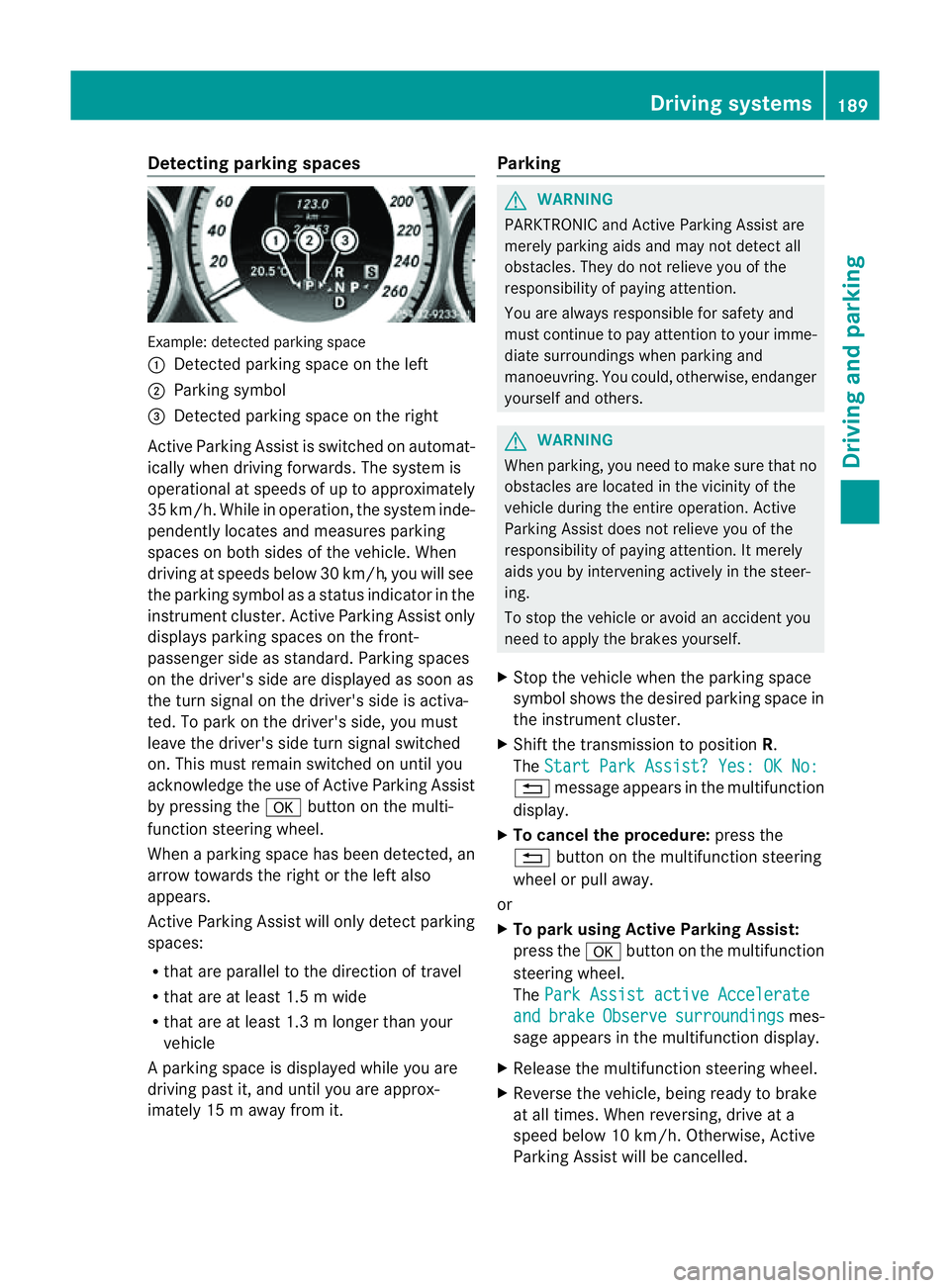
Example: detecte
dparking space
: Detected parking spac eontheleft
; Parking symbol
= Detected parking spac eontheright
Active Parking Assis tisswitched on automat-
ically when driving forwards. The system is
operational at speed sofuptoapproximately
35 km/h. While in operation, th esystem inde-
pendently locates and measures parking
spaces on bot hsides of th evehicle. When
driving at speeds below 30 km/h, you will see
th ep arkin gsymbol as astatu sind icator in the
instrumen tcluster .Active Parking Assist only
display sparking spaces on the front-
passenger sid easstandard .Parking spaces
on th edriver' sside are displayed as soon as
th et urns ignal on the driver's side is activa-
ted. To park on the driver's side, you must
leave the driver's side tur nsignal switched
on. This must remain switched on until you
acknowledge the use of Activ eParking Assist
by pressing the abutton on the multi-
function steerin gwheel.
When aparking space has been detected, an
arrow towards the right or the left also
appears.
Activ eParking Assist will only detect parking
spaces:
R that are parallel to the direction of travel
R that are at least 1. 5mwide
R that are at least 1. 3mlonger than your
vehicle
Ap arking spac eisdisplayed while you are
driving past it, and until you are approx-
imately 15 maway from it. Parking G
WARNING
PARKTRONIC and Activ eParking Assist are
merely parking aids and may no tdetec tall
obstacles. They do not reliev eyou of the
responsibilit yofpaying attention.
You are always responsible for safet yand
must continue to pay attention to your imme-
diate surroundings when parking and
manoeuvring. You could, otherwise, endanger
yourself and others. G
WARNING
When parking, you need to make sure that no
obstacles are located in the vicinity of the
vehicle durin gthe entire operation. Active
Parking Assist does not reliev eyou of the
responsibilit yofpaying attention. It merely
aids you by intervenin gactively in the steer-
ing.
To sto pthe vehicle or avoid an accident you
need to apply the brakes yourself.
X Stop the vehicle when the parking space
symbol shows the desired parking space in
the instrumen tcluster.
X Shif tthe transmission to position R.
The Start Park Assist? Yes: OK No: %
message appears in the multifunction
display.
X To cancel the procedure: press the
% button on the multifunction steering
wheel or pull away.
or
X To parku sing Active Parking Assist:
press the abutton on the multifunction
steerin gwheel.
The Park Assist active Accelerate and brake Observe surroundings mes-
sage appears in the multifunction display.
X Release the multifunction steerin gwheel.
X Reverse the vehicle, being ready to brake
at all times. When reversing, drive at a
speed below 10 km/h. Otherwise, Active
Parking Assist will be cancelled. Driving systems
189Driving and parking Z
Page 193 of 373
i
In tight parking spaces, you willa chieve
the best parking results by backing up as
far as possible. When doing so, also
observe the PARKTRONIC messages.
X Stop as soon as PARKTRONIC sounds the
continuous warning tone, if not before.
Manoeuvring may be required in tight park-
ing spaces.
The Park Assist active Select D Observe surroundings messag
eappears in
the multifunction display.
X Shift the transmission to position Dwhile
the vehicle is stationary.
Active Parking Assist immediately steers in
the other direction.
The Park Assist active Accelerate and brake Observe surroundings mes-
sage appears in the multifunction display.
i You willa chieve the best results by wait-
ing for the steering procedure to complete
before pulling away.
X Drive forward sand be ready to brake at all
times.
X Stop as soon as PARKTRONIC sounds the
continuous warning tone, if not before.
The Park Assist active Select R Observe surroundings messag
eappears in
the multifunction display.
Further transmission shifts may be neces-
sary.
As soon as the parking procedure is com-
plete, the Park Assist switched off mes-
sage appears in the multifunction display.
PARKTRONIC continues to be available.
X Manoeuvre if necessary.
X Alwayso bserve the warning messages dis-
played by PARKTRONIC (Y page 186).
Cancelling Active Parking Assist You can cancel Active Parking Assist at any
time. X
Stop the movement of the multifunction
steering wheelors teer yourself.
Active Parking Assist willbec ancelled at
once. The Park Assist cancelled mes-
sage appears in the multifunction display.
or
X Press the PARKTRONIC button on the
centre console (Y page 186).
PARKTRONIC is switched off and Active
Parking Assist is immediately cancelled.
The Park Assist cancelled message
appears in the multifunction display.
Active Parking Assist is cancelled automati-
cally if:
R the transmission is shifted too early.
R parking using Active Parking Assist is no
longer possible.
R you are driving faster than 10 km/h.
R aw hee lspins and ESP ®
intervenes or fails.
The ä warning lamp lights up in the
instrument cluster.
Aw arning tone sounds. The parking symbol
disappears and th emultifunction display
shows the ParkA ssist cancelled mes-
sage.
When Activ eParking Assist is cancelled, you
must steer again yourself. Reversing camera
Important safety notes G
WARNING
Mak esure that no person soranimals are in
th em anoeuvrin grange. Otherwise, they
could be injured. 190
Driving systemsDriving and parking