ESP MERCEDES-BENZ CLS COUPE 2012 Repair Manual
[x] Cancel search | Manufacturer: MERCEDES-BENZ, Model Year: 2012, Model line: CLS COUPE, Model: MERCEDES-BENZ CLS COUPE 2012Pages: 373, PDF Size: 9.12 MB
Page 194 of 373
General notes
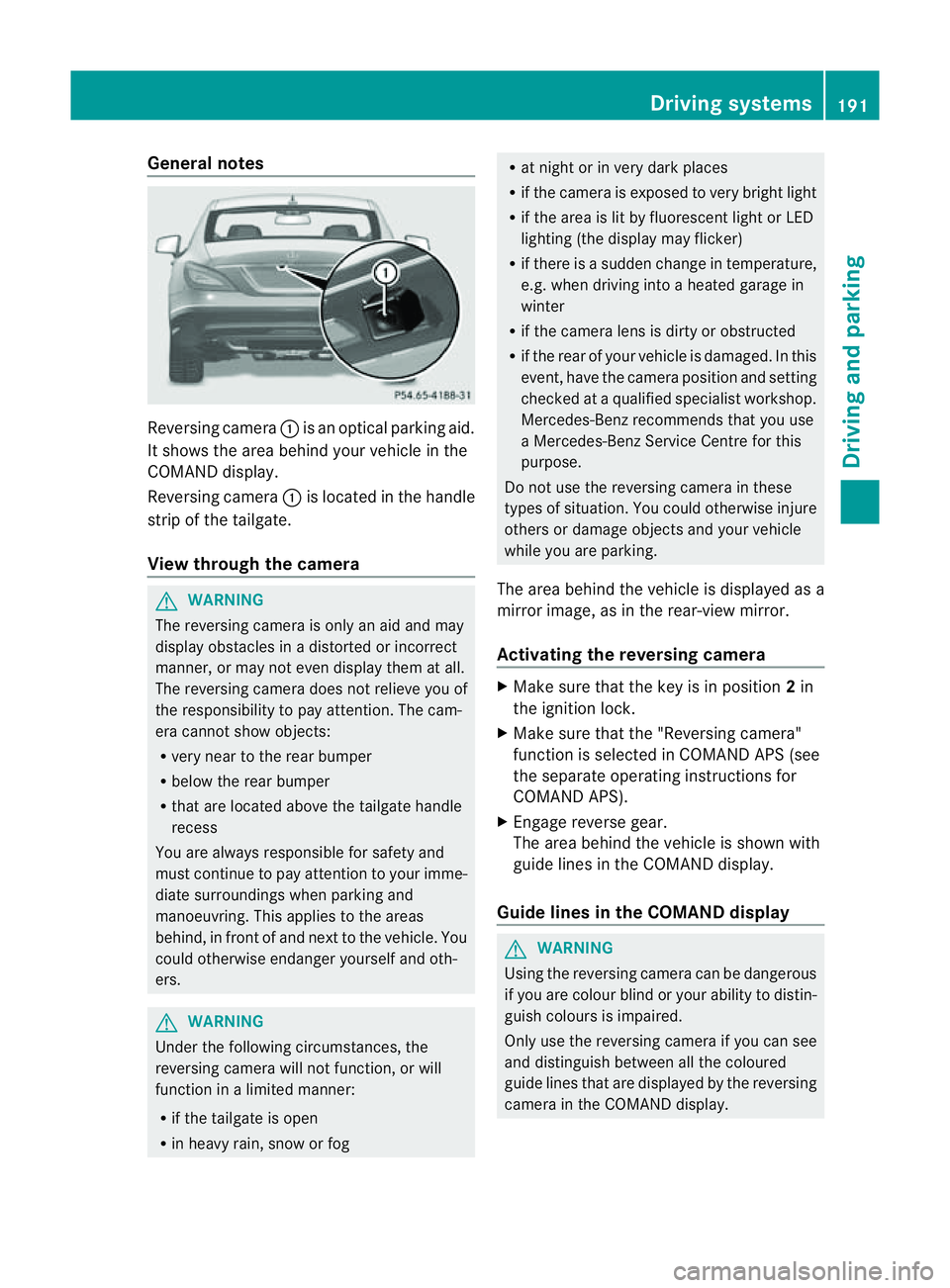
Reversing camera
:is an optical parking aid.
It shows the area behind yourv ehicle in the
COMAND display.
Reversing camera :is located in the handle
strip of the tailgate.
View through the camera G
WARNING
The reversing camera is only an aid and may
display obstacles in adistorted or incorrect
manner, or may not even display them at all.
The reversing camera does not relieve you of
the responsibility to pay attention .The cam-
era cannot show objects:
R very near to the rear bumper
R below the rear bumper
R that are located above the tailgate handle
recess
You are always responsible for safety and
must continue to pay attention to your imme-
diate surroundings when parking and
manoeuvring. This applies to the areas
behind, in front of and next to the vehicle. You
could otherwise endanger yourself and oth-
ers. G
WARNING
Under the following circumstances, the
reversing camera will not function, or will
function in alimited manner:
R if the tailgate is open
R in heavy rain, snow or fog R
at night or in very dark places
R if the camera is exposed to very bright light
R if the area is lit by fluorescent light or LED
lighting (the display may flicker)
R if there is asudden change in temperature,
e.g. when driving into aheated garage in
winter
R if the camera lens is dirty or obstructed
R if the rear of your vehicle is damaged. In this
event, have the camera position and setting
checked at aqualified specialist workshop.
Mercedes-Ben zrecommends that you use
aM ercedes-Benz Service Centr efor this
purpose.
Do not use the reversin gcamera in these
types of situation .You could otherwise injure
others or damage object sand your vehicle
while you are parking.
The area behind the vehicle is displayed as a
mirror image, as in the rear-view mirror.
Activating the reversing camera X
Make sure that the key is in position 2in
the ignition lock.
X Make sure that the "Reversing camera"
function is selected in COMAND APS (see
the separate operating instructions for
COMAND APS).
X Engage reverse gear.
The area behind the vehicle is shown with
guide lines in the COMAND display.
Guide lines in the COMAND display G
WARNING
Using the reversing camera can be dangerous
if you are colour blind or your ability to distin-
guish colours is impaired.
Only use the reversing camera if you can see
and distinguish between all the coloured
guide lines that are displayed by the reversing
camera in the COMAND display. Driving systems
191Driving and parking Z
Page 195 of 373
G
WARNING
Please note that objects not at ground level
may appear to be further awayt han they
actually are. These include:
R the bumper of avehicl ethat is parked
behind yourv ehicle
R at railer drawbar
R the ball coupling of atrailer tow hitch
R the tail-en dofalorry
R slanted posts
The lines are only guides, not accurat emeas-
urement softhe distanc etoanobstacle.
Therefore, you should never pass the red line
when approaching an obstacle. You could oth-
erwise cause an acciden tand injure yourself
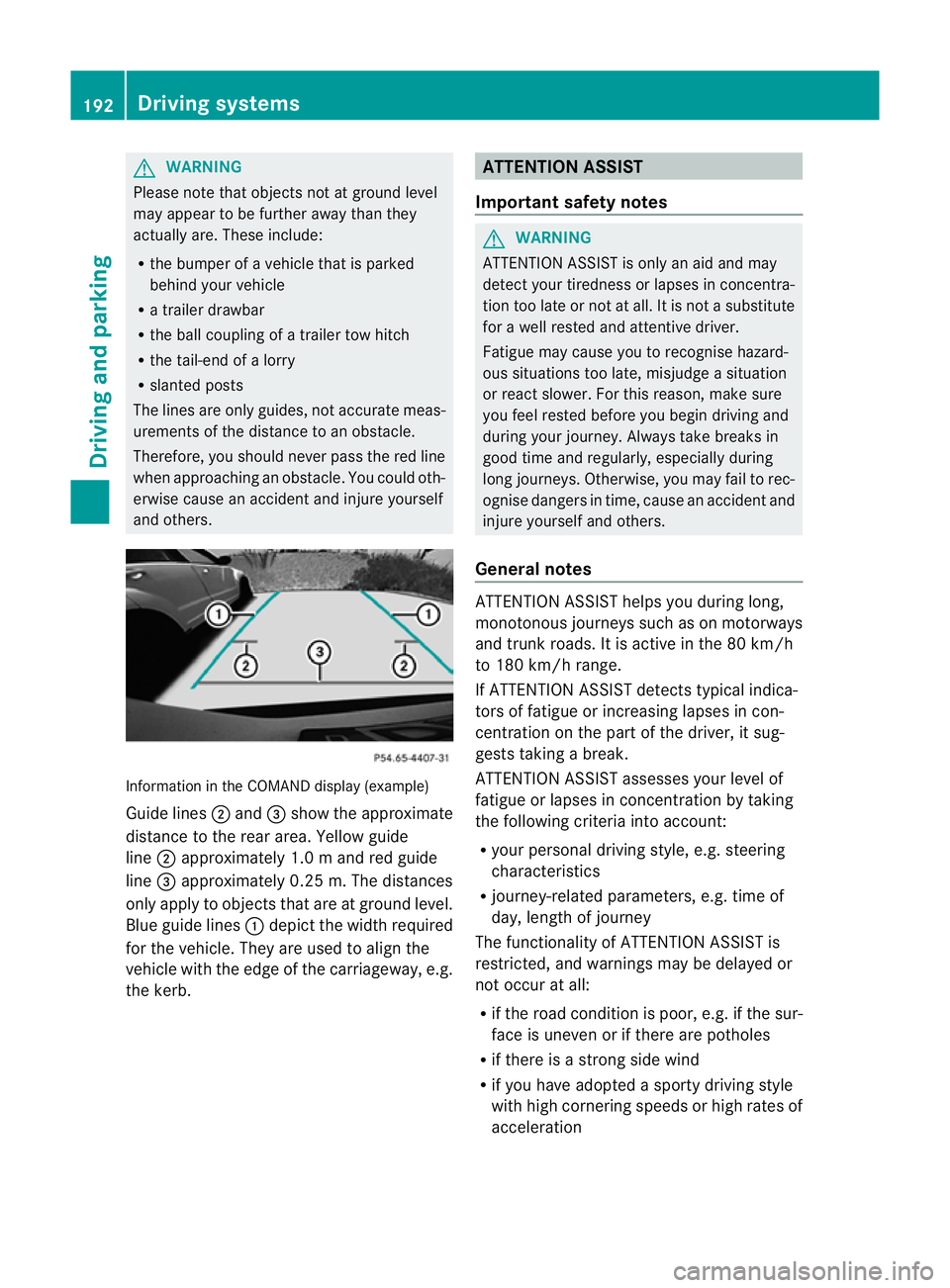
and others. Information in the COMAND display (example)
Guid elines ; and =sho wthe approximate
distance to the rea rarea. Yellow guide
line ;approximatel y1.0ma nd red guide
line =approximatel y0.25 m. Th edistances
only appl ytoobjects that are at ground level.
Blu eguide lines :depict the width required
for the vehicle .They are used to align the
vehicle with the edge of the carriageway ,e.g.
the kerb. ATTENTION ASSIST
Important safety notes G
WARNING
ATTENTIONA SSIST is only an aid and may
detect your tiredness or lapses in concentra-
tion too late or not at all. It is not asubstitute
for aw ell reste dand attentiv edriver.
Fatigue may caus eyou to recognise hazard-
ous situations to olate ,misjudge asituation
or reac tslower. For this reason ,makes ure
you fee lreste dbefore you begin driving and
durin gyour journey. Always tak ebreaks in
good tim eand regularly, especiall yduring
lon gjou rneys. Otherwise, you may fail to rec-
ognise danger sintime, caus eanacciden tand
injure yoursel fand others.
General notes ATTENTIO
NASSIST helps yo uduring long,
monotonou sjourney ssuchasonm otorways
and trunk roads. It is active in the 80 km/h
to 180 km/h range.
If ATTENTIO NASSIST detects typica lindica-
tors of fatigu eorincreasing lapse sincon-
centration on the part of the driver, it sug-
gests taking abreak.
ATTENTIO NASSIST assesses your level of
fatigu eorlapsesinc oncentration by taking
the following criteria into account:
R your persona ldriving style ,e.g. steering
characteristics
R journey-relate dparameters, e.g. time of
day, length of journey
The functionality of ATTENTIO NASSIST is
restricted, and warning smay be delaye dor
not occu ratall:
R if the roa dcondition is poor, e.g. if the sur-
face is uneven or if there are potholes
R if there is astrong sid ewind
R if you have adopted asport ydrivin gstyle
with high cornering speeds or high rates of
acceleration 192
Driving systemsDriving and parking
Page 197 of 373
the navigation syste
misalso used for this
purpose. If atraffic sign indicating aspeed
limit or the end of aspeed limit is detected,
it is shown in the multifunction display. If
Speed Limit Assist does not detect any traffic
signs, the speed limit from the digital road
map is taken and shown in the display.
Speed Limit Assist detects the traffic signs
with acamera attached behind the top of the
windscreen.
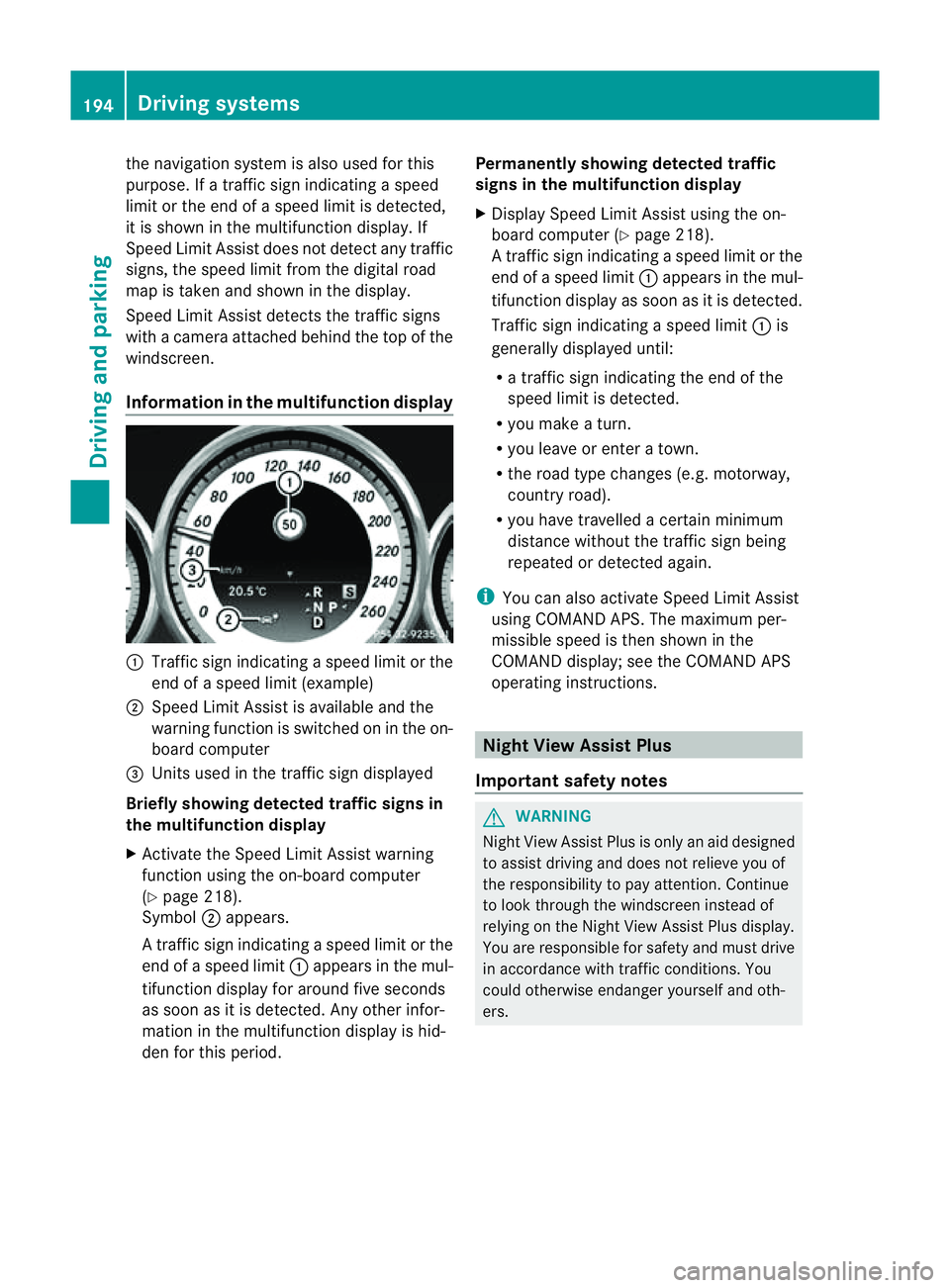
Information in the multifunction display :
Traffic sign indicating aspeed limit or the
end of aspeed limit (example)
; Speed Limit Assist is available and the
warning function is switched on in the on-
board computer
= Unit sused in the traffic sign displayed
Briefly showing detected traffic signs in
the multifunction display
X Activat ethe Speed Limit Assist warning
function using the on-board computer
(Y page 218).
Symbol ;appears.
At raffic sign indicating aspee dlimi tort he
end of aspeed limit :appears in the mul-
tifunction displayf or around five seconds
as soon as it is detected. Any other infor-
mation in the multifunction displayish id-
den for this period. Permanently showing detected traffic
signs in the multifunction display
X
Display Speed Limit Assist using the on-
board computer (Y page 218).
At raffic sign indicating aspee dlimi tort he
end of aspeed limit :appears in the mul-
tifunction displayass oon as it is detected.
Traffic sign indicating aspeed limit :is
generally displayed until:
R at raffic sign indicating the end of the
speed limit is detected.
R you make aturn.
R you leave or enter atown.
R the road type changes (e.g. motorway,
countryr oad).
R you have travelled acertain minimum
distance without the traffic sign being
repeated or detected again.
i You can also activate Speed Limit Assist
using COMAND APS. The maximum per-
missible speed is then shown in the
COMAND display; see the COMAND APS
operating instructions. Night View Assist Plus
Important safety notes G
WARNING
Night View Assist Plus is only an aid designed
to assist driving and does not relieve you of
the responsibility to pay attention. Continue
to look through the windscreen instead of
relying on the Night View Assist Plus display.
You are responsible for safety and must drive
in accordance with traffic conditions. You
could otherwise endanger yourself and oth-
ers. 194
Driving systemsDriving and parking
Page 198 of 373
The system may be impaired or may not func-
tion if:
R there is poor visibility, e.g. due to snow,
rain, fog or spray.
R the windscreen is dirty, misted up or cov-
ered, for instance by asticker, in the vicinity
of the camera.
R on bends, on uphill gradients or downhill
gradients. G
WARNING
Night View Assist Plus does not detect
object sinthe immediate vicinit yofthe vehi-
cle. Look through the windscreen when
manoeuvring. Make sure that there are no
people or animals in the area in which you are
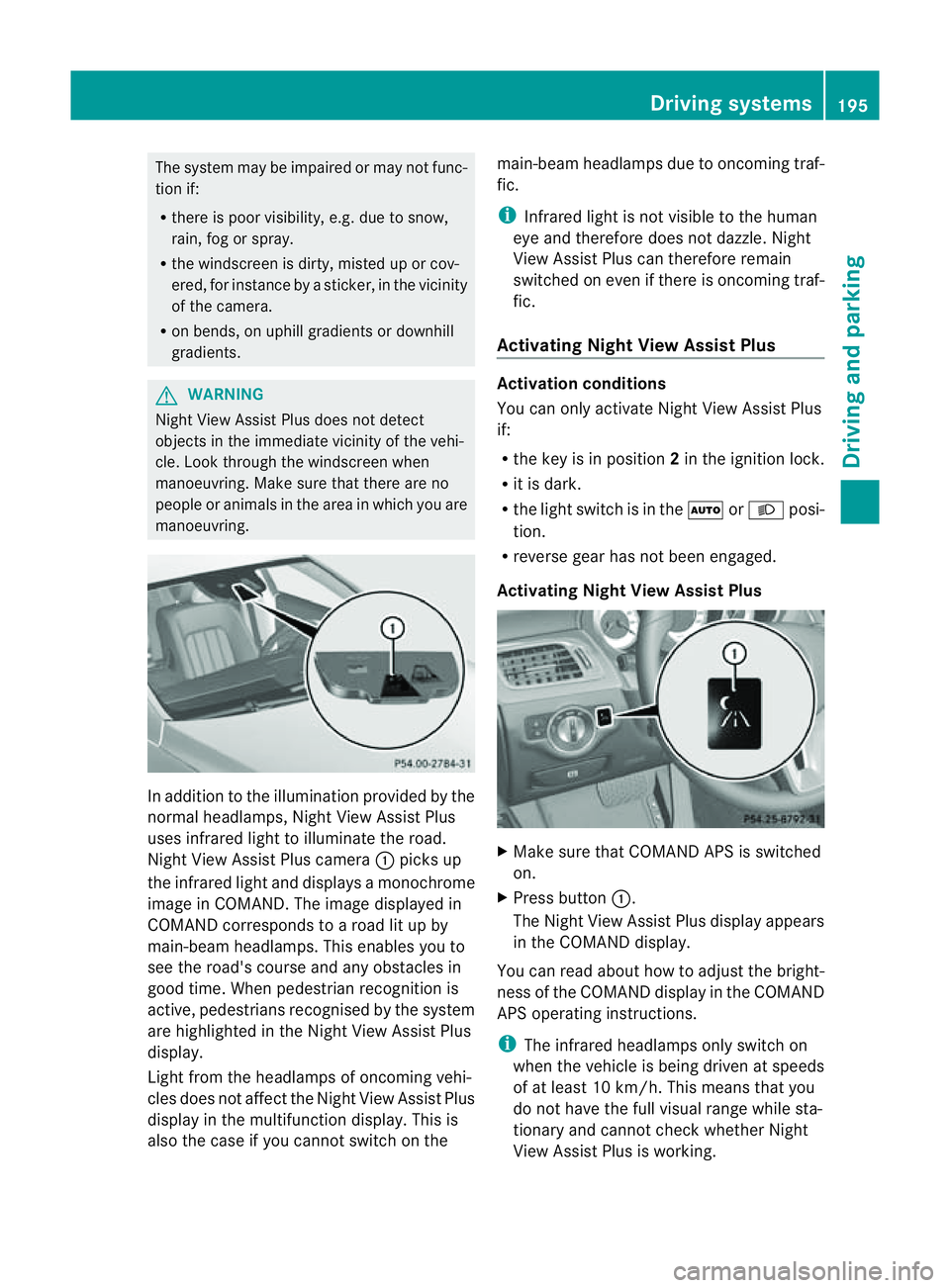
manoeuvring. In addition to the illumination provided by the
normal headlamps, Night View Assist Plus
uses infrared light to illuminate the road.
Night View Assist Plus camera :picks up
the infrared light and display samonochrome
image in COMAND .The image displayed in
COMAND corresponds to aroad lit up by
main-beam headlamps. This enables you to
see the road's course and any obstacles in
good time. When pedestrian recognition is
active, pedestrians recognised by the system
are highlighted in the Night View Assist Plus
display.
Light from the headlamps of oncomingv ehi-
cles does not affect the Night View Assist Plus
displayint he multifunction display. This is
also the case if you cannot switch on the main-beam headlamps due to oncomingt
raf-
fic.
i Infrared light is not visible to the human
eye and therefore does not dazzle. Night
View Assist Plus can therefore remain
switched on even if there is oncomingt raf-
fic.
Activating Night View Assist Plus Activation conditions
You can only activate Night View Assist Plus
if:
R
the key is in position 2in the ignition lock.
R it is dark.
R the light switch is in the ÃorL posi-
tion.
R reverse gear has not been engaged.
Activating Night View Assist Plus X
Make sure that COMAND APS is switched
on.
X Press button :.
The Night View Assist Plus displaya ppears
in the COMAND display.
You can read about how to adjust the bright-
ness of the COMAND displayint he COMAND
APS operating instructions.
i The infrared headlamps only switch on
when the vehicle is being driven at speeds
of at least 10 km/h. This means that you
do not have the full visual range while sta-
tionary and cannot check whether Night
View Assist Plus is working. Driving systems
195Driving and parking Z
Page 200 of 373
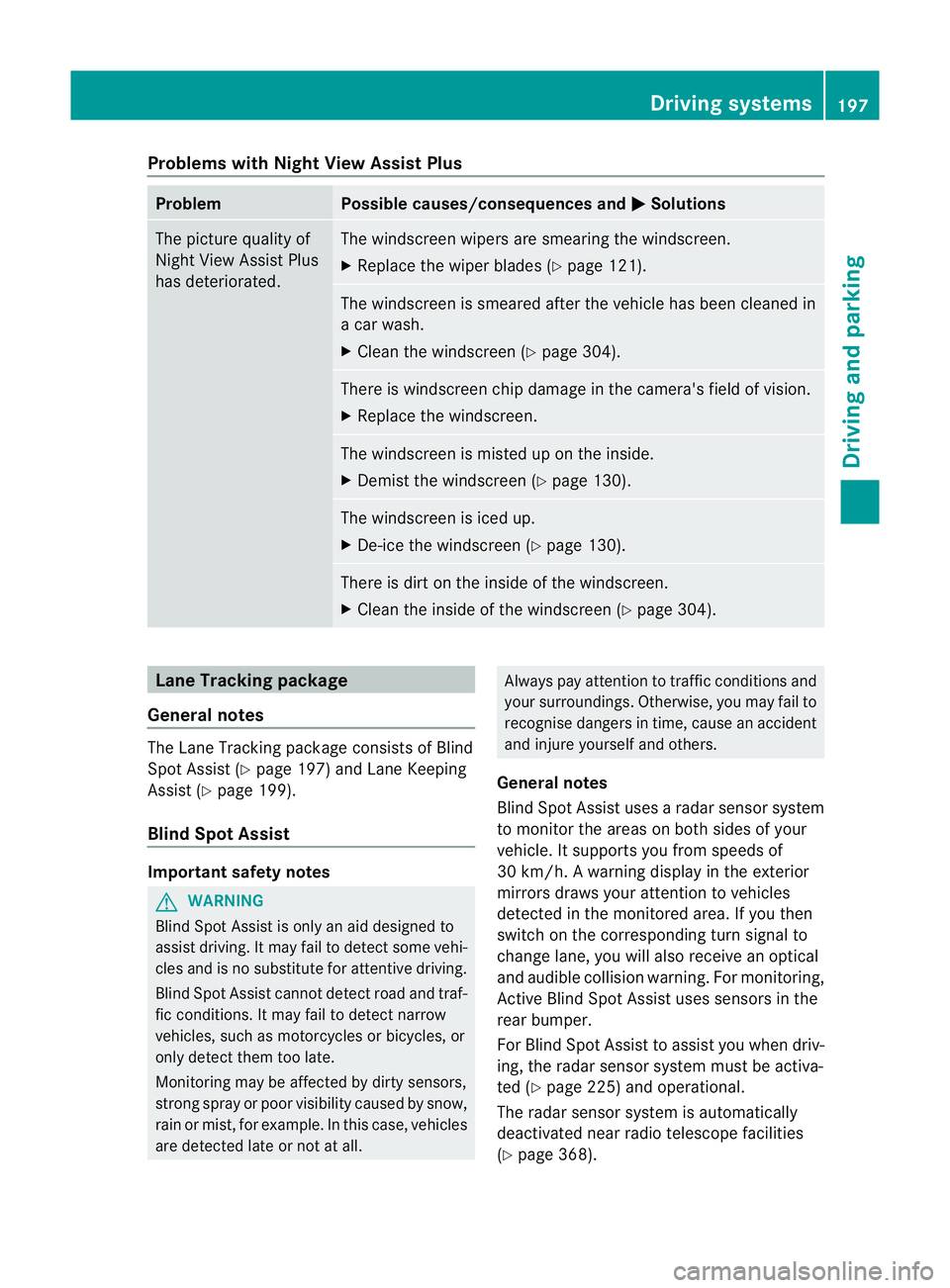
Problems with Night View Assist Plus
Problem Possible causes/consequences and
M Solutions
The picture quality of
Night View Assist Plus
has deteriorated. The windscreen wipers are smearing the windscreen.
X
Replace the wiper blades (Y page 121). The windscreen is smeared after the vehicle has been cleaned in
ac
ar wash.
X Cleant he windscreen (Y page 304). There is windscreen chip damage in the camera's field of vision.
X
Replace the windscreen. The windscreen is misted up on the inside.
X
Demist the windscreen (Y page 130). The windscreen is iced up.
X
De-ice the windscreen (Y page 130). There is dirt on the inside of the windscreen.
X
Cleant he inside of the windscreen (Y page 304).Lane Tracking package
General notes The Lane Tracking package consistsofB
lind
Spot Assist (Y page 197) and Lane Keeping
Assist (Y page 199).
Blind Spot Assist Important safety notes
G
WARNING
Blind Spot Assist is only an aid designed to
assist driving. It may fail to detect some vehi-
cles and is no substitute for attentive driving.
Blind Spot Assist cannot detect road and traf-
fic conditions. It may fail to detect narrow
vehicles, such as motorcycles or bicycles, or
only detect them too late.
Monitoring may be affected by dirty sensors,
strongs pray or poor visibility caused by snow,
rain or mist, for example. In this case, vehicles
are detected late or not at all. Always pay attention to traffic conditions and
your surroundings. Otherwise, you may fail to
recognise dangers in time, cause an accident
and injure yourself and others.
General notes
Blind Spot Assist uses aradar sensor system
to monitor the areas on both sides of your
vehicle. It supports you from speeds of
30 km/h. Awarning displayint he exterior
mirrors draws your attention to vehicles
detected in the monitored area. If you then
switch on the corresponding turn signal to
change lane, you will also receive an optical
and audible collision warning. For monitoring,
Active Blind Spot Assist uses sensors in the
rear bumper.
For Blind Spot Assist to assist you when driv-
ing, the radar sensor system must be activa-
ted (Y page 225) and operational.
The radar sensor system is automatically
deactivated near radio telescope facilities
(Y page 368). Driving systems
197Driving and parking Z
Page 201 of 373
Monitoring range of the sensors
G
WARNING
Blind Spot Assist monitors certain area sinthe
immediate vicinity of yourv ehicle. Vehicles
that approach and drive past at high speeds
are not detected. There is no display and no
warning.
If the lanes are very wide, it may not be pos-
sible to monitor the complet ewidth of the
neighbourin glane. For this reason, vehicles in
the nextl ane may no tbedetected, especially
if they are driving in astaggered formation in
differen tlanes .This may be the case if vehi-
cles are driving at the edge of their lane that
is furthest away from your vehicle.
Always pay attention to traffic conditions and
your surroundings. Otherwise, you may fail to
recognise dangers in time, cause an accident
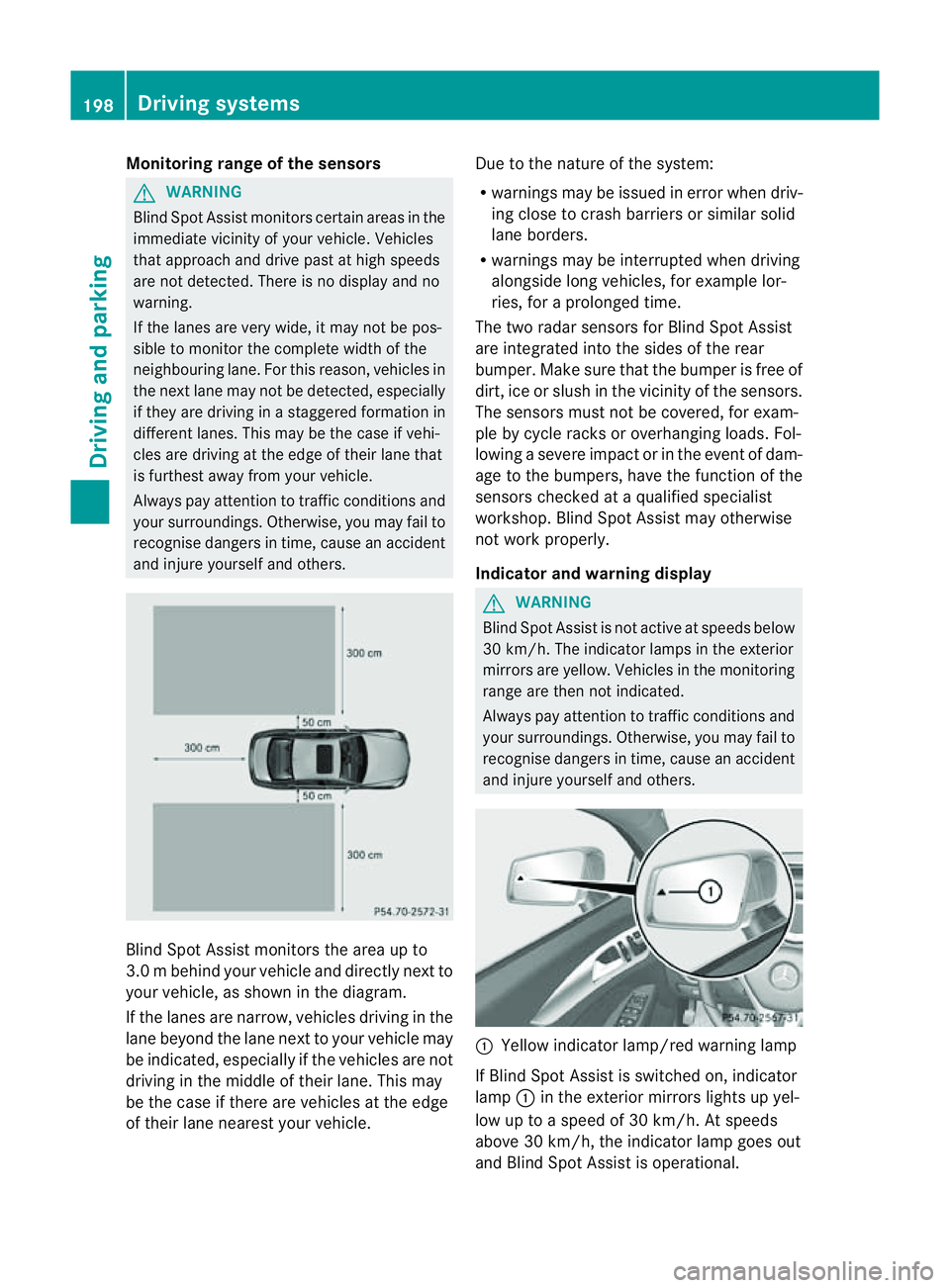
and injure yourself and others. Blind Spot Assist monitors the area up to
3.0 mbehind your vehicle and directly nextto
your vehicle, as shown in th ediagram.
If th elanes are narrow ,vehicles drivin ginthe
lan ebeyond th elan en exttoy our vehicl emay
be indicated, especially if th evehicles are not
drivin ginthemiddle of their lane. This may
be th ecaseift here are vehicles at th eedge
of their lan enearest your vehicle. Due to th
enature of th esystem:
R warnings may be issued in error when driv-
ingc lose to crash barrier sorsimilar solid
lane borders.
R warnings may be interrupted when driving
alongside long vehicles, for example lor-
ries, for aprolonged time.
The two radar sensors for Blin dSpot Assist
are integrated int othe sides of the rear
bumper .Make sure that th ebumpe risfree of
dirt, ice or slush in the vicinity of the sensors.
The sensors must not be covered, for exam-
ple by cycle racks or overhanging loads. Fol-
lowing asevere impact or in the event of dam-
age to the bumpers, have the function of the
sensors checked at aqualified specialist
workshop. Blind Spot Assist may otherwise
not work properly.
Indicator and warning display G
WARNING
Blind Spot Assist is not active at speeds below
30 km/h. The indicator lamps in the exterior
mirrors are yellow. Vehicles in the monitoring
range are then not indicated.
Always pay attention to traffic conditions and
your surroundings. Otherwise, you may fail to
recognise dangers in time, cause an accident
and injure yourselfa nd others. :
Yellow indicator lamp/red warning lamp
If Blind Spo tAssist is switched on, indicator
lamp :in the exterior mirrors lights up yel-
low up to aspeed of 30 km/h. At speeds
above 30 km/h, the indicator lamp goes out
and Blind Spot Assist is operational. 198
Driving systemsDriving and parking
Page 202 of 373
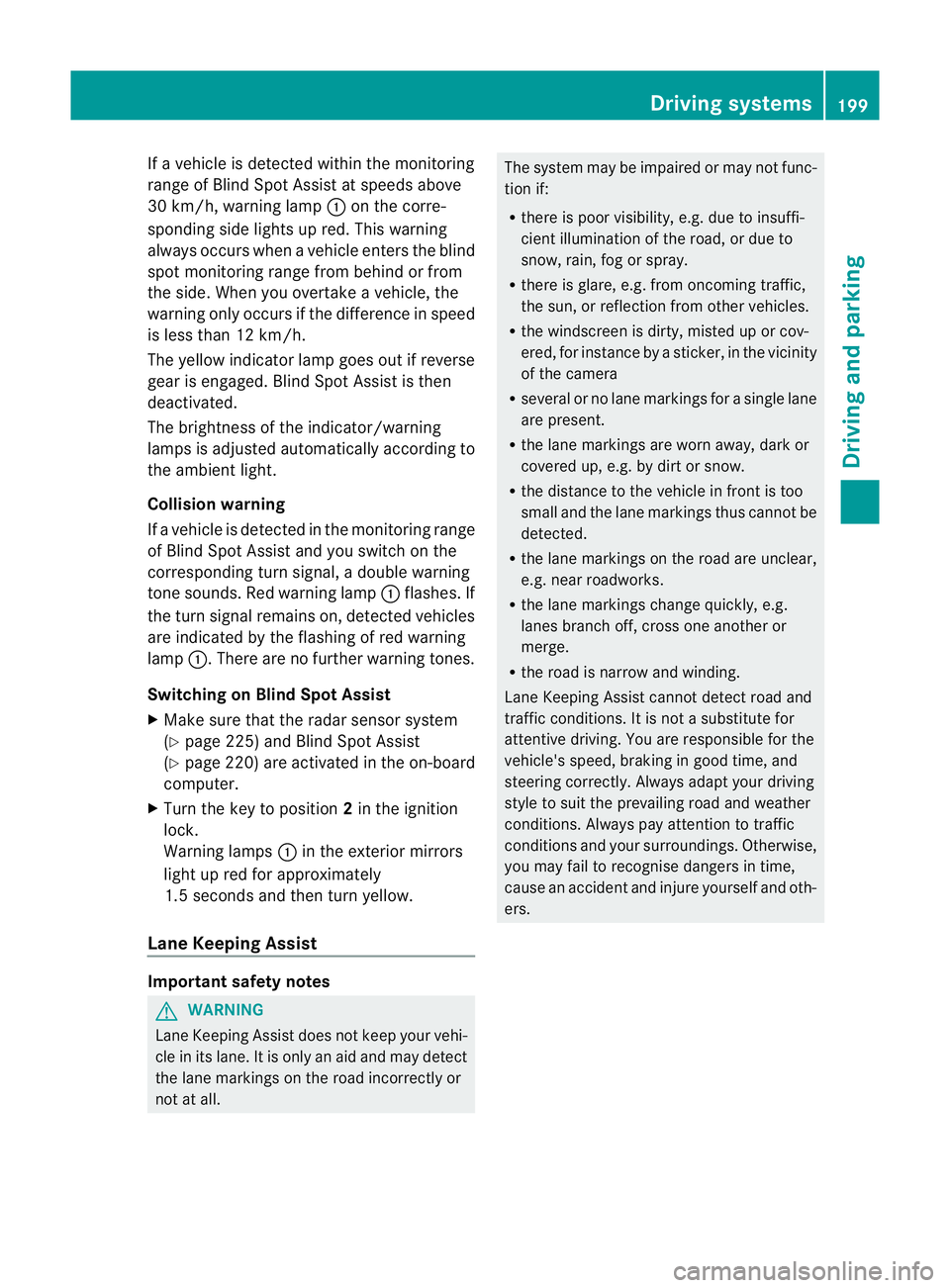
If
av ehicle is detected within the monitoring
range of Blind Spot Assist at speedsa bove
30 km/h, warning lamp :on the corre-
sponding side lights up red. This warning
alwayso ccurs when avehicle enters the blind
spot monitoring range from behind or from
the side. When you overtake avehicle ,the
warning only occurs if the difference in speed
is less than 12 km/h.
The yellow indicator lamp goes out if reverse
gear is engaged. Blind Spot Assist is then
deactivated.
The brightness of the indicator/warning
lampsisa djusted automaticall yaccording to
the ambient light.
Collision warning
If av ehicle is detected in the monitoring range
of Blind Spot Assist and you switch on the
corresponding turn signal ,adouble warning
tone sounds. Red warning lamp :flashes. If
the turn signal remains on, detected vehicles
are indicated by the flashing of red warning
lamp :.There are no further warning tones.
Switching on Blind Spot Assist
X Make sure that the radar sensor system
(Y page 225) and Blind Spot Assist
(Y page 220) are activated in the on-board
computer.
X Turn the key to position 2in the ignition
lock.
Warning lamps :in the exterior mirrors
light up red for approximately
1.5 seconds and then turn yellow.
Lane Keeping Assist Important safety notes
G
WARNING
Lane Keeping Assist does not keep your vehi-
cle in its lane. It is only an aid and may detect
the lane markings on the road incorrectly or
not at all. The system may be impaired or may not func-
tion if:
R
there is poor visibility, e.g. due to insuffi-
cient illumination of the road, or due to
snow, rain, fog or spray.
R there is glare, e.g. from oncomingt raffic,
the sun, or reflection from other vehicles.
R the windscreen is dirty, misted up or cov-
ered, for instancebyas ticker, in the vicinity
of the camera
R several or no lane markings for asingle lane
are present.
R the lane markings are worn away,d ark or
covered up, e.g. by dirt or snow.
R the distance to the vehicle in front is too
small and the lane markings thus cannot be
detected.
R the lane markings on the road are unclear,
e.g. near roadworks.
R the lane markings change quickly, e.g.
lanes branch off, cross one another or
merge.
R the road is narrow and winding.
Lane Keeping Assist cannot detect road and
traffic conditions. It is not asubstitute for
attentive driving. You are responsible for the
vehicle's speed, braking in good time, and
steering correctly. Always adapt your driving
style to suit the prevailing road and weather
conditions. Always pay attention to traffic
conditionsa nd your surroundings. Otherwise,
you may fail to recognise dangers in time,
cause an accident and injure yourself and oth-
ers. Driving systems
199Driving and parking Z
Page 203 of 373
General notes
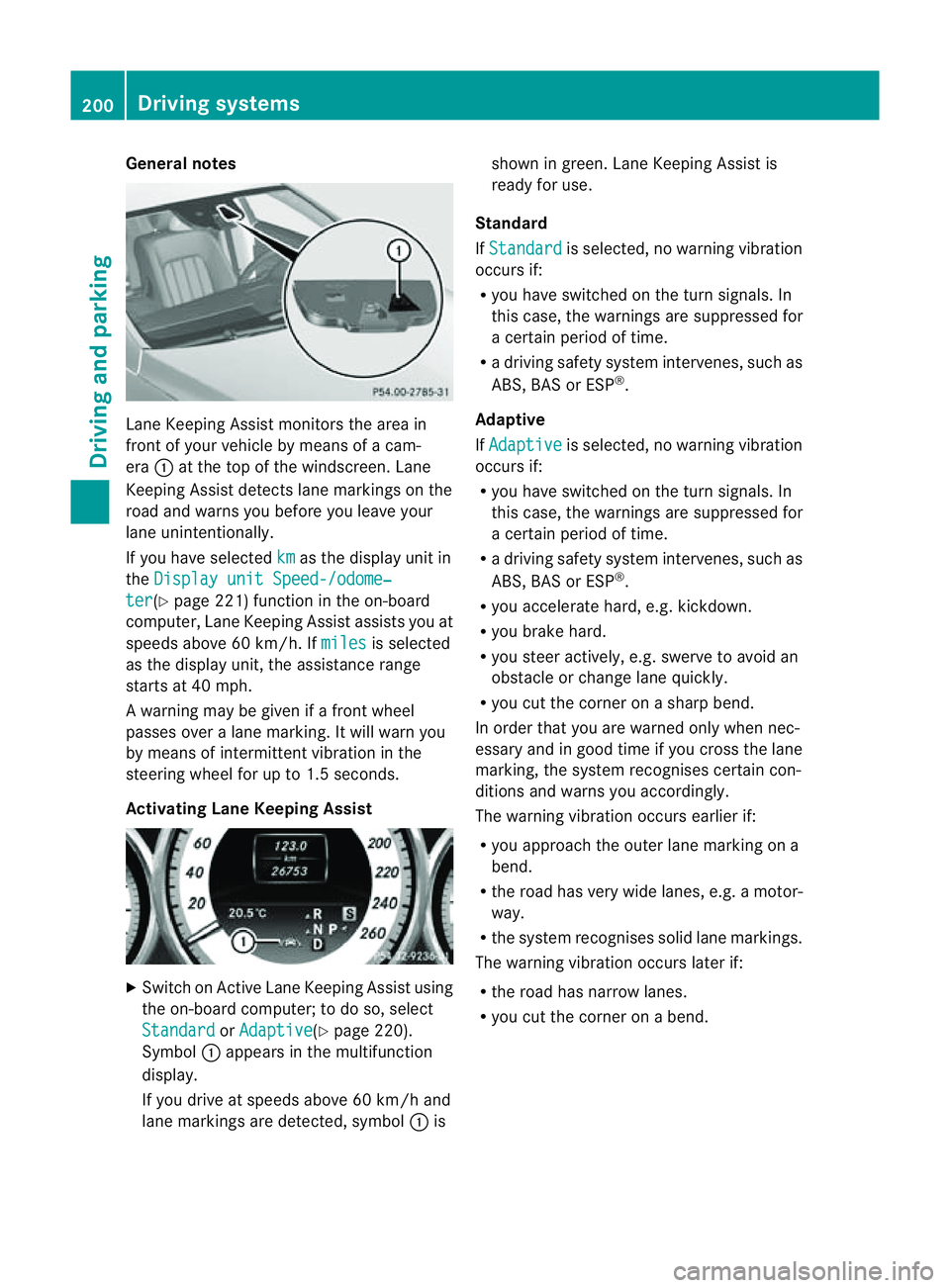
Lane Keeping Assist monitors the area in
front of yourv
ehicle by means of acam-
era :at the top of the windscreen. Lane
Keeping Assist detects lane markings on the
road and warns you before you leave your
lane unintentionally.
If you have selected km as the display unit in
the Display unit Speed-/odome‐ ter (Y
page 221) function in the on-board
computer, Lane Keeping Assist assists you at
speed sabove 60 km/h. If miles is selected
as the display unit, the assistance range
starts at 40 mph.
Aw arning may be given if afront wheel
passes over alane marking. It willw arn you
by means of intermittent vibration in the
steering wheelf or up to 1.5 seconds.
Activating Lane Keeping Assist X
Switch on Active Lane Keeping Assist using
the on-board computer; to do so, select
Standard or
Adaptive (Y
page 220).
Symbol :appears in the multifunction
display.
If you drive at speed sabove 60 km/h and
lane markings are detected, symbol :is shown in green. Lane Keeping Assist is
readyf or use.
Standard
If Standard is selected, no warning vibration
occurs if:
R you have switched on the turn signals. In
this case, the warnings are suppressed for
ac ertain perio doftime.
R ad riving safety system intervenes, such as
ABS, BAS or ESP ®
.
Adaptive
If Adaptive is selected, no warning vibration
occurs if:
R you have switched on the turn signals. In
this case, the warnings are suppressed for
ac ertain perio doftime.
R ad riving safety system intervenes, such as
ABS, BAS or ESP ®
.
R you accelerate hard, e.g. kickdown.
R you brake hard.
R you steer actively ,e.g. swerve to avoidan
obstacle or change lane quickly.
R you cut the corner on asharp bend.
In order that you are warned only when nec-
essary and in good time if you cross the lane
marking, the system recognises certain con-
ditions and warns you accordingly.
The warning vibration occurs earlier if:
R you approach the outer lane marking on a
bend.
R the road has very widel anes, e.g.amotor-
way.
R the system recognises solidl ane markings.
The warning vibration occurs later if:
R the road has narrow lanes.
R you cut the corner on abend. 200
Driving systemsDriving and parking
Page 204 of 373
Active Driving Assistance package
Genera lnotes The Active Drivin
gAssistance packag econ-
sists of DISTRONI CPLUS(Ypage 170), Active
Blind Spot Assist (Y page 201)and Active
Lane Keeping Assist (Y page 204).
Active Blind Spot Assist Important safet
ynotes G
WARNING
Active Blind Spot Assist is only an aid and may
detec tvehicles/obstacles incorrectly or not
at all.
The system may be impaired or may not func-
tion if:
R there is poor visibility, e.g. due to snow,
rain, fog or spray.
R the rear and/or fron tsensor sare dirty.
Active Blind Spot Assist may not detect nar-
row vehicles, such as motorcycles or bicycles,
or only detect them too late. It cannot detect
vehicles which are overtaken at asmall dis-
tanc eand then enter the blind spot area.
Active Blind Spot Assist cannot detect road
and traffic conditions .Itisnotas ubstitute for
attentive driving. You are responsible for the
vehicle's speed, braking in good time, and
steering correctly. Always adapty our driving
style to suit the prevailing road and weather
conditions. Always pay attention to traffic
conditions and your surroundings. Otherwise,
you may fail to recognise dangers in time,
cause an accident and injure yourself and oth-
ers.
General notes
Active Blind Spot Assist uses aradar sensor
system to monitor the area to the sides of
your vehicle which are behind the driver. A
warning display in the exterior mirrors draws
your attention to vehicles detected in the
monitored area. If you then switch on the cor-
responding turn signal to change lane, you
will also receive an optical and audible warn- ing. If
arisk of lateral collision is detected,
corrective braking may help you avoid acol-
lision. To support the course-correcting brake
application, Active Blind Spot Assist uses the
forward-facin gradar sensor system. The free
space in the direction of travel is then evalu-
ated.
Active Blind Spot Assist supports you from a
speed of approximately 30 km/h.
The radar sensor system is switched off auto-
matically in the vicinit yofradio telescope
facilities (Y page 368).
For Active Blind Spot Assist to assist you
when driving, the radar sensor system must
be activated (Y page 225) and operational.
Monitoring range G
WARNING
Active Blind Spot Assist monitors certain
areas in the immediate vicinit yofyour vehicle.
Vehicles that approach and drive past at high
speeds are not detected. No visual nor audi-
ble warnings are emitted and the system does
not brake the vehicle to correc tyour course.
If the lanes are very wide, it may not be pos-
sible to monitor the complete width of the
neighbouring lane. For this reason, vehicles in
the next lane may not be detected, especially
if they are driving in astaggered formation.
This may be the case if vehicles are driving at
the edge of their lane that is furthest away
from your vehicle.
Always pay attention to traffic conditions and
your surroundings. Otherwise, you may fail to
recognise dangers in time, cause an accident
and injure yourself and others. Driving systems
201Driving and parking Z
Page 205 of 373
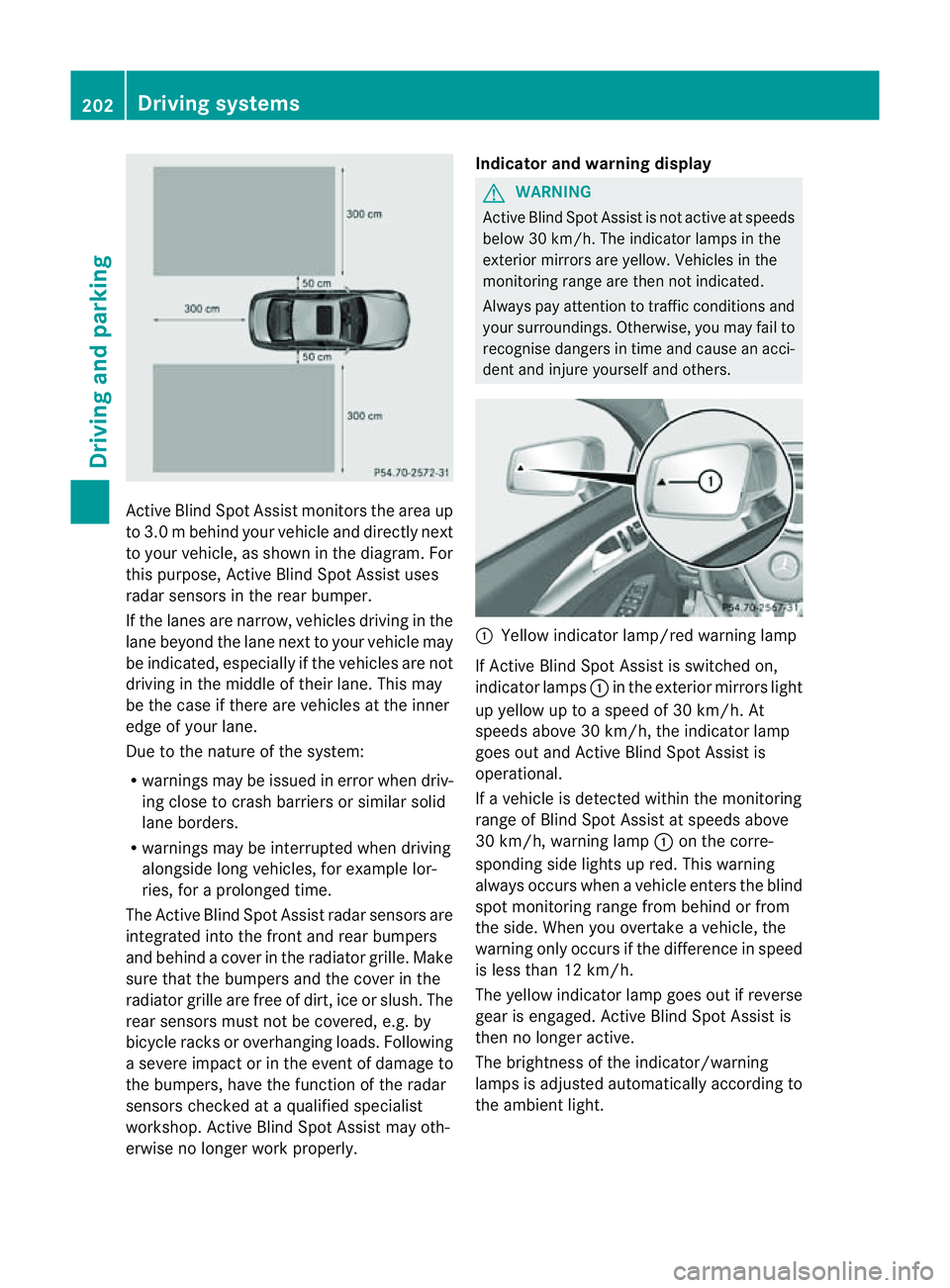
Activ
eBlind Spo tAssist monitors the area up
to 3.0 mbehind your vehicle and directly next
to your vehicle, as shown in the diagram. For
this purpose, Active Blind Spot Assist uses
radar sensors in the rear bumper.
If the lanes are narrow, vehicles driving in the
lane beyond the lane next to your vehicle may
be indicated, especially if the vehicles are not
driving in the middle of their lane. This may
be the case if there are vehicles at the inner
edge of your lane.
Due to the nature of the system:
R warnings may be issued in error when driv-
ing close to crash barriers or similars olid
lane borders.
R warnings may be interrupted when driving
alongside long vehicles, for example lor-
ries, for aprolonged time.
The Active Blind Spot Assist radar sensors are
integrated into the front and rear bumpers
and behind acover in the radiator grille. Make
sure that the bumpers and the cover in the
radiator grille are free of dirt, ice or slush. The
rear sensors must not be covered, e.g. by
bicycle racks or overhanging loads. Following
as evere impact or in the event of damage to
the bumpers, have the function of the radar
sensors checked at aqualified specialist
workshop. Active Blind Spot Assist may oth-
erwise no longer work properly. Indicator and warning display G
WARNING
Active Blind Spot Assist is not active at speeds
below 30 km/h. The indicator lamps in the
exterior mirrors are yellow .Vehicles in the
monitoring range are then not indicated.
Always pay attention to traffic conditions and
your surroundings. Otherwise, you may fail to
recognise dangers in time and cause an acci-
dent and injure yourself and others. :
Yellow indicator lamp/red warning lamp
If Active Blind Spot Assist is switched on,
indicator lamps :in the exterior mirror slight
up yellow up to aspeed of 30 km/h. At
speeds above 30 km/h, the indicator lamp
goes out and Active Blind Spot Assist is
operational.
If av ehicle is detected within the monitoring
range of Blind Spot Assist at speeds above
30 km/h, warning lamp :on the corre-
spondin gside lights up red. This warning
alway soccurs when avehicle enters the blind
spot monitoring range from behind or from
the side. When you overtake avehicle, the
warning only occurs if the difference in speed
is less than 12 km/h.
The yellow indicator lamp goes out if reverse
gear is engaged. Active Blind Spot Assist is
then no longer active.
The brightness of the indicator/warning
lamps is adjusted automatically according to
the ambient light. 202
Driving systemsDriving and parking