phone MERCEDES-BENZ E-Class 2014 W212 Comand Manual
[x] Cancel search | Manufacturer: MERCEDES-BENZ, Model Year: 2014, Model line: E-Class, Model: MERCEDES-BENZ E-Class 2014 W212Pages: 270, PDF Size: 5.82 MB
Page 119 of 270
X
Select Yes
YesorNo
No.
If you select Yes
Yes, the entry is deleted.
If you select No
No, the process will be can-
celed. SIRIUS XM service
Displaying SIRIUS XM service informa-
tion You can display the SIRIUS XM service infor-
mation.
X To show the menu: press0098the COMAND
controller.
X Select Navi
Navi in the main function bar by
sliding 00970052and turning 00790052007Athe COMAND
controller and press 0098to confirm.
X Select SIRIUS Service
SIRIUS Service and press0098to
confirm.
The window on the right half of the display shows the telephone number of the pro-
vider (SIRIUS XM) and the serial number of
your service module.
Registering for the SIRIUS XM traffic
report service X
Call the traffic report provider's phone
number shown on the screen.
i You can also have the satellite service
activated online. To do so, visit the SIRIUS
XM Radio website at
http://www.sirius.com (USA).
Once the connection has been established: X Follow the instructions of the operator.
The activation process may take up to ten
minutes.
If registration is not included when purchas-
ing the system, your credit card details will be required to activate your account. Compass function
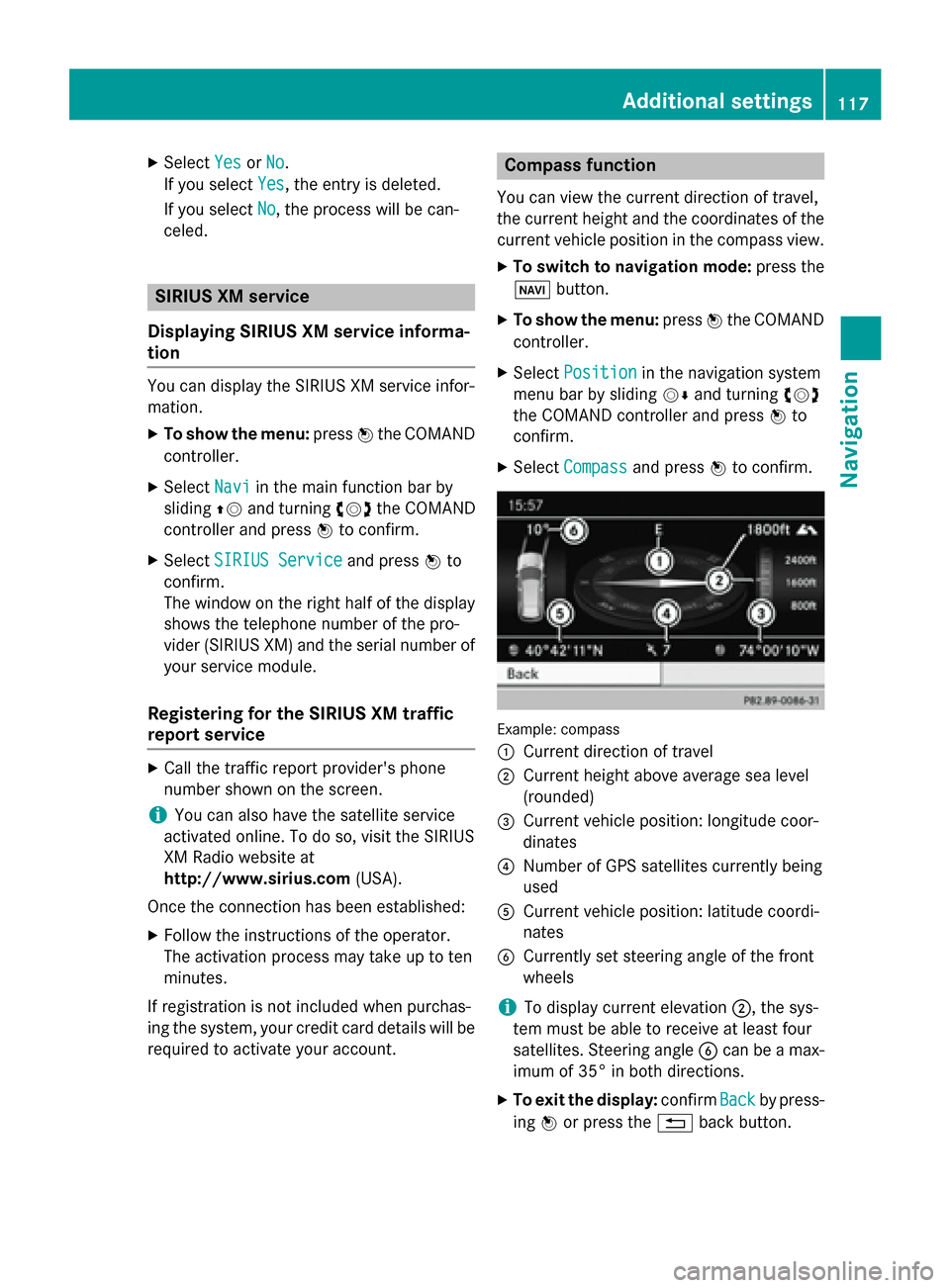
You can view the current direction of travel,
the current height and the coordinates of the current vehicle position in the compass view.
X To switch to navigation mode: press the
00BE button.
X To show the menu: press0098the COMAND
controller.
X Select Position Position in the navigation system
menu bar by sliding 00520064and turning 00790052007A
the COMAND controller and press 0098to
confirm.
X Select Compass
Compass and press 0098to confirm. Example: compass
0043
Current direction of travel
0044 Current height above average sea level
(rounded)
0087 Current vehicle position: longitude coor-
dinates
0085 Number of GPS satellites currently being
used
0083 Current vehicle position: latitude coordi-
nates
0084 Currently set steering angle of the front
wheels
i To display current elevation
0044, the sys-
tem must be able to receive at least four
satellites. Steering angle 0084can be a max-
imum of 35° in both directions.
X To exit the display: confirmBack Backby press-
ing 0098or press the 0038back button. Additional settings
117Navigation Z
Page 125 of 270
Your COMAND equipment
................124
General notes .................................... 124
Telephony via the Bluetooth ®
inter-
face .................................................... 125
Reception and transmission vol-
ume .................................................... 131
Using the telephone .........................132
Using the phone book ......................136
Using call lists ................................... 140
Using the speed dial list ...................142
Text messages .................................. 144
Using the address book ...................146 123Telephone
Page 126 of 270

Your COMAND equipment
These operating instructions describe all the
standard and optional equipment for your
COMAND system, as available at the time of
going to print. Country-specific differences
are possible. Please note that your
COMAND system may not be equipped with
all the features described. General notes
Important safety notes
G
WARNING
If you operate mobile communication equip-
ment while driving, you will be distracted from traffic conditions. You could also lose controlof the vehicle. There is a risk of an accident.
Only operate this equipment when the vehicleis stationary.
If you make a call on your mobile phone while
driving, always use hands-free mode. Only
use the mobile phone when road, weather
and traffic conditions permit. Some jurisdic-
tions prohibit the driver from using a mobile
phone while driving a vehicle.
Bear in mind that at a speed of only 30 mph
(approximately 50 km/h), the vehicle covers
a distance of 44 feet (approximately 14 m)
per second.
Excessive levels of electromagnetic radiation
may cause damage to your health and the
health of others.
There is scientific discussion surrounding the possible health risks posed by electromag-
netic fields. You can reduce this risk by using
an exterior antenna.
Therefore, only use mobile communication
equipment if it is connected to the exterior
antenna of the vehicle. Introduction
COMAND provides telephony via the Blue-
tooth ®
interface.
When connecting Bluetooth ®
-capable mobile
phones with PBAP (Phone BookAccess
Profile), the contacts are automatically down- loaded to COMAND.
With a suitable mobile phone, you can use the
hands-free system and receive vCards via the
Bluetooth ®
interface.
You can use the text message function
(receiving and reading) if the mobile phone
supports the MAP (Message AccessProfile)
Bluetooth ®
profile.
You can obtain more detailed information
about suitable mobile phones and about con-
necting Bluetooth ®
-capable mobile phones to
COMAND on the Internet at
http://www.mbusa-mobile.com . Or call
the Mercedes-Benz Customer Assistance
center at
1-800-FOR-MERCedes(1-800-367-6372 )for
the USA or at 1-800-387-0100 for Canada. Call disconnection while the vehicle is
in motion
A call may be disconnected if:
R there is insufficient network coverage in
certain areas.
R you move from one transmitter/receiver
area (cell) into another and no channels are
free.
R you use a SIM card which is not compatible
with the network available. Operating options
You can operate the telephone by:
R using the COMAND controller:
turn 00790052007A
slide 009500520096 or009700520064 124
General notesTelephone
Page 127 of 270
press
0098
R using the 0061or0076 button and using
the telephone keypad on COMAND
R using the 0061or0076 button on the mul-
tifunction steering wheel
R using the Voice Control System (see the
separate Voice Control System operating
instructions)
Unless stated otherwise, the descriptions and illustrations in this section refer to COMAND. Function restrictions
The telephone is not ready for use in the fol-
lowing situations:
R The telephone automatically tries to log on
to a network. If no network is available, you may not be able to make a " 911" emer-
gency call. If you attempt to make an out-
going call, the No Service
No Service message will
appear for a short while. "911" emergency call
The 911 emergency call is a public service.
Using it without due cause is a criminal
offense.
The following requirements must be fulfilled
for a 911emergency call:
R the mobile phone must be switched on.
R a network must be available.
R a valid and operational SIM card must be
inserted in the mobile phone.
R the mobile phone is connected to COMAND
via Bluetooth ®
.
If you cannot make an emergency call, you
must arrange rescue measures yourself. X
Enter the number on COMAND
(Y page 132).
X Press 0061.
The telephone makes the connection.
X Wait until the emergency call center
answers and describe the emergency sit-
uation. Telephony via the Bluetooth
®
inter-
face Prerequisites
For telephony via COMAND's Bluetooth ®
interface, a Bluetooth ®
-capable mobile
phone is required.
On COMAND
X Activate the Bluetooth ®
function in
COMAND (Y page 45).
On the mobile phone X Switch on the mobile phone and enter the
PIN when prompted to do so (see the
mobile phone operating instructions).
X Activate Bluetooth ®
functions and, where
necessary, Bluetooth ®
visibility on the
mobile phone (see the mobile phone oper-
ating instructions).
The battery of the mobile phone should
always be kept sufficiently charged in order to prevent malfunctions.
In preparation for telephoning via the Blue-
tooth ®
interface, you should check the fol-
lowing items on your mobile phone (see the
mobile phone operating instructions):
R Hands-Free Profile
The mobile phone must support Hands-
Free Profile 1.0 or above.
R Bluetooth ®
visibility
On certain mobile phones, the device itself
must be made "visible" to other devices, as
well as activating the Bluetooth ®
function
(see the mobile phone operating instruc-
tions). Telephony via the Bluetooth
®
interface 125Telephone Z
Page 128 of 270

This visibility is for restricted periods of
time on some mobile phones.
R Bluetooth ®
device name
Every Bluetooth ®
device has its own Blue-
tooth ®
device name. This device name is
freely definable, but can be identical for all
devices from the same manufacturer. It is
therefore recommended that you change
this name so that you can easily recognize
your mobile phone (see the mobile phone
operating instructions).
i Not all mobile phones available on the
market are equally suitable. You can obtain
more detailed information about suitable
mobile phones and about connecting Blue-
tooth ®
-capable mobile phones to
COMAND on the Internet at
http://www.mbusa-mobile.com. Or call
the Mercedes-Benz Customer Assistance
Center at 1-800-FOR-MERCedes
(1-800-367-6372) (for the USA) or Cus-
tomer Relations at 1-800-387-010 0(for
Canada).
i Some displays (e.g. the signal strength)
depend on the supported version of the
Hands-Free Profile. Connecting a mobile phone
General information Before using your mobile phone with
COMAND for the first time, you will need to:
R search for it (Y page 127) and then
R authorize (register) it (Y page 128).
When you authorize a new mobile phone, it is connected automatically.
You can authorize up to 15 mobile phones. If the mobile phone supports PBAP (Phone
Book Access Profile) and MAP (M essage
Access Profile), the following contacts and
messages are downloaded into COMAND
when connecting:
R phone book
R call lists
R text messages
Further information on the conditions for con-
necting (Y page 125). 126
Telephony via the Bluetooth ®
interfaceTelephone
Page 129 of 270

Searching for a mobile phone
Empty Bluetooth
®
telephone list Conditions for searching
Bluetooth
®
telephone list after search is comple-
ted
X Press the 002Bfunction button on
COMAND.
X Select Connect Dev.
Connect Dev. from the telephone
basic menu by sliding 00520064and turning
00790052007Athe COMAND controller and press 0098
to confirm. X
Select Search Search for forPhone
Phone from
fromVehicle
Vehicle
and press the 0098button to confirm.
A message appears.
X Select Start Search
Start Search and press the0098
button to confirm.
The Searching for Bluetooth Searching for Bluetooth
Phones...
Phones... message appears. COMAND
looks for Bluetooth ®
telephones within
range and adds them to the Bluetooth ®
tel-
ephones list.
If a new phone is found, it appears in the list with the 00D3symbol.
The duration of the search depends on the
number of Bluetooth ®
telephones within
range and their characteristics.
Symbols in the Bluetooth ®
phone list Sym-
bol Explanation
00D3
New mobile phone in range, but
not yet authorized
0068
Authorized mobile phone
0036
Currently connected mobile
phone
00DC
Mobile phone in range and
authorized
00DC
(gray)
Mobile phone not in range, but
already authorized
The Bluetooth
®
telephone list shows all
mobile phones within range and all previously authorized mobile phones, whether or not
they are in range.
i If the Bluetooth ®
telephones list is already
full, you will be requested to de-authorize a
mobile phone (Y page 130). If COMAND
does not find your mobile phone, external
authorization may be necessary
(Y page 129).
i If you call up the telephone list again, the
unauthorized devices are removed from the Telephony via the Bluetooth
®
interface 127Telephone Z
Page 130 of 270
list. In this case, start a new search to
update the Bluetooth ®
telephone list.
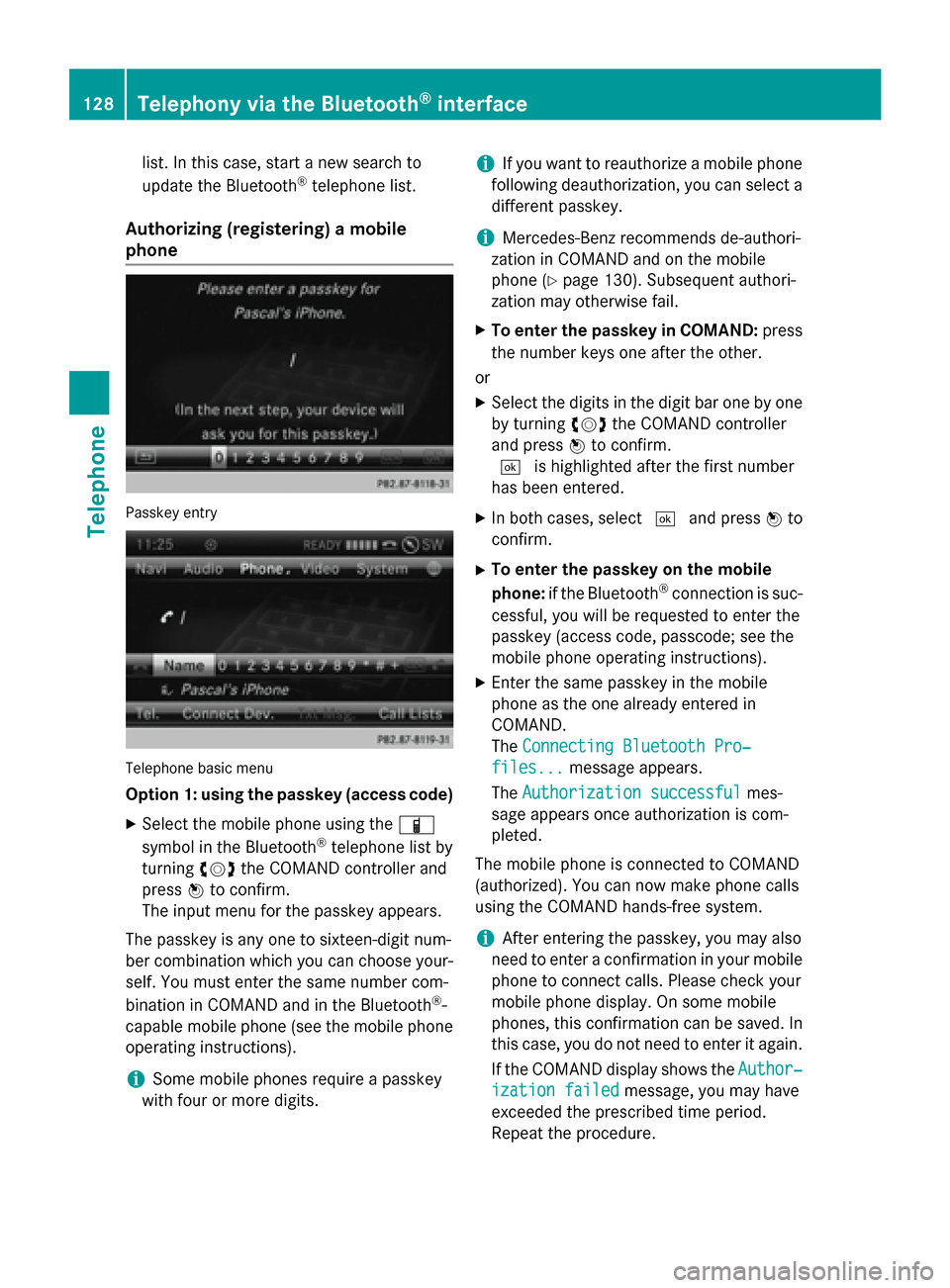
Authorizing (registering) a mobile
phone Passkey entry
Telephone basic menu
Option 1: using the passkey (access code)
X Select the mobile phone using the 00D3
symbol in the Bluetooth ®
telephone list by
turning 00790052007Athe COMAND controller and
press 0098to confirm.
The input menu for the passkey appears.
The passkey is any one to sixteen-digit num-
ber combination which you can choose your- self. You must enter the same number com-
bination in COMAND and in the Bluetooth ®
-
capable mobile phone (see the mobile phone
operating instructions).
i Some mobile phones require a passkey
with four or more digits. i
If you want to reauthorize a mobile phone
following deauthorization, you can select a different passkey.
i Mercedes-Benz recommends de-authori-
zation in COMAND and on the mobile
phone (Y page 130). Subsequent authori-
zation may otherwise fail.
X To enter the passkey in COMAND: press
the number keys one after the other.
or X Select the digits in the digit bar one by one
by turning 00790052007Athe COMAND controller
and press 0098to confirm.
0054 is highlighted after the first number
has been entered.
X In both cases, select 0054and press 0098to
confirm.
X To enter the passkey on the mobile
phone: if the Bluetooth ®
connection is suc-
cessful, you will be requested to enter the
passkey (access code, passcode; see the
mobile phone operating instructions).
X Enter the same passkey in the mobile
phone as the one already entered in
COMAND.
The Connecting Bluetooth Pro‐ Connecting Bluetooth Pro‐
files...
files... message appears.
The Authorization successful
Authorization successful mes-
sage appears once authorization is com-
pleted.
The mobile phone is connected to COMAND
(authorized). You can now make phone calls
using the COMAND hands-free system.
i After entering the passkey, you may also
need to enter a confirmation in your mobile
phone to connect calls. Please check your
mobile phone display. On some mobile
phones, this confirmation can be saved. In
this case, you do not need to enter it again.
If the COMAND display shows the Author‐ Author‐
ization failed
ization failed message, you may have
exceeded the prescribed time period.
Repeat the procedure. 128
Telephony via the Bluetooth ®
interfaceTelephone
Page 131 of 270
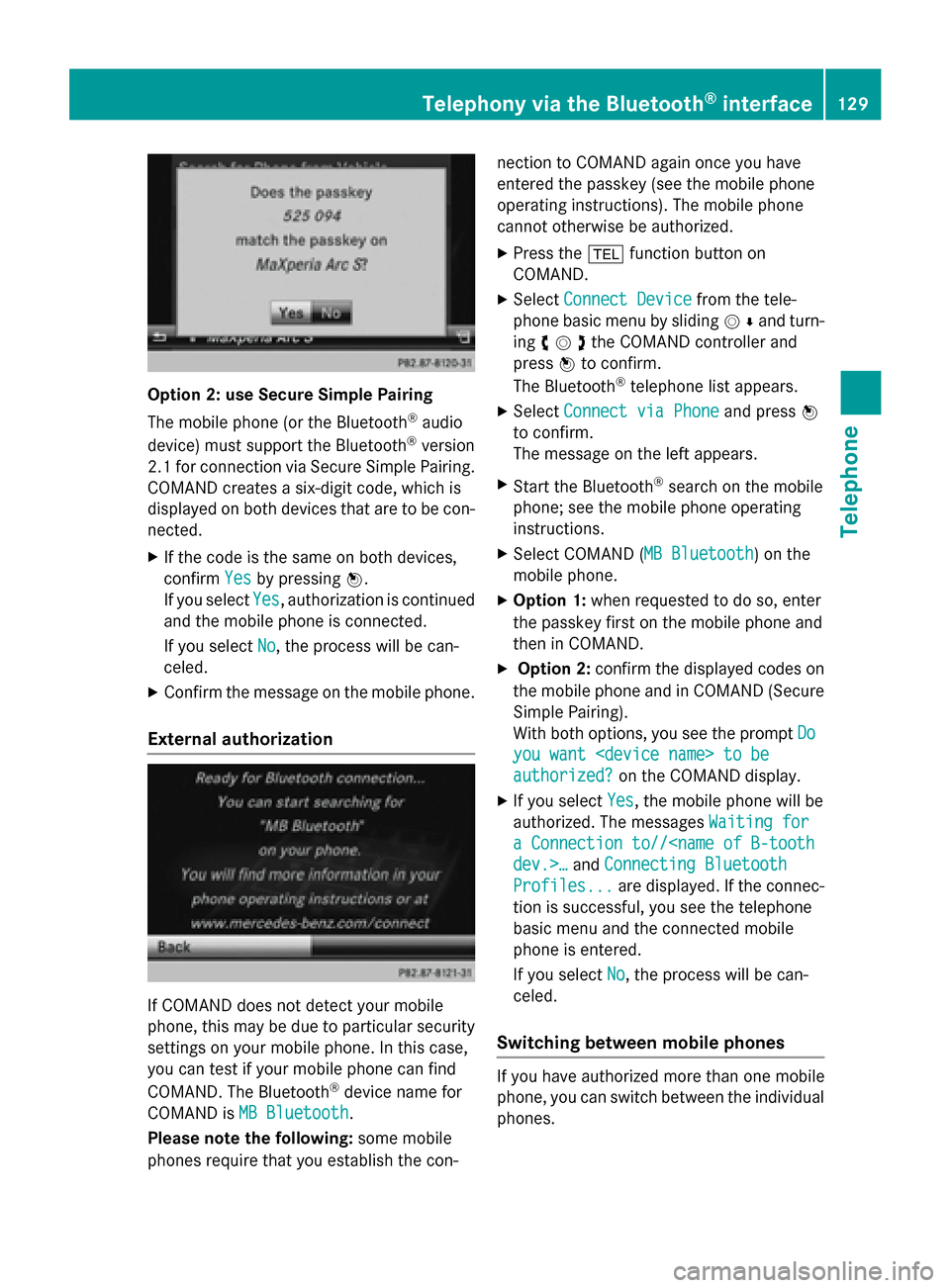
Option 2: use Secure Simple Pairing
The mobile phone (or the Bluetooth
®
audio
device) must support the Bluetooth ®
version
2.1 for connection via Secure Simple Pairing. COMAND creates a six-digit code, which is
displayed on both devices that are to be con-
nected.
X If the code is the same on both devices,
confirm Yes
Yes by pressing 0098.
If you select Yes Yes, authorization is continued
and the mobile phone is connected.
If you select No
No, the process will be can-
celed.
X Confirm the message on the mobile phone.
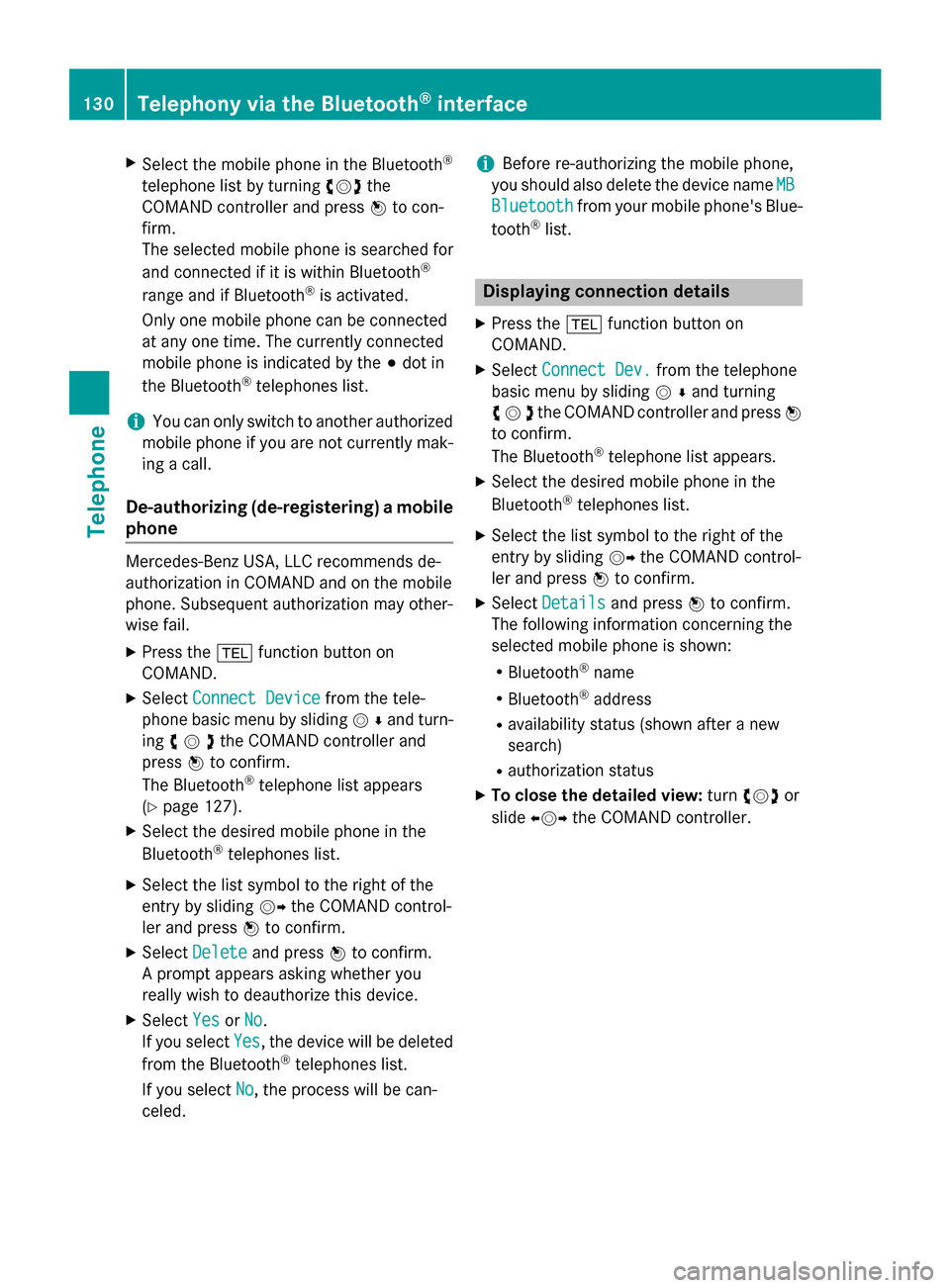
External authorization If COMAND does not detect your mobile
phone, this may be due to particular security settings on your mobile phone. In this case,
you can test if your mobile phone can find
COMAND. The Bluetooth ®
device name for
COMAND is MB Bluetooth
MB Bluetooth.
Please note the following: some mobile
phones require that you establish the con- nection to COMAND again once you have
entered the passkey (see the mobile phone
operating instructions). The mobile phone
cannot otherwise be authorized.
X Press the 002Bfunction button on
COMAND.
X Select Connect Device Connect Device from the tele-
phone basic menu by sliding 00520064and turn-
ing 00790052007Athe COMAND controller and
press 0098to confirm.
The Bluetooth ®
telephone list appears.
X Select Connect via Phone
Connect via Phone and press0098
to confirm.
The message on the left appears.
X Start the Bluetooth ®
search on the mobile
phone; see the mobile phone operating
instructions.
X Select COMAND ( MB Bluetooth MB Bluetooth) on the
mobile phone.
X Option 1: when requested to do so, enter
the passkey first on the mobile phone and
then in COMAND.
X Option 2: confirm the displayed codes on
the mobile phone and in COMAND (Secure Simple Pairing).
With both options, you see the prompt Do Do
you want
you want
authorized? authorized? on the COMAND display.
X If you select Yes
Yes, the mobile phone will be
authorized. The messages Waiting for
Waiting for
a Connection to//
Connecting Bluetooth
Profiles...
Profiles... are displayed. If the connec-
tion is successful, you see the telephone
basic menu and the connected mobile
phone is entered.
If you select No No, the process will be can-
celed.
Switching between mobile phones If you have authorized more than one mobile
phone, you can switch between the individual
phones. Telephony via the Bluetooth
®
interface 129Telephone Z
Page 132 of 270
X
Select the mobile phone in the Bluetooth ®
telephone list by turning 00790052007Athe
COMAND controller and press 0098to con-
firm.
The selected mobile phone is searched for
and connected if it is within Bluetooth ®
range and if Bluetooth ®
is activated.
Only one mobile phone can be connected
at any one time. The currently connected
mobile phone is indicated by the 003Bdot in
the Bluetooth ®
telephones list.
i You can only switch to another authorized
mobile phone if you are not currently mak- ing a call.
De-authorizing (de-registering) a mobile phone Mercedes-Benz USA, LLC recommends de-
authorization in COMAND and on the mobile
phone. Subsequent authorization may other-
wise fail.
X Press the 002Bfunction button on
COMAND.
X Select Connect Device
Connect Device from the tele-
phone basic menu by sliding 00520064and turn-
ing 00790052007Athe COMAND controller and
press 0098to confirm.
The Bluetooth ®
telephone list appears
(Y page 127).
X Select the desired mobile phone in the
Bluetooth ®
telephones list.
X Select the list symbol to the right of the
entry by sliding 00520096the COMAND control-
ler and press 0098to confirm.
X Select Delete
Delete and press 0098to confirm.
A prompt appears asking whether you
really wish to deauthorize this device.
X Select Yes YesorNo
No.
If you select Yes
Yes , the device will be deleted
from the Bluetooth ®
telephones list.
If you select No
No, the process will be can-
celed. i
Before re-authorizing the mobile phone,
you should also delete the device name MB
MB
Bluetooth
Bluetooth from your mobile phone's Blue-
tooth ®
list. Displaying connection details
X Press the 002Bfunction button on
COMAND.
X Select Connect Dev.
Connect Dev. from the telephone
basic menu by sliding 00520064and turning
00790052007Athe COMAND controller and press 0098
to confirm.
The Bluetooth ®
telephone list appears.
X Select the desired mobile phone in the
Bluetooth ®
telephones list.
X Select the list symbol to the right of the
entry by sliding 00520096the COMAND control-
ler and press 0098to confirm.
X Select Details Details and press 0098to confirm.
The following information concerning the
selected mobile phone is shown:
R Bluetooth ®
name
R Bluetooth ®
address
R availability status (shown after a new
search)
R authorization status
X To close the detailed view: turn00790052007A or
slide 009500520096 the COMAND controller. 130
Telephony via the Bluetooth ®
interfaceTelephone
Page 133 of 270
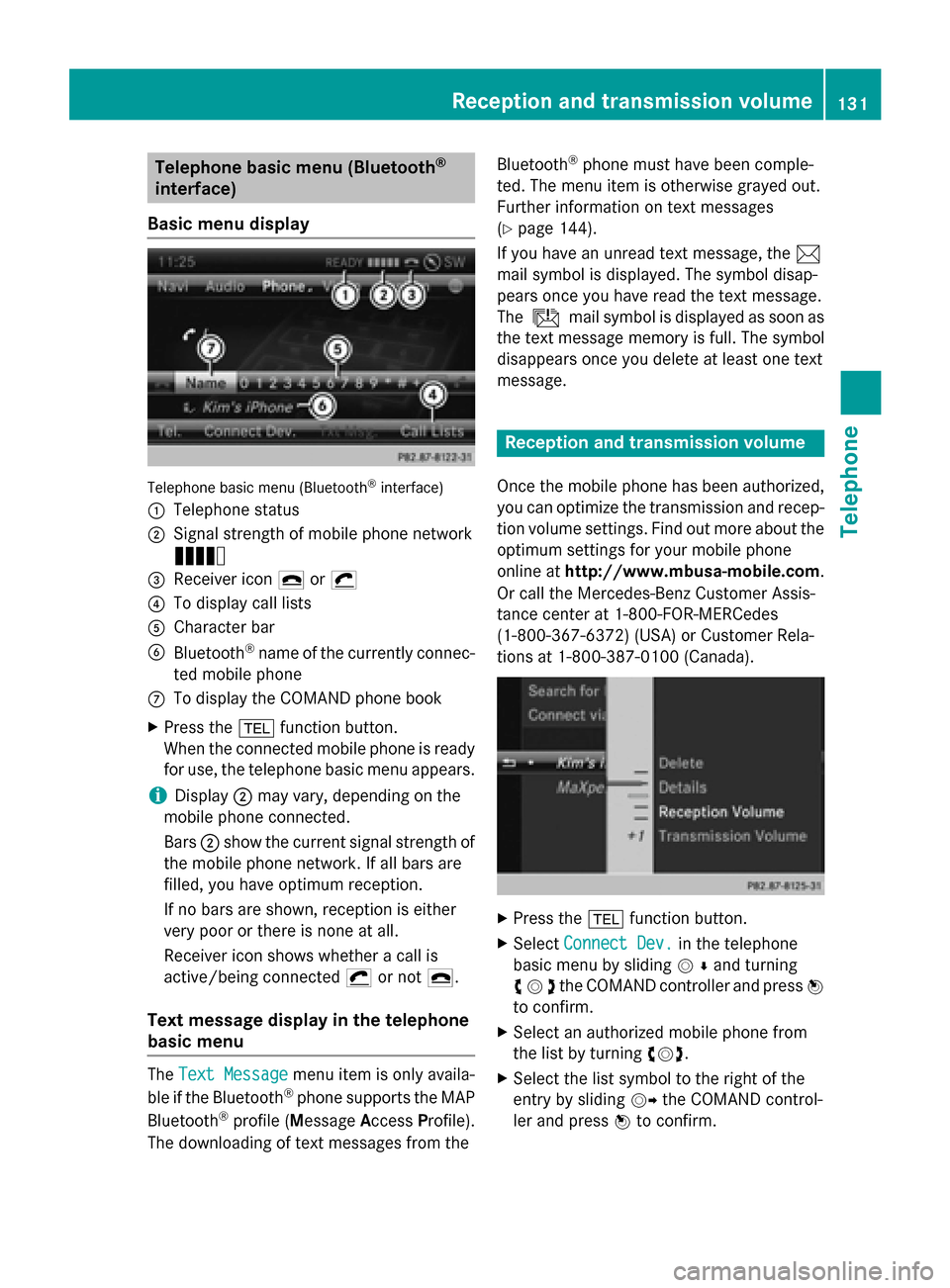
Telephone basic menu (Bluetooth
®
interface)
Basic menu display Telephone basic menu (Bluetooth
®
interface)
0043 Telephone status
0044 Signal strength of mobile phone network
Ä
0087 Receiver icon 0071or0075
0085 To display call lists
0083 Character bar
0084 Bluetooth ®
name of the currently connec-
ted mobile phone
006B To display the COMAND phone book
X Press the 002Bfunction button.
When the connected mobile phone is ready
for use, the telephone basic menu appears.
i Display
0044may vary, depending on the
mobile phone connected.
Bars 0044show the current signal strength of
the mobile phone network. If all bars are
filled, you have optimum reception.
If no bars are shown, reception is either
very poor or there is none at all.
Receiver icon shows whether a call is
active/being connected 0075or not 0071.
Text message display in the telephone
basic menu The
Text Message Text Message menu item is only availa-
ble if the Bluetooth ®
phone supports the MAP
Bluetooth ®
profile ( Message AccessProfile).
The downloading of text messages from the Bluetooth
®
phone must have been comple-
ted. The menu item is otherwise grayed out.
Further information on text messages
(Y page 144).
If you have an unread text message, the 0083
mail symbol is displayed. The symbol disap-
pears once you have read the text message.
The ú mail symbol is displayed as soon as
the text message memory is full. The symbol
disappears once you delete at least one text
message. Reception and transmission volume
Once the mobile phone has been authorized,
you can optimize the transmission and recep-
tion volume settings. Find out more about the optimum settings for your mobile phone
online at http://www.mbusa-mobile.com.
Or call the Mercedes-Benz Customer Assis-
tance center at 1-800-FOR-MERCedes
(1-800-367-6372) (USA) or Customer Rela-
tions at 1-800-387-010 0(Canada). X
Press the 002Bfunction button.
X Select Connect Dev. Connect Dev. in the telephone
basic menu by sliding 00520064and turning
00790052007Athe COMAND controller and press 0098
to confirm.
X Select an authorized mobile phone from
the list by turning 00790052007A.
X Select the list symbol to the right of the
entry by sliding 00520096the COMAND control-
ler and press 0098to confirm. Reception and transmission volume
131Telephone Z