ESP MERCEDES-BENZ E-CLASS CABRIOLET 2011 Workshop Manual
[x] Cancel search | Manufacturer: MERCEDES-BENZ, Model Year: 2011, Model line: E-CLASS CABRIOLET, Model: MERCEDES-BENZ E-CLASS CABRIOLET 2011Pages: 353, PDF Size: 8.42 MB
Page 166 of 353
Refuelling
Fue lfille rflap The fuel filler flap is unlocked or locked auto-
matically when you open or close the vehicle
with the key or using KEYLESS-GO.
The position of the fuel filler cap is displayed
in the instrumen tcluster 8.T he arrow
next to the filling pump indicates the side of
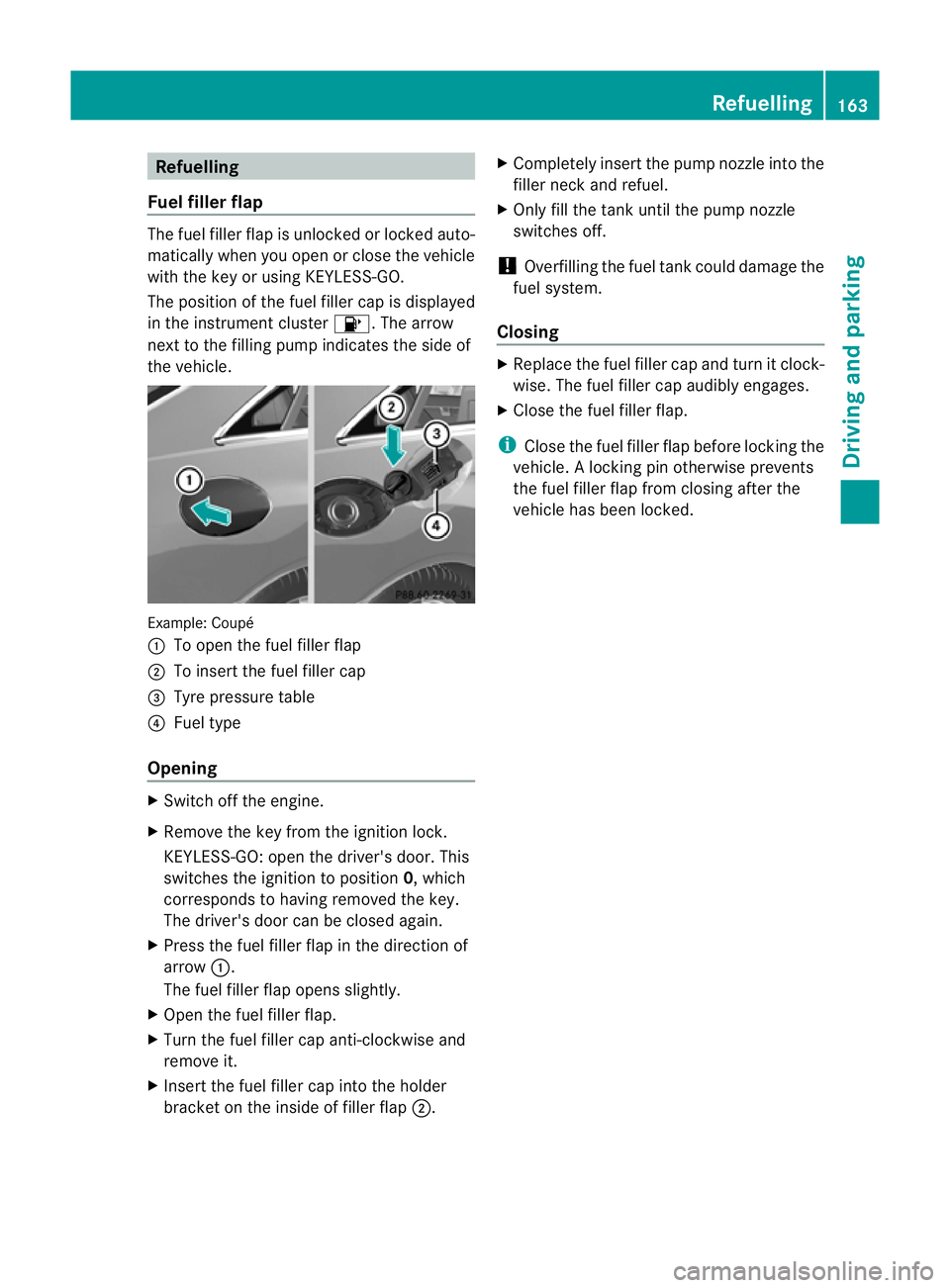
the vehicle. Example: Coupé
:
To open the fuel filler flap
; To insert the fuel filler cap
= Tyre pressure table
? Fuel type
Opening X
Switch off the engine.
X Remove the key from the ignition lock.
KEYLESS-GO: open the driver's door. This
switches the ignition to position 0,which
corresponds to having removed the key.
The driver's door can be closed again.
X Press the fuel filler flap in the direction of
arrow :.
The fuel filler flap opens slightly.
X Open the fuel filler flap.
X Turn the fuel filler cap anti-clockwise and
remove it.
X Insert the fuel filler cap into the holder
bracket on the inside of filler flap ;.X
Completely insert the pump nozzle into the
filler neck and refuel.
X Only fill the tank until the pump nozzle
switches off.
! Overfilling the fuel tank could damage the
fuel system.
Closing X
Replace the fuel filler cap and turn it clock-
wise. The fuel filler cap audibly engages.
X Close the fuel filler flap.
i Close the fuel filler flap before locking the
vehicle. Alockingp in otherwise prevents
the fuel filler flap from closing after the
vehicle has been locked. Refuelling
163Driving and parking Z
Page 169 of 353
Vehicles with automatic transmission
X
Apply the parking brake firmly.
X Shift the transmission to position P.
Usin gthe key
X Turn the key to position 0in the ignition
lock and remove it.
The immobiliser is activated.
i The key can onl yberemove difthe trans-
mission is in position P.
Usin gKEYLESS -GO
X Press the Start/Sto pbutton (Y page 147).
The engine stop sand al lthe indicator
lamps in the instrument cluster go out.
i Whe nthe driver's door is closed, this cor-
responds to key position 1.When the driv-
er's door is open, this corresponds to key
position 0,i.e. key removed.
i The engine can be turned off while the
vehicle is in motion by pressing and holding
the Start/Stop button for three seconds.
This function operates independently of the
ECO start/stop automatic engine switch-
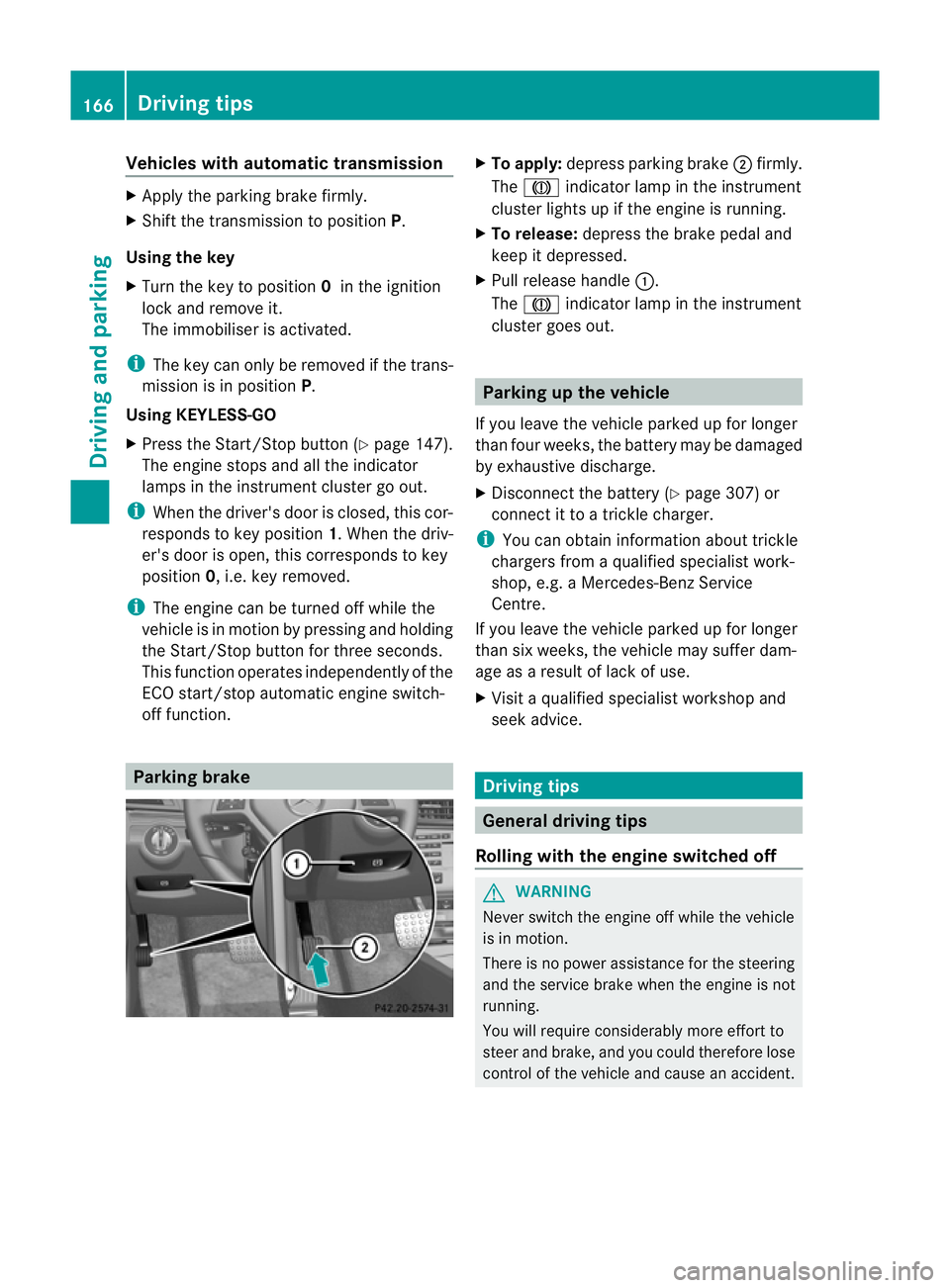
off function. Parking brake X
To apply: depress parking brake ;firmly.
The J indicator lamp in the instrument
cluster lights up if the engine is running.
X To release: depress the brake pedal and
keep it depressed.
X Pull release handle :.
The J indicator lamp in the instrument
cluster goes out. Parking up the vehicle
If you leave the vehicle parked up for longer
than four weeks, the battery may be damaged
by exhaustive discharge.
X Disconnect the battery (Y page 307) or
connect it to atrickle charger.
i You can obtain information about trickle
chargers from aqualified specialist work-
shop, e.g. aMercedes-Ben zService
Centre.
If you leave the vehicle parked up for longer
than six weeks, the vehicle may suffer dam-
age as aresult of lack of use.
X Visit aqualified specialist worksho pand
seek advice. Driving tips
General driving tips
Rolling with the engine switched off G
WARNING
Never switch the engin eoff while the vehicle
is in motion.
There is no power assistanc efor the steering
and the service brake when the engine is not
running.
You will require considerably more effort to
steer and brake, and you could therefor elose
control of the vehicle and cause an accident. 166
Driving tipsDriving and parking
Page 170 of 353
Engine oil
! Vehicles with adiesel particle filter:
If the vehicle is mostly driven for short dis-
tances, it is possible that malfunctions may
occur during the automatic cleaning of the
diesel particle filter. This can lead to engine
damage. Therefore, if you frequently drive
short distances, make sure to drive on
motorways or countr yroads for 20 minutes
at least every 500 km. Brakes
Important safet ynotes G
WARNING
Do not change down for additional engine
brakin gonas lippery road surface. This could
cause the drive wheels to lose their grip and
the vehicle could skid. G
WARNING
Make sure that other road users are not
endangered by your braking.
Downhill gradients On long and steep downhill gradients, espe-
cially if the vehicle is laden or towin gatrailer,
you must shift to alower gear in good tim eor,
on vehicles with automatic transmission,
select shift range 1,2or 3.
i This also applies if you have activated
cruise control, SPEEDTRONIC or DIS-
TRONIC PLUS.
This will use the brakin geffect of the engine,
so less brakin gwill be required to maintain
the speed. This relieves the load on the brake
syste mand prevent sthe brake sfrom over-
heatin gand wearing too quickly. Heavy and light loads G
WARNING
Never depress the brake pedal continuously
while the vehicle is in motion, e.g. never cause
the brake storub by applying constan tslight
pedal pressure. This causes the brak esystem
to overheat, increases the braking distance
and can lead to the brakes failing completely.
If the brakes have been subjected to aheavy
load, do not sto pthe vehicle immediately, but
drive on for ashor twhile. This allowst he air-
flow to cool the brakes more quickly.
If the brakes have been used only moderately,
you should occasionally test their effective-
ness. To do this, brake more firmly from a
higher speed. This improves the grip of the
brakes.
Wet road surface If driving in heavy rain for
aprolonged period
of time without braking, there may be a
delayed reaction from the brakes when brak-
ing for the first time. This may also occur after
the vehicle has been washed.
You have to depress the brake pedal more
firmly. Maintain agreater distance from the
vehicle in front.
After driving on awet road or having the vehi-
cle washed, brake firmly while paying atten-
tion to the traffic conditions. This will warm
up the brake discs, thereby drying them more
quickly and protecting them against corro-
sion.
Limited braking performance on salt
treated roads G
WARNING
The layerofs alt on thebrake discs and the
brake pads/linings may caus eadelay in the
brakin geffect, resultin ginasignificantly lon-
ger brakin gdistance, which could lead to an
accident.
To avoid this danger, you should: Driving tips
167Driving and parking
Z
Page 171 of 353
R
occasionally brake carefully, without put-
ting other road users at risk, when you are
driving on salted roads. This helps to
remove any salt that may have started to
build up on the brake discs and the brake
pads/linings.
R maintain agreater distance to the vehicle
ahead and drive with particular care.
R carefully apply the brakes at the end of a
trip and immediately after commencing a
new trip, so that salt residues are removed
from the brake discs.
New brake pads/linings G
WARNING
New brake pads/linings only reach their opti-
mum braking effect after several hundred kil-
ometres of driving. Before this optimum brak-
ing effect is reached, you should compensate
for the reduced braking effect by applying
greater pressure when braking. This also
applies after the brake discs or the brake
pads/linings have been replaced.
For safety reasons, Mercedes-Benz recom-
mends that you only have brake pads/linings
fitted to your vehicle which have been
approved for Mercedes-Benz vehicles or
which correspon dtoanequivalent quality
standard. Brake pads/linings which have not
been approved for Mercedes-Benz vehicles or
which are not of an equivalent quality could
affect your vehicle's operating safety. Tyret
raction G
WARNING
Whereas the vehicle can be fully controlled at
ac ertain speed on dry roads, you must reduce
your speed on wet or icy roads to achieve the
same road safety. You could otherwise cause
an accident.
Pay particular attention to the road conditions
at temperatures around freezin gpoint. If ice has formed on the road surface (e.g.
from fog),
athin film of water rapidly forms on
the ice when you brake, considerably reduc-
ing tyre traction. Drive with particular care in
such weather conditions. Driving on wet roads
Aquaplaning If water has accumulated to
acertain depth
on the road surface, there is adanger of aqua-
planing occurring, even if:
R you drive at low speeds
R the tyres have adequate tread depth
For this reason, do not drive in tyre ruts, and
brake carefully.
Driving on flooded roads If you have to drive on stretches of road on
which water has collected, please bear in
mind that:
R
the maximum permitted still water depth is
25 cm.
R you should drive no faster than at walking
pace.
! Bear in mind that vehicles travelling in
front or in the opposite direction create
waves. This may cause the maximum per-
missible water depth to be exceeded.
These notes must be observed under all
circumstances. You could otherwise dam-
age the engine, the electronics or the trans-
mission. Winter driving
General notes G
WARNING
If the vehicle becomes trapped in snow,
ensure that snow is kept away from the
exhaust pipe and from around the vehicle as
long as the engine is running. Otherwise, poi- 168
Driving tipsDriving and parking
Page 172 of 353
sonous carbon monoxide (CO) may enter the
vehicle, resulting in loss of consciousness and
even death.
To assure sufficient fresh air ventilation, open
aw indow slightly on the side of the vehicle
not facing the wind.
At the onset of winter, have your vehicle win-
terproofed at aqualified specialist workshop,
e.g. at aMercedes-Benz Service Centre.
Observe the notes in the "Winter operation"
section (Y page 319).
Driving with summer tyres Observe the notes in the "Winter operation"
section (Y
page 319).
Slippery road surfaces G
WARNING
Do not shift down for additional engine brak-
ing on aslippery road surface. This could
cause the drive wheels to lose their grip and
the vehicle could skid.
You should drive particularlyc arefully on slip-
pery road surfaces. Avoid sudden accelera-
tion, steering and braking manoeuvres.
If the vehicle threatens to skid or cannot be
stopped when moving at low speed:
X Vehicles with manual transmission: engage
neutral.
X Vehicles with automatic transmission: shift
the transmission to position N.
X Try to bring the vehicle under control by
using corrective steering.
i For more information on driving with
snow chains, see (Y page 320). Driving systems
Cruise control
Important safety notes Cruise control maintains
aconstant road
speed for you. It brakes automaticallyino rder
to avoid exceeding the set speed. On long and
steep downhill gradients, especially if the
vehicle is laden or towing atrailer, you must
shift to alower gear in good time or select
shift range 1,2or 3on vehicles with auto-
matic transmission. By doing so, you will
make use of the braking effect of the engine,
which relieves the load on the brake system
and prevents the brakes from overheating
and wearing too quickly. G
WARNING
Do not change down for additional engine
braking on aslippery road surface. This could
cause the drive wheels to lose their grip and
the vehicle could skid.
Use cruise control only if road and traffic con-
ditions make it appropriate to maintain a
steady speed for aprolonged period. You can
store any road speed above 30 km/h. G
WARNING
Cruise control cannot take account of road
and traffic conditions.
Always pay attention to traffic conditions
even when cruise control is activated.
Cruise control is only an aid designed to assist
driving. You are responsible for the vehicle's
speed and for braking in good time. G
WARNING
Do not use cruise control
R in traffic conditions that do not allow you to
drive at aconstant speed (e.g. heavy traffic Driving systems
169Driving and parking
Z
Page 174 of 353
X
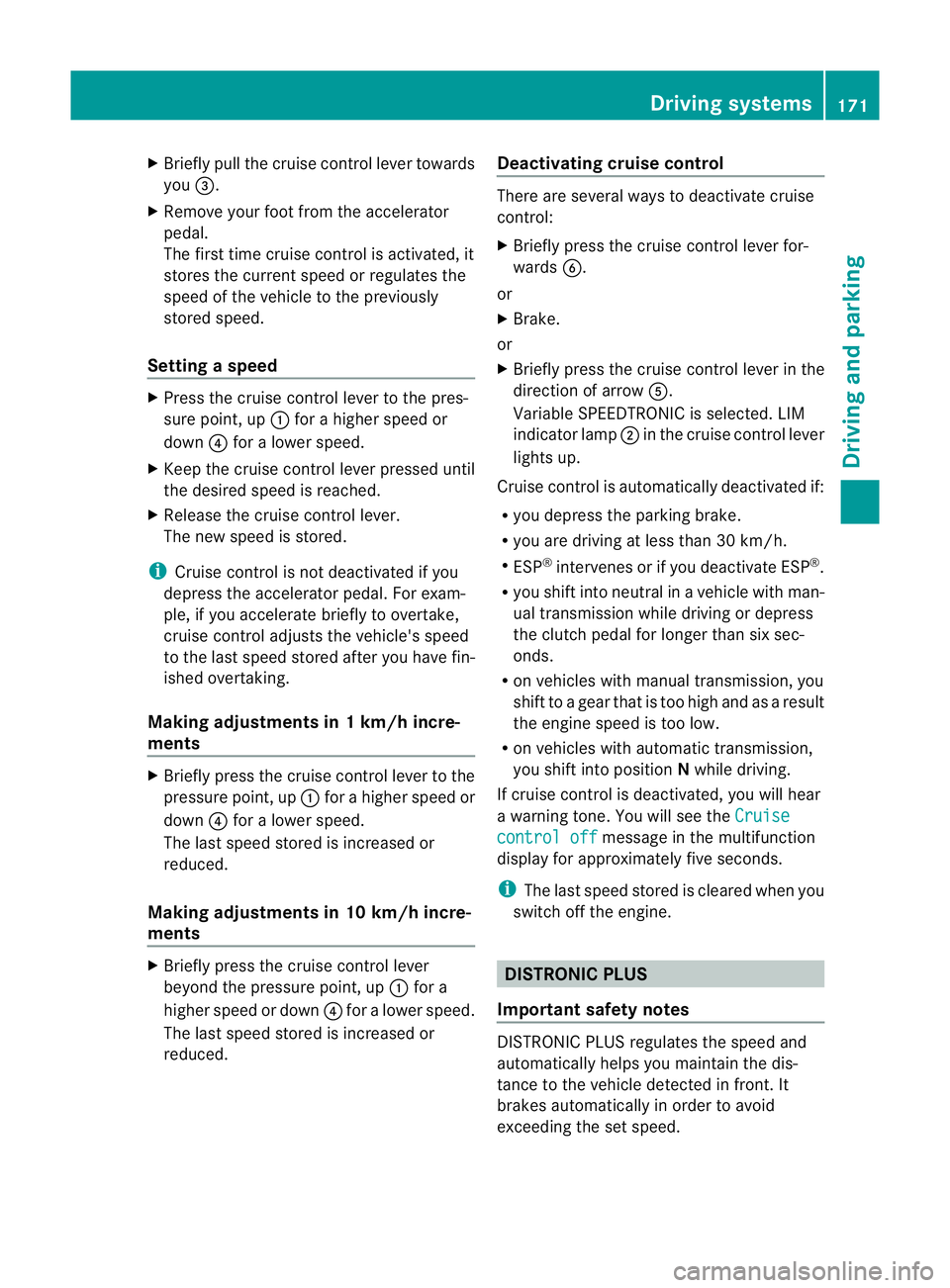
Briefly pull the cruise control lever towards
you =.
X Remove your foot from the accelerator
pedal.
The firs ttime cruise control is activated, it
stores the current speed or regulates the
speed of the vehicle to the previously
stored speed.
Setting aspeed X
Press the cruise control lever to the pres-
sure point, up :for ahighe rs peed or
down ?for alower speed.
X Keep the cruise contro llever pressed until
the desired speed is reached.
X Release the cruise contro llever.
The new speed is stored.
i Cruise contro lisnot deactivated if you
depress the accelerator pedal. For exam-
ple, if you accelerate briefly to overtake,
cruise contro ladjusts the vehicle's speed
to the last speed stored after you have fin-
ished overtaking.
Making adjustments in 1km/h incre-
ments X
Briefly press the cruise contro llever to the
pressure point ,up:for ahigher speed or
down ?for alower speed.
The last speed stored is increased or
reduced.
Making adjustments in 10 km/h incre-
ments X
Briefly press the cruise contro llever
beyond the pressure point ,up:for a
higher speed or down ?for alower speed.
The last speed stored is increased or
reduced. Deactivating cruise control There are several ways to deactivate cruise
control:
X Briefly press the cruise contro llever for-
wards B.
or
X Brake.
or
X Briefly press the cruise contro llever in the
direction of arrow A.
Variable SPEEDTRONIC is selected. LIM
indicator lamp ;in the cruise contro llever
lights up.
Cruise control is automatically deactivated if:
R you depress the parkin gbrake.
R you are driving at less than 30 km/h.
R ESP ®
intervenes or if you deactivat eESP®
.
R you shift inton eutral inavehicle with man-
ual transmission while driving or depress
the clutc hpedal for longer than six sec-
onds.
R on vehicles with manual transmission ,you
shift to agear that is too high and as aresult
the engin espeed is too low.
R on vehicles with automatic transmission,
you shift intop ositionNwhile driving.
If cruise control is deactivated, you will hear
aw arning tone. You will see the Cruise control off message in the multifunction
display for approximately five seconds.
i The last speed stored is cleared when you
switch off the engine. DISTRONIC PLUS
Important safet ynotes DISTRONIC PLUS regulates the speed and
automatically helps you maintain the dis-
tanc
etot he vehicle detected in front. It
brakes automatically in order to avoid
exceeding the set speed. Driving systems
171Driving and parking Z
Page 175 of 353
On long and steep downhill gradients, espe-
cially if the vehicle is laden or towing atrailer,
you must select shift range 1,2or 3in good
time. By doing so, you will make use of the
braking effect of the engine, which relieves
the load on the brake system and prevents
the brakes from overheating and wearing too
quickly.
If as lower-moving vehicle is detected in front,
DISTRONIC PLUS causes your vehicle to
brake and maintain apreset distance to the
vehicle in front. G
WARNING
Do not change down for additional engine
braking on aslippery road surface. This could
cause the drive wheels to lose their grip and
the vehicle could skid. G
WARNING
DISTRONIC PLUS is only an aid designed to
assist driving. The driver remains fully respon-
sible for the vehicle's distance from other
vehicles, the vehicle's speed and for braking
in good time.
DISTRONIC PLUS does not react in particular
to:
R pedestrians
R stationary obstacles on the road, e.g. stop-
ped or parked vehicles
R oncoming and crossing traffic
DISTRONIC PLUS may not detect narrow vehi-
cles driving in front,e .g. motorcycles, or vehi-
cle sd riving on adifferent line. Therefore,
always pa yattention to traffic conditions even
when DISTRONIC PLU Sisactivated. Other-
wise, yo umay fai ltorecognis edanger sin
time ,cause an accident and injure yourself
and others. G
WARNING
DISTRONIC PLU Scanno ttake account of road
and traffic conditions .IfDISTRONIC doe snot
recognise or no longer recognises the vehicle
in front,don ot activate DISTRONIC or, if it is
already active, deactivate it. This is especially
the case:
R before corners
R on filter lanes
R when changing to alane with faster moving
traffic
R in complex driving situations or where lanes
are diverted, e.g. at roadworks on amotor-
way
DISTRONIC PLUS otherwise maintains the
current speed set by you or accelerates up to
the set speed.
DISTRONIC PLUS cannot take account of
weather conditions. Deactivate, or do not
activate, DISTRONIC PLUS:
R if the roads are slippery, snow-covered or
icy. The wheels could lose their grip when
braking or accelerating. The vehicle could
start to skid.
R if the sensors are dirty or there is poor vis-
ibility, e.g. due to snow, rain or fog. Dis-
tancec ontrol may be impaired.
Always pay attention to traffic conditions
even when DISTRONIC PLUS is activated.
Otherwise, you may fail to recognise dangers
in time, cause an accident and injure yourself
and others.
! You must deactivate the radar sensor sys-
tem in certain countries and near radio
telescope facilities. You will find further
information under "Radar sensor system"
in the index.
The radar sensor system is automatically
deactivated near radio telescope facilities
(Y page 345).
If you want DISTRONIC PLUS to assist you,
the radar sensor system must be activated
(Y page 229) and operational. 172
Driving systemsDriving and parking
Page 176 of 353
If there is no vehicle in front, DISTRONIC
PLUS operates in the same way as cruise
control in the speed range between
30 km/h and 200 km/h. If avehicle is driving
in fron tofyou, DISTRONIC operates in the
speed range between 0km/h and
200 km/h.
Do not use DISTRONIC PLUS while driving on
road swith steep gradients. G
WARNING
DISTRONIC PLUS brakes yourv ehicle up to a
maximum of 4m/s2
depending on its speed.
This corresponds to approximately 40% of
your vehicle's maximum braking power. You
must also apply the brakes yourself if this
braking power is not sufficient.
If DISTRONIC PLUS detect sarisk of collision
with avehicle in front, an intermittent warning
tones ounds. In addition, the ·distance
warning lamp in the instrument cluster lights
up. Brak etoavoidacollision.
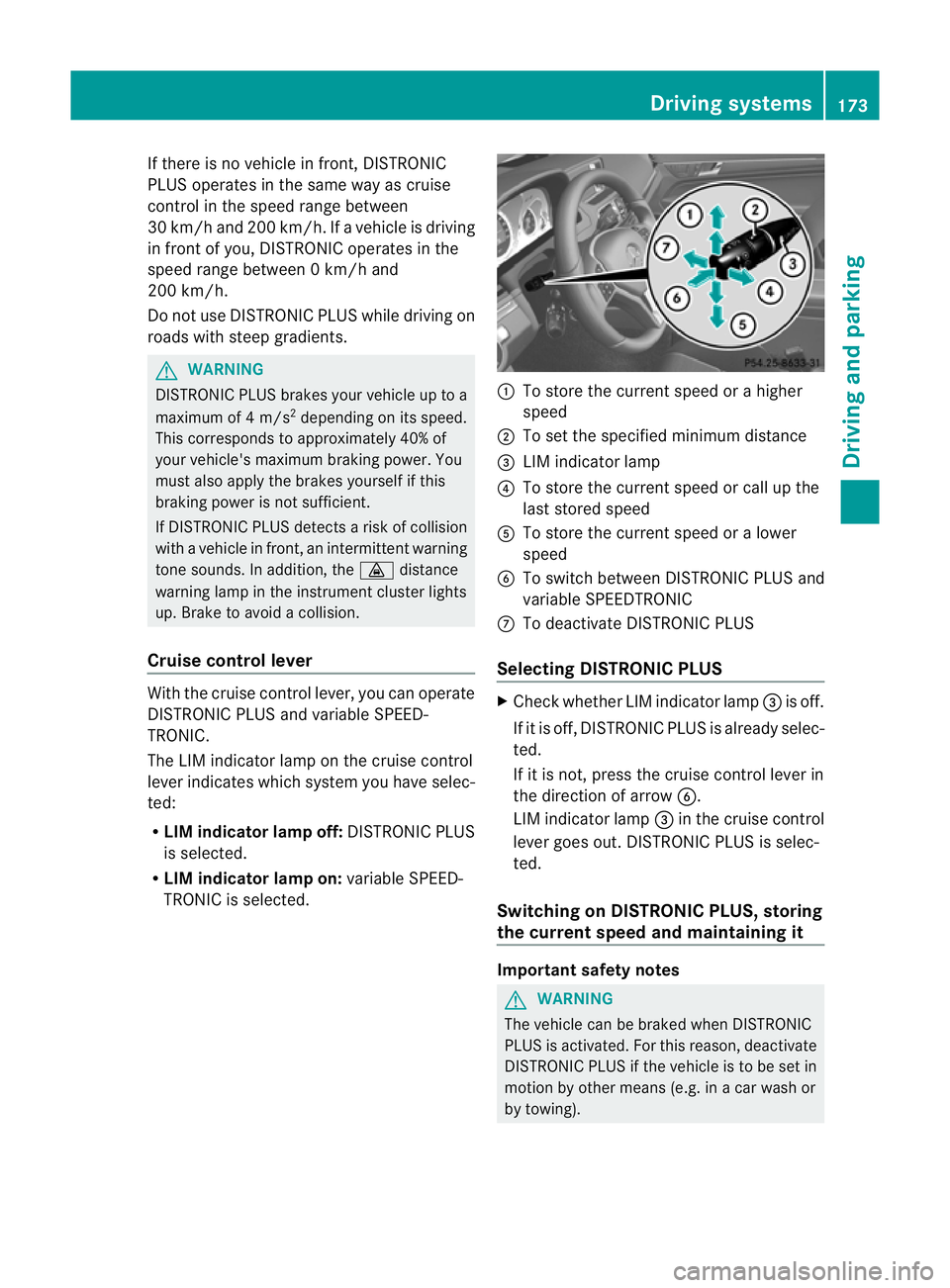
Cruise control lever With the cruise control lever, you can operate
DISTRONIC PLUS and variable SPEED-
TRONIC.
The LIM indicator lamp on the cruise control
lever indicates which system you have selec-
ted:
R LIM indicator lamp off: DISTRONIC PLUS
is selected.
R LIM indicator lamp on: variable SPEED-
TRONIC is selected. :
To stor ethe curren tspeed or ahigher
speed
; To set the specified minimum distance
= LIM indicator lamp
? To stor ethe curren tspeed or call up the
last stored speed
A To stor ethe curren tspeed or alower
speed
B To switc hbetween DISTRONIC PLUS and
variable SPEEDTRONIC
C To deactivate DISTRONIC PLUS
Selecting DISTRONIC PLUS X
Check whether LIM indicator lamp =is off.
If it is off, DISTRONIC PLUS is already selec-
ted.
If it is not ,press the cruise contro llever in
the direction of arrow B.
LIM indicator lamp =in the cruise control
lever goes out. DISTRONIC PLUS is selec-
ted.
Switching on DISTRONIC PLUS, storing
the current speed and maintaining it Important safet
ynotes G
WARNING
The vehicle can be braked when DISTRONIC
PLUS is activated. For this reason, deactivate
DISTRONIC PLUS if the vehicle is to be set in
motion by other means (e.g. in acar wash or
by towing). Driving systems
173Driving and parking Z
Page 177 of 353
To activat
ethe DISTRONIC PLUS, the follow-
ing conditions must be fulfilled:
R the engine must be running. It may take up
to two minutes of driving before DIS-
TRONIC PLUS is ready for use.
R the parking brake is not applied.
R ESP ®
is activated.
R the transmission is in position D.
R the bonnet is closed.
R the driver's door must be closed when you
shift from Pto Dor your seat belt must be
fastened.
R the frontp assenger door is closed.
R thev ehicle is no tskidding.
Activatin gwhile driving
When drivin gatspeeds below30k m/h,you
can onl yactivate DISTRONI CPLUSift he vehi-
cle in front has been detected and is shown
in the multifunction display. If the vehicle in
front is not shown in the multifunction display
and is no longer being detected, for example
because it has changed lanes, DISTRONIC
PLUS is deactivated and atone sounds.
X Briefly pull the cruise control lever towards
you ?or press it up :or down Ato the
pressure point.
DISTRONIC PLUS is selected.
X Keep the cruise control lever pressed
up : or down Auntil the desired speed
is set.
X Remove your foot from the accelerator
pedal.
Your vehicle adapts its speed to that of the
vehicle in front,b ut only up to the desired
stored speed.
i If you do not fully release the accelerator
pedal, the DISTRONIC PLUS suspended message appears in the multifunction dis-
play. The set distance to
aslower-moving
vehicle in front will then not be maintained.
You will be driving at the speed you deter-
mine by the position of the accelerator
pedal. Activating when driving toward
sasta-
tionary vehicle
If the vehicl einfront of yo uisstationary, you
can onl yactivate DISTRONI CPLUSo nce your
vehicl eisstationar yaswell.
X Briefl ypullt he cruis econtro llev er towards
you ?or press it up :or down Ato the
pressure point.
DISTRONI CPLUSiss elected.
i DISTRONIC PLUS can only be activated at
under 30 km/h if avehicle in front has been
detected. Therefore, the DISTRONIC PLUS
distance displayint he instrument cluster
should be activated (Y page 223).
X Keep the cruise control lever pressed
up : or down Auntil the desired speed
is set.
i You can use the cruise control lever to set
the stored speed and the control on the
cruise control lever to set the specified
minimum distance (Y page 177).
Pulling away
X If the vehicleinf ront pulls away:remove
your foot from the brake pedal.
X Briefly pull the cruise control lever towards
you ?.
or
X Accelerate briefly.
Your vehicle pullsa wayand adapts its
speed to that of the vehicle in front.
Driving
If there is no vehicle in front,D ISTRONIC
PLUS operates in the same way as cruise
control.
If as lower-moving vehicle is detected in front,
DISTRONIC PLUS causes your vehicle to
brake and maintain apreset distance to the
vehicle in front.
If DISTRONIC PLUS detects afaster-moving
vehicle in front,iti ncreases the driving speed,
but only up to the desired speed you have
stored. 174
Driving systemsDriving and parking
Page 178 of 353
G
WARNING
If you depress the brake, DISTRONIC PLUS is
deactivated unless yourv ehicle is stationary.
DISTRONIC PLUS then no longer brakes your
vehicle. In such cases, control the distance
from vehicles travellin ginfrontwith the brake
alone. You could otherwise cause an accident
and thereby injure yourself and others. The
drive rremains fully responsible for the vehi-
cle's distanc efrom other vehicles, the speed
being driven and for braking in good time.
Changing lanes
If you wish to change to the passing lane (in
countries where traffic drives on the right, the
passing lane is the left-hand lane), DIS-
TRONIC PLUS supports you if:
R you are driving faster than 60 km/h.
R DISTRONIC PLUS is maintaining the dis-
tanc etoav ehicle in front.
R you switch on the appropriate turn signals.
R DISTRONIC PLUS does not detec tadanger
of collision.
If these condition sare met, your vehicle is
accelerated. Acceleration will be interrupted
if changing lanes takes too long or if the dis-
tanc ebetween your vehicle and the vehicle in
fron tbecomes too small. G
WARNING
DISTRONIC PLUS and Active Blind Spot Assist
are only an aid designed to assist driving.
They do not relieve you of the responsibility
of paying attention .The driver remains fully
responsible for the vehicle's distance from
other vehicles, the vehicle's speed and for
braking in good time. Always pay attention to
traffic conditions and your surroundings. Oth-
erwise, you may fail to recognise dangers in
time, cause an accident and injure yourself
and others.
Vehicles with COMAND APS/
Audio 50 APS
i The following function is not operational
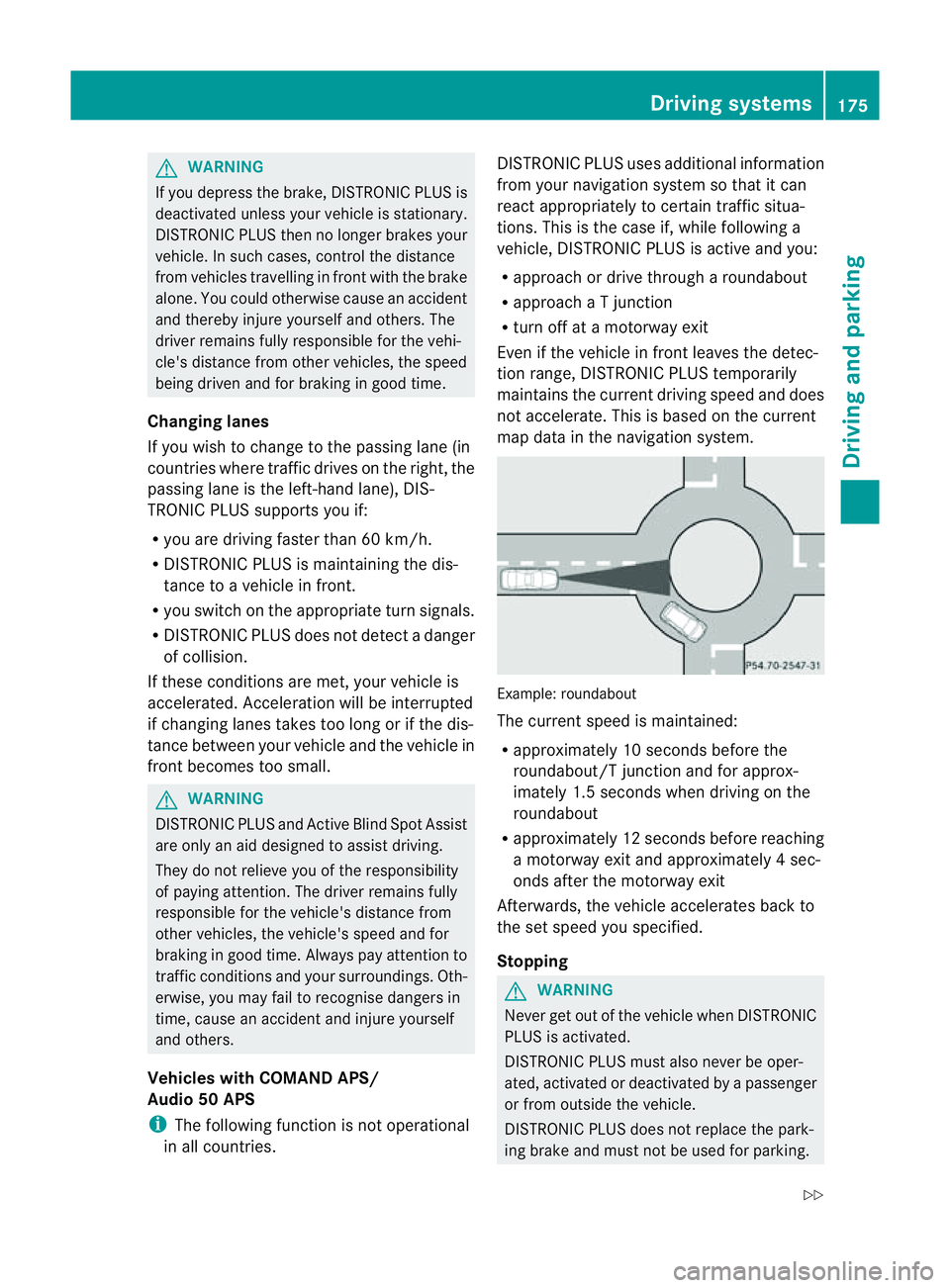
in all countries. DISTRONIC PLUS uses additional information
from your navigation system so that it can
react appropriately to certain traffic situa-
tions. This is the case if, while following a
vehicle, DISTRONIC PLUS is active and you:
R
approach or drive through aroundabout
R approach aTjunction
R turn off at amotorway exit
Even if the vehicle in front leaves the detec-
tion range, DISTRONIC PLUS temporarily
maintains the current driving speed and does
not accelerate. This is based on the current
map data in the navigation system. Example: roundabout
The current speed is maintained:
R
approximately 10 seconds before the
roundabout/T junction and for approx-
imately 1.5 seconds when driving on the
roundabout
R approximately 12 seconds before reaching
am otorway exit and approximately 4sec-
onds after the motorway exit
Afterwards, the vehicle accelerates back to
the set speed you specified.
Stopping G
WARNING
Never get out of the vehicle when DISTRONIC
PLUS is activated.
DISTRONIC PLUS must also never be oper-
ated, activated or deactivated by apassenger
or from outside the vehicle.
DISTRONIC PLUS does not replace the park-
ing brake and must not be used for parking. Driving systems
175Driving and parking
Z