ESP MERCEDES-BENZ E-CLASS CABRIOLET 2011 Owner's Manual
[x] Cancel search | Manufacturer: MERCEDES-BENZ, Model Year: 2011, Model line: E-CLASS CABRIOLET, Model: MERCEDES-BENZ E-CLASS CABRIOLET 2011Pages: 353, PDF Size: 8.42 MB
Page 65 of 353
In wintry driving conditions, alwaysu
se
winter tyres (M+S tyres) and if necessary,
snow chains. Only in this way willt he driv-
ing safety systems describe dinthis section
work as effectively as possible. ABS (Anti-loc
kBraking System)
Important safety notes i
Observe the "Important safety notes" sec-
tio n(Ypage 61).
ABS regulate sbrake pressure in such away
tha tthe wheels do not lock when you brake.
This allowsy ou to continue steering the vehi-
cle when braking.
ABS works from aspeed of about 8km/h
upwards, regardless of road-surface condi-
tions. ABS works on slippery surfaces, even
when you only brake gently. G
WARNING
If ABS is faulty, the wheels could lock when
braking. This limits the steerability of the vehi-
cle when braking and the braking distance
may increase.
If ABS is deactivated due to amalfunction,
then BAS and ESP are also deactivated. There
is an increased risk of your vehicle skidding in
certain situations.
You should always adapt your driving style to
suit the prevailing road and weather condi-
tions.
Braking If ABS intervenes when braking, you will feel
ap ulsing in the brake pedal.
X If ABS intervenes: continue to depress the
brake pedal with force until the braking sit-
uation is over.
X To make afull brake application:
depress the brake pedal with full force.
The pulsating brake pedal can be an indica-
tion of hazardous road conditionsa nd func-tions as
areminder to take extrac are while
driving. G
WARNING
Do not depress the brake pedal several times
in quick succession (pumping). Pumping the
brake pedal reduces the braking effect.Y ou
might otherwise not be able to stop the vehi-
cle in time and could cause an accident.
Depress the brake pedal firmly and smoothly. BAS (Brake Assist)
i Observe the "Important safety notes" sec-
tion (Y page 61).
BAS operates in emergenc ybraking situa-
tions. If you depress the brake pedal quickly,
BAS automatically boosts the braking force,
thus shortening the stopping distance.
X Keep the brake pedal firmly depressed until
the emergenc ybraking situation is over.
ABS prevent sthe wheels from locking.
The brakes will function as usual once you
release the brake pedal. BAS is deactivated. G
WARNING
If BAS has malfunctioned, the braking system
remains available with full brake boosting
effect .However, braking force is not auto-
matically increased in emergenc ybraking sit-
uations and the stopping distance may
increase. BAS PLUS (Brake Assist System
PLUS)
BAS PLUS is only available on vehicles with
DISTRONIC PLUS.
i Observe the "Important safety notes" sec-
tion (Y page 61).
BAS PLUS provides braking assistance in haz-
ardous situations at speeds of over
30 km/ha nd uses rada rsensor technology
to assess the traffic situation. 62
Driving safet
ysystemsSafety
Page 67 of 353
or BAS PLUS, the brake lamps flash rapidly.
In this way, traffic travelling behind you is
warned in an even more noticeable manner.
If you brake sharply from aspeed of more
than 70 km/htoa standstill, the hazard warn-
ing lamps are activated automatically. If the
brakes are applied again, the brake lamps
light up continuously. The hazard warning
lamps switch off automaticallyify ou travel
faster than 10 km/h .You can also switch off
the hazard warning lamps using the hazard
warning switch button (Y page 117).ESP
®
(Electronic Stability Program)
Important safety notes i
See the "Important safety notes" section
(Y page 61).
If ESP ®
detect sthat the vehicle is deviating
from the direction desired by the driver, one
or more wheels are braked to stabilise the
vehicle. If necessary, the engine output is also
modified to keep the vehicle on the desired
course within physical limits. ESP ®
assists
the driver when pulling away on wet or slip-
pery roads. ESP ®
can also stabilise the vehi-
cle during braking.
If ESP ®
intervenes, the ÷ESP®
warning
lamp flashes in the instrument cluster. G
WARNING
If the ÷ warning lamp in the instrument
cluster flashes, proceed as follows:
R do not deactivate ESP ®
under any circum-
stances.
R only depress the accelerator pedal as far as
necessary when pulling away.
R adapt your driving style to suit the prevail-
ing road and weather conditions.
Otherwise, the vehicle could go into askid.
ESP ®
cannot reduce the risk of an accident if
you drive too fast. ESP ®
cannot override the
laws of physics. !
Switch the ignition off when:
R the parking brake is being tested using a
dynamometer
R the vehicle is being towed with the front/
rear axle raised
Application of the brakes by ESP ®
may oth-
erwise destroy the brake system.
i Only use wheels with the recommended
tyre sizes. Only then will ESP ®
function
properly.
ETS (Electronic Traction Support) Traction control is part of ESP
®
.
Traction control brakes the drive wheels indi-
viduall yifthey spin. This enables you to pull
away and accelerate on slippery surfaces, for
example if the road surface is slippery on one
side.
Traction control remains active if you deacti-
vate ESP ®
. G
WARNING
Traction control cannot reduce the risk of an
accident if you drive too fast. Traction control
cannot override the laws of physics.
Deactivating/activating ESP ® i
Observe the "Important safety notes" sec-
tion (Y page 61).
ESP ®
is activated automatically when the
engine is started.
i Vehicles with ECO start/stop function:
the ECO start/stop function switches the
engine off automatically when the vehicle
comes to astop. The engine startsa uto-
matically when the driver wants to pull
away again. ESP ®
remains in its previously
selected status. Example: if ESP ®
was
deactivated before the engine was
switched off, ESP ®
remains deactivated
when the engine is switched on again. 64
Driving safety systemsSafety
Page 68 of 353
It may be best to deactivate ESP
®
in the fol-
lowing situations:
R when using snow chains
R in deep snow
R on sand or gravel G
WARNING
Activate ESP ®
as soon as the situations
describe dabove no longer apply. ESP ®
will
otherwis enot be abletos tabilise the vehicle
if the vehicle starts to skid or awhee lstarts
to spin.
When you deactivate ESP ®
:
R ESP ®
no longer improves driving stability.
R the engine's torque is no longer limited and
the drive wheels can spin. The spinning of
the wheels results in acutting action, which
provide sbetter grip.
R traction control is still activated.
R ESP ®
still provide ssupport when you
brake.
If ESP ®
is deactivated and one or more wheels
start to spin, the ÷ESP®
warning lamp in
the instrument cluster flashes. In such situa-
tions, ESP ®
willn ot stabilise the vehicle.
X To deactivate: (Ypage 223).
The å ESP®
OFF warning lamp in the
instrument cluster lights up. G
WARNING
ESP ®
is deactivated if the åwarning lamp
in the instrument cluster lights up continu-
ouslyw hen the engine is running.
If the ÷ warning lamp and åwarning
lamp are lit continuously, ESP ®
is not availa-
ble due to amalfunction.
There is an increased risk of yourv ehicle skid-
ding in certain situations.
You should alway sadapt your driving style to
suit the prevailing road and weather condi-
tions. X
To activate:(Y page 223).
The å ESP®
OFF warning lamp in the
instrument cluster goes out.
ESP ®
trailer stabilisation If your vehicle with trailer (vehicle/trailer
combination) begins to lurch, you can only
stabilise the vehicle/trailer combination by
depressing the brake firmly.
In this situation ,ESP ®
assists you and can
detec tifthe vehicle/trailer combination
begins to lurch. ESP ®
slows the vehicle down
by braking and limiting the engine output until
the vehicle/trailer combination has stabi-
lised.
Trailer stabilisation is active above speeds of
about 65 km/h. G
WARNING
If road and weather conditions are poor,
trailer stabilisation will not be able to prevent
the trailer from swerving and will thus be
unable to reduce the risk of an accident. Trail-
ers with ahigh centre of gravity can tip over
before ESP ®
can detect this.
Trailer stabilisation does not work if ESP ®
is
deactivated or disabled because of amal-
function. EBD (electronic brake force distribu-
tion)
i Observe the "Important safety notes" sec-
tion (Y page 61).
EBD monitors and controls the brake pres-
sure on the rear wheels to improve driving
stability while braking. G
WARNING
If EBD has malfunctioned, the braking system
remains available with full brake boosting
effect.H owever, the rear wheels can still lock,
e.g. under full braking. This could cause you
to lose control of your vehicle and cause an
accident .You should therefor eadapt your Driving safety systems
65Safety
Z
Page 70 of 353
passenger protection measures (PRE-SAFE
®
)
are activated (Y page 45). If the risk of colli-
sion remains and you do not brake, tak eeva-
sive action or accelerate significantly, the
vehicle may perfor mautomatic emergency
braking .Automatic emergenc ybraking is not
performed until immediately prio rtoanacci-
dent that can no longer be avoided. G
WARNING
Even if PRE-SAFE ®
Brake slows the vehicle
before an imminent rear-end collision, the
system cannot avert acollision without the
intervention of the driver. There is arisk of an
accident .Brake according to the situation or
take evasive action. Delayed intervention by
the driver can lead to an accident. G
WARNING
PRE-SAFE ®
Brake cannot alwaysc learly iden-
tify object sand complex traffic conditions.
In these cases, PRE-SAFE ®
Brake may:
R give an unnecessary warning and then
brake the vehicle
R not give awarning or intervene
There is arisk of an accident .Always pay par-
ticular attention to the traffic situation and be
ready to brake, especially if PRE-SAFE ®
Brake
warns you. Terminat ethe intervention in a
non-critical drivin gsituation.
In particular, the detection of obstacles can
be impaired if there is:
R dirt on the sensors or anything else cover-
ing the sensors
R sno worh eavy rain
R interference by other radar sources
R the possibilit yofstrong radar reflections,
for example in multi-storey car parks
R an arrow vehicle travellin ginfront,e.g. a
motorbike
R av ehicle travellin ginfront on adifferent
line G
WARNING
PRE-SAFE ®
Brak edoes not react:
R to people or animals
R to oncomin gvehicles
R to crossin gtraffic
R when cornering
As aresult ,PRE-SAFE ®
Brak emay not give
warnings or intervene in critical situations.
There is arisk of an accident .Always pay
careful attention to the traffic situation and be
ready to brake.
In order to maintain the appropriate distance
to the vehicle in front and thus prevent acol-
lision ,you must apply the brakes yourself.
X To activate/deactivate: activate or deac-
tivate PRE-SAFE ®
Brak eint he on-board
computer (Y page 223).
The Ä symbol appears in the multifunc-
tion display as long as the HOL Dfunction
is no tactivated (Y page 184).
On vehicles wit hparking guidance, the
Ä symbol is displayed when Pis
engaged or you are driving faste rthan
35 km/h.
The radar sensor system is switched off auto-
matically in the vicinity of radio telescope
facilities (Y page 345).
Vehicles without COMAND and anavigation
system and vehicles for Australia: the radar
sensor system and on-board computer must
be switched off in the vicinity of radio tele-
scope facilities (Y page 229).
For PRE-SAFE ®
Brake to assist you when driv-
ing, the radar sensor system must be
switched on (Y page 229) and be opera-
tional.
Following damage to the front end of the vehi-
cle, have the configuration and operation of
the radar sensors checked at aqualified spe-
cialist workshop. This also applies to colli-
sions at slow speeds where there is no visible
damage to the front of the vehicle. Driving safety systems
67Safety Z
Page 77 of 353
Restoring the factory settings
X Press the %and& buttons simulta-
neously for approximately six seconds until
the battery check lamp flashe stwice. Emergenc
ykey element
General notes If th
evehicle can no longer be locked or
unlocked with th ekey, use th eemergency
key element.
If you use th eemergency key element to
unlock and open th edriver' sdoor or th eboot
lid, th eanti-thef talarm system will be trig-
gered (Y page 68).
There are several ways to tur noff the alarm:
X To turn the alarm off with the key: press
the % or& button on the key.
or
X Insert the key into the ignition lock.
or
X To deactivate the alarm with KEYLESS-
GO: press the Start/Stop button in the igni-
tion lock. The key must be in the vehicle.
or
X Lock or unlock the vehicle using KEYLESS-
GO. The key must be outside the vehicle.
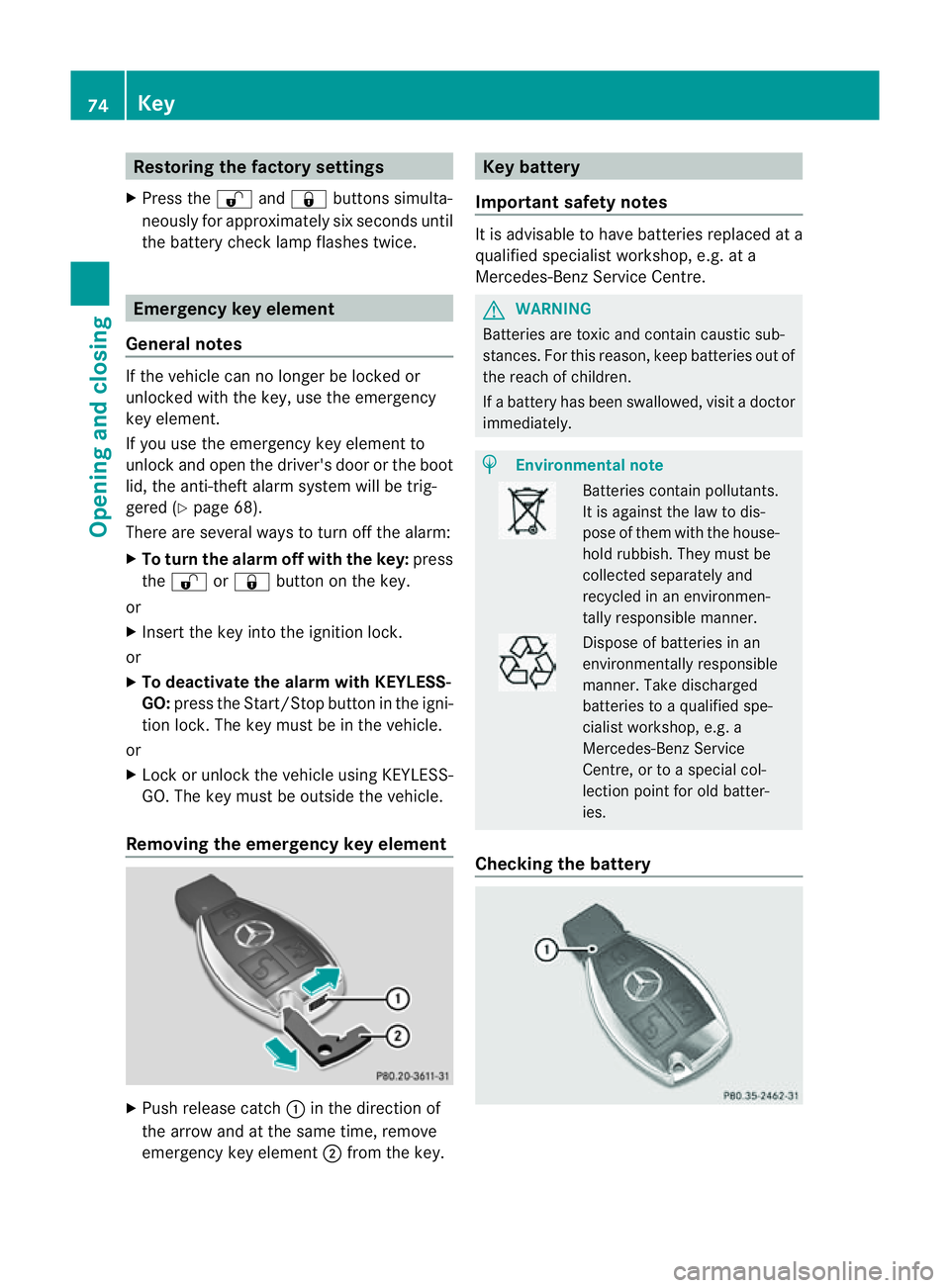
Removing the emergency key element X
Pus hrelease catch :in the direction of
the arrow and at the same time, remove
emergency key element ;from the key. Keyb
attery
Important safety notes It is advisable to have batteries replaced at a
qualified specialist workshop, e.g. at a
Mercedes-Benz Service Centre.
G
WARNING
Batterie sare toxic and contain caustic sub-
stances. For this reason, keep batteries out of
the reach of children.
If ab attery has been swallowed ,visi tad octor
immediately. H
Environmental note Batteries contain pollutants.
It is against the law to dis-
pose of them with the house-
hold rubbish. They must be
collected separately and
recycled in an environmen-
tally responsible manner.
Dispose of batteries in an
environmentally responsible
manner. Take discharged
batteries to
aqualified spe-
cialist workshop, e.g. a
Mercedes-Benz Service
Centre, or to aspecial col-
lection point for old batter-
ies.
Checking the battery 74
KeyOpening and closing
Page 86 of 353
The switches for all side windows are located
on the driver's door. There is also aswitch on
the front-passenger door as well as on the
doors in the rear compartment on the left and
right-hand sides for the respective side win-
dow.
The switches on the driver's door take prec-
edence.
i The side windows cannot be operated
from the rear when the override feature for
the side windows is activated (Y page 61).
X Turn the key to position 1or 2in the ignition
lock.
X To open: press the corresponding switch.
X To close: pull the corresponding switch.
i You can use the automatic operation fea-
ture when opening or closing the fronts ide
windows .Todoso, press or pull the switch
to just beyond the point of resistanc einthe
relevant direction .You can stop automatic
operation by pressing or pulling again.
i You can continue to operate the side win-
dows after switching off the engine or
removing the key. This function remains
active for five minutes or until the driver's
or front-passenger door is opened. Opening and closin
gall side windows
(Cabriolet)
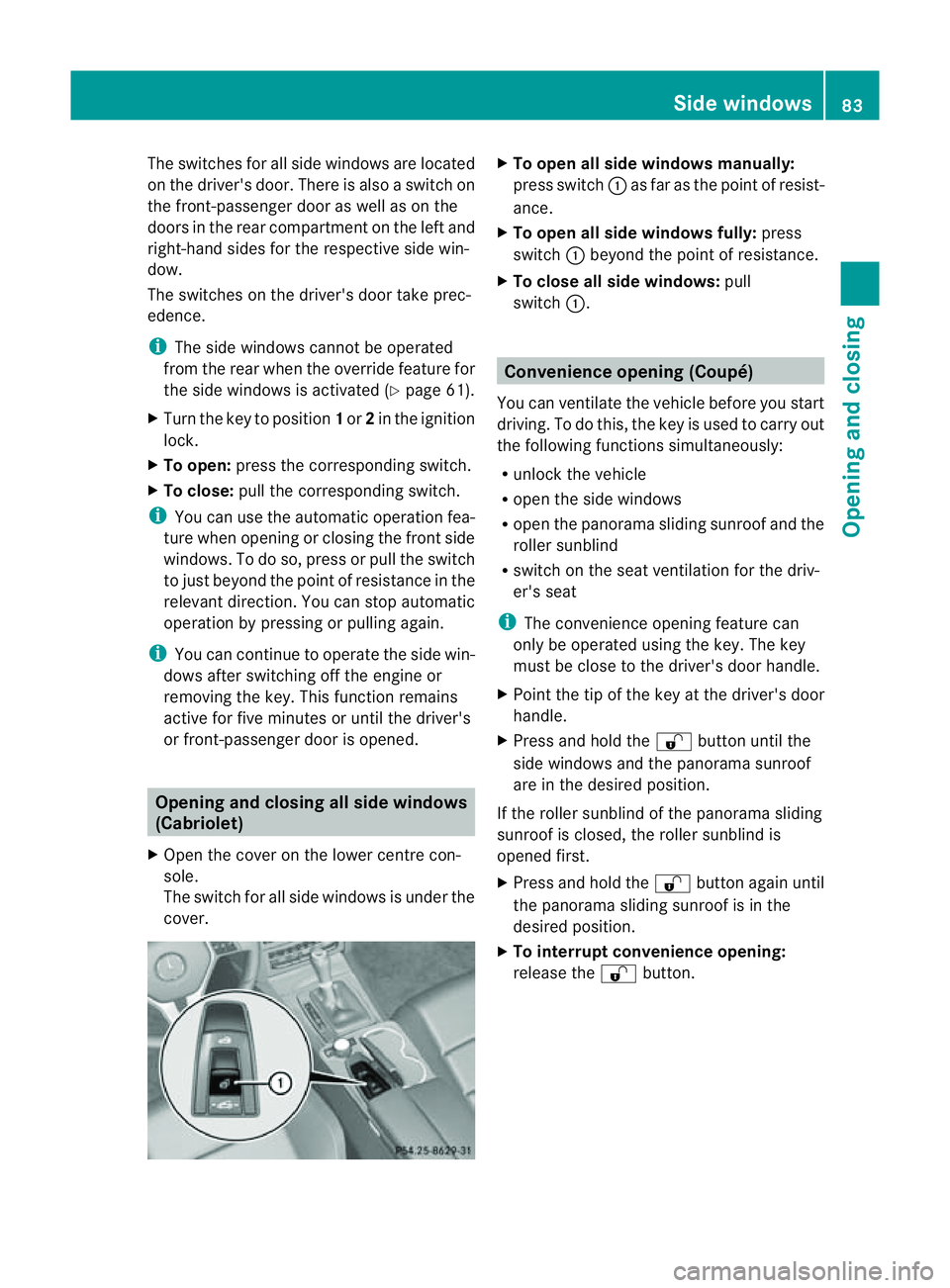
X Open the cover on the lower centre con-
sole.
The switch for all side windows is under the
cover. X
To open all side windows manually:
press switch :as far as the point of resist-
ance.
X To open all side windows fully: press
switch :beyond the point of resistance.
X To close all side windows: pull
switch :. Convenience opening (Coupé)
You can ventilate the vehicle before you start
driving. To do this, the key is used to carry out
the following functions simultaneously:
R unlock the vehicle
R open the side windows
R open the panorama sliding sunroof and the
roller sunblind
R switch on the seat ventilation for the driv-
er's seat
i The convenienc eopening feature can
only be operated using the key. The key
must be close to the driver's door handle.
X Point the tip of the key at the driver's door
handle.
X Press and hold the %button until the
side windows and the panorama sunroof
are in the desired position.
If the roller sunblind of the panorama sliding
sunroof is closed, the roller sunblind is
opened first.
X Press and hold the %button again until
the panorama sliding sunroof is in the
desired position.
X To interrupt convenience opening:
release the %button. Side windows
83Opening and closing Z
Page 87 of 353
Convenience closing (Coupé)
General notes When you loc
kthe vehicle, you can simulta-
neously:
R close the side windows
R close the panorama sliding sunroof
On vehicles with apanorama sliding sunroof,
you can then close the roller sunblind. G
WARNING
When using the convenience closing feature,
make sure that nobody can become trapped.
Proceed as follows if there is arisk of entrap-
ment:
With the key:
R release the &button.
R press and hold the %button until the
side windows and the panorama sliding
sunroof open again.
With KEYLESS-GO:
R release the sensor surface on the door han-
dle.
R pull the door handle immediately and hold
it.
The side windows and the panorama sliding
sunroof open.
Using the key i
The key must be close to the driver's door
handle.
X Point the tip of the key at the driver's door
handle.
X Press and hold the &button until the
side windows and the panorama sliding
sunroof are fully closed.
X Make sure that all the side windows and the
panorama sliding sunroof are closed.
On vehicles with apanorama sliding sunroof:
X Press and hold the &button again until
the roller sunblind of the panorama sliding
sunroof closes. X
To interrupt conveniencec losing:
release the &button.
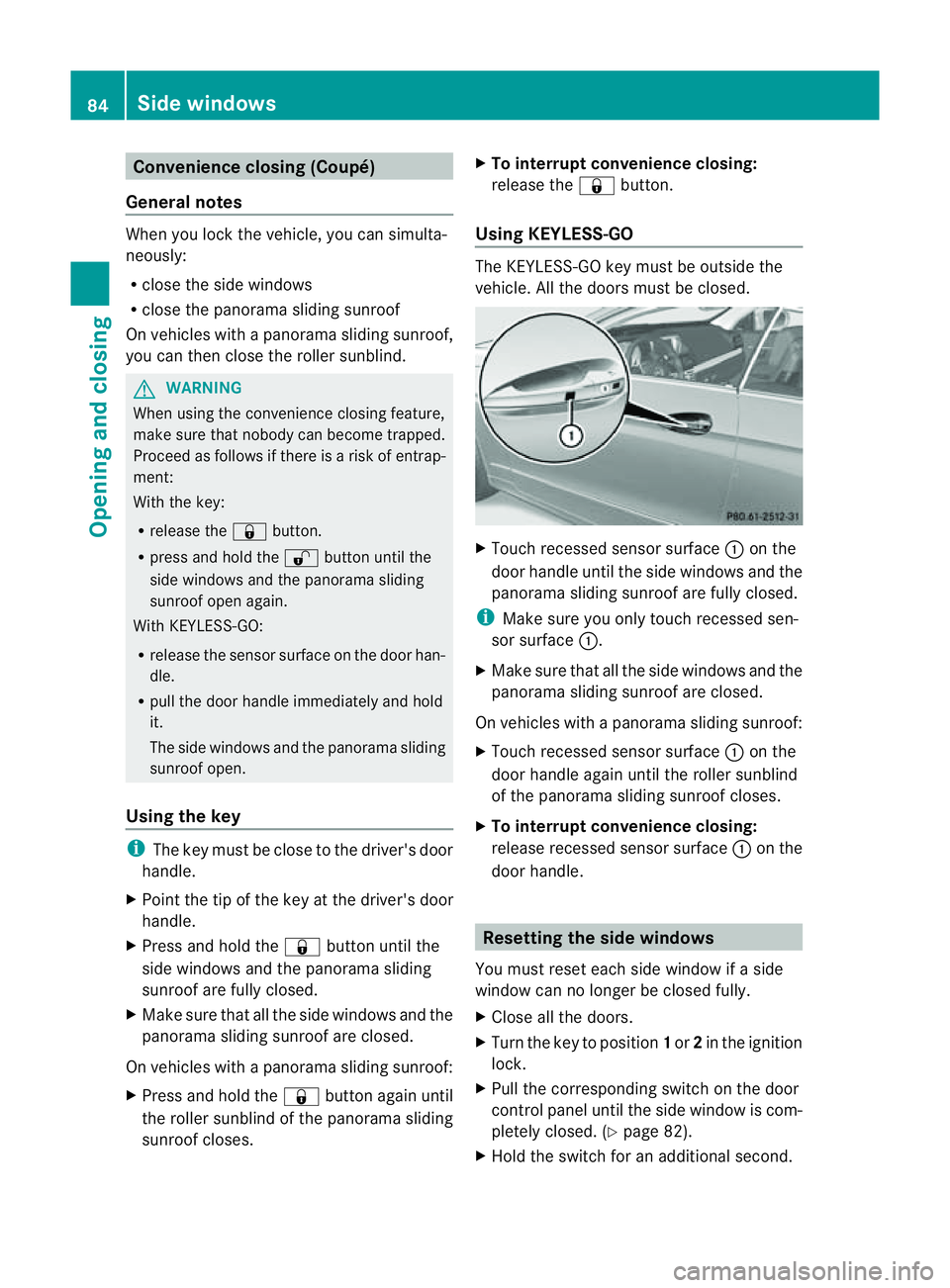
Using KEYLESS-GO The KEYLESS-GO key must be outside the
vehicle. All the doors must be closed.
X
Touch recessed sensor surface :on the
door handle until the side windows and the
panorama sliding sunroof are fully closed.
i Make sure you only touch recessed sen-
sor surface :.
X Make sure that all the side windows and the
panorama sliding sunroof are closed.
On vehicles with apanorama sliding sunroof:
X Touch recessed sensor surface :on the
door handle again until the roller sunblind
of the panorama sliding sunroof closes.
X To interrupt conveniencec losing:
release recessed sensor surface :on the
door handle. Resetting the side windows
You must reset each side window if aside
window can no longer be closed fully.
X Close all the doors.
X Turn the key to position 1or 2in the ignition
lock.
X Pull the corresponding switch on the door
control panel until the side window is com-
pletely closed. (Y page 82).
X Hold the switch for an additional second. 84
Side windowsOpening and closing
Page 88 of 353
If the side window opens again slightly:
X Immediately pullt he corresponding switch
on the door control panel until the side win-
dow is completel yclosed (Y page 82).
X Hold the switch for an additional second.
X If the corresponding side window remains
closed after the button has been released,
the side window has been reset correctly.
If this is not the case, repeatt he steps
above again. Problems with the side windows
Problem: aside window cannot be closed
because it is blocked by objects, e.g.
leaves in th ewindow guide.
X Remove the objects.
X Close the side window.
Problem :aside window cannot be closed
and you cannot see th ecause. G
WARNING
Closing the side windows with increased force
or without the anti-entrapmen tfeature could
lead to serious or even fatal injury. Make sure
that nobody can becom etrapped when clos-
ing the side windows.
If as ide window is obstructed during closing
and reopen sagain slightly:
X Immediately afte rthe window blocks, pull
the corresponding switch again until the
side window has closed.
The side window is closed with increased
force.
If as ide window is obstructed again during
closing and reopens again slightly:
X Immediately after the window blocks, pull
the corresponding switch again until the
side window has closed.
The side window is closed without the anti-
entrapment feature. Soft top (Cabriolet)
Important safety notes
You can open or close the soft top:
R when the vehicle is stationary or
R when driving up to aspeed of 40 km/h.
If there is astrongh ead wind, it may not be
possible to close the soft top fully.Int his
case, reduce speed or stop in order to close
the soft top fully.
For safety reasons, Mercedes-Ben zrecom-
mends that you only open or close the soft
top when the vehicle is stationary. G
WARNING
Only drive with the soft top fully open or
closed.
If the soft top does not open or close fully, the
soft-top hydraulics are depressurised and the
soft top is lowered:
R after about seven minutes if the ignition is
switched on
R immediately if the ignition is switched off
Aw arning tone sounds shortly beforehand.
The Top being opened message appear
sin
th em ultifunction display.
Loc kthe soft top again before driving on. Oth-
erwise, the unlocked soft top could open dur-
ing the journey and cause you to lose control
of your vehicle. You or other persons could be
injured as aresult.
! Never sit on the soft-top compartment
cover and do not store any heavy objects
on it. You will otherwise damage the soft
top and soft-top compartmentc over of the
vehicle.
! When opening and closing the soft top,
make sure that:
R there is sufficient clearance above it, as
the soft top swings upwards
R the boot separator is closed.
R the boot is only loaded to below the boot
separator. Soft top (Cabriolet)
85Opening and closing Z
Page 106 of 353
position if it was previously in an unfavour-
able position.
i You can stor ethe seat settings using the
memor yfunction (Y page 112).
i Vehicles with the through-loading feature
and memor yfunction :ifyou fold down a
rear seat backrest, the respective front
seat is moved forwards slightly if neces-
sary.
i Vehicles with memor yfunction :when the
seat is moved forwards or backwards, the
headrest is moved up or down automati-
cally. Adjusting the head restraints
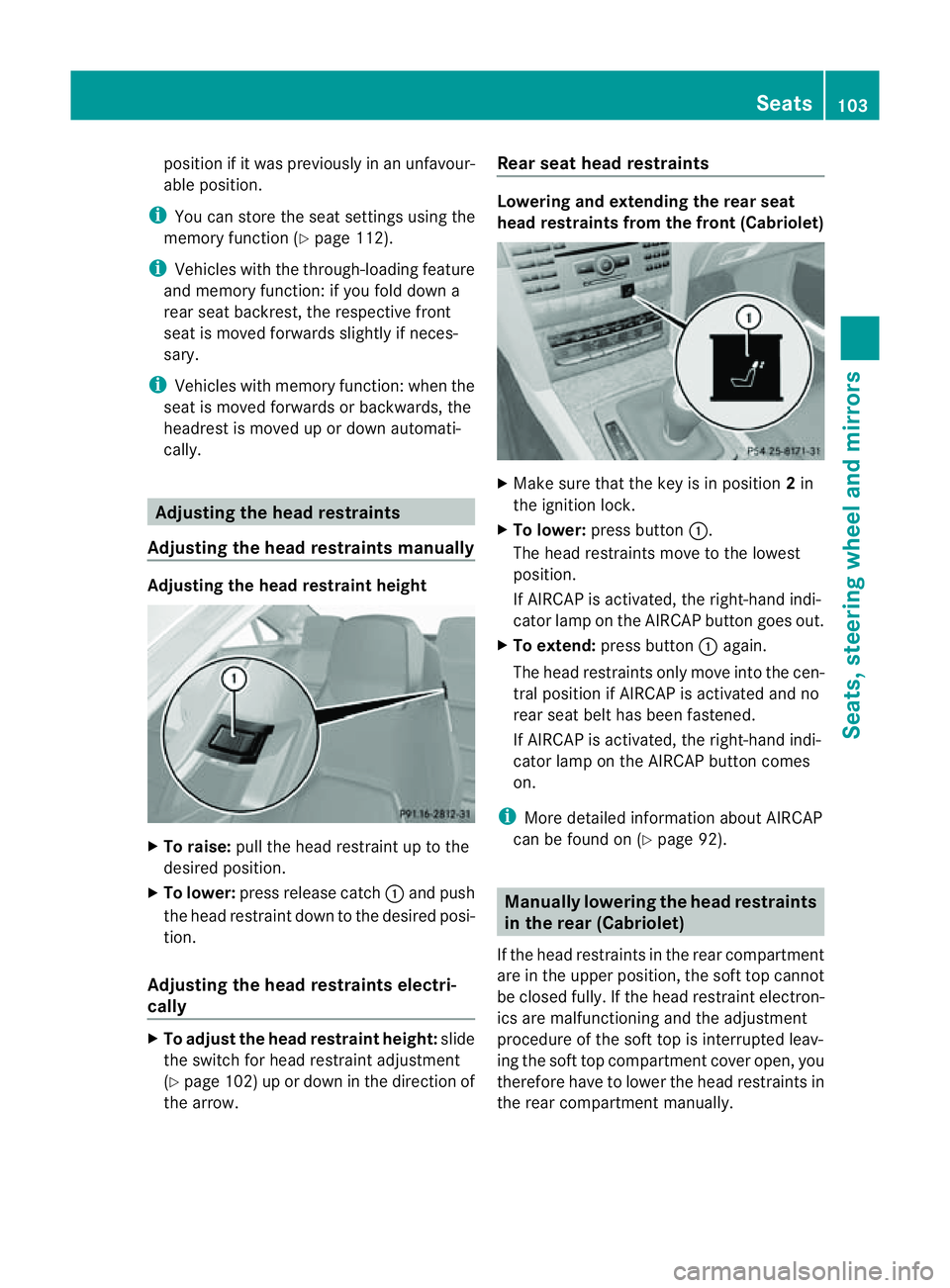
Adjusting the head restraints manually Adjusting the head restraint height
X
To raise: pull the head restraint up to the
desired position.
X To lower: press release catch :and push
the head restraint down to the desired posi-
tion.
Adjusting the head restraints electri-
cally X
To adjust the head restraint height: slide
the switch for head restraint adjustment
(Y page 102) up or down in the direction of
the arrow. Rear seat head restraints Lowering and extending the rear seat
head restraints from the front (Cabriolet)
X
Make sure that the key is in position 2in
the ignition lock.
X To lower: press button :.
The head restraintsm ove to the lowest
position.
If AIRCAP is activated, the right-hand indi-
cator lamp on the AIRCAP button goes out.
X To extend: press button :again.
The head restraintso nly move into the cen-
tral position if AIRCAP is activated and no
rear seat belt has been fastened.
If AIRCAP is activated, the right-hand indi-
cator lamp on the AIRCAP button comes
on.
i More detailed information about AIRCAP
can be found on (Y page 92). Manually lowering the head restraints
in the rear (Cabriolet)
If the head restraintsint he rear compartment
are in the upper position, the soft top cannot
be closed fully.Ift he head restraint electron-
ics are malfunctionin gand the adjustment
procedure of the soft top is interrupted leav-
ing the soft top compartmentc over open, you
therefor ehave to lower the head restraints in
the rear compartment manually. Seats
103Seats, steering wheel and mirrors Z
Page 112 of 353
thereb
yunintentionall yactivate the EASY-
ENTRY/EXIT featur eand become trapped.
Positio nofthe steering whee lwhent he
EASY-ENTRY/EXI Tfeatur eisactive The steerin
gwheel tilts upwards if you:
R remove the key from the ignition lock
R open the driver's door and the key is in
position 0or 1in the ignition lock
i The steerin gwheel only moves upwards if
it has not already reached the upper end
stop.
If you insert the key into the ignition lock with
the driver's door closed, the steerin gwheel is
automatically moved to the previously set
position.
Position of the steering wheel for driv-
ing The steerin
gwheel is moved to the previously
set position if:
R the driver's door is closed
R you insert the key into the ignition lock
or
R you press the Start/Stop button onceon
vehicles with KEYLESS-GO.
If you close the driver's door with the key
inserted into the ignition lock, the steering
wheel is automatically moved to the previ-
ously set position.
The last position of the steerin gwheel is
stored after each manual setting or when you
stor ethe setting with the memory function
(Y page 112).
Crash-responsive EASY-EXIT feature If the crash-responsive EASY-EXIT feature is
triggered in an accident ,the steerin gcolumn
will move upwards when the driver's door is
opened. This occurs irrespective of the posi-
tion of the key in the ignition lock. This makes
it easier to exit the vehicle and rescue the
occupants. The crash-responsive EASY-EXIT feature is
only operational if the EASY-EXIT/ENTRY fea-
ture is activated in the on-board computer. Mirrors
Rear-view mirror
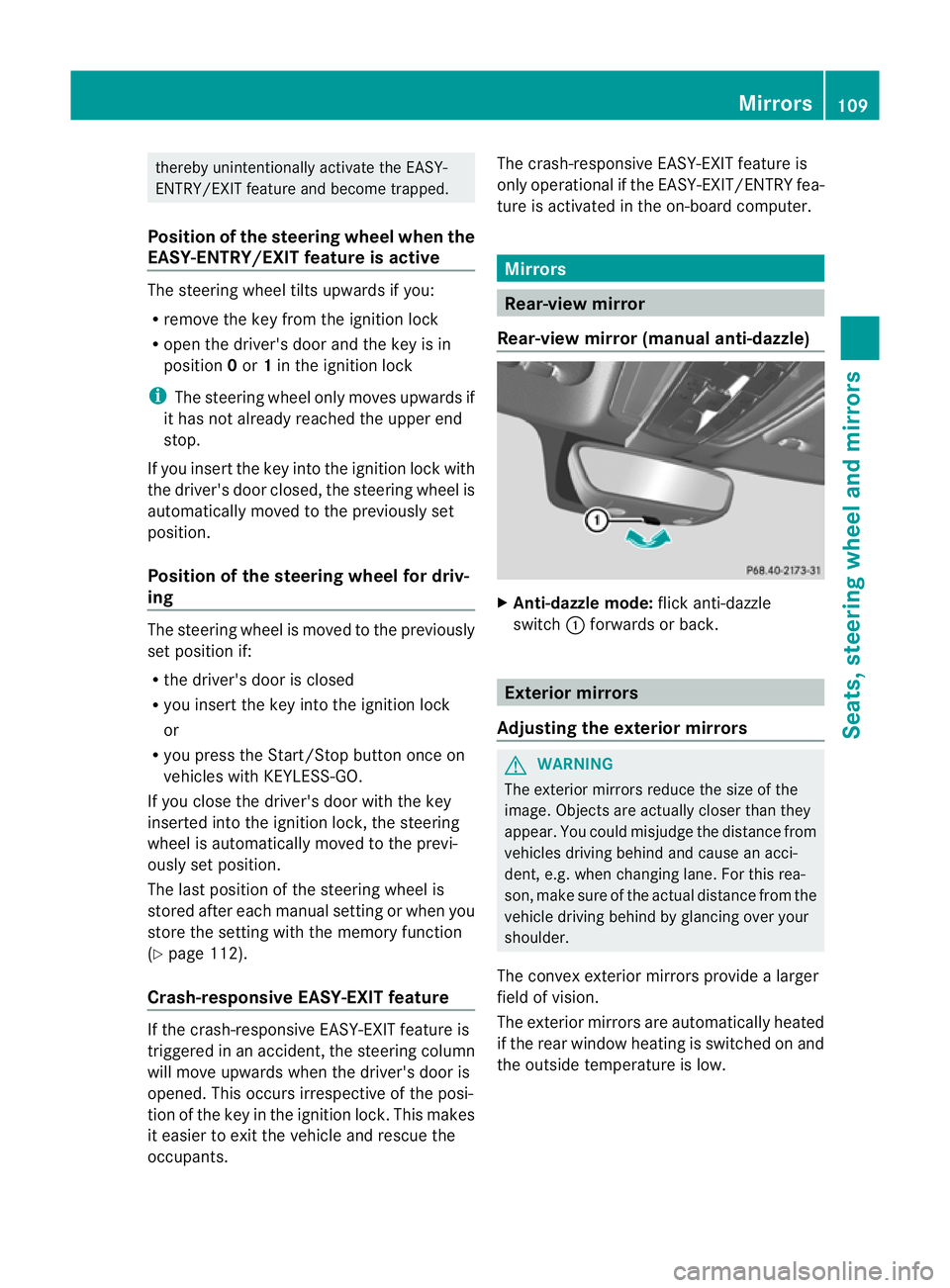
Rear-view mirror (manual anti-dazzle) X
Anti-dazzle mode: flick anti-dazzle
switch :forwards or back. Exterior mirrors
Adjusting the exterior mirrors G
WARNING
The exterior mirrors reduce the size of the
image. Objects are actually closer than they
appear. You could misjudge the distanc efrom
vehicles driving behind and cause an acci-
dent ,e.g. when changin glane. For this rea-
son ,makes ure of th eactual distanc efromt he
vehicle driving behin dbyglancingovery our
shoulder.
The convex exterior mirrors provide alarger
field of vision.
The exterior mirrors are automatically heated
if the rear window heating is switched on and
the outside temperature is low. Mirrors
109Seats, steering wheel and mirrors Z