ABS MERCEDES-BENZ E-CLASS CABRIOLET 2015 User Guide
[x] Cancel search | Manufacturer: MERCEDES-BENZ, Model Year: 2015, Model line: E-CLASS CABRIOLET, Model: MERCEDES-BENZ E-CLASS CABRIOLET 2015Pages: 349, PDF Size: 12.51 MB
Page 64 of 349
Override feature for the rear side win-
dows X
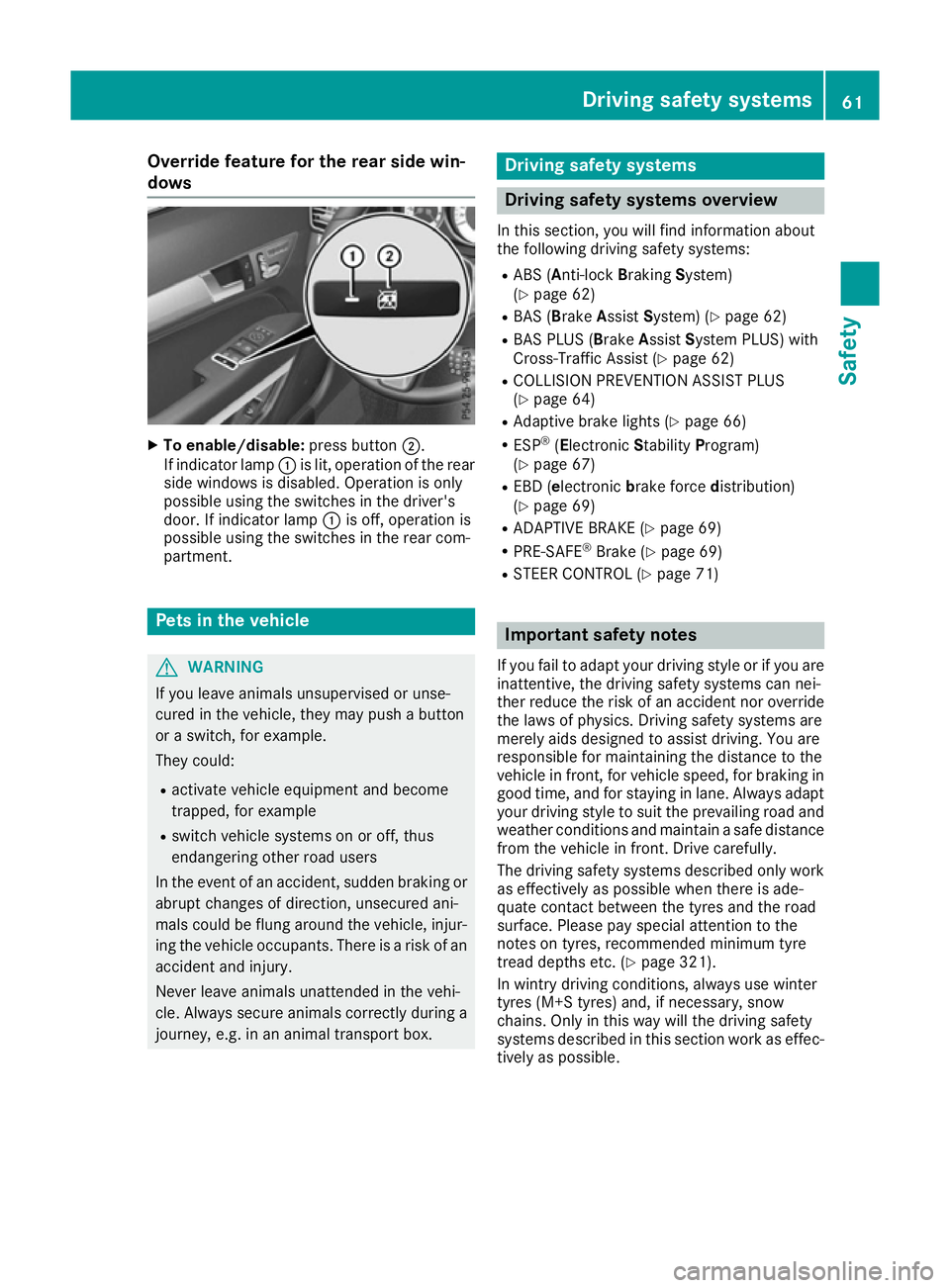
To enable/disable: press button;.
If indicator lamp :is lit, operation of the rear
side windows is disabled. Operation is only
possible using the switches in the driver's
door. If indicator lamp :is off, operation is
possible using the switches in the rear com-
partment. Pets in the vehicle
G
WARNING
If you leave animals unsupervised or unse-
cured in the vehicle, they may push a button
or a switch, for example.
They could:
R activate vehicle equipment and become
trapped, for example
R switch vehicle systems on or off, thus
endangering other road users
In the event of an accident, sudden braking or
abrupt changes of direction, unsecured ani-
mals could be flung around the vehicle, injur-
ing the vehicle occupants. There is a risk of an accident and injury.
Never leave animals unattended in the vehi-
cle. Always secure animals correctly during a
journey, e.g. in an animal transport box. Driving safety systems
Driving safety systems overview
In this section, you will find information about
the following driving safety systems:
R ABS (A nti-lock Braking System)
(Y page 62)
R BAS (Brake AssistSystem) (Y page 62)
R BAS PLUS (B rakeAssist System PLUS) with
Cross-Traffic Assist (Y page 62)
R COLLISION PREVENTION ASSIST PLUS
(Y page 64)
R Adaptive brake lights (Y page 66)
R ESP ®
(Electronic StabilityProgram)
(Y page 67)
R EBD (e lectronic brake force distribution)
(Y page 69)
R ADAPTIVE BRAKE (Y page 69)
R PRE-SAFE ®
Brake (Y page 69)
R STEER CONTROL (Y page 71) Important safety notes
If you fail to adapt your driving style or if you are
inattentive, the driving safety systems can nei-
ther reduce the risk of an accident nor override the laws of physics. Driving safety systems are
merely aids designed to assist driving. You are
responsible for maintaining the distance to the
vehicle in front, for vehicle speed, for braking in
good time, and for staying in lane. Always adapt
your driving style to suit the prevailing road and weather conditions and maintain a safe distance
from the vehicle in front. Drive carefully.
The driving safety systems described only work as effectively as possible when there is ade-
quate contact between the tyres and the road
surface. Please pay special attention to the
notes on tyres, recommended minimum tyre
tread depths etc. (Y page 321).
In wintry driving conditions, always use winter
tyres (M+S tyres) and, if necessary, snow
chains. Only in this way will the driving safety
systems described in this section work as effec-
tively as possible. Driving safety systems
61Safety Z
Page 65 of 349
ABS (Anti-lock Braking System)
General notes ABS regulates brake pressure in such a way that
the wheels do not lock when you brake. This
allows you to continue steering the vehicle when braking.
The ! ABS warning lamp in the instrument
cluster lights up when the ignition is switched
on. It goes out when the engine is running.
ABS works from a speed of about 8 km/h,
regardless of road-surface conditions. ABS
works on slippery surfaces, even when you only
brake gently.
Important safety notes i
Observe the "Important safety notes" sec-
tion (Y page 61). G
WARNING
If ABS is faulty, the wheels could lock when
braking. The steerability and braking charac-
teristics may be severely impaired. Addition-
ally, further driving safety systems are deac-
tivated. There is an increased danger of skid- ding and accidents.
Drive on carefully. Have ABS checked imme-
diately at a qualified specialist workshop.
If ABS is malfunctioning, other systems, includ-
ing driving safety systems, will also become
inoperative. Observe the information on the ABS warning lamp (Y page 256) and display mes-
sages which may be shown in the instrument
cluster (Y page 230).
Brakes X
If ABS intervenes: continue to depress the
brake pedal with force until the braking sit-
uation is over.
X To make a full brake application: depress
the brake pedal with full force.
If ABS intervenes when braking, you will feel a
pulsing in the brake pedal.
The pulsating brake pedal can be an indication
of hazardous road conditions; this serves as a
reminder to take extra care while driving. BAS (Brake Assist)
General notes BAS operates in emergency braking situations.
If you depress the brake pedal quickly, BAS
automatically boosts the braking force, thus
shortening the stopping distance.
Important safety notes i
Observe the "Important safety notes" sec-
tion (Y page 61). G
WARNING
If BAS is malfunctioning, the braking distance
in an emergency braking situation is
increased. There is a risk of accident.
In an emergency braking situation, depress
the brake pedal with full force. ABS prevents
the wheels from locking.
Brakes X
Keep the brake pedal depressed firmly until
the emergency braking situation is over.
ABS prevents the wheels from locking.
The brakes will function as usual once you
release the brake pedal. BAS is deactivated. BAS PLUS (Brake Assist PLUS) with
Cross-Traffic Assist
General notes BAS PLUS can help you to minimise the risk of a
collision with a vehicle or a pedestrian and
reduce the effects of such a collision. If BAS
PLUS detects a danger of collision, you are
assisted when braking.
i Pay attention to the important safety notes
in the "Driving safety systems" section
(Y page 61).
BAS PLUS is only available on vehicles with the
Driving Assistance package.
For BAS PLUS to assist you when driving, the
radar sensor system and the camera system
must be operational. 62
Driving safety systemsSafety
Page 67 of 349
Function
To avoid a collision, BAS PLUS calculates the
brake force necessary if:
R you approach an obstacle and
R BAS PLUS has detected a risk of a collision
When driving at a speed under 30 km/h: if
you depress the brake pedal, BAS PLUS is acti-
vated. Braking assistance from BAS PLUS is car-
ried out at the last possible moment.
When driving at a speed above 30 km/h: if
you depress the brake pedal sharply, BAS PLUS automatically increases the brake pressure to adegree suited to the traffic situation.
BAS PLUS provides braking assistance in haz-
ardous situations with vehicles in front within a
speed range between 7 km/h and 250 km/h.
Up to a speed of approximately 70 km/h, BAS
PLUS may react to:
R stationary objects in the path of your vehicle,
e.g. stopped or parked vehicles
R pedestrians in the path of your vehicle
R obstacles crossing your path, which move in
the detection range of the sensors and are
detected
i If BAS PLUS demands particularly high brak-
ing force, preventative passenger protection
measures (PRE-SAFE ®
) are activated simulta-
neously.
X Keep the brake pedal depressed until the
emergency braking situation is over.
ABS prevents the wheels from locking.
BAS PLUS is deactivated and the brakes func-
tion as usual, if:
R you release the brake pedal
R there is no longer a risk of collision
R no obstacle is detected in front of your vehicle
R you depress the accelerator pedal
R you activate kickdown COLLISION PREVENTION ASSIST
PLUS
General notes i
Observe the "Important safety notes" sec-
tion (Y page 61).
COLLISION PREVENTION ASSIST PLUS consists of a distance warning function with an autono- mous braking function and Adaptive Brake
Assist.
COLLISION PREVENTION ASSIST PLUS can help
you to minimise the risk of a collision with the
vehicle in front or reduce the effects of such a
collision.
If COLLISION PREVENTION ASSIST PLUS
detects that there is a risk of a collision, you will
be warned visually and acoustically. If you do not react to the visual and audible collision warning,
autonomous braking can be initiated in critical
situations. If you apply the brake yourself in a
critical situation, the COLLISION PREVENTION
ASSIST PLUS Adaptive Brake Assist assists you.
Important safety notes In particular, the detection of obstacles can be
impaired in the case of:
R dirt on the sensors or obscured sensors
R snow or heavy rain
R interference by other radar sources
R strong radar reflections, for example, in multi-
storey car parks
R a narrow vehicle travelling in front, e.g. a
motorcycle
R a vehicle travelling in front on a different line
R new vehicles or after a service on the COLLI-
SION PREVENTION ASSIST PLUS system
Please observe the information in the section on running-in the vehicle (Y page 138).
Following damage to the front end of the vehicle, have the configuration and operation of the
radar sensor checked at a qualified specialist
workshop. This also applies to collisions at slow speeds where there is no visible damage to thefront of the vehicle.
Activating/deactivating The COLLISION PREVENTION ASSIST PLUS is
automatically active after switching on the igni-
tion.
You can activate or deactivate COLLISION PRE-
VENTION ASSIST PLUS in the on-board com-
puter (Y page 221). When deactivated, the dis-
tance warning function and the autonomous
braking function are also deactivated.
If COLLISION PREVENTION ASSIST PLUS is
deactivated, the æsymbol appears in the
assistance graphics display. 64
Driving safety systemsSafety
Page 69 of 349
Adaptive Brake Assist
General notes
i Observe the "Important safety notes" sec-
tion (Y page 61).
With the help of Adaptive Brake Assist, the dis-
tance warning signal can detect obstacles that
are in the path of your vehicle for an extended
period of time.
If Adaptive Brake Assist detects a risk of a col-
lision with the vehicle in front, it calculates the
braking force necessary to avoid a collision. If
you apply the brakes forcefully, Adaptive Brake
Assist will automatically increase the braking
force to a level suitable for the traffic conditions.
Adaptive Brake Assist provides braking assis-
tance in hazardous situations at speeds above
7 km/h. It uses radar sensor technology to
assess the traffic situation.
Up to a speed of approximately 250 km/h,
Adaptive Brake Assist is capable of reacting to
moving objects that have already been detected
as such at least once over the period of obser-
vation.
Up to a speed of approximately 70 km/h, Adap-
tive Brake Assist reacts to stationary obstacles.
If Adaptive Brake Assist demands a particularly
high braking force, preventative passenger pro-
tection measures (PRE-SAFE ®
) are activated
simultaneously (Y page 47).
X Keep the brake pedal depressed until the
emergency braking situation is over.
ABS prevents the wheels from locking.
The brakes will work normally again if: R you release the brake pedal
R there is no longer any danger of a collision
R no obstacle is detected in front of your vehicle
Adaptive Brake Assist is then deactivated.
Important safety notes
i Observe the "Important safety notes" sec-
tion for driving safety systems (Y page 61).G
WARNING
Adaptive Brake Assist cannot always clearly
identify objects and complex traffic situa-
tions. In such cases, Adaptive Brake Assist can:
R intervene unnecessarily
R not intervene
There is a risk of an accident.
Always pay careful attention to the traffic sit- uation and be ready to brake. Terminate the
intervention in a non-critical driving situation. G
WARNING
Adaptive Brake Assist does not react:
R to people or animals
R to oncoming vehicles
R to crossing traffic
R when cornering
As a result, the Adaptive Brake Assist may not intervene in all critical conditions. There is a
risk of an accident.
Always pay careful attention to the traffic sit- uation and be ready to brake.
Due to the nature of the system, particularly
complicated but non-critical driving conditions
may also cause Brake Assist to intervene.
If Adaptive Brake Assist is not available due to a malfunction in the radar sensor system, the
brake system remains available with full brake
boosting effect and BAS. Adaptive brake lights
i Observe the "Important safety notes" sec-
tion (Y page 61).
The adaptive brake lights warn following traffic
in an emergency braking situation:
R by flashing brake lamps
R the hazard warning lamps are activated
If you brake sharply from a speed of more than
50 km/h or if braking is assisted by BAS or BAS
PLUS, the brake lamps flash rapidly. In this way,
traffic travelling behind you is warned in an even
more noticeable manner.
If you brake sharply from a speed of more than
70 km/h to a standstill, the hazard warning
lamps are activated automatically. If the brakes are applied again, the brake lamps light up con-
tinuously. The hazard warning lamps switch off
automatically if you travel faster than 10 km/h. 66
Driving safety systemsSafety
Page 81 of 349
X
Repeatedly tap the key against your palm until
battery =falls out.
X Insert the new battery with the positive ter-
minal facing upwards. Use a lint-free cloth to
do so.
X Make sure that the surface of the battery is
free of lint, grease and other contamination.
X Insert the front tabs of battery compartment
cover :into the housing and then press to
close it.
X Insert emergency key element ;into the key
(Y page 76).
X Check the function of all key buttons on the
vehicle. 78
KeyOpening and closing
Page 182 of 349
Dynamic handling package with
sports mode
General notes The most important part of the dynamic han-
dling package with sports mode is the adjusta-
ble damping system. This automatically controls
and adapts the suspension to the respective
driving situation.
The calibration of the suspension depends on:
R your driving style
R the road surface conditions
R your individual selection; see the following
description
Vehicles with dynamic handling package
with sports mode: in addition to drive pro-
grams Eand S, there is also manual drive pro-
gram M(Y page 151).
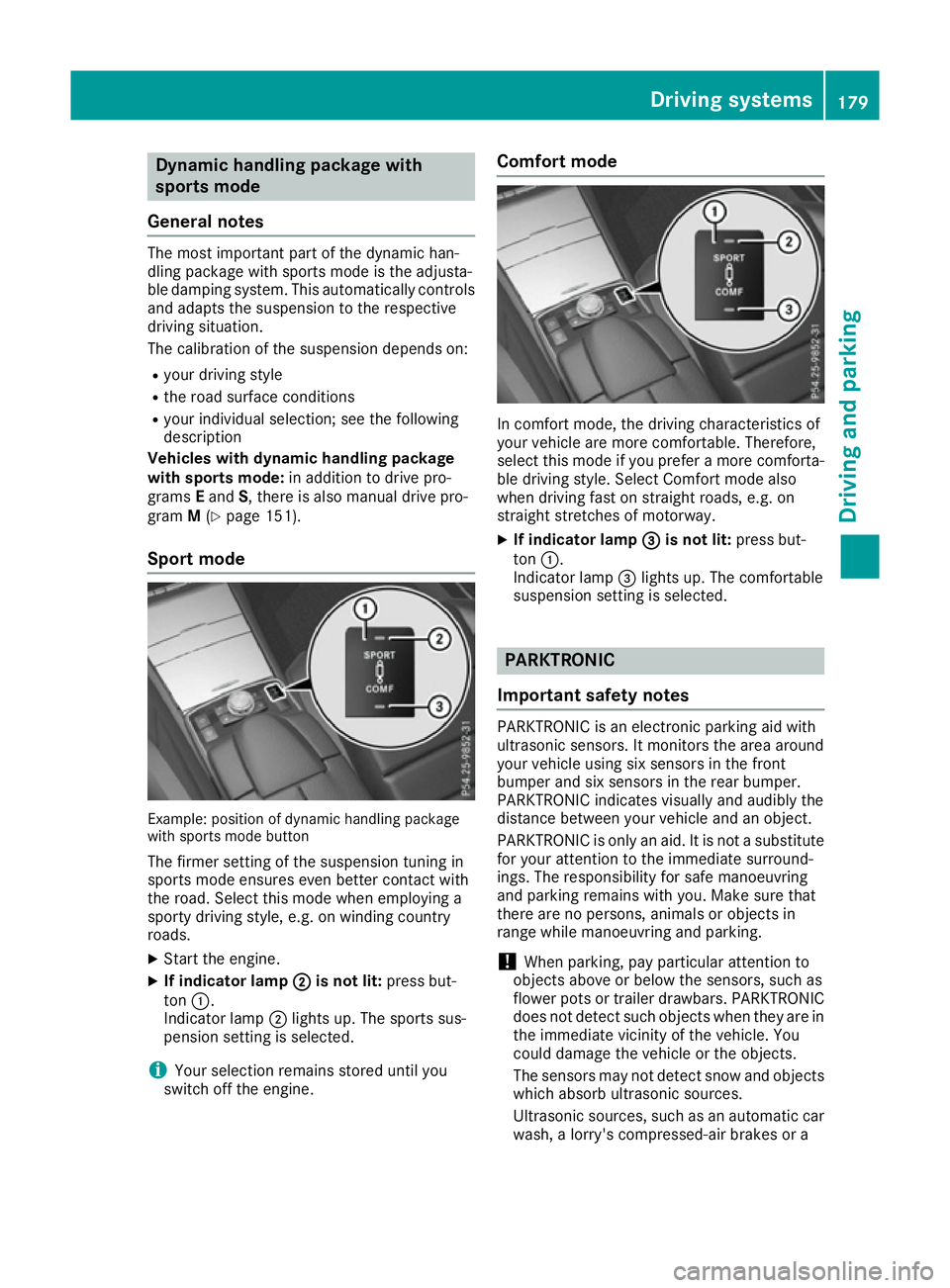
Sport mode Example: position of dynamic handling package
with sports mode button
The firmer setting of the suspension tuning in
sports mode ensures even better contact with
the road. Select this mode when employing a
sporty driving style, e.g. on winding country
roads.
X Start the engine.
X If indicator lamp ;
; is not lit: press but-
ton :.
Indicator lamp ;lights up. The sports sus-
pension setting is selected.
i Your selection remains stored until you
switch off the engine. Comfort mode
In comfort mode, the driving characteristics of
your vehicle are more comfortable. Therefore,
select this mode if you prefer a more comforta-
ble driving style. Select Comfort mode also
when driving fast on straight roads, e.g. on
straight stretches of motorway.
X If indicator lamp =
= is not lit: press but-
ton :.
Indicator lamp =lights up. The comfortable
suspension setting is selected. PARKTRONIC
Important safety notes PARKTRONIC is an electronic parking aid with
ultrasonic sensors. It monitors the area around
your vehicle using six sensors in the front
bumper and six sensors in the rear bumper.
PARKTRONIC indicates visually and audibly the
distance between your vehicle and an object.
PARKTRONIC is only an aid. It is not a substitute
for your attention to the immediate surround-
ings. The responsibility for safe manoeuvring
and parking remains with you. Make sure that
there are no persons, animals or objects in
range while manoeuvring and parking.
! When parking, pay particular attention to
objects above or below the sensors, such as
flower pots or trailer drawbars. PARKTRONIC does not detect such objects when they are in
the immediate vicinity of the vehicle. You
could damage the vehicle or the objects.
The sensors may not detect snow and objects which absorb ultrasonic sources.
Ultrasonic sources, such as an automatic car
wash, a lorry's compressed-air brakes or a Driving syste
ms
179Driving an d parking Z
Page 206 of 349
R
the lane markings are worn away, dark or cov-
ered up, e.g. by dirt or snow
R the distance to the vehicle in front is too small
and the lane markings thus cannot be detec-
ted
R the lane markings change quickly, e.g. lanes
branch off, cross one another or merge
R the road is narrow and winding
R there are highly variable shade conditions on
the road
Activating Lane Keeping Assist X Activate Lane Keeping Assist using the on-
board computer; to do so, select Standard
Standard or
Adaptive Adaptive (Ypage 222).
If you drive at speeds above 60 km/h and lane
markings are detected, the lines in the assis- tance graphic display (Y page 220) are
shown in green. Lane Keeping Assist is ready for use.
Standard
If Standard
Standard is selected, no warning vibration
occurs if:
R you have switched on the turn signals. In this
case, the warnings are suppressed for a cer-
tain period of time.
R a driving safety system intervenes, such as
ABS, BAS or ESP ®
.
Adaptive
When Adaptive
Adaptive is selected, no warning vibra-
tion occurs if:
R you have switched on the turn signals. In this
case, the warnings are suppressed for a cer-
tain period of time.
R a driving safety system intervenes, such as
ABS, BAS or ESP ®
.
R you accelerate hard, e.g. kickdown.
R you brake hard.
R you steer actively, e.g. swerve to avoid an
obstacle or change lane quickly.
R you cut the corner on a sharp bend.
In order that you are warned only when neces-
sary and in good time if you cross the lane mark-
ing, the system detects certain conditions and
warns you accordingly. The warning vibration occurs earlier if:
R you approach the outer lane marking on a
bend
R the road has very wide lanes, e.g. a motorway
R the system detects solid lane markings
The warning vibration occurs later if:
R the road has narrow lanes
R you cut the corner on a bend Active Driving Assistance package
General notes The Active Driving Assistance package consists
of DISTRONIC PLUS (Y page 168), Active Blind
Spot Assist (Y page 203)and Active Lane Keep-
ing Assist (Y page 206).
Active Blind Spot Assist General notes
Active Blind Spot Assist monitors the areas on
either side of the vehicle that are not visible to
the driver with two lateral, rear-facing radar sen-
sors. A warning display in the exterior mirrors
draws your attention to vehicles detected in the monitored area. If you then switch on the cor-
responding turn signal to change lanes, you willalso receive a visual and audible collision warn-
ing. If a risk of side impact is detected, correc-
tive braking may help you avoid a collision.
Active Blind Spot Assist evaluates the free
space in the direction of travel and to the side
before making a course-correcting brake appli-
cation. For this, Active Blind Spot Assist uses
the forward-facing radar sensors.
Active Blind Spot Assist supports you from a
speed of approximately 30 km/h.
Important safety notes Active Blind Spot Assist is only an aid and is not
a substitute for attentive driving. G
WARNING
Active Blind Spot Assist does not react to
vehicles:
R overtaking too closely on the side, placing
them in the blind spot area
R if the difference in the speed of approach
and overtaking is too great Driving systems
203Driving and parking
Z
Page 211 of 349
R
you have switched on the turn signal. In this
case, the warnings are suppressed for a
certain period of time.
R a driving safety system intervenes, such as
ABS, BAS or ESP ®
.
When Adaptive
Adaptive is selected, no warning vibra-
tion occurs if:
R you have switched on the turn signal. In this
case, the warnings are suppressed for a
certain period of time.
R a driving safety system intervenes, such as
ABS, BAS or ESP ®
.
R you accelerate hard, e.g. kickdown.
R you brake hard.
R you steer actively, e.g. swerve to avoid an
obstacle or change lane quickly.
R you cut the corner on a sharp bend.
In order that you are warned only when neces-
sary and in good time if you cross the lane mark-
ing, the system detects certain conditions and
warns you accordingly.
The warning vibration occurs earlier if:
R you approach the outer lane marking on a
bend
R the road has very wide lanes, e.g. a motorway
R the system detects solid lane markings
The warning vibration occurs later if:
R the road has narrow lanes
R you cut the corner on a bend
Towing a trailer If you couple up a trailer, make sure that you
have correctly established the electrical con-
nection. This can be accomplished by checking
the trailer lighting. Towing a trailer
Important safety notes
G
WARNING
You could lose control of the vehicle/trailer
combination if it begins to swerve. The vehi-
cle/trailer combination could even overturn.
There is a risk of an accident.
On no account should you attempt to
straighten out the vehicle/trailer combina-
tion by increasing speed. Decrease your speed and do not countersteer. Brake if nec-
essary. G
WARNING
If the maximum permissible load for a carrier system is exceeded, the carrier could come
loose from the vehicle and endanger other
road users. There is a risk of an accident and injury.
Never exceed the maximum permissible load
when using a carrier.
Exceeding the maximum permissible nose-
weight of the trailer drawbar on the ball coupling
may cause damage to the following:
R your vehicle
R trailer
R the ball coupling
R trailer tow hitch
The vehicle/trailer combination could become
unstable.
If the noseweight used is lower than the mini-
mum permissible noseweight, the vehicle/
trailer combination could also become unstable.
To avoid hazardous situations:
R make sure to check the noseweight before
each journey
R use a drawbar noseweight as close as possi-
ble to the maximum noseweight
R do not exceed the maximum permissible
noseweight
R do not use a noseweight lower than the min-
imum noseweight
When reversing the vehicle towards the trailer,
make sure there is nobody between the trailer
and the vehicle.
Couple and uncouple the trailer carefully. If you do not couple the trailer to the towing vehicle
correctly, the trailer could become detached.
Make sure that the following values are not
exceeded:
R the permissible trailer drawbar noseweight
R the permissible trailer load
R the permissible rear axle load of the towing
vehicle
R the maximum permissible gross vehicle
weight of both the towing vehicle and the
trailer 208
Towing a trailerDriving and pa
rking
Page 233 of 349
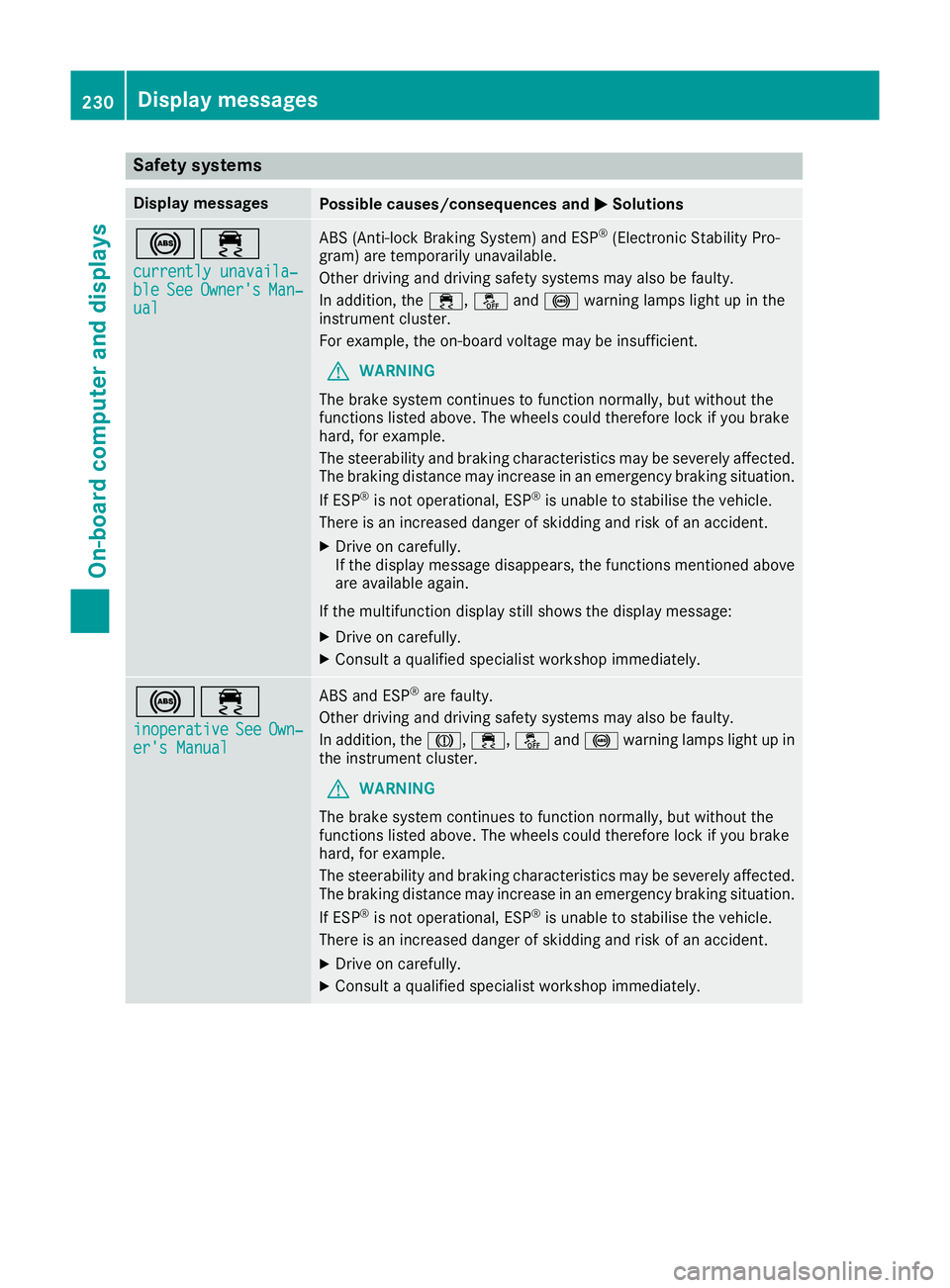
Safety systems
Display messages
Possible causes/consequences and
M
MSolutions !÷
currently unavaila‐
currently unavaila‐
ble ble See
SeeOwner's
Owner's Man‐
Man‐
ual
ual ABS (Anti-lock Braking System) and ESP
®
(Electronic Stability Pro-
gram) are temporarily unavailable.
Other driving and driving safety systems may also be faulty.
In addition, the ÷,åand! warning lamps light up in the
instrument cluster.
For example, the on-board voltage may be insufficient.
G WARNING
The brake system continues to function normally, but without the
functions listed above. The wheels could therefore lock if you brake
hard, for example.
The steerability and braking characteristics may be severely affected. The braking distance may increase in an emergency braking situation.
If ESP ®
is not operational, ESP ®
is unable to stabilise the vehicle.
There is an increased danger of skidding and risk of an accident.
X Drive on carefully.
If the display message disappears, the functions mentioned above
are available again.
If the multifunction display still shows the display message: X Drive on carefully.
X Consult a qualified specialist workshop immediately. !÷
inoperative inoperative See SeeOwn‐
Own‐
er's Manual
er's Manual ABS and ESP
®
are faulty.
Other driving and driving safety systems may also be faulty.
In addition, the J,÷, åand! warning lamps light up in
the instrument cluster.
G WARNING
The brake system continues to function normally, but without the
functions listed above. The wheels could therefore lock if you brake
hard, for example.
The steerability and braking characteristics may be severely affected. The braking distance may increase in an emergency braking situation.
If ESP ®
is not operational, ESP ®
is unable to stabilise the vehicle.
There is an increased danger of skidding and risk of an accident.
X Drive on carefully.
X Consult a qualified specialist workshop immediately. 230
Display messagesOn-board computer and displays
Page 234 of 349
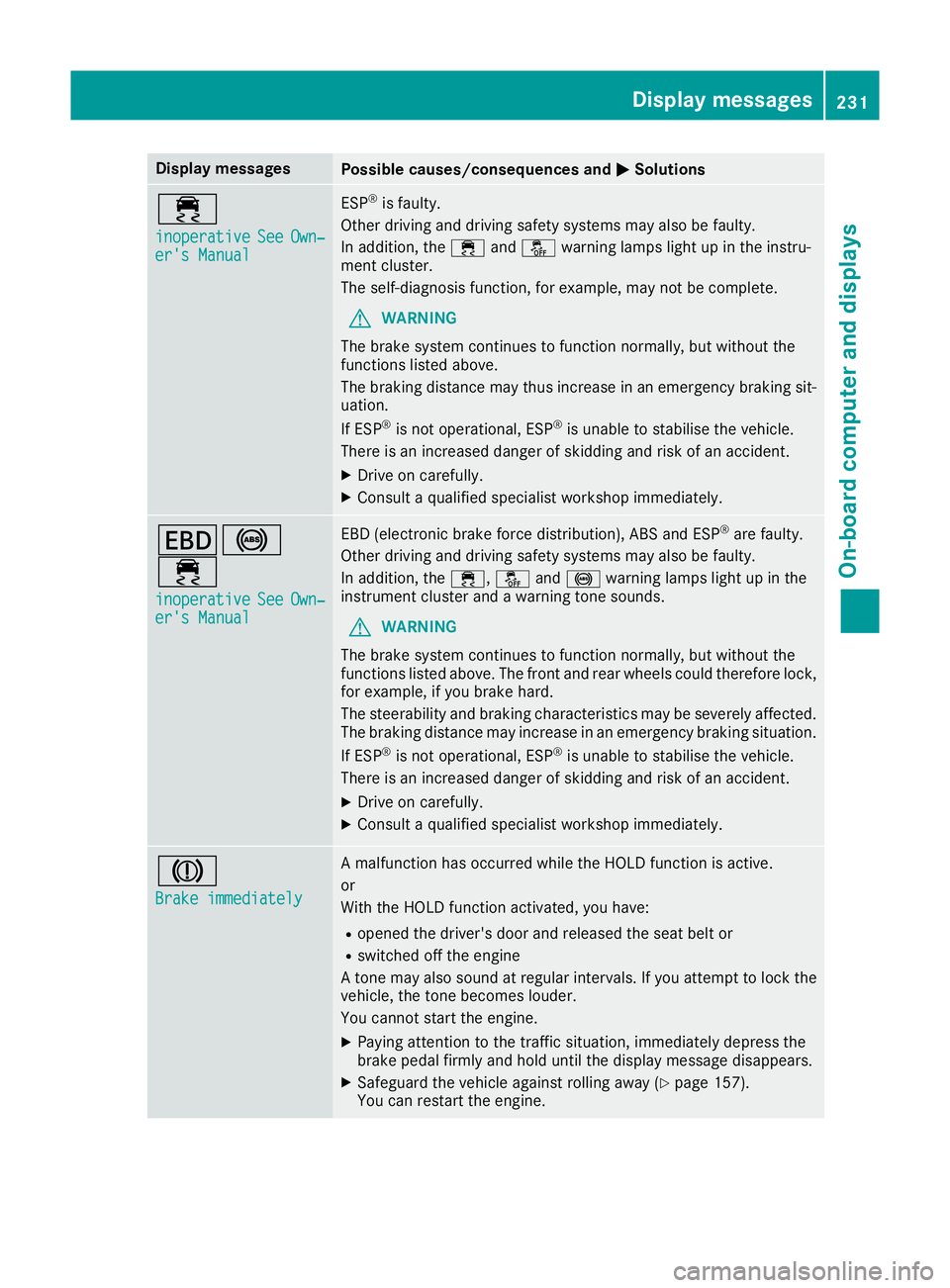
Display messages
Possible causes/consequences and
M
MSolutions ÷
inoperative inoperative
See
SeeOwn‐
Own‐
er's Manual
er's Manual ESP
®
is faulty.
Other driving and driving safety systems may also be faulty.
In addition, the ÷andå warning lamps light up in the instru-
ment cluster.
The self-diagnosis function, for example, may not be complete.
G WARNING
The brake system continues to function normally, but without the
functions listed above.
The braking distance may thus increase in an emergency braking sit-
uation.
If ESP ®
is not operational, ESP ®
is unable to stabilise the vehicle.
There is an increased danger of skidding and risk of an accident.
X Drive on carefully.
X Consult a qualified specialist workshop immediately. T!
÷
inoperative inoperative See SeeOwn‐
Own‐
er's Manual
er's Manual EBD (electronic brake force distribution), ABS and ESP
®
are faulty.
Other driving and driving safety systems may also be faulty.
In addition, the ÷,åand! warning lamps light up in the
instrument cluster and a warning tone sounds.
G WARNING
The brake system continues to function normally, but without the
functions listed above. The front and rear wheels could therefore lock, for example, if you brake hard.
The steerability and braking characteristics may be severely affected.The braking distance may increase in an emergency braking situation.
If ESP ®
is not operational, ESP ®
is unable to stabilise the vehicle.
There is an increased danger of skidding and risk of an accident.
X Drive on carefully.
X Consult a qualified specialist workshop immediately. J
Brake immediately Brake immediately A malfunction has occurred while the HOLD function is active.
or
With the HOLD function activated, you have:
R opened the driver's door and released the seat belt or
R switched off the engine
A tone may also sound at regular intervals. If you attempt to lock the
vehicle, the tone becomes louder.
You cannot start the engine.
X Paying attention to the traffic situation, immediately depress the
brake pedal firmly and hold until the display message disappears.
X Safeguard the vehicle against rolling away (Y page 157).
You can restart the engine. Display
messages
231On-board computer and displays Z