light MERCEDES-BENZ E-CLASS CABRIOLET 2017 Owner's Manual
[x] Cancel search | Manufacturer: MERCEDES-BENZ, Model Year: 2017, Model line: E-CLASS CABRIOLET, Model: MERCEDES-BENZ E-CLASS CABRIOLET 2017Pages: 521, PDF Size: 10.64 MB
Page 80 of 521

Problem
Possible causes/consequences and M
MSolutions
& WARNING Risk of becoming trapped or fata lly injured if reve rsing pr otection is not activated
If yo u close a side wind owagain immediately af ter it has been bloc ked or reset, the side window closes
with increased or maximum forc e. The reve rsing feature is then not active.
Pa rts of the body could become trapped in the closing area in the process. #
Make sure that no parts of the body are in the closing area. #
Tostop the closing process, release the button or press the button again toreopen the side win‐
do w. #
Close the soft top.
If a side window is obstructed during closing and reopens again slightly: #
Immediately af terth e window is obstructed, pull the cor responding button again until the side window
has closed, and hold the button for an additional second.
The side window is closed with increased forc e.
If a side window is obstructed again during closing and reopens again slightly: #
Repeat the pr evious step.
The side window is closed without the automatic reve rsing function. Opening and closing
77
Page 81 of 521

Soft
top Opening/closing
the soft top using the so ft-
to p switch &
WARNING Risk of becoming trapped
due tothe soft top lo wering unexpect‐
ed ly
If yo u do not fully open/close the soft top,
th e soft-to phy draulics depressurise af ter a
short time.
This causes the soft topto lowe r unexpect‐
edly and may cause you or others tobe trap‐
ped. #
Alw ays fully open or close the soft top. &
WARNING Risk of becoming trapped
when opening/closing the soft top .
When opening or closing the soft top, there
is a risk that parts of the body could become
trapped bymoving parts such as thero of
mechanism, the boot lid, or the side win‐
do ws. #
When opening or closing, make sure
that no body parts are in the vicinity of
moving components. #
Release the button if somebody
becomes trapped. *
NO
TEPossible damage tothe soft top
when opening or closing The soft
top can be damaged when opening
or closing. #
Make sure there is suf ficient clearance
ab ove it. #
Only load the boot below the boot sepa‐
ra tor so that it will not be pushed
upwards. #
Make sure that the boot lid is closed. #
Ifth e soft top is dirty, wet or frozen, do
not open the soft top. *
NO
TEDama getothe soft top caused by
heavy objects Heavy objects placed on
the soft-to p com‐
partment co ver can dama gethe soft top or
soft-to p compartment co ver. #
Do not place he avy objects on the soft-
to p compartment co ver. #
Do not sit on the soft-to p compartment
co ver. Fo
r saf etyre asons, Mercedes-Benz recommends
opening or closing the soft top when theve hicle
is stationar y.
Do not exceed a speed of maximum 50 km/h
when driving (max. 60 km/h toavoid inter rupt‐
ing the closing process while slightly exceeding
th is speed). #
Make sure that the boot separator is closed. #
Close the boot lid. #
Switch the ignition on. #
Keep the brake pedal depressed when the
ve hicle is stationar y. 78
Opening and closing
Page 84 of 521

AIR
CAP can be activated or deactivated at
speeds of up toappr oximately 160 km/h. &
WARNING Risk of becoming trapped
when retracting AIR CAP
When retracting AIR CAP,persons could
become trapped in the moving mechanism. #
Make sure that persons do not hold
on to the upper frame of the windscreen
and do not touch the AIR CAP wind
deflector. #
Switch the ignition on. #
Toactivate: pull switch 1.
AIR CAPex tends and the indicator lamp in
switch 1lights up. #
Todeactivate: press switch 1.
AIR CAPre tracts and the indicator lamp in
switch 1goes out. If
th eve hicle is par ked with the soft top open
and the po wer supp lyis switched off, AI RCAP
re tracts au tomatical ly.
When youre start the engine af ter having been
par ked, AIR CAPex tends au tomatically. Fi
tting/ removing the folding draught stop &
WARNING Risk of accident when using
th e draught stop in poor visibility condi‐
tions
The draught stop impairs your view tothe
re ar, particular ly when darkor in poor visibil‐
ity conditions. #
Only use the draught stop in good visi‐
bility conditions. &
WARNING Risk of accident and inju ry
due toan incor rectly fitted draught stop
If th e draught stop is not cor rectly fitted it
can come loose du ring the journey and
endanger other road users. Opening and closing
81
Page 90 of 521

Cor
rect driver's seat position &
WARNING Risk of inju rythro ugh adjust‐
ing vehicle settings while theve hicle is in
motion
Yo u could lose cont rol of theve hicle in the
fo llowing situations:
R ifyo u adjust the driver's seat, the head
re stra ints, thesteering wheel or the mir‐
ro r while theve hicle is in motion
R ifyo ufast enyour seat belt while theve hi‐
cle is in motion #
Before starting the engine: adjust the
driver's seat, the head restra ints, the
st eering wheel or the mir ror and fasten
yo ur seat belt. Obser
vethefo llowing when adjusting steering
wheel 1, seat belt 2and driver's seat 3:
R you are as faraw ay from the driver's airbag
as possible
R you are sitting in a no rmal upright position
R your thighs are slight lysuppor tedby the seat
cushion R
your legs are not entirely stre tched and you
can dep ress the pedals properly
R the back of your head is suppo rted at eye
le ve lby the cent reofthe head restra int
R you can hold thesteering wheel with your
arms slightly bent
R you can mo veyour legs freely
R you can see all the displa ysinthe instrument
clus ter clea rly
R you should ha vea good overview of traf fic
conditions
R the seat belt is pulled snugly against the
body and must be routed across the cent re
of your shoulder and across your hips in the
pelvic area Seats and
stowing 87
Page 94 of 521
#
Toselect the front passenger seat: press
button 1.
When the indicator lamp lights up, the front
passenger seat is selected. #
Adjust the front passenger seat using the
buttons in the door control panel on the driv‐
er's side. Ad
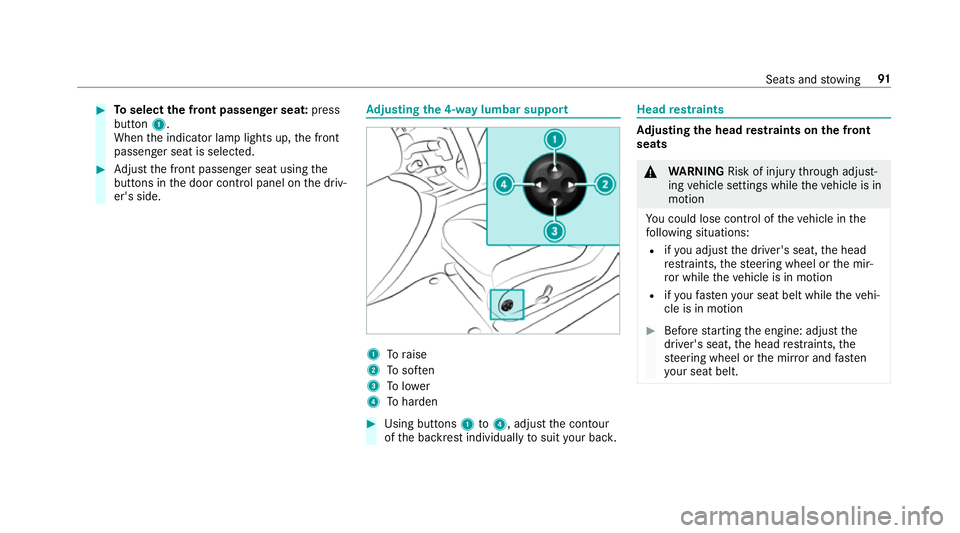
justing the 4-w aylumbar support 1
Toraise
2 Tosof ten
3 Tolower
4 Toharden #
Using buttons 1to4 , adjust the conto ur
of the backrest individually tosuit your bac k. Head
restra ints Ad
justing the head restra ints on the front
seats &
WARNING Risk of inju rythro ugh adjust‐
ing vehicle settings while theve hicle is in
motion
Yo u could lose cont rol of theve hicle in the
fo llowing situations:
R ifyo u adjust the driver's seat, the head
re stra ints, thesteering wheel or the mir‐
ro r while theve hicle is in motion
R ifyo ufast enyour seat belt while theve hi‐
cle is in motion #
Before starting the engine: adjust the
driver's seat, the head restra ints, the
st eering wheel or the mir ror and fasten
yo ur seat belt. Seats and
stowing 91
Page 96 of 521
Fi
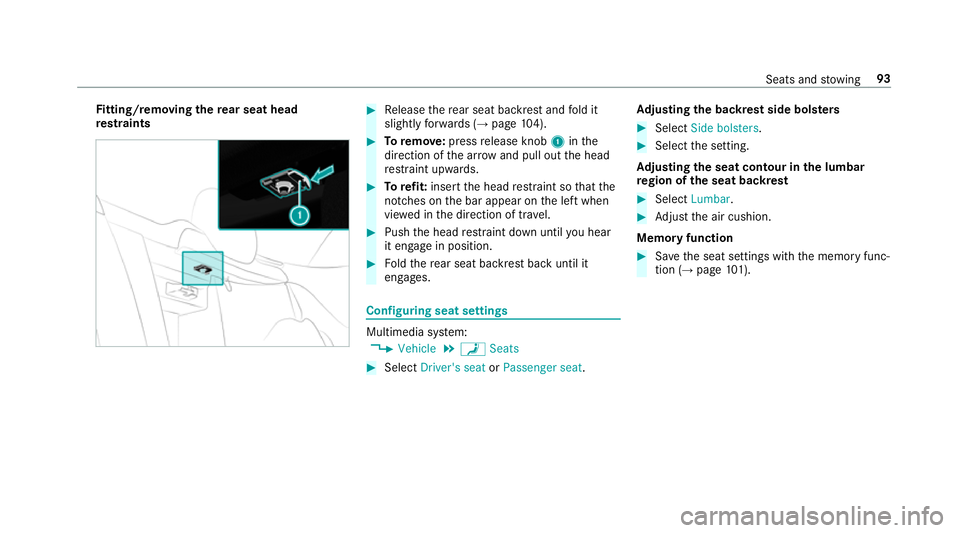
tting/ removing the rear seat head
re stra ints #
Release there ar seat backrest and fold it
slight lyforw ards (→ page104). #
Toremo ve: press release knob 1inthe
direction of the ar row and pull out the head
re stra int upwards. #
Torefit: inse rtthe head restra int so that the
notches on the bar appear on the left when
vie we d in the direction of tra vel. #
Push the head restra int down until you hear
it en gage in position. #
Foldthere ar seat backrest back until it
engages. Configuring seat settings
Multimedia sy
stem:
, Vehicle .
a Seats #
Select Driver's seat orPassenger seat .Ad
justing the backrest side bols ters #
Select Side bolsters . #
Select the setting.
Ad justing the seat contour in the lumbar
re gion of the seat backrest #
Select Lumbar . #
Adjust the air cushion.
Memory function #
Save the seat settings with the memory func‐
tion (→ page101). Seats and
stowing 93
Page 99 of 521
#
Tofold back: swing back the seat backrest
horizon tally.
If th e seat backrest is not engaged, this will
be shown on the multifunction display in the
instrument clus ter.A wa rning tone also
sounds.
The seat mo ves automatically tothestored
position.
If th e pr evious seat position can no longer be
set, e.g. because of luggage in there ar foot we ll
or af ter occupants ha veentered there ar of the
ve hicle: #
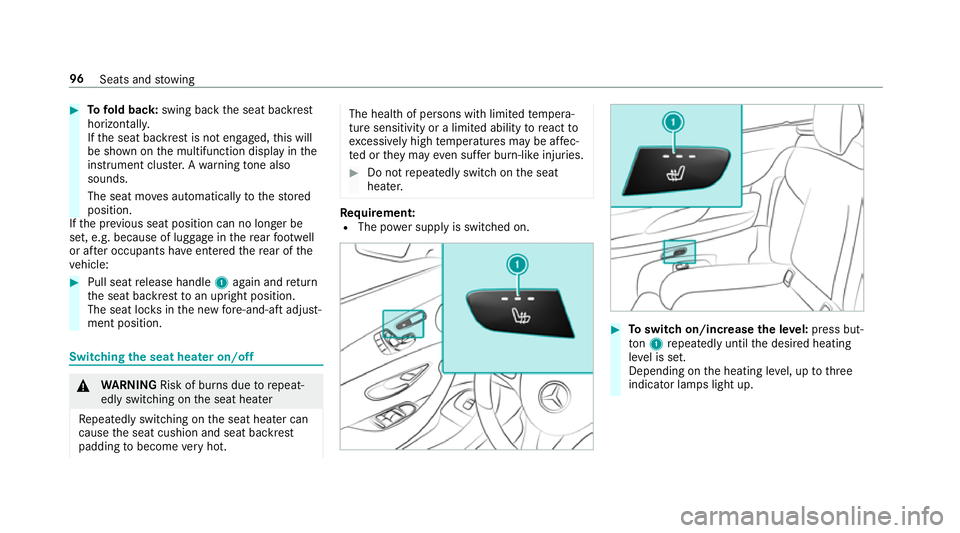
Pull seat release handle 1again and return
th e seat backrest toan upright position.
The seat loc ksinthe new fore -and-aft adjust‐
ment position. Switching the seat hea
ter on/o ff &
WARNING Risk of bu rns due torepeat‐
edly switching on the seat heater
Re peatedly switching on the seat heater can
cause the seat cushion and seat backrest
padding tobecome very hot. The health of persons with limited
temp era‐
ture sensitivity or a limited ability toreact to
exc essively high temp eratures may be af fec‐
te d or they may even suf fer burn-like injuries. #
Do not repeatedly switch on the seat
heater. Re
quirement:
R The po wer supp lyis switched on. #
Toswitch on/increase the le vel:press but‐
to n1 repeatedly until the desired heating
le ve l is set.
Depending on the heating le vel, up tothree
indicator lamps light up. 96
Seats and stowing
Page 100 of 521
#
Toswitch off/reduce the le vel:press but‐
to n1 repeatedly until the desired heating
le ve l is set.
If all indicator lamps are off, the seat heater
is switched off.
% The seat heater automatically switches down
from theth re e heating le vels af ter 8, 10and
20 minutes until the seat heater is switched
off. Setting
the panel heating Multimedia sy
stem:
, Vehicle .
î Vehicle set-
tings .
Panel heating
When the seat heater is switched on, the armr‐
ests in theve hicle as well as the cent reconsole
can be hea ted using this function.
Setting options #
Select Front only orOff. Switching
the seat ventilation on/off Re
quirement:
R the po wer supp lyis switched on #
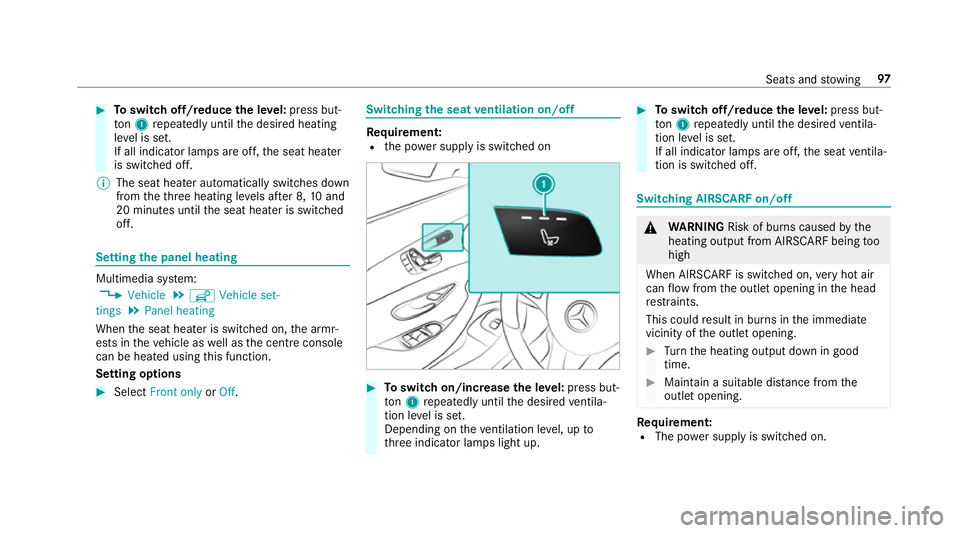
Toswitch on/increase the le vel:press but‐
to n1 repeatedly until the desired ventila‐
tion le vel is set.
Depending on theve ntilation le vel, up to
th re e indicator lamps light up. #
Toswitch off/reduce the le vel:press but‐
to n1 repeatedly until the desired ventila‐
tion le vel is set.
If all indicator lamps are off, the seat ventila‐
tion is switched off. Switching AIRSCARF on/o
ff &
WARNING Risk of bu rns caused bythe
heating output from AIRSCARF being too
high
When AIRSCARF is switched on, very hot air
can flow from the outlet opening in the head
re stra ints.
This could result in burns in the immediate
vicinity of the outlet opening. #
Turn the heating output down in good
time. #
Maintain a suitable dis tance from the
outlet opening. Re
quirement:
R The po wer supp lyis switched on. Seats and
stowing 97
Page 101 of 521
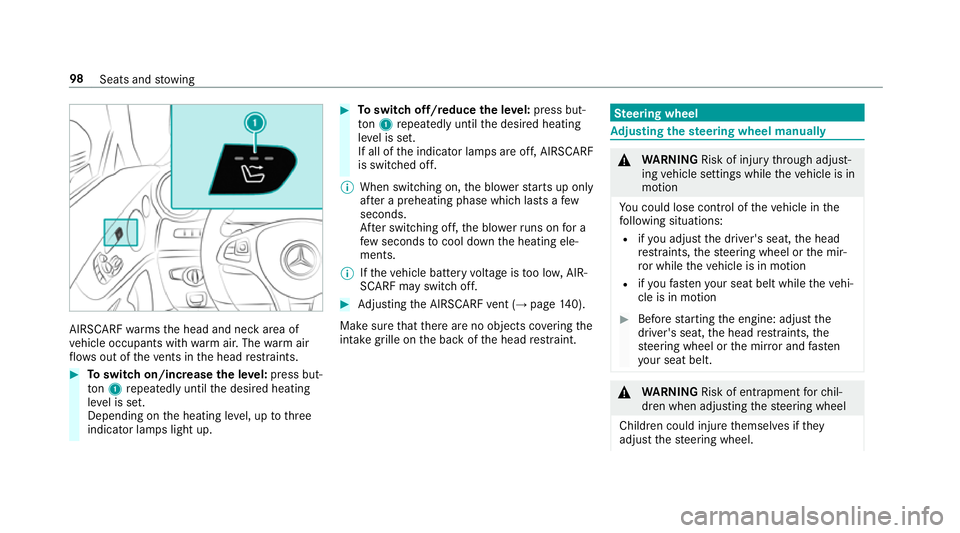
AIRSCARF
warmsth e head and neck area of
ve hicle occupants with warm air. The warm air
fl ow s out of theve nts in the head restra ints. #
Toswitch on/increase the le vel:press but‐
to n1 repeatedly until the desired heating
le ve l is set.
Depending on the heating le vel, up tothree
indicator lamps light up. #
Toswitch off/reduce the le vel:press but‐
to n1 repeatedly until the desired heating
le ve l is set.
If all of the indicator lamps are off, AIRSCARF
is switched off.
% When switching on, the blo werst arts up on ly
af te r a preheating phase which lasts afew
seconds.
Af ter switching off, the blo werru ns on for a
fe w seconds tocool down the heating ele‐
ments.
% Ifth eve hicle battery voltage is too lo w,AIR‐
SCARF may switch off. #
Adjusting the AIRSCARF vent (→ page 140).
Ma kesure that there are no objects co vering the
intake grille on the back of the head restra int. Ste
ering wheel Ad
justing the steering wheel manually &
WARNING Risk of inju rythro ugh adjust‐
ing vehicle settings while theve hicle is in
motion
Yo u could lose cont rol of theve hicle in the
fo llowing situations:
R ifyo u adjust the driver's seat, the head
re stra ints, thesteering wheel or the mir‐
ro r while theve hicle is in motion
R ifyo ufast enyour seat belt while theve hi‐
cle is in motion #
Before starting the engine: adjust the
driver's seat, the head restra ints, the
st eering wheel or the mir ror and fasten
yo ur seat belt. &
WARNING Risk of entrapment forch il‐
dren when adjusting thesteering wheel
Children could injure themselves if they
adjust thesteering wheel. 98
Seats and stowing
Page 109 of 521
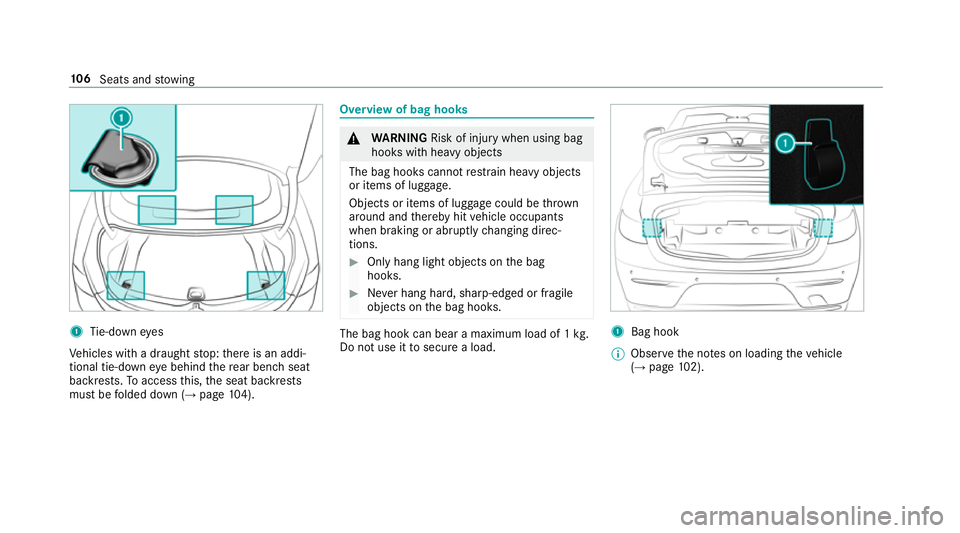
1
Tie-down eyes
Ve hicles with a draught stop: there is an addi‐
tional tie-down eye behind there ar ben chseat
backrests. Toaccess this, the seat backrests
must be folded down (→ page104). Overview of bag hoo
ks &
WARNING Risk of inju rywhen using bag
hooks with heavy objects
The bag hooks cannot restra in heavy objects
or items of luggage.
Objects or items of luggage could be thrown
around and thereby hit vehicle occupants
when braking or abruptly changing direc‐
tions. #
Onlyhang light objects on the bag
hooks. #
Never hang hard, sharp-edged or fragile
objects on the bag hooks. The bag hook can bear a maximum load of 1
kg.
Do not use it tosecure a load. 1
Bag hook
% Obser vethe no tes on loading theve hicle
(→ page 102). 106
Seats and stowing