charging MERCEDES-BENZ E-CLASS CABRIOLET 2018 User Guide
[x] Cancel search | Manufacturer: MERCEDES-BENZ, Model Year: 2018, Model line: E-CLASS CABRIOLET, Model: MERCEDES-BENZ E-CLASS CABRIOLET 2018Pages: 589, PDF Size: 10.56 MB
Page 426 of 589
*
NO
TEDamaging the battery thro ugh
ove rvoltage When using a battery
charge r without a maxi‐
mum charging voltage, the battery or the
ve hicle electronics may be damaged. #
Only use battery charge rs with a maxi‐
mum charging voltage of 14.8 V. &
WARNING Risk ofexplosion from hydro‐
ge nga s igniting
A battery generates hydrogen gas during the
ch arging process. If there is a short circuit or
spar ksstart toform ,th ere is a danger of the
hy drogen gas igniting. #
Make sure that the positive term inal of
th e connected battery does not come
into conta ct withvehicle parts. #
Never place me tal objects or tools on a
batter y. #
When connecting and disconnecting the
batter y,yo u must obse rveth e descri‐
bed order forth e battery clamps. #
When giving starting assis tance, al ways
make sure that you on lyconnect bat‐
te ry term inals with identical polarity. #
During starting assis tance, you must
obse rveth e described order for con‐
necting and disconnecting the jump
lead. #
Do not connect or disconnect the bat‐
te ry cla mp s while the engine is running. &
WARNING Risk ofexplosion during
ch arging process and starting assis tance
During thech arging process and starting
assis tance, the battery may release an explo‐
sive gas mixture. #
Avoid fire , naked flames, creating
spar ksand smoking. #
Make sure that there is suf ficient venti‐
lation du ring thech arging process and
during starting assis tance. #
Do not lean over a batter y. &
WARNING Risk ofexplosion from a fro‐
zen battery
A dischar ged battery may freeze at temp era‐
tures slightly abo veor below freezing point.
During starting assis tance or battery charg‐
ing, bat tery gas may be released. #
Alw aysth aw a frozen bat tery out first
before charging it or per form ing start‐
ing assis tance. If
th e indicator/warning lamps in the instrument
clus ter do not light up at low temp eratures, it is
ve ry likely that the dischar ged battery has fro‐
zen. In this case you may neither jump-s tart the
ve hicle nor charge the batter y.
The service life of a battery that has been
th awe d may be dramatically shor tened. The
st arting characteristics may be impaired, espe‐
cially at low temp eratures.
It is recommended that you ha veathaw ed bat‐
te ry checked at a qualified specialist workshop. Breakdown assis
tance 423
Page 427 of 589
All
vehicles
* NO
TEDama gecaused bynumerous or
ex tended attem ptsto start the engine Nume
rous or extended attem ptsto start the
engine may damage the catalytic con verter
due tonon-combu sted fuel. #
Avoid numerous and extended attem pts
to start the engine. Obser
vethefo llowing points during starting
assis tance and when charging the battery:
R Only use undamaged jump lead/charging
cables with a suf ficient cross-section and
insula tedte rm inal clamps.
R Non- insulated parts of thete rm inal clamps
must not come into con tact wi thother me tal
parts while the jump lead/charging cable is
connected tothe battery/jump-s tart connec‐
tion point.
R The jump lead/charging cable must not
come into contact wi thany parts which may
mo vewhen the engine is running. R
Alw ays make sure that nei ther you nor the
battery is elect rostatically charge d.
R Keep away from fire and naked flames.
R Do not lean overth e batter y.
Obser vethe additional following points when
ch arging the battery:
R Only use battery charge rs tested and
appr oved for Mercedes-Benz.
R Read the battery charge r's operating instruc‐
tions before charging the batter y.
Obser vethe additional following points during
st arting assis tance:
R Starting assis tance may only be pr ovided
using batteries with a nominal voltage of
12 V.
R The vehicles must not touch.
R Petrol engine: only acceptstarting assis‐
ta nce if the engine and exhaust sy stem are
cold. St
arting assi stance and charging the12 V
battery Re
quirements:
R The vehicle is secured with the electric park‐
ing brake.
R Vehicles with automatic transmission: the
transmission is in position j.
R The ignition and all electrical consumers are
switched off.
R The bonnet is open. 424
Breakdown assi stance
Page 428 of 589
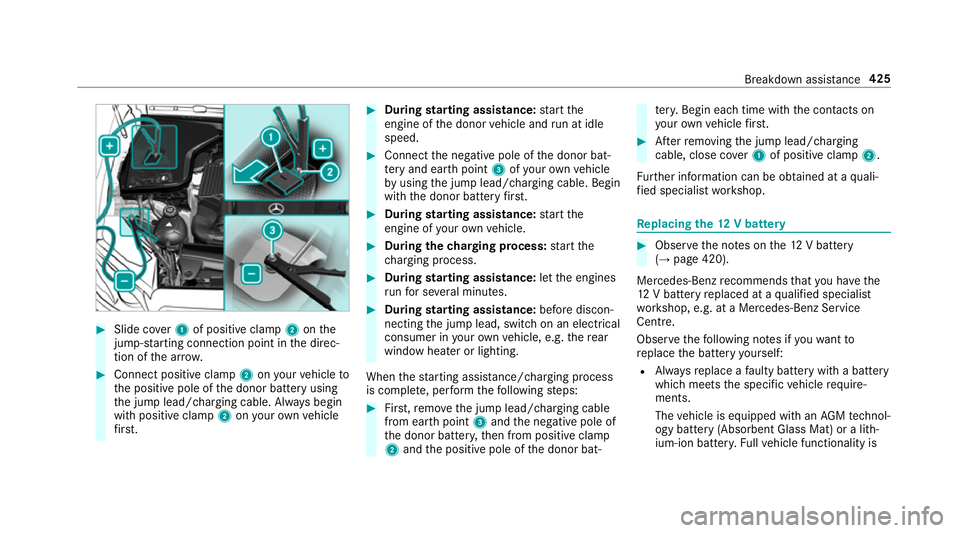
#
Slide co ver1 of positive clamp 2onthe
jump-s tarting connection point in the direc‐
tion of the ar row. #
Connect positive clamp 2onyour vehicle to
th e positive pole of the donor battery using
th e jump lead/charging cable. Alw ays begin
with positive clamp 2onyour ow nve hicle
fi rs t. #
During starting assi stance: start the
engine of the donor vehicle and run at idle
speed. #
Connect the negative pole of the donor bat‐
te ry and ear thpoint 3ofyour ow nve hicle
by using the jump lead/charging cable. Begin
with the donor battery firs t. #
During starting assi stance: start the
engine of your ow nve hicle. #
During thech arging process: start the
ch arging process. #
During starting assi stance: letthe engines
ru nfo r se veral minutes. #
During starting assi stance: before discon‐
necting the jump lead, switch on an electrical
consumer in your ow nve hicle, e.g. there ar
wind owheater or lighting.
When thest arting assis tance/charging process
is compl ete, per form thefo llowing steps: #
First,re mo vethe jump lead/charging cable
from ear thpoint 3and the negative pole of
th e donor batter y,then from positive clamp
2 and the positive pole of the donor bat‐ te
ry. Begin ea chtime wi th the conta cts on
yo ur ow nve hicle firs t. #
Afterre moving the jump lead/charging
cable, close co ver1 of positive clamp 2.
Fu rther information can be obtained at a quali‐
fi ed specialist workshop. Re
placing the 12V battery #
Obser vethe no tes on the12 V battery
(→ page 420).
Mercedes-Benz recommends that you ha vethe
12 V battery replaced at a qualified specialist
wo rkshop, e.g. at a Mercedes-Benz Service
Centre.
Obser vethefo llowing no tes if youwa ntto
re place the battery yourself:
R Alw aysre place a faulty bat tery with a battery
which meets the specific vehicle require‐
ments.
The vehicle is equipped with an AGMtech nol‐
ogy battery (Absorbent Glass Mat) or a li th‐
ium-ion batter y.Fu llve hicle functionality is Breakdown assis
tance 425
Page 503 of 589
Display messages
Possible causes/consequences and M
MSolutions #
Avoiding high loads on the engine, drive tothe nearest qualified specialist workshop. In doing so, ensure that
th e coolant temp erature display remains below 120 °C.
Û
Please wait Charging high-
voltage battery *T
he 48 V battery is dischar ged. You ha veswitched on the ignition while the12 V battery was being charge d with a
suitable charge r or while ano ther vehicle was pr oviding starting assis tance.
The discha rged 48 V battery is charge d automatically via thevo ltage con verter. Af ter a few minutes, theMotor can
be started again display message will be shown on the multifunction displa y. #
Start the engine. #
Drive theve hicle for a while tocharge the12 V battery and the 48 V battery af ter disconnecting thech arger
from theve hicle.
If th eMotor can be started again display message does not appear af ter a few minutes: #
Tryto start the engine again. #
Ifth e engine does not start, consult a qualified specialist workshop.
#
48 V battery See Owner's
Manual *T
he 48 V sy stem is malfunctioning. Con venience functions may be restricted. #
Consult a qualified specialist workshop immediatel y.
8 *T
he fuel supply has dropped into there ser verange. #
Refuel. 500
Displaymessa ges and warning/indicator lamps
Page 547 of 589
Au
tomatic front passen ger front air‐
bag deacti vation sy stem
see Automatic front passenger front
airbag shutoff
Au tomatic front passen ger front air‐
bag shu toff .......................................... 40, 42
Fu nction of the automatic front
passenger front airbag deactivation
sy stem ................................................... 40
PA SSENGER AIR BAG indicator lamp .... .42
Au tomatic mir rorfo lding function
Ac tivating/deactivating ...................... .141
Au tomatic transmission
DIRECT SELECT le ver ........................... 16 9
Drive program display .......................... 16 8
Drive programs .................................... 167
DY NA MIC SELECT switch ..................... 167
Engaging drive position ....................... 17 0
Engaging neutral .................................. 17 0
Engaging pa rkposition ........................ 17 0
Engaging reve rsege ar ........................ .170
Kickdown ............................................. 172
Manual gear changing .......................... 171
St eering wheel gearshift paddles ........ .171
Tr ansmission position display .............. 16 9Tr
ansmission positions ........................ 16 9
Axle load Perm issible .......................................... 457
Tr ailer operation .................................. .471 B
Bag hook ................................................... 11 8
Ball ne ck
Fo lding out/in .................................... .246
BA S (Brake Assist Sy stem) .................... .188
Battery Cha rging (Remo teOnline) .................... 16 0
Ke y ........................................................ .74
Re mo tecontrol (s tationary heater) ...... 151
Battery see Battery (vehicle)
Battery (vehicle) ...................................... 425
Charging .............................................. 424
Charging (Remo teOnline) .................... 16 0
No tes .................................................. 420
No tes (s tarting assis tance and
ch arging) ............................................ .422
Re placing ............................................ 425 St
arting assis tance .............................. 424
Belt see Seat belt
Bic ycle rack
Tr ailer operation .................................. 24 9
Blind Spot Assi st..................................... 239
Ac tivating/deactivating ...................... .242
Fu nction .............................................. 239
Sy stem limitations ...............................2 39
Blo wer
see Climate control
BlueTEC see AdBlue ®
Blue tooth ®
............................................... 292
Information .......................................... 292
Setting up an Internet connection ....... 358
Switching on/off ................................. 292
Switching profile (DUN/PAN) .............. 358
Blue tooth ®
audio
Ac tivating ............................................ .376
De-authorising (de-regis tering) the
device .................................................. 376
Information ..........................................3 74544
Index
Page 556 of 589
ÛPlease
wait Charging high- volt‐
age battery .......................................... 500
PRE- SAFE inoperati veSee Owner's
Manual ................................................ 483
Ra dar sensors dirty See Owner's
Manual .................................................4 78
_ Rear left seat backrest not
loc ked (Example) .................................. 51 5
h Rectify tyre pressure ....................51 0
Re duce speed ...................................... 512
Ø Refill Ad Blue Eng. start not pos‐
sible .................................................... 504
ØRe fill Ad Blue See Owne r’s Man‐
ual .......................................................5 04
!Re lease parking brake .................476
¸ Replace air cleaner ...................... 497
ÀRe placekey See Owner's Man‐
ual ........................................................ 514
Á Replace key ................................ .513
8 Reser vefuel le vel........................ 500 6Re
stra int sys. malfunction Con‐
sult workshop ...................................... 486
Re versing not poss. Consult work‐
shop ....................................................5 07
Risk of vehicle rolling Driver door
open and transmission not in P ...........507
Ru n Flat Indicator inope rative .............. 512
# See Owner's Manual ................... 496
Speed limit (winter tyres) XXX km/h ... 494
ÐSt eering malfunction Incre ased
ph ysical ef fort See Owner's Manual .....516
Ð Steering malfunction Stop
immediately See Owner's Manual ........516
St op vehicle Lea veengine running
Wa itTransmission cooling ...................506
#St opvehicle Lea veengine run‐
ning ..................................................... 497
#St opvehicle See Owner's Man‐
ual .......................................................4 98
ÉSt opvehicle Vehicle too low ........ 491 çsuspended
..................................4 93
bSwitch off lights .......................... 523
bSwitch on headla mps.................. 524
To shift out of P or N,depress brake
and start engine .................................. 507
K Top lo wering ............................... 522
ØTo p upAdBlue Perf.re duced in
XXX miles See Owner's Manual ...........506
Ø Top up AdBlue Perf.re duced:
XXX km/h Nostart in XXX km ............ 505
To p up coolant See Owner ’sManual ... 497
¥To p upwasher fluid ...................... 51 8
Tr af fic Sign Assi stCamera view
re stricted See Owner's Manual ........... 490
Tr af fic Sign Assi stcur rently una vaila‐
ble See Owner's Manual ...................... 489
Tr af fic Sign Assi stinope rative ............. 488
ïTr ailer coupling extending… .........51 5
Tr ansmission Malfunction Stop ........... 506 Index
553
Page 567 of 589
Na
vigation .......................................... .260
Overview ............................................. 254
Ra dio ...................................................2 61
Service ................................................ 257
Te lephone ............................................ 262
Tr ip ...................................................... 258
Mercedes me connect .............................351
Ac cident and breakdown mana ge‐
ment .................................................... 352
Ar ranging a service appointment ........ 352
Calling the Mercedes-Benz Cus tomer
Centre ................................................. 350
Consenting todata transfer .................3 52
Information .......................................... 350
Making a call via theove rhead con‐
trol panel ............................................. 351
Service call with the me button ........... 351
Tr ans ferred data ..................................3 53
Mercedes-AMG vehicles
No tes ................................................... 15 6
Mercedes-Benz Apps Calling up ............................................ 360
Using voice control .............................. 360 Mercedes-Benz emer
gency call sys‐
te m ........................................................... 353
Au tomatic emergency call ................... 354
Information .......................................... 353
Information on data processing .......... .355
Manual emer gency call ........................ 354
Overview ............................................. 353
Self-diagnosis (Russia) ........................ 356
St arting/ending ERA-GLONASS test
mode .................................................. .356
Mercedes-Benz Link ................................ 345
Connecting .......................................... 345
Ending ................................................. 346
Overview ............................................. 345
Using ................................................... 346
Mercedes-Benz service centre see Qualified specialist workshop
Message (multifunction display) see Display message
Message memory .................................... 472
Messages Voice commands (LINGU ATRO NIC) .....2 77
Messages see Text messa ges Mir
rors
see Outside mir rors
Mobile phone Cancelling permission for Internet
connection .......................................... 359
Locking theve hicle ................................ 77
St arting theve hicle ............................. 15 8
Un locking theve hicle ............................77
Wi reless charging ................................ 12 5
Mobile phone see Android Auto
see Apple CarPlay™
see Mercedes-Benz Link
see Second telephone
see Telephone
Mobile phone voice recognition
St arting .............................................. .338
St opping ..............................................3 38
Model series see Vehicle identification plate
MOExtended tyres ................................... 41 5
Mo torw ay mode ....................................... 131564
Index
Page 572 of 589
Ra
dio stations
Dialling (on-boa rdcompu ter) ............... 261
Ra in-closing feature
Side wind ows ........................................86
Ra nge
Ad Blue ®
............................................... 257
Displaying ............................................ 258
REA CHregulation ...................................... 26
Re ading light
see Interior lighting
Re alwo od (Care) .................................... .409
Re ar fog light
Switching on/off .................................1 28
Re ar seat
see Seat
Re ar seat belt
St atus display ........................................ 37
Re ar seat belt status display .................... 37
Re ar window heater ................................ 14 3
Re ar-view mir ror
see Outside mir rors Re
cycling
see Take -ba ckof end-of-life vehicles
Re ducing agent
see AdBlue ®
Re fuelling
Re fuelling theve hicle ........................... 173
To pping up AdBlue ®
............................. 17 7
Re gistration
Ve hicle .................................................. 25
Re mo tecont rol (stationa ryheater/
ve ntilation)
Displa ys............................................... 15 0
Problems ............................................. 15 2
Re placing the battery ........................... 151
Setting ................................................. 15 0
Re mo teOnline
Charging the battery ............................1 60
Cooling or heating theve hicle inte‐
ri or .......................................................1 59
St arting theve hicle ............................. 16 0
Re scue card ............................................... 26
Re ser ve
Fu el ..................................................... 463 Re
set function (multimedia sy stem) .....3 01
Re sidual heat ...........................................1 46
Re storing (factory settings)
see Reset function (multimedia sy stem)
Re stra int sy stem ...................................... .30
Basic instructions forch ildren .............. .47
Fu nction in an accident ........................ .31
Fu nctionality .......................................... 31
Malfunction ...........................................31
Pr otection ..............................................30
Re duced pr otection ...............................30
Self-test ................................................. 31
Wa rning lamp ........................................ .31
Re versege ar
Inserting .............................................. 17 0
Re versing camera .................................. .222
Care .................................................... 407
Fu nction .............................................. 222
Opening the camera co ver (360°
Camera) ............................................. .228
Setting favo urites (360° Camera) ...... .229
Switching auto matic operation
on/off (360° Camera) ......................... 228
Rims (Care) ............................................. .407 Index
569
Page 577 of 589
Setting
the time and date automati‐
cally ..................................................... 291
Setting the time zone .......................... 291
Setting the time/date form at .............. 291
Swit ching transmission of theve hicle
position on/off .................................... 292
Sy stem settings
see Blue tooth®
see Data import/export
see Language
see Software update
see Wi-Fi T
Ta ilpipes (Care) ........................................ 407
Ta ke -back of end-of-life vehicles .............. 19
Pr otection of the environment ............... 19
Ta nk content
Ad Blue ®
............................................... 464
Fu el ..................................................... 463
Re ser ve(fuel) ...................................... 463
Te ch nical data
Axle load (trailer operation) ................. 471
Fa stening points (trailer hitch) .............4 70Information .......................................... 455
Mounting dimensions (trailer hitch) ..... 470
No tes (trailer hitch) ............................. 470
Overhang dimension (trailer hitch) ...... 470
To ngue weight ...................................... 471
To wing capacity (trailer operation) ...... 470
Ty re pressure monitoring sy stem ........ 440
Ve hicle identification plate .................. 457
Te lephone ........................................ .262, 331
Ac tivating functions du ring a call ........ 339
Business telephony settings ................ 336
Call and ringtone volume .................... .338
Calls with se veral participants ............ .339
Connecting a mobile phone (busi‐
ness telephony) .................................. .334
Connecting a mobile phone (Near
Field Communication (NFC)) .............. .337
Connecting a mobile phone (Pass‐
ke y) .................................................... .332
Connecting a mobile phone (Secu re
Simple Pairing) .................................... 332
De-authorising a mobile phone ............ 337
Disconnecting a mobile phone ............ 337
Importing con tacts .............................. 341
Importing contacts (o verview) ............ .341 Incoming call during an
existing call .... 339
Information .......................................... 332
Inter changing mobile phones .............. 336
Locking theve hicle (mobile phone) .......77
Menu (on-board computer) .................. 262
Mobile phone voice recognition .......... 338
No tes .................................................. 330
Operating modes ................................. 332
Re ception and transmission volume .... 338
St arting theve hicle (mobile phone) ..... 15 8
Switching mobile phones (Near Field
Communication (NFC)) ........................ 337
Symbols for business telephony .......... 335
Te lephone menu overview ...................3 31
Te lephone operation ............................ 338
Un locking theve hicle (mobile phone) ....77
Using a SIM card for business tel‐
ephony ................................................ 334
Using Near Field Communication
(NFC) .................................................. .337
Vo ice commands (LINGU ATRO NIC) ...... 274
Wi reless charging (mobile phone) ........ 12 5
Te lephone
see Second telephone 574
Index
Page 584 of 589
Checking ............................................
.435
Che cking the tyre pressure (tyre
pressure monitoring sy stem) ............... 438
Fitting .................................................. 451
Flat tyre ............................................... 414
Inter changing ...................................... 446
MOExtended tyres ...............................4 15
No ise .................................................. .435
No tes on fitting ................................... 443
Re moving ............................................. 451
Re placing .................................... 443,447
Re starting the tyre pressure loss
wa rning sy stem ................................... 442
Re starting the tyre pressure monitor‐
ing sy stem ...........................................4 39
Selection ............................................. 443
Snow chains ........................................ 435
St oring ................................................ 446
TIREFIT kit ............................................ 416
Ty re pressure (N otes) .......................... 436
Ty re pressure loss warning sy stem
(function) ............................................. 442
Ty re pressure monitoring sy stem
(function) ............................................. 438
Ty re pressure table .............................. 437
Un usual handling characteristics ........ 435 Wi
-Fi ........................................................ .292
Overview ............................................. 292
Setting ................................................. 293
Setting up a hotspot ............................ 294
Setting up an Internet connection ....... 357
Wi nd deflector
Care ....................................................4 05
Wi ndo ws
Closing (all) .......................................... .84
Opening (all) .......................................... 84
Wi ndo ws
see Side windo ws
Wi ndo ws(Care) ...................................... .407
Wi ndscreen ...................................... 137, 14 3
Defrosting ............................................ 14 3
Re placing wiper blades (MAGIC
VISION CONTROL) ............................... 137
Wi ndscreen
see Windsc reen
see Windshield
Wi ndscreen washer fluid ........................ 467
No tes ................................................... 467 Wi
ndscreen washer sy stem
To pping up ...........................................3 98
Wi ndscreen wipers
Changing the wiper blades .................. 13 6
Re placing wiper blades (MAGIC
VISION CONTROL) ............................... 137
Switching on/off ................................. 13 5
Wi ndshield ............................................... 13 6
Changing the wiper blades .................. 13 6
Wi nter operation
Snow chains ........................................ 435
Wi nter tyres
Setting the permanent speed limita‐
tion ...................................................... 202
Wi per blades
Ca re .................................................... 407
Re placing .............................................1 36
Re placing (MAGIC VISION CONTROL)
.............................................................1 37
Wire lesscharging
Fu nction/no tes ................................... 12 3
Mobile phone ....................................... 12 5 Index
581