display MERCEDES-BENZ E-CLASS COUPE 2009 Owner's Manual
[x] Cancel search | Manufacturer: MERCEDES-BENZ, Model Year: 2009, Model line: E-CLASS COUPE, Model: MERCEDES-BENZ E-CLASS COUPE 2009Pages: 313, PDF Size: 7.76 MB
Page 82 of 313
Seat-belt adjustment
The belt adjustment function adjusts the driv-
er's and front-passenger seat belt to the
upper body of the occupants. The belt strap
is tightened slightly when:
R you engage the belt tongue in the buckle
and then turn the key to position 2in the
ignition lock.
R the key is in position 2in the ignition lock
and you then engage the belt tongue in the
buckle once the seat-belt extender has
retracted.
The seat-belt adjustment will apply acertain
tightening force if any slack is detected
between the occupant and the belt sash. The
belt should not be held during the adjust-
ment.Y ou can switch the belt adjustment on
and off in the on-board computer
(Y page 121).
Unfastening the belt X
Press release button 0088and guide belt
tongue 0047back towards seat-belt
extender 0046. Belt warning for driver and front
passenger
The 0082 seat belt warning lamp in the instru-
ment cluster reminds you that all occupants
should fasten their seat belts. It is either lit
continuously or flashes. Additionally, there
may be awarning tone.
The 0082 seat belt warning lamp goes out and
the warning tone ceases as soon as the driver
and front passenger have fastened their seat
belts.
For certain countries only: regardless of
whether the driver or the front passenger
already have their seat belt fastened, the
0082 seat belt warning lamp lights up for six
seconds after the engine has been started. It
then goes out if both the driver and the front
passenger have fastened their seat belt. i
Further information about the 0082seat
belt warning lamp (Y page 236). Rear seat belt status indicator
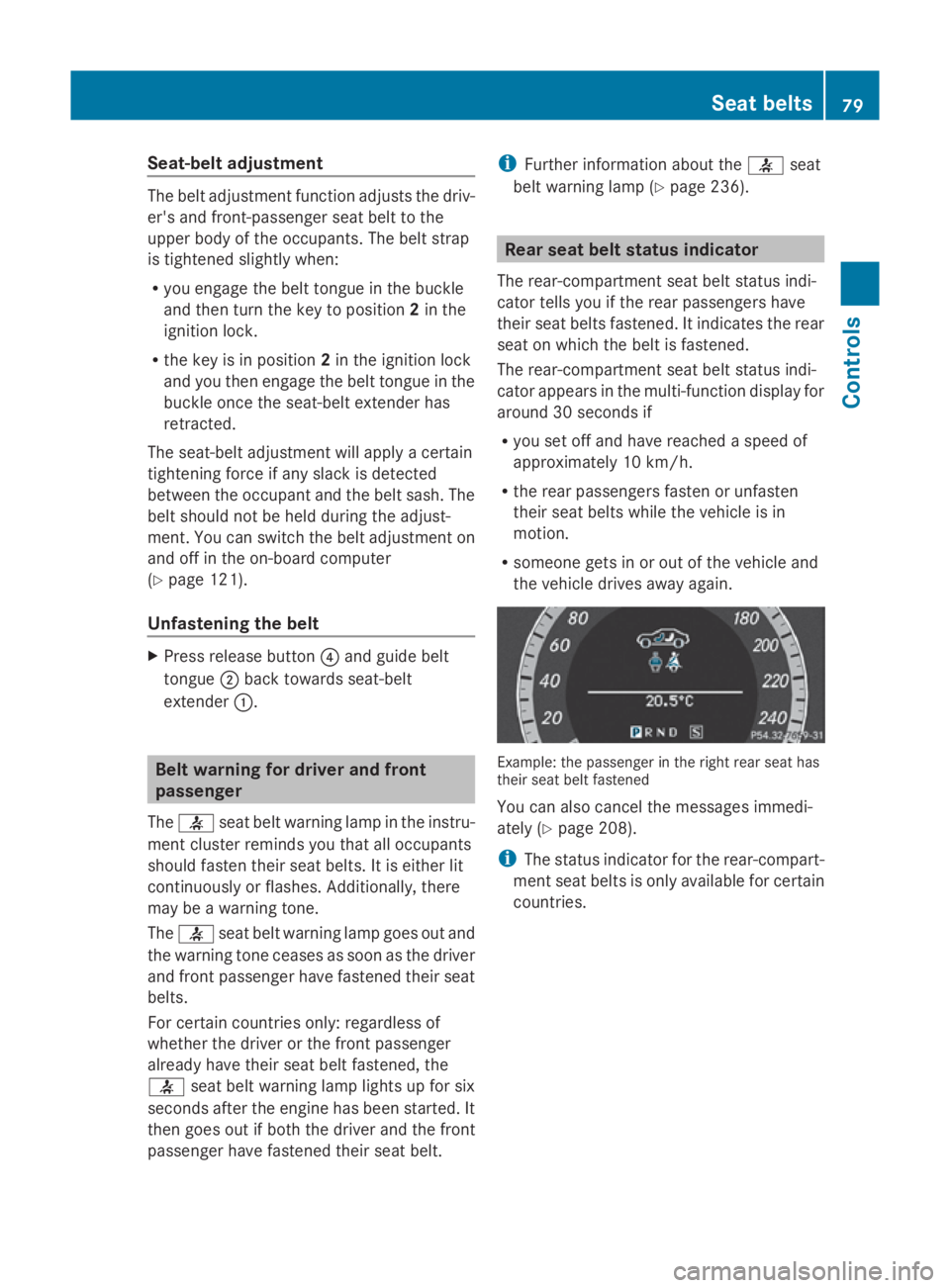
The rear-compartment seat belt status indi-
cator tells you if the rear passengers have
their seat belts fastened. It indicates the rear
seat on which the belt is fastened.
The rear-compartment seat belt status indi-
cator appears in the multi-function display for
around 30 seconds if
R you set off and have reached aspeed of
approximately 10 km/h.
R the rear passengers fasten or unfasten
their seat belts while the vehicle is in
motion.
R someone gets in or out of the vehicle and
the vehicle drives away again. Example: the passenger in the right rear seat has
their seat belt fastened
You can also cancel the messages immedi-
ately (Y
page 208).
i The status indicator for the rear-compart-
ment seat belts is only available for certain
countries. Seat belts
79Controls
207_AKB; 2; 3, en-GB
mkalafa, Version: 2.11.8.1 2009-07-23T10:23:49+02:00-Seite 79 Z
Page 83 of 313
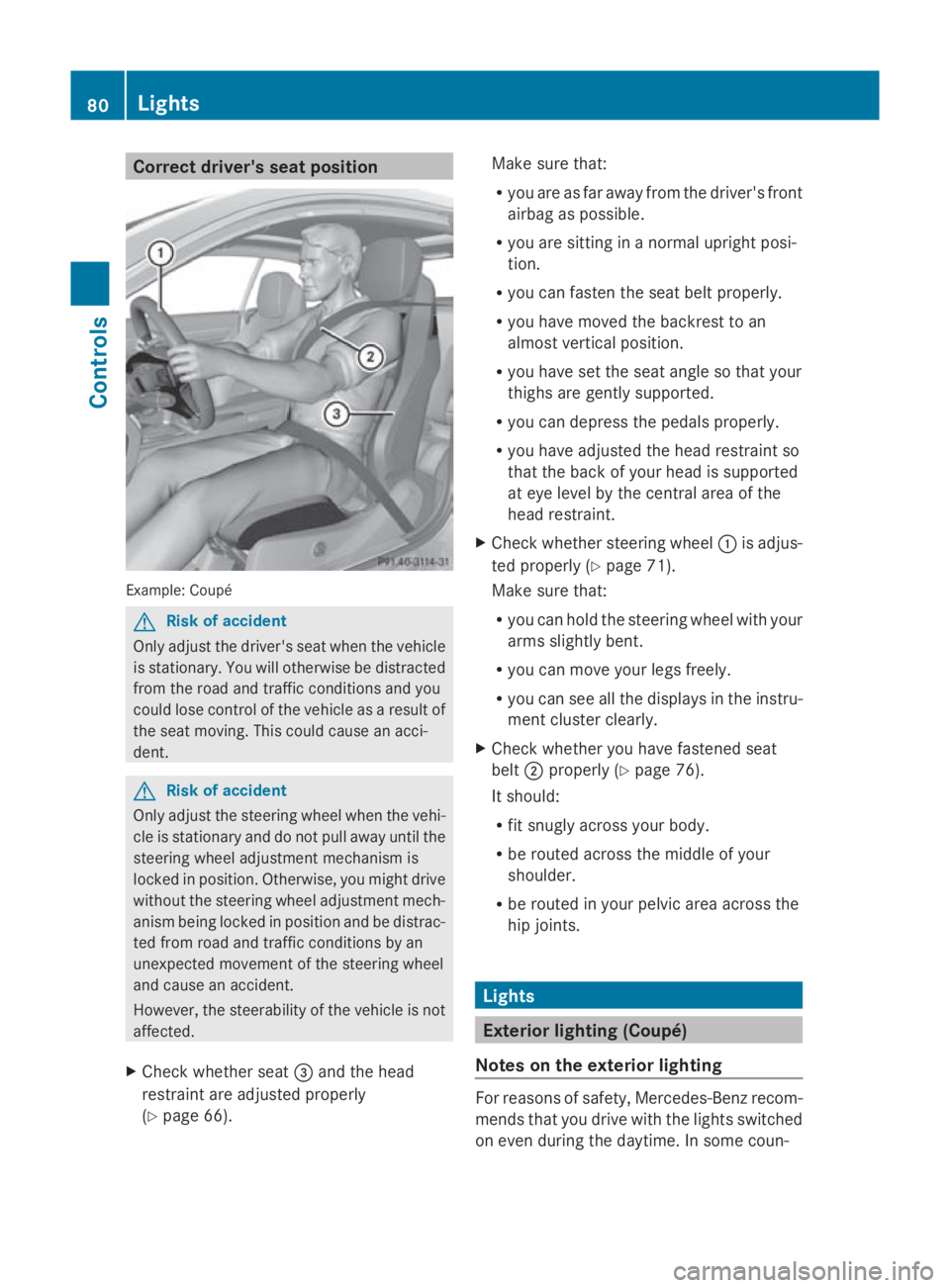
Correct driver's seat position
Example
:Coupé G
Ris
kofa ccident
Only adjust th edriver' sseat when th evehicle
is stationary. You will otherwise be distracted
from th eroad and traffic condition sand you
coul dlose control of th evehicle as aresult of
th es eat moving .This coul dcaus eana cci-
dent. G
Ris
kofa ccident
Only adjust th esteering wheel when th evehi-
cle is stationar yand do no tpull away until the
steering wheel adjustmen tmechanism is
locke dinposition. Otherwise, you migh tdrive
without th esteering wheel adjustmen tmech-
anis mbeinglocke dinp ositio nand be distrac-
te df romr oad and traffic condition sbyan
unexpected movement of th esteering wheel
and caus eanaccident.
However, th esteerabilit yofthevehicle is not
affected.
X Chec kwhether seat 008Aand th ehead
restraint are adjusted properly
(Y page 66). Mak
esure that:
R you are as far away from th edriver' sfront
airbag as possible.
R you are sittin ginanormalupright posi-
tion.
R you can fasten th eseat belt properly.
R you have moved th ebackres ttoan
almos tvertical position.
R you have set th eseat angle so that your
thighs are gently supported.
R you can depress th epedals properly.
R you have adjusted th ehead restraint so
that th eback of your head is supported
at eye leve lbythecentral area of the
head restraint.
X Chec kwhether steering wheel 0046is adjus-
te dp roperl y(Ypage 71).
Mak esure that:
R you can hold th esteering wheel wit hyour
arm sslightly bent.
R you can mov eyour legs freely.
R you can see all th edisplays in th einstru-
men tcluste rclearly.
X Chec kwhether you have fastened seat
belt 0047properl y(Ypage 76).
It should:
R fit snugly across your body.
R be routed across th emiddle of your
shoulder.
R be routed in your pelvic area across the
hip joints. Lights
Exterior lightin
g(Coupé)
Notes on th eexterior lighting For reason
sofsafety, Mercedes-Ben zrecom-
mends that you driv ewitht he light sswitched
on eve ndurin gthe daytime. In som ecoun- 80
LightsControls
207_AKB
;2;3,en-GB
mkalafa ,V ersion: 2.11.8.1
2009-07-23T10:23:49+02:00
-Seite 80
Page 102 of 313
Starting the engine using KEYLESS-
GO* G
Risk of injury
Your vehicle can be started using avalid KEY-
LESS-GO* key. For this reason, children
should never be left unsupervised in the vehi-
cle. Always take the key with you when leaving
the vehicle, even if you are only leaving it for
as hort time.
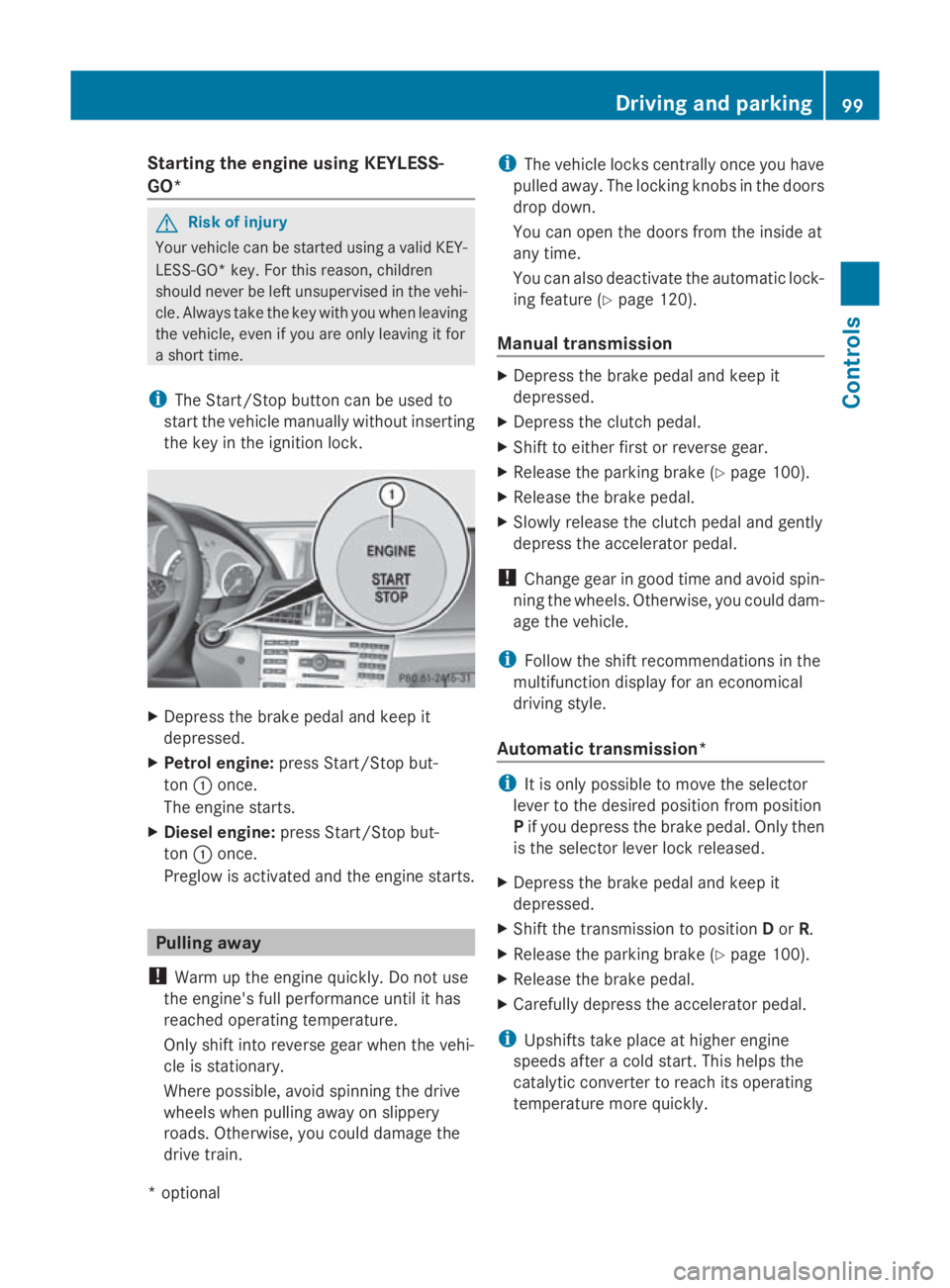
i The Start/Stop button can be used to
start the vehicle manually without inserting
the key in the ignition lock. X
Depress the brake pedal and keep it
depressed.
X Petrol engine: press Start/Stop but-
ton 0046once.
The engine starts.
X Diesele ngine:press Start/Stop but-
ton 0046once.
Preglow is activated and the engine starts. Pulling away
! Warm up the engine quickly. Do not use
the engine's full performanc euntil it has
reached operating temperature.
Only shift into reverse gear when the vehi-
cle is stationary.
Where possible, avoid spinning the drive
wheels when pulling away on slippery
roads. Otherwise, you could damage the
drive train. i
The vehicle locks centrally once you have
pulleda way.The locking knobs in the doors
drop down.
You can open the doors from the inside at
any time.
You can also deactivate the automatic lock-
ing feature (Y page 120).
Manual transmission X
Depress the brake pedal and keep it
depressed.
X Depress the clutch pedal.
X Shift to either first or reverse gear.
X Release the parking brake (Y page 100).
X Release the brake pedal.
X Slowly release the clutch pedal and gently
depress the accelerator pedal.
! Change gear in good time and avoid spin-
ning the wheels. Otherwise, you could dam-
age the vehicle.
i Follow the shift recommendations in the
multifunction display for an economical
driving style.
Automatic transmission* i
It is only possible to move the selector
lever to the desired position from position
P if you depress the brake pedal. Only then
is the selector lever lock released.
X Depress the brake pedal and keep it
depressed.
X Shift the transmission to position Dor R.
X Release the parking brake (Y page 100).
X Release the brake pedal.
X Carefull ydepress the accelerator pedal.
i Upshifts take place at higher engine
speeds after acold start. This helps the
catalytic converter to reach its operating
temperature more quickly. Driving and parking
99Controls
*optional
207_AKB; 2; 3, en-GB
mkalafa,
Version: 2.11.8.1 2009-07-23T10:23:49+02:00-Seite 99 Z
Page 105 of 313
Shifting dow
nattoo high aspeed (trans-
missio nbraking) can cause the engine to
overrev ,leadin gtoe ngine damage.
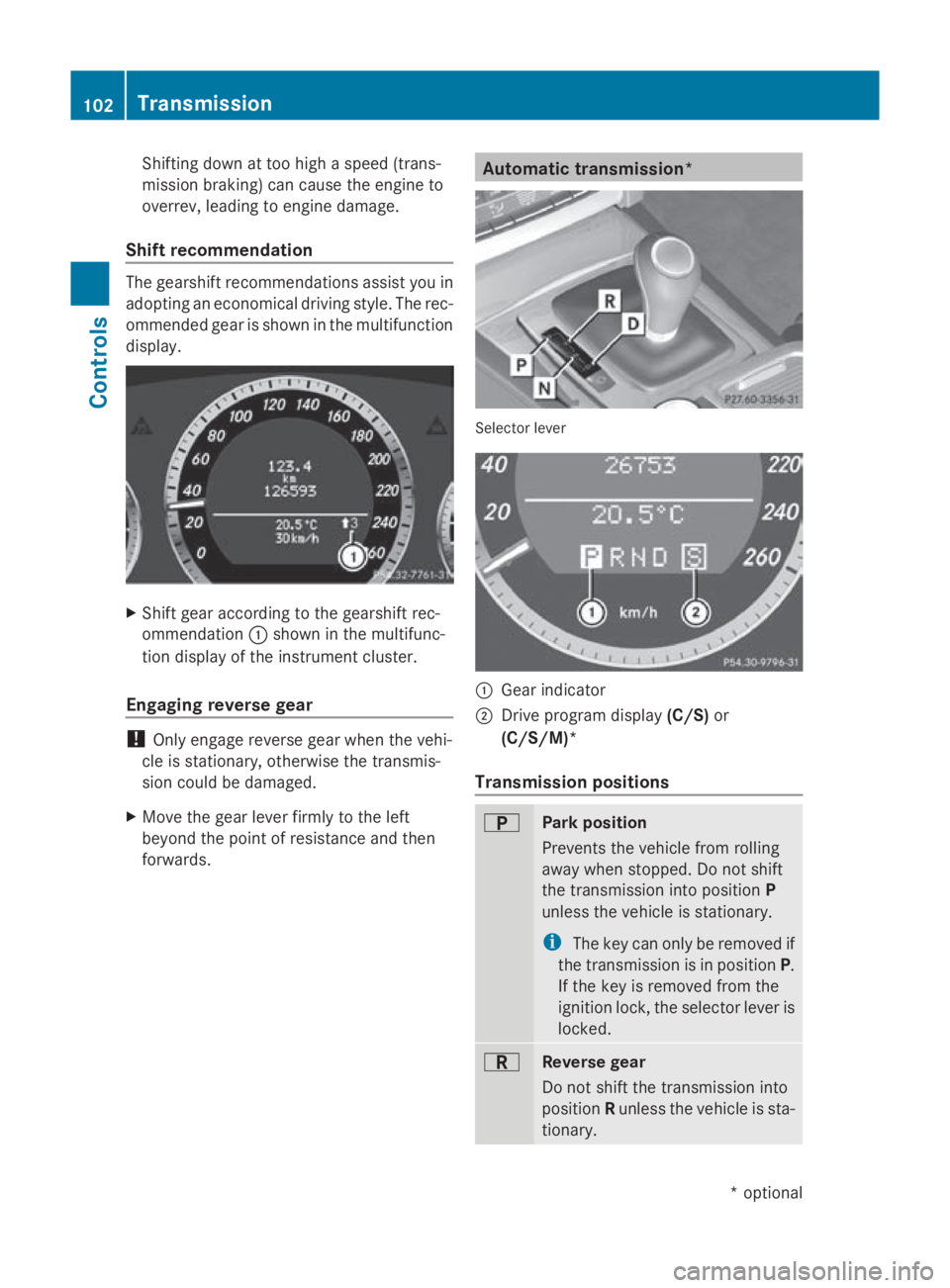
Shift recommendation The gearshift recommendations assis
tyou in
adopting an economica ldriving style .The rec-
ommended gea risshown in the multifunction
display. X
Shift gea raccording to the gearshift rec-
ommendation 0046shown in the multifunc-
tion display of the instrument cluster.
Engagin greverse gear !
Only engage reverse gea rwhent he vehi-
cle is stationary ,otherwise the transmis-
sio nc ould be damaged.
X Mov ethe gea rlev er firmly to the left
beyond the point of resistance and then
forwards. Automatic transmission*
Selector lever
0046
Gear indicator
0047 Drive progra mdisplay (C/S) or
(C/S/M)*
Transmission positions 0045
Park position
Prevents the vehicl
efrom rolling
away when stopped. Do not shift
the transmissio ninto position P
unless the vehicl eisstationary.
i The key can onl yberemoved if
the transmissio nisinp osition P.
If the key is removed from the
ignition lock, the selector lever is
locked. 0046
Revers
egear
Do not shift the transmissio ninto
position Runless the vehicl eissta-
tionary. 102
TransmissionControls
*o
ptional
207_AKB; 2; 3, en-GB
mkalafa
,V ersion: 2.11.8.1
2009-07-23T10:23:49+02:00
-Seite 102
Page 106 of 313
0044
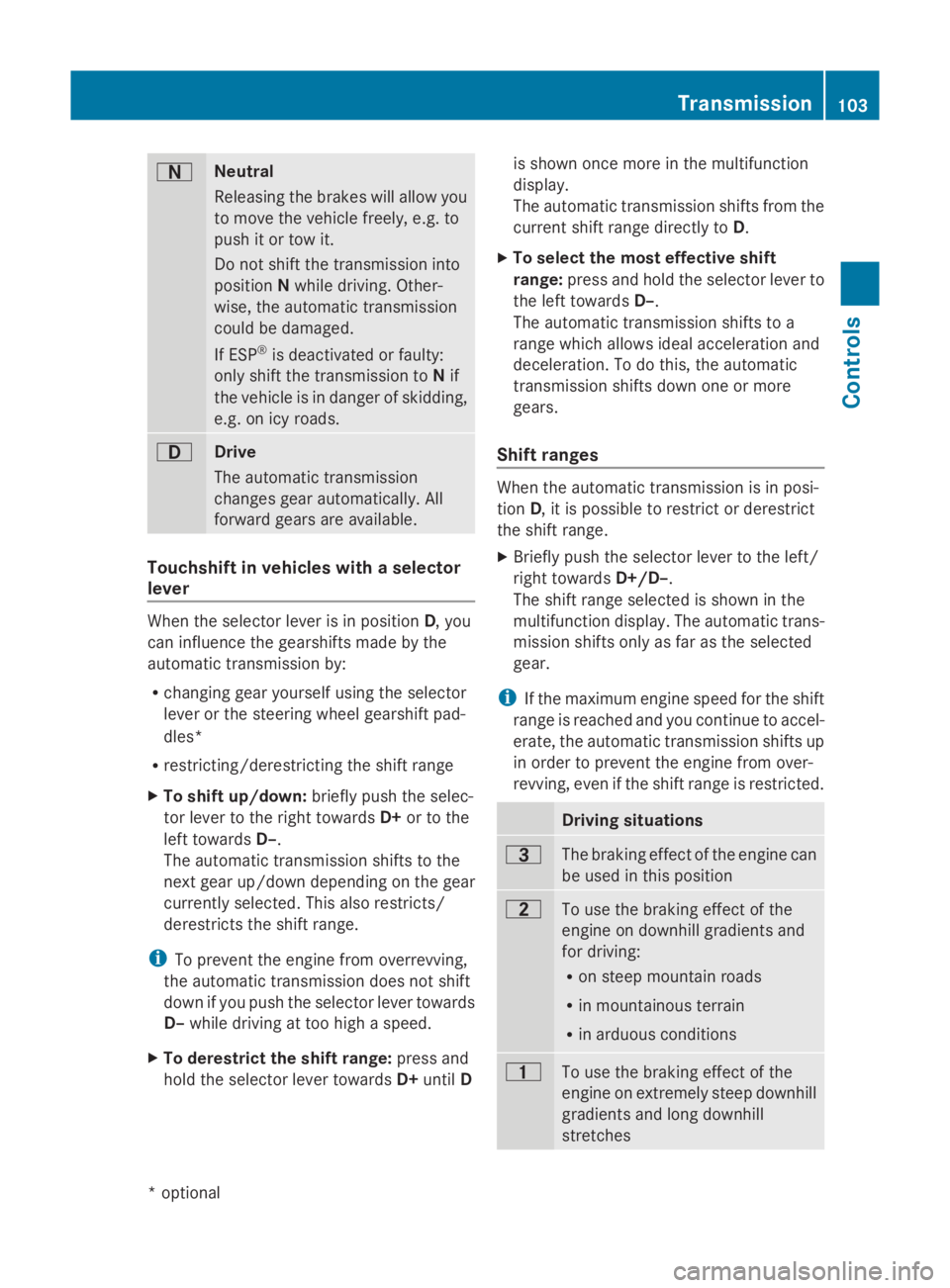
Neutral
Releasing the brakes will allo
wyou
to mov ethe vehicl efreely, e.g .to
push it or tow it.
Do not shift the transmission into
position Nwhil edriving. Other-
wise ,the automatic transmission
could be damaged.
If ESP ®
is deactivated or faulty:
onl yshift the transmission to Nif
the vehicl eisindangerofs kidding,
e.g .oni cy roads. 003A
Drive
Th
ea utomatic transmission
change sgeara utomatically. All
forward gear sareavailable. Touchshift in vehicle
swithas elector
lever When the selector lever is in position
D,you
can influence the gearshifts made by the
automatic transmission by:
R changing gear yourself using the selector
lever or the steering whee lgears hift pad-
dles*
R restricting/derestricting the shift range
X To shift up/down: brieflypusht he selec-
tor lever to the right towards D+or to the
left towards D–.
Th ea utomatic transmission shifts to the
next gear up/down depending on the gear
currentl yselect ed.Thisa lsor estricts/
derestricts the shift range.
i To prevent the engine fro moverrevving,
the automatic transmission does not shift
down if yo upusht he selector lever towards
D– whil edrivin gatt oo high aspeed.
X To derestrict the shift range: press and
hol dthe selector lever towards D+until D is shown once mor
einthe multifunction
display.
Th ea utomatic transmission shifts fro mthe
current shift range directl ytoD.
X To select the mos teffec tive shift
range: press and hol dthe selector lever to
the left towards D–.
Th ea utomatic transmission shifts to a
range which allows idea lacceleratio nand
deceleration. To do this, the automatic
transmission shifts down one or more
gears.
Shift ranges When the automatic transmission is in posi-
tion
D,itisp ossibl etor estric torderestrict
the shift range.
X Briefl ypusht he selector lever to the left/
right towards D+/D–.
Th es hift range selected is shown in the
multifunctio ndisplay .The automatic trans-
mission shifts onl yasfaras the selected
gear.
i If the maximum engine spee dfor the shift
range is reache dand yo ucontinue to accel-
erate, the automatic transmission shifts up
in order to prevent the engine fro mover-
revving, eve nifthe shift range is restricted. Driving situations
0040
Th
eb raking effect of the engine can
be used in thi sposit ion 0038
To us
ethe braking effect of the
engine on downhil lgradients and
for driving:
R on steep mountai nroads
R in mountainou sterrain
R in arduou sconditions 0037
To us
ethe braking effect of the
engine on extremel ysteep downhill
gradients and long downhill
stretches Transmission
103Controls
*optional
207_AKB; 2; 3, en-GB
mkalafa
,V ersion: 2.11.8.1
2009-07-23T10:23:49+02:00
-Seite 103 Z
Page 107 of 313
i
On vehicles with steering wheel gearshift
paddles* ,you can restrict or derestrict the
shift range in the same way as with Touch-
shift (Y page 103).
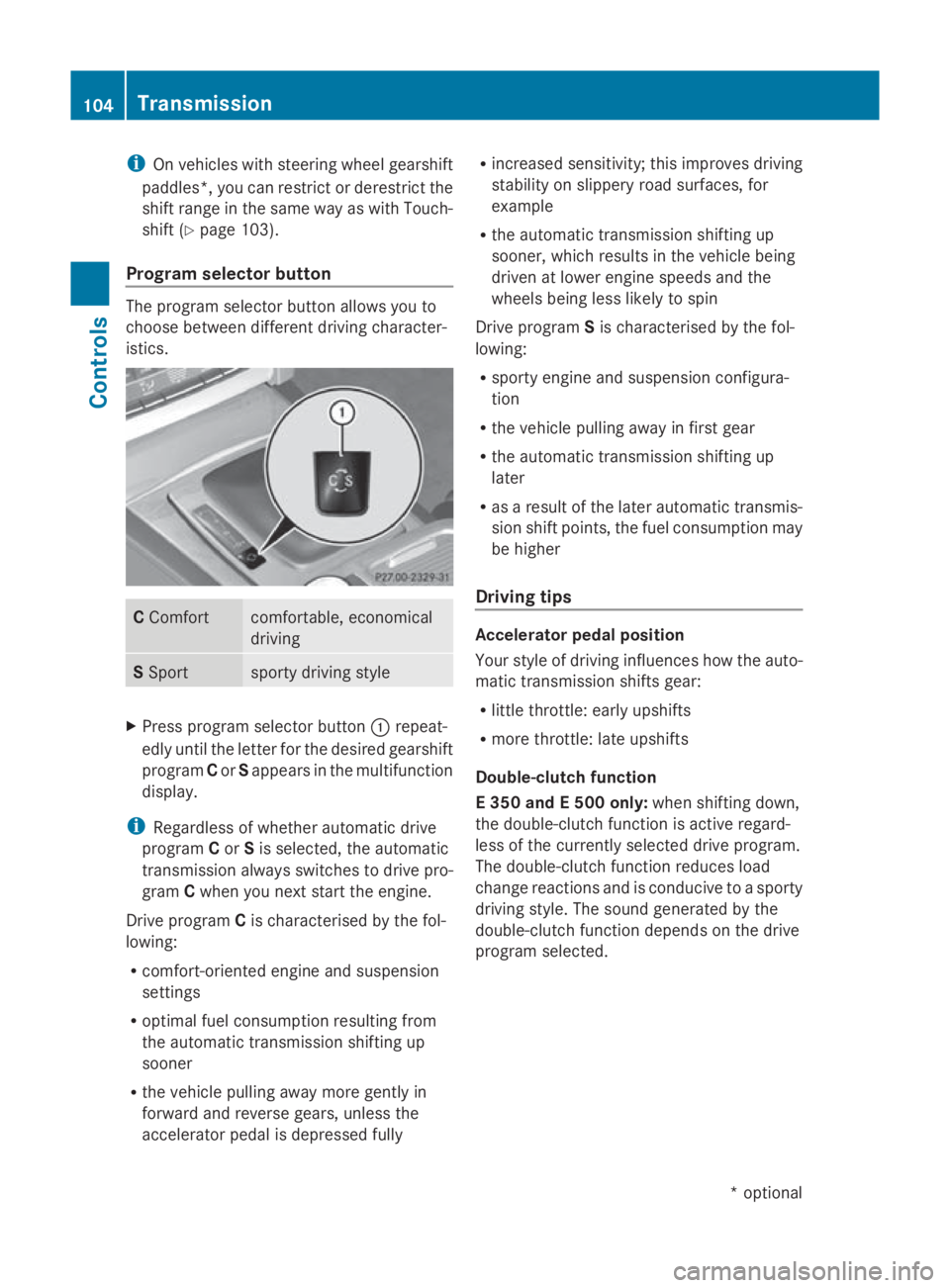
Program selector button The program selector button allows you to
choose between different driving character-
istics. C
Comfort comfortable, economical
driving
S
Sport sporty driving style
X
Press program selector button 0046repeat-
edly until the letter for the desired gearshift
program Cor Sappears in the multifunction
display.
i Regardless of whether automatic drive
program Cor Sis selected, the automatic
transmission always switches to drive pro-
gram Cwhen you next start the engine.
Drive program Cis characterised by the fol-
lowing:
R comfort-oriented engine and suspension
settings
R optimal fuel consumption resulting from
the automatic transmission shifting up
sooner
R the vehicle pulling awaym ore gently in
forward and reverse gears, unless the
accelerator pedal is depressed fully R
increased sensitivity; this improves driving
stability on slippery road surfaces, for
example
R the automatic transmission shifting up
sooner, which results in the vehicle being
driven at lower engine speeds and the
wheels being less likely to spin
Drive program Sis characterised by the fol-
lowing:
R sporty engine and suspension configura-
tion
R the vehicle pulling awayinf irst gear
R the automatic transmission shifting up
later
R as aresult of the later automatic transmis-
sion shift points, the fuel consumption may
be higher
Driving tips Accelerator pedal position
Your style of driving influences how the auto-
matic transmission shifts gear:
R
little throttle: early upshifts
R more throttle: late upshifts
Double-clutch function
E3 50 and E500 only: when shifting down,
the double-clutch function is active regard-
less of the currently selected drive program.
The double-clutch function reduces load
change reactions and is conducive to asporty
driving style. The sound generated by the
double-clutch function depends on the drive
program selected. 104
TransmissionControls
*o
ptional
207_AKB;2;3,e
n-GB
mkalafa, Version: 2.11.8.1 2009-07-23T10:23:49+02:00-Seite 104
Page 109 of 313
0046
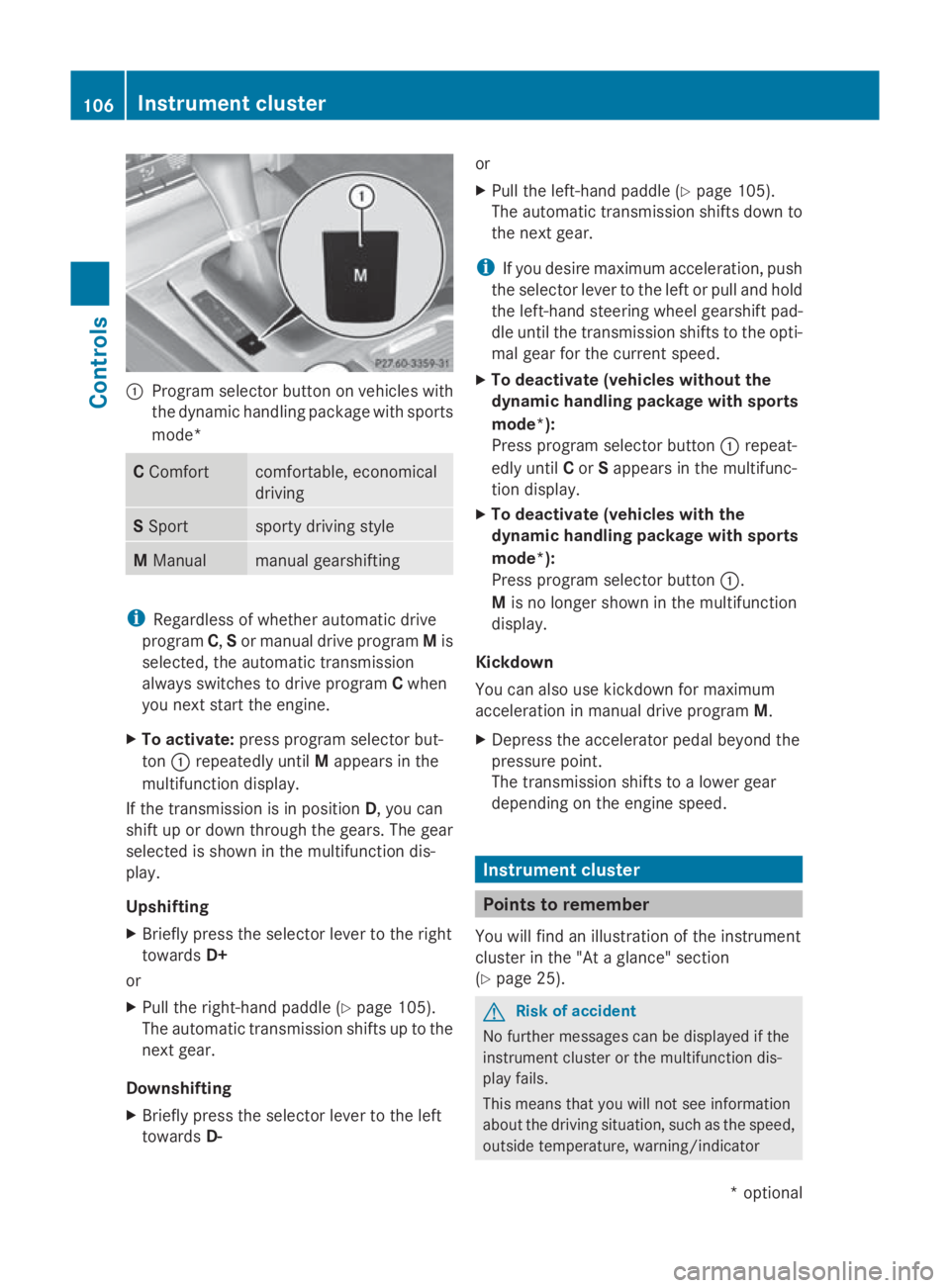
Program selector button on vehicles with
the dynamic handling package with sports
mode* C
Comfort comfortable, economical
driving
S
Sport sporty driving style
M
Manual manual gearshifting
i
Regardless of whether automatic drive
program C,Sor manual drive program Mis
selected, the automatic transmission
alway sswitches to drive program Cwhen
you next start the engine.
X To activate: press program selector but-
ton 0046repeatedly until Mappears in the
multifunction display.
If the transmission is in position D,you can
shift up or down through the gears. The gear
selected is shown in the multifunction dis-
play.
Upshifting
X Briefly press the selector lever to the right
towards D+
or
X Pull the right-hand paddle ( Ypage 105).
The automatic transmission shifts up to the
next gear.
Downshifting
X Briefly press the selector lever to the left
towards D- or
X
Pull the left-hand paddle ( Ypage 105).
The automatic transmission shifts down to
the next gear.
i If you desire maximum acceleration ,push
the selector lever to the left or pull and hold
the left-hand steerin gwheel gearshift pad-
dle until the transmission shifts to the opti-
mal gear for the curren tspeed.
X To deactivate (vehicles without the
dynamic handling package with sports
mode*):
Press program selector button 0046repeat-
edly until Cor Sappears in the multifunc-
tion display.
X To deactivate (vehicles with the
dynamic handling package with sports
mode*):
Press program selector button 0046.
M is no longer shown in the multifunction
display.
Kickdown
You can also use kickdown for maximum
acceleration in manual drive program M.
X Depress the accelerator pedal beyond the
pressure point.
The transmission shifts to alower gear
depending on the engine speed. Instrument cluster
Points to remember
You will find an illustration of the instrument
cluster in the "At aglance" section
(Y page 25). G
Risk of accident
No further messages can be displayed if the
instrument cluster or the multifunction dis-
play fails.
This means that you will not see information
about the driving situation, such as the speed,
outside temperature, warning/indicator 106
Instrument clusterControls
*o
ptional
207_AKB; 2; 3, en-GB
mkalafa,
Version: 2.11.8.1 2009-07-23T10:23:49+02:00-Seite 106
Page 110 of 313
lamps, display messages or system failures.
The vehicle's handlin gcharacteristics may be
affected. Adjust your drivin gstyle and speed
accordingly.
Immediately consult aqualified specialist
workshop which has the necessary specialist
knowledge and tools to carr yout the work
required. Mercedes-Ben zrecommends that
you use aMercedes-Ben zService Centre for
this purpose .Inparticular, work relevant to
safet yoro nsafety-related systems must be
carried out at aqualified specialist workshop. Coolant temperatur
egauge
The coolan ttemperature gauge is in the
instrumen tcluster on the right-han dside.
Under normal operating condition sand with
the specified coolan tlevel, the coolan ttem-
perature may rise to 120 †. The coolan ttem-
perature may rise to the top end of the scale
at high outside temperatures and on long
uphill stretches. Speedometer with segments
The segment sinthe speedometer indicate
which speed rang eisavailable.
Cruise control mode:
The segment slight up fro mthe stored speed
to the maximum speed.
Variable Speedtronic mode:
The segment slight up fro mthe star tofthe
scale to the selected limit speed.
Distronic Plus* mode:
One or two segment saround the stored
speed light up. Rev counter
The red band in the rev counter indicates the
engine's overrevving range. The fuel supply is
interrupted to protect the engin ewhen the
red band is reached. !
Do not drive in the overrevving range.
Doin gsow ill damage the engine. Outside temperatur
edisplay G
Risk of accident
At temperatures just above freezin gpoint ,the
street may be icy, especially in wooded areas
or on bridges .Ifyou do not adapt your driving
style to the conditions, the vehicle could skid.
For this reason ,adapt your drivin gstyle and
speed to the weathe rconditions.
Changes in the outside temperature are dis-
played after ashor tdelay. On-board computer
Points to remember
The on-board computer is activate dassoon
as you turn the key to position 1in the ignition
lock. G
Risk of accident
Only use the on-board computer when road
and traffic condition spermit. You would oth-
erwise be distracted and unable to concen-
trate properly on driving, and could cause an
accident. Multifunction steering wheel
You can control the multi-function display and
the settings in the on-board computer using On-board computer
107Controls
*optional
207_AKB; 2; 3, en-GB
mkalafa,
Version: 2.11.8.1 2009-07-23T10:23:49+02:00-Seite1 07 Z
Page 111 of 313
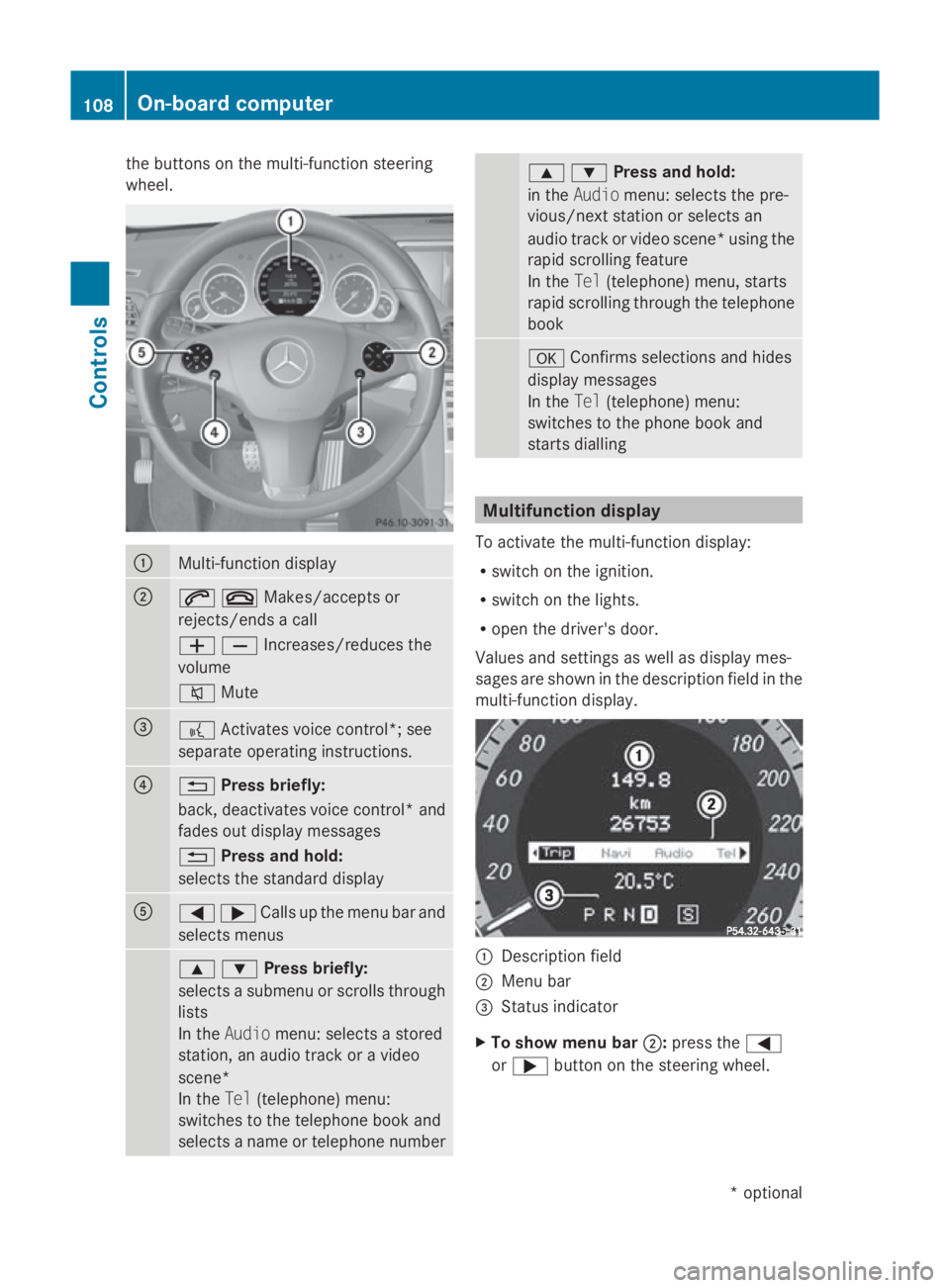
the buttons on the multi-functio
nsteering
wheel. 0046
Multi-functio
ndisplay 0047
006A007FMakes/accept
sor
rejects/ends acall
005A005BIncreases/reduces the
volume
006C Mute 008A
0062
Activates voice control*; see
separate operating instructions. 0088
0041
Press briefly:
back, deactivates voice control* and
fades out display messages
0041 Press and hold:
selects the standard display 0086
0040003ECalls up th
emenub ar and
select smenus 003C003DPress briefly:
selects
asubmenu or scrolls through
lists
In the Audio menu: selects astored
station, an audiot rack oravideo
scene*
In the Tel(telephone) menu:
switches to the telephone book and
selects aname or telephone number 003C003DPress and hold:
in the
Audio menu: selects the pre-
vious/next station or selects an
audiot rack or video scene* using the
rapid scrolling feature
In the Tel(telephone) menu, starts
rapid scrolling through the telephone
book 0064
Confirms selections and hides
display messages
In the Tel(telephone) menu:
switches to the phone book and
starts dialling Multifunction display
To activate the multi-function display:
R switch on the ignition.
R switch on the lights.
R open the driver's door.
Values and settings as well as display mes-
sages are shown in the description field in the
multi-function display. 0046
Description field
0047 Menu bar
008A Status indicator
X To show menu bar 0047:press the 0040
or 003E button on the steering wheel. 108
On-board computerControls
*o
ptional
207_AKB; 2; 3, en-GB
mkalafa,
Version: 2.11.8.1 2009-07-23T10:23:49+02:00-Seite 108
Page 112 of 313
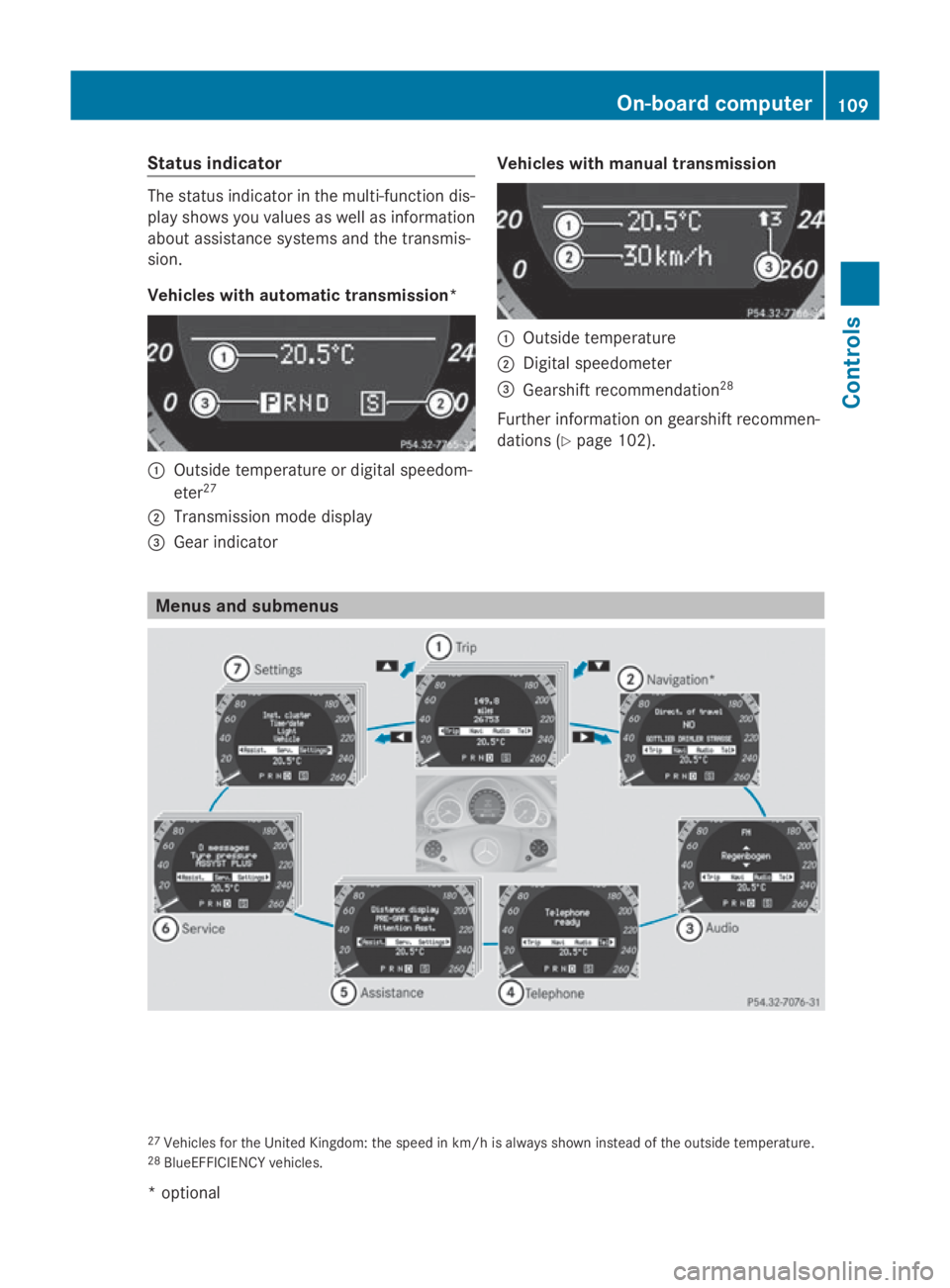
Status indicator
The status indicator in the multi-function dis-
play shows you values as well as information
about assistance systems and the transmis-
sion.
Vehicles with automatic transmission* 0046
Outside temperature or digital speedom-
eter 27
0047 Transmission mode display
008A Gear indicator Vehicles with manualt
ransmission 0046
Outside temperature
0047 Digital speedometer
008A Gearshift recommendation 28
Further information on gearshift recommen-
dations (Y page 102). Menus and submenus
27
Vehicles for the United Kingdom: the speed in km/h is alwayss hown instead of the outside temperature.
28 BlueEFFICIENCY vehicles. On-board computer
109Controls
*optional
207_AKB; 2; 3, en-GB
mkalafa,
Version: 2.11.8.1 2009-07-23T10:23:49+02:00-Seite 109 Z