display MERCEDES-BENZ E-CLASS COUPE 2009 Workshop Manual
[x] Cancel search | Manufacturer: MERCEDES-BENZ, Model Year: 2009, Model line: E-CLASS COUPE, Model: MERCEDES-BENZ E-CLASS COUPE 2009Pages: 313, PDF Size: 7.76 MB
Page 140 of 313
You will see
awarnin gmessage in the multi-
function display if the HOL Dfunction is acti-
vated and:
R the driver's door is opened and you release
the seat belt.
R the engin eisswitched off.
R the bonnet is opened.
Vehicles with manual transmission:
Brak eimmediately
X Immediately depres sthe brak epedal firmly
until the warnin gmessage in the multi-
function display goes out. This deactivates
the HOL Dfunction.
On vehicles with automatic transmission*:
Select Park (P)
X Move the selector lever to Pto prevent the
vehicle fro mrollin gaway.
The HOL Dfunction is deactivated. The
warnin gmessage in the multi-function dis-
play disappears.
Ah orn will also sound at regular intervals if
the HOL Dfunction is activate dand you:
R switc hoff the engine, open the driver's
door and remove your seat belt.
R open the bonnet.
The sounding of the horn alert syou to the fact
that the vehicle has been parked while the
HOL Dfunction is still activated. The tone
becomes louder if you attempt to lock the
vehicle. The vehicle is not locked until the
HOL Dfunction is deactivated.
i If the ignition has been switched off ,the
engin ecannot be started again until the
HOL Dfunction has been deactivated.
If there is afault in the system or power supply
while the HOL Dfunction is activated, the
Brak eimmediately message is shown in
the multi-function display. Immediately
depres sthe brak efirmly until the warning
message in the multi-function display goes
out. On vehicles with automatic transmis-
sion*, you can also select P.This deactivates
the HOL Dfunction. Dynamic handling package with
sports mode*
The most importan tpart of the dynamic han-
dling package with sport smode is the adjust-
able suspension system. This automatically
controls and adapts the suspension to the
respectiv edrivin gsituation.
The calibration of the suspension depends
on:
R your drivin gstyle
R the road surfac econditions
R your individual selection ;see also the fol-
lowing description.
If your vehicle is equipped with automatic
transmission*, the dynamic handlin gpack-
age with sport smode also includes steering
wheel gearshift paddles* with amanual gear-
shift program* (Y page 105). X
Start the engine.
Sports tuning The firmer settin
gofthe suspension tuning in
sport smode ensures even better contact
with the road. Selec tthis mode when employ-
ing asport ydrivin gstyle, e. g. on winding
countr yroads.
Your selection remain sstored until you
switc hoff the engine.
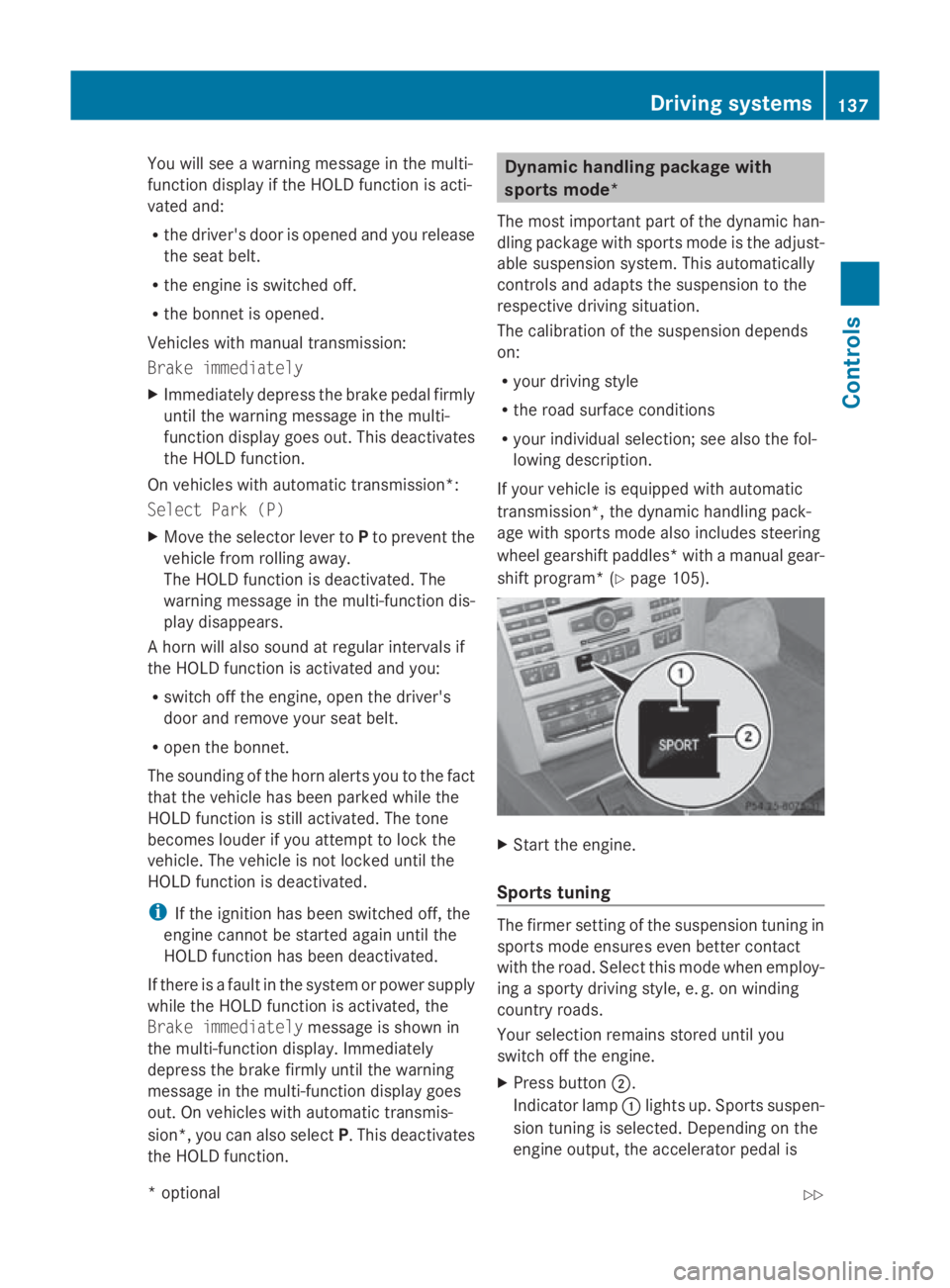
X Press button 0047.
Indicator lamp 0046light sup. Sports suspen-
sion tuning is selected. Dependin gonthe
engin eoutput ,the accelerator pedal is Driving systems
137Controls
*optional
207_AKB; 2; 3, en-GB
mkalafa,
Version: 2.11.8.1 2009-07-23T10:23:49+02:00-Seite1 37 Z
Page 142 of 313
Fron
tsensors Centre Approximately 10
0cm Corners Approximately 60 cm
Rea
rsensors Centre Approximately 12
0cm Corners Approximately 80 cm
!
When parking ,pay particular attentio nto
object sabov eorb elow th esensors, such
as flower pot sortrailer towbars .PAR K-
TRONIC does no tdetect suc hobject swhen
they are in th eimmediat evicinity of the
vehicle .You could damag ethe vehicle or
th eo bjects.
Ultrasonic sources suc hasanautomatic
car wash, alorry's compressed-air brakes
or ap neumatic dril lcou ld caus ePARK-
TRONIC to malfunction.
Minimu mdistance Centre Approximately 20 cm
Corners Approximately 15 cm
If there is an obstacle within this range, all
warning displays light up and
atones ounds.
If th edistanc efalls below th eminimum clear-
ance, it may no longer be shown.
Warning displays The warning displays sho
wthe distance
between th esensor sand th eobstacle .The
warning display for th efront area is located
on th edashboard abov ethe centr eair vents.
The warning display for th erear area in the
Coupé is locate dontheroo flining in th erear
compartment; in th eCabriolet ,itisbetween
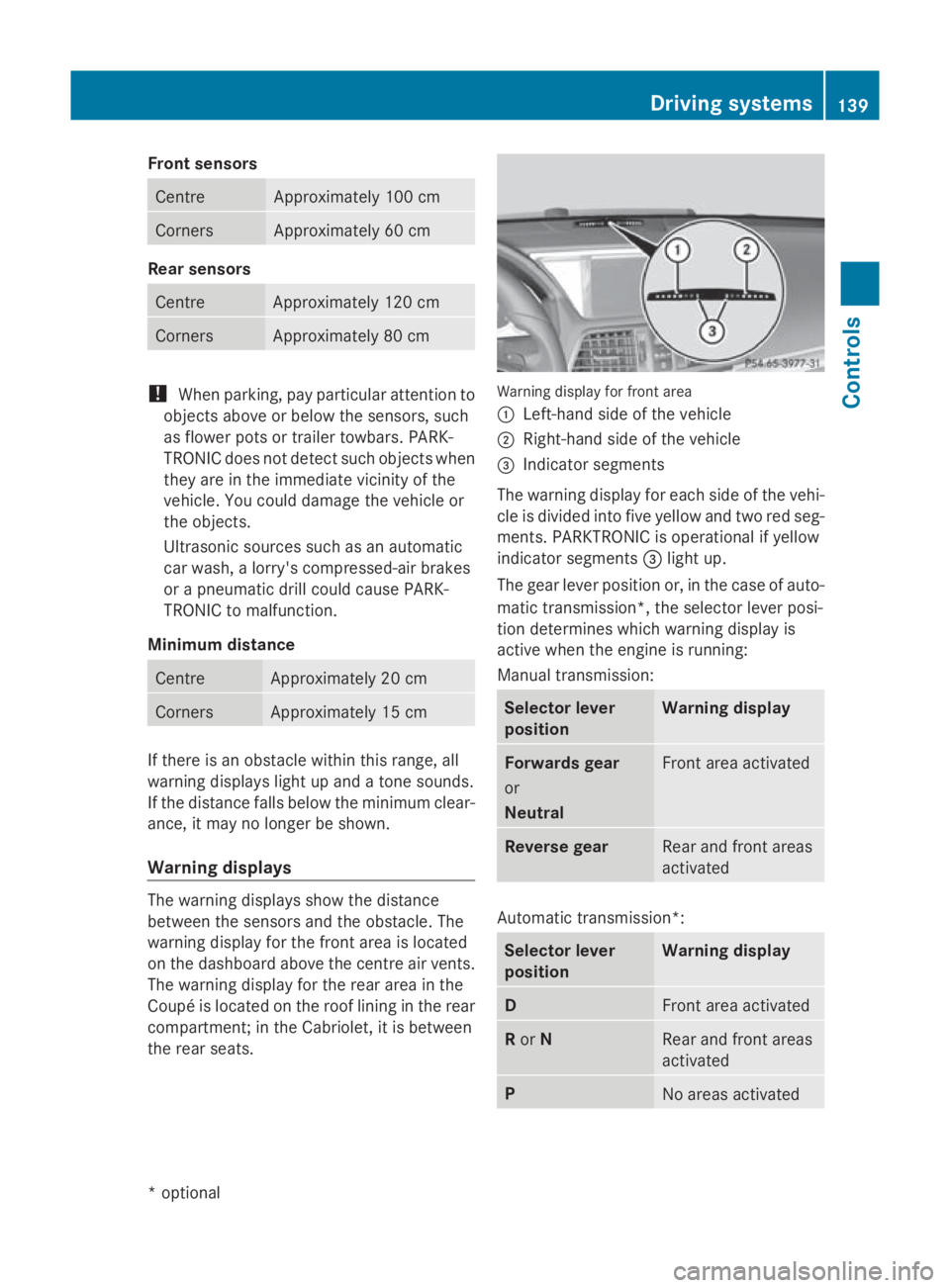
th er ear seats. Warning display for fron
tarea
0046 Left-han dside of th evehicle
0047 Right-hand side of th evehicle
008A Indicato rsegments
The warning display for each side of th evehi-
cle is divided int ofivey ellow and two red seg-
ments .PAR KTRONIC is operational if yellow
indicator segments 008Alight up.
The gear leve rpositio nor, in th ecaseofa uto-
matic transmission*, th eselector leve rposi-
tio nd etermine swhichw arning display is
active when th eengineisr unning:
Manual transmission: Selector lever
position Warning display
Forward
sgear
or
Neutral Fron
tarea activated Revers
egear Rear and fron
tareas
activated Automatic transmission*:
Selector lever
position Warning display
D
Fron
tarea activated R
or N Rear and fron
tareas
activated P
No areas activatedDriving systems
139Controls
*optional
207_AKB
;2;3,en-GB
mkalafa ,V ersion: 2.11.8.1
2009-07-23T10:23:49+02:00
-Seite 139 Z
Page 144 of 313
G
Risk of injury
Make sure that no persons or animal sare in
the manoeuvring range. Otherwise, they
could be injured.
Whe nPARKTRONIC is deactivated, Parking
Guidance is also unavailable.
Use Parking Guidance for parking spaces:
R that are paralle ltothe direction of travel
R that are on straigh troads, not bends
R that are on the same level as the road, i.e.
not on the pavement
Parking tips:
R On narro wroads, drive as clos etothe park-
ing space as possible.
R Parking spaces which are littered ,over-
grow norp artiall yoccupied by traile rdraw-
bars might be identified incorrectl yornot
at all.
R Snowfal lorheavy rai nmay lead to aparking
space being measured inaccurately.
R Pa ya ttention to the PARKTRONIC warning
messages during the parking procedure
(Y page 138).
R Whe ntransporting aloa dw hich protrudes
from your vehicle ,you mus tnot us eParking
Guidance.
R Neve ruse Parking Guidance with snow
chains or an emergency spare wheel *fit-
ted.
R The wa yyourv ehicle is positioned in the
parking space afte rparking is dependent
on variou sfactors. These includ ethe posi-
tion and shape of the vehicle sparked in
front and behind it and the conditions of the
location. In some cases, Parking Guidance
may guid eyou too far or not far enough into
ap arking space. In some cases, it may also
lead yo uacross or onto the kerb. If neces-
sary, cance lthe parking procedure with
Parking Guidance. !
If unavoidable, yo ushoul ddrive over
obstacles such as kerbs slowl yand not at
as harp angle. Otherwise, yo umay damage
the wheel sortyres.
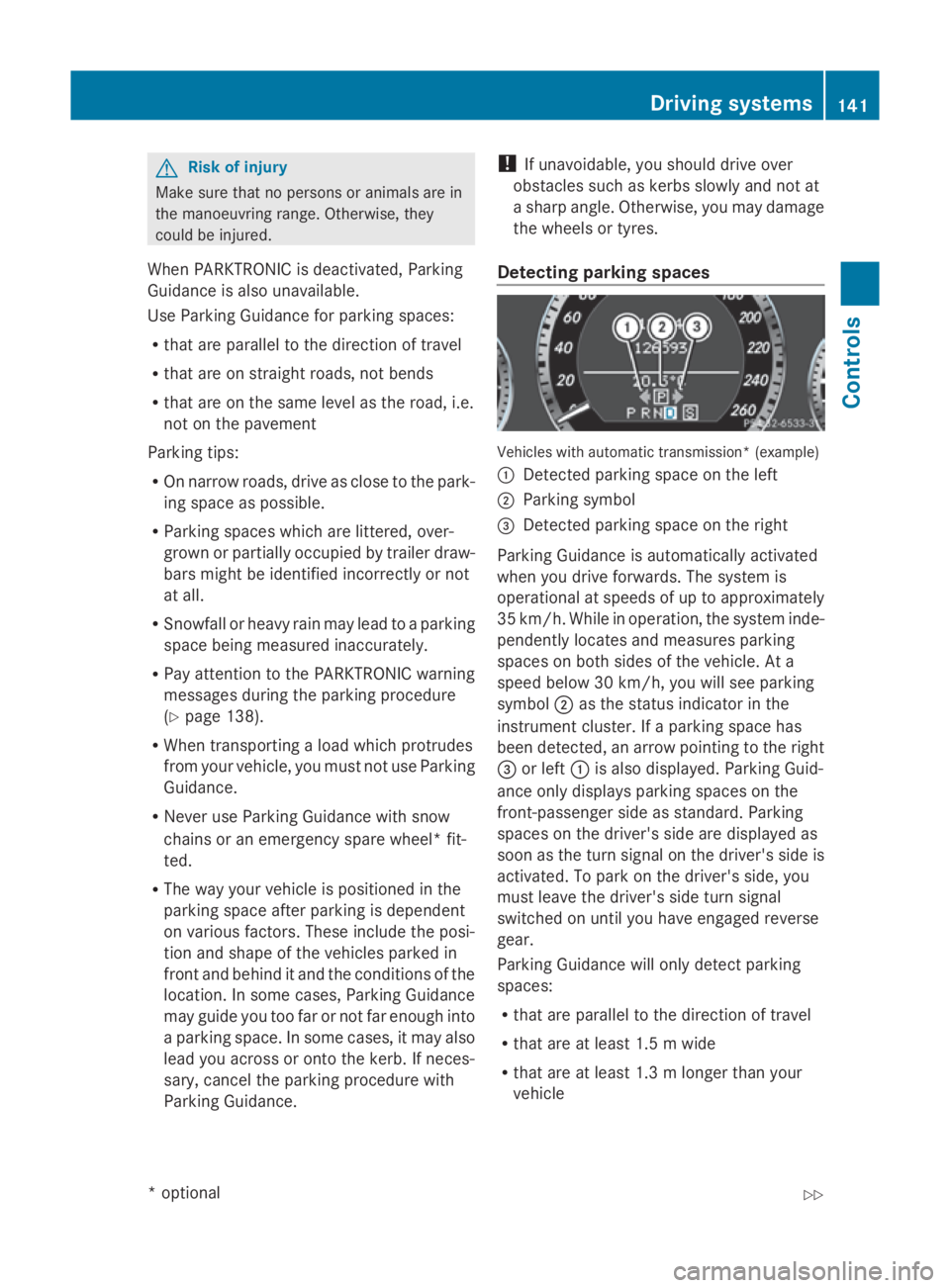
Detecting parkin gspaces Vehicles with automatic transmission* (example)
0046
Detected parking space on the left
0047 Parking symbol
008A Detected parking space on the right
Parking Guidance is automaticall yactivated
whe nyou drive forwards. The system is
operational at speeds of up to approximately
35 km/h .While in operation, the system inde-
pendently locates and measures parking
spaces on both sides of the vehicle .Ata
speed below 30 km/h ,you will see parking
symbol 0047as the statu sindicator in the
instrument cluster. If aparking space has
bee ndetected, an arrow pointing to the right
008A or left 0046is also displayed. Parking Guid-
ance only display sparking spaces on the
front-passenger sid easstandard .Parking
spaces on the driver' ssidea re displayed as
soo nasthe turn signal on the driver' ssideis
activated. To park on the driver' sside, you
mus tlea ve the driver' ssidet urn signal
switched on unti lyou have engaged reverse
gear.
Parking Guidance will only detect parking
spaces:
R that are paralle ltothe direction of travel
R that are at leas t1.5mw ide
R that are at leas t1.3ml onger than your
vehicle Drivin
gsystems
141Controls
*optional
207_AKB
;2;3,en-GB
mkalafa ,V ersion: 2.11.8.1
2009-07-23T10:23:49+02:00
-Seite 141 Z
Page 145 of 313
Ap
arking space is displaye dwhile youa re
driving past it, and unti lyou area pprox-
imatel y15m away from it.
Parking G
Ris
kofa ccident
PARKTRONI Cand Parking Guidance are
merel yparking aids and ma ynot detect all
obstacles. The ydonot relieve yo uofthe
responsibility of paying attention.
Yo ua realways responsibl efor safety and
must continue to pa yattentio ntoyourimme-
diate surrounding swhenp arking and
manoeuvring .You could otherwis eendanger
yoursel fand others.
X Stop the vehicl ewhent he parking space
symbo lshows the desired parking space in
the instrument cluster.
X Vehicles with manua ltransmission: shift to
revers egear.
Vehicles with automatic transmission*:
mov ethe selecto rlev er to R.
The multi-functio ndisplay shows the
Check vehicl esurroundings Con‐
fir mwithOK message.
X Press 0064on the multi-functio nsteering
whee ltoconfirm.
The multi-functio ndisplay switches to
Parking Guidance.
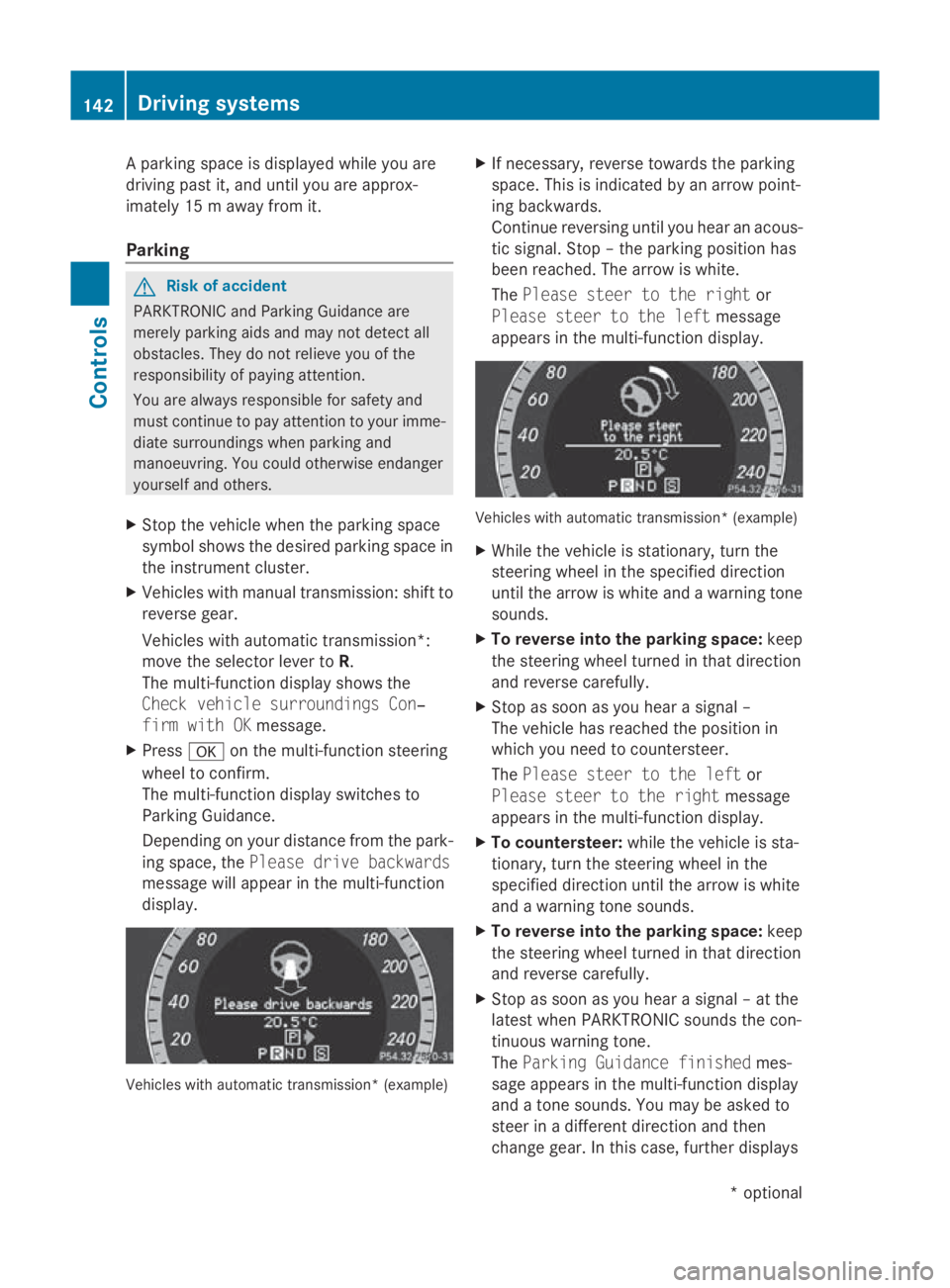
Depending on your distance fro mthe park-
ing space ,the Please drive backwards
message will appear in the multi-function
display. Vehicles with automatic transmission* (example) X
If necessary ,revers etowards the parking
space .Thisisi ndicated by an arrow point-
ing backwards.
Continu ereversing unti lyou hear an acous-
tic signal. Stop –the parking positio nhas
been reached. The arrow is white.
The Please steer to the right or
Please steer to the left message
appear sinthe multi-functio ndisplay. Vehicles with automatic transmission* (example)
X
Whil ethe vehicl eisstationary, tur nthe
steering whee linthe specifie ddirection
unti lthe arrow is white and awarning tone
sounds.
X To revers eintot he parking space: keep
the steering whee lturned in tha tdirection
and revers ecarefully.
X Stop as soo nasyou hear asigna l–
The vehicl ehasreache dthe positio nin
which yo uneedtoc ountersteer.
The Please steer to the left or
Please steer to the right message
appear sinthe multi-functio ndisplay.
X To countersteer: whilethe vehicl eissta-
tionary, tur nthe steering whee linthe
specifie ddirection unti lthe arrow is white
and awarning tone sounds.
X To revers eintot he parking space: keep
the steering whee lturned in tha tdirection
and revers ecarefully.
X Stop as soo nasyou hear asigna l–att he
latest when PARKTRONI Csounds the con-
tinuou swarning tone.
The Parkin gGuidance finished mes-
sage appear sinthe multi-functio ndisplay
and atone sounds .You maybea sked to
stee rinad ifferent direction and then
change gear .Inthisc ase, furthe rdisplays 142
Driving systemsControls
*o
ptional
207_AKB; 2; 3, en-GB
mkalafa,
Version: 2.11.8.1 2009-07-23T10:23:49+02:00-Seite 142
Page 146 of 313
in the multi-function display will direc
tyou
to the final position.
X Manoeuvre, if necessary.
X Always observe the warnin gmessages dis-
played by PARKTRONI C(Ypage 138).
Cancelling Parking Guidance X
Press the PARKTRONI Cbutton on the
centr econsole (Y page 138).
Parking Guidanc eiscancelled immediately
and PARKTRONI Cisdeactivated.
Parking Guidanc eiscancelled automatically
if it is no longer possible to guide you int othe
parking space, or if amalfunction occurs.
The parking space symbol disappears and the
Parking Guidance cancelled message
appears in the multi-function display.
Trailer towing* For vehicles with
atrailer coupling, the mini-
mum length for parking spaces is slightly
increased.
If you have attached atrailer to your vehicle,
you should not use Parking Guidance. When
the electrical connection is established
between your vehicle and the trailer, Parking
Guidanc ecease stobea vailable. PARK-
TRONI Cisdeactivated for the rear area. Reversing camera*
The reversin gcamera is an optical aid. It
shows the area behin dyour vehicle in the
COMAND APS display. G
Risk of injury
Make sure that no persons or animals are in
the manoeuvrin grange. Otherwise, they
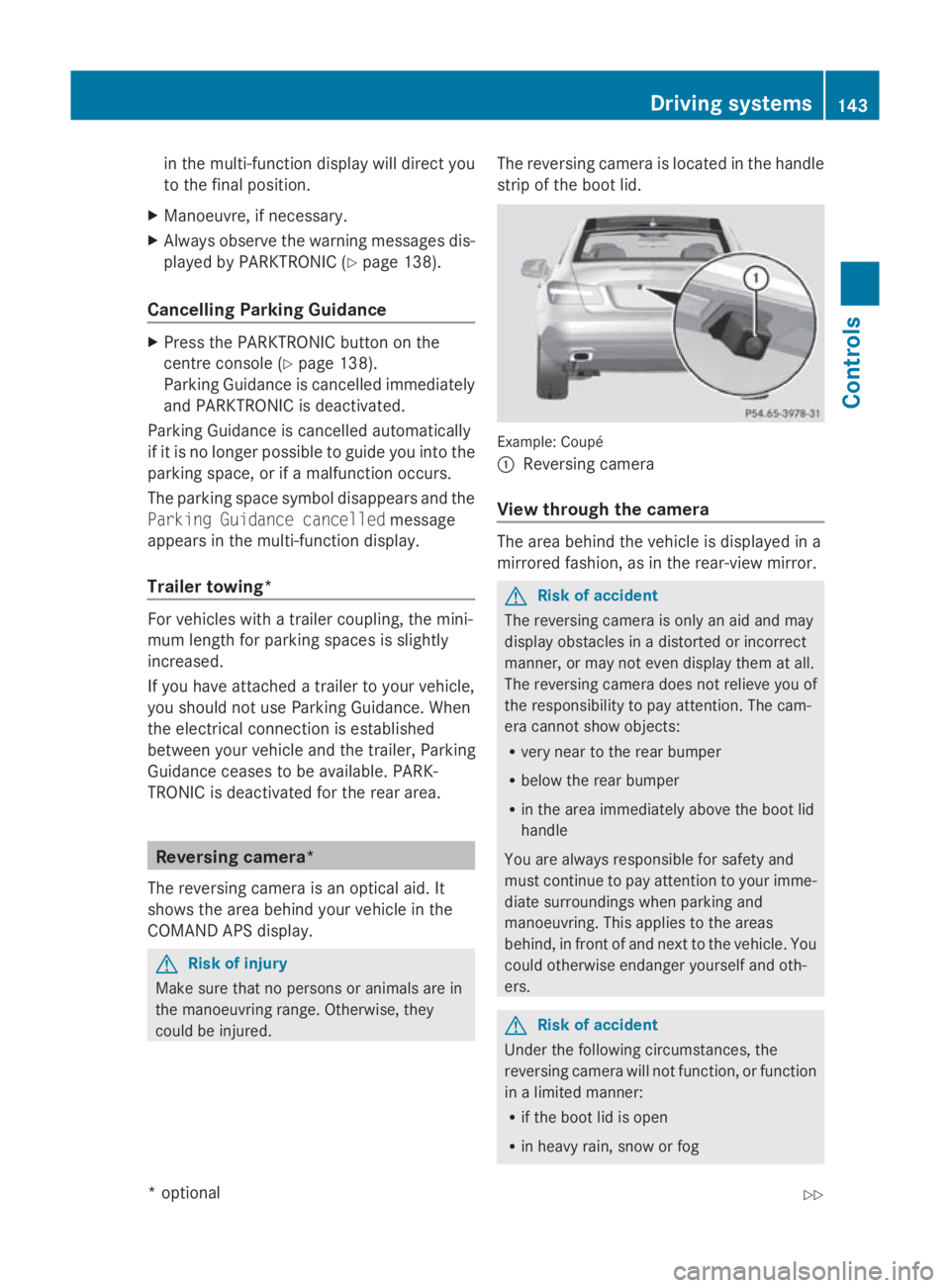
could be injured. The reversin
gcamera is located in the handle
strip of the boot lid. Example: Coupé
0046
Reversing camera
View through th ecamera The area behin
dthe vehicle is displayed in a
mirrored fashion, as in the rear-view mirror. G
Risk of accident
The reversin gcamera is only an aid and may
display obstacles in adistorted or incorrect
manner, or may not even display the matall.
The reversin gcamera does not reliev eyou of
the responsibility to pay attention. The cam-
era cannot show objects:
R very near to the rear bumper
R below the rear bumper
R in the area immediately above the boot lid
handle
You are always responsible for safet yand
must continue to pay attention to your imme-
diate surroundings when parking and
manoeuvring. This applies to the areas
behind, in front of and nex ttothe vehicle. You
could otherwise endanger yourself and oth-
ers. G
Risk of accident
Under the followin gcircumstances, the
reversin gcamera will not function ,orfunction
in alimited manner:
R if the boot lid is open
R in heavy rain, sno worfog Driving systems
143Controls
*optional
207_AKB; 2; 3, en-GB
mkalafa,
Version: 2.11.8.1
2009-07-23T10:23:49+02:0
0-Seite1 43 Z
Page 147 of 313
R
at night or in ver ydark places
R if th ecamera is exposed to ver ybright light
R if th earea is lit by fluorescent light (th edis-
play may flicker)
R if there is asudden chang eintemperature,
e.g .when driving int oaheated garag ein
winter
R if th ecamera len sisdirtyoro bstructed
R if th erear of your vehicle is damaged. In this
even thave th ecamera position and setting
checked at aqualified specialist workshop.
Mercedes-Ben zrecommend sthaty ou use
aM ercedes-Ben zServic eCentre for this
purpose.
Do no tuse th ereversing camera in these
type sofs ituation. You could, otherwise,
injure other sordamage object sand your
vehicle while you are parking.
Activating th ereversing camera X
Mak esure that th ekeyis in position 2in
th ei gnition lock.
X Mak esure that th e"Reversin gcamera"
function is selecte dinCOMAND AP S(see
th es eparate operatin ginstruction sfor
COMAND APS).
X Engage revers egear.
The area behin dthe vehicle is show ninthe
COMAND AP Sdisplay.
You can selec tnotto show th earea behind
th ev ehicle in th eCOMAND AP Sdisplay (see
th es eparate operatin ginstruction sfor
COMAND APS). ATTENTION ASSIST
ATTENTION ASSIST helps you on long, monot-
onous journeys suc hasonmotorways and
trunk roads .Itisactive at speed sbetween 80
and 18 0km/ h. If ATTENTION ASSIST detects
tiredness or increasing lapses in concentra-
tio nont hepart of th edriver, it suggest sa
break. G
Ris
kofa ccident
ATTENTION ASSIST is only an aid and may
detect your tiredness or lapses in concentra-
tio nt oo late or no tatall. It is no tasubstitute
for aw ell reste dand attentive driver.
Fatigue may caus eyou to recognise hazard-
ous situations to olate ,misjudge asituation
or reac tslower. For this reason ,makes ure
you feel reste dbefore you begin driving and
durin gyour journey. Always tak ebreak sin
good tim eand regularly, especially during
lon gjou rneys. Otherwise, you may fail to rec-
ognise dangers in time, caus eanacciden tand
injure yourself and others.
ATTENTION ASSIST assesses your leve lof
fatigue or increasing inattentiveness taking
int oc onsideratio nthe followin gcriteria:
R personal driving style, e.g .steering charac-
teristics
R driving conditions, e. g. time, driving time
ATTENTION ASSIST' sfunctionality is restric-
te da nd warning sare delayed or do not
appear at all:
R if th eroad condition is poor ,e.g.large
bumps or potholes
R there is astron gs ide wind
R you have adopted averys porty driving style
with high cornering speed sordriving with
ah igh rat eofacceleration
R if you are predominantly driving slower
than 80 km/h or faster than 18 0km/h
R if you are currently operatin gormaking a
call usin gCOMAND APS*
R in active driving situations ,for example, if
you are changing lane sorchanging the
vehicle speed 144
Driving systemsControls
*o
ptional
207_AKB
;2;3,en-GB
mkalafa, Version:2.11.8.1
2009-07-23T10:23:49+02:00
-Seite 144
Page 148 of 313
Warning and display messages in the
multi-function display Example
:vehicles with automatic transmission*
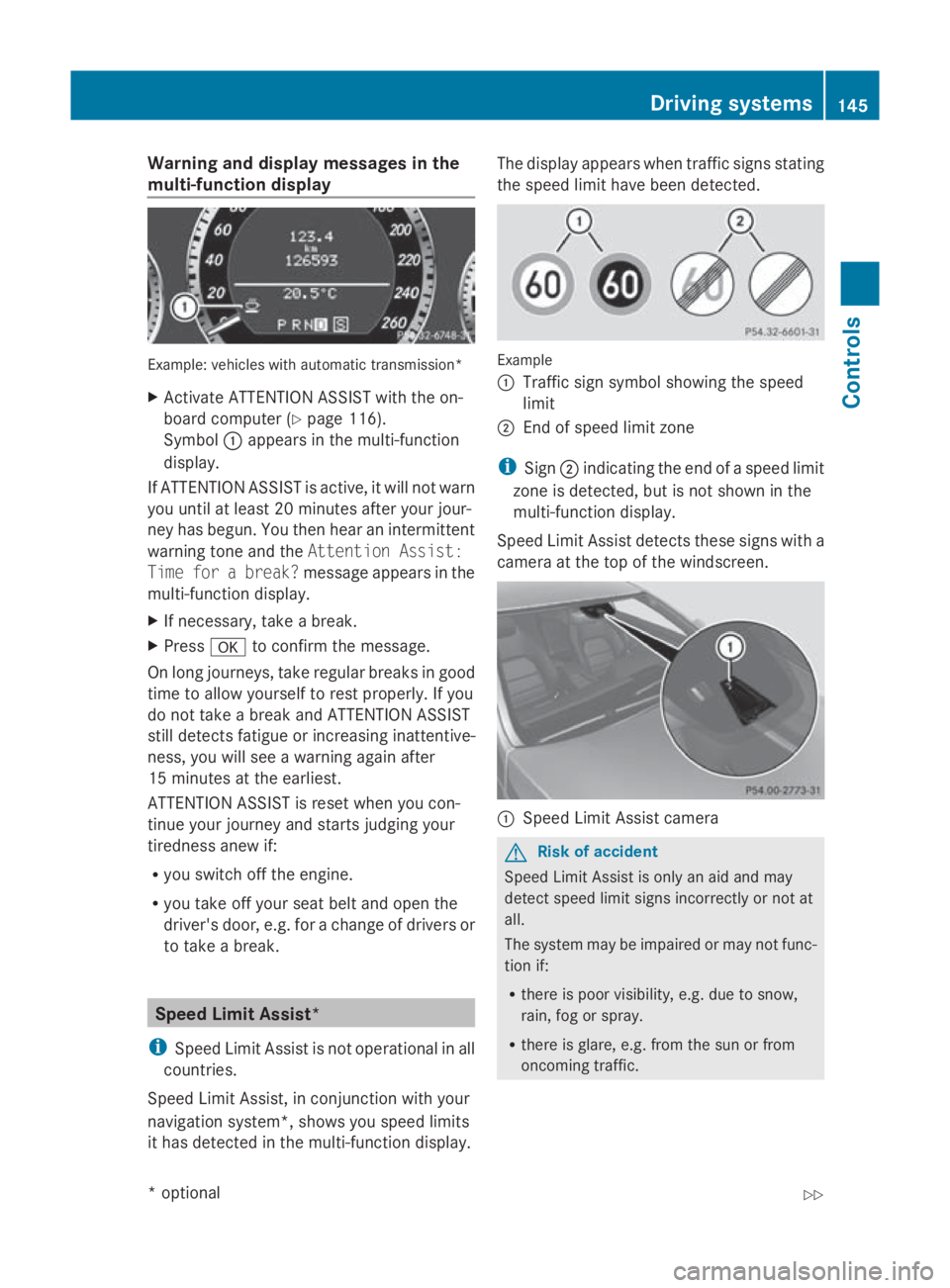
X Activate ATTENTION ASSIST with the on-
board computer (Y page116).
Symbol 0046appears in the multi-function
display.
If ATTENTION ASSIST is active, it wil lnot warn
you until at least 20 minutes after you rjour-
ney has begun. You then hea ranintermittent
warning tone and the Attention Assist:
Time for abreak? message appears in the
multi-function display.
X If necessary, take abreak.
X Press 0064to confirm the message.
On long journeys, take regularb reaks in good
time to allow yourself to rest properly .Ifyou
do not take abrea kand ATTENTION ASSIST
still detects fatigu eorincreasing inattentive-
ness, you wil lsee aw arning again after
15 minutes at the earliest.
ATTENTION ASSIST is reset whe nyou con-
tinue you rjourney and starts judging your
tirednes sanew if:
R you switch off the engine.
R you take off you rseatb elta nd open the
driver's door, e.g. for achange of drivers or
to take abreak. Spee
dLimi tAssist*
i Speed Limit Assist is not operational in all
countries.
Speed Limit Assist, in conjunction with your
navigation system*, show syou spee dlimits
it has detected in the multi-function display. The displaya
ppears whentraffic signs stating
the spee dlimi thave been detected. Example
0046
Traffi csign symbol showing the speed
limit
0047 End of spee dlimi tzone
i Sign 0047indicating the end of aspee dlimit
zone is detected, but is not show ninthe
multi-function display.
Speed Limi tAssist detects these signs with a
camera at the top of the windscreen. 0046
Speed Limit Assist camera G
Risk of accident
Speed Limit Assist is only an aid and may
detect spee dlimi tsigns incorrectly or not at
all.
The syste mmay be impaired or may not func-
tion if:
R there is poor visibility, e.g. due to snow,
rain, fog or spray.
R there is glare, e.g. from the sun or from
oncoming traffic. Driving systems
145Controls
*optional
207_AKB; 2; 3, en-GB
mkalafa,
Version: 2.11.8.1 2009-07-23T10:23:49+02:00-Seite 145 Z
Page 149 of 313
R
the windscree nisd irty ,m iste duporc ov-
ered, for instance by asticker ,inthe vicinity
of the camera.
R the traffi csigns ar ecovered ,for instance
by dirt, sno wortrees.
R the traffi csigns ar epoorlyi llumin ated.
R there ar eambiguous trafficsigns ,for
instance nea rroadworks or on multi-lane
roads.
Traffi csigns always have priority ove rthe
Speed Limi tAssist display. Speed Limit Assist
cannot detect roa dand traffi cconditions .Itis
not asubst itute for attentiv edriving.
Alway spayattentio ntotrafficconditions and
your surroundings. Otherwise, yo umayfail to
recognise dangers in time, cause an accident
and injure yourself and others.
Informatio ninthe multi-function dis-
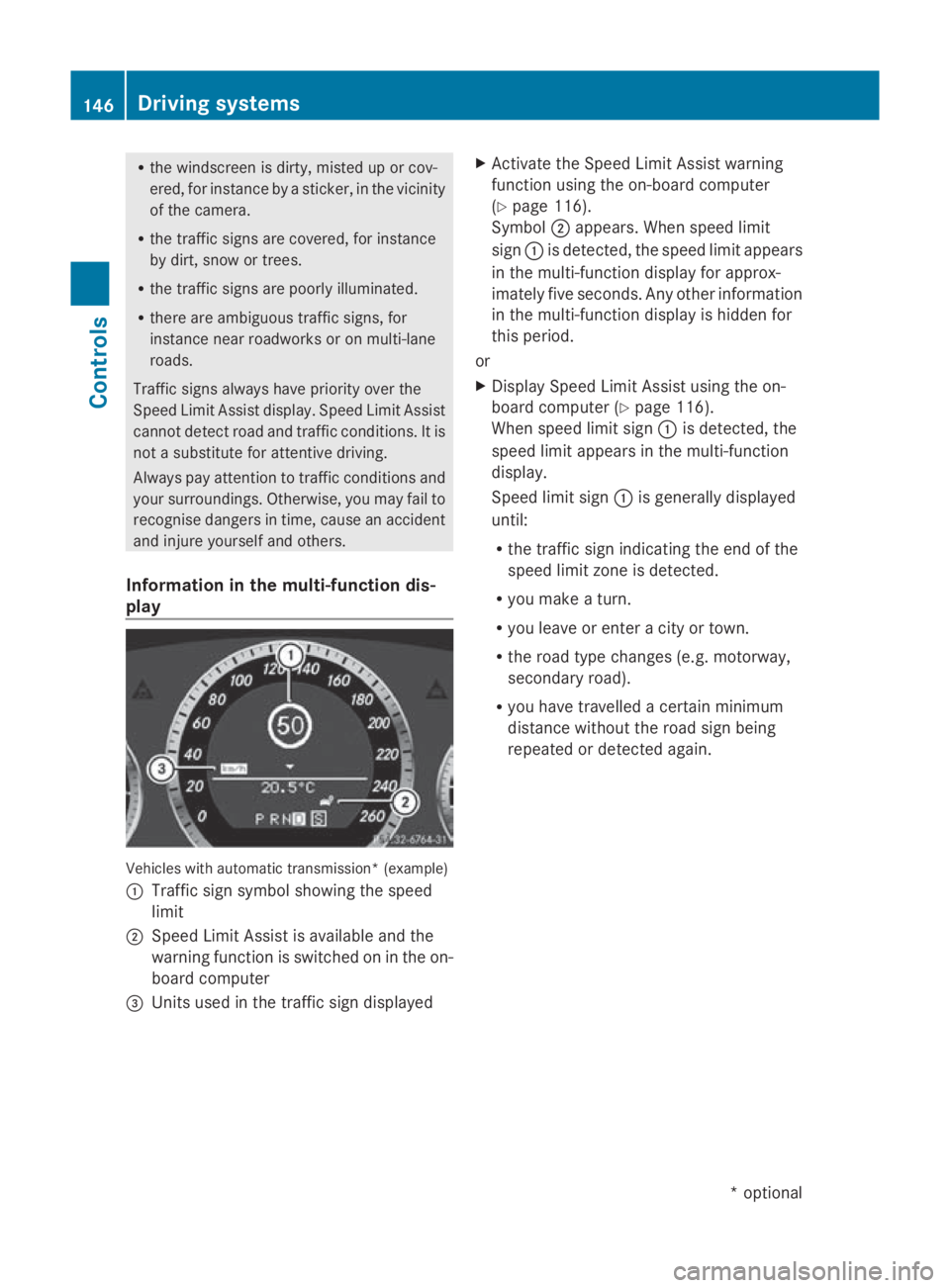
play Vehicles with automatic transmission* (example)
0046
Traffi csigns ym bolshowing the speed
limit
0047 Speed Limi tAssist is availabl eand the
warning functio niss witched on in the on-
boar dcomputer
008A Units used in the traffi csignd isplayed X
Activate the Speed Limi tAssist warning
functio nusing the on-board computer
(Y page 116).
Symbol 0047appears. When spee dlimit
sign 0046is detected, the spee dlimit appears
in the multi-functio ndisplay for approx-
imately fiv eseconds. Any othe rinformation
in the multi-functio ndisplay is hidden for
thi sp eriod.
or
X Display Speed Limi tAssist using the on-
boar dcompute r(Ypage 116).
When spee dlimit sign 0046is detected, the
spee dlimit appear sinthe multi-function
display.
Speed limi tsign 0046is generall ydisplayed
until:
R the traffi csigni ndicating the end of the
spee dlimit zone is detected.
R yo um akeat urn.
R yo ul eave or ente racity or town.
R the roa dtypec hange s(e.g. motorway,
secondar yroad).
R yo uh avet ravelle dacertain minimum
distance withou tthe roa dsignb eing
repeated or detecte dagain. 146
Driving systemsCont
rols
*optio nal
207_AKB; 2; 3, en-GB
mkalafa
,V ersion: 2.11.8.1
2009-07-23T10:23:49+02:00
-Seite 146
Page 151 of 313
i
The integrated filter can filter out most
particles of dust and completely filters out
pollen. Aclogged filter reduces the amount
of air supplied to the vehicle interior. For
this reason, you should alway sobserve the
interval for replacing the filter, which is
specified in the Servic eBooklet .Asit
depends on environmental conditions, e.g.
heavy air pollution, the interval may be
shorter than stated in the Servic eBooklet. G
Risk of accident
Observe the settings recommended on the
following pages. Otherwise, the windows
could mist up. This may obstruct your view of
the traffic situation and, as aresult, you may
cause an accident. Overview of air-conditioning system functions
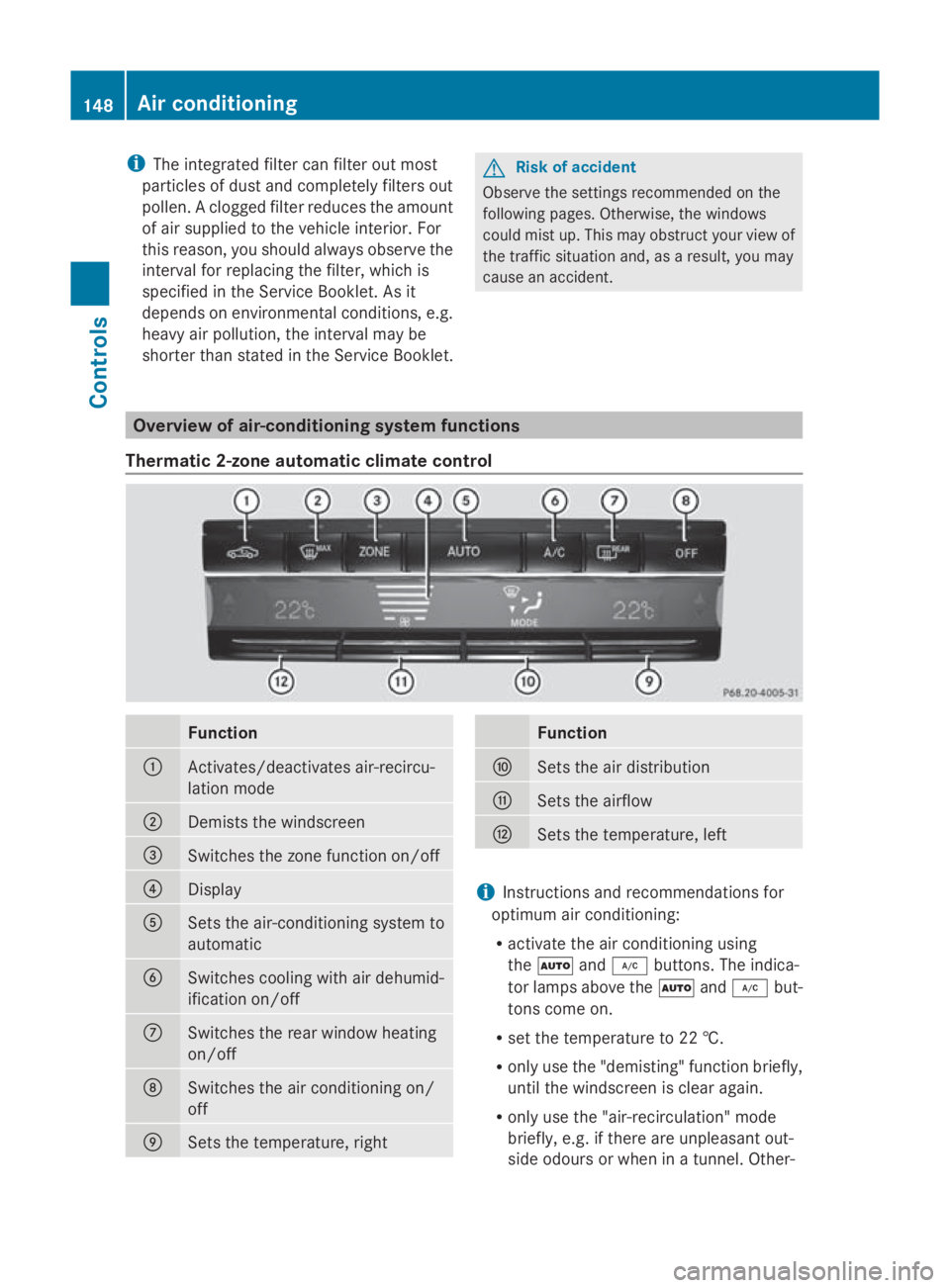
Thermatic 2-zone automatic climate control Function
0046
Activates/deactivates air-recircu-
lation mode
0047
Demist
sthe windscreen 008A
Switches the zonef
unction on/off0088
Display
0086
Sets the air-conditioning system to
automatic
0087
Switches cooling with air dehumid-
ification on/off
006E
Switches the rear window heating
on/off
006F
Switches the air conditioning on/
off
0070
Sets the temperature, right Function
0071
Sets the air distribution
0072
Sets the airflow
0073
Sets the temperature, left
i
Instruction sand recommendations for
optimum air conditioning:
R activat ethe air conditioning using
the 005A and005C buttons. The indica-
tor lamps above the 005Aand005C but-
tonsc ome on.
R set the temperature to 22 †.
R only use the "demisting" function briefly,
until the windscreen is clear again.
R only use the "air-recirculation" mode
briefly, e.g. if there are unpleasant out-
side odours or when in atunnel. Other- 148
Air conditioningControls
207_AKB; 2; 3, en-GB
mkalafa,
Version: 2.11.8.1 2009-07-23T10:23:49+02:00-Seite 148
Page 152 of 313
wise, th
ewindows could mist up due to
al ack of fresh air.
R use th e"ZONE "function to adopt the
temperature settings on th edriver's side for th
efront-passenger side as well. The
indicator lamp above the 00D8button
goes out.
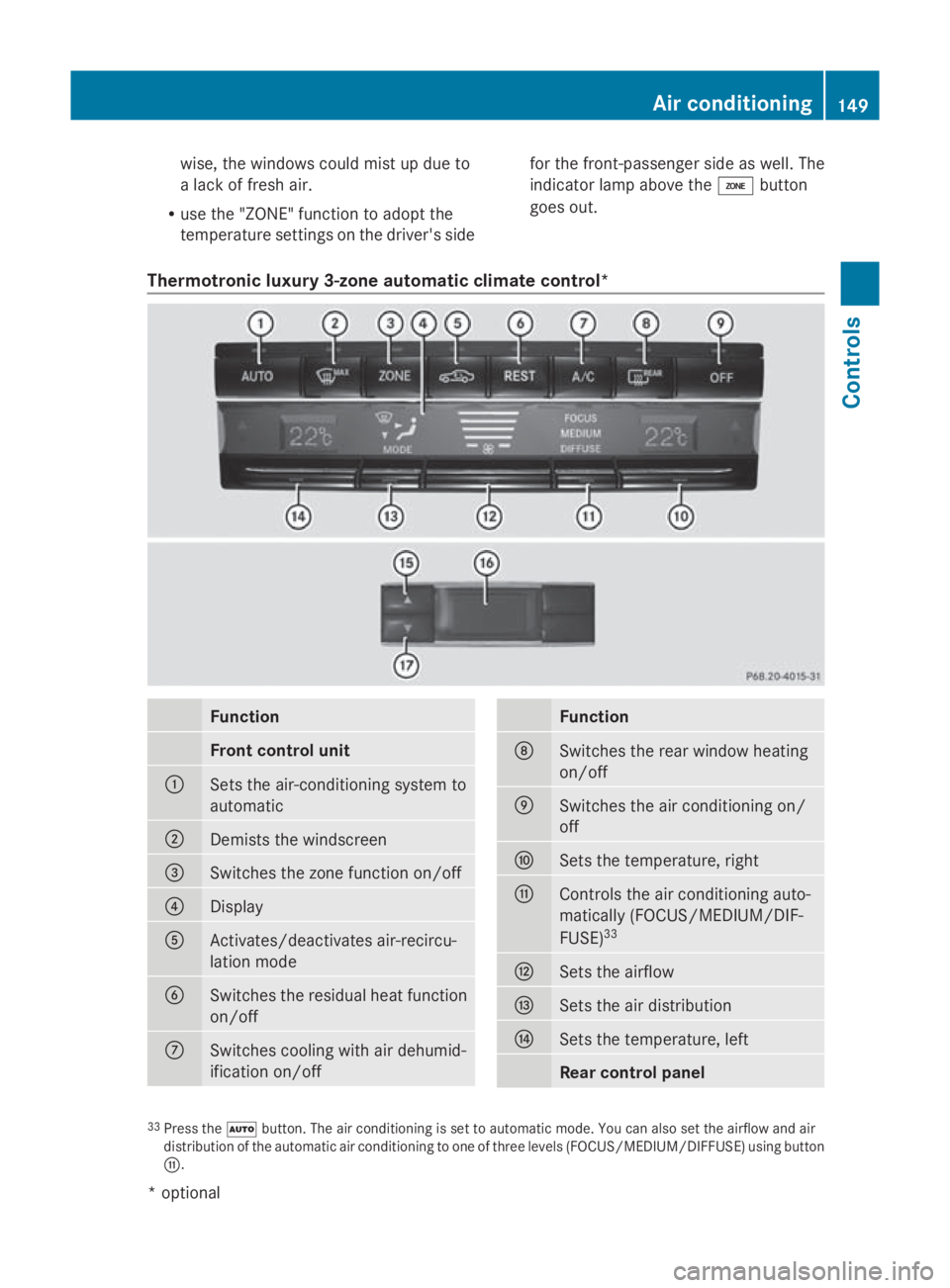
Thermotronic luxury 3-zone automatic climate control* Function
Front control unit
0046
Set
sthe air-conditioning system to
automatic 0047
Demist
sthe windscreen 008A
Switche
sthe zone function on/off 0088
Display
0086
Activates/deactivates air-recircu-
latio
nmode 0087
Switche
sthe residual heat function
on/off 006E
Switche
scooling with air dehumid-
ificatio non/off Function
006F
Switche
sthe rear windo wheating
on/off 0070
Switche
sthe air conditioning on/
off 0071
Set
sthe temperature, right 0072
Controls th
eair conditioning auto-
matically (FOCUS/MEDIUM/DIF-
FUSE) 33 0073
Set
sthe airflow 0074
Set
sthe air distribution 0075
Set
sthe temperature, left Rea
rcontrol panel 33
Pres sthe 005A button. The air conditioning is set to automatic mode .You can also set th eairflow and air
distribution of th eautomatic air conditioning to one of three level s(FOCUS/MEDIUM/DIFFUSE )usin gb utton
0072. Air conditioning
149Controls
*optional
207_AKB; 2; 3, en-GB
mkalafa,
Version:2.11.8.1
2009-07-23T10:23:49+02:00
-Seite1 49 Z