display MERCEDES-BENZ E-CLASS COUPE 2009 User Guide
[x] Cancel search | Manufacturer: MERCEDES-BENZ, Model Year: 2009, Model line: E-CLASS COUPE, Model: MERCEDES-BENZ E-CLASS COUPE 2009Pages: 313, PDF Size: 7.76 MB
Page 17 of 313
Sparew
heel
Fitting ............................................ 268
Technical data ............................... 302
Spee dLimi tAssist ............................ 145
Activating/deactivating message
function (on-board computer) ........116
Displaying (on-board computer) ..... 116
Display message ............................ 212
Spee dlimiter
SPEEDTRONIC ............................... 133
Speedometer
Digita lspeedometer (on-board
computer) ...................................... 111
Segments ...................................... 107
Selecting the displa yunit (on-
board computer) ............................ 117
Speedtronic ....................................... 133
Display message .................... 212, 215
Permanent ..................................... 135
Variabl e......................................... 133
SRS (Supplemental Restrain tSystem)
Display message ............................ 227
Warning lamp ........................... 35, 233
Standard display (on-board com-
puter) ................................................. .110
Status indicator (on-board com-
puter) ................................................. .109
Steering Display message ............................ 221
Steering wheel
Adjusting ................................... 71, 72
Buttons (on-board computer) ......... 107
Storing settings ............................... 75
Steering wheel boss
Cleaning ......................................... 203
Steering wheel gearshift paddles ....105
Stowage compartments ...................166
Armrest (under) ............................. 167
Centre console .............................. 167
Glove compartment .......................166
Stowage well
Boot floo r(un derneath) ................. 171
Submen u(on-board computer)
Convenience .................................. 121
Factory setting ............................... 122
Instrument cluster .........................117
Lights ............................................ .119 Standard displa
y............................ 110
Time/Date ..................................... 118
Vehicle .......................................... .120
Summer opening
see Convenience opening
Sun visor ............................................ 172
Supplemental Restrain tSystem
see SRS ........................................... 35
See SRS .......................................... 35
Supplemental Restrain tSystem
(SRS) ..................................................... 35
Surround lighting Switching on/off (on-board com-
puter) ............................................. 120
Switchin goff the alarm
ATA .................................................. 58 T
Tail lamps Display message ............................ 223
Tail pipes
Cleaning ......................................... 203
Tank
see Fuel tank
Tank capacity .................................... 288
Technical data E200 CGIB lueEFFICIENCY ...........291
E2 20 CDI BlueEFFICIENCY ...........294
E2 50 CDI BlueEFFICIENCY ...........295
E2 50 CGIB lueEFFICIENCY ...........292
E3 50 ............................................. 292
E3 50 CDI BlueEFFICIENCY ...........296
E3 50 CGIB lueEFFICIENCY ...........293
E5 00 ............................................. 293
Trailer loads ................................... 304
Tyres ...................................... 297, 301
Wheels ................................... 297, 301
Telephone
see Mobile phone .......................... 114
Telephone compartment ..................167
Temperature Coolant .......................................... 107
Outside temperature ..................... .107
THERMATIC
Malfunction indicator lamp ............230
THERMOTRONIC
Malfunction indicator lamp ............230 14
Index 207_AKB; 2; 3, en-GB
mkalafa,
Version: 2.11.8.1 2009-07-23T10:23:49+02:00-Seite 14
Page 18 of 313
Through-loading
................................ 167
Through-loading feature ...................169
Tightening torque .............................. 272
Time Setting (on-board computer) .......... 118
Setting the time (on-board com-
puter) ............................................. 118
TIREFIT kit
Storage location ............................ 207
Using ............................................. 264
Top Tether ............................................ 51
Total distanc erecorder .................... 110
Tourist mode see Intelligent Ligh tSystem
Tow-away protection ..........................59
Towing ................................................ 279
Towing atrailer
Folding in the bal lcoupling ............ 196
Folding out the bal lcoupling .......... 193
Towing eye
Fitting ............................................ 279
Removing ....................................... 280
Tow-starting ....................................... 279
Trailer 7-pin connector ............................. 197
Bulb failure indicator for LED
lamps ............................................. 197
Display message ...........218, 222, 225
Power supply ................................. 197
Trailer coupling
see Trailer tow hitch
Trailer loads
Technical data ............................... 304
Trailer tow hitch ................................ 193
Cleaning ......................................... 203
Trailer towing
Driving tips .................................... 194
ESP ®
................................................ 55
Mounting dimensions ....................303
Parking Guidance ........................... 143
Parktroni c...................................... 140
Transmission output (maximum)
Telephone/two-wa yradio .............. 285
Transmission positions ....................102
Transport (vehicle) ............................280
Trim strips Cleaning ......................................... 204 Trip computer
On-board computer .......................110
Trip meter .......................................... 110
Resetting (on-board computer) ......111
Turn signal
Display message .................... 222, 223
TV
Operating (on-board computer) .....114
Two-way radio
Installatio n..................................... 285
Type identification plate
see Vehicle identification plate ......286
Tyre grip ............................................. 192
Tyre pressure ................................... .186
Display message ............................ 213
Tyre pressure los swarning system
............................................................ 187
Tyres
Direction of rotatio n...................... 185
General notes ................................ 184
Technical data ....................... 297, 301
Tyre tread .......................................... .186 U
Unladen weight ................................. 291
Unlocking Emergency unlocking ..................... 249
From insid ethe vehicle (central
unlocking button) ............................. 64 V
Vanity mirror Sun viso r........................................ 172
Variable Speedtronic ........................133
Vehicle Emergency unlocking ............249, 250
Individua lsettings (on-board com-
puter) ............................................. 117
Leaving parked up .........................249
Towing ........................................... 279
Tow-starting ................................... 279
Transporting .................................. 280
Vehicle battery .................................. 273
Vehicle dimensions ...................291, 296
Vehicle electronics ...........................284 Index
15 207_AKB; 2; 3, en-GB
mkalafa,
Version: 2.11.8.1 2009-07-23T10:23:49+02:00-Seite 15
Page 19 of 313
Vehicl
eidentificatio nnumber
(VIN) .......................................... 286, 287
Vehicle identification plate ..............286
Vehicle tool kit .................................. 207
Vehicle weights ................................. 291W
Warning and indicator lamps ABS (yellow) ................................... 232
Distronic Plu s(red )........................ 232
ESP ®
........................................ 54, 233
ESP ®
OFF ....................................... 233
LIM (cruise control) ........................ 123
LIM (Distroni cPlus) ....................... 126
LIM (variable Speedtronic) .............133
Malfunction indicator lamp ............230
Warning lamps
see Indicator and warning lamps
Warning tone ..................................... 237
Warning triangle ................................ 206
Washer fluid Display message ............................ 229
Washer fluid reservoir ..............183, 291
Wearin gseat belts .............................. 76
Whee lbolts
Tightening torqu e........................... 272
Whee lchock
Use ................................................ 269
Wheels
Cleaning ......................................... 202
General notes ................................ 184
Interchanging ................................. 189
Technical data ....................... 297, 301
Wind deflector
see AIRCAP
Windowbag .......................................... 40
Windowbags Display message ............................ 228
Windows
Cleaning ......................................... 202
see Side windows
Windscree nwasher fluid .................. 291
Topping up ..................................... 183
Windscree nwasher system .....183, 291
Windscree nwipers ............................. 94
Malfunction ................................... .244
Replacing the wiper blades ............263Winte
rdiesel ..................................... 180
Winte rdriving ............................ 189, 190
Winte rtyres ....................................... 189
Limiting the spee d(on-board com-
puter) ............................................. 135
Wiper blades
Cleaning ......................................... 202
Replacing ....................................... 263
Wooden trim
Cleaning ......................................... 204 16
Index 207_AKB; 2; 3, en-GB
mkalafa,
Version: 2.11.8.1 2009-07-23T10:23:49+02:00-Seite 16
Page 28 of 313
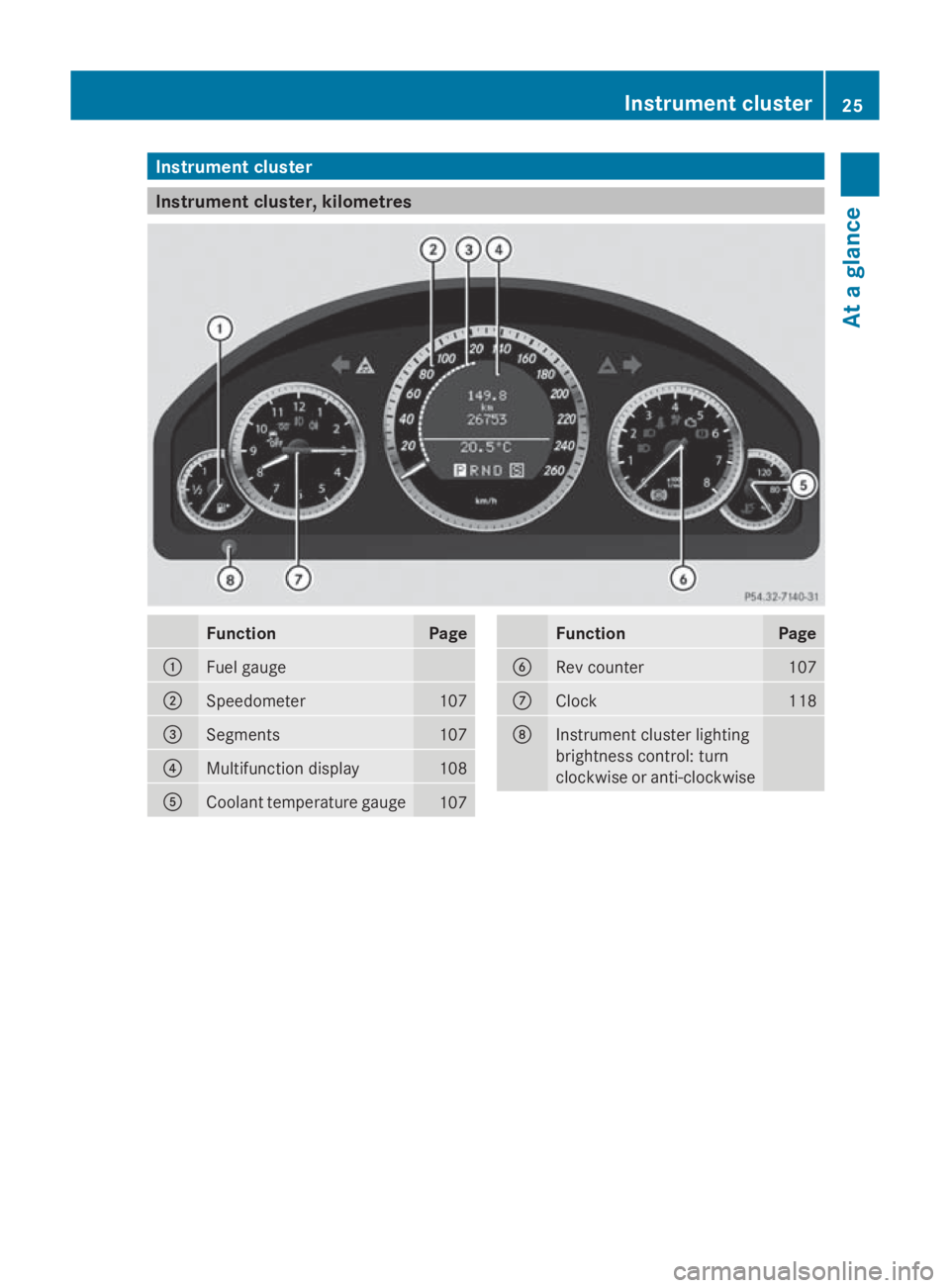
Instrumen
tcluster Instrumen
tcluster ,kilometres Function Page
0046
Fuel gauge
0047
Speedometer 107
008A
Segments 107
0088
Multifunction display 108
0086
Coolan
ttem perature gauge 107 Function Page
0087
Rev counter 107
006E
Clock 118
006F
Instrumen
tcluste rlighting
brightness control :turn
clockwise or anti-clockwise Instrument cluster
25Atag lance
207_AKB ;2;3,en-GB
mkalafa, Version:2.11.8.1
2009-07-23T10:23:49+02:00
-Seite 25 Z
Page 29 of 313
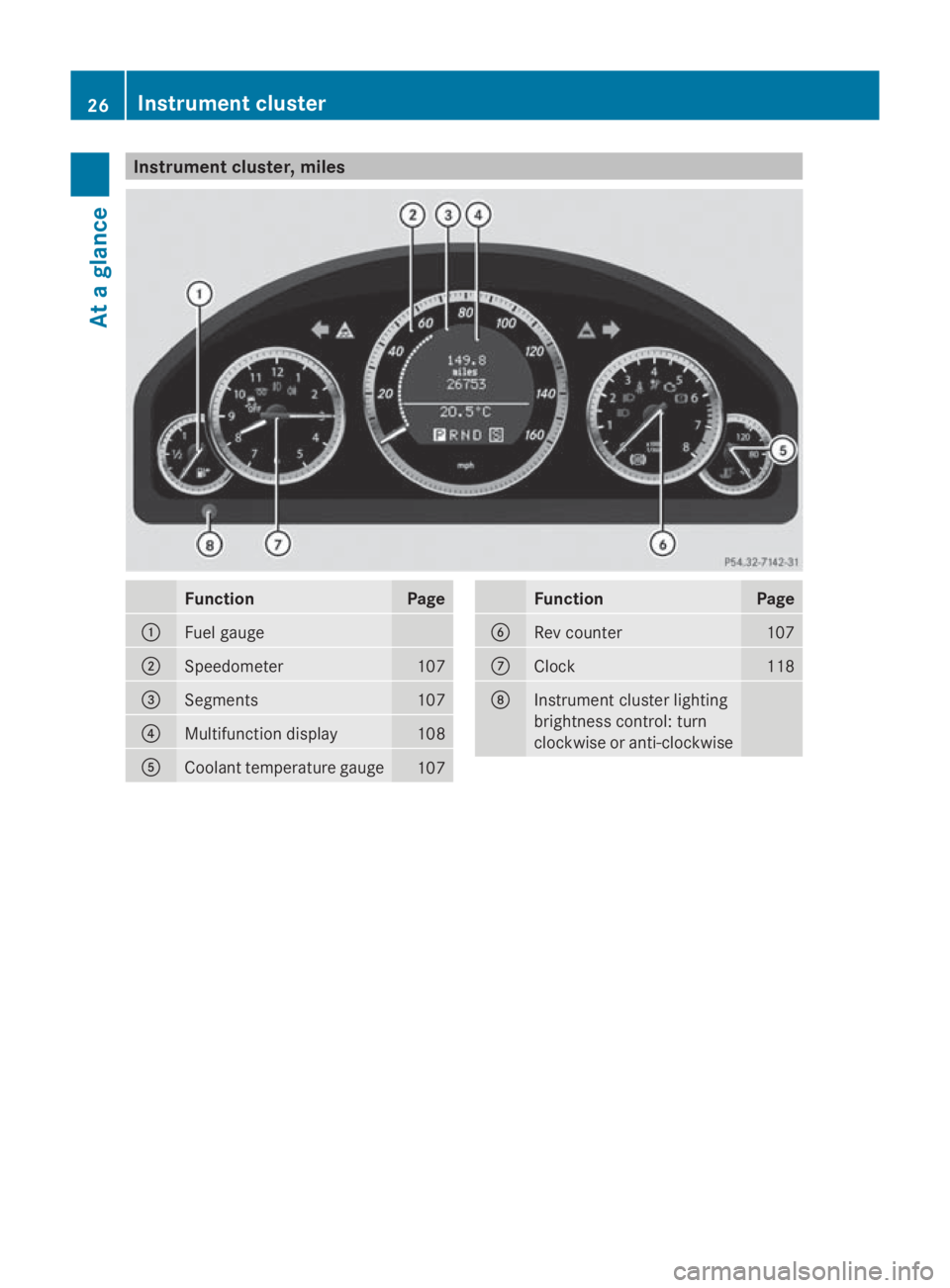
Instrumen
tcluster ,miles Function Page
0046
Fuel gauge
0047
Speedometer 107
008A
Segments 107
0088
Multifunction display 108
0086
Coolan
ttem perature gauge 107 Function Page
0087
Rev counter 107
006E
Clock 118
006F
Instrumen
tcluste rlighting
brightness control :turn
clockwise or anti-clockwise 26
Instrumen
tclusterAt ag lance
207_AKB ;2;3,en-GB
mkalafa, Version:2.11.8.1
2009-07-23T10:23:49+02:00
-Seite 26
Page 31 of 313
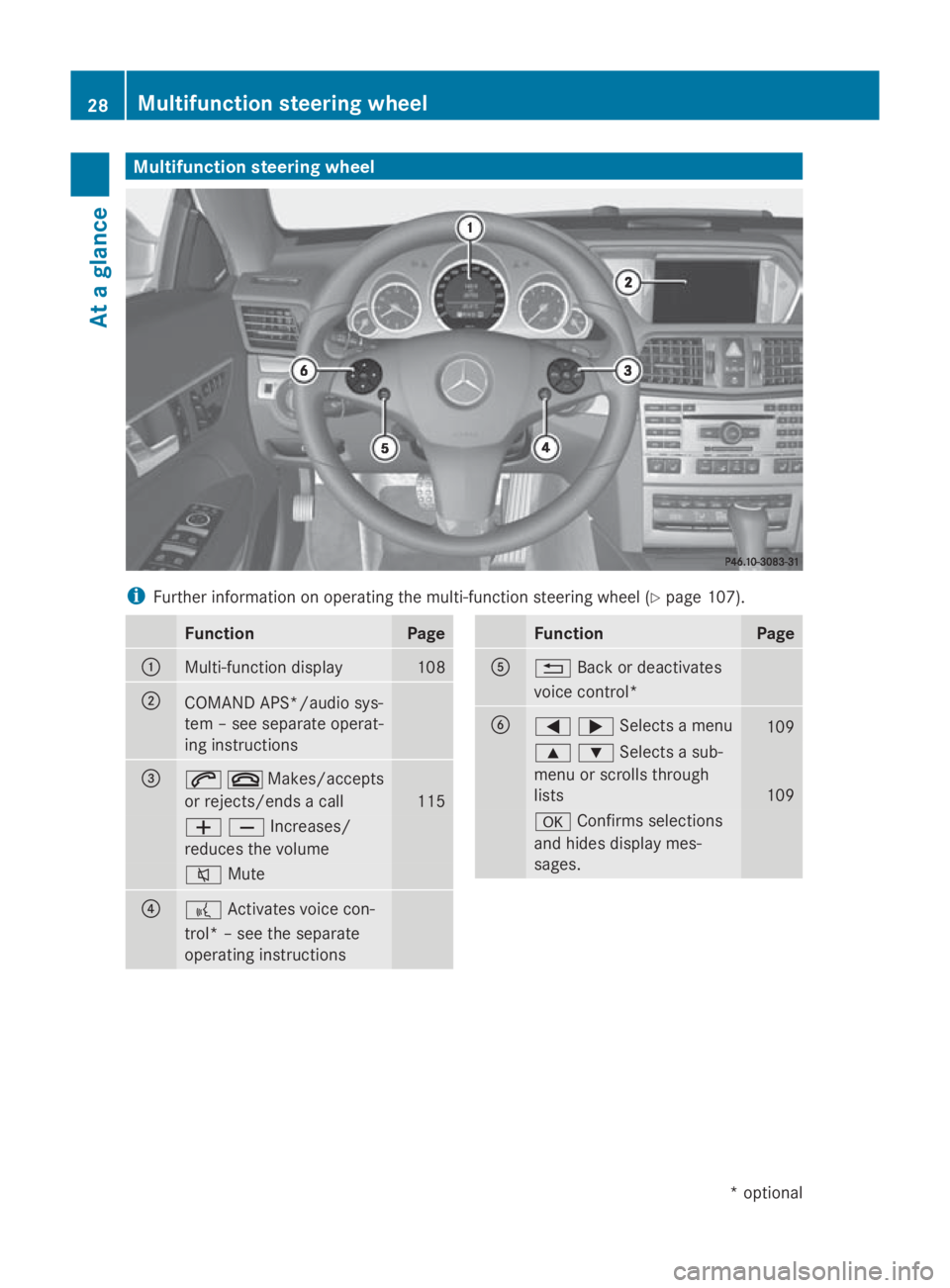
Multifunction steering wheel
i
Further information on operating the multi-function steering whee l(Ypage 107). Function Page
0046
Multi-function display 108
0047
COMAND APS*/audios
ys-
tem –see separate operat-
ing instructions 008A
006A007FMakes/accepts
or rejects/ends
acall 115
005A005BIncreases/
reduces the volume
006C
Mute 0088
0062
Activates voice con-
trol* –see the separate
operating instructions Function Page
0086
0041
Back or deactivates
voice control* 0087
0040003ESelects
amenu 109
003C003DSelects
asub-
menu or scroll sthrough
lists 109
0064
Confirm sselections
and hide sdisplay mes-
sages. 28
Multifunctio
nsteering wheelAt ag lance
*o ptional
207_AKB; 2; 3, en-GB
mkalafa
,V ersion: 2.11.8.1
2009-07-23T10:23:49+02:00
-Seite 28
Page 44 of 313
side windows so that only
asmall gap
remains.
R Cabriolet: if the vehicle skids, it closes the
front side windows so that only asmall gap
remains.
if the hazardous situation passes without
resulting in an accident, PRE-SAFE ®
slackens
the belt pretensioning. You can then reverse
all settings made by PRE-SAFE ®
.Onv ehicles
with amulticontour seat*, the air pressure in
the side bolsters is reduced.
If the seat belts are not released:
X Move the backrest or the seat back slightly
until the belt tension is reduced.
The locking mechanism releases. G
Risk of injury
When adjusting the seat, make sure that
nobody can become trapped.
! Make sure that there are no objects in the
footwell or behind the seats when adjusting
the seats. You could otherwise damage the
seats and the objects. Roll bar (Cabriolet)
The roll bars are located under the rear head
restraints. They are extended if systems
detect that the vehicle is in danger of over-
turning. G
Risk of injury
Make sure the roll bars and head restraints
can move freely in order to prevent injuries
when the roll bars extend.
When the roll bars are extended, the rear
head restraints also extend automatically.
Once the roll bars are extended, you can no
longer lower the rear head restraints or oper-
ate the soft top. In this case, visit the nearest
qualified specialist workshop. G
Risk of injury
If the roll bar is malfunctioning, the 0073
Malfunction Consult workshop message
appears in the multifunction display. The roll
bars will then not be extended in the event of
an accident. This could result in severe or
even fatal injuries to you and other occupants.
In this case, visit aqualified specialist work-
shop immediately and have the roll bar
checked. NECK-PRO head restraints
NECK-PRO head restraints are designed to
increase protection to the driver's and front-
passenger's head and neck.Tot his end, the
head restraints on the driver's and front-
passenger seats are moved forwards and
upwards in the event of arear-end collision of
ac ertain severity when viewed in the direc-
tion of travel. This provides better head sup-
port. G
Risk of injury
Head restraint covers prevent the NECK-PRO
head restraints from triggering correctly. Con-
sequently, the NECK-PRO head restraints
cannot provide the intended level of protec-
tion. Do not use head restraint covers.
If the NECK-PRO head restraints are triggered
in an accident, you must reset the head
restraints on the driver's and front-passenger
seats (Y page 257). Head restraints that have
been triggered are tilted forwards. Children in the vehicle
If ac hild is travelling in your vehicle, secure
the child using achild restraint system which
is appropriate to the size and age of the child
and is recommended for Mercedes-Benz
vehicles. You should fit the restraint system
to as uitabler ear seat. Ensure that the child
is secured throughout the trip. Occupant safety
41Safety
*optional
207_AKB;2;3,e
n-GB
mkalafa, Version: 2.11.8.1 2009-07-23T10:23:49+02:00-Seite 41 Z
Page 59 of 313
G
Risk of accident
If the 00C7 warning lamp in the instrument
cluster lights up whe nthe engine is running,
ESP ®
is deactivated or is unavailabl edueto a
malfunction. The ris kthat your vehicle may
star ttos kid then increase sincertain situa-
tions.
Alway sadapt your driving styl etothe prevail-
ing roa dand weathe rconditions.
X To activate: press button 0046.
The 00C7 warning lamp in the instrument
cluster goe sout. EBV (electroni
cbrake forc edistribu-
tion)
EBV monitors and control sthe brake pres-
sure on the rea rwheel stoi mprove driving
stability whe nbraking. G
Risk of accident
If EBV is malfunctioning ,the brake system is
stil lavailable with ful lbrake boosting effect.
However, the rea rwheel scan stil llock, e.g.
under ful lbraking. Thi scould cause yo uto
los econtrol of your vehicle and cause an acci-
dent. You shoul dtherefore adap tyou rd riving
styl etot he different handling characteristics. ADAPTIVE BRAKE
ADAPTIVE BRAKE enhances braking safety
and offers increased braking comfort. In addi-
tion to the braking function, ADAPTIVE BRAKE
also ha sthe HOLD function (Y page 135) and
hil lstar tassist( Ypage 100). For further
information, see Driving tips (Y page 191).PRE-SAFE
®
Brake (vehicle swithD IS-
TRONIC PLUS)*
PRE-SAFE ®
Brake can hel pyou to minimise
the ris kofafrontalcollision with avehicle ahea
dorr educe the effects of such acolli-
sion.
Thi sfunction will issue awarning at speeds of
around 30 km/h or more if:
R for aperiod of several seconds, the dis-
tance to the vehicle in front is too short for
the speed at which yo uare travelling. The
00BA distance warning lamp in the instru-
ment cluster lights up.
R yo ua re approaching the vehicle in front too
rapidly .Anintermittent warning tone
sounds and the 00BAdistance warning
lamp lights up in the instrument cluster.
Due to the nature of the system, particularly
complicated driving conditions may cause the
system to display an unnecessary warning. G
Risk of accident
Pa yp articula rattention to the traffi ccondi-
tions if the 00BAdistance warning lamp in the
instrument cluster lights up or an intermittent
warning tone sounds. If necessary, brake or
manoeuvre to avoid an obstacle.
If the driver and passengers have fastened
thei rseatb elts, PRE-SAFE ®
Brake can also
can also perform the following at speeds of
above approximately 30 km/h:
R brake the vehicle automaticall yfrom a
speed of up to approximately 200 km/h
R trigger preventative passenger protection
measures (PRE-SAFE ®
) G
Risk of accident
PRE-SAFE ®
Brake is only an ai dtoassist you
whe ndriving .You are responsibl efor main-
taining asafed istance from othe rvehicles,
the vehicle's speed and for braking in good
time .Alway spayattention to the traffi ccon-
ditions .Otherwise, yo umay recognise dan-
gers too late, cause an accident and injure
yoursel fand others.
With the hel pofthe radar senso rsystem,
PRE-SAFE ®
Brake can detect obstacles that
are in front of your vehicle for an extended 56
Drivin
gsafety systemsSafety
*optional
207_AKB
;2;3,en-GB
mkalafa ,V ersion: 2.11.8.1
2009-07-23T10:23:49+02:00
-Seite 56
Page 60 of 313
period of time. If you approach an obstacle
and PRE-SAFE ®
Brak edetects arisk of acol-
lision, the system will initially alert you both
visually and acoustically. If you do not brake
or steer ,the vehicle will at first automatically
brake slightly. In the event of an increased
risk of acollision, PRE-SAFE ®
is activated
(Y page 40). If the risk of collision persist sand
you do not brake, manoeuvr eoraccelerate
significantly yourself, an automatic full brake
application may be carried out. G
Risk of accident
Only clearly detected obstacles will trigger a
warning and initiat ebrakin gassistance by
PRE-SAFE ®
Brake.
In particular, the detection of obstacles can
be impaired if ther eis:
R dirt on the sensors or the sensors are cov-
ered
R snow or heavy rain
R interferenc ebyother radar sources
R the possibility of strong radar reflections,
for example in multi-storey car parks
PRE-SAFE ®
Brak edoes not react to persons,
animals, oncoming vehicles, crossing traffic
or when cornering.
PRE-SAFE ®
Brak emay not detec tnarrow
vehicles such as motorcycles and vehicles
drivin gonad ifferentline. G
Risk of accident
Depending on the curren tspeed, PRE-SAFE ®
Brak edecelerates your vehicle by up to
4m /s2
before performing possible emer-
genc ybraking. This is equivalent to approx-
imately 40 %ofthe maximum brakin gpower
of the vehicle. You must additionally apply the
brakes yourself in order to preven tacollision
or minimis eanimpact .Automatic emergency
brakin gisnot performed until immediately
prior to an acciden tinthe event that you are
unable to avoid one by, for instance, taking
evasive action. In order to maintain the appropriate distance
to the vehicle in fron
tand thus preven ta
crash, you must apply the brakes yourself.
At speeds up to approximately 70 km/h,
PRE-SAFE ®
Brak ecan also detec tstationary
obstacles, for example stopped or parked
vehicles. G
Risk of accident
If, in acritical drivin gsituation ,you do not
receiv eavisual and acoustic warning:
R PRE-SAFE ®
Brak edid not detec tthe risk of
ac ollision
R PRE-SAFE ®
Brak eiss witched off
R PRE-SAFE ®
Brak ehas failed
You must then brake to avoid acollision.
X To activate: activate PRE-SAFE ®
Brak ein
the on-board computer (Y page 116).
The 00C7 symbol appears in the lower
multi-function display, as long as the HOLD
function is not activated (Y page 135).
On vehicles with parkin gguidance* ,drive
range Pmust be engaged for the symbol to
be displayed.
The radar sensors are automatically deacti-
vated in the vicinity of radio telescope facili-
ties (Y page 304).
For PRE-SAFE ®
Brak etoa ssist you when driv-
ing, the radar senso rsystem must be
switched on and operational.
PRE-SAFE ®
Brak edoes not always detect
complex traffic situation sproperly. You can
terminate the brakin gaction of PRE-SAFE ®
Brak einan on-critical drivin gsituation at any
time if:
R an acoustic and visual warning occurs
R the vehicle brakes
To end this you can either depress the accel-
erator pedal further, activate kickdown or
release the brake pedal. Driving safet
ysystems
57Safety
*optional
207_AKB
;2;3,en-GB
mkalafa, Version:2.11.8.1
2009-07-23T10:23:49+02:0
0-Seite 57 Z
Page 75 of 313
G
Risk of accident
Only adjust the steering wheel whe nthe vehi-
cle is stationar yand do not pull away unti lthe
steering wheel adjustment mechanism is
locke dinposition. Otherwise, yo umight drive
withou tthe steering wheel adjustment mech-
anism being locke dinposition and be distrac-
ted from roa dand traffi cconditions by an
unexpecte dmovement of the steering wheel
and cause an accident.
However, the steerability of the vehicle is not
affected.
Whe nyou adjust the steering wheel ,make
sure that:
R the steering wheel can be reached with
your arm sslightl ybent
R yo uc an move your legs freely
R yo uc an see al lthe display sinthe instru-
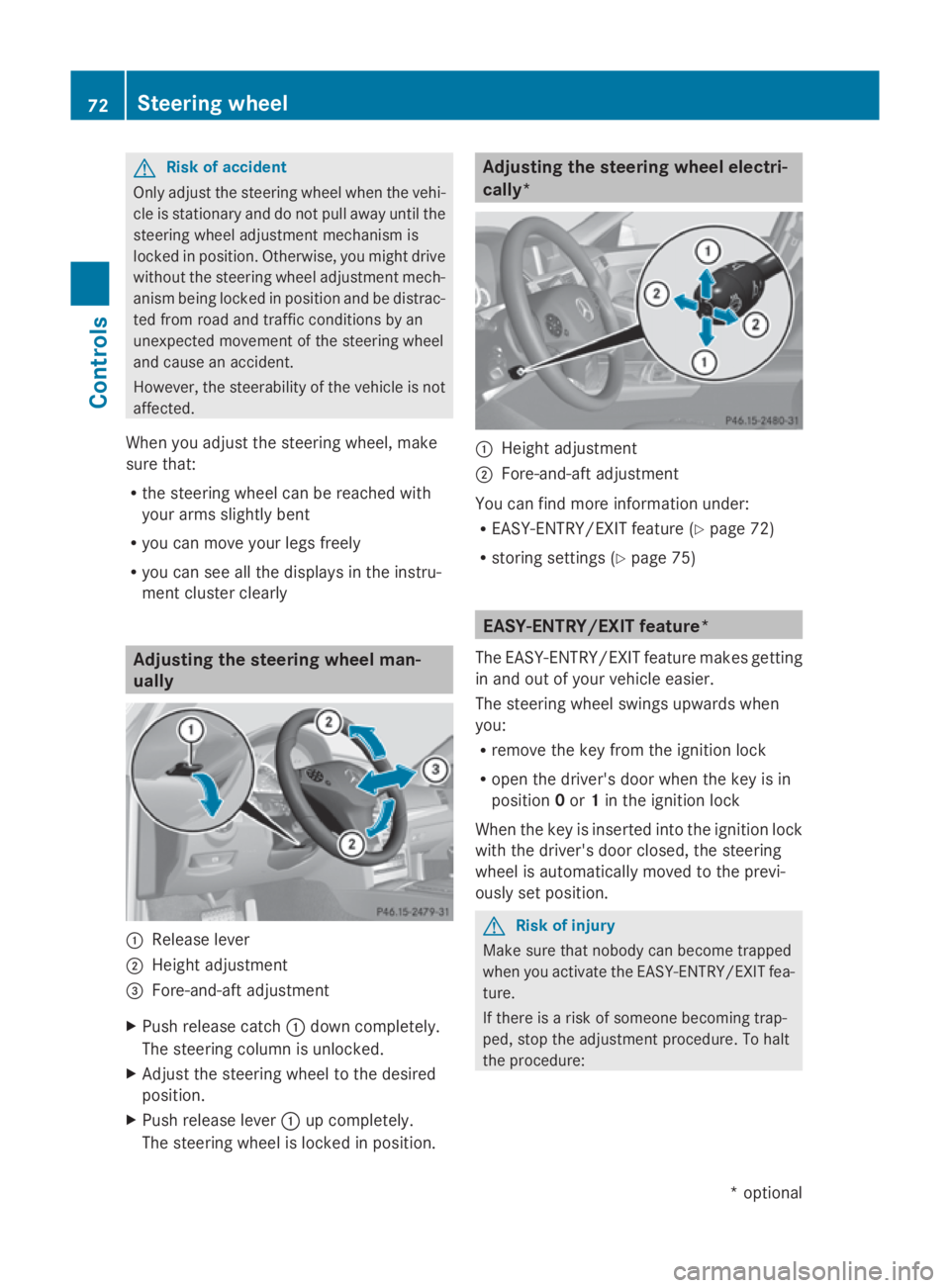
ment cluster clearly Adjusting the steering wheel man-
ually 0046
Releas elever
0047 Height adjustment
008A Fore-and-aft adjustment
X Push release catch 0046dow ncompletely.
The steering column is unlocked.
X Adjus tthe steering wheel to the desired
position.
X Push release lever 0046up completely.
The steering wheel is locke dinposition. Adjusting the steering wheel electri-
cally*
0046
Height adjustment
0047 Fore-and-aft adjustment
You can find more information under:
R EASY-ENTRY/EXIT feature (Y page 72)
R storing settings (Y page 75) EASY-ENTRY/EXI
Tfeature*
The EASY-ENTRY/EXIT feature make sgetting
in and ou tofyourv ehicle easier.
The steering wheel swings upwards when
you:
R remove the key from the ignition lock
R ope nthe driver' sdoorw hent he key is in
position 0or 1in the ignition lock
Whe nthe key is inserted into the ignition lock
with the driver' sdoorc losed, the steering
wheel is automaticall ymovedtot he previ-
ously set position. G
Risk of injury
Make sure that nobody can become trapped
whe nyou activate the EASY-ENTRY/EXIT fea-
ture.
If there is ariskofs omeone becoming trap-
ped ,stop the adjustment procedure. To halt
the procedure: 72
Steering wheelControls
*o
ptional
207_AKB
;2;3,en-GB
mkalafa ,V ersion: 2.11.8.1
2009-07-23T10:23:49+02:00
-Seite 72