display MERCEDES-BENZ E-CLASS COUPE 2009 Service Manual
[x] Cancel search | Manufacturer: MERCEDES-BENZ, Model Year: 2009, Model line: E-CLASS COUPE, Model: MERCEDES-BENZ E-CLASS COUPE 2009Pages: 313, PDF Size: 7.76 MB
Page 125 of 313
Switching the fold in mirrors when lock-
ing* function on/off
If you switch on the Fold mirrors in when
locking: function, the exterior mirrors fold
in when you lock the vehicle. When you
unlock the vehicle and then open the driver's
or front-passenger door, the exterior mirrors
fold out again.
If you have switched the function on and you
fold the exterior mirrors in using the button
on the door (Y page 74), they will not fold out
automatically. The exterior mirrors can then
only be folded out using the button on the
door.
X Press the 0040or003E button on the steer-
ing wheel to select the Settingsmenu.
X Press the 003Dor003C button to select the
Convenience submenu.
X Press the 0064button to confirm.
X Press the 003Dor003C button to select the
Fold in mirrors when locking: func-
tion.
You will see the selected setting: onor
off.
X Press the 0064button to save the setting.
Restoring the factory settings For safety reasons, not all functions are reset:
the
Limit speed (winter tyres): func-
tion in permanent SPEEDTRONIC can only be
set in the Vehiclesubmenu. If you want to
reset the Daytime driving lamps: in the
Light submenu, you must turn the key in the
ignition lock to position 1.
X Press the 0040or003E button on the steer-
ing wheel to select the Settingsmenu.
X Press the 003Dor003C button to select the
Factory setting submenu.
X Press the 0064button to confirm.
The Reset all settings? message
appears. X
Press the 003Dor003C button to select
Yes orNo.
X Press the 0064button to confirm the selec-
tion.
If you have selected Yes,the multifunction
display shows aconfirmation message. Driving systems
Overview of driving systems
The vehicle's driving systems are described
on the following pages:
R cruise control, Distronic Plus* and Speed-
tronic, which are used to control the speed
of the vehicle
R HOLD function, which makes pulling away
easier, particularly on steep uphill gradi-
ents
R dynamic handling package with sports
mode*, which is used to adjust the vehi-
cle's suspension system
R PARKTRONIC* and Parking Guidance*,
which assist you in finding aparking space,
as well as when manoeuvring and parking
R reversing camera*, which assists you when
parking and manoeuvring
R ATTENTION ASSIST, which helps you
detect tiredness or increasing lapses in
concentration
R Speed Limit Assist*, which shows you
speed limits that are detected in the multi-
function display
The ABS,B AS,BAS PLUS* ,adaptive brake
lights, ESP ®
,E BV and ADAPTIVE BRAKE driv-
ing safety systems and the PRE-SAFE ®
Brake* are described in the "Driving safety
systems" section (Y page 52). Cruise control
Cruise control maintains aconstant road
speed for you. It brakes automatically in order 122
Driving systemsControls
*o
ptional
207_AKB; 2; 3, en-GB
mkalafa,
Version: 2.11.8.1 2009-07-23T10:23:49+02:00-Seite 122
Page 126 of 313
to avoi
dexceeding the se tspeed. On long and
steep downhil lgradients ,especially if the
vehicl eisladen or towing atrailer, yo umust
shift to alower gear in good tim eorselect
shift range 1,2or 3on vehicles with auto-
matic transmission* .Bydoing so ,you will
make us eofthe braking effect of the engine,
which relieves the load on the brake system
and prevents the brakes fro moverheating
and wearing too quickly. G
Ris
kofa ccident
Do not change down for additional engine
braking on aslipper yroads urface. This could
cause the drive wheels to lose their gri pand
the vehicl ecould skid.
Use cruis econtrol onl yifroada nd traffi ccon-
ditions make it appropriate to maintain a
stead yspeed foraprolonge dperiod. Youc an
store any roa dspeed above 30 km/h. G
Ris
kofa ccident
Cruise control cannot take account of road
and traffi cconditions.
Alway spayattentio ntotrafficconditions
eve nw henc ruis econtrol is activated.
Cruise control is onl yanaiddesigne dtoassist
driving. Yo uareresponsibl efor the vehicle's
spee dand for braking in good time. G
Ris
kofa ccident
Do not us ecruis econtrol:
R in roa dand traffi cconditions which do not
allo wyouto maintain aconstant spee d(e.g.
heav ytraffi corw inding roads). Yo ucould
otherwis ecause an accident.
R on slippery roads .Braking or accelerating
could cause the drive wheels to lose trac-
tio na nd the vehicl ecould the nskid.
R when there is poor visibility, e.g .due to fog,
heav yrainors now
Cruis econtro llever Yo
uc an operate cruis econtrol and variable
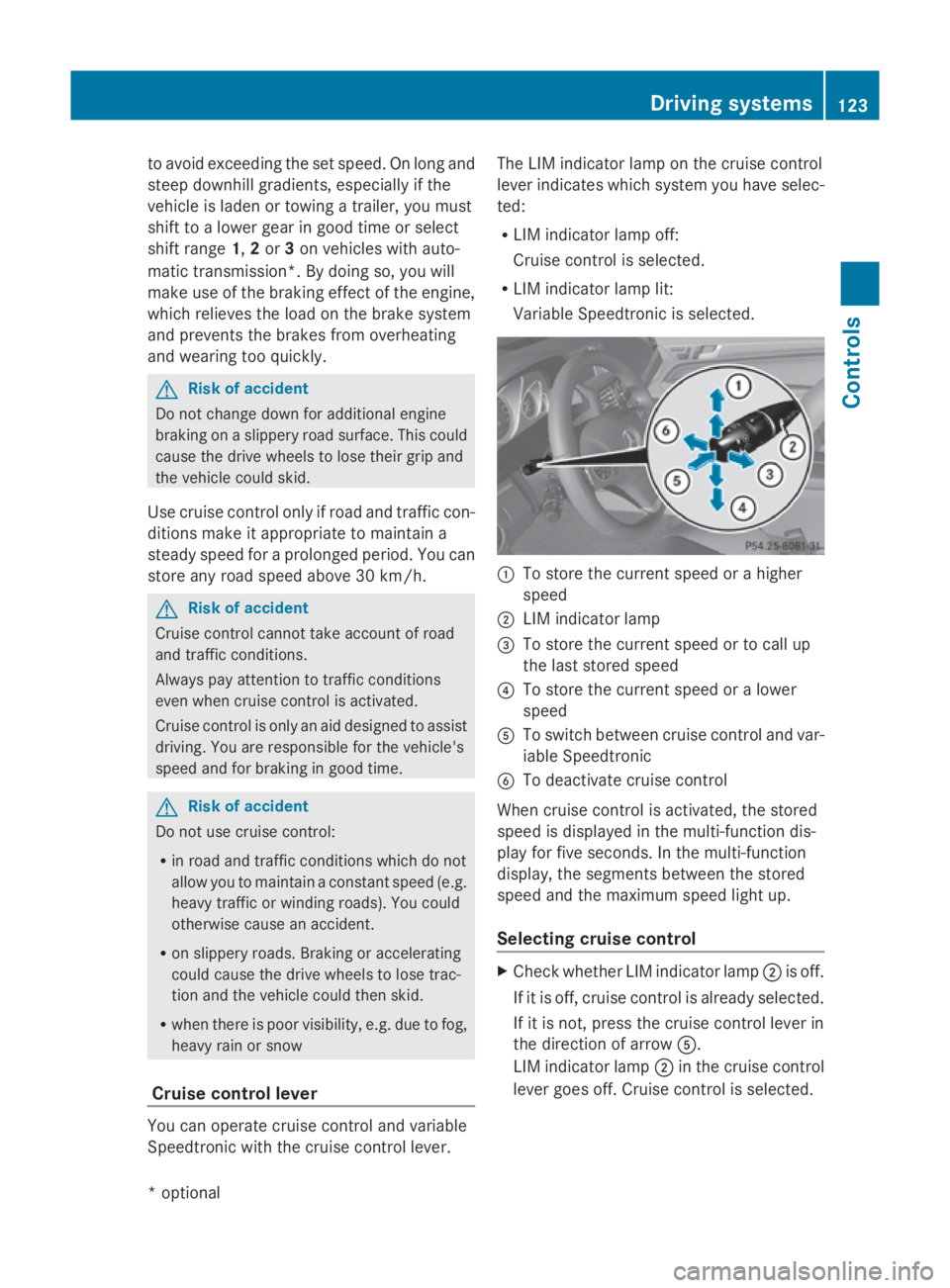
Speedtroni cwitht he cruis econtrol lever. Th
eL IM indicator lamp on the cruis econtrol
lever indicates which syste myouhave selec-
ted:
R LIM indicator lamp off:
Cruise control is selected.
R LIM indicator lamp lit:
Variable Speedtroni ciss elect ed. 0046
To store the current spee dorahigher
speed
0047 LIM indicator lamp
008A To store the current spee dortocallup
the last stored speed
0088 To store the current spee doralower
speed
0086 To switch between cruis econtrol and var-
iabl eSpeedtronic
0087 To deactivate cruis econtrol
When cruis econtrol is activated ,the stored
spee disd isplayed in the multi-functio ndis-
play for five seconds. In the multi-function
display, the segments between the stored
spee dand the maximum spee dlight up.
Selecting cruis econtrol X
Check whether LIM indicator lamp 0047is off.
If it is off ,cruis econtrol is already selected.
If it is not, press the cruis econtrol lever in
the directio nofarrow 0086.
LIM indicator lamp 0047in the cruis econtrol
lever goes off .Cruise control is selected. Driving systems
123Controls
*optio nal
207_AKB; 2; 3, en-GB
mkalafa
,V ersion: 2.11.8.1
2009-07-23T10:23:49+02:00
-Seite 123 Z
Page 130 of 313
Selecting Distronic Plus
X
Check whether LIM indicator lamp 008Ais off.
If it is off, Distronic Plus is already selected.
If it is not, press the cruise control lever in
the direction of arrow 0087.
LIM indicator lamp 008Ain the cruise control
lever goes off. Distronic Plus is selected.
Switching on Distronic, storing the cur-
rent speed and maintaining it G
Risk of accident
The vehicle can be braked when DISTRONIC
PLUS is activated. For this reason, deactivate
DISTRONIC PLUS if the vehicle is to be set in
motion by other means (e.g. in acar wash or
by towing).
You can activate Distronic Plus in the follow-
ing circumstances:
R after the engine has been running for about
two minutes
R if the parking brake is not applied
R if ESP ®
is activated
R if the automatic transmission* is in position
D
R if the bonnet is closed
R if the driver's door is closed and you switch
from Pto Dor your seat belt is fastened.
R if the front-passenger door is closed
Activating while driving
When driving at speeds below 30 km/h, you
can only activate Distronic Plus if the vehicle
in front has been detected and is shown in the
multi-function display.Ift he vehicle in front is
not shown in the multi-function display and is
no longer being detected, because it has
changed lanes, for example, Distronic Plus is
deactivated and atone sounds. X
Briefly pull the cruise control lever towards
you 0088or press it up 0046or down 0086to the
pressure point.
Distronic Plus is selected.
X Keep the cruise control lever pressed
up 0046 or down 0086until the desired speed
is set.
X Remove your foot from the accelerator
pedal.
Your vehicle adapts its speed to that of the
vehicle in front,b ut only up to the stored
speed.
i If you do not fully release the accelerator
pedal, the DISTRONIC PLUS suspended
message appears in the multi-function dis-
play.T he set distance to aslower-moving
vehicle in front will then not be maintained.
You will be driving at the speed you deter-
mine by the position of the accelerator
pedal.
Activating when driving towards asta-
tionary vehicle
If the vehicle in front of you is stationary, you
can only activate Distronic Plus once your
vehicle is stationary as well.
X Briefly pull the cruise control lever towards
you 0088.
Distronic Plus is selected.
i Distronic Plus can only be activated at
under 30 km/hi favehicle in front has been
detected. Therefore, the Distronic Plu sdis-
tance displayint he instrument cluster
should be activated.
X Keep the cruis econtrol leve rpressed
up 0046 or down 0086until the desired speed
is set.
i You can use the cruis econtrol leve rtoset
the stored spee dand the thumbwheel on
the cruis econtrol leve rtoset the specified
minimu mdistance (Y page129). Driving systems
127Controls
*optional
207_AKB; 2; 3, en-GB
mkalafa,
Version: 2.11.8.1 2009-07-23T10:23:49+02:00-Seite 127 Z
Page 131 of 313
Pulling away
X
If the vehicle in front pulls away: remove
your foot from the brake pedal.
X Briefly pull the cruise control lever towards
you 0088.
or
X Accelerate briefly.
Your vehicle pulls away and adapts its
speed to that of the vehicle in front.
Driving
If there is no vehicle in front,D istronic Plus
operates in the same way as cruise control.
If as lower-moving vehicle is detected in front,
Distronic Plus causes your vehicle to brake
and maintain apreset distance to the vehicle
in front.
If Distronic Plus detectsaf aster-moving vehi-
cle in front,iti ncreases the driving speed, but
only up to the stored speed. G
Risk of accident
If you depress the brake, DISTRONIC PLUS is
deactivated unless your vehicle is stationary.
DISTRONIC PLUS then no longer brakes your
vehicle. The driver is fully responsible for the
vehicle's distance from other vehicles, its
speed and for braking in good time.
Stopping G
Risk of accident
The DISTRONIC PLUS braking effect is can-
celled and the vehicle can start moving if:
R DISTRONIC PLUS is deactivated using the
cruise control lever.
R you accelerate.
R the system or the power supply is disrup-
ted, e.g. due to battery failure.
R the electrical system in the engine com-
partment or the fuses are tampered with.
R the battery is disconnected. G
Risk of accident
Never get out of the vehicle when DISTRONIC
PLUS is activated.
DISTRONIC PLUS must never be operated or
deactivated by apassenger or from outside
the vehicle.
DISTRONIC PLUS does not replace the park-
ing brake and must not be used for parking.
If you wish to leave the vehicle or park it,
deactivate DISTRONIC PLUS and secure the
vehicle against rolling away.
If Distronic Plus detectst hat the vehicle in
front is stopping, it brakes your vehicle until
it is stationary.
Once your vehicle is stationary, it remains
stationary and you do not need to depress the
brake.
i Depending on the specified minimum dis-
tance, your vehicle will come to astandstill
at as ufficient distance behind the vehicle
in front.T he specified minimum distance is
set using the thumbwheel on the cruise-
control lever.
When Distronic Plus is activated and the vehi-
cle is at astandstill, awarning message
appears in the multi-function display if:
R the driver's door is opened and you release
the seat belt.
R the engine is switched off.
R the bonnet is opened.
Select Park (P)
X Move the selector lever to Pto prevent the
vehicle from rolling away.
Distronic Plus is deactivated. The warning
message in the multi-function display dis-
appears.
Ah orn will also sound at regular intervals if
Distronic Plus is activated and you:
R switch off the engine, open the driver's
door and remove your seat belt.
R open the bonnet. 128
Driving systemsControls
207_AKB; 2; 3, en-GB
mkalafa,
Version: 2.11.8.1 2009-07-23T10:23:49+02:00-Seite 128
Page 132 of 313
The sounding of the horn alerts you to the fact
that the vehicle has been parked while Dis-
tronic Plus is still activated. The sound
becomes louder if you attempt to lock the
vehicle. The vehicle is not locked until Dis-
tronic Plus is deactivated.
i If the ignition has been switched off, the
engine cannot be started again until Dis-
tronic Plus has been deactivated.
If Distronic Plus is activated and afault occurs
in the system or there is adisruption in the
power supply while the vehicle is stationary,
the Brake immediately message is shown
in the multi-function display .Immediately
depress the brake firmly until the warning
message in the multi-function display goes
out or move the selector lever to P.Distronic
Plus is deactivated.
Setting aspeed X
Press the cruise control lever to the pres-
sure point, up 0046for ahigher speed or
down 0086for alower speed.
X Keep the cruise control lever pressed until
the desired speed is reached.
X Release the cruise control lever.
The new speed is stored. Distronic Plus is
activated and adjusts the vehicle's speed
to the new speed stored.
Making adjustments in 1km/h incre-
ments X
Briefly press the cruise control lever to the
pressure point, up 0046for ahigher speed or
down 0086for alower speed.
The last speed stored is increased or
reduced. Making adjustments in 10 km/h incre-
ments X
Briefly press the cruise control lever
beyond the pressure point, up 0046for a
higher speed or down 0086for alower speed.
The last speed stored is increased or
reduced.
Storing the current speed or calling up
the last stored speed G
Risk of accident
Only select astored speed if you knoww hat
that speed is and whether it is suitable for the
curren tsituation. Otherwise, sudden acceler-
ation or braking could endanger you or others.
X Briefly pull the cruise control lever towards
you 0088.
X Remove your foot from the accelerator
pedal.
Distronic Plus is activated. The first time it
is activated, the curren tspeed is stored.
Otherwise, it sets the vehicle cruise speed
to the previously stored value.
Setting the specified minimu mdis-
tance for Distronic Plus You can set the specified minimum distance
for Distronic Plus by varying the time span
between one and two seconds. With this func-
tion, you can set the minimum distanc
ethat
Distronic Plus keeps to the vehicle in front,
dependent on vehicle speed. You can see this
distanc einthe multi-function display
(Y page 130). Driving systems
129Controls
207_AKB; 2; 3, en-GB
mkalafa, Version: 2.11.8.1 2009-07-23T10:23:49+02:00-Seite 129 Z
Page 133 of 313
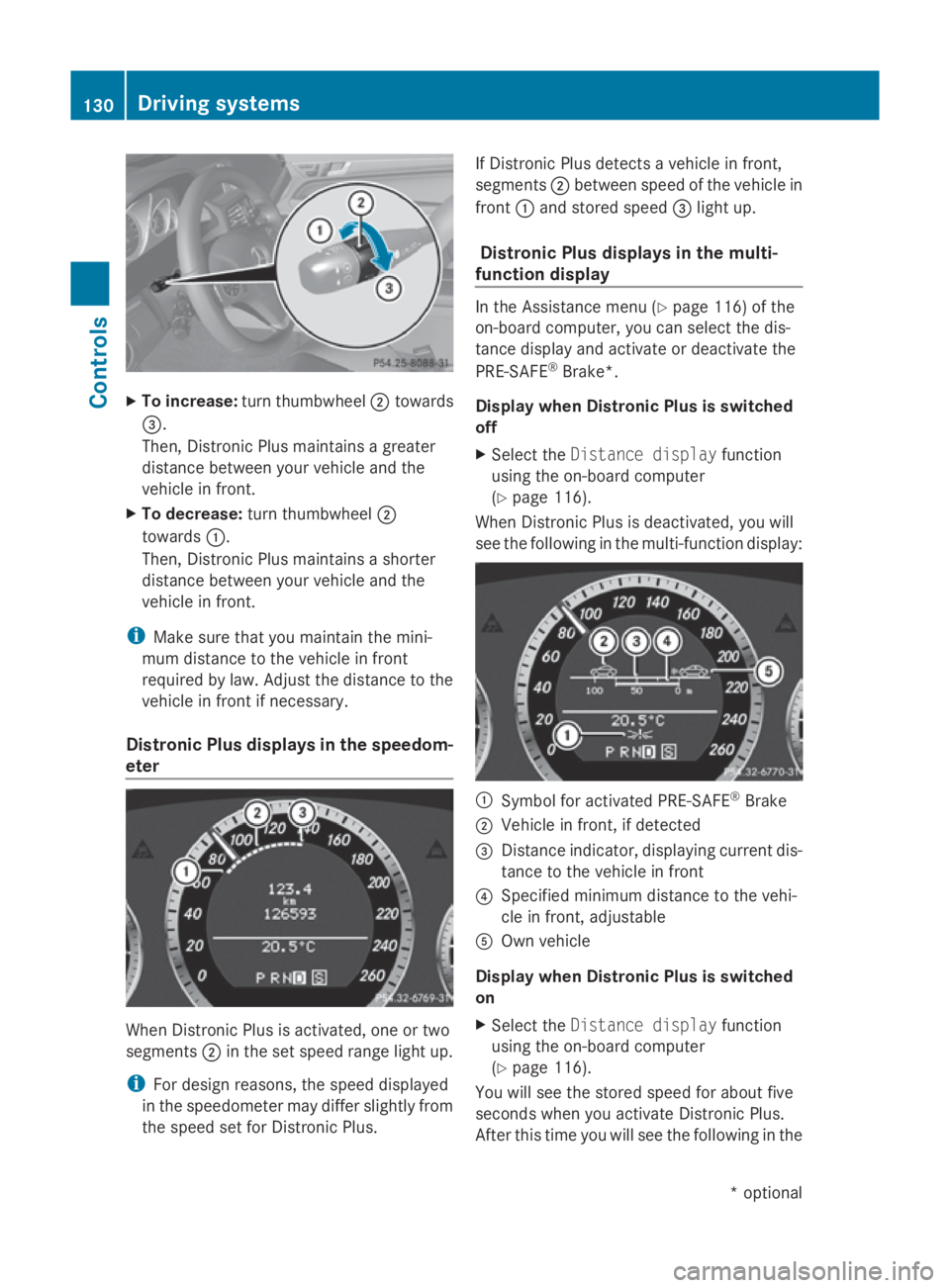
X
To increase: turnthumbwheel 0047towards
008A.
Then, Distroni cPlusm aintains agreater
distance between your vehicl eand the
vehicl einfront.
X To decrease: turnthumbwheel 0047
towards 0046.
Then, Distroni cPlusm aintains ashorter
distance between your vehicl eand the
vehicl einfront.
i Make sure tha tyou maintain the mini-
mu md istance to the vehicl einfront
required by law. Adjust the distance to the
vehicl einfront if necessary.
Distroni cPlusd isplay sinthe speedom-
eter Whe
nDistroni cPlusisa ctivated ,one or two
segments 0047in the set speed range light up.
i For design reasons ,the speed displayed
in the speedometer ma ydiffe rs ligh tlyf rom
the speed set for Distroni cPlus. If Distroni
cPlusd etects avehicl einf ront,
segments 0047between speed of the vehicl ein
front 0046and stored speed 008Alight up.
Distroni cPlusd isplay sinthe multi-
function display In the Assistance menu (Y
page 116) of the
on-board computer, yo ucan select the dis-
tance display and activate or deactivate the
PRE-SAFE ®
Brake*.
Display when Distroni cPlusiss witched
off
X Select the Distance display function
using the on-board computer
(Y page 116).
Whe nDistroni cPlusisd eactivated ,you will
see the following in the multi-functio ndisplay: 0046
Symbo lfor activated PRE-SAFE ®
Brake
0047 Vehicl einfront, if detected
008A Distance indicator, displaying current dis-
tance to the vehicl einfront
0088 Specified minimu mdistance to the vehi-
cle in front, adjustable
0086 Ownvehicle
Display when Distroni cPlusiss witched
on
X Select the Distance display function
using the on-board computer
(Y page 116).
Yo uw ills ee the stored speed for abou tfive
second swheny ou activate Distroni cPlus.
After thi stime yo uwills ee the following in the 130
Driving systemsControls
*o
ptional
207_AKB; 2; 3, en-GB
mkalafa,
Version: 2.11.8.1 2009-07-23T10:23:49+02:00-Seite 130
Page 134 of 313
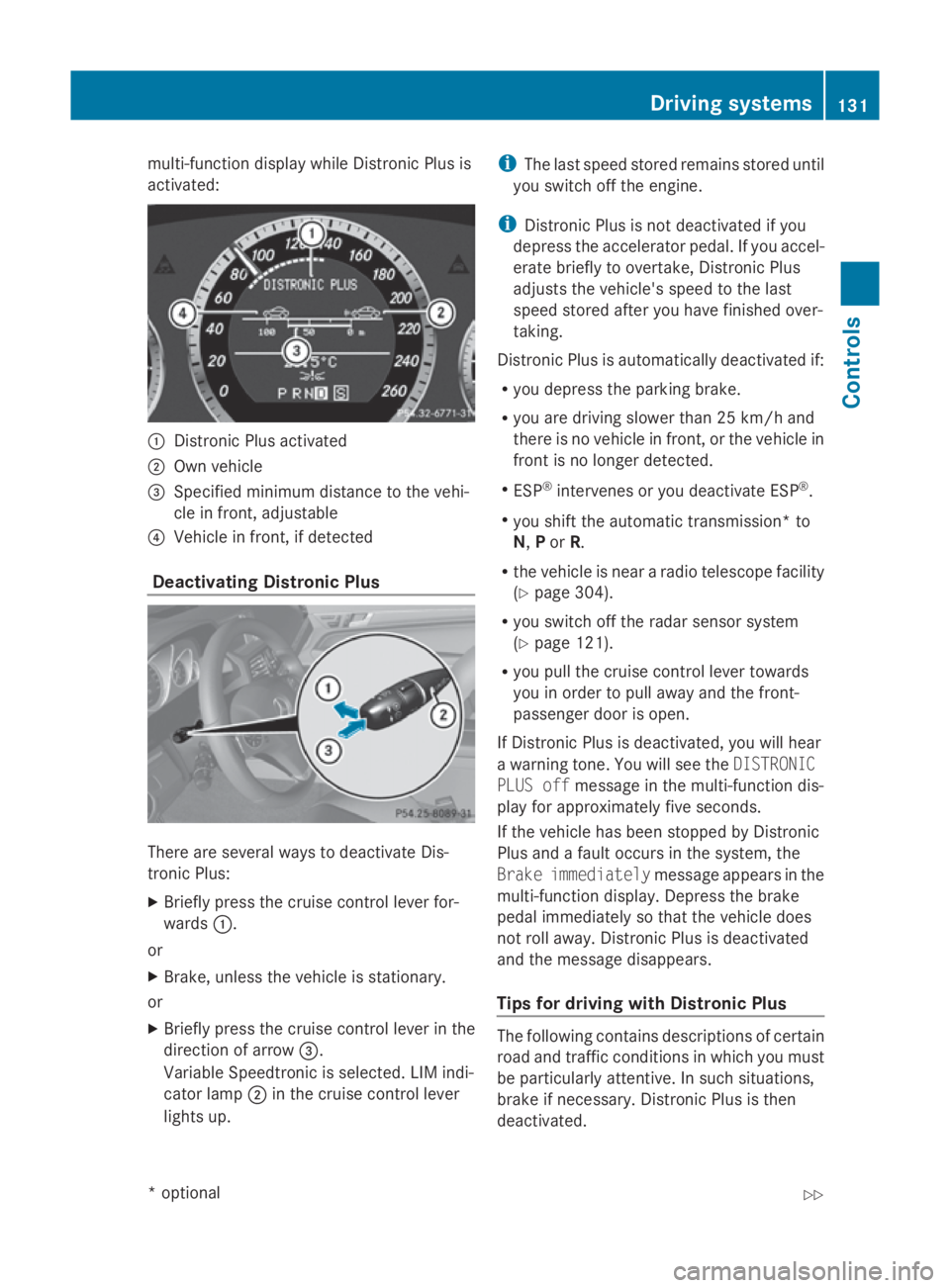
multi-function display while Distronic Plusis
activated: 0046
Distronic Plusa ctivated
0047 Own vehicle
008A Specifie dminimu mdistance to the vehi-
cle in front, adjustable
0088 Vehicl einfront, if detected
Deactivatin gDistronic Plus There are severa
lwaystod eactivate Dis-
tronic Plus:
X Briefly press the cruise control lever for-
wards 0046.
or
X Brake, unles sthe vehicl eisstationary.
or
X Briefly press the cruise control lever in the
directio nofarrow008A.
VariableS peedtronic is selected. LIM indi-
cator lamp 0047in the cruise control lever
lights up. i
The lasts peedstored remains stored until
you switch off the engine.
i Distronic Plusisn ot deactivated if you
depress the accelerator pedal. If you accel-
erate briefl ytoovertake, Distronic Plus
adjusts the vehicle's spee dtothe last
spee dstored after you have finishe dover-
taking.
Distronic Plusisa utomatically deactivated if:
R you depress the parking brake.
R you are driving slower than 25 km/h and
there is no vehicl einfront, or the vehicl ein
front is no longer detected.
R ESP ®
intervenes or you deactivate ESP ®
.
R you shift the automatic transmission* to
N, Por R.
R the vehicl eisneararadiot elescop efacility
(Y page3 04).
R you switch off the rada rsensor system
(Y page1 21).
R you pullt he cruise control lever towards
you in order to pulla waya nd the front-
passenger door is open.
If Distronic Plusisd eactivated, you willh ear
aw arning tone. You wills ee theDISTRONIC
PLUS off message in the multi-function dis-
playf or approximatel yfive seconds.
If the vehicl ehas been stopped by Distronic
Plusa ndafault occurs in the system, the
Brake immediately message appears in the
multi-function display.D epress the brake
peda limmediatel ysothat the vehicl edoes
not roll away. Distronic Plusisd eactivated
and the message disappears.
Tips for driving with Distronic Plus The following contains descriptions of certain
road and traffic conditions in which you must
be particularl
yattentive. In such situations,
brake if necessary .Distronic Plusist hen
deactivated. Driving systems
131Controls
*optional
207_AKB; 2; 3, en-GB
mkalafa,
Version: 2.11.8.1 2009-07-23T10:23:49+02:00-Seite 131 Z
Page 137 of 313
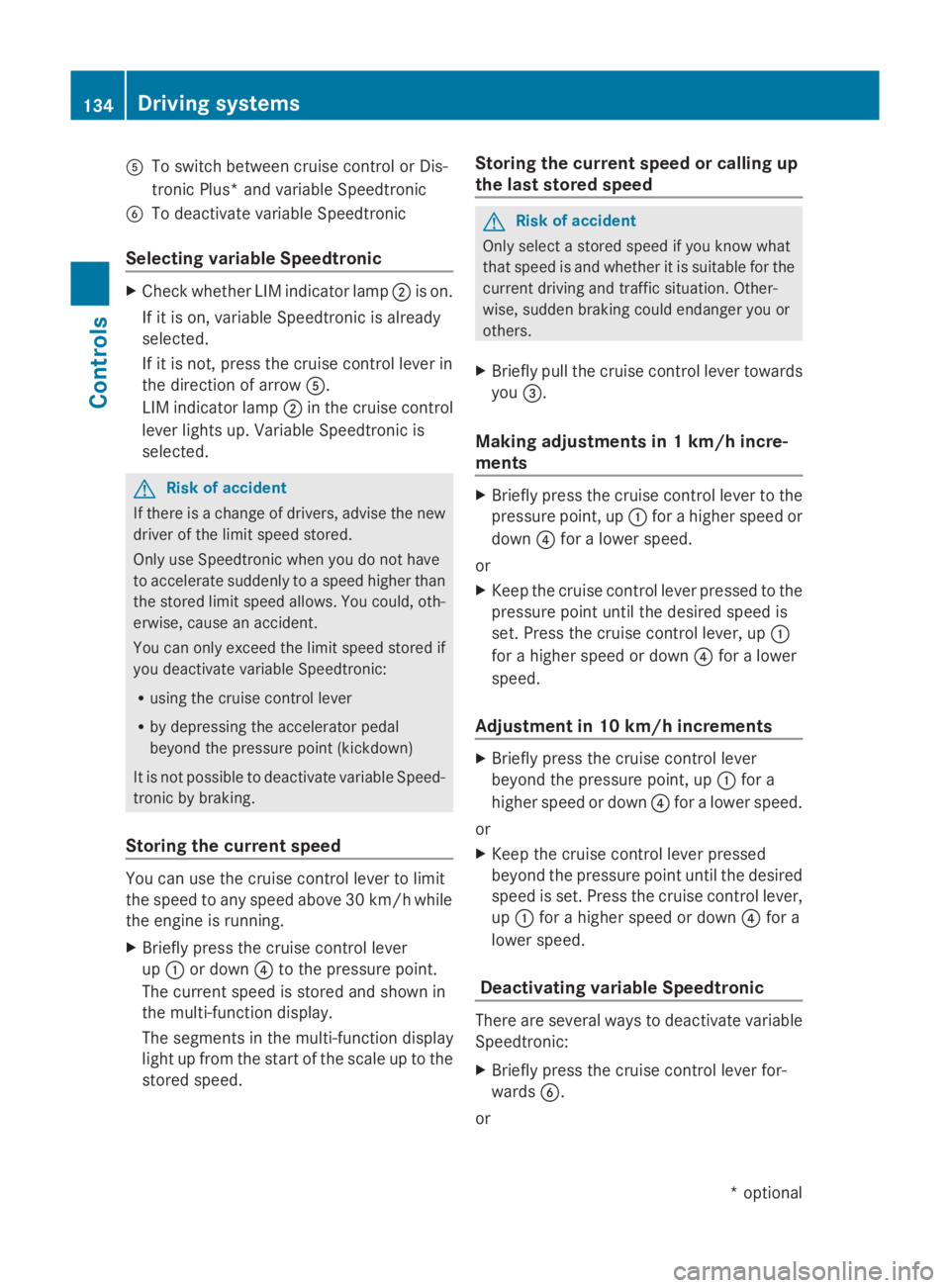
0086
To switch between cruise control or Dis-
tronic Plus* and variable Speedtronic
0087 To deactivate variable Speedtronic
Selecting variable Speedtronic X
Check whether LIM indicator lamp 0047is on.
If it is on, variable Speedtronic is already
selected.
If it is not,p ress the cruise control lever in
the direction of arrow 0086.
LIM indicator lamp 0047in the cruise control
lever lights up. Variable Speedtronic is
selected. G
Risk of accident
If there is achange of drivers, advise the new
driver of the limit speed stored.
Only use Speedtronic when you do not have
to accelerate suddenly to aspeed higher than
the stored limit speed allows. You could, oth-
erwise, cause an accident.
You can only exceed the limit speed stored if
you deactivate variable Speedtronic:
R using the cruise control lever
R by depressing the accelerator pedal
beyond the pressure point (kickdown)
It is not possible to deactivate variable Speed-
tronic by braking.
Storing the current speed You can use the cruise control lever to limit
the speed to any speed above 30 km/hw
hile
the engine is running.
X Briefly press the cruise control lever
up 0046 or down 0088to the pressure point.
The current speed is stored and shown in
the multi-function display.
The segments in the multi-function display
light up from the start of the scale up to the
stored speed. Storing the current speed or calling up
the last stored speed G
Risk of accident
Only select astored speed if you know what
that speed is and whether it is suitable for the
current driving and traffic situation. Other-
wise, sudden braking could endanger you or
others.
X Briefly pull the cruise control lever towards
you 008A.
Making adjustments in 1km/h incre-
ments X
Briefly press the cruise control lever to the
pressure point, up 0046for ahigher speed or
down 0088for alower speed.
or
X Keep the cruise control lever pressed to the
pressure point until the desired speed is
set. Press the cruise control lever, up 0046
for ahigher speed or down 0088for alower
speed.
Adjustment in 10 km/h increments X
Briefly press the cruise control lever
beyond the pressure point, up 0046for a
higher speed or down 0088for alower speed.
or
X Keep the cruise control lever pressed
beyond the pressure point until the desired
speed is set. Press the cruise control lever,
up 0046 for ahigher speed or down 0088for a
lower speed.
Deactivating variable Speedtronic There are several waystod
eactivate variable
Speedtronic:
X Briefly press the cruise control lever for-
wards 0087.
or 134
Driving systemsControls
*o
ptional
207_AKB; 2; 3, en-GB
mkalafa,
Version: 2.11.8.1 2009-07-23T10:23:49+02:00-Seite 134
Page 138 of 313
X
Briefly press the cruise control lever in the
direction of arrow 0086.
LIM indicator lamp 0047in the cruise control
lever goe sout.V ariabl eSpeedtroni cis
deactivated.
Cruise control or Distronic Plus* is selec-
ted.
Variabl eSpeedtroni cisautomaticall ydeacti-
vated:
R whe nyou depress the accelerato rpedal
beyond the pressure point (kickdown) but
only if your current speed doe snot differ by
more than 20 km/h from the store dspeed.
You will hea rawarning tone if this is the
case.
R on vehicle swithm anual transmission, if
yo us hift to ahigher gea rand as aresult the
engine speed is too low. G
Risk of accident
It is not possible to deactivate variabl eSpeed-
tronic by braking.
i The last speed store disclearedwheny ou
switch off the engine.
Permanen tSpeedtronic i
Permanent Speedtroni cisonly available
in certain countries.
You can us ethe on-board compute rtolimit
the speed permanently to avalue between
160 km/h (e.g .for driving with winter tyres)
and the maximum speed.
Just before the store dspeed is reached ,it
appears in the multi-function display.
Permanent Speedtroni cremains active, even
if variabl eSpeedtroni cisdeactivated.
You cannot excee dthe store dlim it speed,
eve nify oudepress the accelerato rpedal
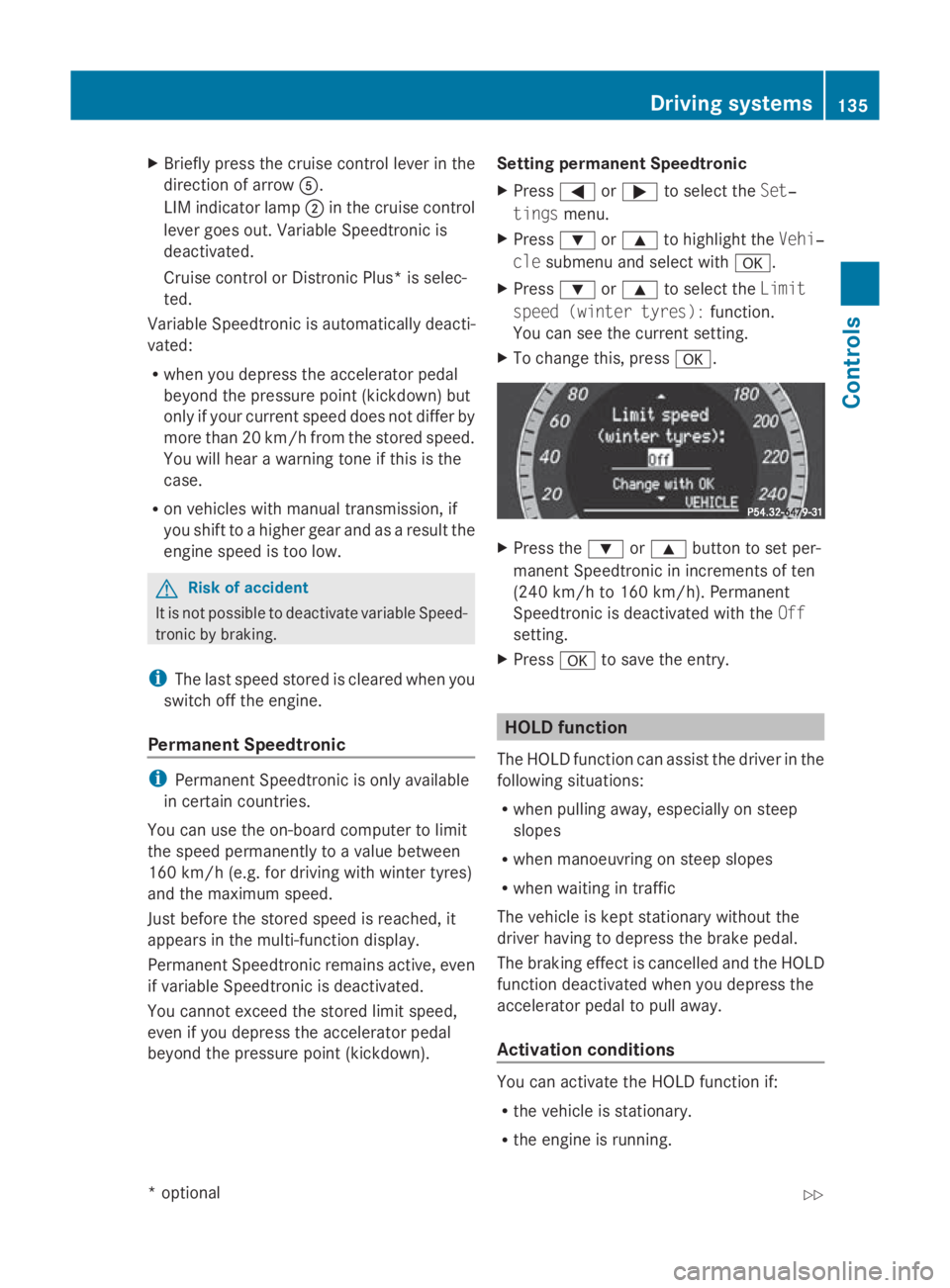
beyond the pressure point (kickdown). Setting permanent Speedtronic
X Press 0040or003E to select the Set‐
tings menu.
X Press 003Dor003C to highlight the Vehi‐
cle submenu and select with 0064.
X Press 003Dor003C to select the Limit
spee d(winter tyres): function.
You can see the current setting.
X To change this ,press 0064. X
Press the 003Dor003C button to set per-
manent Speedtroni cinincrements of ten
(240 km/h to 160 km/h). Permanent
Speedtroni cisdeactivated with the Off
setting.
X Press 0064to save the entry. HOL
Dfunction
The HOLD function can assis tthe driver in the
following situations:
R whe npulling away ,especially on steep
slopes
R whe nmanoeuvring on stee pslopes
R whe nwaiting in traffic
The vehicle is kept stationar ywithou tthe
driver having to depress the brake pedal.
The braking effect is cancelled and the HOLD
function deactivated whe nyou depress the
accelerato rpedal to pull away.
Activation conditions You can activate the HOLD function if:
R
the vehicle is stationary.
R the engine is running. Drivin
gsystems
135Controls
*optional
207_AKB; 2; 3, en-GB
mkalafa
,V ersion: 2.11.8.1
2009-07-23T10:23:49+02:00
-Seite 135 Z
Page 139 of 313
R
the driver's door is close doryourseatb elt
is fastened.
R the parking brake is not applied.
R the bonnet is closed.
R on vehicles with automatic transmission*,
D, Ror Nis selected.
R Distroni cPlus* is deactivated
Activatin gthe HOL Dfunction X
Make sure tha tthe activatio nconditions
ar em et.
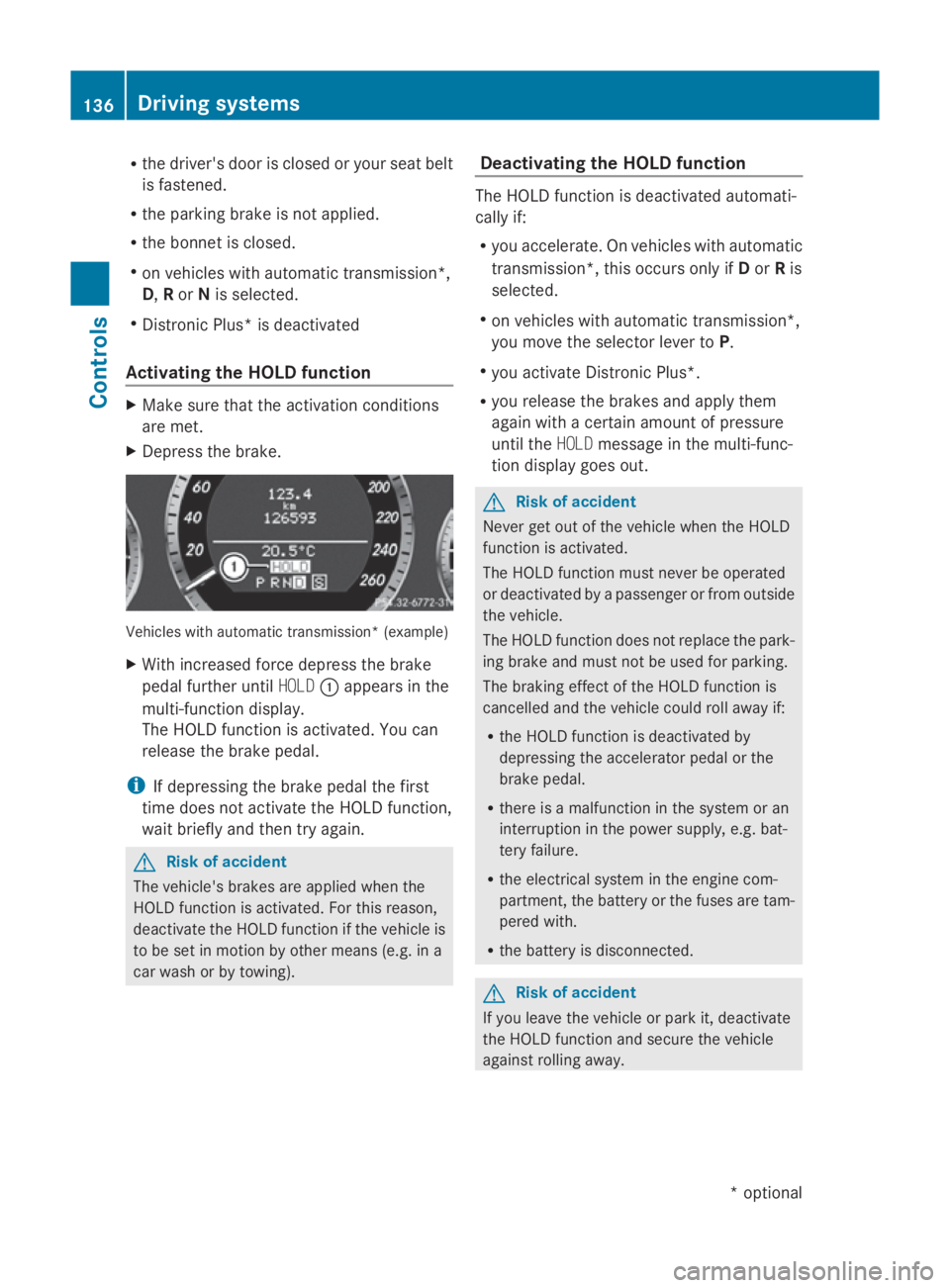
X Depres sthe brake. Vehicle
switha utomatic transmission* (example)
X With increase dforce depress the brake
peda lfur the runtil HOLD 0046appear sinthe
multi-functio ndisplay.
Th eH OLDf unctio nisa ctivated .You can
release the brake pedal.
i If depressing the brake peda lthe first
tim edoesn ot activate the HOL Dfunction,
wait briefl yand the ntry again. G
Ris
kofa ccident
Th ev ehicle' sbrakes ar eapplied when the
HOL Dfunctio nisa ctivated. For thi sreason,
deactivate the HOL Dfunctio nift he vehicl eis
to be se tinmotion by other means (e.g. in a
car wash or by towing). Deactivatin
gthe HOL Dfunction Th
eH OLDf unctio nisd eactivated automati-
cally if:
R yo ua ccelerate. On vehicles with automatic
transmission* ,thiso ccurs onl yifDorRis
selected.
R on vehicles with automatic transmission*,
yo um ovet he selector lever to P.
R yo ua ctivate Distroni cPlus*.
R yo ur elease the brakes and appl ythem
agai nwithac ertainamount of pressure
unti lthe HOLD message in the multi-func-
tio nd isplay goes out. G
Ris
kofa ccident
Never ge toutof the vehicl ewhent he HOLD
functio nisa ctivated.
Th eH OLDf unctio nm ustn eve rbeo perated
or deactivated by apassenge rorfromo utside
the vehicle.
Th eH OLDfunctio ndoesn ot replace the park-
ing brake and must not be used for parking.
Th eb raking effect of the HOL Dfunctio nis
cancelle dand the vehicl ecould rol lawa yif:
R the HOL Dfunctio nisd eactivate dby
depressing the accelerator peda lorthe
brake pedal.
R there is amalfunctio nint he syste moran
interruption in the powe rsupply, e.g.bat-
tery failure.
R the electrica lsystemint he engine com-
partment, the battery or the fuse saretam-
pered with.
R the battery is disconnected. G
Ris
kofa ccident
If yo uleave the vehicl eorparki t, deactivate
the HOL Dfunctio nand secure the vehicle
against rolling away. 136
Driving systemsCont
rols
*optio nal
207_AKB; 2; 3, en-GB
mkalafa
,V ersion: 2.11.8.1
2009-07-23T10:23:49+02:00
-Seite 136