ESP MERCEDES-BENZ E-CLASS COUPE 2017 Service Manual
[x] Cancel search | Manufacturer: MERCEDES-BENZ, Model Year: 2017, Model line: E-CLASS COUPE, Model: MERCEDES-BENZ E-CLASS COUPE 2017Pages: 541, PDF Size: 10.71 MB
Page 187 of 541
re
sponsible forth e dis tance totheve hicle in
front, forve hicle speed, for braking in good time
and forst ay ing in lane.
If all activation conditions are met, you can acti‐
va te Dis tance Pilot DISTRONIC du ring a jou rney
or while stationar y.When Dis tance Pilot
DISTRONIC is acti vated, a speed is stored which
th e driver can increase or reduce at any time.
The speed can be adjus ted between 20 km/h
and 200 km/h.
Ve hicles with the Driving Assistance Pack‐
age: The speed can be adju sted between
20 km/h and 210 km/h.
Ve hicles with Driving Assistance Package,
Pa rking Pilot and COMAND Online: Upto30
seconds af terst opping, theve hicle automatically
fo llo ws theve hicle ahead without the inter ven‐
tion of the driver. This is only possible if theve hi‐
cle is tr avelling on a mo torw ay or a high-speed
major road. If an obs tacle is de tected in front of
th eve hicle during the driving-off procedure, a
ta ke ove rwa rning is given. Acceleration is
re duced, the driver is given a visual and acoustic
wa rning and must stop theve hicle before reach‐
ing the obs tacle or take evasive action. Ve
hicles with the Driving Assistance Pack‐
age: In conjunction with navigation sy stems, Dis‐
ta nce Pilot DISTRONIC pr events prohibi tedove r‐
ta king on theright at speeds over 80 km/h in
ri ght-hand traf fic and overtaking on the left in
left-hand tra ffic on mo torw ays and high-speed
major roads.
Dis tance Pilot DISTRONIC uses information from
th e navigation sy stem torespond tocer tain traf‐
fi c situations:
R Roundabouts
R T junctions
R Motorw ay ex its
R Tollboo th
Even if theve hicle in front lea vesth e de tection
ra nge in these situations, Dis tance Pilot
DISTRONIC temp orarily maintains the cur rent
driving speed and does not accele rate.
If yo u activate the turn signal indicator tochange
lanes, theve hicle will accelerate more briskly to
th e set speed under thefo llowing conditions:
R Distance Pilot DISTRONIC is acti vated.
R Ifth e driving speed is higher than 70 km/h. R
Ifth e driven speed drops below thestored
speed.
R Ifth e tra ffic situation in theove rtaking lane
permits a safe lane change.
Ve hicles with Driving Assistance Package
and Traf fic Sign Assis t:Distance Pilot
DI STRO NIC also has the Speed Limit Pilot func‐
tion. This function can be confi gured inthe mul‐
timedia sy stem. If a change in the speed limit is
de tected and Dis tance Pil otDISTRONIC is acti va‐
te d, Dis tance Pilot DISTRONIC assumes this new
speed.
The driven speed is adap ted when theve hicle is
le ve l with the tra ffic signs. In the case of signs
indicating entry into an urban area, the speed is
adap ted beforehand. The speed limit display in
th e Instrument Display is alw ays update d when
th eve hicle is le vel with the tra ffic sign.
If th e Dis tance Pilot DISTRONIC has been put
into passi vemode bypressing the accelera tor
pedal, only speed limits which are higher than
th e set speed are adop ted. 184
Driving and pa rking
Page 191 of 541
#
Take into account the tra ffic situation
before calling up thestored speed. #
Ifth estored speed is not known, store
th e desired speed again. &
WARNING Risk of accident due tounex‐
pec ted acceleration byDis tance Pilot
DISTRONIC
If Dis tance Pilot DISTRONIC no longer
de tects a vehicle in front, it may unexpect‐
edly accelerate tothe speed stored.
R This speed may be too high for a filter
lane or a slip road.
R If driving in theright lane, this speed may
be so high that you pass vehicles driving
on the left (in count ries where traf fic
drives on theright).
R If driving in the left lane, this speed may
be so high that you pass vehicles driving
on theright (in countri es where traffic
drives on the left). Alw
ays carefully obser vethe traf fic condi‐
tions and be ready tobrake at all times. &
WARNING Risk of accident due toDis‐
ta nce Pilot DISTRONIC pulling away auto‐
matically
If Dis tance Pilot DISTRONIC pe rforms an
automatic driving-off procedure, theve hicle
may accelerate unexpectedly.
Where necessar y,brake theve hicle yourself
and take evasive action. &
WARNING Risk of accident due toSpeed
Limit Pilot adapting theve hicle's speed
The speed adop tedby the Speed Limit Pilot
may be too high or incor rect in some individ‐
ual cases, su chas:
R inthewe t or in fog
R when towing a trailer
Ensure that the driven speed complies with
traf fic re gulations. Re
quirements:
R The vehicle has been star ted.
R The elect ric pa rking brake is released.
R Parking Pilot is not being used topark the
ve hicle or toexit from a parking space.
R ESP ®
is activated, but is not inter vening.
R The transmission is in position h.
R The driver's door, front passenger door and
there ar doors are closed.
R The engine bonnet is closed. 18 8
Driving and pa rking
Page 194 of 541
case. During
the transition from the active to
passive status, theè symbol is shown as
enlar ged and flashes yello w. Once the sy stem is
passive theè symbol is shown as gr eyinthe
multifunction displa y.
The sy stem may be impaired or may not function
in thefo llowing ins tances:
R Ifth ere is poor visibility, e.g. due toinsuf fi‐
cient illumination of thero ad, or due tosno w,
ra in, fog or spr ay.
R Ifth ere is glare, e.g. from oncoming traf fic,
di re ct sunlight or reflection from other vehi‐
cles (e.g. if the car riag ewa y is wet).
R Ifth e windscreen is dirty, mis ted up, dam‐
aged or co vered, for ins tance byast icke r,in
th e vicinity of the camera.
R If no, or se veral, unclear lane markings are
present for one lane, e.g. in a construction
area.
R Ifth e lane markings are wornaw ay, dark or
co vered up, e.g. bydirt or sno w.
R The dis tance totheve hicle in front is too
small and the lane markings thus cannot be
de tected. R
Ifth e lane markings change quickl y,e.g.
lanes branch off, cross one ano ther or
mer ge.
R The car riag ewa y is nar rowand winding.
R Ifth ere are highly variable shade conditions
on the car riag ewa y.
R Ifth ere are obs tacles such as traf fic guid‐
ance posts on the lane or projecting out into
th e lane.
The sy stem does not pr ovide assis tance in the
fo llowing conditions:
R Onvery sharp bends.
R When towing a trailer.
R Ifyo u actively change lane without swit ching
on the turn signal indicator.
R Ifyo u swit chon the turn signal indicator and
th e conditions for activating Active Lane
Change Assi stare not fulfilled.
Ac tivating Steering Pilot
Requ irements:
R ESP ®
must be switched on, but not inter ven‐
ing. R
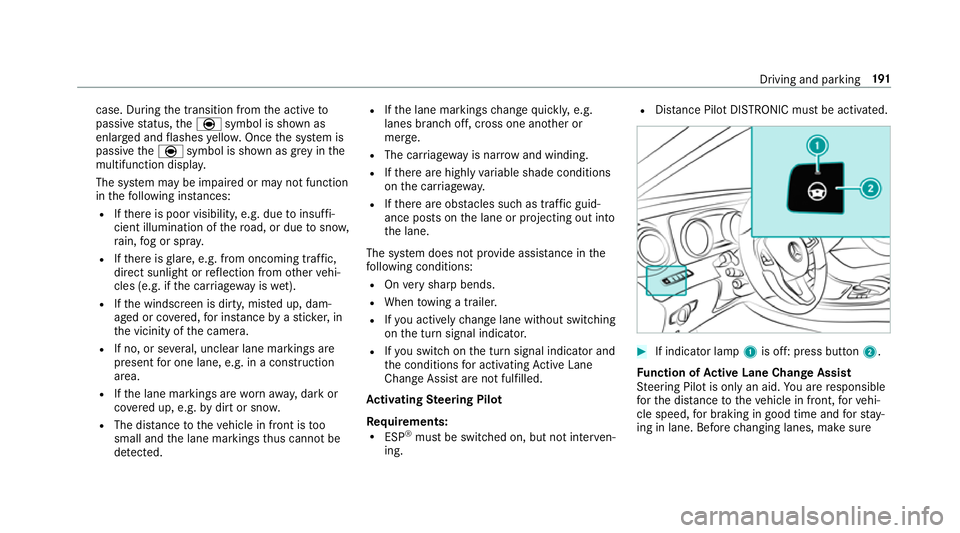
Distance Pilot DISTRONIC mu stbe activated. #
If indicator lamp 1is off: press button 2.
Fu nction of Active Lane Change Assi st
St eering Pilot is only an aid. You are responsible
fo rth e dis tance totheve hicle in front, forve hi‐
cle speed, for braking in good time and forst ay‐
ing in lane. Before changing lanes, make sure Driving and parking
191
Page 195 of 541
th
at the neighbouring lane is free (shoulder
view).
% The availability of thefo llowing function is
countr y-dependent.
St eering Pilot remains active even if the turn sig‐
nal indicator is switched on. Steering Pilot then
assists the driver when changing lanes byapply‐
ing steering torques toinitiate the lane change.
Assis tance when changing lanes is pr ovided if all
th efo llowing conditions are me t:
R You are driving on a mo torw ay or high-speed
multi-lane major road with multiple lanes in
th e direction of tr avel.
R The neighbouring lane is free and separated
by a broken lane marking.
R The driven speed is between 80 km/h and
18 0 km/h.
R The turn signal indicator is switched on for
longer than two seconds.
If th e sy stem is impaired, Active Lane Change
Assi stmay be inter rupte d. If an inter ruption
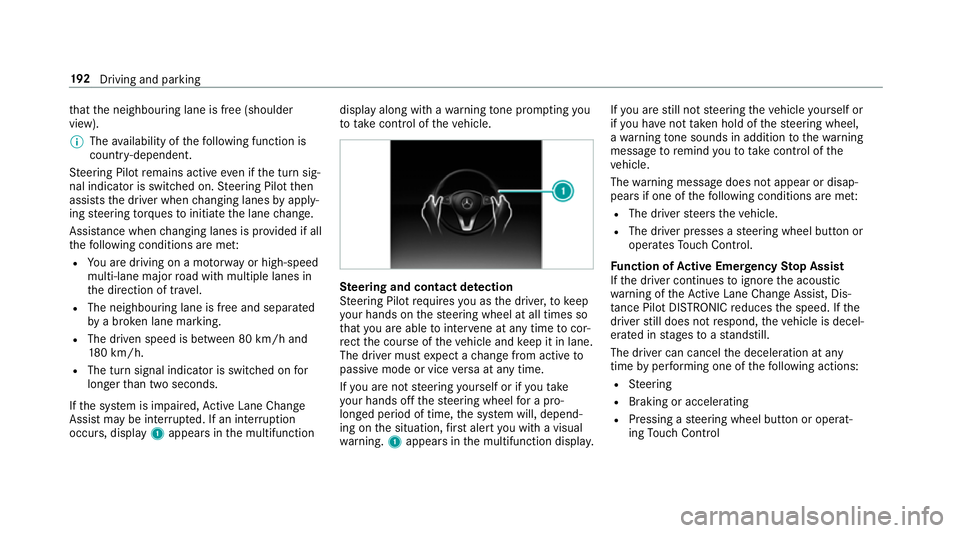
occurs, display 1appears in the multifunction display along with a
warning tone prom pting you
to take control of theve hicle. Ste
ering and contact de tection
St eering Pilot requ ires you as the driver, tokeep
yo ur hands on thesteering wheel at all times so
th at you are able tointer vene at any time tocor‐
re ct the course of theve hicle and keep it in lane.
The driver must expect a change from active to
passive mode or vice versa at any time.
If yo u are not steering yourself or if you take
yo ur hands off thesteering wheel for a pro‐
longed period of time, the sy stem will, depend‐
ing on the situation, firs t alert you with a visual
wa rning. 1appears in the multifunction displa y.If
yo u are still not steering theve hicle yourself or
if yo u ha venot take n hold of thesteering wheel,
a wa rning tone sounds in addition tothewa rning
message toremind youto take control of the
ve hicle.
The warning message does not appear or disap‐
pears if one of thefo llowing conditions are me t:
R The driver steers theve hicle.
R The driver presses a steering wheel button or
operates Touch Control.
Fu nction of Active Eme rgency Stop Assist
If th e driver continues toigno rethe acoustic
wa rning of theAc tive Lane Change Assi st, Dis‐
ta nce Pilot DISTRONIC reduces the speed. If the
driver still does not respond, theve hicle is decel‐
erated in stages toast andstill.
The driver can cancel the deceleration at any
time byper form ing one of thefo llowing actions:
R Steering
R Braking or accelerating
R Pressing a steering wheel button or operat‐
ing Touch Control 19 2
Driving and pa rking
Page 201 of 541
Pa
rking Assist PARKTRONIC Fu
nctions of Parking Assist PARKTRONIC Pa
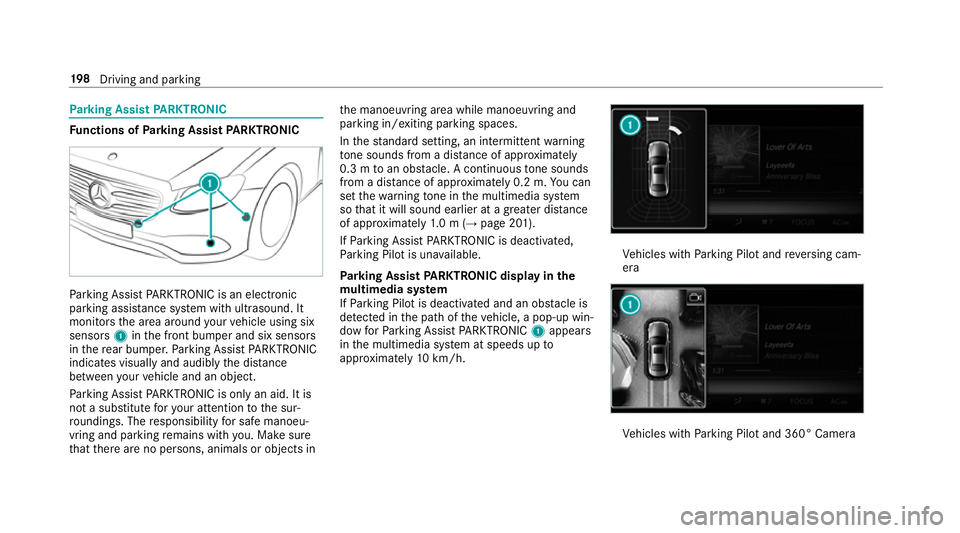
rking Assist PARKTRONIC is an electronic
parking assi stance sy stem with ultrasound. It
monitors the area around your vehicle using six
sensors 1inthe front bumper and six sensors
in there ar bumper. Parking Assist PARKTRONIC
indicates visually and audibly the dis tance
between your vehicle and an object.
Pa rking Assist PARKTRONIC is on lyan aid. It is
not a substitute foryo ur attention tothe sur‐
ro undings. The responsibility for safe manoeu‐
vring and parking remains with you. Make sure
th at there are no persons, animals or objects in th
e manoeuvring area while manoeuvring and
parking in/exiting parking spaces.
In thest andard setting, an intermit tent wa rning
to ne sounds from a di stance of appr oximately
0.3 m toan obs tacle. A continuous tone sounds
from a di stance of appr oximately 0.2 m. You can
set thewa rning tone in the multimedia sy stem
so that it will sound earlier at a greater dis tance
of appr oximately 1.0 m (→ page 201).
If Pa rking Assist PARKTRONIC is deacti vated,
Pa rking Pilot is una vailable.
Pa rking Assist PARKTRONIC displ ayinthe
mu ltimedia sy stem
If Pa rking Pilot is deactivated and an obs tacle is
de tected in the path of theve hicle, a pop-up win‐
dow forPa rking Assist PARKTRONIC 1appears
in the multimedia sy stem at speeds up to
appr oximately 10km/h. Ve
hicles with Parking Pilot and reve rsing cam‐
era Ve
hicles with Parking Pilot and 360° Camera 19 8
Driving and pa rking
Page 204 of 541
Ad
justing the warning tones of Parking
Assist PARKTRONIC
Multimedia sy stem:
, Vehicle .
k Assistance .
Cam. &
Parking Pilot .
Set warning tone
Ad justing the volume of thewa rning tones #
Select Warning tone volume. #
Adjust theva lue.
Specifying thest arting point for the warning
to nes
Yo u can specify whe ther thePa rking Assist
PA RKTRONIC warning tones should commence
when theve hicle is fur ther aw ay from an obs ta‐
cle. #
Select Warn early. #
Activate Oor deacti vate ª the function.
Ac tivating/deactivating audio fadeout
Yo u can specify whe ther thevo lume of a media
source in the multimedia sy stem is tobe
re duced when Parking Assist PARKTRONIC gives
an audible warning. #
Select Audio fadeout during warning tones . #
Activate Oor deacti vate ª the function. Re
versing camera Fu
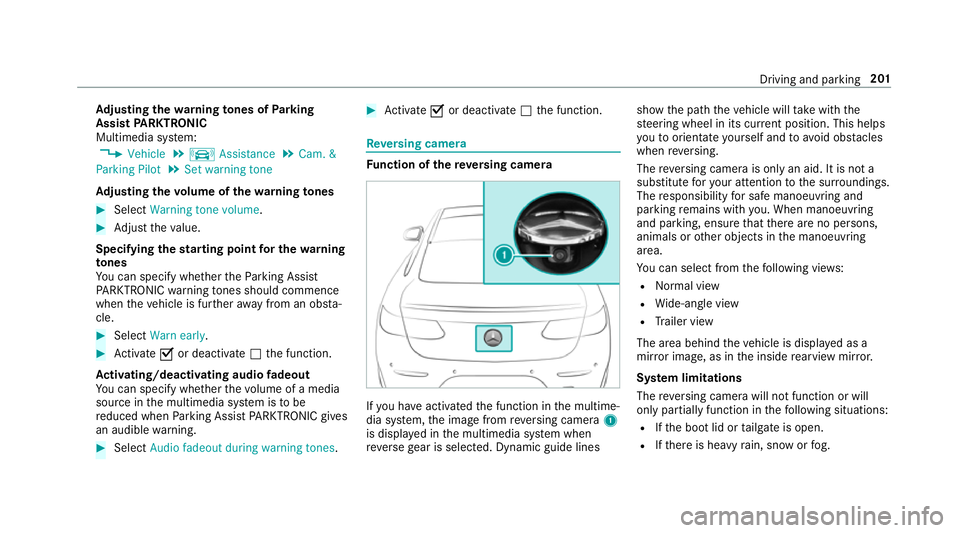
nction of there ve rsing camera If
yo u ha veactivated the function in the multime‐
dia sy stem, the image from reve rsing camera 1
is displa yed in the multimedia sy stem when
re ve rsege ar is selec ted. Dynamic guide lines show
the path theve hicle will take with the
st eering wheel in its cur rent position. This helps
yo uto orientate yourself and toavo id obs tacles
when reve rsing.
The reve rsing camera is only an aid. It is not a
substitute foryo ur attention tothe sur roundings.
The responsibility for safe manoeuvring and
parking remains with you. When manoeuv ring
and pa rking, ensure that there are no persons,
animals or other objects in the manoeuvring
area.
Yo u can select from thefo llowing vie ws:
R Normal view
R Wide-angle view
R Trailer view
The area behind theve hicle is displa yed as a
mir ror image, as in the inside rearview mir ror.
Sy stem limitations
The reve rsing camera will not function or will
only partially function in thefo llowing situations:
R Ifth e boot lid or tailgate is open.
R Ifth ere is heavy rain, snow or fog. Driving and parking
201
Page 207 of 541
When
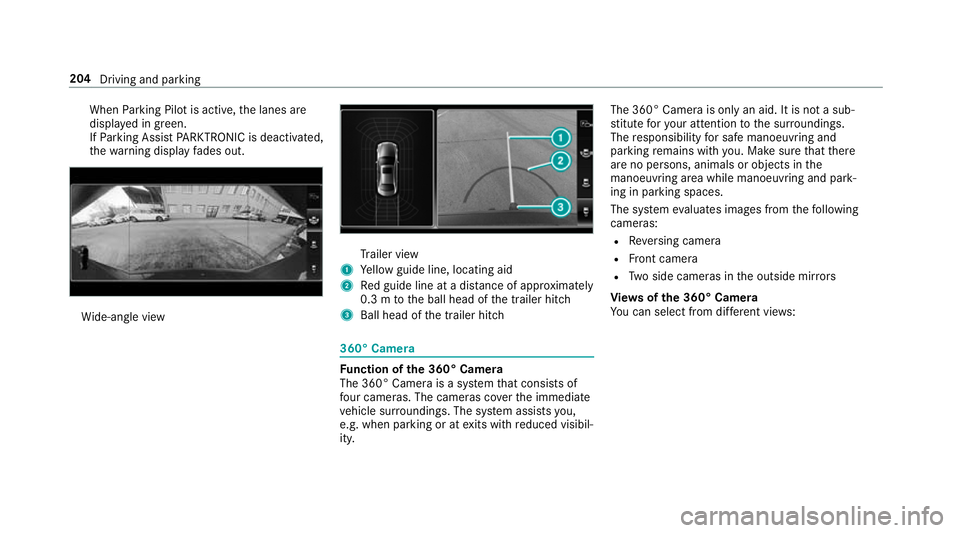
Parking Pilot is active, the lanes are
displa yed in green.
If Pa rking Assist PARKTRONIC is deacti vated,
th ewa rning display fades out. Wi
de-angle view Tr
ailer view
1 Yellow guide line, locating aid
2 Red guide line at a dis tance of appr oximately
0.3 m tothe ball head of the trailer hitch
3 Ball head of the trailer hitch 360° Camera
Fu
nction of the 360° Camera
The 360° Camera is a sy stem that consists of
fo ur cameras. The cameras co verth e immediate
ve hicle sur roundings. The sy stem assists you,
e.g. when parking or at exits with reduced visibil‐
ity. The 360° Camera is only an aid. It is not a sub‐
st
itute foryo ur attention tothe sur roundings.
The responsibility for safe manoeuvring and
parking remains with you. Make sure that there
are no persons, animals or objects in the
manoeuvring area while manoeuvring and park‐
ing in parking spaces.
The sy stem evaluates images from thefo llowing
cameras:
R Reversing camera
R Front camera
R Two side cameras in the outside mir rors
Vi ew s of the 360° Camera
Yo u can select from dif fere nt vie ws: 204
Driving and parking
Page 209 of 541
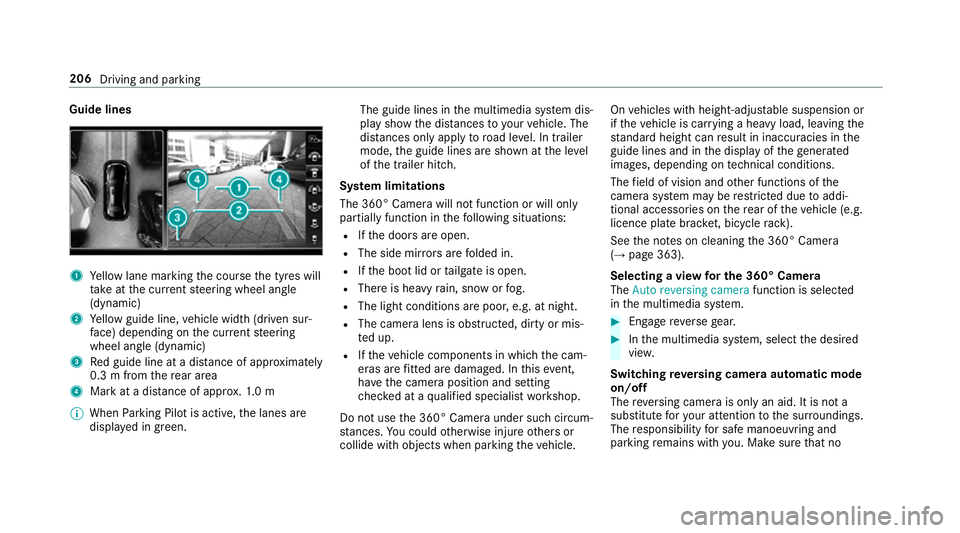
Guide lines
1
Yellow lane marking the course the tyres will
ta ke atthe cur rent steering wheel angle
(dynamic)
2 Yellow guide line, vehicle width (driven sur‐
fa ce) depending on the cur rent steering
wheel angle (dynamic)
3 Red guide line at a dis tance of appr oximately
0.3 m from there ar area
4 Mark at a distance of appr ox.1. 0 m
% When Parking Pilot is active, the lanes are
displa yed in green. The guide lines in
the multimedia sy stem dis‐
play show the dis tances toyour vehicle. The
dis tances only apply toroad le vel. In trailer
mode, the guide lines are shown at the le vel
of the trailer hitch.
Sy stem limitations
The 360° Camera will not function or will only
partially function in thefo llowing situations:
R Ifth e doors are open.
R The side mir rors are folded in.
R Ifth e boot lid or tailgate is open.
R There is heavy rain, snow or fog.
R The light conditions are poor, e.g. at night.
R The camera lens is obstructed, dirty or mis‐
ted up.
R Ifth eve hicle components in which the cam‐
eras are fitted are dama ged. In this event,
ha ve the camera position and setting
ch ecked at a qualified specialist workshop.
Do not use the 360° Camera under such circum‐
st ances. You could otherwise injure others or
collide with objects when parking theve hicle. On
vehicles with height-adjus table suspension or
if th eve hicle is car rying a heavy load, leaving the
st andard height can result in inaccuracies in the
guide lines and in the display of thege nerated
ima ges, depending on tech nical conditions.
The field of vision and other functions of the
came rasystem may be restricted due toaddi‐
tional accesso ries on there ar of theve hicle (e.g.
licence plate brac ket, bicycle rack ).
See the no tes on cleaning the 360° Camera
(→ page 363).
Selecting a view for the 360° Camera
The Auto reversing camera function is selected
in the multimedia sy stem. #
Enga gereve rsege ar. #
Inthe multimedia sy stem, select the desired
vie w.
Switching reve rsing camera automatic mode
on/off
The reve rsing camera is only an aid. It is not a
substitute foryo ur attention tothe sur roundings.
The responsibility for safe manoeuvring and
parking remains with you. Make sure that no 206
Driving and parking
Page 211 of 541
R
You swit choff Parking Pilot.
R You begin steering.
R You apply the parking brake.
R Vehicles with automatic transmission:
Yo u en gage j.
R ESP ®
inter venes.
Pa rking Pilot sy stem limitations
Objects located abo veor below the de tection
ra nge of Parking Pilot are not de tected when the
parking space is being measured. These are also
not taken into account when the parking
manoeuvre is calculated, e.g. overhanging loads,
ov erhangs or loading ramp s of lor ries or the
boundaries of a parking space. In some circum‐
st ances, Parking Pilot may therefore guide you
into the parking space prematurely. &
WARNING Risk of accident due to
objects located abo veor below the
de tection range of Parking Pilot
If th ere are objects abo veor below the
de tection range, thefo llowing situations may
arise:
R Parking Pilot may steer too ear ly.
R Vehicles with automatic transmis‐
sion: Thevehicle may not stop in front of
th ese objects.
This could cause a collision. #
Inthese situations, do not use Parking
Pilot. Sn
owfa ll or heavy rain may lead toa parking
space being measured inaccuratel y.Pa rking
spaces that are partial lyoccupied bytrailer
dr aw bars might not be identified as such or be
measured incor rectly. Only use Parking Pilot on
le ve l, high-grip ground. Do not use
Parking Pilot, forex ample, in thefo l‐
lowing situations:
R Inextreme weather conditions such as ice or
pac ked snow or in heavy rain.
R Ifyo u are transpo rting a load that pr otru des
be yond theve hicle.
R Ifth e parking space is on a steep downhill or
uphill gradient.
R Ifyo u ha veins talled snow chains.
Pa rking Pilot may also display parking spaces
th at are not suitable for parking, e.g.:
R Parking spaces where parking is prohibited.
R Parking spaces on unsuitable sur faces.
Pa rking Pilot will not assist you with parking
spaces at right angles tothe direction of tr avel
in thefo llowing situations:
R If two parking spaces are located immedi‐
ately next toeach other.
R Ifth e parking space is directly next toa low
obs tacle su chas a low kerb. 208
Driving and parking
Page 213 of 541
&
WARNING Risk of accident due tovehi‐
cle swinging out while parking or pulling
out of a parking space
While parking or pulling out of a parking
space, theve hicle swings out and can drive
onto areas of the oncoming lane.
This could cause youto collide wi thobjects
or other road users. #
Pay attention toobjects and other road
users. #
Where necessar y,stop theve hicle or
cancel the parking procedure with Park‐
ing Pilot. #
If,forex ample, theEngage reverse gear mes‐
sage appears in the display of the multimedia
sy stem: select the cor responding transmis‐
sion position.
Ve hicles with automatic transmission:
The vehicle drives into the selected parking
space. #
Vehicles with manual transmission: Stop
as soon as Parking Assist PARKTRONIC
sounds the continuous warning tone, if not be
fore . Depending on the message or as
re qu ired, engage forw ard or reve rsege ar.
On completion of the parking procedure, the
Parking Pilot finished, take control of the vehi-
cle. display message appears. Further manoeu‐
vring may still be necessar y. #
After completion of the parking procedure,
safeguard theve hicle against rolling away.
When requ ired bylegal requirements or local
conditions: turn the wheels towa rdsth eke rb.
% Ve
hicles with automatic transmission:
Yo u can stop theve hicle and change the
transmission position du ring the parking pro‐
cedure. The sy stem then calculates a new
ve hicle path. The parking procedure can
th en be continued. If no new vehicle path is
av ailable, the transmission position will be
ch anged again. If theve hicle has not yet
re ached the parking space, the parking pro‐
cedure will be cancelled, should a gear be
ch anged. Exiting a pa
rking space with Parking Pilot
Re quirement:
Yo u can on lyex it a parking space with Parking
Pilot if you ha veprev iously par kedth eve hicle
with Parking Pilot.
Please no tethat you are responsible forth eve hi‐
cle and sur roundings during the entire parking
procedure. #
Start theve hicle. 210
Driving and pa rking