brakes MERCEDES-BENZ E-CLASS COUPE 2018 User Guide
[x] Cancel search | Manufacturer: MERCEDES-BENZ, Model Year: 2018, Model line: E-CLASS COUPE, Model: MERCEDES-BENZ E-CLASS COUPE 2018Pages: 593, PDF Size: 10.63 MB
Page 246 of 593
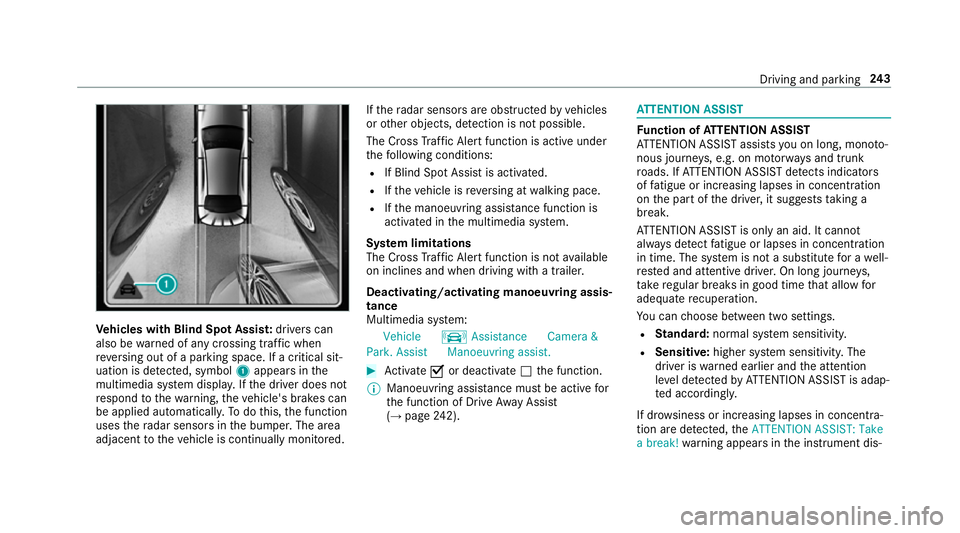
Ve
hicles with Blind Spot Assis t:drivers can
also be warned of any crossing traf fic when
re ve rsing out of a parking space. If a critical sit‐
uation is de tected, symbol 1appea rsinthe
multimedia sy stem displa y.Ifth e driver does not
re spond tothewa rning, theve hicle's brakes can
be applied automaticall y.To do this, the function
uses thera dar sensors in the bumper. The area
adjacent totheve hicle is continually monitored. If
th era dar sensors are obstructed byvehicles
or other objects, de tection is not possible.
The Cross Traf fic Alert function is acti veunder
th efo llowing conditions:
R If Blind Spot Assist is activated.
R Ifth eve hicle is reve rsing at walking pace.
R Ifth e manoeuvring assis tance function is
acti vated in the multimedia sy stem.
Sy stem limitations
The Cross Traf fic Alert function is not available
on inclines and when driving with a trailer.
Deactivating/activating manoeuv ring assis‐
tance
Multimedia sy stem:
Vehicle kAssistance Camera &
Park. Assist Manoeuvring assist. #
Activate Oor deacti vate ª the function.
% Manoeuvring assis tance mu stbe active for
th e function of Drive AwayAssi st
( → page 242). AT
TENTION ASSI ST Fu
nction of ATTENTION ASSI ST
AT TENTION ASSIST assists you on long, mon oto‐
nous journe ys, e.g. on mo torw ays and trunk
ro ads. If ATTENTION ASSIST de tects indicators
of fatigue or increasing lapses in concentration
on the part of the driver, it suggests taking a
brea k.
AT TENTION ASSIST is only an aid. It cannot
alw ays de tect fatigue or lapses in concentration
in time. The sy stem is not a substitute for a well-
re sted and attentive driver. On long journe ys,
ta ke regular breaks in good time that allow for
adequate recuperation.
Yo u can choose between two settings.
R Standard: normal sy stem sensitivity.
R Sensitive: higher system sensitivity. The
driver is warned earlier and the attention
le ve l de tected byATTENTION ASSIST is adap‐
te d according ly.
If dr owsiness or increasing lapses in concentra‐
tion are de tected, theATTENTION ASSIST: Take
a break! warning appears in the instrument dis‐ Driving and parking
243
Page 452 of 593
On-board computer:
Service Tyres #
Swipe down wards on Touch Control on the
left-hand side of thesteering wheel.
The Run Flat Indicator activeRestart: press
Touch Control message is shown in the mul‐
tifunction displa y.
Re start the tyre pressure loss warning sy stem in
th efo llowing situations:
R The tyre pressure has changed.
R The wheels or tyres ha vebeen changed or
newly fitted. #
Tobegin restart, press Touch Control on the
left-hand side of thesteering wheel.
The Tyre pressure now OK? message is
shown in the multifunction displa y.#
Select Yes. #
Toconfirm restart, press Touch Control on
th e left-hand side of thesteering wheel.
The Run Flat Indicator restarted message is
shown in the multifunction displa y. Af
teryo u ha vedriven for a few minutes, the
tyre pressu reloss warning sy stem monitors
th e set tyre pressures of all the tyres.
Be sure toalso obse rveth efo llowing fur ther
re lated subjects:
R Notes on tyre pressure (→ page442) Wheel
change Note
s on selecting, fitting and replacing
tyres Mercedes
-AMG vehicles: observeth e no tes in
th e Supplement. Otherwise, you may failto rec‐
ognise dangers.
Yo u can ask for information rega rding permit ted
wheel/tyre combinations at a Mercedes-Benz
Service Cent re. &
WARNING Risk of accident due toincor‐
re ct dimensions of wheels and tyres
If wheels and tyres of the wrong size are
used, the wheel brakes or wheel suspension
components may become damaged. #
Alw aysre place wheels and tyres with
th ose that fulfil the specifications of the
original part.
When replacing wheels, make sure tofit the
cor rect:
R Designation
R Type
When replacing tyres, make sure tofit the
cor rect:
R Designation
R Manufactu rer
R Type &
WARNING Risk of inju rythro ugh exceed‐
ing the specified tyre load-bearing capa‐
city or the permissible speed rating
Exceeding the specified tyre load-bearing
capacity or the permissible speed rating may
lead totyre dama geand tothe tyres bur st‐
ing. Wheels and tyres
449
Page 455 of 593
R
Obser vethe maximum permissible speed for
th e M+S tyres fitted.
If th is is below theve hicle's maximum speed,
th is must be indicated byan appropriate
label in the driver's field of vision.
R Run in new tyres at moderate speeds forthe
fi rs t10 0 km.
R Replace the tyres af ter six years at the latest,
re ga rdless of wear.
R When replacing with tyres that do not
fe ature run-flat characteristics: vehicles
with MOExtended tyres are not equipped
with a TIREFIT kit at thefa ctor y.Equip the
ve hicle with a TIREFIT kit af terre placing with
tyres that do not feature run-flat characteris‐
tics, e.g. winter tyres.
Fo r more information on wheels and tyres, con‐
ta ct a qualified specialist workshop.
Be sure toalso obse rveth efo llowing fur ther
re lated subjects:
R Notes on tyre pressure (→ page442)
R Tyre pressure table (→ page443) R
Notes on the emer gency spa rewheel
(→ page 459) Note
s on inter changing wheels &
WARNING Risk of inju rythro ugh dif fer‐
ent wheel sizes
Inter changing the front and rear wheels if the
wheels or tyres ha vediffere nt dimensions
may se verely impair the driving characteris‐
tics.
The disk brakes or wheel suspension compo‐
nents may also be damaged. #
Rotate front and rear wheels on lyifthe
wheels and tyres are of the same
dimensions. Inter
changing the front and rear wheels if the
wheels or tyres ha vediffere nt dimensions can
re nder thege neral operating pe rmit in valid. The
wear pat tern s on the front and rear wheels
dif fer:
R Front wheels wear more on the shoulder of
th e tyre
R Rear wheels wear more in the cent reofthe
tyre
On vehicles with the same front and rear wheel
size, you can inter change the wheels every
5,000 to10,000 km, depending on thewe ar.
Ensure the direction of rotation is maintained for
th e wheels.
It is imperative toobser vethe instructions and
saf ety no tes on "Changing a wheel" when doing
so Preparing theve hicle for a wheel
ch ange( →page 453). Note
s onstoring wheels When
storing wheels, obser vethefo llowing
no tes:
R Afterre moving wheels, store them in a cool,
dry and preferably dark place.
R Protect the tyres from conta ct withoil,
grease or fuel. 452
Wheels and tyres
Page 475 of 593
MB-F
reigabe or MB-Appr oval Diesel engine
sMB-Freigabe or MB-
Appr oval
All models 228.51,229.3 1,
229.5 1,229.52,
229.6 1,229.71
E 350 d
E 400 d 4MATIC 229.52, 229.61If
th e engine oils lis ted in theta ble are not avail‐
able, you may add a maximum of 1.0 litr e ofthe
fo llowing engine oils once only:
R petrol engines:
- E 350: MB- Freigabe orMB-Appr oval
229. 31orAC EA C3
- E 450 4MATIC: MB-F reigabe or MB-
Appr oval 229.3 or ACEA A3/B4
- allother models: MB-F reigabe or MB-
Appr oval 229.3, 229. 51, 229.52 or
AC EA A3/B4
R diesel engines: -
E 400 d 4MATIC: MB-F reigabe or MB-
Appr oval 229. 51orAC EA C3
- allother models: ACEA C3
The following values referto an oil change,
including the oil filter.
Re placement amount Mode
lR eplacement
amount
E 200
E 300 7.
0 litres
E 220 d
E 220 d 4MATIC 6.0 litres
E 300 d6 .8 litres
E 350 6.6 litres
E 350 d9 .0 litres
E 400 d 4MATIC 8.0 litres
All other models 6.5 litres Note
s on brake fluid Obser
vethe no tes on operating fluids
(→ page 465). &
WARNING Risk of an accident due to
va pour poc kets form ing in the brake sys‐
tem
The brake fluid cons tantly absorbs moi sture
from the air. This lo wersthe boiling point of
th e brake fluid. If the boiling point is too lo w,
va pour poc kets may form inthe brake sys‐
te m when the brakes are applied hard.
This impairs the braking ef fect. #
Have the brake fluid rene we d at the
specified inter vals. Ha
ve the brake fluid regularly replaced at a
qu alified specialist workshop.
Only use brake fluid appr ovedby Mercedes-Benz
according toMB-F reigabe or MB-Appr oval 33 1.0. 472
Tech nical da ta
Page 534 of 593
Wa
rning and indicator lamps Overview of
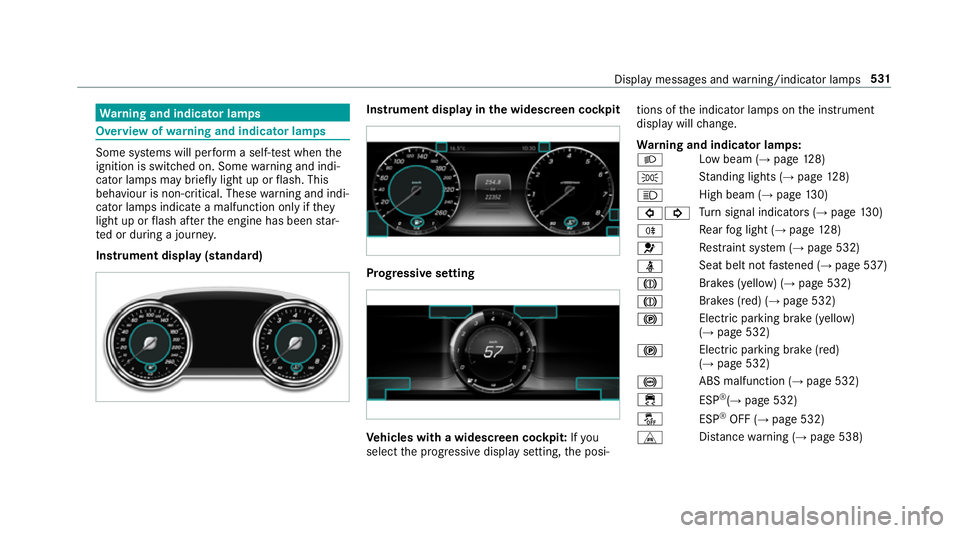
warning and indicator lamps Some sy
stems will per form a self-test when the
ignition is switched on. Some warning and indi‐
cator lamps may brief lylight up or flash. This
behaviour is non-critical. These warning and indi‐
cator lamps indicate a malfunction only if they
light up or flash af terth e engine has been star‐
te d or during a journe y.
Instrument display (standard) Instrument display in
the widescreen cockpit Prog
ressive setting Ve
hicles with a widescreen cock pit:Ifyou
select the progressive display setting, the posi‐ tions of
the indicator lamps on the instrument
display will change.
Wa rning and indicator lamps:
L Low beam (→
page128)
T St
anding lights (→ page128)
K High beam (→
page130)
#! Tu
rn signal indicators (→ page130)
R Re
ar fog light (→ page128)
6 Re
stra int sy stem (→ page 532)
ü Seat belt not
fastened (→ page 537)
J Brakes (yellow) (→
page 532)
J Brakes (red) (→
page 532)
! Elect
ric pa rking brake (yellow)
(→ page 532)
! Electric parking brake (red)
(→ page 532)
! ABS malfunction (→
page 532)
÷ ESP®
(→ page 532)
å ESP®
OFF (→ page 532)
L Distance warning (→ page 538) Display messages and
warning/indicator lamps 531
Page 553 of 593
Blue
tooth ®
............................................... 300
Information .......................................... 300
Setting up an Internet connection ....... 366
Switching on/off ................................. 300
Switching profile (DUN/PAN) .............. 366
Blue tooth ®
audio
Ac tivating ............................................ 384
De-authorising (de-regis tering) the
device .................................................. 384
Information .......................................... 382
Overview .............................................3 82
Sear ching for a track ........................... 384
Sear ching for and auth orisingthe
device .................................................. 383
Selecting a media pla yer ..................... 384
Switching device via NFC .................... 384
Boot lid Activating/deactivating theta ilgate
opening limiter ...................................... 85
Closing .................................................. 81
HANDS-FREE ACCESS .......................... .83
Locking separa tely ................................ 84
Opening .................................................80
Opening dimensions ............................4 74Brake Assi
stSystem
see BAS (Brake Assi stSystem)
Brake fluid
No tes ................................................... 472
Brake forc e distribution
EBD (Elect ronic Brake forc e Distribu‐
tion) ..................................................... 19 5
Brakes ABS (Anti-lo ckBraking Sy stem) ........... 19 0
Ac tive Brake Assi st.............................. 19 6
Ad aptive brake lights .......................... .201
BA S (Brake Assi stSystem) ...................1 91
Driving tips .......................................... 16 3
EBD (Electronic Brake forc e Distribu‐
tion) ..................................................... 19 5
HOLD function .................................... .217
Limited braking ef fect (salt-trea ted
ro ads) .................................................. 16 3
New/replaced brakepads/brake
discs .................................................... 16 2
Ru nning-in no tes ..................................1 62
Braking assi stance
see BAS (Brake Assi stSystem) Breakdown
Overview of the help functions .............. 16
To w- starting ........................................ 437
To wing away ........................................ 433
Tr ansporting theve hicle ......................4 35
Wheel change ...................................... 453
Breakdown see Flat tyre
Breakdown assistance call see Mercedes me connect
Bu rm ester ®
high-end 3D sur round
sound sy stem
Ad justing the balance/fader ............... 399
Ad justing the sound optimisation ........ 399
Ad justing treble, mid-range and bass
settings ............................................... 399
Au tomatic volume adjustment ............ .399
Calling up the sound menu .................. 398
Information .......................................... 398
Selecting the sound profile .................. 399
Burmes ter®
sur round sound sy stem .....3 97
Ad justing the balance/fader ............... 398
Ad justing the sound focus ................... 398 550
Index