height MERCEDES-BENZ E-CLASS COUPE 2018 User Guide
[x] Cancel search | Manufacturer: MERCEDES-BENZ, Model Year: 2018, Model line: E-CLASS COUPE, Model: MERCEDES-BENZ E-CLASS COUPE 2018Pages: 593, PDF Size: 10.63 MB
Page 224 of 593
The
vehicle is lo wered again in thefo llowing sit‐
uations:
R When driving fasterthan 80 km/h.
R When driving between 60 km/h and
80 km/h for appro ximately thre e minutes.
R After selecting a drive program using the
DY NA MIC SELECT switch.
The vehicle is adjus tedto the height of the last
active drive program.
Lo weri ngtheve hicle #
Press button 1.
Indica tor lamp 2goes out. The vehicle is
adjus tedto the height of the active drive pro‐
gram. Pa
rking Assist PARKTRONIC Fu
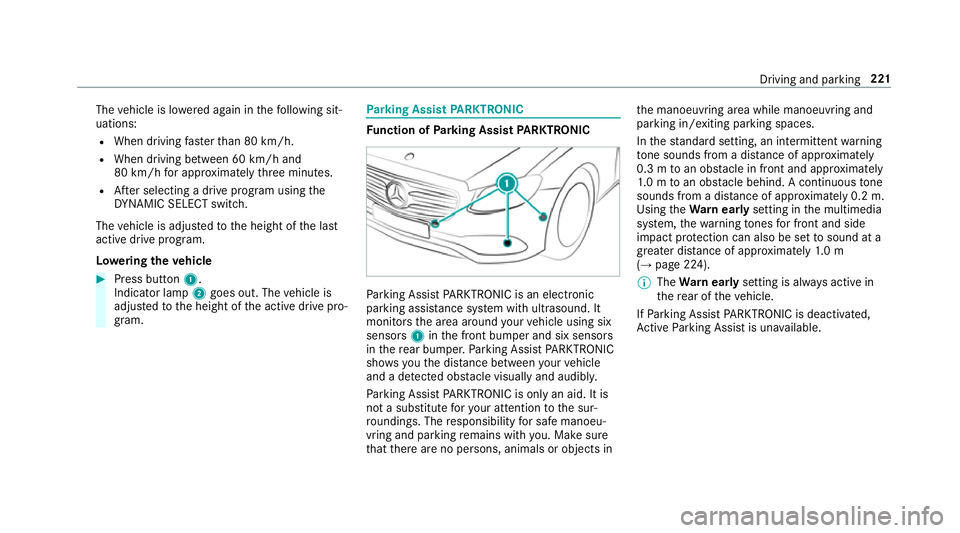
nction of Parking Assist PARKTRONIC Pa
rking Assist PARKTRONIC is an electronic
parking assi stance sy stem with ultrasound. It
monitors the area around your vehicle using six
sensors 1inthe front bumper and six sensors
in there ar bumper. Parking Assist PARKTRONIC
sho wsyouth e dis tance between your vehicle
and a de tected obs tacle visually and audibly.
Pa rking Assist PARKTRONIC is on lyan aid. It is
not a substitute foryo ur attention tothe sur‐
ro undings. The responsibility for safe manoeu‐
vring and parking remains with you. Make sure
th at there are no persons, animals or objects in th
e manoeuvring area while manoeuvring and
parking in/exiting parking spaces.
In thest andard setting, an intermit tent wa rning
to ne sounds from a di stance of appr oximately
0.3 m toan obs tacle in front and appr oximately
1. 0 m toan obs tacle behind. A continuous tone
sounds from a di stance of appr oximately 0.2 m.
Using theWa rnear lysetting in the multimedia
sy stem, thewa rning tones for front and side
impact pr otection can also be set tosound at a
greater dis tance of appr oximately 1.0 m
(→ page 224).
% The Warnear lysetting is alw ays active in
th ere ar of theve hicle.
If Pa rking Assist PARKTRONIC is deacti vated,
Ac tive Parking Assist is una vailable. Driving and parking
221
Page 234 of 593
Sy
stem limitations
The 360° Camera will not function or will only
partially function in thefo llowing situations:
R The doors are open.
R The side mir rors are folded in.
R The boot lid is open.
R There is heavy rain, snow or fog.
R The light conditions are poor, e.g. at night.
R The camera lens is obstructed, dirty or mis‐
te d up.
R If cameras or vehicle components in which
th e cameras are fitted are dama ged. In this
eve nt, ha vethe cameras, their positions and th
eir setting checked at a qualified specialist
wo rkshop.
Do not use the 360° Camera under such circum‐
st ances. You could otherwise injure others or
collide with objects when parking or manoeu‐
vring theve hicle.
On vehicles with height-adjus table suspension or
if th eve hicle is car rying a heavy load, leaving the
st andard height can result in inaccuracies in the
guide lines and in the display of thege nerated
ima ges, depending on tech nical conditions.
The field of vision and other functions of the
came rasystem may be restricted due toaddi‐
tional attachments on theve hicle (e.g. licence
plate brac ket, bicycle rack ).
See the no tes on cleaning the 360° Camera
(→ page 414).
Selecting a view for the 360° camera
Requ irements:
R The Auto reversing camera function is selec‐
te d in the multimedia sy stem. #
Enga gereve rsege ar. #
Inthe multimedia sy stem, select the desired
vie w.
Switching reve rsing camera automatic mode
on/off
The reve rsing camera is only an aid. It is not a
substitute foryo ur attention tothe sur roundings.
The responsibility for safe manoeuvring and
parking remains with you. Make sure that no
persons, animals or objects etc. are in the
manoeuvring range. Pay attention to your sur‐
ro undings and be ready tobrake at all times.
Multimedia sy stem:
Vehicle kAssistance Camera &
Park. Assist Auto reversing camera #
Activate Oor deacti vate ª the function.
Opening the camera co ver of the reve rsing
camera
Multimedia sy stem:
Vehicle kAssistance Camera &
Park. Assist #
Select Open camera cover. Driving and parking
231
Page 340 of 593
Displaying
the compass
Multimedia sy stem:
Navigation ÀRoute and position #
Select Compass.
The compass display sho wsthefo llowing
information:
R the cur rent di rection of tr avel with bear‐
ing (360° form at) and compass direction
R longitude and latitude coo rdinates in
degrees, minutes and seconds
R height (rounded)
R number of GPS satellites from which a
signal can be recei ved
Displaying Qibla
Requ irements:
R The Qibla display is available in your count ry.Multimedia sy
stem:
Navigation ÀRoute and position #
Select Qibla.
The ar rowonthe compass sho wsthe direc‐
tion of pr ayer toMecca in relation tothe cur‐
re nt di rection of tr avel.
The number of satellites recei ved is shown.
Setting the map scale automatically
Multimedia sy stem:
Navigation ZOptions
The map scale is set automatically depending on
yo ur driving speed.
Fo r journe ysin cities with de tailed city models, a
map view from the driver's perspective is used. #
Switch Auto zoom onO or off ª.
% The automatically selected map scale can be
changed manually for a short time. The set‐
ting is reset automatically af ter a few sec‐
onds. Displaying
the satellite map
Multimedia sy stem:
Navigation ZOption sM ap content #
Swit chSatellite map onO or off ª.
or #
If sa tellite map display 6isavailable in the
map menu, switch it on Oor off ª
(→ page 332).
Switched on O: satellite maps are displa yed
in map scales of 2 km or less.
Swit ched off ª: satellite maps are not dis‐
pla yed in map scales from 2 km to10 km.
% Satelli temaps forth ese map scales are not
av ailable in all countries.
Displ aying weather information
Re quirements:
R Mercedes me connect is available.
R You ha vea user account forth e Mercedes
me por tal.
R The service is available.
R The service has been activated at a
Mercedes-Benz service centre. Multimedia sy
stem 337
Page 407 of 593
#
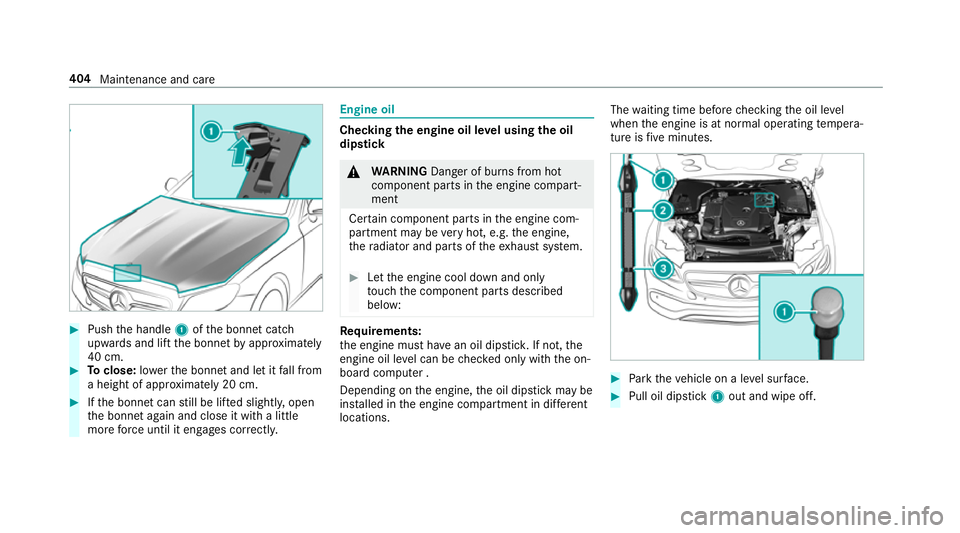
Push the handle 1ofthe bonn etcatch
up wa rds and lift the bonn etby appr oximately
40 cm. #
Toclose: lowe rth e bonn etand let it fall from
a height of appr oximately 20 cm. #
Ifth e bonn etcan still be lif ted slightl y,open
th e bonn etagain and close it with a little
more forc e until it engages cor rectly. Engine oil
Che
cking the engine oil le vel using the oil
dip stick &
WARNING Danger of bu rns from hot
component parts in the engine compart‐
ment
Cer tain component parts in the engine com‐
partment may be very hot, e.g. the engine,
th era diator and parts of theex haust sy stem. #
Let the engine cool down and only
to uch the component parts described
below: Re
quirements:
th e engine must ha vean oil dipstic k.If not, the
engine oil le vel can be checked only with the on-
board computer .
Depending on the engine, the oil dipstick may be
ins talled in the engine compartment in dif fere nt
locations. The
waiting time before checking the oil le vel
when the engine is at normal operating temp era‐
ture is five minutes. #
Park theve hicle on a le vel sur face. #
Pull oil dipstick 1out and wipe off. 404
Maintenance and care
Page 477 of 593
&
WARNING ‑ Risk of fire and injury due to
windscreen washer concentrate
Wi ndsc reen washer concentrate is highly
fl ammable. It could ignite if it comes into
con tact wi thhot engine component parts or
th eex haust sy stem. #
Make sure that no windsc reen washer
concentrate spills out next tothefiller
opening. *
NO
TEDama getotheex terior lighting
due tounsuitable windsc reen washer
fl uid Uns
uitable windsc reen washer fluids may
damage the plastic sur face of theex terior
lighting. #
Only use windscreen washer fluids
which are also suitable for use on plas‐
tic sur faces, e.g. MB SummerFit or MB
Wi nterFit. *
NO
TEBlocked spr aynozzles caused by
mixing windscreen washer fluids #
Do not mix MB SummerFit and MB Win‐
te rFit with other windscreen washer flu‐
ids. Do not use distilled or de-ionised
water asthefill
le ve l sensor may be triggered er roneously.
Re commended windscreen washer fluid:
R Abo vefreezing point: e.g. MB SummerFit
R Below freezing point: e.g. MB WinterFit
Fo rth e cor rect mixing ratio, referto the informa‐
tion on the antif reeze contai ner.
Mix thewa sher fluid with the windscreen washer
fl uid all year round. Ve
hicle data Ve
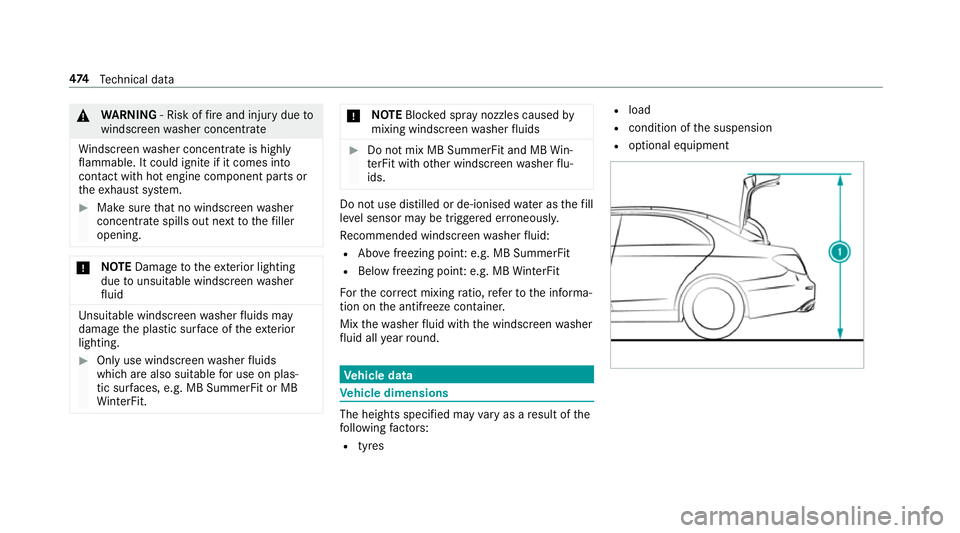
hicle dimensions The heights speci
fied may vary as a result of the
fo llowing factors:
R tyres R
load
R condition of the suspension
R optional equipment 474
Tech nical da ta
Page 478 of 593
Height when opened
Model
1 1Height
when
opened
E 200 4MATIC
E 220 d 4MATIC 17
47 mm
E 350
E 350 d 17
41 mm
E 400 d 4MATIC
E 450 4MATIC 17
48 mm
All other models 1740 mm Ve
hicle dimensions All models
Ve
hicle lengt h4 826 mm
Ve hicle width including out‐
side mir rors 2055 mm All models
Ve
hicle width excluding out‐
side mir rors 18
60 mm
Wheelbase 2873 mm Ve
hicle height Model
E 200 4MATIC
E 220 d 4MATIC
14
38 mm
E 350
E 350 d 14
31 mm
E 400 d 4MATIC
E 450 4MATIC 14
39 mm
All other models 1430 mm We
ights and loads Please no
tethat forth e specified vehicle data:
R items of optional equipment increase the
unladen weight and reduce the pa yload.
R vehicle-specific weight information can be
fo und on theve hicle identification plate .
Ro of load All models
Maximum
roof load 75kg Tr
ailer hitch Gene
ral no tes on the trailer hit ch Not all models can be used
for trailer operation
(→ page 253).
Modi fications tothe engine cooling sy stem may
be necessar y,depending on theve hicle model.
The retrofitting of a trailer hitch is only pe rmissi‐
ble if a towing capacity is specified in your vehi‐
cle documents. Te
ch nical da ta475
Page 587 of 593
Locking/unlocking (emergency
key) .... .79
Lo we ring ............................................. 458
Pa rking up .......................................... .189
QR code rescue card ............................. 26
Qualifi ed specialist workshop ................25
Ra ising ................................................ 455
REA CHregulation ..................................26
Re gistration ...........................................25
St andby mode function ...................... .189
St arting (Digital Vehicle Keyst icke r) .... 16 0
St arting (eme rgency operation
mode) .................................................. 161
St arting (mobile phone) ...................... .160
St arting (Remo teOnline) ..................... 16 2
St arting (s tart/s top button) ................ 15 9
Switching off (s tart/s top button) .........1 81
To wing ................................................ .259
Un locking (digital vehicle keyst icke r) .... 76
Un locking (from the inside) .................... 76
Un locking (KEYLESS-GO) ...................... .77
Un locking (mobile phone) ...................... 76
Ve ntilating (co nvenience opening) ......... 88
Vo ice commands (LINGU ATRO NIC) .....2 86
Ve hicle data
Displ aying (DYNAMIC SELECT) ............ 17 0Ro
of load ............................................. 475
Tr ans ferring toAndroid Auto™ ............ 357
Tr ans ferring toApple CarPl ay™ ........... 357
Ve hicle height ...................................... 474
Ve hicle length ...................................... 474
Ve hicle width ....................................... 474
Wheelbase ...........................................4 74
Ve hicle dimensions ................................. 474
Ve hicle identification number
see VIN
Ve hicle identification plate .................... 463
EU general operating pe rmit number .. 463
Pa int code .......................................... .463
Pe rm issible axle load .......................... .463
Pe rm issible gross mass ...................... .463
VIN ...................................................... 463
Ve hicle interior
Cooling or heating (Remo teOnline) ..... 161
Ve hicle key
see Key
Ve hicle maintenance
see ASS YST PLUS Ve
hicle position
Switching transmission on/off ............ 300
Ve hicle tool kit ........................................ 422
TIREFIT kit .......................................... .422
To wing eye .......................................... 436
Ve ntilating
Con venience opening ............................ 88
Ve ntilation
see Climate cont rol
Ve nts
see Air vents
Vi deo mode .............................................. 379
Ac tivating ............................................ 377
Ac tivating/deactivating full-screen
mode ................................................... 379
Overview ............................................. 378
Settings ............................................... 379
VIN ............................................................ 463
Identification plate .............................. 463
Seat ..................................................... 463
Wi ndsc reen ......................................... 463
Vi sion
Demisting windo ws............................. 14 8584
Index