steering MERCEDES-BENZ E-CLASS ESTATE 2012 Repair Manual
[x] Cancel search | Manufacturer: MERCEDES-BENZ, Model Year: 2012, Model line: E-CLASS ESTATE, Model: MERCEDES-BENZ E-CLASS ESTATE 2012Pages: 457, PDF Size: 11.62 MB
Page 257 of 457
X
To select the next or previous scene:
briefly press the 9or: button.
X To select ascene from the scene list
(rapid scrolling): press and hold the
9 or: buttonuntil desired
scene :has been reached. Telephone menu
Introduction G
WARNING
Observe the legal requirements of the country
in which you are currently driving regarding
the use of mobile phones in the vehicle.
If it is permitted to use mobile phones while
the vehicle is in motion, you should only use
them when the road and traffic conditions
allow. Otherwise, you may be distracted from
the traffic conditions, cause an accident and
injure yoursel fand others.
X Switch on the mobile phone (see the sep-
arate operating instructions).
X Switch on the audio system or COMAND
Online; see the separate operating instruc-
tions.
X Insert the mobile phone into the bracket
(Y page 334).
or
X Establish a Bluetooth ®
connection to the
audio system or COMAND Online; see the
separate operating instructions.
X Press the =or; button on the steer-
ing wheel to select the Tel menu.
You will see one of the following display mes-
sages in the multifunctio ndisplay:
R Please enter PIN :t
he mobile phone has
been placed in the mobile phone bracket
and the PIN has not been entered.
When you enter your PIN via the mobile
phone, LINGUATRONIC, the audio system or COMAND Online, the mobile phone
searches for a network.
R Telephone ready or the name of the net-
work provider: the mobile phone has found
a network and is ready to receive.
R Telephone No service : there is no net-
work available or the mobile phone is
searching for a network.
i You can obtain further information about
suitable mobile phones and connecting
mobile phones via Bluetooth ®
:
R from any Mercedes Benz Service Centre
R on the Internet at: http://
www.mercedes-benz.com/connect
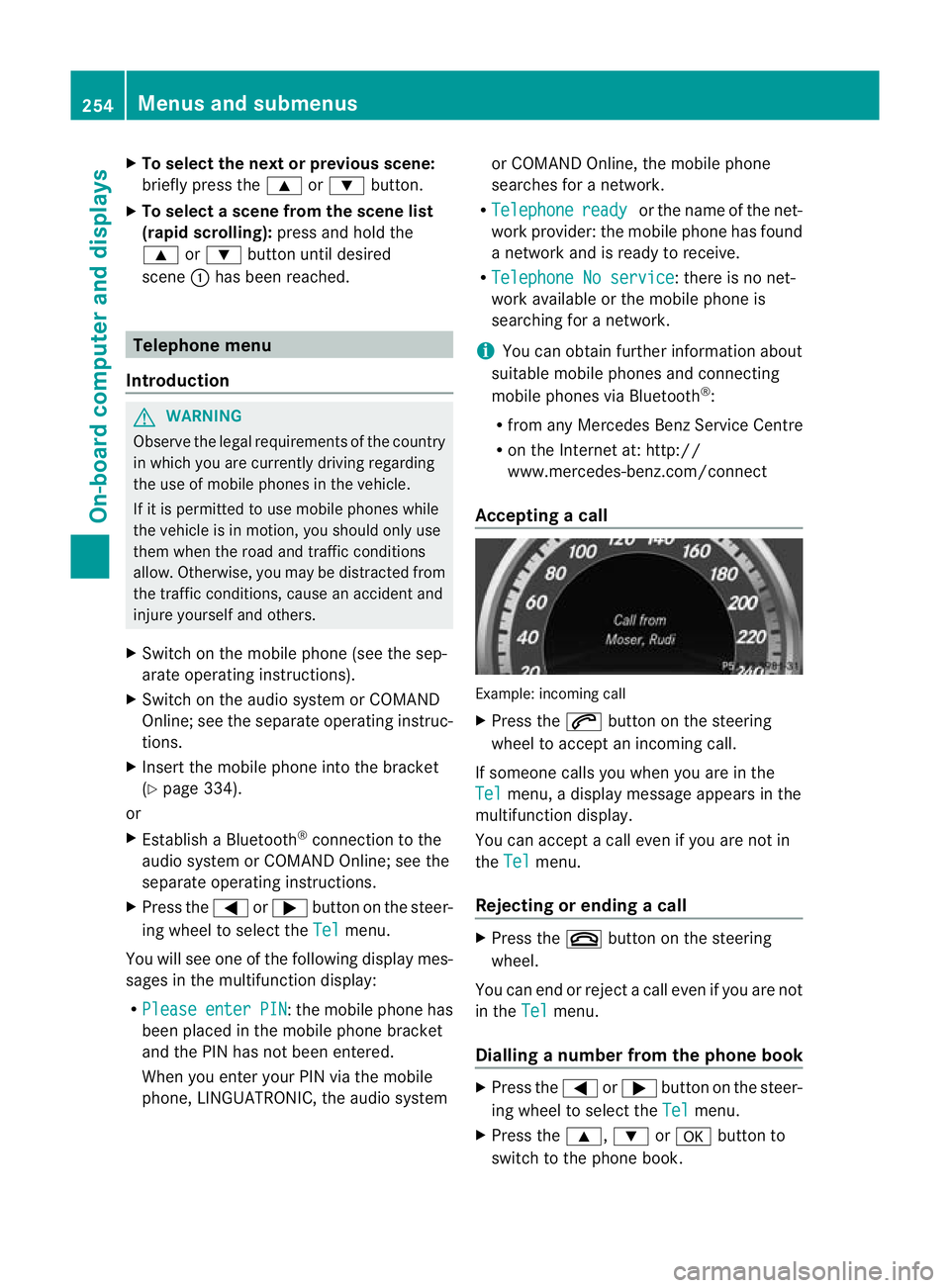
Accepting acall Example: incoming call
X
Press the 6button on the steering
wheel to accep tanincoming call.
If someone calls you when you are in the
Tel menu, a display message appears in the
multifunctio ndisplay.
You can accept a call even if you are not in
the Tel menu.
Rejecting or ending acall X
Press the ~button on the steering
wheel.
You can end or reject a call even if you are not
in the Tel menu.
Dialling anumber from the phone book X
Press the =or; button on the steer-
ing wheel to select the Tel menu.
X Press the 9,:ora button to
switch to the phone book. 254
Menus and submenusOn-board computer and displays
Page 266 of 457
heating adopts the THERMATIC or
THERMOTRONIC temperature setting.
You can switch off the auxiliary heating by
using the remote control or the auxiliary heat-
ing button on the centre console.
i Switch the auxiliary heating on regularly
once a month for about ten minutes.
Selecting the departure time or deactivat-
ing a selected departure time
X Press the =or; button on the steer-
ing wheel to select the Settings menu.
X Press the :or9 button to select the
Heating submenu.
X Press ato confirm.
You will see the selected setting.
X Press ato confirm.
X Press the :or9 button to select
one of the three departure times or Timeroff (no timer active).
X Press ato confirm.
If a departure time is selected, the yellow
indicator lamp lights up on the auxiliary
heating button.
Changing the departure time
X Press the =or; button on the steer-
ing wheel to select the Settings menu.
X Press the :or9 button to select the
Heating submenu.
X Press ato confirm.
You will see the selected setting.
X Press ato confirm.
X Press the :or9 button to select A ,
B or
Change C .
X Press ato confirm.
You can now change the departure time.
X Press the =or; button to select the
display to be changed: hours, minutes. X
Press the :or9 button to set the
selected display.
X Press the abutton to store the entry.
The yellow indicator lamp on the auxiliary
heating button lights up.
Convenience Activating/deactivating the EASY-
ENTRY/EXIT feature
G
WARNING
The steering wheel moves when the EASY-
ENTRY/EXIT feature is active. There is a risk
of occupants becoming trapped. Before acti-
vating the EASY-ENTRY/EXIT feature, make
sure that nobody can become trapped.
Do not leave children unsupervised in the
vehicle, even if they are secured in a child
restraint system. The children could open the
driver's door and thereby unintentionally acti-
vate the EASY-ENTRY/EXIT feature and
become trapped.
X Press the =or; button on the steer-
ing wheel to select the Settings menu.
X Press the :or9 button to select the
Convenience submenu.
X Press ato confirm.
X Press the :or9 button to select the
Easy Entry/Exit: function.
If the Easy Entry/Exit function is activa-
ted, the vehicle steering wheel is displayed
in red in the multifunction display.
X Press the abutton to save the setting.
Further information on the EASY-ENTRY/EXIT
feature (Y page 118).
Switching the belt adjustment on/off
X Press the =or; button on the steer-
ing wheel to select the Settings menu.
X Press the :or9 button to select the
Convenience submenu.
X Press ato confirm. Menus and submenus
263On-board computer and displays Z
Page 269 of 457
Starting a new lap
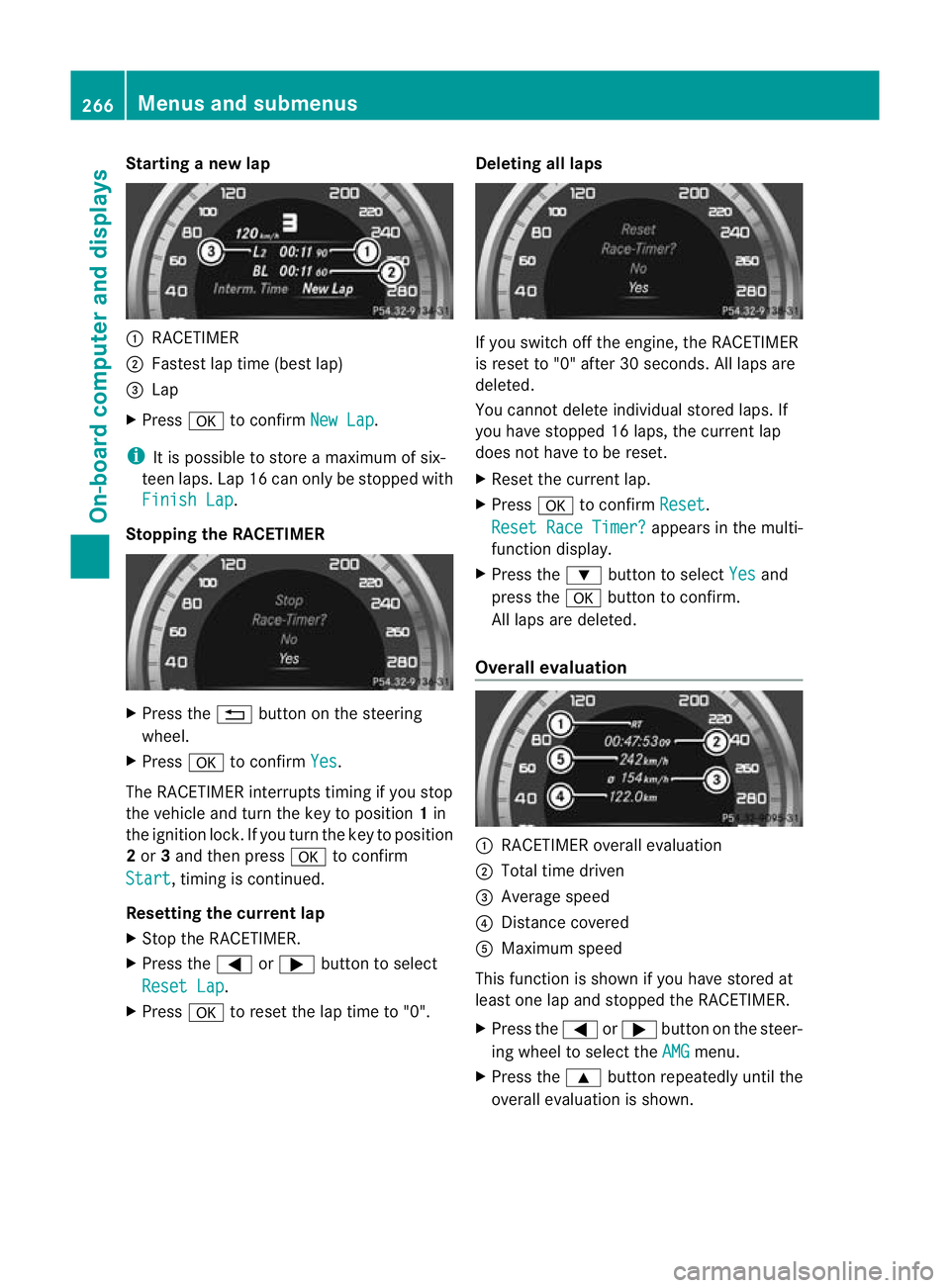
:
RACETIMER
; Fastest lap time (best lap)
= Lap
X Press ato confirm New Lap .
i It is possible to store a maximum of six-
teen laps. Lap 16 can only be stopped with
Finish Lap .
Stopping the RACETIMER X
Press the %button on the steering
wheel.
X Press ato confirm Yes .
The RACETIMER interrupts timing if you stop
the vehicle and turn the key to position 1in
the ignition lock. If you turn the key to position
2 or 3and then press ato confirm
Start , timing is continued.
Resetting the current lap
X Stop the RACETIMER.
X Press the =or; button to select
Reset Lap .
X Press ato reset the lap time to "0". Deleting all laps If you switch off the engine, the RACETIMER
is reset to "0" after 30 seconds. All laps are
deleted.
You cannot delete individual stored laps. If
you have stopped 16 laps, the current lap
does not have to be reset.
X
Reset the current lap.
X Press ato confirm Reset .
Reset Race Timer? appears in the multi-
function display.
X Press the :button to select Yes and
press the abutton to confirm.
All laps are deleted.
Overall evaluation :
RACETIMER overall evaluation
; Total time driven
= Average speed
? Distance covered
A Maximum speed
This function is shown if you have stored at
least one lap and stopped the RACETIMER.
X Press the =or; button on the steer-
ing wheel to select the AMG menu.
X Press the 9button repeatedly until the
overall evaluation is shown. 266
Menus and submenusOn-board computer and displays
Page 271 of 457
Display messages
Introduction
General notes Display messages appear in th
emultifunction display.
Display messages with graphic symbols are simplified in th eOwner's Manual and may differ
fro mt he symbols in the multifunction display.
Please respond in accordance with the display messages and follow the additional notes in
this Owner's Manual.
Certain display messages are accompanied by an audible warning tone or a continuous tone.
When the ignition is switched off, all display messages are deleted apart from some high-
priority display messages. Once the causes of the high-priority display messages have been
rectified, the corresponding display messages are also deleted.
When you stop and park the vehicle, please observe the notes on:
R HOLD function (Y page 205)
R Parking (Y page 183)
Hiding display messages X
Press the aor% button on the steering wheel to hide the display message.
The display message is cleared.
The multifunction display shows high-priority display messages in red. Some high-priority dis-
play messages cannot be hidden.
The multifunction display shows these messages continuously until the causes for the mes-
sages have been remedied.
Message memory The on-board computer saves certain display messages in the
message memory.You can
call up the display messages:
X Press the =or; button on the steering wheel to select the Serv. menu.
If there are display messages, the multifunction display shows 2 messages , for example.
X Press the 9or: button to select the entry, e.g. 2 messages .
X Press ato confirm.
X Press the 9or: button to scroll through the display messages. 268
Display messagesOn-board computer and displays
Page 285 of 457
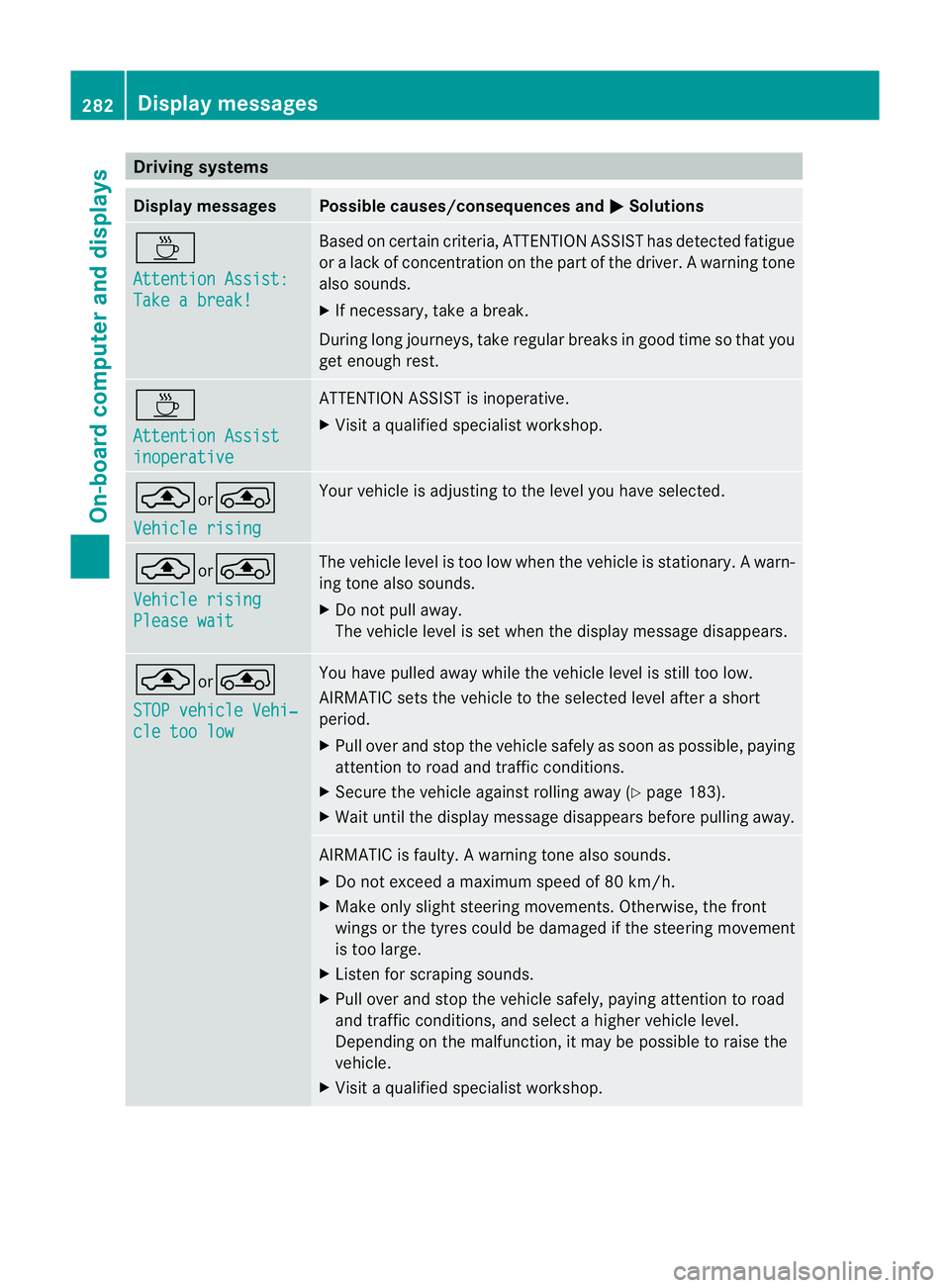
Driving systems
Display messages Possible causes/consequences and
M Solutions
À
Attention Assist:
Take a break! Based on certain criteria, ATTENTION ASSIST has detected fatigue
or
alack of concentration on th epart of th edriver. A warning tone
also sounds.
X If necessary, take a break.
During long journeys, take regular breaks in good time so that you
get enough rest. À
Attention Assist
inoperative ATTENTION ASSIST is inoperative.
X
Visi taqualified specialist workshop. ¨or°
Vehicle rising Your vehicle is adjusting to the level you have selected.
¨or°
Vehicle rising
Please wait The vehicle level is too low when the vehicle is stationary.
Awarn-
ing tone also sounds.
X Do no tpull away.
The vehicle level is set when the display message disappears. ¨or
°
STOP vehicle Vehi‐ cle too low You have pulled away while the vehicle level is still too low.
AIRMATIC sets the vehicle to the selected level after a short
period.
X
Pull ove rand stop the vehicle safely as soo nas possible, paying
attention to road and traffic conditions.
X Secure the vehicle against rolling away (Y page 183).
X Wait until the display message disappears before pulling away. AIRMATIC is faulty.
Awarning tone also sounds.
X Do not exceed a maximum speed of 80 km/h.
X Make only sligh tsteering movements. Otherwise, the front
wings or the tyres could be damaged if the steering movement
is too large.
X Liste nfor scraping sounds.
X Pull over and stop the vehicle safely, paying attention to road
and traffic conditions, and select a higher vehicle level.
Depending on the malfunction, it may be possible to raise the
vehicle.
X Visit a qualified specialist workshop. 282
Display messagesOn-board computer and displays
Page 288 of 457
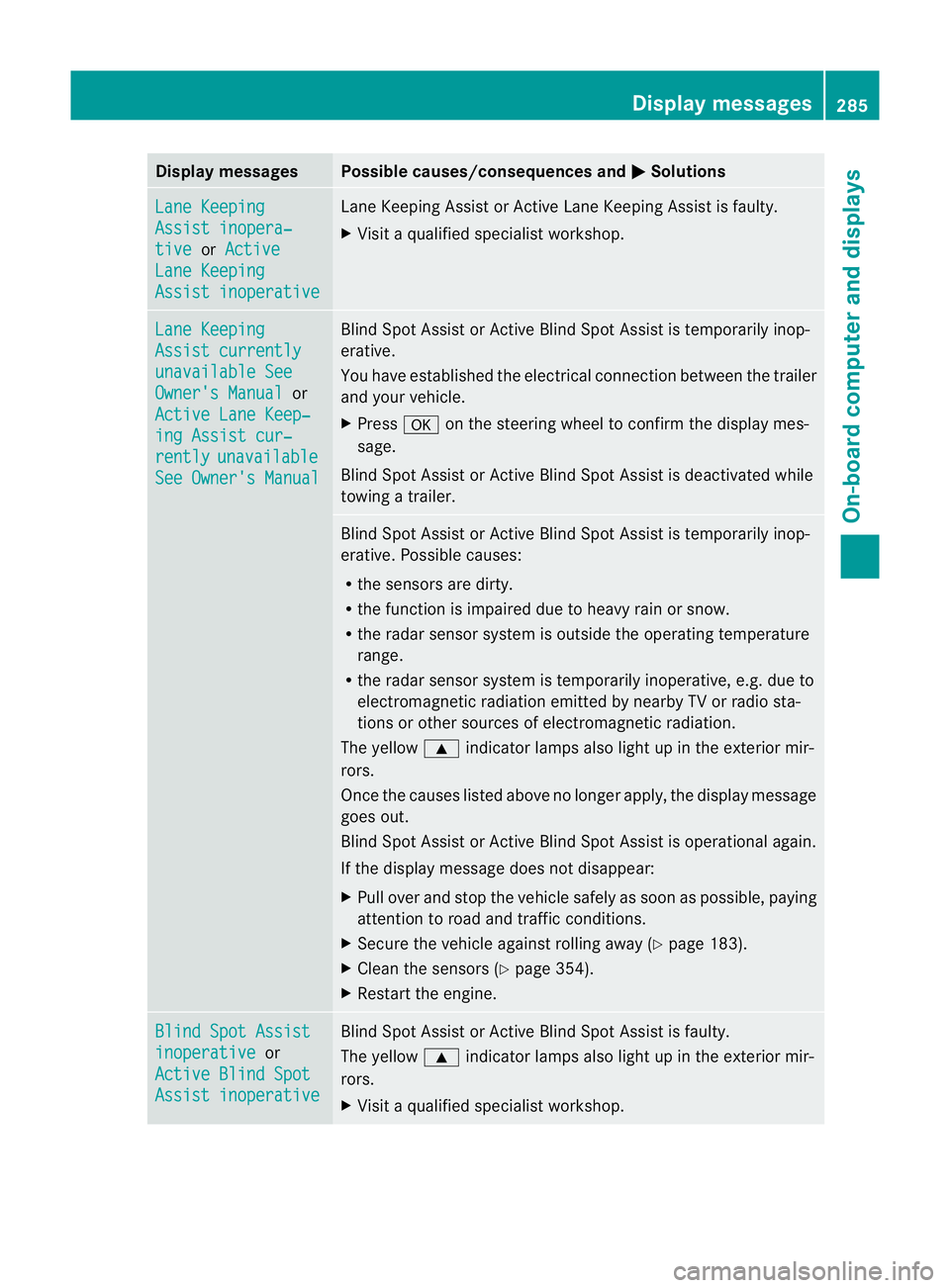
Display messages Possible causes/consequences and
M Solutions
Lane Keeping
Assist inopera‐
tive or
Active Lane Keeping
Assist inoperative Lane Keeping Assis
torActive Lane Keeping Assist is faulty.
X Visit a qualified specialist workshop. Lane Keeping
Assist currently
unavailable See
Owner's Manual or
Active Lane Keep‐ ing Assist cur‐
rently unavailable
See Owner's Manual Blind Spot Assist or Active Blind Spot Assist is temporarily inop-
erative.
You have established the electrical connection between the trailer
and your vehicle.
X Press aon the steering wheel to confirm the display mes-
sage.
Blind Spot Assist or Active Blind Spot Assist is deactivated while
towing a trailer. Blind Spot Assist or Active Blind Spot Assist is temporarily inop-
erative .Possible causes:
R the sensors are dirty.
R the function is impaired due to heavy rain or snow.
R the radar sensor system is outside the operating temperature
range.
R the radar sensor system is temporarily inoperative, e.g. due to
electromagnetic radiation emitted by nearby TV or radio sta-
tions or other sources of electromagnetic radiation.
The yellow 9indicator lamps also light up in the exterior mir-
rors.
Once the causes listed above no longer apply, the display message
goes out.
Blind Spot Assist or Active Blind Spot Assist is operational again.
If the display message does not disappear:
X Pull over and stop the vehicle safely as soon as possible, paying
attention to road and traffic conditions.
X Secure the vehicle against rolling away (Y page 183).
X Clean the sensors (Y page 354).
X Restart the engine. Blind Spot Assist
inoperative or
Active Blind Spot Assist inoperative Blind Spot Assist or Active Blind Spot Assist is faulty.
The yellow 9indicator lamps also light up in the exterior mir-
rors.
X Visit a qualified specialist workshop. Display messages
285On-board computer and displays Z
Page 292 of 457
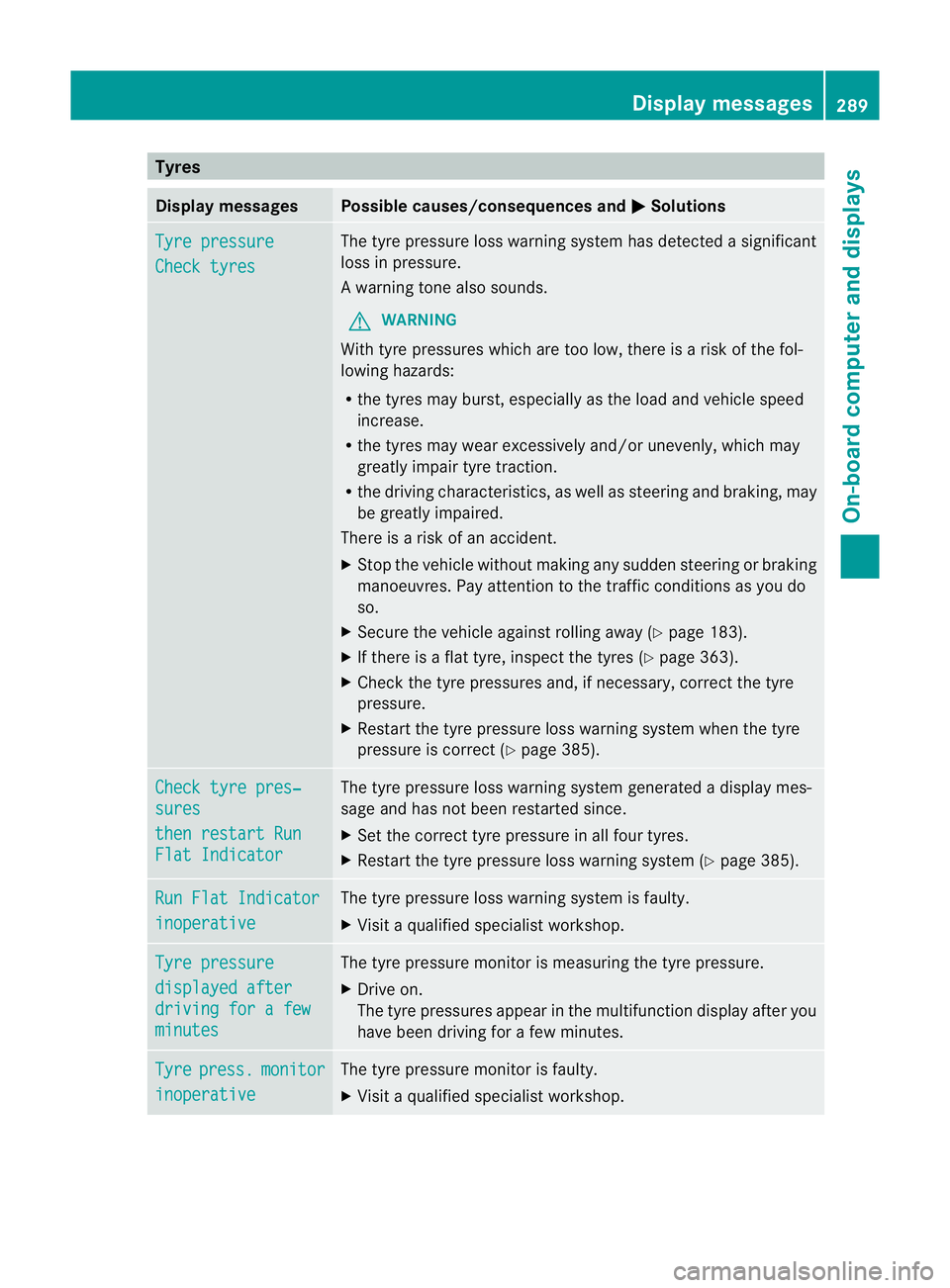
Tyres
Display messages Possible causes/consequences and
M Solutions
Tyre pressure
Check tyres The tyre pressure loss warning system has detected a significant
loss in pressure.
Aw
arning tone also sounds.
G WARNING
With tyre pressures which are too low, there is a ris kofthe fol-
lowing hazards:
R the tyres may burst, especially as the load and vehicle speed
increase.
R the tyres may wear excessively and/or unevenly, which may
greatly impair tyre traction.
R the driving characteristics, as well as steering and braking, may
be greatly impaired.
There is a risk of an accident.
X Stop the vehicle without making any sudden steering or braking
manoeuvres. Pay attention to the traffic conditions as you do
so.
X Secure the vehicle against rolling away (Y page 183).
X If there is a flat tyre, inspect the tyres (Y page 363).
X Check the tyre pressures and, if necessary, correct the tyre
pressure.
X Restart the tyre pressure loss warning system when the tyre
pressure is correct (Y page 385).Check tyre pres‐
sures
then restart Run
Flat Indicator The tyre pressure loss warning system generated a displaym
es-
sage and has not been restarted since.
X Set the correct tyre pressure in all four tyres.
X Restart the tyre pressure loss warning system (Y page 385).Run Flat Indicator
inoperative The tyre pressure loss warning system is faulty.
X
Visit a qualified specialist workshop. Tyre pressure
displayed after
driving for a few
minutes The tyre pressure monitor is measuring the tyre pressure.
X
Drive on.
The tyre pressures appear in the multifunction display after you
have been driving for a few minutes. Tyre press. monitor
inoperative The tyre pressure monitor is faulty.
X
Visit a qualified specialist workshop. Display messages
289On-board computer and displays Z
Page 293 of 457
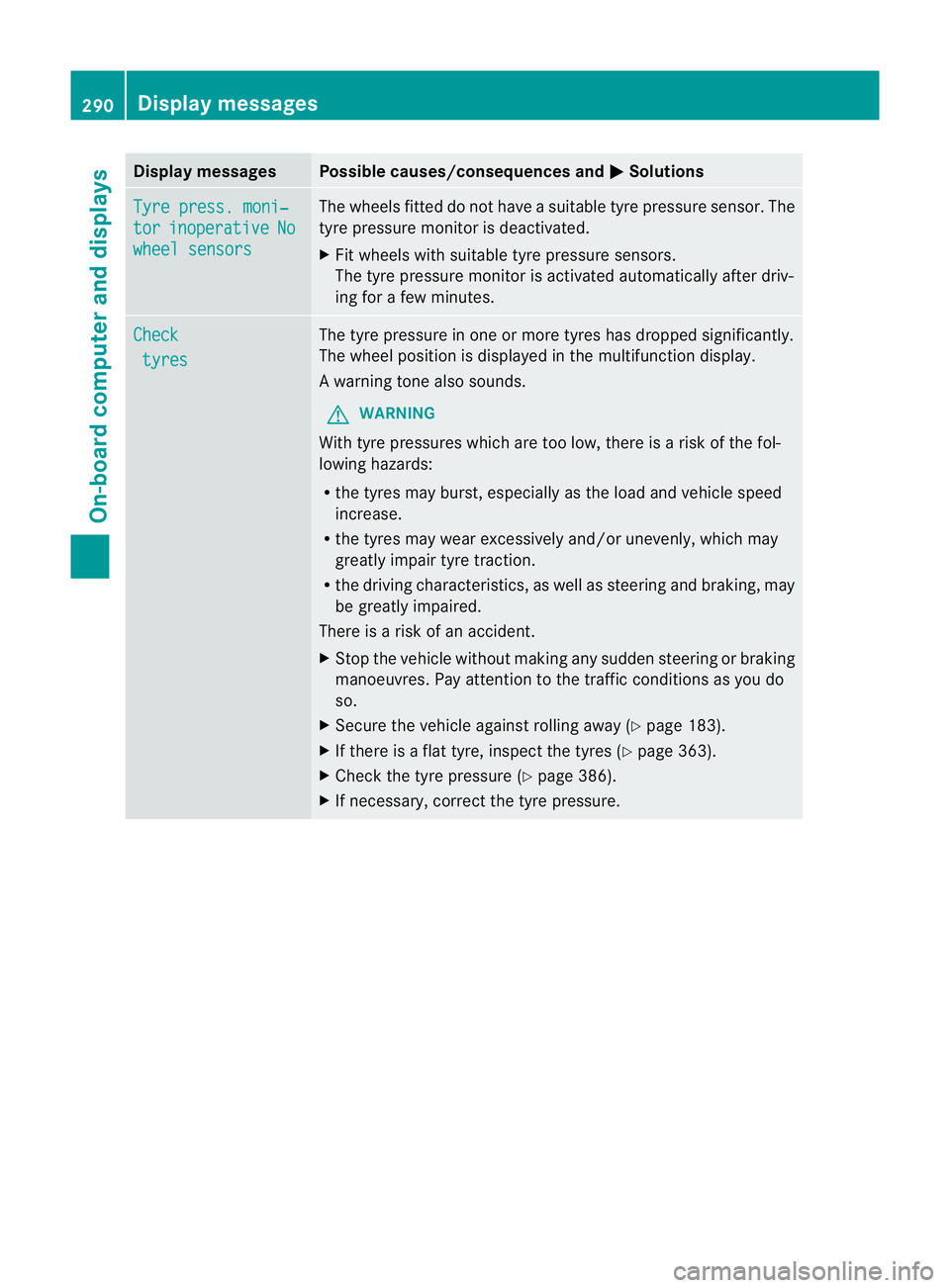
Display messages Possible causes/consequences and
M Solutions
Tyre press. moni‐
tor inoperative No
wheel sensors The wheels fitted do no
thave a suitable tyre pressure sensor .The
tyre pressure monitor is deactivated.
X Fit wheels with suitable tyre pressure sensors.
The tyre pressure monitor is activated automatically after driv-
ing for a few minutes. Check
tyres The tyre pressure in one or more tyres has dropped significantly.
The wheel position is displayed in the multifunction display.
Aw
arning tone also sounds.
G WARNING
With tyre pressures which are too low, there is a ris kofthe fol-
lowing hazards:
R the tyres may burst, especially as the load and vehicle speed
increase.
R the tyres may wear excessively and/or unevenly, which may
greatly impair tyre traction.
R the driving characteristics, as well as steering and braking, may
be greatly impaired.
There is a risk of an accident.
X Stop the vehicle without making any sudden steering or braking
manoeuvres. Pay attention to the traffic conditions as you do
so.
X Secure the vehicle against rolling away (Y page 183).
X If there is a flat tyre, inspect the tyres (Y page 363).
X Check the tyre pressure (Y page 386).
X If necessary, correct the tyre pressure. 290
Display messagesOn-board computer and displays
Page 294 of 457
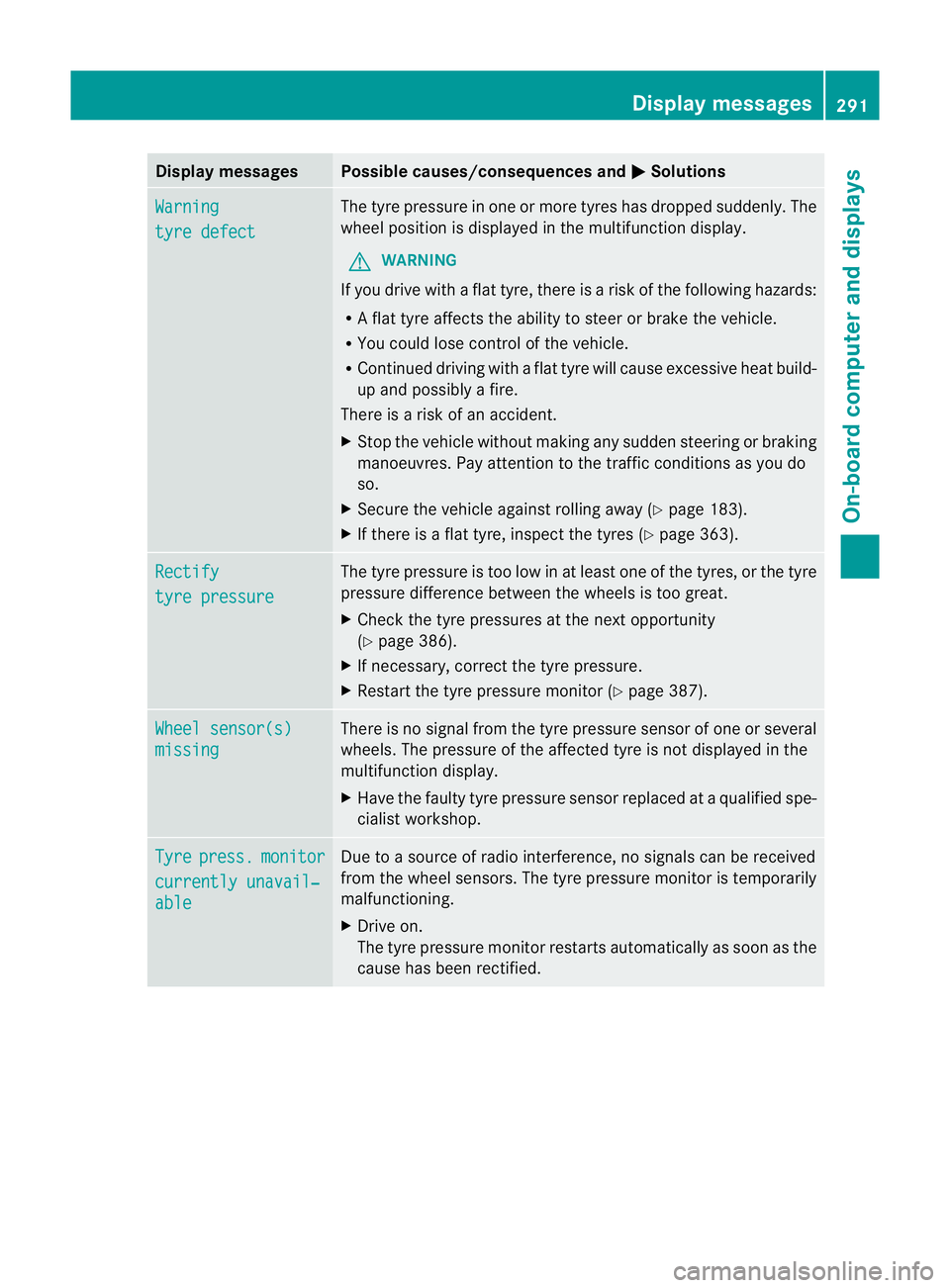
Display messages Possible causes/consequences and
M Solutions
Warning
tyre defect The tyre pressure in on
eormore tyres has dropped suddenly. The
wheel position is displayed in the multifunction display.
G WARNING
If you drive with a flat tyre, there is a risk of the following hazards:
R A flat tyre affects the ability to steer or brake the vehicle.
R You could lose control of the vehicle.
R Continued driving with a flat tyre will cause excessive heat build-
up and possibly a fire.
There is a risk of an accident.
X Stop the vehicle without making any sudden steering or braking
manoeuvres. Pay attention to the traffic conditions as you do
so.
X Secure the vehicle against rolling away (Y page 183).
X If there is a flat tyre, inspect the tyres (Y page 363).Rectify
tyre pressure The tyre pressure is too low in at least one of the tyres, or the tyre
pressure difference between the wheels is too great.
X
Check the tyre pressures at the next opportunity
(Y page 386).
X If necessary, correct the tyre pressure.
X Restart the tyre pressure monitor (Y page 387).Wheel sensor(s)
missing There is no signal from the tyre pressure sensor of one or several
wheels. The pressure of the affected tyre is not displayed in the
multifunction display.
X
Have the faulty tyre pressure sensor replaced at a qualified spe-
cialist workshop. Tyre press. monitor
currently unavail‐
able Due to a source of radio interference, no signals can be received
from the wheel sensors. The tyre pressure monitor is temporarily
malfunctioning.
X Drive on.
The tyre pressure monitor restarts automatically as soon as the
cause has been rectified. Display messages
291On-board computer and displays Z
Page 295 of 457
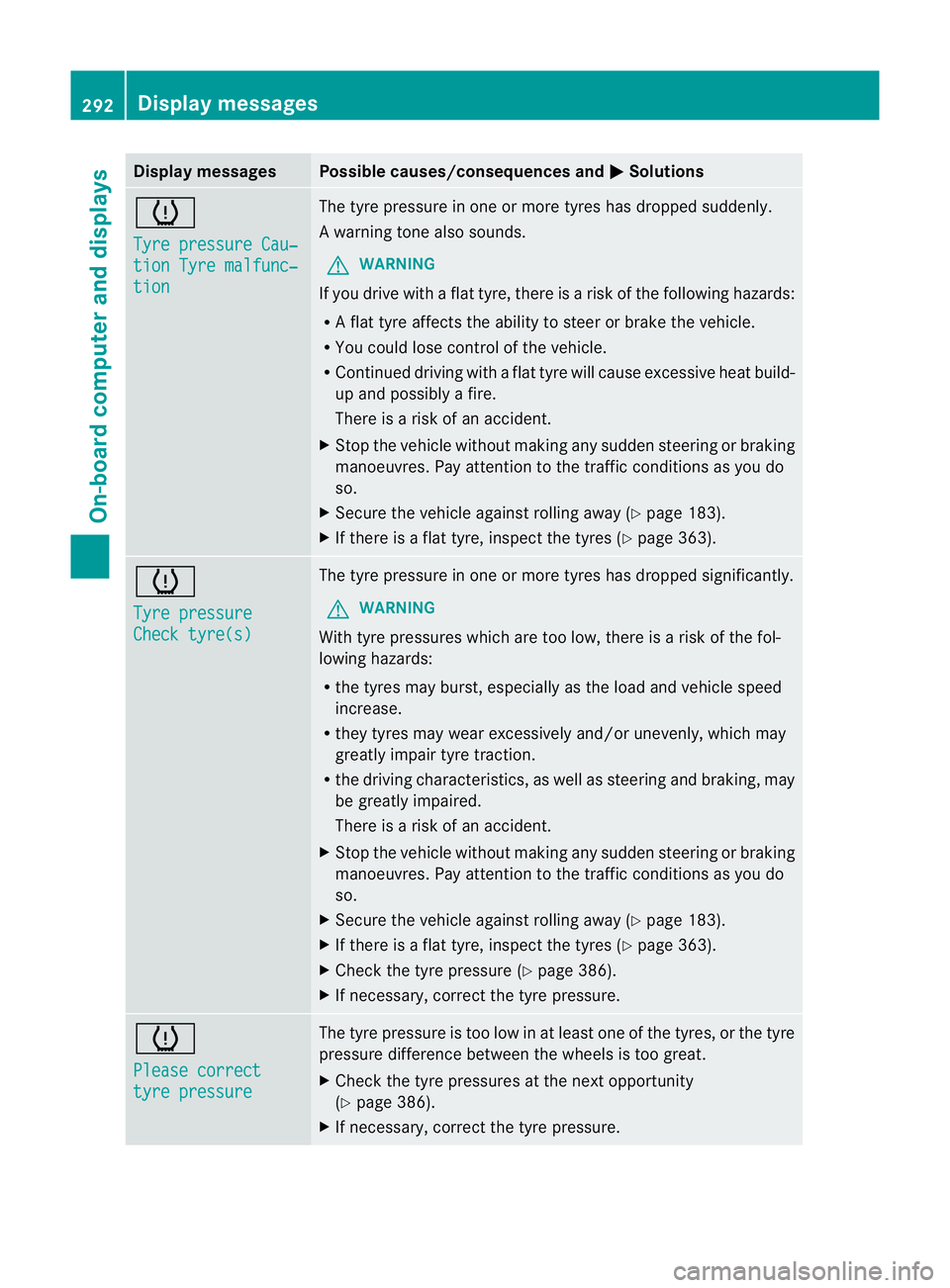
Display messages Possible causes/consequences and
M Solutions
h
Tyre pressure Cau‐
tion Tyre malfunc‐
tion The tyre pressure in one or more tyres has dropped suddenly.
Aw
arning tone also sounds.
G WARNING
If you drive with a flat tyre, there is a ris kofthe following hazards:
R A flat tyre affects the ability to steer or brake the vehicle.
R You could lose control of the vehicle.
R Continued driving with a flat tyre will cause excessive heat build-
up and possibly a fire.
There is a risk of an accident.
X Stop the vehicle without making any sudden steering or braking
manoeuvres. Pay attention to the traffic conditions as you do
so.
X Secure the vehicle against rolling away (Y page 183).
X If there is a flat tyre, inspect the tyres (Y page 363).h
Tyre pressure
Check tyre(s) The tyre pressure in one or more tyres has dropped significantly.
G WARNING
With tyre pressures which are too low, there is a risk of the fol-
lowing hazards:
R the tyres may burst, especially as the load and vehicle speed
increase.
R they tyres may wear excessively and/or unevenly, which may
greatly impair tyre traction.
R the driving characteristics, as well as steering and braking, may
be greatly impaired.
There is a risk of an accident.
X Stop the vehicle without making any sudden steering or braking
manoeuvres. Pay attention to the traffic conditions as you do
so.
X Secure the vehicle against rolling away (Y page 183).
X If there is a flat tyre, inspect the tyres (Y page 363).
X Check the tyre pressure (Y page 386).
X If necessary, correct the tyre pressure. h
Please correct
tyre pressure The tyre pressure is too low in at least one of the tyres, or the tyre
pressure difference between the wheels is too great.
X
Check the tyre pressures at the next opportunity
(Y page 386).
X If necessary, correct the tyre pressure. 292
Display messagesOn-board computer and displays