climate settings MERCEDES-BENZ E-CLASS ESTATE 2012 Owners Manual
[x] Cancel search | Manufacturer: MERCEDES-BENZ, Model Year: 2012, Model line: E-CLASS ESTATE, Model: MERCEDES-BENZ E-CLASS ESTATE 2012Pages: 457, PDF Size: 11.62 MB
Page 15 of 457
Fuses
Allocatio nchart ............................. 376
Before changing ............................. 376
Fuse box in the boot ......................376
Fuse box in the engine compart-
ment .............................................. 376
Fuse box in the luggage compart-
ment .............................................. 377
Important safety notes ..................375 G
Garage door opener Clearing the memory .....................337
Frequencies ................................... 338
Important safety notes ..................335
Opening/closing the garage door ..337
Programming (button in the rear-
view mirror) ................................... 336
Gear indicator (on-board com-
puter) ................................................. .264
Gearshift program SETUP (on-board computer) ..........265
Genuine Mercedes-Benz parts .........432
Glove compartment ..........................311H
Handbrake see Parking brake
Hazard warning lamps ......................129
Headbag Display message ............................ 275
Headlamp
Cleaning system (function) ............130
Cleaning system (notes) ................443
Headlamps
Misting up ...................................... 133
Topping up the cleaning system ....349
see Automatic headlamp mode
Head restraints
Adjusting ....................................... 109
Adjusting (electrically). ..................110
Adjusting (manually). .....................109
Adjusting (rear) .............................. 110
Fitting/removing (rear) ..................111
Luxury ............................................ 110 Heating
see Climate control
High-pressure cleaners ....................352
Hill start assist .................................. 164
HOLD function Display message ............................ 283
Function/notes ............................. 205 I
ICS padded play table .........................63
Ignition lock see Key positions
Immobiliser .......................................... 78
In-car hotspot see Separate operating instructions
Indicator and warning lamps
Coolant .......................................... 305
DISTRONI CPLUS ........................... 307
Engine diagnostics .........................305
Fuel tank ........................................ 305
SPORT handling mode ...................303
Indicator lamps
Display message ............................ 276
see Warning and indicator lamps
Infrared lamps (changing bulbs) ......137
Insectp rotection on the radiator ....346
Inspection see ASSYST PLUS
Instrument cluster
Overview .................................. 32, 245
Settings ......................................... 258
Warning and indicator
lamps ...................................... .34, 298
Instrument cluster lighting ..............246
Integrated child seat ICS padded pla ytable ...................... 63
Important safety guidelines .............61
Side hea drestraints ...................... ...64
Storing, ICS padded play table and
sid eh ead restraint s......................... 65
Intelligen tLight System
Activating/deactivatin g................. 259
Display message ............................ 278
Overview ........................................ 130
Setting the dipped-bea mhead-
lamps for driving on the right/left .260 12
Index
Page 20 of 457
Notes for AMG vehicles
.................437
Refuelling proces s......................... 180
see Fuel
Releasing the parking loc kman-
ually (automatic transmission) ........179
Remote control Auxiliary heating/ventilation .......... 152
Changing the batteries (auxiliary
heating) ......................................... 154
Garage door opene r....................... 335
Programming (garage door
opener) .......................................... 336
Replacing the battery (auxiliary
heating remote control) .................... 154
Reserve (fuel tank) see Fuel
Reserve fuel
Display message ............................ 280
Warning lamp ................................. 305
Residual heat (climate control) ........150
Restraint system see SRS (Supplemental Restraint
System)
Rev counter ........................................ 247
Reverse gear Engaging (automatic transmis-
sion) ............................................... 171
Engaging (manual transmission) ....170
Reversing camera
Cleaning instructions .....................354
Function/notes ............................. 218
Switching on/off ........................... 219
Reversing lamp (display message) ..277
Roller sunblind Panorama sliding sunroo f.............. 101
Rea rwindow .................................. 330
Roof carrier ........................................ 327
Roof lining and carpets (cleaning
instructions) ...................................... 357
Roof load (maximum) ........................444 S
Safety Childre ninthe vehicle ..................... 55
Child restraint systems ....................55
Safety net
Attaching ....................................... 321
Important safety information .........321
Safety system
see Driving safety system
Seat
Folding the backres t(rear com-
partment) forwards/back ..............317
Seat belt
Adjusting the driver's and front-
passenger sea tbelt ......................... 52
Adjusting the height ......................... 52
Belt force limiter .............................. 54
Belt tensione r.................................. 54
Centre rear-compartment sea t........ 53
Cleaning ......................................... 357
Display message ............................ 273
Fastening ......................................... 52
Important safety guidelines .............51
Rea rseat belt status indicator .........54
Releasing ......................................... 53
Switching belt adjustment on/off
(on-board computer) ......................263
Warning lamp ................................. 299
Warning lamp (function) ................... 53
Seats
Adjusting (electrically). ..................108
Adjusting (manually and electri-
cally) .............................................. 108
Adjusting lumba rsuppor t.............. 113
Adjusting the 4-way lumba rsup-
por t................................................ 113
Adjusting the head restraint ..........109
Cleaning the cover .........................356
Correct driver's sea tposition ........106
Important safety notes ..................107
Overview ........................................ 107
Seat heating problem ....................116
Seat ventilation problem ................116
Storing settings (memory func-
tion) ............................................... 121 Index
17
Page 145 of 457
Useful information
i This Owner's Manual describes all mod-
els, series and optional equipment for your
vehicle that were available at the time of
going to press. National variations are pos-
sible. Note that your vehicle may not be
equipped with all of the functions descri-
bed. This is also the case for systems and
functions relevant to safety.
i Read the information on qualified special-
ist workshops: (Y page 25). Overview of climate control systems
Important safety notes
G
WARNING
Observe the settings recommended on the
following pages. The windows could other-
wise mist up. This may preven tyou from
observing the traffic conditions, thereby caus-
ing an accident.
Climate control regulates the temperature
and the humidity in the vehicle interior and
filters undesirable substances out of the air.
Climate control is only operational when the
engine is running. The system only works
optimally if the side windows and the roof are
closed.
The residual heat function can only be acti-
vated or deactivated with the ignition
switched off (Y page 150).
i Ventilate the vehicle for a brief period
during warm weather, e.g. using the con-
venience opening feature (Y page 96). This
will speed up the cooling process and the
desired vehicle interior temperature will be
reached more quickly.
i The integrated filter can filter out most
particles of dust and completely filters out
pollen. Aclogged filter reduces the amount
of air supplied to the vehicle interior .For
this reason, you should always observe the interval for replacing the filter, which is
specified in the Service Booklet
.As it
depends on environmental conditions, e.g.
heavy air pollution, the interval may be
shorter than stated in the Service Booklet.
i It is possible that the residual heat func-
tion may be activated automatically an hour
after the key has been removed. The vehi-
cle is then ventilated for 30minutes to dry
the air-conditioning system. 142
Overview of climate control systemsClimate control
Page 146 of 457
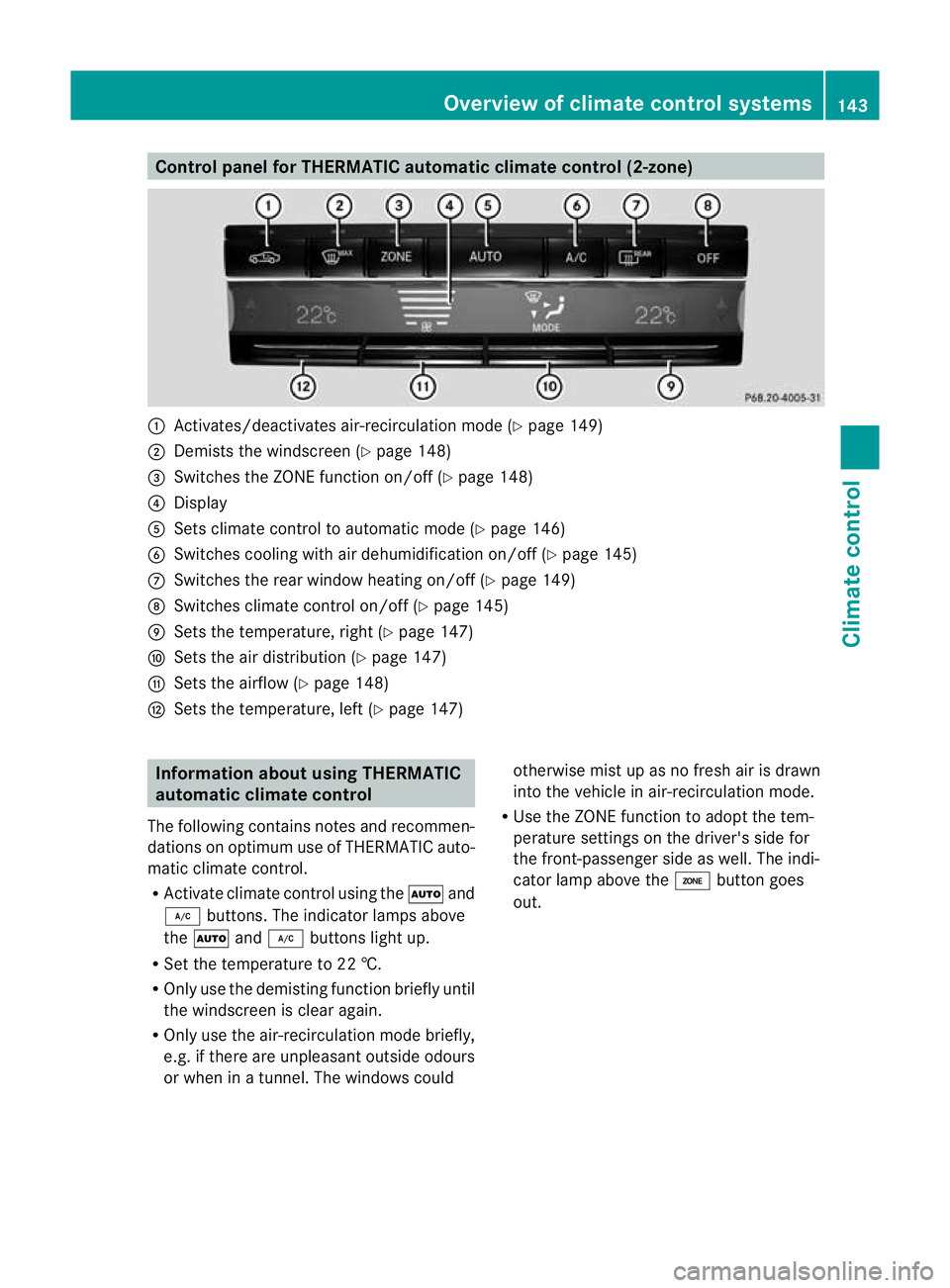
Control panel for THERMATIC automatic climate control (2-zone)
:
Activates/deactivates air-recirculation mode (Y page 149)
; Demists the windscreen (Y page 148)
= Switches the ZONE function on/off (Y page 148)
? Display
A Sets climate control to automatic mod e(Ypage 146)
B Switches cooling with air dehumidification on/off ( Ypage 145)
C Switches the rear window heating on/off (Y page 149)
D Switches climate control on/off (Y page 145)
E Sets the temperature, right (Y page 147)
F Sets the air distribution (Y page 147)
G Sets the airflow (Y page 148)
H Sets the temperature, left (Y page 147)Information about using THERMATIC
automatic climate control
The following contains notes and recommen-
dations on optimum use of THERMATIC auto-
matic climate control.
R Activate climate contro lusing the Ãand
¿ buttons. The indicator lamps above
the à and¿ buttons light up.
R Set the temperature to 22 †.
R Only use the demisting function briefly until
the windscreen is clear again.
R Only use the air-recirculation mode briefly,
e.g. if there are unpleasant outside odours
or when in a tunnel. The windows could otherwise mist up as no fresh air is drawn
into the vehicle in air-recirculation mode.
R Use the ZONE function to adopt the tem-
perature settings on the driver's side for
the front-passenger side as well.T he indi-
cator lamp above the ábutton goes
out. Overview of climate control systems
143Climate control Z
Page 148 of 457
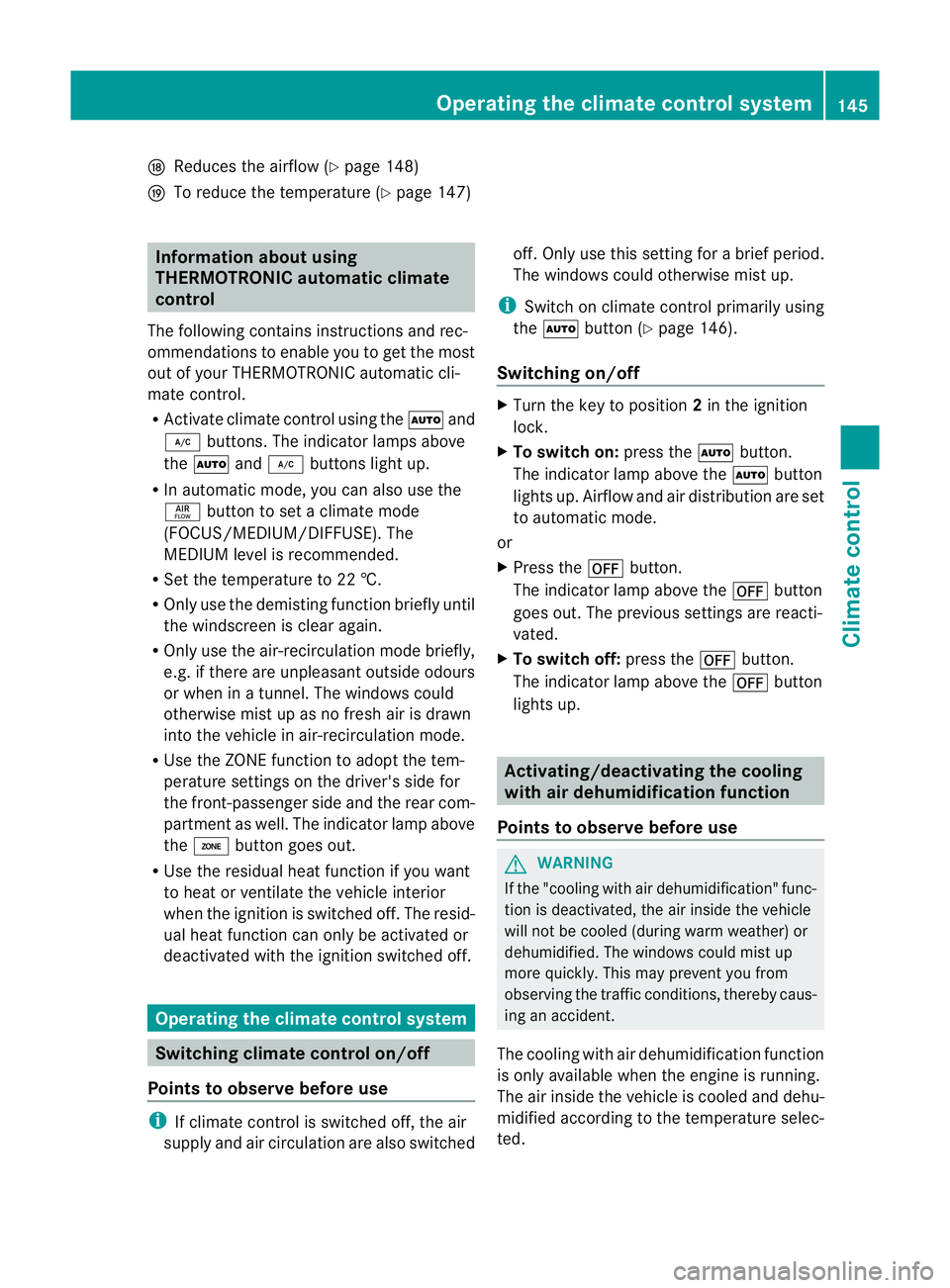
N
Reduces the airflow ( Ypage 148)
O To reduce the temperature (Y page 147)Information about using
THERMOTRONIC automatic climate
control
The following contains instructions and rec-
ommendations to enable you to get the most
out of your THERMOTRONIC automati ccli-
mate control.
R Activate climate control using the Ãand
¿ buttons .The indicator lamps above
the à and¿ buttons light up.
R In automatic mode, you can also use the
ñ button to set a climate mode
(FOCUS/MEDIUM/DIFFUSE). The
MEDIUM level is recommended.
R Set the temperature to 22 †.
R Only use the demisting function briefly until
the windscreen is clear again.
R Only use the air-recirculation mode briefly,
e.g. if there are unpleasant outside odours
or when in a tunnel. The windows could
otherwise mist up as no fresh air is drawn
into the vehicle in air-recirculation mode.
R Use the ZONE function to adopt the tem-
perature settings on the driver's side for
the front-passenger side and the rear com-
partment as well. The indicator lamp above
the á button goes out.
R Use the residual heat function if you want
to heat or ventilate the vehicle interior
when the ignition is switched off. The resid-
ual heat function can only be activated or
deactivated with the ignition switched off. Operating the climate control system
Switching climate control on/off
Points to observe before use i
If climate control is switched off, the air
supply and air circulation are also switched off. Only use this setting for a brief period.
The windows could otherwise mist up.
i Switch on climate control primarily using
the à button (Y page 146).
Switching on/off X
Turn the key to position 2in the ignition
lock.
X To switch on: press theÃbutton.
The indicator lamp above the Ãbutton
lights up. Airflow and air distribution are set
to automatic mode.
or
X Press the ^button.
The indicator lamp above the ^button
goes out. The previous settings are reacti-
vated.
X To switch off: press the^button.
The indicator lamp above the ^button
lights up. Activating/deactivating the cooling
with air dehumidification function
Points to observe before use G
WARNING
If the "cooling with air dehumidification" func-
tion is deactivated, the air inside the vehicle
will not be cooled (during warm weather) or
dehumidified. The windows could mist up
more quickly. This may prevent you from
observing the traffic conditions, thereby caus-
ing an accident.
The cooling with air dehumidification function
is only available when the engine is running.
The air inside the vehicle is cooled and dehu-
midified according to the temperature selec-
ted. Operating the climate control system
145Climate control Z
Page 150 of 457
Setting the temperature
THERMATIC automatic climate control Different temperatures can be set for the
driver's and front-passenger sides.
X Turn the key to position 2in the ignition
lock.
X To increase/reduce: press switchEor
H up or down (Y page 143).
Only change the temperature setting in
small increments. Start at 22 †.
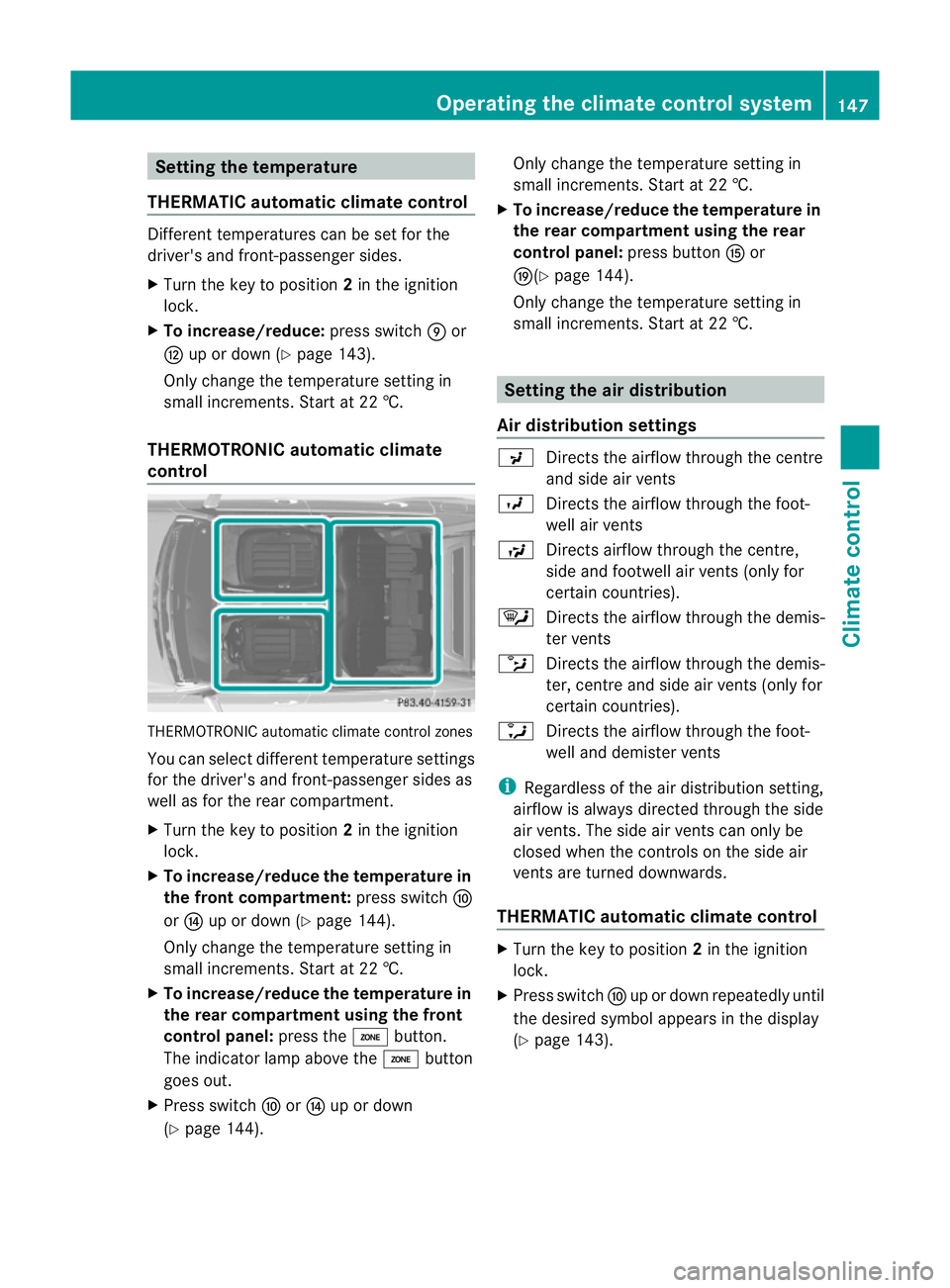
THERMOTRONIC automatic climate
control THERMOTRONIC automatic climate control zones
You can select different temperature settings
for the driver's and front-passenger sides as
well as for the rear compartment.
X Turn the key to position 2in the ignition
lock.
X To increase/reduce the temperature in
the front compartment: press switchF
or J up or down (Y page 144).
Only change the temperature setting in
small increments. Start at 22 †.
X To increase/reduce the temperature in
the rear compartment using the front
control panel: press theábutton.
The indicator lamp above the ábutton
goes out.
X Press switch ForJ up or down
(Y page 144). Only change the temperature setting in
small increments. Start at 22 †.
X To increase/reduce the temperature in
the rear compartment using the rear
control panel: press buttonKor
O(Y page 144).
Only change the temperature setting in
small increments. Start at 22 †. Setting the air distribution
Air distribution settings P
Directs the airflow through the centre
and side air vents
O Directs the airflow through the foot-
well air vents
S Directs airflow through the centre,
side and footwell air vents( only for
certain countries).
¯ Directs the airflow through the demis-
ter vents
b Directs the airflow through the demis-
ter, centre and side air vents (only for
certain countries).
a Directs the airflow through the foot-
well and demister vents
i Regardless of the air distribution setting,
airflow is always directed through the side
air vents. The side air vents can only be
closed when the controls on the side air
vents are turned downwards.
THERMATIC automatic climate control X
Turn the key to position 2in the ignition
lock.
X Press switch Fup or down repeatedly until
the desired symbol appears in the display
(Y page 143). Operating the climate control system
147Climate control Z
Page 151 of 457
THERMOTRONIC automatic climate
control
X
Turn the key to position 2in the ignition
lock.
X Press switch Iup or down repeatedly until
the desired symbol appears in the display
(Y page 144). Setting the airflow
THERMATIC automatic climate control X
Turn the key to position 2in the ignition
lock.
X To increase/reduce: press switchGup
or down (Y page 143).
THERMOTRONIC automatic climate
control X
Turn the key to position 2in the ignition
lock.
X To increase/reduce the front-compart-
men tairflow: press switch Hup or down
(Y page 144).
X To increase/reduce the rear airflow:
press switch MorN(Y page 144). Switching the ZONE function on/off
X To switch on: press theábutton.
The indicator lamp above the ábutton
lights up.
THERMATIC automatic climate control: the
temperature setting for the driver's side is
not adopted for the front-passenger side.
THERMOTRONIC automatic climate con-
trol: the temperature setting for the driver's
side is not adopted for the front-passenger
side and the rear compartment.
X To switch off: press theábutton.
The indicator lamp above the ábutton
goes out. THERMATIC automatic climate control: the
temperature setting for the driver's side is
adopted for the front-passenger side.
THERMOTRONIC automatic climate con-
trol: the temperature setting for the driver's
side is adopted for the front-passenger side
and the rear compartment. Demisting the windscreen
You can use this function to demist the wind-
screen or to demist the inside of the wind-
screen and the side windows.
Switch off the "demisting" function as soon
as the windscreen is clear again.
X Turn the key to position 2in the ignition
lock.
X To activate: press the¬button.
The indicator lamp above the ¬button
lights up.
The climate control syste mswitches to the
following functions:
R heating with dehumidificatio non
R high airflow (depending on the outside
temperature)
R high temperature (depending on the out-
side temperature)
R air distribution to the windscreen and
front side windows
R air-recirculation mode off
X To deactivate: press the¬button.
The indicator lamp above the ¬button
goes out. The previous settings are reacti-
vated. The heating with air dehumidifica-
tion function remains on. Air-recirculation
mode remains deactivated.
or
X Press the Ãbutton.
The indicator lamp above the ¬button
goes out. Airflow and air distribution are set
to automatic mode.
or 148
Operating the climate control systemClimate control
Page 159 of 457
Setting the centre air vents
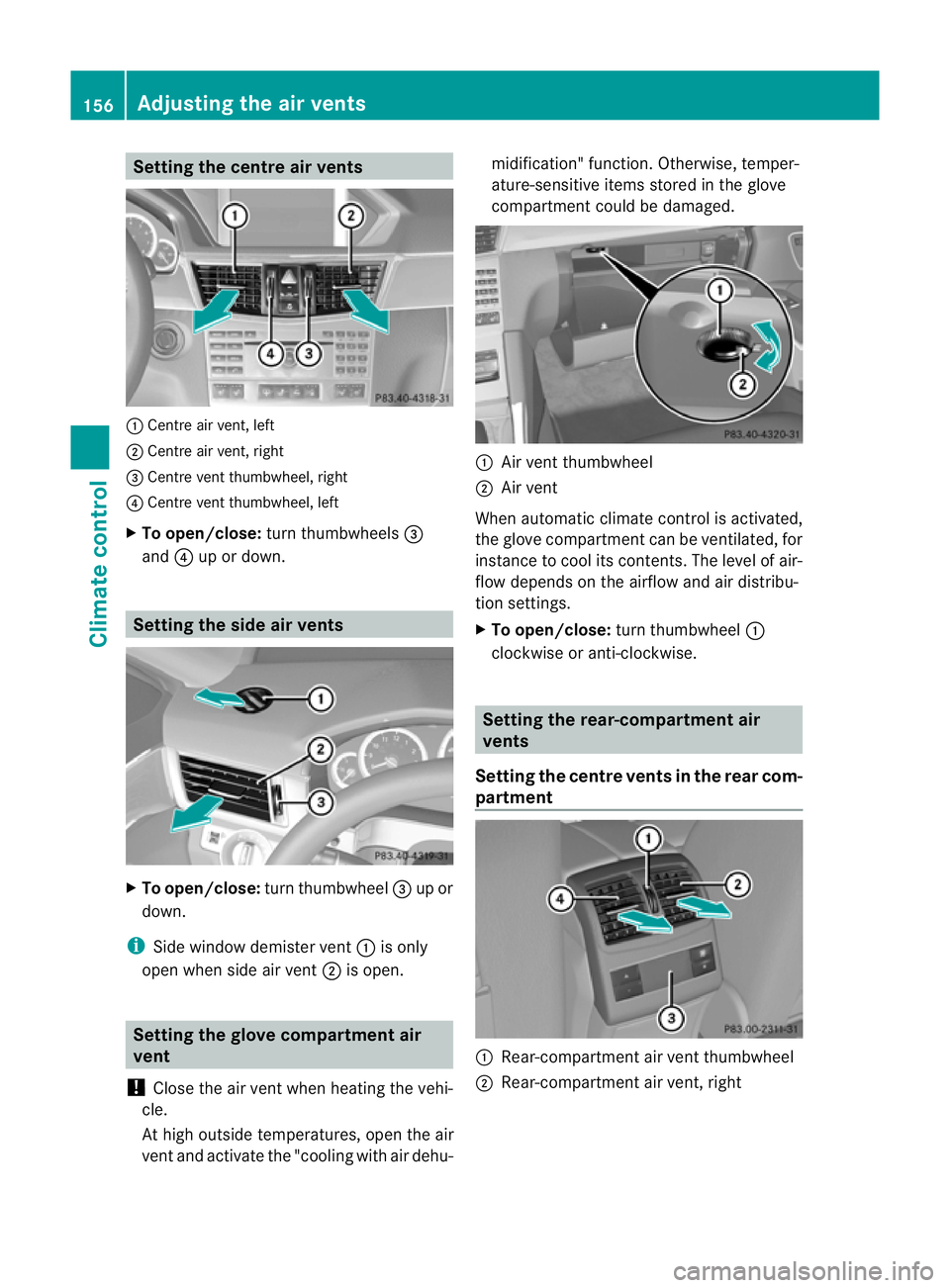
:
Centre air vent, left
; Centre air vent, right
= Centre vent thumbwheel, right
? Centre vent thumbwheel, left
X To open/close: turn thumbwheels =
and ?up or down. Setting the side air vents
X
To open/close: turn thumbwheel =up or
down.
i Side window demister vent :is only
open when side air vent ;is open. Setting the glove compartment air
vent
! Close the air vent when heating the vehi-
cle.
At high outside temperatures, open the air
vent and activate the "cooling with air dehu- midification" function. Otherwise, temper-
ature-sensitive items stored in the glove
compartmen
tcould be damaged. :
Air vent thumbwheel
; Air vent
When automatic climate control is activated,
the glove compartment can be ventilated, for
instance to cool its contents.T he level of air-
flow depends on the airflow and air distribu-
tion settings.
X To open/close: turn thumbwheel :
clockwise or anti-clockwise. Setting the rear-compartment air
vents
Setting the centre vents in the rear com-
partment :
Rear-compartment air vent thumbwheel
; Rear-compartment air vent, right 156
Adjusting the air ventsClimate control