change time MERCEDES-BENZ E-CLASS ESTATE 2017 User Guide
[x] Cancel search | Manufacturer: MERCEDES-BENZ, Model Year: 2017, Model line: E-CLASS ESTATE, Model: MERCEDES-BENZ E-CLASS ESTATE 2017Pages: 585, PDF Size: 11.8 MB
Page 241 of 585
Re
mo teParking Assis tsupports them anoeu‐
vring or parking procedur ewhile youa reoutside
yo ur vehicle. Once youh ave selected asuitable
parking space, yout hen exitth ev ehicle and
guide it int othe parking space using asuitable
mobile phone. Remo teParking Assis tchanges
ge ar,a ccelerates, brakes and steer sthe vehicle.
While Remo teParking Assis tisactive, thev ehi‐
cle is loc ked. Youc an inter rupt thep arking proc‐
ess at an ytime wit hthe mobile phone or the
ve hicle keya nd then take ove rthe vehicle your‐
self.
Yo uc an also use your mobile phon etomove
yo ur vehicle backwards and forw ards in the
st ra ight-ahead position (exploration mode). This
is useful, fore xamp le, ifagarag eisson arrow
th at it is dif ficul tori mpossible togetinoro utof
th ev ehicle af terith as been par ked. Re mo te
Pa rking Assis tautomaticall yperform sa ny minor
st eering cor rections that ar erequired.
Re mo teParking Assis tisonlyana id. It is no ta
substitut efor your attentio ntothe sur roundings.
The responsibility fors afem anoeuvring and
parking remains wit hyou. Inter rupt or term inate
th ep arking procedur eifnecessar y.Mak esure th
at no persons, animals or object setc. ar ein
th em anoeuvring range.
Fo rthe Remo teParking Assis tfunction ,you
re qu iream obile phon eand thec urrent Remo te
Pa rking Assis tApp.
The following operatin gsystems ar esuppor ted:
R Android™
R Apple ®
iOS
If th ec onnection between thev ehicle and the
mobil ephone is inter rupte dw hile aparking
manoeuvr eisbeing per form ed, them anoeuvre
can be continued if thec onnection is re-es tab‐
lished within about tw ominutes.
The following scenarios ar esuppor ted:
R Parking in aparkin gspace parallel tothe
direction of tra vel.
R Parking in aparkin gspace at right angles to
th ed irection of tra vel.
R Exitin gaparkin gspace at right angles tothe
direction of tra vel(ex ploration mode).
R Parking in astraight-ahea dposition, e.g. into
ag arag eorc arport(ex ploration mode). R
Exiting aparking space in astraight-ahead
position ,e.g. from agarag eorc arport(ex plo‐
ra tio nm ode).
If am alfunctio norasystem limitation is de tec‐
te dw hile parkin gormanoeuvring (e.g. thep er‐
mitted downhill gradient is exceeded), thef ol‐
lowing actions ar eperform ed automatically:
R The parking manoeuvr eiscancelled.
R The vehicle is brought toas tandstill.
R Transmission position jis engaged.
R thev ehicle is switched off.
R The vehicle remains loc ked.
If th ep arking manoeuvr eiscancelled, acorre‐
sponding messag eisdisplayedont he mobile
phone. Youc an then take ove rand manoeuvre
th ev ehicle int othe parking space yourself .Alter‐
nativel y,yo uc an mo vethev ehicle bac ktoits
original position, if necessar y.
Yo uc an inter rupt thep arking procedur ewith
Ac tiveP arking Assis tinorder totake control of
th ev ehicle wit hRemo teParking Assis tand
manoeuvr eitintoi ts final position. 238
Driving and pa rking
Page 246 of 585
#
Select Deauthorise. #
Select Yes.
The mobil ephone is del eted from thel istof
devices.
Fu nction of Driv eAwayA ssist
Driv eAwayA ssistcan reduce thes eve rity of an
impact when pulling away.Ifano bstacle is
de tected in thed irection of tr avel, thev ehicle's
speed is brief lyreduced toappr ox.2 km/h .Ifa
critical situation is de tected, asym bolapp ears
on thec amer aimag eoft he multimedia sy stem. &
WARNING Risk of accident caused by
limited de tection per form anc eofD rive
Aw ayAssi st
Driv eAwayA ssistcanno talway sc learly iden‐
tify objects and traf fics ituations.
In su chcases, Driv eAwayA ssistmight:
R Warnyouw ithout reason and limit the
ve hicle speed.
R Notw arny ou or no tlimit thev ehicle
speed. #
Alw aysp aycareful attention tothet raf‐
fi cs ituation; do no trely on Driv eAway
Assi stalone. #
Be prepared tobrak eors werveasn ec‐
essar y,prov ided thet raffic situation
permit sand that it is saf etotakee va‐
siv ea ction. Driv
eAwayA ssistis onl yana id. It is no tasub‐
st itut efor your attentio ntothe sur roundings.
The responsibility fors afem anoeuvring and
parking remains wit hyou. Mak esuret hat no
persons, animals or objectse tc. areinthe
manoeuvring range.
Ar isk of acollision ma yarise in thef ollowing sit‐
uations, fore xamp le:
R Ifth ed rive rm ixes up thea ccelera tora nd
brak epedals.
R Ifth ew rong gear is selec ted.
The Driv eAwayA ssistfunction is activ eunder
th ef ollowing conditions:
R IfPa rking Assis tPARKTRONIC is activated. R
Ever ytimet he gear is changed tok orh
when thev ehicle is at astandstill.
R Ifth ed etected obs tacle is less than appr ox.
1. 0ma way.
R Ifth em anoeuvring assis tance functio nis
acti vatedint he multimedia sy stem.
Sy stem limitations
Driv eAwayA ssistis no tavailable on incline sand
when drivin gwithat railer.
Fu nction of Cross Traf ficA lert
% Alsoread thei nstruction sonBlind Spot
Assis t(→ pag e248).
Ve hicles with Blind Spo tAssis t:driver scan
also be warned of an ycrossing traf ficw hen
re ve rsing out of aparkin gspace. If acritical sit‐
uation is de tected, awarning symbol appear son
th ec amer aimag eoft he multimedia sy stem. If
th ed rive rd oes no trespond tothew arning ,the
ve hicle's brakes can be applied automaticall y.To
do this, thef unction uses ther adar senso rsin
th eb umper .The area adjacen ttothevehicle is
continually monitored. Driving and parking
243
Page 249 of 585
Tr
af ficS ign Assist Fu
nction of Traf ficS ign Assist Tr
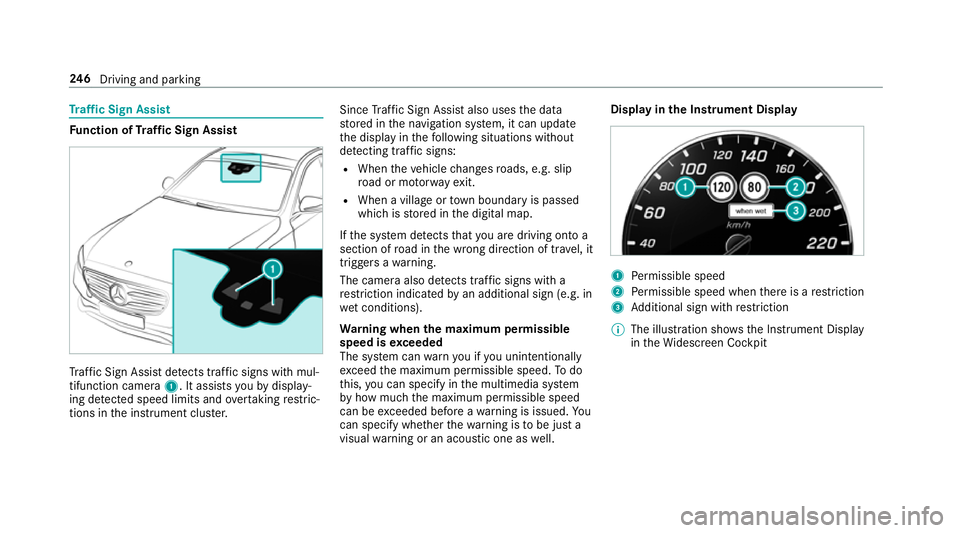
af ficS ign Assi stdetects traf fics igns wi thmul‐
tifunction camera 1.Itassistsy ou bydisplay‐
ing de tected speed limits and overtakin grestric‐
tions in thei nstrument clus ter. Since
Traf ficS ign Assi stalso uses thed ata
st ored in then avigation sy stem, it can update
th ed ispla yint hefollowing situations without
de tecting traf fics igns:
R Whe nthe vehicle changes roads, e.g .slip
ro ad or mo torw ay ex it.
R When avillag eort ownb oundar yispassed
whic hiss tore dint he digital map.
If th es ystemd etects that youa redrivin gontoa
section of road in thew rong direction of tr avel, it
trigger sawarning.
The camera also de tects traf fics igns wi th a
re striction indicated byan additional sign (e.g. in
we tconditions).
Wa rning when them aximum permissible
speed is exceeded
The sy stem can warnyouify ou unintentionally
exc eed them aximum permissible speed. Todo
th is, youc an specify in them ultimedia sy stem
by howm ucht he maximum permissible speed
can be exceeded befor eawarning is issued. Yo u
can specify whe ther thew arning is tobe jus ta
visual warning or an acoustic one as well. Displa
yinthe Instrument Display 1
Perm issible speed
2 Perm issible speed when ther eisar estriction
3 Additional sign wit hrestriction
% The illustration sh owstheI nstrument Display
in theW idescreen Cockpit 246
Driving and pa rking
Page 296 of 585
#
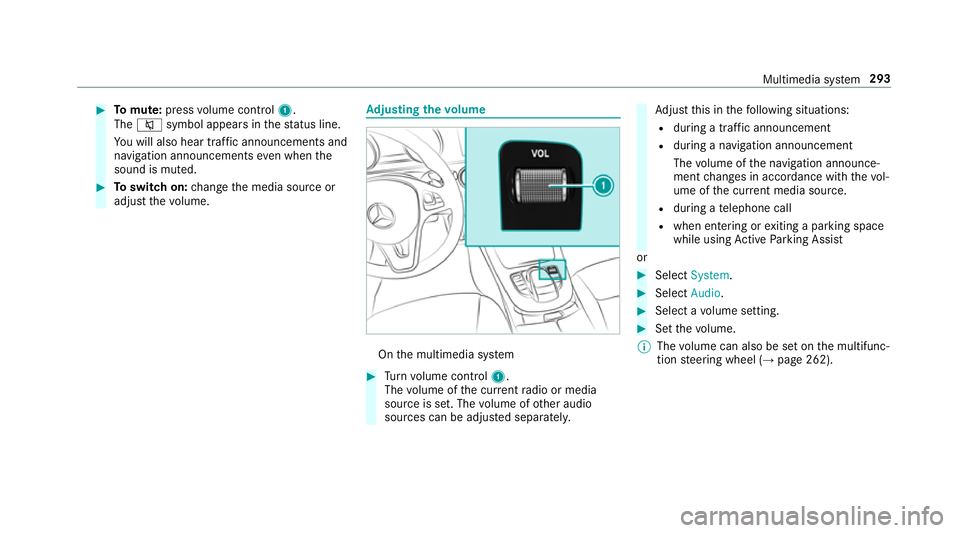
Tomute: pressvolume control 1.
The 8 symbol appear sinthestatus line.
Yo uw ill also hear traf fica nnouncements and
navigation announcements even when the
sound is muted. #
Toswitc hon:chang ethe media source or
adjus tthe volume. Ad
justin gthe volume On
them ultimedia sy stem #
Turn volume control 1.
The volume of thec urrent radio or media
source is set. The volume of other audio
sources can be adjus teds eparatel y. Ad
jus tthis in thef ollowing situations:
R during atraf fica nnouncement
R during anavigation announcement
The volume of then avigation announce‐
ment changes in accordanc ewitht he vol‐
ume of thec urrent media sou rce.
R during atelephone call
R when entering or exitin gap arkin gspace
while using ActiveP arking Assist
or #
Select System. #
Select Audio. #
Selec tavolume setting. #
Setthe volume.
% The volume can also be se tonthe multifunc‐
tion steering wheel (→ page262). Multimedia sy
stem 293
Page 300 of 585
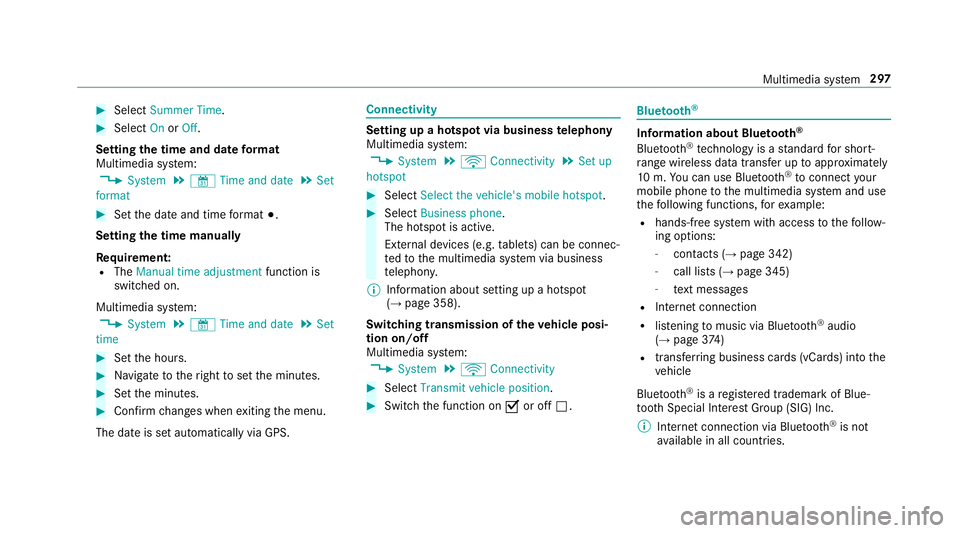
#
Select Summer Time. #
Select OnorOff.
Setting the time and dat eformat
Multimedia sy stem:
, System .
& Time and date .
Set
format #
Setthe dat eand time form at#.
Setting thet imem anually
Re quirement:
R The Manual time adjustment function is
switched on.
Multimedia sy stem:
, System .
& Time and date .
Set
time #
Setthe hours. #
Navigat etot heright tosetthe minutes. #
Setthe minutes. #
Confir mchanges when exitin gthe menu.
The dat eissetautomaticall yvia GPS. Connectivity
Setting up
ahotspo tvia business telephony
Multimedia sy stem:
, System .
ö Connectivity .
Set up
hotspot #
Select Select the vehicle's mobile hotspot . #
Select Business phone.
The hotspo tisactive.
Exte rnal devices (e.g. tablets) can be connec‐
te dtot he multimedia sy stem via business
te lephon y.
% Information abouts etting up ahotspot
(→ pag e358).
Switching transmission of thev ehicle posi‐
tio no n/off
Multimedi asystem:
, System .
ö Connectivity #
Select Transmit vehicle position . #
Switc hthe function on Oor off ª. Blue
tooth ® Information abou
tBluet oo th®
Bl ue tooth ®
tech nology is astandar dfor short-
ra ng ew ireles sdatat ransfer up toappr oximately
10 m.Youc an use Blue tooth®
to connect your
mobile phon etothe multimedia sy stem and use
th ef ollowing functions, fore xamp le:
R hands-free sy stem wit haccess tothef ollow‐
ing options:
- contacts (→ page342)
- call lists (→ page345)
- text messa ges
R Interne tconnection
R listening tomusi cvia Blue tooth®
audio
(→ pag e374 )
R transfer ring business cards (vCards) int othe
ve hicle
Blue tooth ®
is ar egis tere dt rademar kofBlue‐
toot hSpecial Interes tGroup (SIG) Inc.
% Interne tconnection via Blue tooth®
is not
av ailable in all countries. Multimedia sy
stem 297
Page 305 of 585
Data impor
tand export Dat
aimp ort/expor tfunction
The following function sarepossible:
R transfer ring da tafrom one sy stem or vehicle
to ano ther sy stem or vehicle.
R creating abacku pc opyofy our personal data
and loading it again.
R protecting your personal dat aagains tunw an‐
te de xpo rtwit hP IN pr otection.
% Please no tethat theN TFS file sy stem is not
suppor ted. The FAT32 file sy stem is recom‐
mended.
Importing/exporting data
* NO
TEDat aloss #
Do no tremo vethed atas tora ge
medium when dat aisbeingexpor ted.
Mercedes-Ben zisnotliable fora ny loss of
data. Re
quirements:
R The vehicle is stationar y. R
The ignition is switched on or thev ehicle has
been star ted.
R The SD car disinserted( →pag e366) or the
USB device is connecte d(→ pag e369).
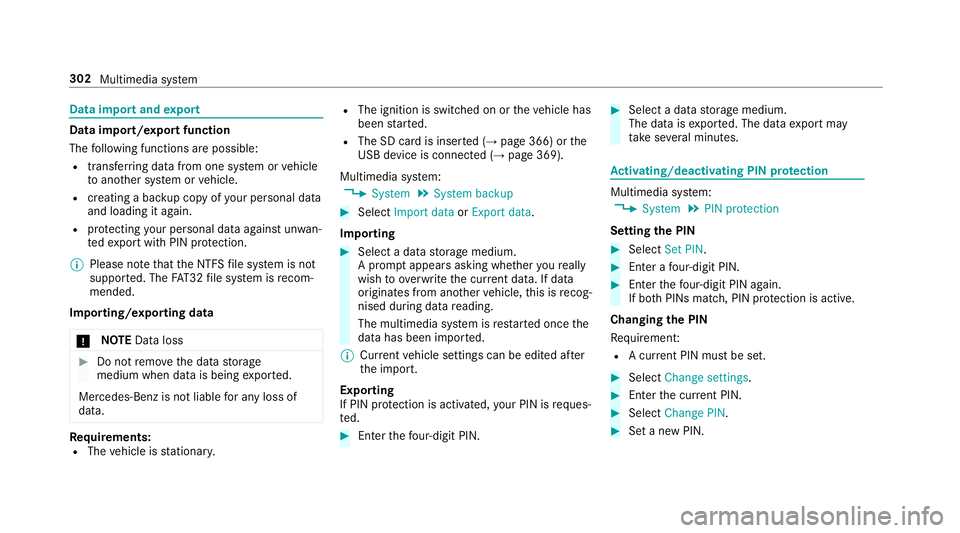
Multimedia sy stem:
, System .
System backup #
Select Import data orExport data.
Importing #
Select adatas torage medium.
Ap romp tappear sasking whe ther your eally
wish to overwrit ethe cur rent da ta.Ifd ata
originates from an other vehicle, this is recog‐
nise ddurin gdatar eading.
The multimedia sy stem is restar tedo ncet he
dat ahas been impor ted.
% Current vehicle settings can be edited af ter
th ei mp ort.
Exporting
If PIN pr otection is activated, your PIN is reques‐
te d. #
Ente rthe four-digit PIN. #
Select adatas torage medium.
The dat aisexported. The dat aexpo rtmay
ta ke severalm inutes. Ac
tivating/deactivatin gPINprotection Multimedia sy
stem:
, System .
PIN protection
Setting theP IN #
Select Set PIN. #
Enteraf our-digit PIN. #
Enter thef our-digit PIN again.
If bo thPINs match, PIN pr otection is active.
Changing theP IN
Re quiremen t:
R Acurrent PIN mu stbe set. #
Select Change settings. #
Ente rthe cur rent PIN. #
Select ChangePIN. #
Setan ewPIN. 302
Multimedia sy stem
Page 306 of 585
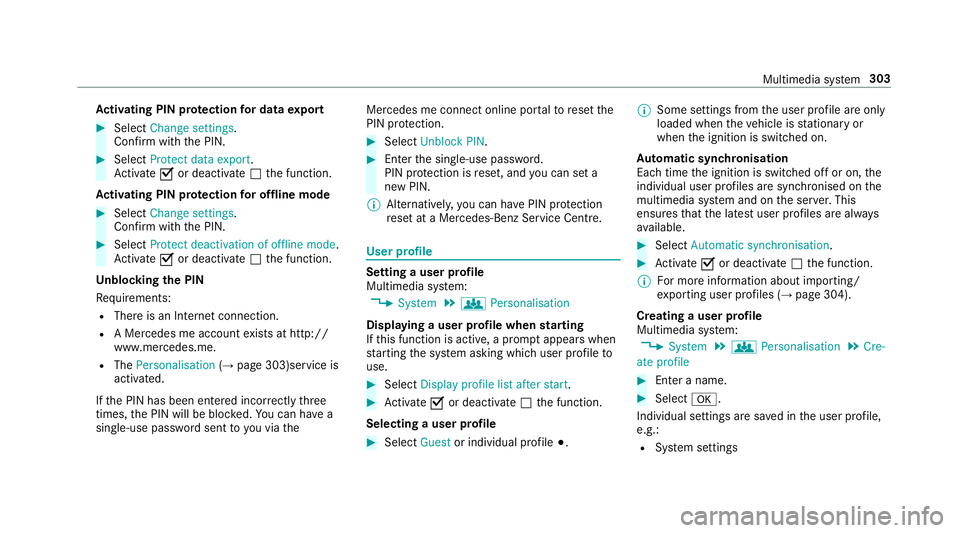
Ac
tivatin gPINprotection ford atae xport #
Select Change settings .
Confir mwitht he PIN. #
Select Protect data export.
Ac tivate Oor deacti vate ª thef unction.
Ac tivatin gPINprotection foro ffline mode #
Select Changesettings .
Confir mwitht he PIN. #
Select Protect deactivation of offline mode.
Ac tivate Oor deacti vate ª thef unction.
Un blocking theP IN
Re quirements:
R Ther eisanI nternetconnection.
R AM ercedes me account exists at http://
www.me rcedes.me.
R The Personalisation (→pag e303)service is
activated.
If th eP IN has been entered incor rectly three
times ,the PIN will be bloc ked. Youc an ha ve a
single-use passwor dsent to yo uviathe Mercedes me connect online por
taltor esetthe
PIN pr otection. #
Select Unbloc kPIN. #
Ente rthe single-use password.
PIN pr otection is reset, and youc an se ta
ne wP IN.
% Alternativel y,yo uc an ha vePIN pr otection
re se tata Mercedes-Benz Service Centre. User profile
Setting
auser profile
Multimedia sy stem:
, System .
g Personalisation
Displaying auser profile when starting
If th is function is active, apromp tappear swhen
st artin gthe sy stem asking whic huser profile to
use. #
Select Display profile list after start . #
Activate Oor deacti vate ª thef unction.
Selecting auser profile #
Select Guestor individual profile #.%
Some settings from theu ser profile ar eonly
loaded when thev ehicle is stationar yor
when thei gnition is switched on.
Au tomatic syn chronisation
Eac htime thei gnition is switched of foron,the
individual user profiles ar esynchronised on the
multimedia sy stem and on thes erve r.This
ensures that thel ates tuser profiles ar ealways
av ailable. #
Select Automatic synchronisation. #
Activate Oor deacti vate ª thef unction.
% Form orei nformation about importing/
ex portin guser profiles (→ page304).
Creating auser profile
Multimedia sy stem:
, System .
g Personalisation .
Cre-
ate profile #
Ente ran ame. #
Select a.
Individuals ettings ar esave dint he user profile,
e.g.:
R System settings Multimedia sy
stem 303
Page 310 of 585
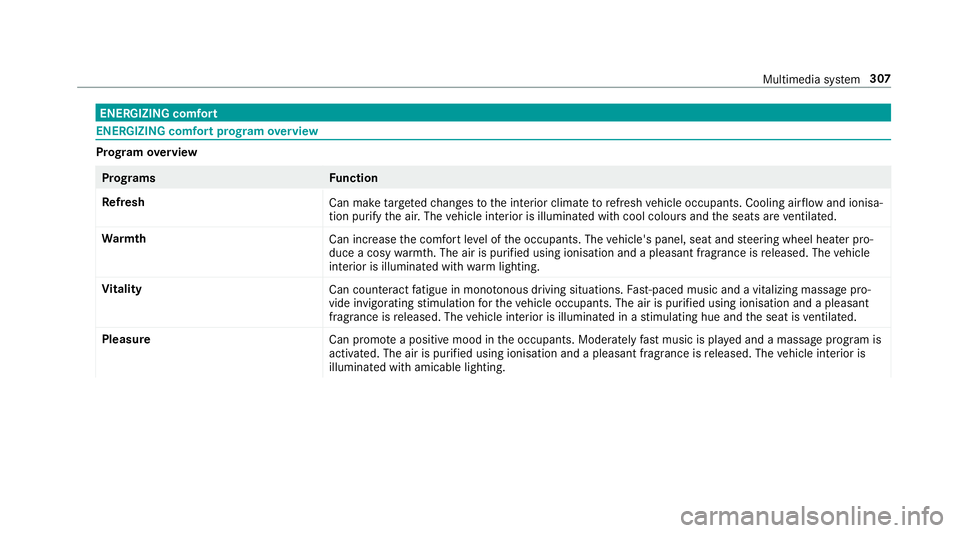
ENERGIZIN
Gcomfort ENERGIZIN
Gcomfor tprogram overview Prog
ramo verview Prog
rams Function
Re fresh
Can maketarget ed changes tothei nterior climat etorefresh vehicle occupants. Cooling air flow and ionisa‐
tio np urify thea ir.T he vehicle interior is illuminated wit hcool colour sand thes eats ar eventilated.
Wa rmth
Can increase thec omfor tleve loft he occupants. The vehicle's panel, seat and steering wheel heater pro‐
duce acosy warmth.T he ai risp urifie dusing ionisation and apleasant fragrance is released. The vehicle
interior is illuminated wit hwarml ighting.
Vi tality
Can countera ct fatigue in mono tonou sdriving situations. Fast-paced musi cand avitalizing massa gepro‐
vide invigorating stimulatio nfor thev ehicle occupants. The air is purified using ionisation and apleasant
fragrance is released. The vehicle interior is illuminated in astimulating hu eand thes eat is ventilated.
Pleasure Canp romo teap ositiv emoodint he occupants. Moderatel yfastm usicisp laye da nd am assag eprogram is
activated. The air is purified using ionisation and apleasant fragrance is released. The vehicle interior is
illuminated wit hamicable lighting. Multimedia sy
stem 307
Page 312 of 585
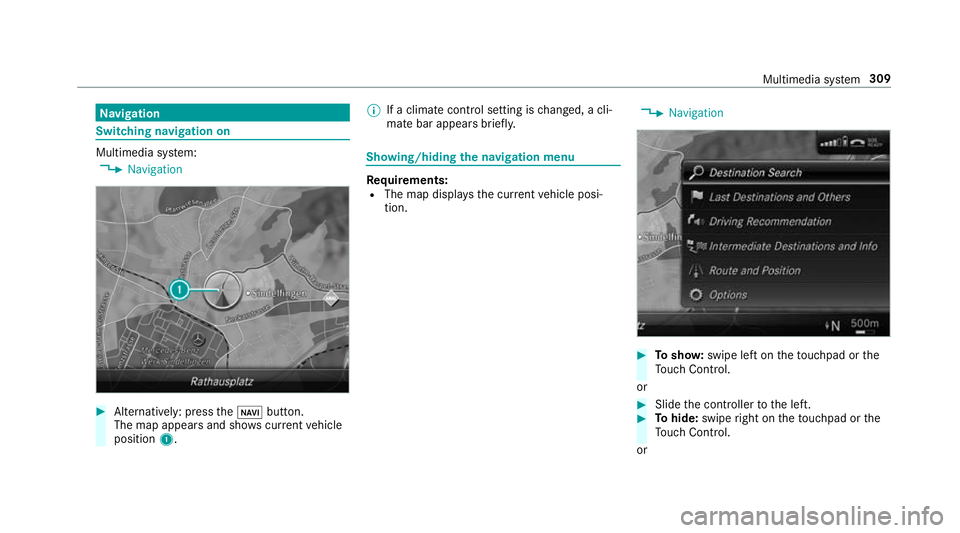
Na
vigation Switching navigation on
Multimedia sy
stem:
, Navigation #
Alternatively: press theß button.
The map appear sand sho wscurrent vehicle
position 1. %
Ifac limat econt rols etting is changed, acli‐
mat ebar appear sbrief ly. Showing/hiding
then avigation menu Re
quirements:
R The map displa ys thecurrent vehicle posi‐
tion. ,
Navigation #
Tosho w:swipe lef tonthetouchpad or the
To uc hC ontrol.
or #
Slid ethe controller tothel eft. #
Tohide: swipe right on thet ouchpad or the
To uc hC ontrol.
or Multimedia sy
stem 309
Page 313 of 585
#
Slide thec ontroller tother ight.
% Tosho worh ide lowerm enu le vels, swipe or
slide tothel eftorr ight as man ytimes as
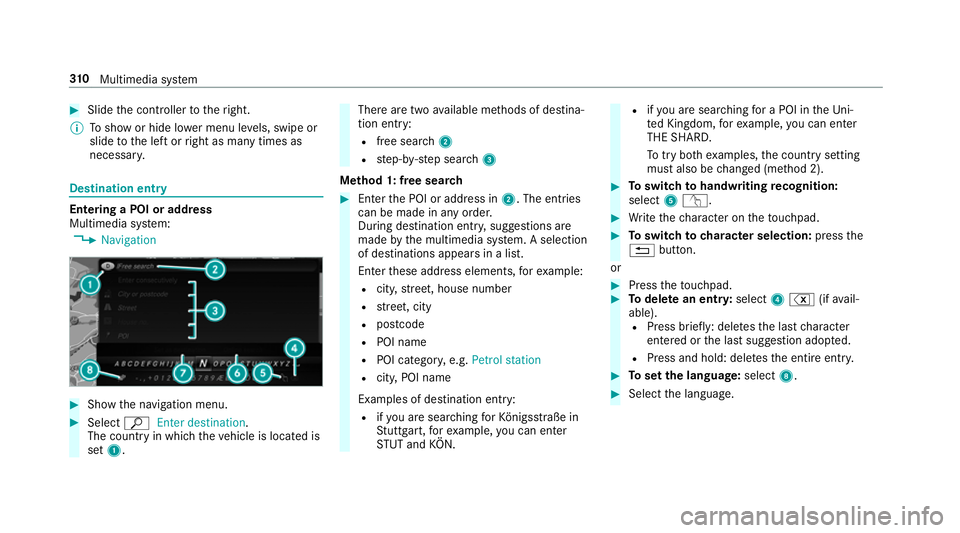
necessar y. Destination ent
ryEntering
aPOI or address
Multimedia sy stem:
, Navigation #
Sho wthe navigation menu. #
Select ªEnter destination .
The countr yinwhichthe vehicle is located is
set 1. Ther
earetwoa vailable me thods of destina‐
tion entry:
R free sear ch2
R step-b y-step sear ch3
Me thod 1: free sear ch #
Enter theP OI or address in 2.The entri es
can be made in an yorder.
During destination entry ,suggestion sare
made bythem ultimedia sy stem. Aselection
of destinations appear sinalist.
Ente rthese address elements, fore xamp le:
R city,stre et,h ouse number
R stre et,c ity
R postcode
R POI name
R POI categor y,e.g. Petrol station
R city,POI name
Examples of destination entry: R ifyo ua resear ching forK önigsstraße in
St utt gart,f or example, youc an en ter
ST UT and KÖN. R
ifyo ua resear ching foraP OI in theU ni‐
te dK ingdom ,for example, youc an en ter
THE SHARD.
To tryb othe xamp les,thec ount rysetting
mus talso be changed (me thod 2). #
Toswitc htoh andwriting recognition:
select 5v. #
Writet he character on thet ouchpad. #
Toswitc htoc harac ters election: pressthe
% button.
or #
Press thet ouchpad. #
Todel eteane ntry:select 4% (ifavail‐
able). R Press brief ly:delet es thel astc haracter
entered or thel asts uggestion adop ted.
R Press and hold: dele test he entir eentry. #
Tosetthe language: select8. #
Select thel anguage. 310
Multimedia sy stem