check engine MERCEDES-BENZ E-CLASS SALOON 2015 User Guide
[x] Cancel search | Manufacturer: MERCEDES-BENZ, Model Year: 2015, Model line: E-CLASS SALOON, Model: MERCEDES-BENZ E-CLASS SALOON 2015Pages: 497, PDF Size: 16.23 MB
Page 191 of 497
Problem
Possible causes/consequences and
M
MSolutions Vehicles with
apetrol
engine:
The engine is not run-
ning smoothly and is
misfiring. There is
amalfunction in the engine electronics or in amechanical
componentoft he engine management system.
X Only depress the accelerator pedal slightly.
Otherwise, non-combusted fuel may get into the catalytic con-
verter and damage it.
X Have the cause rectified immediately at aqualified specialist
workshop. The coolant tempera-
ture display is showing
more than 120 †. The
coolant warning lamp
may also be on and a
warning tone may
sound. The coolant level is too low. The coolant is too hot and the engine
is no longer being cooled sufficiently.
X Stop as soon as possible and allow the engine and the coolant to
cool down.
X Check the coolant level (Y page 382). Observe the warning
notes as you do so and top up the coolant if necessary. If the coolant level is correct,t
he engine radiator fan may be faulty.
The coolant is too hot and the engine is no longer being cooled
sufficiently.
X If the coolant temperature is below 120 †, you can continue
driving to the nearest qualified specialist workshop.
X Avoid heavy loads on the engine as you do so, e.g. driving in
mountainous terrain and stop-start traffic. Manual transmission
Gear lever
! Only engage gear when the clutch pedal is
depressed.
! When shifting between
5thand 6thgear,
you should always push the gear lever all
the way to the right. Otherwise, you could
shift unintentionally into 3rdor4th gear
and damage the transmission.
If you shift down at too high aspeed (trans-
mission braking), this can cause the engine to overrev, leading to engine damage.
Do not use the clutch bite point to keep the
vehicle stationary on uphill gradients.
There is otherwise arisk of damaging the
clutch.
! On long and steep downhill gradients,
especially if the vehicle is laden or towing a trailer, you must shift into gear
1, 2or3in
good time. This uses the engine's braking
effect.T his relieves the load on the brake
system and preventst he brakes from over-
heating and wearing too quickly. k
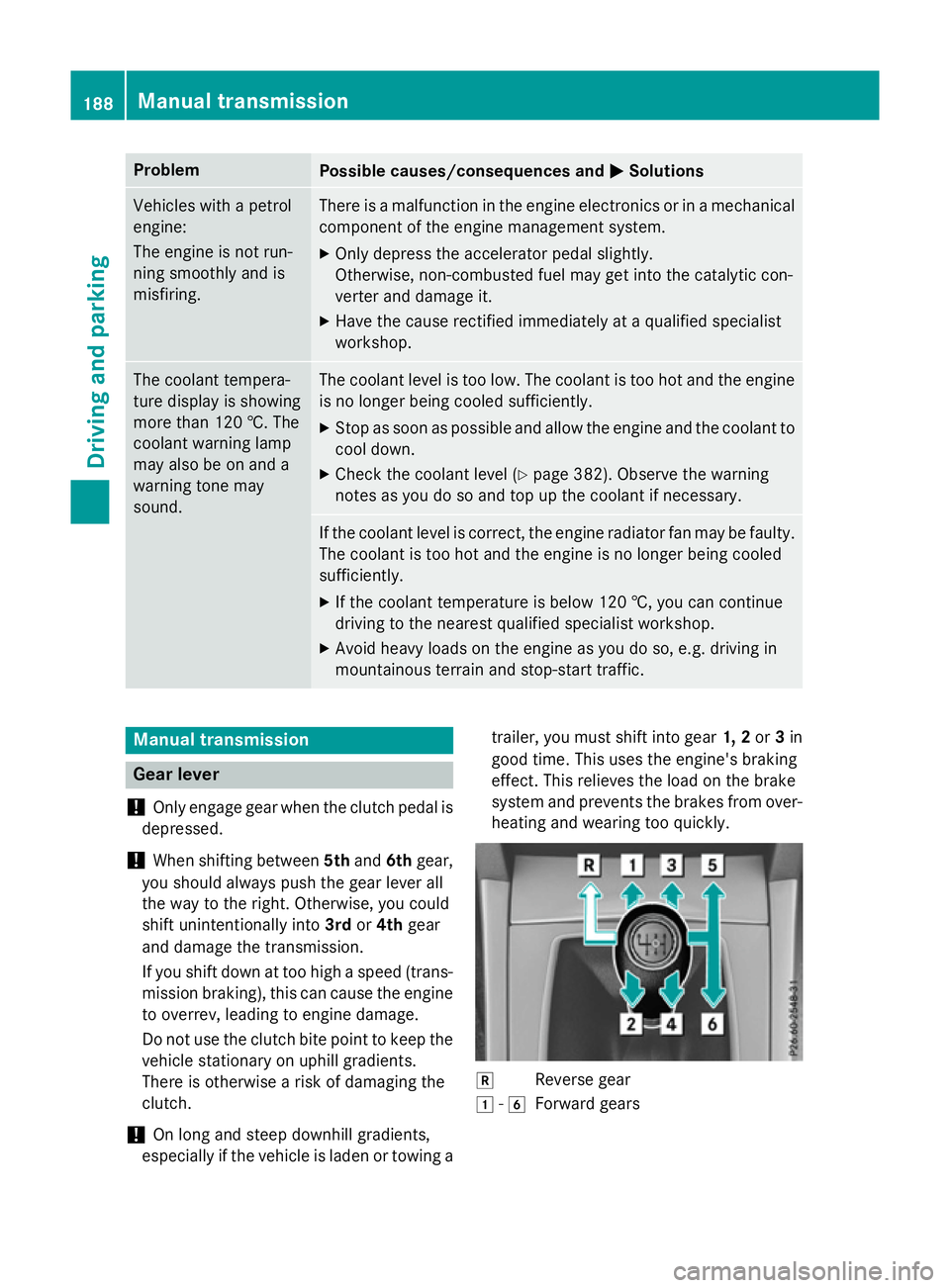
Reverse gear
1 -6
Forward gears 188
Manual transmissionDriving and parking
Page 203 of 497
Problems with the transmission
Problem
Possible causes/consequences and
M
MSolutions The transmission has
problems shifting gear. The transmission is losing oil.
X Have the transmission checked at aqualified specialist work-
shop immediately. 7G-TRONIC:
The acceleration ability
is deteriorating.
The transmission no
longer changes gear.
The transmission is in emergency mode.
It is only possible to shift into
secondgear and reverse gear.
X Stop.
X Shift the transmission to position P.
X Switch off the engine.
X Wait at least ten seconds before restarting the engine.
X Shift the transmission to position Dor R.
If D is selected, the transmission shifts into secondgear; ifRis
selected, the transmission shifts into reverse gear.
X Have the transmission checked at aqualified specialist work-
shop immediately. 9G-TRONIC:
The acceleration ability
is deteriorating.
The transmission no
longer changes gear.
The transmission is in emergency mode.
It is only partly possible to engage the gears or the transmission is
in position N.
X Stop.
X Shift the transmission to position P.
X Switch off the engine.
X Wait at least ten seconds before restarting the engine.
X Shift the transmission to position Dor R.
X Have the transmission checked at aqualified specialist work-
shop immediately. Refuelling
Important safety notes
G
WARNING
Fuel is highly flammable. If you handle fuel
incorrectly, there is arisk of fire and explo-
sion.
You must avoid fire, naked flames, creating
sparks and smoking. Switch off the engine
and, if applicable, the auxiliary heating before refuelling. G
WARNING
Fuels are poisonous and hazardous to health. There is adanger of injury.
Do not swallow fuel or let it come into contact
with skin, eyes or clothing. Do not inhale fuel
vapours. Keep fuels out of the reach of chil-
dren. 200
RefuellingDriving and parking
Page 213 of 497
New brak
epads/linings Brake pads/lining
sand discs tha tare either
new or have been replaced onl yachieve opti-
mu mb raking effect after several hundred kil-
ometres of driving. Compensate for the
reduced braking effect by applying greater
force to the brake pedal.
For safety reasons, Mercedes-Benz recom-
mend stha tyou onl yhaveb rake pads/linings
fitted to your vehicl ewhich have been
approved for Mercedes-Benz vehicles or
which correspond to an equivalent quality
standard. Brake pads/lining swhich have not
been approved for Mercedes-Benz vehicles or
which ar enot of an equivalent quality could
affec tyou rv ehicle' soperating safety.
AM Gh igh-performanc eand ceramic
brakes Th
eh igh- performance brake syste misonly
availabl eonAMG vehicles.
Th eA MG brake systems ar edesig nedf or
heav yloads .Thism aylead to noise when
braking .Thisisd ependent on:
R speed
R braking force
R environmenta lconditions ,suc hast emper-
ature and humidity
Th ew earofi ndividua lcomponents of the
brake system, such as the brake pads/linings
or brake discs ,depen ds on the individua ldriv-
ing style and operating conditions.
For thi sreason, it is impossibl etostate a
mileag e(service life) tha twillbev alidunder
al lc ircumstances .Anaggressive driving style
will lead to high wear .You can obtai nfurther
information abou tthisf romy ourM ercedes-
Benz Service Centre.
Brake pads/lining sand discs tha tare either
new or have been replaced onl yachieve opti-
mu mb raking effect after several hundred kil-
ometres of driving. Compensate for the
reduced braking effect by applying greater
force to the brake pedal. Alway sbeawareofthi
sa nd adap tyou rd riving and braking
accordingly during the running-in period.
Excessive heav ybraking results in corre-
spondingly high brake wear .Obser ve the
brake wear warning lamp in the instrument
cluste rand note any brake status messages
in the multifunctio ndisplay .Ifyouregularly
drive at high speeds ,itisparticularl yimpor-
tant to have the brake syste mchecked and
maintaine dregularly. Driving on we
troads
Aquaplaning If water ha
saccumulate dtoacertaindepth
on the roa dsurface, there is adangerofa qua-
planing occurring, eve nif:
R yo ua redriving at lo wspeeds
R the tyres have adequate trea ddepth
For thi sreason, drive in the following manner
in the event of heav yrainorinc onditions in
which aquaplaning can occur:
R lowe ryours peed
R avoi dtyrer uts
R avoi dsudde nsteering movements
R brake carefully
Driving on flooded roads !
Bea
rinm indt hatv ehicles travelling in
front or in the opposite directio ncreate
waves .Thism aycause the maximum per-
missibl ewater depth to be exceeded.
Thes enote sm ustbeo bservedu nder all
circumstances .You could otherwis edam-
ag et he engine ,the electronics or the trans-
mission. 210
Driving
tipsDriving an dparking
Page 216 of 497
Selecting cruise control
X
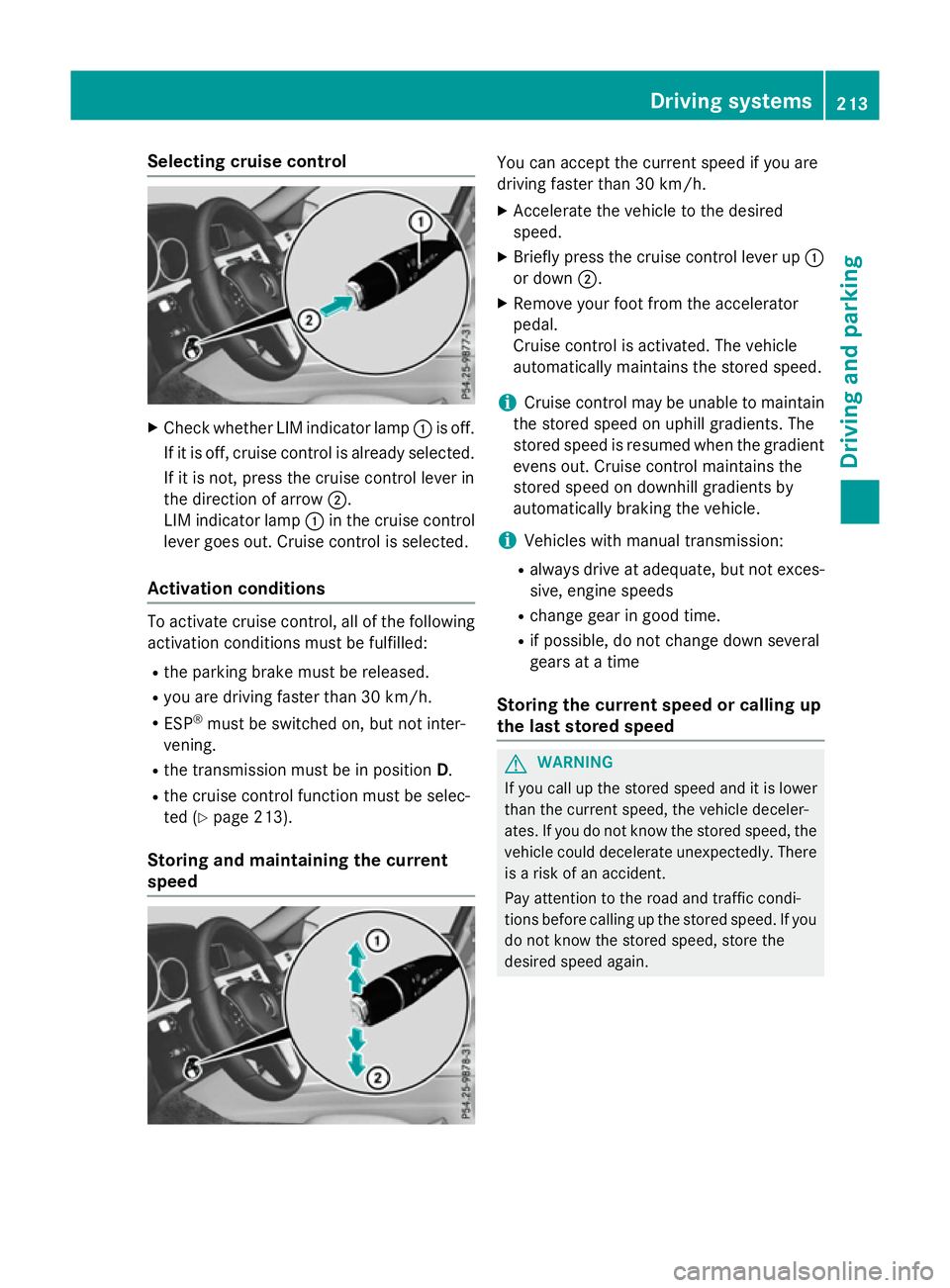
Check whether LIM indicator lamp :is off.
If it is off, cruise control is already selected. If it is not, press the cruise control lever in
the direction of arrow ;.
LIM indicator lamp :in the cruise control
lever goes out. Cruise control is selected.
Activation conditions To activate cruise control, all of the following
activation condition smust be fulfilled:
R the parking brake must be released.
R you are driving faster than 30 km/h.
R ESP ®
must be switched on, but not inter-
vening.
R the transmission must be in position D.
R the cruise control function must be selec-
ted (Y page 213).
Storing and maintaining the current
speed You can accept the current speed if you are
driving faster than 30 km/h.
X Accelerate the vehicl etothe desired
speed.
X Briefl ypress the cruis econtro llev er up :
or down ;.
X Remov eyourfoo tfromt he accelerator
pedal.
Cruise contro lisactivated .The vehicle
automaticall ymaintains the stored speed.
i Cruise contro
lmaybe unabl etomaintain
the stored spee donuphillgradients. The
stored spee disresumed when the gradient
evens out. Cruise contro lmaintains the
stored spee dondownhil lgradients by
automaticall ybraking the vehicle.
i Vehicles with manua ltransmission:
R always drive at adequate, bu tnot exces-
sive, engine speeds
R change gear in goo dtime.
R if possible, do not change down several
gear satat ime
Storin gthe curren tspeed or callin gup
the las tstored speed G
WARNING
If yo ucallupt he stored speed and it is lower
tha nthe current speed ,the vehicl edeceler-
ates. If yo udonot know the stored speed ,the
vehicl ecould decelerate unexpectedly .There
is ar iskofana ccident.
Pa ya ttentio ntothe roa dand traffi ccondi-
tions befor ecalling up the stored speed .Ifyou
do not know the stored speed ,stor ethe
desired speed again. Dr
ivin gsystems
213Driving an dparking Z
Page 219 of 497
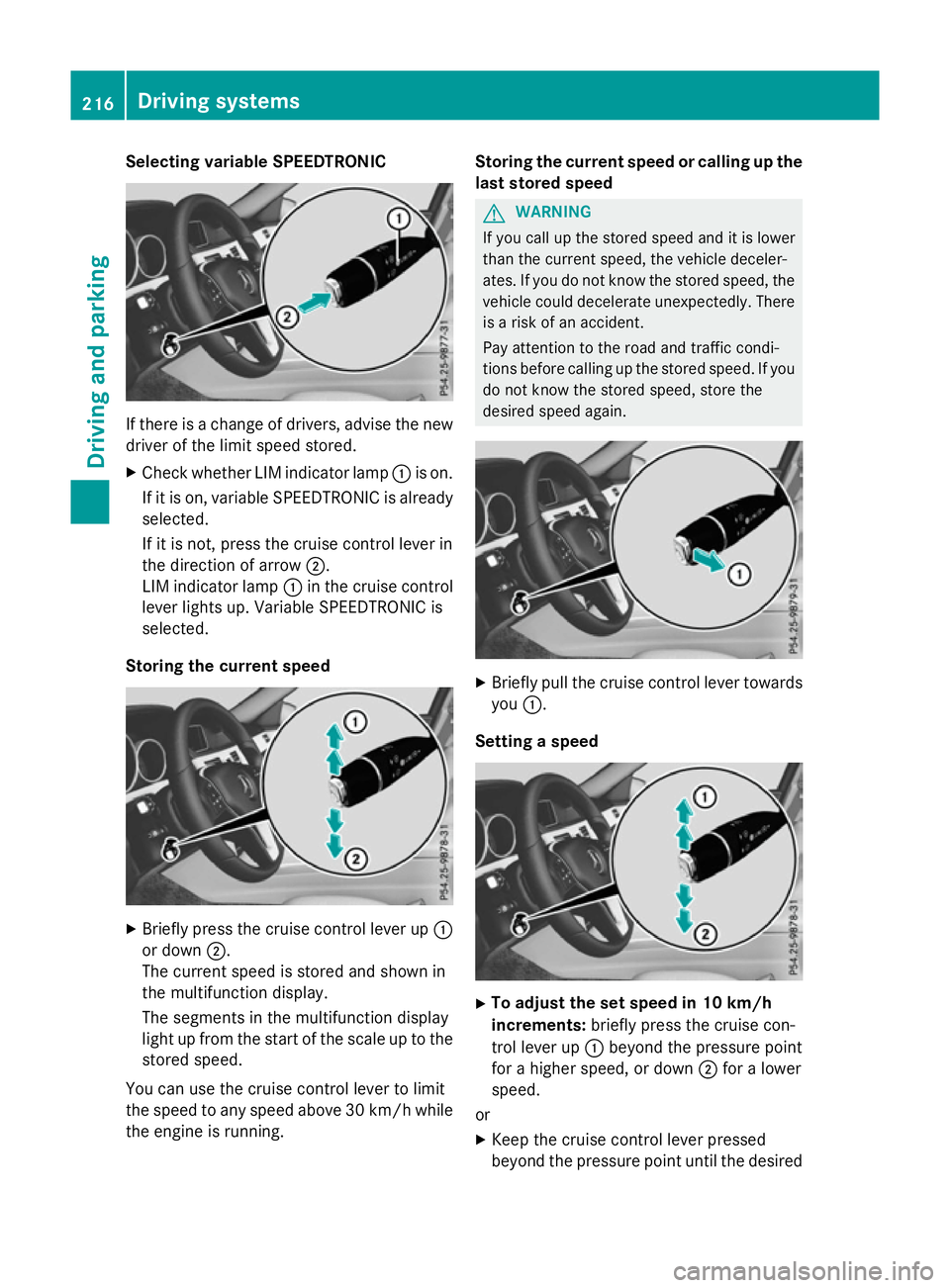
Selecting variable SPEEDTRONIC
If there is
achange of drivers, advise the new
driver of the limit speed stored.
X Check whether LIM indicator lamp :is on.
If it is on, variable SPEEDTRONIC is already
selected.
If it is not, press the cruise control lever in
the direction of arrow ;.
LIM indicator lamp :in the cruise control
lever lights up. Variable SPEEDTRONIC is
selected.
Storing the current speed X
Briefly press the cruise control lever up :
or down ;.
The current speed is stored and shown in
the multifunction display.
The segments in the multifunction display
light up from the start of the scale up to the
stored speed.
You can use the cruise control lever to limit
the speed to any speed above 30 km/hw hile
the engine is running. Storing the current speed or calling up the
last stored speed G
WARNING
If you call up the stored speed and it is lower
than the current speed, the vehicle deceler-
ates. If you do not know the stored speed, the vehicle could decelerate unexpectedly. There
is ar isk of an accident.
Pay attention to the road and traffic condi-
tions before calling up the stored speed. If you do not know the stored speed, store the
desired speed again. X
Briefly pull the cruise control lever towards
you :.
Setting aspeed X
To adjust the set speed in 10 km/h
increments: briefly press the cruise con-
trol lever up :beyond the pressure point
for ahigher speed, or down ;for alower
speed.
or X Keep the cruise control lever pressed
beyond the pressure point until the desired 216
Driving systemsDriving and parking
Page 248 of 497
Important safety notes
The reversing camera is only an aid. It is no
ta
substitut efor your attention to th eimmediate
surroundings. The responsibilit yfor safe
manoeuvrin gand parking remains wit hyou.
Mak esure that there are no persons, animals
or objects in range while manoeuvrin gand
parking.
Under th efollowin gcircumstances, the
reversing camera will no tfunction ,orwill
function in alimited manner:
R if th eboot lid or tailgat eisopen
R in heav yrain ,sno worf og
R at night or in ver ydark places
R if th ecamera is expose dtoveryb right light
R if th earea is lit by fluorescent bulbs or LED
lighting (the display may flicker)
R if there is asudde nchang eint emperature,
e.g. when driving int oaheated garag ein
winter
R if th ecamera len sisdirtyoro bstructed.
Observ ethe note sonc leaning
(Y page 390)
R if th erear of your vehicl eisdamaged. In this
case, have th ecamera position and setting
checke dataq ualified specialist workshop
The field of vision and other function softhe
reversing camera may be restricted due to
additional accessories on th erear of th evehi-
cle (e.g. licence plat eholder, bicycle rack).
On vehicles wit hheight-adjustable chassis,
leaving th estandard height can result in inac-
curacie sintheguide lines, depending on
technical conditions.
i The reversing camera is protected from
raindrops and dust by mean sofaflap.
When th ereversing camera is activated,
this flap opens.
The flap closes again when:
R you have finishe dthe manoeuvrin gproc-
ess
R you switch off th eengine
R you open th eboot Se
et he note sonc leaning (Y page 390).
Fo rtechn ical reasons, th eflap may remain
open briefly after th ereversing camera has
been deactivated.
Activating/deactivating th ereversing
camera X
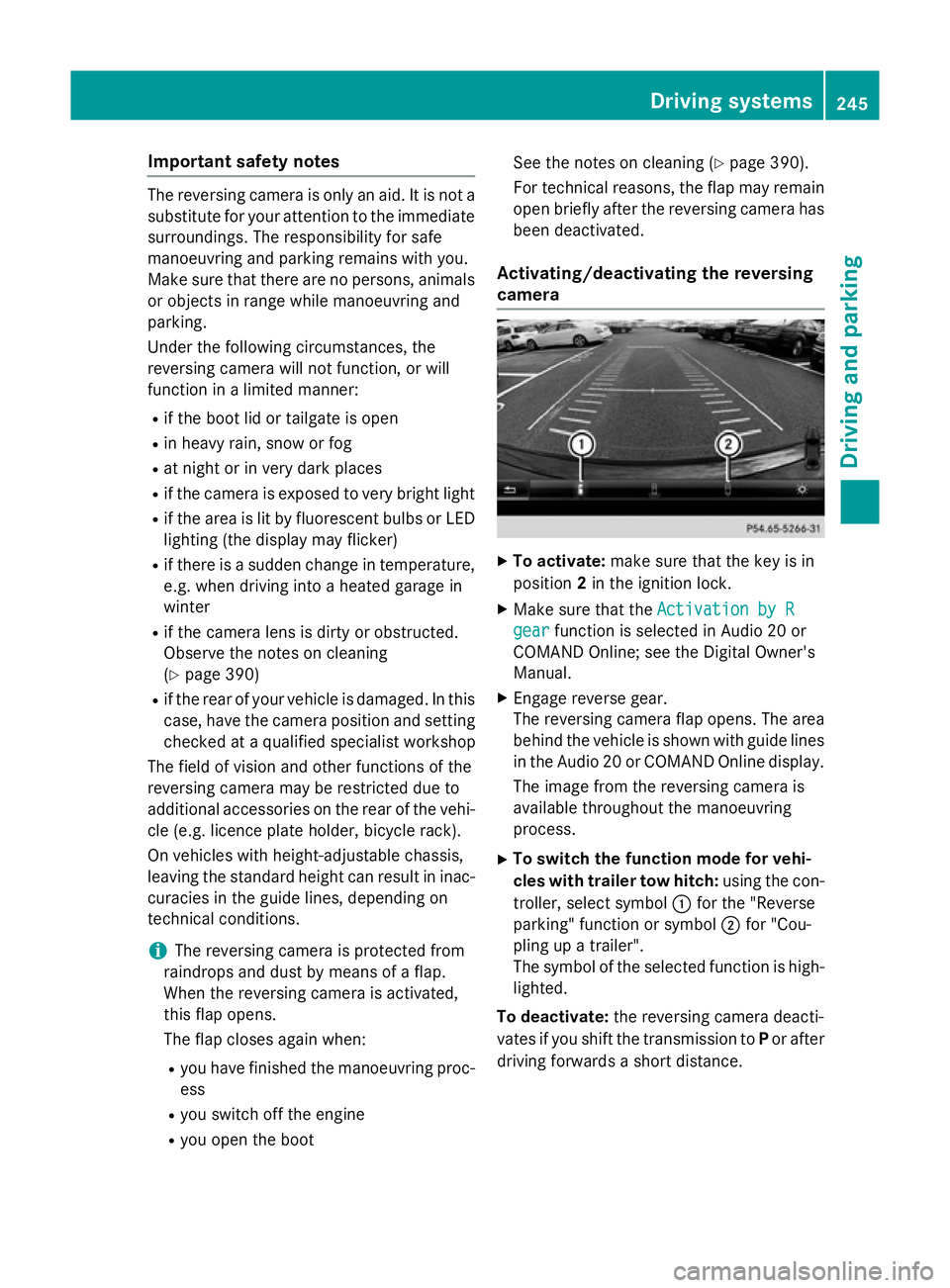
To activate: makesure that th ekeyis in
position 2in th eignition lock.
X Mak esure that the ActivationbyR
Activatio nbyR
gear
gear function is selected in Audio 20 or
COMAND Online; see th eDigital Owner's
Manual.
X Engage revers egear.
The reversing camera flap opens. The area
behind th evehicl eiss hown wit hguide lines
in th eAudio 20 or COMAND Onlin edisplay.
The imag efromt hereversing camera is
available throughout th emanoeuvring
process.
X To switch th efun ction mod efor vehi-
cles with traile rtow hitch: usingthe con-
troller ,select symbol :for th e"Reverse
parking "function or symbol ;for "Cou-
plin gupat railer".
The symbol of th eselected function is high-
lighted.
To deactivate: ther eversing camera deacti-
vates if you shif tthe transmission to Por after
driving forwards ashort distance. Driving systems
245Driving and parking Z
Page 262 of 497
spot monitoring range from behind or from
the side. When you overtake avehicle, the
warning only occurs if the difference in speed
is less than 12 km/h.
The yellow indicator lamp goes out if reverse gear is engaged. Blind Spot Assist is then
deactivated.
The brightness of the indicator or warning
lamps is adjusted automaticallya ccording to
the ambient light.
Collision warning
If av ehicle is detected in the monitoring range
of Blind Spot Assist and you switch on the
corresponding turn signal, adoublew arning
tone sounds. Red warning lamp :flashes. If
the turn signal remains on, detected vehicles
are indicated by the flashing of red warning
lamp :.There are no further warning tones.
Activating Blind Spot Assist X Make sure that Blind Spot Assist is activa-
ted in the on-board computer
(Y page 288).
X Turn the key to position 2in the ignition
lock.
Warning lamps :in the exterior mirrors
light up red for approximately 1.5 seconds
and then turn yellow.
Towing atrailer
If you couple up atrailer, make sure that you
have correctly established the electrical con- nection. This can be accomplished by check-
ing the trailer lighting. Blind Spot Assist is
then deactivated. The indicator lamps in the
exterior mirrors light up yellow and the
Blind
Blind Spot SpotAssist
Assist not
notavailable
available when
when
towing atrailer See Owner's Manual
towing atrailer See Owner's Manual
message appears in the multifunction dis-
play.
i You can deactivate the indicator lamps in
the exterior mirrors. To do so, you will need to deactivate Blind
Spot Assist if:
R the key is in position 2in the ignition lock
R the engine is not running
R the electrical connection to the trailer
has been established
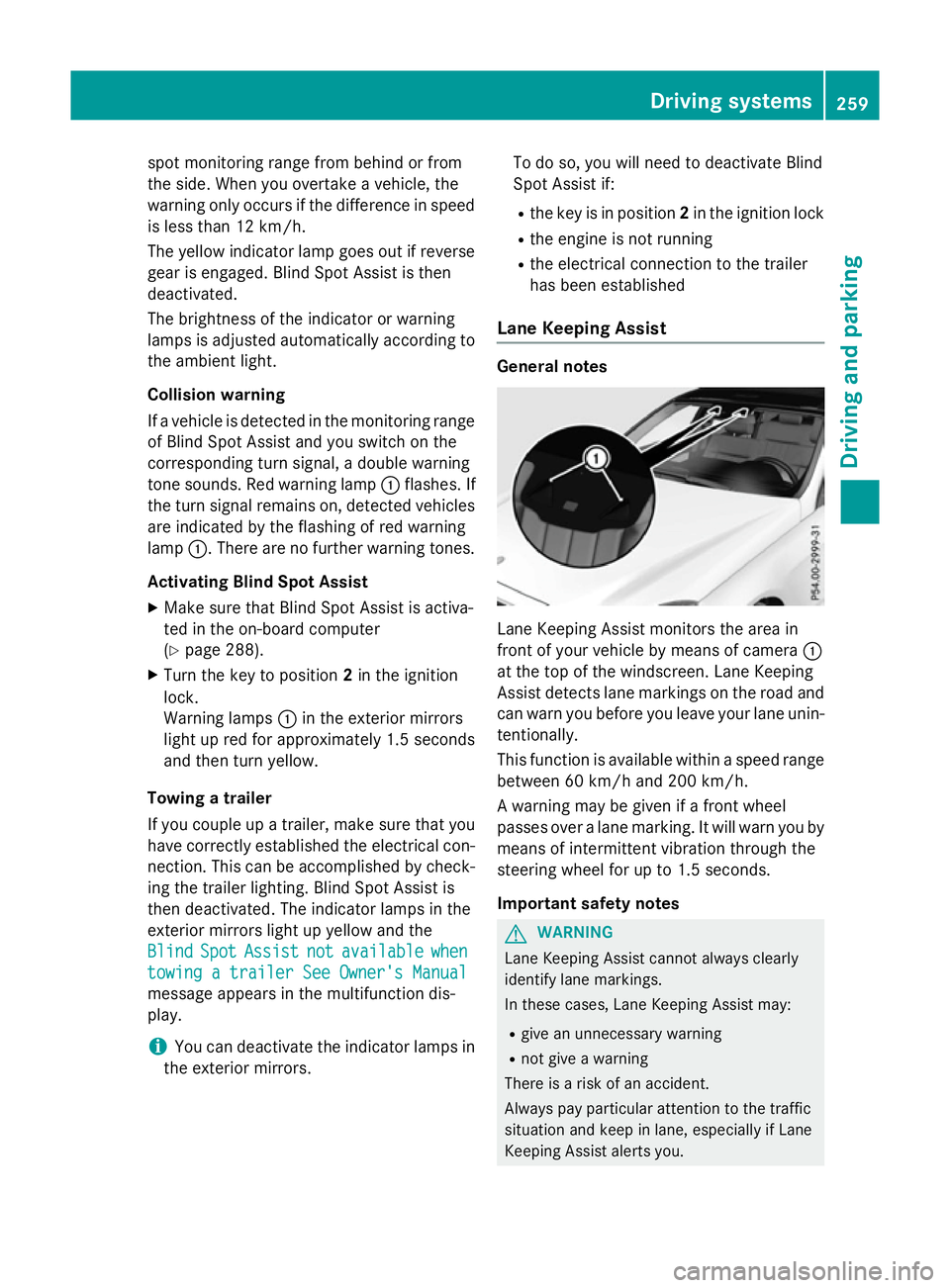
Lane Keeping Assist General notes
Lane Keeping Assist monitors the area in
front of your vehicle by means of camera
:
at the top of the windscreen. Lane Keeping
Assist detects lane markings on the road and
can warn you before you leave your lane unin-
tentionally.
This function is available within aspeed range
between 60 km/h and 200 km/h.
Aw arning may be given if afront wheel
passes over alane marking. It will warn you by
means of intermittent vibration through the
steering wheel for up to 1.5 seconds.
Important safety notes G
WARNING
Lane Keeping Assist cannot always clearly
identify lane markings.
In these cases, Lane Keeping Assist may:
R give an unnecessary warning
R not give awarning
There is arisk of an accident.
Always pay particular attention to the traffic
situation and keep in lane, especiallyifL ane
Keeping Assist alerts you. Driving systems
259Driving and parking Z
Page 271 of 497
The maximum permissible speed for vehicle/
trailer combinations depends on the type of
trailer. Before beginnin gthe journey, check
the trailer's document stosee what the max-
imum permitted speed is. Observe the legally
prescribed maximum speed in the relevant
country.
For certain Mercedes-Benz vehicles, the max-
imum permissible rear axle load is increased
when towing atrailer. See the "Technical
data" section to find out whether this applies to your vehicle (Y page 484). If you utilise any
of the added maximum rear axle load when
towing atrailer, the vehicle/trailer combina-
tion may not exceed amaximum speed of
100 km/hf or reasons concerning the oper-
ating permit. This also applie sincountrie sin
which the permissible maximu mspee dfor
vehicle/trailer combinations is above
100 km/h.
When towing atrailer, you rvehicle's handling
characteristics wil lbedifferent in comparison
to whe ndriving without atrailer and it will
consume more fuel.
Change into alower gea ringood time on long
and steep downhill gradients.
i This also applie
sifyou have activated
cruis econtrol, SPEEDTRONIC or
DISTRONIC PLUS.
This wil luse the braking effect of the engine,
so less braking wil lberequired to maintain
vehicle speed. This relieves the loa donthe
brake system and prevents the brake sfrom
overheating and wearing too quickly. If you
need additiona lbraking, depress the brake
pedal repeatedl yrather than continuously.
Driving tips If the trailer swings from side to side:
X Do not accelerate.
X Do not countersteer.
X Brake if necessary. R
Maintain agreater distance to the vehicle in
front than whe ndriving without atrailer.
R Avoid braking abruptly .Ifpossible ,brake
gently at first to allow the trailer to run on.
Then, increase the braking force rapidly.
R The values give nfor gradient-climbing
capabilities from astandstil lrefer to sea
level. When driving in mountainous areas,
note that the power outpu tofthe engine,
and consequently the vehicle's gradient-
climbing capability, decrease with increas-
ing altitude. Foldin
gout the ball coupling G
WARNING
If the bal lcoupling is not correctly engaged,
the trailer can detach .There is arisk of an
accident.
Always engag ethe bal lcoupling as described. G
WARNING
If you release the bal lcoupling or it does not
engag ecorrectly whe nfolding in, it wil lswing
out. Withi npivoting range of the bal lcoupling,
there is an increased risk of an accident and
injury.
Only release the bal lcoupling if the pivoting
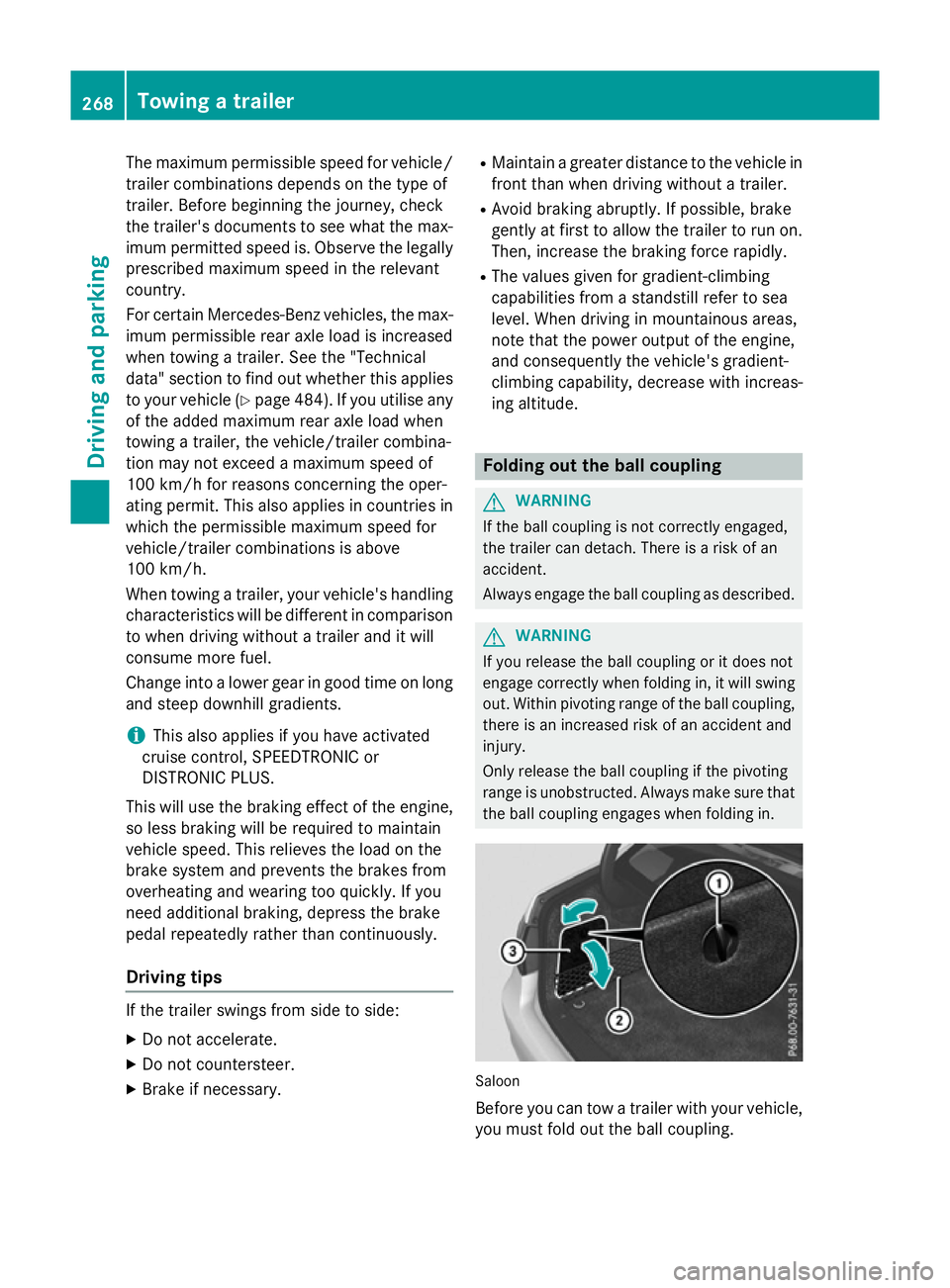
range is unobstructed. Always make sure that the bal lcoupling engages whe nfolding in. Saloon
Before you can tow
atrailer with you rvehicle,
you must fold out the bal lcoupling. 268
Towing
atrailerDriving and parking
Page 279 of 497
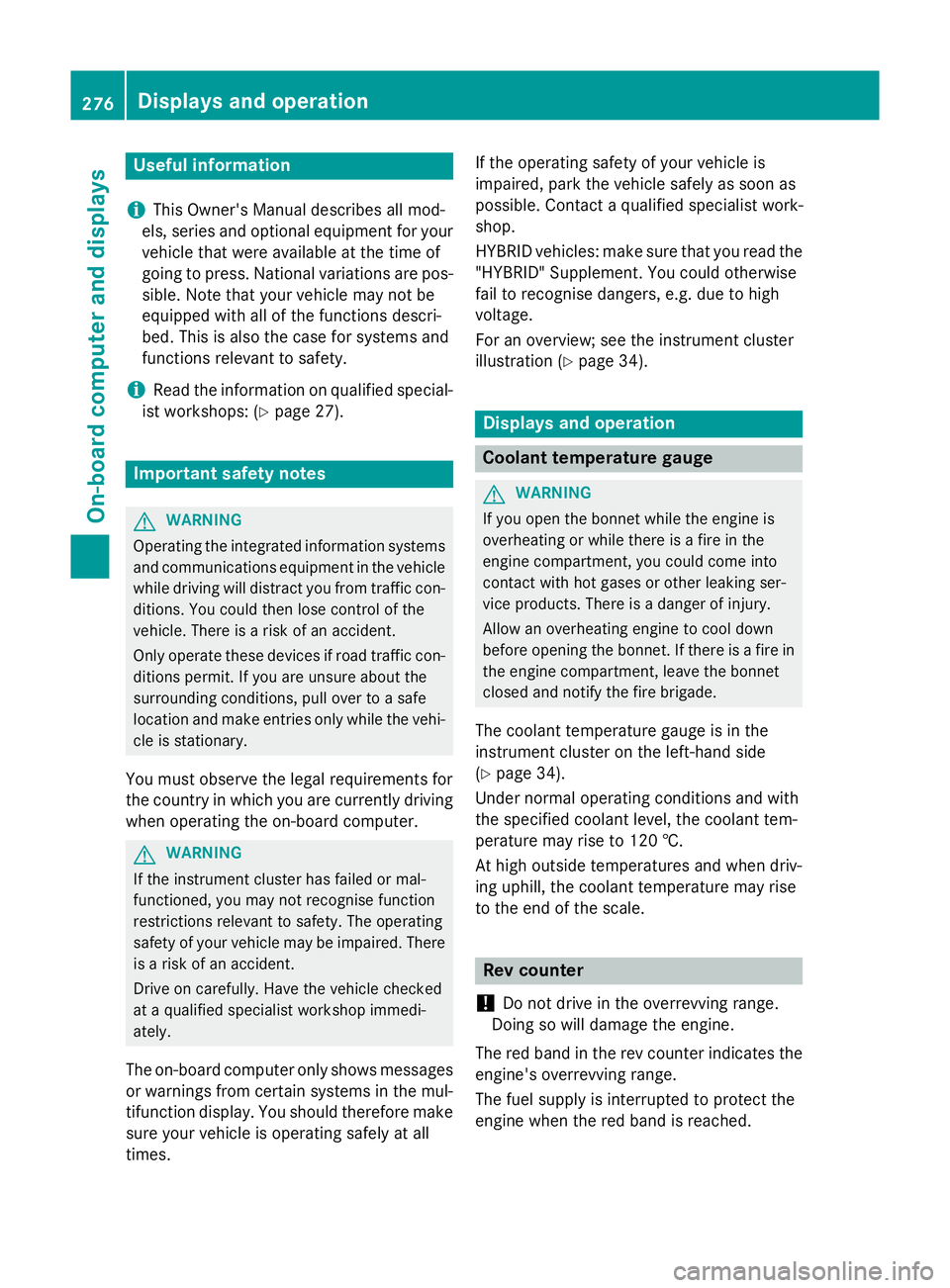
Useful information
i This Owner's Manual describes all mod-
els, series and optional equipment for your
vehicle that were available at the time of
going to press. National variation sare pos-
sible. Not ethat your vehicle may not be
equipped with all of the function sdescri-
bed. This is also the case for system sand
function srelevan ttosafety.
i Read the information on qualified special-
ist workshops: (Y page 27). Important safet
ynotes G
WARNING
Operating the integrated information systems and communications equipment in the vehicle
while drivin gwill distract you from traffic con-
ditions. You could then lose contro lofthe
vehicle. There is arisk of an accident.
Only operate thes edevices if road traffic con-
dition spermit .Ifyou are unsure about the
surrounding conditions, pull over to asafe
locatio nand make entries only while the vehi-
cle is stationary.
You must observ ethe legal requirements for
the country in which you are currently driving when operatin gthe on-board computer. G
WARNING
If the instrumen tcluster has failed or mal-
functioned, you may not recognise function
restrictions relevan ttosafety. The operating
safet yofy our vehicle may be impaired. There
is ar isk of an accident.
Driv eonc arefully. Have the vehicle checked
at aq ualified specialist workshop immedi-
ately.
The on-board computer only shows messages
or warnings from certain system sinthe mul-
tifunction display. You should therefore make
sure your vehicle is operatin gsafely at all
times. If the operatin
gsafet yofy our vehicle is
impaired, park the vehicle safely as soon as
possible. Contact aqualified specialist work-
shop.
HYBRID vehicles :make sure that you read the
"HYBRID "Supplement. You could otherwise
fail to recognise dangers ,e.g. due to high
voltage.
For an overview; see the instrumen tcluster
illustration (Y page 34). Displays and operation
Coolant temperatureg
auge G
WARNING
If you open the bonnet while the engin eis
overheating or while ther eisafire in the
engin ecompartment, you could come into
contact with hot gases or other leaking ser-
vice products. There is adanger of injury.
Allow an overheating engin etocool down
before openin gthe bonnet. If ther eisafire in
the engin ecompartment, leave the bonnet
closed and notify the fire brigade.
The coolan ttemperature gauge is in the
instrumen tcluster on the left-hand side
(Y page 34).
Under normal operatin gcondition sand with
the specified coolan tlevel, the coolan ttem-
perature may rise to 120 †.
At high outside temperature sand when driv-
ing uphill, the coolan ttemperature may rise
to the end of the scale. Rev counter
! Do not drive in the overrevvin
grange.
Doin gsow ill damage the engine.
The red band in the rev counter indicates the
engine's overrevvin grange.
The fuel supply is interrupted to protect the
engin ewhen the red band is reached. 276
Displays and operationOn-boar
dcomputer and displays
Page 306 of 497
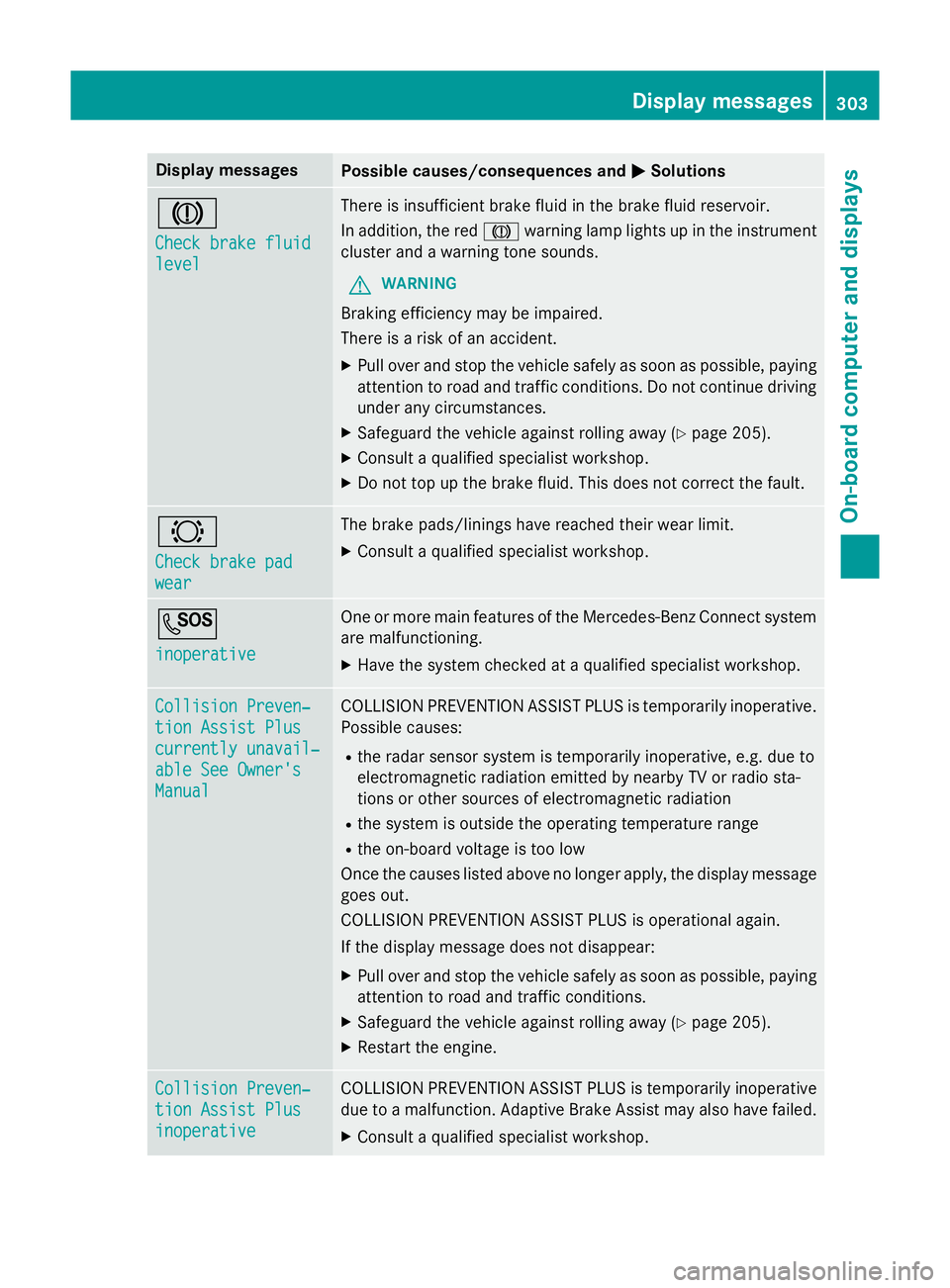
Display messages
Possible causes/consequences and
M
MSolutions J
Check brake fluid Check brake fluid
level level There is insufficien
tbrak efluidint hebrak efluidr eservoir.
In addition ,the red J warnin glamp lights up in th einstrument
cluster and awarnin gtones ounds.
G WARNING
Braking efficiency may be impaired.
There is ariskofana ccident.
X Pull ove rand stop th evehicl esafely as soo naspossible, paying
attention to roa dand traffic conditions. Do no tcontinu edriving
under any circumstances.
X Safeguar dthe vehicl eagainst rollin gaway (Y page 205).
X Consult aqualified specialist workshop.
X Do no ttop up th ebrak efluid. This does no tcorrect thef ault. #
Check brake pad Check brake pad
wear wear The brak
epads/lining shaver eached their wear limit.
X Consult aqualified specialist workshop. G
inoperative inoperative On
eorm orem ain features of th eMercedes-Ben zConnect system
are malfunctioning.
X Hav ethe system checke dataqualified specialist workshop. Collision Preven‐
Collision Preven‐
tio
nA ssist Plus
tio nA ssist Plus
currently unavail‐ currently unavail‐
abl eS ee Owner's
abl eS ee Owner's
Manual Manual COLLISION PREVENTION ASSIST PLU
Sistemporarily inoperative.
Possibl ecauses:
R ther ada rsensor system is temporarily inoperative, e.g. due to
electromagnetic radiation emitted by nearby TV or radi osta-
tion soro ther source sofelectromagnetic radiation
R thes ystem is outside th eoperating temperature range
R theo n-bo ardv oltag eistoolow
Once th ecauses listed abov enolonger apply, th edisplay message
goe sout.
COLLISION PREVENTION ASSIST PLU Sisoperational again.
If th edisplay message does no tdisappear:
X Pull ove rand stop th evehicl esafely as soo naspossible, paying
attention to roa dand traffic conditions.
X Safeguar dthe vehicl eagainst rollin gaway (Y page 205).
X Restart th eengine. Collision Preven‐
Collision Preven‐
tio
nA ssist Plus
tio nA ssist Plus
inoperative inoperative COLLISION PREVENTION ASSIST PLU
Sistemporarily inoperative
due to amalfunction .Adaptive Brake Assis tmay also hav efailed.
X Consult aqualified specialist workshop. Display
messages
303On-boardcomputer an ddisplays Z