wheel MERCEDES-BENZ E-CLASS SALOON 2017 Service Manual
[x] Cancel search | Manufacturer: MERCEDES-BENZ, Model Year: 2017, Model line: E-CLASS SALOON, Model: MERCEDES-BENZ E-CLASS SALOON 2017Pages: 497, PDF Size: 10.38 MB
Page 223 of 497
Re
versing camera Fu
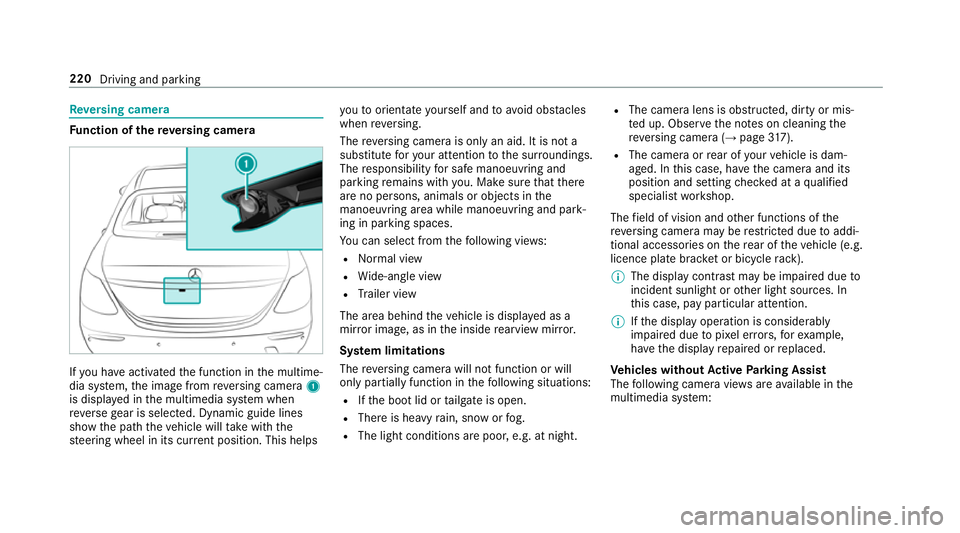
nction of there ve rsing camera If
yo u ha veactivated the function in the multime‐
dia sy stem, the image from reve rsing camera 1
is displa yed in the multimedia sy stem when
re ve rsege ar is selec ted. Dynamic guide lines
show the path theve hicle will take with the
st eering wheel in its cur rent position. This helps yo
uto orientate yourself and toavo id obs tacles
when reve rsing.
The reve rsing camera is only an aid. It is not a
substitute foryo ur attention tothe sur roundings.
The responsibility for safe manoeuvring and
parking remains with you. Make sure that there
are no persons, animals or objects in the
manoeuvring area while manoeuvring and park‐
ing in parking spaces.
Yo u can select from thefo llowing vie ws:
R Normal view
R Wide-angle view
R Trailer view
The area behind theve hicle is displa yed as a
mir ror image, as in the inside rearview mir ror.
Sy stem limitations
The reve rsing camera will not function or will
only partially function in thefo llowing situations:
R Ifth e boot lid or tailgate is open.
R There is heavy rain, snow or fog.
R The light conditions are poor, e.g. at night. R
The camera lens is obstructed, dirty or mis‐
te d up. Obser vethe no tes on cleaning the
re ve rsing camera (→ page317).
R The camera or rear of your vehicle is dam‐
aged. In this case, ha vethe camera and its
position and setting checked at a qualified
specialist workshop.
The field of vision and other functions of the
re ve rsing camera may be restricted due toaddi‐
tional accesso ries on there ar of theve hicle (e.g.
licence plate brac ket or bicycle rack ).
% The display contrast may be impaired due to
incident sunlight or other light sources. In
th is case, pay particular attention.
% Ifth e display operation is considerably
impaired due topixel er rors,fo rex ample,
ha ve the display repaired or replaced.
Ve hicles without Active Parking Assist
The following camera vie wsare available in the
multimedia sy stem: 220
Driving and parking
Page 224 of 497
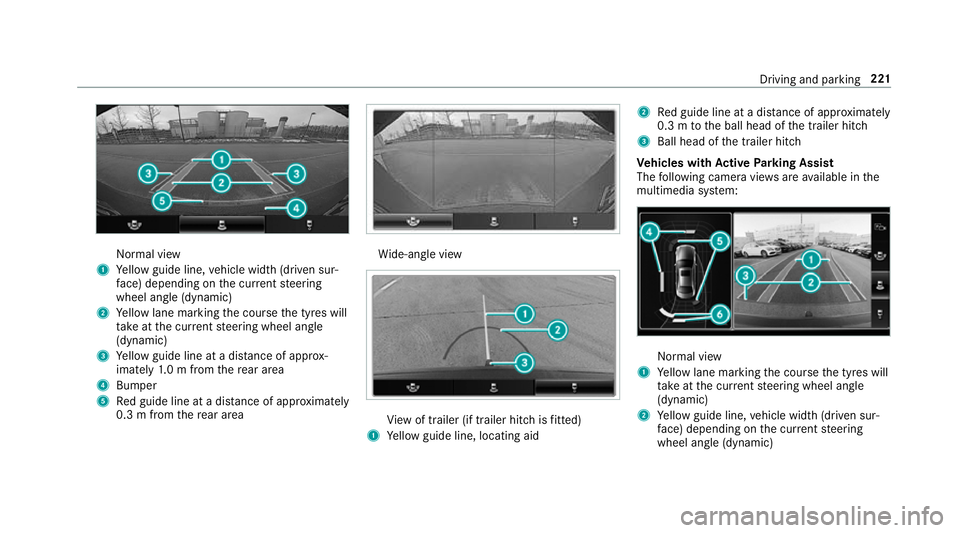
Normal view
1 Yellow guide line, vehicle width (driven sur‐
fa ce) depending on the cur rent steering
wheel angle (dynamic)
2 Yellow lane marking the course the tyres will
ta ke atthe cur rent steering wheel angle
(dynamic)
3 Yellow guide line at a dis tance of appr ox‐
imately 1.0 m from there ar area
4 Bumper
5 Red guide line at a dis tance of appr oximately
0.3 m from there ar area Wi
de-angle view Vi
ew of trailer (if trailer hitch is fitted)
1 Yellow guide line, locating aid 2
Red guide line at a dis tance of appr oximately
0.3 m tothe ball head of the trailer hitch
3 Ball head of the trailer hitch
Ve hicles with Active Parking Assist
The following camera vie wsare available in the
multimedia sy stem: Normal view
1 Yellow lane marking the course the tyres will
ta ke atthe cur rent steering wheel angle
(dynamic)
2 Yellow guide line, vehicle width (driven sur‐
fa ce) depending on the cur rent steering
wheel angle (dynamic) Driving and parking
221
Page 227 of 497
To
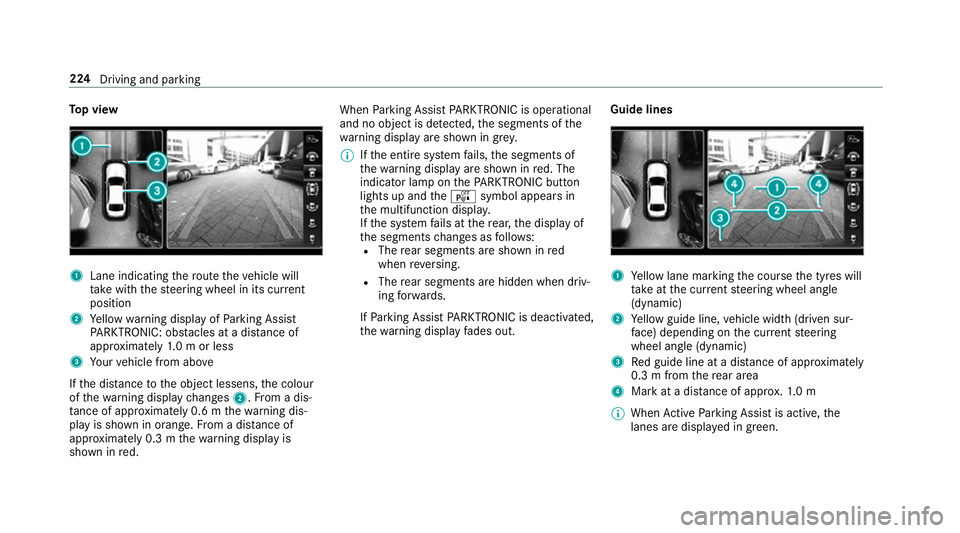
p view 1
Lane indicating thero ute theve hicle will
ta ke with thesteering wheel in its cur rent
position
2 Yellow warning display of Parking Assist
PA RKTRONIC: obstacles at a dis tance of
appr oximately 1.0 m or less
3 Your vehicle from abo ve
If th e dis tance tothe object lessens, the colour
of thewa rning display changes 2.From a dis‐
ta nce of appr oximately 0.6 m thewa rning dis‐
play is shown in orange. From a dis tance of
appr oximately 0.3 m thewa rning display is
shown in red. When
Parking Assist PARKTRONIC is operational
and no object is de tected, the segments of the
wa rning display are shown in grey.
% Ifth e entire sy stem fails, the segments of
th ewa rning display are shown in red. The
indicator lamp on thePA RKTRONIC but ton
lights up and theé symbol appears in
th e multifunction displa y.
If th e sy stem fails at there ar, the display of
th e segments changes as follo ws:
R The rear segments are shown in red
when reve rsing.
R The rear segments are hidden when driv‐
ing forw ards.
If Pa rking Assist PARKTRONIC is deacti vated,
th ewa rning display fades out. Guide lines 1
Yellow lane marking the course the tyres will
ta ke atthe cur rent steering wheel angle
(dynamic)
2 Yellow guide line, vehicle width (driven sur‐
fa ce) depending on the cur rent steering
wheel angle (dynamic)
3 Red guide line at a dis tance of appr oximately
0.3 m from there ar area
4 Mark at a distance of appr ox.1. 0 m
% When Active Parking Assist is active, the
lanes are displa yed in green. 224
Driving and parking
Page 228 of 497
The guide lines in
the multimedia sy stem dis‐
play show the dis tances toyour vehicle. The
dis tances only apply toroad le vel.
In trailer mode, the guide lines are shown at
th e le vel of the trailer hitch.
Tr ailer view (if trailer hitch is fitted)
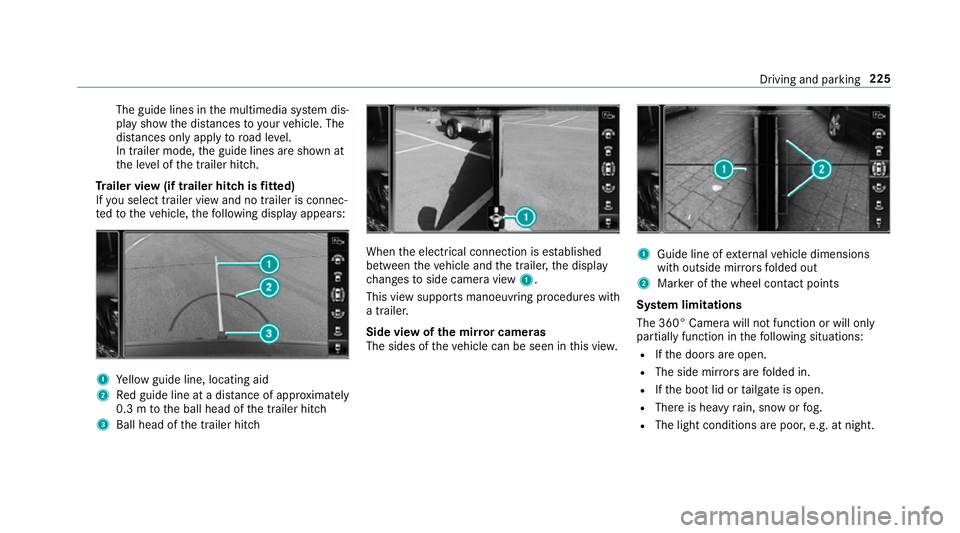
If yo u select trailer view and no trailer is connec‐
te dto theve hicle, thefo llowing display appears: 1
Yellow guide line, locating aid
2 Red guide line at a dis tance of appr oximately
0.3 m tothe ball head of the trailer hitch
3 Ball head of the trailer hitch When
the electrical connection is es tablished
between theve hicle and the trailer, the display
ch anges toside camera view 1.
This view supports manoeuvring procedures with
a trailer.
Side view of the mir ror cameras
The sides of theve hicle can be seen in this vie w. 1
Guide line of extern al vehicle dimensions
with outside mir rors folded out
2 Marker of the wheel conta ct points
Sy stem limitations
The 360° Camera will not function or will only
partially function in thefo llowing situations:
R Ifth e doors are open.
R The side mir rors are folded in.
R Ifth e boot lid or tailgate is open.
R There is heavy rain, snow or fog.
R The light conditions are poor, e.g. at night. Driving and parking
225
Page 232 of 497
#
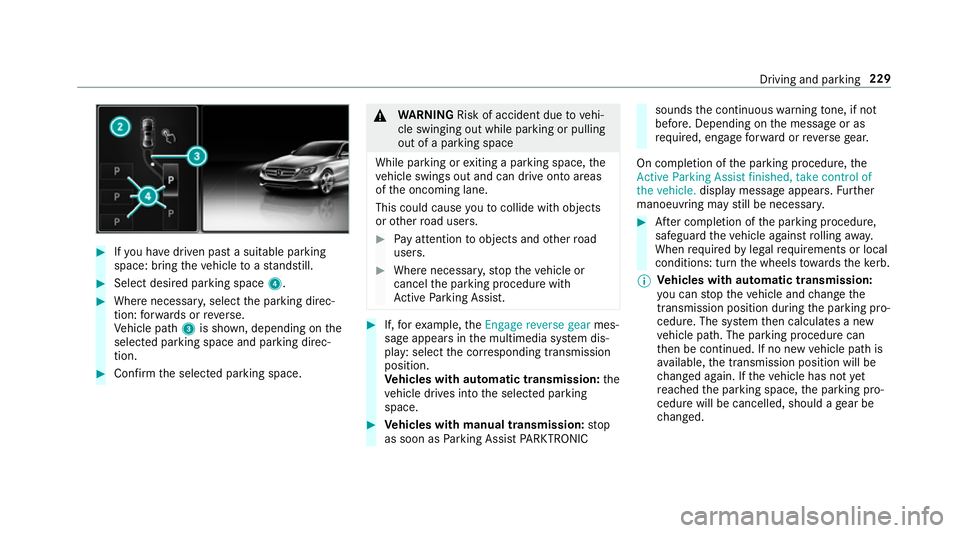
Ifyo u ha vedriven past a suitable parking
space: bring theve hicle toast andstill. #
Select desired parking space 4.#
Where necessar y,select the parking direc‐
tion: forw ards or reve rse.
Ve hicle path 3is shown, depending on the
selected parking space and parking direc‐
tion. #
Confirm the selected parking space. &
WARNING Risk of accident due tovehi‐
cle swinging out while parking or pulling
out of a parking space
While parking or exiting a parking space, the
ve hicle swings out and can drive onto areas
of the oncoming lane.
This could cause youto collide wi thobjects
or other road users. #
Pay attention toobjects and other road
users. #
Where necessar y,stop theve hicle or
cancel the parking procedure with
Ac tive Parking Assist. #
If,forex ample, theEngage reverse gear mes‐
sage appears in the multimedia sy stem dis‐
play: select the cor responding transmission
position.
Ve hicles with automatic transmission: the
ve hicle drives into the selected parking
space. #
Vehicles with manual transmission: stop
as soon as Parking Assist PARKTRONIC sounds
the continuous warning tone, if not
be fore . Depending on the message or as
re qu ired, engage forw ard or reve rsege ar.
On completion of the parking procedure, the
Active Parking Assist finished, take control of
the vehicle. displaymessa geappears. Further
manoeuvring may still be necessar y. #
After completion of the parking procedure,
safeguard theve hicle against rolling away.
When requ ired bylegal requirements or local
conditions: turn the wheels towa rdsth eke rb.
% Ve
hicles with automatic transmission:
yo u can stop theve hicle and change the
transmission position du ring the parking pro‐
cedure. The sy stem then calculates a new
ve hicle path. The parking procedure can
th en be continued. If no new vehicle path is
av ailable, the transmission position will be
ch anged again. If theve hicle has not yet
re ached the parking space, the parking pro‐
cedure will be cancelled, should a gear be
ch anged. Driving and parking
229
Page 237 of 497
%
On completion of the parking procedure, the
ve hicle is loc ked.
Re quirements:
R The mobile phone and Remo teParking Assist
are connec ted (→ page 236)
Park ing #
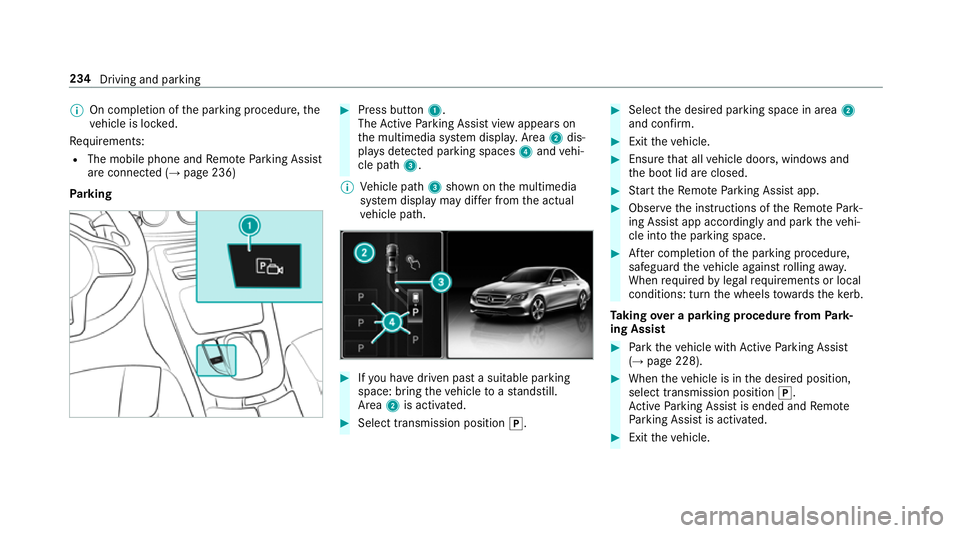
Press button 1.
The Active Parking Assist view appears on
th e multimedia sy stem displa y.Area 2dis‐
pl ay s de tected pa rking spaces 4and vehi‐
cle path 3.
% Vehicle path 3shown on the multimedia
sy stem display may dif fer from the actual
ve hicle path. #
Ifyo u ha vedriven past a suitable parking
space: bring theve hicle toast andstill.
Area 2is activated. #
Select transmission position j. #
Select the desired parking space in area 2
and confi rm. #
Exit theve hicle. #
Ensure that all vehicle doors, windo wsand
th e boot lid are closed. #
Start theRe mo teParking Assist app. #
Obser vethe instructions of theRe mo tePark‐
ing Assist app accordingly and park theve hi‐
cle into the parking space. #
After completion of the parking procedure,
safeguard theve hicle against rolling away.
When requ ired bylegal requirements or local
conditions: turn the wheels towa rdsth eke rb.
Ta king over a parking procedu refrom Park‐
ing Assist #
Park theve hicle with Active Parking Assist
(→ page 228). #
When theve hicle is in the desired position,
select transmission position j.
Ac tive Parking Assist is ended and Remo te
Pa rking Assist is activated. #
Exit theve hicle. 234
Driving and parking
Page 238 of 497
#
Ensu rethat all vehicle doors, windo wsand
th e boot lid are closed. #
Start theRe mo teParking Assist app. #
Obser vethe instructions of theRe mo tePark‐
ing Assist app accordingly and park theve hi‐
cle into the parking space. #
After completion of the parking procedure,
safeguard theve hicle against rolling away.
When requ ired bylegal requirements or local
conditions: turn the wheels towa rdsth eke rb.
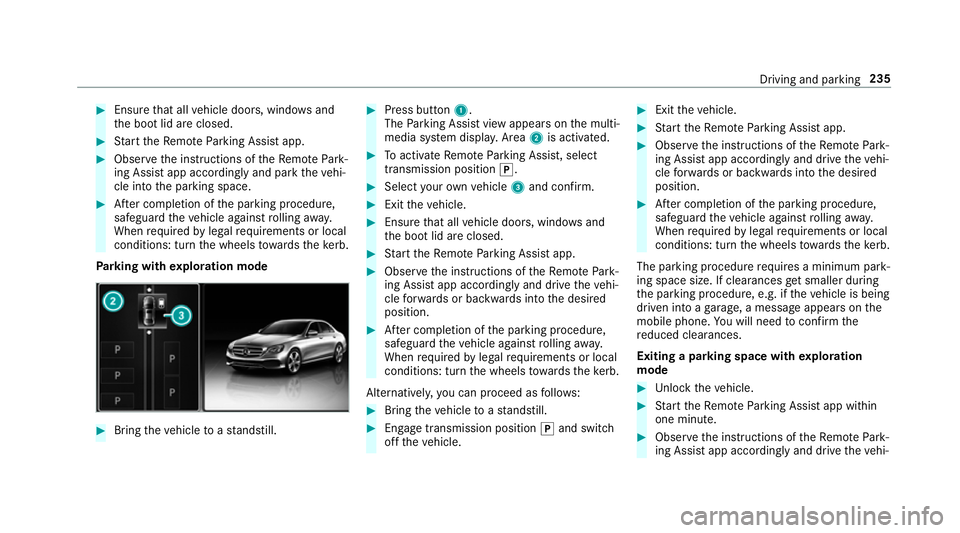
Pa rking with explo ration mode #
Bring theve hicle toast andstill. #
Press button 1.
The Parking Assist view appears on the multi‐
media sy stem displa y.Area 2is acti vated. #
Toactivate Remo teParking Assist, select
transmission position j. #
Select your ow nve hicle 3and confirm. #
Exit theve hicle. #
Ensure that all vehicle doors, windo wsand
th e boot lid are closed. #
Start theRe mo teParking Assist app. #
Obser vethe instructions of theRe mo tePark‐
ing Assist app accordingly and drive theve hi‐
cle forw ards or backwards into the desired
position. #
After completion of the parking procedure,
safeguard theve hicle against rolling away.
When requ ired bylegal requirements or local
conditions: turn the wheels towa rdsth eke rb.
Alternatively, you can proceed as follo ws: #
Bring theve hicle toast andstill. #
Engage transmission position jand switch
off theve hicle. #
Exit theve hicle. #
Start theRe mo teParking Assist app. #
Obser vethe instructions of theRe mo tePark‐
ing Assist app accordingly and drive theve hi‐
cle forw ards or backwards into the desired
position. #
After completion of the parking procedure,
safeguard theve hicle against rolling away.
When requ ired bylegal requirements or local
conditions: turn the wheels towa rdsth eke rb.
The parking procedu re requires a minimum park‐
ing space size. If clearances getsmaller during
th e parking procedure, e.g. if theve hicle is being
driven into a garage , a message appears on the
mobile phone. You will need toconfirm the
re duced clearances.
Exiting a parking space with explo ration
mode #
Unlock theve hicle. #
Start theRe mo teParking Assist app within
one minute. #
Obser vethe instructions of theRe mo tePark‐
ing Assist app accordingly and drive theve hi‐ Driving and parking
235
Page 244 of 497
Ac
tivating/deactivating Blind Spot Assi stor
Ac tive Blind Spot Assi st
Multimedia sy stem:
, Vehicle .
Assistance .
Blind Spot
Assist #
Activate or deacti vate the function. Ac
tive Lane Keeping Assist Ac
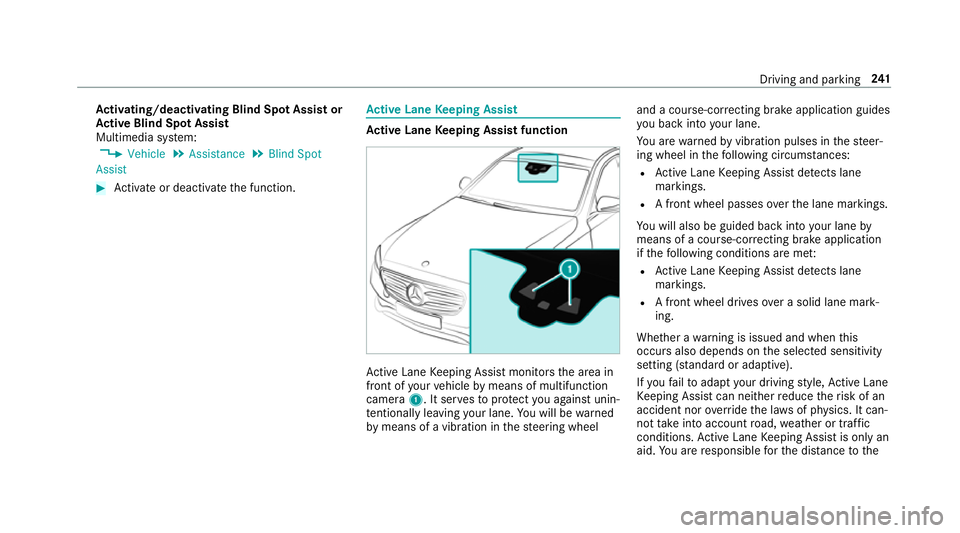
tive Lane Keeping Assist function Ac
tive Lane Keeping Assist monitors the area in
front of your vehicle bymeans of multifunction
camera 1. It ser vesto protect you against unin‐
te ntional lyleaving your lane. You will be warned
by means of a vibration in thesteering wheel and a course-cor
recting brake application guides
yo u back into your lane.
Yo u are warned byvibration pulses in thesteer‐
ing wheel in thefo llowing circums tances:
R Active Lane Keeping Assist de tects lane
markings.
R A front wheel passes over the lane markings.
Yo u will also be guided back into your lane by
means of a course-cor recting brake application
if th efo llowing conditions are me t:
R Active Lane Keeping Assist de tects lane
markings.
R A front wheel drives over a solid lane mark‐
ing.
Whe ther a warning is issued and when this
occurs also depends on the selected sensitivity
setting (s tanda rdor adaptive).
If yo ufa ilto adapt your driving style, Ac tive Lane
Ke eping Assist can neither reduce therisk of an
accident nor override the la wsof ph ysics. It can‐
not take into account road, weather or traf fic
conditions. Active Lane Keeping Assist is only an
aid. You are responsible forth e dis tance tothe Driving and pa
rking 241
Page 251 of 497
%
Accessories can be connected tothe perma‐
nent po wer supp lyup to180W, and tothe
po we r supp lythat is swit ched on via the igni‐
tion loc k.
Un coupling a trailer &
WARNING Risk of being crushed and
becoming trapped when uncoupling a
trailer
When uncoupling a trailer wi than engaged
ine rtia-activated brake, your hand may
become trapped between theve hicle and the
trailer dr awbar. #
Do not uncouple trailers with an
engaged overrun brake. &
WARNING Risk of becoming trapped
when disconnecting the trailer cable
Ve hicles with le vel control sy stem: the
ve hicle lo werswhen the trailer cable is dis‐
connected. This could
result in you or other people
becoming trapped if your or their limbs are
between theve hicle body and the tyres or
underneath theve hicle. #
Make sure nobody is underneath the
ve hicle or in the immediate vicinity of
th e wheel ar ches when you disconnect
th e trailer cable. *
NO
TEDama getothere ar bumper from
ins talling adap ter cables or adapte r plugs The
following parts could be damaged when
re tracting the ball neck fully electrically:
R bumper
R adap ter cable
R adapte r plug #
Alw aysre mo vethe adap ter cable or
adapte r plug before retracting the ball
neck fully electrically. #
Safeguard the trailer against rolling away. #
Disconnect the electrical connection
between theve hicle and the trailer. #
Uncouple the trailer. #
Place the co ver on the ball head. Bicycle
rack &
WARNING Risk of an accident when
using the bicycle rack incor rectly
The bicycle rack may become de tach ed from
th eve hicle in thefo llowing cases:
R the permissible load capacity of the
trailer hitch is exceeded.
R the bicycle rack is used incor rectl y.
R the bicycle rack is secured tothe ball
neck beneath the ball head.
Obser vethefo llowing foryo ur ow n sa fety
and that of other road users:
R always adhere tothe permissible load
capacity of the trailer hitch. 248
Driving and pa rking
Page 255 of 497
R
Limiter (→ page 202)
R Active Dis tance Assi stDISTRONIC
(→ page 205)
* NO
TEEngine dama gedue toexc essively
high engine speeds The engine will be damaged if
you drive with
th e engine in theov errevving range. #
Do not drive wi th the engine in theove r‐
re vving range. The fuel supply is inter
rupted toprotect the
engine when there d band in rev counter 3
(o ve rrev ving range) is reached.
During no rmal operating conditions, coolant
te mp erature display 4may rise to120 °C. &
WARNING Danger of bu rns when open‐
ing the bonn et
If yo u open the engine bonn etwhen the
engine has overheated or during a fire inthe
engine compartment, you could come into
contact with hot gases or other escaping
operating fluids. #
Before opening the bonn et, allow the
engine tocool down. #
Intheeve nt of a fire inthe engine com‐
partment, keep the engine bonn et
closed and call thefire service. Ve
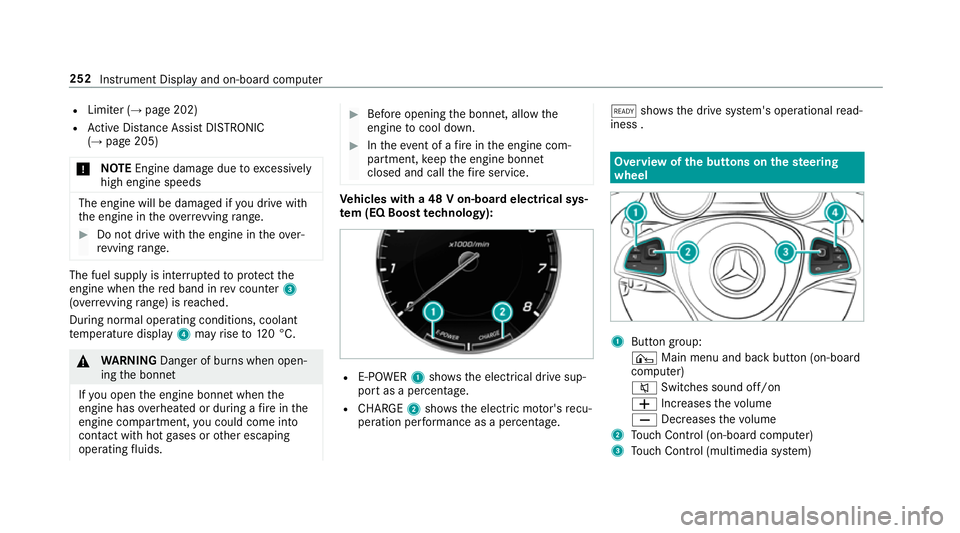
hicles with a 48 V on-board electrical sys‐
te m (EQ Boo sttech nology): R
E-POWER 1shows th e electrical drive sup‐
port as a percentage.
R CHARGE 2showsthe electric mo tor's recu‐
peration per form ance as a percen tage. õ
showsthe drive sy stem's operational read‐
iness . Overview of
the but tons on thest eering
wheel 1
Button group:
¤ Main menu and ba ckbutton (on-board
computer)
8 Switches sound off/on
W Increases thevo lume
X Decreases thevo lume
2 Touch Control (on-board co mputer)
3 Touch Control (multimedia sy stem) 252
Instrument Display and on-board computer