wheel MERCEDES-BENZ E-CLASS SALOON 2017 Workshop Manual
[x] Cancel search | Manufacturer: MERCEDES-BENZ, Model Year: 2017, Model line: E-CLASS SALOON, Model: MERCEDES-BENZ E-CLASS SALOON 2017Pages: 497, PDF Size: 10.38 MB
Page 256 of 497
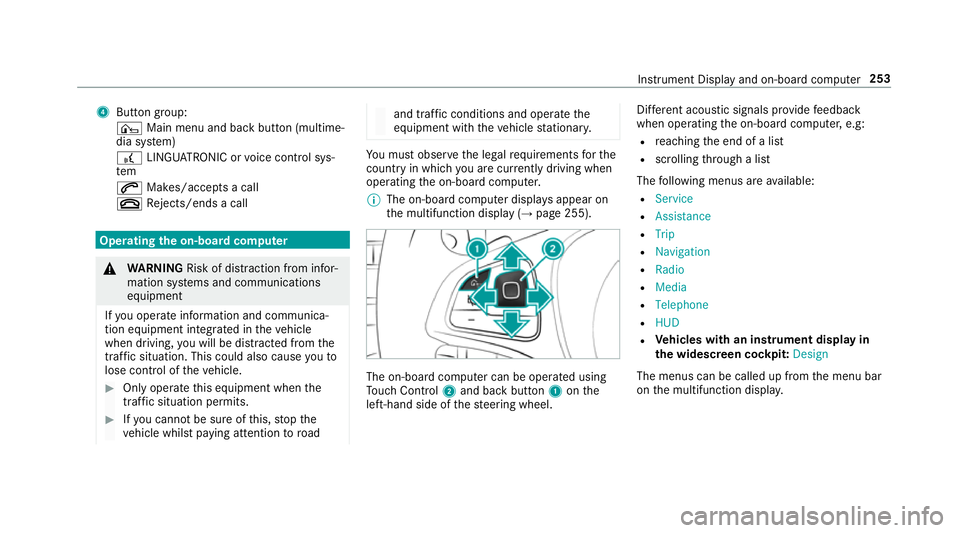
4
Button group:
¤ Main menu and ba ckbutton (multime‐
dia sy stem)
£ LINGU ATRO NIC or voice control sys‐
tem
6 Makes/accepts a call
~ Rejects/ends a call Ope
rating the on-board co mputer &
WARNING Risk of di stra ction from infor‐
mation sy stems and communications
equipment
If yo u operate information and communica‐
tion equipment integ rated in theve hicle
when driving, you will be distracted from the
traf fic situation. This could also cause youto
lose control of theve hicle. #
Only operate this equipment when the
traf fic situation permits. #
Ifyo u cannot be sure of this, stop the
ve hicle whilst paying attention toroad and traf
fic conditions and ope rate the
equipment with theve hicle stationar y. Yo
u must obse rveth e legal requirements forthe
country in whi chyou are cur rently driving when
operating the on-board computer.
% The on-board computer displa ysappear on
th e multifunction display (→ page 255). The on-board computer can be operated using
To uch Control 2and back but ton1 onthe
left-hand side of thesteering wheel. Dif
fere nt acoustic signals pr ovide feedback
when operating the on-board computer, e.g:
R reaching the end of a list
R scrolling thro ugh a list
The following menus are available:
R Service
R Assistance
R Trip
R Navigation
R Radio
R Media
R Telephone
R HUD
R Vehicles with an instrument display in
th e widescreen cockpit: Design
The menus can be called up from the menu bar
on the multifunction displa y. Instrument Display and on-board computer
253
Page 264 of 497
#
Only operate this equipment when the
traf fic situation permits. #
Ifyo u cannot be sure of this, stop the
ve hicle whilst paying attention toroad
and traf fic conditions and ope rate the
equipment with theve hicle stationar y. When
telephoning, you must obse rveth e legal
re qu irements forth e count ryin which you are
cur rently driving.
Ve hicles with theAu dio 20 multimedia sys‐
te m: the most recently dialled telephone num‐
bers are displa yed on theTelephone menu. #
Select an entr y:swipe upwards or down‐
wa rds on the left-hand touch cont rol. #
Press the left-hand touch cont rol.
If th ere is only one telephone number
sa ve dto an entr y:thete lephone number is
selec ted. #
Ifth ere are multiple telephone numbers
sa ve dto an entr y:swipe upwards or down‐
wa rds on the left-hand touch cont rolto
select the desired telephone number. #
Press the left-hand touch cont rol.
The telephone number is dialled.
The following displa ysmay appear ins tead of the
te lephone numbers dialled:
R Please wait... :th e application is starting.
When a Blue tooth®
connection tothe mobile
phone is not es tablished, the menu for
authorising and connecting a mobile phone is
displa yed in the multimedia sy stem
(→ page 279).
R Updating data. ..:the call list is being upda‐
te d.
R Importing contacts... :th e conta cts from the
mobile phone or from a storage medium are
being impor ted.
Ac cepting/rejecting a call
When youre cei vea call, theIncoming call mes‐
sage appears on the head-up displa y. #
Swipe up wards or down wards on the left-
hand touch cont rol and select 6(Accept)
or ~ (Reject). #
Press the left-hand touch cont rol. The call may be accep
ted/rejec ted using the
6 or~ buttons on thesteering wheel. Ad
justing the head-up display settings via
the on-board co mputer On-board computer:
, HUD
The following head-up display settings can be
adjus ted:
R Position
R Brightness
R Display content #
Toselect a setting: swipe upwards or down‐
wa rds on the left-hand touch cont rol. #
Press the left-hand touch cont rol. #
Toadjust a value: swipe upwards or down‐
wa rds on the left-hand touch cont rol. #
Press the left-hand touch cont rol. Instrument Display and on-board computer
261
Page 295 of 497
R
Onthe basis of the call, the operator decides
whe ther it is necessary tocall rescue teams
and/or the police tothe accident site.
R A message with accident data is transmit ted
to the Mercedes-Benz emer gency call centre.
The Mercedes-Benz emergency call centre
can transmit theve hicle position data toone
of the public emer gency services call cen‐
tres.
R In cer tain situations data is also transmitted
in the speech channel tothe Mercedes-Benz
emer gency call centre.
This allo wsmeasu resfo rre scue, reco very or
to wing toa Mercedes-Benz Service Cent reto
be initiated quickl y.
If th e Mercedes-Benz emer gency call sy stem
cann otconnect tothe Mercedes-Benz emer‐
ge ncy call centre, the emer gency call is au tomat‐
ical lysent tothe public emer gency services call
centre.
If no connection can be made tothe public
emer gency services, a cor responding message
appears inthe displa y. #
Dial the emer gency number 999 or 112 on
yo ur mobile phone.
Ending an unin tentional emer gency call #
Select ~onthe multifunction steering
wheel.
Tr ansmitted data with th e Mercedes-Benz
emer gency call sy stem
The following data is transmitte dto the
Mercedes-Benz emer gency call centre:
R theve hicle's GPS position data
R the last GPS position data on thero ute (a few
hundred metres before the incident)
R direction of tr avel
R vehicle identification number
R theve hicle drive type
R the estimated number of people in theve hi‐
cle
R whe ther Mercedes me connect is available or
not
R whe ther the emer gency call was initiated
manually or automatically R
the time of the accident
R the language setting on the multimedia sys‐
tem
Fo r accident clarification purposes, thefo llowing
measures can be take n up toan hour af terthe
emer gency call has been initia ted:
R the cur rent vehicle position can be called up
R avo ice connection totheve hicle occupants
can be es tablished
% ForRu ssia: various functions, e.g. receiving
traf fic information, cannot be used for up to
two hou rsafte r sending an emergency call. 292
Multimedia sy stem
Page 307 of 497
Displaying
the artist and track Multimedia sy
stem:
, Radio .
Options #
Select Display artist and track. #
Switch on Oa function. Switching traf
fic announcements on/off Multimedia sy
stem:
, Radio .
Options .
TA #
Activate Oor deacti vate ª the function.
or #
Press and hold the8 button on the mul‐
tifunction steering wheel until theTA display
in thest atus line lights up or goes out. Displ
aying station information Re
quirements:
R Radio stations pr ovide there leva nt informa‐
tion. Multimedia sy
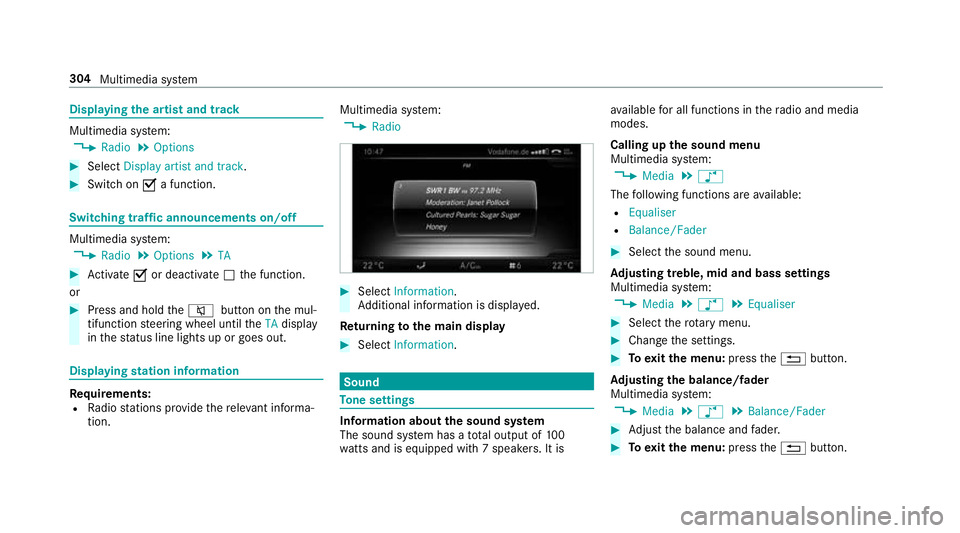
stem:
, Radio #
Select Information.
Ad ditional information is displa yed.
Re turning tothe main display #
Select Information. Sound
To
ne settings Information about
the sound sy stem
The sound sy stem has a total output of 100
wa tts and is equipped wi th7 spea kers. It is av
ailable for all functions in thera dio and media
modes.
Calling up the sound menu
Multimedia sy stem:
, Media .
à
The following functions are available:
R Equaliser
R Balance/Fader #
Select the sound menu.
Ad justing treble, mid and bass settings
Multimedia sy stem:
, Media .
à .
Equaliser #
Select thero tary menu. #
Change the settings. #
Toexitth e menu: pressthe% button.
Ad justing the balance/ fader
Multimedia sy stem:
, Media .
à .
Balance/Fader #
Adjust the balance and fader. #
Toexitth e menu: pressthe% button. 304
Multimedia sy stem
Page 309 of 497
ASS
YST PLUS se rvice inter val display Fu
nction of the ASS YST PLUS se rvice inter val
displ ay The ASS
YST PLUS service inter val display in the
instrument display pr ovides information on the
re maining time or dis tance be fore the next
service due date.
Yo u can hide this service message using the
back button on the left-hand side of thesteering
wheel.
Yo u can obtain fur ther information concerning
th e servicing of your vehicle from a qualified
specialist workshop, e.g. a Mercedes-Benz
Service Centre. Displaying
the service due da teOn-board computer:
, Service .
ASSYST PLUS
The next service due date is displa yed. #
Toexitth e displa y:press the back button
on the left-hand side of thesteering wheel. Make sure
toobser vethefo llowing fur ther rela‐
te d subjec t:
R Operating the on-board computer
(→ page 253). Car
rying out maintenance workatregular
inter vals *
NO
TEPremature wearthro ugh failure to
obser veservice due dates Service
workwhich is not car ried out at the
ri ght time or incomple tely can lead to
inc reased wear and damage totheve hicle. #
Alw ays obser vethe prescribed service
inter vals. #
Alw ays ha vethe prescribed service
wo rkcar ried out at a qualified specialist
wo rkshop. Special service
requ irements The prescribed service inter
val is based on nor‐
mal operation of theve hicle. Maintenance work will need
tobe per form ed more of tenth an
specified if theve hicle is operated under ardu‐
ous conditions or increased loads, forex ample:
R regular city driving with frequent intermedi‐
ate stops.
R ifth eve hicle is primarily used for short-dis‐
ta nce driving.
R for frequent operation in mountainous terrain
or on poor road sur faces.
R ifth e engine is of ten le ftidling for long peri‐
ods.
R in particula rly dusty conditions and/or if air-
re circulation mode is frequently used.
In these or similar operating conditions, ha vethe
interior filter, engine air cleaner, engine oil, oil fil‐
te ret c. changed more frequent ly. The tyres must
be checked more frequently if theve hicle is
operated under increased loads. Further infor‐
mation can be obtained at a qualified specialist
wo rkshop. 306
Maintenance and care
Page 319 of 497
Note
s on paint work/matt finish paint workcare Obser
vethefo llowing information: Cleaning and car
eA voiding paintwork damage
Pa intwork R
Insect remains: soak with insect remo ver and rinse off the
trea ted areas af terw ards.
R Bird droppings: soak with water and rinse off af terw ards.
R Coolant, brake fluid, tree resins, oils, fuel and greases:
re mo veby gently rubbing with a clo thsoaked in petroleum
et her or lighter fluid.
R Tarst ains: use tarre mo ver.
R Wax: use silicone remo ver. R
Do not attach sticke rs,fi lms or similar.
R Remo vedirt immediatel y,where possible.
Matt finish R
Only use care products appr oved byMercedes-Benz. R
Do not polish theve hicle and light-alloy wheels.
R Only use car washes that cor respond tothe latest engi‐
neering standards.
R Do not use car wash programmes with a final hot wax
treatment.
R Do not use paint cleane rs, buf fing or polishing products,
gl oss preser vers, e.g. wax.
R Alw ays ha vepaintwork repairs car ried out at a qualified
specialist workshop. 316
Maintenance and care
Page 320 of 497
Note
s on care of car parts &
WARNING Risk of entrapment if the
windscreen wipers are swit ched on while
th e windscreen is being cleaned
If th e windscreen wipers are set in motion
while you are cleaning the windscreen or
wiper blades, you can be trapped bythe
wiper arm. #
Alw ays switch off the windscreen wip‐
ers and the ignition before cleaning the
windscreen or wiper blades. &
WARNING Risk of bu rns from tailpipes
and tailpipe trim
The tailpipe and tailpipe trim can become
ve ry hot. If you come into contact with these
parts of theve hicle, you could burn yourself. #
Alw ays be particular lycareful around
th eta ilpipe and theta ilpipe trim. #
Allow theve hicle parts tocool down
before youto uch them. Obser
vethefo llowing information: Note
s on cleaning and car eA voiding vehicle damage
Wheels/rims Usewate r and acid-free wheel cleaners. R
Do not use acidic wheel cleaners toremo vebrake dust.
This could damage wheel bolts and brake components.
R Toavoid cor rosion of the brake discs and brake pads,
drive theve hicle for a few minutes af ter cleaning before
parking it. The brake discs and brake pads warm up and
dry out.
Wi ndo ws
Cleanthe windo wsonthe inside and outside using a damp
clo thand cleaning agents recommended byMercedes-Benz. Do not use dry clo
ths or abrasive or sol vent-based cleaning
agents toclean the inside of windo ws. Maintenance and care
317
Page 327 of 497
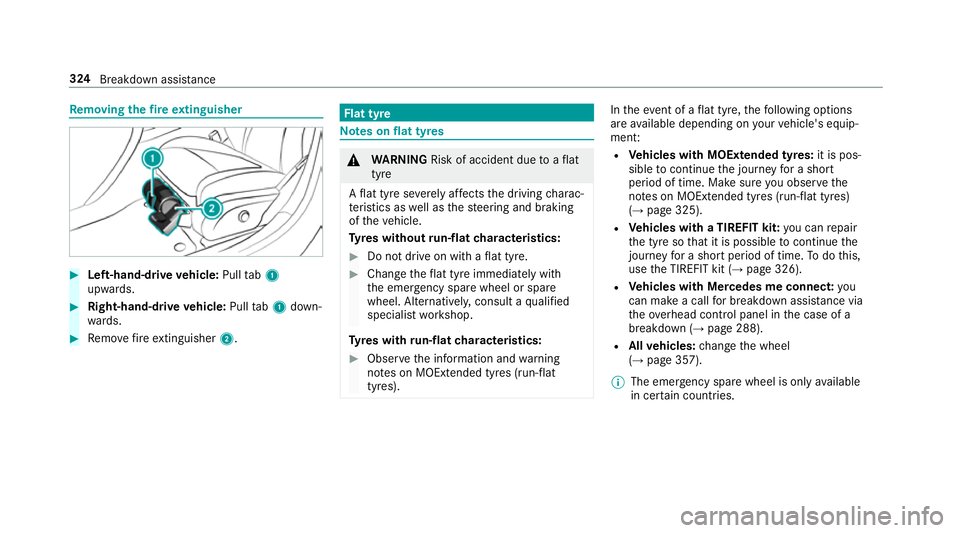
Re
moving the fire extinguisher #
Left-hand-drive vehicle: Pulltab1
upwards. #
Right-hand-d rive ve hicle: Pulltab1 down‐
wa rds. #
Remo vefire extinguisher 2. Flat tyre
Note
s onflat tyres &
WARNING Risk of accident due toaflat
tyre
A flat tyre se verely affects the driving charac‐
te rist ics as well as thesteering and braking
of theve hicle.
Ty res without run-flat characteristics: #
Do not drive on with a flat tyre. #
Chan getheflat tyre immediately with
th e emer gency spa rewheel or spare
wheel. Alternativel y,consult a qualified
specialist workshop.
Ty res with run-flat characteristics: #
Obse rveth e information and warning
no tes on MOExtended tyres (run-flat
tyres). In
theeve nt of a flat tyre, thefo llowing options
are available depending on your vehicle's equip‐
ment:
R Vehicles with MOExtended tyres: it is pos‐
sible tocontinue the journey for a short
period of time. Make sure you obse rvethe
no tes on MOExtended tyres (run-flat tyres)
(→ page 325).
R Vehicles with a TIREFIT kit: you can repair
th e tyre so that it is possible tocontinue the
jou rney for a short period of time. Todo this,
use the TIREFIT kit (→ page 326).
R Vehicles with Mercedes me connect: you
can make a call for breakdown assi stance via
th eove rhead control panel in the case of a
breakdown (→ page 288).
R Allvehicles: change the wheel
(→ page 357).
% The emer gency spa rewheel is only available
in cer tain countries. 324
Breakdown assis tance
Page 329 of 497
TIREFIT kit
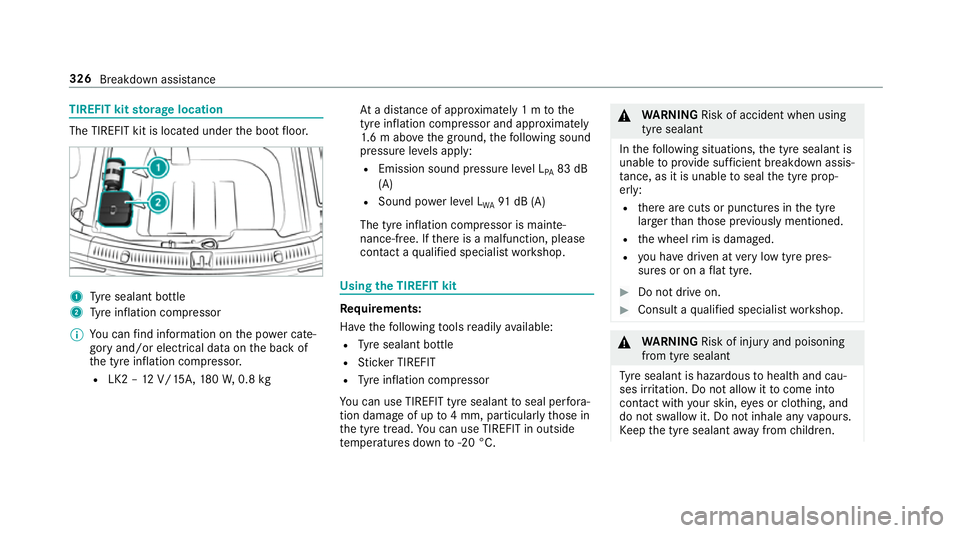
storage location The TIREFIT kit is located under
the boot floor. 1
Tyre sealant bottle
2 Tyre inflation compressor
% You can find information on the po wer cate‐
gory and/or electrical data on the back of
th e tyre inflation compressor.
R LK2 – 12V/15A, 180W, 0.8 kg At
a dis tance of appr oximately 1 m tothe
tyre inflation compressor and appr oximately
1. 6 m abo vethe ground, thefo llowing sound
pressure le vels apply:
R Emission sound pressure le vel L
PA 83 dB
(A)
R Sound po wer le vel L
WA 91
dB (A)
The tyre inflation compressor is mainte‐
nance-free. If there is a malfunction, please
conta ct aqualified specialist workshop. Using
the TIREFIT kit Re
quirements:
Ha ve thefo llowing tools readily available:
R Tyre sealant bottle
R Sticke r TIREFIT
R Tyre inflation compressor
Yo u can use TIREFIT tyre sealant toseal per fora‐
tion dama geof up to4 mm, particular lythose in
th e tyre tread. You can use TIREFIT in outside
te mp eratures down to-20 °C. &
WARNING Risk of accident when using
tyre sealant
In thefo llowing situations, the tyre sealant is
unable toprov ide suf ficient breakdown assis‐
ta nce, as it is unable toseal the tyre prop‐
er ly:
R there are cuts or punctures in the tyre
lar gerth an those pr eviously mentioned.
R the wheel rim is dama ged.
R you ha vedriven at very low tyre pres‐
sures or on a flat tyre. #
Do not drive on. #
Consult a qualified specialist workshop. &
WARNING Risk of inju ryand poisoning
from tyre sealant
Ty re sealant is hazardous tohealth and cau‐
ses ir rita tion. Do not allow it tocome into
contact wi thyour skin, eyes or clo thing, and
do not swallow it. Do not inhale any vapours.
Ke ep the tyre sealant away from children. 326
Breakdown assis tance
Page 330 of 497
Obser
vethefo llowing if you come into con‐
ta ct wi th the tyre sealant: #
Rinse off the tyre sealant from your skin
using water immediatel y. #
If tyre sealant gets into your eyes, thor‐
oughly rinse them using clean water
immediatel y. #
If tyre sealant has been swallowe d,
th oroughly rinse out your mouth imme‐
diately and drink plenty of water.Do not
induce vomiting and seek medical
attention immediately. #
Change out of clo thing which has come
into con tact wi thtyre sealant immedi‐
ately. #
If an alle rgic reaction occurs, seek med‐
ical attention immediatel y.*
NO
TEOverheating due tothe tyre infla‐
tion compressor running too long #
Do not runth e tyre inflation compres‐
sor for longer than ten minu tes without
inter ruption. Comply with
the manufacturer's saf ety no tes on
th est icke r on the tyre inflation compressor.
Ha ve the tyre sealant bottle replaced in a quali‐
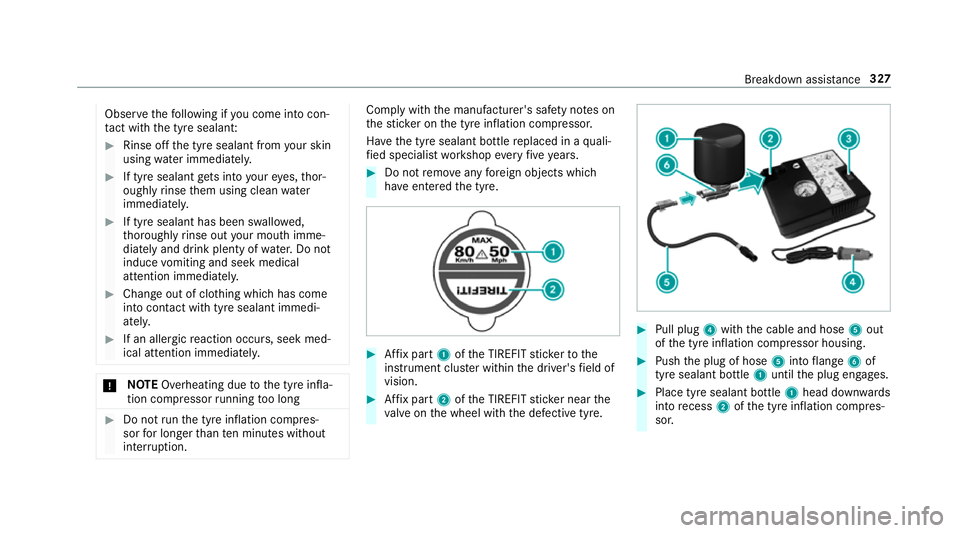
fi ed specialist workshop every five years. #
Do not remo veany fore ign objects which
ha ve entered the tyre. #
Affix pa rt1 ofthe TIREFIT sticke rto the
instrument clus ter within the driver's field of
vision. #
Affix pa rt2 ofthe TIREFIT sticke r near the
va lve on the wheel with the defective tyre. #
Pull plug 4with the cable and hose 5out
of the tyre inflation compressor housing. #
Push the plug of hose 5into flange 6of
tyre sealant bottle 1until the plug engages. #
Place tyre sealant bottle 1head down wards
into recess 2ofthe tyre inflation compres‐
sor. Breakdown assis
tance 327